I was recently working on a project where I needed to use Power Automate to upload an Excel file to SharePoint, crack it open to get to the goodies inside and then delete the file.
Getting to the file contents is straightforward enough using the Excel connector, but the really annoying thing is the file sharing lock the Excel connector then places on a file which typically results in an angry red dot of failure when using the SharePoint delete file action:

The file https://company.sharepoint.com/teams/path/to/file.xlsx is locked for shared use by paul@company.com [membership].
clientRequestId: blah
serviceRequestId: blah;blah
I am sure many folks have hit this and might put a wait in their flow or write a scheduled flow to cleanup later when the lock has expired.
But did you know that we can easily bypass this issue and delete this locked file? All we need to do is use the very versatile swiss army knife action known as “Send an HTTP request to SharePoint” to call the API that handles recycling of files. We then add a directive to the header of the request that essentially says “I don’t care about your stupid lock, delete anyway!”
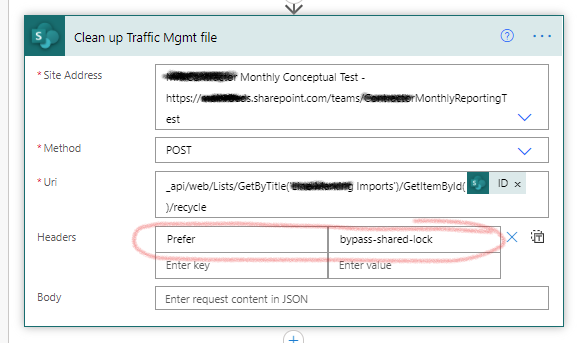
Here is what the API call looks like:
_api/web/Lists/GetByTitle('DocLib')/GetItemById(ID)/recycle
The extra magic is in the header:
Prefer: bypass-shared-lock
So the entire request looks like this:
Thanks for reading
Paul

This one has been driving me nuts and all I was able to find online were solutions to loop until SP automatically unlocked the file. Your solution was WAY simpler and more elegant. Thank you for posting!
Comment by Anthony — March 23, 2021 @ 9:18 pm
I am not able to set the API call for ‘Send an HTTP request to SharePoint’ action. I have added my document library (hardcoded) and ID (dynamic content) from the file creation action. But, I am getting error that the expression is invalid. Please help.
Comment by Pavankumar Patil — June 21, 2021 @ 7:24 pm
Awesome info!!!!! Do you have a solution if I’m using OneDrive instead of SharePoint?
Comment by Robert A Edwards — July 1, 2021 @ 9:12 pm
Hi Team,
If anyone can say me how to get that URI part, it will be very helpful and appreciated, Im new to power automate please please help me out this is the main task i have to do it.
Comment by Sajjad — July 2, 2021 @ 8:07 pm
Hi Team,
Can you please say what should i put in URI please.
Thanks in advance.
Comment by Sajjad — July 5, 2021 @ 4:22 pm
Hi,
I used the DELETE method instead of POST , and also a different URI
_api/web/GetFileByServerRelativeUrl(‘/sites/YoursiteName/Shared Documents/General/YourFileName’)
This work for me 😉
Comment by Omar — July 9, 2021 @ 12:01 am
It works completely well thank yoiu for the assist
Comment by Vignesh raj — July 20, 2021 @ 2:59 pm
The /recycle seems to be deleting the file regardless of the lock. I really just want to clear the lock so I can continue on to the next step of using the file. Is this at all possible?
Comment by Jean Farmer — August 6, 2021 @ 2:45 am
Wow you saved me and everyone. It was the last part of the project and 1 day prior to the release when i hit this road block. Savior. Thank you
Comment by Tharindu Palipane — September 2, 2021 @ 8:56 am
Thank you for this. Helped a lot 🙂
Comment by Pranathi — September 3, 2021 @ 12:38 pm
How did you get the sharepoint ID in the uri ?
Comment by DAVID POWELL — October 15, 2021 @ 5:19 am
in my case is upload file/ create File. can this be solved with a send and https request?
Comment by Faiz — October 15, 2021 @ 10:28 am
This works for me.
But then I tried to imitate this method to move the file
_api/web/Lists/GetByTitle(‘Documents’)/GetItemById(ID)/moveTo(newurl=’https://example.sharepoint.com/Documents/book1.xlsx’, flags=1)
and it always says Cannot find resource for the request moveTo.
Does anyone know how to deal with this error?
Comment by un — December 24, 2021 @ 6:41 pm
wow, this has plagued me and many other users for years! It worked! Would you be ok with me posting this solution in the Power Automate Power Users forum? I did not see it there previously. I would put a link to this article and give you credit. Amazing!
Comment by Mark Raybuck — March 17, 2022 @ 10:47 pm
Thanks for this!
As with @Pavankumar Patil above, I am also creating a temporary file that needs deleted and found that the “ID” attribute is not correct, the “ItemId” attribute must be used. Also if you are deleting from the default Shared Documents list, the list is called “Documents”.
Comment by Jacob Mulquin — May 12, 2022 @ 9:08 am
What can I say, life saver! Ms really should include a “force”checkbox in the delete action
Comment by Eduardo Russo — May 17, 2022 @ 7:06 pm
A similar problem is encountered when a user created a new document within a Document Library, and a PowerAutomate Flow has been set to “Update New File Properties” of that file, say, patching in file meta-data. If the user has the file open (or if it’s closed, but the SharePoint still has it marked as locked) then the flow will fail.
Popular workarounds include a Check-if-document-is-still-locked Do Until loop, but this becomes problematic when SharePoint fails to unlock a file after the user is no longer in the file.
Is there a similar method that may be called to allow both the User to be editing their new file, and also have a Flow patch in New File Properties at the same time?
Comment by Karl — August 27, 2022 @ 6:34 am
This works – and much cleaner than a wait loop! However, is there any way of executing WITHOUT immediately deleting? My task is to MOVE the file and then delete it, but need to clear the lock first… I cannot find an alternate qualifier to /recycle that unlocks but leaves the file. Is there
Comment by Robert Rimalover — September 20, 2022 @ 12:49 am
Hi,
Am I the only one that the solution doesn’t work ? It’s written that the API doesn’t exist
Vincent
Comment by Vincent — September 27, 2022 @ 5:28 pm
Using the DELETE method instead of POST worked for me as well as using the below:
_api/web/GetFileByServerRelativeUrl(‘{everythingAfterTheDomainUpToTheFilename}/ {filenameWithExtension}’)
Comment by Vicente — October 7, 2022 @ 9:16 pm
Great help, thank you.
I think I had the same issue others reported in the comments.
I found I was not getting the ID properly.
List files will not work, I switched to Get Files (properties only) and the ID from that worked
Comment by Starfield Screensaver — October 20, 2022 @ 12:48 pm
Hi Paul,
First of all, thanks for sharing.
I did exactly all steps above, but what is happening is, the action (Send HTTP POST or DELETE) is running perfectly but the files are always being moved to the Recycle Bin.
I thought they would stay in the same folder and be unlocked.
Do you have any idea what might be happening?
Cheers
Ricardo.
Comment by Jose Ricardo — November 19, 2022 @ 7:47 am
Hi, thank you so much for the help.
Where you have, ‘DocLib’, for me will that be something like,
‘Shared%20Documents/Event%20Manager%20Reports/Completed%20Reports’
i.e. the path to the file?
Thank you, Guy
Comment by Guy Boswell — December 12, 2022 @ 11:55 pm
This is great but I’ve come to the conclusion that the power platform is severely limited and the simplest things cannot be done. When you can copy a file but can’t choice its file name you know its not worth taking it seriously.
Comment by Richard — January 7, 2023 @ 1:27 am
Good to know and thanks for sharing, as others have asked above is there an API that allows for unlocking but also retains the file rather than deleting it? 6 mins plus wait for a file to unlock is just not workable.
Comment by Padraig Sheeran — January 19, 2023 @ 4:13 am
Using getItemById I got a 401 error. Even though user is sc admin.
But using _api/web/GetFileByServerRelativeUrl and DELETE instead works fine and deletes the damned excel file.
Thanks for sharing, Paul.
Comment by Christian — January 20, 2023 @ 4:54 pm
Thanks a lot for giving me this idea, it took some time to make it work with my files.
but I wish I knew this before.
Appreciate your help.
Comment by Kash — March 13, 2023 @ 6:28 am
Thanks for the help – you saved me the time it would have taken to make these loops
Comment by Kash — March 13, 2023 @ 6:29 am
This took way longer than it should have, but I figured it out!
I ended up using the _api/web/GetFileByServerRelativeUrl with a DELETE method.
Here’s my URI:
_api/web/GetFileByServerRelativeUrl(‘/sites/mysitename/Shared documents/fileNameWithextension’)
Please be weary copy-pasting from these examples, as the string delimiter -> ‘ ‘, not the paragraph character -> ` , that they are using. 🙂
Comment by Asbjørn — March 16, 2023 @ 4:33 am
What if…. I don’t want to *delete* the file but just to *unlock* it? I have a Flow which updates a row in an Excel Table and I want to be able to copy the file after that – but it’s locked out at random times for random periods of time.
Comment by Adam — May 22, 2023 @ 2:28 pm
I am not sure how this is supposed to work or how the author is making it work.
But the URI clearly states that this is for “Lists” and not document libraries.
This is the reason why so many people in the comments have more success with the “Delete” api call and “GetFileByServerRelativeUrl”
Not sure what the author is doing exactly.
Comment by Alex Haven — July 13, 2023 @ 8:37 pm
I have the same question:
Do you have a solution if I’m using OneDrive instead of SharePoint?
Thank you
Comment by GIULIANO LORENZON — September 22, 2023 @ 6:34 pm
Is there a way where we can only remove the lock on file and not delete it ?
Comment by Pallavi G L — September 27, 2023 @ 3:49 pm
In my case the entire flow is based around the data in the file(s). Unfortunately, if I delete the file to then replace it, it breaks other connections to it later in the flow. I tried the delete and re-add early in the flow, or a delete last in the flow, it just didn’t matter. Links in Teams SharePoint get broken. It’s not just the file name, it’s apparently also the file ID that’s used. I wish I could just delete the file, write it back as the same name with the newer data, and move on. But nope. I am forced to leave the files in place and overwrite. I have managed to do so by turning off “chunking” when writing to the cloud. But I’m still working on the write back to the original file on our S drive. Getting it to overwrite on our LAN is being an elusive challenge thus far. It acts like it succeeds, but doesn’t overwrite the file.
Comment by This Flow's Manager — October 23, 2024 @ 12:20 am
Futbol forma tasarla
Howdy! Do you know if they make any plugins to protect against hackers?
I’m kinda paranoid about losing everything I’ve worked hard on. Any suggestions?
Comment by Futbol forma tasarla — August 4, 2025 @ 2:36 pm
купить диплом проведенный купить диплом проведенный .
Comment by Diplomi_iimn — October 4, 2025 @ 12:36 am
https://shorturl.fm/DekPD
Comment by Cassandra2459 — October 20, 2025 @ 1:28 am
купить диплом прораба купить диплом прораба .
Comment by Diplomi_eooi — October 21, 2025 @ 5:06 pm
рольшторы с электроприводом рольшторы с электроприводом .
Comment by rylonnie shtori s elektroprivodom_wxMa — October 31, 2025 @ 4:36 pm
1xbet g?ncel giri? 1xbet g?ncel giri? .
Comment by 1xbet giris_lhPt — November 5, 2025 @ 10:56 pm
Для того чтобы определить точную стоимость ремонт владивосток необходимо учитывать множество факторов включая размеры помещения выбор материалов и желаемый уровень отделки. может стать серьезной проблемой . Ремонтный сезон проходит круглый год . Ремонт во Владивостоке представляет собой сложный процесс . Ремонт требует тщательной подготовки . Ремонтные работы должны быть выполнены качественно . Ремонтный процесс включает множество нюансов . Выбор подрядчика требует тщательного подхода . Подрядчик должен предоставить гарантии качества . Работа с подрядчиком должна основываться на контракте . Работы должны быть выполнены в срок . Подрядчик должен использовать только качественные материалы . Результат работы должен быть оценен по достоинству . Планирование ремонта требует определения бюджета . Планирование должно быть выполнено профессионально . Ремонт должен быть выполнен по плану . План ремонта должен быть обсужден с подрядчиком. Планирование требует специальных знаний . Ремонтный план должен включать все возможные варианты . Окончание ремонта требует тщательного подхода . Ремонт должен быть завершен в срок . Работы должны быть сделаны с учетом безопасности. Ремонтный процесс включает множество нюансов . Ремонт должен соответствовать всем ожиданиям . Ремонтные работы должны быть сделаны с учетом всех деталей .
Comment by remont_vken — November 8, 2025 @ 12:32 am
Купить диплом о высшем образовании Наши специалисты предлагаютбыстро и выгодно купить диплом который выполнен на оригинальном бланке и заверен печатями штампами подписями официальных лиц. Наш диплом пройдет лубую проверку даже при использовании специфических приборов. Решайте свои задачи быстро и просто с нашей компанией- avtolux48.ru/people/user/374/blog/12877
Comment by Jariorhky — January 3, 2026 @ 6:58 pm
Fantastic! THANK YOU!!!! I had been struggling with this issue for days and your solution worked beautifully. For the method field I used DELETE rather than POST as another comment suggested.
Comment by Johanna — June 19, 2026 @ 1:53 am