Hi all
Welcome to my second post that delves into the irrational world of cloud computing. In the first post, I described my first foray into the world of web hosting, which started way back in 2000. Back then I was more naive than I am now (although when it comes to predicting the future I am as naive as anybody else.) I concluded Part 1 by asserting that cloud computing is an adaptive change. We are going to explore the effects of this and the challenges it poses in the next few posts.
Adaptive change occurs in a number of areas, including the companies providing a cloud application – especially if on-premise has been the basis of their existence previously. To that end, I’d like to tell you an Office 365 fail story and then see what lessons we can draw from it.
Office 365 and Software as a Service…
For those who have ignored the hype, Office 365 known in cloud speak as “Software as a Service” (SaaS). Basically one gets SharePoint, Exchange mail, web versions of Office Applications and Lync all bundled up together. In Office 365, SharePoint is not run on-premise at all, and instead it is all run from Microsoft servers in a subscription arrangement. Once a month you pay Microsoft for the number of users using the service and the world is a happy place.
Office 365, like many SaaS models, keeps much of the complexity of managing SharePoint in the hands of Microsoft. A few years back, Office 365 would have been described in hosting terms as a managed service. Like all managed services, one sacrifices a certain level of control by outsourcing the accompanying complexity. You do not manage or control the underlying cloud infrastructure including network, servers, operating systems, SharePoint farm settings or storage. Furthermore, limited custom code will run on Office 365, because developers do not have back-end access. Only sandbox solutions are available, and even then, there are some additional limitations when compared to on-premise sandbox solutions. You have limited control of SharePoint service applications too, so the best way to think about Office 365 is that your administrative control extends to the site collection level (this is not actually true but suffices for this series.)
One key reason why its hard to get feature parity between on-premise and SaaS equivalents is because many SaaS architectures are based around the concept of multitenancy. If you have heard this word bandied about in SharePoint land is because it is something that is supported in SharePoint 2010. But the concept extends to the majority of SaaS providers. To understand it, imagine an swanky office building in the up-market part of town. It has a bunch of companies that rent out office space and are therefore tenants. No tenant can afford an entire building, so they all lease office space from the building and enjoy certain economies of scale like a great location, good parking, security and so on. This does have a trade-off though. The tenants have to abide by certain restrictions. An individual tenant can’t just go and paint the building green because it matches their branding. Since the building is a shared resource, it is unlikely the other tenants would approve.
Multi tenancy allows the SaaS vendor to support multiple customers with a single platform. The advantages of this model is economies of scale, but the trade-off is the aforementioned customisation flexibility. SaaS vendors will talk up this by telling you that SaaS applications can be updated more frequently than on-premise software, since there is less customisation complexity from each individual customer. While that’s true, it nevertheless means a loss of control or choice in areas like data security, integration with on-premise systems, latency and flexibility of the application to accommodate change as an organisation grows.
A small example of the restricting effect of multi-tenancy is when you upload a PDF into a SharePoint document library in Office 365. You cannot open the PDF in the browser and instead you are prompted to save it locally. This is because of a well-known issue with a security feature that was added to IE8. In the on-premise SharePoint world, you can modify the behaviour by changing the “Browser File Handling” option in the settings of the affected Web Application. But with Office 365, you have to live with it (or use a less than elegant workaround) because you do not have any access at a web application level to change the behaviour. Changing it will affect any tenants serviced by that web application.
Minor annoyances aside, if you are a small organisation or you need to mobilise quickly on a project with a geographically dispersed team, Office 365 is a very sweet offering. It is powerful and integrated, and while not fully featured compared to on-premise SharePoint, it is nonetheless impressive. One can move very quickly and be ready to go with within one or two business days – that is, if you don’t make a typo…
How a typo caused the world to cave in…
A while back, I was part of a geographically dispersed, multi-organisation team that needed a collaborative portal for around a year. Given the project team was distributed across varying organisations, various parts of Australia, the fact that one of the key stakeholders had suggested SharePoint, and the fact that Office 365 behaved much better than Google apps behind overly paranoid proxy servers of participating organisations, Office 365 seemed ideal and we resolved to use it. I signed up to a Microsoft Office 365 E3 service.
Now when I say sign up, Microsoft uses Telstra in Australia as their Office 365 partner, so I was directed to Telstra’s sign up site. My first hint of trouble to come was when I was asked to re-enter my email address in the signup field. Through some JavaScript wizard no doubt, I was unable to copy/paste my email address into the confirmation field. They actually made me re-type it. “Hmm” I thought, “they must really be interested in data validation. At least it reduces the chance that people do not copy/paste the wrong information into a critical field.” I also noted that there was also some nice JavaScript that suggested the strength of the password chosen as it was typed.
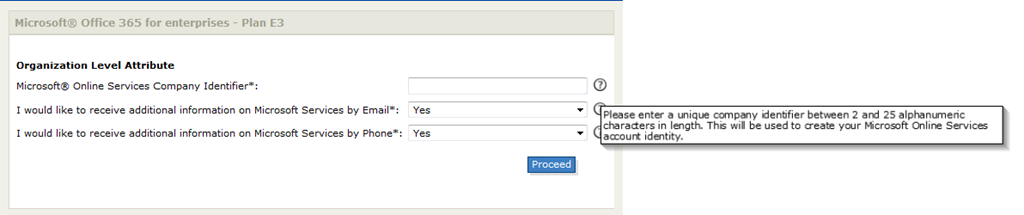
But that’s where the fun ended. Soon after entering the necessary detail, and obligatory payment details, I am asked to enter a mysterious thing listed only as an Organization Level Attribute and more specifically, “Microsoft Online Services Company Identifier.” Checking the question mark icon tells me that it is “used to create your Microsoft Online Services account identity.”
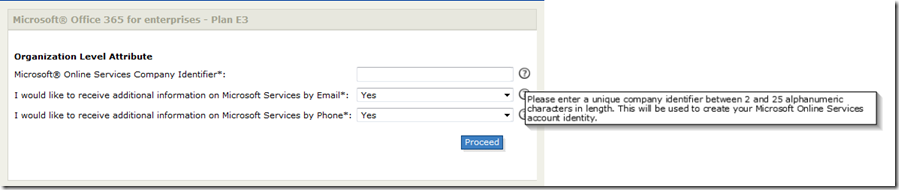
I wondered if this was the domain name for the site, as there was no descriptive indicator as to the significance of this code. For all I knew, it could be a Microsoft admin code or accounting code. Nevertheless I assumed it was the domain name because I just had a feeling it was. So I entered my online identity and away I went. I got a friendly email message to say things were in motion and I waited my obligatory hour or so for things to provision.
The inbox sound chimes and I received two emails. One told me I now have a “Telstra t-Suite account” and the other is entitled “Registration confirmation from Microsoft online.” I was thanked for purchasing and the email stated that “the services are managed via Microsoft Online Portal (MOP), a separate portal to the Telstra T-Suite Management Console.” I had no idea what the Telstra T-Suite Management Console was at this point, but I was invited to log into the Microsoft Online Portal with a supplied username and password.
At this point I swore…I could see by my username, that I made a typo in the Microsoft Online Services Company Identifier. Username: admin@SampleProjject.onmicrosoft.com – which means I typed in “SampleProjject” instead of “SampleProject” (Aargh!)
The saga begins…
Swearing at my dyslexic typing, I logged a support call to Telstra in the faint hope that I can change this before it’s too late… Below is the anonymised mail I sent:
“Hiya
In relation to the order below I accidentally set SampleProjject as the identifier when it should be SampleProject. Can this be rectified before things are commissioned?
Thanks
Paul”
Another hour passed by and my inbox chimed again with a completely unsurprising reply to my query.
“Hi Paul , sorry but company identifier can not be changed because it is used to identify the account in Office 365 database.”
Cursing once again at my own lack of checking, I cannot help but shake my head in that while I was forced to type in my email address twice (and with cut and paste disabled) when I signed up to Office 365, I was given no opportunity to verify the Microsoft Online Services Company Identifier (henceforth known as MOSI) before giving the final go-ahead. Surely this identifier is just as important as the email address? Therefore, why not ask for it to be entered twice or visually make it clear what the purpose of this identifier is? Then dumb users like me would get a second chance before opening the hellgate, unleashing forces that can never be contained.
At the end of the day though, the fault was mine so while I think Telstra could do better with their validation and conveying the significance of the MOSI, I caused the issue.
Forces are unleashed…
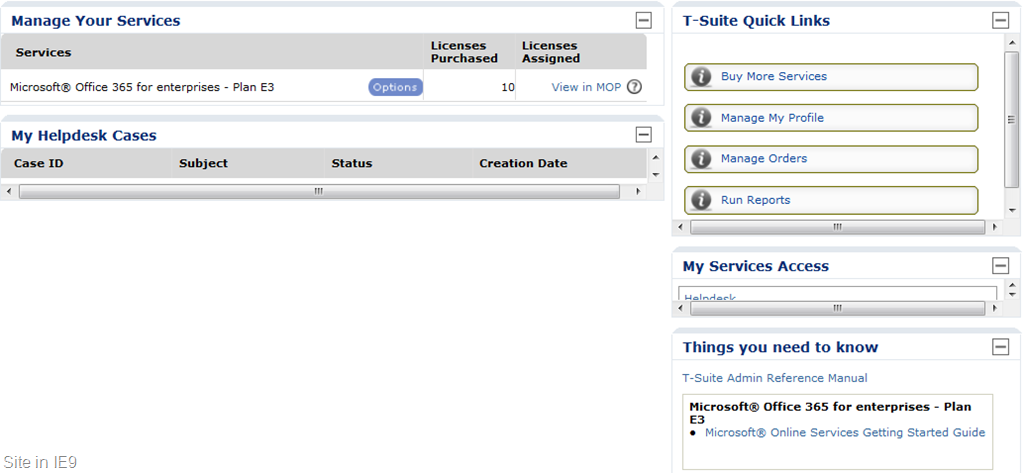
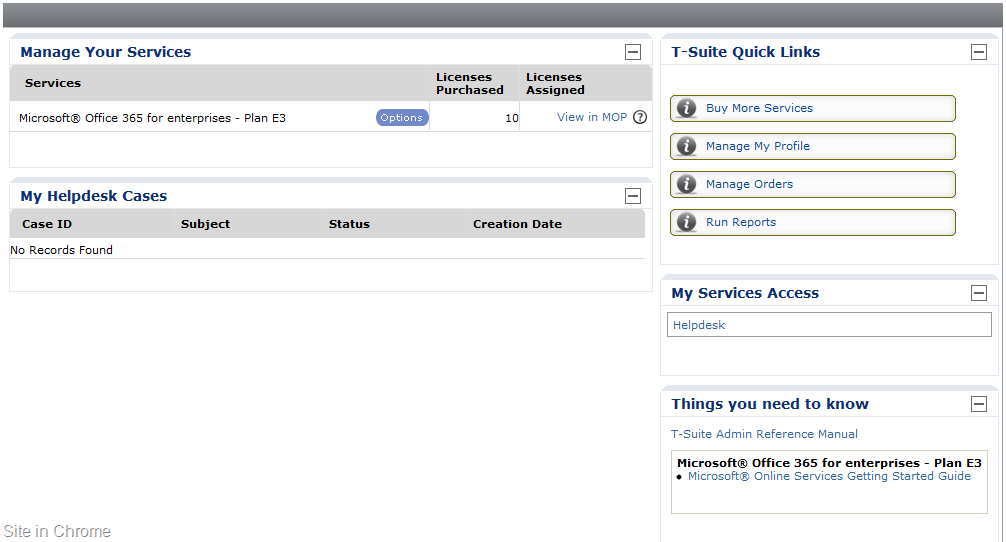
So I log into Telstra’s t-suite system and try and locate my helpdesk call entry. The t-suite site, although not SharePoint, has a bit of a web part feel about it – only like when you have fixed the height of a web part far too small. It turned out that their site doesn’t handle IE9 well. If you look closely the “my helpdesk cases” and “my service access” are collapsed to the point that I can’t actually see anything. So I tried Chrome and was able to operate the portal like a normal person would. My teeth gnashed once more…
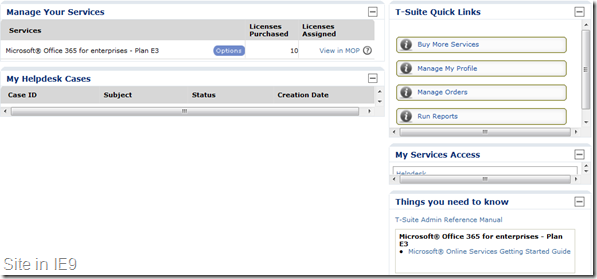
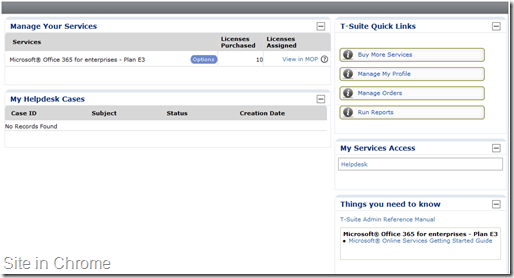
Finally, being able to take an action, I open my support request and ask the following:
*** NOTES created by Paul Culmsee
Can I cancel this account and re provision? A typo was made when the MOSI was entered. The domain name is incorrect for the site.
A few emails went back and forth and I received a confirmation that the account is cancelled. I then return to the Office 365 site and re-apply for an E3 service. This time I triple checked my spelling of the MOSI and clicked “proceed.” I received an email that thanked me for my application and that I should receive a provisioning notification within an hour or so.
So I wait…
and wait…
and wait…
and wait…
24 hours went by and I received no notification of the E3 service being provisioned. I log into Telstra’s t-suite and log a new call, asking when things will be provisioned. Here is what I asked…
Hi there, I have had no notification of this being provisioned from Microsoft. Surely this should be done by now?
In typical level 1 helpdesk fashion, the guy on the other end did not actually read what I wrote. He clearly missed the word “no”
Hi Paul,
that’s affirmative. Your T-Suite order has been provisioned. As per the instructions in the welcome email you can follow the links to log in to portal.
Contact me on 1800TSUITE Option 2.3 to discuss it further. I’ll keep this case open for a week.
*sigh* – this sort of bad level 1 email support actually does a lot of damage to the reputation of the organisation so I mail back…
But I received no welcome email from Microsoft with the online password details… I have no means to log into the portal
This inane exchange costs me half a day, so I took Telstra’s friendly advice and contacted them “on 1800TSUITE Option 2.3 to discuss it further.” I got a pretty good tech who realised there indeed was a problem. He told me he would look into it and I thanked him for his time. Sometime later he called back and advised me that something was messed up in the provisioning process and that the easiest thing to do, was for him to delete my most recent E3 application, and for me to sign up from scratch using a totally different email address and a totally new MOSI. Somehow, either Telstra’s or Microsoft’s systems had associated my email address and MOSI with the original, failed attempt to sign up (the one with the typo), and it was causing the provisioning process to have an exception somewhere along the line.
In hearing this, I can imagine some giant PowerShell provisioning script with dodgy exception handling getting halfway through and then dying on them. So I was happy to follow the tech’s advice went through the entire Office 365 sign up process from the very beginning again (this is the third time). This time I used a fresh email address and quadruple checked all of the fields before I provisioned. Eureka! This time things worked as planned. I received all the right confirmation emails and I was able to sign into the Microsoft online portal. From there I created user accounts, provisioned a SharePoint site collection and we were ready to rock and roll. Although the entire saga ended up taking 5 business days from start to finish, I have my portal and the project team got down to business.
Now for what it’s worth, it should be noted that if you are an integrator or are in the business of managing multiple Office 365 services, Telstra requires a different email address to be used for each Office 365 service you purchase. One cannot have an alias like provision@myoffice365supportprovider as the general account used to provision multiple E1-E4 services. Each needs its own t-suite account with a different email address.
Plunged into darkness…
Things hummed along for a couple of months with no hiccups. We received an invoice for the service by email, and then a couple of days later, received a mail to confirm that in fact the invoice has been automatically paid via credit card. For our purposes, Office 365 was a really terrific solution and the project team really liked it and were getting a lot of value out off it.
I then had to travel overseas and while I was gone, suddenly the project team were unable to login to the portal. They would receive a “subscription expired” message when attempting to login. Now this was pretty serious as a project team was coming to an important deadline and now no-one could log in. We checked the VISA records and it seemed that the latest invoice had not been deducted from the account as there was still a balance owing. Since I was in overseas, one of my colleagues immediately called up Telstra support (it was now after hours in Perth) and was stuck in a queue for an hour and then ended up speaking to two support people. After all of the fuss with the provisioning issues around the MOSI and my typo, it seemed that Telstra support didn’t actually know what a MOSI was in any event. This is what my colleague said:
I was asked for an account number straight away both times, and I explained that I didn’t have one, but I did have the invoice number in question, and that this was a Microsoft Office 365 subscription. They were still unable to locate the account or invoice. I then gave them the MOSI, thinking this would help. Unfortunately, they both had no idea what I was talking about! I explained that users were unable to login to the site with a ‘subscription expired’ error message. I also explained the fact that the VISA had not been processed for this period (although it was fine in the last period).
Both support staff could not access the Office 365 subscription information (even after I gave them our company name). Because I called after hours, t-suite department was not available. The two staff I talked to could not access the account, so could not pull up any of the relevant details. It turns out that after business hours, Telstra redirect t-suite support to the mobile and phones department. The first support person passed me onto technical but the transfer was rerouted to the original call menu – so I went through the whole thing again, press x for this, press x for that, etc. The second time round, I explained it all over again. The tech assured me that it couldn’t be a billing issue and that Telstra generally would not suspend an account because of a few days late payment. If that was the case, prior to suspension, Telstra would send out an email to notify customers of overdue payment. I told him that no such email had been sent. He then said that it would most likely be a technical problem and would have to be dealt with the next day as the T-suite department would not be available til next morning between office hours 9-5pm EST.
I hung up frustrated, no closer to solving the problem after two hours on the phone.
My colleague then got up early and called Telstra at 6am the next day (9am EST is 3 hours ahead of Perth time). She explained the situation again to Telstra t-suite support person all over again. Here again is the words of my colleague:
The first person who took my call (who I will call “girl one”) couldn’t give me an answer and said she’d get someone to call back, and in the meantime she’d check with another department for me. She put me on hold and during this time the call was re-routed back to the original menu when you first call. I thought that instead of waiting for a call that I may not receive soon as this was an emergency, I went through the menu again. This time I got “girl two” and explained the whole thing *again*. I got her to double check that the E3 subscription was set to automatically deduct from the VISA supplied – yes, it was. She noticed that it said 0 licenses available. She told me that she was not sure what that was all about, so would log a call with Microsoft. Girl two advised me that it could take any time between an hour to a few days for a response from Microsoft.
I then got a call from Telstra (girl three) on the cell-phone just after I finished with girl two. This was the person who girl one promised would call back. I told her what I’d gone through with all support staff so far, and that “girl two” was going to log a call with Microsoft. Girl three, like girl two, noticed the 0 licenses available. She wasn’t sure that it was because there were none to begin with or that there were no more available. I stated that the site had been working fine till yesterday. I explained that no one could access the site and that they all got the same message. Same as girl two, girl three advised that she would also log a call with Microsoft. Again, I was told that it could take up to several days before I could get a reply.
Half an hour later, we received an email from Telstra t-suite support. It stated the following:
Case Number: xxxxxxxx-xxxxxxx
Case Subject: subscription has expired for all users
I checked your account info and invoices. The invoice xxxxx paid for 01 Oct to 01 Nov was for company ID SampleProjject not SampleProject. Please call billing department to change it for you.
With this email, we now knew that the core problem here was related to billing in some way. As far as we had been told, Telstra had deleted the original two failed Office 365 subscriptions, but apparently not from their billing systems. The bill was paid against a phantom E3 service – the deleted one called “SampleProjject”. Accordingly the live service had expired and users were locked out of the system.
As instructed in the above email, my colleague called up t-suite billing (there was a phone number on the invoice). In her words:
Once again, the support person asked for the account number to which I said I didn’t have one. I offered him the invoice number and the MOSI, thinking someone’s got to know what it was since it was ‘used to identify the account in Office 365 database.’ He stated he could not ‘pull up an account with the MOSI’ and said something to the effect that he didn’t know what the MOSI ‘was all about’. He asked what company registered the service and I gave him our details. He immediately saw several ‘accounts’ in the billing system related to our company. He noted that the production E3 was a trial subscription and the trial had now expired and he surmised that the problem was most likely due to that fact. I queried why this was the case when the payment subscription was set to automatically deduct from the supplied visa account. He told me that as going from trial to production was a sales thing, I would have to speak to t-suite sales department. He also added that we were lucky because there was a risk that the mistakenly expired E3 service could have been deleted from Office 365.
I called up sales and finally, they were able to correct the problem.
So after a long, stressful and chaotic evening and morning, Armageddon was averted and the portal users were able to log in again.
Reflections…
This whole story started from something seemingly innocuous – a typo that I made on a poorly described text box (MOSI). From it, came a chain of events that could have resulted in a production E3 service being mistakenly deleted. There were multiple failures at various levels (including my bad typing that set this whole thing off). Nevertheless, first thing that becomes obvious is that this was a high risk issue that had utterly nothing to do with the Office 365 service itself. As I said, the feedback from the project team has been overwhelmingly positive for Office 365. There was no bug or no extended outage because of any technical factors. Instead, it was the lack of resilience in the systems and processes that surround the Office 365 service. At the end of the day, we got almost nailed because of a billing screw-up. It was exacerbated by some poor technical support outcomes. Witness the number of people and departments my colleague had to go through to get a straight answer, as well as the two times she was redirected back to the main phone menuing system when she was supposed to be transferred.
Now I don’t blame any of the tech support staff (okay, except the first guy who did not read my initial query). I think that the tech support themselves were equally hamstrung by immature process and poor integration of systems. What was truly scary about this issue was that it snuck up upon us from left field. We thought the issue was resolved once the service was finally provisioned (third time lucky), and had email receipts of paid invoices. Yet this near fatal flaw was there all along, only manifesting some three months later when the evaluation period expired.
I think there are a number of specific aspects to this story that Microsoft needs to reflect on. I have summarised these below:
- Why is the registration process to sign up to Office 365 via Telstra such a complete fail of the “Don’t Make Me Think” test.
- Why is the significance of the MOSI not made more clear when you first enter it (given you have to enter your email address twice)?
- Why did no-one at all in Telstra support have the faintest idea what a MOSI is?
- When you entrust your data and service to a cloud provider how confident do you feel when tech support completely misinterprets your query and answers a completely opposite question?
- How do you think customers with a critical issue feel when the company that sits between you and Microsoft tells you that it will take “between an hour to a few days for a response from Microsoft”. Vote of confidence?
- How do you think customers with a critical issue feel when the company that sits between you and Microsoft redirects tech support to their cell phone division after hours?
- How do you think customers with a critical issue feel when the company that sits between you and Microsoft has to pass you around from department to department to solve an issue, and along the way, re-route you back to the main support line?
- We were advised to delete our E3 accounts and start all over again. Why did Telstra’s systems not delete the service out of their billing systems? Presumably they are not integrated, given that from a billing perspective, the old E3 service was still there?
Now I hope that I don’t sound bitter and twisted from this experience. In fact, the experience reinforced what most in IT strategy already know. It’s not about the technology. I still like what Office 365 offers and I will continue to use and recommend it under the right circumstances. This experience was simply a sobering reality check though that all of the cool features amounts to naught when it can be undone by dodgy underlying supporting structures. I hope that Microsoft and Telstra read this and learn from it too. From a customer perspective, having to work through Telstra as a proxy for Microsoft feels like additional layers of defence on behalf of Microsoft. Is all of this duplication really necessary? Why can’t Australian customers work directly with Microsoft like the US can?
Moving on…
No cloud provider is immune to these sorts of stories – and for that matter no on-premise provider is immune either. So for Amazon fanboys out there who want to take this post as evidence to dump on Microsoft, I have some news for you too. In the next post in this series, I am going to tell you an Amazon EC2 story that, while not being an issue that resulted in an outage, nevertheless represents some very short sighted dumbass policies. The result of which, we are literally forced to hand our business to another cloud provider.
Until then, thanks for reading and happy clouding 🙂
Paul Culmsee
www.sevensigma.com.au