Back to Cleverworkarounds mainpage
 

Demystifying SharePoint Performance Management Part 3 – Getting at RPS

Hi and welcome back to this series aimed at making SharePoint performance management a little more digestible. In the first post we examined the difference between lead and lag indicators and in the second post, we specifically looked at the lead indicator of Requests Per Seconds (RPS) and its various opportunities and issues. In this episode we are actually going to do some real work at the – wait for it – the command line! As a result the collective heart rates of my business oriented readers – who are avid users of the “I’m business, not technical” cliché  – will start to rise since anything that involves a command line is shrouded in mystique, fear, uncertainty and doubt.

For the tech types reading this article, please excuse the verboseness of what I go through here. I need to keep the business types from freaking out.

Okay… so in the last post I said that despite its issues in terms of being a reliable indicator of future performance needs, RPS has the advantage that it can be derived from your existing deployment. This is because the information needed is captured in web server (IIS) logs over time. Having this past performance means you have a lag indicator view of RPS, which can be used as a basis to understand what the future might look like with more confidence than some arbitrary “must handle x RPS.”

Now just because RPS is held inside web server log files, does not mean it is easy to get to. In this post, I will outline the 3 steps needed to manipulate logfiles to extract that precious RPS goodness. The utility that we are going to use to do this is Log parser.

Now a warning here: This post assumes your existing deployment runs on Microsoft’s IIS platform v7 (the webserver platform that underpins SharePoint 2010). If you are running one of the myriad of portal/intranet platforms, you are going to have to take this post as a guide and adjust to your circumstances.

Step 1: Getting Log parser

Installing Log parser is easy. Just install version 2.2 as you would any other tool. It will run on pretty much any Windows operating system. Once installed, it will likely reside in the C:\Program Files (x86)\Log Parser 2.2 folder. (Or C:\Program Files\Log Parser 2.2 if you have an older, 32 bit PC).

There you go business types – that wasn’t so hard was it?

Step 2: Getting your web server logs

After the relative ease of getting log parser installed, we now need the logs themselves to play with. We are certainly not going to mess with a production system so we will need to copy the log files for your current portal to the PC where you installed Log parser. If you do not have access to these log files, call your friendly neighbourhood systems administrator to get them for you. If you have access (or do not have a friendly neighbourhood systems administrator), then you will need to locate the files you need. Here’s how:

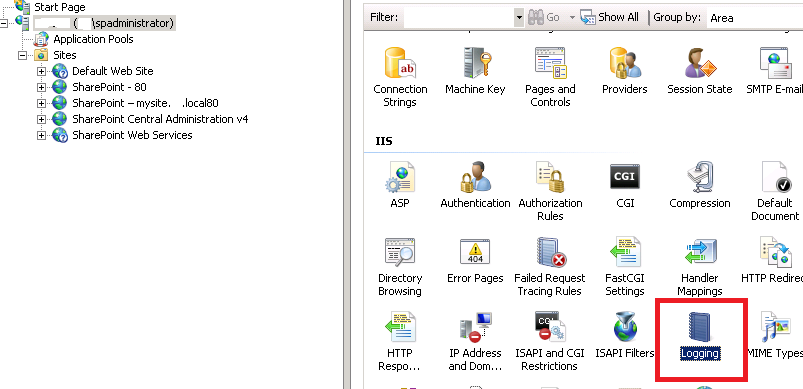
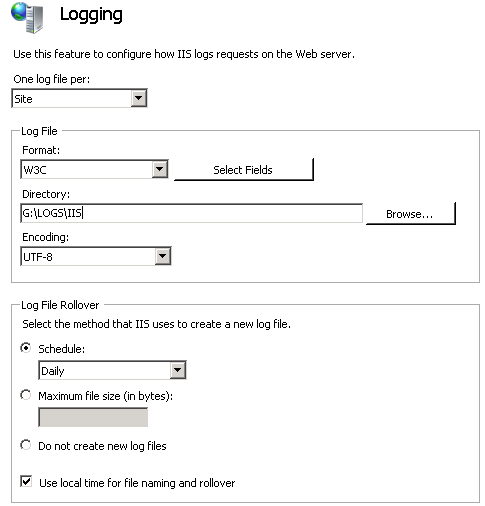
Assuming you have access to your web front end server/s, you can load Internet Information Services (IIS) Manager from Start->All programs->Administrative tools on the server. Using this tool we can find out the location of the IIS log files as well as the specific logs we need. By default IIS logs are stored in C:\inetpub\logs\LogFiles, but it is common for this location to be changed to somewhere else. To confirm this in IIS manager, click on the server name in the left pane, then click on the Logging” icon in the right pane. In the example below, we can see that the IIS logfiles live in G:\LOGS\IIS folder (I always move the logfiles off C:\ as a matter of principle). While you are there, pay special attention to the fairly nondescript “Use local time for file naming and rollover” tickbox. We are going to return to that later…

image  image

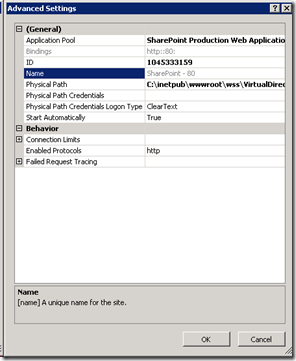
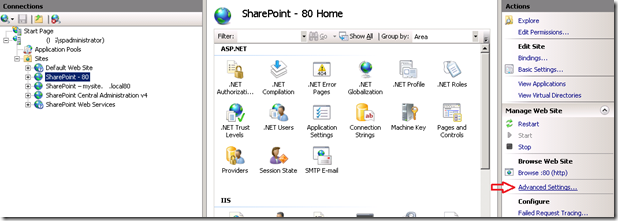
Okay so we know where the log files live, so lets work out the sub-folder for the specific site. Back in the left hand pane now, expand “Sites” and find the web site you want to profile for RPS. When you have found it, select it and find the “Advanced Settings” link and click it.

image_thumb5

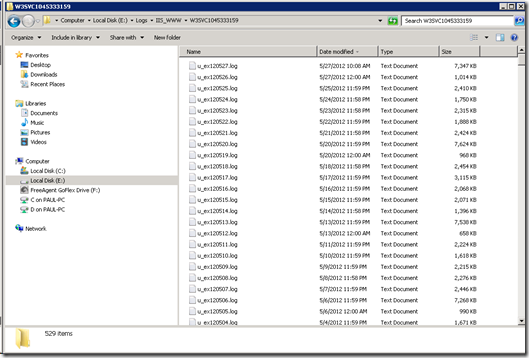
On the next screen you will see ID of the site. It will be a large number – something like 1045333159. Take a note of this ID, because all IIS logs for this site will be stored in a folder with the name “W3SVC” prepended to this ID (eg W3SVC1045333159). Thus the folder we are looking for is G:\LOGS\IIS\W3SVC1045333159. Copy the contents of this folder to the computer where you have installed logparser to. (In my example below I copied the logs to E:\LOGS\IIS_WWW\W3SVC1045333159 on a test server).

image10_thumb2 image14_thumb

Step 3: Preparation of log files…

Okay, so now we have our log files copied to our PC, so we can start doing some log parser magic. Unfortunately default IIS logfile format does not make RPS reporting particularly easy and we have to process the raw logs to make a file that is easier to use. Now business people – stay with me here… the payoff is worth the command line pain you are about to endure! Smile

First up, we will make use of the excellent work of Mike Wise (You can find his original document here), who created a script for log parser that processes all of the logfiles and creates a single (potentially very large) file that:

  • includes a new field which is the time of the day converted into seconds
  • splits the date and timestamp up into individual bits (day, month, hour, minute, etc.) This makes it easier to do consolidated reports
  • excludes 401 authentication requests (way back in part 1 I noted that Microsoft excludes authentication traffic from RPS)

I have pasted a modified version of Mike’s log parser script below, but before you go and copy it into Notepad, make sure you check two really important things.

  1. Be sure to change the path in the second last line of the script to the folder where you copied the IIS logs to (In my case it was E:\LOGS\IIS_WWW\W3SVC1045333159\*.log)
  2. Check whether IIS is saving your logfiles using UTC timestamps or local timestamps. (Now you know why I told you to specifically make note of the “Use local time for file naming and rollover” tickbox earlier). If the box is unticked, the logs are in UTC time and you should use the first script pasted below. If it is ticked, the logs are in local time the second script should be used.

UTC Script

select EXTRACT_FILENAME(LogFilename),LogRow, date, time, cs-method, cs-uri-stem, cs-username,
c-ip, cs(User-Agent), cs-host, sc-status, sc-substatus, sc-bytes, cs-bytes, time-taken,

add(
    add(
         mul(3600,to_int(to_string(to_localtime(to_timestamp(date,time)),'hh'))),
         mul(60,to_int(to_string(to_localtime(to_timestamp(date,time)),'mm')))
    ),
    to_int(to_string(to_localtime(to_timestamp(date,time)),'ss'))
) as secs,

add(
    mul(60,to_int(to_string(to_localtime(to_timestamp(date,time)),'hh'))),
    to_int(to_string(to_localtime(to_timestamp(date,time)),'mm'))
) as minu,

to_int(to_string(to_localtime(to_timestamp(date,time)),'yy')) as yy,
to_int(to_string(to_localtime(to_timestamp(date,time)),'MM')) as mo,
to_int(to_string(to_localtime(to_timestamp(date,time)),'dd')) as dd,
to_int(to_string(to_localtime(to_timestamp(date,time)),'hh')) as hh,
to_int(to_string(to_localtime(to_timestamp(date,time)),'mm')) as mi,
to_int(to_string(to_localtime(to_timestamp(date,time)),'ss')) as ss,
to_lowercase(EXTRACT_PATH(cs-uri-stem)) as fpath,
to_lowercase(EXTRACT_FILENAME(cs-uri-stem)) as fname,
to_lowercase(EXTRACT_EXTENSION(cs-uri-stem)) as fext

from e:\logs\iis_www\W3SVC1045333159\*.log

where sc-status<>401 and date BETWEEN TO_TIMESTAMP(%startdate%, 'yyyy-MM-dd') and TO_TIMESTAMP(%enddate%, 'yyyy-MM-dd')

Local Time Script

select EXTRACT_FILENAME(LogFilename),LogRow, date, time, cs-method, cs-uri-stem, cs-username,
c-ip, cs(User-Agent), cs-host, sc-status, sc-substatus, sc-bytes, cs-bytes, time-taken,

add(
   add(
      mul(3600,to_int(to_string(to_timestamp(date,time),'hh'))),
      mul(60,to_int(to_string(to_timestamp(date,time),'mm')))
   ),
   to_int(to_string(to_timestamp(date,time),'ss'))
) as secs,

add(
   mul(60,to_int(to_string(to_timestamp(date,time),'hh'))),
   to_int(to_string(to_timestamp(date,time),'mm'))
) as minu,

to_int(to_string(to_timestamp(date,time),'yy')) as yy,
to_int(to_string(to_timestamp(date,time),'MM')) as mo,
to_int(to_string(to_timestamp(date,time),'dd')) as dd,
to_int(to_string(to_timestamp(date,time),'hh')) as hh,
to_int(to_string(to_timestamp(date,time),'mm')) as mi,
to_int(to_string(to_timestamp(date,time),'ss')) as ss,
to_lowercase(EXTRACT_PATH(cs-uri-stem)) as fpath,
to_lowercase(EXTRACT_FILENAME(cs-uri-stem)) as fname,
to_lowercase(EXTRACT_EXTENSION(cs-uri-stem)) as fext

from e:\logs\iis_www\W3SVC1045333159\*.log

where sc-status<>401 and date BETWEEN TO_TIMESTAMP(%startdate%, 'yyyy-MM-dd') and TO_TIMESTAMP(%enddate%, 'yyyy-MM-dd')

After choosing the appropriate script and modifying the second last line, save this file into the Log parser installation folder and call it GETSECONDS.TXT.

For the three readers who *really* want to know, the key part of what this does is to take the timestamp of each log entry and turn it into what second of the day it is and what minute of the day it is. So assuming the timestamp is 8:35am at the 34 second park, the formula effectively adds together:

  • 8 * 3600 (since there are 3600 seconds in an hour)
  • 35 * 60 (60 seconds in a minute)
  • 34 seconds

= 30934 seconds

  • 8 * 60 (60 minutes in an hour)
  • 35 minutes

= 515 minutes

Now that we have our GETSECONDS.TXT script ready, let’s use Log parser to generate our file that we will use for reporting. Open a command prompt (for later versions of windows make sure it is an administrator command prompt) and change directory to the LogParser installation location.

C:\Program Files (x86)\Log Parser 2.2>

Now decide a date to report on. In my example, the logs go back two years and I only want the the 15th of November 2011. The format for the dates MUST be “yyyy-mm-dd” (e.g. 2011-11-15).

Type in the following command (substituting whatever date range interests you):

logparser -i:IISW3C file:GetSeconds.txt?startdate=’2011-11-15’+enddate=’2011-11-15′ -o:csv >e:\temp\LogWithSeconds.csv

  • The –i parameter specifies the type of input file. In this case the input file is IISW3C (IIS weblog format)
  • The ?startdate parameter specifies the start  date you want to process
  • The +enddate parameter specifies the end date you want to process
  • The –o parameter specifies the type of output file. In this case the output file is CSV format
  • The –q parameter says not to prompt the user for anything
  • The >LogWithSeconds.csv says to save the CSV output into a file called LogsWithSeconds.csv

So depending on how many logfiles you had in your logs folder, things may take a while to process. Be patient here… after all, it might be processing years of logfiles (and now you know why we didn’t do this in a production install!). Also be warned, the resulting LogWithSeconds.csv that is created will be very very big if you specified a wide date range. Whatever you do, do not open this file with notepad if its large! We will be using additional log parser scripts to interrogate it instead.

Conclusion

Right! If you got this far and your normally not a command line kind of person… well done! If you are a developer, thanks for sticking with me. You should have a newly minted file called LogWithSeconds.csv and you are ready to do some interrogation of it. In the next post, I will outline some more logparser scripts that generate some useful information!

Until then, thanks for reading

Paul Culmsee

p.s Why not check out my completely non SharePoint book entitled “The Heretics Guide to Best Practices”. It recently won a business book award.


Demystifying SharePoint Performance Management Part 2 – So what is RPS anyway?

Hi all

I never mentioned it in the first post that the reason I am blogging again is I finally completed most of the game Skyrim. Man – that game is dangerous if you value your time!

Anyway, in the first post, I introduced this series by covering the difference between lead and lag performance indicators. To recap from part 1, a lead indicator is something that can help predict an outcome by measuring an action, whereas a lag indicator measures the result or outcome achieved from taking an action. This distinction is important to understand, because otherwise it is easy to use performance measurements inappropriately or get very confused. Lead indicators in particular sometimes feel wishy washy because it is hard to have a direct correlation to what you are seeing.

In this post, we are going to examine one of the most commonly cited (and abused) lead indicators to measure for performance. Good old Requests Per Second (RPS). Let’s attempt to make this more clear…

Microsoft defines RPS as:

The number of requests received by a farm or server in one second. This is a common measurement of server and farm load. The number of requests processed by a farm is greater than the number of page loads and end-user interactions. This is because each page contains several components, each of which creates one or more requests when the page is loaded. Some requests are lighter than other requests with regard to transaction costs. In our lab tests and case study documents, we remove 401 requests and responses (authentication handshakes) from the requests that were used to calculate RPS because they have insignificant impact on farm resources

So according to this definition, RPS is any interaction between browsers (or any other device or service making web requests) and the SharePoint webserver, excluding authentication traffic. The logic of measuring requests per second is that it provides insight into how much load your SharePoint box can take because, after all, SharePoint at the end of the day is servicing requests from users.

RPS by example

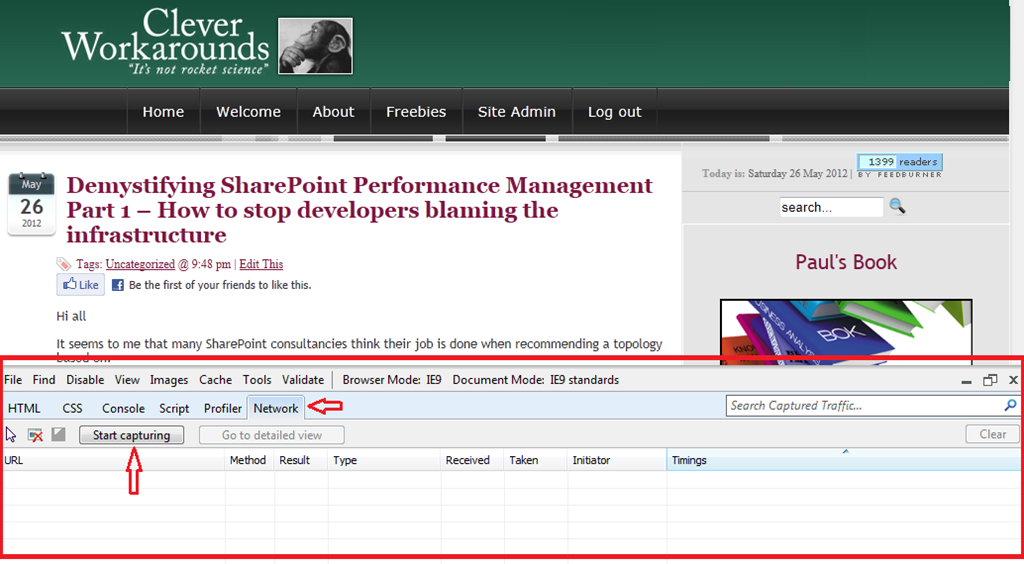
Before we start picking apart RPS and its issues, let’s look at an example. Assuming you are viewing this page in Internet Explorer version 8 or 9, press F12 right now. You should see something like the screen below. If you have not seen it before, it is called the internet explorer developer tools and is bloody handy. Now click on the “Network” link, highlighted below and then click the “Start capturing” button.

image

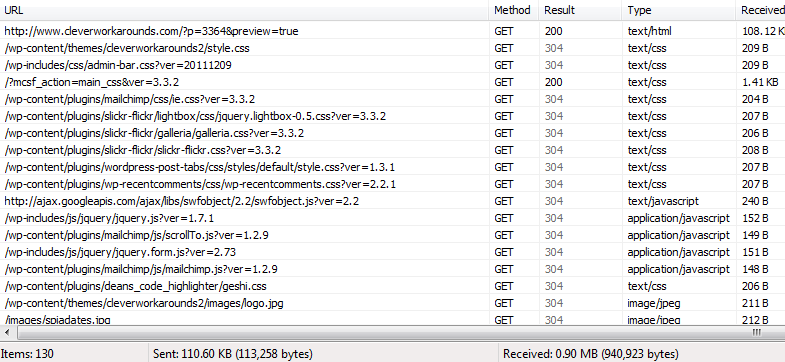
Now refresh this page and watch the result. You should see a bunch of activity logged, looking something like the picture below.

image

What you are looking at is all of the requests that your browser has made to load this very page. While the detail is not overly important for the purpose of this post, the key point is that to load this page, many requests were made. In fact if you look in the left-bottom corner of the above screenshot, a total of 130 individual requests are listed.

So, first pop-quiz for the day: Were all 130 requests made to my cleverworkarounds blog to refresh this page? The answer my friends is no. In actual fact, only 2 items were loaded from my blog!

So why the discrepancy? What happened to the other 128 requests? Two main reasons.

1. Browser cache: First up, many of the items listed above were cached by my browser already. I’ve been to this site before, and so a lot of the page components (CSS style sheets, logos and the like) did not have to be retrieved again. It just happens that the internet explorer developer tool shows requests that were handled by locally cached data as well as actual requests made to SharePoint. If you look closely at the “Result” column in the above screenshot, you will see that some entries are grey colour while others are black. All of the grey entries are cached requests. They never left the confines of the browser. This alone accounts for 95 of the 130 requests.

Now this is worth consideration because if a browser has never accessed this site before, there will be no content in the browser cache. Therefore, on first access, the browser would indeed have made 95 additional requests to load the page. This scenario is most likely on day one of a production SharePoint rollout, where a large chunk of the workforce might load the homepage for the first time.

2. Content from other sites: The second reason for the discrepancy is that some content doesn’t even come from the cleverworkarounds site. Anytime you visit a blog and it has a snazzy widget like Amazon books or Facebook “like” buttons, that content is very likely being retrieved from Amazon or Facebook. In the case of this very article you are reading, 33 requests were made to other sites like Facebook, amazon, feedburner, sharepointads and whoever else happens to grace a widget on the right hand side. In these cases, my server is not handling this traffic at all. This accounts for 33 of the 130 requests.

95 + 33 = 128 of the 130 requests made.

So hopefully now you get what is meant by RPS. Let’s now look at its utility in measuring performance.

Dangers of RPS reliance…

Consider two fairly typical SharePoint transactions: The first example is loading the SharePoint home page and the second example is where a user loads a document from a SharePoint document library. Below I have compared the two transactions by using an Office 365 site of mine and capturing the requests made by each one. (For what its worth, I used a utility called fiddler rather than the developer toolbar because it has some snazzier features).

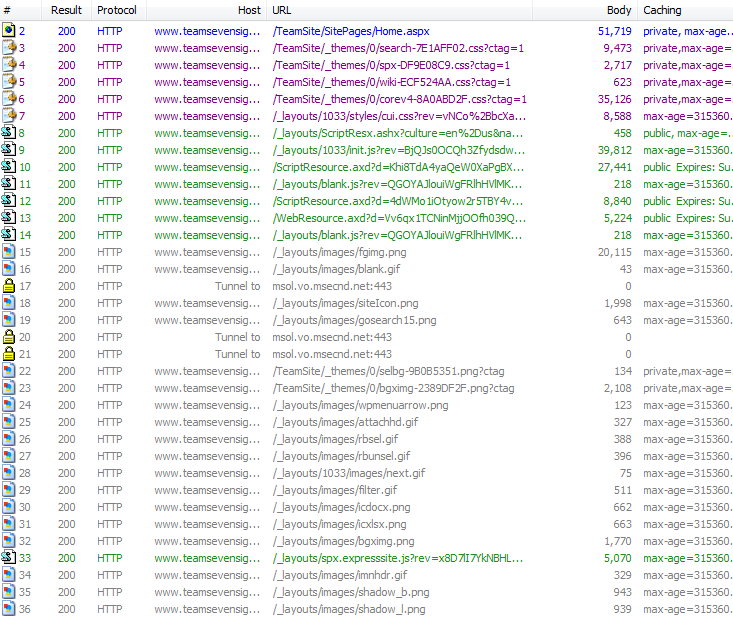
In example #1, we have loaded the homepage of an Office365 site (assuming for the first time). In all, 36 requests made to the server. If we add up the amount of data returned by the server (summing the “Body” column below), we have a total of 245,322 bytes received.

image

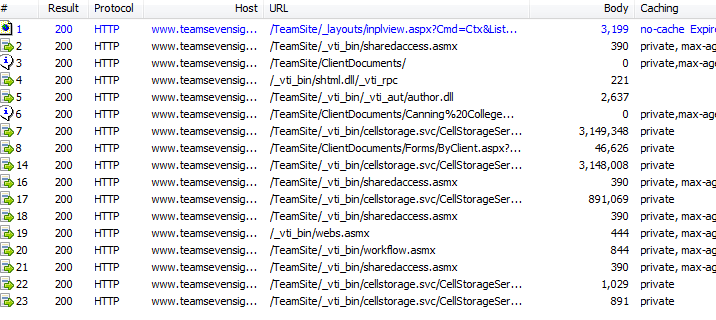
In request #2, we are looking at the trace of me opening a 7 megabyte document from a document library. Notice that this time, 17 requests were. But compared to the first example, significantly more data was returned from the server: 7,245,876 KB in fact. If you drill down further by examining the “Body” column, you will notice that of those 17 requests, 3 of them were the bulk of the data transferred with 3,149,348, 3,148,008 and 891,069 KB respectively.

image

So here is my point. Some requests are more significant than others! In the latter example, 3 of the 17 requests transferred 98% of the data. The second transaction also took much longer than the first, and the data was retrieved from the SQL Server database, which meant that this interaction with SharePoint likely had more back-end performance load than the first example when the home page was loaded. When loading the home page, the data may have been served from one of the many SharePoint caches and barely touching the back-end SQL box.

Now with that in mind, consider this: The typical rationale you see around the interweb for utilising RPS as a performance tool is to estimate future scalability requirements. Statements like "This SharePoint farm needs to be capable of 125RPS” are fairly common. Traditionally, the figure was derived from a methodology that looked something like:

  1. Work out the peak times of the day for SharePoint site usage (for example between 10:45am-2:45pm each day)
  2. Estimate the number of concurrent users accessing your SharePoint site during this time
  3. Classify the users via their usage profile (wussy, light, heavy, psycho, etc)
  4. Estimate how many transactions each of these user types might make in the peak hour (a transaction being an operation like browse home page, edit document, and so on)
  5. Multiply concurrent users by the number of expected transactions to derive the total number of transactions for the period
  6. Divide the total by the number of seconds in the period to work out how many transactions per second.

There are lots of issues with this methodology, but here are 4 obvious ones.

  1. The first is that it confuses transactions with requests. While browsing the SharePoint home page might be considered one “transaction”, it will likely consist of more than one request (particularly if the content being served is designed to be fairly dynamic and not rely on cache data). Essentially this methodology may underestimate the number of requests because it assumes a 1:1 relationship between a transaction and a request. My two examples above demonstrate that this is not the case.
  2. The classification of usage profile of users (light, medium, heavy) is crude and overlooks the aforementioned variation in usage patterns. A “heavy user” might continually update a SharePoint calendar, while a “light” user might load 20 megabyte documents or run sophisticated reports. In both cases, the real load on the infrastructure – and the resulting response time – may be quite varied.
  3. It fails to take into consideration the fact that SharePoint 2010 in particular has many new features in the form of Service Applications. These also make requests behind the scenes that have load implications. The most obvious example is the search crawling SharePoint sites.
  4. It also overlooks the fact that SharePoint content is often accessed indirectly. Many non-browser client tools such as SharePoint Workspace, OneNote, Outlook Social Connector, Harmon.ie and the like. If Colligo Contributor is deployed to all desktops, does that make all users “heavy?”

So hopefully by now, you can understand the folly of saying to someone “This system should be capable of handling 150RPS.” There is simply far too many variables that contribute to this, and each request can be wildly different in terms of real load on the back-end servers. Now you know why Robert Bogue likened this issue to Drakes Equation in part 1. The RPS target arrived at utilising this sort of methodology is likely to be fairly inaccurate and of questionable value.

So what is RPS good for and how do I get it?

So am I anti RPS? Definitely not!

The one thing RPS has going for it, which makes it incredibly useful, is that it is likely to be the one performance metric that any organisation can tap into straight away (assuming you have an existing deployment). This is because the metric is collected in web server (IIS) logs over time. Each request made to the server is logged with a date and timestamp. For most places, this is the only high fidelity performance data you have access to, because many organisations do not collect and store other stats like CPU and Disk IO performance over time. While its unlikely you would be able to see CPU for a server 6 months ago on Tuesday at 9:53am, chances are you can work out the RPS at that time if you have an existing intranet or portal. The reason for this is that IIS logs are not cleared so you have the opportunity to go back in time and see how a SharePoint site has been utilised.

The benefit is that we have the means to understand past performance patterns of an organisations use of their intranet or portal. We can work out stuff like:

  • peak times of the day for usage of the portal based on previous history
  • the maximum number of requests that the server has ever had to process
  • the rate of increase/decrease of RPS over time (ie “What was peak RPS 6 months ago?  What was it 3 months ago?)
  • the patterns/distribution of requests over a typical day (peaks and troughs – we can see the “shape” of SharePoint usage over a given period)

As an added bonus, the data in web server logs allow for some other fringe benefits including stuff like:

  • the percentage or pattern of requests were “non interactive” (such as % of requests that are search crawls or SharePoint workspace sync’s)
  • identifying usage patterns of certain users (eg top 10 users and their usage usage patterns)

Finally, if you monitor CPU and disk performance, you can compare the RPS peaks against those other performance counters and then interpolate how things might have been in the past (although this has some caveats too).

Coming up next…

Okay so now you are convinced that RPS does not suck – and you want to get your hands on all this RPS goodness. The good news is that its fairly easy to do and Microsoft’s Mike Wise has documented the definitive way to do it. The bad news is, you have to download and learn a yet another utility. Fear not though as the utility (called LogParser) is brilliant and needs to be in your arsenal anyway (especially business oriented SharePoint readers of this blog – this is not one just for the techies). Put simply, LogParser provides the ability to do SQL-like queries to your log files. You can have it open a log file (or series of files), process them via a SQL style language, and then output the results of your query into different formats for reporting.

But, just as I have whetted your appetite, I am going to stop.This post is already getting large and I still have a bit to get through in relation to using LogParser, so I will focus on that in the next post.

Hopefully though at this point, you don’t totally hate RPS, have a much better idea of what RPS is and some of the issues of its use.

Thanks for reading

Paul Culmsee

www.hereticsguidebooks.com


Demystifying SharePoint Performance Management Part 1 – How to stop developers blaming the infrastructure

Hi all

It seems to me that many SharePoint consultancies think their job is done when recommending a topology based on:

  • Looking up Microsoft’s server recommendations for CPU and RAM and then doubling them for safety
  • Giving the SQL Database Administrators heart palpitations by ‘proactively’ warning them about how big SharePoint databases can get.
  • Recommending putting database files and logs files on different disks with appropriate RAID levels.

Then satisfied that they have done the due diligence required, deploy a SharePoint farm chock-full of dodgy code and poor configuration.

Now if you are more serious about SharePoint performance, then chances are you had a crack at reading all 307 pages of Microsoft’s “Planning guide for server farms and environments for Microsoft SharePoint Server 2010.” If you indeed read this document, then it is even more likely that you worked your way through the 367 pages of Microsoft whitepaper goodness known as “Capacity Planning for Microsoft SharePoint Server 2010”. If you really searched around you might have also taken a look through the older but very excellent 23 pages of “Analysing Microsoft SharePoint Products and Technologies Usage” whitepaper.

Now let me state from the outset that these documents are hugely valuable for anybody interested in building a high performing SharePoint farm. They have some terrific stuff buried in there – especially the insights from Microsoft’s performance measurement of their own very large SharePoint topologies. But nevertheless, 697 pages is 697 pages (and you thought that my blog posts are wordy!). It is a lot of material to cover.

Having read and digested them recently, as well as chatting to SharePoint luminary Robert Bogue on all things related to performance, I was inspired to write a couple of blog posts on the topic of SharePoint performance management with the aim of making the entire topic a little more accessible. As such, all manner of SharePoint people should benefit from these posts because performance is a misunderstood area by geek and business user alike.

Here is what I am planning to cover in these posts.

  • Highlight some common misconceptions and traps for younger players in this area
  • Understand the way to think about measuring SharePoint performance
  • Understand the most common performance indicators and easy ways to measure them
  • Outline a lightweight, but rigorous method for estimating SharePoint performance requirements

In this introductory post, we will start proceedings by clearing up one of the biggest misconceptions about measuring SharePoint performance – and for that matter, many other performance management efforts. As an added bonus, understanding this issue will help you to put a permanent stop to developers who blame the infrastructure when things slow down. Furthermore you will also prevent rampant over-engineering of infrastructure.

Lead vs. lag indicators

Let’s say for a moment that you are the person responsible for road safety in your city. What is your ultimate indicator of success? I bet many readers will answer something like “reduced number of traffic fatalities per year” or something similar. While that is a definitive metric, it is also pretty macabre. It is also suffers from the problem of being measured after something undesirable has happened. (Despite millions of dollars in research, death is still relatively permanent at the time of writing).

Of course, you want to prevent road fatality, so you might create road safety education campaigns, add more traffic lights, improve signage on the roads and so forth. None of these initiatives are guaranteed to make any difference to road fatalities, but they very likely to make a difference nonetheless! Thus, we should also measure these sorts of things because if it contributes to reducing road fatalities, it is a good thing.

So where am I going with this?

In short, the number of road signage is a lead indicator, while the number of road fatalities is a lag indicator. A lead indicator is something that can help predict an outcome. A lag indicator is something that can only be tracked after a result has been achieved (or not). Therefore lag indicators don’t predict anything, but rather, they show the results of an outcome that has already occurred.

Now Robert Bogue made a great point when we were talking about this topic. He said that SharePoint performance and capacity planning is like trying to come up with drakes equation. For those of you not aware, Drakes equation attempts to estimate how much intelligent life might exist in the galaxy. But it is criticised because there are so many variables and assumption made in it. If any of them are wrong, the entire estimate is called into question. Consider this criticism of the equation by Michael Crighton:

The only way to work the equation is to fill in with guesses. As a result, the Drake equation can have any value from "billions and billions" to zero. An expression that can mean anything means nothing. Speaking precisely, the Drake equation is literally meaningless…

Back to SharePoint land…

Roberts point was that a platform like SharePoint can run many different types of applications with different patterns of performance. An obvious example is that saving a 10 megabyte document to SharePoint has a very different performance pattern than rendering a SharePoint page with a lot of interactive web parts on it. Add to that all of the underlying components that an application might use (for example, PowerPivot, Workflows, Information Management Policies, BCS and Search) and it becomes very difficult to predict future SharePoint performance. Accordingly, it is reasonable to conclude that the only way to truly measure SharePoint performance is via measuring SharePoint response times under some load. At least that performance indicator is reasonably definitive. Response time correlates fairly strongly to user experience.

So now that I have explained lead vs. lag indicators, guess which type of indicator response time is? Yup – you guessed it – a lag indicator. In terms of lag indicator thinking, it is completely true that page response time measures the outcome of all your SharePoint topology and design decisions.

But what if we haven’t determined our SharePoint topology yet? What if your manager wants to know what specification of server and storage will be required? What if your response time is terrible and users are screaming at you? How will response time help you to determine what to do? How can we predict the sort of performance that we will need?

Enter the lead indicator.  These provide assurance that the underlying infrastructure is sound and will scale appropriately. But by themselves, they no a guarantee of SharePoint performance (especially when there are developers and excessive use of foreach loops involved!) But what they do ensure is that you have a baseline of performance that can be used to compare with any future custom work. It is the difference between the baseline and whatever the current reality is that is the interesting bit.

So what lead indicators matter?

The three Microsoft documents I referred above list many useful performance monitor counters (particularly at a SQL Server level) that are useful to monitor. Truth be told I was sorely tempted to go through them in this series of posts, but instead I opted to pitch these articles to a wider audience. So rather than rehash what is in those documents, lets look at the obvious ones that are likely to come up in any sort of conversation around SharePoint performance. In terms of lead indicators there are several important metrics

  • Requests per second (RPS)
  • Disk I/O per second (IOPS)
  • Disk Megabytes transferred per second (MBPS)
  • Disk I/O latency

In the next couple of posts, I will give some more details on each of these indicators (their strengths and weaknesses) and how to go about collecting them.

A final Kaizen addendum

Kaizen? What the?

I  mentioned at the start of this post that performance management is not done well in many other industries. Some of you may have experienced the pain of working for a company that chases short term profit (lag indicator) at the expense of long term sustainability (measured by lead indicators). To that end, I recently read an interesting book on the Japanese management philosophy of Kaizen by Masaaki Imai. Imai highlighted the difference between Western attitudes to management in terms of “process-oriented management vs. result-oriented management”. The contention in the book was that western attitudes to management is all about results whereas Japanese approaches are all about the processes used to deliver the result.

In the United States, generally speaking, no matter how hard a person works, lack of results will result in a poor personal rating and lower income or status. The individuals contribution is valued only for its concrete results. Only results count in a result oriented society.

So as an example, a result society would look at the revenue from sales made over a given timeframe – the short term profit focused lag indicator. But according to the Kaizen philosophy, process oriented management would consider factors like:

  • Time spent calling new customers
  • Time spent on outside customer calls versus time devoted to clerical work

What sort of indicators are these? To me they are clearly lead indicators as they do not guarantee a sale in themselves.

It’s food for thought when we think about how to measure performance across the board. Lead and lag indicators are two sides of the same coin. You need both of them.

Thanks for reading

Paul Culmsee

www.hereticsguidebooks.com


Engaging with stakeholders–did you know there is a standard for it?

Hi all

I think its a sure bet that many of you, for your various sins, perform “stakeholder engagement” as part of delivering solutions to your clients or organisations. I also bet that many of you would not be aware that a standard for Stakeholder Engagement has been released. It was written by the nice folks at accountability.org, an organisation dedicated to helping organisations embed accountability into their operations at an ethical, environmental, social, and governance level.

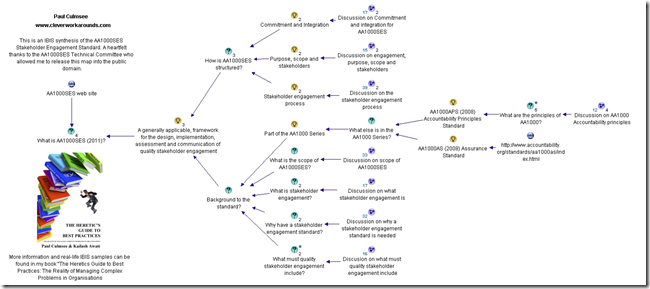
When the standard was released, I read it with some interest, and decided to see what it would look like as an IBIS based issue map. I checked with the report authors and got the okay to do so. The result can be seen by clicking the image below.

image

Hope you find it of interest, and that it gives you some new insights into the art of stakeholder engagement.

Thanks for reading

Paul Culmsee

www.sevensigma.com.au


I’m published in a PM Journal

Hi all

Just a quick note for those of you who are of the academic persuasion or who have an interest in research and academic literature. Kailash and I wrote a paper for the International Journal for Managing Projects in Business. The article is called “Towards a holding environment: building shared understanding and commitment in projects”. The paper is about how to improve shared understanding on projects – particularly at the early stages where ambiguity around objectives tends to be at its highest. While it covers a similar territory to the Heretics Guide, it covers some literature that we did not use for the book. Plus it is peer reviewed of course.

This paper presents a viewpoint on how to build a shared understanding of project goals and a shared commitment to achieving them. One of the ways to achieve shared understanding is through open dialogue, free from political and other constraints. In this paper (and in the Heretics Book) we flesh out what it takes for this to happen and call an environment which fosters such dialogue a holding environment. We illustrate, via a case study:

  1. How an alliance-based approach to projects can foster a holding environment.
  2. The use of argument visualisation tools such as IBIS (Issue-Based Information System) to clarify different points of view and options within such an environment.

This was my first experience with the peer review process of writing a journal paper. I have to say that, despite the odd bit of teeth gnashing, the review process did make this paper much better than it originally was. Of course, none of this would have even happened without Kailash. This was definitely his baby, and this paper would not exist without his intellect and wide-ranging knowledge.

Thanks for reading

Paul Culmsee

www.hereticsguidebooks.com


Wohoo! Heretics Guide has won an award

Tags: Award,Books,Heretics Guide @ 3:28 am

image

Hi all

This might count as the winner of the cleverworkarounds “Most enjoyable blog post ever” award. This is because the book I wrote with Kailash Awati has won a medal at the 2012 Axiom Business Book Awards. The Heretics Guide to Best Practices has taken out the bronze medal in the category of Operations Management/Lean/Continuous Improvement. As you can imagine, we are completely thrilled and stoked about winning this, especially as we are first time writers with such awesome competition (there were 381 books entered into these awards).

In case you are wondering what the Axiom awards are all about, they are the largest and most respected critical guidepost for business books. From the site:

These prestigious and competitive awards are presented in 21 business categories and serve as the premier list to help readers discover new and innovative works.

The Axiom Book Awards are the go-to list connecting readers with high-quality, cutting edge, business books that provide information and ideas critical to success in today’s competitive market place. Today’s consumers want to learn about, shop for, and buy books beyond the model of traditional writing and publishing. Today’s world of business publishing gets new ideas and trends to readers faster and more economically. With Axiom Business Book Awards, you know you will be buying the best, cutting-edge business books

There is an awards ceremony on  June 4th, on the eve of BookExpo America in New York. Methinks I will be heading back to US shores after all!

So beers are on us for today!

CoverProof2

Thanks for reading

Paul

p.s The world needs more heresy. I would be grateful if readers of the blog would be up for a little love on twitter today and help us spread the word!


Warts and all SharePoint caveats in Melbourne and Auckland

image   image

Hi all

There are a couple of conferences happening this month that you should seriously consider attending. The New Zealand and Australian SharePoint Community Conferences. This year things have changed. There are over 50 Sessions designed to cater to a wide audience of the SharePoint landscape and the most varied range of international speakers I have seen so far. What is all the more pleasing this year is that aside from 20 sessions of technical content, the business side of SharePoint focus has been given greater coverage and there are over 20 customer case studies, which give great insight into how organisations large and small are making the most of their SharePoint deployments. This stuff is gold because it is what happens in the trenches of reality, rather than the nuanced, airbrushed one you tend to get when people are trying to sell you something.

My involvement will include some piano accompaniment while Christian Buckley hits the high notes Smile, and in terms of talks, I will be “keeping it real“ by presenting a talk called “Aligning Business Objectives with SharePoint“. I will also be running a 1 day class on one of the hardest aspects of SharePoint delivery: Business goal alignment. This is workshop is the “how” of goal alignment (plenty of people can tell you the “what”). If you are a BA, PM or recovering tech dude, do not miss this session. It draws a lot of inspiration from my facilitation and sensemaking work and has been very well received wherever I have run it.

The other session I am really looking forward to is a talk called SharePoint 2010 Caveats: Don’t get caught out! Now anybody in SharePoint for long enough has learnt the hard way to test all assumptions. This is because SharePoint is a complex beast with lots of moving parts. Unfortunately these moving parts don’t always integrate the way they one would assume. Usually the result of such an untested assumption is a lot of teeth gnashing and heavily adjusted project plans.

I mentioned airburshed reality before – this is something that occasionally frustrates me, especially when you see SharePoint demonstrations full of gushing praise, via a use case that glosses over inconvenient facts. Michal Pisarek of SharePointAnlystHQ fame, is a SharePoint practitioner who shares my view and a while back, we both decided to present a talk about some of the most common, dangerous and some downright strange caveats that SharePoint has to offer. The session outline is below.

"Yes but…" is a common answer given by experienced SharePoint consultants when asked if a particular solution design "will work". One of the key reasons for this is that SharePoint’s greatest strength is one of its weaknesses. The sheer number of components or features jam packed into the product, means that there are many complex interactions between them – often with small gotchas or large caveats that were not immediately apparent while the sales guy was dutifully taking you through the SharePoint pie diagram.

Unfortunately, some organizations trip up on such untested assumptions at times, and in turn it can render the logical edifice of their solution design invalid. This is costly in terms of lost time to change approaches, but increased complexity since sometimes workarounds are worse than the caveats. In this fun, lively and interactive session, Michal Pisarek will put his MVP (not really) on the line, and with a little help from Paul Culmsee, examine some of SharePoint’s common caveats. Make no mistake, understanding these caveats and the approaches for mitigating them will save you considerable time, money and heartache.

Don’t miss this informative and eye opening session

Now let me state up front that our aim is not to walk into a session and just spent all of the time bitching about all the ills of SharePoint. In fact the aim and intent of this session was from the point of view of “knowing this will save you money”. To that end, if there is a workaround for an issue, we will outline it for you.

Now just about every person who I have mentioned this talk to, have said something along the lines of “Oh I could give you some good ones”. So to that end, we want to hear any of the weird and wacky things that have stopped you in your tracks. If you have any rippers, then leave a comment below or submit them to Michal (michalpisarek@sharepointanlysthq.com)

We will also make this session casual and interactive. So expect some audience participation!

Thanks for reading


Paul Culmsee

www.sevensigma.com.au

www.hereticsguidebooks.com


The cloud isn’t the problem–Part 6: The pros and cons of patriotism

Hi all and welcome to my 6th post on the weird and wonderful world of cloud computing. The recurring theme in this series has been to point out that the technological aspects of cloud computing have never really been the key issue. Instead, I feel It is everything else around the technology, ranging from immature process, through to the effects of the industry shakeout and consolidation, through to the adaptive change required for certain IT roles. To that end, in the last post, we had fun at the expense of server huggers and the typical defence mechanisms they use to scare the rest of the organization into fitting into their happy-place world of in-house managed infrastructure. In that post I made a note on how you can tell an IT FUD defence because risk averse IT will almost always try use their killer argument up-front to bury the discussion. For many server huggers or risk averse IT, the killer defence is US Patriot Act Issue.

Now just in case you have never been hit with the “…ah but what about the Patriot Act?” line and have no idea what the Patriot Act is all about, let me give you a nice metaphor. It is basically a legislative version of the “Men in Black” movies. Why Men in Black? Because in those movies, Will Smith and Tommy Lee Jones had the ability to erase the memories of anyone who witnessed any extra-terrestrial activity with that silvery little pen-like device. With the Patriot Act, US law enforcement now has a similar instrument. Best of all, theirs doesn’t need batteries – it is all done on paper.

image

In short, the Patriot Act provides a means for U.S. law enforcement agencies, to seek a court order allowing access to the personal records of anyone without their knowledge, provided that it is in relation to an anti-terrorism investigation. This act applies to pretty much any organisation who has any kind of presence in the USA and the rationale behind introducing it was to make it much easier for agencies to conduct terrorism investigations and better co-ordinate their efforts. After all, in the reflection and lessons learnt from the 911 tragedy, the need for for better inter-agency co-ordination was a recurring theme.

The implication of this act is for cloud computing should be fairly clear. Imagine our friendly MIB’s Will Smith (Agent J) and Tommy Lee Jones (Agent K) bursting into Google’s headquarters, all guns blazing, forcing them to hand over their customers data. Then when Google staff start asking too many questions, they zap them with the memory eraser gizmo. (Cue Tommy Lee jones stating “You never saw us and you never handed over any data to us.” )

Scary huh? It’s the sort of scenario that warms the heart of the most paranoid server hugger, because surely no-one in their right mind could mount a credible counter-argument to that sort of risk to the confidentiality and integrity of an organisations sensitive data.

But at the end of the day, cloud computing is here to stay and will no doubt grow. Therefore we need to unpack this issue and see what lies behind the rhetoric on both sides of the debate. Thus, I decided to look into the Patriot act a bit further to understand it better. Of course, it should be clear here that I am not a lawyer, and this is just my own opinions from my research and synthesis of various articles, discussion papers and interviews. My personal conclusion is that all the hoo-hah about the Patriot Act is overblown. Yet in stating this, I have to also state that we are more or less screwed anyway (and always were). As you will see later in this post, there are great counter arguments that pretty much dismantle any anti-cloud arguments that are FUD based, but be warned – in using these arguments, you will demonstrate just how much bigger this thing is beyond cloud computing and get a sense of the broader scale of the risk.

So what is the weapon?

The first thing we have to do is understand some specifics about the Patriot Act’s memory erasing device. Within the vast scope of the act, the two areas for greatest concern in relation to data is the National Security Letter and the Section 215 order. Both provide authorities access to certain types of data and I need to briefly explain them:

A National Security Letter (NSL) is a type of subpoena that permits certain law enforcement agencies to compel organisations or individuals to provide certain types of information like financial and credit records, telephone and ISP records (Internet searches, activity logs, etc). Now NSL’s existed prior to the Patriot Act, but the act loosened some of the controls that previously existed. Prior to the act, the information being sought had to be directly related a foreign power or the agent of a foreign power – thereby protecting US citizens. Now, all agencies have to do is assert that the data being sought is relevant in some way to any international terrorism or foreign espionage investigations.

Want to see what a NSL looks like? Check this redacted one from wikipedia.

A Section 215 Order is similar to an NSL in that it is an instrument that law enforcement agencies can use to obtain data. It is also similar to NSL’s in that it existed prior to the Patriot Act – except back then it was called a FISA Order – named after the Foreign Intelligence Surveillance Act that enacted it. The type of data available under a Section 215 Order is more expansive than what you can eke out of an NSL, but a Section 215 Order does require a judge to let you get hold of it (i.e. there is some judicial oversight). In this case, the FBI obtains a 215 order from the Foreign Intelligence Surveillance Court which reviews the application. What the Patriot Act did different to the FISA Order was to broaden the definition of what information could be sought. Under the Patriot Act, a Section 215 Order can relate to “any tangible things (including books, records, papers, documents, and other items).” If these are believed to be relevant to an authorised investigation they are fair game. The act also eased the requirements for obtaining such an order. Previously, the FBI had to present “specific articulable facts” that provided evidence that the subject of an investigation was a “foreign power or the agent of a foreign power.” From my reading, now there is no requirement for evidence and the reviewing judge therefore has little discretion. If the application meets the requirements of Section 215, they will likely issue the order.

So now that we understand the two weapons that are being wielded, let’s walk through the key concerns being raised.

Concern 1: Impacted cloud providers can’t guarantee that sensitive client data won’t be turned over to the US government

CleverWorkArounds short answer:

Yes this is dead-set true and it has happened already.

CleverWorkArounds long answer:

This concern stems from the “loosening” of previous controls on both NSL’s and Section 215 Orders. NSL’s for example, require no probable cause or judicial oversight at all, meaning that the FBI can issue these at their own volition. Now it is important to note that they could do this before the Patriot Act came into being too, but back then the parameters for usage was much stricter. Section 215 Orders on the other hand, do have judicial oversight, but that oversight has also been watered down. Additionally the breadth of information that can be collected is now greater. Add to that the fact that both NSL’s and Section 215 Orders almost always include a compulsory non-disclosure or “gag” order, preventing notification to the data owner that this has even happened.

This concern is not only valid but it has happened and continues to happen. Microsoft has already stated that it cannot guarantee customers would be informed of Patriot Act requests and furthermore, they have also disclosed that they have complied with Patriot Act requests. Amazon and Google are in the same boat. Google also have also disclosed that they have handed data stored in European datacenters back to U.S. law enforcement.

Now some of you – particularly if you live or work in Europe – might be wondering how this could happen, given the European Union’s strict privacy laws. Why is it that these companies have complied with the US authorities regardless of those laws?

That’s where the gag orders come in – which brings us onto the second concern.

Concern 2: The reach of the act goes beyond US borders and bypasses foreign legislation on data protection for affected providers

CleverWorkArounds short answer:

Yes this is dead-set true and it has happened already.

CleverWorkArounds long answer:

The example of Google – a US company – handing over data in its EU datacentres to US authorities, highlights that the Patriot Act is more pervasive than one might think. In terms of who the act applies to, a terrific article put out by Alex C. Lakatos put it really well when he said.

Furthermore, an entity that is subject to US jurisdiction and is served with a valid subpoena must produce any documents within its “possession, custody, or control.” That means that an entity that is subject to US jurisdiction must produce not only materials located within the United States, but any data or materials it maintains in its branches or offices anywhere in the world. The entity even may be required to produce data stored at a non-US subsidiary.

Think about that last point – “non-US subsidiary”.  This gives you a hint to how pervasive this is. So in terms of jurisdiction and whether an organisation can be compelled to hand over data and be subject to a gag order, the list is expansive. Consider these three categories:

  • – US based company? Absolutely: That alone takes out Apple, Amazon, Dell, EMC (and RSA), Facebook, Google, HP, IBM, Symantec, LinkedIn, Salesforce.com, McAfee, Adobe, Dropbox and Rackspace
  • – Subsiduary company of a US company (incorporated anywhere else in the world)? It seems so.
  • – Non US company that has any form of US presence? It also seems so. Now we are talking about Samsung, Sony, Nokia, RIM and countless others.

The crux of this argument about bypassing is the gag order provisions. If the US company, subsidiary or regional office of a non US company receives the order, they may be forbidden from disclosing anything about it to the rest of the organisation.

Concern 3: Potential for abuse of Patriot Act powers by authorities

CleverWorkArounds short answer:

Yes this is true and it has happened already.

CleverWorkArounds long answer:

Since the Patriot Act came into place, there was a significant marked increase in the FBI’s use of National Security Letters. According to this New York Times article, there were 143,000 requests  between 2003 to 2005. Furthermore, according to a report from the Justice Department’s Inspector General in March 2007, as reported by CNN, the FBI was guilty of “serious misuse” of the power to secretly obtain private information under the Patriot Act. I quote:

The audit found the letters were issued without proper authority, cited incorrect statutes or obtained information they weren’t supposed to. As many as 22% of national security letters were not recorded, the audit said. “We concluded that many of the problems we identified constituted serious misuse of the FBI’s national security letter authorities,” Inspector General Glenn A. Fine said in the report.

The Liberty and Security Coalition went into further detail on this. In a 2009 article, they list some of the specific examples of FBI abuses:

  • – FBI issued NSLs when it had not opened the investigation that is a predicate for issuing an NSL;
  • – FBI used “exigent letters” not authorized by law to quickly obtain information without ever issuing the NSL that it promised to issue to cover the request;
  • – FBI used NSLs to obtain personal information about people two or three steps removed from the subject of the investigation;
  • – FBI has used a single NSL to obtain records about thousands of individuals; and
  • – FBI retains almost indefinitely the information it obtains with an NSL, even after it determines that the subject of the NSL is not suspected of any crime and is not of any continuing intelligence interest, and it makes the information widely available to thousands of people in law enforcement and intelligence agencies.

Concern 4: Impacted cloud providers cannot guarantee continuity of service during investigations

CleverWorkArounds short answer:

Yes this is dead-set true and it has happened already.

CleverWorkArounds long answer:

An oft-overlooked side effect of all of this is that other organisations can be adversely affected. One aspect of cloud computing scalability that we talked about in part 1 is that of multitenancy. Now consider a raid on a datacenter. If cloud services are shared between many tenants, innocent tenants who had nothing whatsoever to do with the investigation can potentially be taken offline. Furthermore, the hosting provider may be gagged from explaining to these affected parties what is going on. Ouch!

An example of this happening was reported in the New York TImes in mid 2011 and concerned Curbed Network, a New York blog publisher. Curbed, along with some other companies, had their service disrupted after an F.B.I. raid on their cloud providers datacenter. They were taken down for 24 hours because the F.B.I.’s raid on the hosting provider seized three enclosures which, unfortunately enough, included the gear they ran on.

Ouch! Is there any coming back?

As I write this post, I wonder how many readers are surprised and dismayed by my four risk areas. The little security guy in me says If you are then that’s good! It means I have made you more aware than you were previously which is a good thing. I also wonder if some readers by now are thinking to themselves that their paranoid server huggers are right?

To decide this, let’s now examine some of the the counter-arguments of the Patriot Act issue.

Rebuttal 1: This is nothing new – Patriot Act is just amendments to pre-existing laws

One common rebuttal is that the Patriot Act legislation did not fundamentally alter the right of the government to access data. This line of argument was presented in August 2011 by Microsoft legal counsel Jeff Bullwinkel in Microsoft Australia’s GovTech blog. After all, it was reasoned, the areas frequently cited for concern (NSL’s and Section 215/FISA orders) were already there to begin with. Quoting from the article:

In fact, U.S. courts have long held that a company with a presence in the United States is obligated to respond to a valid demand by the U.S. government for information – regardless of the physical location of the information – so long as the company retains custody or control over the data. The seminal court decision in this area is United States v. Bank of Nova Scotia, 740 F.2d 817 (11th Cir. 1984) (requiring a U.S. branch of a Canadian bank to produce documents held in the Cayman Islands for use in U.S. criminal proceedings)

So while the Patriot Act might have made it easier in some cases for the U.S. government to gain access to certain end-user data, the right was always there. Again quoting from Bullwinkel:

The Patriot Act, for example, enabled the U.S. government to use a single search warrant obtained from a federal judge to order disclosure of data held by communications providers in multiple states within the U.S., instead of having to seek separate search warrants (from separate judges) for providers that are located in different states. This streamlined the process for U.S. government searches in certain cases, but it did not change the underlying right of the government to access the data under applicable laws and prior court decisions.

Rebuttal 2: Section 215’s are not often used and there are significant limitations on the data you can get using an NSL.

Interestingly, it appears that the more powerful section 215 orders have not been used that often in practice. The best article to read to understand the detail is one by Alex Lakatos. According to him, less than 100 applications for section 215 orders were made in 2010. He says:

In 2010, the US government made only 96 applications to the Foreign Intelligence Surveillance Courts for FISA Orders granting access to business records. There are several reasons why the FBI may be reluctant to use FISA Orders: public outcry; internal FBI politics necessary to obtain approval to seek FISA Orders; and, the availability of other, less controversial mechanisms, with greater due process protections, to seek data that the FBI wants to access. As a result, this Patriot Act tool poses little risk for cloud users.

So while section 215 orders seem less used, NSL’s seem to be used a dime a dozen – which I suppose is understandable since you don’t have to deal with a pesky judge and all that annoying due process. But the downside of NSL’s from a law enforcement point of view is that the the sort of data accessible via the NSL is somewhat limited. Again quoting from Lakatos (with emphasis mine):

While the use of NSLs is not uncommon, the types of data that US authorities can gather from cloud service providers via an NSL is limited. In particular, the FBI cannot properly insist via a NSL that Internet service providers share the content of communications or other underlying data. Rather [.] the statutory provisions authorizing NSLs allow the FBI to obtain “envelope” information from Internet service providers. Indeed, the information that is specifically listed in the relevant statute is limited to a customer’s name, address, and length of service.

The key point is that the FBI has no right to content via an NSL. This fact may not stop the FBI from having a try at getting that data anyway, but it seems that savvy service providers are starting to wise up to exactly what information an NSL applies to. This final quote from the Lakato article summarises the point nicely and at the same time, offers cloud providers a strategy to mitigate the risk to their customers.

The FBI often seeks more, such as who sent and received emails and what websites customers visited. But, more recently, many service providers receiving NSLs have limited the information they give to customers’ names, addresses, length of service and phone billing records. “Beginning in late 2009, certain electronic communications service providers no longer honored” more expansive requests, FBI officials wrote in August 2011, in response to questions from the Senate Judiciary Committee. Although cloud users should expect their service providers that have a US presence to comply with US law, users also can reasonably ask that their cloud service providers limit what they share in response to an NSL to the minimum required by law. If cloud service providers do so, then their customers’ data should typically face only minimal exposure due to NSLs.

Rebuttal 3: Too much focus on cloud data – there are other significant areas of concern

This one for me is a perverse slam-dunk counter argument that puts the FUD defence of a server hugger back in its box. The reason it is perverse is that it opens up the debate that for some server huggers, may mean that they are already exposed to the risks they are raising. You see, the thing to always bear in mind is that the Patriot Act applies to data, not just the cloud. This means that data, in any shape or form is susceptible in some circumstances if a service provider exercises some degree of control over it. When you consider all the applicable companies that I listed earlier in the discussion like IBM, Accenture, McAfee, EMC, RIM and Apple, you then start to think about the other services where this notion of “control” might come into play.

What about if you have outsourced your IT services and management to IBM, HP or Accenture? Are they running your datacentres? Are your executives using Blackberry services? Are you using an outsourced email spam and virus scanning filter supplied by a security firm like McAfee? Using federated instant messaging? Performing B2B transactions with a US based company?

When you start to think about all of the other potential touch-points where control over data is exercised by a service provider, things start to look quite disturbing. We previously established that pretty much any organisation with a US interest (whether US owned or not), falls under Patriot Act jurisdiction and may be gagged from disclosing anything. So sure. . .cloud applications are a potential risk, but it may well be that any one of these companies providing services regarded as “non cloud” might receive an NSL or section 215 order with a gag provision, ordering them to hand over some data in their control. In the case of an outsourced IT provider, how can you be sure that the data is not straight out of your very own datacenter?

Rebuttal 4: Most other countries have similar laws

It also turns out that many other jurisdictions have similar types of laws. Canada, the UK, most countries in the EU, Japan and Australia are some good examples. If you want to dig into this, examine Clive Gringa’s article on the UK’s Regulation of Investigatory Powers Act 2000 (RIPA) and an article published by the global law firm Linklaters (a SharePoint site incidentally), on the legislation of several EU countries.

In the UK, RIPA governs the prevention and detection of acts of terrorism, serious crime and “other national security interests”. It is available to security services, police forces and authorities who investigate and detect these offenses. The act regulates interception of the content of communications as well as envelope information (who, where and when). France has a bunch of acts which I won’t bore you too much with, but after 911, they instituted act 2001-1062 of 15 November 2001 which strengthens the powers of French law enforcement agencies. Now agencies can order anyone to provide them with data relevant to an inquiry and furthermore, the data may relate to a person other than the one being subject to the disclosure order.

The Linklaters article covers Spain and Belgium too and the laws are similar in intent and power. They specifically cite a case study in Belgium where the shoe was very much on the other foot. US company Yahoo was fined for not co-operating with Belgian authorities.

The court considered that Yahoo! was an electronic communication services provider (ESP) within the meaning of the Belgian Code of Criminal Procedure and that the obligation to cooperate with the public prosecutor applied to all ESPs which operate or are found to operate on Belgian territory, regardless of whether or not they are actually established in Belgium

I could go on citing countries and legal cases but I think the point is clear enough. Smile

Rebuttal 5: Many countries co-operate with US law enforcement under treaties

So if the previous rebuttal argument that other countries have similar regimes in place is not convincing enough, consider this one. Lets assume that data is hosted by a major cloud services provider with absolutely zero presence in, or contacts with, the United States. There is still a possibility that this information may still be accessible to the U.S. government if needed in connection with a criminal case. The means by which this can happen is via international treaties relation to legal assistance. These are called Mutual Assistance Legal Treaties (MLAT).

As an example, US and Australia have had a longstanding bilateral arrangement. This provides for law enforcement cooperation between the two countries and under this arrangement, either government can potentially gain access to data located within the territory of the other. To give you an idea of what such a treaty might look like consider the scope of the Australia-US one. The scope of assistance is wide and I have emphasised the more relevant ones:

  • (a) taking the testimony or statements of persons;
  • (b) providing documents, records, and other articles of evidence;
  • (c) serving documents;
  • (d) locating or identifying persons;
  • (e) transferring persons in custody for testimony or other purposes;
  • (f) executing requests for searches and seizures and for restitution;
  • (g) immobilizing instrumentalities and proceeds of crime;
  • (h) assisting in proceedings related to forfeiture or confiscation; and
  • (i) any other form of assistance not prohibited by the laws of the Requested State.

For what its worth, if you are interested in the boundaries and limitations of the treaty, it states that the “Central Authority of the Requested State may deny assistance if”:

  • (a) the request relates to a political offense;
  • (b) the request relates to an offense under military law which would not be an offense under ordinary criminal law; or
  • (c) the execution of the request would prejudice the security or essential interests of the Requested State.

Interesting huh? Even if you host in a completely independent country, better check the treaties they have in place with other countries.

Rebuttal 6: Other countries are adjusting their laws to reduce the impact

The final rebuttal to the whole Patriot Act argument that I will cover is that things are moving fast and countries are moving to mitigate the issue regardless of the points and counterpoints that I have presented here. Once again I will refer to an article from Alex Lakatos, who provides a good example. Lakatos writes that the EU may re-write their laws to ensure that it would be illegal for the US to invoke the Patriot Act in certain circumstances.

It is anticipated, however, that at the World Economic Forum in January 2012, the European Commission will announce legislation to repeal the existing EU data protection directive and replace it with more a robust framework. The new legislation might, among other things, replace EU/US Safe Harbor regulations with a new approach that would make it illegal for the US government to invoke the Patriot Act on a cloud-based or data processing company in efforts to acquire data held in the European Union. The Member States’ data protection agency with authority over the company’s European headquarters would have to agree to the data transfer.

Now Lakatos cautions that this change may take a while before it actually turns into law, but nevertheless is something that should be monitored by cloud providers and cloud consumers alike.

Conclusion

So what do you think? Are you enlightened and empowered or confused and jaded? Smile

I think that the Patriot Act issue is obviously a complex one that is not well served by arguments based on fear, uncertainty and doubt. The risks are real and there are precedents that demonstrate those risks. Scarily, it doesn’t make much digging to realise that those risks are more widespread than one might initially consider. Thus, if you are going to play the Patriot Act card for FUD reasons, or if you are making a genuine effort to mitigate the risks, you need to look at all of the touch points where service provider might exercise a degree of control. They may not be where you think they are.

In saying all of this, I think this examination highlights some strategy that can be employed by cloud providers and cloud consumers alike. Firstly, If I were a cloud provider, I would state my policy about how much data will be given when confronted by an NSL (since that has clear limitations). Many providers may already do this, so to turn it around to the customer, it is incumbent on cloud consumers to confirm with the providers as to where they stand. I don’t know if there is that much value in asking a cloud provider if they are exempt from the reach of the Patriot Act. Maybe its better to assume they are affected and instead, ask them how they intend to mitigate their customers downlevel risks.

Another obvious strategy for organisations is to encrypt data before it is stored on cloud infrastructure. While that is likely not going to be an option in a software as a service model like Office 365, it is certainly an option in the infrastructure and platform as a service models like Amazon and Azure. That would reduce the impact of a Section 215 Order being executed as the cloud provider is unlikely going to have the ability to decrypt the data.

Finally (and to sound like a broken record), a little information management governance would not go astray here. Organisations need to understand what data is appropriate for what range of cloud services. This is security 101 folks and if you are prudent in this area, cloud shouldn’t necessarily be big and scary.

Thanks for reading

Paul Culmsee

www.hereticsguidebooks.com

www.sevensigma.com.au

p.s Now do not for a second think this article is exhaustive as this stuff moves fast. So always do your research and do not rely on an article on some guys blog that may be out of date before you know it.

An obscure “failed to create the configuration database” issue…

Hi all

You would think that after years of installing SharePoint in various scenarios, that I would be able to get past step 3 in the configuration wizard (the step that creates the configuration database). But today I almost got nailed by an issue that – while in hindsight is dead-set obvious – was rather difficult to diagnose.

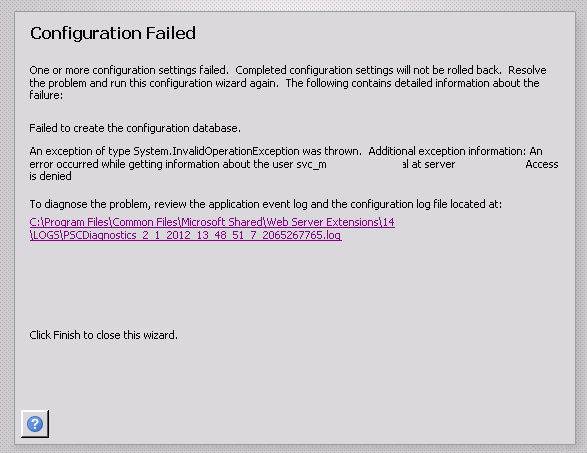
Basically it was a straightforward two server farm installation. The installer account had local admin rights on the web front end server and sysadmin rights on the SQL box. SQL was a dedicated named instance using an alias. I was tutoring the install while an engineer did the driving and as soon as we hit step 3, blammo! – the Installation failed claiming that the configuration database could not be created.

image

Looking a little deeper into the log, the error message stated:

An error occurred while getting information about the user svc-spfarm at server mydomain.com: Access is denied

Hmm.. After double checking all the obvious things (SQL dbcreator and securityadmin on the farm account, group policy interference, etc) it was clear this was something different. The configuration database was successfully created on the SQL server, although the permissions of the farm account had not been applied. This proved that SQL permissions were appropriate. Clearly this was an issue around authentication and active directory.

There were very few reports of similar symptoms online and the closest I saw was a situation where the person ran the SharePoint configuration wizard using the local machine administrator account by mistake, rather than a domain account. Of course, the local account had no rights to access active directory and the wizard had failed because it had no way to verify the SharePoint farm account in AD to grant it permissions to the configuration database. But in this case we were definitely using a valid domain account.

As part of our troubleshooting, we opted to explicitly give the farm account “Log on as a service” rights (since this is needed for provisioning the user profile service later anyhow). It was then we saw some really bizarre behaviour. We were unable to find the SharePoint farm account in Active Directory. Any attempt to add the farm account to the “log on as a service” right would not resolve and therefore we could not assign that right. We created another service account to test this behaviour and and the same thing happened. This immediately smelt like an issue with Active directory replication – where the domain controller being accessed was not replicating with the others domain controllers. A quick repladmin check and we ascertained that all was fine.

Hmm…

At this point, we started experimenting with various accounts, old and new. We were able to conclude that irrespective of the age of the account, some accounts could be found in Active Directory no problem, whereas others could not be. Yet those that could not be found were valid and working on the domain.

Finally one of the senior guys in the organisation realised the problem. In their AD topology, there was an OU for all service accounts. The permissions of that OU had been modified from the default. The “Domain users” group did not have any access to that OU at all. This prevented service accounts from being enumerated by regular domain accounts (a security design they had adopted some time back). Interestingly, even service accounts that live in this OU cannot enumerate any other accounts in that OU, including themselves.

This caused several problems with SharePoint. First the configuration wizard could not finish because it needed to assign the farm account permissions to the config and central admin databases. Additionally, the farm account would not be able to register managed accounts if those accounts were stored in this OU.

Fortunately, when they created this setup, they made a special group called “Enumerate Service Account OU”. By adding the installer account and the farm account to this group all was well.

I have to say, I thought I had seen most of the ways Active Directory configuration might trip me up – but this was a first. Anyone else seen this before?

Thanks for reading

Paul Culmsee

www.sevensigma.com.au

www.hereticsguidebooks.com

p.s The error log detail is below….


Log Name:      Application

Source:        SharePoint 2010 Products Configuration Wizard

Date:          1/02/2012 2:22:52 PM

Event ID:      104

Task Category: None

Level:         Error

Keywords:      Classic

User:          N/A

Computer:      Mycomputer

Description:

Failed to create the configuration database.

An exception of type System.InvalidOperationException was thrown.  Additional exception information: An error occurred while getting information about the user svc-spfarm at server mydomain: Access is denied

System.InvalidOperationException: An error occurred while getting information about the user svc-spfarm at server mydomain

   at Microsoft.SharePoint.Win32.SPNetApi32.NetUserGetInfo1(String server, String name)

   at Microsoft.SharePoint.Administration.SPManagedAccount.GetUserAccountControl(String username)

   at Microsoft.SharePoint.Administration.SPManagedAccount.Update()

   at Microsoft.SharePoint.Administration.SPProcessIdentity.Update()

   at Microsoft.SharePoint.Administration.SPApplicationPool.Update()

   at Microsoft.SharePoint.Administration.SPWebApplication.CreateDefaultInstance(SPWebService service, Guid id, String applicationPoolId, SPProcessAccount processAccount, String iisServerComment, Boolean secureSocketsLayer, String iisHostHeader, Int32 iisPort, Boolean iisAllowAnonymous, DirectoryInfo iisRootDirectory, Uri defaultZoneUri, Boolean iisEnsureNTLM, Boolean createDatabase, String databaseServer, String databaseName, String databaseUsername, String databasePassword, SPSearchServiceInstance searchServiceInstance, Boolean autoActivateFeatures)

   at Microsoft.SharePoint.Administration.SPWebApplication.CreateDefaultInstance(SPWebService service, Guid id, String applicationPoolId, IdentityType identityType, String applicationPoolUsername, SecureString applicationPoolPassword, String iisServerComment, Boolean secureSocketsLayer, String iisHostHeader, Int32 iisPort, Boolean iisAllowAnonymous, DirectoryInfo iisRootDirectory, Uri defaultZoneUri, Boolean iisEnsureNTLM, Boolean createDatabase, String databaseServer, String databaseName, String databaseUsername, String databasePassword, SPSearchServiceInstance searchServiceInstance, Boolean autoActivateFeatures)

   at Microsoft.SharePoint.Administration.SPAdministrationWebApplication.CreateDefaultInstance(SqlConnectionStringBuilder administrationContentDatabase, SPWebService adminService, IdentityType identityType, String farmUser, SecureString farmPassword)

   at Microsoft.SharePoint.Administration.SPFarm.CreateAdministrationWebService(SqlConnectionStringBuilder administrationContentDatabase, IdentityType identityType, String farmUser, SecureString farmPassword)

   at Microsoft.SharePoint.Administration.SPFarm.CreateBasicServices(SqlConnectionStringBuilder administrationContentDatabase, IdentityType identityType, String farmUser, SecureString farmPassword)

   at Microsoft.SharePoint.Administration.SPFarm.Create(SqlConnectionStringBuilder configurationDatabase, SqlConnectionStringBuilder administrationContentDatabase, IdentityType identityType, String farmUser, SecureString farmPassword, SecureString masterPassphrase)

   at Microsoft.SharePoint.Administration.SPFarm.Create(SqlConnectionStringBuilder configurationDatabase, SqlConnectionStringBuilder administrationContentDatabase, String farmUser, SecureString farmPassword, SecureString masterPassphrase)

   at Microsoft.SharePoint.PostSetupConfiguration.ConfigurationDatabaseTask.CreateOrConnectConfigDb()

   at Microsoft.SharePoint.PostSetupConfiguration.ConfigurationDatabaseTask.Run()

   at Microsoft.SharePoint.PostSetupConfiguration.TaskThread.ExecuteTask()


On the decay (or remarkable recurrence) of knowledge

“That’s only 10%…”

One of my mentors who is mentioned in the book I wrote with Kailash (Darryl) is a veteran project manager in the construction and engineering industry. He has been working as a project manager more than 30 years, is a fellow of the Institute of Engineers and marks exams at the local university for those studying a Masters Degree in Project Management. His depth of knowledge and experience is abundantly clear when you start working with him and I have learned more about collaborative project delivery from him than anyone else.

Recently I was talking with him and he said something really interesting. He was telling some stories from the early days of alliancing based project delivery in Australia (alliancing is a highly interesting collaborative project governance approach that we devote a chapter to in our book). He stated that alliancing at its core is the application of good project management practice. Now I know Darryl pretty well and knew what he meant by that, but commented to him that when you say the word “project management practice,” some would associate that statement with (among other things) a well-developed Gantt chart listing activities with names, tasks and times.

His reply was unsurprising: “at best that’s only 1/10th of what project management is really about.”

Clearly Darryl has a much deeper and holistic view of what project management is than many other practitioners I’ve worked with. Darryl argues that those who criticise project management are actually criticising a small subset of the discipline, based on their less than complete view of what the discipline entails. Thus by definition, the remedies they propose are misinformed or solve a problem that has already been solved.

Whether you agree with Darryl or not, there is a pattern here that occurs continually in organisation-land. Fanboys of a particular methodology, framework model or practice (me included) will waste no time dumping on whatever they have grown to dislike and swear that their “new approach” addresses the gaps. Those with a more holistic view like Darryl might argue that crusaders aren’t really inventing anything new and that if a gap exists, it’s a gap in the knowledge of those doing the criticising.

As Ambrose Bierce said, “There is nothing new under the sun but there are lots of things we don’t know.”

From project management to systems thinking…

Now with that in mind, here’s a little anecdote. A few weeks back I joined a Design Thinking group on LinkedIn. I had read about Design Thinking during its hype phase a couple of years ago and my immediate thought was “Isn’t this just systems thinking reinvented?” You see, I more or less identify myself as a bit of a pragmatic systems thinker, in that I like to broaden a discussion, but I also actually get shit done. So I was curious to understand how design thinkers see themselves as different from systems thinkers.

I followed several threads on the LinkedIn group as the question had been discussed a few times. Unfortunately, no-one could really put their finger on the difference. Eventually I found a recent paper by Pourdehnad, Wexler and Wilson which went into some detail on the two disciplines and offered some distinctions. I won’t bother you with the content, except to say it was a good read, and left me with the following choices about my understanding of systems and design thinking:

  • That my understanding of systems thinking is wrong and I am in fact a design thinker after all
  • That I am indeed a systems thinker and design thinking is just systems thinking with a pragmatic bent

Of course being a biased human, I naturally believe the latter point is more correct. clip_image002

From systems to #stoos

Like the Snowbird retreat that spawned the agile manifesto, the recent stoos movement has emerged from a group of individuals who came together to discuss problems they perceive in existing management structures and paradigms. Now this would have been an exhilarating and inspiring event to be at – a bunch of diverse people finding emergent new understandings of organisations and how they ought to be run. Much tacit learning would have occurred.

But a problem is that one has to have been there to truly experience it. Any published output from this gathering cannot convey the vibe and learning (the tacit punch) that one would get from experiencing the event in the flesh. This is the effect of codifying knowledge into the written form. Both myself and Kailash were fully cognisant of this when we read the material on the stoos website and knew that for us, some of it would cover old ground. Nevertheless, my instinctive first reaction to what I read was “I bet someone will complain that this is just design thinking reinvented.”

Guess what… a short time later that’s exactly what happened too. Someone tweeted that very assertion! Presumably this opinion was offered by a self-identified design thinker who felt that the stoos crowd was reinventing the wheel that design thinkers had so painstakingly put together. My immediate urge was to be a smartarse and send back a tweet telling this person that design thinking is just pragmatic systems thinking anyway so he was just as guilty as the #stoos crowd. I then realised I might be found guilty of the same thing and someone might inform me of some “deeper knowing” than systems thinking. Nevertheless I couldn’t resist and made a tweet to that effect.

The decay (or remarkable recurrence) of knowledge…

(At this point I discussed this topic with Kailash and have looped him into the conversation)

Both of us see a pattern of a narrow focus or plain misinterpretation of what has come before. As a result, it seems there is a tendency to reinvent the wheel and slap a new label on claiming it to be unique or profound. We wonder therefore, how much of the ideas of new groups or movements are truly new.

Any corpus of knowledge is a bunch of memes – “ideas, behaviours or styles that spread from person to person within a culture.” Indeed, entire disciplines such as project management can be viewed as a bunch of memes that have been codified into a body of knowledge. Some memes are “sticky,” in that they are more readily retained and communicated, while others get left behind. However, stickiness is no guarantee of rightness. Two examples of such memes that we covered in our book are the waterfall methodology and the PERT scheduling technique Though both have murky origins and are of questionable utility, they are considered to be stock standard in the PM world, at least in certain circles. While it would take us too far afield to recount the story here (and we would rather you read our book Smile ) the point is that some techniques are widely taught and used despite being deeply flawed. Clearly the waterfall meme had strong evolutionary characteristics of survival while the story of its rather nuanced beginnings have been lost until recently.


A person indoctrinated in a standard business school curriculum sees real-life situations through the lens of the models (or memes!) he or she is familiar with. To paraphrase a well-known saying – if one is familiar only with a hammer, every problem appears as a nail. Sometime (not often enough!) the wielder of the metaphorical hammer eventually realises that not all problems yield to hammering. In other words, the models they used to inform their actions were incomplete, or even incorrect. They then cast about for something new and thus begin a quest for a new understanding. In the present day world one doesn’t have to search too hard because there are several convenient corpuses of knowledge to choose from. Each supply ready-made models of reality that make more sense than the last and as an added bonus, one can even get a certification to prove that one has studied it.

However, as demonstrated above with the realisation that not all problems yield to hammering, reality can truly be grasped only through experience, not models. It is experience that highlights the difference between the real-world and the simplistic one that is captured in models. Reality consists of complex, messy situations and any attempt to capture reality through concepts and models will always be incomplete. In the light of this it is easy to see why old knowledge is continually rediscovered, albeit in a different form. Since models attempt to grasp the ungraspable, they will all contain many similarities but will also have some differences. The stoos movement, design thinking and systems thinking are rooted in the same reality, so their similarities should not be surprising.

Coming back to Darryl – his view of project management with 30 years experience includes a whole bunch of memes and models, that for whatever reason, tend to be less sticky than the ones we all know so well. Why certain memes are less successful than others in being replicated from person to person is interesting in its own right and has been discussed at length in our book. For now, we’ll just say that those who come up with new labels to reflect their new understandings are paradoxically wise and narrow minded at the same time. They are wise in that they are seeking better models to understand the reality they encounter, but at the same time likely trashing some worthwhile ones too. Reality is multifaceted and cannot be captured in any particular model, so the finders of a new truth should take care that they do not get carried away by their own hyperbole.

Thanks for reading

Paul Culmsee (with Kailash Awati)

www.hereticsguidebooks.com


« Previous PageNext Page »

Today is: Saturday 7 March 2026 -