Back to Cleverworkarounds mainpage
 

A call for help Canada – SharePoint Governance and Information Architecture Class in Toronto

Tags: Conference,SharePoint,Training @ 12:41 am

Hi all

For those of you that enjoy reading this blog, I really need your help. I am running my SharePoint Governance and Information Architecture master classes in North America and Canada in May 2011. This is a bit of a “one night only” thing, because it is a damn long way for me to travel, so I rarely visit the USA and I have never been to Canada. It’s unlikely that I will be back here for some time.

My SharePoint governance class has been run in London, Dublin, Sydney, Perth and Wellington. It is also about to be run in the Netherlands in May by 21apps. Responses have been terrific from attendees thus far. In May, I will be in the US/Canada, in the following locations:

I’ll also be running a class in Brisbane in June too.

Seattle is looking good at this stage, but Toronto is not. If any Canadians reading this blog would like to see this class happen in your shores, then please help us by spreading the word. Without your help, we may not be able to commit to Toronto at all.

If you want to see what you are in for, then why not watch the video below from the New Zealand SharePoint conference where I cover the first half an hour of the course. Imagine two days of such fun and frivolity!!

image


Thanks for reading

Paul Culmsee

www.sevensigma.com.au


Consequences of complexity–the evilness of the SharePoint 2010 User Profile Service

Hiya

A few months back I posted a relatively well behaved rant over the ridiculously complex User Profile Service Application of SharePoint 2010. I think this component in particular epitomises SharePoint 2010’s awful combination of “design by committee” clunkiness, along with real-world sheltered Microsoft product manager groupthink which seems to rate success on the number of half baked features packed in, as opposed to how well those features install logically, integrate with other products and function properly in real-world scenarios.

Now truth be told, until yesterday, I have had an unblemished record with the User Profile Service – being able to successfully provision it first time at all sites I have visited (and no I did not resort to running it all as administrator). Of course, we all have Spence to thank for this with his rational guide. Nevertheless, I am strongly starting to think that I should write the irrational guide as a sort of bizzaro version of Spencers articles, which combines his rigour with some mega-ranting ;-).

So what happened to blemish my perfect record? Bloody Active Directory policies – that’s what.

In case you didn’t know, SharePoint uses a scaled down, pre-release version of Forefront Identify Manager. Presumably the logic here to this was to allow more flexibility, by two-way syncing to various directory services, thereby saving the SharePoint team development time and effort, as well as being able to tout yet another cool feature to the masses. Of course, the trade-off that the programmers overlooked is the insane complexity that they introduced as a result. I’m sure if you asked Microsoft’s support staff what they think of the UPS, they will tell you it has not worked out overly well. Whether that feedback has made it way back to the hallowed ground of the open-plan cubicles of SharePoint product development I can only guess. But I theorise that if Microsoft made their SharePoint devs accountable for providing front-line tech support for their components, they will suddenly understand why conspiracy theorist support and infrastructure guys act the way they do.

Anyway I better supress my desire for an all out rant and tell you the problem and the fix. The site in question was actually a fairly simple set-up. Two server farm and a single AD forest. About the only thing of significance from the absolute stock standard setup was that the active directory NETBIOS name did not match the active directory fully qualified domain name. But this is actually a well known and well covered by TechNet and Spence. A quick bit of PowerShell goodness and some AD permission configuration sorts the issue.

Yet when I provisioned the User Profile Service Application and then tried to start the User Profile Synchronisation Service on the server (the big, scary step that strikes fear into practitioners), I hit the sadly common “stuck on starting” error. The ULS logs told me utterly nothing of significance – even when i turned the debug juice to full throttle. The ever helpful windows event logs showed me Event ID 3:

ForeFront Identity Manager,
Level: Error

.Net SqlClient Data Provider: System.Data.SqlClient.SqlException: HostId is not registered
at Microsoft.ResourceManagement.Data.Exception.DataAccessExceptionManager.ThrowException(SqlException innerException)
at Microsoft.ResourceManagement.Data.DataAccess.RetrieveWorkflowDataForHostActivator(Int16 hostId, Int16 pingIntervalSecs, Int32 activeHostedWorkflowDefinitionsSequenceNumber, Int16 workflowControlMessagesMaxPerMinute, Int16 requestRecoveryMaxPerMinute, Int16 requestCleanupMaxPerMinute, Boolean runRequestRecoveryScan, Boolean& doPolicyApplicationDispatch, ReadOnlyCollection`1& activeHostedWorkflowDefinitions, ReadOnlyCollection`1& workflowControlMessages, List`1& requestsToRedispatch)
at Microsoft.ResourceManagement.Workflow.Hosting.HostActivator.RetrieveWorkflowDataForHostActivator()
at Microsoft.ResourceManagement.Workflow.Hosting.HostActivator.ActivateHosts(Object source, ElapsedEventArgs e)

The most common issue with this message is the NETBIOS issue I mentioned earlier. But in my case this proved to be fruitless. I also took Spence’s advice and installed the Feb 2011 cumulative update for SharePoint 2010, but to no avail. Every time I provisioned the UPS sync service, I received the above persistent error – many, many, many times. 🙁

For what its worth, forget googling the above error because it is a bit of a red herring and you will find issues that will likely point you to the wrong places.

In my case, the key to the resolution lay in understanding my previously documented issue with the UPS and self-signed certificate creation. This time, I noticed that the certificates were successfully created before the above error happened.  MIISCLIENT showed no configuration had been written to Forefront Identity Manager at all. Then I remembered that the SharePoint User Profile Service Application talks to Forefront over HTTPS on port 5725. As soon as I remembered that HTTP was the communication mechanism, I had a strong suspicion on where the problem was – as I have seen this sort of crap before…

I wondered if some stupid proxy setting was getting in the way. Back in the halcyon days of SharePoint 2003, I had this issue when scheduling SMIGRATE tasks, where the account used to run SMIGRATE is configured to use a proxy server, would fail. To find out if this was the case here, a quick execute of the GPRESULT tool and we realised that there was a proxy configuration script applied at the domain level for all users. We then logged in as the farm account interactively (given that to provision the UPS it needs to be Administrator anyway this was not a problem). We then disabled all proxy configuration via Internet explorer and tried again.

Blammo! The service provisions and we are cooking with gas! it was the bloody proxy server. Reconfigure group policy and all is good.

Conclusion

The moral of the story is this. Anytime windows components communicate with each-other via HTTP, there is always a chance that some AD induced dumbass proxy setting might get in the way. If not that, stateful security apps that check out HTTP traffic or even a corrupted cache (as happened in this case). The ULS logs will never tell you much here, because the problem is not SharePoint per se, but the registry configuration enforced by policy.

So, to ensure that you do not get affected by this, configure all SharePoint servers to be excluded from proxy access, or configure the SharePoint farm account not to use a proxy server at all. (Watch for certificate revocation related slowness if you do this though).

Finally, I called this post “consequences of complexity” because this sort of problem is very tricky to identify the root cause. With so many variables in the mix, how the hell can people figure this sort of stuff out?

Seriously Microsoft, you need to adjust your measures of success to include resiliency of the platform!


Thanks for reading

Paul Culmsee

www.sevensigma.com.au


The facets of collaboration part 5: It’s all Gen-Y’s fault – or is it?


Hi all

imageWelcome to another exploration of the collaborative world through a lens called the facets of collaboration. If you are joining us for the first time, I am writing a series of posts that looks at how our perception of collaboration influences our penchant for certain collaborative tools and approaches. SharePoint, given that it is touted as a collaboration platform, inevitably results in consultants never being able to give a straight answer. This is because SharePoint is so feature-rich (and as a result caveat-rich), that there are always fifty different ways a situation can be approached. Add the fact that many clients do not necessarily know what they want and learn about their problem by examining potential solutions, we have all the hallmarks of a wicked problem in the making.

These wicked problems, underpinning SharePoint, often results in Robot Barbie situations (cue the image to the left), which is the metaphor that I started this series with. Robot Barbie represents everything wrong about SharePoint deployments, as it is symptomatic of throwing features at a platitude, pretending to be solving a real problem and then wondering why the result doesn’t gel at all. It is a pattern of behaviour that is similar to an observation made by the very wise (and profane) Ted Dziuba who once spoke these words of wisdom.

If there’s one thing all engineers love to do, it’s create APIs. It’s so awesome because you can draw on a white board and feel like you put in a good day’s work, despite having solved no real, actual problems. Web 2.0 engineers, in addition to their intrinsic love of APIs, have a real hard-on for anything having to do with a social network. For example, developing a Facebook application lets them call their shitty little PHP program an "application" running on a "platform," like a real, live computer programmer does. Make-believe time is so much fun, even for adults.

Apart from making me giggle, Dziuba may have a point. Elsewhere on this blog I have spent time explaining that there are different types of problems that require different approaches to solving them (wicked vs. tame). My conjecture is that collaboration itself is exactly the same in this regard. People who espouse a particular type of tool or approach as the utopian solution to collaboration are taking a one size fits all approach to a multifaceted area and even worse, treating that area as a platitude. Anyone who calls themselves an Information Architect and doesn’t at least give cursory examination to the dimensions or facets of collaboration is likely to be doing their stakeholders a disservice.

All of us have certain biases, and I am no exception. For a start, I am generation X – the so-called cynical generation. Apparently we whinge and whine about everything and then blame it all on generation-Y. Thus, if cynicism is the gen-X stereotype, then I will happily accept being the poster child. I mean seriously, all of you vanity obsessed, self interested generation y’ers, if you spend a little less time preening and more time thinking, we might get some wisdom out of you (see – I am such a cynical gen-X right now).

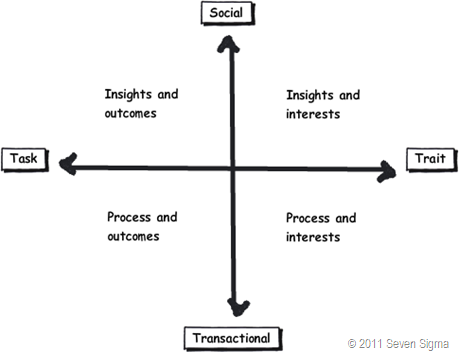
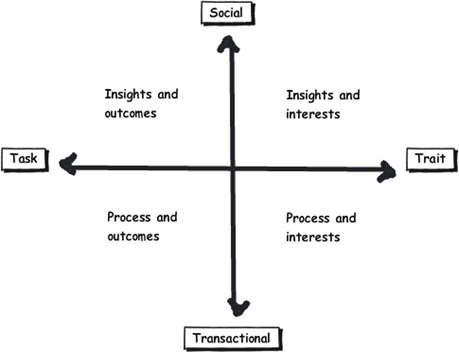
So let’s recap the facets of collaboration. The model I came up with identifies four major facets for collaborative work: Task, Trait, Social and Transactional.

  • Task: Because the outcome drives the members’ attention and participation
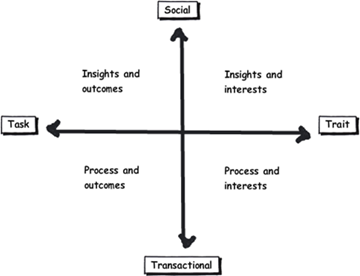
  • Trait: Because the interest drives the members’ attention and participation
  • Transactional: Because the process drives the members’ attention and participation
  • Social: Because the shared insight drives the members’ attention and participation

image

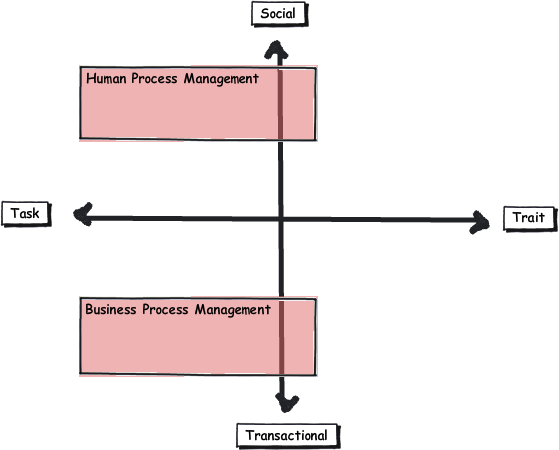
In the last post, I used the model to examine the notion of Business Process Management versus Human Process Management and looked at some of the claims and counter claims made by proponents of each. This time let’s up the ante and talk about something curlier. We will examine the notion that social networking in the enterprise is the answer to improving collaboration within the enterprise. On first thought, it makes perfect sense, given the incredible success of Facebook, LinkedIn and Twitter. Nevertheless, there is ongoing debate about the use and value of social tools in the enterprise driven by their rise outside of organisational contexts. One particularly strongly worded quote is from Aaron Fulkerson, co-founder and CEO of MindTouch who doesn’t mince his words:

This class of software forces business users to adopt the myopic social visions imagined by the developers, which are nearly identical to their corresponding consumer web implementations. In short, social software is not solving business problems. In fact, these applications only serve to treat symptoms of the problems businesses face. They exacerbate the real problems within businesses by creating distractions and, worse, proliferate more disconnected data and application silos.

Ouch! Even within the SharePoint community there is significant variation of opinions as to the value of social. While I better protect the innocent and not name names, I have spoken with several well known SharePointers who think social is a giant waste of time, versus those who see real value in it. Irrespective of your opinion, you cannot ignore the fact that social is a significant game changer with effects still being felt. While web 2.0 has dropped off the Gartner hype cycle, its effect on particular sectors has been far reaching. Now it seems that all sectors have a 2.0 on the end of their name. For example:

  • Enterprise 2.0
  • Education 2.0
  • Legal 2.0
  • Government 2.0

Clearly, if things were just a flash in the pan, why are governments around the world trying to revitalise their public sector by utilising these tools?

Look at Microsoft as another example. They have, I think smartly, recognised industry trends and reacted to them via the introduction of a number of new SharePoint features, such as tagging/folksonomy via managed metadata, ratings columns, enhanced wiki capabilities and a significant investment in the capabilities of my-sites. Their clients now have the option to leverage these features should they choose to do so.

So just as there are naysayers, there are the pundits. Many people cite the reasoning that these features are necessary to attract and retain the next generation of workers, who have grown up with these tools in their personal lives. Whether this claim is valid is debatable, but I have to say, I really like the Enterprise 2.0 slide deck below by Scott Gavin for a number of reasons. I think it encapsulates the 2.0 vision, underpinned by social/cloud technologies very nicely. I sometimes ask people to discuss this slide deck in my IA classes and discussion is equally polarising as social networking in the enterprise itself. Some people think it represents the vision for the future, and others think it is hopelessly idealistic and doesn’t reflect cold, hard reality. Take a look for yourself below…

And the survey says…

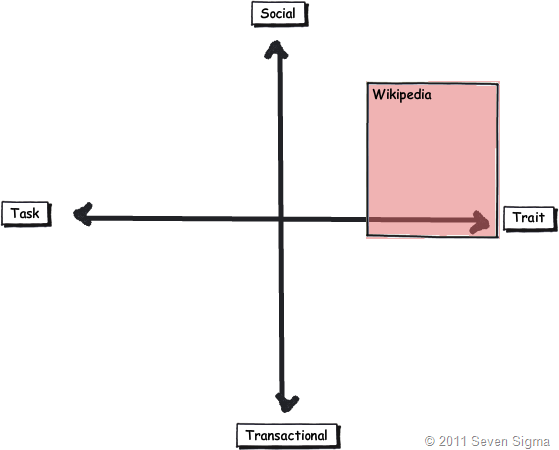
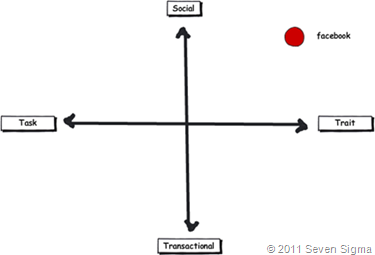
Using the facets quadrants, we can start to see patterns for success of these tools for the enterprise and whether Aaron Fulkerson’s argument has merit or whether Scott Gavin is on the right track. An interesting use of the facet diagram is to plot where various tools and technologies are located. in my classes, I ask people to plot where Facebook belongs on facets diagram. Guess where it is usually drawn? 
image

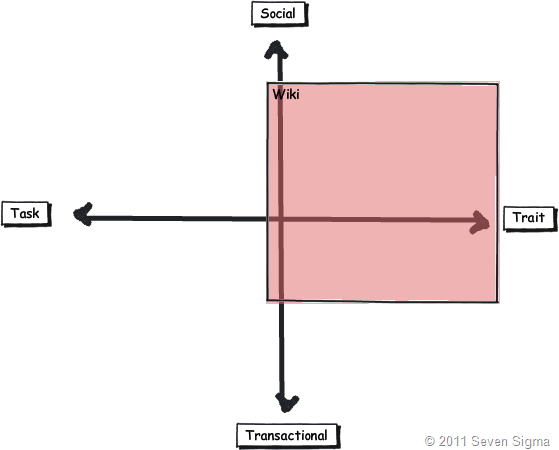
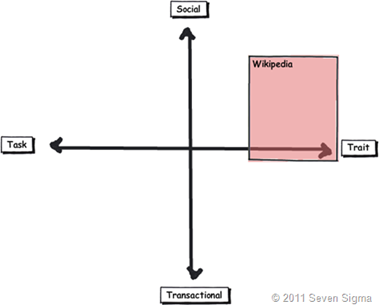
While some people will draw Facebook at various levels on the vertical axis, everyone pretty much describes Facebook (and LinkedIn)  as trait based, while being highly dominant on the social quadrant. As discussed in the last article, if I ask people to plot a crowdsourced tool like Wikipedia, the dominant characteristic is always trait/social. In other words, people maintain and update Wikipedia articles because of their interest in the topic area, not because it helps them get something done.
image_thumb29

Clearly, big social networking technologies are successful in the "trait based social” quadrant. In other words, we tend to use Facebook more for common interest collaboration than to solve a task based collaborative issue (such as deliver a project). Another interesting thing about a lot of social networking technologies is that for many, our work-based collaborative life tends to be more task based, compared to our non-work which is more trait based. In other words, for a lot of us, our work life revolves around working with a group of people for a common outcome and if it was not for that common outcome, we wouldn’t necessarily have much in common (I risk falling victim to my own generalisation here – so I will come back to this later in the section titled “Why User Buy-In Is Hard”).

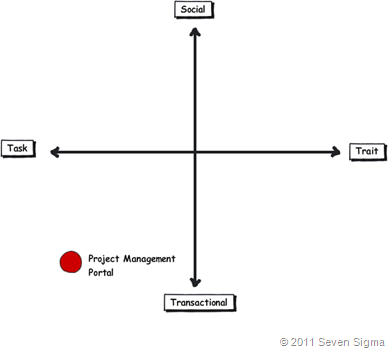
When you look at where Facebook sits in the quadrant, it begs the question of how well this type of tool (or the building blocks it is based on) would work in an organisation that is project (task) based and highly transactional. To that end, consider a project management information system, such as the basic one that Dux espouses in his book or the more complex one that Microsoft sell to organisations. Where do you think it belongs on the quadrant?

When I ask people to plot their project management information system, I typically get this response:
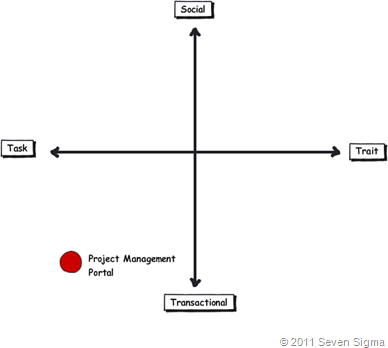
image

I speculate that the further away two tools lie on the spectrum, the more likely we are to have a robot-barbie solution if you blindly mix features that work well in each individual quadrant. The wiki argument I made in part 3 seems to support this contention. If you recall, in part 3 of this series, I mentioned that I ask every attendee of my classes if they had ever seen a successful project management wiki.  Irrespective of the location of the class, the answer was pretty much “no”. I noted that where I had seen successful wikis tended to be where the users of the wiki were linked by strong traits.

Looking Deeper

While that is interesting, I think the facets diagram tells you more than it intends. Obviously, it is clear that these project management systems such as MS Project Server are oriented toward task/transactional (“getting things done”) aspect of project delivery (ie, time, cost, scope, budget and the like). While some people might point to this and say “there you go – I told you all that social crap was a waste of time – bloody gen-Y and their social networking hubris”, I feel this is naive. If task based transactional tools are sufficient, then why do so many projects fail?

I have stated many times on this blog that shared commitment to a course of action requires shared understanding of the problem at hand. The act of aligning a team to project goals and developing this shared understanding is the realm of the task/social quadrant (the top left), where insights and outcomes come together. When I ask people to name tools that live in this space, few can name anything. Obviously, most project management systems are devoid here. Worst still, we subsequently delude ourselves to thinking that shared understanding can come from a few platitudinal paragraphs labelled as a “problem statement”.

Social networking pundits implicitly recognise this issue (and frequently butt heads against command and control type project managers as a result). But i feel they make the mistake in applying a one size fits all approach to collaboration and apply trait based tools as a panacea when they are not wholly appropriate. The social tools seem to fit exceptionally well into the top right quadrant, but not in the top left.

In fact the only tools that spring to mind that belong in the top left category are the sensemaking tools that my company practice, such as Dialogue Mapping.

Where’s the proof, Paul?

So I guess I am arguing that using social tools because they are the “choice of the new generation” ignores a few home truths about the nature of these tools versus the nature of organisational life. Just because Microsoft provide the tools for you, tells you that they are hedging their bets rather than having any more insight than you or me. So to test all of this, let’s use the facets model in a different way to back up some of my observations and suggestions in this post. Guess what happens when I ask people to plot SharePoint itself on the facets map?

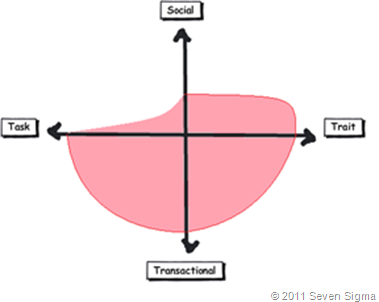
When I asked SharePoint practitioners to do this, they initially drew SharePoint 2007 as a circle over the entire model. Once they did so, they would very often adjust the drawing to emphasise transactional over social collaboration as shown below.
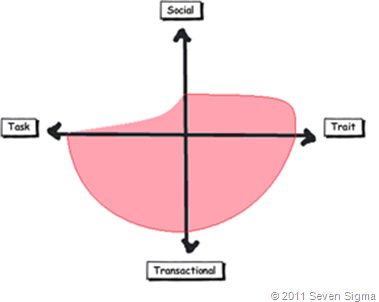
Sharepoint 2007 

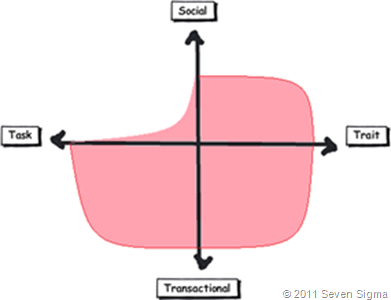
When practitioners were asked to draw SharePoint 2010, they usually indicated a higher representation in in the two social quadrants, but favoured the trait based social over task based social as shown below.
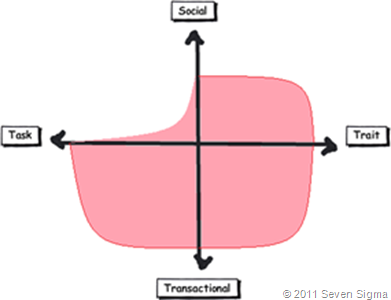
image

What was interesting about this experiment is that very few people drew SharePoint over the entire facets of collaboration. Social collaboration with SharePoint it seems, only stretches so far. This leads me onto more conjecture, and now we get to the bit in the post where we name a giant SharePoint elephant in the room.

Structured tools for social collaboration?

Many collaborative tools purport themselves as operating in the social space. SharePoint 2010 clearly does so, principally due to the Managed Metadata service, pimped MySites with tagging/rating capabilities. But SharePoint’s core heritage is database/metadata driven, document based collaboration. If we go back to our definition of social collaboration as dynamic, unstructured, with sharing of perspectives and insight through pattern sensing, then social collaboration is clearly not a predefined interaction.

Yet, database driven tools like SharePoint, and its building blocks like site columns and content types require considerable up-front planning to install and govern. Many, many inputs need to be well defined and furthermore, unless you have learnt through living the pain of things like content type definitions in declarative CAML, SharePoint buildings blocks are difficult to maintain/change over time. SharePoint suffers from a problem of reduced resiliency over time in that the more you customise it to suit your ends, the less flexible it gets. In the case of social collaboration the problem is worse because we are trying design for outputs where the inputs are not controlled. Trying to turn something that is inherently organic and emergent to something that has an X and Y on it may be misfocused and destined to fail in many circumstances. The realm of well-defined inputs is the realm of transactional collaboration, where workflow and business process management thrive and change is much more controlled before SharePoint ever gets a look in.

SharePoint excels at transactional scenarios as this is its heritage – after all, the majority of its feature set is oriented to transactional collaboration. The fact that people are prepared to draw SharePoint as dominating across across the transactional half of the facets diagram illustrates this.

But this raises interesting, if not slightly heretical question. If we need to use information architects to get a collaborative tool deployed for social collaboration (to get those inputs defined), then are we pushing the solution into the transactional side of the fence? Recall that in part 3 of this series, I looked at document collaboration and noted that when asked to draw team based document collaboration, people typically drew it operating in the social half of the matrix (pasted below for reference). I also noted in part 3 that for team based collaboration, rules and process are much less rigid or formalised with regards to document use and structure. I then referred to a recent NothingbutSharePoint article where a large organisation’s attempts to introduce the usage of content types largely failed. Like the seeming lack of success of wiki’s for task based collaboration, maybe content types simply are not the ideal construct as you move up the Y axis from transactional to social?
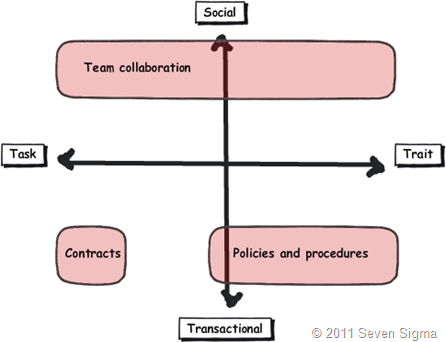
Now do not assume that I am anti metadata/content types here as this is not the case at all. Content types rock when it comes to search and surfacing of related information across a site collection (and beyond if you use search web parts). What I am calling out is the fact that if the SharePoint constructs that we have at our disposal were the panacea for social collaboration, where are the best practices that tell us how to leverage them for success? Perhaps the nature of the collaboration taking place plays a part in the lack of take-up reported in the aforementioned article? Those who advocate highly structured metadata as the only true solution may in fact be pushing a transactional paradigm onto a collaborative model that is ill-suited to it?

The knowledge worker paradox – one of the reasons why user buy-in is hard

Finally for now I’d like to cover one more aspect to this issue. Last year, one of my students looked at the facets and said “Now I know why my users aren’t seeing the value that I see in SharePoint”. When I asked him why, he explained:

“Many of my users are transactional and governed by process – that’s their KPI. Here I am as a knowledge worker, seeing all of these great collaborative features, but I am not judged by a process or transaction. I don’t live in that world. I forget that someone whose performance is judged by process consistency is not going to get all excited by a wiki or tagging or a blog.”

I call this the knowledge worker paradox and it is reminiscent of what I said in part 4 where we looked at BPM vs. HPM. Each role on an organisation is multifaceted. For many roles, there is varying degrees of transactional work taking place. Accordingly some people are very much process driven just as much as they are social driven. Gross generalisations that make statements that “80% of people are knowledge workers or perform knowledge work” do not help matters. In fact they serve to feed the one size fits all mentality that has proven to be detrimental to projects when people fail to recognise that some projects have wicked aspects.

SharePoint people are almost always knowledge workers. Thus if you, as a knowledge worker who is rarely governed by transactional process, think that you have the vision to prescribe a SharePoint driven meta-utopia to meet transactional needs without having lived that world, then if your results are not what you hoped for then to me its hardly surprising.  My student in this case realised that he had been approaching his user base the wrong way. Like Jane in part 1, he did not take into account the dominant facets of collaboration for the roles that he was trying to sell SharePoint into.

When you think about it, the whole argument around records management versus collaborative document management is in effect, an argument between a transactional oriented approach, versus a social oriented one. It is the same pattern as BPM vs. HPM. In records management, the paradigm is that management of the record is more important than the content of the record. Furthermore, that record shouldn’t change. Yet with team based document collaboration, without content there is no document as such and furthermore, the document will change frequently and require less strict controls to grease the gears of collaboration.

Both records oriented people and social pundits commonly make the same mistake of my student, where they force their dominant paradigm on everyone else.

Conclusion

Food for thought, eh?

This is probably my last facets of collaboration post for a while. It is one of these series of articles that I feel has value, but I know it won’t be read by too many 🙂 Nevertheless, I do hope that anyone who has gotten this far through has gotten some value from this examination and sees value in the model to help users make more informed Information Architecture decisions for SharePoint and beyond. I certainly use it now in most engagements and hope that it can be improved upon as a tool, or somehow incorporated into some of the SharePoint standards or maturity model stuff that is out there.

Remember the most important thing of all though. Despite all I have said, it is still definitely all generation y’s fault!

Thanks for reading


Paul Culmsee

www.sevensigma.com.au



Australian SharePoint Conference Community Challenge–How we did it.

Hiya

image

I recently participated in the Australian and New Zealand community SharePoint conferences and had a blast. First up, I was given the opportunity to keynote the Australian conference on day 2, where I spoke about SharePoint Governance home truths. It received very positive feedback and I was told by a lot of people that it really made them rethink their governance approach. In fact, in the New Zealand session, as I was going through some of the common mistakes people make, I could see people cringing as they knew they were guilty as charged. One attendee buried her head in her hands when I started talking about the “buffet of platitudes” (what is the “buffet of platitudes” you ask? Come to my class to find out! 🙂

The community challenge in Australia was a real highlight. This was a new addition to the conference where a group of conference attendees delivered a SharePoint solution for a not for profit organisation. WorkVentures was the organisation selected and the challenge progressed over three sessions, facilitated by SharePoint community leaders. Session one (Define and Design), was a business session which aimed to work through the high level requirements that WorkVentures had for an intranet, their aims for what they hope it would achieve and what they wanted included.  

This post was written on the assumption that you are familiar with some of Seven Sigma’s methods. If not, then we suggest you stop and read a couple of foundational posts first – especially if these maps do not mean much to you.

The Importance of Goal Alignment…

Nick Hadlee was supposed to chair this define and design session, but was unable to get to the Australian conference due to the earthquake events in Christchurch. As a result, I ended up inheriting this role, so I roped in Andrew Jolly to help me on this, because we have a lot in common and work in a similar way. User surveys had been conducted with WorkVentures staff and management, which gave some insights into potential focus areas for SharePoint. Even so, I had no way of knowing whether those potential focus areas made strategic sense. To resolve this issue, we examined WorkVentures 2009 Annual Report to understand their core purpose and strategic focus areas and various business units. After all, it is all well and good to develop some SharePoint functionality, but if you can’t see how that component helps achieve strategic objectives, how do you know it is the right thing to do?

The annual report proved to be a goldmine. It stated that WorkVentures had embarked on an enterprise improvement strategy prior to SharePoint and the community challenge being on the radar. This enterprise improvement plan, incorporating quality management, IT, HR and business strategy development, provided us the context to focus SharePoint as an enabler that fitted within the plan.

Andrew wasn’t due to fly into Sydney until the evening before the conference. So the day before the conference, Debbie Ireland and I visited WorkVentures on-site, meeting with the CEO, CFO and Marketing Director. The purpose of this visit was to ensure a shared understanding among us all of the alignment of the SharePoint community challenge outputs to the WorkVentures vision, purpose and strategic focus areas. From this conversation, which I mapped, some really interesting stories enabled them to pinpoint one of the key success factors for any SharePoint implementation at WorkVentures – “Bridging Silos”.

Ultimately, we identified four key areas of strategic focus for SharePoint that aligned to WorkVentures strategic goals. Below is a screenshot of the end-to-end alignment in map format . This map was used during the “define and design” conference session to help focus attendees on the purpose of SharePoint for this organisation, as well as noting the key areas that we would have to do well, to consider SharePoint a success.

FocusAreas

Stories that led to the goal

Lawrence Luk – the CFO of WorkVentures told Debbie and I several captivating stories that surfaced the bridging silos area of focus. One interesting facet of WorkVentures was that staff from the whole organisation came together once per year – at the Christmas party. This is because each WorkVentures “division” or “business unit” is in effect a separate mini-company, with different goals, customers, vertical markets and regulatory requirements. Thus the problem of silos isn’t a negative one in the sense where dysfunctional “culture” is blamed as such. More that it was the simple fact that each business unit didn’t have a lot in common with other business units. The silo effect was a by-product and it was not driven by negative behaviours.

A great example of this was one particular business unit, Connect IT. It solicits organisations to donate old PC’s, which provides opportunities for skills development for disadvantaged people by teaching them how to refurbish these PC’s. These refurbished PC’s are then sold at low cost. A KPI for this program is the number of organisations donating old PC’s to WorkVentures to sustain ConnectIT. Lawrence had the experience where WorkVentures financial auditors, who had been doing the books for two years prior, asked him why they hadn’t been approached to donate PC’s as they had some. Lawrence realised that he almost missed a great opportunity to help the ConnectIT division achieve one of their key KPI’s. Furthermore, the auditor should never have had to ask themselves. Instead all WorkVentures staff should have this core KPI instilled and internalised so that they could proactively seek out these opportunities to help the other business units.

Another couple of interesting contextual facets illustrated that there were other forms of silo that went beyond a purely divisional basis:

  • Most backoffice staff had never been to the Campbelltown office, where all of the “coal face” work took place with the community.
  • English was a second language to many staff.
  • Not all staff had their own PC’s.

These stories catalysed the conversation to many other examples of missed opportunities, where one business unit has the means to make a massive difference to the results of another. On reflection, it was realised that the nature of WorkVentures business units, being so independent of each-other, inevitably had a silo effect. There was a lack of awareness organisation-wide of the core KPI’s of each unit, hence bridging (not breaking) these silos became a key theme. If SharePoint was to have a long lasting, successful legacy, then it had to play a part in addressing this issue.

The define and design session live…

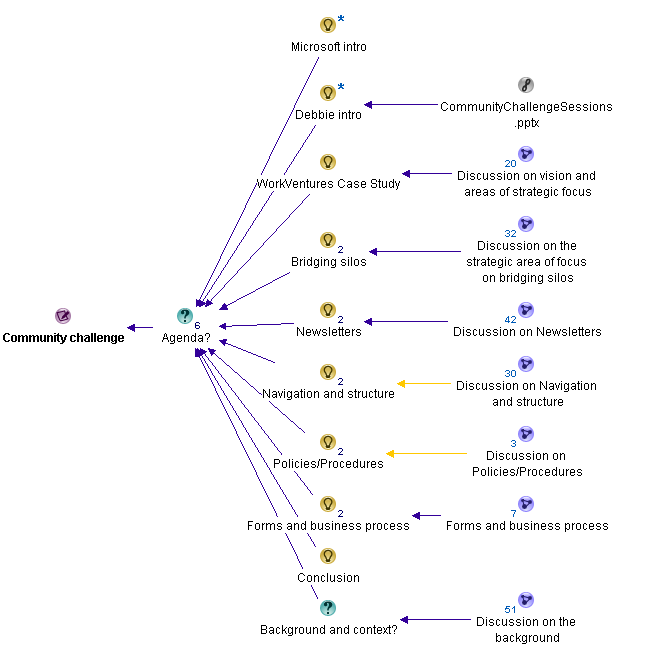
From there, with invaluable help from Andrew Jolly, we planned and then executed the requirements session with a conference audience of around one hundred people. We split the session up into several areas and the map below shows how we structured it.

After Microsoft did their intro, Debbie explained the context of the community challenge via a short PowerPoint presentation. I then took the chair and explained the vision and areas of focus map (the image above) and stressed to the audience that they were going to be participating in this session as well. I also stressed that no matter what solutions or ideas they came up with, they had to justify them against the four key focus areas, which I went through.

image

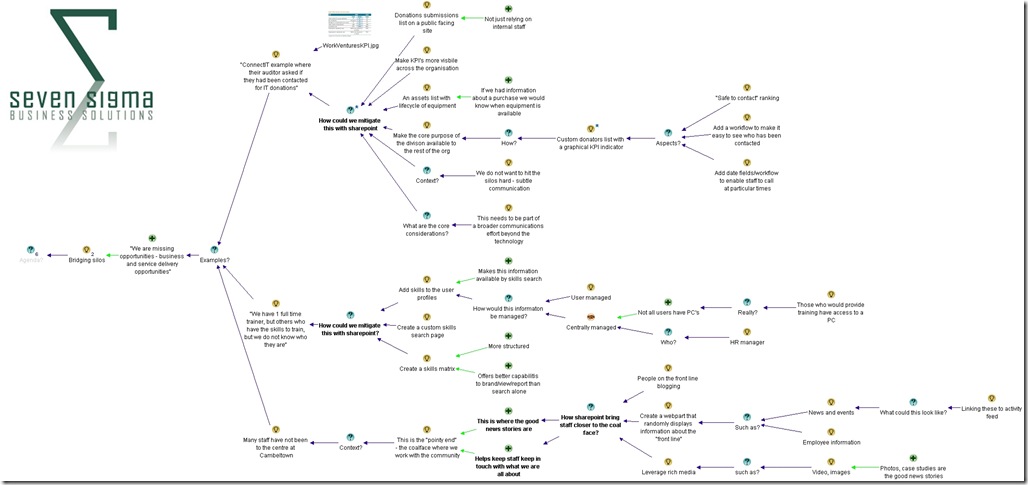
Then we got down to business where I dialogue mapped, with Andrew and I co-facilitating. We decided to focus people’s attention to the core goal of bridging silos as a topic area itself, and ask the audience how SharePoint could indeed bridge silos. We utilised three of the examples that Lawrence gave us  and then leveraged the wisdom of the (large) crowd to solicit ideas. Below is the dialogue map that shows the richness of this discussion (click to enlarge). You will see in this map that for each story told to us by Lawrence, we asked the question “How could we mitigate this with SharePoint?”. The purpose of asking the question this way helped the audience to focus on SharePoint as an enabler to a greater end – and not to be a tool looking for a problem to solve.


Silos

Given that we only had around 45 minutes to work with, Andrew and I could only spend around 15 minutes on the bridging silos area. But the map above shows that a lot of very valuable rationale from the audience was captured. The real benefit though was focusing the audience onto the broader goals and how SharePoint could enable them. This was critical to do, because now we had to switch focus from the lofty world of goal alignment to focusing on how SharePoint building blocks could be used to achieve specific ends.

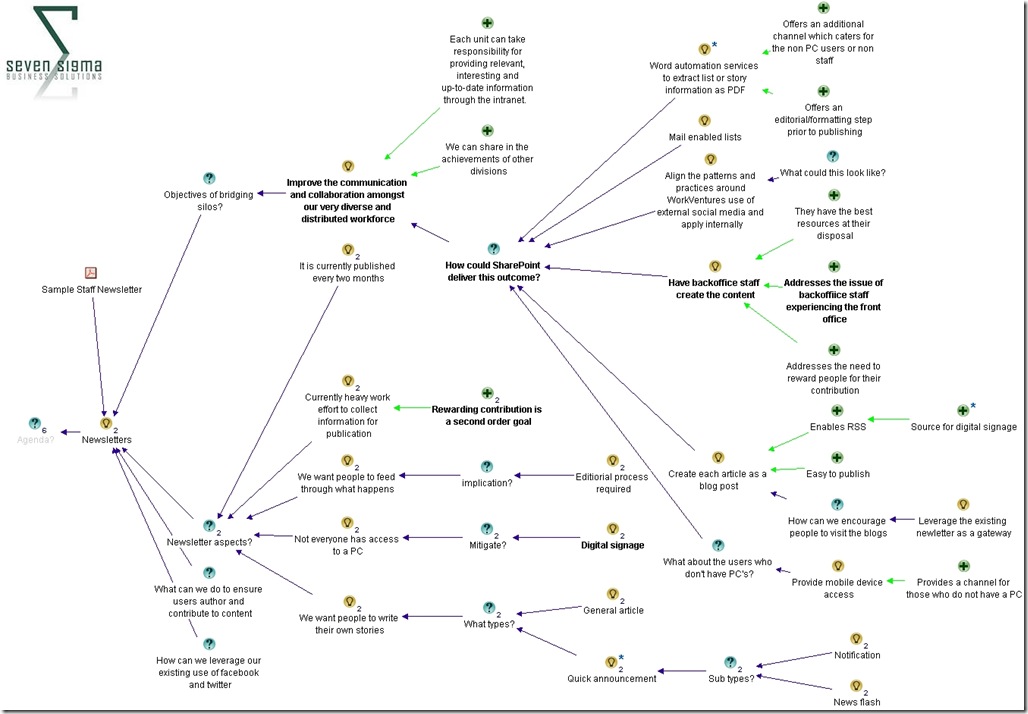
We examined how SharePoint could augment the existing newsletter based method for dissemination of information within WorkVentures. We showed the audience what sample WorkVentures newsletter looked like and reviewed some of the key contextual aspects to newsletters within WorkVentures in terms of their creation, management, reach and format.  We reminded the audience about the importance of bridging silos and then called for ideas from the audience as to how SharePoint could improve the dissemination of news. What was particularly great about this session was that audience members began to relate SharePoint ideas against the key focus areas and identify some of the governance aspects that would be required to make it work.

For example, if you look at the map below (click to enlarge), one of the ideas for the newsletter was a fairly technical one: leveraging “word automation services to extract list or story items and create a PDF”. On first glance one might think “wow that’s fairly heavy” (and not to mention quite nerdy), but the justification for this idea was that it would still account for those WorkVentures users who do not have a PC and therefore access to the portal. Another idea was “Have backoffice staff create the content” on the basis that in doing so, they would get a better feel for coal-face issues that they typically do not see normally. When you think about it, this idea is not SharePoint at all, but more of a strategy for how SharePoint should be adopted and accountabilities for doing so (i.e. a governance approach!)

The key point here is that In both of these examples, audience members were clearly relating their ideas back to the previously established goals, which in turn were aligned to the WorkVentures vision, purpose and key strategic focus areas. Not bad for a couple hours work eh? Smile

Newsletters

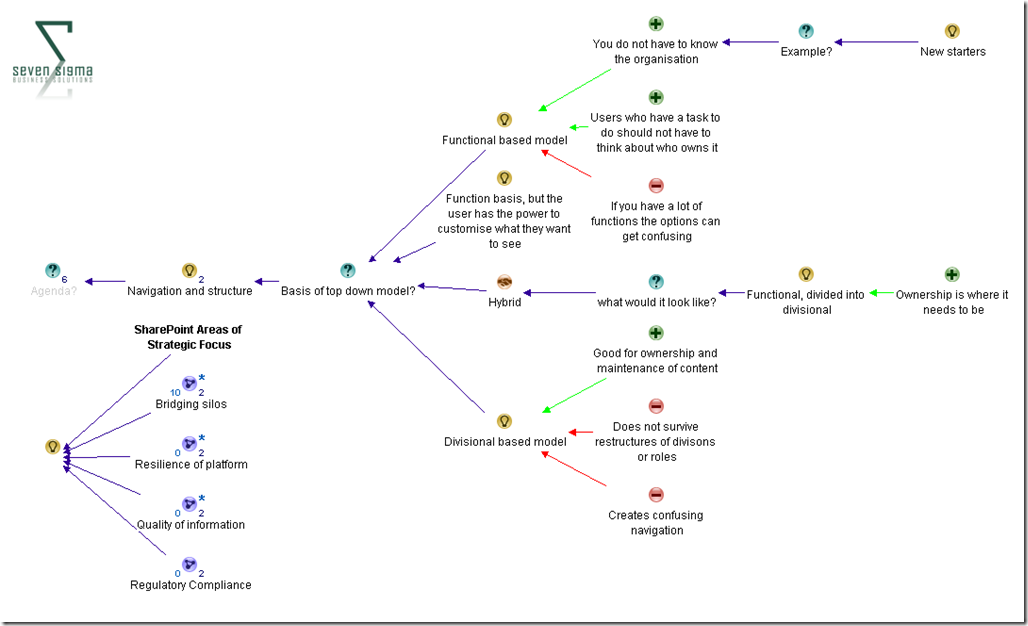
With the little time that we had left, we also looked at site navigation and structure, where the audience resolved that WorkVentures would be best served by a hybrid navigation model that was functionally driven primarily (i.e. task based navigation), but then divided into divisional areas. (As opposed to a purely organisational structure driven navigation model).

As you can see below, we made a point of always showing the four areas of focus for SharePoint overall, to ensure that decisions made were informed by them.

image

Conclusion

I have to say that given the timeframe and constraints, I think we did a great job of developing a shared vision for SharePoint, how it fitted into WorkVentures organisational and strategic context, and then focusing a diverse audience into looking at SharePoint building blocks through that lens. The dialogue maps were very rich, with some terrific ideas, and WorkVentures staff were thrilled to see the alignment of SharePoint to their strategic goals.

I use similar methods to this for non IT projects too, and I think that if we had a week to work on WorkVentures, we would have created something really special. Nevertheless, from my point of view, I think that the community challenge is an terrific idea, I enjoyed being a part of it, and I have to offer special thanks to Debbie and Andrew in particular for helping to make this into a really great mini-engagement. Hopefully we can do it all again next year.

Thanks for reading

Paul Culmsee

www.sevensigma.com.au


MOSS World

Tags: Collaboration,Offbeat @ 3:22 am

Wow, Christian Buckley doesn’t waste any time. First up, watch this video then I will explain:

Now I am writing this at 8am and around 10pm last night I recorded this vid with him and now it has photos, montage and credits. I don’t think he slept.

The story behind this goes back a bit. When Dux first told me he was going to do a rap – I think 2 years ago or more at a Best Practices Conference – and showed me the lyrics to “SharePoint is Nice Nice Baby”, I thought “no that will never work because its framed too nicely”. (Of course I was completely wrong and Dux stole the show and continues to do so. )

Anyway, to me Mad World (the Gary Jule version) seemed the perfect song for SharePoint because it gave me the right sort of subtlety to work with my cynical sense of humour. Much of the lyrics were done years back and I sent them to Ruven Gotz and Peter Serzo who both sent back some mods. Somehow by chance the subject came up again in Wellington New Zealand with Christian Buckley. Christian happens to be a great singer who has been in bands in his past. Our hotel lobby had an old piano so the scene was set.  A bit of Lennon/McCartney-esque collaboration (Culmsee/Buckley of course) on lyrics and we were ready to go.

We did one take, with Mark Miller providing magnificent cinematography (the flowers fade in and fade out was sheer gold)

In case you are interested, here are the full lyrics as far as I remember them… enjoy!


All around me are new interfaces

Shared workspaces, my-site places

Run by admins who can’t tie their laces

Page loads snail pace, backups no trace


Out of box is just so boring, i think its kind of sad

My dreams of coding c-sharp are the best I ever had

I find it hard to tell you, the root hive’s really toast

When coders put in SharePoint its a really really

Mad world, Mad World


Metrosexuals try to make it facebook

Where’s my hairspray? where’s my hairspray?

Using designer to create a workflow

No-one follows, no-one follows


Out of box is just so boring, i think its kind of sad

My dreams of coding c-sharp are the best I’ve ever had

I find it hard to tell you, the root hive’s really toast

When coders put in SharePoint its a really really

Mad world, Mad World


Content database is like Godzilla

8 hour backups, 8 hour backups

Mess with settings inside web.config

Where’s my homepage? where’s my homepage?


Out of box is just so boring, i think its kind of sad

Code monkeys blame their admins but their memory leaks suck bad

I find it hard to tell you, the sequel’s out of space

When tech-geeks put in SharePoint its a very very

Mad world, MOSS world


How to use Charlie Sheen to improve your estimating…

Monte Carlo simulations are cool – very cool. in this post I am going to try and out-do Kailash Awati in trying to explain what they are. You see, I am one of these people who’s eyes glaze over the minute you show me any form of algebra. Kailash recent wrote a post to explain Monte Carlo to the masses, but he went and used a mathematical formula (he couldn’t help himself), and thereby lost me totally. Mind you, he used the example of a drunk person playing darts. This I did like a lot and gave me the inspiration for this post.

So here is my attempt to explain what Monte Carlo is all about and why it is so useful.

I have previously stated, that vaguely right is better than precisely wrong. If someone asks me to make an estimate on something, I offer them a ranged estimate, based on my level of certainty. Thus for example, if you asked me to guess how many beers per day Charlie Sheen has been knocking back lately, I might offer you an estimate of somewhere between 20 and 50 pints. I am not sure of the exact number (and besides, it would vary on a daily basis anyway) , so I would rather give you a range that I feel relatively confident with, than a single answer that is likely to be completely off base.

Similarly, if you asked me how much a SharePoint project to “improve collaboration” would cost, I would do a similar thing. The difference between SharePoint success and Charlie Sheen’s ability to keep a TV show afloat is that with SharePoint, there are more variables to consider. For example, I would have to make ranged estimates for the cost of:

  • Hardware and licensing
  • Solution envisioning and business analysis
  • Application development
  • Implementation
  • Training and user engagement

Now here is the problem. A CFO or similar cheque signer wants certainty. Thus, if you give them a list of ranged estimates, they are not going to be overly happy about it. For a start, any return on investment analysis is by definition, going to have to pick a single value from each of your estimates to “run the numbers”. Therefore if we used the lower estimate (and therefore lower cost) for each variable, we would inevitably get a great return on investment. If we used the upper limit to each range, we are going to get a much costlier project.

So how to we reconcile this level of uncertainty?

Easy! Simply run the numbers lots and lots (and lots) of times – say, 100,000 times, picking random values from each variable that goes into the estimate. Count the number of times that your simulation is a positive ROI compared to a negative one. Blammo – that’s Monte Carlo in a nutshell. It is worth noting that in my example, we are assuming that all values between the upper and lower limits are equally likely. Technically this is called a uniform distribution – but we will get to the distribution thing in a minute.

As a very crappy, yet simple example, imagine that if SharePoint costs over $250,000 it will be considered a failure. Below are our ranged estimates for the main cost areas:

Item Lower Cost Upper Cost
Hardware and licensing $50,000 $60,000
Solution envisioning and business analysis  $20,000 $70,000
Application development $35,000 $150,000
Implementation $25,000 $55,000
Training and User engagement $10,000 $100,000
Total $140,000 $435,000

If you add up my lower estimates we get a total of $140,000 – well within our $250,000 limit. However if my upper estimates turn out to be true we blow out to $435,000 – ouch!

So why don’t we pick a random value from each item, add them up, and then repeat the exercise 100,000 times. Below I have shown 5 of 100,000 simulations.

Item Simulation 1 Simulation 2 Simulation 3 Simulation 4 [snip] Simulation 100,000
Hardware and licensing 57663 52024 53441 58432 51252
Solution envisioning and business analysis 21056 68345 42642 37456 64224
Application development 79375 134204 43566 142998 103255
Implementation 47000 25898 25345 51007 35726
Training and User engagement 46543 73554 27482 87875 13000
Total Cost 251637 354025 192476 377768 267457

So according to this basic simulation, only 2 out of 5 shown are below $250,000 and therefore a success according to my ROI criteria. Therefore we were successful only only 40% of the time (2/5 = .4). By that measure, this is a risky project (and we haven’t taken into account discounting for risk either).

“Thats it?”, I hear you say? Essentially yes. All we are doing is running the numbers over and over again and then looking at the patterns that emerge from this. But that is not the key bit to understand. Instead, the most important thing to understand with Monte Carlo properly is to understand probability distributions. This is the bit that people mess up on and the bit that people are far too quick to jump into mathematical formulae.

But random is not necessarily random

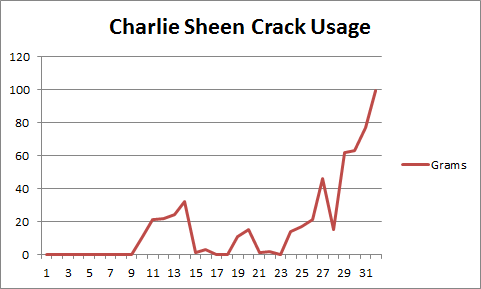
Let’s use Charlie Sheen again to understand probability distributions. If we were to consider the amount of crack he smokes on a daily basis, we could conclude it is between 0 grams  and 120 grams. The 120g upper limit is based on what Charlie Sheen could realistically tolerate (which is probably three times the amount of normal humans). If we plotted this over time, it might look like the example below (which is the last 31 days):

image

So to make a best guess at the amount he smokes tomorrow, should we pick random values between 0 and 120 grams?  I would say not. Based on observing the chart above, you would be likely to choose values from the upper end of the range scale (lately he has really been hitting things hard and we all know what happens when he hangs with starlets from the adult entertainment industry).

That’s the trick to understanding a probability distribution. If we simply chose a random value it would likely not be representative of the recent range of values. We still have to pick a value from a range of possibilities, but some values are more likely than others. We are not truly picking random values at all.

The most common probability distribution people use is the old bell curve – you probably saw it in high school. For many variables that go into a monte carlo, it is a perfectly fine distribution. For example, the average height of a human male may be 5 foot 6. Some people will be larger and some will be smaller, but you would find that there would be more people closer to this mid-point than far away from it, hence the bell shape.

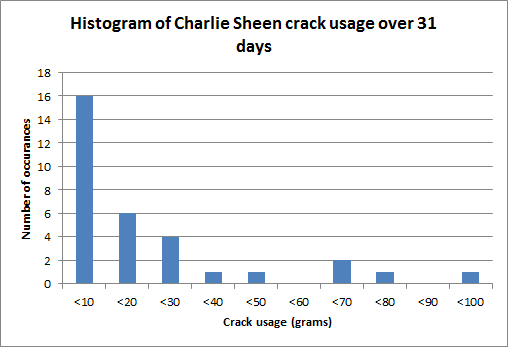
Let’s see what Charlie Sheen’s distribution looks like. Since we have our range of values, for each days amount of crack usage, let’s divide up crack usage into ranges of grams and see how much Charlie has consumed. The figure is below:

Amount Daily occurrences %
0-10g 16 50%
10-20g 6 19%
20-30g 4 13%
30-40g 1 3%
40-50g 1 3%
50-60g 0 0%
60-70g 2 6%
70-80g 1 3%
80-90g 0 0%
90-100g 1 3%
100-120g 0 0%

As you can see, according to the 50% of the time Charlie was not hitting the white stuff particularly hard. There 16 occurrences where Charlie ingested less than 10 grams. What sort of curve does this make? The picture below illustrates it.

image

Interesting huh? If we chose random numbers according to this probability distribution, chances are that 50% of the time, we would get a value between 0 and 10 grams of crack being smoked or shovelled up his nasal passages. Yet when we look at the trend of the last 10 days, one could reasonably expect that its likely that tomorrows value would be significantly higher than zero. In fact there were no occurrences at all of less than 10 grams in a single day in the last 10 days.

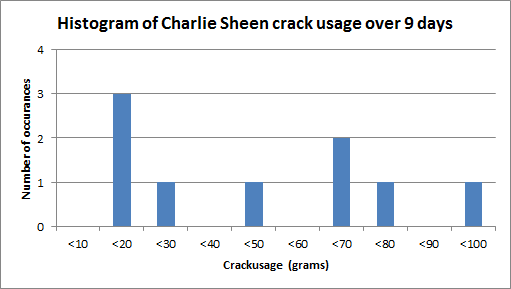
Now let’s change the date range, and instead look at Charlie’s last 9 days of crack usage. This time the distribution looks a bit more realistic based on recent trends. Since he has not been well behaved lately, there were no days at all where his crack usage was less than 10 grams. In fact 4 of the 9 occurrences were over 60 grams.

Amount Daily occurrences %
0-10g 0 0%
10-20g 3 33%
20-30g 1 11%
30-40g 0 0%
40-50g 1 11%
50-60g 0 0%
60-70g 2 22%
70-80g 1 11%
80-90g 0 0%
90-100g 1 11%
100-120g 0 0%

image

This time, utilising a different set of reference points (9 days instead of 31), we get very different “randomness”. This gets to one of the big problems with probability distributions which Kailash tells me is called the Reference class problem. How can you pick a representative sample? In some situations completely random might actually be much better than a poorly chosen distribution.

Back to SharePoint…

So imagine that you have been asked to estimate SharePoint costs and you only have vague, ranged estimates. Lets also assume that for each of the variables that need to be assigned an estimate, you have some idea of their distribution. For example if you decide that SharePoint hardware and licensing really could be utterly random between $50000-$60000 then pick a truly random value (a uniform distribution) from the range with each iteration of the simulation. But if you decide that its much more likely to come in at $55000 than it is $50000, then your “random” choice will be closer to the middle of the range more often than not – a normal distribution.

So the moral of the story? Think about the sort of distribution that each variable uses. It’s not always a bell curve. its also not completely random either. In fact you should strive for a distribution that is the closest representation of reality. Kailash tells me that a distribution “should be determined empirically – from real data – not fitted to some mathematically convenient fiction (such as the Normal or Unform distributions). Further, one should be absolutely certain that the data is representative of the situation that is being estimated.”

Since SharePoint often relies on some estimations that offer significant uncertainty, a Monte Carlo simulation is a good way to run the numbers – especially if you want to see how many variables with different probability distributions combine to produce a result. Run the simulation enough times, you will produce a new probability distribution that represents all of these variables.

Just remember though – Charlie Sheen reliably demonstrates that things are not often predictable and that past values are no reliable indicator of future values. Thus a simulation is only as good as your probability distributions in the first place


Thanks for reading


Paul Culmsee

www.sevensigma.com.au

 

p.s A huge thanks to Kailash for checking this post, offering some suggestions and making sure I didn’t make an arse of myself.


A brief sojourn into the world of Exchange 2010

Okay so this post is going to seem way out of place because it has utterly nothing to do with SharePoint and instead focuses on Microsoft Exchange Server. To explain why I have to give you a quick history lesson.

Before I was a SharePoint guy, I was a networking, infrastructure and security guy. In fact I met and worked with Jeremy Thake before either of us were full-time SharePoint guys. If you were to ask him I’m sure he would tell you I was a bit of an infrastructure and security nazi back then. What warms my heart though is that since then I have mellowed out and now Jeremy has taken on some of those nazi tendencies (I have heard him threaten to “hunt you down if you do that” at user group presentation – referring to some dodgy SharePoint developer practice that will hurt you later).

Anyways, I still get asked to do the odd bit of Cisco, Active Directory and Exchange work. Although my interest in these areas is practically nil, some part of me likes to have a crack at it every so often to make sure I can get on the bike again – so to speak. Each time I get on the bike, I then remember why I got off in the first place ;-( (It’s a bit like eating KFC – you swear you will never do it again but given enough time, the pain seems to fade)

This time around, I agreed to help a client extricate themselves from the evil nightmare that is Small Business Server 2008, to real, grown up Windows Server environment. They had outgrown SBS and had been taken over by a foreign company and there was a need for AD domain trusts, among many other things – something that SBS can’t do. As part of this I had to get Exchange, SharePoint, AD, WSUS, Certificate services and various other things like RRAS, DHCP and DNS off the Small Business Server and onto real servers.

So first up my big Exchange 2010 lesson learned and then some detail on how you too can make Small Business Server 2008 history in your organisation.

My first and last exchange post: Exchange 2010 RTM and SP1 do not play nice!

Due to the nature of this upgrade, I had to set up a temporary exchange server 2010 box to be a temporary mailbox store. Provided that any Exchange 2007 servers in the organisation are running Service Pack 1, mail can happily route between Exchange 2007 and 2010 servers. Once the migration of mailboxes was complete, we decommissioned the Small Business Server following the steps outlined in the next section. We then installed a fresh, new Win2008R2 + Exchange 2010 as the final server – only this time with Exchange 2010 service pack 1 (the client used newer media this time).

All went well, the new server installed fine. So now I had two Exchange 2010 servers in the organisation, one RTM and one SP1. I was able to manage both servers using Exchange system manager on both servers and there was nothing untoward in the logs on either server.

However, when I tried to move a mailbox from the RTM box to the SP1 box, I received the following error:

Service ‘net.tcp://<servername>/Microsoft.Exchange.MailboxReplicationService’ encountered an exception. Error: MapiExceptionNoAccess: Unable to open message store. (hr=0x80070005, ec=-2147024891)

Diagnostic context:
    Lid: 18969   EcDoRpcExt2 called [length=132]

[blah blah blah skip ugly stack trace stuff]

Exception details: MapiExceptionNoAccess (80070005): MapiExceptionNoAccess: Unable to open message store. (hr=0x80070005, ec=-2147024891)

[blah blah blah skip more ugly stack trace stuff]

As you can see, not a helpful message at all. So I tried to initiate the mailbox move from the SP1 server instead of the RTM server. This time, I received a different error:

There are no available servers that are running the Mailbox Replication Service.
+ CategoryInfo : NotSpecified: (0:Int32) [New-MoveRequest], MailboxReplicationTransientException + FullyQualifiedErrorId : 5C08CF31,Microsoft.Exchange.Management.RecipientTasks.NewMoveRequest

Now as Johnny says, this error suggests that no exchange server in the organisation is running the mailbox replication service. However in my case the RTM box was running this service and it was started. Clearly something was amiss.

Google didn’t show much about this problem, and I considered calling Microsoft support, but knew full well that they would probably make me install SP1 on both boxes before investigating. So I installed SP1, following Gnawgnu’s advice about surviving an Exchange 2010 Service Pack 1 install. All went smoothly and when I reattempted the mailbox move, everything worked fine.

Moral of the story, apparently a stack trace is an appropriate error message for an incompatibility between Exchange versions. C’mon exchange product team, you are no better than SharePoint in terms of horrible error messages. Surely a version check would be an easy use-case to test for?

How to extricate yourself from Small Business Server 2008

For what its worth, getting SBS2008 out of your domain is a bit like pulling teeth. It really doesn’t want to go. Nevertheless it can be done and I largely followed this unofficial guide and can confirm that it works for me (I have added a couple of steps below, and also remember, this is SBS2008 we are talking about so its bound to go wrong somewhere)

1. Upgrade the AD schema of the SBS2008 domain

  • Using your new Win2008 R2 media find the adprep utility and run: Adprep /forestprep and Adprep /domainPrep
  • On SBS 2008 ensure that the schema version is updated to 47 and *not* 44 by checking the HKLM\SYSTEM\CurrentControlSet\Services\NTDS\Parameters\Schema Version registry key

2. Install Win2008R2 on your soon to be new domain controller and add it as a member server of your SBS2008 domain

3. Install the Active Directory Domain Services role and then launch the Active Directory Domain Services Installation Wizard (dcpromo.exe).

  • On the Choose a Deployment Configuration page, click Existing forest
  • On the Additional Domain Controller Options page, make sure the DNS and Global Catalog is checked
  • Check all of your group policies for reference to the original SBS server and repoint to the new AD server (recreating share folders where necessary)
  • Move FSMO roles to the new AD server: http://support.microsoft.com/default.aspx?scid=kb;EN-US;255504
  • Add the AD certificate services role and backup/restore the certificate store
  • Install DHCP and backup/restore config from SBS box and then remove DHCP role from SBS2008
  • Change DHCP scopes so DNS points to the new DC, as well as statically assigned devices

6. Install Win2008R2 on your soon to be Exchange Server and install Exchange 2010 (with the hub, client access server and mailbox roles)

  • Patch Exchange 2007 on your SBS2008 Server to SP1 if it is not already (otherwise you cannot move mailboxes to the Exchange 2010 server)
  • Note: You need to download a special Exchange SP1 installer for Small Business Server as the default installer will refuse to install on account that a SBS box does not meet minimum conditions for install
  • Move mailboxes and public folders from SBS2008 server to the new Exchange 2010 Server
  • Export IIS certificates from the SBS2008 server to the new server and then set up client access (OWA, ActiveSync and Outlook Anywhere) with the same certificate
  • Reconfigue your router/firewall to the ne server for OWA/Activesync/Outlook Anywhere

7. Uninstall Exchange 2007 from SBS 2008

8. Install Win2008R2 on your soon to be SharePoint Server and install Search Server Express 2010 or whatever SharePoint edition you have paid for

  • Create a new web application
  • Restore Companyweb site using database reattach method
  • Reconfigure companyweb search to use enterprise search template that comes with Search Server Express 2010
  • Install Microsoft fax (if you used faxing in SBS2008) and enable email based fax routing
  • Configure incoming email to SharePoint by configuring a subdomain in active directory and configuring a remote domain in Exchange 2010 Hub Transport
  • Mail enable the Faxes document library in companyweb
  • Set the destination for faxes to be the Faxes document library in companyweb

8. DCPromo down SBS 2008 and remove SBS 2008 from the network.

9. Crack open a beer and celebrate your victory


Thanks for reading

Paul Culmsee

www.sevensigma.com.au


Exciting news for Governance and Information Architecture classes

Hi all

I just thought I would check-in with some updates on happenings and some upcoming travels. In less then 2 weeks now, I will be in London with Andrew Woodward and Ant Clay of 21apps for the second SharePoint Governance and Information Architecture Master Class. There are still places available on this class so if you have been thinking about attending, now is the time to act.

Also in Europe, a class is being run in Utrecht, Netherlands in May by Ant Clay.

I am proud to be chosen to be a keynote speaker at the Australian SharePoint conference in Sydney in March. I am still wondering if I should dialogue map 600 people! I will also be running a two-day class after this conference – the only one in Sydney for this year. The week after I am in NZ at the SharePoint conference there, also running a 2 day class and hopefully the first ever Issue Mapping class in New Zealand.

After a small break (begging forgiveness of clients who have to put up with my “international man of mystery” gallivanting), I’ll be heading to North American shores to run classes over there. Confirmed cities at this stage are Boston and Toronto, but DC and Chicago are in the works and I am hopeful to run one on the west coast, perhaps in San Francisco or Seattle.

If you are a SharePoint consultancy in these areas and would like to partner with us on this, please contact me on twitter @paulculmsee or email me via the address at the about page of this blog.

Below is the current itinerary for Governance and Information Architecture classes. Things are still being solidified, and will obviously change a little between now and then. Keep an eye on twitter @paulculmsee for more detail.

Date Location Class Hashtag Comments
Feb 21-22 London SharePoint Governance and Information Architecture #SPIAUK  
March 10-11 Sydney SharePoint Governance and Information Architecture #SPIAAU  
March 14-15 Wellington SharePoint Governance and Information Architecture #SPIANZ  
March 21-22 Wellington Issue Mapping Master Class #IBISNZ  
April 28-29 Washington DC SharePoint Governance and Information Architecture #SPIADC Tentative date: to be confirmed
May 2-3 Indianapolis SharePoint Governance and Information Architecture #SPIAIA Tentative date: to be confirmed
May 5-6 Boston SharePoint Governance and Information Architecture #SPIABN Tentative date: to be confirmed
May 9-10 Netherlands SharePoint Governance and Information Architecture #SPIANL Ant Clay of 21apps is running this class as I am in the USA
May 9-10 Chicago SharePoint Governance and Information Architecture ? Tentative date: to be confirmed
we will arrange some kind of hookup to the Netherlands class
May 12-13 Toronto SharePoint Governance and Information Architecture #SPIATO Announced
May 16-17 West coast USA SharePoint Governance and Information Architecture   Looking for a partner for this region
June London Issue Mapping Master Class   in the works…
July South Atrica SharePoint Governance and Information Architecture   in the works…

if you live in any of the regions that are either “tentative” or “in the works”, please contact me and register your interest so I can work with local partners on the ground in these locations.


Thanks for reading

Paul Culmsee


The facets of collaboration part 4–BPM vs. HPM


Hi all and welcome to part four of my series on unpacking this buzzword phenomenon that is “collaboration”. Like it or not, Collaboration is a word that is very in-vogue right now. I see it being used all over the place, particularly as a by-product of the success of x2.0 tools and technologies. Yet if you do your research, most of the values being espoused actually hark back to the 1950’s and even earlier. (More on that topic in my forthcoming Beyond Best Practices book).

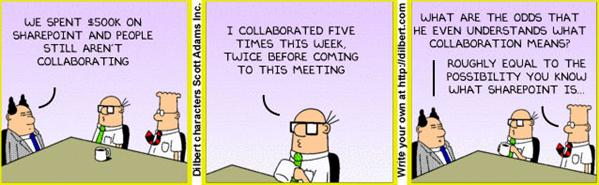
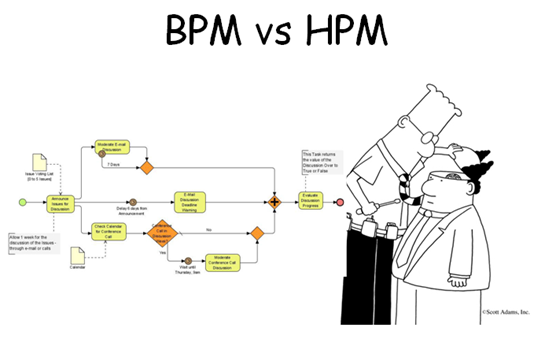
As it happens, Dilbert is quite a useful buzzword KPI. Once a buzzword graces a Scott Adams cartoon, you know that it has officially made it – as shown below:

image

So back to business! Way back in the first article, I introduced you to Robot Barbie, a metaphor that represents all of those horrid SharePoint sites remind you of a cross-dressing Frankenstein’s monster. I had an early experience with a client who championed a particular vision for a SharePoint project, only to find little buy-in within the organisation for that vision. This, and a bunch of other things, got me interested in the softer areas of SharePoint governance, where no tried and tested best practices really exist. If they did and were so obvious, Microsoft would published them as its in their interest to do so.

image

This all culminated in when I wrote a SharePoint Governance and Information Architecture training course last year. I read a lot of material where authors attempted to unpack what collaboration actually meant. My rationale for doing so would be to hopefully avoid creating SharePoint solutions that were Robot-Barbie Frankensteins. The model that I came up with is illustrated below:

image

The basic model is covered in detail in part 2. But to recap here is the basic summary: This model identifies four major facets for collaborative work: Task, Trait, Social and Transactional.

  • Task: Because the outcome drives the members’ attention and participation
  • Trait: Because the interest drives the members’ attention and participation
  • Transactional: Because the process drives the members’ attention and participation
  • Social: Because the shared insight drives the members’ attention and participation

In the last post, I used the model to compare and contrast the use of particular SharePoint features, such as wikis, SharePoint lists and the different aspects of document collaboration. With regards to the latter of these three, I l looked at the effectiveness of certain SharePoint building blocks like content types and site columns within the different facets.

In this post and the next, we will use the facets in a different manner. We will take a quick tour through some common philosophical smackdowns that manifest in organisational life. These smackdowns emanate because of the different viewpoints that people with particular job titles and respective bodies of knowledge have.

Any suggestion that a philosophy might be wrong or incomplete often calls into question the self-identify of the practitioner, which causes much angst among adherents. For this reason, I will leave the “agile is great” vs. “agile sucks” debate for another time, because if you search the internet for criticisms of agile you tend see really passionate programmers get all riled up and flame the hell out of you.

Instead, I will start with a relatively easy one…

Business Process Management v.s. Human Process Management

image

What does painting the Golden Gate Bridge and Business Process Management have in common? With both, you find that by the time you get to the end, you need to go back to the beginning again. I have personally seen organisations fill an office full of people and take literally years to define and then document key processes all in the name of various best practice frameworks or a regulatory requirement. They then find that, once a thick process manual is created, no-one actually follows it unless an auditor is watching or their performance-based remuneration is directly measured by adherence to it. Of course, I’m not the only one to notice this. In fact, the entire discipline of business process management has taken a bit of a battering in recent years.

If we consider a “process” as the means by which we convert inputs of some description into outputs, Business Process Management has long been the discipline that concerns itself with process optimisation. But in a pattern that is seen in all disciplines like Project Management and Business Analysis, someone will inevitably come along, tell you that you have it wrong or are not being “holistic” and invent a new term to account for your wrongness. In the case of BPM, we now have people arguing for various terms: such as Human Interaction Management, Human Centric Business Process Management, Non-Linear Business Process (thanks Sadie!) or Human Process Management. We will use the latter term, but they are essentially talking about the same thing.

So before we see an example Human Process Management (HPM), let’s review Business Process Management and see what the HPM fanboys are whining about.

Business Process Management

image

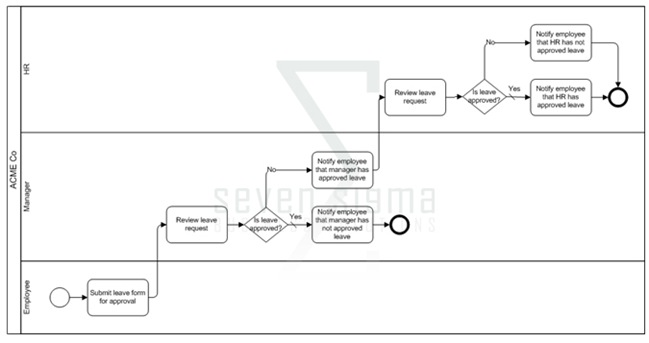
BPM is a structured approach to analyse and continually improve and optimise process activities. Process structure and flow are modelled via diagrammatic tools, allowing organizations to abstract business process from technology infrastructure and organisational departmental/jurisdictional boundaries. This abstracted view allows business to holistically examine process and increase their efficiency and respond rapidly to changing circumstances. This in turn creates competitive advantage.

BPM is often used within the broader context of process improvement methodologies such as Six Sigma (which if you have never read about it, will finally prove to you that all that high-school mathematics that you found mind-numbingly boring was actually useful). While BPM on its own provides excellent visibility of process via modelling them, Six Sigma also incorporates additional analytical tools to solve difficult and complex process problems. Thus, BPM and Six Sigma augment each-other, because process improvement efforts can be more focused via BPM modelling. Thomas Gomez, in an article entitled “The Marriage of BPM and Six Sigma", had the following to say:

“Without BPM, Six Sigma may flounder because executives lack the critical data needed to focus their efforts. Instead, the executives bounce all over the place looking for performance weaknesses, or they focus on areas where successful performance improvements provide only marginal results. With BPM, Six Sigma projects can pinpoint problems and address the underlying causes.”

But that is where the fun ends according to the BPM critics. BPM nerds have had to suffer the indignation of hurtful labels like “Sick Sigma” and stories of long term problems with innovation because of such initiatives. They cite examples such as  George Buckley of 3M, who wound back many of his predecessor’s Six Sigma initiatives.

"Invention is by its very nature a disorderly process. You can’t put a Six Sigma process into that area and say, well, I’m getting behind on invention, so I’m going to schedule myself for three good ideas on Wednesday and two on Friday. That’s NOT how creativity works."

Ouch! Its enough to make a BPM feel all flustered and defensive of their craft. Nevertheless the above quote echoes the main points made by BPM critics. That many processes are not structured, predictable or logical and therefore, BPM approaches force a structured paradigm when none necessarily exists (Mind you, many other methodologies do precisely the same). In an appropriately titled article “The H-Bomb of Business Processes: Humans”, Ayal Steiner makes a point that also cuts to the heart of tame vs wicked problems debate too.

“The modern idea of BPM stresses a well-defined business process as the starting point but this is not always the case. Therefore, in a project that involves new practices or a cross-functional learning among participants, BPM has always had a tough time dealing with the humans.”

The notion of the well-defined starting or ending point is one of the characteristics of a tame problem. Wicked problems are often characterised by poorly defined staring and ending points. In fact with a wicked problem, often participants cannot agree on what the problem is in the first place!

Critics like Steiner also argue that many roles within an organisation, tend to deal with more tacit, dynamic situations and as such spend a large amount of their work time performing collaborative human work, when compared to transactional business process work (knowledge workers is the prevailing label for this type of role). While the main area of benefit for BPM’s is its ability to increase the efficiency of a core business process, the sort of thinking required to re-think processes in a systematic manner involves collaboration and systems thinking (in other words, beyond the process in front of us and how it interacts and interrelates more broadly since the whole of the broader system is greater than the sum of its parts). This is a human-driven activity as it is based on humans collaborating and innovating.

Closer to SharePoint home, Sadie Van Buren noted this same distinction in May 2010 which was around the same time I started the development of my IA class.

Human Process Management

So if BPM is incomplete, enter Human Process Management (HPM). HPM is concerned with process that is not easily defined, nor well structured, where it is hard to prescribe the execution of the process based on some model of the business. With human process, it is generally known how to achieve an intended result, but each case is handled separately and requires tacit judgment (for both decisions and flow) as part of the process. There is not enough standardization between instances of the process that allows for a formal, complete and rigorous description of the process end-to-end.

The obvious downside of human processes, say the critics, is that they are far too fluid and dynamic to be made part of an Enterprise BPM system. As a result, these processes tend to be handled through email, which in turn contributes to information overload and poor information worker productivity – precisely why we look to tools like SharePoint in the first place! The implication of HPM is that we need to shift emphasis to tools and practices that help us deal with unstructured or ad-hoc processes (and the information created/used during that process) more so than tools that deal with the well-defined world of BPM.

To be fair to the BPM crowd, these above criticisms will be seen by BPM practitioners as naive, since from their point of view, the less structured side is simply a part of the entire BPM spectrum. They argue that critics do not properly understand the principles and philosophy of BPM in the first place (Agile and PMBOK defenders say essentially the same thing when defending from critics). Supporting this counterargument is a key theme for BPM success that is regularly emphasised. That is, the critical pre-requisite of clarity of purpose and shared understanding of the end in mind. Mohamed Zairi, in a paper called “Business process management: a boundaryless approach to modern competitiveness” stated:

“The achievement of a BPM culture depends very much on the establishment of total alignment to corporate goals and having every employee’s efforts focused on adding value to the end customer.”

Therefore the BPM crowd are arguing for the same human process that HPM base their criticism on. Developing a culture of alignment to corporate goals is very much a human process. Are the HPM fanboy criticisms well founded or is it more a case that some BPM guys forget about strategic goal alignment and optimise process in isolation?

What do the facets say?

Clearly, there is a natural tension between these two polarities of BPM and HPM and this often plays out in organisational life in how we collaborate to deliver organisational outcomes. While there have always been process nazis, the emergence of social collaboration platforms that do not have a great deal of formal structure (think tagging and folksonomies) has led to a great deal of debate and self examination in BPM circles and beyond. Understanding these traits is critically important on the use of SharePoint tools, because SharePoint – and in particular SP2010 offers features for both BPM and HPM aficionados. Putting the two together however might risk Robot Barbie scenarios.

Straight away, it seems that the transactional vs. social axis of the facets of collaboration neatly explain the Business Process Management (BPM)/Human Process Management (HPM) challenge. Both areas are concerned with producing an output or getting something done. Therefore I have drawn BPM and HPM leaning toward the task side of the model. HPM proponents argue that human process is unstructured or semi-structured, dynamic, intertwined and borderless, which fits in well with the task/social trait of process and insight. BPM naturally fits into the lower transactional half where inputs are well defined.

image


While I would agree with the assertion that many processes are ill-defined and rely on tacit knowledge to be completed, HPM proponents go further though. For example, Ayal Steiner who I quoted earlier, argues that “analysts are now realising that human processes account for 80% of the business processes carried out in most organisations”. That is a big call, in effect, arguing that the majority of workplace interactions occupy the social quadrants above. I disagree. From my experience, most organisational roles have extremely varying degrees of transactional vs. social collaboration and some roles are in fact dominated by transactional collaboration. Perhaps there is some confirmation bias going on here, where knowledge workers who put in collaborative systems tend to think that everyone are knowledge workers too.

Here is an example. Mrs CleverWorkarounds used to be a medical nurse. When I first showed her this model I asked her to describe where nurses would fit in terms of their collaboration. She indicated two areas.

  • Firstly, nurses are strongly linked by trait and transaction. This is because they all have a minimum degree of knowledge and skill. As stated in part 2, the key tell-tale sign of a role with transactional collaboration is how easily individuals performing that role can be replaced by someone else with similar experience at short notice. Supporting this, if a nurse is sick or unavailable, a replacement nurse can be called in to perform the same tasks.  Collaboration between nurses according to Mrs Cleverworkarounds is quite transactional as well. Routine and process consistency via tracking the status of patient care is a critical task – patient status is everything. Thus, data driven tools with version history and well defined inputs make this form of collaboration easier. In fact, Mrs CleverWorkarounds taught herself InfoPath and SPD Workflows because she was so convinced that automated forms with consistent audit trails via workflow would make her job easier.
  • Yet at the same time, the sort of collaboration between nurses and patients is completely different and highly social in nature. No process is going to govern the interaction between nurse and patient. The type of care and counselling to get someone well is going to vary the type of interaction. A broken leg is one thing, health problems from say – alcoholism is something else entirely. The latter has much deeper symptoms than just the illness as presented. Here the focus is on patient well-being and goes beyond status of meds, when doctors have visited or accurate handover notes from one nursing shift to another.

State machine workflows?

Interestingly, even seemingly well-defined business processes tend to have ad-hoc and dynamic aspects to them. When there is an exception to the standard process, those exceptions tend to be handled in a relatively ad-hoc, case-by-case manner. Microsoft developer Pravin Indurkar cited an example of a seemingly transactional purchase ordering system.

“Often the business processes contain a prescribed path to the end goal but then there are a lot of alternate ways the same goal can be achieved. For example, a purchase order can contain a prescribed path where the PO goes from being created, to approved, to shipped, and then to completed. But then there a multitude of other ways in which the PO can be completed. The PO can get changed, or back ordered or cancelled and then Reopened. All these paths must be accounted for.”

Indurkar studied the purchase order system of a small business and found that apart from the one standard traditional order fulfilment process, there were about 65 different variations on the same process depending on the nature of the order. This is when BPM diagrams start to get scary. If you think that this workflow below is scary, then be more scared. It is page 12 of a 136 page process!

image

Naturally, trying to hardwire such a large number of alternate paths is very difficult and traditionally, there were two ways in which this was dealt with;

  • Either the business process was hard wired to accommodate all the paths as shown in figure 1, which made the implementation of the business process extremely complex, brittle and hard to maintain.
  • The alternate paths are simply not dealt with and any situation of the ordinary was dealt outside the domain of the process. This meant that tracking and visibility were lost because people would create manual systems to track such out of the ordinary situations. The facet diagram below illustrates this:

image

In Indurkar’s article that I quoted with the purchase order example, he argued that the solution to this sort of problem was via state-based or state-machine workflows which SharePoint has supported in a basic fashion, out of the box since SP2007. This kind of workflow, if you are not aware, is when the workflow waits for one or more events to move it into another state. There is no sequence as such, because this new target state can be any of the defined states in the workflow. This makes state workflows reflect the unpredictable nature of process variations.

Thus, it could be argued that BPM is not incomplete as what the HPM fanboys think, but that critics have a less than holistic understanding of the craft?

Conclusion: A Process Analysis Tool…

To be honest, I don’t want to answer the question of which fanboy is right because it is a bit of a zero sum game. When you think about process, many seem to have elements of transactional and social in them (just like job roles). For example, an “Approval” decision diamond in a business process diagram will determine the path a process takes. Apart from stating the fact that this process is a gateway where a decision is made, this says nothing about whether the activity of making that decision is transactional or social. In some processes the decision may be made by a rigorous data driven process (like a point-score based credit check for a loan applicant). In others it may be on gut feel (such as choosing the right applicant for a job position).

So to me, whether you are the most regimented process nazi or the most cowboyish non-conformist hippie, modelling a business process according to its ratio of transactional to social facets is probably very useful indeed to complement a BPM model. It help us understand how much tacit judgement is required in a given process and whether modelling every variation in a sequential workflow is worthwhile. Check out some examples on how this could be done below. In first example on the left, a business process where the majority of the steps are performed by tacit judgement might look like something like how I have drawn, with a task based social dominance. If the process in question indeed looks like this, then attempting to document every minute variation on the paths the process can take might not be worthwhile. Perhaps documenting the broad process (within the constraints of any compliance regime requirements) might be a better idea. In the second example, the process seems to be oriented around a repeatable set of choices (task based transactional dominant). As a result it may be worthwhile formally documenting these variations.

image  image

By combining these “process diagnostics” with the actual diagram, we might now offer additional insights into how the organisation really works with a certain process and do crazy stuff like produce something akin to my mockup below:

image

Hell, throw in a RACI chart and now you start to see process accountabilities as well!

image

Of course, you could always remove the task/trait axis if it is not needed and simply use a sliding scale. Nevertheless, what this shows is that the facets of collaboration model offers an extra dimension to any process being modelled and would help many to better understand the nature of the process being modelled, as well as strategies for improving that process via SharePoint.

Thanks for reading


Paul Culmsee

www.sevensigma.com.au
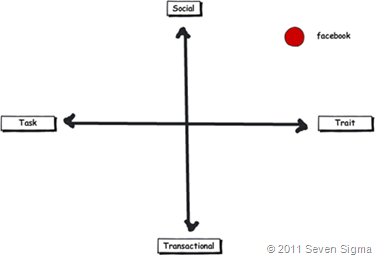
p.s If you are a real trainspotter/glutton for punishment and want to dive deeper, google “Human Interaction Management” and “Role Activity Diagrams”


The facets of collaboration Part 3–The feature jigsaw


Hi all and welcome to part three of my series on unpacking this mysterious phenomenon known as collaboration. In case you missed the first two articles (and I highly suggest that you read part 1 and part 2), I spent some 500 odd hours last year developing a SharePoint Governance and Information Architecture course. Amongst the sweat and tears of that particular endeavour, I researched many papers and online articles that attempt to look at the multitude of factors and variables that impact on collaborative scenarios where SharePoint might be leveraged. I also talked about Robot-Barbie, which represents the tendency for SharePoint features to be combined in such a way where the benefit gained is much less than the potential of the individual parts. Robot-Barbie solutions are to be avoided at all costs.

image

In part 2, I explained each of the facets using the model above, identifying four key facets for collaborative facets: Task, Trait, Social and Transactional.

  • Task: Because the outcome drives the members’ attention and participation
  • Trait: Because the interest drives the members’ attention and participation
  • Transactional: Because the process drives the members’ attention and participation
  • Social: Because the shared insight drives the members’ attention and participation
  • An interesting use of the facet diagram is to plot where various tools and technologies are located and therefore, where their strengths may be. In this article, we will go through some of SharePoint’s collaborative components and see how they fit together.

    The document is dead – long live wikis?

    When I have asked people to draw where Wikipedia lies on the facets, the most common answer by far is on the trait side of the collaborative fence. This seems relatively straightforward. After all, the authors of Wikipedia articles obviously have a shared interest in the topic matter. Without an interest in the topic, there would be little incentive to take the time to write about it. Furthermore with Wikipedia, authors are highly unlikely to be working on the same project or task, since the author can be anybody in the world. But, authors are likely to be performing similar tasks in their respective organisations. A classic trait based scenario.

    Wikis also are open and essentially unstructured, relying on authors to link to other content to build contextual relevance. By this logic, Wikipedia is a strong trait based collaborative system and the dominant process driving the use of the tool is insight more than process. Therefore wikis are socially oriented more than transactional. I would suggest that very few Wikipedia authors indeed would be driven by a process that mandating they update an entry.

    Closer to SharePoint home, Look at the success of SPDevWiki as another example. If you were to plot it across the spectrum (and remember this is about collaboration using the tool, not individual use), it would appear in a similar position on the model to Wikipedia. People use SpDevWiki because they wish to develop and contribute to a repository of knowledge to help others in similar situations. This reciprocal behaviour serves to help the individual in their own endeavours.

    image

    But there is an interesting change if I ask people to simply draw “a wiki” on the model, rather than the specific example of Wikipedia (the mother of all wikis). The model tends to look something like the image below. Suddenly the scope of wikis expands more into transactional, but few people draw a wiki across the whole collaboration spectrum. As a result of this pattern, one question I make a point of asking people in all of my classes is whether they have ever seen or used a successful project management wiki. I have asked this question in London, New Zealand and around Australia, and the overwhelming answer is no. One respondent stated that his organisation had implemented a project management wiki, but conceded that he was the only one who maintained it.

    image

    The reason I continually ask this question is that I wanted to know if the pattern I had observed was common, as I can only base observation from my own client base. Using my clients, I have seen two occasions where wikis were particularly successful. The first was a wiki for programmers who worked for the same company and the second was a school, where teachers maintained a wiki as part of a SharePoint solution that we put in. Both of these examples are clearly trait dominant in that the authors were in a very similar role. Perhaps a gross generalisation is that wiki’s are best suited to trait/social based collaborative scenarios? If so, it raises an important issue. If a task based collaboration effort has a varied mix of participants, then using the model suggests a wiki may not necessarily be the way to go.

    By the way, I have learned over the years that as soon as you make an assertion to rightness, someone will come along and prove you wrong. For example, I strongly advise people not to use the Microsoft pizza/pie diagram to introduce SharePoint to new users, but Ruven Gotz proves that it is perfectly acceptable to do so. Therefore in the example above I am only reporting on my observations, plus feedback from those who have attended my classes. I am not trying to prove right or wrong here as I know many will disagree with the diagram. But what I am interested in, if you can prove the assertion wrong, is what you did to make a wiki successful in the other quadrants?

    Wikis vs. Custom lists

    In typical SharePoint fashion, there is always ten ways to do something, each with their own pros and cons. Both wikis and SharePoint lists are flexible information repositories, that differ by the degree of structure imposed. Lists offer the creation of custom columns of different kinds, that allow tables of information to be stored and via the use of views, to make sense of the content. You get a few other niceties like datasheet view, attaching files, and export to Excel/MSAccess. In fact, many people like to adopt lists because they previously used Excel for storing information and Sharepoint offers similar functionality with improved data entry and multi-user support.

    Someone once told me that more critical corporate data is stored in excel than any other database system in the world. I am not surprised in the slightest.

    When asked to place where SharePoint lists fit on the facets model, many users tend to link it to transactional based collaboration that is equally task or trait based. Lists it seems, are well suited to tracking “stuff”, which lends itself naturally to transactional collaboration where process tends to govern interaction.

    Lists also tend to need more up-front work where a wiki usually does not. Before content can be effectively added to a list, you need to define columns or content types in advance and hope that you get it right. Information Architects routinely get paid to help do this. Remember that transactional collaboration is the world of well-defined inputs, because process governs the interaction. As such, project delivery (a transactional/task oriented process) often uses list based techniques because of the improved ability to track, slice and dice information, when compared to a wiki. Dux Sy’s book on using SharePoint for Project Management is a good illustration of this approach. Wiki’s do not even get mentioned in Dux’s book. Why is this? Perhaps the tracking of time, resources, costs, risks, constraints and work performed is best delivered via lists? Certainly, more fully fledged PMIS systems like Microsoft Project Server are highly database driven and designed for transactional work.

    It is then quite interesting to overlay SharePoint lists and wiki’s together. Is it possible to make a more educated call as to when one option is more suited than the other? Take a knowledgebase scenario which could easily be either a wiki or a list. Perhaps the decision as to use wiki or list should be based on the nature of the collaboration? If a bunch of people linked by trait are creating a knowledge repository, a wiki is a proven approach – Wikipedia shows this to be the case. But if this is for say, a more transactional scenario such as a call-center, where KPI’s are based around quick turnaround and resolution of common problems, a list approach might be better?

    image

    At this point I can feel the heat of offended Enterprise 2.0 fanboys. Please understand, I am not anti wiki’s or anything 2.0 – we use these tools in our practice. Furthermore SharePoint blurs the above distinction anyway. Columns can be added to wikis and they leverage SharePoint’s version history too. In other words, you can make a wiki look and feel somewhat like a list. Furthermore, SharePoint wikis can be integrated with information management policies and workflow. When you add those additional capabilities to the mix, you might draw things differently. Nevertheless, I think this is a useful exercise because it might offer insight as to why certain portal features rarely, if ever get used in certain situations.

    Document Collaboration – Transactional or Social?

    Finally for now, document based collaboration seems to fit into any quadrant (and is therefore quite tricky at times). This is because the “document” is simply a medium of collaboration (as is a wiki for that matter).

    For one extreme, take the example of a quality management system (policies, procedures, manuals). Given that a QMS is usually part of a compliance regime, requiring audits and demonstrated conformance, document collaboration is fairly rule-based and managed via well defined and understood process. Therefore, we are talking transactional work. In this world, SharePoint features like content types, metadata, policies and workflow are fairly easy to define and implement.

    But a QMS, via policies and procedures, guide the behaviour and decision making in organisations. So while transactional, it is oriented towards trait based. This is because a QMS is rarely installed to deliver a single project, but to guide delivery of many projects. One thing that might be guided by a QMS is the creation of a legal contract that outlines the scope and responsibilities of two parties undertaking a project. Documents such as contracts, while also usually transactional, are task based they outline a legal commitment to achieving an agreed outcome.

    Contrast this with a team collaborating via documents. A team can be driven by an outcome or common interest (department) and as a result covers both the task and trait based quadrants. Often the rules of engagement are much less rigid or formalised with regards to document use and structure. Thus, a lot of team document collaboration is more social and trying to fit this into an overly strict or complex taxonomy can do more harm than good. I noticed with great interest that recently, certain SharePoint elephants in the room are starting to be named. The recent articles on NothingButSharePoint entitled “SharePoint Content Types: Is this a lost cause?”, highlights what I mean. In this article, repeated attempts were made to try and harness the value and power of content types into a large enterprise. However despite the effort, they were rarely used.

    To me, this highlights the characteristic of team collaboration – particularly knowledge workers. If collaboration is not a predefined interaction, then content types, which by definition, force us to go to a lot of effort to define inputs when those inputs are not necessarily known. Perhaps the nature of the collaboration taking place played a part in the lack of take-up reported in the aforementioned article? Those who advocate metadata as the only true solution may in fact be pushing a transactional paradigm onto a collaborative model that is ill-suited?


    image

    As a general rule, in transactional scenarios, the classification of the document is of more importance than the content of the document. This is the records management and compliance paradigm, where the fact that the document is controlled is the key driver. However, in team collaborative scenarios, the content of the document is usually more important than the metadata classifying it. From a team members point of view, metadata that helps to indicate content is more important than metadata that indicates compliance.

    As documents age however, the value of the content tends to diminish and the value of the classification increases. Balancing the need for compliance against the need for collaboration is a key document management challenge irrespective of the tools and systems that underpin it. There is a large smackdown looming between the worlds of compliance vs. the world of government and enterprise 2.0 and I will eventually write on that topic.

    Once again, the key point here is context. Some document oriented collaborative scenarios are highly structured and well suited to well-defined taxonomy and metadata. Others are somewhat less so. Perhaps a tool like this helps to work out when certain information architecture decisions are applicable when it comes to document collaboration?

    Conclusion

    You might have noticed that this post has more questions than answers. In doing a model, I never said I would provide more answers. Instead, more of a frame or perspective to ask certain types of questions that many SharePoint practitioners have increasingly be asking (as evidenced by the content type post above). In the next post, I will conclude by using the facets to examine several common arguments seen in organisations, where people in particular roles are in effect, predisposed to having a bias in one or more of these facets. We will also look at SharePoint as a whole, as well as examine what we can glean about user engagement and buy-in.

    Until then, thanks for reading.

    Paul Culmsee

    www.sevensigma.com.au
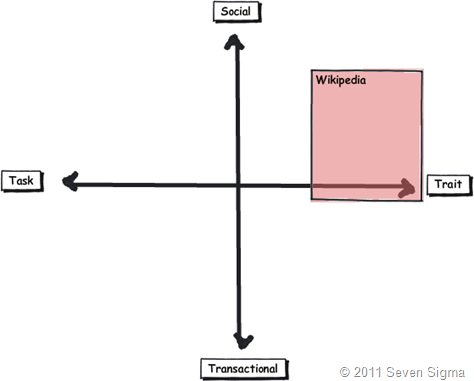


    « Previous PageNext Page »

    Today is: Sunday 8 March 2026 -