Nerds and CFO’s. If there is ever a group of people who don’t know how to talk to each other, it would be those two. Perhaps, I should write a book and call it “Nerds are From Mars, CFO’s are from Venus” (ok for those of you who did not get that little joke go here).
Now, not so long ago, I was a serious nerd. Not in a ‘have the latest gadget and bash Microsoft ‘cos it’s cool’ sense, but I got very deeply involved in the guts of the technology. I was heavy into infrastructure and security. Got a few certs to make my business cards and CV look good, etc. In addition, I *thought* that I understood business. I wrote reports and memos that used all the right ‘business sounding’ cliches. In my security work I wrote lovely risk assessments, good security policies, etc. I wrote technical architectures in loving detail, outlining the technical vision and strategy for the company going forward.
But guess what? Although I felt that I had a pretty good business acumen, I had trouble communicating with some senior management. I blamed them of course, damn computer illiterate luddites, the lot of them. To be fair, you have some who are technically savvy, but most of them are not.
(In fact, have you noticed that the size of a laptop, is inversely proportional to a person’s rank/computer literacy in an organisation?)
Jokes aside, the truth is, senior management simply have much bigger fish to fry, compared to caring about say, the technical advantages/disadvantages of say, an MPLS network versus a VPN or say, SharePoint versus Skype (yep, I got asked this). IT people (some IT Managers included) tend to argue benefits on technical and feature grounds, whereas most high level business decision making is made along financial grounds.
Technical considerations are critical in the decision making process of course, but that sort of criteria is why *you* are hired. Our CFO and senior management do not want to know nor need to know this. For them, put simply, it all boils down to:
- How much will it cost?
- How much will it make/save me in the future
In this article, I am going to attempt to explain the financial techniques that you can use to transform technical considerations into a costing model that will make sense to your CFO.
The techniques I cover here are used all of the time by senior management on a scale you can only dream of. Compare the cost/justification complexity of a SharePoint 2007 implementation to trying to determine how much to pay for another company in a buyout situation!
Time Value of Money
First up, we have to get a fundamental concept out of the way.
Money loses value over time!
Ever had a grandparent say “back in my day, it only costed me a penny to [insert often repeated boring story here]”? While an economy has inflation, the same amount of money will be able to buy less and less as time goes on. You will find that $1 now, will always buy you more than $1 would, say, 5 years into the future. Consider petrol over the last few years. How much petrol do you think you will get for $1 in 5 years time?
So, let’s discount the value of money over time by using the inflation rate.
If we assume an inflation rate of 3% per year, and start out with $100 now, we can discount the $100 by 3% per year. In doing this, we can reasonably assume that after 3 years, our $100 is effectively able to buy just over $91 worth of goods. Below is the table.
| Year | Value |
| 2007 | $100 |
| 2008 | $97 ($100 – 3%) |
| 2009 | $94.09 ($100 – 3%^2) |
| 2010 | $91.26 ($100 – 3%^3) |
What we have done here is taken the present value (PV) of our money ($100) and estimated the future value of our money ($91.26) by discounting it by the inflation rate.
This can be expressed in a formula.
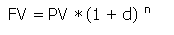
In our example:
- PV = $100,
- d = -.03 (remember we are discounting by 3%)
- n = 3 (we are discounting over 3 years)
100 * (1 – .03) ^ 3 = FV of 91.26
True investment value
So, if inflation was at 3% and you were offered an investment that returns %5 per annum, are you really getting a 5% return? Of course not. Inflation hasn’t been taken into consideration.
Your return would be more like 2% in real terms once you account for inflation.
So, what has this got to do with cost-justifying SharePoint, or any other IT investment for that matter? Well quite obviously, if we are going to take an initial outlay, and then determine the return of an investment over say, 3 years, we need to discount those returns to account for the time value of money.
Additionally, the discount rate to apply is actually significantly higher than the inflation rate. Why is this?
Now not all companies are awash with cash. Many have to borrow money to invest for the future and they have to pay commercial interest rates. Any investment made would have to have a better return that the interest rate.
The companies that do have surplus cash can put that money into the bank or invest it. Even after inflation, they can probably earn 6% per annum as interest on that investment. In addition, that 6% return is considered pretty safe – it’s a bank. This is known as the risk free rate. Basically no financial decision maker would approve expenditure on a project that had a projected return that is less than the risk free rate.
Makes sense, doesn’t it? So, how do we determine if a potential investment in a product or technology is worth it?
Discounted Cash Flow
Discount Cash Flow is a common financial technique that attempts to determine the present value of an investment by estimating the expected future cash flows of an investment. Now, if you are like what I used to be, and you’re not a financial kind of person, then this is best served with an example.
Let’s say, you spend $100,000 on a SharePoint investment. Each year, support and maintenance costs are $20,000. But on the good side, you estimate that you will do such a good job implementing it, that it will save the company $40,000 in costs per year after Year 1 and increase by $20,000 each year thereafter.
This is how you would express the cash flow over 3 years. Make a column for money spent and another for money earned/saved. Add the two together and you get your cash flow for a period.
For example:
| Year | Cash Out | Cash In | Cash Flow |
| 0 | -100,000 | 0 | -100,000 |
| 1 | -20,000 | 40,000 | 20,000 |
| 2 | -20,000 | 60,000 | 40,000 |
| 3 | -20,000 | 80,000 | 60,000 |
| Total | -160,000 | 180,000 | 20,000 |
So, after year 3, it shows that total outgoings are $160,000 (add up the “Cash Out” column). Total incoming is $180,000 (add up the “Cash In” column). Obviously more incoming than outgoing is a good thing. So we subtract our outgoings from the incoming…
Woohoo! We saved $20,000 ($180,000 – $160,000). That is a 20% return on the $100,000. Not a bad return on our initial $100,000, eh!? Management would be so proud of us! We can demonstrate that our SharePoint project is going to be a good thing for our company.
Looking at it another way, we turned our $100,000 into $120,000 after 3 years. Thus, we would consider the present value of this investment to be $120,000. If we subtract the original outlay of $100,000, the net present value is $20,000
But wait!
Just before you go and ask for that well deserved bonus, one little thing. We forgot about the time value of money. The risk free rate is say, 6 percent. So we haven’t discounted by the risk free rate yet.
DOH!
Let’s say the risk free rate was 6%. So, how do we discount the above cash flows? Below is the formula. Put simply, each cash flow is discounted year on year by the discount rate. The cash flows are then added up just as we did above.

Here is the formula with our figures applied:

Now, let’s work out the discount rate formula:

NPV = -100,000 + 18868 + 35600 + 50377
NPV = $4845
So, this time after year 3 our net present value is $4 845. Thus, when you apply a discount rate of 6% to the cash flows, we turned our $100,000 into $104845 after 3 years. Thus, we would consider the present value of this investment to be $104 845. If we subtract the original cost of $100,000, the net present value is $4 845.
That translates to a return of 4.8% over 3 years. Hmmm, that’s like.. 1.6% per year.
If you are thinking “well that is okay, it’s still saving money”, I have some bad news for you.. .but we will come back to this as we have to do the Excel thing…
Excel is your friend
Now that I showed you the maths behind discount cash flow and net present value, I’ll show you the quick and easy way to do it. Excel has a built in formula to generate the result quickly and easily.
The function is called NPV and takes the following parameters:
NPV(rate,value1,value2, …)
Rate is the rate of discount over the length of one period.
Value1, value2, … are arguments representing the payments and income
The excel version of the previous example is:
=-$100 000+NPV(0.06,20000,40000,60000)
= $4 844.94
Accounting for Risk
We used an interest rate for the discount rate in our example. But ,is that a fair and accurate discount rate? There are other factors to consider. We also have to consider the risk of the project as well. A really high risk project should have a ‘risk premium’ attached to the discount rate.
Unfortunately, a discussion on determining an appropriate discount rate is beyond the scope of this article. My suggestion here is simply to ask your finance department to give you a discount rate to use. They would be used to doing this sort of thing. What I can say is a discount rate between 10-16% is pretty common.
Now, SharePoint 2007 is a big undertaking. There are many mistakes you can make in an implementation, from business analysis, requirements gathering and project management, as well as the risk of a poor implementation (and some things I have written about such as document management and branding :-).
In project management terms, your time and budget estimate is usually accompanied by a +/- percentage estimate that accounts for risk. A large SharePoint deployment project may have a +/-40% attached to it. If that is your best estimate, then the discount rate should be higher than say, a project management estimate that is +/-10%.
So, to account for risk, let’s increase the discount rate to 15% and see what our NPV is.
This time we use Excel.
=-$100000+NPV(0.15,20000,40000,60000)
= -$12 911.98
OUCH! When you see a negative net Present Value, it is suggesting that the investment is not worth it. The estimated future cash flows do not give a return that justifies the risk of this investment.
Turning it on its head
So, it’s pretty clear that our mythical SharePoint scenario is actually a pretty crap investment and money is better spent elsewhere. But we have the formula now, and we can tweak the numbers to see what it would take to make this investment better.
Let’s leave the discount rate alone, assuming that finance have set the rate. So, what do we have to play with? The cash flow.
So, let’s assume that presented with your brilliantly conceived scenario, Microsoft caved in and discounted the license price  . So, your initial outlay is $75 000 instead of $100 000.
Let’s plug it in, then!
NPV =-$75000+NPV(0.15,20000,40000,60000)
NPV = $12088.02
Better, I guess. If we look at our original outlay of $75 000, $12 088 is a little over 16 percent over three years.
The Internal Rate of Return
Now, we’ve seen from the above example that a discount rate of 6% with our $100 000 outlay showed a NPV of $4 845. When we changed the discount rate, it changed to $-12 911.98! Quite often, we want to find out what is the discount rate, where the net present value is equal to 0. Why? Because this suggests the rate you need to return to break even!
Excel has an IRR formula, and it’s pretty easy to use. You enter each cash flow into cells and then wrap an IRR formula around it.
So, assuming -100 000 is in cell A1; 20 000 is in A2; 40 000 in A3 ; and 60 000 in A4, the formula looks like:
=IRR(A1:A4)
=8.21%
So, what this tells us is the discount rate to break even on our original SharePoint investment would need to be 8.21%. If your finance department tells you to use a discount rate of more than this (e.g. 15% as per my example in the section titled “Accounting for Risk”), then I suggest you not bother writing a big proposal  .
.
And the SharePoint relevance is where?
In summation, I introduced you to the techniques you can use in evaluating if an investment offers a return that is good enough to offset any risk involved. We covered the theory of discount cash flows, net present value and internal rate of return. I haven’t covered everything you need, however, and a future article will expand on this.
I know this isn’t exactly the standard SharePoint blog fare.I’m not solving any technical problems here, or telling you about some fancy cleverworkaround programming technique. But ,this is a really important and often overlooked area of project initiation as part of the project management process. Despite the subject matter I have covered all of my other articles, this is the stuff that I am particularly interested in and I intend to write quite a few articles on this topic.
In my next article on this series, we will actually delve into some SharePoint project scenarios, run the numbers and see whether the investment is all worth it.
Thanks for reading
PS: For what it’s worth, I also use this technique as an aid in buying stocks too.

[…] Learn to talk to your CFO in their language – Part 1 […]
Pingback by CleverWorkarounds » Learn to talk to your CFO in their language - Part 2 — November 25, 2007 @ 5:49 pm
[…] analysis techniques to non financial oriented IT people. My first two articles in this series were theory and background and this is the first of three scenarios that illustrates an […]
Pingback by CleverWorkarounds » Learn to talk to your CFO : Collaboration Scenario - Part 3 — November 28, 2007 @ 11:10 am
[…] Now, SharePoint as a product is pretty easy to sell, despite the price for the enterprise version. It has enough features that have the ‘wow’ factor and if the client wants to dig deeper, there is some substance behind those slick marketing brochures. Forms services, excel services, windows workflow foundation, document and list versioning, combined with tight SQL report server and Office 2007 integration can be made to radically improve efficiencies and reduce costs. (More detailed material on cost/justification scenarios can be found in my ‘learn to talk to your CFO series‘). […]
Pingback by CleverWorkarounds » "You’re not ready" - SharePoint kung fu — December 12, 2007 @ 2:41 am
[…] waste anymore time on feasibility studies, strategic/planning meetings, etc. Just write a business justification and get a budget to upgrade. It’s such a brain-dead proposition that I am not even going to […]
Pingback by CleverWorkarounds » "Fair, Good, Better, Best" or "Crap, Unbearable, Barely Tolerable, Good"? — January 7, 2008 @ 10:28 am
[…] oriented series of articles for the most part, so for you people who like the governance and finance stuff, you may not get too much out of this one. Although this article (part 2) focuses on my […]
Pingback by CleverWorkarounds » SharePoint for Cisco Fanboys (darn WEBDAV) - Part 2 — January 26, 2008 @ 10:05 am
[…] came up with this figure. Gut feel almost always is not good enough. (For what its worth, I have blogged a little on doing this last year, but a lot more is to […]
Pingback by CleverWorkarounds » Selling MOSS (the moral of the story) — February 22, 2008 @ 10:20 am
[…] previously blogged a 6 part series on SharePoint ROI considerations, and although I haven’t blogged about it yet, there are financial modelling techniques […]
Pingback by CleverWorkarounds » Why do SharePoint Projects Fail - Part 3 — April 19, 2008 @ 10:19 pm
[…] off all of the sections applicable to your SharePoint deployment. Additionally, when I wrote my ROI Series, I actually used the aforementioned governance checklist as the methodology to estimate project […]
Pingback by CleverWorkarounds » Why do SharePoint Projects Fail - Part 5 — April 27, 2008 @ 11:27 pm
[…] quote for me, is very important, and really was what inspired me to write the SharePoint ROI series. It gets to the essence of why senior managers really couldn’t give a toss about why say, […]
Pingback by CleverWorkarounds » Globalisation, Strategy, Technology and Organisational Maturity — May 3, 2008 @ 4:24 pm
[…] reading all of the insightful information in the CleverworkArounds’ “Learn to speak to your CFO” series :-P, a project management plan has been put together and agreed upon and signed off […]
Pingback by CleverWorkarounds » Why do SharePoint Projects Fail - Part 6 — May 12, 2008 @ 12:32 am
[…] you have read the “project failure…” series, ROI, or the organisational maturity posts, you will see a parallel here. Seems that even to teach a […]
Pingback by CleverWorkarounds » "Train the Trainer" — May 21, 2008 @ 1:50 am
[…] (No I am not going to explain return on equity in this post – maybe a future “Learn to Speak to Your CFO” style series.). Below is a quote from Whitwam, specifically talking about this. … Other […]
Pingback by CleverWorkarounds » Why do SharePoint Projects Fail? - Part 7 — May 27, 2008 @ 9:28 pm
[…] about "intangibles" is their inherent subjectivity. When I wrote my series on "SharePoint ROI", "project failure" and even "Thinking SharePoint", I expected a negative […]
Pingback by CleverWorkarounds » Book Review - Essential SharePoint 2007 — August 13, 2008 @ 4:32 pm
[…] fact, my first series on branding, ROI and disk planning were inspired from that particular project. Other articles such as my […]
Pingback by CleverWorkarounds » Book Review - "SharePoint for Project Management" — November 23, 2008 @ 10:05 pm
[…] requirements but also help you with budgeting and making sure you cover all all governance areas http://www.cleverworkarounds.com/200…nguage-part-1/ http://www.cleverworkarounds.com/200…nguage-part-2/ […]
Pingback by Gathering requirements for a SharePoint site | keyongtech — January 19, 2009 @ 3:29 am
Excellent .. Simply marvelous !
Comment by Rahul — April 2, 2009 @ 8:56 pm
[…] incumbent on them to provide a “translator” role between IT and “the business”. After all, nerds and CFO’s can’t communicate right? Enter the BA to ask questions and solve […]
Pingback by CleverWorkarounds » Am I a Business Analyst? What about those calling themselves BAs? — September 18, 2009 @ 10:22 pm
Your RSS feed does not work properly with my browser (firefox) how can i deal with it?
Comment by social network design — March 29, 2010 @ 5:43 pm
[…] outputs, Information Architecture mind-maps, BPMN diagrams, wireframes, user engagement tools, ROI calculations and […]
Pingback by CleverWorkarounds » Share2010 – A new kind of SharePoint conference — September 16, 2010 @ 10:18 pm
[…] the time (2/5 = .4). By that measure, this is a risky project (and we haven’t taken into account discounting for risk […]
Pingback by CleverWorkarounds » How to use Charlie Sheen to improve your estimating… — March 14, 2011 @ 6:14 pm
We forgot about the time value of money
Comment by James — April 10, 2012 @ 3:53 am