Back to Cleverworkarounds mainpage
 

Why I’ve been quiet…

As you may have noticed, this blog has been a bit of a dead zone lately. There are several very good reasons for this – one being that a lot of my creative energy has been going into co-writing a book – and I thought it was time to come clean on it.

So first up, just because I get asked this all the time, the book is definitely *not* “A humble tribute to the leave form – The Book”! In fact, it’s not about SharePoint per se, but rather the deeper dark arts of team collaboration in the face of really complex or novel problems.

It was late 2006 when my own career journey took an interesting trajectory, as I started getting into sensemaking and acquiring the skills necessary to help groups deal with really complex, wicked problems. My original intent was to reduce the chances of SharePoint project failure but in learning these skills, now find myself performing facilitation, goal alignment and sensemaking in areas miles away from IT. In the process I have been involved with projects of considerable complexity and uniqueness that make IT look pretty easy by comparison. The other fringe benefit is being able to sit in a room and listen to the wisdom of some top experts in their chosen disciplines as they work together.

Through this work and the professional and personal learning that came with it, I now have some really good case studies that use unique (and I mean, unique) approaches to tackling complex problems. I have a keen desire to showcase these and explain why our approaches worked.

My leanings towards sensemaking and strategic issues would be apparent to regular readers of CleverWorkarounds. It is therefore no secret that this blog is not really much of a technical SharePoint blog these days. The articles on branding, ROI, and capacity planning were written in 2007, just before the mega explosion of interest in SharePoint. This time around, there are legions of excellent bloggers who are doing a tremendous job on giving readers a leg-up onto this new beast known as SharePoint 2010.

BBP (3)

So back to the book. Our tentative title is “Beyond Best Practices” and it’s an ambitious project, co-authored with Kailash Awati – the man behind the brilliant eight to late blog. I had been a fan of Kailash’s work for a long time now, and was always impressed at the depth of research and effort that he put into his writing. Kailash is a scarily smart guy with two PHD’s under his belt and to this day, I do not think I have ever mentioned a paper or author to him that he hasn’t read already. In fact, usually he has read it, checked out the citations and tells me to go and read three more books!

Kailash writes with the sort of rigour that I aspire to and will never achieve, thus when the opportunity of working with him on a book came up, I knew that I absolutely had to do it and that it would be a significant undertaking indeed.

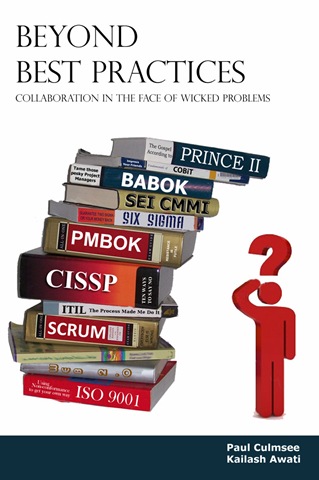
To the left is a mock-up picture to try and convey where we are going with this book. See the guy on the right? Is he scratching his head in confusion, saluting or both? (note, this is our mockup and the real thing may look nothing like this)

This book dives into the seedy underbelly of organisational problem solving, and does so in a way that no other book has thus far attempted. We examine why the very notion of “best practices” often makes no sense and have such a high propensity to go wrong. We challenge some mainstream ideas by shining light on some obscure, but highly topical and interesting research that some may consider radical or heretical. To counter the somewhat dry nature of some of this research (the topics are really interesting but the style in which academics write can put insomniacs to sleep), we give it a bit of the cleverworkarounds style treatment and are writing in a conversational style that loses none of the rigour, but won’t have you nodding off on page 2. If you liked my posts where I use odd metaphors like boy bands to explain SharePoint site collections, the Simpsons to explain InfoPath or death metal to explain records versus collaborative document management, then you should enjoy our journey through the world of cognitive science, memetics, scientific management and Willy Wonka (yup – Willy Wonka!).

Rather than just bleat about what the problems with best-practices are, we will also tell you what you can do to address these issues. We back up this advice by presenting a series of practical case studies, each of which illustrates the techniques used to address the inadequacies of best practices in dealing with wicked problems. In the end, we hope to arm our readers with a bunch of tools and approaches that actually work when dealing with complex issues. Some of these case studies are world unique and I am very proud of them.

Now at this point in the writing, this is not just an idea with an outline and a catchy title. We have been at this for about six months, and the results thus far (some 60-70,000 words) have been very, very exciting. Initially, we really had no idea whether the combination of our writing styles would work – whether we could take the degree of depth and skill of Kailash with my low-brow humour and my quest for cheap laughs (I am just as likely to use a fart joke if it helps me get a key point across)…

… But signs so far are good so stay tuned 🙂

Thanks for reading


Paul Culmsee

www.sevensigma.com.au


The practice of Dialogue Mapping – Part 3

Hi there and welcome to part 3 of my series on the practice of Dialogue Mapping in the real-world. To recap, in part 1, I provided a brief overview of Dialogue Mapping and in part 2, I described a common real world usage scenario that we perform fairly often as SharePoint consultants.

The rest of this series will change tack a little. In this article I am going to describe a very different Dialogue Mapping scenario to you. This was a huge challenge and a large leap from what I described in part 2. There were some wonderful lessons learned from this work which I will cover off here.

The most “wicked” problems are not technical

My first Dialogue Mapping gig where I was not a subject matter expert also happened to be a real baptism of fire. Here was a problem that I had no understanding of, no discipline knowledge and no sense of background history of the project, the dynamics of the group, nor any idea of the positions of stakeholders on the problem.

By this time my IBIS fluency was pretty much down and I felt very confident with the usage of Compendium. I had not yet travelled to the USA yet to train under Jeff Conklin directly, but I carried his book around with me, and had read it many times over. I had performed Dialogue Mapping many times, however until this point all the projects or subjects that I was involved in I knew a lot about. This time I felt very vulnerable. Your domain knowledge is a form of armour, and it was unsettling to know that you’re going in stark naked. I was intimidated, yet excited at the same time.

So imagine this scenario. There was myself, a facilitator, and *fifteen* strangers sitting across from me. This was double the group numbers of the typical IT scenarios I had previously mapped. I remember emailing Jeff for advice when I heard that there would be so many and I recall him saying that 15 was a lot of people for a newbie. What was I in for! 🙂

Little did I know at the time that this group had been meeting for quite some time before that, but were really struggling on a complex urban planning issue. When I say complex, I mean complex in a social way, rather than technical. Interestingly, the issue was not a technically complicated issue at all. Anybody could have sat in the room and understood most of the dialogue (not necessarily the full context but you would not be completely blinded by science). What made this particular issue complex was the fact that the group members came from several different organisations, representing some quite diametrically opposing viewpoints. In part 2, I wrote about how it was hard enough just to get one IT department to come to the party and that was just one department of a single organisation – sheesh! If you have complained about organisational silos and think it is hard enough to get some degree of consensus within the realm of one organisation, imagine it when over a dozen representatives from different organisations are involved, organisations that straddle the full spectrum of public and private sectors, as well as the community.

There were simply so many stakeholders and interconnected issues that it was very hard to not get bogged down into tangents, repetition and frustration. Now, imagine eighteen months of this environment and the stressful social complexity impacts.

This is a long-term project that I am still involved with, so I will not be taking you through the specific details of this project just yet. Rest assured though, it has been such a great experience that I will write about it in detail in the future. For now, I will focus on lessons learnt so that others aspiring to perform this craft can learn from my own experiences.

People often tell you the best way to learn is to dive right in, and Dialogue Mapping is no exception. No sooner than I had put up a “what should we do…” type root question, it didn’t take long for debate to get … shall we say … rigorous! So I will go over some of the key lessons that I learnt from this experience thus far.

Lesson One: Confidence and assertiveness

The first thing that I had to contend with was not being in control of the conversation to the same extent as before. As previously stated, with SharePoint workshops I tend to direct the flow of the workshop as a mapper and as a subject matter expert. But this scenario was very different. I didn’t know the topic area at all and therefore some of the terms and acronyms made no sense to me. Also being new and unused to the decorum of the group, I erred on what I thought was politeness, rather than annoy the group by being direct and at times, interrupting them.

This, in my opinion, is a mistake and does a disservice to the other participants. It is also probably the most common thing a newbie mapper will experience when starting out, especially with a new group. As a result, the mapping in this first workshop ebbed and flowed. There were a few times where I was mapping the conversation really well, and the participants really engaged with the argumentation as it unfolded on the screen before them. Participants gestured to the map and asked me to add additional arguments and issues to what had already been built there. I could literally hear some of the initially sceptical, suddenly have that magic moment where they see it working. But at other times, during, say a particularly contentious issue, the conversation would fly at a rapid rate of knots. With so many people in the room, many wanted to have their say on these topics. This led to:

  1. Side conversations started up
  2. Some participants looked away from the map, and started debating directly to each other

As soon as one of these happened, and especially with the latter, I, as the Mapper, had no hope of following the conversation. As you might expect, I would lose focus and the quality of what was captured suffered (hence lots of idea nodes with no connections to anything). The focussing power of the map would be diminished and the wheels would start to fall off.

So remember this above all else. No matter what you do, you must be confident and assertive from the very start to keep the group focussed on the map. Don’t be afraid to interrupt someone to clarify a point, or pause them before they go too fast. If someone else starts to interject, interject back and make it clear that you will get to them as soon as you have finished capturing what someone else has said.

Here is the other critical thing: You must be consistent. It is the first ten to twenty minutes that will set the tone for the rest of the session. This is where people will implicitly learn the decorum of a Dialogue Mapping session and know what to expect. Your actions as a mapper, during this period, is critical to the overall quality of the session. Start it well and it will generally end well.

Jeff Conklin, of course, offers advice for this in his wonderful book on how to dealing with this. But of course, in the heat of dialogue, all of that advice goes straight out the window as you struggle to keep up with the rapid fire dialogue heading your way. Reading about how one should dialogue map is one thing, doing it is another. This is why I call Dialogue Mapping a craft and leads me to my second lesson learned.

Lesson Two: Remember that one guitar lesson you had? (Be realistic)

I think just about everybody at one point has had romantic notions of being a rock guitarist, banging out the blues like Clapton or blistering solos like Kirk Hammett or Brian May. A surprisingly large number of people have actually bought a guitar at some stage in their lives and have tried to live the dream. Most give it up once they find that the gap between their ability to play a G chord and their dream of playing the solo to Hotel California stretches to the moon and back. Inevitably, many guitars ends up collecting dust in the attic, along with the home gym set and many other items that were bought from late night infomercials.

You will hit this with Dialogue Mapping. Remember that wicked problems breed social complexity. Some problems may have some stakeholders with diametrically opposed views and discussion can be quite heated. The romantic notion of your group suddenly solving their wicked problem from your wonderful dialogue mapping has to be viewed with the reality that you still have to learn the G chord and audience can be fickle.

Thus, as far as audiences go, don’t go playing a stadium gig until you feel that you can handle sitting in the corner of a local bar or the school disco. In other words, start small and work your way up. A small, successful meeting will help you develop your style, confidence and then empower you to take on larger groups.

As Ali-G would say, keep it real.

Lesson Three: Stick to your domain of knowledge (at first)

This is a logical extension of lesson two, and also a tricky one because it can be just as much of a worst practice as a best one. This I suspect is probably a lesson on where Jeff Conklin or other dialogue mappers may disagree with me. One of the transitions that you have to make as a mapper is to move from what I would call Issue Mapping to real Dialogue Mapping. Just because you are doing mapping in front of a group, doesn’t actually mean you are necessarily “dialogue” mapping. Dialogue Mapping is often called “Issue Mapping with facilitation”, and when you work within your domain of expertise and you are a mapper as well as participant. Therefore you are not an impartial facilitator. This is the situation I described in part 2 and discovered very quickly, that pure dialogue mapping was much harder and mentally tougher.

But in terms of developing your skills, you will have good results when you are working in an area that you know well. You don’t have to worry about the meaning of acronyms and half of the questions you have likely heard before anyway. Remember though, that in a way it is kind of cheating because you are in effect, using the craft to get people to confront questions that you want answered. But it is an important stepping stone and will help you master lesson 4.

Lesson Four: IBIS grammar in the reptile brain

IBIS is the grammar that you use to map discourse. When mapping rapid-fire contributions from a group of people, they do not want to sit and wait for you to mull over whether their statement was an idea followed by a pro or an inferred question with an idea. If you find yourself having to do this, it is like trying to play a song on guitar and having to consciously think about how to play that G chord. Just think about how much you’d enjoy a Metallica concert if James Hetfield stopped every minute or so on a hard bit of a song and said “Wait, wait.. I’ve done this before… ok, hang on…oops, sorry”. This translation needs to burn itself into your reptile brain so that the process is as automatic as possible. To do this, you need to initially not worry about getting up in front of a group. As Conklin suggests in his book, listen to interviews on the radio or take an article, pull out its main points and create an IBIS map for it. There are a zillion ways to do this.

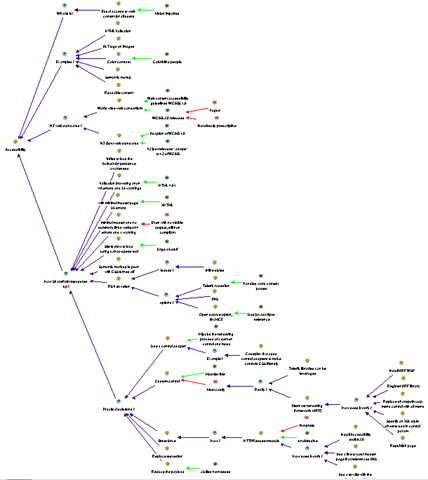
For all of you SharePoint people, a really excellent, highly relevant way of practice that I use, is to sit in the audience of a presentation at SharePoint Saturday or a conference and issue map the presentation. Below is a sample of some of the sessions where I have done this and the image after that demonstrates how much rationale I captured in the “NZ Web Standards and SharePoint” session.
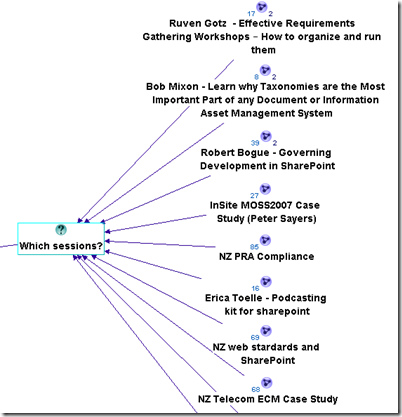
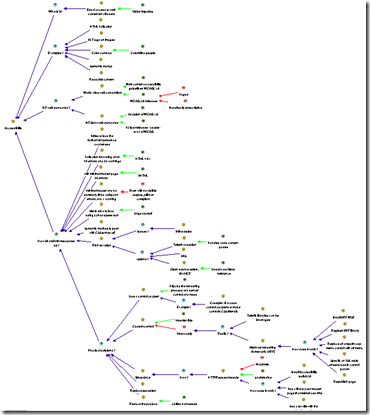
image   image

Another great way to learn is to send one of your maps to an IBIS practitioner and let them pull it to bits. Even those of us who have done this for a while need that constant reinforcement and feedback. Like any grammar, different things can be written in different ways and one person’s IBIS will not always look like someone else’s. (There is another blog post in the works that will show this in a funny way). At various times I have sent maps to Conklin for constructive feedback (and then ducked for cover! – hehe)

Finally, if you are serious about this and like what you are reading, then do what I did – the 5 week Issue Mapping webinar based workshops that Jeff Conklin runs, or if you are in Australia and want something local, then contact me for a half or full-day in-house Issue Mapping intro workshop. Both will not teach you to dialogue map, but by the end of them you will dream in IBIS 🙂

Lesson Five: IBIS translation in the reptile brain

Once the language of IBIS is familiar to you, you can take any argumentation and form a consistent IBIS map. You then have to learn how to listen very carefully because that is half the art. Now you have to take prose and pontification by participants and somehow unpack the points made, articulate them into a summary, and form an IBIS based model in your head, and then commit it to the map.

This can be hard – very hard, and it is nigh on impossible to do without applying what I told you in lesson one. A dialogue mapper is not superhuman and does not have photographic memory. The skill you are developing here is one where you pick out the IBIS elements of some dialogue quickly, as well as knowing when to interject to make sure you do not miss anything.

A great example of this working is when someone has stated something, and although I cannot remember all points, I know that there was a question and three ideas offered. I might pause the conversation before it goes too far and say something like “Ah, that was important and I need to get this right. I heard you say three things there. You questioned the idea of X, and you offered an answer with 3 pros. One was Y, and what were the other two again?”

Conklin explains meeting discourse and question types in his book and the aforementioned workshop in a lot of detail. But once again, to apply it to a real-world situation can only be done by practice (and more practice). The absolute best way to do this is to watch an experienced dialogue mapper perform this and look at how they handle the situation, which brings me onto lesson six.

Lesson Six: Observe

One of the most enjoyable training experiences of my career was to travel to the picturesque town of Annapolis and learn dialogue mapping from Jeff Conklin himself. Up until then, I had been practicing the craft, but after those two days, I returned as a much better practitioner.

The single most important part of the time spent there was when we, the students, dialogue mapped each other as we discussed a real-world issue. We each sat in the hot seat for fifteen minutes or so, trying to map the discussion. We were all being completely evil, deliberately starting side conversations, interrupting and interjecting, playing the role of the dominant type A style participant, jumping all over the place and, overall, just being as difficult as we could.

Unsurprisingly, we all sucked big time trying to dialogue map this. However, when Conklin took the floor, we then saw how exactly Dialogue Mapping was done and what twenty years of practice does. He effortlessly brushed off our attempts to trip him up by observing all of the lessons that I have thus far described, but also with some subtle tricks that we didn’t even notice until he told us afterwards.

After Conklin had wiped the floor with us, so to speak, we all got to have another crack at it, with the benefit of observation and hindsight. This time the difference was significant in our performance and the way that we each handled the “mob”.

Moral? The very best thing you can do is to be involved in a Dialogue Mapping session where it has been done well. Watch carefully what the mapper is doing and how they are conducting themselves and the process.

Lesson Seven: It will make you tired

If you think of all the various things that you have to do simultaneously (for examples listening, understanding, mapping, and managing the group) during Dialogue Mapping, it is amazing that anyone with a Y chromosome can manage it, given that men usually cannot multitask at all. (Case in point: If sport is on the radio and my wife is speaking to me, one of them has to be switched off…Sorry honey 🙂 ).

When you are first learning this craft and you are going to be up in front of a group, plan for only an hour or so. While you have to think quite consciously about things, it will exhaust you even more. Once things become more automatic, you can go for longer. From my own experience, the limit for Dialogue Mapping a big group on a really wicked topic would be about four hours at the absolute maximum. (Usually by then the participants also need to take a break and sleep on it anyway).

Some sessions can be intense, and you, as a mapper, need to be switched on for that entire time. You are listening carefully to every person speak because you are trying to form it into IBIS. So unlike everybody else who can sit there and look interested, yet be mentally switched off, you have to be interested by definition.

One thing about this is that, while you are in the zone, you don’t need coffee. When mapping, you have enough endorphins racing around your system to keep quite alert, but as soon as there is a break, you can find that you will feel quite tired at times, and a well timed coffee can be very handy (real coffee, of course – none of that instant junk!)

The one thing that compensates for what Dialogue Mapping can take out of you mentally, is that exhilarating experience when the group is really getting into the process and the positive feedback that you receive when a really well formed map has been developed.

Lesson Eight: Learn to love “transclusions” and CTRL+R

I thought that I would drop in a left-field lesson learned at this point that is still very important.

Trans-what? Don’t worry – I don’t know why they called it that either. Ted Nelson, who also coined the term “hypertext”, came up with the name but I think the day “transclusion” sprung to mind, he was having an off-day. I asked Conklin what it meant and he said “It’s technically accurate … an "inclusion" of material *across* (‘trans’) several documents”. When I whined about the geekiness of the name he added “There was a time when the word "hypertext" was a wacko term for geeks, you know”. Damn! He’s got me there.

My explanation that will suffice for now? Transclusions is a fancy way of describing the process of breaking your big map up into smaller, linked up sub-maps. I have also heard it referred to as chunking, and when maps get too big, this is a necessity. (For the hypertext nerds that is somewhat incomplete but suffices for this point).

The compendium software that I choose to use for this work also has a great feature in it. Your map is re-drawn automatically when you hold down the control key and press R. I am now in the habit that after entering a node or three, I redraw the map via this method to keep it all looking orderly. That way, if there has been a lot of dialogue captured, you do not end up with a messy, cluttered map that participants find hard to follow. Like lesson number three and four, stopping conversation while you refactor a messy map will cost you group momentum so ideally if you have gotten into the Control+R habit, all you have to do is a quick transclusion at an opportune time.

The best time to perform a map transclusion is when a thread of discussion has been exhausted and the group has moved onto a new idea or area in the map. A trick I learned from Anapolis was to sit up and say something like “Okay, let’s just pause for a minute.” (Holding up my hand), congratulate the group on the quality of what they have captured and then say something like “Let’s just put this stuff into its own pigeonhole, so we can now focus on X idea”.

Lesson Nine: Nurture the holding environment

Okay, so if there is to be one big serious lesson learned, it is this one. To make the point, I am going to quote Heifetz and Linsky from their excellent book Leadership on the Line. You can read a PDF press release here, specifically the section entitled “Control the temperature.”

Changing the status quo generates tension and produces heat by surfacing hidden conflicts and challenging organizational culture. It’s a deep and natural human impulse to seek order and calm, and organizations and communities can tolerate only so much distress before recoiling.

If you try to stimulate deep change, you have to control the temperature. There are really two tasks involved. The first is to raise the heat enough that people sit up, pay attention, and deal with the real threats and challenges facing them. Without some distress, there is no incentive for them to change anything. The second is to lower the temperature when necessary to reduce a counterproductive level of tension. Any community can only take so much pressure before it becomes either immobilized or spins out of control. The heat must stay within a tolerable range—not so high that people demand it be turned off completely, and not so low that they are lulled into inactivity.

Heifetz and Linsky talk about maintaining the “the productive range of distress” but I have heard many metaphors like this. Another I like is “creative abrasion”, coined by Leonard and Swap in their excellent book When Sparks Fly . Both are essentially talking about making the whole environment conducive to getting the best out of the participants.

The key takeaway is this: Each group is different and each situation is different. In the normal discourse of the meeting, there will be times where the group works together in almost perfect unison and times where one wrong word will destroy that balance and require the group to stop, reset things and move forward. This is not about IBIS either. The fact is that over time, a particular pattern will emerge in the decorum of the sessions, where conducting the sessions or approaching the mapping in a particular way, will work consistently well for the group.

Let me give you a classic example that was absolute genius on the part of my client who did exactly this. Before Dialogue Mapping for a group of concerned residents who were facing the prospect of significant change to the amenity of their homes, a bus was hired and the residents were taken to an area where a similar urban transformation had been made ten years before. We all walked around the area for an hour, soaking in the vibe, learning about the history of the area, how the area was redeveloped and how certain planning challenges were overcome.

This allowed the participants to get a real sense of the issues they needed to confront, and they felt it with all senses, sight, sound and tactile, rather than some cold, rather detached room with a projected map on the wall. Later, when I dialogue mapped the session after the bus tour, the group did a fantastic job and the quality of the rationale that was captured was much richer and faster, through that sensory immersion that took place before the mapping process began.

So just remember, Dialogue Mapping is a great holding environment in the sense that Heifetz and Linsky talk about. It is a wonderful “rich container”, as Conklin puts it, for fostering and maintaining creative abrasion. But as the bus ride example shows, there is a lot of things that you can combine with it to enhance the experience further.

More examples like this will be covered in part 4 of this series.

Thanks for reading

Paul Culmsee

www.sevensigma.com.au



SharePoint book review – Seamless Teamwork by Michael Sampson

Hi all

Some time back a publisher sent me a self-help SharePoint book pitched at end users. I figured that I don’t really represent an end user and the best way to review it would be to make Mrs Cleverworkarounds review the book. I mean, after all, getting the spouse to bring home the bacon is part of my quest to eventually be a kept man! However, my grand plan ran aground after a while – she got around halfway through the book and came back and said “It’s easy to follow and all, but I don’t understand *why* I am doing these things.”

As a result, I never published the review of that particular book.

If you are wondering what the point behind that little anecdote is, then read on. 

“Seamless Teamwork” by Michael Sampson is a book that I knew I had to review – from when I first heard about it and read one of the chapters at its web site. Its subtitle is “Using Microsoft SharePoint Technologies to Collaborate, Innovate and Drive Business in New Ways” and as expected, this is a book that looks at SharePoint through a different lens to most of the technical books that I review (with the exception of Dux’s great project management book).

In fact Dux’s book is actually a great frame of reference when reading this book because both authors have adopted a similar approach. Rather than focussing on the technology, both books focus on a specific problem domain and explain how to leverage the technology through the exploration of that problem. In doing so, they avoid the pitfalls of “end user” SharePoint books that lack coherence like the one that my wife was dissatisfied with. Why? Because there is a clear outcome to achieve by the end of the book.

Here is the funny thing, though. Both authors approach the subject matter from the perspective of a new project that needs to be successfully implemented, yet Michael actually uses SharePoint in a very different manner to how Dux does in his book. Does that mean one of them is wrong? Not at all. In fact it really hit home to me that if you can achieve *true* buy-in and shared commitment to a particular solution, then the technology aspects can be implemented in a number of different ways. Michael actually makes this very clear in his preface when he says

In a book of this nature, it is impossible to cover every eventuality, every situation, and every approach. What I hope you get out of it is a vision of how you can apply the capabilities of SharePoint to the work of your team, rather than a prescription of what you need to do at each and every point of a teaming process. Embrace the ideas that work for you and ignore the ones that don’t.

This book explores SharePoint through the “fly on the wall” view of “Project Delta” where an up and coming MBA holding brown-noser named Roger has kissed enough butts to be handed a high profile project to drive growth in the overseas market for his company. (Okay, so I am embellishing the back-story just a teensy bit). Through Roger’s eyes, we discover why email based collaboration is not sufficient for project collaboration, along with some teamwork theory, cleverly interwoven around the storyline. "Project collaboration” is broken down into more specific outcomes and explored individually, illustrating what capabilities of SharePoint are suited to these outcomes.

  • Collaborating
  • Finding
  • Accessing
  • Using for decision making
  • Enforcing structure
  • Publishing and managing

.. and that was just chapter 1!

Chapter 2 introduces the project management model used by Roger and the intrepid heroes of Project Delta. I like this chapter because he offers enough meat to theory nuts like me, while balancing useful and relevant SharePoint content. First up, five project phases are defined and explained, namely:

  • Creating a shared vision
  • Understanding the options
  • Analysing the options
  • Making a decision
  • Concluding the project

This particular choice of wording has no references or footnotes and googling the exact terms leads me straight to Michael’s book so I presume that he is applying his own world view here. Next, we focus on getting the right people involved in the project. Roger has to identify the people with the right mix of skills, background and experiences to participate and this provides a nice dovetail to introduce SharePoint user profiles and “My sites”. As well as explaining the concepts and workings of this SharePoint feature, practical tips are offered to get the best out of it as well. The chapter concludes with a project team identified, assembled and ready to rock and roll.

Chapter 3 now focuses on the different audiences involved in a project, namely the project team, the project sponsors and stakeholders and “everyone else”. SharePoint team sites are introduced by examining the information needs of each of these groups and illustrating that one size does not fit all. The chapter walks through creating a site for each of these groups using a site and subsite hierarchy and the permissions required. Blank site templates are used (something I also tend to start with) and then some “projecty type” out of the box lists are created, as well as the ubiquitous wiki library and a blog site. Finally, some out of the box web parts are added to the mix.

All in all, a great example of a practical project oriented site that one could use or build upon.

Chapter 4 expands on these sites by switching focus from creation to actual use of the site. Michael writes about the “Seamless Teamwork Approach” to project collaboration and then uses this as a platform to explain alerting, RSS, basic usage of the lists, wiki and blog. The key theme of this chapter is the section about “teamworking protocol” – in other words, team members need to agree on the general approach to how they will work together. The most important point  in this chapter deserves its own entire chapter.

It is expected – and absolutely beneficial – that people have disagreements and differences of opinion about key matters in the project. If everyone thinks the same, a team would not be necessary. However the key is that we will not allow disagreements to derail the progress of the project, because we agree to listen carefully and resolve our disagreements through candid dialogue and debate.

Chapter 5 through 9 now examines each of the five project phases  that were outlined in chapter 2.

Chapter 5 is all about creating a shared vision. We examine the different types of vision (again from my research this view of vision seems to be Michael’s ideas and not based on any of the methodologies or academic stuff that I have read). We cover planning for engagement with stakeholders using a wiki, before the actual engagement process itself. Once again, this chapter is a deft mix of the product, the process and the rationale behind the approach. This chapter does not stick strictly with SharePoint either as we have the scenario of a PowerPoint presentation being viewed over a live meeting session for geographically dispersed stakeholders.

Chapter 5 also delves a little into some of the factors that cause the “chaos” that derails projects. The importance of timely notification of changing constraints or circumstances is covered by reviewing how the RSS and email notifications (tasks list connected to Outlook) are used. Finally, for some odd reason, Michael devotes two pages to placating those annoying mac users who, no matter that the problem is, has already tried to convince everyone that buying a mac is the solution…hehehe!

Chapter 6 is all about identifying options and starts out by examining how to effectively brainstorm using the SharePoint wiki (and confluence gets a mention also). OneNote is also covered and I found the shared OneNote notebook idea quite interesting as I have not tried that myself. This chapter is heavy on guidance and decorum around how brainstorming should be approached to get the most out of it. The chapter concludes with consolidating and synthesising the ideas.

Chapter 7 is all about analysing the options from the collated list. The key question here is “what could we realistically do?” This chapter is the first one to introduce the notion of a custom list. In the example, a custom list is used to track further analysis on each option. I loved the little governance interlude here, where Roger, being the angel user that he is, contacts Gareth, the ever friendly and helpful SharePoint support person to get advice on the best way to structure the custom list. (What sort of utopian fantasy world are you painting here Michael? :-D). Seriously though, this is actually quite an advanced chapter in terms of SharePoint conceptual stuff, given that document based content types are also introduced here too and various permutations of mixing and matching document libraries, wikis and the perennial folder vs metadata debate. Thankfully, Michael did not poo-poo folders outright and instead gives one of the best write-ups I’ve seen on the pros and cons of folders vs metadata. He also covers site columns and how they can be scoped. This is great stuff.

The final section from this chapter is on meetings, with participants are either in the same location or separate locations. There are different types of meetings for different purposes and advice is offered on how best to run these meetings and when and what technology is appropriate to augment them. Microsoft’s free conferencing tool, “SharedView” is covered (something I never knew existed until I read this book – duh, Paul!) SharePoint meeting workspaces and Groove 2007 are covered also. The technology detail covered in this section is matched by great, practical advice on how best to use the tools, given the circumstances.

Chapter 8 is entitled “Making a decision.” Now our intrepid Roger has come to the crunch and gets a recommendation made, circulated and signed off. Here we use SharePoint surveys to do the task, but in reality, this chapter is not about SharePoint at all. The meat of this chapter is around the processes needed and advice on decorum in particular situations. There is a smattering of wiki and a good section introducing workflows in context of the feedback process, but fundamentally, the value of this chapter is in the non SharePoint material.

Chapter 9 is all about concluding the project. Roger’s butt kissing and pandering to stakeholders’ whims are finally at an end with confirmation that the final recommendation on project Delta has been accepted by senior management. Tasks include updating participants “My sites” with the project details as well as any skills learned, a blog post about the project in my-site, and the essential, but unpopular task of cleaning up all the loose ends of the projects from a compliance, archival and retention point of view. Some final housekeeping and we are done!

My favourite chapter of the book is actually not in the book at all. It is a separate chapter available from the Seamless Teamwork website and is all about SharePoint governance. I highly recommend this chapter, as it one of the best write-ups that I have seen on the topic so far. 

Overall this is a terrific book, yet there are sections where advice is given that I would personally not take. Some things I flat out disagree with. But I need to fair here. I am currently surrounded by a dozen books on team dynamics, facilitation, soft systems methodology and risk management so I am not the intended audience for this book. Just because I have different philosophical approaches to some aspects does not detract from this book at all. In fact, it comes with the territory of a book like this and this is why I think it is such a great read. I personally find it quite easy to write technically oriented articles, but to delve into ‘soft’ topics like team dynamics, project chaos, developing shared vision and the like is actually much more subjective and I think, ambitious and difficult to write well.

If I was to make a broad comparison with Dux’s book, which is about the closest thing to a comparison out there, I would say that Dux covered more SharePoint feature areas than Michael and stuck fairly close to the project management body of knowledge. Michael on the other hand, delved deeper into some of the softer topics around how teams can deliver great projects. Apples and oranges really, and I think that both books compliment each-other exceptionally well.

The other commonality with Dux’s book is that readers with a technical audience who skip the preface will probably not like this book or consider it too light on in terms of low level SharePoint coverage. Michael is very clear in his preface here. This book is for users, information workers and project team members who want to make the best use of SharePoint for their team. To this end, Michael has completely nailed what he set out to do and should be commended for delivering the goods.

It is great to see SharePoint books coming out that delve deeper into the mechanics of team collaboration, before diving straight into product features and capabilities. Previous books have tended to gloss over the non technical side of team collaboration and this book fills the gap nicely.


Thanks for reading


Paul Culmsee

www.sevensigma.com.au 


New book preview – SharePoint 2007 Developers Guide to the Business Data Catalog

I’ve been busy on a number of fronts and some of the fruits of that work will appear soon enough, but I thought that I would pop up to let you know about a forthcoming book written by Brett Lonsdale and Nick Swan on a SharePoint component that has until now, been seriously under-represented in the plethora of SharePoint books out there in the marketplace.

The Business Data Catalog is one of those SharePoint components that is easy enough to understand conceptually, but then will scare the utter crap out of you when you delve into the guts of its XML based complexity.  At least that was my experience the first time I toyed with it in early 2007. Luckily for me, my ass was saved by a tool that had just been released as a public beta called BDC MetaMan. I downloaded this tool and within around 15 minutes I used it to set up a BDC connection to Microsoft’s Systems Management Server v4 to pull software package details into a SharePoint list and felt very proud of myself indeed. 

Fast forward to mid 2009 and BDC MetaMan has come a hell of a long way, as have its creators. Nick and Brett are about as world-authoritative as you can possibly get on the BDC and if you wish to become a Jedi in the dark arts of the BDC “force” then you now have your official bible. This book is absolutely crammed with detail and the expertise of the authors in this feature shines throughout.

The book is split up across 11 chapters and although it is not explicitly stated by the authors, seems to be made of 3 broad parts. Chapter 1 introduces the BDC, how it is architected (web parts, BDC column, BDC Search, and integration with User Profile import and the SDK). Also covered is the range of data sources, an introduction to Application Definition Files (ADF) and how it all integrates into the Shared Service Provider model.

Once the intro chapter is done with, Brett and Nick don’t waste too much time in diving deep. 

Chapters 2 and 3 deal with the structure of BDC Application Definition (ADF) files, and follows up with the complex world of how authentication plays out with the BDC. Chapter 2 delves far more into the ADF files than I ever wished to tread, but Nick and Brett somehow manage to describe a long, boring XML file in a logical, easy to follow manner and there was a lot of stuff that I learned here that I had simply missed from trawling MSDN articles. The authentication chapter is covered in excellent detail in Chapter 3 and goes way beyond the usual NTLM/Kerberos double-hop stuff. Authentication in the Microsoft world has become very complex these days, and there are various options and trade-offs. This chapter covers all of this and more, brilliant stuff.

After the deep dive of ADF and authentication, we surface a little from the previous two chapters into what I think really, is part 2 of this book. That is, several chapters that deal with how you leverage the BDC once you have connected to a line of business application. Chapter 4 introduces the built-in web parts that come with the BDC, shows how they are used and how they can be modified either using SharePoint Designer or tweaking XSL styles directly. Chapter 5 explores the BDC column type, how it can be used in the Office document information panel, in SharePoint Designer workflows, as well as its limitations. Chapter 6 explains how to leverage the BDC for allowing SharePoint to crawl your back-end line of business data and present it in search results. In addition to this, chapter 6 has a lot to offer just from the point of view of customising the search experience, whether using BDC or not. Finally, Chapter 7 examines how the BDC can be utilised to add data into user profiles that is leveraged via audience targeting.

Next we dive back into “real programmer” territory and what I think makes part 3 of this book. Chapter 8 delves deep into the BDC object model, for those times when the out of the box stuff just won’t quite cut it for you. The example used to demonstrate this object model is a web service that exposes BDC data via several methods. Chapter 9 then covers the creation of a custom web part that is in effect, an Ajax version of the out of the box “Business Data List web part” that refreshes data every few seconds without requiring a page load. Chapter 10 is particularly interesting because it examines how the BDC is used in conjunction with another oft overlooked suite of technologies known as “Office Business Applications”. The combination of BDC and OBA offer many interesting capabilities and among the examples, there are examples of Excel and Word leveraging the BDC as well as creating custom task panes, custom ribbons and the like. Finally, chapter 11 deals with using the BDC to write data back to the line of business applications and finishes with a great example of using InfoPath to submit data to a line of business application via a webservice that calls the BDC. That is hellishly cool in a nerdy developer kind of a way.

Phew! First up, *man* these guys are smart! I have to say this is the hardest SharePoint book that I have reviewed. It is obviously aimed at developers but it has so much to offer beyond the BDC. The content is very technical at times and obviously low-level. That, itself, is not the problem. Conversely, complex topics are handled really well and everything is extremely logically organised and flows well. The book is simply very, very comprehensive! There is plenty of meat for developers to sink their teeth into and this book will keep you going for a long time.

The preface of the book states that it has been written for an audience of “Microsoft SharePoint 2007 Information Workers and Developers who need to learn how to use, customize and create solutions using the Business Data Catalog”. I would agree with this, but I hope that information workers do not get put off by chapter 2 (and to some extent, chapter 3). This book dives deep straight off the bat and it is actually the middle chapters that offer the sort of insights that information workers will find the most useful.

So, if you think that the BDC deserves more than one single chapter towards the back of a SharePoint book, then this is your answer. As well as becoming an expert on the BDC, It will open your eyes to many possibilities beyond it.

Thanks for reading

Paul Culmsee


Book Review – "SharePoint for Project Management"

To review this book I need to tell you a true story first…

The very first MOSS 2007 project that I was involved in did not go well. I was the architect who had to design the SharePoint farm, perform some IA work, sort out governance and work with the stressed out project manager who was dealing with stakeholders who insisted we press ahead, despite the fact they all had wildly different interpretations of what problem they were trying to solve.

In fact, my first series on branding, ROI and disk planning were inspired from that particular project. Other articles such as my “document management for metalheads” and my “project failure” series were also inspired by it too (although in that case the actual articles came from more broad soul searching).

Now one thing that came out of that experience, is that the organisation had a string of problematic projects prior to that. Thus they had attempted to rectify the problem by doing what many medium to large organisations do. They put together a program management office (PMO). Highly paid consultants came in and trained up various staff on the rigour and process for a PMO based on a PMBOK foundation. I was very supportive of this initiative, because at that time I was hell bent on achieving the PMP certification, so I was studying PMBOK anyway.

PMBOK for those who don’t know stands for the Project Management Body of Knowledge. It is a set of project management best practice guidelines produced by the Project Management Institute (PMI). Since the word “institute” is in its name, they are obviously really, really smart.

But the very same highly paid PMBOK consultants had no SharePoint experience. So, they also put together a new Project management Information System (PMIS) based on a complex folder structure, a bunch of new MSWord based forms, strictly managed manual workflows in relation to managing and tracking various critical aspects of projects (Excel-based, of course).

So, here we were, implementing a large scale collaboration project with the aim of improving the management and tracking of knowledge within the organization, and the PMO was not actually using SharePoint. The irony was not lost on me, especially considering that this was a service based organisation that made its money by undertaking projects! Even better, the outcome for the SharePoint project was to create “project portals” for staff to better manage their own information!

I used to make the point that it sent a bad message when we were undertaking a project to bring SharePoint to the masses so they could better manage their projects, yet not using it to manage *this* project. What did that say about our confidence with the platform?

Of course, it was easy for me to criticise this perceived hypocrisy because I was the tech guy who had learned how the product worked. The others had not had that luxury and trying to learn PMBOK rigour, combined with a new tool was simply too much for them to handle.

Story over – fast forward two and a half years later, here we are and what do we have…?

When I first heard that this book was coming out I was very pleased because I noted that its author, Dux Raymond Sy was certified as a Project Management Professional (PMP). This means that Dux has passed an exam validating his knowledge of PMBOK, but more importantly, had the real world experience to even qualify (PMBOK has some tight eligibility requirements). Given my interest and knowledge of PMBOK and experience of working in a PMBOK based PMO, I was very keen to read this book indeed. Luckily for me, Dux was kind enough to give me this opportunity and supplied me a review copy.

Before you even start on this book, do not skip the preface. Dux is not setting out to write for low level geeks or developers. In this book, you will not find insights into how to create a custom site definition for a PMO, complete with stapled features, event handlers or Visual Studio based workflows. Instead this book is more akin to a more focused “Teach yourself SharePoint” type book, combined with a “Project Management 123” style book.

Dux states that he has written the book for the following groups, of which only the last one may have expectation issues.

  • Project Managers
  • Project team members
  • Program Managers
  • IT/IS Directors
  • SharePoint consultants

Aside from the last group, we are not exactly talking uber-tech geeks here. Additionally, Dux explicitly states that the book can help SharePoint consultants to “leverage your SharePoint technical skills by offering a focused approach to implementing SharePoint as a PMIS“. He also states in his assumptions that “I am not inclined to write yet another technical book about SharePoint … the level of technical detail I will cover is just enough to get your PMIS up and running“.

So this book is pitched squarely at the end-user as far as the complexity and accessibility of the material, and Dux has actually come up with something that I think is of value to people who do not have a project management background either.

End-user training books work best when there is a context to the lessons. So whether it is using SharePoint for project management or using SharePoint to help Americans to play the game of cricket, having that unifying theme underneath always makes for a more coherent book helping to explain the rationales for all your actions.

Dux has used PMBOK as the basis to introduce SharePoint features. Each chapter steps you through the project management life cycle from project kickoff at Chapter 1, to project closing at Chapter 9.

Chapter 1 outlines the essential project management activities that have to take place and borrows from PMBOK theory. The concept of a PMIS is introduced and SharePoint is introduced as a product. Thankfully for all of us, Dux has resisted the urge to waste excessive paper on the history of SharePoint; something that every other author seems to feel compelled to do. The chapter is finished off by introducing a fictitious company called “SharePoint Dojo Inc.” which is used throughout the rest of the book.

Chapter 2 is entitled “Setting Up the PMIS” and starts by explaining SharePoint basics such as top level sites and subsites and site templates. He then relates this back to how a PMO may be structured. Once again, rather than go into excess theory, several different ways to organise your PMO are suggested with some basic considerations and we are quickly creating a SharePoint site as a workshop. The key point here is that Dux has set the scene, explained what we are going to do and the outcome that we want. Readers therefore aren’t going through the motions without knowing why. Each workshop then has a debrief that summarises the actions performed.

Chapter 3 is called “Adding PMIS Components” and, once again, Dux sets the scene by explaining the functionality that a PMIS needs to provide. This premise is used to introduce lists and libraries, and this is where non project management readers will also get benefit. There are lists and libraries created for tracking project risks, tasks, resources, contacts and documents with some customizations. Therefore, readers get a subtle introduction to PMBOK as well as learning how to customize lists and libraries in SharePoint.

Chapter 4 deals with “Adding stakeholders to the PMIS”, which is essentially a subtle way to write a chapter on managing users, groups and permissions.

Chapter 5 is entitled “Supporting Team Based Collaboration” and builds on chapters 2-4 by introducing more advanced SharePoint features, such as versioning, check-in and content approval in the context of project team members, stakeholders and project sponsors wanting to review and track the evolution of project documentation. Dux then introduces Wikis, discussion boards and document workspaces on the premise that “collaborative project activities can be ad hoc, offline or remote in nature”, such as brainstorming, sharing lessons learned and continual process improvement.

Chapter 6 is back into the PMBOK discipline again and is called “Project tracking”. It expands on chapter 3 in particular and tracking project tasks and risks. The workshop updates the lists with chapter 3 and requires readers to make more advanced changes to the existing lists. Additional columns are added and the datasheet view is introduced. The second half of chapter 6 introduces workflows, and the out of the box three-state workflow concept is introduced and implemented as a change control system.

Chapter 7 builds on chapter 6, by talking about requirements for project reporting in a PMIS and covers the SharePoint features of custom views, specific web parts and alerts to achieve this. This chapter also covers the creation of web part pages for the purpose of management dashboards (publishing pages are not covered). Mind you, later in this chapter the MOSS only KPI web parts are covered as well as a 3rd party web part by Bamboo Software. Alerts are also covered off, as well as particular attention to meeting workspaces as a means to improve the quality of project meetings. Anyone in project management knows, that meetings are a fact of life and a constant source of frustration and wastage.

Chapter 8 deals with integration issues. Dux offers techniques for integrating MS Project with SharePoint and Excel for managing SharePoint lists. Out of the box integration with SharePoint and MS Project is not overly slick and some 3rd party options are suggested. The integration with Excel on the other hand was actually something that I did not know existed – bi-direction sync between Excel and SharePoint via a Microsoft add-in.

Chapter 9 is the final chapter and entitled “Project Closing”. By this time we have created a fully functional PMIS site and this chapter rounds off the book by taking our complete site, and saving it as a template for re-use for new projects. As a final note, Dux writes about the importance of buy-in from stakeholders when adopting SharePoint as a PMIS.

I think that the level of detail that this book went into was well pitched at Dux’s targeted audience. If I was to make one suggestion in relation to the coverage of SharePoint features, it would have been to include both filter web parts and the concept of web part connections in chapter 7. I think that web part connections add an extra dimension to dashboards without requiring application development expertise. This may have been a good fit for this book.

SQL Reporting services integration may have been worthwhile in chapter 8 as well. Whilst excessive detail is not required for reporting services, the sort of functionality that it provides is definitely worth covering, especially as MOSS specific functionality like KPI web parts were mentioned. That chapter also was fairly small compared to the other chapters and I think this would have rounded it off nicely.

In terms of people who have never been involved with project management disciplines, there is also something to offer here. This book is not a PMBOK study guide by any stretch, but it still provides an insight into the rigour and processes that should be followed when managing projects. For that reason, I think that this book is actually better than many of the “teach yourself…” style books that provide lessons without an underlying context. If I was to nit-pick in this area, there is probably scope for further fleshing out some of the head-space around project management practice. But in saying that I’ve already read PMBOK books so I may be biased in this regard.

If Dux felt really inclined, he could probably repeat this formula. I could easily see this style of book being applied to say, using SharePoint for Scrum methodology.

All in all, a great book for what it is and a “must read” for those involved in project management who want to know what SharePoint is all about.

Paul Culmsee


Root Causes of Communication Fragmentation: Organisational Culture

This is the second article in a series of articles which examine factors causing the sort of organisational inefficiencies that lead people to use products like SharePoint. My first article in the series examined individual learning and behavioural styles and their impact on communication and how those same learning and behavioural styles still manifest themselves in collaborative tools and informational architecture.

We now turn our attention away from individuals and look at the collection of individuals known as the "organisation". In the first article, I lamented the fact that it seemed no empirical study had even been performed to determine the relationship between behaviour/learning styles and specific collaborative tools/techniques. Fortunately for me, in writing this second article, organisational culture has long been recognised as just about *the* most critical factor in organisational success. What that essentially translates to, is that there is an absolute *plethora* of research on the topic of the influence of organisational culture in knowledge management. In writing this article I had a severe case of information overload but fortunately found exactly what I was looking for.

Knowledge management in academia

Academic papers tend to be pretty dry reads. Researchers, surprise…surprise, write papers to be read by other researchers. Any time you delve into academia to look for answers you have a lot to read and digest, and need a strong jolt of caffeine to keep you going.

Combine that with the fact that the term "Knowledge Management" suffers from rampant buzzword abuse in the same way that the term "Governance" does. This abuse reflects itself in academia where authors are forced to spend pages and pages of their work on defining exactly what they are talking about, whilst making sure that they have demonstrated that they have checked their facts (evidenced by numerous references to other researches).

I ended up finding one particular paper to be very insightful contained within this book:


and in particular, this paper/chapter with an extremely long title…

*Paul takes a deep breath*

"An Empiric Study of Organizational Culture Types and their Relationship with the Success of a Knowledge Management System and the Flow of Knowledge in the U.S. Government and Nonprofit Sectors" by Juan Román-Velázquez, D.Sc.

What a mouthful that was!

Credit where credit is due though, this is a terrific paper and I am going to barely paraphrase it here. But I encourage anyone who wants to ensure that organisational culture issues have been given due consideration in their planing to read this paper. Despite being oriented to government and non-profit organisations, there is a lot of good conclusions to draw from.

Velázquez sets the scene by explaining that public, private, and nonprofit enterprises must survive and thrive in an environment of shrinking distance, complex interdependencies and increased uncertainty. Unsurprisingly, the use of knowledge management (KM) is rapidly growing and tools like SharePoint are commonly used in this area. Velázquez has a good definition for KM that

…provides the capability to engineer the enterprise structure, functions, and processes necessary for the enterprise to survive and prosper. KM leverages the existing human capital/intellectual assets to help generate, capture, organize, and share knowledge that is relevant to the mission of the enterprise. Furthermore, the implementation of a KM system (KMS) enables the effective application of management best practices and information technology tools to deliver the best available knowledge to the right person, at just the right time, to solve a problem, make a decision, capture expertise, and so forth, while performing their work. The KMS can comprise formal systems, processes, management directives, and others that, when combined, help generate, capture, organize, and share available knowledge that is relevant to the mission of the enterprise.

Velázquez than makes the key point that I have always believed. I tell clients that SharePoint is 90% head-space. Velázquez argues although motivations for KM may differ between the public and private sector, the *practice* of knowledge management is very similar. Velázquez also stresses the point that "tools" are a small part of the solution.

A successful KMS involves more than just implementing a new technology that can be acquired in a “box”; it requires understanding and integrating its human aspects and the culture in which it operates.

So SharePoint is not a Knowledge Management System – it is merely one of the tools that underpin a KMS.

Where does organisational culture come from?

A widely held view is that the importance of organisational cultural considerations emerged by the failure of many US and European companies to compete with Japanese firms. Case in point? Look at the history of Ford, General Motors and Toyota. In their book, Diagnosing and Changing Organisation Culture (see below), authors Kim Cameron and Robert Quinn make the point that successful companies with sustained profitability and above-average returns leverage their organisational culture as the key factor for competitive advantage.

Organisational culture can emerge in a number of ways:

  • It is sometimes created by its founder (e.g. Walt Disney).
  • It may emerge over time, as the organization faces challenges and obstacles (e.g. Coca-Cola)
  • It may be developed consciously by the management team (e.g. General Electric through Jack Welch).

How important is organisational culture? Consider this quote from Cameron and Quinn.

The point we are illustrating with these examples is that without another kind of fundamental change, namely, the change of the culture of an organisation, there is little hope of enduring improvement in organisational performance. A primary reason for the failure of so many efforts to improve organisational effectiveness is that, whereas the tools and techniques may be present and the change strategy implemented with vigor, failure occurs because the fundamental culture of the organisation remains the same. Consider the studies by Cameron and his colleagues (Cameron, Freeman, & Mishra, 1991; Cameron, 1992; Cameron, 1995) in which empirical studies were conducted in more than 100 organisations that had engaged in total quality management (TQM) and downsizing as strategies for enhancing effectiveness. The results of those studies were unequivocal. The successful implementation of TQM and downsizing programs, as well as the resulting effectiveness of the organisations’ performance, depended on having the improvement strategies embedded in a culture change. When TQM and downsizing were implemented independent of a culture change, they were unsuccessful. When the culture of these organisations was an explicit target of change, so that the TQM and/or downsizing initiatives were a part of an overall culture change effort, they were successful. Organisational effectiveness increased. Culture change was the key.

That quote, I think hits the nail on the head of why so many SharePoint projects fail. To implement SharePoint without any appreciation for organisational culture is simply not smart. If you are dumfounded by the fact that nobody in the organisation is embracing wikis, blogs and discussion forums, stop and think about it. Is this organisation conducive to such technologies?

Fortunately for SharePoint practitioners who have never considered the effect that an organisation’s culture has on the application of collaborative technology, I’m about to make your life easier… In short, the hard work has been done for you.

The CVF model

In the first article, I used the learning style theories of Honey and Mumford and Marston DISC to explain how our individual differences impacted on the means and methods by which we collaborate. They are not the only theories by any stretch. In fact, pretty much anytime anybody puts up a theory or methodology, you will invariably find someone else trashing it by questioning its validity. Likewise, when trying to quantify organisational culture factors, there are many different measurement methods with different theoretical underpinnings. Naturally, each believes that *theirs* is the right way to go.

I just had a sudden thought that maybe the learning and behavioural styles of an individual has an influence on which measurement methodology they might find to be the most useful.

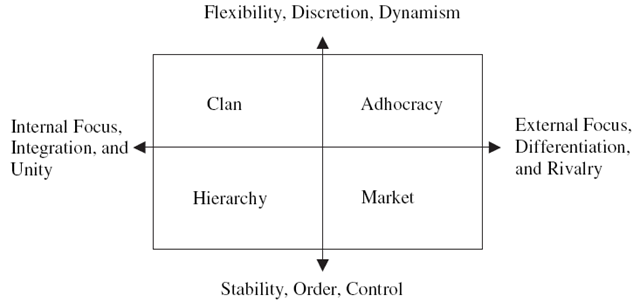
One tool used to diagnose organisations and help executives change their culture is called the Competing Values Framework (CVF). The CVF consists of a framework, a sense-making tool, and a set of steps to analyze and change organisational culture. CVF is best explained with two charts that I have supplied below.


image

There are two dimensions used in this chart. From left to right, we are looking at "internal versus external" factors such as employee satisfaction, customer service, market share and profitability. From bottom to top, we are looking at the "control versus flexibility" factors such as the internal processes, policies and systems that maintain stability and consistency at one end, and adaptability at the other. Taken together, the two dimensions of the CVF produces four quadrants: Clan, Adhocracy, Hierarchy and Market culture.

Note that it is a very similar dimension based system like Marston DISC. (This is why I like it).

Below I have defined the characteristics of each culture type as defined by Velázquez:

The clan culture: Dominant in flexibility, discretion, dynamism, internal focus, integration and unity.

A very friendly place to work where people share a lot of themselves. It is like an extended family. The leaders, or the heads of the organization, are considered to be mentors and perhaps parent figures. The organization is held together by loyalty or tradition. Commitment is high. The organization emphasizes the long-term benefits of human resources development and attaches great importance to cohesion and morale. Success is defined in terms of sensitivity to customers and concern for people. The organization places a premium on teamwork, participation, and consensus.

The adhocracy culture: Dominant in flexibility, discretion, dynamism, external focus, differentiation and rivalry.

A dynamic, entrepreneurial, and creative place to work. People stick their necks out and take risks. The leaders are considered innovators and risk takers. The glue that holds the organisation together is commitment to experimentation and innovation. The emphasis is on being on the leading edge. The organisation’s long-term emphasis is on growth and acquiring new resources. Success means gaining unique and new products or services. Being a product or service leader is important. The organisation encourages individual initiative and freedom.

The market culture: Dominant in stability, order, control, external focus, differentiation and rivalry.

A results-oriented organisation whose major concern is with getting the job done. People are competitive and goal oriented. The leaders are hard drivers, producers, and competitors. They are tough and demanding. The glue that holds the organisation together is an emphasis on winning. Reputation and success are common concerns. The long-term focus is on competitive action and achievement of measurable goals and targets

The hierarchy culture: Dominant in stability, order, control, internal focus, integration and unity.

A very formalised and structured place to work. Procedures govern what people do. The leaders pride themselves on being good efficent-minded coordinators and organizers. Maintaining a smooth-running organisation is most critical. Formal rules and policies hold the organisation together. The long-term concern is on stability and performance with efficient smooth operations. Success is defined in terms of dependable delivery, smooth scheduling, and low cost. The management of employees is concerned with secure employment and predictability.

I’m sure that just like the previous article, most readers will readily identify the sort of organisational culture to which they belong. Microsoft themselves are a classic case study of an organisation that has attempted to change its culture on numerous occasions with varying degrees of success. Microsoft would like to think that their culture is that of a clan and adhocracy, but the reality is they are very much a market culture. These days they are beaten to the punch my smaller, more nimble competitors, but over the long term they are able to use their formidable market position and financial leverage to succeed. Netscape is a classic example of Microsoft’s market culture succeeding, but you can almost *hear* the rusty gears of the Microsoft culture machine slowly but surely turning as competitors like Google and Linux achieve tremendous success which has been built on very different philosophical foundations.

Having said that, I believe personally that Google is now invariably moving from a strong clan/adhocracy culture starting point to a dominant market culture as well. If you disagree with my assertion then we need to prove it either way. How? 

…Enter the OCAI.

OCAI

The Organisational Culture Assessment Instrument (OCAI) is part of the CVF. It is a survey based instrument that allows an organisation to profile what quadrant they are strongest in and to decide if they would be better off by cultivating strengths in another quadrant. There are plenty of reasons why a company might want to do this. Microsoft both succeeded and failed in this regard. They managed to completely out-compete Netscape through Netscape’s own failed execution of strategy, yet they have been playing catch-up with Google for years and still really have not managed to make a dent. 

To determine the dominant culture type in an organization, survey questions are group into six "cultural components". The six components are: General Dominant Characteristics, Organizational Leadership, Management of Employees, Organizational Glue, Strategic Emphasis and Criteria of Success.

  • General Dominant Characteristics: In general, what does the organisation look like? What the overall organization is like.
  • Organizational Leadership: How leaders are perceived in their direction of the institution.
  • Management of Employees: The style that characterizes how employees are treated and what the working environment is like.
  • Organizational Glue: The bonding mechanisms that hold the organisation together.
  • Strategic Emphasis: Areas of emphasis or priority issues that guide the organisational strategies.
  • Criteria of Success: Evaluation criteria and procedures to determine level of achievements and outcomes. It is how victory is defined and what gets rewarded and celebrated.

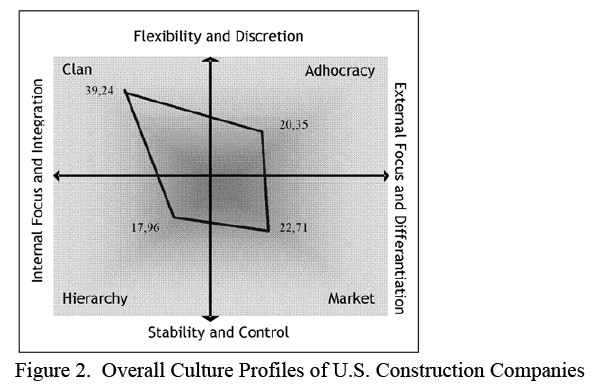
Each question has four alternatives representing each CVF quadrant (A=Clan, B=Adhocracy, C=Market, D=Hierarchy). Individuals completing the OCAI are asked to assign a score to each alternative. A higher number of points are given to the alternative that is most similar to the organisation in question. Results of the OCAI survey are obtained by computing the average of the response scores for each alternative. This can then be plotted as per the example below.

image

Et Voila! Now we have a much clearer assessment of the culture of an organisation, based on the feedback from the members of the organisation.

Is it worth it?

Geeks who have made it this far through this article are at this point wondering what I am smoking, but rest assured – this stuff is critically important for anybody who is tasked with putting SharePoint into an organisation.

It actually turns out that research using the CVF quadrant has shown that large organisations able to balance their competing values by growing strength in each quadrant tend to outperform other organisations over the long-term. Therefore, the tools and technologies that are put in place to support knowledge management need to also take into account the culture of the organisation in order to extract maximum value from the investment.

Each of the four traits were also significant predicators of other effectiveness criteria such as quality, employee satisfaction, and overall performance. The results also showed that the four traits were strong predicators of subjectively-rated effectiveness criteria for the total sample of firms, but were strong predicators of objective criteria such as return on net-assets and sales growth only for larger firms.

In a following post from this series, I will present the findings of the Velázquez paper which undertook an empirical analysis of KM priorities and critical success factors of many organisations using OCAI.

How would SharePoint look?

In the first article I had a section where I theorised how a SharePoint installation would look like if behavioural types had been taken to extremes. In the interests of consistency, I think it’s good to repeat that experiment in poor stereotyping here:

The clan culture is social networking personified and therefore Facebook style applications are the answer to collaboration and knowledge management. Employees twitter away to each-other and share everything. SharePoint’s "My Sites" are the obvious candidate here, but to a mature clan culture, my-sites are pretty antiquated and almost laughable compared to some of the competing cloud based applications out there. Document libraries? Sheesh! What do you need documents for anyway?  Everyone uses blogs, wikis and Information architecture consists of tagging anything and everything. A mature clan culture would very likely utilise 3rd party add-ins like Newsgators Social Sites if they were to make a SharePoint investment.

I actually believe that anyone who considers themselves a clan culture and is putting in SharePoint is really a market culture with a case of rose coloured glasses 🙂 .

The adhocracy culture is essentially every startup company as well as any CEO who describes themselves as "dynamic". SharePoint, in this type of culture, does not have an information architecture to speak of (in the ‘classic’ meaning of that term). SharePoint features will be used as needed and grow over time. If it works, it will be used, if it does not, it will lie abandoned. Anything newly released will be eagerly tried, kept or discarded depending on relevance and usage. Some re-use from learning will take place, but ultimately SharePoint will perpetually be a work in progress with no central governance authority. Most power users will be administrators of their own sites and any attempts to impose centralised order or a governance regime that is based around centralisation and standards will likely fail. Decentralised control for this type of organisation is fine because there is a strong sense of ownership of the knowledge and information.

The market culture would start to utilise SharePoint in a manner that is most in keeping with the literature around features, deployment and governance. Dashboards and KPI’s would feature heavily, as well as workflows that contribute to the ease of collecting performance measurements. Reporting Services integration in particular will fare well here. In a market culture, very little sympathy may be given for SharePoint functionality that is not seen as contributing positively to the business. Additionally, users are unlikely to change for the sake of change or because it is something new and shiny. A market driven culture will implement SharePoint because they see a tangible, quantifiable reason to do so.

The hierarchy culture will implement SharePoint in its most ‘classical’ style. They will naturally make use of site collection, sites and subsites and enforce strict, often complex security boundaries with tight centralised control. Chances are that significant time will be invested into ‘classical’ governance such as forming a committee, standardising on structure and conventions and trying to create a solution that is repeatable with a minimum of rework. Workflows will be very popular, as well as form services as well as document centric collaboration. Facebook style social networking will most definitely not be a high priority, and what’s more, will probably be blocked by the corporate firewall anyway!

Another note: SharePoint out of the box in my opinion is most suited to the latter two organisational cultures. Is it any surprise that a market culture organisation such as Microsoft would produce a collaborative tool that happens to work with it’s own organisational culture? Therefore it begs the question whether an organisation founded on one culture can ever really write the perfect tool for another culture?

Culture based communication fragmentation

Just like the first article, I have painted a pretty stereotypical picture of the sort of SharePoint installation I’d likely see. Some readers (dare I risk suggesting younger readers?) may look at the market and hierarchy culture as old school, representing 20th century organisational thinking. Certainly Linux proves that the clan culture can be extremely successful against the old school guys. But there are many stories of organisations that have had massive initial success, only to get left in the dust once the slower market and hierarchical cultures get their act in gear. One thing hierarchical cultures can do exceptionally well is repeat process more consistently, with fewer defects which ultimately reduces cost. They may not be all that quick at first, but it’s not always about being first to market.

Once again I leave you on an Information Architecture note. Someone who only knows a clan culture will very likely put together a SharePoint solution vastly different to someone who has only known hierarchical culture. The prevailing culture will always win the technology battle, no matter how passionate the individuals are. Even organisational stakeholders in a SharePoint project often make this mistake with the "build it and they will come" approach and think that making the technology available will change the culture . This is both naive and dangerous and has the effect of setting yourself up for project failure.

So, you, as an information architect, need to acutely be aware of the prevailing culture. If your stakeholders give you mixed messages, then perhaps the CVF/OCIA analysis would be a very timely and smart thing to do.

Thanks for reading

Paul Culmsee

www.sevensigma.com.au
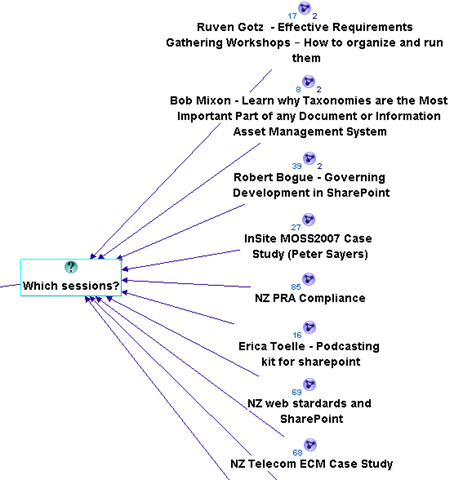


Book Review – Essential SharePoint 2007

One SharePoint book on my bookshelf is "Essential SharePoint 2007 – Delivering High Impact Collaboration", by Scott Jamison, Mauro Cardarelli and Susan Hanley.

Time moves fast in the SharePoint world. Having been involved with MOSS2007 since around August 2006, it is amazing just how far things have come. Here we are in August 2008 and I simply cannot keep up! We have a staggering myriad of blogs, books, magazines, products, training and everything in between, competing for the hearts and minds of confused and frustrated user base, all around this powerful yet maddening product known as SharePoint.

I’m not too worried about the pace of new developments happening at an ever increasing rate, because if I struggle to keep up, what hope do my clients have? 

I’ve read a few SharePoint books over the last couple of years (particularly in the early days where like everyone else, I was trying to make sense of it all). I found most of them to offer a background to the product, then go through the extensive feature-set of the product, but are weak on practical guidance.

Continue reading “Book Review – Essential SharePoint 2007”


« Previous Page

Today is: Saturday 16 May 2026 -