Back to Cleverworkarounds mainpage
 

More User Profile Sync issues in SP2010: Certificate Provisioning Fun

Wow, isn’t the SharePoint 2010 User Profile Service just a barrel of laughs. Without a bit of context, when you compare it to SP2007, you can do little but shake your head in bewilderment at how complex it now appears.

I have a theory about all of this. I think that this saga started over a beer in 2008 or so.

I think that Microsoft decided that SharePoint 2010 should be able to write back to Active Directory (something that AD purists dislike but sold Bamboo many copies of their sync tool). Presumably the SharePoint team get on really well with the Forefront Identify Manager team and over a few Friday beers, the FIM guys said “Why write your own? Use our fit for purpose tool that does exactly this. As an added bonus, you can sync to other directories easily too”.

“Damn, that *is* a good idea”, says the SharePoint team and the rest is history. Remember the old saying, the road to hell is paved with good intentions?

Anyways, when you provision the UPS enough times, and understand what Forefront Identity Manager does, it all starts to make sense. Of course, to have it make sense, requires you to mess it up in the first place and I think that everyone universally will do this – because it is essentially impossible to get it right the first time unless you run everything as domain administrator. This is a key factor that I feel did not get enough attention within the product team. I have now visited three sites where I have had to correct issues with the user profile service. Remember, not all of us do SharePoint all day – for the humble system administrator that is also catering with the overall network, this implementation is simply too complex. Result? Microsoft support engineers are going to get a lot of calls here – and its going to cost Microsoft that way.

One use-case they never tested

I am only going to talk about one of the issues today because Spence has written the definitive article that will get you through if you are doing it from scratch.

I went to a client site where they had attempted to provision the user profile synchronisation unsuccessfully. I have no idea of the things they tried because I wasn’t there unfortunately, but I made a few changes to permissions, AD rights and local security policy as per Spencers post. I then provisioned user profile sync again and I hit this issue. A sequence of 4 event log entries.

Event ID:      234
Description:
ILM Certificate could not be created: Cert step 2 could not be created: C:\Program Files\Microsoft Office Servers\14.0\Tools\MakeCert.exe -pe -sr LocalMachine -ss My -a sha1 -n CN=”ForefrontIdentityManager” -sky exchange -pe -in “ForefrontIdentityManager” -ir localmachine -is root

Event ID:      234
Description:
ILM Certificate could not be created: Cert could not be added: C:\Program Files\Microsoft Office Servers\14.0\Tools\CertMgr.exe -add -r LocalMachine -s My -c -n “ForefrontIdentityManager” -r LocalMachine -s TrustedPeople

Event ID:      234
Description:
ILM Certificate could not be created: netsh http error:netsh http add urlacl url=
http://+:5725/ user=Domain\spfarm sddl=D:(A;;GA;;;S-1-5-21-2972807998-902629894-2323022004-1104)

Event ID:      234
Description:
Cannot get the self issued certificate thumbprint:

The theory

Luckily this one of those rare times where the error message actually makes sense (well – if you have worked with PKI stuff before). Clearly something went wrong in the creation of certificates. Looking at the sequence of events, it seems that as part of provisioning ForeFront Identity Manager, a self signed certificate was created for the Computer Account, added to the Trusted People certificate store and then is used for SSL on a web application or web service listening on port 5725.

By the way, don’t go looking for the web app listening on such a port in IIS because its not there. Just like SQL Reporting Services, FIM likely uses very little of IIS and doesn’t need the overhead.  

The way I ended up troubleshooting this issue was to take a good look at the first error in the sequence and what the command was trying to do. Note the description in the event log is important here. “ILM Certificate could not be created: Cert step 2 could not be created”. So this implies that this command is the second step in a sequence and there was a step 1 that must have worked. Below is the step 2 command that was attempted.

C:\Program Files\Microsoft Office Servers\14.0\Tools\MakeCert.exe -pe -sr LocalMachine -ss My -a sha1 -n CN=”ForefrontIdentityManager” -sky exchange -pe -in “ForefrontIdentityManager” -ir localmachine -is root

When you create a certificate, it has to have a trusted issuer. Verisign and Thawte are examples and all browsers consider them trustworthy issuers. But we are not using 3rd party issuers here. Forefront uses a self-signed certificate. In other words, it trusts itself. We can infer that step 1 is the creation of this self-trusted certificate issuer by looking at the parameters of the MakeCert command that step 2 is using.

Now I am not going to annotate every Makecert parameter here, but the English version of the command above says something like:

Make me a shiny new certificate for the local machine account and call it “ForefrontIdentityManager”, issued by a root certificate that can be found in the trusted root store also called ForeFrontIdentityManager.

So this command implies that step 1 was the creation of that root certificate that issues the other certificates. (Product team – you could have given the name of the root issuer certificate something different to the issued certificate)

The root cause

Now that we have established a theory of what is going on, the next step is to run the failing Makecrt command from a prompt and see what we get back. Make sure you do this as the Sharepoint farm account so you are comparing apples with apples.

C:\Program Files\Microsoft Office Servers\14.0\Tools>MakeCert.exe -pe -sr LocalMachine -ss My -a sha1 -n CN=”ForefrontIdentityManager” -sky exchange -pe -in “ForefrontIdentityManager” -ir localmachine -is root

Error: There are more than one matching certificate in the issuer’s root cert store. Failed

Aha! so what do we have here? The error message states that we have more than 1 matching certificate in the issuers root certificate store.

For what its worth it is the parameters “-ir localmachine -is root” that specifies the certificate store to use. In this case, it is the trusted root certificate store on the local computer.

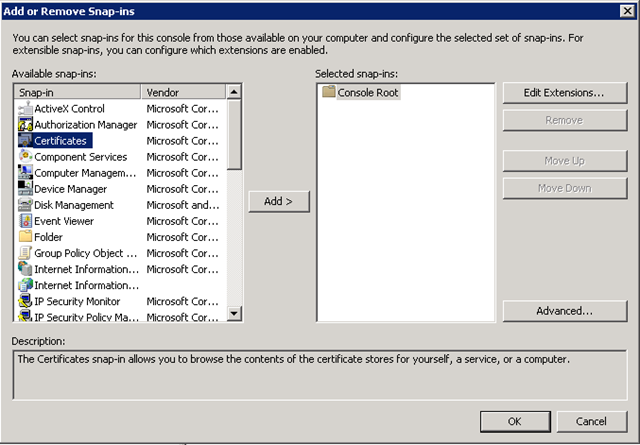
So lets go and take a look. Run the Microsoft Management Console (MMC) and Choose “Add/Remove Snap In” from the File Menu.
image

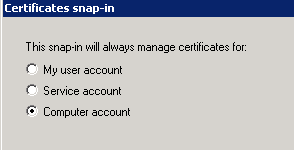
From the list of snap ins choose Certificates and then choose “Computer Account”
image

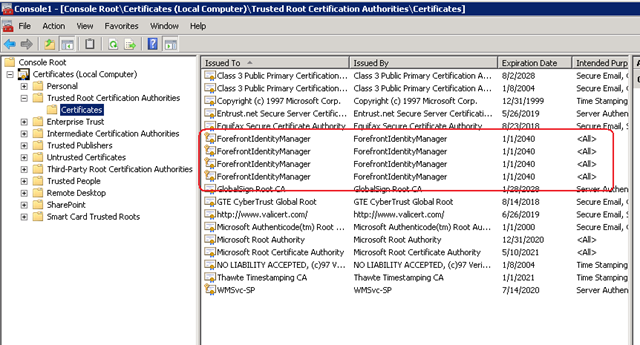
Now in the list of certificate stores, we need to examine the one that the command refers to: The Trusted Root Certification Authorities store. Well, look at that, the error was telling the truth!
image

Clearly the Forefront Identity Manager provisioning/unprovisioning code does not check for all circumstances. I can only theorise what my client did to cause this situation because I wasn’t privy to what was done on this particular install before I got there. but step 1 of this provisioning process would create an issuing certificate whether one existed already or not. Step 2 then failed because it had no way to determine which of these certificates is the authoritative one.

This was further exacerbated because each re-attempt creates another root certificate because there is no check whether a certificate already exists.

The cure is quite easy. Just delete all of the ForefrontIdentityManager certificates from the Trusted Root Certification Authorities and re-provision the user profile sync in SharePoint. Provided that there is no certificate in this store to begin with, step 1 will create it and step 2 will then be able to create the self signed certificate using this issuer just fine.

Conclusion (and minor rant)

Many SharePoint pros have commented on the insane complexity of the new design of the user profile sync system. Yes I understand the increased flexibility offered by the new regime, leveraging a mature product like Forefront, but I see that with all of this flexibility comes risk that has not been well accounted for. SP2010 is twice as tough to learn as SP2007 and it is more likely that you will make a mistake than not making one. The more components added, the more points of failure and the less capable over-burdened support staff are in dealing with it when it happens.

SharePoint 2010 is barely out of nappies and I have already been in a remediation role for several sites over the user profile service alone.

I propose that Microsoft add a new program level KPI to rate how well they are doing with their SharePoint product development. That KPI should be something like % of time a system administrator can provision a feature without making a mistake or resorting to running it all as admin. The benefit to Microsoft would be tangible in terms of support calls and failed implementations. Such a KPI would force the product team to look at an example like the user profile service and think “How can we make this more resilient?”. “How can we remove the number of manual steps that are not obvious?”, “how can we make the wizard clearer to understand?” (yes they *will* use the wizard).

Right now it feels like the KPI was how many features could be crammed, in as well as how much integration between components there is. If there is indeed a KPI for that they definitely nailed it this time around.

Don’t get me wrong – its all good stuff, but if Microsoft are stumping seasoned SharePoint pros with this stuff, then they definitely need to change the focus a bit in terms of what constitutes a good product.

Thanks for reading

Paul Culmsee

www.sevensigma.com.au


Index index everywhere but not a result in sight.

I have been doing a bit more tech work than normal lately – SP2010 popularity I guess, and was asked to remediate a few issues on a problematic server that I hadn’t set up. The server in question had a number of issues (over and above the usual “lets all run it as one account” type stuff) that had a single root cause, so I thought I’d quickly document the symptoms and the cause here.

Symptom 1: SQL Server Event ID 28005:

“An exception occurred while enqueueing a message in the target queue. Error: 15404, State: 19. Could not obtain information about Windows NT group/user ‘DOMAIN\someuser’, error code 0x5”

This error would be reported in the Application log around 70 times per minute. As it happened, I had removed the account in question from running any of the SharePoint web, application or windows services, but this still persisted. I suspect SharePoint was installed as this account because it was the db owner of many of the databases on the SQL Server. Whatever the case, SQL was whinging about it despite its lack of actual need to be there.

Symptom 2: Event ID 4625:

At a similar rate of knots as the SQL error, was the rate of 4625 errors in the security log. These logs were not complaining about the account that the SQL event complained about, but instead it complained about ANY account running the SQL Server instance. I tried network service, a domain account and a local account and saw similar errors (although the local one had a different code).

Log Name:      Security
Source:        Microsoft-Windows-Security-Auditing
Event ID:      4625
Task Category: Logon
Keywords:      Audit Failure
Description:  An account failed to log on. 

Subject:
    Security ID:        NETWORK SERVICE
    Account Name:        COMPUTER$
    Account Domain:        DOMAIN
    Logon ID:        0x3e4 

Failure Information:
    Failure Reason:        Unknown user name or bad password.
    Status:            0xc000006d
    Sub Status:        0xc0000064 

Process Information:
    Caller Process ID:    0x7e0
    Caller Process Name:    E:\Program Files\Microsoft SQL Server\MSSQL10_50.MSSQLSERVER\MSSQL\Binn\sqlservr.exe 

Detailed Authentication Information:
    Logon Process:        Authz   
    Authentication Package:    Kerberos

When using a local, rather than a domain user account the code was:

Failure Information:
    Failure Reason:        An Error occured during Logon.
    Status:            0xc000005e
    Sub Status:        0x0 

Symptom 3: Search only working for domain administrators

On top of the logs being filled by endless entries of the previous two, I had another error (the original reason why I was called in actually). A SharePoint search would yield zip, nada, zero, no results for a regular user, but a domain administrator could happily search SP2010 and get results. (well actually regular users did get some results – people searched actually worked fine).

The crawler was fine and dandy and the default content source had not been messed with. There were no errors or logs to suggest anything untoward.

The resolution:

It was the second symptom that threw me because I thought that the problem must have been kerberos config. But I quickly discounted that after checking SPN’s and the like (notwithstanding the fact this was a single server install anyway!)

On a hunch (helped by the fact that I had dealt with the issue of registering managed accounts not so long ago), I concentrated on the user account that was causing SQL Server all the trouble (Event ID 28005). I loaded up Active Directory and temporarily changed the security of this user account so that “Authenticated Users” had “READ” access to it.

image

As soon as I did this, both event ID 28005 and 4625 stopped.

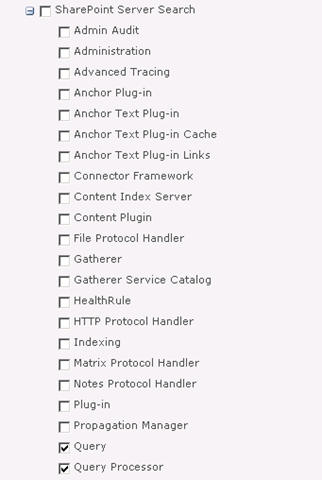
I then checked the search (symptom 3) and it was still barfing. In this case I decided to turn up the debug juice on the “Query” and “Query Processor” functions of “SharePoint Server Search”.

image

After upping the level of verbosity, I found what I was looking for.

08/12/2010 22:13:41.00     w3wp.exe (0x2228)                           0x1F0C    SharePoint Server Search          Query Processor                   g2j3    High        AuthzInitializeContextFromSid failed with ERROR_ACCESS_DENIED. This error indicates that the account under which this process is executing may not have read access to the tokenGroupsGlobalAndUniversal attribute on the querying user’s Active Directory object. Query results which require non-Claims Windows authorization will not be returned to this querying user.    debd2c54-d6a5-41b8-bf26-c4697b36f4d4

I knew immediately that this was very likely the same issue as the first two symptoms and when I googled this result, my Perth compatriot, Jeremy Thake had hit the same issue in July. The fix is to add your search service account to a group called “Pre-Windows 2000 Compatibility Access” group. This group happens to have the right required to read this attribute. Whether it is the same attribute I needed for my SQL issue, or the registering managed accounts issue I don’t know, but what I do know is that this group loosens up permissions enough to cure all four of these issues.

The little security guy in me keeps telling me I should confirm the least privilege in each of these scenarios, but hey if Microsoft are saying to put the accounts into this group, then who am I to argue?

Finally, it turns out that SP2010 re-introduced something that was in SP2003. A call to a function called AuthzInitializeContextFromSid which seems to be the root of it all. Apparently it was not used in SP2007, but its sure there now. I assume that one of the many stored procedures that SharePoint would call in SQL may have been the cause of Symptom 1. When you look at Symptom 2, it now makes sense because AD was faithfully reporting an access denied when the call to AuthzInitializeContextFromSid was made. It reported SQL Server as the culprit, I assume, because of a stored proc doing the work perhaps? It just sucks that the security event logged is a fairly stock message that doesn’t give you enough specifics to really work out what is going on.

Anyway, I hope that helps someone else – as googling the event ID details is not overly helpful


Thanks for reading

Paul Culmsee

www.sevensigma.com.au


Why I’ve been quiet…

As you may have noticed, this blog has been a bit of a dead zone lately. There are several very good reasons for this – one being that a lot of my creative energy has been going into co-writing a book – and I thought it was time to come clean on it.

So first up, just because I get asked this all the time, the book is definitely *not* “A humble tribute to the leave form – The Book”! In fact, it’s not about SharePoint per se, but rather the deeper dark arts of team collaboration in the face of really complex or novel problems.

It was late 2006 when my own career journey took an interesting trajectory, as I started getting into sensemaking and acquiring the skills necessary to help groups deal with really complex, wicked problems. My original intent was to reduce the chances of SharePoint project failure but in learning these skills, now find myself performing facilitation, goal alignment and sensemaking in areas miles away from IT. In the process I have been involved with projects of considerable complexity and uniqueness that make IT look pretty easy by comparison. The other fringe benefit is being able to sit in a room and listen to the wisdom of some top experts in their chosen disciplines as they work together.

Through this work and the professional and personal learning that came with it, I now have some really good case studies that use unique (and I mean, unique) approaches to tackling complex problems. I have a keen desire to showcase these and explain why our approaches worked.

My leanings towards sensemaking and strategic issues would be apparent to regular readers of CleverWorkarounds. It is therefore no secret that this blog is not really much of a technical SharePoint blog these days. The articles on branding, ROI, and capacity planning were written in 2007, just before the mega explosion of interest in SharePoint. This time around, there are legions of excellent bloggers who are doing a tremendous job on giving readers a leg-up onto this new beast known as SharePoint 2010.

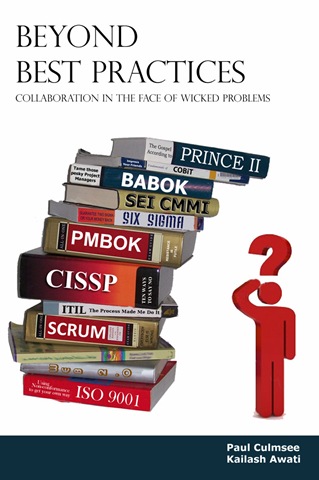
BBP (3)

So back to the book. Our tentative title is “Beyond Best Practices” and it’s an ambitious project, co-authored with Kailash Awati – the man behind the brilliant eight to late blog. I had been a fan of Kailash’s work for a long time now, and was always impressed at the depth of research and effort that he put into his writing. Kailash is a scarily smart guy with two PHD’s under his belt and to this day, I do not think I have ever mentioned a paper or author to him that he hasn’t read already. In fact, usually he has read it, checked out the citations and tells me to go and read three more books!

Kailash writes with the sort of rigour that I aspire to and will never achieve, thus when the opportunity of working with him on a book came up, I knew that I absolutely had to do it and that it would be a significant undertaking indeed.

To the left is a mock-up picture to try and convey where we are going with this book. See the guy on the right? Is he scratching his head in confusion, saluting or both? (note, this is our mockup and the real thing may look nothing like this)

This book dives into the seedy underbelly of organisational problem solving, and does so in a way that no other book has thus far attempted. We examine why the very notion of “best practices” often makes no sense and have such a high propensity to go wrong. We challenge some mainstream ideas by shining light on some obscure, but highly topical and interesting research that some may consider radical or heretical. To counter the somewhat dry nature of some of this research (the topics are really interesting but the style in which academics write can put insomniacs to sleep), we give it a bit of the cleverworkarounds style treatment and are writing in a conversational style that loses none of the rigour, but won’t have you nodding off on page 2. If you liked my posts where I use odd metaphors like boy bands to explain SharePoint site collections, the Simpsons to explain InfoPath or death metal to explain records versus collaborative document management, then you should enjoy our journey through the world of cognitive science, memetics, scientific management and Willy Wonka (yup – Willy Wonka!).

Rather than just bleat about what the problems with best-practices are, we will also tell you what you can do to address these issues. We back up this advice by presenting a series of practical case studies, each of which illustrates the techniques used to address the inadequacies of best practices in dealing with wicked problems. In the end, we hope to arm our readers with a bunch of tools and approaches that actually work when dealing with complex issues. Some of these case studies are world unique and I am very proud of them.

Now at this point in the writing, this is not just an idea with an outline and a catchy title. We have been at this for about six months, and the results thus far (some 60-70,000 words) have been very, very exciting. Initially, we really had no idea whether the combination of our writing styles would work – whether we could take the degree of depth and skill of Kailash with my low-brow humour and my quest for cheap laughs (I am just as likely to use a fart joke if it helps me get a key point across)…

… But signs so far are good so stay tuned 🙂

Thanks for reading


Paul Culmsee

www.sevensigma.com.au


It’s all Joel’s fault…

Here we go… another Cleverworkarounds waffle!

Now, we all know that Joel Oleson is the Russell Crowe of the SharePoint world! I mean, he’s multi-skilled, loads of talent, has the respect of his peers and has built a well deserved reputation of being one of the best at what he does. (Although unlike Russell I am fairly sure that he has not thrown a telephone at an annoying IT manager in a fit of rage just yet).

But despite his best intentions and with his heart in the right place, Joel is one of the unwitting architects of a butterfly effect that is now plaguing the SharePoint world. One that is now causing much pain and damage to already beleaguered enterprises.

In short, he set the wheels in motion that helped destroy a word via buzzword abuse 🙂 That word is…

"Governance"

See, way, way back in the bowels of time (okay, around 2006), when the stock market was soaring and therefore SOX compliance was being conveniently ignored by investors in equities, Joel’s blog was one of a couple of blogs of any significance SharePoint-wise. He was out there doing his bit for the common good, stressing the importance of governance in the SharePoint world before the word governance was really used in this context. Joel cited this article by Matthew Cain at Gartner which seems to be the root of it all. Now this is perfectly fine and dandy, but Joel made one fatal mistake that we are still feeling the effects of…

He de-nerdified his blog and made this stuff accessible! Thus, somewhere in the world, a marketing person read it and understood just enough syllables to get a gist of what Joel was talking about. Sensing the opportunity to add a new word to glossy brochureware, from that moment forward the true meaning of "governance" was lost forever as the snowball effect of a new buzzword taking root gained momentum. As the snowball rolls faster, more and more vendors get onto the bandwagon, each skewing the definition to suit their own ends.

So now, I am afraid that governance is now irreversibly sliding down the same slippery slope as such luminaries as "convergence", "portal", "ubiquitous", "social networking" and the current cream of the crop – "web 2.0".

…and it’s all Joel’s fault, right? 🙂

So, how to reclaim this word? I don’t know if you can. I have, however, decided to start a social experiment making my own future buzzword. More on that in a minute.

Governance = systems thinking

Before I present my version of what governance really means, I want to enlighten you to an important philosophical concept that underpins governance called "systems thinking" or "the systems approach". Systems thinking approaches problem solving from the perspective that the problem must be looked at as parts of an overall system, rather than focusing on individual outcomes. Wikipedia has quite a nice quote which captures the philosophy nicely.

Systems thinking attempts to illustrate that events are separated by distance and time and that small catalytic events can cause large changes in complex systems. Acknowledging that an improvement in one area of a system can adversely affect another area of the system, it promotes organizational communication at all levels in order to avoid the silo effect.

Either I have been officially typecast, or many organisations are feeling the same pain. The reason I say this is because I’ve been called in to assist organisations that are suffering a crisis of confidence with the SharePoint platform. In each case there are one or more highly visible and persistent problems that are causing user dissatisfaction. That translates to a stressed and under-confident SharePoint/IT project team who are questioning the validity of the SharePoint platform.

My brief in each was to help them pinpoint the root cause of their immediate pain, but in the context of a more holistic review of the SharePoint service to try and identify the gaps that allowed the situation to arise in the first place. The interesting fact about these sites is that they did have governance plans and on the surface of it all, most of the boxes could be ticked.

So, what went wrong?

It all boiled down to this: Stakeholders had a different interpretation of what governance actually means – the curse of a buzzword!. Most stakeholders in fact were more interested in the fact that they had a thirty page document someone wrote with "Governance plan" in the title and thought "okay that’s done, what’s next?".

This is not a systems thinking approach and therefore, this is not good governance. In fact, it really has missed the point entirely.

"SharePoint Assurance" is the new buzzword :-) 

At the end of the day, there are two immutable facts of working life.

1. We are all accountable to someone. Whether it is the board of directors being accountable to shareholders or the guy on the helpdesk being accountable to his operational manager, the vast majority of us are tasked with various responsibilities that our performance is judged on. If we fail to perform to the expectations, we not only let ourselves down, but we can adversely affect others.

2. We all want to go home from work, secure in the knowledge that we performed what was expected of us and we are still going to have a job tomorrow.

Both of these facts underpin the principle that we are all cogs in a complex organisational machine where our individual (and organisation-wide) fate is reliant on each other in complex, often implicit interdependencies.

Governance therefore is all about providing assurance. If you do not provide assurance, you will have fear, uncertainty and doubt. Take a look at the stock markets crashing around the world. Clearly assurance is in extremely short supply!

A Social Experiment

Now what I want to do twofold. For some strange reason I see the funny side of creating a new buzzword and see how long it takes to get to a brochure. Thus I am officially raising a virtual flag and laying claim to being the first person to use the term "SharePoint assurance" instead of SharePoint governance. (at the time of a writing a google search on this phrase yields only 5 hits).

Once you see the term in a marketing brochure, please let me know 🙂

But on a more serious note, I think that assurance in the SharePoint space can be done a lot better than it is and I have a few ideas on how this can be achieved.

More (hopefully much more) on this topic area soon…


Thanks for reading

Paul Culmsee


Complexity bites: When SharePoint = Risk

I think as you age, you become more and more like your parents. Not so long ago I went out paintballing with some friends and we all agreed that the 16-18 year olds who also happened to be there were all obnoxious little twerps who needed a good kick in the rear. At the same time, we also agreed that we were just as obnoxious back when we were that age. Your perspective changes as you learn and your experience grows, but you don’t forget where you came from.

I now find myself saying stuff to my kids that my parents said to me, I think today’s music is crap, I have taken a liking to drinking quality scotch. Essentially all I need now to complete the metamorphosis to being my father is for all my hair to fall out!

So when I write an article whining about an assertion that IT has a credibility issue and has gone backwards in its ability to cope with various challenges, I fear that I have now officially become my parents. I’ll sound like grandpa who always tells you that life was so much simpler back in the 1940’s.

Consequences of complexity…

Before I go and dump on IT as a discipline, how about we dump on finance as a discipline, just so you can be assured that my cynicism extends far beyond nerds.

I previously wrote about how Sarbanes Oxley legislation was designed to, yet ultimately failed to, provide assurance to investors and regulators that public companies had adequate controls over their financial risk. As I write this, we are in the midst of a once in a generation-or-two credit crisis where some seven hundred billion dollars ($700,000,000,000) of US taxpayers’ money will be used to take ownership of crap assets (foreclosed or unpaid mortgages).

Part of the problem with the credit crisis was through the use of "collateralized debt obligations". This is a fancy, yet complex, way of taking a bunch of mortgages, and turning them into an "asset" that someone else who has some spare cash invests in. If you are wondering why the hell someone would invest in such a thing, then consider people with home loans, supposedly happily paying interest on those mortgages. It is that interest that finds its way to the holder (investor) of the CDO. So a CDO is supposedly an income stream.

Now if that explanation makes your eyes glaze over then I have bad news for you: that’s supposed to be the easy part. The reality is that the CDO’s are actually extremely complex things. They can be backed by residential property, commercial property, something called mortgage backed securities, corporate loans – essentially anything that someone is paying interest on can find its way into a CDO that someone else buys into, to get the income stream from the interest paid.

To provide "assurance" that these CDO’s are "safe", ratings agencies give them a mark that investors rely upon when making their investment. So a "AAA" CDO is supposed to have been given the tick of approval by experts in debt instrument style finance.

Here’s the rub about rating agencies. Below is a news article from earlier in the year with some great quotes

http://www.nytimes.com/2008/03/23/business/23how.html?pagewanted=print

Credit rating agencies, paid by banks to grade some of the new products, slapped high ratings on many of them, despite having only a loose familiarity with the quality of the assets behind these instruments.

Even the people running Wall Street firms didn’t really understand what they were buying and selling, says Byron Wien, a 40-year veteran of the stock market who is now the chief investment strategist of Pequot Capital, a hedge fund. “These are ordinary folks who know a spreadsheet, but they are not steeped in the sophistication of these kind of models,” Mr. Wien says. “You put a lot of equations in front of them with little Greek letters on their sides, and they won’t know what they’re looking at.”

Mr. Blinder, the former Fed vice chairman, holds a doctorate in economics from M.I.T. but says he has only a “modest understanding” of complex derivatives. “I know the basic understanding of how they work,” he said, “but if you presented me with one and asked me to put a market value on it, I’d be guessing.”

What do we see here? How many people really *understand* what’s going on underneath the complexity?

Of course, we now know that many of the mortgages backing these CDO’s were made to people with poor credit history, or with a high risk of not being able to pay the loans back. Jack up the interest rate or the cost of living and people foreclose or do not pay the mortgage. When that happens en masse, we have a glut of houses for sale, forcing down prices, lowering the value of the assets, eliminating the "income stream" that CDO investors relied upon, making them pretty much worthless.

My point is that the complexity of the CDO’s were such that even a guy with a doctorate in economics only had a ‘modest understanding’ of them. Holy crap! If he doesn’t understand it then who the hell does?

Thus, the current financial crisis is a great case study in the relationship between complexity and risk.

Consequences of complexity (IT version)…

One thing about doing what I do, is that you spent a lot of time on-site. You get to see the IT infrastructure  and development at many levels. But more importantly, you also spend a lot of time talking to IT staff and organisation stakeholders with a very wide range of skills and experience. Finally and most important of all, you get to see first hand organisational maturity at work.

My conclusion? IT is completely f$%#ed up across all disciplines and many will have their own mini equivalent of the US $700 billion dollar haemorrhage. Not only that, it is far worse today than it previously was – and getting worse! IT staff are struggling with ever accelerating complexity and the "disconnect" between IT and the business is getting worse as well. To many businesses, the IT department has a credibility problem, but to IT the feeling is completely mutual 🙂

You can find a nice thread about this topic on slashdot. My personal favourite quote from that thread is this one

Let me just say, after 26 years in this business, of hearing this every year, the systems just keep getting more complex and harder to maintain, rather than less and easier.

Windows NT was supposed to make it so anyone who could use Windows could manage a server.

How many MILLION MSCEs do we have in the world now?

Storage systems with Petabytes of data are complex things. Cloud computing is a complex thing. Supercomputing clusters are complex things. World-spanning networks are complex things.

No offense intended, but the only people who think things are getting easier are people who don’t know how they work in the first place

Also there is this…

There are more software tools, programming languages, databases, report writers, operating systems, networking protocols, etc than ever before. And all these tools have a lot more features than they used to. It’s getting increasingly harder to know "some" of them well. Gone are the days when just knowing DOS, UNIX, MVS, VMS, and OS/400 would basically give you knowledge of 90% of the hardware running. Or knowing just Assembly/C/Cobol/C++ would allow you to read and maintain most of the source code being used. So I would argue that the need for IT staff is going to continue to increase.

I think the "disconnect" between IT and Business has a lot more to do with the fact that business "knows" they depend on IT, but they are frustrated that IT can’t seem to deliver what they want when they want it. On the other side, IT has to deal with more and more tools and IT staff has to learn more and more skills. And to increase frustration in IT, business users frequently don’t deliver clear requirements or they "change" their mind in the middle of projects….

So it seems that I am not alone 🙂

I mentioned previously that more often than not, SQL Server is poorly maintained – I see it all the time. Yet today I was speaking to a colleague who is a storage (SAN) and VMware virtualisation god. I asked him what the average VMware setup was like and his answer was similar to my SQL Server and SharePoint experience. In his experience, most of them were sub-optimally configured, poorly maintained, poorly documented and he could not provide any assurance as to the stability of the platform.

These sorts of quality assurance issues are rampant in application development too. I see the same thing most definitely in the security realm too.

As the above quote sates, "it’s increasingly harder to know *some* of them well". These days I am working with specialists who live and breathe their particular discipline (such as storage, virtualisation, security or comms). Those disciplines over time grow more complex and sub-disciplines appear.

Pity then, the poor developer/sysadmin/IT manager who is trying to keep a handle on all of this and try to provide a decent service to their organisation!

Okay, so what? IT has always been complex – I sound like a Gartner cliche. What’s this got to do with SharePoint?

Consequences of SharePoint complexity…

SharePoint, for a number of reasons, is one of those products that has a way of really laying bare any gaps that the organisation has in terms of their overall maturity around technology and strategy.

Why?

Because it is so freakin’ complex! That complexity transcends IT disciplines and goes right to the heart organisational/people issues as well.

It’s bad enough getting nerds to agree on something, let alone organisation-wide stakeholders!

Put simply, if you do a half-arsed job of putting SharePoint in, you will be punished in so many ways! The simple fact is that the odds are against you before you even start because it only takes a mistake in one particular part of the complex layers of hardware, systems, training, methodology, information architecture and governance, to devalue the whole project.

When I first started out, I was helping organizations get SharePoint installed. However lately I am visiting a lot of sites where SharePoint has already been installed, but it has not been a success. There are various reasons;I have cited them in detail in the project failure series, so I won’t rehash all that here. (I’d suggest reading parts three, four and five in particular).

I am firmly of the conclusion that much of SharePoint is more art than science, and what’s more, the organisation has to be ready to come with you. Due to differing learning styles and poor communication of strategy, this is actually pretty rare. Unfortunately, IT are not the people who are well suited to "getting the organisation ready for SharePoint."

If that wasn’t enough, then there is this question. If IT already struggle to manage the underlying infrastructure and systems that underpin SharePoint, then how can you have any assurance that IT will have a "governance epiphany" and start doing things the right way?

This translates to risk, people! I will be writing all about risk in a similar style to the CFO Return on Investment series very soon. I am very interested in methods to quantify the risk brought about by the complexity of SharePoint and the IT services it relies on. For me, I see a massive parallel from the complexity factor in the current financial crisis and I think that a lot can be learned from it. SOX was supposed to provide assurance and yet did nothing to prevent the current crisis. Therefore, SOX represents a great example of mis-focused governance where a lot of effort can be put in for no tangible gain.

A quick test of "assurance"…

Governance is like learning to play the guitar. It takes practice, and it does not give up its secrets easily and despite good intent, you will be crap at it for a while. It is easy to talk about, but putting it into practice is another thing.

Just remember this. The whole point of the exercise is to provide *assurance* to stakeholders. When you set any rule, policy, procedure, standard (or similar), just ask yourself: Does this provide me the assurance I need that gives me confidence to vouch for the service I am providing? Just because you may be adopting ITIL principles, does *not* mean that you are necessarily providing the right sort assurance that is required.

I’ll leave you with a somewhat biased, yet relatively easy litmus test that you can use to test your current level of assurance.

It might be simplistic, but if you are currently scared to apply a service pack to SharePoint, then you might have an assurance issue. 🙂


Thanks for reading


Paul Culmsee
www.sevensigma.com.au


Sometimes "Microsoft bashing" is justified

Microsoft bashing is a favourite pastime of many a nerd. Whether it is justified or not in many cases is debatable since M$ will never please everyone. But the point is, it is cathartic and in actual fact, good therapy because venting your frustrations at Bill Gates is much healthier than at your colleagues or family.

To my Microsoft employee friends reading this. Don’t feel all defensive – some of the very best Microsoft bashing I have ever heard comes from you guys anyway 🙂

So although sometimes the M$ bashing is completely unjustified, long shall it continue to preserve the sanity of IT professionals around the globe.

Having said that, on occasion you will hit some Microsoft induced pain that is legitimately and frustratingly dumb. By "legitimately", I mean that you cannot say "although in hindsight it was dumb, I can actually understand why they decided to do that". Instead you get caught out and experience pain and frustration simply because of a silly Microsoft oversight.

In this case, the oversight is with the SharePoint Configuration Wizard

Continue reading “Sometimes "Microsoft bashing" is justified”


Not Good Enough Stories…

Tags: Risk,Security,Troubleshooting @ 7:17 pm

Bill, a former colleague of mine who is very technically savvy, has a little corner of the blogspace called www.notgoodenough.net.

Here he posts about the everyday dumb issues that he comes across that make his working life that little bit harder. By day, he manages some very complex infrastructure for a company of over 1000 staff, and we often catch up for a coffee to compare notes on the latest head-shaking piece of dumbness that we have recently encountered. Now doing "not good enough" stories for Microsoft is simply too easy, so that’s why I like the fact that Bill goes after the likes of IBM and Packeteer as well 🙂

The thing that is really scary when you read his stories, is the sheer unbridled freakin *lameness* of some of the things that he has encountered. My own stores are very similar, and it reinforces to me that usually when something goes pear shaped enough to cost time and money, the underlying cause is rarely clever.

Continue reading “Not Good Enough Stories…”


All in the name of "security"…

Here is a recent little story about when, in the name of "security", a really dumb thing was done, and the response that said a lot about the security posture of those behind the response.

A client of mine has 4 servers (2 for an Active Directory domain, and two for SharePoint/SQL server) hosted with an external provider. I was commissioned to perform a fairly standard install of MOSS 2007 enterprise.

My former life in security still influences me to this day, and thus I always build SharePoint in a fairly locked down fashion. So, apart from some strict naming conventions among components, I used a bunch of user accounts to run the various SharePoint services. I made sure that none of which have any privileges over and above what they absolutely require for SharePoint to work.

The install was fairly flawless and was over in a couple of hours, however my client called me half a day later to let me know that search was broken.

Continue reading “All in the name of "security"…”


Using google to find potentially misconfigured SharePoint sites

Those in the security community who have ever performed vulnerability assessment/penetration testing will know of the Google Hacking database. Google is actually a very handy tool to look for potentially vulnerable sites, due to the fact that it will crawl anything it finds. Therefore, if you have misconfigured an externally facing web-based application, at some point the crawler will come along and your misconfiguration will end up in Google’s giant cache.

Extending this risk to SharePoint is not such a stretch. For example, type the following into a Google search…

"view all site content" "sign in" "people and groups"

What do you see?

Scary, huh?

Now to be fair, I have to make some points here.

  • Many of these sites are legitimately meant to be accessible to the public
  • I am not disclosing a SharePoint vulnerability, or any issue with the security of the product. Hence why this is not posted to say, bugtraq and I am not making a big deal of it beyond this post.
  • SharePoint is secure by default in the sense that privileged operations are protected by granular access permissions and anonymous access must be explicitly granted.
  • It is extremely unlikely that you will be able to change anything – as this is read-only anonymous access explicitly granted by the SharePoint administrator. Areas of the site not marked anonymous (e.g site settings) should be safe from modification
  • If there is an error here, then it is human error around configuration of the product.

But as a "bad guy", when you decide to target an organisation, you go through a phase of gathering as much information as possible. Some of these sites expose domain names, user account names and other personal details. Such information can be used to gather additional information. For example, knowing a person’s name, I could set up a fake email address, myspace or facebook account in that person’s name and target their colleagues using social engineering techniques. Using anonymity tools like tor in combination with say, WGET, you could sponge all of the data and documents on such sites for offline analysis.

Documents left inside public document libraries expose internal system names, acronyms and details that paint a fuller picture of the internal organisational set-up. Such information can be used for bogus telephone surveys for the purpose of obtaining more information, targeted Trojans disguised as patches, etc. On occasion, particularly sensitive information can be found within these publicly accessible lists and libraries. (Consider the risk if a data connection library or client list was contained in a site like this).

Additionally, when I see domain names, it gives me a pretty good idea of the topology of the SharePoint infrastructure also. Why? Well, for example, if I see domain names, then people are signing in using their domain accounts. Therefore, the SharePoint server has to be part of the Active Directory and is very likely residing on their internal network and published to the Internet via ISA or some other reverse proxy or port forwarding technique.

All in all, it should be a wake up call to SharePoint administrators about the risks of information disclosure when setting up public-facing SharePoint sites.

Google does not forgive (or forget).

Thanks

Paul Culmsee


A neat trick with the publishing feature

As I mentioned in my last post, I always security trim SharePoint. A very common issue with a security trimmed SharePoint is the "access denied" message that you receive when trying to activate the "Office SharePoint Server Publishing Infrastructure" site collection feature.

image

There are lots of blog topics about this. Most refer to this one as the definitive source.

Activating Office SharePoint Server Publishing Infrastructure

The issue here is that the publishing feature actually breaks a security rule. When you think about it, activating a site collection feature should only ever modify settings related to that site collection. I previously blogged about how it was bad practice for a site collection feature to modify the web.config files for a given web application.

If you set the scope of this feature at the site collection level, you are basically allowing a site collection administrator to make a change that affects all other site collections in the web application. Uh – does the site collection administrator have access to other site collections? Probably not, so why the hell would you allow them to perform a task that impacts on site collections to which they have no access? You don’t – it breaks the security model.

Well, as it happens, the publishing feature needs to create some SharePoint timer jobs to deal with the scheduling of publishing pages (i.e. Setting the date/time of when a page should be published to the masses). But where are timer jobs edited and managed?

Site Collection Administration! This is a *farm* level operation. Should a site collection administrator have the access rights to add custom timer jobs to the SharePoint farm? Hell, no! that is a farm administrator’s job!

So, is it no surprise then, that the publishing feature barfs when activated by a site collection administrator who has no *farm* level access? (I’ve pasted the error message to the end of this article).

I could whine about how this *should* be done, but instead, I’ll simply tell you the two quickest tricks to fix this issue. Both of these methods do not require changing permissions as per the aforementioned blog.

The first method, is to use STSADM to activate the feature for the site collection. By definition, to use the STSADM command, you have to be logged into the SharePoint server and be a farm administrator. Therefore, running the following command should do the trick.

stsadm -o activatefeature -name PublishingSite -url http://sitecollectionurl

The second method is the one that I use (although it’s less clean). As per normal, I create a web application, and then create a site collection. (Usually the blank template for reasons that I will talk about some other time). But rather than log into the site and activate the publishing feature via site settings, I immediately create a *second*  site collection (e.g /sites/boo).

Remember that I am performing this task via SharePoint central administration, so I have farm level permissions.

When I create this second site collection, I choose the publishing site template. As the name suggests, the publishing site template uses the publishing site feature by default. So in creating this site collection, the SharePoint timer jobs get added to the farm.

I then immediately *delete* this site collection, as it is no longer needed.

Now I can load the originally created site collection and activate the publishing feature. It will work fine, because the timer jobs have already been created, and all of the other goodies that the publishing feature gives you, are scoped at the *site collection* level. Therefore, no more "access denied" messages.

Regards

Paul Culmsee

www.cleverworkarounds.com


Error message: (stop reading now – this is for google 🙂

"Feature Activation: Threw an exception, attempting to roll back.  Feature ‘PublishingResources’ (ID: ‘aebc918d-b20f-4a11-a1db-9ed84d79c87e’).  Exception: Microsoft.SharePoint.SPException: Provisioning did not succeed. Details: Failed to provision the scheduling job definitions.  Page scheduling will not succeed. OriginalException: Access denied. —> System.Security.SecurityException: Access denied.     at Microsoft.SharePoint.Administration.SPPersistedObject.Update()     at Microsoft.SharePoint.Administration.SPJobDefinition.Update()     at Microsoft.SharePoint.Administration.SPWorkItemJobDefinition.Update()     at Microsoft.SharePoint.Publishing.Internal.RootProvisioner.<>c__DisplayClass5.<AddSchedulingJobDefinitions>b__4()     at Microsoft.SharePoint.SPSecurity.CodeToRunElevatedWrapper


« Previous PageNext Page »

Today is: Friday 6 March 2026 -