Back to Cleverworkarounds mainpage
 

Sack Justin Bieber with SPD2010 and Forms Services – Part 2

Hi

This is part 2 of a quick (but huge) post on my experiences working with SharePoint Designer 2010 workflows and Forms Services. In part 1, we used the scenario of an employee termination form, and sacked Justin Bieber. Now we want to ensure that the SharePoint user experience for sacking Justin Bieber is seamless and intuitive.

Truth be told, I have never actually heard a Justin Bieber song because we have not had a television in the house for over a year. Ignorance is bliss, but I have seen enough news reports that I still want to sack him!

In part 1, we examined the ability of SPD2010 to leverage InfoPath for tailoring forms used by workflows. We then covered creating a workflow utilising the Start Approval Process action, which enables us to do a couple of cool things without custom programming.

Now we are onto the next two steps.

Continue reading “Sack Justin Bieber with SPD2010 and Forms Services – Part 2”


Sack Justin Bieber with SPD2010 and Forms Services – Part 1

Hi all

A very long time ago now, I had the ambition to write an end-to-end blog post series called “A Humble Tribute to the Leave Form”. The intent was to show InfoPath Forms Services 2007 in all its glory – from its initially seductive, demo friendly first impressions, through to all of the dodgy workarounds and .net code required to get it to adequately handle a relatively simple business process like employee leave applications.

As it happened, I got through seven and a half blog posts and never finished it as events kind of overtook me. Its a pity because I didn’t get to the nasty bits. But one of the side effects of getting as far as I did, was that I ended up getting a lot of work developing leave forms!

Thus, now that SharePoint 2010 is upon us, it was inevitable that I would eventually get called to develop a leave form for this new edition. I now have done so, and in the process learnt a couple of new things that I thought were blogworthy – especially around getting things to play nice in a sustainable manner.

I came to realise that anytime you write any content that involves InfoPath, you end up with a stupid number of screenshots, and you are perpetually torn on the amount of detail to cover. So this time, rather than do a twelve post monster, I’ll just do 2 posts (real programmers will still find this post waffly but hopefully normal humans won’t).

I am not going to do a total beginners course here, I will assume instead you have done some basic InfoPath and SharePoint Designer workflows previously, and now want to know some interesting ways to do a general approval type process using SharePoint 2010. My main focus here is to deal with handling browser based InfoPath forms with SharePoint Designer workflows.

Continue reading “Sack Justin Bieber with SPD2010 and Forms Services – Part 1”


Announcing the SamePage Alliance

image

This is really great, and something that’s been a long time coming. On behalf of my partners at Seven Sigma, I’m announcing the formation of the SamePage Alliance. A strategic partnership with Seven Sigma and 21Apps, founded by Andrew Woodward, as founding members. SamePage is a commercial relationship where we will be pooling the respective talents of our organisations together and expanding our service offerings to clients.

I first met Andrew in San Diego in 2008, the SharePoint Best Practices Conference, where I was a very nervous first-time presenter, wondering if all of my wicked problem stuff would resonate with the US audience. Andrew was there, presenting on TDD and Scrum, and apart from having someone in the US I could talk about the cricket with, it was immediately clear that we had a hell of a lot in common. It was like he held a big piece to a puzzle, and I held another piece. The irony was that I never got to see his talk as, if I recall, we presented at the same time. But back then (Feb 08) I made a rather prophetic statement at the end of my report of that conference.

“I feel some future collaboration in the very near future.  Andrew Woodward will definitely be a part of it (although he doesn’t know it yet…Hehehe).”

Funny how things turn out. We have collaborated on a number of different things since then, both within the SharePoint realm and beyond it. The common interests run deep and between 21apps and Seven Sigma, there is a lot of experience there. During the SharePoint Evolutions conference, where a certain volcano prevented me attending, Andrew ran my wicked problems/SharePoint/IBIS talk for me and did a tremendous job (I watched all the tweets from Perth).

In terms of practicalities, we will be reselling each-others products and services. Seven Sigma entered the training space this year, writing the SharePoint 2010 Governance and Information Architecture course that 3Grow and Microsoft New Zealand use to certify gold partners for SharePoint prowess. Seven Sigma also developed a unique 1 and 2-day SharePoint Governance f-Laws course, with content drawn from our sensemaking work that we ran in the New Zealand and Sydney conferences. When it came to who could possibly teach Seven Sigma courseware, the obvious answer was Andrew Woodward, given our shared interests and his sterling job at Evolutions.

21apps released their first SharePoint product into the marketplace this year – 21scrum, and 21apps authors and teaches workshops and training for development teams looking to improve their quality of development around the SharePoint space.

Further to this, we will be co-developing products as well. Seven Sigma has been brewing some things in the cauldron for some time and 21apps will be part of this development effort.

In general terms, we offer great SharePoint competencies across training, governance, infrastructure, development and delivery. Our combined offerings means that we can offer:

  • Global software development and round the clock SharePoint managed services and support
  • World-unique strategic advisory services and collaborative facilitation services, incorporating goal alignment, shared visioning and performance framework development, large group facilitation, user and community engagement, enquiry by design, risk analysis, critical thinking and decision methodologies, process improvement
  • Beyond SharePoint, we can provide full enterprise architecture and analysis services over the program life cycle
  • The first output of this new arrangement is a two-day course to be run in London in mid November. Andrew will be there too, and we will cover my SharePoint Governance f-Laws course as well as material from the recent Information Architecture course in New Zealand. If you have SharePoint competencies and find yourself having to bridge the gap between organisational aspirations and SharePoint as the enabler to that aspiration, then this session is for you.

    You can find out more about this event and register at the 21apps site.

    Looking forward to seeing you all there!

    www.samepage.co

    www.21apps.co.uk

    www.sevensigma.com.au


    Share2010 – A new kind of SharePoint conference

    Having spoken at the odd SharePoint event over the last three years or so, I’ve always lamented on the lack of a purely business focused SharePoint conference. Whilst the conferences I attend do cater for non technology oriented topics – particularly the best practice conferences, there is usually an equal or greater proportion of content aimed at the nerdier aspects of SharePoint.

    Sadly though, nerds don’t often sign the cheques. Those who do sign them, are rarely interested in deploying SharePoint via Powershell, or why sandboxed solutions are a good thing or not. They are looking for the ways and means to take SharePoint (the enabler) and work out what the hell SharePoint is enabling and to work out if it has done so properly.

    Some time back, via a reference from Kristian Kalsing, I received a call from the organisers of the forthcoming Share2010 in Sydney, asking for feedback on what I would like to see in a good business focused SharePoint conference. In speaking to Steve from Eventful Management and his team, it was clear that something unique was in the making here.

    Fast forward several months and after a whole lot of market research and round-table discussions from SharePoint customers (including a couple of our clients), we have a conference that puts many critical topics close to my heart, front and centre, namely governance, user engagement and adaption, business process automation and workflow; information architecture; collaboration; document and records management; resourcing and support; social networking; ROI; security and so on.

    I am honoured that I was also asked to participate as a speaker at this conference, along side the likes of Dux Sy, Erica Toelle, Andrew Jolly and Michael Sampson. You will find that speakers from this group have one thing in common: Their focus on the softer areas of SharePoint. There are also speakers from some of Australia’s leading organisations (and some international ones too), who will share their trials, tribulations and lessons learned. This is real problem/real solution type stuff and I am seriously looking forward to being part of it.

    I’ll be involved in the initial festivities on the Sunday evening, conducting a special interest kickoff session called SharePoint Governance Home Truths. This session aims to present a lot of my work in a more relaxed, entertaining manner and hopefully, set a good tone for the rest of the event.

    I will also be running a special event on Wednesday called “Microsoft SharePoint Governance f-Laws: Handy Hints for Those Who Question Business as Usual”. I am really excited about this. Developing the content for this session has been a labour of love for me since November last year – and is a kind of magnum opus of everything I have learned in my IT and non IT work. I have been very fortunate to work on some very large and complex non IT projects and worked with some amazingly talented people in the areas of project management, cognitive science, facilitation and community engagement. I can absolutely guarantee you that there will be many aspects to this session that would not have been seen before in one place in this distilled form. I am super excited about delivering this in full at Share2010 – there simply could not be a better conference for this type of workshop.

    By the way, I used elements of this material in the SharePoint 2010 Governance and Information Architecture course that was developed for the Microsoft NZ/3Grow Elite Program. The feedback from that course speaks for itself.

    The outcomes to expect for attendee of this session are:

    • Understand the SharePoint governance lens beyond an IT service delivery focus
    • Develop your ‘wicked problem’ radar and apply appropriate governance practices, tools and techniques accordingly
    • Learn how to align SharePoint projects to broad organisational goals, avoid chasing platitudes and ensure that the problem being solved is the right problem
    • Understand the relationship between governance and assurance, why both are needed and how they affect innovation
    • Understand the underlying, often hidden forces of organisational chaos that underpins projects like SharePoint

    There is a large amount of content and activities in this session that has never graced CleverworkArounds. In fact, if I ever get around to posting some of the content, I could blog for months. But more importantly than the content, you will have a lot of practical tools to leverage as well. Attendees to my session will receive a CD containing end-to-end governance artefacts ranging from IBIS maps, goal alignment and performance framework outputs, envisioning workshop sample outputs, Information Architecture mind-maps, BPMN diagrams, wireframes, user engagement tools, ROI calculations and more.

    As it happens, I collaborated on a lot of this stuff with Erica Toelle, so it is terrific that she is speaking at the event and her “Don’t reinvent the wheel” talk should not be missed, as well as her Tuesday keynote. If I ask her nicely, she might just pop a few of her goodies onto the CD as well!

    You can register here, for this unique event, and let’s hope that there are many more to come. There is opportunity for one on one meetings with speakers like myself as part of the deal.

    Thanks for reading


    Paul Culmsee

    www.sevensigma.com.au


    Why me? Web part errors on new web applications

    Oh man, it’s just not my week. After nailing a certificate issue yesterday that killed user profile provisioning, I get an even better one today! I’ve posted it here as a lesson on how not to troubleshoot this issue!

    The symptoms:

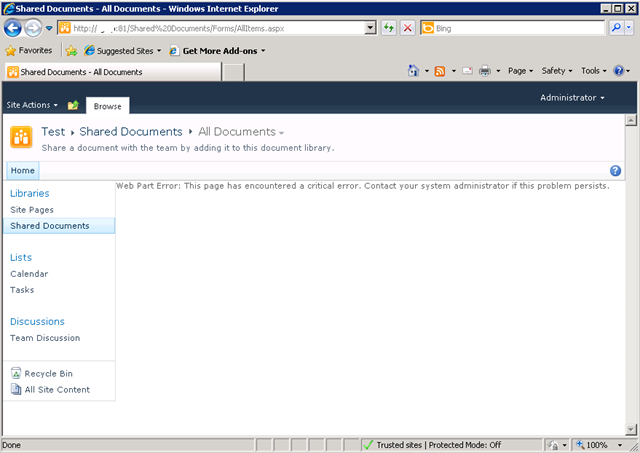
    I created a brand new web application on a SP2010 farm, and irrespective of the site collection I subsequently create, I get the dreaded error "Web Part Error: This page has encountered a critical error. Contact your system administrator if this problem persists"

    Below is a screenshot of a web app using the team site template. Not so good huh?

    image

    The swearing…

    So faced with this broken site, I do what any other self respecting SharePoint consultant would do. I silently cursed Microsoft for being at the root of all the world’s evils and took a peek into that very verbose and very cryptic place known as the ULS logs. Pretty soon I found messages like:

    0x3348 SharePoint Foundation         General                       8sl3 High     DelegateControl: Exception thrown while building custom control ‘Microsoft.SharePoint.SPControlElement’: This page has encountered a critical error. Contact your system administrator if this problem persists. eff89784-003b-43fd-9dde-8377c4191592

    0x3348 SharePoint Foundation         Web Parts                     7935 Information http://sp:81/default.aspx – An unexpected error has been encountered in this Web Part.  Error: This page has encountered a critical error. Contact your system administrator if this problem persists.,

    Okay, so that is about as helpful as a fart in an elevator, so I turned up the debug juice using that new, pretty debug juicer turner-upper (okay, the diagnostic logging section under monitoring in central admin). I turned on a variety of logs at different times including.

    • SharePoint Foundation           Configuration                   Verbose
    • SharePoint Foundation           General                         Verbose
    • SharePoint Foundation           Web Parts                       Verbose
    • SharePoint Foundation           Feature Infrastructure          Verbose
    • SharePoint Foundation           Fields                          Verbose
    • SharePoint Foundation           Web Controls                    Verbose
    • SharePoint Server               General                         Verbose
    • SharePoint Server               Setup and Upgrade               Verbose
    • SharePoint Server               Topology                        Verbose

    While my logs got very big very quickly, I didn’t get much more detail apart from one gem,to me, seemed so innocuous amongst all the detail, yet so kind of.. fundamental 🙂

    0x3348 SharePoint Foundation         Web Parts                     emt7 High     Error: Failure in loading assembly: Microsoft.SharePoint, Version=12.0.0.0, Culture=neutral, PublicKeyToken=b03f5f7f11d50a3a eff89784-003b-43fd-9dde-8377c4191592

    That rather scary log message was then followed up by this one – which proved to be the clue I needed.

    0x3348 SharePoint Foundation         Runtime                       6610 Critical Safe mode did not start successfully. This page has encountered a critical error. Contact your system administrator if this problem persists. eff89784-003b-43fd-9dde-8377c4191592

    It was about this time that I also checked the event logs (I told you this post was about how not to troubleshoot) and I saw the same entry as above.

    Log Name:      Application
    Source:        Microsoft-SharePoint Products-SharePoint Foundation
    Event ID:      6610
    Description:
    Safe mode did not start successfully. This page has encountered a critical error. Contact your system administrator if this problem persists.

    I read the error message carefully. This problem was certainly persisting and I was the system administrator, so I contacted myself and resolved to search google for the “Safe mode did not start successfully” error.

    The 46 minute mark epiphany

    image

    If you watch the TV series “House”, you will know that House always gets an epiphany around the 46 minute mark of the show, just in time to work out what the mystery illness is and save the day. Well, this is the 46 minute mark of this post!

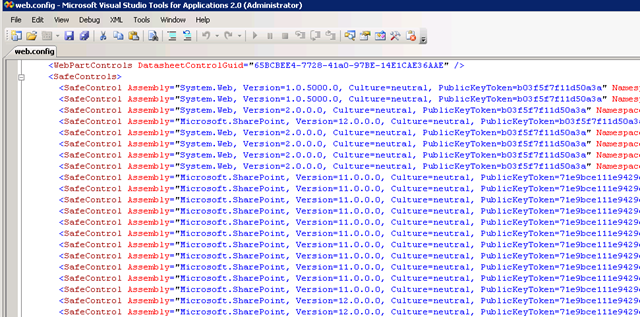
    I quickly found that others had this issue in the past, and it was the process where SharePoint checks web.config to process all of the controls marked as safe. If you have never seen this, it is the section of your SharePoint web application configuration file that looks like this:

    image 

    This particular version of the error is commonly seen when people deploy multiple servers in their SharePoint farm, and use a different file path for the INETPUB folder. In my case, this was a single server. So, although I knew I was on the right track, I knew this wasn’t the issue.

    My next thought was to run the site in full trust mode, to see if that would make the site work. This is usually a setting that makes me mad when developers ask for it because it tells me they have been slack. I changed the entry

    <trust level="WSS_Minimal" originUrl="" />

    to

    <trust level="Full" originUrl="" />

    But to no avail. Whatever was causing this was not affected by code access security.

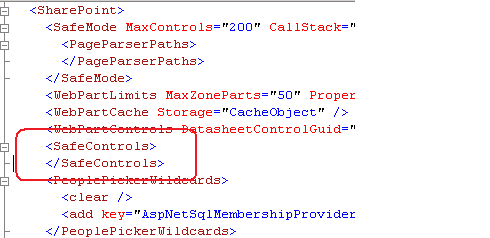
    I reverted back to WSS_Minimal and decided to remove all of the SafeControl entries from the web.config file, as shown below. I knew the site would bleat about it, but was interested if the “Safe Mode” error would go away.

    image

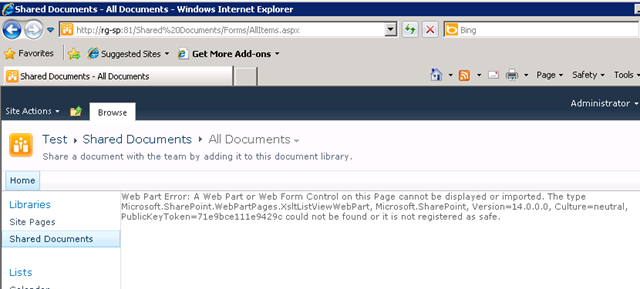
    The result? My broken site was now less broken. It was still bitching, but now it appeared to be bitching more like what I was expecting.

    image

    After that, it was a matter of adding back the <safecontrol> elements and retrying the site. It didn’t take long to pinpoint the offending entry.

    <SafeControl Assembly="Microsoft.SharePoint, Version=12.0.0.0, Culture=neutral, PublicKeyToken=b03f5f7f11d50a3a" Namespace="Microsoft.SharePoint.WebPartPages" TypeName="ContentEditorWebPart" Safe="False" />

    As soon as I removed this entry the site came up fine. I even loaded up the content editor web part without this entry and it worked a treat. Therefore, how this spurious entry got there is still a mystery.

    The final mystery

    My colleague and I checked the web.config file in C:\Program Files\Common Files\Microsoft Shared\Web Server Extensions\14\CONFIG. This is the one that gets munged with other webconfig.* files when a new web application is provisioned.

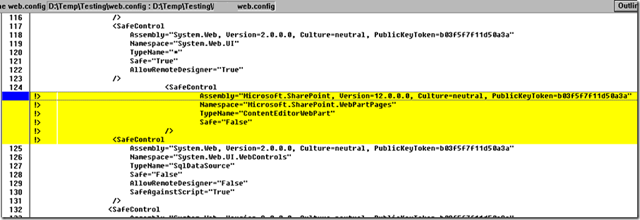
    Sure enough, its modified date was July 29 (just outside the range of the SharePoint and event logs unfortunately). When we compared against a known good file from another SharePoint site, we immediately saw the offending entry.

    image

    The solution store on this SharePoint server is empty and no 3rd party stuff to my knowledge has been installed here. But clearly this file has been modified. So, we did what any self respecting SharePoint consultant would do…

    …we blamed the last guy.


    Thanks for reading

    Paul Culmsee

    www.sevensigma.com.au


    More User Profile Sync issues in SP2010: Certificate Provisioning Fun

    Wow, isn’t the SharePoint 2010 User Profile Service just a barrel of laughs. Without a bit of context, when you compare it to SP2007, you can do little but shake your head in bewilderment at how complex it now appears.

    I have a theory about all of this. I think that this saga started over a beer in 2008 or so.

    I think that Microsoft decided that SharePoint 2010 should be able to write back to Active Directory (something that AD purists dislike but sold Bamboo many copies of their sync tool). Presumably the SharePoint team get on really well with the Forefront Identify Manager team and over a few Friday beers, the FIM guys said “Why write your own? Use our fit for purpose tool that does exactly this. As an added bonus, you can sync to other directories easily too”.

    “Damn, that *is* a good idea”, says the SharePoint team and the rest is history. Remember the old saying, the road to hell is paved with good intentions?

    Anyways, when you provision the UPS enough times, and understand what Forefront Identity Manager does, it all starts to make sense. Of course, to have it make sense, requires you to mess it up in the first place and I think that everyone universally will do this – because it is essentially impossible to get it right the first time unless you run everything as domain administrator. This is a key factor that I feel did not get enough attention within the product team. I have now visited three sites where I have had to correct issues with the user profile service. Remember, not all of us do SharePoint all day – for the humble system administrator that is also catering with the overall network, this implementation is simply too complex. Result? Microsoft support engineers are going to get a lot of calls here – and its going to cost Microsoft that way.

    One use-case they never tested

    I am only going to talk about one of the issues today because Spence has written the definitive article that will get you through if you are doing it from scratch.

    I went to a client site where they had attempted to provision the user profile synchronisation unsuccessfully. I have no idea of the things they tried because I wasn’t there unfortunately, but I made a few changes to permissions, AD rights and local security policy as per Spencers post. I then provisioned user profile sync again and I hit this issue. A sequence of 4 event log entries.

    Event ID:      234
    Description:
    ILM Certificate could not be created: Cert step 2 could not be created: C:\Program Files\Microsoft Office Servers\14.0\Tools\MakeCert.exe -pe -sr LocalMachine -ss My -a sha1 -n CN=”ForefrontIdentityManager” -sky exchange -pe -in “ForefrontIdentityManager” -ir localmachine -is root

    Event ID:      234
    Description:
    ILM Certificate could not be created: Cert could not be added: C:\Program Files\Microsoft Office Servers\14.0\Tools\CertMgr.exe -add -r LocalMachine -s My -c -n “ForefrontIdentityManager” -r LocalMachine -s TrustedPeople

    Event ID:      234
    Description:
    ILM Certificate could not be created: netsh http error:netsh http add urlacl url=
    http://+:5725/ user=Domain\spfarm sddl=D:(A;;GA;;;S-1-5-21-2972807998-902629894-2323022004-1104)

    Event ID:      234
    Description:
    Cannot get the self issued certificate thumbprint:

    The theory

    Luckily this one of those rare times where the error message actually makes sense (well – if you have worked with PKI stuff before). Clearly something went wrong in the creation of certificates. Looking at the sequence of events, it seems that as part of provisioning ForeFront Identity Manager, a self signed certificate was created for the Computer Account, added to the Trusted People certificate store and then is used for SSL on a web application or web service listening on port 5725.

    By the way, don’t go looking for the web app listening on such a port in IIS because its not there. Just like SQL Reporting Services, FIM likely uses very little of IIS and doesn’t need the overhead.  

    The way I ended up troubleshooting this issue was to take a good look at the first error in the sequence and what the command was trying to do. Note the description in the event log is important here. “ILM Certificate could not be created: Cert step 2 could not be created”. So this implies that this command is the second step in a sequence and there was a step 1 that must have worked. Below is the step 2 command that was attempted.

    C:\Program Files\Microsoft Office Servers\14.0\Tools\MakeCert.exe -pe -sr LocalMachine -ss My -a sha1 -n CN=”ForefrontIdentityManager” -sky exchange -pe -in “ForefrontIdentityManager” -ir localmachine -is root

    When you create a certificate, it has to have a trusted issuer. Verisign and Thawte are examples and all browsers consider them trustworthy issuers. But we are not using 3rd party issuers here. Forefront uses a self-signed certificate. In other words, it trusts itself. We can infer that step 1 is the creation of this self-trusted certificate issuer by looking at the parameters of the MakeCert command that step 2 is using.

    Now I am not going to annotate every Makecert parameter here, but the English version of the command above says something like:

    Make me a shiny new certificate for the local machine account and call it “ForefrontIdentityManager”, issued by a root certificate that can be found in the trusted root store also called ForeFrontIdentityManager.

    So this command implies that step 1 was the creation of that root certificate that issues the other certificates. (Product team – you could have given the name of the root issuer certificate something different to the issued certificate)

    The root cause

    Now that we have established a theory of what is going on, the next step is to run the failing Makecrt command from a prompt and see what we get back. Make sure you do this as the Sharepoint farm account so you are comparing apples with apples.

    C:\Program Files\Microsoft Office Servers\14.0\Tools>MakeCert.exe -pe -sr LocalMachine -ss My -a sha1 -n CN=”ForefrontIdentityManager” -sky exchange -pe -in “ForefrontIdentityManager” -ir localmachine -is root

    Error: There are more than one matching certificate in the issuer’s root cert store. Failed

    Aha! so what do we have here? The error message states that we have more than 1 matching certificate in the issuers root certificate store.

    For what its worth it is the parameters “-ir localmachine -is root” that specifies the certificate store to use. In this case, it is the trusted root certificate store on the local computer.

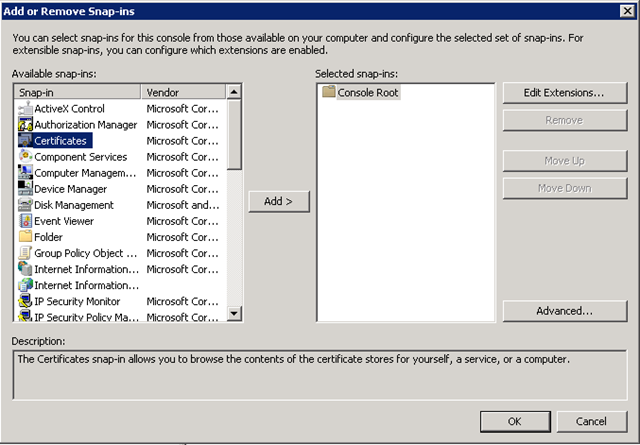
    So lets go and take a look. Run the Microsoft Management Console (MMC) and Choose “Add/Remove Snap In” from the File Menu.
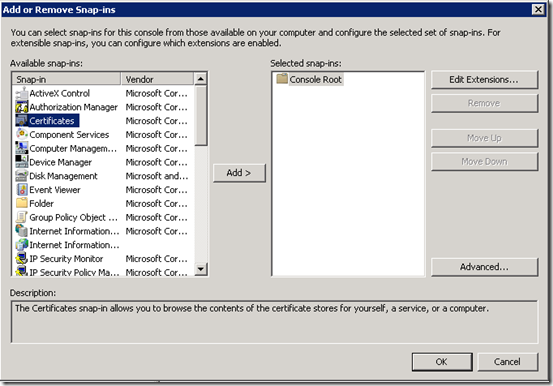
    image

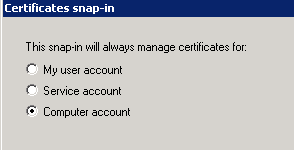
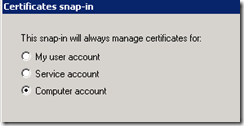
    From the list of snap ins choose Certificates and then choose “Computer Account”
    image

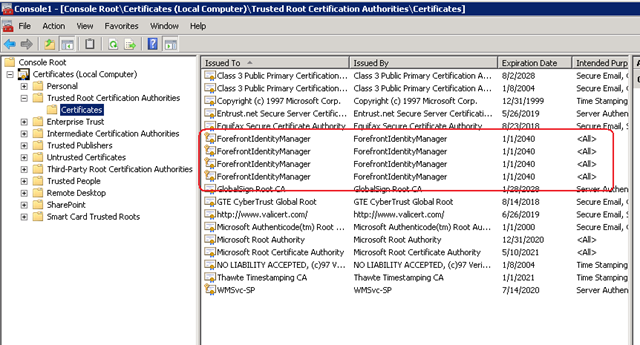
    Now in the list of certificate stores, we need to examine the one that the command refers to: The Trusted Root Certification Authorities store. Well, look at that, the error was telling the truth!
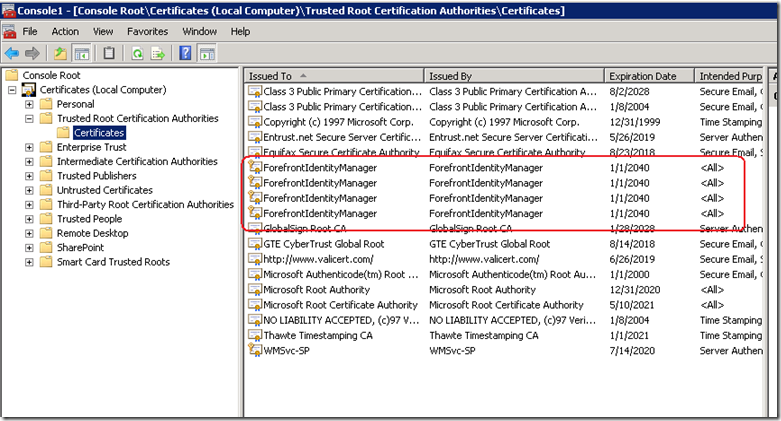
    image

    Clearly the Forefront Identity Manager provisioning/unprovisioning code does not check for all circumstances. I can only theorise what my client did to cause this situation because I wasn’t privy to what was done on this particular install before I got there. but step 1 of this provisioning process would create an issuing certificate whether one existed already or not. Step 2 then failed because it had no way to determine which of these certificates is the authoritative one.

    This was further exacerbated because each re-attempt creates another root certificate because there is no check whether a certificate already exists.

    The cure is quite easy. Just delete all of the ForefrontIdentityManager certificates from the Trusted Root Certification Authorities and re-provision the user profile sync in SharePoint. Provided that there is no certificate in this store to begin with, step 1 will create it and step 2 will then be able to create the self signed certificate using this issuer just fine.

    Conclusion (and minor rant)

    Many SharePoint pros have commented on the insane complexity of the new design of the user profile sync system. Yes I understand the increased flexibility offered by the new regime, leveraging a mature product like Forefront, but I see that with all of this flexibility comes risk that has not been well accounted for. SP2010 is twice as tough to learn as SP2007 and it is more likely that you will make a mistake than not making one. The more components added, the more points of failure and the less capable over-burdened support staff are in dealing with it when it happens.

    SharePoint 2010 is barely out of nappies and I have already been in a remediation role for several sites over the user profile service alone.

    I propose that Microsoft add a new program level KPI to rate how well they are doing with their SharePoint product development. That KPI should be something like % of time a system administrator can provision a feature without making a mistake or resorting to running it all as admin. The benefit to Microsoft would be tangible in terms of support calls and failed implementations. Such a KPI would force the product team to look at an example like the user profile service and think “How can we make this more resilient?”. “How can we remove the number of manual steps that are not obvious?”, “how can we make the wizard clearer to understand?” (yes they *will* use the wizard).

    Right now it feels like the KPI was how many features could be crammed, in as well as how much integration between components there is. If there is indeed a KPI for that they definitely nailed it this time around.

    Don’t get me wrong – its all good stuff, but if Microsoft are stumping seasoned SharePoint pros with this stuff, then they definitely need to change the focus a bit in terms of what constitutes a good product.

    Thanks for reading

    Paul Culmsee

    www.sevensigma.com.au



    Index index everywhere but not a result in sight.

    I have been doing a bit more tech work than normal lately – SP2010 popularity I guess, and was asked to remediate a few issues on a problematic server that I hadn’t set up. The server in question had a number of issues (over and above the usual “lets all run it as one account” type stuff) that had a single root cause, so I thought I’d quickly document the symptoms and the cause here.

    Symptom 1: SQL Server Event ID 28005:

    “An exception occurred while enqueueing a message in the target queue. Error: 15404, State: 19. Could not obtain information about Windows NT group/user ‘DOMAIN\someuser’, error code 0x5”

    This error would be reported in the Application log around 70 times per minute. As it happened, I had removed the account in question from running any of the SharePoint web, application or windows services, but this still persisted. I suspect SharePoint was installed as this account because it was the db owner of many of the databases on the SQL Server. Whatever the case, SQL was whinging about it despite its lack of actual need to be there.

    Symptom 2: Event ID 4625:

    At a similar rate of knots as the SQL error, was the rate of 4625 errors in the security log. These logs were not complaining about the account that the SQL event complained about, but instead it complained about ANY account running the SQL Server instance. I tried network service, a domain account and a local account and saw similar errors (although the local one had a different code).

    Log Name:      Security
    Source:        Microsoft-Windows-Security-Auditing
    Event ID:      4625
    Task Category: Logon
    Keywords:      Audit Failure
    Description:  An account failed to log on. 
    
    Subject:
        Security ID:        NETWORK SERVICE
        Account Name:        COMPUTER$
        Account Domain:        DOMAIN
        Logon ID:        0x3e4 
    
    Failure Information:
        Failure Reason:        Unknown user name or bad password.
        Status:            0xc000006d
        Sub Status:        0xc0000064 
    
    Process Information:
        Caller Process ID:    0x7e0
        Caller Process Name:    E:\Program Files\Microsoft SQL Server\MSSQL10_50.MSSQLSERVER\MSSQL\Binn\sqlservr.exe 
    
    Detailed Authentication Information:
        Logon Process:        Authz   
        Authentication Package:    Kerberos

    When using a local, rather than a domain user account the code was:

    Failure Information:
        Failure Reason:        An Error occured during Logon.
        Status:            0xc000005e
        Sub Status:        0x0 

    Symptom 3: Search only working for domain administrators

    On top of the logs being filled by endless entries of the previous two, I had another error (the original reason why I was called in actually). A SharePoint search would yield zip, nada, zero, no results for a regular user, but a domain administrator could happily search SP2010 and get results. (well actually regular users did get some results – people searched actually worked fine).

    The crawler was fine and dandy and the default content source had not been messed with. There were no errors or logs to suggest anything untoward.

    The resolution:

    It was the second symptom that threw me because I thought that the problem must have been kerberos config. But I quickly discounted that after checking SPN’s and the like (notwithstanding the fact this was a single server install anyway!)

    On a hunch (helped by the fact that I had dealt with the issue of registering managed accounts not so long ago), I concentrated on the user account that was causing SQL Server all the trouble (Event ID 28005). I loaded up Active Directory and temporarily changed the security of this user account so that “Authenticated Users” had “READ” access to it.

    image

    As soon as I did this, both event ID 28005 and 4625 stopped.

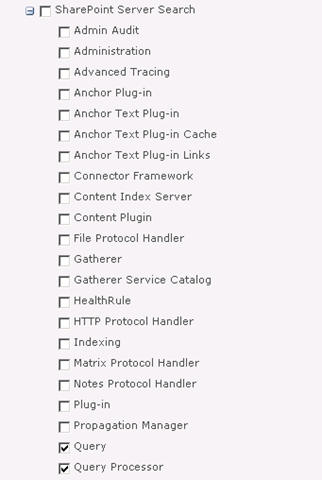
    I then checked the search (symptom 3) and it was still barfing. In this case I decided to turn up the debug juice on the “Query” and “Query Processor” functions of “SharePoint Server Search”.

    image

    After upping the level of verbosity, I found what I was looking for.

    08/12/2010 22:13:41.00     w3wp.exe (0x2228)                           0x1F0C    SharePoint Server Search          Query Processor                   g2j3    High        AuthzInitializeContextFromSid failed with ERROR_ACCESS_DENIED. This error indicates that the account under which this process is executing may not have read access to the tokenGroupsGlobalAndUniversal attribute on the querying user’s Active Directory object. Query results which require non-Claims Windows authorization will not be returned to this querying user.    debd2c54-d6a5-41b8-bf26-c4697b36f4d4

    I knew immediately that this was very likely the same issue as the first two symptoms and when I googled this result, my Perth compatriot, Jeremy Thake had hit the same issue in July. The fix is to add your search service account to a group called “Pre-Windows 2000 Compatibility Access” group. This group happens to have the right required to read this attribute. Whether it is the same attribute I needed for my SQL issue, or the registering managed accounts issue I don’t know, but what I do know is that this group loosens up permissions enough to cure all four of these issues.

    The little security guy in me keeps telling me I should confirm the least privilege in each of these scenarios, but hey if Microsoft are saying to put the accounts into this group, then who am I to argue?

    Finally, it turns out that SP2010 re-introduced something that was in SP2003. A call to a function called AuthzInitializeContextFromSid which seems to be the root of it all. Apparently it was not used in SP2007, but its sure there now. I assume that one of the many stored procedures that SharePoint would call in SQL may have been the cause of Symptom 1. When you look at Symptom 2, it now makes sense because AD was faithfully reporting an access denied when the call to AuthzInitializeContextFromSid was made. It reported SQL Server as the culprit, I assume, because of a stored proc doing the work perhaps? It just sucks that the security event logged is a fairly stock message that doesn’t give you enough specifics to really work out what is going on.

    Anyway, I hope that helps someone else – as googling the event ID details is not overly helpful


    Thanks for reading

    Paul Culmsee

    www.sevensigma.com.au


    Also why I’ve been quiet…

    I’m in an airport (again), typing this on my way back from my latest trip to New Zealand – a country I am loving more and more each time I go there. (Anywhere that I can go that uses the same power plugs as back home is a great place in my book).

    image

    A while back I posted about the book I am writing with Kailash Awati (Beyond Best Practices). If that project wasn’t taking enough time, dedication and brain cells, I have just finished an undertaking that has essentially consumed me for four months (some 450 man hours). This week it was delivered and the student responses far surpassed my expectations and made it all worthwhile.

    I created a 4 day SharePoint 2010 Governance and Information Architecture training course as part of Microsoft New Zealand’s Elite initiative. (760 pages of SharePoint governance and IA goodness!) If you are not aware of the Elite initiative, it is a novel initiative by Microsoft in New Zealand to improve the quality of SharePoint practitioners in the Microsoft partner ecosystem. Now I tell you – Darryl Burling and his team down there at Microsoft have their ear to the ground – and really do listen to their customers. They initiated this program to allow local solution providers to take the next step beyond technical knowhow and turn it into deeper proficiency.

    The SharePoint Elite Partner Initiative is designed to recognise those New Zealand Partners who have built skills excellence and a track record for success with SharePoint into their business. When it comes to SharePoint, these are the elite – the best of the best. If you are looking for a partner who can help you plan and deploy your SharePoint implementation, these are the best in the business.

    This Elite program is unique in its focus and via the insight of those who conceived it, allowed me the flexibility to create a course that was a balance of technical labs, sensemaking, governance, critical thinking and user engagement. I was going through the course feedback just now and the key trend from it all was that the students really enjoyed the softer stuff that I teach, more so than the “here is a SharePoint feature and look at what it can do!” type material (they can get that sort of material anywhere).

    So all in all it was a great week, which made all the effort, sweat and tears leading up to it worth it.

    So thanks attendees, it was a great 4 days. For other readers, hopefully the course might come to a city near you in the not too distant future.


    Thanks for reading

    Paul Culmsee

    www.sevensigma.com.au


    SQL Server oddities

    So its Saturday night and where I should be out having fun, I am instead sitting in a training room in Wellington New Zealand, configuring a lab for a course I am running on Monday.

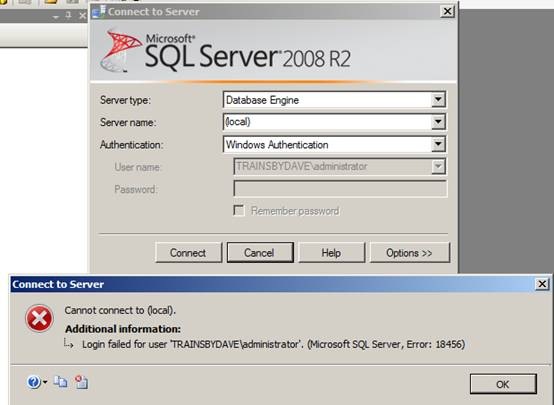
    Each student lab setup is two virtual machines. The first being a fairly stock standard AD domain controller and the second being a SQL/SharePoint 2010 box. Someone else set up the machines, and I came in to make some changes for the labs next week. But as soon as I fired up the first student VM’s I hit a snag. I loaded SQL Server Management Studio, only to find that I was unable to connect to it as the domain administrator, despite being fairly certain that the account had been granted the sysadmin role in SQL.

    clip_image002

    Checking the event logs, showed an error that I had not seen before. “Token-based server access validation failed with an infrastructure error”. hmmm

    Log Name: Application

    Source: MSSQLSERVER

    Date: 31/07/2010 6:45:37 p.m.

    Event ID: 18456

    Task Category: Logon

    Level: Information

    Keywords: Classic,Audit Failure

    User: TRAINSBYDAVE\administrator

    Computer: SP01.trainsbydave.com

    Description:

    Login failed for user ‘TRAINSBYDAVE\administrator’. Reason: Token-based server access validation failed with an infrastructure error. Check for previous errors.

    [CLIENT: <local machine>]

    Event Xml:

    <Event xmlns="http://schemas.microsoft.com/win/2004/08/events/event">

    <System>

    <Provider Name="MSSQLSERVER" />

    <EventID Qualifiers="49152">18456</EventID>

    <Level>0</Level>

    <Task>4</Task>

    <Keywords>0x90000000000000</Keywords>

    <TimeCreated SystemTime="2010-07-31T06:45:37.000000000Z" />

    <EventRecordID>8281</EventRecordID>

    <Channel>Application</Channel>

    <Computer>SP01.trainsbydave.com</Computer>

    <Security UserID="S-1-5-21-3713613819-1395520312-4192346095-500" />

    </System>

    <EventData>

    <Data>TRAINSBYDAVE\administrator</Data>

    <Data> Reason: Token-based server access validation failed with an infrastructure error. Check for previous errors.</Data>

    <Data> [CLIENT: &lt;local machine&gt;]</Data>

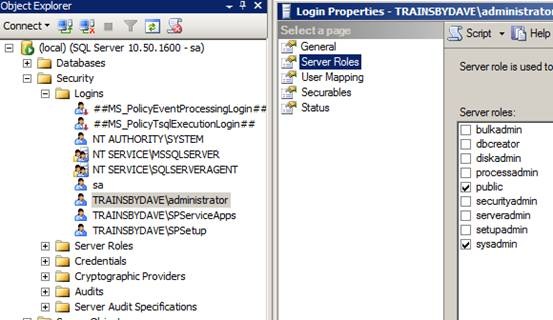
    As it happened, whoever set it up had SQL Server in mixed mode authentication, so I was able to sign in as the sa account and have a poke around. All things considered, it should have worked. The user account in question was definitely in the logins and set with sysadmin server rights as shown below.

    clip_image004

    Uncle google showed a few people with the error but not as many as I expected to see since half the world gets nailed on authentication issues. I also took the event log suggestion and looked for a previous error. A big nope on that suggestion. In fact in all respects, everything looked sweet. The machine was valid on the domain and I was able to perform any other administrative task.

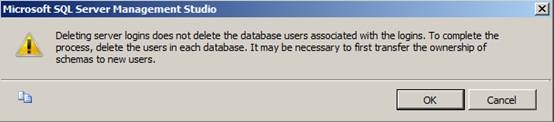
    Finally, I removed the TRAINSBYDAVE\administrator account from the list of Logins in SQL Server. It gave the unsurprising whinge about orphaned database users, but luckily for AD accounts when you re-add the same account back it is smart enough to re-establish the link.

    clip_image006

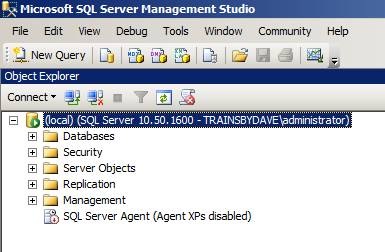
    As soon as I re-added the account, all was good again. If I was actually interested enough I’d delve into why this happened, but not tonight – I have another 6 student machines to configure 🙂

    Goodnight!

    clip_image008


    Why I’ve been quiet…

    As you may have noticed, this blog has been a bit of a dead zone lately. There are several very good reasons for this – one being that a lot of my creative energy has been going into co-writing a book – and I thought it was time to come clean on it.

    So first up, just because I get asked this all the time, the book is definitely *not* “A humble tribute to the leave form – The Book”! In fact, it’s not about SharePoint per se, but rather the deeper dark arts of team collaboration in the face of really complex or novel problems.

    It was late 2006 when my own career journey took an interesting trajectory, as I started getting into sensemaking and acquiring the skills necessary to help groups deal with really complex, wicked problems. My original intent was to reduce the chances of SharePoint project failure but in learning these skills, now find myself performing facilitation, goal alignment and sensemaking in areas miles away from IT. In the process I have been involved with projects of considerable complexity and uniqueness that make IT look pretty easy by comparison. The other fringe benefit is being able to sit in a room and listen to the wisdom of some top experts in their chosen disciplines as they work together.

    Through this work and the professional and personal learning that came with it, I now have some really good case studies that use unique (and I mean, unique) approaches to tackling complex problems. I have a keen desire to showcase these and explain why our approaches worked.

    My leanings towards sensemaking and strategic issues would be apparent to regular readers of CleverWorkarounds. It is therefore no secret that this blog is not really much of a technical SharePoint blog these days. The articles on branding, ROI, and capacity planning were written in 2007, just before the mega explosion of interest in SharePoint. This time around, there are legions of excellent bloggers who are doing a tremendous job on giving readers a leg-up onto this new beast known as SharePoint 2010.

    BBP (3)

    So back to the book. Our tentative title is “Beyond Best Practices” and it’s an ambitious project, co-authored with Kailash Awati – the man behind the brilliant eight to late blog. I had been a fan of Kailash’s work for a long time now, and was always impressed at the depth of research and effort that he put into his writing. Kailash is a scarily smart guy with two PHD’s under his belt and to this day, I do not think I have ever mentioned a paper or author to him that he hasn’t read already. In fact, usually he has read it, checked out the citations and tells me to go and read three more books!

    Kailash writes with the sort of rigour that I aspire to and will never achieve, thus when the opportunity of working with him on a book came up, I knew that I absolutely had to do it and that it would be a significant undertaking indeed.

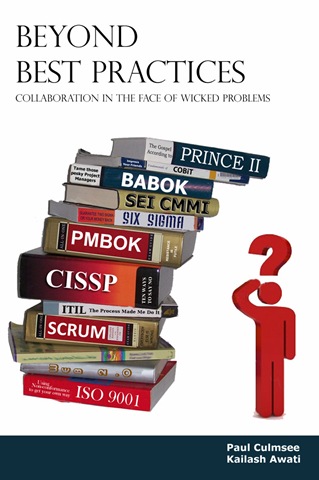
    To the left is a mock-up picture to try and convey where we are going with this book. See the guy on the right? Is he scratching his head in confusion, saluting or both? (note, this is our mockup and the real thing may look nothing like this)

    This book dives into the seedy underbelly of organisational problem solving, and does so in a way that no other book has thus far attempted. We examine why the very notion of “best practices” often makes no sense and have such a high propensity to go wrong. We challenge some mainstream ideas by shining light on some obscure, but highly topical and interesting research that some may consider radical or heretical. To counter the somewhat dry nature of some of this research (the topics are really interesting but the style in which academics write can put insomniacs to sleep), we give it a bit of the cleverworkarounds style treatment and are writing in a conversational style that loses none of the rigour, but won’t have you nodding off on page 2. If you liked my posts where I use odd metaphors like boy bands to explain SharePoint site collections, the Simpsons to explain InfoPath or death metal to explain records versus collaborative document management, then you should enjoy our journey through the world of cognitive science, memetics, scientific management and Willy Wonka (yup – Willy Wonka!).

    Rather than just bleat about what the problems with best-practices are, we will also tell you what you can do to address these issues. We back up this advice by presenting a series of practical case studies, each of which illustrates the techniques used to address the inadequacies of best practices in dealing with wicked problems. In the end, we hope to arm our readers with a bunch of tools and approaches that actually work when dealing with complex issues. Some of these case studies are world unique and I am very proud of them.

    Now at this point in the writing, this is not just an idea with an outline and a catchy title. We have been at this for about six months, and the results thus far (some 60-70,000 words) have been very, very exciting. Initially, we really had no idea whether the combination of our writing styles would work – whether we could take the degree of depth and skill of Kailash with my low-brow humour and my quest for cheap laughs (I am just as likely to use a fart joke if it helps me get a key point across)…

    … But signs so far are good so stay tuned 🙂

    Thanks for reading


    Paul Culmsee

    www.sevensigma.com.au


    « Previous PageNext Page »

    Today is: Sunday 8 March 2026 -