
“Folders are bad” and other urban legends…
Hi all
This post is somewhat related to the whole “Zen and the art of SharePoint governance” idea where the notion of a “best practice” is so culture and context dependent that the worst practice is to insist that your best practice applies universally :-).
Let me explain with this example. Consider two problem/solution scenarios, A and B.
- Scenario A: We have a technically inferior solution with a really deep commitment to that solution by the stakeholders and participants
- Scenario B: We have a technically superior solution with “uneven” commitment to that solution by the stakeholders and participants
Which scenario has a better likelihood of success?
Everyone I have asked this question to, has without fail, chosen scenario A.
Why is this? Because people instinctively know that strong commitment to a course of action will trump technical superiority most of the time?
Now, let me change the scenario to something a little more interesting and potentially divisive.
- Scenario A: We have a folder based document storage solution with a really deep commitment to that solution by the stakeholders and participants
- Scenario B: We have a metadata based document storage solution with “uneven” commitment to that solution by the stakeholders and participants
Which scenario has a better likelihood of success? I bet this time you probably feel like answering “Well, it is not that clear cut” or “Scenario A but…” or “Scenario A only because…”, etc. It seems that putting a specific, tangible example against the scenario creates the urge to question the validity of “either/or” in the scenario. This is because you implicitly recognise that there is a little more to it.
This is interesting to me because it gives away what I think is the more “correct” answer. The ideal outcome is actually a third scenario where we, as SharePoint consultants and practitioners, recognise the technical merits of a solution, and start the process of steering a group toward a commitment to that technically superior solution.
Well…most of the time anyway. 🙂
Considering the metadata vs. folders question above. Let me give you a common use-case where the metadata question actually gets murky. Let’s say you have a document library with four well defined metadata columns and have some views that are leveraging those columns. Some users are happily navigating to your site and uploading their files via the “Upload” options or the “New” option in the document library itself. In short, those users who are browser centric in their productivity habits find this to be a good solution. Let’s also say that some two hundred files have been uploaded to this library and are well classified and easy to find via the views. Below is a typical example that I doubt any SharePoint person would find unfamiliar.
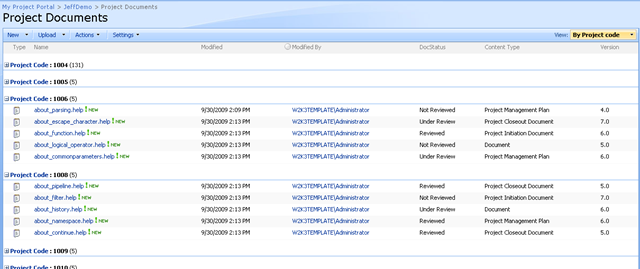
But there is another chunk of the user population who has very different productivity habits, in that they are application centric. Let’s say a user lives their life in Microsoft Word (you might scoff but plenty of people who work with a lot of documents do work this way). They start MSWord up and then decide what document to open or work with. They click the open toolbar button (or the office home button) to open a document and navigate to the document library.
Uh, oh…
- Where is our metadata?
- Where are our views?
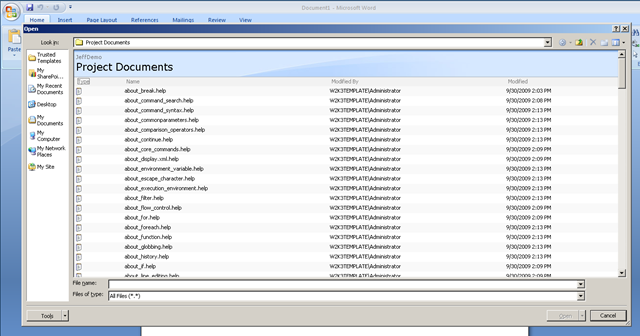
Well isn’t that interesting. We don’t get to leverage columns and views when accessing documents in this way. All we see is a large listing of files with no metadata. If there is one thing worse than too many folders, then it is surely none at all (with several hundred files in the root folder to choose from).
So now we have a tricky balancing act. Let’s consider what to do, based around the lens of user engagement and commitment.
If you chose scenario A earlier, the technically inferior yet deeply committed option, then you may argue against bringing out the big stick and trying to force users out of their productivity habits (i.e. switch from application centric usage to browser centric usage). You would be concerned that the big stick approach may result in an erosion of commitment, leading to a lack of adoption, leading to the project being deemed a failure.
But then, if we leave it as it is, users will continue to create and manage folders to compensate for the sheer number of files. We have failed to make use of some of SharePoint’s great document management features. We risk creating a chaotic installation, where the same poor information management habits that have likely created the interest in SharePoint in the first place, actually work against SharePoint and devalue it as a platform. This would also lead to user frustration, leading to lack of adoption and project failure.
Interesting dilemma…two options and both with significant risks of an undesirable outcome. What would you do here?
For me, it depends completely on the organisation, department and user tolerance for productive distress. (Don’t worry I will define productive distress in a minute).
Learning by opportunity
When sitting around the bar with Best Practice Conference attendees and presenters in DC, a rigorous debate occurred over aspects of SharePoint branding. One particular person made a fairly generalised sweeping statement and everyone else disagreed quite strongly. The person making that statement actually knew his stuff and everything said was technically and logically correct. But the instinct that I think the rest of us at the table had developed is that the notion of “best” and “right” is actually extremely fluid. No-one disagreed with his frustration that led to his big catch-all conclusion, but we all instinctively rallied against his single “best” solution that would apply to all scenarios.
So I will tell you openly that we have clients for whom we have developed relatively sophisticated information architectures around content types, metadata, search and logical architecture of site collections and sites (Particularly for BMS/QMS scenarios). Yet we also have clients where we have not used metadata at all at first, or else it is quite piecemeal across sites or site collections. What I have come to realise is that sometimes you have to allow people to work with the technically inferior (some would say wrong) option, before you can take them to the technically superior solution with the commitment required to see it become successful.
You have to remember that you, in some way, are pushing someone out of their comfort zone. Depending on the nature of the project, those people did not necessarily ask for you to do this. Thus, push too hard and you will have chaos and pullback. Don’t push at all and you remain with the status quo.
“Obtain management buy-in” is the standard catch-cry for most methodologies, right? It is often cited as if it is the be-all and end-all critical success factor for a project success. To me, it now sounds like a cliché that you say because it is the right thing to say. The same goes with vision and mission statements. Just because you have done those things in your project charter or plan does not mean that everyone is suddenly on board. It goes deeper than that.
I believe that real commitment from the users requires them to believe that a new system will indeed make things better. If they are not convinced that the change initiative will make a positive difference to them, then you are looking forward to a chaotic project that has the odds stacked against it.
Productive Distress
If, like me, you sometimes opt for doing things that go against what SharePoint blogs or books tell you, you simply have to provide the right sort of oversight to support your course of action. This oversight is part of the “how” that I spoke of in the secret to understanding governance post. I *know* that “client X” may only be scratching the surface of SharePoint’s capability, and it may frustrate a seasoned SharePoint professional that they are not making optimal use of what is available. But based on the nature of questions asked, we assess where they are in terms of SharePoint maturity and decide that they are not ready to jump to the deep end. Instead, we help them to work within their level of maturity and allow them to better understand their problem by learning about the solution. This small step approach allows the user base to be pushed just enough out of their comfort zone, where they are still productive and not pulling back. (Hence the term “productive distress”). Pretty soon, that productive distress is forgotten, becomes the new “business as usual” and we now move up a notch.
Repeat process as necessary. Fast forward a few day or weeks and suddenly the nature of the questions change, reflecting the improved understanding of SharePoint and its capabilities. There is a certain maturity around the questions asked, the sophistication behind the scenarios conceived and you can tell that they are now ready to move to the next level of productive distress.
So it is not really that “folders are bad” or the equally common “Keep SharePoint Designer out of the hands of mortals!” because, to repeat an oft abused cliché, they are just tools. If you can convince your users that SharePoint will improve the situation and allow them the time to adjust to the new paradigm, then they will work out for themselves whether folders are bad or not. As the scenario above demonstrates, it can sometimes depend very much on how you look at the problem. Also remember that most of the time, commitment trumps technical superiority.
Thanks for reading
Paul Culmsee





