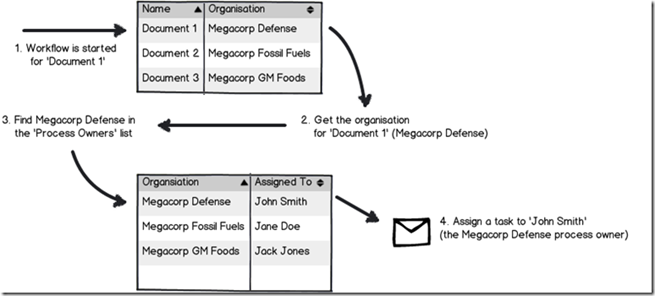
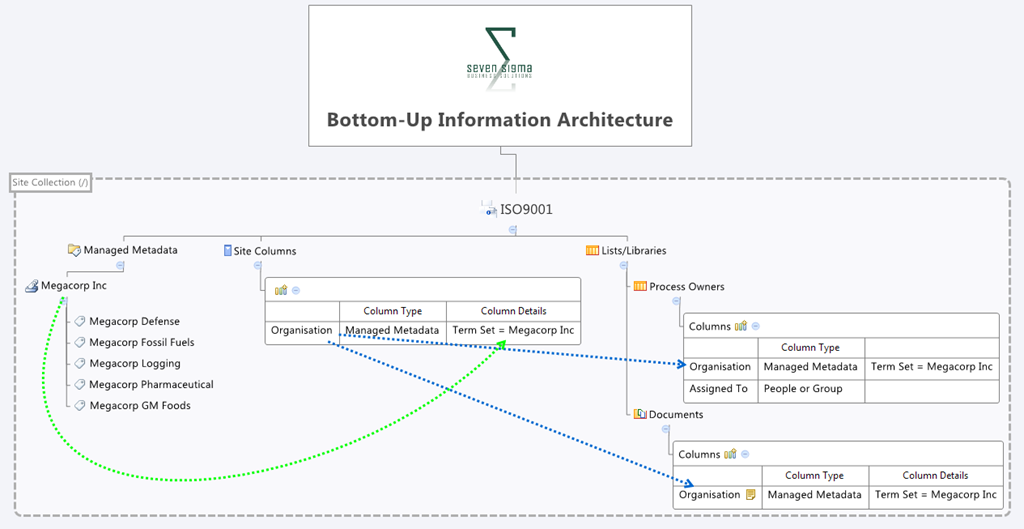
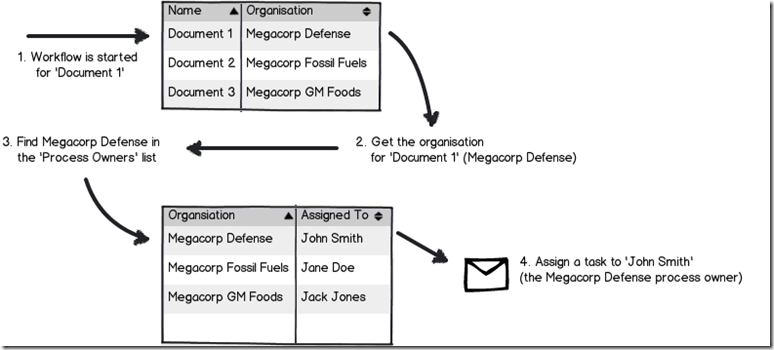
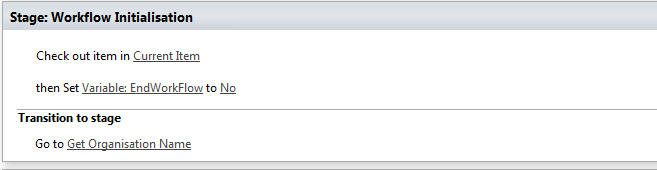
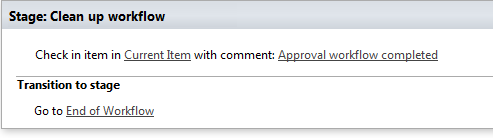
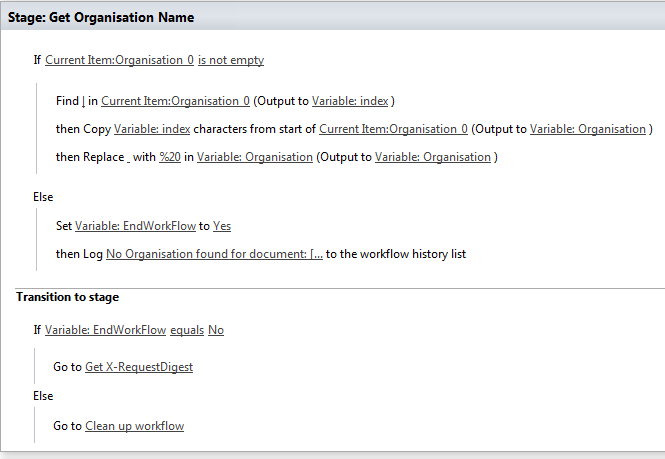
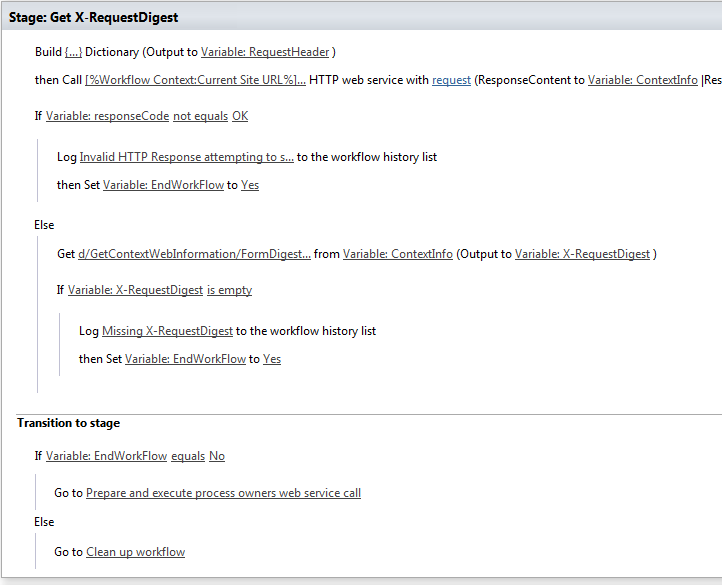
Hi and welcome to part 3 of my series of articles that take a peek under the hood of SharePoint 2013 workflows, while trying to answer the question of whether SharePoint 2013 workflows can enable citizen developers to go forth and solve business problems and catapault organisations to success. In part 1, I introduced you to Megacorp Inc and their need for a controlled documents approval workflow. In part 2, we created a basic SharePoint 2013 workflow that implements the logic outlined in the picture below. The workflow is not yet finished, but we did enough to be able to run it and learn from it, which brings us to this post.
Now I will tell straight up that our first test of this workflow is not going to work. The entire point of this series of articles is to show you *why* things do not always work what you need to do about it. As we progress, I hope that you will learn quite a bit about the operation of workflows in SharePoint 2013, as well as developing and troubleshooting them. After all, we all know that the best citizens are informed citizens!
So let’s get on with testing this particular workflow. We published it to the Documents library in part 2, so now we trigger it by selecting one of the files in the library. In this example, I will select one of the documents tagged as from Megacorp GM Foods. So using the filtering feature provided by metadata navigation, we just show the four documents owned by the Megacorp GM Foods division.
![image4_thumb[1]](http://www.cleverworkarounds.com/wp-content/uploads/2013/12/image4_thumb1_thumb.png "image4_thumb[1]")
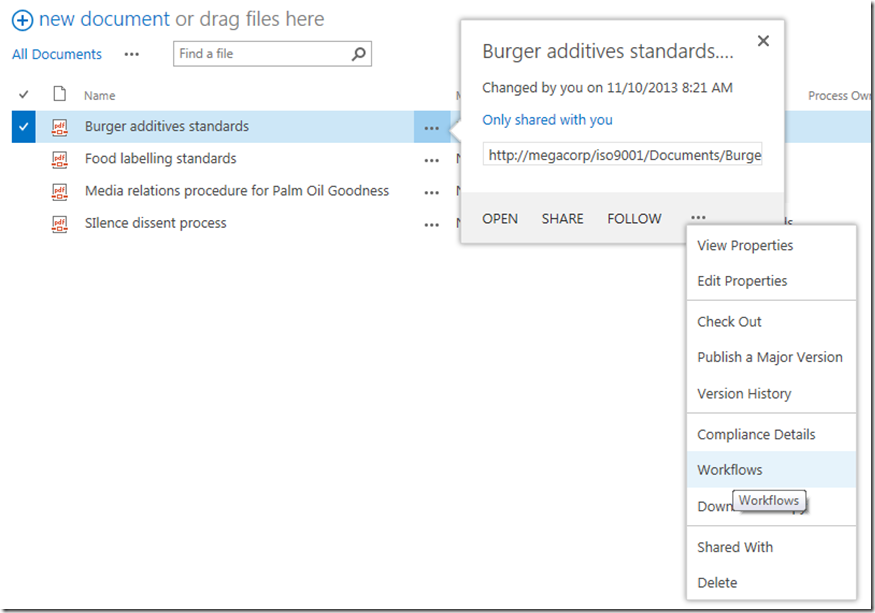
In this example, we will update the document called Burger Additives Standard. The workflow has not yet been set to automatically start, so we will need to manually trigger the workflow ourselves. To do so, click the ellipses next to the Burger Additives Standard document, and then click the ellipsis in the bottom right of the properties/preview window. This will show a second drop down menu. Choose Workflows from this menu as shown below.
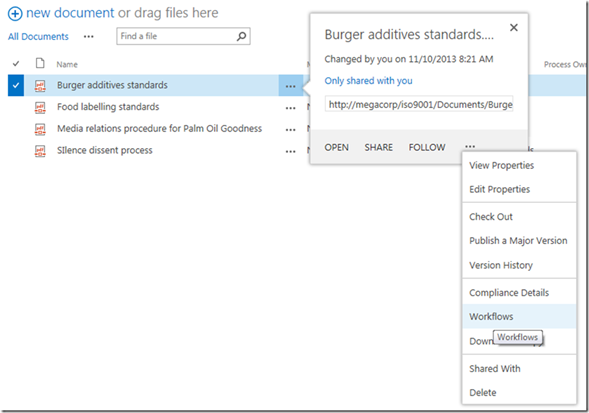
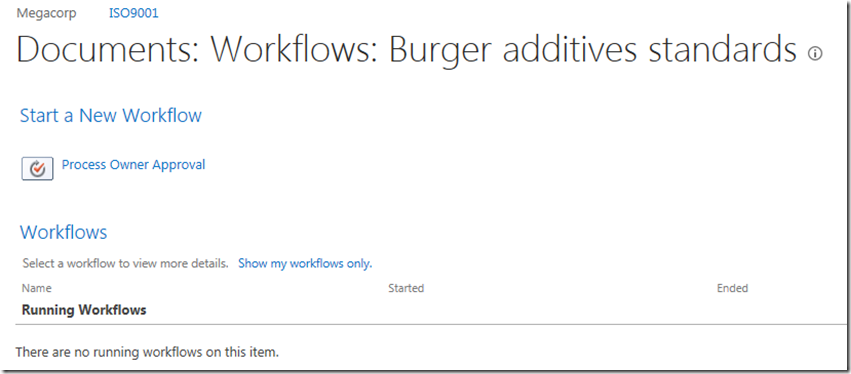
Underneath the Start a New Workflow text, you will see the workflow we published in part 2 called Process Owner Approval. Clicking it will start the workflow on this document.
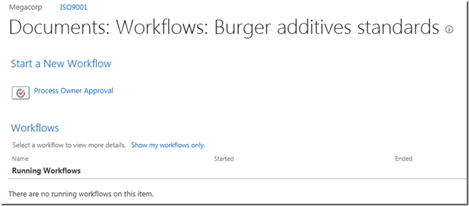
First sign of trouble…
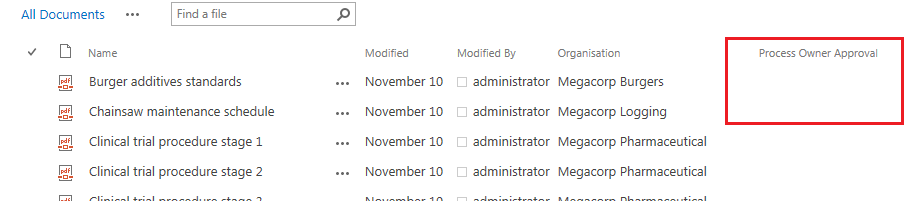
After starting the workflow, the browser will redirect you back to the Documents library. At this point, we see our first sign of trouble. When a workflow is published on a list or library, a column is added that is used to track workflow progress. In this case, we started our workflow, but there is nothing displayed in the workflow status column and the workflow does not appear to run. Hmm… what gives?

When a workflow does not behave as you intended, the easiest way to troubleshoot is to use the workflow status page. As it happens, you have already seen this page, because it is the same page where we started the workflow. So once again, we click on the ellipsis next to the burger additives standard document, click the ellipsis in the properties window and choose Workflows from the drop down menu.
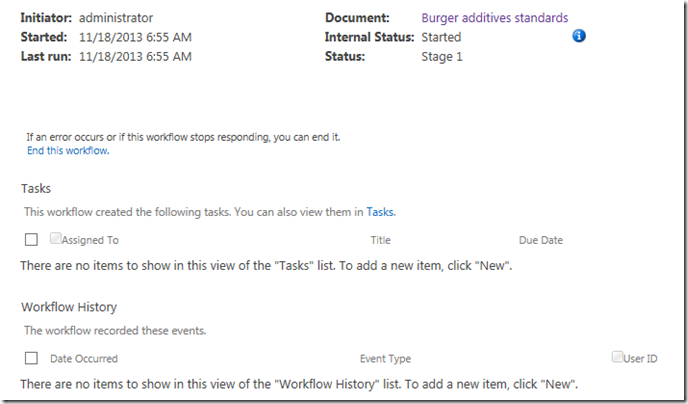
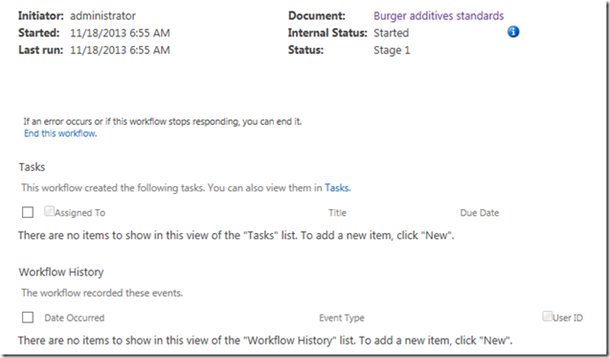
Well look at that… it says the workflow is indeed started…

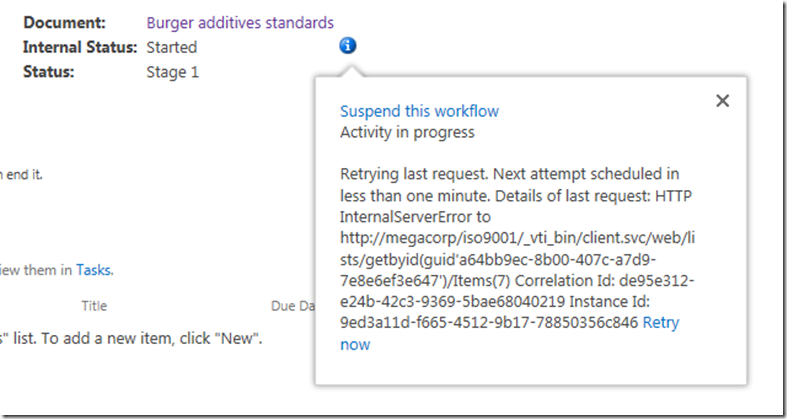
Clicking on the running workflow, we can see more detail which I have shown below. This screen also says that the workflow is started and nothing appears amiss. But then there is the little blue information symbol next to the Internal Status label. Hovering over this icon displays yet more information. This time, we see an error that would stump many – the sort of error that an information worker would have to call up helpdesk for.
Retrying last request. Next attempt scheduled in less than one minute. Details of last request: HTTP InternalServerError to http://megacorp/iso9001/_vti_bin/client.svc/web/lists/getbyid(guid’a64bb9ec-8b00-407c-a7d9-7e8e6ef3e647′)/Items(7) Correlation Id: de95e312-e24b-42c3-9369-5bae68040219 Instance Id: 9ed3a11d-f665-4512-9b17-78850356c846
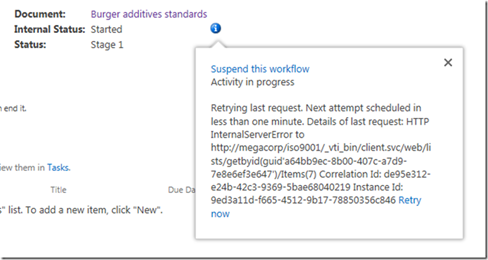
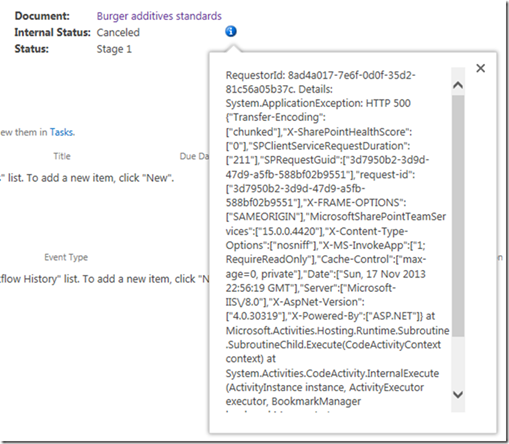
Okaaaay, so that error message is about as useful as Windows Vista. It shows an internal server error and a correlation ID. Furthermore, if you wait another minute or so, and then refresh the workflow status screen, it’s internal status is no longer started, but now has the status of Cancelled. You can see it for yourself below…

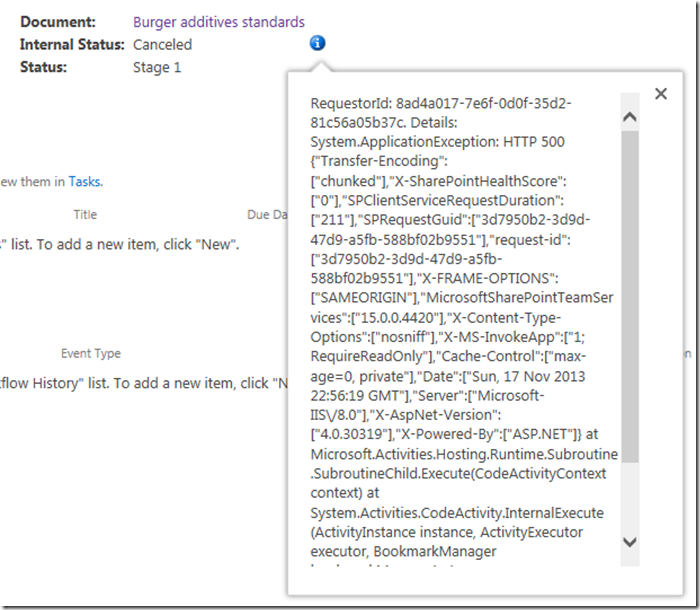
One again, clicking the little blue info button gives us more detail. Unfortunately, the detail consists of an even scarier appearing message than the previous one. This one looks nasty enough to freak out some SharePoint admins too. Check it out – it is pretty much useless in terms of conveying any information of value.
RequestorId: 8ad4a017-7e6f-0d0f-35d2-81c56a05b37c. Details: System.ApplicationException: HTTP 500 {“Transfer-Encoding”:[“chunked”],”X-SharePointHealthScore”:[“0″],”SPClientServiceRequestDuration”:[“211″],”SPRequestGuid”:[“3d7950b2-3d9d-47d9-a5fb-588bf02b9551″],”request-id”:[“3d7950b2-3d9d-47d9-a5fb-588bf02b9551″],”X-FRAME-OPTIONS”:[“SAMEORIGIN”],”MicrosoftSharePointTeamServices”:[“15.0.0.4420″],”X-Content-Type-Options”:[“nosniff”],”X-MS-InvokeApp”:[“1; RequireReadOnly”],”Cache-Control”:[“max-age=0, private”],”Date”:[“Sun, 17 Nov 2013 22:56:19 GMT”],”Server”:[“Microsoft-IIS\/8.0″],”X-AspNet-Version”:[“4.0.30319″],”X-Powered-By”:[“ASP.NET”]} at Microsoft.Activities.Hosting.Runtime.Subroutine.SubroutineChild.Execute(CodeActivityContext context) at System.Activities.CodeActivity.InternalExecute(ActivityInstance instance, ActivityExecutor executor, BookmarkManager bookmarkManager) at System.Activities.Runtime.ActivityExecutor.ExecuteActivityWorkItem.ExecuteBody(ActivityExecutor executor, BookmarkManager bookmarkManager, Location resultLocation)
So what the hell is going on here?
Unfortunately, both of the error messages above are virtually useless for most people and the only way to dig deeper is to delve into the SharePoint ULS logs. Of course, if you use Office 365 you don’t have that luxury because accessing the ULS logs are not available to you – so your best option to figuring out errors like this is trial and error. you need to learn CSOM code to access the logs. For the rest of us living in on-premises or IaaS land, a quick search of the ULS logs for the file name “Burger additives standards” reveals the issue and the root cause. Check out the errors reported below – it should be quite clear…
SharePoint Foundation General 8kh7 High The file “http://megacorp/iso9001/Documents/Burger additives standards.pdf” is not checked out. You must first check out this document before making changes.
SharePoint Foundation General aix9j High SPRequest.AddOrUpdateItem: UserPrincipalName=i:0).w|s-1-5-21-1480876320-1123302732-2276846122-500, AppPrincipalName=I:0I.T|MS.SP.EXT|2CC54B18-3F9D-43A3-BE55-B3A81C045562@B9A66C21-F39D-42DB-B6CD-DE520B6C1C91 ,bstrUrl=http://megacorp/iso9001 ,bstrListName={A64BB9EC-8B00-407C-A7D9-7E8E6EF3E647} , bAdd=False , bSystemUpdate=False , bPreserveItemVersion=False , bPreserveItemUIVersion=False , bUpdateNoVersion=False ,pbstrNewDocId=00000000-0000-0000-0000-000000000000 , bHasNewDocId=False , bstrVersion=8 , bCheckOut=False ,bCheckin=False , bUnRestrictedUpdateInProgress=False , bMigration=False , bPublish=False , bstrFileName=<null>
SharePoint Foundation CSOM ahjq1 High Exception occured in scope Microsoft.SharePoint.SPListItem.UpdateWithFieldValues. Exception=Microsoft.SharePoint.SPException: The file “http://megacorp/iso9001/Documents/Burger additives standards.pdf” is not checked out. You must first check out this document before making changes. —> System.Runtime.InteropServices.COMException: The file “http://megacorp/iso9001/Documents/Burger additives standards.pdf” is not checked out. You must first check out this document before making changes. at Microsoft.SharePoint.Library.SPRequestInternalClass.AddOrUpdateItem(String bstrUrl, String bstrListName, Boolean bAdd, Boolean bSystemUpdate, Boolean bPreserveItemVersion, Boolean bPreserveItemUIVersion, Boolean bUpdateNoVersion, Int32& plID, String& pbstrGuid, Guid pbstrNewDocId, Boolean bHasNewDo… 3b84d615-e006-4457-811a-0af089963216
So in case it is not clear from the above messages, we have an error stating that the file Burger additives standards is not checked out and that to make changes to the document, we need to check it out first. This raises several questions:
- 1. Why is the document library configured to require check-out?
- 2. Why is the workflow trying to change the document anyway? The workflow we created in part 2 does no action on the Documents library.
- 3. Why were the error messages so useless (which really hurts in Office365 scenarios)
- 4. How can we fix this problem?
Let’s examine each of these in turn…
1. Why is the document library configured to require check-out?
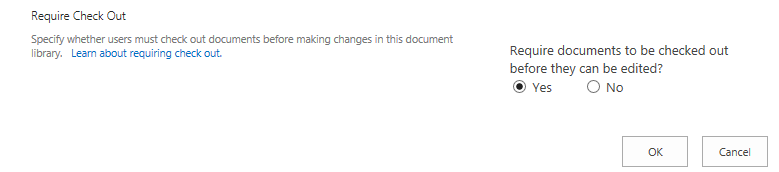
The first question is really easy to answer. When you create a site using the Document Center site template, the document library versioning settings enable the Require Check Out option as shown below. Therefore no changes can be made to this document unless the user making the change checks it out.
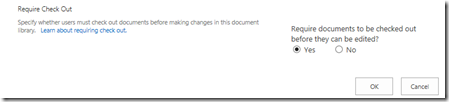
2. Why is the workflow trying to change the document anyway?
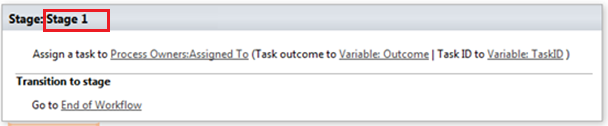
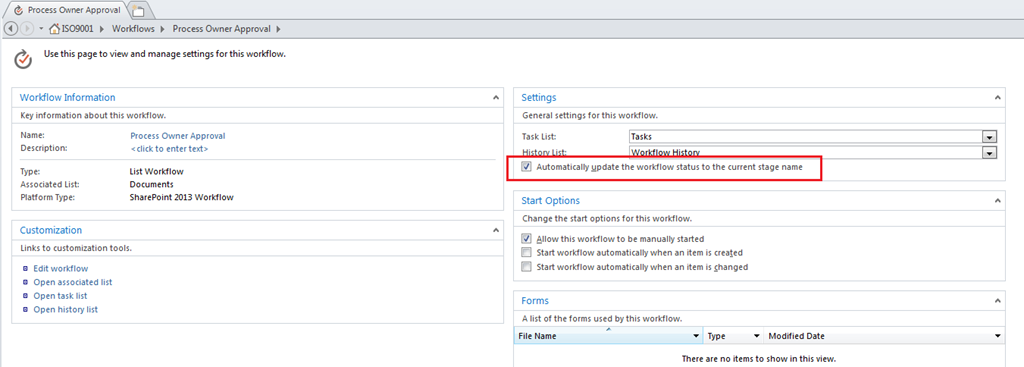
The second question is also easy to answer, but the answer is somewhat more complicated. When a workflow is associated to a list or content type, it adds a column to track the status of the workflow. In SharePoint 2013, the default behaviour is to update this column with whatever stage in the workflow currently being executed. Therefore, as soon as the workflow runs, and before it has run any of the actions, it attempts to update its stage to the document that it was triggered from. So looking at the images below, if things were working we should see the string “Stage 1” in the Process Owner Approval column for the document Burger additives standards. But since the document requires check-out to make a change, SharePoint prevents this from happening by design.
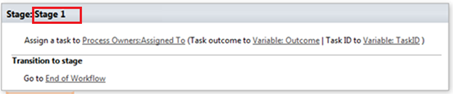
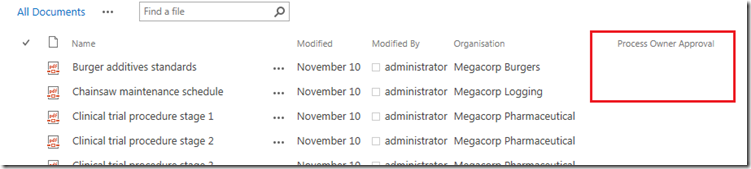
Some readers who are experienced with SharePoint Designer workflow might be thinking “easy… just use the check out item workflow action before you do anything else.”Unfortunately this won’t work for you because this issue gets triggered when the stage info is written to the workflow status column which happens before any actions run.
3. Why were the error messages so useless (which really hurts in Office365 scenarios)
The next question is why on earth wasn’t the true error able to be reported back to the workflow? After all, in the end, this was a clearly identified error in SharePoint, yet all we got was error messages that did not state the problem at all. This would have saved the effort of delving deep into the ULS logs and that is not even possible in Office 365.
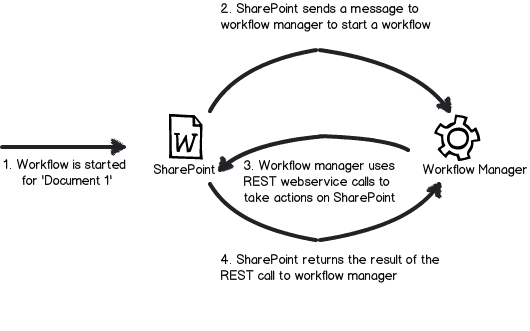
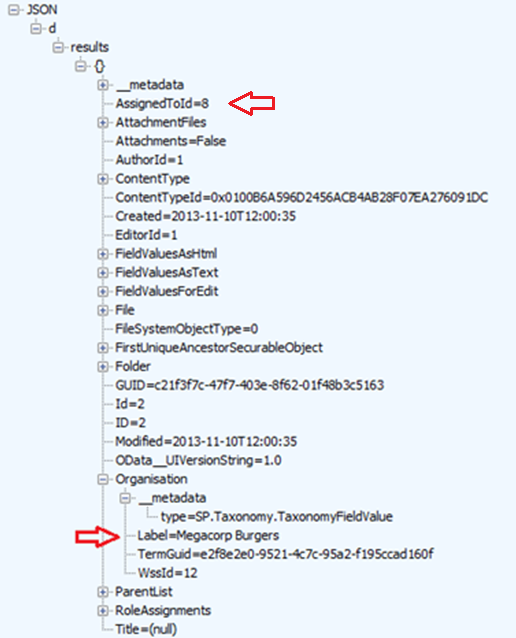
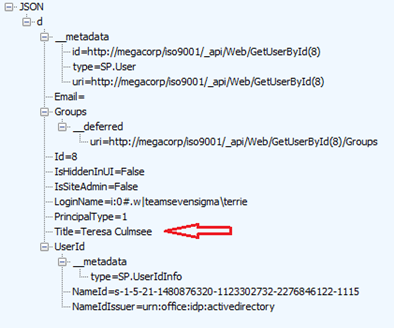
The answer to this question is a little more complex and relates to how Workflow Manager and SharePoint interact with each other. Without getting into detail, the gist of the issue is that Workflow Manager uses REST webservice calls to do all of its operations on SharePoint content. Each and every workflow action (like the Log to History List) uses REST to talk to SharePoint to get the work done. While a detailed discussion of REST would take us too far afield, I have drawn you possibly the dodgiest ever diagram of this process ever to help you understand it. The main point with REST worth mentioning is that the intention of REST is to embrace the key protocols of the web, so a successful or failed request is conveyed via a HTTP status code. If you have ever experienced your browser giving you a 404 page not found, then you know what I mean when I speak of HTTP status codes.
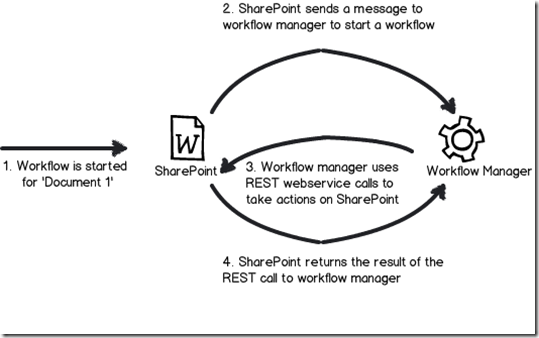
Now look again at the gory detail of the error that was logged by the workflow. We see the following string amongst all the other stuff. “Details: System.ApplicationException: HTTP 500”. So what happened is when the workflow tried to update the document with its stage, the check-out requirement resulted in SharePoint sending back a HTTP Error 500 (server error) back to the workflow manager. Unfortunately for us, it did not send back the underlying cause of the error. Instead, the details of the response logged by workflow has all sorts of information about the HTTP request, but no hint to the underlying error. Sucks eh?
4. How can we fix this problem?
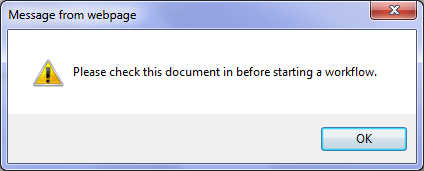
The final question was what we could do about this issue. There are two relatively easy ways, but before I do that, let me show you what happens if you check out the document and then attempt to run the workflow. While you might think this problem might go away, instead we get a friendly dialog box telling us to check the document back in before we attempt to start a workflow. Given that I couldn’t run this workflow because the item needed to be checked out, I had to laugh.
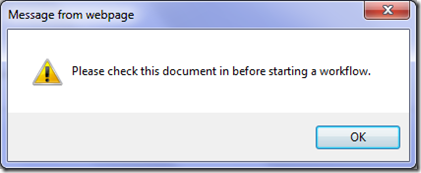
Anyways, the two options you have are to disable require check out on the Documents library or change the default behaviour of the workflow so that it does not write the stage back to the item that triggered the workflow. The first one is pretty easy – in the Versioning Settings of the Documents library, we change the Require documents to be checked out before they can be edited? option from Yes to No

The problem with the first option is that requiring check-out for controlled documents is likely to be a key requirement, so it is not an option in all circumstances. So the other option is to change the behaviour of the workflow itself so that it does not write its stage information back to the Documents library. Luckily for us, this is actually really easy to do. In SharePoint Designer 2013, there is an option to disable the updating of stage information. In the workflow settings screen, look for the option called Automatically update the workflow status to the current stage name and untick it.
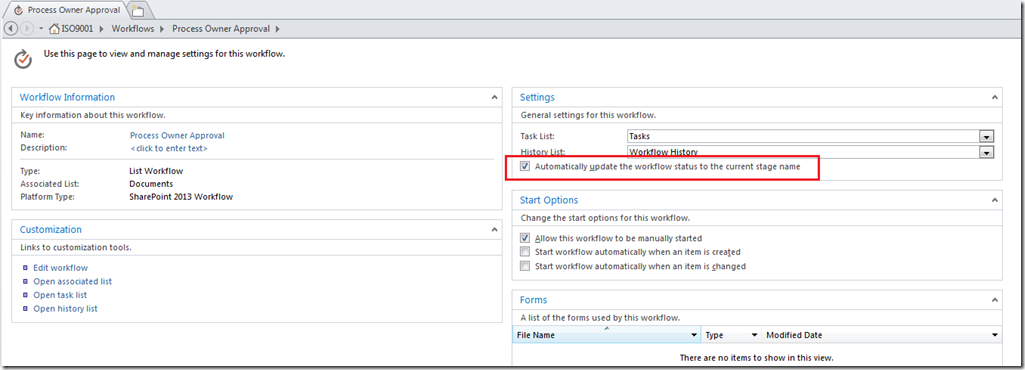
Now unticking this box will get us past this error, but the problem now is that we have no easy way to track workflows, as this status update can be used in views on the Documents library to see which workflows are at a particular stage. For a complex workflow, or one that will be running on many items, not being able to see the status of the workflow would make life difficult. One workaround is to add a Check Out Item workflow action to the start of the workflow, and then use the Set Workflow Status action to update the status column on the current item as the workflow progresses. This will give us back the ability to track the workflow behaviour in the Documents library, but it will mean that a new version will be added to that Document each time the status updates. So another workaround is to log workflow status to some other list altogether (using the Create List Item action) and use that list for tracking and reporting instead.
Conclusion
I think that the separation of SharePoint and Workflow Manager into separate products is ultimately a good thing. It’s just a pity that one of the legacies of this change is an issue like what we covered in this post, where a relatively simple problem was exacerbated by poor reporting of errors between Workflow Manager and SharePoint. I guess this is part of the bigger price we pay – that of increased technical complexity via more moving parts. Hopefully an issue like this one can be addressed in a future service pack or update, because it is this sort of stuff that can cause people to lose some confidence and jump to the 3rd party solution perhaps prematurely. So if this issue was enough for you to think “pah – let’s go third party”, I have news for you. As you progress through this series we are going to deal with more complex issues than this one too.
Anyway, the point is that we have identified the cause of this particular issue and gotten past it, so we should be able to continue testing the workflow and marvel at our awesomeness. So in the next article, we will continue with testing our workflow and see what else SharePoint throws at us.
Thanks for reading
Paul Culmsee

www.hereticsguidebooks.com









![image4_thumb[1]](http://www.cleverworkarounds.com/wp-content/uploads/2013/12/image4_thumb1.png "image4_thumb[1]")