Back to Cleverworkarounds mainpage
 

SharePoint development/deployment governance…

My home-town compatriot Jeremy Thake has hit onto a governance topic that I think will turn into a very popular series once he is done with it (in committing to writing it, he will be a busy boy indeed for a while I suspect :-) ).

He has written a post on current methods and common issues of deployment of SharePoint customisations from dev to staging to prod, with particular reference to the current pain associated with iterative development and deployment.

The state of play in this area out in SharePoint land is not the best, due to a wide variety of factors and Jeremy sums it up very well.

Certainly, there are some extremely annoying architectural quirks. Back when I did the branding series I encountered some, but Jeremy has hit some nastier ones than what I found.

Anyway, take a look at his post - its a good read.

No Tags


Why do SharePoint Projects Fail - Part 6

Hi again and welcome to part 6 of my series on the factors of why SharePoint projects fail. Joel Oleson’s write-up a while back gave me 5 minutes of fame, but like any contestant on Big Brother, I’ve had my time in the limelight, been voted out of the house (as in Joel’s front page) and I’m back to being an ordinary citizen again.

If you have followed events thus far, I covered off some wicked problem theory, before delving into the bigger ticket items that contribute to SharePoint project failure. In the last post, we pointed our virtual microscope at the infrastructure aspects that can cause a SharePoint problem to go off the rails.

Now we turn our magnifying glass onto application development issues and therefore application developers. Ah, what fun you can have with application developer stereotyping, eh! A strange breed indeed they are. As a group they have had a significant contribution to the bitter and twisted individual that I am today.

The CleverWorkarounds tequila shot rating is back!

for a project manager in denial :-)

for the rest of us!

Continue reading “Why do SharePoint Projects Fail - Part 6″

No Tags


Free MOSS Web Part - Hide Controls via JavaScript

Note: version 0.2 posted with minor bugfix 15th March 08!

Note2: Only works with MOSS 2007 sorry as you WSS guys do not have audiences targeting :-(

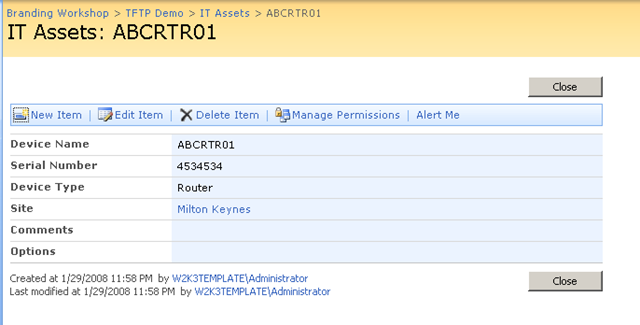
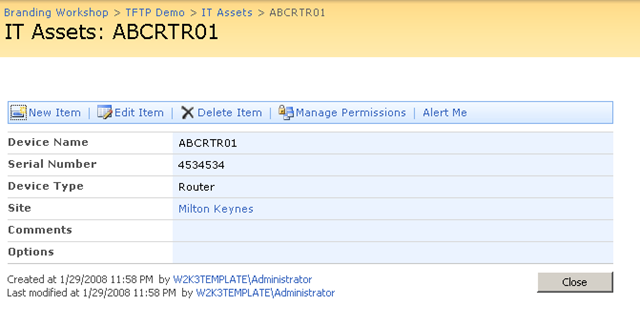
This is my small contribution to the SharePoint world. It is a web part that once added to a web part page, allows you to customise the display by adding JavaScript to selectively hide controls on the page . Ever needed to hide a field from display/edit for a certain audience? Well here is a way do it without requiring SharePoint Designer and having to break a page from it’s site definition (unghosting).

Before and after shots below (look ma - no top button!)

image  image

To fully understand what is being done here, I suggest you read my series of articles on the use of JavaScript in SharePoint. Part 3 in particular will show you how to safely add this web part to pages with editing disabled (NewForm.aspx, EditForm.aspx and DispForm.aspx)

The full series can be found here: Part 1, Part 2, Part 3, Part 4, Part 5 and Part 6.

Kudos to Jeremy Thake for feedback and some code contribution. Despite being seriously metrosexual, he is otherwise otherwise very cool :-P.

Now two important warnings:

Warning 1: This is an alpha quality release and I may never touch it again :-) So you very likely *will* break it. If there is enough interest, I am happy to pop it on codeplex

Warning 2: This web part should NOT be considered as a security measure and thus used in any security sensitive scenario (such as an extranet or WCM site). JavaScript by its very nature can be trivially interfered with and thus other methods (server side) should be employed in these scenarios to prevent interference at the browser.

You can download by reading the disclaimer and clicking the button below..

THIS CODE IS PROVIDED UNDER THIS LICENSE ON AN “AS IS” BASIS, WITHOUT WARRANTY OF ANY KIND, EITHER EXPRESSED OR IMPLIED, INCLUDING, WITHOUT LIMITATION, WARRANTIES THAT THE COVERED CODE IS FREE OF DEFECTS, MERCHANTABLE, FIT FOR A PARTICULAR PURPOSE OR NON-INFRINGING. THE ENTIRE RISK AS TO THE QUALITY AND PERFORMANCE OF THE COVERED CODE IS WITH YOU. SHOULD ANY COVERED CODE PROVE DEFECTIVE IN ANY RESPECT, YOU (NOT THE INITIAL DEVELOPER OR ANY OTHER CONTRIBUTOR) ASSUME THE COST OF ANY NECESSARY SERVICING, REPAIR OR CORRECTION. THIS DISCLAIMER OF WARRANTY CONSTITUTES AN ESSENTIAL PART OF THIS LICENSE. NO USE OF ANY COVERED CODE IS AUTHORIZED HEREUNDER EXCEPT UNDER THIS DISCLAIMER

Use at your own risk!

To install perform the following commands

  1. stsadm.exe” -o addsolution -filename CleverWorkAroundsHideFields.wsp
  2. stsadm.exe” -o execadmsvcjobs
  3. stsadm.exe” -o deploysolution -name CleverWorkAroundsHideFields.wsp -immediate -allowgacdeployment -allcontenturls
  4. stsadm.exe” -o execadmsvcjobs

To remove/reinstall perform the following commands

  1. stsadm.exe” -o retractsolution -name CleverWorkAroundsHideFields.wsp -immediate -allcontenturls
  2. stsadm.exe” -o execadmsvcjobs
  3. stsadm.exe” -o deletesolution -name CleverWorkAroundsHideFields.wsp
  4. stsadm.exe” -o execadmsvcjobs
  5. stsadm.exe” -o addsolution -filename CleverWorkAroundsHideFields.wsp
  6. stsadm.exe” -o execadmsvcjobs
  7. stsadm.exe” -o deploysolution -name CleverWorkAroundsHideFields.wsp -immediate -allowgacdeployment -allcontenturls
  8. stsadm.exe” -o execadmsvcjobs

No Tags


More SharePoint Branding - Customisation using JavaScript - Part 6

God help me, I’m up to part 6 of series about a technology I dislike and still going. For those of you that have just joined us, then you might want to go back to the very beginning of this series where I used JavaScript to improve the SharePoint user experience. Since then, I’ve been trying to pick a path through the thorny maze of what you could term, ’sustainable customisation’.

By that, I mean something that hopefully will not cause you grief and heartache the next time a service pack is applied!

So no mood for jokes this time - I want to get this over with so let’s get straight to it and finish this thing!

So where are we at?

  • Part 1 looked at how we can use JavaScript to deal with the issue of hiding form elements from the user in lists and document libraries.
  • Part 2 examined some of the issues with the part 1 JavaScript hacks and wrapped it into a web part using the content editor web part.
  • Part 3 then examined the various issues of adding this new web part to certain SharePoint pages (NewForm.aspx, EditForm.aspx and DispForm.aspx). I also covered using SharePoint Audience targeting to make the hiding/unhiding of form elements personalised to particular groups of users.
  • Part 4 started to address a couple of remaining usability issues, and introduced ‘proper’ web-part development using Visual Studio and STSDEV. I created a project to perform the same functionality in part 3, but would not requiring the user to have any JavaScript knowledge or experience.
  • Part 5 then used STSDEV to create a solution package that allowed easy debugging, deployment and updating of the web part developed in part 4.

So what could we possibly have left to cover? Basically this article will revisit the web part code and make some functionality improvements and then I will cover off some remaining quirks/issues that you should be aware of.

[Quick Navigation: Part 1, Part 2, Part 3, Part 4, Part 5 and Part 6]

Continue reading “More SharePoint Branding - Customisation using JavaScript - Part 6″

No Tags


More SharePoint Branding - Customisation using Javascript - Part 5

Hello and welcome to part 5 of another epic CleverWorkArounds blog post.

If you think I write a lot on my blog, you should see my documentation and training material! I seem to be rare insofar as I actually like to write documentation and can churn out reasonable quality pretty fast. So if you need your scary SharePoint farm/infrastructure audited and fully documented, you know who to call! :-)

Anyhow, here is the current state of play.

  • Part 1 of this series looked at how we can use JavaScript to deal with the common request of hiding form elements from the user in lists and document libraries. We looked at a Microsoft documented method, then a better, more flexible method.
  • Part 2 wrapped this JavaScript code into a web part which has been loaded into the SharePoint web part gallery.
  • Part 3 then examined the trials and tribulations of getting this new web part added to certain SharePoint pages (NewForm.aspx, EditForm.aspx and DispForm.aspx), and then with a few simple edits, use this web part to hide form fields as desired. Finally, I demonstrated the power of combining this with SharePoint Audiences targeting functionality to make the hiding/unhiding of form elements personalised to particular groups of users.
  • Part 4 introduced Visual Studio and STSDEV. I created a project to perform the same functionality in part 3, but not requiring any JavaScript knowledge or experience. By the end of part 4 I had a STSDEV project that compiled with no errors.

And now we are onto Part 5 where we turn our attention to the packaging and deployment of our web part. As you are about to see, STSDEV makes this a very quick and painless experience. If you aren’t convinced of the merits of STSDEV and the SharePoint solution framework by the time you finish this article, then I don’t know what will convince you.

[Quick Navigation: Part 1, Part 2, Part 3, Part 4 and Part 6]

Continue reading “More SharePoint Branding - Customisation using Javascript - Part 5″

No Tags


More SharePoint Branding - Customisation using JavaScript - Part 4

Hi there. As I write this post, the media are telling me that the stock market is stuffed, the US economy is going to the dogs and banks are writing down billions from sub-prime excess. I dare not check my online broker, road traffic this morning was abysmal, I was late, brought in the wrong laptop and left an important DVD at home.

Could it get any worse? Who knows, but it sounds like the sort of day to re-visit JavaScript and get frustrated with writing a web part for the first time.

So to recap on our journey thus far..

  • Part 1 of this series looked at how we can use JavaScript to deal with the common request of hiding form elements from the user in lists and document libraries. It looked at a Microsoft documented method, then a better, more flexible method.
  • Part 2 wrapped this JavaScript code into a web part which has been loaded into the SharePoint web part gallery.
  • Part 3 then examined the trials and tribulations of getting this new web part added to certain SharePoint pages (NewForm.aspx, EditForm.aspx and DispForm.aspx), and then with a few simple edits, use this web part to hide form fields as desired. Finally, I demonstrated the power of combining this with SharePoint Audiences targeting functionality to make the hiding/unhiding of form elements personalised to particular groups of users.

All in all a pretty clever workaround so far if I say so myself. :-)

My original goals for this JavaScript was to find an effective, easily repeatable way to customise SharePoint form pages by hiding fields or form elements when we need to. Specifically:

  • Allow hidden fields based on identity/audience
  • Avoid use of SharePoint Designer
  • Avoid customisations to the form pages that unghosted the pages from the site definition

We achieved these goals in part three, but was I satisfied? No. The quest for more clever workarounds always goes on!

[Quick Navigation: Part 1, Part 2, Part 3, Part 5 and Part 6]

Continue reading “More SharePoint Branding - Customisation using JavaScript - Part 4″

No Tags


SharePoint Branding Part 7 -The ‘governance’ of it all..

Well, here we are! After delving into dark arts where everybody but metrosexual web designers fear to tread (HTML and CSS), we then delved into the areas that metrosexual web designers truly fear to tread (packaging, deployment and even some c# code!). Finally, we get to the area where everybody is interested until it happens to get in their way! (Ooh, I am a cynical old sod tonight).

That is Governance!

Continue reading “SharePoint Branding Part 7 -The ‘governance’ of it all..”

No Tags


SharePoint Branding Part 6 - A "solution" to all issues?

There has been a bit of a gap in this series between part 5 and 6 - and fortunately for the both of us, I think this is the penultimate post in my series on SharePoint branding. While it has been an interesting exercise for me, I must confess each successive article is getting harder to write as my interest is shifting :-)  So many sub-disciplines within MOSS - I think I might delve into WCM soon :-).

Continue reading “SharePoint Branding Part 6 - A "solution" to all issues?”

No Tags


Finally - clever filtered lookups!

Tags: Branding, Features, Solutions @ 8:24 am

Pretty much since I started with MOSS2007 (and back in the pre 2007 days too), I’ve required smarter drop down choices for my columns. Basically, I needed a secondary drop down list filtered based on the choice from a primary drop down list - the whole category/sub category thing. Seems amazing to me that it is not available out of the box.

On my to-do list was to write a detailed post critiquing all the workarounds out there (such as Patrick’s Javascript method and Dattard’s designer work) and rate their cleverness - as per the branding series.

Continue reading “Finally - clever filtered lookups!”

No Tags


Today is: Thursday 28 August 2008 -