Back to Cleverworkarounds mainpage
Visit - A Seven Sigma Initiative
 

Aug 03 2009

Troubleshooting SPSearch and good practices for moving large files

Every so often I get back into geek mode and roll up the sleeves and get my SharePoint hands dirty. Not so long ago I was assisting a small WSS3 based organisation with a major disk subsystem upgrade (iSCSI SAN) and locally attached storage upgrade, driven by content database growth and a need to convert some sites to site collections. By the end of it all, we had a much better set-up with a much better performing disk subsystem, but I was hit by two problems. One was WSS Search being broken and needing a fix and the other was the appallingly slow speed of copying large files around.

So, let’s talk about fixing broken search and then talk about copying large files.

1. When SPSearch breaks…

The SharePoint install in question was a WSS3 site with SP1, and Search Server 2008 had not been installed. The partition that contained the indexes (F:\) had to be moved to another partition (G:), so to achieve this I used the command

stsadm –o spsearch indexlocation G:\DATA\INDEX

Now, 99.9% of the time this will happily do its thing. But today was the 0.01% of the time when it decided to be difficult. Upon executing this command, I received an RPC error. Unfortunately for me, I was out of time, so I decided to completely re-provision search and start all over again.

It didn’t matter whether I tried this in Central Administration->Operations->Services on Server, or via the command line below. Both methods would not work.

stsadm -o spsearch -action stop

On each attempt, search would get stuck on unprovisioning (stopping) with a sequence of events in the event log (eventID 2457, 2429 and 2428).

===========================================================================================
Event Source: Windows SharePoint Services 3 Search
Event Category: Gatherer
Event ID: 2457
Description: 

The plug-in manager <SPSearch.Indexer.1> cannot be initialized.
Context: Application 'Search index file on the search server' 

Details:
The system cannot find the path specified. (0x80070003) 

===========================================================================================
Event Source: Windows SharePoint Services 3 Search
Event Category: Gatherer
Event ID: 2429
Description: 

The plug-in in <SPSearch.Indexer.1> cannot be initialized.
Context: Application '93a1818d-a5ec-40e1-82d2-ffd8081e3b6e', Catalog 'Search' 

Details:
The specified object cannot be found. Specify the name of an existing object. (0x80040d06) 

===========================================================================================
Event Source: Windows SharePoint Services 3 Search
Event Category: Gatherer
Event ID: 2428
Description: 

The gatherer object cannot be initialized.
Context: Application 'Search index file on the search server', Catalog 'Search' 

Details:
The specified object cannot be found. Specify the name of an existing object. (0x80040d06) 


So, as you can see I was stuck. I couldn’t not clear the existing configuration and the search service would never actually stop. In the end, I started to wonder whether the problem was that my failed attempt to change the index partition had perhaps not reapplied permissions to the new location. To be sure I reapplied permissions using the following STSADM command

psconfig -cmd secureresources

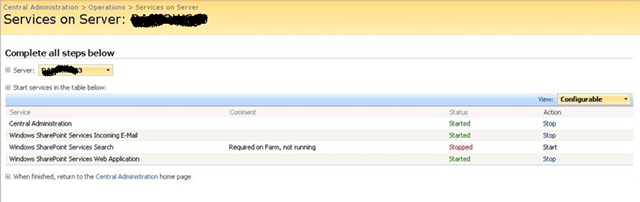
This seemed to do the trick. Re-executing the stsadm spsearch stop command finally did not come up with an error and the service was listed as stopped.

image

Once stopped, we repartitioned the disks accordingly and now all I had to do was start the damn thing :-)

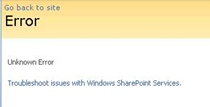
Through the Central Administration GUI I clicked Start and re-entered all of the configuration settings, including service accounts and the new index location (G:\DATA\INDEX). After a short time, I received the ever helpful “Unknown Error” error message.

image

Rather than change debug settings in web.config, I simply checked the SharePoint logs and the event viewer. Now, I had a new event in the logs.

Event Type: Warning
Event Source: Windows SharePoint Services 3 Search
Event Category: Gatherer
Event ID: 10035
Description:
Could not import the registry hive into the registry because it does not exist in the configuration database.
Context: Application '93a1818d-a5ec-40e1-82d2-ffd8081e3b6e' 

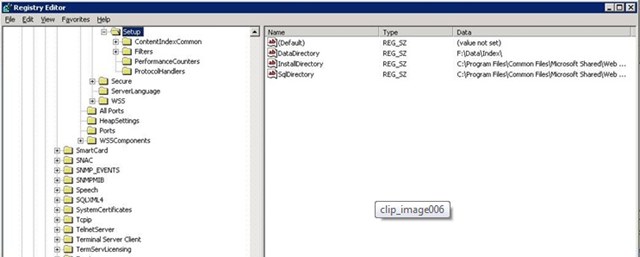
Hmm… It suggests a registry issue, so I checked the registry.

image


Although the error message really made no sense to me, checking the registry turned out to be the key to solving this mystery. If you look carefully in the above screenshot, note that the registry key DataDirectory was set to “F:\DATA\INDEX”.

I was surprised at this, because I had re-provisioned the SPSearch to use the new location (G:\DATA\INDEX). I would have thought that changing the default index location would alter the value of this key. A delve into the ULS logs showed events like this.

STSADM.EXE (0x0B38) 0×0830 Search Server Common MS Search Administration 95k1 High WSS Search index move: Changing index location from ‘F:\data\index’ to ‘G:\data\index’.

STSADM.EXE (0x0B38) 0×0830 Search Server Common MS Search Administration 95k2 High WSS Search index move: Index location changed to ‘G:\data\index’.

STSADM.EXE (0x0B38) 0×0830 Search Server Common MS Search Administration 0 High CopyIndexFiles: Source directory ‘F:\data\index\93a1818d-a5ec-40e1-82d2-ffd8081e3b6e’ not found for application ’93a1818d-a5ec-40e1-82d2-ffd8081e3b6e’.

STSADM.EXE (0x0F10) 0×1558 Windows SharePoint Services Topology 8xqz Medium Updating SPPersistedObject SPSearchServiceInstance Parent=SPServer Name=DAPERWS03. Version: 218342 Ensure: 0, HashCode: 54267293, Id: 305c06d7-ec6d-465a-98be-1eafe64d8752, Stack: at Microsoft.SharePoint.Administration.SPPersistedObject.Update() at Microsoft.SharePoint.Administration.SPServiceInstance.Update() at Microsoft.SharePoint.Search.Administration.SPSearchServiceInstance.Update() at Microsoft.Search.Administration.CommandLine.ActionParameter.Run(StringBuilder& output) at Microsoft.SharePoint.Search.Administration.CommandLine.SPSearch.Execute() at Microsoft.Search.Administration.CommandLine.CommandBase.Run(String command, StringDictionary keyValues, String& output) at Microsoft.SharePoint.StsAdmin.SPStsAdmin.RunOperation(SPGlobalAdmin globalAdmin, String st…

mssearch.exe (0×1654) 0×1694 Search Server Common IDXPIPlugin 0 Monitorable CTripoliPiMgr::InitializeNew – _CopyNoiseFiles returned 0×80070003 – File:d:\office\source\search\ytrip\search\tripoliplugin\tripolipimgr.cxx Line:519

mssearch.exe (0×1654) 0×1694 Search Server Common Exceptions 0 Monitorable <Exception><HR>0×80070003</HR><eip>0000000001D4127F</eip><module>d:\office\source\search\ytrip\search\tripoliplugin\tripolipimgr.cxx</module><line>520</line></Exception>

Note the second last line above (marked bold and italic). It showed that a function called CopyNoiseFiles returned a code of 0×8007003. This code happens to be “The system cannot find the path specified,” so it appears something is missing.

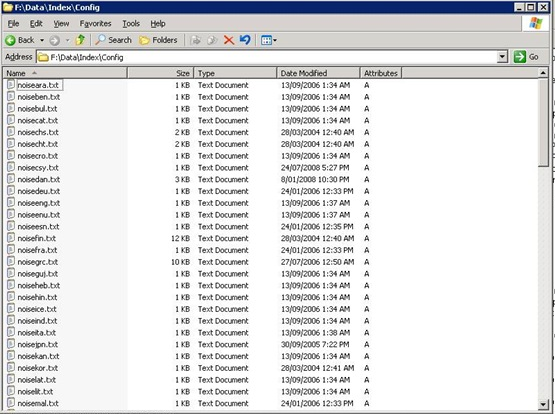
It then dawned on me. Perhaps the SharePoint installer puts some files into the initially configured index location and despite moving the index to another location, SharePoint still looks to this original location for some necessary files. To test this, I loaded up a blank Windows 2003 VM and installed SharePoint SP1 *without* running the configuration wizard. When I looked in the location of the index files, sure enough – there are some files as shown below.

image

It turned out that during our disk reconfiguration, the path of F:\DATA\INDEX no longer existed. So I recreated the path specified in the registry (F:\DATA\INDEX) and copied the contents of the CONFIG folder from my fresh VM install. I then started the search service from Central Administration and… bingo! Search finally started successfully…Wohoo!

Now that I had search successfully provisioned, I re-ran the command to change the index location to G:\DATA\INDEX and then started a full crawl.

C:\>stsadm -o spsearch -indexlocation G:\DATA\INDEX

Operation completed successfully.

C:\>stsadm -o spsearch -action fullcrawlstart

Operation completed successfully.

I then checked the event logs and now it seems we are cooking with gas!

Event Type: Information
Event Source: Windows SharePoint Services 3 Search
Event Category: Gatherer
Event ID: 10045
Description: 

Successfully imported the application configuration snapshot into the registry.
Context: Application '93a1818d-a5ec-40e1-82d2-ffd8081e3b6e' 

Event Type: Information
Event Source: Windows SharePoint Services 3 Search
Event Category: Gatherer
Event ID: 10044
Description: 

Successfully stored the application configuration registry snapshot in the database.
Context: Application 'Serve search queries over help content' 

As a final check, I re-examined the registry and noted that the DataDirectory key had not changed to reflect G:\. Bear that in mind when moving your index to another location. The original path may still be referred to in the configuration.

2. There are RAID cards and there are RAID cards

Since part of the upgrade work was to improve disk performance, we had to detach databases and move them around while we upgraded the disk infrastructure and repartitioned existing disk arrays. The server had an on-board Intel RAID controller with two arrays configured. One was a two-disk RAID 0 SCSI and the other was a three-disk RAID 5 SATA array. The performance of the RAID 5 SATA had always been crap – even crappier than you would expect from onboard RAID 5. When I say crap, I am talking around 35 megabytes per second transfer rate – even on the two-disk SCSI RAID 0 array.

Now, 35MB/sec isn’t great, but not completely intolerable. But, what made this much, much worse however, was the extreme slowness in copying large files (ie >4GB). When trying to copy files like this to the array, the throughput dropped to as low as 2MBs.

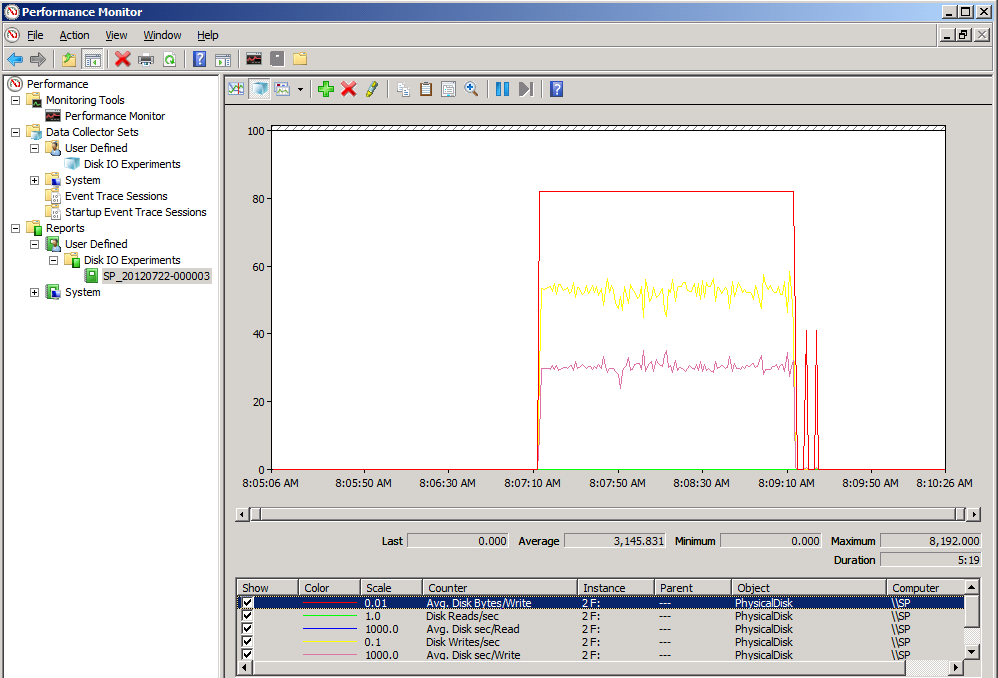
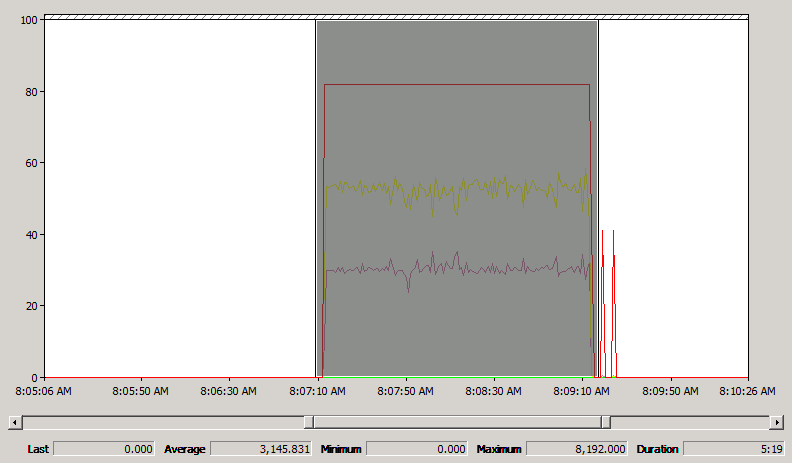
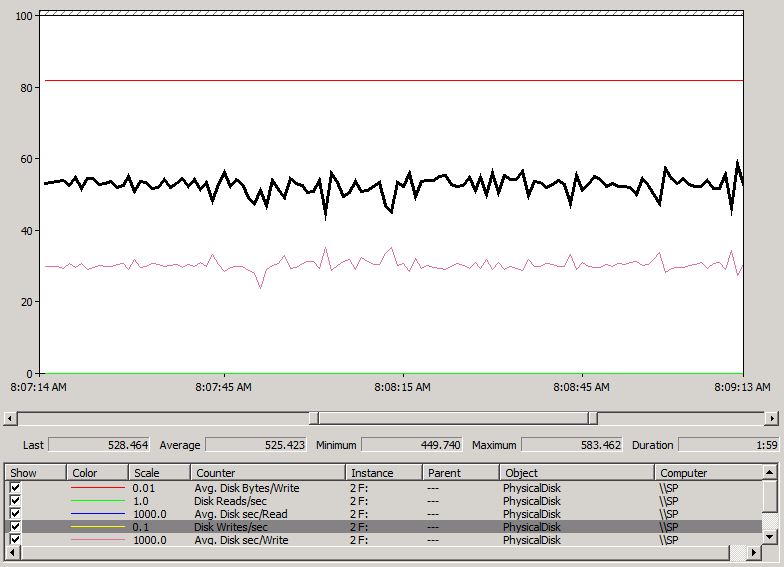
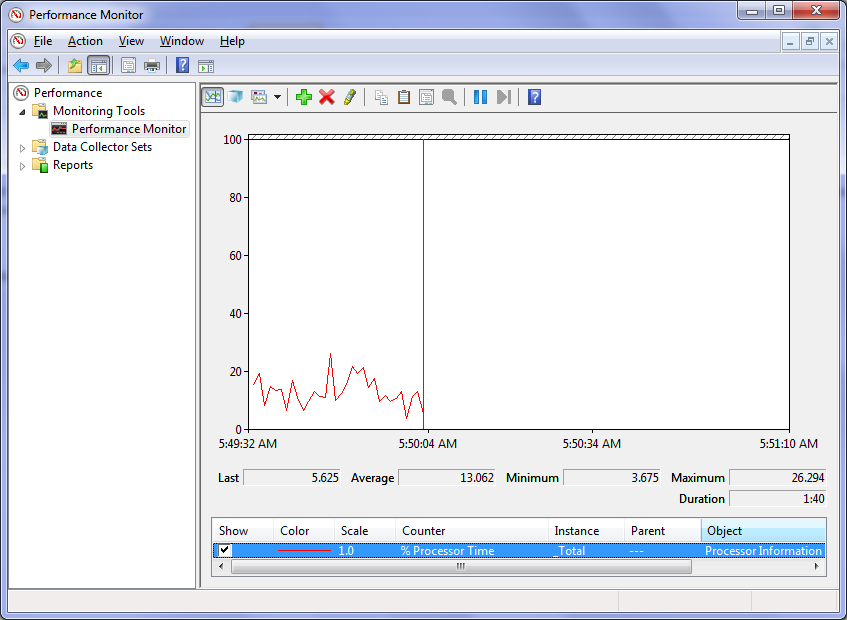
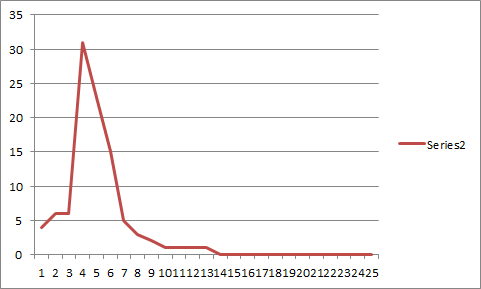
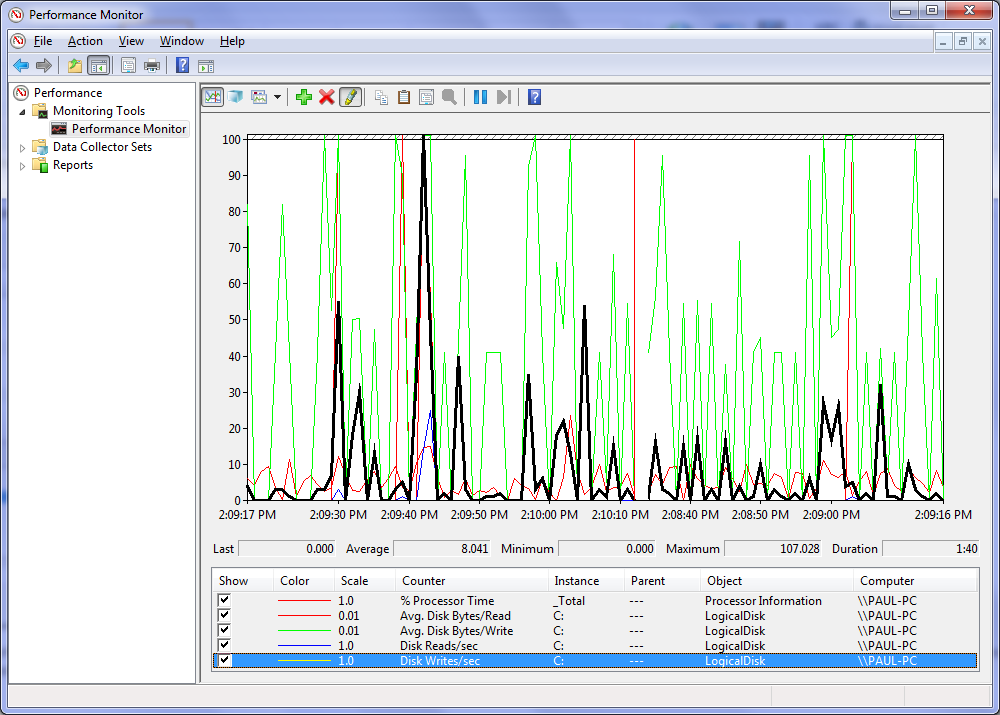
No matter whether it was Windows Explorer drag and drop or a command line utility like ROBOCOPY, the behaviour was the same. Throughput would be terrific for around 60 seconds, and then it would drop as shown below.

image

My client called the server vendor and was advised to purchase 4 SCSI disks to replace the SATA’s. Apparently the poor SATA performance was actually because SCSI and SATA were mixed on the same RAID bard and bus. That was a no-no.

Sounded plausible, but of course, after replacing the RAID 5 with the SCSI disks, there was no significant improvement in disk throughput at all. The performance of large files still reflected the pattern illustrated in the screenshot above.

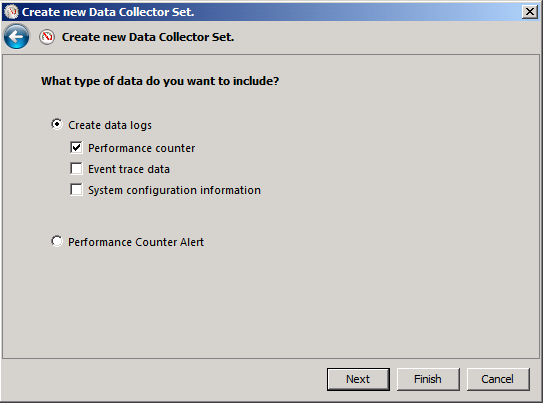
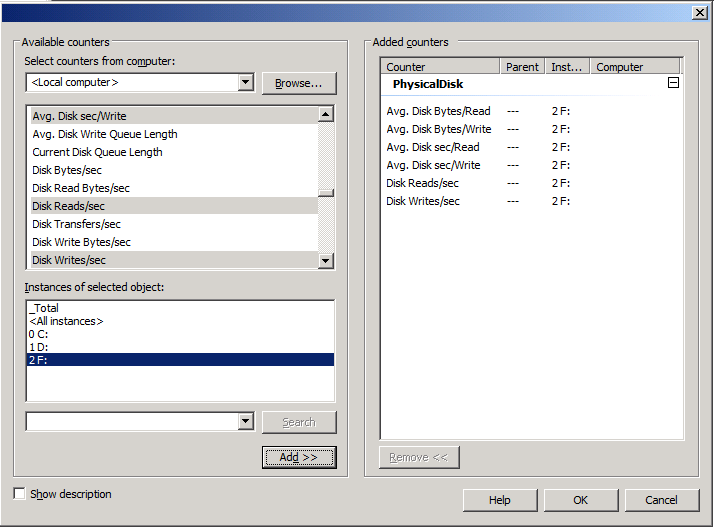
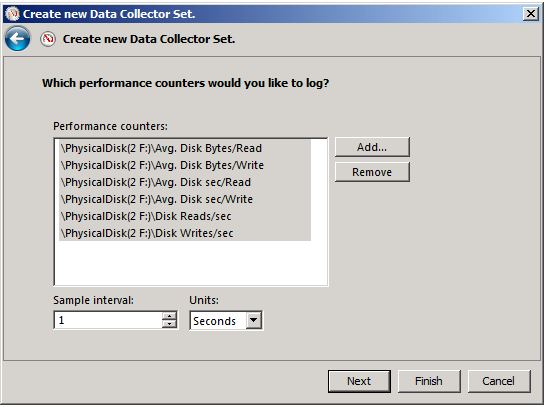
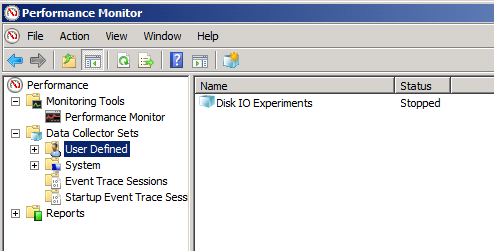
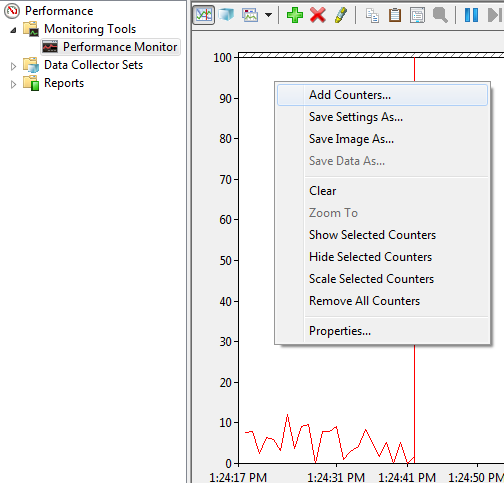
Monitoring disk queue length on the new RAID array showed that disk queues were off the planet in terms of within normal boundaries. Now, I know that some people view disk queue length as a bit of an urban myth in terms of disk performance, but copying the same files to the iSCSI SAN yielded a throughput rate of around 95MBs and the disk queue value rarely spiked above 2.

Damn! My client wasn’t impressed with his well known server vendor! Not only does the onboard RAID card have average to crappy performance to begin with, RAID 5 with large files makes it positively useless.

Fun with buffers

To me, this smelt like a buffer type of issue. Imagine you are pouring sand into a bucket and the bucket has a hole in it. If you pour sand into the bucket at a faster rate than the hole allows sand to pour out, then eventually you will overflow the bucket. I suspected this sort of thing was happening here. The periods of high throughput were when the bucket was empty and the sand filled it fast. Then the bucket filled up and things slowed to a crawl while all of that sand passed through the metaphorical hole in the bottom. Once the bucket emptied, there was another all-too-brief burst of throughput as it filled quickly again.

I soon found a terrific article from EPS Windows Server Performance Team that explain what was going on very clearly.

Most file copy utilities like Robocopy or Xcopy call API functions that try and improve performance by keeping data in a buffer. The idea is that files that are changed or accessed frequently can be pulled from the buffer, thereby improving performance and responsiveness. But there is a trade-off. Adding this cache layer introduces an overhead in creating this buffer in the first place. If you are never going to access to copy this file again, adding it to the buffer is actually a bad idea.

Now imagine a huge file. Not only do you have the buffer overhead, but you now are also filling the buffer (and forcing it to be flushed), over and over again.

With a large file, you are actually better off avoiding the buffer altogether and doing a raw file copy. Any large file on a slow RAID card will still take time, but it’s a heck of a lot quicker than when combined with the buffering overhead.

Raw file copy methods

In the aforementioned article from the Microsoft EPS Server performance team, they suggest ESEUTIL as an alternative method. I hope they don’t mind me quoting them…

For copying files around the network that are very large, my copy utility of choice is ESEUTIL which is one of the database utilities provided with Exchange.  To get ESEUTIL working on a non-Exchange server, you just need to copy the ESEUTIL.EXE and ESE.DLL from your Exchange server to a folder on your client machine.  It’s that easy.  There are x86 & x64 versions of ESEUTIL, so make sure you use the right version for your operating system.  The syntax for ESEUTIL is very simple: eseutil /y <srcfile> /d <destfile>.  Of course, since we’re using command line syntax – we can use ESEUTIL in batch files or scripts.  ESEUTIL is dependent on the Visual C++ Runtime Library which is available as a redistributable package

I found an alternative to this, however, that proved its worth to me. It is called Teracopy and we tried the free edition to see what difference it would make in terms of copy times. As it happens, the difference was significant and the time taken to transfer large files around was reduced by a factor of 5. Teracopy also produced a nice running summary of the copy thoughput in MB/sec.The product definitely proved its worth and at a whopping $15 bucks, is not going to break the bank.

So, if you are doing any sort of large file copies and your underlying disk subsystem is not overly fast, then I recommend taking a look at this product. Believe me, it will save you a heap of time.

3. Test your throughput

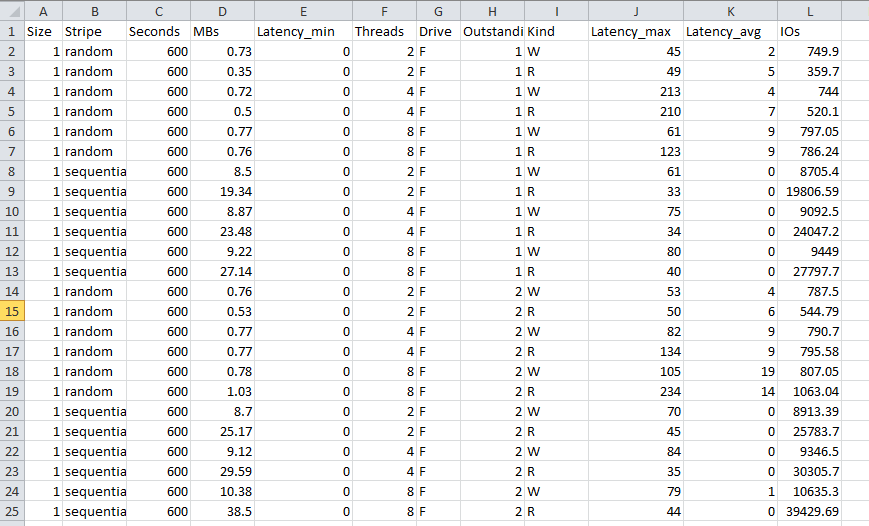
A final note about this saga. Anyone who deals with SQL Server will have likely read articles about best practice disk configuration in terms of splitting data/logs/backups to different disk arrays to maximise throughput. This client had done this, but since Teracopy gave us nice throughput stats, we took the opportunity to test the read/write performance of all disk subsystems and it turned out that putting ALL data onto the SAN array had significantly better performance than using any of the onboard arrays.

This meant that the by-the-book configuration was hamstrung by a poorly performing onboard RAID controller and even if the idea of using separate disks/spindles seemed logical, the cold hard facts of direct throughput testing proved otherwise.

After reconfiguring the environment to leverage this fact, the difference in response time of WSS, when performing bulk uploads was immediately noticeable.

The moral of the story?

If you are a smaller organisation and can’t afford the high end server gear like Compaq/IBM, then take the time to run throughput tests before you go to production. The results may surprise you.

Thanks for reading

Paul Culmsee
www.sevensigma.com.au

No Tags


Sep 25 2008

Complexity bites: When SharePoint = Risk

I think as you age, you become more and more like your parents. Not so long ago I went out paintballing with some friends and we all agreed that the 16-18 year olds who also happened to be there were all obnoxious little twerps who needed a good kick in the rear. At the same time, we also agreed that we were just as obnoxious back when we were that age. Your perspective changes as you learn and your experience grows, but you don’t forget where you came from.

I now find myself saying stuff to my kids that my parents said to me, I think today’s music is crap, I have taken a liking to drinking quality scotch. Essentially all I need now to complete the metamorphosis to being my father is for all my hair to fall out!

So when I write an article whining about an assertion that IT has a credibility issue and has gone backwards in its ability to cope with various challenges, I fear that I have now officially become my parents. I’ll sound like grandpa who always tells you that life was so much simpler back in the 1940′s.

Consequences of complexity…

Before I go and dump on IT as a discipline, how about we dump on finance as a discipline, just so you can be assured that my cynicism extends far beyond nerds.

I previously wrote about how Sarbanes Oxley legislation was designed to, yet ultimately failed to, provide assurance to investors and regulators that public companies had adequate controls over their financial risk. As I write this, we are in the midst of a once in a generation-or-two credit crisis where some seven hundred billion dollars ($700,000,000,000) of US taxpayers’ money will be used to take ownership of crap assets (foreclosed or unpaid mortgages).

Part of the problem with the credit crisis was through the use of "collateralized debt obligations". This is a fancy, yet complex, way of taking a bunch of mortgages, and turning them into an "asset" that someone else who has some spare cash invests in. If you are wondering why the hell someone would invest in such a thing, then consider people with home loans, supposedly happily paying interest on those mortgages. It is that interest that finds its way to the holder (investor) of the CDO. So a CDO is supposedly an income stream.

Now if that explanation makes your eyes glaze over then I have bad news for you: that’s supposed to be the easy part. The reality is that the CDO’s are actually extremely complex things. They can be backed by residential property, commercial property, something called mortgage backed securities, corporate loans – essentially anything that someone is paying interest on can find its way into a CDO that someone else buys into, to get the income stream from the interest paid.

To provide "assurance" that these CDO’s are "safe", ratings agencies give them a mark that investors rely upon when making their investment. So a "AAA" CDO is supposed to have been given the tick of approval by experts in debt instrument style finance.

Here’s the rub about rating agencies. Below is a news article from earlier in the year with some great quotes

http://www.nytimes.com/2008/03/23/business/23how.html?pagewanted=print

Credit rating agencies, paid by banks to grade some of the new products, slapped high ratings on many of them, despite having only a loose familiarity with the quality of the assets behind these instruments.

Even the people running Wall Street firms didn’t really understand what they were buying and selling, says Byron Wien, a 40-year veteran of the stock market who is now the chief investment strategist of Pequot Capital, a hedge fund. “These are ordinary folks who know a spreadsheet, but they are not steeped in the sophistication of these kind of models,” Mr. Wien says. “You put a lot of equations in front of them with little Greek letters on their sides, and they won’t know what they’re looking at.”

Mr. Blinder, the former Fed vice chairman, holds a doctorate in economics from M.I.T. but says he has only a “modest understanding” of complex derivatives. “I know the basic understanding of how they work,” he said, “but if you presented me with one and asked me to put a market value on it, I’d be guessing.”

What do we see here? How many people really *understand* what’s going on underneath the complexity?

Of course, we now know that many of the mortgages backing these CDO’s were made to people with poor credit history, or with a high risk of not being able to pay the loans back. Jack up the interest rate or the cost of living and people foreclose or do not pay the mortgage. When that happens en masse, we have a glut of houses for sale, forcing down prices, lowering the value of the assets, eliminating the "income stream" that CDO investors relied upon, making them pretty much worthless.

My point is that the complexity of the CDO’s were such that even a guy with a doctorate in economics only had a ‘modest understanding’ of them. Holy crap! If he doesn’t understand it then who the hell does?

Thus, the current financial crisis is a great case study in the relationship between complexity and risk.

Consequences of complexity (IT version)…

One thing about doing what I do, is that you spent a lot of time on-site. You get to see the IT infrastructure  and development at many levels. But more importantly, you also spend a lot of time talking to IT staff and organisation stakeholders with a very wide range of skills and experience. Finally and most important of all, you get to see first hand organisational maturity at work.

My conclusion? IT is completely f$%#ed up across all disciplines and many will have their own mini equivalent of the US $700 billion dollar haemorrhage. Not only that, it is far worse today than it previously was – and getting worse! IT staff are struggling with ever accelerating complexity and the "disconnect" between IT and the business is getting worse as well. To many businesses, the IT department has a credibility problem, but to IT the feeling is completely mutual :-)

You can find a nice thread about this topic on slashdot. My personal favourite quote from that thread is this one

Let me just say, after 26 years in this business, of hearing this every year, the systems just keep getting more complex and harder to maintain, rather than less and easier.

Windows NT was supposed to make it so anyone who could use Windows could manage a server.

How many MILLION MSCEs do we have in the world now?

Storage systems with Petabytes of data are complex things. Cloud computing is a complex thing. Supercomputing clusters are complex things. World-spanning networks are complex things.

No offense intended, but the only people who think things are getting easier are people who don’t know how they work in the first place

Also there is this…

There are more software tools, programming languages, databases, report writers, operating systems, networking protocols, etc than ever before. And all these tools have a lot more features than they used to. It’s getting increasingly harder to know "some" of them well. Gone are the days when just knowing DOS, UNIX, MVS, VMS, and OS/400 would basically give you knowledge of 90% of the hardware running. Or knowing just Assembly/C/Cobol/C++ would allow you to read and maintain most of the source code being used. So I would argue that the need for IT staff is going to continue to increase.

I think the "disconnect" between IT and Business has a lot more to do with the fact that business "knows" they depend on IT, but they are frustrated that IT can’t seem to deliver what they want when they want it. On the other side, IT has to deal with more and more tools and IT staff has to learn more and more skills. And to increase frustration in IT, business users frequently don’t deliver clear requirements or they "change" their mind in the middle of projects….

So it seems that I am not alone :-)

I mentioned previously that more often than not, SQL Server is poorly maintained – I see it all the time. Yet today I was speaking to a colleague who is a storage (SAN) and VMware virtualisation god. I asked him what the average VMware setup was like and his answer was similar to my SQL Server and SharePoint experience. In his experience, most of them were sub-optimally configured, poorly maintained, poorly documented and he could not provide any assurance as to the stability of the platform.

These sorts of quality assurance issues are rampant in application development too. I see the same thing most definitely in the security realm too.

As the above quote sates, "it’s increasingly harder to know *some* of them well". These days I am working with specialists who live and breathe their particular discipline (such as storage, virtualisation, security or comms). Those disciplines over time grow more complex and sub-disciplines appear.

Pity then, the poor developer/sysadmin/IT manager who is trying to keep a handle on all of this and try to provide a decent service to their organisation!

Okay, so what? IT has always been complex – I sound like a Gartner cliche. What’s this got to do with SharePoint?

Consequences of SharePoint complexity…

SharePoint, for a number of reasons, is one of those products that has a way of really laying bare any gaps that the organisation has in terms of their overall maturity around technology and strategy.

Why?

Because it is so freakin’ complex! That complexity transcends IT disciplines and goes right to the heart organisational/people issues as well.

It’s bad enough getting nerds to agree on something, let alone organisation-wide stakeholders!

Put simply, if you do a half-arsed job of putting SharePoint in, you will be punished in so many ways! The simple fact is that the odds are against you before you even start because it only takes a mistake in one particular part of the complex layers of hardware, systems, training, methodology, information architecture and governance, to devalue the whole project.

When I first started out, I was helping organizations get SharePoint installed. However lately I am visiting a lot of sites where SharePoint has already been installed, but it has not been a success. There are various reasons;I have cited them in detail in the project failure series, so I won’t rehash all that here. (I’d suggest reading parts three, four and five in particular).

I am firmly of the conclusion that much of SharePoint is more art than science, and what’s more, the organisation has to be ready to come with you. Due to differing learning styles and poor communication of strategy, this is actually pretty rare. Unfortunately, IT are not the people who are well suited to "getting the organisation ready for SharePoint."

If that wasn’t enough, then there is this question. If IT already struggle to manage the underlying infrastructure and systems that underpin SharePoint, then how can you have any assurance that IT will have a "governance epiphany" and start doing things the right way?

This translates to risk, people! I will be writing all about risk in a similar style to the CFO Return on Investment series very soon. I am very interested in methods to quantify the risk brought about by the complexity of SharePoint and the IT services it relies on. For me, I see a massive parallel from the complexity factor in the current financial crisis and I think that a lot can be learned from it. SOX was supposed to provide assurance and yet did nothing to prevent the current crisis. Therefore, SOX represents a great example of mis-focused governance where a lot of effort can be put in for no tangible gain.

A quick test of "assurance"…

Governance is like learning to play the guitar. It takes practice, and it does not give up its secrets easily and despite good intent, you will be crap at it for a while. It is easy to talk about, but putting it into practice is another thing.

Just remember this. The whole point of the exercise is to provide *assurance* to stakeholders. When you set any rule, policy, procedure, standard (or similar), just ask yourself: Does this provide me the assurance I need that gives me confidence to vouch for the service I am providing? Just because you may be adopting ITIL principles, does *not* mean that you are necessarily providing the right sort assurance that is required.

I’ll leave you with a somewhat biased, yet relatively easy litmus test that you can use to test your current level of assurance.

It might be simplistic, but if you are currently scared to apply a service pack to SharePoint, then you might have an assurance issue. :-)


Thanks for reading


Paul Culmsee

www.sevensigma.com.au

No Tags


Apr 27 2008

Why do SharePoint Projects Fail – Part 5

Hi again and welcome to this seemingly endless series of posts on the topic of SharePoint projects gone bad.

We spent a couple of posts looking at problem projects in general before focusing specifically on SharePoint. If you have followed the series closely, you will observe that haven’t talked much on technical aspects of the product yet. If you were expecting me to pick apart annoying aspects of the architecture then unfortunately, you will be disappointed because I really don’t believe that it is a big factor in why SharePoint projects fail. Besides which, 90% of SharePoint blogs are on technical/development content anyway.

So where am I going with part 5 then you ask?  I am indeed delving into technical aspects, but once again it is all about the people involved.

So now its time to take a few cheap-shots at the geeks. (After all, they are sensitive souls and we don’t want them to feel left out do we). For the purposes of this post, infrastructure people, tech support, system administrators can be lumped into the same ‘geek bucket’.

Geeks can also cop it like Project Managers do, when projects take on wicked tendencies. They will implement the agreed requirements, but the stakeholders feel that the end result isn’t what they wanted. In the ensuing fallout that happens when the project sponsor realises that say, half a million bucks has been blown with little to show for it, blame is inevitably directed their way, whether justified or not.

Continue reading “Why do SharePoint Projects Fail – Part 5″

No Tags


Mar 25 2008

SharePoint External Storage API – Crushing My Dream

When I read several months back, that Microsoft was going to supply an API for external storage in MOSS/WSS, I sprang from my desk and danced around the room and babbled incoherently as if I’d been touched by Benny Hinn.

Okay, well maybe I didn’t quite do that. But what I did do was forward the KB article to a colleague whose company is the leading reseller for EMC Documentum in my town. We’d previously had one of those conversations over a few beers where we questioned the wisdom of SharePoint’s potentially unwise, yet unsurprising use of SQL Server as the storage engine.

…so what’s wrong with SQL?

I am going to briefly dump on SQL here for a minute. But first, let me tell you, I actually like SQL Server! Always have. I hated other Office Server products like Exchange until the 2003 version and SharePoint until the 2007 version. But on the whole, I found SQL to be pretty good. So hopefully that will stop the SQL fanboys from flaming me!

Those readers who appreciate capacity planning issues would appreciate the challenges SQL based storage brings to the table.Additionally, those who have used Enterprise Information Management products like Documentum or Hummingbird (now OpenText) would nod as if Microsoft have finally realised the error of their ways with this updated API.

All of the SharePoint goodies like version control, full text indexing and records management come at a price. Disk consumption and performance drain.  Microsoft say to plan for 1.5 times your previous growth in disk usage. In my own real-world results it is more like 2.5 times previous growth. Disk I/O is also increased markedly.

“So what? Disk is cheap”, you reply. Perhaps so, but the disk itself was never the major cost. Given that this is a SQL database we are talking about, a backup of a 100 gigabyte SQL database could take hours and a restore possibly longer. A differential backup of a SQL database would be the entire 100 gig as it is generally one giant database file! So the whole idea of differential backups during the week and full backups on weekends suddenly has to be re-examined. Imagine a disk partition gets corrupted rendering the data useless. In a file server, this might mean 20% of shared files are unavailable while a restore takes place. In a SQL world, you have likely toasted the whole thing and a full restore is required. Often organisations overlook the common issue of existing backup infrastructure not being scalable enough to deal with SQL databases of this size.

“100 gig”, you scoff, don’t be ridiculous”. Sorry but I have news for you. At an application level, there is a scalability issue in that the lowest logical SharePoint object that can have its own database is a Site Collection, not an individual site. For many reasons, it is usually better to use a single site collection where possible. But if one particular SharePoint site has a library with a lot of files, then the entire content database for the site collection is penalised.

Now the above reasons may be the big ticket items that vendors use to sell SAN’s and complex Backup/Storage solutions, but that’s not the real issue.

The real issue (drumroll…)

It may come as a complete shock to you, but documents are not all created equal. No! Really? :-) If they were, those crazy cardigan wearing, file-plan obsessed document controllers and records managers wouldn’t exist. But as it happens, different content is handled and treated completely differently, based on its characteristics.

Case in point: Kentucky Fried Chicken would have some interesting governance around the recipe for its 11 herbs and spices, as would the object of Steve Balmer’s chair throwing with their search engine page ranking algorithms.

I picked out those two obvious examples to show an extreme in documents with high intrinsic value to an organisation. The reality is much more mundane. For example, you may be required by law to store all financial records for seven years. In this day and age, invoices can be received electronically, via fax or email. Once processed by accounts payable, invoices largely have little real value.

By using SQL Server, Microsoft is in effect allocating an identical cost of each document in terms of infrastructure cost. Since all documents of a site collection reside inside a SQL content database, you have limited flexibility to shift lower value documents to lower cost storage infrastructure.

How do the big boys do it then?

Documentum as an example stores the content itself in traditional file shares and then stores the name and location of that document (and any additional metadata) in the SQL database. Those of you who have only seen SharePoint may think this is a crazy idea and introduce much more complex disaster recovery issues. But the reality is the opposite.

Consider the sorts of things you can do with this set-up. You can have many file shares on many servers or SAN’s. Documentum for example, would happily allow an administrator to automatically move all documents not accessed in three months to older, slower file storage. It would move the files and then update the file location in SQL so the new location is hidden from the user and they don’t even know it has been moved. Conversely, documents on older, slower storage that have been accessed recently can be moved back to the faster storage automatically.

It also facilitates geographically dispersed organisations having a central SQL repository for the document metadata, but each remote site has a local file store, to make retrieval work at LAN speeds for most documents. This is a much simpler geographically dispersed scenario than SharePoint can ever do right now.

Restores from backup are quite simple. If a file server corrupts, it only affects the documents stored on that file server. Individual file restores are easy to perform and you don’t have to do a major 100gig database restore for a few files.

Furthermore, documents that have a compliance requirement, but do not need to be immediately available, can easily be archived off to read-only media, thus reducing disk space consumption. The metadata detail of the file can still be retrieved from the SQL database, but location information in the SQL database can now refer to a DVD or tape number.

For this reason, it is clear that SharePoint’s architecture has some cost and scalability limitations when it comes to disk usage and management, largely due to SQL Databases and the limitation of Site Collections for content databases.

So how can we move less valuable documents onto less expensive disk hardware? Multiple databases? Possibly, but that requires multiple site collections and this complicates your architecture significantly. (Doing that is the Active Directory equivalent of using separate forests for each of your departments).

Note to SharePoint fanboys: I am well aware that you can ‘sort of’ do some of this stuff via farm design, site design and 3rd party tools. But until you have seen an high end enterprise content management system, there is no contest.

So you might wonder why SharePoint is all the rage then – even for organisations that already have high end ECM systems? Well the short answer is other ECM vendors’ GUIs suck balls and users like SharePoint’s front end better. (And I am not going to provide a long answer :-) )

Utopia then?

As I said at the start of this post, I was very happy to hear about Microsoft’s external storage API. In my mind’s eye, I envisaged a system where you create two types of document libraries: ‘standard’ document libraries that use SQL as the store and ‘enhanced’ document libraries that look and feel identical to a regular document library, but it stores the data outside of SQL. Each ‘enhanced document library’ would be able to point to various different file stores, configured from within the properties of the document library itself.

Utopia my butt!

Then a few weeks back some more detail emerged in SDK documentation and my dream was shattered. This really smells like a “just get version 1 out there and we will fix it properly in version 2″ release. I know all software companies partake in this sales technique, but it is Microsoft we are talking about here. Therefore it it my god given right…no…my god given privilege to whine about it as much as I see fit.

Essentially this new feature defines an external BLOB store (EBS). The EBS runs parallel to the SQL Server content database, which stores the site’s structured data. You will note that this is pretty much the Documentum method.

In SharePoint, you must implement a COM interface (called the EBS Provider) to keep these two stores in sync. The COM interface recognizes file Save and Open commands and invokes redirection calls to the EBS. The EBS Provider also ensures that the SQL Server content database contains metadata references to their associated BLOB streams in the external BLOB store.

You install and configure the EBS Provider on each Web front end server in your farm. In its current version, external BLOB storage is supported only at the scope of the farm (SPFarm).

Your point being?

If you haven’t realised why I marked the previous sentence in bold, it is this. Since this EBS provider can only be supported at farm scope, then every document library on every site on every site collection in your farm now saves its data via the EBS provider.

So there is utterly nil granularity with this approach. It’s an all or nothing deal. (There goes my utopian dream of two different types of document libraries). All of your documents in the farm are doing to be stored in this EBS provider!

But it gets worse!

The external BLOB storage feature in the present release will not remain syntactically consistent with external BLOB storage technology to be released with the next full-version release of Microsoft Office and Windows SharePoint Services. Such compatibility was not a design goal, so you cannot assume that your implementation using the present version will be compatible with future versions of Microsoft Office or Windows SharePoint Services.

So basically, if you invest time and resources into implementing an EBS provider, then you’re pretty much have to rewrite it all for the next version. (At least you find this out up front).

No utility is available for moving BLOB data from the content database into the external BLOB store. Therefore, when you install and enable the EBS Provider for the first time, you must manually move existing BLOBs that are currently stored in the content database to your external BLOB store.

Okay that makes sense. It is annoying but I can forgive that. Basically if you implement an EBS provider and enable it, your choices for migrating your existing content into it is a backup and restore/overwrite operation or simply wait it out and allow the natural process of file updates do the job for you.

When using an external BLOB store with the EBS Provider, you must re-engineer your backup and restore procedures, as well as your provisions for disaster recovery, because some backup and restore functions in Windows SharePoint Services operate on the content database but not on the external BLOB store. You must handle the external BLOB store separately.

I would have preferred Microsoft to flesh this statement out, as this will potentially cause much grief if people are not aware of this. It implies that STSADM isn’t going to give you the sort of full-fidelity backup that you expect. Yeouch! I feel I might get a few late night call-outs on that one!

Ah, but wait a minute there, sunshine, is that any different to now? STSADM backup and restore is not exactly rock solid now!

Any error conditions, resource drag, or system latency that is introduced by using the EBS Provider, or in the external BLOB store itself, are reflected in the performance of the SharePoint site generally.

Yeah whatever, this is code word for Microsoft’s tech support way of getting out of helping you. “I’m sorry sir, but call your EBS vendor. Thank you come again!”

Conclusion

I can’t say I am surprised at this version 1 implementation, but I am disappointed. If only the granularity extended to a site collection or better still an individual site, I could forgo the requirement to extend it to individual document libraries or content types.

So it will be interesting to see if this API gets any real uptake and if it does, who would actually use it!
later

Paul

No Tags


Oct 09 2007

Upgrading HBA controller driver and firmware for IBM Blade

Tags: IBM,Infrastructure,SAN @ 10:56 pm

Seriously.. this particular post is so fringe I wonder if there is any point, given I mostly blog around SharePoint 2007. But hey, governance is critical at all levels and its all well and good to have all this governance at a SharePoint farm level, only to find the underlying infrastructure supporting it is sub-optimally configured or maintained.

For what its worth, I don’t do this sort of work anymore.. its been a long time since geeky low level stuff pushed my buttons. But hey, you never know – maybe someone may find this of some use..

So here we go. This post simply outlines the process of upgrading an IBM blade server to the latest greatest (at the time of writing) drivers, firmware and stuff. The operating system was installed by IBM’s fancy schamzy ServerGuide CD’s. But from my experience with IBM in particular, by the time you rip open the packaging, the CD is out of date and there are much newer versions on IBM’s site. Given that we are talking about disk subsystems, BIOS, drivers and that sort of stuff here, you should ideally ensure you always do a comprehensive check of all components of your server and system infrastructure and make sure you have the latest.

Upgrading this stuff before the server is in production is less risky and allows you to capture really useful information that helps for next time.

Example HBA and storage subsystem driver install for WINDOWS Cluster on IBM BladeServers

1. Qlogic San Surfer management agent

Run the QLogic SANsurfer install program on the blade server and click on the custom button and then click on the Next button:

Deselect everthing except SANsurfer FC Windows Agent (we do not need all the other crap) and click on the Next button:

Click on the Install button:

Click on the Done button:

2. Update the Qlogic drivers

So now that we have the SanSurfer management agent installed, we can use the SanSurfer Administration utility to connect to this server and check things out. You can collect some useful stats from this utility which I will blog about some other time. (I used it to corroborate disk I/O performance as reported by my SAN as well as Windows physicaldisk performance counters)

Anyway I digress. So I am assuming here that you have installed the SanSurfer management components (the stuff you skipped in step 1) onto management PC. So using SANSurfer Administration utility, Connect to the IP of the server running the agent and then click on each HBA/Port listed.

Click UTILITIES tab and click Update Driver and choose “from the Qlogic Website”

If there is a new driver, then you will see a message like the one below

You will be asked to enter a password.. (you can find the default password in the documentation that comes with the blade if you have never set it)

Now the update has completed..

3. Option ROM and Firmware

Note the OS driver was not the only thing upgradable via this utility. It is also possible to upgrade firmware and BIOS for the controller itself

So I went snooping at the IBM website and came across the is the IBM OEM Support page

http://support.qlogic.com/support/oem_detail_all.asp?oemid=224

Listed on this page is:

4Gb Expansion Card ROM Image for HS & LS blades 1.38 4Gb Expansion Card BIOS 1.24, Fcode 1.25, Firmware 4.00.24.

Examination of the current BIOS using SanSurfer showed an older BIOS.

BIOS is 1.04, FW 4.00.23, fcode 1.08

Downloaded ibm_qmix472cf1.38risc4.00.24.zip from the above site and saved it to my PC.

Now back in the SANSurfer GUI, choose UPDATE OPTION ROM

Choose the downloaded zip file

enter password

Reboot the server and check the option rom Information. Well what do you know.. now it matches the version on the IBM OEM site.

4. Install IBM Storage Manager host agent for failover

This site has a nice new IBM SAN, and to achieve redundancy within the SAN, you have to install an IBM component that sets up the HBA’s on the blade for failover. This software came with the SAN and once again I checked IBM’s web site for the latest version.

Here, I used Storage Manager v9.19 for Windows 64-bit\Windows

Choose HOST from the list here.

Choose the RDAC Driver as recommended. This is holding my entire farm and I’ll stick to the recommendation

Restart and hey presto! You will see in a later post my test plan for stress testing this SAN once set up as I test this failover by pulling cables

No Tags


Today is: Saturday 31 July 2010 |