I’ve been nerding it up lately SharePointwise, doing the geeky things that geeks like to do like ADFS and Claims Authentication. So in between trying to get my book fully edited ready for publishing, I might squeeze out the odd technical SharePoint post. Today I had to troubleshoot a broken SharePoint people search for the first time in a while. I thought it was worth explaining the crawl process a little and talking about the most likely ways in which is will break for you, in order of likelihood as I see it. There are articles out on this topic, but none that I found are particularly comprehensive.
Background stuff
If you consider yourself a legendary IT pro or SharePoint god, feel free to skip this bit. If you prefer a more gentle stroll through SharePoint search land, then read on…
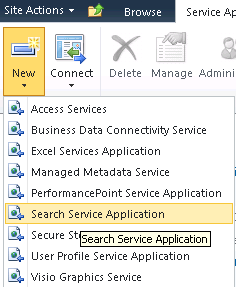
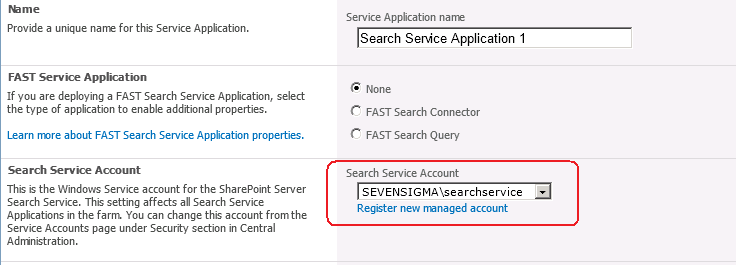
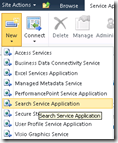
When you provision a search service application as part of a SharePoint installation, you are asked for (among other things), a windows account to use for the search service. Below shows the point in the GUI based configuration step where this is done. First up we choose to create a search service application, and then we choose the account to use for the “Search Service Account”. By default this is the account that will do the crawling of content sources.
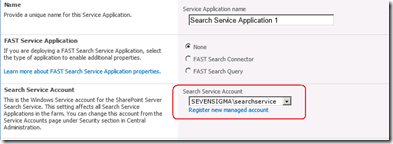
Now the search service account is described as so: “.. the Windows Service account for the SharePoint Server Search Service. This setting affects all Search Service Applications in the farm. You can change this account from the Service Accounts page under Security section in Central Administration.”
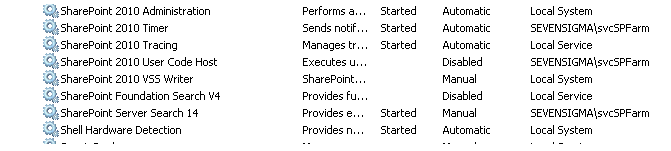
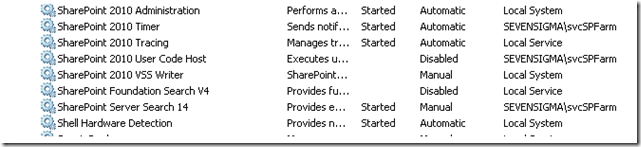
In reading this, suggests that the windows service (“SharePoint Server Search 14”) would run under this account. The reality is that the SharePoint Server Search 14 service account is the farm account. You can see the pre and post provisioning status below. First up, I show below where SharePoint has been installed and the SharePoint Server Search 14 service is disabled and with service credentials of “Local Service”.

The next set of pictures show the Search Service Application provisioned according to the following configuration:
- Search service account: SEVENSIGMA\searchservice
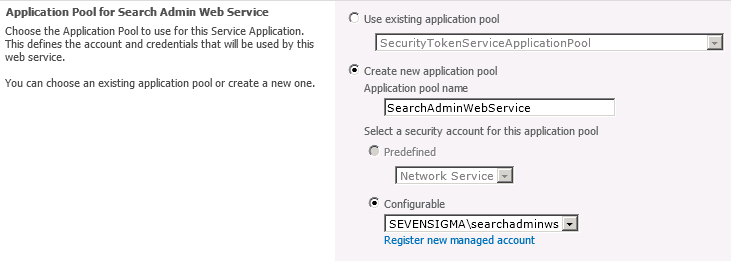
- Search admin web service account: SEVENSIGMA\searchadminws
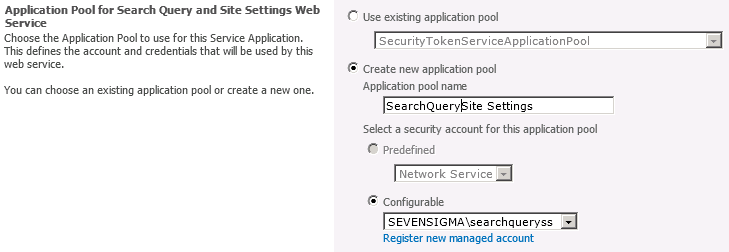
- Search query and site settings account: SEVENSIGMA\searchqueryss
You can see this in the screenshots below.

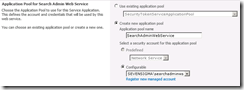
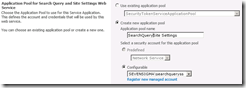
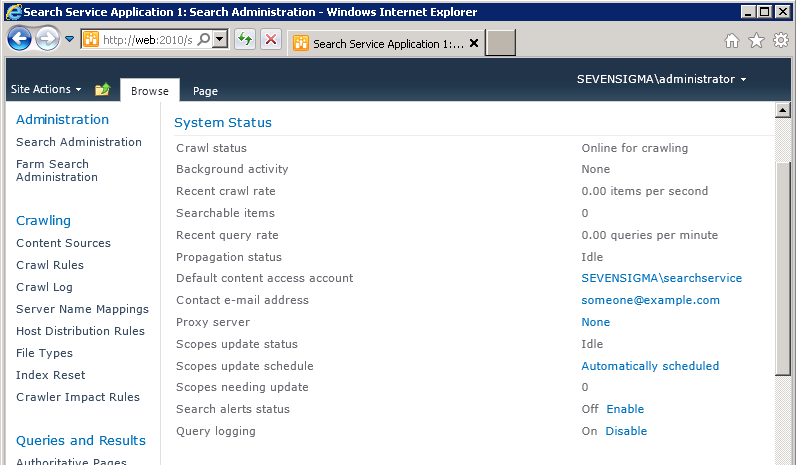
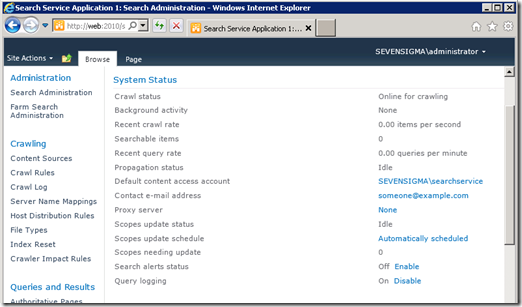
Once the service has been successfully provisioned, we can clearly see the “Default content access account” is based on the “Search service account” as described in the configuration above (the first of the three accounts).
Finally, as you can see below, once provisioned, it is the SharePoint farm account that is running the search windows service.
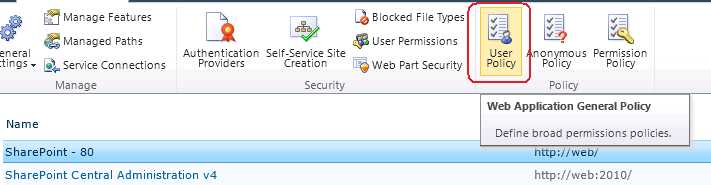
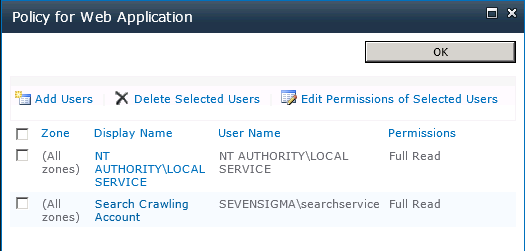
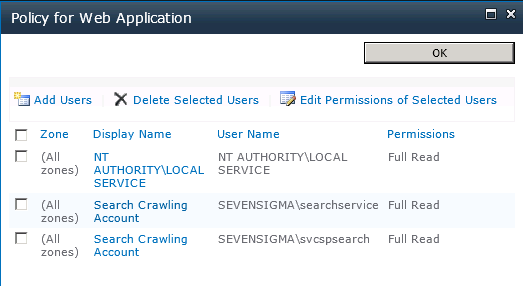
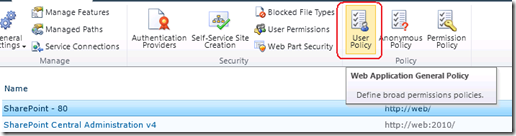
Once you have provisioned the Search Service Application, the default content access (in my case SEVENSIGMA\searchservice), it is granted “Read” access to all web applications via Web Application User Policies as shown below. This way, no matter how draconian the permissions of site collections are, the crawler account will have the access it needs to crawl the content, as well as the permissions of that content. You can verify this by looking at any web application in Central Administration (except for central administration web application) and choosing “User Policy” from the ribbon. You will see in the policy screen that the “Search Crawler” account has “Full Read” access.
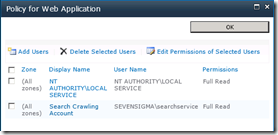
In case you are wondering why the search service needs to crawl the permissions of content, as well as the content itself, it is because it uses these permissions to trim search results for users who do not have access to content. After all, you don’t want to expose sensitive corporate data via search do you?
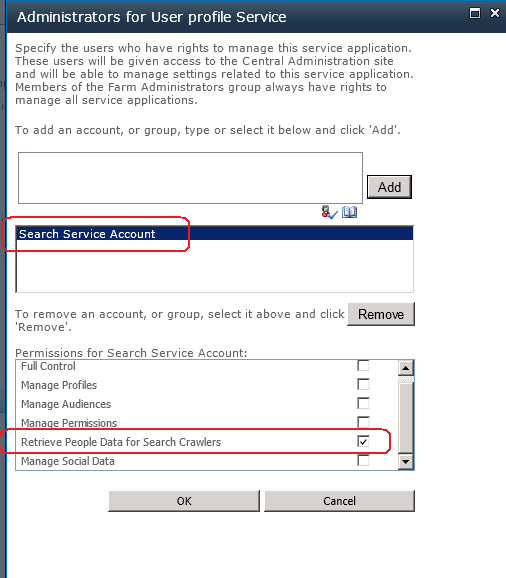
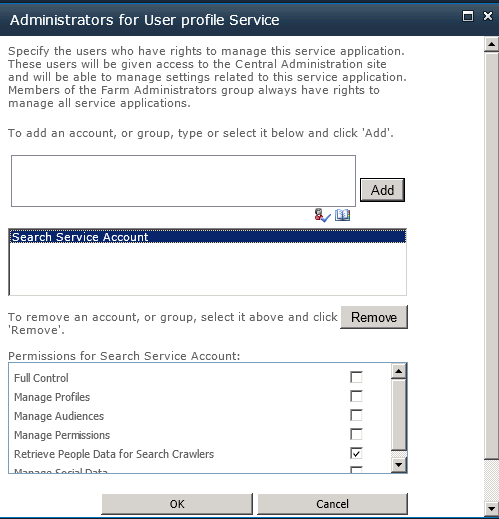
There is another more subtle configuration change performed by the Search Service. Once the evilness known as the User Profile Service has been provisioned, the Search service application will grant the Search Service Account specific permission to the User Profile Service. SharePoint is smart enough to do this whether or not the User Profile Service application is installed before or after the Search Service Application. In other words, if you install the Search Service Application first, and the User Profile Service Application afterwards, the permission will be granted regardless.
The specific permission by the way, is “Retrieve People Data for Search Crawlers” permission as shown below:
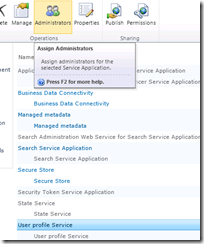
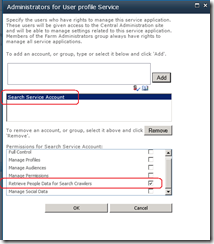
Getting back to the title of this post, this is a critical permission, because without it, the Search Server will not be able to talk to the User Profile Service to enumerate user profile information. The effect of this is empty "People Search results.
How people search works (a little more advanced)
Right! Now that the cool kids have joined us (who skipped the first section), lets take a closer look at SharePoint People Search in particular. This section delves a little deeper, but fear not I will try and keep things relatively easy to grasp.
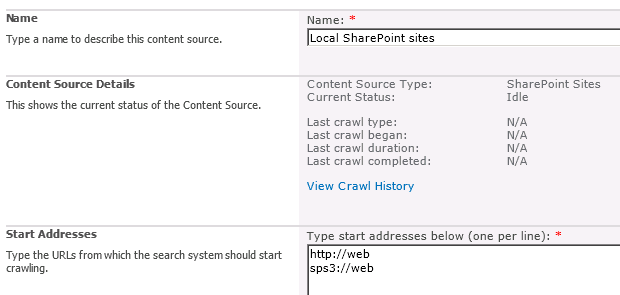
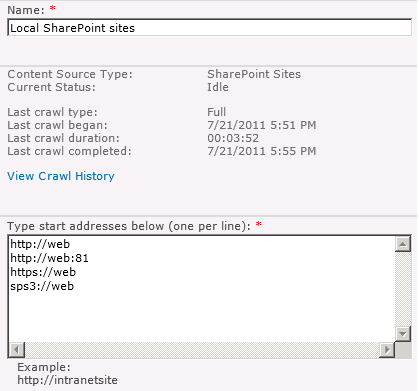
Once the Search Service Application has been provisioned, a default content source, called – originally enough – “Local SharePoint Sites” is created. Any web applications that exist (and any that are created from here on in) will be listed here. An example of a freshly minted SharePoint server with a single web application, shows the following configuration in Search Service Application:
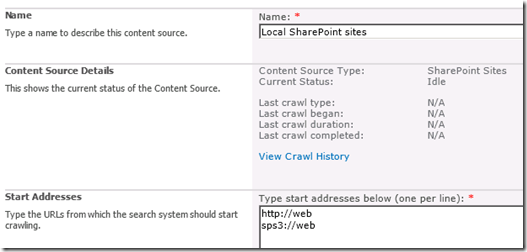
Now hopefully http://web makes sense. Clearly this is the URL of the web application on this server. But you might be wondering that sps3://web is? I will bet that you have never visited a site using sps3:// site using a browser either. For good reason too, as it wouldn’t work.
This is a SharePointy thing – or more specifically, a Search Server thing. That funny protocol part of what looks like a URL, refers to a connector. A connector allows Search Server to crawl other data sources that don’t necessarily use HTTP. Like some native, binary data source. People can develop their own connectors if they feel so inclined and a classic example is the Lotus Notes connector that Microsoft supply with SharePoint. If you configure SharePoint to use its Lotus Notes connector (and by the way – its really tricky to do), you would see a URL in the form of:
notes://mylotusnotesbox
Make sense? The protocol part of the URL allows the search server to figure out what connector to use to crawl the content. (For what its worth, there are many others out of the box. If you want to see all of the connectors then check the list here).
But the one we are interested in for this discussion is SPS3: which accesses SharePoint User profiles which supports people search functionality. The way this particular connector works is that when the crawler accesses this SPS3 connector, it in turns calls a special web service at the host specified. The web service is called spscrawl.asmx and in my example configuration above, it would be http://web/_vti_bin/spscrawl.asmx
The basic breakdown of what happens next is this:
- Information about the Web site that will be crawled is retrieved (the GetSite method is called passing in the site from the URL (i.e the “web” of sps3://web)
- Once the site details are validated the service enumerates all of the use profiles
- For each profile, the method GetItem is called that retrieves all of the user profile properties for a given user. This is added to the index and tagged as content class of “urn:content-class:SPSPeople” (I will get to this in a moment)
Now admittedly this is the simple version of events. If you really want to be scared (or get to sleep tonight) you can read the actual SP3 protocol specification PDF.
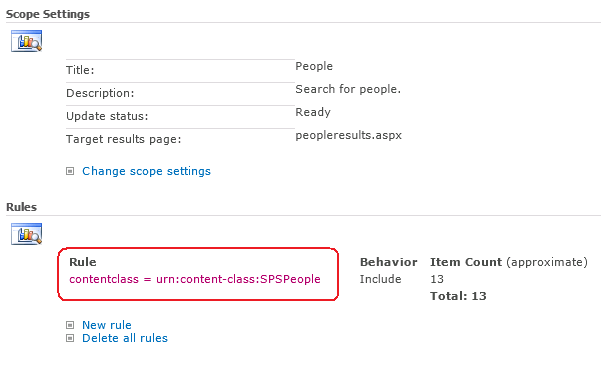
Right! Now lets finish this discussion by this notion of contentclass. The SharePoint search crawler tags all crawled content according to its class. The name of this “tag” – or in correct terminology “managed property” – is contentclass. By default SharePoint has a People Search scope. It is essentially a limits the search to only returning content tagged as “People” contentclass.
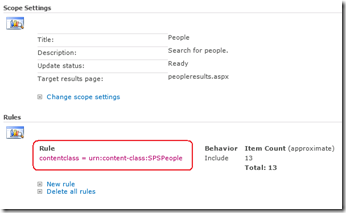
Now to make it easier for you, Dan Attis listed all of the content classes that he knew of back in SharePoint 2007 days. I’ll list a few here, but for the full list visit his site.
- “STS_Web” – Site
- “STS_List_850″ – Page Library
- “STS_List_DocumentLibrary” – Document Library
- “STS_ListItem_DocumentLibrary” – Document Library Items
- “STS_ListItem_Tasks” – Tasks List Item
- “STS_ListItem_Contacts” – Contacts List Item
- “urn:content-class:SPSPeople” – People
(why some properties follow the universal resource name format I don’t know *sigh* – geeks huh?)
So that was easy Paul! What can go wrong?
So now we know that although the protocol handler is SPS3, it is still ultimately utilising HTTP as the underlying communication mechanism and calling a web service, we can start to think of all the ways that it can break on us. Let’s now take a look at common problem areas in order of commonality:
1. The Loopback issue.
This has been done to death elsewhere and most people know it. What people don’t know so well is that the loopback fix was to prevent an extremely nasty security vulnerability known as a replay attack that came out a few years ago. Essentially, if you make a HTTP connection to your server, from that server and using a name that does not match the name of the server, then the request will be blocked with a 401 error. In terms of SharePoint people search, the sps3:// handler is created when you create your first web application. If that web application happens to be a name that doesn’t match the server name, then the HTTP request to the spscrawl.asmx webservice will be blocked due to this issue.
As a result your search crawl will not work and you will see an error in the logs along the lines of:
- Access is denied: Check that the Default Content Access Account has access to the content or add a crawl rule to crawl the content (0x80041205)
- The server is unavailable and could not be accessed. The server is probably disconnected from the network. (0x80040d32)
- ***** Couldn’t retrieve server http://web.sevensigma.com policy, hr = 80041205 – File:d:\office\source\search\search\gather\protocols\sts3\sts3util.cxx Line:548
There are two ways to fix this. The quick way (DisableLoopbackCheck) and the right way (BackConnectionHostNames). Both involve a registry change and a reboot, but one of them leaves you much more open to exploitation. Spence Harbar wrote about the differences between the two some time ago and I recommend you follow his advice.
(As an slightly related side note, I hit an issue with the User Profile Service a while back where it gave an error: “Exception occurred while connecting to WCF endpoint: System.ServiceModel.Security.MessageSecurityException: The HTTP request was forbidden with client authentication scheme ‘Anonymous’. —> System.Net.WebException: The remote server returned an error: (403) Forbidden”. In this case I needed to disable the loopback check but I was using the server name with no alternative aliases or full qualified domain names. I asked Spence about this one and it seems that the DisableLoopBack registry key addresses more than the SMB replay vulnerability.)
2. SSL
If you add a certificate to your site and mark the site as HTTPS (by using SSL), things change. In the example below, I installed a certificate on the site http://web, removed the binding to http (or port 80) and then updated SharePoint’s alternate access mappings to make things a HTTPS world.
Note that the reference to SPS3://WEB is unchanged, and that there is also a reference still to HTTP://WEB, as well as an automatically added reference to HTTPS://WEB
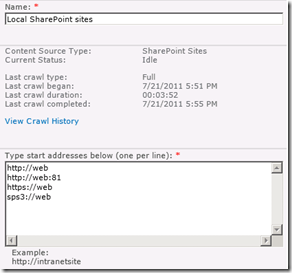
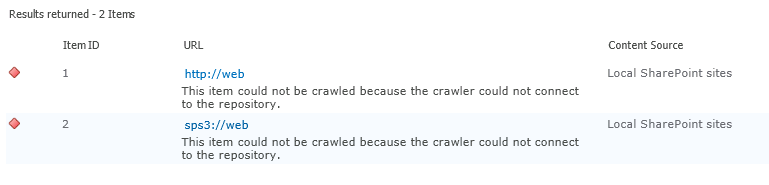
So if we were to run a crawl now, what do you think will happen? Certainly we know that HTTP://WEB will fail, but what about SPS3://WEB? Lets run a full crawl and find out shall we?
Checking the logs, we have the unsurprising error “the item could not be crawled because the crawler could not contact the repository”. So clearly, SPS3 isn’t smart enough to work out that the web service call to spscrawl.asmx needs to be done over SSL.
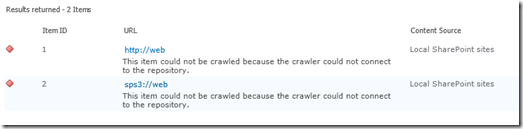
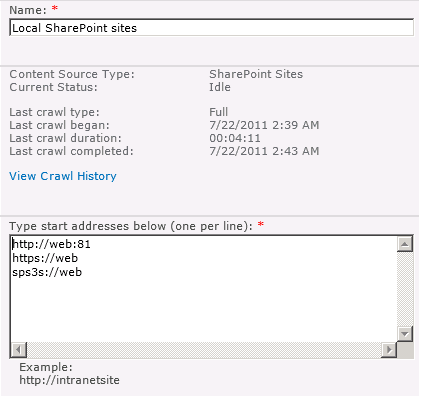
Fortunately, the solution is fairly easy. There is another connector, identical in function to SPS3 except that it is designed to handle secure sites. It is “SPS3s”. We simple change the configuration to use this connector (and while we are there, remove the reference to HTTP://WEB)
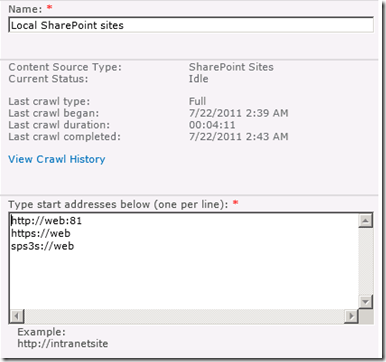
Now we retry a full crawl and check for errors… Wohoo – all good!

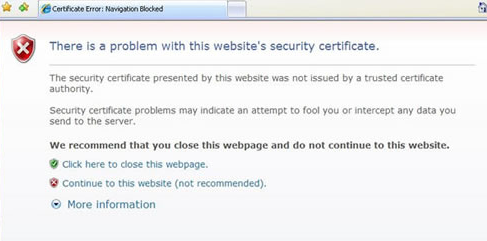
It is also worth noting that there is another SSL related issue with search. The search crawler is a little fussy with certificates. Most people have visited secure web sites that warning about a problem with the certificate that looks like the image below:
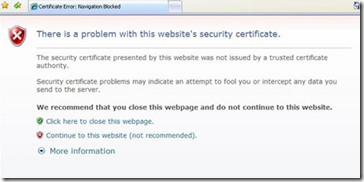
Now when you think about it, a search crawler doesn’t have the luxury of asking a user if the certificate is okay. Instead it errs on the side of security and by default, will not crawl a site if the certificate is invalid in some way. The crawler also is more fussy than a regular browser. For example, it doesn’t overly like wildcard certificates, even if the certificate is trusted and valid (although all modern browsers do).
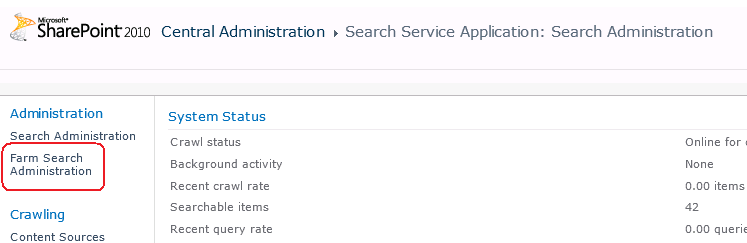
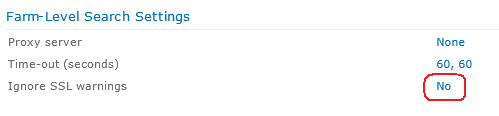
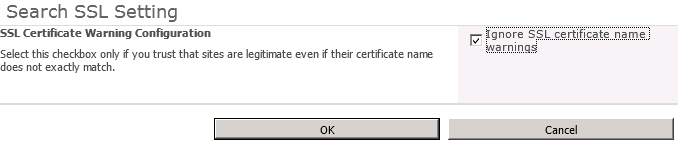
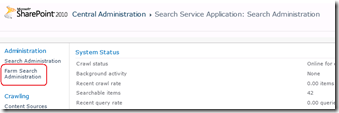
To alleviate this issue, you can make the following changes in the settings of the Search Service Application: Farm Search Administration->Ignore SSL warnings and tick “Ignore SSL certificate name warnings”.
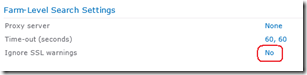
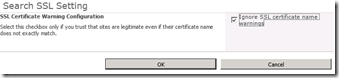
The implication of this change is that the crawler will now accept any old certificate that encrypts website communications.
3. Permissions and Change Legacy
Lets assume that we made a configuration mistake when we provisioned the Search Service Application. The search service account (which is the default content access account) is incorrect and we need to change it to something else. Let’s see what happens.
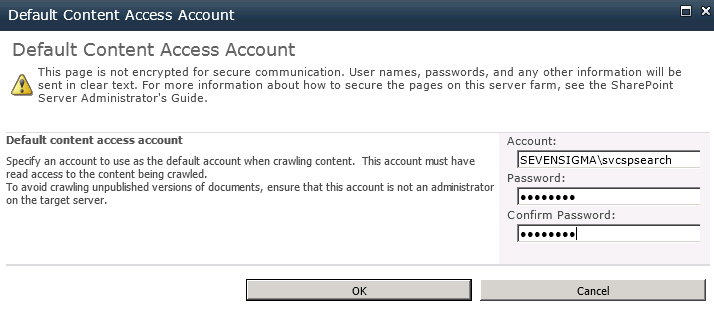
In the search service application management screen, click on the default content access account to change credentials. In my example I have changed the account from SEVENSIGMA\searchservice to SEVENSIGMA\svcspsearch
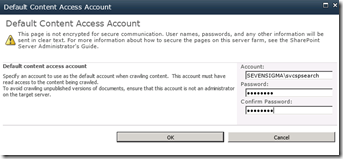
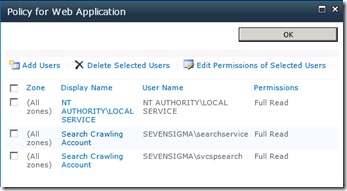
Having made this change, lets review the effect in the Web Application User Policy and User Profile Service Application permissions. Note that the user policy for the old search crawl account remains, but the new account has had an entry automatically created. (Now you know why you end up with multiple accounts with the display name of “Search Crawling Account”)
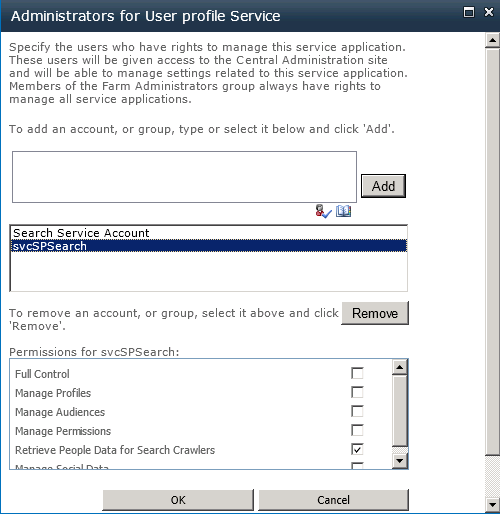
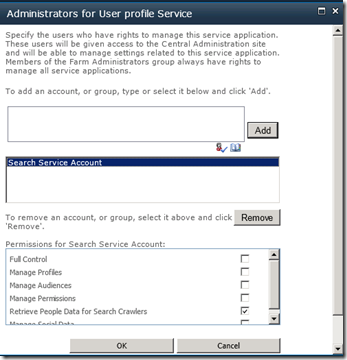
Now lets check the User Profile Service Application. Now things are different! The search service account below refers to the *old* account SEVENSIGMA\searchservice. But the required permission of “Retrieve People Data for Search Crawlers” permission has not been granted!
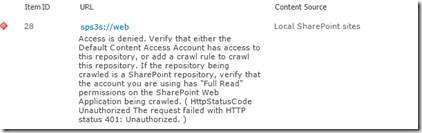
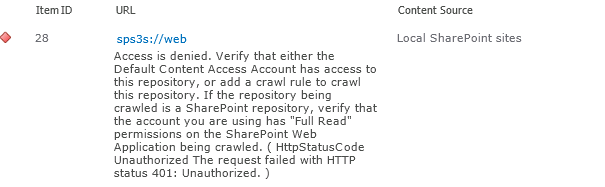
If you traipsed through the ULS logs, you would see this:
Leaving Monitored Scope (Request (GET:https://web/_vti_bin/spscrawl.asmx)). Execution Time=7.2370958438429 c2a3d1fa-9efd-406a-8e44-6c9613231974
mssdmn.exe (0x23E4) 0x2B70 SharePoint Server Search FilterDaemon e4ye High FLTRDMN: Errorinfo is "HttpStatusCode Unauthorized The request failed with HTTP status 401: Unauthorized." [fltrsink.cxx:553] d:\office\source\search\native\mssdmn\fltrsink.cxx
mssearch.exe (0x02E8) 0x3B30 SharePoint Server Search Gatherer cd11 Warning The start address sps3s://web cannot be crawled. Context: Application ‘Search_Service_Application’, Catalog ‘Portal_Content’ Details: Access is denied. Verify that either the Default Content Access Account has access to this repository, or add a crawl rule to crawl this repository. If the repository being crawled is a SharePoint repository, verify that the account you are using has "Full Read" permissions on the SharePoint Web Application being crawled. (0x80041205)
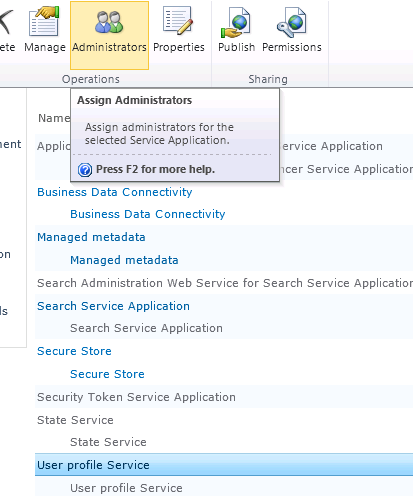
To correct this issue, manually grant the crawler account the “Retrieve People Data for Search Crawlers” permission in the User Profile Service. As a reminder, this is done via the Administrators icon in the “Manage Service Applications” ribbon.
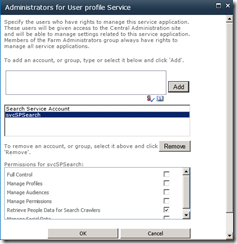
Once this is done run a fill crawl and verify the result in the logs.4.
4. Missing root site collection
A more uncommon issue that I once encountered is when the web application being crawled is missing a default site collection. In other words, while there are site collections defined using a managed path, such as http://WEB/SITES/SITE, there is no site collection defined at HTTP://WEB.
The crawler does not like this at all, and you get two different errors depending on whether the SPS or HTTP connector used.
- SPS:// – Error in PortalCrawl Web Service (0x80042617)
- HTTP:// – The item could not be accessed on the remote server because its address has an invalid syntax (0x80041208)
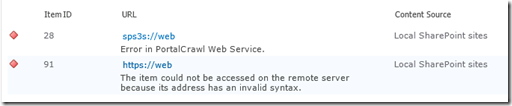
The fix for this should be fairly obvious. Go and make a default site collection for the web application and re-run a crawl.
5. Alternative Access Mappings and Contextual Scopes
SharePoint guru (and my squash nemesis), Nick Hadlee posted recently about a problem where there are no search results on contextual search scopes. If you are wondering what they are Nick explains:
Contextual scopes are a really useful way of performing searches that are restricted to a specific site or list. The “This Site: [Site Name]”, “This List: [List Name]” are the dead giveaways for a contextual scope. What’s better is contextual scopes are auto-magically created and managed by SharePoint for you so you should pretty much just use them in my opinion.
The issue is that when the alternate access mapping (AAM) settings for the default zone on a web application do not match your search content source, the contextual scopes return no results.
I came across this problem a couple of times recently and the fix is really pretty simple – check your alternate access mapping (AAM) settings and make sure the host header that is specified in your default zone is the same url you have used in your search content source. Normally SharePoint kindly creates the entry in the content source whenever you create a web application but if you have changed around any AAM settings and these two things don’t match then your contextual results will be empty. Case Closed!
Thanks Nick
6. Active Directory Policies, Proxies and Stateful Inspection
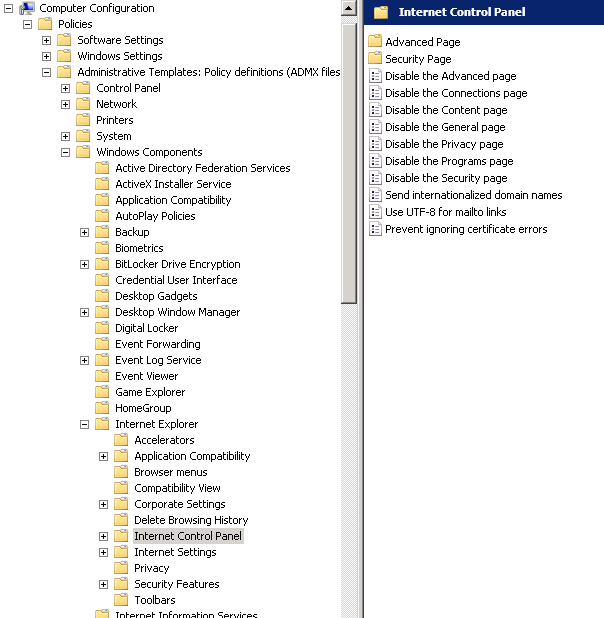
A particularly insidious way to have problems with Search (and not just people search) is via Active Directory policies. For those of you who don’t know what AD policies are, they basically allow geeks to go on a power trip with users desktop settings. Consider the image below. Essentially an administrator can enforce a massive array of settings for all PC’s on the network. Such is the extent of what can be controlled, that I can’t fit it into a single screenshot. What is listed below is but a small portion of what an anal retentive Nazi administrator has at their disposal (mwahahaha!)
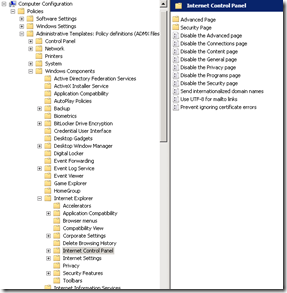
Common uses of policies include restricting certain desktop settings to maintain consistency, as well as enforce Internet explorer security settings, such as proxy server and security settings like maintaining the trusted sites list. One of the common issues encountered with a global policy defined proxy server in particular is that the search service account will have its profile modified to use the proxy server.
The result of this is that now the proxy sits between the search crawler and the content source to be crawled as shown below:
Crawler —–> Proxy Server —–> Content Source
Now even though the crawler does not use Internet Explorer per se, proxy settings aren’t actually specific to Internet Explorer. Internet explorer, like the search crawler, uses wininet.dll. Wininet is a module that contains Internet-related functions used by Windows applications and it is this component that utilises proxy settings.
Sometimes people will troubleshoot this issue by using telnet to connect to the HTTP port. "ie: “Telnet web 80”. But telnet does not use the wininet component, so is actually not a valid method for testing. Telnet will happily report that the web server is listening on port 80 or 443, but it matters not when the crawler tries to access that port via the proxy. Furthermore, even if the crawler and the content source are on the same server, the result is the same. As soon as the crawler attempts to index a content source, the request will be routed to the proxy server. Depending on the vendor and configuration of the proxy server, various things can happen including:
- The proxy server cannot handle the NTLM authentication and passes back a 400 error code to the crawler
- The proxy server has funky stateful inspection which interferes with the allowed HTTP verbs in the communications and interferes with the crawl
For what its worth, it is not just proxy settings that can interfere with the HTTP communications between the crawler and the crawled. I have seen security software also get in the way, which monitors HTTP communications and pre-emptively terminates connections or modifies the content of the HTTP request. The effect is that the results passed back to the crawler are not what it expects and the crawler naturally reports that it could not access the data source with suitably weird error messages.
Now the very thing that makes this scenario hard to troubleshoot is the tell-tale sign for it. That is: nothing will be logged in the ULS logs, not the IIS logs for the search service. This is because the errors will be logged in the proxy server or the overly enthusiastic stateful security software.
If you suspect the problem is a proxy server issue, but do not have access to the proxy server to check logs, the best way to troubleshoot this issue is to temporarily grant the search crawler account enough access to log into the server interactively. Open internet explorer and manually check the proxy settings. If you confirm a policy based proxy setting, you might be able to temporarily disable it and retry a crawl (until the next AD policy refresh reapplies the settings). The ideal way to cure this problem is to ask your friendly Active Directory administrator to either:
- Remove the proxy altogether from the SharePoint server (watch for certificate revocation slowness as a result)
- Configure an exclusion in the proxy settings for the AD policy to that the content sources for crawling are not proxied
- Create a new AD policy specifically for the SharePoint box so that the default settings apply to the rest of the domain member computers.
If you suspect the issue might be overly zealous stateful inspection, temporarily disable all security-type software on the server and retry a crawl. Just remember, that if you have no logs on the server being crawled, chances are its not being crawled and you have to look elsewhere.
7. Pre-Windows 2000 Compatibility Access Group
In an earlier post of mine, I hit an issue where search would yield no results for a regular user, but a domain administrator could happily search SP2010 and get results. Another symptom associated with this particular problem is certain recurring errors event log – Event ID 28005 and 4625.
- ID 28005 shows the message “An exception occurred while enqueueing a message in the target queue. Error: 15404, State: 19. Could not obtain information about Windows NT group/user ‘DOMAIN\someuser’, error code 0×5”.
- The 4625 error would complain “An account failed to log on. Unknown user name or bad password status 0xc000006d, sub status 0xc0000064” or else “An Error occured during Logon, Status: 0xc000005e, Sub Status: 0x0”
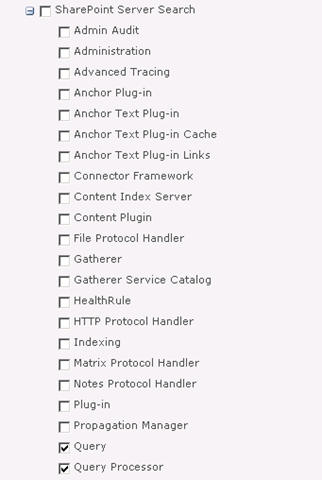
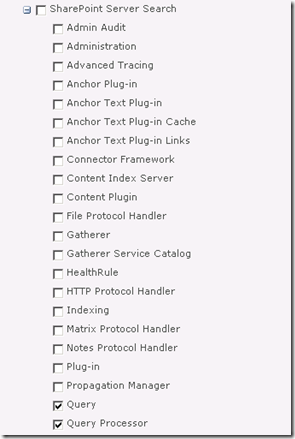
If you turn up the debug logs inside SharePoint Central Administration for the “Query” and “Query Processor” functions of “SharePoint Server Search” you will get an error “AuthzInitializeContextFromSid failed with ERROR_ACCESS_DENIED. This error indicates that the account under which this process is executing may not have read access to the tokenGroupsGlobalAndUniversal attribute on the querying user’s Active Directory object. Query results which require non-Claims Windows authorization will not be returned to this querying user.
The fix is to add your search service account to a group called “Pre-Windows 2000 Compatibility Access” group. The issue is that SharePoint 2010 re-introduced something that was in SP2003 – an API call to a function called AuthzInitializeContextFromSid. Apparently it was not used in SP2007, but its back for SP2010. This particular function requires a certain permission in Active Directory and the “Pre-Windows 2000 Compatibility Access” group happens to have the right required to read the “tokenGroupsGlobalAndUniversal“ Active Directory attribute that is described in the debug error above.
8. Bloody developers!
Finally, Patrick Lamber blogs about another cause of crawler issues. In his case, someone developed a custom web part that had an exception thrown when the site was crawled. For whatever reason, this exception did not get thrown when the site was viewed normally via a browser. As a result no pages or content on the site could be crawled because all the crawler would see, no matter what it clicked would be the dreaded “An unexpected error has occurred”. When you think about it, any custom code that takes action based on browser parameters such as locale or language might cause an exception like this – and therefore cause the crawler some grief.
In Patricks case there was a second issue as well. His team had developed a custom HTTPModule that did some URL rewriting. As Patrick states “The indexer seemed to hate our redirections with the Response.Redirect command. I simply removed the automatic redirection on the indexing server. Afterwards, everything worked fine”.
In this case Patrick was using a multi-server farm with a dedicated index server, allowing him to remove the HTTP module for that one server. in smaller deployments you may not have this luxury. So apart from the obvious opportunity to bag programmers :-), this example nicely shows that it is easy for a 3rd party application or code to break search. What is important for developers to realise is that client web browsers are not the only thing that loads SharePoint pages.
If you are not aware, the user agent User Agent string identifies the type of client accessing a resource. This is the means by which sites figure out what browser you are using. A quick look at the User Agent parameter by SharePoint Server 2010 search reveals that it identifies itself as “Mozilla/4.0 (compatible; MSIE 4.01; Windows NT; MS Search 6.0 Robot)“. At the very least, test any custom user interface code such as web parts against this string, as well as check the crawl logs when it indexes any custom developed stuff.
Conclusion
Well, that’s pretty much my list of gotchas. No doubt there are lots more, but hopefully this slightly more detailed exploration of them might help some people.
Thanks for reading
Paul Culmsee
www.sevensigma.com.au
www.spgovia.com