Back to Cleverworkarounds mainpage
 

"Ain’t it cool?" - Integrating SharePoint and real-time performance data - Part 2

Hi again

This article is the second half of a pair of articles explaining how I integrated real-time performance data with an SharePoint based IT operational portal, designed around the principle of passive compliance with legislative or organisational controls.

In the first post, I introduced the PI product by OSIsoft, and explained how SQL Reporting services is able to generate reports from more than just SQL Server databases. I demonstrated how I created a report server report from performance data stored in the PI historian via an OLE DB provider for PI, and I also demonstrated how I was able to create a report that accepted a parameter, so that the output of the report could be customised.

I also showed how a SharePoint provides a facility to enter parameter data when using the report viewer web part.

We will now conclude this article by explaining a little about my passively compliant IT portal, and how I was able to enhance it with seamless integration with the real-time performance data stored in the PI historian.

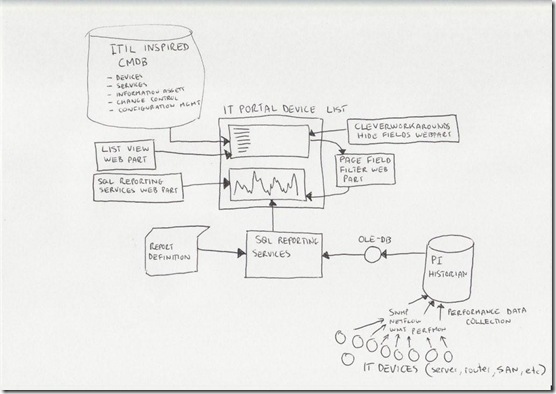
Just to remind you, here is my conceptual diagram in "acoustic Visio" format

The IT portal

This is the really ultra brief explanation of the thinking that went into my IT portal

I spent a lot of time thinking about how critical IT information could be stored in SharePoint to achieve the goals of quick and easy access to information, make tasks like change/configuration management more transparent and efficient, as well as capture knowledge and documentation. I was influenced considerably by ISO17799 as it was called back then, especially in the area of asset management. I liked the use of the term "IT Assets" in ISO17799 and the strong emphasis on ownership and custodianship.

ISO defined asset as "any tangible or intangible thing that has value to an organization". It maintained that "…to achieve and maintain appropriate protection of organizational assets. All assets should be accounted for and have a nominated owner. Owners should be identified for all assets and the responsibility for the maintenance of appropriate controls should be assigned. The implementation of specific controls may be delegated by the owner as appropriate but the owner remains responsible for the proper protection of the assets."

That idea of delegation is that an owner of an asset can delegate the day-to-day management of that asset to a custodian, but the owner still bears ultimate responsibility.

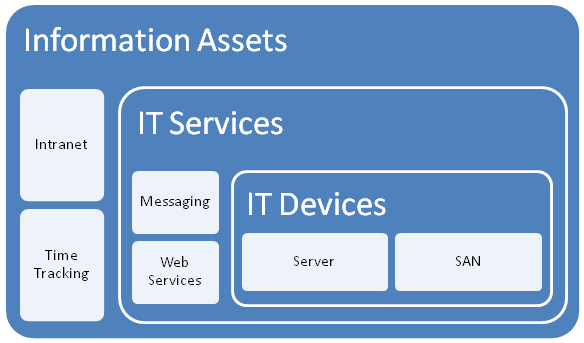
So I developed a portal around this idea, but soon was hit by some constraints due to the broad ISO definition of an asset. Since assets have interdependencies, geeks have a tendency to over-complicate things and product a messy web of interdependencies. After some trial and error, as well as some soul searching I was able to come up with a 3 tier model that worked.

I changed the use of the word "asset", and split it into three broad asset types.

  • Devices (eg Server, SAN, Switch, Router, etc)
  • IT Services (eg Messaging, Databases, IP Network, etc)
  • Information Assets (eg Intranet, Timesheets,
image

The main thing to note about this model is to explain the different between an IT Service and an Information Asset. The distinction is in the area of ownership. In the case of an "Information Asset", the ownership of that asset is not IT. IT are a service provider, and by definition the IT view of the world is different to the rest of the organisation. An "IT Service" on the other hand, is always owned by IT and it is the IT services that underpin information assets.

So there is a hierarchical relationship there. You can’t have an information asset without an IT service providing it. Accountabilities are clear also. IT own the service, but are not responsible for the information asset itself - that’s for other areas of the organisation. (an Information Asset can also depend on other information assets as well as many IT services.

While this may sound so obvious that its not worth writing, my experience is that IT department often view information assets and the services providing those assets as one and the same thing.

Devices and Services

So, as an IT department, we provide a variety of services to the organisation. We provide them with an IP network, potentially a voice over IP system, a database subsystem, a backup and recovery service, etc.

It is fairly obvious that each IT service consists of a combination of IT devices (and often other IT services). an IP network is an obvious one and a basic example. The devices that underpin the "IP Network" service are routers, switches and wireless access points.

For devices we need to store information like

  • Serial Number
  • Warranty Details
  • Physical Location
  • Vendor information
  • Passwords
  • Device Type
  • IP Address
  • Change/Configuration Management history
  • IT Services that depend on this device (there is usually more than 1)

For services, we need to store information like

  • Service Owner
  • Service Custodian
  • Service Level Agreement (uptime guarantees, etc)
  • Change/Configuration Management history
  • IT Devices that underpin this service (there is usually more than 1)
  • Dependency relationships with other IT services
  • Information Assets that depend on this IT service

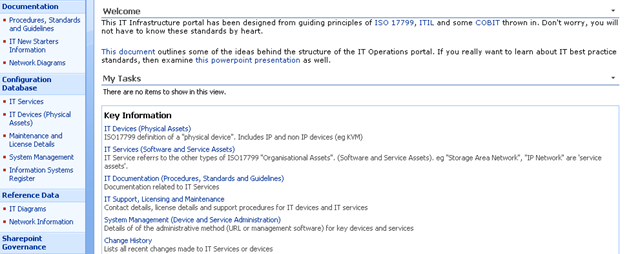
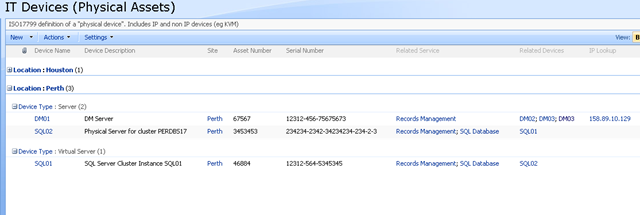
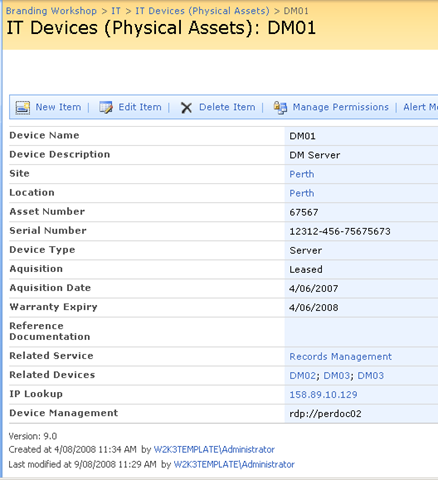
Keen eyed ITIL practitioners will realise that all I am describing here is a SharePoint based CMDB. I have a site template, content types, lists, event handlers and workflows that allow the above information to be managed in SharePoint. Below is three snippets showing sections of the portal, drilling down into the device view by location (click to expand), before showing the actual information about the server "DM01"

image image

image

Now the above screen is the one that I am interested in. You may also notice that the page above is a system generated page, based on the list called "IT Devices". I want to add real-time performance data to this screen, so that as well as being able to see asset information about a device, I also want to see its recent performance.

Modifying a system page

I talked about making modifications to system pages in detail in part 3 of my branding using Javascript series. Essentially, a system page is an automatically generated ASPX page that SharePoint creates. Think about what happens each time you add a column to a list or library. The NewForm.aspx, Editform.Aspx and Dispform.aspx are modified as they have to be rebuild to display the new or modified column.

SharePoint makes it a little tricky to edit these pages on account of custom modifications running the risk of breaking things. But as I described in the branding series, using the ToolPaneView hack does the job for us in a safe manner.

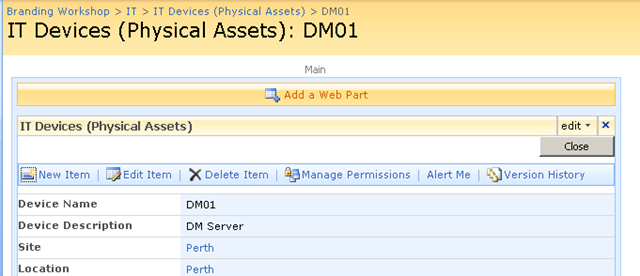
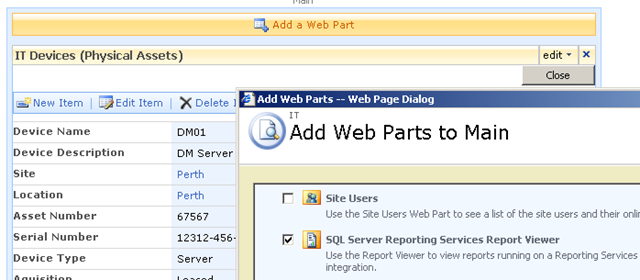
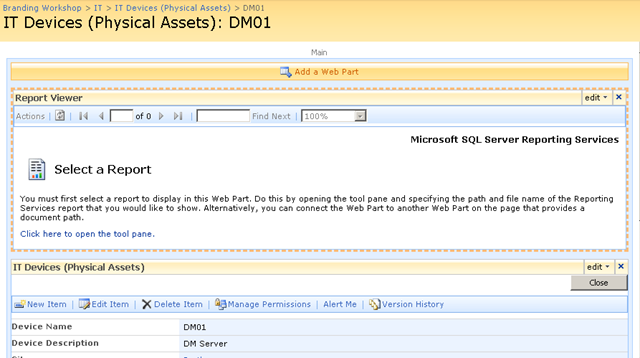
So using this hack, I was able to add a report viewer web part to the Dispform.aspx of the "IT devices" list as shown below.

image image

imageimage

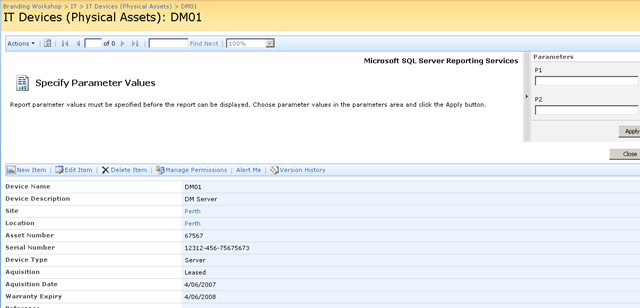
Finally, we have our report viewer webpart, linked to our report that accesses PI historian data. As you can see below, the report that I created actually is expecting two parameters to be supplied. These parameters will be used to retrieve specific performance data and turn it into a chart.

image

Web Part Connection Magic

Now as it stands, the report is pretty much useless to us in the sense that we have to enter parameters to it manually, to get it to actually present us the information that we want. But on the same page as this report is a bunch of interesting information about a particular device, such as its name, IP Address, location and description. Wouldn’t it be great if we could somehow pass the device name (or some other device information) to the report web part automatically.

That way, each time you opened up a device entry, the report would retrieve performance information for the device currently being viewed. That would be very, very cool.

Fortunately for us it can be easily done. The report services web part, like many other web parts is connectable. This means that it can accept information from other web parts. This means that it is possible to have the parameters automatically passed to the report! 

Wohoo!

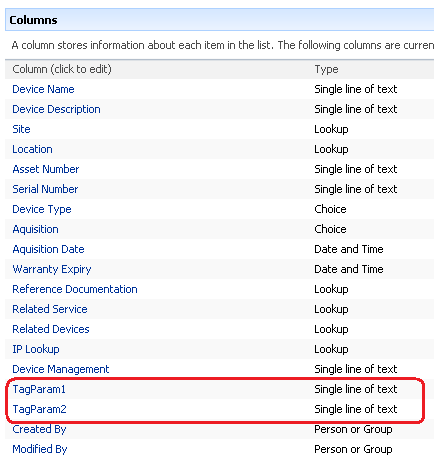
So here is how I am going to do this. I am going to add two new columns to my device list. Each column will be the parameter passed to the report. This way, I can tailor the report being generated on a device by device basis. For example, for a SAN device I might want to report on disk I/O, but a server I might want CPU. If I store the parameter as a column, the report will be able to retrieve whatever performance data I need.

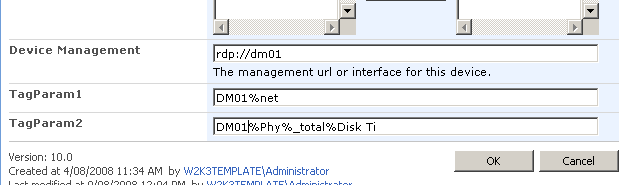
Below shows the device list with the additional two columns added. the columns are called TAGPARAM1 and TAGPARAM2. The next screen below, shows the values I have entered for each column against the device DM01. These values will be passed to the report server report and used to find matching performance data.

image image

So the next question becomes, how do I now transparently pass these two parameters to the report? We now have the report and the parameters on the same page, but no obvious means to pass the value of TagParam1 and TagParam2 to the report viewer web part.

The answer my friends, is to use a filter web part!

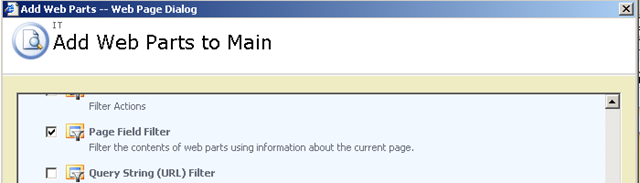
Using the toolpane view hack, we once again edit the view item page for the Device List. We now need to add two additional web parts (because we have two parameters). Below is the web part to add.

image

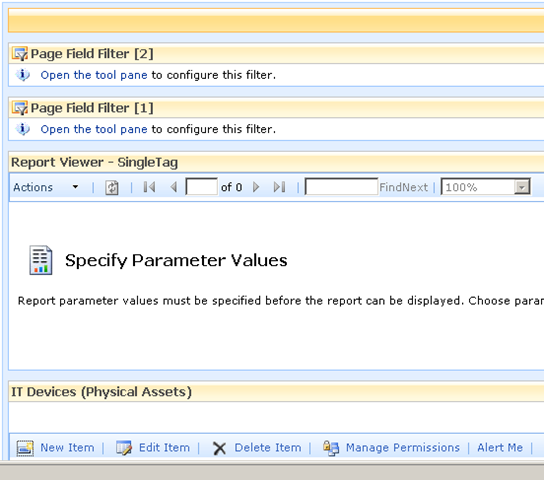
The result should be a screen looking like the figure below

image

Filter web parts are not visible when a page is rendered in the browser. They are instead used to pass data between other web parts. There are various filter web parts that work in different ways. The Page Field filter is capable of passing the value of any column to another web part.

Confused? Check out how I use this web part below…

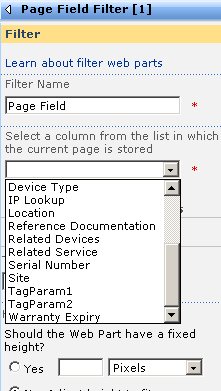
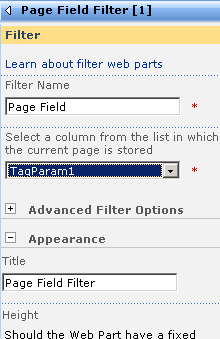
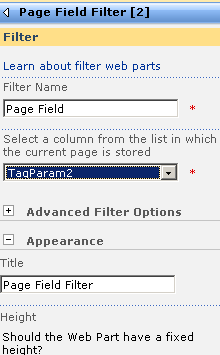
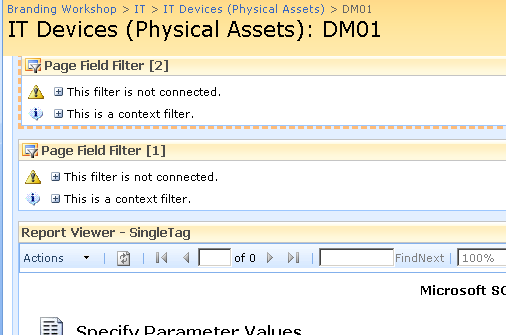
The screen above shows that the two Page Field filters web parts are not configured. They are prompting you to open the tool pane and configure them. Below is the configuration pane for the page field filter. Can you see how it has enumerated all of the columns for the "IT device" list? In the second and third screen we have chosen TagParam1 for the first page filter and TagParam2 for the second page filter web part.

image image image

Now take a look at the page in edit mode. The page filters now change display to say that they are not connected. All we have done so far is tell the web parts which columns to grab the parameter values from

image

Almost Home - Connecting the filters

So now we need to connect each Page Field filter web part to the report viewer web part. This will have the effect of passing to the report viewer web part, the value of TagParam1 and TagParam2. Since these values change from device to device, the report will display unique data for each device.

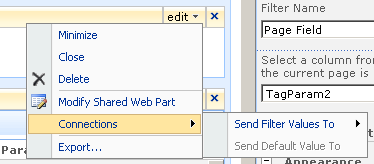
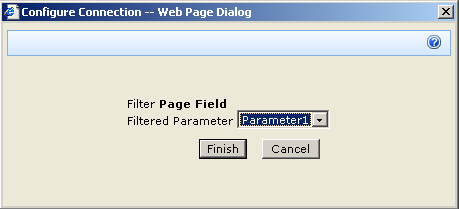
To to connect each page filter web part you click the edit dropdown for each page filter. From the list of choices, choose "Connections", and it will expand out to the choice of "Send Filter Values To". If you click on this, you will be promoted to send the filter values to the report viewer web part on the page. Since in my example, the report viewer web part requires two parameters, you will be asked to choose which of the two parameters to send the value to.

image image

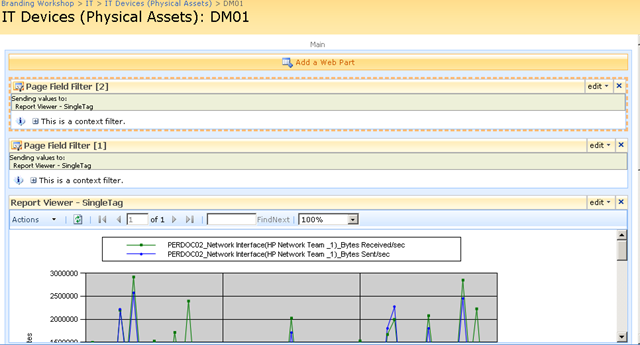
Repeat this step for both page filter web parts and something amazing happens, we see a performance report on the devices page!! The filter has passed the values of TagParam1 and tagParam2 to the report and it has retrieved the matching data!

image

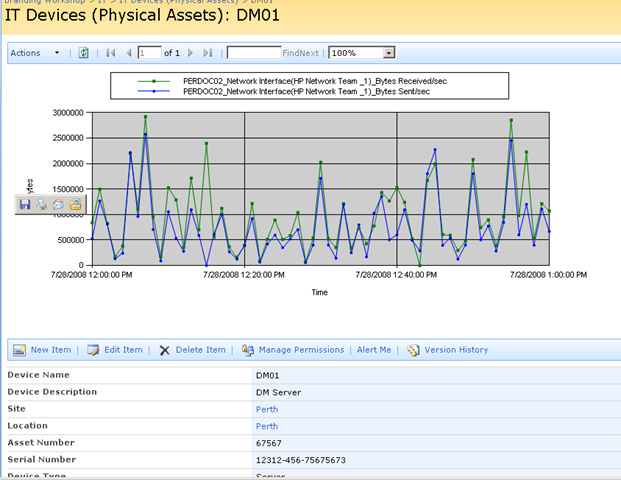
Let’s now save this page and view it in all of its glory! Sweet eh!

image 

Conclusion (and Touchups)

So let’s step back and look at what we have achieved. We can visit our IT Operations portal, open the devices list and immediately view real-time performance statistics for that device. Since I am using a PI historian, the performance data could have been collected via SNMP, netflow, ping, WMI, Performance Monitor counters, a script or many, many methods. But we do not need to worry about that, we just ask PI for the data that we want and display it using reporting services.

Because the parameters are stored as additional metadata with each device, you have complete control over the data being presented back to SharePoint. You might decide that servers should always return CPU stats, but a storage area network return disk I/O stats. It is all controllable just by the values you enter into the columns being used as report parameters.

The only additional thing that I did was to use my CleverWorkArounds Hide Field Web Part, to subsequently hide the TagParam1 and TagParam2 fields from display, so that when IT staff are looking at the integrated asset and performance data, the ‘behind the scenes’ glue is hidden from them.

So looking at this from a IT portal/compliance point of view, we now have an integrated platform where we can:

  • View device asset information (serial number, purchase date, warranty, physical location)
  • View IT Service information (owners, custodians and SLA’s)
  • View Information Asset information (owners, custodians and SLA’s)
  • Understand the relationships between devices, services and information assets
  • Access standards, procedures and work instructions pertaining to devices, services and information assets
  • Manage change and configuration management for devices, services and information assets
  • Quickly and easily view detailed, real time performance statistics of devices

All in all, not a bad afternoons work really! And not one line of code!

As i said way back at the start of the first article, this started out as a quick idea for a demo and it seems to have a heck of a lot of potential. Of course, I used PI but there is no reason why you can’t use similar techniques in your own IT portals to integrate your operational and performance data into the one place.

I hope that you enjoyed this article and I look forward to feedback.

<Blatant Plug>Want an IT Portal built in passive compliance? Then let’s talk!</Blatant Plug>

cheers

Paul Culmsee


OSISoft addendum

Now someone at OSISoft at some point will read this article and wonder why I didn’t write about RTWebparts. Essentially PI has some web parts that can be used to display historian data in SharePoint. There were two reasons why I did not mention them.

  1. To use RTWebparts you have to install a lot of PI components onto your web front end servers. Nothing wrong with that, but with Report Services, those components only need to go onto the report server. For my circumstances and what I had to demonstrate, this was sufficient.
  2. This post was actually not about OSISoft or PI per se. It was used to demonstrate how it is possible to use SharePoint to integrate performance and operational information into one integrated location. In the event that you have PI in your enterprise and want to leverage it with SharePoint, I suggest you contact me about it because we do happen to be very good at it :-)


No Tags


"Ain’t it cool?" - Integrating SharePoint and real-time performance data - Part 1

Hi

This is one of those nerdy posts in the category of "look at me! look at me! look at what I did, isn’t it cool?". Normally application developers write posts like this, demonstrating some cool bit of code they are really proud of. Being only a part-time developer and more of a security/governance/compliance kind of guy, my "aint it cool" post is a little different.

So if you are a non developer and you are already tempted to skip this one, please reconsider. If you are a CIO, IT manager, Infrastructure manager or are simply into ITIL, COBiT or compliance around IT operations in general, this post may have something for you. It offers something for knowledge managers too. Additionally it gives you a teensy tiny glimpse into my own personal manifesto of how you can integrate different types of data to achieve the sort of IT operational excellence that is a step above where you may be now.

Additionally, if you are a Cisco nerd or an infrastructure person who has experience with monitoring, you will also find something potentially useful here.

In this post, I am going to show you how I leveraged three key technologies, along with a dash of best practice methodology to create an IT Portal that I think is cool.

The Premise - "Passive Compliance"

In my career I have filled various IT roles and drunk the kool-aid of most of the vendors, technologies, methodologies and practices. Nowadays I am a product of all of these influences, leaving me slightly bitter and twisted, somewhat of a security nerd, but at the same time fairly pragmatic and always mindful of working to business goals and strategy.

One or the major influences to my current view of the world, was a role working for OSI Software from 2000-2004, via a former subsidiary company called WiredCity. OSISoft develop products in the process control space, and their core product is a data historian called PI. At WiredCity, we took this product out of the process control market and right into the IT enterprise and OSISoft now market this product as "IT Monitor". I’ll talk about PI/IT monitor in detail in a moment, but humour me and just accept my word that it is a hellishly fast number crunching database for storing lots of juicy performance data.

An addition I like to read all the various best practice frameworks and methodologies and I write about them a fair bit. As a result of this interest, I have a SharePoint IT portal template that I have developed over the last couple of years, designed around the guiding principle of passive compliance. That is, by utilising the portal for IT various operational tasks, structured in a certain way, you implicitly address some COBiT/ISO27001 controls as well as leverage ITIL principles. I designed it in such a way that an auditor could take a look at it and it would demonstrate the assurance around IT controls for operational system support. It also had the added benefit of being a powerful addition to disaster recovery strategy. (In the second article, to be published soon, I will describe my IT portal in more detail).

Finally, I have SQL Reporting Services integrated with SharePoint, used to present enterprise data from various databases into the IT Portal - also as part of the principle of passive compliance via business intelligence.

Recently, I was called in to help conduct a demonstration of the aforementioned PI software, so I decided to add PI functionality to my existing "passive compliance" IT portal to integrate asset and control data (like change/configuration management) along with real-time performance data. All in all I was very pleased with the outcome as it was done in a day with pretty impressive effect. I was able to do this with minimal coding, utilising various features of all three of the above applications with a few other components and pretty much wrote no code at all.

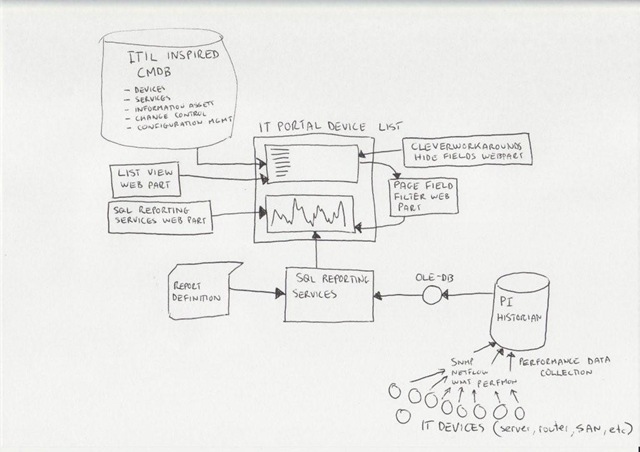
Below I have built a conceptual diagram of the solution. Unfortunately I don’t have Visio installed, but I found a great freeware alternative ;-)

Image0003

I know, there is a lot to take in here (click to enlarge), but if you look in the center of the diagram, you will see a mock up of a SharePoint display. All of the other components drawn around it combine to produce that display. I’ll now talk about the main combination, PI and SQL Reporting Services.

A slice of PI

Okay so let’s explain PI because I think most people have a handle on SharePoint :-).

To the right is the terminator looking at data from a PI historian showing power flow in California. So this product is not a lightweight at all. It’s heritage lies in this sort of critical industrial monitoring.

Just to get the disclaimers out of the way, I do not work for OSISoft anymore nor are they even aware of this post. Just so hard-core geeks don’t flame me and call me a weenie, let me just say that I love RRDTool and SmokePing and prefer Zabbix over Nagios. Does that make me cool enough to make comment on this topic now? :-)   

Like RRDTool, PI is a data historian, designed and optimised for time-series data.

"Data historian? Is that like a database of some kind?", you may ask. The answer is yes, but its not a relational database like SQL Server or Oracle. Instead, it is a "real-time, time series" data store. The English translation of that definition, is that PI is extremely efficient at storing time based performance data.

"So what, you can store that in SQL Server, mySQL or Oracle", I hear you say. Yes you most certainly can. But PI was designed from the ground up for this kind of data, whereas relational databases are not. As a result, PI is blisteringly fast and efficient. Pulling say, 3 months of data that was collected at 15 second intervals would literally take seconds to do, with no loss of fidelity, even going back months.

As an example, let’s say you needed to monitor CPU usage of a critical server. PI could collect this data periodically, save it into the historian for later view/review/reporting or analysis. Getting data into the historian can be performed a number of ways. OSISoft have written ‘interfaces’ to allow collection of data from sources such as SNMP, WMI, TCP-Response, Windows Performance Monitor counters, Netflow and many others.

The main point is that once the data is inside the historian, it really doesn’t matter whether the data was collected via SNMP, Performance Monitor, a custom script, etc. All historian data can now be viewed, compared, analysed and reported via a variety of tools in a consistent fashion.

SQL Reporting Services

For those of you not aware, Reporting Services has been part of SQL Server since SQL 2000 and allows for fairly easy generation of reports out of SQL databases. More recently, Microsoft updated SQL Server 2005 with tight integration with SharePoint. Now when creating a report server report, it is "published" to SharePoint in a similar manner to the publishing of InfoPath forms.

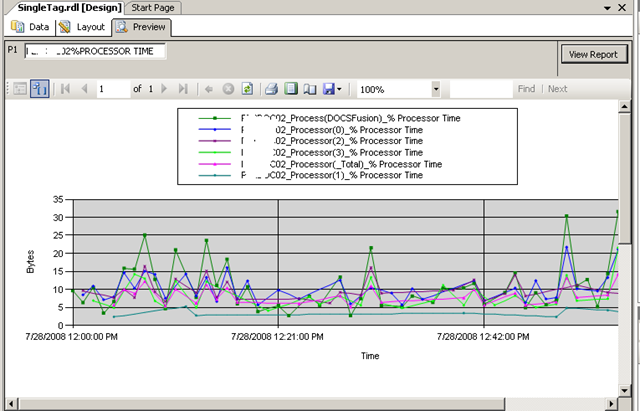
Creating reports is performed via two ways, but I am only going to discuss the Visual Studio method. Using Visual Studio, you are able to design a tailored report, consisting of tables and charts. An example of a SQL Reporting Services Report in visual studio is below. (from MSDN)


The interesting thing about SQL Reporting services is that it can pull data from data sources other than SQL Server databases. Data sources include Oracle, Web Services, ODBC and OLE-DB. Depending on your data source, reports can be parameterised (did I just make up a new word? :-) ). This is particularly important to SharePoint as you will soon see. It essentially means that you can feed your report values that customise the output of that report. In doing so, reports can be written and published once, yet be flexible in the sort of data that is returned.

Below is a basic example:

Here is a basic SQL statement that retrieves three fields from a data table called "picomp2". Those fields are "Tag", "Time" and "Value". This example selects values only where "Time" is between 12-1pm on July 28th and where "tag" contains the string "MYSERVER"

SELECT    "tag", "time", "value"
FROM      picomp2
WHERE     (tag LIKE ‘%MYSERVER%’) AND ("time" >= ‘7/28/2008 12:00:00 PM’) AND ("time" <= ‘7/28/2008 1:00:00 PM’)

Now what if we wanted to make the value for TAG flexible? So instead of "MYSERVER", use the string "DISK" or "PROCESSOR". Fortunately for most data sources, SQL Reporting Services allows you to pass parameters into the SQL. Thus, consider this modified version of the above SQL statement.

SELECT    "tag", "time", "value"
FROM      picomp2
WHERE     (tag LIKE ‘%’ + ? + ‘%’) AND ("time" >= ‘7/28/2008 12:00:00 PM’) AND ("time" <= ‘7/28/2008 1:00:00 PM’) 

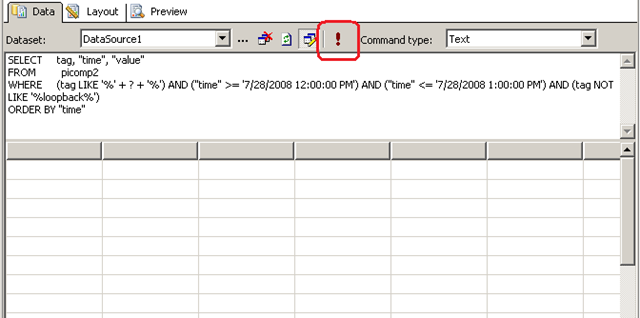
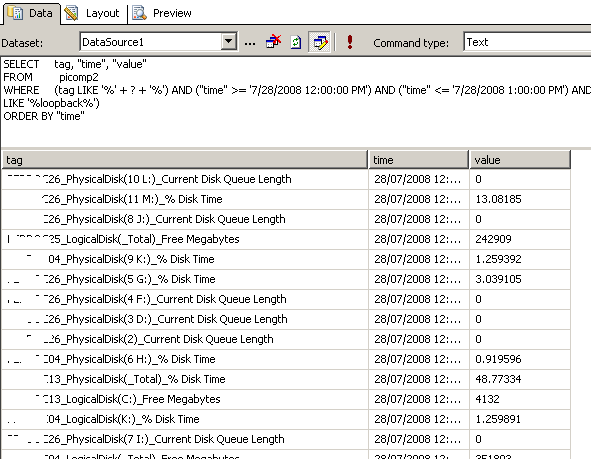
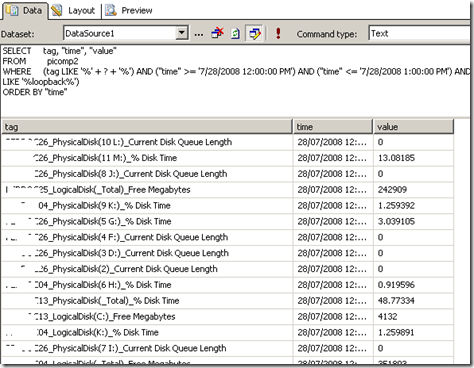
Look carefully at the WHERE clause in the above line. Instead of specifying %MYSERVER%, I have modified it to %?%. The question mark has special meaning. It means that you will be prompted to specify the string to be added to the SQL on the fly. Below I illustrate the sequence using three screenshots. The first screenshot shows the above SQL inside a visual studio report project. Clicking the exclamation mark will execute this SQL.
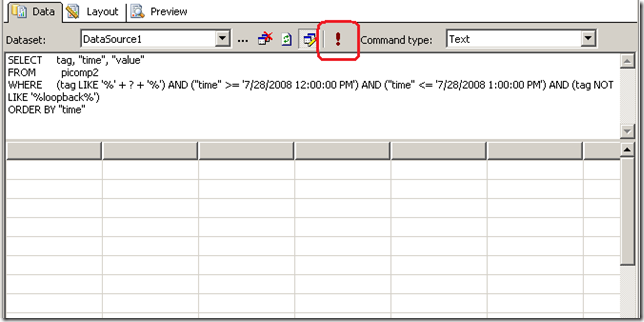
image

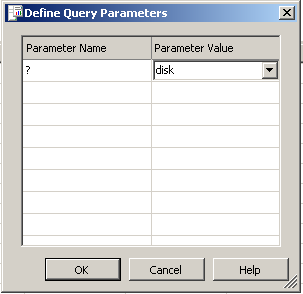
Immediately we get asked to fill out the parameter as shown below. (I have added the string "DISK")
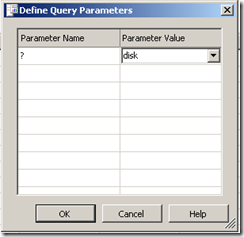
image

Clicking OK, and the SQL will now be executed against the datasource, with the matching results returned as shown below. Note the all data returned contains the word "disk" in the name. (I have scrubbed identifiable information to protect the innocent).
image

Reporting Services and SharePoint Integration

Now we get to the important bit. As mentioned earlier, SharePoint and SQL Reporting Services are now tightly integrated. I am not going to explain this integration in detail, but what I am going to show you is how a parameterised query like the example above is handled in SharePoint.

In short, if you want to display a Reporting Services report in SharePoint, you use a web part called the "SQL Server Reporting Services Report Viewer"

image

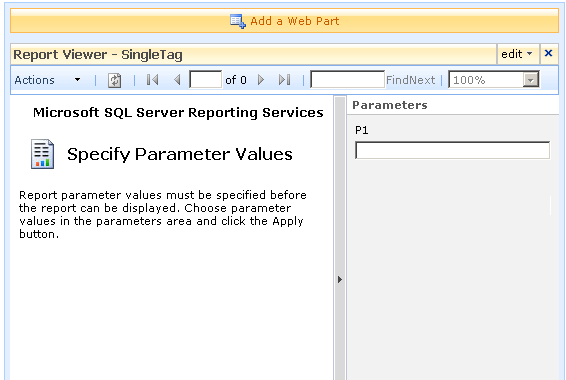
After dropping this webpart onto a SharePoint page, you pick the report to display, and if it happens to be a parameterised report, you see a screen that looks something like the following.
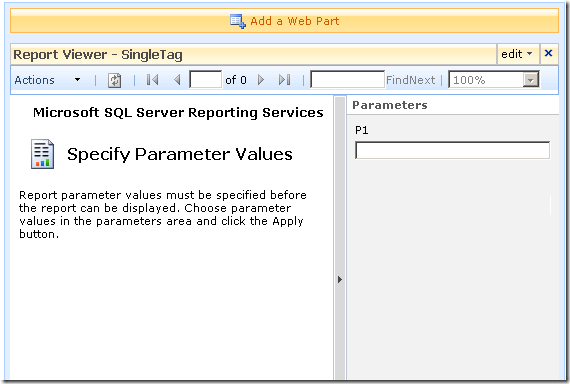
image

Notice anything interesting? The webpart recognises that the report requires a parameter and asks for you to enter it. As you will see in the second article, this is very useful indeed! But first let’s get reporting services talking to the PI historian.

Fun with OLEDB

So, I have described (albeit extremely briefly) enough information about PI and Reporting services. I mentioned earlier that PI is not a relational database, but a time series database. This didn’t stop OSISoft from writing an OLEDB provider :-)

Thus it is possible to get SQL reporting services to query PI using SQL syntax. In fact the SQL example that I showed in the previous section was actually querying the PI historian.

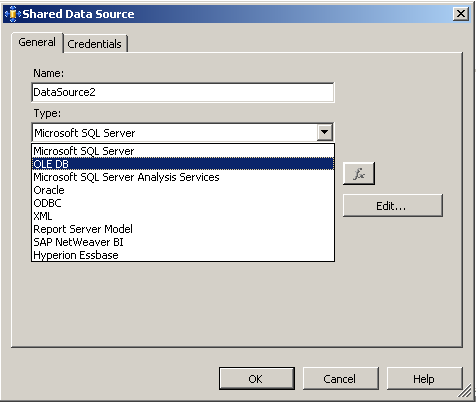
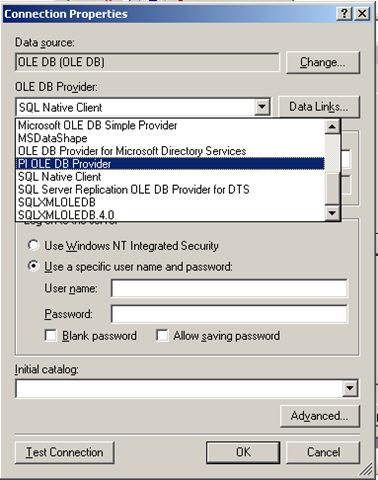
To get reporting services to be able to talk to PI, I need to create a report server Data Source as shown below. When selecting the data source type, I choose OLE DB from the list. The subsequent screen allows you to pick the specific OLEDB provider for PI from the list.
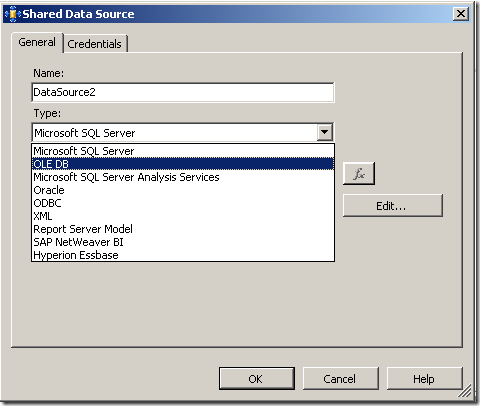
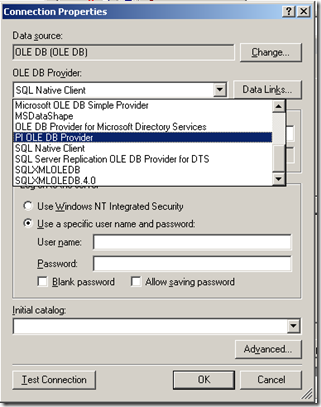
image image

Now I won’t go into the complete details of completing the configuration of the PI OLE DB provider, as my point here is to demonstrate the core principle of using OLE DB to allow SQL Reporting Services to query a non-relational data store.

Once the data source had been configured and tested (see the test button in the above screenshot), I was able to then create my SQL query and then design a report layout. Here is the sample SQL again.

SELECT    "tag", "time", "value"
FROM      picomp2
WHERE     (tag LIKE ‘%’ + ? + ‘%’) AND ("time" >= ‘7/28/2008 12:00:00 PM’) AND ("time" <= ‘7/28/2008 1:00:00 PM’) 

As I previously explained, this SQL statement contains a parameter, which is passed to the report when it is run, thereby providing the ability to generate a dynamic report.

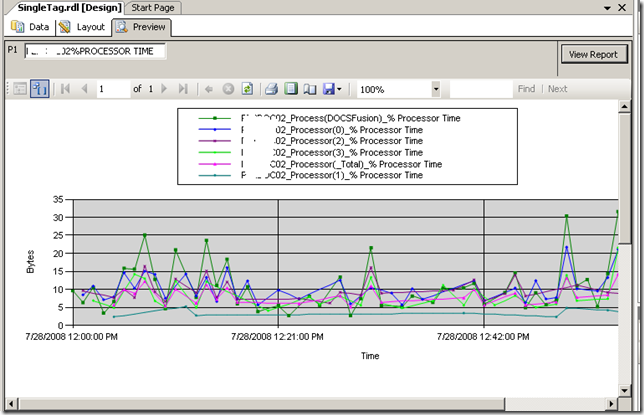
Using Visual Studio I created a new report and added a chart from the toolbox. Once again the purpose of this post is not to teach how to create a report layout, but below is a screenshot to illustrate the report layout being designed. You will see that I have previewed my design and it has displayed a textbox (top left) allowing the parameter to be entered for the report to be run. The report has pulled the relevant data from the PI historian and rendered it in a nice chart that I created.
image

Conclusion

Right! I think that’s about enough for now. To sum up this first post, we talked a little about my IT portal and the principle of "passive compliance". We examined OSISoft’s PI software and how it can be used to monitor your enterprise infrastructure. We then took a dive into SQL Reporting services and I illustrated how we can access PI historian data via OLE DB.

In the second and final post, I will introduce my IT Portal template in a brief overview, and will then demonstrate how I was able to integrate PI data into my IT portal to combine IT asset data with real-time performance metrics with no code :-)

I hope that you found this post useful. Look out for the second half soon where this will all come together nicely

cheers

Paul


No Tags


Why do SharePoint Projects Fail? - Part 8

Hi

Well, here we are at part 8 in a series of posts dedicated to the topic of SharePoint project failure. Surely after 7 posts, you would think that we are exhausting the various factors that can have a negative influence on time, budget and SharePoint deliverables? Alas no! My urge to peel back this onion continues unabated and thus I present one final post in this series.

Now if I had my time again, I would definitely re-order these posts, because this topic area is back in the realm of project management. But not to worry. I’ll probably do a ‘reloaded’ version of this series at some point in the future or make an ebook that is more detailed and more coherently written, along with contributions from friends.

In the remote chance that you are hitting this article first up, it is actually the last of a long series written over the last couple of months (well, last for now anyway). We started this series with an examination of the pioneering work by Horst Rittell in the 1970’s and subsequently examined some of the notable historical references to wicked problems in IT. From there, we turned our attention to SharePoint specifically and why it, as a product, can be a wicked problem. We looked at the product from viewpoints, specifically, project managers, IT infrastructure architects and application developers.

In the last article, we once again drifted away from SharePoint directly and looked at senior management and project sponsors contribution. Almost by definition, when looking at the senior management level, it makes no sense to be product specific, since at this level it is always about business strategy.

In this post, I’d like to examine when best practice frameworks, the intent of which is to reduce risk of project failure, actually have the opposite effect. We will look at why this is the case in some detail.

CleverWorkarounds tequila shot rating..

 image image image image  For readers with a passing interest in best practice frameworks and project management.

imageimageimage For nerds who swear they will never leave the "tech stuff."

Continue reading “Why do SharePoint Projects Fail? - Part 8″

No Tags


Why do SharePoint Projects Fail? Part 4

Hi again

Welcome to part 4 of this series, which examines the factors that contribute to SharePoint projects causing much pain and suffering among project teams. Each post has started with some attempt at humour, before getting into some theory. We’ve had a drinking game, insulted project managers by painting them all with the same brush, and have had a mythical conversation with Bill Gates successfully selling MOSS to the good people at the company GOOSUNACLE.

On a serious side, we have looked at the Rittel definition of a wicked problem, looked at its relevance in IT projects and then considered some SharePoint specific factors, namely the “Microsoft Factor” and the “Panacea Factor”. Let’s continue down this road…

The New Product Factor… what does it do again?

This is a big problem area, certainly for the next couple of years. To properly explain it, I can draw a parallel to what happened in 1998-2002 when organisations moved from NT4 domains to Active Directory. Infrastructure people who have been involved in Active Directory projects will be nodding in agreement at this point.

In 2000 when Active Directory was released, it was a major advancement over Windows NT4 domains. It was not a simple incremental update, but essentially a whole new approach to how Microsoft networks were structured and managed. Microsoft released an absolute barrage of white papers, along with seminars and tutorials way in advance of release, explaining how it all worked. I have to admit though that as an infrastructure engineer at that time, it didn’t make much sense to me then, because a white paper is one thing, but actually using the product in the real world is another.

What was interesting about that time was that “Active Directory” became somewhat of a buzz word, and it was marketed as the be-all-and-end-all of life, the universe and everything. Just to demonstrate how nuts it was, I recall that Cisco and Microsoft made an announcement with big fanfare, trumpeting the fact that the management of all of your Cisco devices would be done via Active Directory!

WTF? “That never happened!”, I hear you AD and Cisco nerds exclaim.

Well here is the proof - god I love google sometimes :-)

Choice quotes are always useful - Here is an article from 1998. http://www.cnn.com/TECH/computing/9811/19/cisconds.cdx.idg/

Microsoft and Cisco have been working for 20 months now on a project entitled Cisco Networking Services for Active Directory. The delivery date of that integrated product is tightly tied to the ship date of Windows 2000, which at the time of the Microsoft/Cisco partnership was supposed to be before the year’s-end. Microsoft is now saying that Windows 2000 will not ship until the middle of 1999.

So have you ever managed a Cisco network using Active Directory (apart from Radius authentication)?

So, fast forward 8 years and we now have a ton of collective real world experience, a set of mature best practices, and countless books on the subject. Active Directory projects are really not that complex at all. But back when it first came out, there was no collective expertise, and mistakes were made.

I have been involved with a few Active Directory revamp projects over the years, and every one of them was a project of consolidation, clean-up and simplification from the previous attempts at it. To this day I have never been called in to increase the complexity of an Active Directory to solve business issues.

Why am I telling you all this? Quite simple really, SharePoint is still in the hype stage, real world experience is still lacking, but more importantly, best practices are not mature. This is not helped by the way Microsoft and partners market the product. Right now, that is also very similar to Active Directory in 1999-2001. Let’s now look at that more closely.

(Mis)use of terms, ambiguous marketing and buzzword abuse

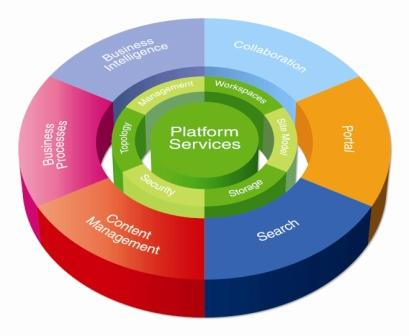
Okay, first up let’s take a closer look at a chart that pre-sales consultants will know well. Take a look at any of the terms in the outer ring and you basically have entire fields or disciplines where people spend their entire careers. So SharePoint can do all of that with one product, huh? Dang! It must be super-duper, finger-lickin’, umpa-lumpa good then!

image

Microsoft is in the business of selling licenses to use their software, and judging on their revenue and growth, SharePoint has been a rampaging success. I dislike their marketing material and will get into that in a minute, but at the end of the day it has worked for them. If I was developing a product to be used across many different organisational types and vertical markets, I’d probably end up doing exactly the same…

All of the disciplines above also happen to be buzzwords in their own right. When that happens, it is an irresistible target for savvy marketing campaigns to try and fit products into that space. Sometimes buzz-words come from odd sources too. Sarbanes Oxley is not a discipline, it is a legislative framework which has been widely used in marketing, especially by companies offering products in the security space - and judging by the current financial crisis in credit markets, have these products helped at all with the intent of SOX?

If I believed everything that was marketed to me, surely I would be throwing off gorgeous women in presales or strategy meetings? I mean, I use Lynx deodorant and it worked for the dentist…


(That ad is so wrong and I love it! - If you see a broken image here your company blocks youtube. Here is the link)

So let’s now focus on where SharePoint marketing has the potential to do more harm than good. My issue with this ‘chart’ is this: Explain to me what “Business Intelligence” actually is. Define “Content Management” or “Collaboration”. (Don’t cheat and go to wikipedia! - that is the place people go just before they have a meeting and want to sound like they know what they are talking about.)

The very fact that these areas are entire disciplines in themselves means that their meanings vary vastly to different people. Given that human beings like to categorise things into little boxes, the more generic a discipline, the more sub-definitions and branches within the discipline there are. Additionally, these sub-definitions and branches introduce their own terminology and acronyms.

I previously lamented the fact that the term “document management” is totally abused all the time and it leads to confusion and bad projects. What is funny, is that term is not even used in the above chart! So where does document management fall under? Content management or collaboration? It all depends on your definition of “document management”, doesn’t it?

Crap! It’s bad enough that we can’t agree on what the hell “document management” is and then I’m not sure where it fits anyway!

I have to say though, that “Business Intelligence” and “Collaboration” are even more misunderstood than document management. I was asked by a stakeholder of a million dollar SharePoint implementation if I could explain the difference between SharePoint and Skype! What the…! But his justification was quite simple. “I can collaborate with anyone cheaply with skype, as I can talk to them whenever and wherever I want. What does the added cost of SharePoint give me?”.

It is still a “what the…” moment, but really, you can’t fault why he asked such a question.

Conclusion

So to finish off part 4 section, let’s take a moment, pause and recap one of Rittel’s properties of a wicked problem. “Solutions to wicked problems are not true-or-false, but good or bad. Judgements on the effectiveness of solutions are likely to differ widely based on the personal interests, value sets, and ideology of the participants.”

Do you think that Microsoft pie chart really helps customers? Hmm, I think not.

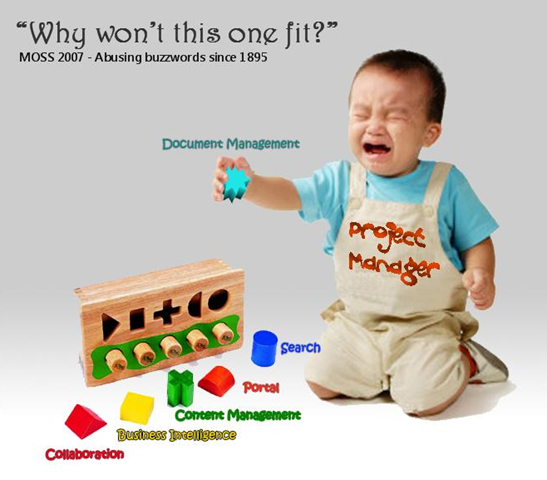
I just had a cartoon idea moment (Paul digs out photoshop). I think the image below says it all.

image 


more to come… stay tuned!

Paul

No Tags


More on SOX and subprime

In 2002, a high profile client asked the company I was involved with what our position/compliance was on ISO17799. The managing director called me up and asked if I could “put something together for him” by the next day.

So I put something to him. Two words to be exact. “Non compliant”.

The irony was that I had actually been trying to win support for adopting *some* ISO17799 principles as a yardstick to measure ourselves, knowing full well that at some point we were going to be asked. But I never was able to get any management behind the idea. Why? Because it was seen as not particularly critical to the business.

Then, they were asked by a client, and heaven forbid, it has to be done by the next day!

What this highlights to me is the general disinterest among many in business of things that are seen as ‘getting in the way’. These days I’m better at appreciating why this is the case and I’m better at providing quantifiable explanation/justification, but it is still disheartening nonetheless.

So I was thinking to myself whether the attitude I experienced was similar at all to the current subprime victim in the news, Bear Stearns.

Continue reading “More on SOX and subprime”

No Tags


Compliance is about to get worse…

I think SharePoint is an excellent platform for quality improvement, PMO and compliance efforts. But this is a non SharePoint oriented post. I’m sick of writing nerdy stuff at the moment.

In 2001, the supposedly blue chip US multinational called Enron filed for bankruptcy. For you younglings who were still at school, this made pretty big news around the world. Many of the senior executives are still in jail for fraud related offenses. the whole sorry tale is one of greed, corruption, deceit, insider trading, huge theft of workers’ entitlements and massive job losses. As part of the collateral damage, Enron’s auditing firm, “Arthur Anderson” was also obliterated as its reputation dissolved quicker than Paris Hilton’s credibility.

google “enron scandal” - it’s interesting reading

Sarbanes-Oxley (real brief version)

Anyway, one of the things that came out of this and other scandals like Worldcom, was the Sarbanes-Oxley act. Its intent was to:

Protect investors by improving the accuracy and reliability of corporate disclosures made pursuant to the securities laws, and for other purposes.

It did this by creating new standards for corporate accountability, and significantly beefed up penalties for acts of wrongdoing. Boards and executives are now personally accountable for the accuracy of financial statements. There are additional financial reporting responsibilities, with particular focus on the verifiable application of internal controls and procedures designed to ensure the validity of their financial records.

Now executives tend to like spreading the love (risk) around, and if they are going to go down, they like to take others with them. So IT professionals also have to do their bit for the common good. This is because the financial reporting processes of organisations heavily utilise IT technology. As a result, IT controls that relate to financial risk are fair game.

So how to account for IT controls?

COBiT

COBiT is not the only IT control methodology used for SOX compliance, but it’s the only one I am familiar with :-) COBiT (Control Objectives of Information and Related Technology) is commonly used as the framework to cover all your IT controls. I won’t get into detail here, as COBiT is a big subject in itself, and I have some information here already.

SOX Criticisms

Was SOX an over-reaction to isolated indecent’s of large scale fraud? It is clear that some believe this to be the case. “Compliance cost is too onerous” is very commonly cited, particularly with smaller affected firms. Most scarily for me, is seeing the term ‘SOX’ being used as a sales tool for products that at best, have little relevance to what SOX compliance is really about. The same criticism can be levelled against service companies as well, who are happy to bag Microsoft’s amateurish use of FUD, yet use disturbingly similar methods to sell products and services that have questionable relevance.

When researching my training material last year, I came across this nugget of information that gave an indication of the level of frustration that SOX has caused.

A global study from European accountants Mazars, found that close to 20% of EU companies are planning to de-list from the US market to avoid complying and more than half feel the costs outweigh the benefits 

But I then found this interesting snippet.

However this has the potential to impact on the cost of credit for such companies as warned in July 2006 by Moodys. “The cost of capital for public companies in countries that choose not to implement US Sarbanes-Oxley (SOX) type corporate governance rules may soon increase to reflect the additional risk premium resulting from companies and their auditors concealing the true level of audit risk” 

So now we come to the point of this post. What did they say above? “Cost of credit”? So Moodys implies that SOX compliance offers a level of assurance to suppliers of capital.

Six Years Later

I liked Moodys’ quote in the previous section. Fast forward to the present and the word “credit crunch” is on the news quite a lot. So is it fair to rate the effectiveness of SOX compliance based on the current turmoil in financial markets?

To answer that question, we have to look at the current problems that have led to the current financial crisis affecting world markets.

Here is a pretty good layman’s summary that explains the sub-prime issue and the problems with stagnant or falling property values. However we need to delve a little deeper here. The New York Times has a great article that goes into the necessary detail but it is large, and I’ll try and paraphrase it as briefly as I can.

In the past decade, there has been an explosion in complex derivative instruments, such as collateralized debt obligations and credit default swaps, which were intended primarily to transfer risk.

These products are virtually hidden from investors, analysts and regulators, even though they have emerged as one of Wall Street’s most outsized profit engines. They don’t trade openly on public exchanges, and financial services firms disclose few details about them 

Among the topics they discussed were investment vehicles that allowed Citigroup and other banks to keep billions of dollars in potential liabilities off of their balance sheets — and away from the scrutiny of investors and analysts. 

Now what was the intent of SOX again? “To protect investors by improving the accuracy and reliability of corporate disclosures made pursuant to the securities laws, and for other purposes”. What do we see above? “potential liabilities off the balance sheet” … hmm

But there’s more..

Credit rating agencies, paid by banks to grade some of the new products, slapped high ratings on many of them, despite having only a loose familiarity with the quality of the assets behind these instruments.

Still others say the primary reason the Fed moved so quickly was to divert an even bigger crisis: a meltdown in an arcane yet huge market known as credit default swaps. Like C.D.O.’s, which few outside of Wall Street had ever heard about before last summer, the credit default swaps market is conducted entirely behind the scenes and is not regulated.

Ratings agencies have similarly been under fire ever since the credit crisis began to unfold, and new regulations may force them to distance themselves from the investment banks whose products they were paid to rate.

If you research into the fate of Arthur Anderson, they were screwed by a sudden and fatal loss of reputation as a result of their association and conflict of interest issues in relation to Enron. Disturbingly, the last quote above criticising ratings agencies reminds me very much of the conflict of interest criticisms levelled at audit firms like Arthur Anderson.

Crystal Ball Time

Since the practices quoted above are not necessarily illegal, and it is too early to determine whether the SOX laws will be used in a punitive sense to institutions caught up in the current crisis. I’m not a lawyer and as a result, my opinion here is naively uninformed. But like the Enron/Worldcom scandals, regulatory authorities and other interested parties will rightfully ask questions about risk management, and therefore the effectiveness of the controls for SOX compliant organisations.

This current crisis makes previous scandals pale into insignificance. A news site that I frequent reports that US investment bank Goldman Sachs  suggests that credit losses will amount to 1.2 trillion US dollars. That is a freakin’ *insane* amount of money and many people affected do not even realise it yet until they see their next pension/superannuation statement.

Consider that the world population is some 6.6 billion people. The above loss is therefore 180 US dollars per person on the planet! … Mind boggling isn’t it.

Notwithstanding the directly affected people who are defaulting on their mortgage, getting margin called, etc. Many, many people will be royally pissed. Politicians will react to this by forming committees to look at how to prevent this from happening again. SOX will be revised, or new regulations will be developed. More checks and balances, more compliance overheads, more disclosure.

Thus, more accountants, more lawyers, more business advisers, more IT security professionals, and of course, smelling a new FUD angle, more snake oil salesmen selling irrelevent products and services.

If companies think that their compliance costs are high now, just wait. I think it’s going to get a lot worse.

No Tags


Today is: Thursday 28 August 2008 -