Hi all and welcome to the final article in my series on SharePoint performance management – for now anyway. Once SharePoint 2013 goes RTM, I might revisit this topic if it makes sense to, but some other blogging topics have caught my attention.
To recap the entire journey, the scene was set in part 1 with the distinction of lead and lag indicators. In part 2, we then examined Requests per Second (RPS) and looked at its strengths and weakness as a performance metric. From there, we spent part 3 looking at how to leverage RPS via the Log Parser utility and a little PowerShell goodness. Part 4 rounded off our examination of RPS by delving deeper into utilising log parser to eke out interesting RPS related performance metrics. We also covering the very excellent SharePoint Flavored Weblog Reader utility, which saves a bunch of work and can give some terrific insights. Part 5 switched tack into the wonderful world of latency, and in particular, focused on disk latency. Part 6 then introduced the disk performance metrics of IOPS, MBPS and their relationship to latency. We also looked at typical SharePoint and SQL Server disk IO characteristics and then examined the pros and cons of RPS, IOPS, Latency, MBPS and how they all relate to each other. In part 7 and continuing into part 8, we introduced the performance monitor counters that give us insight into these counters, as well as introduced the SQLIO utility to stress test disk infrastructure. This set the scene for part 9, where we took a critical look at Microsoft’s own real-world findings to help us understand what suitable figures would be. The last post then introduced a couple of other excellent tools, namely Process Monitor and Windows Performance Analysis Toolkit that should be in your arsenal for SharePoint performance.
In this final article, we will tie up a few loose ends.
Insights from Microsoft labs testing…
In part 9 of this series, I examined Microsoft’s performance figures reported from their production SharePoint 2010 deployments. This information comes from the oft mentioned SharePoint 2010 Capacity Planning Guide. Microsoft are a large company and they have four different SharePoint farms for different collaborative scenarios. To recap, those scenarios were:
- Enterprise Intranet environment (also described as published intranet). In this scenario, employees view content like news, technical articles, employee profiles, documentation, and training resources. It is also the place where all search queries are performed for all of the other the SharePoint environments within the company. Performance reported for this environment was 33580 unique users per day, with an average of 172 concurrent users and a peak concurrency of 376 users.
- Enterprise intranet collaboration environment (also described as intranet collaboration). In this scenario, is where important team sites and publishing portals are housed. Sites created in this environment are used as communication portals, applications for business solutions, and general collaboration. Performance reported for this environment was double the first environment with 69702 unique users per day. Concurrency was more than double, with an average of 420 concurrent users and a peak concurrency of 1433 users.
- Departmental collaboration environment. In this scenario, employees use this environment to track projects, collaborate on documents, and share information within their department. Performance reported for this environment was a much lower figure of 9186 unique users per day (which makes sense given it is departmental stuff). Nevertheless, concurrency was similar to the enterprise intranet scenario with an average of 189 concurrent users and a peak concurrency of 322 users.
- Social collaboration environment. This is Microsoft’s My Sites scenario, connecting employees with one another and presenting personal information such as areas of expertise, past projects, and colleagues to the wider organization. This included personal sites and documents for collaboration. Performance reported for this environment was 69814 unique users per day, with an average of 639 concurrent users and a peak concurrency of 1186 users
Presented as a table, we have the following rankings:
| Scenario | Social Collaboration | Enterprise Intranet Collaboration | Enterprise Intranet | Departmental Collaboration |
| Unique Users | 69814 | 69072 | 33580 | 9186 |
| Avg Concurrent | 639 | 420 | 172 | 189 |
| Peak Concurrent | 1186 | 1433 | 376 | 322 |
When you think about it, the performance information reported for these scenarios are lag indicator based. That is, they are real-world performance statistics based on a pre-existing deployment. Thus while we can utilise the above figures for some insights into estimating the performance needs of our own SharePoint environments, they lack important detail. For example: in each scenario above, while the SharePoint farm topology was specified, we have no visibility into how these environments were scaled out to meet performance needs.
Some lead indicator perspective…
Luckily for us, Microsoft did more than simply report on the performance of the above four collaboration scenarios. For two of the scenarios Microsoft created test labs and published performance results with different SharePoint farm topologies. This is really handy indeed, because it paints a much better lead indicator scenario. We get to see what bottlenecks occurred as the load on the farm was increased. We also get insight about what Microsoft did to alleviate the bottlenecks and what sort of a difference it made.
The first lab testing was based off Microsoft’s own Departmental collaboration environment (the 3rd scenario above) and is covered on pages 144-162 of the capacity planning guide. The other lab was based off the Enterprise Intranet Collaboration Environment (the 2nd scenario above) and is the focus of attention on pages 174-197. Consult the guide for full detail of the tests. This is just a quick synthesis.
Lab 1: Enterprise Intranet Collaboration Environment
In this lab, Microsoft took a subset of the data from their production environment using different hardware. They acknowledge that the test results will be affected by this, but in my view it is not a show stopper if you take a lead indicator viewpoint. Microsoft tested web server scale out initially by starting out with a 3 server topology (one web front end server, one application server and one database server). They then increased the load on the farm until they reached a saturation point. Once this happened, they added an additional web server to see what would happen. This was repeated and scaled from one Web server (1x1x1) to five Web servers (5x1x1).
The transactional mix used for this testing was based on the breakdown of transactions from the live system. Little indication of read vs. write transactions are given in the case study, but on page 152 there is a detailed breakdown of SharePoint traffic by type. While I won’t detail everything here, regular old browser traffic was the most common, representing 36% of all test traffic. WebDAV came in second (WebDAV typically includes office clients and windows explorer view) representing 28.12 of traffic and outlook sync traffic third at 7.04%.
Below is a table showing the figures where things bottlenecked. Microsoft produce many graphs in their documentation so the figures below are an approximation based on my reading of them. It is also important to note that Microsoft did not perform tests while search was running, and compensated for search overhead by defining a max CPU limit for SQL Server of 80%.
| 1*1*1 | 2*1*1 | 3*1*1 | 4*1*1 | 5*1*1 | |
| Max RPS | 180 | 330 | 510 | 560 | 565 |
| Sustainable RPS | 115 | 210 | 305 | 390 | 380 |
| Latency | .3 | .2 | .35 | .2 | .2 |
| IOPS | 460 | 710 | 910 | 920 | 840 |
| WFE CPU | 96% | 89% | 89% | 76% | 58% |
| SQL CPU | 17% | 33% | 65% | 78% | 79% |
For what its worth, the sustainable RPS figure is based on the server not being stressed (all servers having less than 50% CPU). Looking at the above figures, several things are apparent.
- The environment scaled up to four Web servers before the bottleneck changed to be CPU usage on the database server
- Once database server CPU hit its limits, RPS on the web servers suffered. Note that RPS from 4*1*1 to 5*1*1 is negligible when SQL CPU was saturated.
- The addition of the fourth Web server had the least impact on scalability compared to the preceding three (RPS only increased from 510 to 560 which is much less then adding the previous web servers). This suggests the SQL bottleneck hit somewhere between 3 and 4 web servers.
- The average latency was almost constant throughout the whole test, unaffected by the number of Web servers and throughput. This suggests that we never hit any disk IO bottlenecks.
Once Microsoft identified the point at which Database server CPU was the bottleneck (4*1*1), they added an additional database server and then kept adding more webservers like they did previously. They split half the content databases onto one SQL server and half on the other. It is important to note that the underlying disk infrastructure was unchanged, meaning that total disk performance capability was kept constant even though there were now two database servers. This allowed Microsoft to isolate server capability from disk capability. Here is what happened:
| 4*1*1 | 4*1*2 | 6*1*2 | 8*1*2 | |
| RPS | 560 | 660 | 890 | 930 |
| Latency | .2 | .35 | .2 | .2 |
| IOPS | 910 | 1100 | 1350 | 1330 |
| WFE CPU | 76% | 87% | 78% | 61% |
| SQL CPU | 78% | 33% | 52% | 58% |
Here is what we can glean from these figures.
- Adding a second database server did not provide much additional RPS (560 to 660). This is because CPU utilization on the Web servers was high. In effect, the bottleneck shifted back to the web front end servers.
- With two database servers and eight web servers (8*1*2), the bottleneck became the disk infrastructure. (Note the IOPS at 6*1*2 is no better than 8*1*2).
So what can we conclude? From the figures shown above, it appears that you could reasonably expect (remember we are talking lead indicators here) that bottlenecks are likely to occur in the following order:
- Web Server CPU
- Database Server CPU
- Disk IOPS
It would be a stretch to suggest when each of these would happen because there are far too many variables to consider. But let’s now examine the second lab case study to see if this pattern is consistent.
Lab 2: Divisional Portal Environment
In this lab, Microsoft took a different approach from lab we just examined. This time they did not concern themselves with IOPS (“we did not consider disk I/O as a limiting factor. It is assumed that an infinite number of spindles are available”). The aim this time was to determine at what point a SQL Server CPU bottleneck was encountered. Based on what I have noted from the first lab test above, unless your disk infrastructure is particularly crap, SQL Server CPU should become a bottleneck before IOPS. However, one thing in common with the last lab test was that Microsoft factored in the effects of an ongoing search crawl by assuming 80% SQL Server CPU as the bottleneck indicator.
Much more detail was provided on the transaction breakdown for this lab. Page 181 and 182 lists transactions by type and and unlike the first lab, whether they are read or write. While it is hard to directly compare to lab 1, it appears that more traffic is oriented around document collaboration than in the first lab.
The basic methodology of this was to start off with a minimal farm configuration of a combined web/application server and one database server. Through multiple iterations, the test ended with a configuration of three Web servers, one application server, one database server. The table of results are below:
| 1*1 | 1*1*1 | 2*1*1 | 3*1*1 | |
| RPS | 101 | 150 | 318 | 310 |
| Sustainable RPS | 75 | 99 | 191 | 242 |
| Latency | .81 | .85 | .6 | .8 |
| Users simulated | 125 | 150 | 200 | 226 |
| WFE CPU | 86% | 36% | 76% | 42% |
| APP CPU | NA | 41% | 46% | 44% |
| SQL CPU | 18% | 32% | 56% | 75% |
Here is what we can glean from these figures.
- Web Server CPU was the first bottleneck encountered.
- At a 3*1*1 configuration, SQL Server CPU became the bottleneck. In lab 1 it was somewhere between the 3rd and 4th webserver.
- RPS, when CPU is taken into account, is fairly similar between each lab. For example, in the first lab, the 2*1*1 scenario RPS was 330. In this lab it was 318 and both had comparable CPU usage. The 1*1*1 test, had differing results (101 vs 180) , but if you adjust for the reported CPU usage, things even up.
- With each additional Web server, increase in RPS was almost linear. We can extrapolate that as long as SQL Server is not bottlenecked, you can add more Web servers and an additional increase in RPS is possible.
- Latencies are not affected much as we approached bottleneck on SQL Server. Once again, the disk subsystem was never stressed.
- The previous assertion that bottlenecks are likely to occur in the the order of Web Server CPU, Database Server CPU and then Disk subsystem appears to hold true.
Now we go any further, one important point that I have neglected to mention so far is that the figures above are extremely undesirable. Do you really want your web server and database server to be at 85% constantly? I think not. What you are seeing above are the upper limits, based on Microsoft’s testing. While this helps us understand maximum theoretical capacity, it does not make for a particularly scalable environment.
To account for the issue of reporting on max load, Microsoft defined what they termed as a “green zone” of performance. This is a term to describe what “normal” load conditions look like (for example, less than 50% CPU) and they also provided RPS results for when the servers were in that zone. If you look closely in the above tables you will see those RPS figures there as I labelled them as “Sustainable RPS”.
In case you are wondering, the % difference between sustainable RPS and peak RPS for each of the scenarios ranges between 60-75% of the peak RPS reported.
Some Microsoft math…
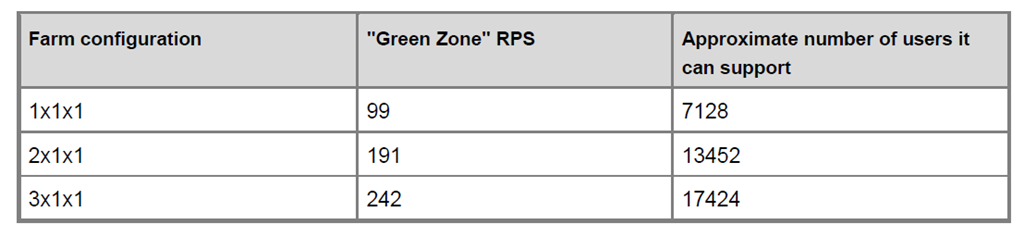
In the second lab, Microsoft offers some advice on how translate their results into our own deployments. They suggest determining a users to RPS ratio and then utilising the green zone RPS figures to estimate server requirements. This is best served via their own example from lab 2: They state the following:
- A divisional portal in Microsoft which supports around 8000 employees collaborating heavily, experiences an average RPS of 110.
- That gives a Users to RPS ratio of ~72 (that is, 8000/110). That is: 72 users will amount to 1 RPS.
- Using this ratio and assuming the sustainable RPS figures from lab 2 results, Microsoft created the following table (page 196) to suggest the number of users a typical deployment might support.
A basic performance planning methodology…
Okay.. so I am done… I have no more topics that I want to cover (although I could go on forever on this stuff). Hopefully I have laid out enough conceptual scaffolding to allow you to read Microsoft’s large and complex documentation regarding SharePoint performance and capacity guide with more clarity than before. If I were to sum up a few of the key points of this 11 part exploration into the weird and wonderful world of SharePoint performance management it would be as follows:
- Part 1: Think of performance in terms of lead and lag indicators. You will have less of a brain fart when trying to make sense of everything.
- Part 2: Requests are often confused with transactions. A transaction (eg “save this document”) usually consists of multiple requests and the number of requests is not an indicator of performance. Look to RPS to help here…
- Part 3 and 4: The key to utilising RPS is to understand that as a counter on its own, it is not overly helpful. BUT it is the one metric that you probably have available in lots of detail, due to it being captured in web server logs over time. Use it to understand usage patterns of your sites and portals and determine peak usage and concurrent usage.
- Part 5: Latency (and disk latency in particular) is both unavoidable, yet one of the most common root causes of performance issues. Understanding it is critical.
- Part 6: Disk latency affects – and is affected by – IOPS, IO size and IO patterns. Focusing one one without the others is quite pointless. They all affect each other so watch out when they are specified in isolation (ie 5000 IOPS).
- Part 6, 7 and 8: Latency and IOPS are handy in the sense that they can be easily simulated and are therefore useful lead indicators. Test all SQL IO scenarios at 8k and 64K IO size and ensure it meets latency requirements.
- Part 9: Give your SAN dudes a specified IOPS, IO Size and latency target. Let them figure out the disk configuration that is needed to accommodate. If they can make your target then focus on other bottleneck areas.
- Part 10: Process Monitor and Windows Performance Analyser are brilliant tools for understanding disk IO patterns (among other things)
- Part 9 and 11: Don’t believe everything you read. Utilise Microsoft’s real world and lab results as a guide but validate expected behaviour by testing your own environment and look for gaps between what is expected and what you get.
- Part 11: In general, Web Server CPU will bottleneck first, followed by SQL Server CPU. If you followed the advice of points 6 and 7 above, then disk shouldn’t be a problem.
Now I promised at the very start of this series, that I would provide you with a lightweight methodology for estimating SharePoint performance requirements. So assuming you have read this entire series and understand the implications, here goes nothing…
- 1. Read through this series and then review Microsoft’s documentation (“Planning guide for server farms and environments for Microsoft SharePoint Server 2010 and Capacity Planning for Microsoft SharePoint Server 2010”).
- 2. Tell your storage guys you need 5000 IOPS on random IO to have an average of 8ms latency with 64KB read/writes.
- 3. Tell your storage guys you need 5000 IOPS on sequential IO with average 1ms latency (max 5ms) on sequential 8KB and 64KB writes.
If they can meet this target, skip to step 8. 🙂
If they cannot meet this, don’t worry because there are two benefits gained already. First, by finding that they cannot get near the above figures, they will do some optimisation like test different stipe sizes and check some other common disk performance hiccups. This means they now better understand the disk performance patterns and are thinking in terms of lead indicators. The second benefit is that you can avoid tedious, detailed discussions on what RAID level to go with up front.
So while all of this is happening, do some more recon…
- 4. Examine Microsoft and HP’s testing results that I covered in part 9 and in this article. Pay particular attention to the concurrent users and RPS figures. Also note the IOPS results from Microsoft and HP testing. To remind you, no test ever came in over 1400 IOPS.
- 5. Use logparser to examine your own logs to understand usage patterns. Not only should you eke out metrics like max concurrent users and RPS figures, but examine peak times of the day, RPS growth rate over time, and what client applications or devices are being used to access your portal or intranet.
- 6. Compare your peak and concurrent usage stats to Microsoft and HP’s findings. Are you half their size, double their size? This can give you some insight on a lower IOPS target to use. If you have 200 simultaneous users, then you can derive a target IOPS for your storage guys to meet that is more modest and in line with your own organisations size and make-up.
By now the storage guys will come back to you in shock because they cannot get near your 5000 IOPS requirement. Be warned though… they might ask you to sign a cheque to upgrade the storage subsystem to meet this requirement. It won’t be coming out of their budget for sure!
- 7. Tell them to slowly reduce the IOPS until they hit the 8ms and 1ms latency targets and give them the revised target based on the calculation you made in step 6. If they still cannot make this, then sign the damn cheque!
At this point we have assumed that there is enough assurance that the disk infrastructure is sound. Now its all about CPU and memory.
- 8. Determine a users to RPS ratio by dividing your total user base by average RPS (based on your findings from step 5).
- 9. Look at Microsoft’s published table (page 196 of the capacity planning guide and reproduced here just above this conclusion). See what it suggests for the minimum topology that should be needed for deployment.
- 10. Use that as a baseline and now start to consider redundancy, load balancing and all of that other fun stuff.
And there you have it! My 10 step dodgy performance analysis method. 
Conclusion and where to go next…
Right! Although I am done with this topic area, there are some next steps to consider.
Remember that this entire series is predicated on the notion that you are in the planning stage. Let’s say you have come up with a suggested topology and deployed the hardware and developed your SharePoint masterpiece. The job of ensuring performance will work to expectations does not stop here. You still should consider load testing to ensure that the deployed topology meets the expectations and validates the lead indicators. There is also a seemingly endless number of optimisations that can be done within SharePoint too, such as caching to reduce SQL Server load or tuning web application or service application settings.
But for now, I hope that this series has met my stated goal of making this topic area that little bit more accessible and thankyou so much for taking the time to read it all.
Paul Culmsee