Back to Cleverworkarounds mainpage
Visit - A Seven Sigma Initiative
 

Nov 29 2009

SBS 2008, Hewlett Packard, WSS3, Search Server 2008 Express and a UPS – Oh the pain!

image

In the words of Doctor Smith from lost in space, while everyone else was in Vegas having a grand old time, I was at a client site, having to come to grips with the beast known as Windows Small Business Server 2008. I rarely work with SBS2003 and had never used SBS2008 until now.

This was one of those engagements that is somewhat similar to those awful dreams that you have when you are trying to get to some place, but you never quite get there and your subconscious puts all sorts of strange and surreal obstacles in your path. In my case, the surreal obstacles were very real, yet some of them were really really dumb. Whatsmore, it is a very sad indictment on IT at several levels and a testament to how complexity will never be tamed with yet more complexity.

As a result, I really fear the direction that IT in general is heading.

So where to begin? This project was easy enough in theory. A former colleague called me up because he knew of my dim, dark past in the world of Cisco, Active Directory and SharePoint. He asked me to help put in SBS2008 for him, configuring Exchange/AD/SharePoint and migrating his environment over to it.

“Sure”, I say, “it’ll be a snap” (famous last words)

image

I haven’t use the coffee or tequila ratings for a while, so I thought that this post was apt for dusting them off. If you check the Why do SharePoint Projects Fail series, you will see that I use tequila shots or coffee at times. In this case, I will use the tequila shots to demonstrate my stress levels.

Attempt 1

We start our sorry tale a few weeks ago, where my client had ordered Small Business Server 2008 and the media/key had not arrived by the time I was due to start. The supplier came to the rescue by sending them a copy of the media and promised to send the license key in a couple of days.

The server was a HP Proliant DL360 G6, a seemingly nice box with some good features at a reasonable price. HP/Compaq people will be familiar with the SmartStart software and process, where instead of using the windows media, you pop in the supplied SmartStart CD and it will perform some admin tasks, before asking for the windows media, auto-magically slipstreaming drivers and semi-automating the install.

On client machines, I never use the CD from the vendor because there is always too much bloatware crap. However on servers I generally do use the CD, because it tends to come with all the tools necessary to manage disk storage, firmware and the like. I dutifully popped in SmartStart CD, answered a few basic questions, and it asked for the windows media CD.

Cleverworkarounds stress rating: Good so far

Next it asked me for the Windows SBS2008 licence key. Of course, I was using media that had been lent to us from the supplier because my client’s media (and keys) had not arrived. Thus, since I did not have a license key I was unable to proceed with the install using this preferred manner. HP, in their infinite wisdom, have assumed that you always have the license key when you install via their SmartStart CD, despite Microsoft giving you 30 days to activate the product. To be fair on HP, they are hooking into Microsoft’s unattended installation framework, so perhaps the blame should be shared.

All was not lost however. The SmartStart CD can be run after windows has been installed. It then will install all the necessary “HP bits” like graphics and system board drivers. So I booted off the Windows CD and fortunately, windows installer detected the HP storage controller and the disk array,  and proceeded to let me partition it and install.

Cleverworkarounds stress rating: Minor annoyance, but good so far

Small Business Server 2008 did its thing and then loaded up a post install wizard that sets the timezone, active directory domain name and the like. At a certain step when running this wizard, SBS2008 informed me that there was no network card with a driver loaded, so it could not continue. As it turns out, Microsoft’s initial SBS2008 configuration wizard simply will not proceed unless it finds a valid network card. But since this is the pre-install wizard, we are not yet at the point in the installation where we have a proper windows desktop with start menu and windows explorer. All is not lost (apparently), because SBS allows you to start device manager from within the wizard and search for the driver.

Fair enough, I think to myself, so I pop in the HP SmartStart CD and tell device manager to search the media.

Cleverworkarounds stress rating: Spider senses tingle that today might not turn out well

image

Windows device manager comes back and tells me that it cannot find any drivers.

Why?

Well after some examination, the SmartStart drivers are all self extracting executables and therefore device manager could not find them when I told it to. Of course, the self extracting zip files have hugely meaningful names like C453453.EXE making it really obvious to work out what driver set is the one required… not!

Luckily, Ctrl+Alt+Del gave me task manager which allowed me to start a windows explorer session, and I was able to browse to the CD and run the autorun of the SmartStart CD manually. This loaded up HP’s fancy schamsy driver install software that produces a nice friendly report on what system software is missing and proceeds to install it all for you.

SmartStart did its thing, finding all of the driverless hardware and installed the various drivers. A few minutes and a reboot later and SBS2008 reruns its configuration wizard and this time finds the network and allows me to complete the wizard. This triggers another thirty minutes of configuration and another reboot and we have ourselves a small business server!

Cleverworkarounds stress rating: Spider senses subside – back on track?

Next I did something that is a habit that has served me well over the years (until now). I reran the Smartstart CD, now with a network and internet access. This time I told the driver management utility to connect to HP.COM. It scanned HP and reported to me that most drivers on the SmartStart CD were out of date. This is unsurprising because most of the time I do server builds for any vendor, I find that about half of the drivers, BIOS and various firmwares have been replaced by newer versions since the CD was pressed.

Since this is a brand new server build, it is a habit of mine to upgrade to the latest drivers, BIOS and firmware before going any further.

Among the things found to be out of date was the BIOS, the firmware on the RAID Storage controller as well as the network card. The SmartStart software downloaded all of these updates, and another reboot later, all are installed happily. Another hour of patching via Windows update, and we have a ready to go SBS2008 server with WSS3, Exchange, SQL Express and WSUS all configured automatically for you.

Cleverworkarounds stress rating: This SBS2008 stuff isn’t so bad right?

Okay, so things were good so far, but now here is where the fun really begins.

Windows 2008 SBS comes with a pre-installed WSS3 site called http://Companyweb. As we all know, search completely sucks in WSS3. It has a bunch of limitations and isn’t a patch on what you get with MOSS. But no problem – we have Microsoft Search Server Express now, a free upgrade which turns WSS search from complete horribleness to niceness fairly quickly.

For those of you reading this who run WSS3 and have not installed Search Server Express, I suggest you investigate it as it does offer a significant upgrade of functionality. Search server express pretty much makes WSS3 have the same search capabilities of MOSS 2007.

So, I proceeded to install Search Server 2008 express onto this Small Business Server 2008 box. I have installed Search Server Express quite a few times before and I have to admit, it is a tricky install at times. But given that this was a fresh Small Business Server 2008 install and not in production, as well as having successfully installed it on Small Business Server 2003 previously, I felt that I should be safe.

I commenced the Search Server 2008 express install, and the first warning sign that my day was about to turn bad showed itself. The install of search server express only allowed me to choose the “Basic” option. The option that I wanted to use, “Advanced” was greyed out and therefore unavailable.

Cleverworkarounds stress rating: Spider senses tingling again

imageimage

Knowing this server was not in production, I went ahead and allowed Search Server Express to install as per the forced basic setting. The install itself appeared to work, but it died during the SharePoint configuration wizard. It specifically crapped out on step 9, with the error message

“Failed to create sample data. An exception of type Microsoft.SharePoint.SPException was thrown.  Additional exception information: User cannot be found”.

“Curses!” I say, “another trip to logs folder in the 12 hive”. For the nerds, the log is pasted below.

[SPManager] [INFO] [10/21/2009 3:38:47 PM]: Finished upgrading SPContentDatabase Name=ShareWebDb Parent=SPDatabaseServiceInstance Name=Microsoft##SSEE.
[SPManager] [DEBUG] [10/21/2009 3:38:47 PM]: Using cached [SPContentDatabase Name=ShareWebDb Parent=SPDatabaseServiceInstance Name=Microsoft##SSEE] NeedsUpgrade value: False.
[SharedResourceProviderSequence] [DEBUG] [10/21/2009 3:38:47 PM]: Unable to locate SearchDatabase. Exception thrown was: System.Data.SqlClient.SqlException: Cannot open database "SharedServices_DB_ed3872ca-06b1-44c5-8ede-5a81b52265f9" requested by the login. The login failed.
Login failed for user ‘NT AUTHORITY\NETWORK SERVICE’.
   at System.Data.SqlClient.SqlInternalConnection.OnError(SqlException exception, Boolean breakConnection)
   at System.Data.SqlClient.TdsParser.ThrowExceptionAndWarning(TdsParserStateObject stateObj)
   at System.Data.SqlClient.TdsParser.Run(RunBehavior runBehavior, SqlCommand cmdHandler, SqlDataReader dataStream, BulkCopySimpleResultSet bulkCopyHandler, TdsParserStateObject stateObj)
   at System.Data.SqlClient.SqlInternalConnectionTds.CompleteLogin(Boolean enlistOK)

The long and short of this error takes a little while to explain. First we need to explain the historical difference between SQL Server Express edition and SQL Server Embedded edition (also known as the Windows internal database). From wikipedia:

SQL Server 2005 Embedded Edition (SSEE): SQL Server 2005 Embedded Edition is a specially configured named instance of the SQL Server Express database engine which can be accessed only by certain Windows Services.

SQL Server Express Edition: SQL Server Express Edition is a scaled down, free edition of SQL Server, which includes the core database engine. While there are no limitations on the number of databases or users supported, it is limited to using one processor, 1 GB memory and 4 GB database files.

Why does this matter? Well Microsoft, being the wise chaps that they are, decided that when you perform a SharePoint installation using the “basic” option, different editions of SharePoint use different editions of SQL Server! Mark Walsh explains it here:

  • When you use the "Basic" install option during MOSS 2007 installation it will install and use SQL Server 2005 Express Edition and you have a 4GB database size limit.
  • When you use the "Basic" install option during WSS 3.0 installation it DOES NOT use SQL Express, it uses SQL Server 2005 Embedded edition and it DOES NOT have a 4GB size limit.

It happens that Small Business Server 2008 comes with WSS3 preinstalled. Annoyingly, but unsurprisingly, the Small Business Server team opted to use the BASIC installation mode. As described above, SQL Server Embedded Edition (known on Win2008 as the Windows Internal Database) is used. For reference, WSUS on Small Business Server 2008 also uses this database instance.

BUT BUT BUT…

Search Server 2008 Express, uses SQL Server Express edition when performing a basic install. As a result, an additional SQL Server Express instance (SERVERNAME\OFFICESERVERS) gets installed onto the Small Business 2008 server. Then, to make matters worse, the installer gets mixed up and installs some Search Server express databases into the new instance (a Shared Service Provider), but then uses the SQL Embedded Edition instance to install other databases (like the searchDB). Then later during the configuration wizard, it cannot find the databases that it needs because it searches the wrong instance!

The net result is the error shown in the log above. I tried all sorts of things like copying the Express databases into the embedded edition, but I couldn’t disentangle this dependency issue. Some parts of SharePoint (the search server express bits no doubt) looked in the SQL Express instance and the WSS bits looked in the Embedded SQL instance. Eventually, conscious of time, I proceeded to uninstall Search Server Express.

Cleverworkarounds stress rating: Some swear words now uttered

imageimageimage

Uninstalling Search Server Express was attempted and tells me that it has successfully completed and wants a reboot. Unfortunately SharePoint is now even more hosed than it was before and I tried a few things to get things back on track (psconfig to create a new farm and the like). After more frustration, and conscious of time I decided to uninstall WSS3 altogether and then reinstall it according to the SBS Repair guide for WSS3.

This had the effect of stuffing up WSUS as well! (I assume because it shares the same Windows Internal Database instance), and after a couple of hours of trying all sorts of increasingly hacky ways of getting all of this working, I was forced to give up.

Note: Whatever you do, do not attempt this method. At one point I tried to trick WSS3 into temporarily thinking it was not a basic mode install so get Search Server Express to prompt for Advanced mode, but it made things worse because the configuration database got confused.

Cleverworkarounds stress rating: Installing SharePoint in basic mode is committing a crime against humanity.

imageimageimageimage

Attempt 2

image

At this point I hear Doctor Smith abusing me like the poor old robot. “You bubble-headed booby, you ludicrous lump, adlepated amateur, dottering dunderhead”.

Since WSUS got completely screwed, as well as the Windows Internal Database through relentless uninstallation and repair attempts, I started to get nervous. Small Business Server 2008 is a very fussy beast. Essentially it can get very upset at seemingly benign changes. I felt that I had messed about so much that I could no longer guarantee the integrity of this server so I wiped clean and reinstalled.

I installed Windows as per the previous method, and once again the install wizard stopped, asking me for a network driver. Once again I popped in the HP SmartStart CD and proceeded to run the driver install program from the SBS configuration wizard.

This time, no network card was detected!

What the? During attempt 1, I happily installed the necessary HP drivers using the same %$^#% SmartStart CD! Why is it not detecting now??

Cleverworkarounds stress rating: Now thinking about how much fun everyone is having in Vegas while I am fighting this server

imageimageimageimageimage

After some teeth gnashing, the cause of this problem hit me as I was driving home from the site. I had upgraded the firmware of the network card during attempt 1, as well as the storage controller and system BIOS. I realised that the stupid, brain-dead HP network card drivers likely could no longer recognise its own network card with a newer firmware.

The next day I came back refreshed, and found that indeed, there were newer network drivers at the HP site. I downloaded them and extracted them and sure enough, suddenly the network card was found and I was back in business. How dumb is that! Surely if you are going to write a driver, at the very least make it recognise the hardware irrespective of firmware!  

Once I got past this stupid annoyance, it did not take too long for SBS2008 to be installed and ready to go. Remember that WSS3 is installed for you in basic mode, so to change it requires an uninstall of WSS and then to reinstall it in a different mode. But the problem here is SBS2008 and its fussiness about messing with configuration. In going down this path, you risk future service packs and updates breaking because things are not as expected. Additionally you would have to create companyweb manually and it raises the risk of a misconfiguration or mistake along the way.

I logged a call with Microsoft and got a pretty good engineer (hey Ai Wa) and she was able to consistently reproduce all of my issues in the lab, but was unable to work out a supportable fix. In the meantime, I tried to force Search Server 2008 to install into advanced mode using a scripted install, using an article written by my old mate Ben Curry. Alas, I could not bend it to my will and at the time of writing this article, I had to give up on Search Server 2008 with SBS2008 for now.

For what its worth, I know that I can make this work by installing WSS3 differently, but I planned to properly nail this issue in my lab using the out of the box installs and then publish this article, but I didn’t have the sufficient hardware to run Small Business Server 2008. It requires a lot of grunt to run! So I will revisit this issue once my new VM server arrives and post an update.

But there is more…

If the whole Smartstart, network driver, SBS2008 with its dodgy scripted WSS3 install, with Search Server Express dumb installation assumptions were not enough, I hit more dumb things that resulted in showing how ill equipped HP’s support is able to deal with these sorts of issues.

The server, not surprisingly, supplied with a nice hardware RAID configuration and my client opted to buy some additional disk. When the disks arrived and were installed, we found that the RAID controller could see the disks, but we were unable to add the disks to the existing array using HP’s management tools. HP’s “friendly” support was unable to work out the issue and asked me to do things that were never going to work and insulted my intelligence. Eventually I worked out what was going on myself, via HP’s own forums. It turns out that the HP Server requires a write cache module to be able to grow an array. We had one of these installed. Upon further examination by opening up the chassis, we were missing a battery to go with the write cache module. HP were unable to determine the part number that we needed and we ended up working it out ourselves and telling our supplier.

Then HP stuffed up the order and after following up for two weeks, it turned out they accidentally forgot to put the order through to Singapore to get the part. It seemed that once we went outside of the normal supply chain system at HP, it all broke down. After two weeks and numerous calls, they suddenly realised that the part was available in Sydney all along and it was shipped over next day!. The irony was that next day the part from Singapore arrived!

So now we had two batteries.

Grrrr. It shouldn’t be this hard! Why supply a write cache module and not supply the battery! Dumb Dumb Dumb!

Cleverworkarounds stress rating: Really hating HP and Microsoft at this point.

imageimageimageimageimageimage

… and piece de resistance!

Okay so we had a few frustrating struggles, but we more or less got there. But here is the absolute showstopper – the final issue that for me, really made me question this IT discipline that I have worked in for twenty years now.

My client rang me on Monday morning to tell me the server was powered off when we arrived on site. This was unusual because the rack was UPS protected and no other devices were off. We ran HP’s diagnostic tools and no faults were reported. The UPS was a fairly recent APC model, and we installed a serial cable to the server and loaded the APC UPS Management software. The software (which looks scarily like what 16 bit apps used to look like in the early 90’s), found the UPS and showed that was all hunky dory.

We decided to perform a battery test using the software. No sooner than I clicked OK, the server powered off with no warning or shutdown. Whoa!!

I put in a call to APC, and was told that the UPS was not compatible with HP’s new fancy shmansy green star rating power supplies. We had to buy a new UPS because of some “sine wave” mumbo jumbo (UPS engineer talk that I really wasn’t interested in). If the UPS switched to battery, this server would think power was dodgy and do a pre-emptive shutdown. The reason that the server was powered off on the Monday morning was that the UPS has a built in self test that runs every 7 days that cannot be disabled!

Cleverworkarounds stress rating: For %%$$ sake!.

imageimageimageimageimageimageimageimageimageimageimageimage

Conclusion

Now I don’t know about you, but once a UPS cannot be “compatible” with a server, that’s it – things have gone too far. For crying out loud, a UPS supplies power. How $%#^ hard can that be? How is an organization supposed to get value out of their IT investments with this sort of crap to deal with.

Then add in the added complexity of Blade servers, Citrix, Virtualisation, shared storage, and I truly feel that some sites are sitting on time bombs. The supposed benefits in terms of efficiency, resiliency and scalability that these technologies bring, come at an often intangible and insidious cost – sheer risk from incredible complexity. If you look at this case study of a small organisation putting in a basic server, most of the issues I have encountered are the side effects of this complexity and the lack of ability for the vendors to be able to help with it.

As the global financial crisis has aptly demonstrated, when things are complex and no-one person can understand everything, when something bad does happen, it tends to do it in a spectacularly painful and costly way.

Finally, before you reply to this likely immature rant and tell me I am a whiner, remember this all you Vegas people. You got to have fun and marvel at all the new (complex) SP2010 toys, while I sat on the other side of the planet in a small computer room, all bitter and twisted, sprouting obscenities to HP, Microsoft and APC dealing with this crap. When you put that into perspective, I think this article is quite balanced! :-)

Thanks for reading

Paul Culmsee
www.sevensigma.com.au

No Tags


Nov 11 2009

A simple way to improve your estimating (and a cool pub trick) – Conclusion

…and we’re back!

Well… that was a long commercial break wasn’t it :-)

In case you missed part 1 of our version of the show “deal or no deal”, you missed the big cliff-hanger and you really should read part 1 first. For the rest of you, to quickly recap, I came out of the closet and admitted by secret teenybopper shame, told the world that my wife had a teenage thing for Jean Claude Van Damme, showed the effect of beer goggles and introduced the notion of cognitive bias and how it can affect judgement.

i also demonstrated how, by altering the frame of reference, to a problem something that at first seems completely unquantifiable “how the hell do I know how many SharePoint developers drive yellow cars?”, is actually not as “impossible” as you may first think.

At the end of the last post I left you with a $10000 dilemma. You had to make a “deal or no deal” decision about going with your estimate about SharePoint developers who own yellow cars, or to instead cast your lot with a bag of marbles with a 9 in 10 chance of winning the prize. Just to refresh your memory, here is the salient part of the pub conversation.

  • Me: Okay, so you are 90% sure that here are between 300 and 2000 SharePoint developers in the world with a yellow car?
  • Them: Yes
  • Me: So, let’s make this like the game show “deal or no deal”. If you are right and the answer is within your range, you will win $10000. BUT you have an alternative…
  • Them: Ok…
  • Me: What if I were to present you with a bag containing 9 red marbles and 1 black marble and offer you $10000 if you pull out a red marble. Pull the one black marble, and you miss out on the money. Do you want to stick to your estimate or do you want to draw a marble?

So have you decided? Now be honest and see how you went against the 4 outcomes that I have experienced when trying this on people. Here are the possible answers in order of popularity…

  1. The person chooses to pull from the bag of marbles rather than their ranged estimate. (This is the predominant answer for all people I have tried this with – perhaps 70-75% of all responses).
  2. The person chooses to use their estimate over the bag of marbles. (perhaps 25% of people have answered with this option)
  3. Upon hearing the bag option, the person wants to change their ranged estimate. (Happened to me once)
  4. The person doesn’t care which method.. (never happened to me)

So which is the right answer to this question? 

(drumroll) Lets tackle the possible answer in order of likelihood.

“Take the marble! take the maaaaaarble!”

For the 70 odd percent of you who opted to take your chances with the bag of marbles, GONG! you lose!

image

Better double check your estimates in future because you have demonstrated that you are over-confident in your estimates. In other words, you are suffering from optimism bias. To explain why, think about the original question carefully. I asked originally for a ranged estimate that you were 90% confident with.

I then presented an alternative that has a 9 out of 10 chance of success – also 90%. From a statistical point of view, you should be completely ambivalent as to which option to use. Therefore, despite being asked for a range that you were 90% confident with, the range you actually estimated is not really 90% at all. It has to be less than 90% for you to prefer a clear 9/10 probability.

So that is why you are so stressed and busy! You keep giving crap estimates that make life harder for you! :-) Either that or you are too nice and when your project manager looks at you with those big, sad project manager eyes, your heart melts and you relent.

Isn’t that cool in a nerdy way? It is very interesting to see people’s faces as the penny drops to this logic and they suddenly realise just how bad some of their past estimates have been as a result. The consolation prize is just about 4 out of 5 people do exactly the same as you and take the marbles.

“No deal, I will stick with my estimate”

For the smaller group who decide that their estimate is preferred, you also lose.

image

In this case, the reason why should be pretty obvious. You are so paranoid about getting it wrong, that you have made an estimate that is more like 95% or even 99% confident. Why? your range is too wide for 90% because when presented with a clear 9/10 chance of success, you chose your original estimate. While that may sound like you are confident, in reality you are a bit of a wuss, because in fact you are under confident with your estimate. So grow some balls you weenie :-)

Honorary mention – “I want to change my estimate”

At the Best Practice Conference in DC, I attempted this pub trick on Yoav Lurie from Synteractive, who is much more of a business and strategic thinker than us IT nerds. His response I think, deserves an honorary mention for being the closest to winning the game. In this example, I asked him to estimate in feet, the wingspan of a Boeing 747. I knew instantly that he was a good estimator because of the logic he used to come to a range.

“Hmm, well an aircraft seat is maybe one and a half feet, and there will be 10 seats in the cabin, with two passages that are probably two feet in width…so that ads up to…”

What do you notice about what Yoav did? Straight away, he related the wingspan of an aircraft (a clear unknown), to something he could make a reasonable estimate of (the width of an aircraft seat). After all, we have all sat in an aircraft seat in sardine (economy) class and know how cramped it is. He knew there were three rows of seats and related this to the width of the cabin, which he then related to the size of the wing. Deducing that the wing might be 4 to 6 times the width of the cabin, he then was able to make a very good ranged estimate of the overall wingspan of the plane.

I was very impressed at his estimate and how he arrived at it, but I still got him :-)

As soon as I presented him with the bag of marbles alternative, without missing a beat he said “I want to change my estimate”. It took only a split second of presenting a clear 90% probability made Yoav realise that his estimate was not 90% and he was still a little overconfident.

That being said, Yoav’s method of relating something known to help frame the reference to something unknown is the only time anyone has used any sort of rigour in forming an estimate and very impressive for the pub setting :-)

The right answer

Okay, so as you may have guessed by now, the right answer is to shrug your shoulders and say “I don’t care” or wave your hand at me and say “pfft, whatever”. (This is one of the few times saying you couldn’t care less is the right answer). In doing so, you have placed equal weight upon the choices, based on the assumption that both are 90% probabilities.

Neat pub trick huh? It certainly gets people thinking.

How to calibrate yourself

Douglas Hubbard talks about “calibrated estimates” in his books and has an appendix of calibration questions, that are designed to help you perceive and account for cognitive bias in your estimating.

What you should take away from this exercise is that when asked to estimate on something you are uncertain about, make your initial estimate. Then, pretend you are in the game show and you have to pick between this estimate and the marble. If you feel that you would take the marble over your estimate, increase the width of your range until you feel that it doesn’t matter which option you pick.

Conversely, if you are one of the wimps who are under confident, then reduce the width of your range, until you feel that you have no particular preference of your estimate vs. the marbles.

In the same way that reframing a problem led from something being unquantifiable to something that indeed had a upper and lower range, by reframing the estimate against a unambiguous probability such as a bag of 10 marbles with 9 red, helps you to account for cognitive bias in your estimates.

Conclusion

So to reiterate my key points to this post

  1. Many things that seem unquantifiable are easier to quantify than you think, once you think in terms of ranged estimates and probability.
  2. Your bad taste in fashion and music when you were a teenager still manifests itself today and it is called cognitive bias.
  3. There are easy methods that you can use to calibrate yourself better so that your estimating radar is more finely tuned.

Most importantly of all however, you learned that my wife liked Jean Claude Van Damme in the 80’s and you know that I am in big trouble when she reads this! :-P

Thanks for reading

Paul

No Tags


Nov 09 2009

A simple way to improve your estimating (and a cool pub trick) – Part 1

Okay I’ll admit it, I used to really suck as a time and effort estimator. I happen to have a business partner who is much better at it than me (hey Peter), and every time I sought a second opinion from him on my estimates, he would almost always make a much less optimistic assessment then me. Of course, Peter was almost always right too, dammit.

So, why was Peter much more accurate with his estimates?

The answer to this question, all one has to do is think back to their teenage years, where they went through that awkward stage where you look back and cringe at the posters that were on your wall and your choice of fashion. For many, this period demonstrates some utterly appalling choices of taste. Mine are particularly cringe-worthy, given that these days I am a bit of a metalhead. My favourite song at the time was Respectable by Mel and Kim. I thought that Karate Kid II was the best film of all time (and that the girl in it was hot). Mind you, my wife has an even more shameful secret. She had a crush on Jean Claude Van Damme! Mwahahahah :-)

These are examples of a phenomenon I like to call “Teenybopper bias” :-)

Now, there is a point in telling you about my wife’s secret shame and it isn’t to see her reaction when she reads this (okay, well maybe a teenie bit). These examples of “what the hell was I thinking” are a form of cognitive bias that took place at the time the opinion was formed. In terms of teenybopper bias, the root of the bias is likely the same hormones that caused your face to break out with acne and hair to grow in funny places. Another very common cognitive bias that afflicts people whether young or old is good old “beer goggle” bias illustrated below.

     image

There are many, many forms of cognitive bias documented, such as optimism bias, anchoring, hindsight bias and the recency effect to name a few. Now let’s take the final image above and pretend we asked someone at the pub for an estimate on a project at 8pm, 10pm and 1am. I’d be willing to bet that the estimate gets more optimistic on a par with how optimistic the perception of the people in the image above become.

Overcoming cognitive bias

Kailash writes about the risk that cognitive bias can play in project failure, particularly in the perception of risks.

overcoming biases requires an understanding of the thought processes through which humans make decisions in the face of uncertainty.  Of particular interest is  the role of  intuition and rational thought in forming judgements, and the common mechanisms that underlie judgement-related cognitive biases.   A knowledge and awareness of these mechanisms  might help project managers in consciously countering the operation of cognitive biases in their own decision making. 

The essential difference between Peter and myself in our estimating, is that Peter happens to have a much more finely tuned radar to optimism bias in particular. Douglas Hubbard of Applied Information Economics fame, writes about the effect of cognitive bias extensively in his two books and offers a simple, yet highly useful method to quickly improve the quality of estimates which I will explain with an example below.

The great thing about learning about your cognitive biases and the methods for mitigating them, is that you can use it in the pub too. While I don’t recommend this method for picking up members of the opposite sex, it’s a pretty cool icebreaker.

Thus, I will demonstrate how to improve your estimating accuracy by a mythical pub conversation. Imagine you are onto your third beer…

  • Me: “How many SharePoint developers worldwide own a yellow car?
  • Them: “What the…I haven’t the faintest idea!”
  • Me: “Well, I can understand that, so let’s do an estimate. Give me a range that the answer could fall in, that you are 90% confident with.”
  • Them: "I still can’t give you an estimate, I can’t possibly know something like that.”
  • Me: “Well, could there be a million SharePoint developers who like yellow cars?”
  • "Them: “Don’t be ridiculous, there would be nowhere near a million SharePoint developers – period."
  • Me: “So you do have an upper bound then, less than a million. Remember this is not about the exact answer, I want a range that you would be 90% confident with.”
  • Them: “Okay I get it. I think it is somewhere between three hundred and two thousand.

Note that at this point, we have already made the initial breakthrough. At first the person found it impossible to make an estimate, yet when I related it to something they did have a fair idea of (the thought of a million people), they made some mental associations and realised they did have some idea of limits after all. Thus, by presenting a better frame of reference that they could use to approach the problem, they were able to move from “I have no idea” to a wide range of possible values.

The width of the range reflects the uncertainty that someone has about the answer. The more the uncertainty, the wider the range. Some project mangers hate being given a ranged value because it really mucks up their task or project work breakdowns. As a result, they always want the “ball park” or something that is a single value. I completely understand why this happens, but what these people forget is that an estimation is uncertain by definition. The obvious way to express uncertainty is with a range of values! So asking someone for an estimation and then complaining that it is not accurate enough actually makes no sense. A manager might not like the “width” of the range, but you can’t force someone to reduce their uncertainty just because it doesn’t fit the plan. Unless you provide them with the means to reduce this uncertainty, you cannot and should not try and artificially reduce this range through pressure and coercion.

But despite my observation of the flawed logic of dealing with uncertainty in estimating, a ranged estimate alone is not enough yet. We still have not accounted for the sorts of cognitive bias that I described earlier in the article. So without further adieu, I present a simplified version of Hubbards ‘calibration’ techniques that account for bias. Let’s continue the bar conversation.

  • Me: Okay, so you are 90% sure that here are between 300 and 2000 SharePoint developers in the world with a yellow car?
  • Them: Yes
  • Me: So, let’s make this like the game show “deal or no deal”. If you are right and the answer is within your range, you will win $10000. BUT you have an alternative…
  • Them: Ok…
  • Me: What if I were to present you with a bag containing 9 red marbles and 1 black marble and offer you $10000 if you pull out a red marble. Pull the one black marble, and you miss out on the money. Do you want to stick to your estimate or do you want to draw a marble?

I’d like readers to think about this before continuing with this article. Make a ranged estimate of the number of SharePoint developers worldwide who drive a yellow car, and then decide whether you want to stick to your estimate or take your chances with the marbles.

(Cue game show music where you have 10 seconds to decide with a little ping sound at the end.)

image

The suspense is now killing you I am sure. Want to know the correct answer?

Find out after this short commercial break (game show speak for wait till part 2 of this series :-) )


Thanks for reading


Paul Culmsee
www.sevensigma.com.au

No Tags


Apr 21 2009

Perth SharePoint Users Group wrap

Today I presented a session at the Perth SharePoint Users Group. I was a little unsure whether my non-technically focussed content would be of interest to the geeks but the turnout was terrific and the feedback has been brilliant. (The 3 copies I gave away of Dux’s excellent “SharePoint for Project Management” book may have sweetened the deal – hehe )

My sincere thanks to new user group president Sezai Komur for giving me the opportunity to present this material as it was the first time it has seen the light of day in Perth.

If you want to check out the slide deck from the session, you will find it below. Expanded information that builds on this content can be found at the Seven Sigma site, as well as here at CleverWorkarounds.

Thanks for reading

Paul Culmsee

www.sevensigma.com.au

No Tags


Mar 30 2009

“Governance Man” has fallen into my trap! :-)

image

This post was supposed to be called “SharePoint Governance is not a deliverable” – hence the pizza above, but my secret evil plan has worked faster than expected! Read on…

When I met with Dux Sy for breakfast the other day in a diner that looked remarkably like the set from Happy Days, our conversation covered various areas of topics around US vs Australian culture, SharePoint governance, project management, food, wicked problems, sense-making and my two kilograms of Vietnamese coffee beans that came from a weasel’s digestive tract :-) . Smart guy, is our Mr Sy indeed; good business acumen – well suited to being a SharePoint sensei.

But one part of that conversation triggered a memory about a post that I was supposed to write and then completely forgot about. Thanks for jogging my memory, Dux.

Right in the middle of writing said post, SharePoint Joel has just posted some thoughts about his recent excellent governance document, inspired in part by some twitter conversations with Andrew Woodward. Andrew, like me, dislikes the word “governance” because he has seen the same confusion that can arise. Joel in his post, nailed totally what I was going to write about here, and referred to an old post of mine written in October 2008 where I undertook an experiment on whether I could make my own buzzword.

So, I think I will kill two birds with one stone here. I’ll post my original idea – in effect echoing what Joel said with regards to how to best use his governance plan, and I will also talk about the exciting adventures of intrepid hero “Governance Man” and vain attempts to defeat his arch nemesis “Dr Wicked” :-) .

The precedent…

I have had a couple of experiences now, where I have been called in by clients who have the typical SharePoint chaos. Things have gotten out of hand and as a result, key stakeholders started to lose faith, and the project team really felt the pressure from the powers to be. There were strong undercurrents of desperation to get things sorted, like… yesterday. Under these circumstances, they asked for help on “governance”. They needed “governance”, they must have “governance”  and they spoke about governance as if it was something that a pizza driver can deliver to their door (and if it was not there in 30 minutes, it was free).

I was being a bit flippant when I talked to Dux about it, because both times I was dealing with the project manager in charge of each SharePoint implementation. I recall saying something along the lines of “some project managers have a lot to answer for here”. What I meant by that was “governance” in their eyes was a 1 line item on a work breakdown structure on their project plan – a project deliverable. As a result, they had this impression that by getting me to produce a “governance document” would somehow solve the chaos. Therefore, I had to answer the standard HMHL question (how much, how long) so it slotted nicely into the work breakdown structure.

*Sigh* if only it was that simple.

This hopefully provides an insight to why I am uncomfortable with the word. What these clients, in fact, were dealing with, was a crisis of confidence with the platform. They were unable to provide a level of assurance to the organisation that the platform could meet their needs. The lack of confidence turned to user pessimism, and the pessimism turned to outright rejection of the platform by some sectors.

Adding to that, Joel Oleson recently published a major revision of his sample governance plan, which I had the opportunity to review and made a few suggestions here and there. It is a great template to use for many organisations, but my fear is that people will think that this plan alone will be all that is needed because it has “governance” in its name. I mean, as a template, it is the best thing by far that is out there right now and adds significantly more meat than the governance checklist guide does.

“Governance Man” vs “Dr Wicked” (and “Agile Boy")

I have listened to the governance godfather Robert Bogue suggest that governance is a process and I think that is pretty close to the mark. He has also suggested that governance at its core is about risk management which I also agree with – or at least I do partly. As previously stated, I’ve always found that “governance” never really succinctly nailed this risk management emphasis. Isn’t risk management about providing assurance to stakeholders? It certainly makes more logical sense than saying “providing governance to stakeholders”.

So, in October last year, I wrote a post about the curse of “governance” now achieving buzzword status which makes life confusing for all, given that “governance” is talked about a lot, yet seemingly hard to understand and/or execute. To make it interesting, I blamed it all on my arch nemesis – “Governance Man”. You can see him in the photo below (check the T-shirt). Although the disguise is almost perfect (like mine), can you pick who he is? :-)

image

In that October 08 post, I also executed my “secret evil plan ™” which actually had little to do with the governance/assurance debate itself. I simply wanted to see how long it would take for a new buzzword to take hold. I spoke of “SharePoint Assurance” and with a little help from my trusted super-friend Andrew “Agile Boy” Woodward, my arch nemesis – that meddlesome “Governance Man” fell into my wicked trap by blogging about it!

Mwaahahahahah… more people debating it! Another piece of Dr Wicked’s secret evil buzzword plan falls into place :-) .

The unified theory of everything…

I recently did some Dialogue Mapping work for a local government organisation. In performing that work, I finally came across a definition of governance that I liked because it was simple and succinct and did not come from IT. It also has the positive side effect of putting my assurance instinct into the right perspective, too. Governance was defined in these terms:

“The word ‘govern’ means to ‘steer’. We aim to steer the energy and resources available for the greatest benefit to all”

Now we look at the definition of assurance (ripped from quality assurance)

“Assurance provides confidence in a product’s suitability for its intended purpose. It is a set of activities intended to ensure that customer requirements are satisfied in a systematic, reliable fashion.”

I see these as quite distinct activities and the key words in the above definition are “intended purpose”. Defining and maintaining “intended purpose” is the realm of governance via ‘steering’. Thus, governance is all about achieving shared commitment among stakeholders to a solving business problem, whereas assurance is all about achieving and maintaining confidence in the solution.

Paradoxically, you actually need both governance and assurance, for each to stand on their own individually. I mean, how can you achieve shared commitment without confidence? How can you have confidence without a shared commitment to a course of action? This is wicked problem fodder right here, and for a more detailed exploration in the relationship between shared understanding, shared commitment and project failure, then read the one best practice to rule them all series.

This, I think gets, to the root of why I get nervous when I hear the term “governance” bandied around. So, I take Joel’s point that assurance may “lack legs”, but assurance, to me, has a clearer meaning for the “confidence” side of governance. As I mentioned earlier, a nice little test is to say out loud these two statements and see which one ‘feels’ right.

  • “We have to provide better SharePoint assurance to the business.”
  • “We have to provide better SharePoint governance to the business.”

For what it’s worth, this article is not the first one to try and unify these concepts in this way. John Miller previously wrote a nice article that relates these two concepts together neatly way before me.

Are we splitting hairs? Yup, totally. In fact the next section is really what is important.

It’s all in the attitude…

Joel talks about governance in terms of “defining a service offering” as well as “mitigating conflict within an organisation”. No objections to both of these arguments as that is not really assurance. But my own “high level” governance guides are usually 2-5 pages, and guess what? I define the service offering, the guiding principles and define the roles and then refer to the other documents where the bulk of the material ends up. More often than not, these documents are assurance oriented documents.

Let’s talk for a minute about the “mitigating conflict within an organisation”. If you have read my “project fail…” and especially the “one best practice” series of posts, the “conflict resolution” aims of governance is definitely not served by a “governance document”. This is the world of what Jeff Conklin calls social complexity – or put perhaps in a simpler way: people, strategy and politics.

This is where I differ slightly from Robert Bogue. I attended his Feb 09 Best Practices Conference session where he spoke of SharePoint governance as a process. I personally believe that SharePoint governance is more in common with a methodology, and should be looked at through similar lens to other methodologies, like Agile software development, PMBOK, SEI CMMI and the like. Agile is not considered a ‘process’, although process is a significant part of it. I think the difference is that a methodology requires attitude to support the process. It is the latter area where the problems are. Without the commitment to back up the process, “governance” will be nothing more than just another document that few will ever read and even less will understand.

A document cannot alone drive the shared commitment required to make governance work.

When you look at SharePoint governance through the “methodology lens”, you will see that the reasons for governance failure are the same as why methodologies themselves have a hit and miss fate. Most methodologies require significant attitude to support the rigour to succeed.

Lessons from Agile

Not so long ago, I spoke to SharePoint’s own Agile/TDD guru Andrew Woodward about the topic of rigour and attitude to make Scrum projects a success. I had read this terrific real life story on the attitude factor required in Agile and was interested in Andrew’s experience with this, specifically in the SharePoint realm. Andrew confirmed that attitude and shared commitment among the team were particularly critical. Here is what he had to say.

When discussing agile teams and why they fail, Malcom Gladwells theory about Broken Windows is often quoted.   The premise is that if a broken window is left unrepaired, people will conclude that no one cares and will stop caring themselves. This is a very relevant to agile development teams where they rely on team ownership; where the team as a whole have to care about what they are developing and the way it is developed.

Agile processes quickly start to fail if some team members don’t care;  the broken window could be something as seemingly small as a failed unit test not being fixed or continually forgetting what they did yesterday at the scrum, eventually if this broken window is not fixed other team members will stop caring and the team will reach their tipping point.

The rigor needed by all team members is significantly greater than traditionally applied to development,  the myths around lack of control and process could not be further from the truth.  To be successful with agile processes you need every team member to care

I think you would agree, that Andrew could have been talking about being successful with SharePoint itself. 

Finally something practical

I thought that I would end this post by being practical as the post thus far has been a bit of a theory-fest. If you take some lessons from why methodologies such as Agile/Scrum fail, then it is pretty easy to list some practices that are likely to help you with your SharePoint governance effort.

One size definitely does not fit all

  • Organisations vary in terms of size, industry and culture. A template cannot possible cover all scenarios.
  • It is unwise to submit Joel’s sample plan without a real concerted effort to make that plan your own

Systems thinking and commitment

  • We all rely on each other in complex and implicit interdependencies. Without a shared understanding among all participants, you will not have shared commitment among participants.
  • Without shared commitment, a governance plan is just another document that will be out of date within months.

Governance affects different participants in different ways

  • Culture is only changed if strong leadership makes it so, or participant accountabilities are crystal clear and completely unambiguous; therefore
  • Split accountability into service ownership (“service”, being the SharePoint platform, is the domain of the IT department) and the Information Asset ownership (the applications and running on the service) are the domains of the business; and
  • Identify owners versus custodians. Make sure that owners realise they are *always* accountable, even if they delegate day to day operational matters to custodians. If something goes wrong, the finger is pointed at *owners*. This has the benefit of making them suddenly much more interested in service and information assurance.
  • It is more than the geeks. Geeks are custodians 99% of the time. In fact, SharePoint chaos comes more from Information Architecture and poor strategic planning as much as from a poor installation.
  • Communicating the governance plan to more than the geeks is paramount. We should work to keep at least the high level material in planning as buzzword free as possible, my grandma should be able to read this stuff.
  • Provide training for custodians and owners (if an owner refuses, then they may not appreciate their accountabilities as described in the second point).

Use common sense

  • It doesn’t have to be bigger than Ben Hur. Doggedly following the written word to the last letter ignores the cultural commitment required by participants to make it work
  • People only want to read what applies to their responsibilities. Make your documentation relevant to the key roles.
  • One big document is just like meeting minutes – most will never read it. Split the document up if you have to.
  • User evangelism is a good thing; be too controlling and you will lose it. Once lost it takes a long time to recover (look at Microsoft who have spent years trying to win back support from the days when they acted like bullies in the marketplace).
  • Why put in SharePoint and then use a paper based change control or configuration management system? 

Put the supporting structures in place

  • Targeted training. For key roles in the governance framework bring someone into your organisation. Targeted training for this group is better than some generic course.

In short, attitude and commitment is a problem of social complexity. The documented plan is great, but that is unfortunately the tame bit.


Thanks for reading

Paul Culmsee

www.sevensigma.com.au

No Tags


Mar 05 2009

Seven Sigma is officially a CogNexus Institute Designated Partner

image

Hi all

This is the culmination of a significant amount of effort and a long time in the making, but I am extremely proud that Seven Sigma, the company that I am a co-founder and partner of, is now officially recognised as the first CogNexus Institute "Designated Partner" in the world. I first came across the unique work of Jeff Conklin and CogNexus some time ago and it has changed forever the way that I and my Seven Sigma colleagues approach all of our client engagements. We have been using the CogNexus philosophy, teachings and methods for complex problem solving ever since and are now uniquely qualified in this craft – not only in Australia but much of the world.

This goes way beyond our original SharePoint competencies (and believe me, we are not too shabby at SharePoint!). We are regularly called upon to practice the craft of Issue and Dialogue Mapping outside of the traditional IT discipline, assisting clients to make sense of complex or wicked problems confronting them. Whether we are helping a group of stakeholders to decide issues of transport and road infrastructure, helping a board of directors determine their corporate strategy, or simply righting the ship of a SharePoint or IT project gone haywire, we have proven our competency in this craft. Hence, our skills are now formally recognised.

If you are wondering what this is all about, then it is best to to read my current "One Best Practice" series of articles found here. 

Does it work? Well, our clients seem to think so. Check out this quote from the ICT Manager of the Royal Flying Doctors of Western Australia

I can confirm that I have dealt with and are currently dealing with Seven Sigma Pty Ltd for our SharePoint implementation project. During the setup phase of our project we interviewed several SharePoint focused companies and found Seven Sigma to be above the rest with their overall knowledge of SharePoint and its underlying technologies.  Their approach and methodology to our project has been unique and refreshing and has been enthusiastically accepted by our project team and end-users. It is evident that their ability to map the underlying processes and clearly decipher these during the project kick-off will be a key success factor to our project. Their work to date has been a major factor in empowering our users which will directly assist in our intranet project becoming successful.

I can confidently recommend Seven Sigma Pty Ltd as a solid and reliable SharePoint supplier, and experts in their field.

Matthew Turany

ICT Manager

RFDS Western Operations

<plug>Want to learn more? Got a toxic wicked problem? Want to be trained on the Jedi-arts of IBIS? Then contact us and let’s talk!</plug>

Thanks for reading

Paul Culmsee
www.sevensigma.com.au

No Tags


Mar 04 2009

The one best-practice to rule them all – Part 4

image

Hi there

Welcome to the fourth post in my series on how to deal with the true root cause of project failure. The first three posts were really to set the scene for this post where I will explain the basics of my craft for resolving some of this. First up, I described my journey through the maze of of well known methodologies and best-practice standards, trying to make sense of a character known as "SharePoint vs Skype guy". After seemingly taking one step back for every two steps forward, I finally found an area of research that I strongly identified with – the concepts and phenomena of wicked problems. I described how I have come to believe very strongly in the principle that understanding a problem comes from exploration of potential solutions, and that the act of exploring solutions will change your understanding of the problem. Traditional methodologies tend not to recognise this fact, and in fact, many force you into a problem solving model that precludes this perfectly natural sense-making activity.

This sense-making process is utterly critical to project success. The fact is, almost any project failure symptom (such as scope creep) can be traced back to a single root cause. That cause is a lack of shared understanding among participants of the problem behind the project. If you presume, however unlikely, that every stakeholder had an identical deep understanding of a problem and maintain that understanding, then almost by definition, things like "scope creep" and "unrealistic expectations" would not happen

In my last post, I turned my attention to the "inappropriate methods" that are all-too commonly used to tackle projects that have taken on wicked tendencies. We looked at the flawed logic of throwing "process" at a wicked problem, the sometimes misguided reasoning behind many scope restrictions, as well as the pros and cons of competitive and authoritative strategies. Finally, we examined the paradoxical effect where, to fully understand a problem, we have to understand all points of view. Yet in doing this, we leave ourselves susceptible to falling foul of wicked problem characteristics.

Hmm…Such a conundrum…Is there a way out?

From Rittel to Conklin (and IBIS)

Once again, we have to take a brief sojourn to the era of sideburns, flared jeans and excessive amounts of pubic hair…The 1970’s.

Years before Rittel wrote his seminal wicked problem paper in 1973, he had already come to the belief that the relationship of problem understanding was dependent on the solution being considered at any given time. He had also been thinking about tools and methods to overcome the problem. By 1970, Rittel had invented what he termed a "design augmentation" system that he called Issue-Based Information System (IBIS). Here is how IBIS was described back then.

Issue-Based Information Systems (IBIS) are meant to support coordination and planning of political decision processes. IBIS guides the identification, structuring, and settling of issues raised by problem-solving groups, and provides information pertinent to the discourse … Elements of the system are topics, issues, questions of fact, positions, arguments, and model problems.

For you trainspotters, You can read Rittel’s 1970 paper mentioning IBIS for the first time here. This paper is quite amusing when you read it nowadays as it is positively antiquated. But, hey, we are talking about a time before PC’s and when my father still had all his hair. The first time Rittel compared and contrasted "wicked to tame problems" was actually in a 1972 article. Rittel was also not alone in the search for tools and instruments to assist sense-making. He was influenced by the legendary Douglas Englebert (the dude who invented the mouse), who had spent the early half of the sixties examining tools and methods to "augment human intellect".

Rittel’s original 1970 incarnation of IBIS had many elements to it. He called one component in particular an "Issue Map". Rittel described the issue map as:

Representation of the various relations between issues, questions, etc., by graphic display of the state of argument

The issue map, 1970 style, involved pen and paper (probably those lead-laced black marker pens that made your head spin from the fumes). But over the following years, IBIS was refined and further developed. Many of the components of the 1970’s version were made obsolete by advances in technology and business practices, but Issue Maps in particular, remained. In the 1980’s, the era of personal computers dawned and later pioneers such as Jeff Conklin (who had worked with Rittel from 1984), could see the potential that IBIS had by utilising a computer-based visual display.

Independently from Rittel, Conklin was pursuing ways of capturing design rationale and had created his own notation called ISAAC. He recognized IBIS as the perfect solution when he heard Horst Rittel give a talk about it.

"His IBIS structure was simpler than my ISAAC structure, and his field experience with using IBIS showed that he understood the social and cognitive issues far better than any of us.  (Someone asked him what the IBIS process was for making decisions and he replied, "There is none.  Decision making is completely context and culture dependent)" 

Conklin then adapted IBIS for use in software engineering and created the gIBIS (graphical IBIS) hypertext system to support this use of IBIS. Later Conklin used Rittel’s ideas about wicked problems to help motivate engineers and managers to use gIBIS on their projects. Conklin spent twenty years working with IBIS and sense-making software and systems, and all of that work now culminates today in a software tool called Compendium and a facilitation method called Dialogue Mapping. These days, utilising a projector, Compendium type software, a skilled IBIS practitioner can make a massive difference in helping a group develop a shared understanding and commitment of a problem.

To explain IBIS, let’s take a look at it being used for a well known SharePoint debate.

IBIS by example…

IBIS, at its heart, is a language specifically designed to break down the often convoluted and complex structure of a conversation into something much more simple to understand and digest. The premise of IBIS is that no matter how complex or argumentative an issue is, we can break it all down to just three basic artifacts:

  • Questions
  • Ideas
  • Arguments (pros and cons) 

There are a couple of very basic rules by which these artifacts interact (the grammar behind the language). Ideas respond to questions, offering possible solutions to the question. The arguments argue for and against the various ideas. Questions can then be expanded on or challenge other questions, ideas, or arguments.

Here is a great example of IBIS in action for a SharePoint wicked problem. Mr Oleson well and truly got himself into trouble a while back when he made disparaging comments about site definitions and hurt the sensitive feelings of many a SharePoint developer. A large thread of discussion ensued, where various people voiced their opinion in a long series of replies.

A blog, along with its comment system is typical of many collaborative mediums that are not particularly well suited to dealing with a complex issue. The whole linear nature of a blog and its comments, means that the last person to comment, in effect tends to have the last word. That is also why newsgroups and discussion forums have flame-wars that degenerate into deep threads of point-counterpoint discussion that go nowhere because the positions taken get more and more intractable. Any linear based collaborative tool suffers from the last poster having the moral high ground – until someone posts below them.

So, let’s instead build the subsequent debate into an IBIS issue map.

Joel started out with a nice, controversial statement, along the lines of "Just Say NO to Custom Site Definitions". Sounds like an idea to me, so let’s get it into the map.

image

One of the rules in IBIS is that an idea is always an answer to a question. Sometimes that question can take a little while to tease out (and you may change the question a couple of times before it feels right), but it is very important that the root question be defined.

Why is this important? Well look at what happened – Joel eventually had to *clarify* his original post because of the fact that readers had different interpretations of the question he was answering. As a result, some missed the real message that he was trying to get across.

"After a lengthy conversation with all our favorite SharePoint MVPs from Andrew Connell, Robert Bogue, Todd Baginski… I need to soften some of the language here, but emphasizing in clarity what I’m concerned about in the spirit of this post"

Now, we have Joel’s "Just say no" comment captured as an idea. When you start using IBIS, you quickly find that a "comment" can take a couple of forms. As previously stated, it can simply be an idea, that is answering a question that hasn’t been specifically asked yet, but it can be a ‘bundled up’ question, idea and a supporting argument in one terse (or extremely verbose) statement.

Let’s think about the inferred question that Joel’s idea is answering. My guess is that the root question is along the lines of "What should the best practice be around SharePoint customisation?" I have worded the question quite deliberately and I’ll explain the logic a little later. I represent this new question on the issue map using the following IBIS notation.

image

Joel made various arguments to support his position. Let’s see if we can disentangle his very first supporting paragraph into IBIS artifacts and issue based structure.

If you don’t need to modify [site definitions] don’t do it.  Consider them product code!  If you need to build something, do it in a feature, staple the feature and deploy it in a solution.  Site Templates as tough to work with as they are, are better than custom site definitions.  Even the use of site templates is controversial in the community due to the customizations that it causes in the database.  From an upgrade perspective, it’s Much Much easier to upgrade a site based on a site template than it is a site based on a custom site definition.  Now a site template based on a custom site definition is just as bad if not worse

image

Above I have created 4 supporting arguments to support Joel’s idea of not using site definitions.

  • The statement "Site Templates as tough to work with as they are, are better than custom site definitions", is really using the example of site templates to highlight that site definitions are complex.
  • "If you don’t need to modify them don’t do it.  Consider them product code!" is to me arguing that site definitions are used or modified unnecessarily.
  • "From an upgrade perspective, it’s Much Much easier to upgrade a site based on a site template than it is a site based on a custom site definition" is another example based proposition that site definitions are difficult to upgrade.
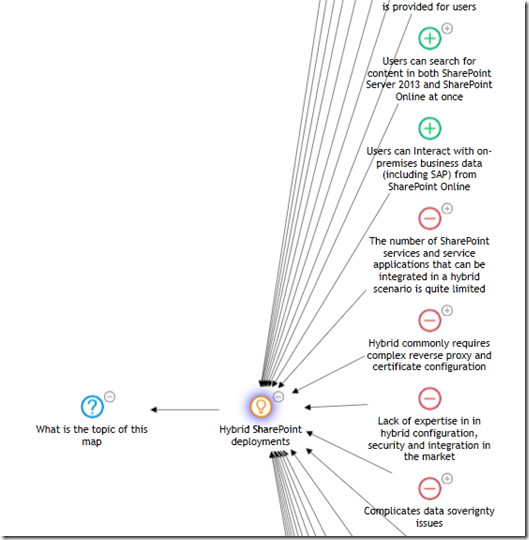
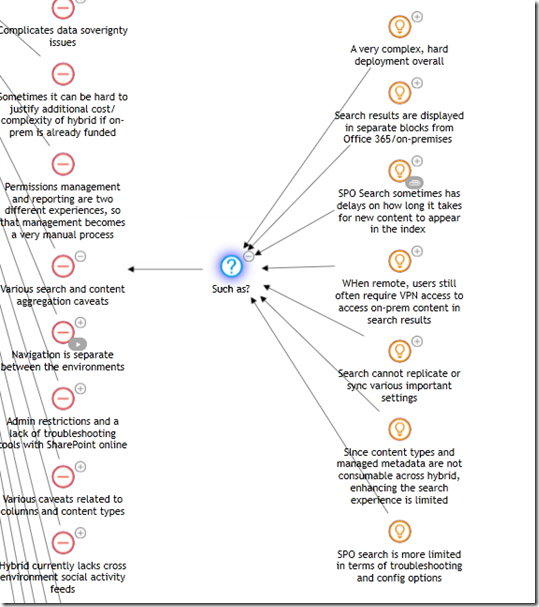
  • Finally, the suggestion "If you need to build something, do it in a feature, staple the feature and deploy it in a solution" is in fact one of those "bundled" statements that I mentioned before. Here, Joel is making a supporting argument that there are alternatives, and goes onto suggest an alternative. I captured that in IBIS by breaking up the statement "If you need to build something, do it in a feature, staple the feature and deploy it in a solution" into the supporting argument (pro) "There are easier alternatives", followed up by a question "Such as" and the idea of using stapled features packaged as solutions.

Objectification is the name of the game!

Now step back and take a look at what we have done here. We have two major advantages over the original statement.

Firstly, participants now do not have to read a potentially convoluted set of paragraphs where the question being answered is subject to interpretation. The issue map above is simple to read, logical and easy to understand. Secondly, and most critically, I have objectified the whole thing. When you look at this map, it is pretty hard to get all fired up and defensive at it, because the root question that I placed onto the map is in effect, calling for ideas, of which Joel’s is simply one of those ideas.

Cool huh? Shall we do some more Issue Mapping?

Back to the map…

Here is Joel’s next 3 statements and the updated map

Ok so it’s easier to modify an existing site definition.  WRONG Answer!  You just broke the out of the box product and you will have a hard time getting support.  Maybe the dev support people will help you, but poor customer.  Poor support.  Poor everyone who has to pay to try to undo what’s taken place.

Don’t modify the out of the box site definitions unless you are following some MSDN article…  Even then, make sure there is no other way and you know what you are doing so you can back it out.  Always back it up.  You may even consider backing it up to disk so you’ve got it for later.

I had to listen to customers crying about what consultants came in and did to their environments in the name of "Good SharePoint Development."  If you can, leave the site def alone, and package up your code so it can be added and later removed or replaced at least.

If you look at the map below, all I have done is reworded Joel’s idea and added a single additional supporting argument. Seems to me that the above three statements were really saying the same thing, that modifying the out of the box site definitions are unsupported by Microsoft. The rest of the arguments still fit within the first four that I captured previously.

image

I need someone to give me a list of reasons WHY you need to mess around with the site definitions.  I’ve had a couple of devs take me up on it, but I still think it’s WAY better if you just leave it alone and pretend like you can’t.  It will keep you honest and it will make upgrade and support TONS easier.

You’ve recently seen me in favour of client side code running server side elsewhere.  That’s great.  See if you can take things to a higher level and go with a zero server footprint deployment.  Or go with Off the shelf code where you get support for upgrade from an outside company with assurance.

I’m not totally against custom code, but I do want to see it thought through.

I’m sure nearly all SharePoint Dev classes have info on creating custom site definitions.  You may even have something in the certification test on them.

Any SharePoint developer can create a custom site definition, but the challenge is to see if they can fulfill those same requirements without using a custom site definition (The albatross around an admins neck).

Worried about users turning off the features?  Make an STSADM extension for provisioning your special site that activates the hidden feature.  Or consider feature stapling.  Get creative and think outside the V2 Box.  If you’re building custom site definitions on a regular basis you haven’t learned how to do things in the new world.

Now things get interesting. To me, Joel actually contradicts himself a little without realising. We started out with the premise of "Just say ‘no’ to site definitions", but here he is actually adding *more* good ideas around best practices for customising SharePoint sites and less about why you should say no to site definitions. Example?

  • "See if you can take things to a higher level and go with a zero server footprint deployment"
  • "Go with Off the shelf code where you get support for upgrade from an outside company with assurance"
  • "challenge is to see if they can fulfill those same requirements without using a custom site definition"

Remember that we now have a clear root question "What should the best practice be around SharePoint customisation?".

I also adjusted the "They are difficult to upgrade" supporting argument to "They are difficult to upgrade and support", acknowledging Joel’s "It will keep you honest and it will make upgrade and support TONS easier" comment.

Finally, Joel has actually offered us up two more alternative ideas, an STSADM extension, off-the-shelf code and he also mentioned again the option for feature stapling. I decided to capture these as separate ideas now and remove the "such as" argumentation that I previously used.

Below is my updated map that I think reflects where we are so far. 

image

If you are *really* observant, then you may wonder what the little (*) is by the "Custom STSADM extension" node on the above map. All that it means is that I have more detail in that node as shown below.

image

Below is the rest of Joel’s opening salvo

Let’s continue to talk through the trade offs of site templates, feature stapling, and site definitions.  I think this is an important discussion.  In the future I’d love to see it to not be common at all when even hard things need to happen.

Ok, so developers don’t think much about upgrade, but let’s start preaching… Can we do this without custom Site Defs without a note from the teacher that agrees to says it’s a Requirement.  On the hierarchy of Scary Customizations.  The Custom Site Def is nearly the worst.  The only ones worse are customizing the out of the box site definitions and messing with the database and adding your own triggers and "fixing" the inefficient SharePoint stored procedures.

Todd Posts  "How to Create a Custom Site Definition" , but agrees we need to minimize what we do with them (see above).  Good job Todd, my friend, you show up as #1 using keywords… custom site definition)

I do think we need to see more about "How to NOT Create a Custom Site Definition" or

You don’t need to use Site Definitions (This is AC’s Love and the discussion) please point your devs to this one.  I continue to plan to point customers and developers to that one. 

If you’re a lost developer or even one that’s looking to go through a ten step program, I recommend the Hippocratic Oath of SharePoint – First Do No Harm  (Thanks Woody).  There’s also SharePoint Dev guidance at by the Patterns & Practices Group. AC talks about it.  I’m anxious to see them provide guidance on when site definitions are necessary (yes as an IT pro, I want to see them used when features and solutions don’t do the job).

The first two paragraphs don’t really offer anything new to what has already been captured. But he then refers to Todd, Andrew and Woody’s posts. I have incorporated those URL’s into my map as reference material. If Joel had paraphrased specifically what their recommendations were, I would have created more idea or argument nodes in the map but for now, it if sufficient to simply reference those maps without linking them anywhere yet.

Remember, ideas can often "sit out there" for a while, before being worked into a cohesive issue map.

image

Conclusion

I believe that this issue map, as it stands, has captured the essence of Joel’s arguments thus far. As you might have guessed, part 5 is going to continue to dissect the site definition debate and continue to build out this issue map. As we delve deeper, the map will get frequently restructured. As a result, there will be lots of pretty map pictures. So, for all you readers who say you read playboy "just for the articles", you can stop reading this series now :-) .

Thanks for reading

Paul Culmsee

www.sevensigma.com.au


No Tags


Feb 23 2009

The one best-practice to rule them all – Part 3

Gollum the Ring (2)

This is the third post in a series that focuses on what I think is the Holy Grail of project success – particularly SharePoint projects. Like everybody else, I am a product of my experiences, and one of these experiences was a project that included one of my greatest career teachers – "SharePoint-vs-Skype guy". If you have not yet heard of this luminary of SharePoint folklore, then I suggest you go back to Part 1 of this series and start there. Starting here at part 3 really makes no sense at all…seriously.

I’ve spent two posts explaining my so-called journey to enlightenment and in part 2 of this series, I made the assertion that the *true* root cause of failed projects is usually a lack of shared understanding (and therefore shared commitment) among project participants. This root cause is often misdiagnosed because it is reflected in more visible symptoms such as scope creep, vague/incomplete requirements, mismatched expectations and general all-round unpleasantness. I also spoke about my journey toward "problem fundamentalism", where I have come to believe very strongly that if you can achieve and maintain that illusive "shared understanding" of a problem among participants, then the actual process that you adopt to implement the solution really doesn’t matter that much. In essence I am echoing the inventor Charles F. Kettering when he once said

A problem well stated is a problem half solved.

Let’s now turn our attention to the "how" of shared understanding.

"Inappropriate methods"

Rittel and Conklin say that many groups fail to recognise that they are dealing with a wicked problem, or a problem that has taken on wicked tendencies. As a result, they apply inappropriate methods to deal with them. There are a few reasons for this, but two major ones stick out in my mind.

The first reason is the "unconscious incompetency" factor, which is training speak for "you do not know what you do not know". In other words, if you have never heard of wicked problems and their nature, how are you supposed to know how best to deal with them? Thus, like any other form of enlightenment, you have to move from unconsciously incompetent to consciously incompetent (you now know that you do not know) before anything else. This series of posts hopefully is doing the trick here.

The second reason is that the visible signs of wickedness manifest themselves as scope creep, incomplete requirements, wheel reinventing and the like. Since I have already asserted that these are actually symptoms and not the true root cause, the usual methods used to try and deal with them are treating those *symptoms* and not the true cause. At the very least, traditional techniques are inappropriate and at the very worst, they are going to make things significantly worse!

Jeff Conklin recently said this about shared commitment:

The ‘Holy Grail’ of effective collaboration is creating shared understanding, which is a precursor to shared commitment. If you accept that the crux of effective action is agreeing on what the problem is, then the challenge for organizations is coming to a shared understanding about what their particular dilemma is. Plenty has been written about how to get people ‘on board’ and create buy-in for a strategy; but the business of how to craft shared understanding – a deep and robust understanding of the circumstances – hasn’t been well understood. Shared understanding means that the stakeholders understand each other’s positions well enough to have intelligent dialogue about their different interpretations of the problem, and to exercise collective intelligence about how to solve it.

With Jeff’s quote in mind, let’s take a look at these traditional techniques and see how guilty we all are of using them :-) .

It’s the process stupid!

It is almost universal to blame all of the world’s faults on "process". I went through this line of thinking as I was off in my "theory cave", trying to make sense of "SharePoint vs Skype" guy and other mysteries of life. What logically follows from this is usually the implementation of some sort of best-practice methodology, in the guise of program or project management office. This in turn creates a lot of extra rigour around the activities and processes around *solving* problems. Don’t get me wrong. Process, structure and consistency are actually critical, but problem wickedness and shared understanding are in the *sensemaking* space. The problem is that most best-practice standards and methodologies are very much focused in the *solution space* and tend to work on a presumption of more shared understanding than is actually the case. Again, this is due to the focus on treating the symptoms of problem wickedness. For example: "You have a scope change? Well, let’s fill out a change request form then".

As a result, the whole sensemaking half of the puzzle is entirely missing!

CleverWorkarounds’ Hindsight Rating: This is why a lot of SharePoint governance plans and information architecture exercises are misfocused or simply miss the point.

Nail the scope, baby!

The other common way to try and tame things is to restrict or lock down the scope. I’m sure all readers have engaged in this. The idea being that if we solve this smaller, more constrained bit of the problem, we can then solve the harder bits later. The great flaw in this logic is exposed once you understand the symbiotic relationship between problems and their solutions that I spoke about in part 2. To recap, each time you think of a potential solution, you will always have an effect on your understanding of the problem. This was Rittel’s first characteristic of a wicked problem and it fed the endless loop of the second wicked problem characteristic – the "no stopping rule". Therefore, by restricting scope and implementing a smaller subset, you will likely significantly change the understanding of the problem among the participants to the point where you can be in an even more fragmented position than you were in the first place.

In other words, the goalposts have moved in the meantime and the scope is no longer relevant. Stakeholders with hindsight question the very logic of that original scope restriction!

CleverWorkarounds’ Hindsight Rating: It’s so easy in hindsight :-)

The umpire is always right, right?

Sometimes a group will become so fragmented in their understanding of a problem and therefore become completely polarised on the various solutions. The positions become so intractable for some that even to talk about other options, gives those options more credence than deserved. For example, to an ardent mac or linux fanboy, Microsoft are so evil and nasty that you should not use their products like … ever, dude!

When this occurs, usually after a long, arduous and spiteful process of trying to reach consensus, parties will often give the problem to a "higher source" and agree to abide by their decision. This could be your mother, the CEO, or the International Court of Justice in the Hague. The point is that the decision process is transferred from many to a few. In doing so, we rely on the knowledge, expertise and authority of that higher source.

This does tend to speed things along because when buried in the mud of analysis paralysis (symptom of endless looping between problem and solution), the desire to "shut-up and make a decision already" can be very strong. The tradeoff with this approach however, is that the decision makers themselves are inherently subjective and may disregard what some see as critical considerations. Since this is a win/lose proposition, stakeholders can become disenfranchised and although the decision has been made, there is no true shared commitment to implementing that decision.

CleverWorkarounds’ Hindsight Rating: If there is no shared commitment then it doesn’t matter how technically valid the solution is. It’s still dead.

Selling Ice to Eskimos

Many organisations (and in particular, governments) use a competition based method to deal with complex problems. Just like the previous example with entrenched, seemingly intractable positions, outcome will be determined by the forces of competition. The theory is that the best ideas will stand up to scrutiny and rigour and via a process of natural selection, the best will survive.

This method of competition between potential solutions, and the stakeholders that propose them actually has some distinct benefits. For example, it can foster innovation, sharpen the sensemaking focus of participants and provide good solution choices.

Unfortunately, as with all forms of competition, someone has to lose, and as a result, people do not always like to play fair. Whether it is Olympic athletes drugging themselves with steroids or certain corporations taking illegal advantage of their dominant market position, competition is often a very dirty game. A great case in point is the debate around Intelligent Design. It is argued by some that intelligent design is a scientific theory and should be taught in schools. But critics argue that the concept is simply an ingenious way to get around the 1987 US Supreme court ruling that creationism based science being taught in science in public schools violated the constitution, because it advanced a particular religion. Whether the latter view is right or not, it is still a great case study in how the rules of the game can be manipulated.

CleverWorkarounds’ Hindsight Rating: Marketing has a lot to answer for!

The paradox of shared understanding

Given that complex problems have a lot of interlocking and multi-causal factors, combined with the social complexity of multiple stakeholders with different world views, is it any wonder that traditional methods of reining in haywire projects are largely ineffectual? Traditional thinking across many disciplines suggests that problem solving is a linear process. Whether you are trying to work out where to put a freeway offramp or install a SharePoint internet site, the process would usually start by defining the problem, gathering data, analysing that data and then planning and implementation of the solution. Call it "waterfall", or the "scientific method" or whatever, this approach has been around since… forever.

I wrote in more detail about the perils of waterfall in the project fail series in the section "how we really solve problems".

But here is the problem with that approach. Those complex, interlocking issues and social complexity cause significant differences in opinion on the best solution, yet we need all of the diverse views to really gain a true, deep understanding of the problem and obtain the critical shared commitment that we need. The "no stopping rule" means that it is exceedingly difficult to determine when participants have *sufficiently* defined the problem, gathered data or formulated a solution.

So, how can we reconcile this paradox?

Is it possible to have a holistic, systems approach to examining the deep structure of an issue, that somehow allows us all to see the illusive big picture, without the inefficiency of "analysis paralysis" and the endless loop of the "no stopping rule"? (not to mention and the other nine characteristics of wickedness that Rittel identified). How can we, as a diverse group of stakeholders, fully explore a problem and gain the deep understanding of an issue without social complexity and those wicked factors derailing everything?

This is a question that Horst Rittel spent a lot of time thinking about and by 1970, had developed a potential answer. In part 4 I will tell you what his answer was and what it has now become, thanks to Jeff Conklin.


Thanks for reading

Paul Culmsee

No Tags


Feb 21 2009

Functional consultants vs *great* functional consultants

Kristian Kalsing was written a really terrific post, not just because he quoted yet another bloody international standard that I will have to now read (ISO15489). But because, drawing on his experiences of the world of SAP, he has observed that there are some important lessons that can be learned for SharePoint engagements. SAP (okay, well Basis anyway) is a world that I experienced way back in 1999 and, boy, can I write some stories about social complexity and project failure about that era!

Kristian observes that on SAP projects, the roles of consultants are typically very clearly defined and discipline based. For example, there are infrastructure (Basis) consultants, developers and functional consultants. Even within functional consultants, there are sub-disciplines of expertise. (Hope you don’t mind me quoting you Kristian).

The point is that the consultant configuring the finance module is basically an accountant and the consultant configuring the HR module probably studied human resources at university. In the SAP world, it would be absurd to take someone who has configured materials management or plant maintenance with one client and ask them to configure HR with the next. In SAP, the specialisation does not stop with the functional areas of the product. There are also functional consultants building up experience in certain industries. E.g. supply chain management can be very different when talking coal mining compared to running supermarkets.

Kristian observed that this notion of functional consultants does not occur in the SharePoint world. However, he qualifies this by observing that SAP is much bigger than SharePoint and therefore a direct comparison is "bit of a stretch", yet lessons can be learned. On the ‘bigger’ point I actually disagree and think that the context of ‘bigger’ is relative (and I look forward to Kristians’ opinion on my take). SAP and ERP systems are massively bigger and more complex than SharePoint – without a doubt. SharePoint may not be as big as SAP in terms of feature-set and complexity, but it can actually be just as big as an ERP system in terms of the impact on the day-to-day workings of staff.

To paint a gross generalisation, with an ERP system, often all that many end-users will ever see is a system to enter their time-sheets and perhaps perform some HR functions such as apply for leave or check pay-slips. Not everyone directly sees or interacts with, say, financials, plant maintenance and the like. But you can be pretty damn sure that everyone saves files to G:\ drive on a daily basis. (Substitute whatever your drive letter is that represents your jungle that is the file system).

More staff = more social diversity = more differing opinions = more complexity = bigger scope = more options = even bigger scope = wicked problem

Therefore, it is not a case that "lessons can be learned from the SAP world", but it is a case of "lessons should be learned from the SAP world".

But here is one additional (admittedly subjective) point to consider.

ERP systems have a really bad failure rate. Does the fact that there are discipline specific functional consultants involved really hold the key to project success?

Don’t get me wrong. I think that SharePoint functional consultants are a critical piece of the puzzle and, by god, the world can do without Microsoft gold partners throwing one of their "technical" people at what is essentially a project with a huge training and advisory component. But succeeding in SharePoint – or any other discipline involving complexity and a large diversity of stakeholders, goes deeper than that.

The difference between a "functional consultant" and a "great functional consultant" is not only domain specific knowledge. It is the art of helping diverse stakeholders to disentangle complex problems from a cluttered maze of overlapping issues, the moving target of requirements into an environment where all participants have a shared understanding.

I’ll have more to say about this as I delve deeper into the "One best practice…" series.


Thanks for reading

Paul Culmsee

No Tags


Feb 15 2009

The one best practice to rule them all – Part 2

image

Hi all

This is part of a somewhat self-indulgent story of how I came to practice a craft that has made a profound difference on how I approach and manage SharePoint projects. If you have not read part 1, then I suggest you stop now and read that first. This post will really not make a lot of sense, otherwise :-) .

In my last exciting instalment, I had concluded with the time where I discovered the term "Wicked problems" and the work of Horst Rittel, who coined the term. In his landmark 1973 paper, Rittel identified ten common characteristics of wicked problems. I remember quite distinctly, reading through that list for the first time, having this strange sense of relief. Of the characteristics, most of them had *clearly* manifested in my SharePoint-gone-haywire project. The relief stemmed from the fact that it was a recognised phenomena with a tendency to defy traditional problem solving techniques. The characteristics with which I immediately identified are marked in bold below.

  1. There is no definitive formulation of a wicked problem.
  2. Wicked problems have no stopping rule.
  3. Solutions to wicked problems are not true-or-false, but better or worse.
  4. There is no immediate and no ultimate test of a solution to a wicked problem.
  5. Every solution to a wicked problem is a "one-shot operation"; because there is no opportunity to learn by trial-and-error, every attempt counts significantly.
  6. Wicked problems do not have an enumerable (or an exhaustively describable) set of potential solutions, nor is there a well-described set of permissible operations that may be incorporated into the plan.
  7. Every wicked problem is essentially unique.
  8. Every wicked problem can be considered to be a symptom of another problem.
  9. The existence of a discrepancy representing a wicked problem can be explained in numerous ways. The choice of explanation determines the nature of the problem’s resolution.
  10. The planner has no right to be wrong (planners are liable for the consequences of the actions they generate).

But the real clincher – the moment that made me realise that my frustrating journey through standards, methodologies and best practices was finally coming to an end was the 5th characteristic. "Every solution to a wicked problem is a "one -shot operation". When I read that one, it was as if my famous "Skype-vs-SharePoint" guy suddenly materialised in front of me and mooned me saying over and over again "I can collaborate on Skype, too!"

For those of you who skipped part 1 despite warnings, "We only have one shot at this" was pretty much a word-for-word quote on what was said to me in the haywire project that started all of this.

Is it any surprise that I felt I was onto something here?

Digging deeper

When I read Rittel’s 1973 paper, I began to get a deeper understanding of what he meant by his first two characteristics that I didn’t immediately identify with. Namely "there is no definitive formulation of a wicked problem" and "wicked problems have no stopping rule".

I soon realised that these two characteristics were actually the most *prevalent* characteristics of complex IT projects and therefore, the list was even *more* relevant to me than I had originally thought. After that, I was a convert. Rittel explained the first characteristic as follows…

The information needed to understand the problem depends upon one’s idea for solving it. That is to say: In order to describe a wicked-problem in sufficient detail, one has to develop an exhaustive inventory of all conceivable solutions ahead of time. The reason is that every question asking for additional information depends upon the understanding of the problem–and its resolution–at that time. Problem understanding and problem resolution are concomitant to each other.

The second characteristic, "no stopping rule", is a natural consequence of the above issue. Again, quoting Rittel from 1973…

Because (according to Proposition 1) the process of solving the problem is identical with the process of understanding its nature, because there are no criteria for sufficient understanding [...] , the would-be planner can always try to do better. Some additional investment of effort might increase the chances of finding a better solution.

Skype-vs-SharePoint guy, who now has the credit of being one of the most significant unwitting teachers of my career, went from not knowing any difference between SharePoint and Skype, to suggesting work items that already existed in the project plan, to telling us how we should build our information architecture based on 1990’s era document management systems. It was crystal clear that he went through this iterative process of changing his understanding of the problem based on how much thought he had put into the solution.

The sad fact was that Skype-vs-SharePoint guy was not unique. He might have been an extreme case, but in reality, he was simply the latest in a long line of users and stakeholders who I would have previously dismissed as idiots, computer illiterate or just plain tossers. Is it any wonder why we have the scourge of "scope creep" and "vague and incomplete requirements" that are so commonly cited as project failure factors? How many times have you banged your head against the wall thinking "How can we build a system when they don’t know what they want!"?

Problem fundamentalism

So in a way, we, as solution architects, developers and consultants, are just as much at fault as those users who we chastise because they "don’t know what they want". Why? We fail to recognise or account for the immutable fact that understanding of a problem is not cut-and-dry. It almost certainly will change over time as people mull over, work through, learn from and grapple with the nature of a problem and the complexities of the interlocking issues that form the problem. To make matters worse, we all do this *individually* and at *different speeds* with *different value sets*. Inevitably, we arrive at different conclusions based on different paths we take on making sense of it all.

That cyclical nature of understanding the problem, based on understanding the solution, does not automatically stop once the scope document has been signed off, either. It will continue over and over again as a perfectly natural part of the learning process. With that in mind, consider all of the studies that have looked into factors causing project failure (uncle google shows up many studies). All of the usual suspects are there. For example…

  • Scope creep
  • Incomplete requirements
  • Unclear objectives
  • Lack of user involvement
  • Unrealistic or overly optimistic time frames
  • Lack of resources

blah…blah…blah – I am sure that you have seen these before.

If you accept Rittel’s assertion that the problem and the solution are intertwined and concomitant, then it is clear that the sorts of factors listed above are merely *symptoms*, not causes. *Of course* there are incomplete requirements and scope creep. There would have to be incomplete requirements and scope creep almost by *definition* for a complex project. For a long time I had instinctively felt this way, but I couldn’t quite put my finger on it… until SharePoint-vs-Skype guy, Horst Rittel and Jeff Conklin showed me the way.

At the end of the day, it all boils down to this:

Projects fail principally because there is a lack of *shared understanding* among the participants of that project. Additionally, shared understanding is a prerequisite before the key thing that makes or breaks a project – shared commitment.

image

(Stunned silence … Paul hears pin drop)

I can imagine some reader comments at this point:

  • "Big $%#$ deal, tell me something I don’t know".
  • "What the….you made me read through one and a half blog posts for *that*?"
  • "So what theory-boy, tell me *how* to actually develop shared understanding"
  • "Paul can you tell me the difference between SharePoint and Twitter?" :-)

To be fair, I think most people know instinctively that a lack of shared understanding is the major cause of projects being comatose before they barely got off the ground. But if it was so obvious why does scope continue to creep? Why are objectives still unclear? And, why are requirements and specifications incomplete? To answer that, we need to turn the "shared understanding" assertion around and ask it in this way.

Let’s suspend reality and just assume for a minute that all participants have an *identical* deep and tacit understanding of a really complex problem. Would we still have the incomplete requirements, unclear objectives, scope creep, unrealistic time frames that are cited as project failure factors?

I say "no" from a philosophical standpoint, but a "Well, yes… but much less than what normally happens" from a pragmatic standpoint.

Thus, I started to look at my SharePoint engagements through different eyes and became what I now think should be called a "problem fundamentalist". I began to believe that if you could achieve the utopian dream of complete shared understanding among participants at the very start of a project, then really, you could use any methodology you like to actually manage the problem and implement the solution. The common factors of project failure would fall drastically.

So finally for now, is it simply just a matter of dealing with the little question of *how* to actually achieve this goal of shared understanding?

We will talk about that in part 3…


Thanks for Reading

Paul Culmsee

No Tags


Next Page »

Today is: Tuesday 16 March 2010 |