Oh man, it’s just not my week. After nailing a certificate issue yesterday that killed user profile provisioning, I get an even better one today! I’ve posted it here as a lesson on how not to troubleshoot this issue!
The symptoms:
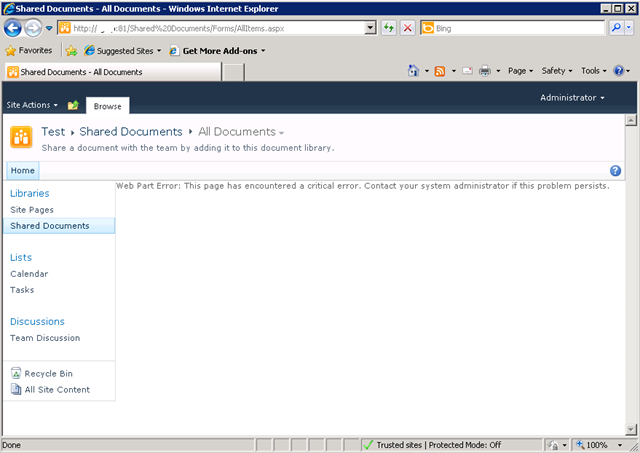
I created a brand new web application on a SP2010 farm, and irrespective of the site collection I subsequently create, I get the dreaded error "Web Part Error: This page has encountered a critical error. Contact your system administrator if this problem persists"
Below is a screenshot of a web app using the team site template. Not so good huh?
The swearing…
So faced with this broken site, I do what any other self respecting SharePoint consultant would do. I silently cursed Microsoft for being at the root of all the world’s evils and took a peek into that very verbose and very cryptic place known as the ULS logs. Pretty soon I found messages like:
0x3348 SharePoint Foundation General 8sl3 High DelegateControl: Exception thrown while building custom control ‘Microsoft.SharePoint.SPControlElement’: This page has encountered a critical error. Contact your system administrator if this problem persists. eff89784-003b-43fd-9dde-8377c4191592
0x3348 SharePoint Foundation Web Parts 7935 Information http://sp:81/default.aspx – An unexpected error has been encountered in this Web Part. Error: This page has encountered a critical error. Contact your system administrator if this problem persists.,
Okay, so that is about as helpful as a fart in an elevator, so I turned up the debug juice using that new, pretty debug juicer turner-upper (okay, the diagnostic logging section under monitoring in central admin). I turned on a variety of logs at different times including.
- SharePoint Foundation Configuration Verbose
- SharePoint Foundation General Verbose
- SharePoint Foundation Web Parts Verbose
- SharePoint Foundation Feature Infrastructure Verbose
- SharePoint Foundation Fields Verbose
- SharePoint Foundation Web Controls Verbose
- SharePoint Server General Verbose
- SharePoint Server Setup and Upgrade Verbose
- SharePoint Server Topology Verbose
While my logs got very big very quickly, I didn’t get much more detail apart from one gem,to me, seemed so innocuous amongst all the detail, yet so kind of.. fundamental 🙂
0x3348 SharePoint Foundation Web Parts emt7 High Error: Failure in loading assembly: Microsoft.SharePoint, Version=12.0.0.0, Culture=neutral, PublicKeyToken=b03f5f7f11d50a3a eff89784-003b-43fd-9dde-8377c4191592
That rather scary log message was then followed up by this one – which proved to be the clue I needed.
0x3348 SharePoint Foundation Runtime 6610 Critical Safe mode did not start successfully. This page has encountered a critical error. Contact your system administrator if this problem persists. eff89784-003b-43fd-9dde-8377c4191592
It was about this time that I also checked the event logs (I told you this post was about how not to troubleshoot) and I saw the same entry as above.
Log Name: Application
Source: Microsoft-SharePoint Products-SharePoint Foundation
Event ID: 6610
Description:
Safe mode did not start successfully. This page has encountered a critical error. Contact your system administrator if this problem persists.
I read the error message carefully. This problem was certainly persisting and I was the system administrator, so I contacted myself and resolved to search google for the “Safe mode did not start successfully” error.
The 46 minute mark epiphany

If you watch the TV series “House”, you will know that House always gets an epiphany around the 46 minute mark of the show, just in time to work out what the mystery illness is and save the day. Well, this is the 46 minute mark of this post!
I quickly found that others had this issue in the past, and it was the process where SharePoint checks web.config to process all of the controls marked as safe. If you have never seen this, it is the section of your SharePoint web application configuration file that looks like this:
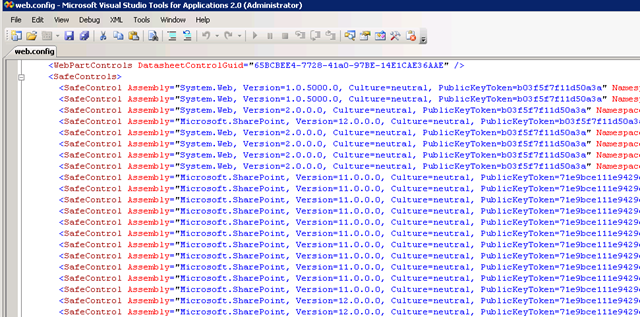
This particular version of the error is commonly seen when people deploy multiple servers in their SharePoint farm, and use a different file path for the INETPUB folder. In my case, this was a single server. So, although I knew I was on the right track, I knew this wasn’t the issue.
My next thought was to run the site in full trust mode, to see if that would make the site work. This is usually a setting that makes me mad when developers ask for it because it tells me they have been slack. I changed the entry
<trust level="WSS_Minimal" originUrl="" />
to
<trust level="Full" originUrl="" />
But to no avail. Whatever was causing this was not affected by code access security.
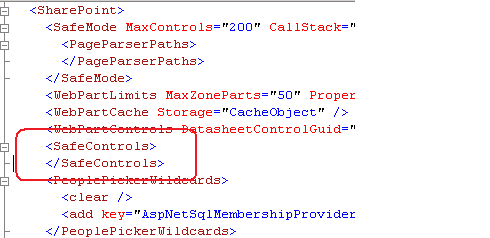
I reverted back to WSS_Minimal and decided to remove all of the SafeControl entries from the web.config file, as shown below. I knew the site would bleat about it, but was interested if the “Safe Mode” error would go away.
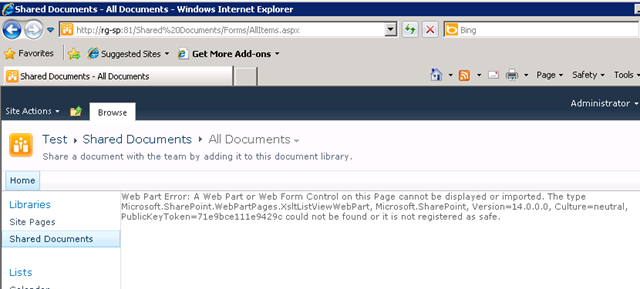
The result? My broken site was now less broken. It was still bitching, but now it appeared to be bitching more like what I was expecting.
After that, it was a matter of adding back the <safecontrol> elements and retrying the site. It didn’t take long to pinpoint the offending entry.
<SafeControl Assembly="Microsoft.SharePoint, Version=12.0.0.0, Culture=neutral, PublicKeyToken=b03f5f7f11d50a3a" Namespace="Microsoft.SharePoint.WebPartPages" TypeName="ContentEditorWebPart" Safe="False" />
As soon as I removed this entry the site came up fine. I even loaded up the content editor web part without this entry and it worked a treat. Therefore, how this spurious entry got there is still a mystery.
The final mystery
My colleague and I checked the web.config file in C:\Program Files\Common Files\Microsoft Shared\Web Server Extensions\14\CONFIG. This is the one that gets munged with other webconfig.* files when a new web application is provisioned.
Sure enough, its modified date was July 29 (just outside the range of the SharePoint and event logs unfortunately). When we compared against a known good file from another SharePoint site, we immediately saw the offending entry.
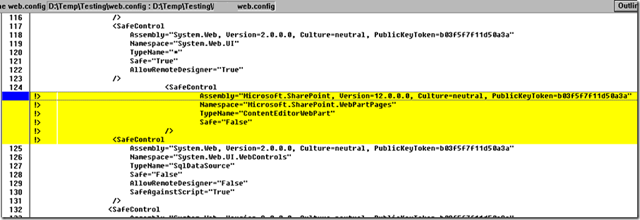
The solution store on this SharePoint server is empty and no 3rd party stuff to my knowledge has been installed here. But clearly this file has been modified. So, we did what any self respecting SharePoint consultant would do…
…we blamed the last guy.
Thanks for reading
Paul Culmsee
www.sevensigma.com.au