Back to Cleverworkarounds mainpage
 

Jan 16 2012

Why can’t users find stuff on the intranet? An IBIS synthesis–Part 4

Hi and welcome to my final post on the linkedin discussion on why users cannot find what they are looking for on intranets. This time the emphasis is on synthesis… so let’s get the last few comments done shall we?

Michael Rosager • @ Simon. I agree.
Findability and search can never be better than the content available on the intranet.
Therefore, non-existing content should always be number 1
Some content may not be published with the terminology or language used by the users (especially on a multilingual intranet). The content may lack the appropriate meta tags. – Or maybe you need to adjust your search engine or information structure. And there can be several other causes…
But the first thing that must always be checked is whether they sought information / data is posted on the intranet or indexed by the search engine.

Rasmus Carlsen • in short:
1: Too much content (that nobody really owns)
2: Too many local editors (with less knowledge of online-stuff)
3: Too much “hard-drive-thinking” (the intranet is like a shared drive – just with a lot of colors = a place you keep things just to say that you have done your job)

Nick Morris • There are many valid points being made here and all are worth considering.
To add a slightly different one I think too often we arrange information in a way that is logical to us. In large companies this isn’t necessarily the same for every group of workers and so people create their own ‘one stop shop’ and chaos.
Tools and processes are great but somewhere I believe you need to analyse what information is needed\valued and by whom and create a flexible design to suit. That is really difficult and begins to touch on how organisations are structured and the roles and functions of employees.

Taino Cribb • Hi everyone
What a great discussion! I have to agree to any and all of the above comments. Enabling users to find info can definately be a complicated undertaking that involves many facets. To add a few more considerations to this discussion:
Preference to have higher expectations of intranet search and therefore “blame” it, whereas Google is King – I hear this too many times, when users enter a random (sometimes misspelled) keyword and don’t get the result they wish in the first 5 results, therefore the “search is crap, we should have Google”. I’ve seen users go through 5 pages of Google results, but not even scroll down the search results page on the intranet.
Known VS Learned topics – metadata and user-tagging is fantastic to organise content we and our users know about, but what about new concepts where everyone is learning for the first time? It is very difficult to be proactive and predict this content value, therefore we often have to do so afterwards, which may very well miss our ‘window of opportunity’ if the content is time-specific (ie only high value for a month or so).
Lack of co-ordination with business communications/ training etc (before the fact). Quite often business owners will manage their communications, but may not consider the search implications too. A major comms plan will only go so far if users cannot search the keywords contained in that message and get the info they need. Again, we miss our window if the high content value is valid for only a short time.
I very much believe in metadata, but it can be difficult to manage in SP2007. Its good to see the IM changes in SP2010 are much improved.

Of the next four comments most covered old ground (a sure sign the conversation is now fairly well saturated). Nick says he is making a “a slightly different” point, but I think issues of structure not suiting a particular audience has been covered previously. I thought Taino’s reply was interesting because she focused on the issue of not accounting for known vs. learned topics and the notion of a “window of opportunity” in relation to appropriate tagging. Perhaps this reply was inspired by what Nick was getting at? In any event, adding it was a line call between governance and information architecture and for now, I chose the latter (and I have a habit of changing my mind with this stuff :-) .
image_thumb[12]

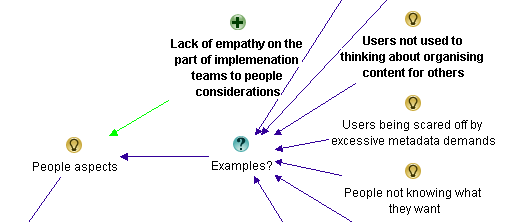
I also liked Taino’s point about user expectations around the “google experience” and her examples. I also loved earlier Rasmus’s point about “hard-drive thinking” (I’m nicking that one for my own clients Rasmus Smile). Both of these issues are clearly people aspects, so I added them as examples around that particular theme.
image_thumb[14]

Finally, I added Taino’s “lack of co-ordination” comments as another example of inadequate governance.

image_thumb[18]

Anne-Marie Low • The one other thing I think missing from here (other than lack of metadata, and often the search tool itself) is too much content, particularly out of date information. I think this is key to ensuring good search results, making sure all the items are up to date and relevant.

Andrew Wright • Great discussion. My top 3 reasons why people can’t find content are:
* Lack of meta data and it’s use in enabling a range of navigation paths to content (for example, being able to locate content by popularity, ownership, audience, date, subject, etc.) See articles on faceted classification:
http://en.wikipedia.org/wiki/Faceted_classification
and
Contextual integration
http://cibasolutions.typepad.com/wic/2011/03/contextual-integration-how-it-can-transform-your-intranet.html#tp
* Too much out-of-date, irrelevant and redundant information
See slide 11 from the following presentation (based on research of over 80 intranets)
http://www.slideshare.net/roowright/intranets2011-intranet-features-that-staff-love
* Important information is buried too far down in the hierarchy
Bonus 2 reasons :-)
* Web analytics and measures not being used to continuously improve how information is structured
* Over reliance on Search instead of Browsing – see the following article for a good discussion about this
Browse Versus Search: Stumbling into the Unknown
http://idratherbewriting.com/2010/05/26/browse-versus-search-organizing-content-9/

Both Anne and Andrew make good points and Andrew supplies some excellent links too, but all of these issues have been covered in the map so nothing more has been added from this part of the discussion.

Juan Alchourron • 1) that particular, very important content, is not yet on the intranet, because “the” director don’t understand what the intranet stands for.
2) we’re asuming the user will know WHERE that particular content will be placed on the intranet : section, folder and subfolder.
3) bad search engines or not fully configured or not enough SEO applied to the intranet

John Anslow • Nowt new from me
1. Search ineffective
2. Navigation unintuitive
3. Useability issues
Too often companies organise data/sites/navigation along operational lines rather than along more practical means, team A is part of team X therefore team A should be a sub section of team X etc. this works very well for head office where people tend to have a good grip of what team reports where but for average users can cause headaches.
The obvious and mostly overlooked method of sorting out web sites is Multi Variant Testing (MVT) and with the advent of some pretty powerful tools this is no longer the headache that it once was, why not let the users decide how they want to navigate, see data, what colour works best, what text encourages them to follow what links, in fact how it works altogether?
Divorcing design, usability, navigation and layout from owners is a tough step to take, especially convincing the owners but once taken the results speak for themselves.

Most of these points are already well discussed, but I realised I had never made a reference to John’s point about organisational structures versus task based structures for intranets. I had previously captured rationale around the fact that structures were inappropriate, so I added this as another example to that argument within information architecture…

image

Edwin van de Bospoort • I think one of the main reasons for not finding the content is not poor search engines or so, but simply because there’s too much irrelevant information disclosed in the first place.
It’s not difficult to start with a smaller intranet, just focussing on filling out users needs. Which usually are: how do I do… (service-orientated), who should I ask for… (corporate facebok), and only 3rd will be ‘news’.
So intranets should be task-focussed instead if information-focussed…
My 2cnts ;)

Steven Kent • Agree with Suzanne’s suggestion “Old content is not deleted and therefore too many results/documents returned” – there can be more than one reason why this happens, but it’s a quick way to user frustration.

Maish Nichani • It is interesting to see how many of us think metadata and structure are key to finding information on the intranet. I agree too. But come to think of it, staff aren’t experts in information management. It’s all very alien to them. Not too long ago, they had their desktops and folders and they could find their information when they wanted. All this while it was about “me and my content”. Now we have this intranet and shared folders and all of a sudden they’re supposed to be thinking about how “others” would like to find and use the information. They’ve never done this before. They’ve never created or organized information for “others”. Metadata and structure are just “techie” stuff that they have to do as part of their publishing, but they don’t know why they’re doing it or for what reason. They real problem, in my opinion, is lack of empathy.

Barry Bassnett • * in establishing a corporate taxonomy.1. Lack of relevance to the user; search produces too many documents.3. Not training people in the concept that all documents are not created by the individual for the same individual but as a document that is meant to be shared. e.g. does anybody right click PDFs to add metadata to its properties? Emails with a subject line stat describe what is in it.

Luc de Ruijter • @Maish. Good point about information management.
Q: Who’d be responsible to oversee the management of information?
Shouldn’t intranet managers/governors have that responsibility?
I can go along with (lack of) empathy as an underlying reason why content isn’t put away properly. This is a media management legacy reason: In media management content producers never had to have empathy with participating users, for there were only passive audiences.
If empathy is an issue. Then it proves to me that communication strategies are still slow to pick up on the changes in communication behaviour and shift in mediapower, in the digital age.
So if we step back from technological reasons for not finding stuff (search, meta, office automation systems etc.) another big reason looks around the corner of intranet management: those responsible for intranet policies and strategy.

Most of this discussion covers stuff already represented in the map, although I can see that in this part of the conversation there is a preoccupation with content and its relevance. Maish also makes a couple of good points. First up he makes the point that staff are not experts in information management and don’t tend to think about how someone else might wish to find the information later. He also concludes by stating the real problem is a lack of empathy. I liked this and felt that this was a nice supporting argument to the whole conjecture that “people issues” is a major theme in this discussion, so I added it as a pro.

image


Now we have an interesting bit in the conversation (for me anyway). Terry throws a curveball question. (Side note: Curveball questions are usually asked with genuine intent, but tend to have a negative effect on live meetings. Dialogue Mapping loves curveball questions as it is often able to deflect its negative impacts).

Terry Golding • Can I play devils advocate and ask WHY you feel meta data is so vital? Dont misunderstand me I am not saying that it is not important, but I cant help feeling that just saying meta data as a reason for not finding things is rather a simplification. Let me ask it another way, what is GOOD meta data, can you give examples please ?

Luc de Ruijter • @Terry. Good questions which can have many answers (see all comments above where you’ll find several answers already). Why do library books have labels on their covers? Those labels are in fact metadata (avant la lettre) which help library people ordering their collection, and clients to find titles. How do you create tag clouds which offer a more intuitive and user centered way to navigate a website/blog? By tagging all content with (structured) meta tags.Look around a bit and you’ll see that metadata are everywhere and that they serve you in browsing and retrieving content. That’s why metadata are vital these days.I think there are no strict right and good meta structures. Structures depend on organisational contexts. Some metastructures are very complex and formal (see comments about taxonomies above), others are quite simple.Metadata can enable users to browse information blocks. By comparisson navigation schemes can only offer rigid sender driven structures to navigate to pages.

Andrew Wright • @Terry. Meta data enables content to be found in a number of different ways – not just one as is typical of paper based content (and many intranets as well unfortunately).
For instance, if you advertise a house for sale you may have meta data about the house such as location, number of rooms and price. This then allows people to locate the house using this meta data (eg. search by number of bedrooms, price range, location). Compare this with how houses are advertised in newspapers (ie. by location only) and you can see the benefits of meta data.
For a good article about the benefits of meta data, read Card Sorting Doesn’t Cut the Custard:
http://www.zefamedia.com/websites/card-sorting-doesnt-cut-the-custard/
To read a more detailed example about how meta data can be applied to intranets, read:
Contextual integration: how it can transform your intranet
http://cibasolutions.typepad.com/wic/2011/03/contextual-integration-how-it-can-transform-your-intranet.html

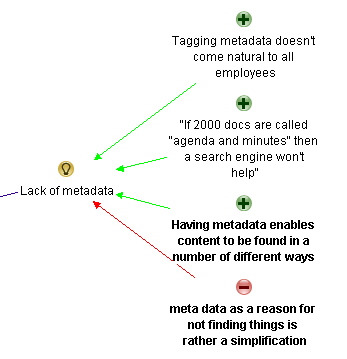
Terry questions the notion of metadata. I framed it as a con against the previous metadata arguments. Both Luc and Andrew answer and I think the line that most succinctly captures the essence of than answer is Andrew’s “Meta data enables content to be found in a number of different ways”. So I reframe that slightly as a pro supporting the notion that lack of metadata is one of the reasons why users can;t find stuff on the intranet.

image

Next is yours truly…

Paul Culmsee • Hi all
Terry a devils advocate flippant answer to your devils advocate question comes from Corey Doctrow with his dated, but still hilarious essay on the seven insurmountable obstacles to meta-utopia :-) Have a read and let me know what you think.
http://www.well.com/~doctorow/metacrap.htm
Further to your question (and I *think* I sense the undertone behind your question)…I think that the discussion around metadata can get a little … rational and as such, rational metadata metaphors are used when they are perhaps not necessarily appropriate. Yes metadata is all around us – humans are natural sensemakers and we love to classify things. BUT usually the person doing the information architecture has a vested interest in making the information easy for you. That vested interest drives the energy to maintain the metadata.
In user land in most organisations, there is not that vested interest unless its on a persons job description and their success is measured on it. For the rest of us, the energy required to maintain metadata tends to dissipate over time. This is essentially entropy (something I wrote about in my SharePoint Fatigue Syndrome post)
http://www.cleverworkarounds.com/2011/10/12/sharepoint-fatigue-syndrome/

Bob Meier • Paul, I think you (and that metacrap post) hit the nail on the head describing the conflict between rational, unambiguous IA vs. the personal motivations and backgrounds of the people tagging and consuming content. I suspect it’s near impossible to develop a system where anyone can consistently and uniquely tag every type of information.
For me, it’s easy to get paralyzed thinking about metadata or IA abstractly for an entire business or organization. It becomes much easier for me when I think about a very specific problem – like the library book example, medical reports, or finance documents.

Taino Cribb • @Terry, brilliant question – and one which is quite challenging to us that think ‘metadata is king’. Good on you @Paul for submitting that article – I wouldn’t dare start to argue that. Metadata certainly has its place, in the absence of content that is filed according to an agreed taxonomy, correctly titled, the most recent version (at any point in time), written for the audience/purpose, valued and ranked comparitively to all other content, old and new. In the absence of this technical writer’s utopia, the closest we can come to sorting the wheat from the chaff is classifcation. It’s not a perfect workaround by any means, though it is a workaround.
Have you considered that the inability to find useful information is a natural by-product of the times? Remember when there was a central pool to type and file everything? It was the utopia and it worked, though it had its perceived drawbacks. Fast forward, and now the role of knowledge worker is disseminated to the population – people with different backgrounds, language, education and bias’ all creating content.
It is no wonder there is content chaos – it is the price we pay for progress. The best we as information professionals can do is ride the wave and hold on the best we can!

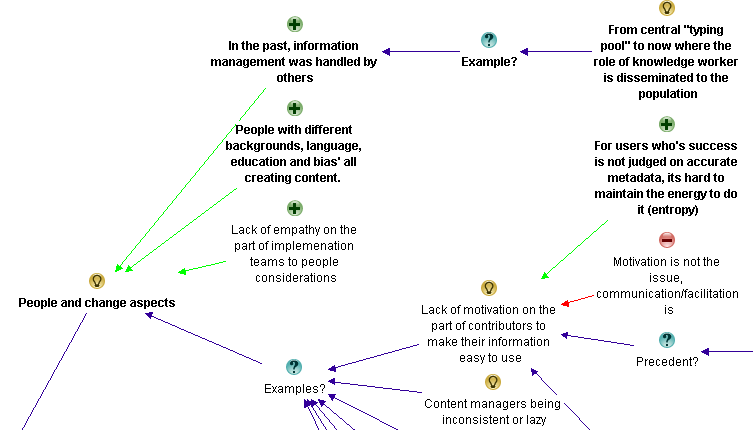
Now my reply to Terry was essentially speaking about the previously spoken of issue around lack of motivation on the part of users to make their information easy to use. I added a pro to that existing idea to capture my point that users who are not measured on accurate metadata have little incentive to put in the extra effort. Taino then refers to pace of change more broadly with her “natural by-product of the times” comment. This made me realise my meta theme of “people aspects” was not encompassing enough. I retitled it “people and change aspects” and added two of Taino’s points as supporting arguments for it.

image

At this point I stopped as enough had been captured the the conversation had definitely reached saturation point. It was time to look at what we had…

For those interested, the final map had 139 nodes.

The second refactor

At this point is was time to sit back and look at the map with the view of seeing if my emergent themes were correct and to consolidate any conversational chaff. Almost immediately, the notion of “content” started to bubble to the surface of my thinking. I had noticed that a lot of conversation and re-iteration by various people related to the content being searched in the first place. I currently had some of that captured in Information Architecture and in light of the final map, I felt that this wasn’t correct. The evidence for this is that Information Architecture topics dominated the maps. There were 55 nodes for information architecture, compared to 34 for people and change and 31 for governance.

Accordingly, I took all of the captured rationale related to content and made it its own meta-theme as shown below…

image

Within the “Issues with the content being searched” map are the following nodes…

image

I also did another bit of fine tuning too here and there and overall, I was pretty happy with the map in its current form.

The root causes

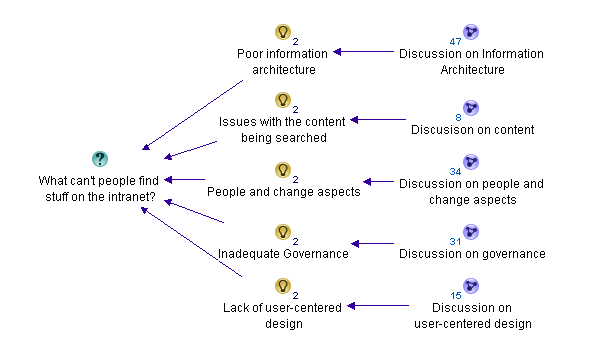
If you have followed my synthesis of what the dialogue from the discussion told me, it boiled down to 5 key recurring themes.

  1. Poor Information Architecture
  2. Issues with the content itself
  3. People and change aspects
  4. Inadequate governance
  5. Lack of user-centred design

I took the completed maps, exported the content to word and then pared things back further. This allowed me to create the summary table below:

Poor Information Architecture Issues with content People and change aspects Inadequate governance Lack of user-centred design
Vocabulary and labelling issues

· Inconsistent vocabulary and acronyms

· Not using the vocabulary of users

· Documents have no naming convention

Poor navigation

Lack of metadata

· Tagging does not come naturally to employees

Poor structure of data

· Organisation structure focus instead of user task focussed

· The intranet’s lazy over-reliance on search

Old content not deleted

Too much information of little value

Duplicate or “near duplicate” content

Information does not exist or an unrecognisable form

People with different backgrounds, language, education and bias’ all creating content

Too much “hard drive” thinking

People not knowing what they want

Lack of motivation for contributors to make information easier to use

Google inspired inflated expectations on search functionality on intranet

Adopting social media from a hype driven motivation

Lack of governance/training around metadata and tagging

Not regularly reviewing search analytics

Poor and/or low cost search engine is deployed

Search engine is not set up properly or used to full potential

Lack of “before the fact” coordination with business communications and training

Comms and intranet don’t listen and learn from all levels of the business.

Ambiguous, under-resourced or misplaced Intranet ownership

The wrong content is being managed

There are easier alternatives available

Content is structured according to the view of the owners rather than the audience

Not accounting for two types of visitors… task-driven and browse-based

No social aspects to search

Not making the search box available enough

A failure to offer an entry level view

Not accounting for people who do not know what they are looking for versus those who do

Not soliciting feedback from a user on a failed search about what was being looked for

The final maps

The final map can be found here (for those who truly like to see full context I included an “un-chunked” map which would look terrific when printed on a large sized plotter). Below however, is a summary as best I can do in a blog post format (click to enlarge). For a decent view of proceedings, visit this site.

Poor Information Architecture

part4map1

Issues with the content itself

part4map2

People and change aspects

part4map3

Inadequate governance

part4map4

Lack of user-centred design

part4map5

Thanks for reading.. as an epilogue I will post a summary with links to all maps and discussion.

Paul Culmsee

www.sevensigma.com.au

 Digg  Facebook  StumbleUpon  Technorati  Deli.cio.us  Slashdot  Twitter  Sphinn  Mixx  Google  DZone 

No Tags


Jan 15 2012

Why can’t users find stuff on the intranet? An IBIS synthesis–Part 1

Hi

There was an interesting discussion on the Intranet Professionals group on LinkedIn recently where Luc De Ruijter asked the question:

What are the main three reasons users cannot find the content they were looking for on intranet?

As you can imagine there were a lot of responses, and a lot more than three answers. As I read through them, I thought it might be a good exercise to use IBIS (the language behind issue mapping) to map the discussion and see what the collective wisdom of the group has to say. So in these posts, I will illustrate the utility of IBIS and Issue mapping for this work, and make some comments about the way the conversation progressed.

So what is IBIS and Issue/Dialogue Mapping?

Issue Mapping captures the rationale behind a conversation or dialogue—the emergent ideas and solutions that naturally arise from robust debate. This rationale is graphically represented using a simple, but powerful, visual structure called IBIS (Issue Based Information System). This allows all elements and rationale of a conversation, and subsequent decisions, to be captured in a manner that can be easily reflected upon.

The elements of the IBIS grammar are below. Questions give rise to ideas, or potential answers. Ideas have pros or cons arguing for or against those ideas.

image_thumb81

Dialogue Mapping is essentially Issue Mapping a conversation live, where the mapper is also a facilitator. When it is done live it is powerful stuff. As participants discuss a problem, they watch the IBIS map unfold on the screen. This allows participants to build shared context, identify patterns in the dialogue and move from analysis to synthesis in complex situations. What makes this form of mappingcompelling is that everything is captured. No idea, pro or con is ignored. In a group scenario, this is an extremely efficient way of meeting what social psychologist Hugh Mackay says is the first of the ten human desires which drives us – this being the desire to be taken seriously. Once an idea is mapped, the idea and the person who put it forth are taken seriously. This process significantly reduces “wheel spinning” in meetings where groups get caught up in a frustrating tangled mess of going over the same old ground. It also allows the dialogue to move more effectively to decision points (commitments) around a shared understanding.

In this case though, this was a long discussion on a LinkedIn group so we do not get the benefit of being able to map live. So in this case I will create a map to represent the conversation as it progresses and make some comments here and there…

So let’s kick off with the first reply from Bob Meier.

Bob Meier • Don’t know if these are top 3, but they’re pretty common find-ability issues:
1. Lack of metadata. If there are 2000 documents called “agenda and minutes” then a search engine, fancy intranet, or integrated social tool won’t help.
2. Inconsistent vocabulary and acronyms. If you’ve branded the expense report system with some unintuitive name (e.g. a vendor name like Concur) then I’ll scan right past a link looking for “expense reports” or some variation.
3. Easier alternatives. If it’s easier for me to use phone/email/etc. to find what I want, then I won’t take the time to learn how to use the intranet tools. Do grade schools still teach library search skills? I don’t think many companies do…

In IBIS this was fairly straightforward. Bob listed his three answers with some supporting arguments. I reworded his supporting argument of point 2, but otherwise it pretty much reflects what was said…

image_thumb2

Nigel Williams (LION) • I agree with Bob but I’d add to point two not speaking our user base’s language. How many companies offer a failure to find for example (i.e.if you fail to find something in a search you submit a brief form which pops up automatically stating what you were looking for and where you expected to find it? Lots of comms and intranet teams are great at telling people and assuming we help them to learn but don’t listen and learn from all levels of the business.
If I make that number 1 I’ll also add:
2) Adopting social media because everyone else is, not because our business or users need it. This then ostracises the technophobics and concerns some of our less confident regular users. They then form clans of anti-intranetters and revert to tried and tested methods pre-intranet (instant messaging, shared drives, email etc.)
3) Not making the search box available enough. I’m amazed how many users in user testing say they’ve never noticed search hidden in the top right of the banner – “ebay has their’s in the middle of the screen, so does Google. Where’s ours?” is a typical response. If you have a user group at your mercy ask them to search for an item on on Google, then eBay, then Amazon, then finally your intranet. Note whether they search in the first three and then use navigation (left hand side or top menu) when in your intranet.

Nigel’s starts out by supporting Bob’s answer and I therefore add them as pros in the map. Having done this though, I can already see some future conversational patterns. Bob’s two supporting arguments for “not using the vocabulary of users”, actually are two related issues. One is about user experience and the other is about user engagement/governance. Nevertheless, I have mapped it as he stated it at this point and we see what happens.

image_thumb3

Luc de Ruijter • @Bob. I recognise your first 2 points. The third however might be a symptom or result, not a cause. Or is it information skills you are refering to?
How come metadata are not used? Clearly there is a rationale to put some effort in this?
@Nigel. Is the situation in which Comm. depts don’t really listen to users a reason for not finding stuff? Or would it be a lack of rapport with users before and while building intranets? Is the cause concepetual, rather than editorial for instance?
(I’m really looking for root causes, the symptoms we all know from daily experience).
Adding more media is something we’ve seen for years indeed. Media tend to create silo’s.
Is your third point about search or about usability/design?

In following sections I will not reproduce the entire map in the blog post – just relevant sections.

In this part of the conversation, Luc doesn’t add any new answers to the root question, but queries three that have been put forward thus far. Also note at this point I believe one of Luc’s answers is for a different question. Bob’s “easier alternatives” point was never around metadata. But Luc asks “how come metadata is not used?”. I have added it to the map here, changing the framing from a rhetorical question to an action. Having said that, if I was facilitating this conversation, I would have clarified that point before committing it to the map.

image_thumb27

Luc also indicates that the issue around communications and intranet teams not listening might be due to a lack of rapport.

image_thumb25

Finally, he adds an additional argument why social media may not be the utopia it is made out to be, by arguing that adding more media channels creates more information silos. He also argues against the entire notion on the grounds that this is a usability issue, rather than a search issue.

image_thumb80

Nigel Williams (LION) • Hi Luc, I think regarding Comms not listening that it is two way. If people are expecting to find something with a certain title or keyword and comms aren’t recognising this (or not providing adequate navigation to find it) then the item is unlikely to be found.
Similarly my third point is again both, it is an issue of usability but if that stops users conducting searches then it would impact daily search patterns and usage.

I interpret this reply as Nigel arguing against Luc’s assertion around lack of rapport being the reason behind intranet and comms teams not listening and learning from all levels of the user base.

image_thumb34

Nigel finishes by arguing that even if social media issues are usability issues, they might still impede search and the idea is therefore valid.

image_thumb84

Bob Meier • I really like Nigel’s point about the importance of feedback loops on Intranets, and without those it’s hard to build a system that’s continually improving. I don’t have any data on it, but I suspect most companies don’t regularly review their search analytics even if they have them enabled. Browse-type searching is harder to measure/quantify, but I’d argue that periodic usability testing can be used in place of path analysis.
I also agree with Luc – my comment on users gravitating from the Intranet to easier alternatives could be a symptom rather than a cause. However, I think it’s a self-reinforcing symptom. When you eliminate other options for finding information, then the business is forced to improve the preferred system, and in some cases that can mean user training. Not seeing a search box is a great example of something that could be fixed with a 5-minute Intranet orientation.
If I were to replace my third reason, I’d point at ambiguous or mis-placed Intranet ownership . Luc mentions Communications departments, but in my experience many of those are staffed for distributing executive announcements rather than facilitating collective publishing and consumption. I’ve seen many companies where IT or HR own the Intranet, and I think the “right” department varies by company. Communications could be the right place depending on how their role is defined.

Bob makes quite a number of points in this answer, right across various elements of the unfolding discussion. Firstly, he makes a point about analytics and the fact that a lack of feedback loops makes it hard to build a system that continually improves.

image_thumb45

In term of the discussion around easier alternatives, Bob offers some strategies to mitigate the issue. He notes that there are training implications when eliminating the easier alternatives.

image_thumb41

Finally, Bob identifies issues around the ownership of the intranet as another answer to the original question of people not being able to find stuff on the intranet. He also lists a couple of common examples.

image_thumb69

Karen Glynn • I think the third one listed by Bob is an effect not a cause.
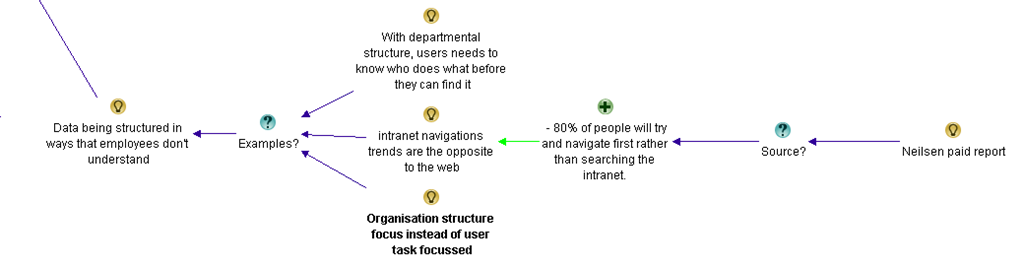
Another cause could be data being structured in ways that employees don’t understand – that might be when it is structured by departments, so that users need to know who does what before they can find it, or when it is structured by processes that employees don’t know about or understand. Don’t forget intranet navigations trends are the opposite to the web – 80% of people will try and navigate first rather than searching the intranet.

In this answer, Karen’s starts by agreeing with the point Luc made about “easier alternatives” being a symptom rather than a cause, so there is no need to add it to the map as it is already there. However she provides a new answer to the original question: the structure of information (this by the way is called top-down information architecture – and it was bound to come out of this discussion eventually). She also makes a claim that 80% of people will navigate prior to search on the intranet. I wonder if you can tell what will happen next? Smile

image_thumb49

Luc de Ruijter • @Nigel Are (customer) keywords the real cause for not finding stuff? In my opinion this limits the chalenge (of building effective intranet/websites) to building understandable navigation patters. But is navigation the complete story? Where do navigation paths lead users to?
@Bob Doesn’t an investiment in training in order to have colleagues use the search function sound a bit like attacking the symptom? Why is search not easy to locate in the first place? I’d argue you’re looking at a (functional) design flaw (cause) for which the (where is the search?) training is a mere remedy, but not a solution.
@Karen You mention data. How does data relate to what we conventionally call content, when we need to bring structure in it?
Where did you read the 80% intranet-users navigate before searching?

Okay, so this is the first time thus far where I do a little bit of map restructuring. In the discussion so far, we had two ideas offered around the common notion of vocabulary. In this reply, Luc states “Are (customer) keywords the real cause for not finding stuff?” I wasn’t sure which vocabulary issue he was referring to, so this prompted me to create a “meta idea” called “Vocabulary and labelling issues”, of which there are two examples cited thus far. This allowed me to capture the essence of Luc’s comment as a con against the core idea of issues around vocabulary and labelling.

image_thumb52

Luc then calls into question Bob’s suggestion of training and eliminating the easier alternatives. Prior to Luc’s counter arguments, I had structured Bob’s argument like this:

image_thumb58

To capture Luc’s argument effectively, I restructured the original argument and made a consolidated idea to “eliminate other options and provide training”. This allowed me to capture Luc’s counter argument as shown below.

image_thumb55

Finally, Luc asked Karen for the source of her contention that 80% of users navigate intranets, rather than use the search engine first up.

image_thumb61

In this final bit of banter for now, the next three conversations did not add too many nodes to the map, so I have grouped them below…

Karen Glynn • Luc, the info came from the Neilsen group.

Helen Bowers • @Karen Do you know if the Neilsen info is available for anyone to look at?

Karen Glynn • I don’t know to be honest – it was in one of the ‘paid for’ reports if I remember correctly.

Luc de Ruijter • @Karen. OK in that case, could you provide us with the title and page reference of the source? Than it can become usable as a footnote (in a policy for instance).Thanks
Reasons so far for not finding stuff:
1. Lack of metadata (lack of content structure).
2. Inconsistent vocabulary and acronyms (customer care words).
3. Adopting social media from a hype-driven motivation (lack of coherence)
4. Bad functional design (having to search for the search box)
5. Lack of measuring and feedback on (quality, performance of) the intranet
6. Silo’s. Site structures suiting senders instead of users

So for all that Banter, here is what I added to what has already been captured.

image_thumb65

Where are we at?

At this point, let’s take a breath and summarise what has been discussed so far. Below is the summary map with core answers to the question so far. I have deliberately tucked away the detail into sub maps so you can see what is emerging. Please note I have not synthesised this map yet (well … not too much anyway). I’ll do that in the next post.

image_thumb72

If you want to take a look at the entire map as it currently stands, take a look at the final image at the very bottom of this post. (click to enlarge). I have also exported the entire map so far for you to view things in more context. Please note that the map will change significantly as we continue to capture and synthesise the rationale, so as we continue to unpack the discussion, expect this map to change quite a bit..

Thanks for reading

Paul Culmsee

CoverProof29

www.sevensigma.com.au

Map25

 Digg  Facebook  StumbleUpon  Technorati  Deli.cio.us  Slashdot  Twitter  Sphinn  Mixx  Google  DZone 

No Tags


Dec 21 2010

It’s email integration captain, but not as we know it (problems with incoming email handling on SharePoint 2010)

Tags: Uncategorized @ 5:32 pm

Hi everyone. This is my last post for 2010, and I am going out on a troubleshooting note. See you all next year with lots of new content and cool stuff!

I had some interesting experiences recently with SharePoint 2010, specifically the Content Organiser feature and leveraging it with incoming email. I thought they might be worth sharing, but first I need to set some context via the use-case where this started.

Where would we be without the photocopier?

image

Most organisations large or small, have one of those multifunction photocopier/scanner/fax/coffee maker gizmos (okay so maybe not the coffee maker). You know the types – they are large, noisy and the paper feeders frequently jam, where the tech guy who comes to fix it has to be on site so often that he’s considered a staff member. They usually have a document feeder, can scan to PDF and email it straight through to you. If you have a really fancy-schmancy one, it might even OCR the content for you so the resultant PDF is not an image but text based.

While all that is good, the real benefit of these devices is more subtle. Employees like to congregate nearby for a little bit of office gossip, and to quietly bitch to each-other about how much their boss or co-workers annoy them. The conversations around the photocopier are usually some of the most insightful and valuable conversations you might have at times.

So I believe that anything we can do to encourage photocopier conversations is a good thing. For some organisations, this is about as close as it gets to cross departmental collaboration! Smile with tongue out. If we also leverage the fact that these devices offer this “scan to PDF and email” function at the press of a button, then SharePoint has a nice story to tell here – especially with SharePoint 2010 and the Content Organiser feature.

The premise: Content Organiser coolness

I will spend a few moments to introduce the Content Organiser feature for readers who have not seen much of SharePoint 2010. If you know all about this feature, skip to the next section.

For those of you who may not be aware, SharePoint 2010 has an interesting new feature called the Content Organiser. The Content Organizer feature is quite a powerful document routing solution that makes it easier to store documents consistently, according to administrator defined rules that can copy or move a document from one place in SharePoint to another place. I will get to the rules in a minute, but the content organiser feature is important for several reasons;

  • It makes the saving of documents easier because users do not necessarily have to worry about knowing the destination when uploading new content.
  • It is a highly flexible method for routing documents between sites and site collections around the SharePoint farm.
  • It underpins a solid compliance and records management file plan capability.

So before anything else can be done, we need to turn it on. The Content Organiser feature has to be activated on each site for the functionality to be enabled. In other words, it is a site scoped feature. Below is an illustration of the feature to activate.

image

Once the Content Organiser feature is activated, SharePoint 2010 makes several changes to the site configuration.

  • It creates a new document library called the Drop-off Library.
  • It creates a new custom list called Content Organizer Rules.
  • It adds two new Site Administration links in the Site Settings page to manage the Content Organiser for the site.

image

The description for the feature says “Create metadata based rules…” and it these Content Organiser rules that allow you to automatically route documents from the newly created Drop-off Library to some other location. It is important to know that the Drop-off Library is fixed – it is the first point of call for files that need to be moved or copied somewhere. Consider the drop-off library like a bellboy of a hotel. You give him your luggage and he will ensure it gets to its correct location (and unlike a bellboy you don’t need to tip).

So if the drop-off library is the starting point, where can documents be routed to? The location can be;

  • A document library and/or a folder within a document library on the site.
  • The Drop-off library of another site, which allows inter and intra site collection routing.

The Content Organiser rules are managed from Site Administration which is accessed via Site Settings. New rules are added in the same manner as adding new items to any SharePoint list. In the following example, we will create a rule where a content types of invoice will be routed to a document library called Finance.

image

The conditions section of the rule allows for multiple conditions to be defined to determine matching content and then, where that content should be routed to. The properties available are any columns assigned to the content type being routed. In the example below, we have added two conditions that have to be satisfied before the rule will fire.

image

Let’s take a closer look at this beast known as the Drop-off library. This is a special document library is added to the site upon feature activation, imaginatively called the Drop Off Library. As stated earlier, this library is really a temporary staging area for items that do not have all required metadata to satisfy any routing rules.

The sequence of events for the Content Organiser is;

  1. Documents with the correct content type, metadata, and matching rules are automatically routed to the final library and folder.
  2. Documents that lack the amount of metadata required to match a rule or that are missing required metadata are retained in the "Drop-Off Library" so that the user can enter metadata to satisfy a rule.
  3. After a user has edited a staging document with the appropriate metadata required to match a rule, the document is automatically routed to the target library and folder.

As an example, if we assume that a Content Organiser role will route any document with “Finance” in its name to document library called Finance, the behaviour will be as follows:

  • If the file uploaded has the word “finance” in its name, SharePoint indicates that the document has been successfully routed
  • If the file uploaded does not have the word “finance” in its name, SharePoint will indicate to the user that the content organiser has placed it into the Drop-off library.

Now, before you rush off and start to mess with the content organiser, I’d better tell you about a couple of caveats

  1. The Content Organizer will only work on content types that are, or derive from, the Document content type. So it does not work for automatically organizing large lists.
  2. When uploading documents via Windows explorer view, Content Organiser rules are ignored and the document will not be redirected to the Drop-off library. (through the browser if a document is uploaded to a destination library, SharePoint will move it to the Drop-off library for classification)
  3. There is a limit of six conditions per rule. After six conditions are added, the "Add new condition" link disappears.
  4. If you wish to route the document to another site, the Content Organizer feature has to be installed on that site for the Drop-off library to be created as that is the destination. Additionally, you need to add the configuration information in Central Administration by adding the destination to the list of send to connections for the web application (that is beyond the scope of this article, but easy enough to do).
  5. Ruven Gotz tells me there are also some potential risks around the fact that you can route files to any destination even if you do not have permission and potentially overwrite content. As Scott says, the content organizer will move content to the new location whether or not the contributing user has access to the destination location.

Content Organiser and email integration

So if we go back to where we started with our fancy photocopier. SharePoint has offered email integration on document libraries since the 2007 version. In effect, we give each document library or list an email address, set up a few parameters and any attachment will be in effect, uploaded to a document library.

On a semi-related note, my company actually developed a version of the content organiser for SharePoint 2007 that allowed the routing of documents based on business rules. Contact us if you want to now more.

Given the routing capabilities of the content organiser in SharePoint 2010, one would think that by email-enabling the Drop-off library that is created when you activate the content organiser feature, that we can have all scanned correspondence end up in the Drop-off library, ready for classification by an administrator and routed in accordance to specified routing rules.

Sounds logical enough – so logical in fact that I gave it a try.

Problem 1: Race condition?

Email enabling a document library is pretty easy, provided you have set up incoming email in SharePoint Central Administration first. In this case, I set up the incoming email on the Drop-off Library with the settings below: Note that I specified not to overwrite attachments with the same name.

image

I then programmed the photocopier to use this email address as a profile. That way, a user would scan incoming correspondence, then choose this profile as the destination. The photocopier would scan to PDF and then email those PDF’s to the Drop-off library. The problem was – not all of the scans arrived.

We noticed that individual scans (ie one document at a time), would work fine, but for some reason, bulk scans would not. Typically, if a user scanned say, 10 items, only 6 of them would make it to the document library. A trawl through the diagnostic logs was therefore required. Luckily, SharePoint 2010 has been built upon PowerShell, and there is a PowerShell command to get at the diagnostic logs. I have become a huge fan of PowerShell just from this one command, as it has eliminated the need for me to install additional tools to view logs on SP2010 boxes. Taking a punt, I assumed if there was to be an error message, it would have the word “E-mail” in it. So I issued the following PowerShell command:

Get-SPLogEvent | Where-Object ( $_.message -like "*E-Mail*" ) | Out-GridView

This will return any logs in a graphical format (the gridview) as shown below. Immediately I saw warning messages, telling that an error occurred while attempting to create an attachment for an item sent via email.

image

This was clearly related to my issue, so I adjusted the PowerShell script to be a little more specific so I can see the full message

Get-SPLogEvent | Where-Object { $_.message -like "*create an att*" } | Select-Object -Property message | Out-GridView

The email was sent to the list “Drop Off Library”, and the error was: the file DropOffLibrary/<filename> has been modified by SHAREPOINT\SYSTEM on <date>

image

Problem 2: A poorly named feature?

This time, I saw that it claims that the attachment was modified by SHAREPOINT/system. Hmm – that sort of error message is very similar to race conditions seen with SharePoint Designer workflows. Thus, my first thought was that email enabling the Drop-off library was possibly unsupported. I figured that the Drop-off library likely used event-receivers, workflow or scheduled tasks to do the document routing that might get in the way with processing incoming email attachments.

My suspicion was further given weight when I recalled that there was another feature to do with content organiser that I could activate: Email Integration with Content Organiser. According to the description, it enable a site’s content organizer to accept and organize email messages. Cool – this seemed logical enough, so I activated it.

image

Upon activating this feature, a small change is made to the Content Organiser Settings page, found under Site Settings. An e-mail address was assigned, and a link was provided to configure the organizers incoming email  settings as shown below:

image

This is where things started to get interesting. As expected, I was taken to the incoming email settings screen, but instead of it being the drop-off library, it was a hidden list called Submitted E-mail Records. At the time, this suggested that my initial conclusion that incoming email on the drop-off library was unsupported was correct. After all, why else would incoming email be redirected to another list instead of the drop-off library? I couldn’t think of any other logical explanation.

image

At the time, I searched the web to see if anybody else had mentioned the Submitted E-mail Records hidden list and problems with incoming emails. I was then surprised to learn that this hidden list was there in SharePoint 2007, but I’d never seen it before because Records Management in 2007 is crappy and I never used it much.

Anyway, try as I might, I could never get items emailed to the Submitted E-mail Records list, to ever route to the Drop-off library. The photocopier would happily mail items to Submitted E-mail Records list, but they would stay there and never get processed. Grrr!

After turning up some debug logs to verbose, specifically:

  • Document management Server: Content organiser
  • SharePoint foundation: E-Mail

We saw the following error message: “Cannot resolve mailbox (null) to a valid user”. Additionally, my colleague Peter Chow used reflector to examine the underlying code behind this feature. From what we could tell, a method, GetOfficialFilePropsFromBody, in the class: Microsoft.Office.RecordsManagement.RecordsRepository.EmailRecordsHandler, was attempting to extract a mailbox value and getting a null.  Unfortunately for us, the code eventually lead to obfuscated classes so we were not able to dig any deeper.

At this point, with nothing on the net to guide us and twitter going quiet, I logged a support call with Microsoft. Pretty quickly, our issue was reproduced and escalated to the local team and then to the US. A few weeks later, we got the following answer:

The E-mail Integration with Content Organizer feature is a there for legacy Exchange 2007 deployments that can journal mail to SharePoint.  Such functionality is not available in Exchange 2010 and we do not (and never have) supported directly e-mailing a content organizer as the steps below show.  It just won’t work – that mail submitted to that list needs to be in a special format that Exchange 2007 can create (or some other system who has implemented that documented protocol). The users should consider leaving the mail in Exchange and using Exchange’s record management and compliance functionality or buying a third party add-in if they need to get mail into a SharePoint content library. http://technet.microsoft.com/en-us/sharepoint/ff598594.aspx has a list of partners.

Workaround : For this  scenario we found a workaround to enable incoming email on the “Drop Off library” and which in turn routed the emails/attachments to the destination library as per the rule. The envelope data or other metadata will NOT be carried along with the item to its final location with this workaround. So the customer should expect to lose sender, sent, received, et cetera

If the customer wants to check on how to get this working using Exchange 2007: http://msexchangeteam.com/archive/2006/11/21/431608.aspx

So the format is generated by the backend transport layer via a policy on a Managed Folder.  So even in 2007, you can’t email a content organizer.  But you can set up a journaling rule on a managed folder in Exchange to journal every item dropped into that folder to SharePoint.

We should not encourage users to email Content organizer since we have that has a legacy feature to support Exchange 2007. If the users wants email to be sent to SharePoint then use Email enabled Doc Lib.

So there you have it. Do not activate the Email Integration with Content Organiser feature!. It is a legacy designed specifically for Exchange 2007, yet the description for the feature in SharePoint makes no mention of this! If this was explicitly mentioned in the description of this feature, two weeks worth of needless troubleshooting and a long support call would have been avoided. Even my local (and excellent) Microsoft escalation team were not aware of this. Oh well, you live and learn.

Back to square one. (shut-up and apply the latest cumulative update)

So now that we confirmed that the Email Integration with Content Organiser feature was a giant red herring and never going to fly, we returned focus to why some attachments were not being correctly processed by the Drop-off Library. As it happened, the August cumulative update for SharePoint 2010 had a fix in it. This technet thread describes the issue in more detail. http://social.technet.microsoft.com/Forums/en-US/sharepoint2010setup/thread/896cbe2a-94c6-4a0f-9e4f-ea6b0fe3cc45/. There appeared to be a bug where even if you set the email-enable feature option called “Overwrite files with the same name”, to no, it was ignored and an exception was logged when attachments with the same file-name arrived. Turns out the photocopier file names were not 100% unique! It used a timestamp as part of the filename that was unique down to the minute, not the second.

So after a journey that included a needless support call, we applied the CU and what do you know, problem solved!

To conclude this rather long and rambling post, I feel kind of bad that I got so side tracked on the Email Integration with Content Organiser feature. That’s part of troubleshooting life I guess. The only consolation I can really take from it, is that it also fooled Microsoft engineers too. I guess this issue is yet one more of the many caveats that we all have to learn about the hard way.


Thanks for reading

Paul Culmsee

www.sevensigma.com.au

 Digg  Facebook  StumbleUpon  Technorati  Deli.cio.us  Slashdot  Twitter  Sphinn  Mixx  Google  DZone 

No Tags


Sep 22 2010

Sack Justin Bieber with SPD2010 and Forms Services – Part 2

Hi

This is part 2 of a quick (but huge) post on my experiences working with SharePoint Designer 2010 workflows and Forms Services. In part 1, we used the scenario of an employee termination form, and sacked Justin Bieber. Now we want to ensure that the SharePoint user experience for sacking Justin Bieber is seamless and intuitive.

Truth be told, I have never actually heard a Justin Bieber song because we have not had a television in the house for over a year. Ignorance is bliss, but I have seen enough news reports that I still want to sack him!

In part 1, we examined the ability of SPD2010 to leverage InfoPath for tailoring forms used by workflows. We then covered creating a workflow utilising the Start Approval Process action, which enables us to do a couple of cool things without custom programming.

Now we are onto the next two steps.

Continue reading “Sack Justin Bieber with SPD2010 and Forms Services – Part 2″

 Digg  Facebook  StumbleUpon  Technorati  Deli.cio.us  Slashdot  Twitter  Sphinn  Mixx  Google  DZone 

No Tags


Sep 21 2010

Sack Justin Bieber with SPD2010 and Forms Services – Part 1

Hi all

A very long time ago now, I had the ambition to write an end-to-end blog post series called “A Humble Tribute to the Leave Form”. The intent was to show InfoPath Forms Services 2007 in all its glory – from its initially seductive, demo friendly first impressions, through to all of the dodgy workarounds and .net code required to get it to adequately handle a relatively simple business process like employee leave applications.

As it happened, I got through seven and a half blog posts and never finished it as events kind of overtook me. Its a pity because I didn’t get to the nasty bits. But one of the side effects of getting as far as I did, was that I ended up getting a lot of work developing leave forms!

Thus, now that SharePoint 2010 is upon us, it was inevitable that I would eventually get called to develop a leave form for this new edition. I now have done so, and in the process learnt a couple of new things that I thought were blogworthy – especially around getting things to play nice in a sustainable manner.

I came to realise that anytime you write any content that involves InfoPath, you end up with a stupid number of screenshots, and you are perpetually torn on the amount of detail to cover. So this time, rather than do a twelve post monster, I’ll just do 2 posts (real programmers will still find this post waffly but hopefully normal humans won’t).

I am not going to do a total beginners course here, I will assume instead you have done some basic InfoPath and SharePoint Designer workflows previously, and now want to know some interesting ways to do a general approval type process using SharePoint 2010. My main focus here is to deal with handling browser based InfoPath forms with SharePoint Designer workflows.

Continue reading “Sack Justin Bieber with SPD2010 and Forms Services – Part 1″

 Digg  Facebook  StumbleUpon  Technorati  Deli.cio.us  Slashdot  Twitter  Sphinn  Mixx  Google  DZone 

No Tags


Feb 22 2010

SharePoint Webcasts: Reporting Services for the Really Really Good Looking

imageLast year, Peter Serzo and I presented at the SharePoint Best Practices Conference in DC. We did an extremely serious talk called “SharePoint and SQL Reporting Services 2008 for the really really good looking” which rated rather well. As part of this, we recorded a bunch of screencasts that have never seen the light of day, so I thought that some would benefit from this being released to a wider audience.

Note: This post and content is really going make utterly no sense unless you have watched Zoolander. Even if you have seen the movie, before you launch into the webcasts, some scene setting is required.

The business need

Some time ago, Peter and I were contracted by the Derek Zoolander School for the Really, Really Good Looking after Derek saw Microsoft’s new SharePoint diagram when he accidentally picked up a “Computerworld” magazine. Apart from matching Derek’s suit colour rather nicely, the diagram captivated his imagination with the notion of “Insights”.

Zoolander thought that “Insight”, sounded like the perfect look to follow up from the highly successful “Magnum”, which he used to save the Malaysian prime ministers life. He took the diagram to his wife, and demanded that he must have “Insights” at all costs.

image

Zoolander’s wife saw the business problem that “Insights” would help to address. You see, the Derek Zoolander School for the Really, Really Good Looking, at great expense, custom developed an ERP system to manage everything you needed to know about male models. The system was called the “Computerised Records for Attractive People”…

image

The CRAP system stored all sorts of interesting information about male models, such as tracking their “hotness”, as well as important detail such as stated age versus actual age, and any cosmetic procedures that they have undertaken. After a long and expensive consultation, Peter and I concluded that SharePoint 2007, integrated with SQL Reporting Services, was the perfect solution to create the all important “Insights” that Zoolander so desperately needed.

As a result, we conducted a project kickoff meeting with Hansel and Peter tried to explain the architecture of reporting services using a nice diagram.

image

… but we worked out pretty quickly that this was not the way to explain how it all worked to poor old Hansel…

image

So instead, we went the live demo route. Being male models, custom development was totally out of the question. This solution had to be done using all out of the box methods in a quick and easy manner. Below are the four live demos that were recorded and now you can use them as inspiration for your own male modelling school.

  • Our first webcast illustrates how we were able to create a meaningful report from the CRAP system within five minutes.
  • The second webcast expanded on this idea, by illustrating how reports can be parameterised and linked together for drilldown reporting.
  • The third demo modifies the user profile store to allow for recording of each users unique ID in the CRAP system
  • The last webcast strings this all together for the final demonstration where we pimp the report to make it dynamic with no custom code.


image  image

The 5 minute report

Drilling down with Derek
image image

User Profiles for the really really good looking

Pimp my report


We hope you find some value from these webcasts and we look forward to hearing about your hot new look as a result!

Thanks for reading


Paul Culmsee

www.sevensigma.com.au

 Digg  Facebook  StumbleUpon  Technorati  Deli.cio.us  Slashdot  Twitter  Sphinn  Mixx  Google  DZone 

No Tags


Sep 27 2009

The practice of Dialogue Mapping – Part 4

Three weeks ago my plasma TV broke, freeing the family from the magic spell of hi-def television. My family took the loss in different ways. My four year old was devastated at the lack of Nintendo Wii, and constantly whined about being bored. My ten year old is a bookworm anyway, and continued to be one. I suddenly found mountains of time to write, churning out three Dialogue Mapping articles that I had been meaning to write for ages.

Today the repair man came and fixed the TV. I expect that the glow of the plasma screen will once again induce that zombie-like state, where my work-rate is dependant on what show happens to be on at the time (NCIS as I write this). Luckily, this is the last article of this particular series on Dialogue Mapping for now and I might have enough active brain cells to hang on long enough to squeeze this article out.

This article builds on the last section of part three that was entitled “Nurture the holding environment”. In that section, I introduced the concept of the “holding environment” and I offered a basic example (the bus trip that was conducted prior to the Dialogue Mapping session). This concept is so fundamental and important to the success of Dialogue Mapping and projects more broadly that I want to do it proper justice here in part four.

The paradox of individuality

Put a bunch of right-brained geeks in a room to solve a problem and you will probably find that they get on relatively well. Put a bunch of creative left-brained marketing people in a room to solve a problem and you might expect the same thing. The solutions offered, when compared to each other, are likely to be quite different and will also likely be sub-optimal. For a truly good solution, we need diversity in perspectives and, although this pains me to say, marketing people are therefore actually needed. This creates a bit of a problem though with the paradox of individuality because, as geeks, we all know the notion of marketing people being needed goes against everything we stand for.

I first read about the paradox of individuality in a book called Team Talk: The Power of Language in Team Dynamics and it was described as follows:

The only way for a group to become a group is for individuals to express their individuality, yet the only way for individuals is to become fully individuated is to accept and develop more fully, their connections to the group.

What? Geeks and marketing people accepting each other as equals? Unifying the laws of physics will come sooner and this is a classic example of what Conklin calls “social complexity”. Of course, social complexity goes much deeper than geeks vs. marketing people, but one of the effects of social complexity is a distinct lack of direct communication between parties. This is because conflict is not fun and avoidance is a natural reaction to situations that are not fun.

The idea of the “holding environment” is best summed up with the image below. Here, you can see that we have an area set aside for kids to play in a safe, controlled environment.

image

A holding environment for an organisation or a team is actually not that dissimilar to the example above. You are attempting to create a state where participants can step out of their comfort zones, but at the same time, are shielded from counter productive tensions that cause paralysis, chaos and pullback.

For this reason I maintain that beer is one of the best holding environments available and it forms a key part of my professional skill set ;-)

As I stated in part 1 of this series, Dialogue Mapping is a very useful holding environment on its own, but it can be augmented with other things as well and you should always be on the lookout for complimentary tools and techniques. In the following sections, I will outline where Dialogue Mapping has augmented another method, or where we have augmented Dialogue Mapping itself with another method.

Information gathering for 40+ people

There are practical limits to how many people should be involved in a standard Dialogue Mapping session. Mind you, there are practical limits for how many people should attend a meeting too and that limit seems to be any more than one person :-) .

By “standard”, I mean the sort of session illustrated below. The exact number that test the limits of Dialogue Mapping varies because it really depends on the wickedness of the problem being discussed and the past history of the group. For example, one of the teams I map for consists of around fifteen to eighteen members. They are working on a particularly wicked problem, yet I can work with this group alone quite easily. This is because over time, the group has worked out their decorum for the Dialogue Mapping sessions that work for all concerned. I also know everybody on a first name basis and some of the group have become personal friends of mine outside of work. In short, people are comfortable with each other and the process, and despite things getting heated people know that it is not personal. This is a simple, yet effective, example of a working holding environment.

image

A while back, my client invited representatives from academia, charities as well as various public sector government departments, to a half day workshop on the topic of social sustainability as part of a significant redevelopment project. There were approximately 40-45 attendees who were there for the first time. There was no way we would be able to cover off the required topics using a standard Dialogue Mapping set-up. With so many people, it would be hard for all attendees to have a say in the allotted time, let alone set up the room to handle that number of people for the process.

The way we got around this issue was to run a pre-workshop session among a much smaller group, to create a series of “seed maps” for each of the sub-areas of social sustainability. By the end of this process, we had around a dozen maps on various subtopics with a few questions, ideas, pros and cons. These maps were not complete at all, but that was not the aim. Instead they were well formed IBIS argumentations.

We then printed each of these maps out at large size. Initially each map was pinned to display boards, and when the attendees arrived they spent time wandering from map to map, examining the argumentation while mingling with other attendees. Below is a photo showing some of the seed maps prior to the attendees arriving.

image

Below is a diagram representing the table arrangement for the workshop. We started with a half hour overview and introduction as to the purpose of the workshop and why they had been invited. At this point, we removed four of the maps from the display boards above, and put a map on each table. We explained to the group that each table had a unique map on it and each map was on a particular topic. At this point attendees had the opportunity to move to a table where the topic was of most relevance or interest to them.

image

Each table contained copious amounts of marker pens. I then took the stage and explained the basics of IBIS grammar to the attendees and explained to them that we wanted them to start adding ideas to the existing maps. I did not belabour the grammar, nor did I expect them to suddenly know how to do IBIS properly, but what I made clear, was that I was going to walk from table to table and interrupt if I felt the additions to the map made no sense or were ambiguous in some way.

The group had just under an hour to work on each map and at the end of the hour, we removed the updated paper maps and replaced them with the next four from the display boards. The process was then repeated and I walked from table to table, asking for clarification or calling out implied questions on parts of the maps that made no sense to me. Interestingly, IBIS novices seemed to have little problems with the usage of ideas, pros and cons, but they would forget to make the underlying question explicit. I would ask them what was the question being answered by a particular idea and would write the question into the map and redraw the lines.

After the third iteration of this process we were done. The last half an hour was a “Where to from here?” session and an opportunity for the group to provide feedback to the organisers of the workshop.

After the workshop was completed, I took all of the updated paper maps and added the additional rationales into the seed maps in Compendium. The process was surprisingly quick because the majority of the additional argumentations that were added were actually pretty good IBIS form. I think that having existing argumentations on the seed maps made it easier for attendees to add rationales that looked similar to what was there already. It wasn’t perfect IBIS by any means, but it was not a difficult task for me to refactor the additional information without losing any of the intent behind the rationales.

For the record, additional workshops were conducted, but these reverted to standard Dialogue Mapping workshops with a subset of the attendees who had specialised skills and knowledge in the topic area. But what this particular process demonstrated was that with a little planning a single Dialogue Mapper could still manage to capture quality rationales from a very large group in a short space of time.

Dialogue Mapping with a facilitator

Dialogue mapping for a large group can be augmented with a facilitator and I have done this a few times. For a large group, this can be very helpful because the mapper can concentrate on capturing the dialogue and less on directing the meeting. Equally though, a facilitator can actually make the process more difficult. The key to a facilitator situation working is when the facilitator either knows IBIS or has been present in a number of Dialogue Mapping workshops and understands how the process works. This is because the facilitator is usually facing the group like the mapper, asking probing questions, directing the course of conversation and therefore is not looking at the map or listening in terms of IBIS translation of the dialogue. As a Dialogue Mapper, it is important for participants to verify what you have captured is correct, and if the facilitators are not following the map, they can easily get in the way of this verification process.

Facilitators can also get you into trouble at times because they can sometimes be conditioned to traditional meeting decorum where topics are allocated at particular times with an agenda that can preclude deeper exploration of a topic. Dialogue Mapping is a rich enough container to allow a group that deeper exploration, but this is not something that some facilitators are used to. One prime example that sticks out in my mind to this day was a workshop where we had a lot of options to explore. Conscious of the agenda, in an attempt to make the process more efficient, the facilitator asked the group whether any of the options had any “fatal flaws” that enabled that option to be quickly discounted. It soon became apparent (in a negative way) that one person’s “fatal flaw” was diametrically opposed to another person’s “fatal flaw”. This attempt to shortcut deliberations backfired badly and resulted in this line of question being completely abandoned.

This is a great example of the importance of nurturing the holding environment (lesson nine from part 3). After this “fatal flaws” episode, I deliberately stopped mapping while the group resolved the fatal flaw issue and resolved to try a different approach. This subsequent approach proved to be much more successful and we never deviated from it after that. “No fatal flaws” became a bit of a mantra among this group.

A key to working with a facilitator is to remember the lesson on confidence and assertiveness from part 3. Just because a facilitator is directing the meeting and influencing the direction of the conversation, it doesn’t mean that the mapper is purely a scribe. Work out a system with the facilitator where, if you raise your hand or signal in some way, you are not ready to move on straight away. Another technique that I have used in a large group situation was to assign someone else the traffic warden role, where if I am having trouble keeping up with the various conversations, and my eyes are on the map, they can call the group to order.

Dialogue Mapping, in tandem with another Dialogue Mapper ,can work very well and I have done many times with my colleagues at Seven Sigma. In this situation, you are both thinking in the IBIS grammar and both of you are mentally unpacking the conversation, although only one of you is actually performing the mapping. We have used this technique with particularly good results in SharePoint requirement gathering workshops, where one of us asks the questions and the other performs the mapping.

Dialogue Mapping and Debategraph

Compendium is one of several tools that can be used to create and render argument grammar like IBIS. For me, Compendium is the absolute best for Dialogue Mapping. Being a desktop application, I do not need internet access and once you are proficient with it, Compendium is very fast. This is of course, the biggest factor for Dialogue Mapping live. You do not want to be hindered by the limitations of the software tool that you are using.

I noticed that some CleverworkArounds readers created IBIS maps in Visio and were also using mind mapping tools after I published the “One best practice” series. But the problem is, although you can technically make an IBIS map, those tools would never work in a live session because of how slow it would be to add rationales to the map. Seriously guys, it might be technically possibly but do not attempt to use those tools live.

One size does not fit all and this is especially true of sense making tools. There are actually two main audiences for maps like this. Those who create the maps and those who consume the maps. The key point is that the ultimate audience for any map is quite often not the group creating the map in the first place. The whole point of capturing rationale is to make visible the process that a group went through when working on a problem, which ultimately shows why a particular decision was made or why a course of action was taken. Those who want to review the rationales are a very different audience to those who made the decision and wish to demonstrate justification. Just because the tool works well for the problem solving process, does not automatically assume that the tool is then best suited to the communication of that rationale to a wider audience.

Compendium maps work brilliantly well during the Dialogue Mapping process and from a broader communication point of view, work exceptionally well when detailed maps are printed onto large sized paper. But as a communication and distribution tool, Compendium is weaker than some of the alternatives. Compendium maps do not translate overly well to the web at this point, and asking all interested parties to install compendium is out of the question. For the sake of article length, I will not go into detail why this is, but to appease the Compendium fanbois, this is direct feedback from my clients and not just my opinionated rant.

For communicating the rationale that has come from Dialogue Mapping sessions to a wider audience, Debategraph is ideal. Unlike Compendium, Debategraph is a cloud based argument visualisation tool, designed to leverage the freeform updating capabilities of a wiki, along with the rigor of an argument grammar much like IBIS. Debategraph does not use a top down or left to right visualisation method. Instead each node is at the centre of the screen and surrounding issues, ideas, pros and cons surround the node, requiring the user to click nodes to explore further argumentation.

The beauty of Debategraph is the combination of its argument navigation, along with the streaming view of related content as shown below. My clients absolutely love the stream view because it is so simple for people to explore and work with. The ability to embed a map at any point in the debate on any web site is also pretty handy and I have pasted a sample map below to illustrate this. Click a node on the left pane (the “*” means there are sub arguments) and the content in the right window will change, based on which argument node is currently being examined.

Compare this to Compendium maps, where additional rich content like images, documents and the like are treated as additional nodes in the map. As you can see in the example below, it is possible to integrate rich content into the map very easily, but that rich content is linked in the same manner as the argumentation itself. Debategraph on the other hard, separates the argumentation from the supporting content and I think that this works much better and supports a richer form of argument based content delivery.

image

But once again, use the best tool that fits the purpose. From a dialogue and rationales collection point of view, Debategraph is an excellent way for a bunch of geographically dispersed people to debate a particular issue because the map will refactor on the fly as people self-contribute to it. But I personally would not use Debategraph for the Dialogue Mapping process, because it is not as fast as compendium and it is not as easy to view the map in full context as shown above. The over-arching point with all of this is that if the rationale has been captured in the first place, there are many ways to make creative use of it.

Note: To be fair on the Compendium makers there are many excellent examples of Compendium being used for some pretty impressive things. I am talking here specifically about online collaboration and communication to a wider audience.

Conclusion

This series of posts has examined the practical aspects of Dialogue Mapping, explored some of the techniques that I have used to augment it. Although I do not intend to write any more articles on this topic right now, the series is by no means complete. This is an ongoing learning process for all practitioners of this craft and I am sure that other Dialogue Mappers have tried different techniques than those that I have covered. (Some interesting things are happening on the SharePoint integration front too, which should enrich this experience even further, but that is a whole separate topic :-) )

But one final request. If you have used techniques such as these to enrich the experience for participants, then I’d love to hear from you. Even if it is not for Dialogue Mapping, any technique that is inclusive and augments the holding environment, please drop me a line or leave a comment.

Thanks for reading

Paul Culmsee

www.sevensigma.com.au

 Digg  Facebook  StumbleUpon  Technorati  Deli.cio.us  Slashdot  Twitter  Sphinn  Mixx  Google  DZone 

No Tags


Sep 02 2009

My amazing psychic abilities :-)

Tags: Uncategorized @ 6:21 pm

I just posted a small article to endusersharepoint.com that you can check out, demonstrating my John Edwards like mastery of the SharePoint spirit realm. Do you also have supernatural powers? If so, check out that article and then send me your own “Crossing over” transcripts :-)

Paul

 Digg  Facebook  StumbleUpon  Technorati  Deli.cio.us  Slashdot  Twitter  Sphinn  Mixx  Google  DZone 

No Tags


Jun 15 2009

SharePoint Governance – Debategraph style

Quick note: This is another of the sort of posts where I cannot help but feel that some readers will wonder what I have been smoking. It is not essential, but reading the “one best practice” series will provide a lot of background to this post.

imageOn the grand scale of world problems, your average messed up SharePoint project would not be considered particularly “wicked”. If you compare a haywire SharePoint project to the truly *global* wicked problems, such as global warming, the Israeli/Palestinian conflict and Tom Cruise, then it kind of makes you realise just how good we SharePoint architects, developers and engineers have it. I mean, hey, if a bunch of nerds can’t make little ol’ SharePoint a success, what hope do we have for the big issues like making Tom Cruise less of a tool?

I know some people who have left SharePoint architecture work because of all the “people crap”. If you think “people crap” is bad in IT, imagine trying to mediate between the myriad of stakeholders involved in, say, cuts to carbon dioxide emissions. That is a world of hurt that is so huge that it pains my brain just to imagine it.

Last year when I was learning the dark Jedi arts of dialogue mapping I got to know David Price, one of my fellow students who operated in that world of hurt. David is a very smart man indeed, with a Ph.D in organisational learning and environmental policy. His career has included public policy consultancy, TV documentary production, academic research and mediation.

It was during that training course that David introduced me to a joint venture that he started with another scarily smart man named Peter Baldwin. Peter is an Australian who had a 15 year career in national politics, including six years as a federal minister in the Australian government. Unlike many Australian pollies, his background was engineering. After leaving politics, with a keen interest in how the web could “raise the quality of debate about public policy issues,” he cranked out visual studio and got down to some coding.

The “baby” from this collaboration between David and Peter is a unique tool called Debategraph and it is a very interesting tool indeed.

image

DebateGraph was conceived as a tool to improve the quality of public debate on contentious or complex issues. Public debate, in general, is usually pretty awful. David and Peter explain why this is the case pretty comprehensively below.

Public debates tend to be complex; with multiple data sources and perspectives and conflicting demands and values. In complex debates, the volume of information and arguments can seem like an overwhelming obstacle to someone, trying to develop a comprehensive understanding of the essential arguments advanced by all sides.

Public debate is all too often characterized by repetitive contributions, digressions, argumentative fallacies, rhetorical flourishes, manipulative framing, obfuscation and personal attacks that result in a high noise-to-signal ratio and confusion rather than clarity.

Conventional media reporting of public policy debates often struggles with the challenge of conveying nuanced, reasoned positions in a compressed linear form, when simple heated oppositions deliver a more dramatic and rewarding effect.

This, in turn, makes it harder for established public figures to think tentatively and creatively in public about new policy approaches and to acknowledge strengths and common ground in opponents’ positions.

We are talking about wicked problems here a lot of the time since public policy debates by definition respond to problems or questions where the general public are stakeholders. This means that there are a lot of varied stakeholders with even more varied world views and frames of reference. By creating a tool to improve the quality of a public policy discussion, DebateGraph is a tool that helps to deal with wicked problems themselves. What is interesting about DebateGraph is that like the IBIS based issue mapping that I practice, it is a visual, map based approach, yet it was developed independently from Conklin, Compendium or anything else in the space.

image

DebateGraph is a free online service. It allows the global community to collaboratively build maps of complex debates that accurately present all sides of the debate from a neutral standpoint, free of repetitive clutter and ‘noise’. Like a wiki, all aspects of the debate maps, both their content and structure, are continuously open to revision, refinement, comment, and evaluation by anyone who wants to join the community of thought. Each map is a cumulative work in progress.

Readers and editors of the maps can explore the top-level structure of debates and delve into specific strands or sub-structures of a debate. What interested me was the fact that the debate maps can be embedded into other websites; with changes made to the map on one site updating immediately across every site on which it appears.

DebateGraph also has RSS and email alerting like SharePoint, as well as a unique rating system where users can specify how much they relate to, or believe in a particular argument. The map then self reconfigures based on what arguments are considered the strongest. In effect, the map becomes a multi-dimensional poll or decision making tool.

“Although consensus can emerge from such a process, not least because it promotes the discovery of previously unidentified options, our hope is as much that the people who continue to disagree will do so on the basis of an enriched understanding of the reasons for their disagreement and having had the chance to test each other’s reasoning to the fullest.”

How DebateGraph works

Using DebateGraph is pretty easy, given that you can embed it into other web sites as I have done here in this post. From the hundreds of maps that I can choose, I’ve decided to embed the map of the global financial crisis for you to explore. Click on the bubbles below and move them around. You will find that like bubble-wrap, you will spend your first few minutes immersing yourself in moving nodes around and navigating here and there. Go ahead and have a play – I’m patient – I’ll wait for you :-)

Right! I’m guessing around seven minutes have passed. Now that you’ve had a play, click on the first arrow, below the map and above the bottom toolbar. This will take you back to the top level financial crisis map. Let’s take a closer look at what is going on here.

Attached to this “Global Financial Crisis” map is several root questions covering the cause, consequences, triggers and response to this problem. If you hover your mouse over any of the nodes, you will find a more detailed view of the question. Hover your mouse over the arrows between nodes, and you will find that the questions “arise from” the central “global financial crisis” node.

Also, note the thickness of the arrows between nodes. The width represents the importance placed on this node by the community of users that have developed this map.

The node colours are important too. Click on the “Long term causes of the financial crisis?” node above, and it will break out to a sub-map. Here the nodes are blue, rather than orange as shown below. The difference in colour is because these nodes are possible responses to the question “Long term causes of the financial crisis?” Once again, the width of the arrows indicate the community’s view of the validity of the responses. Now let’s look at a response that would potentially be divisive. One of the potential answers to the long term causes of the current crisis is “Natural financial dynamics of the baby boom generation.” So, it’s all the baby boomers fault, is it? ;-)

image

Clicking on the “Natural financial dynamics of the baby boom generation” and we see a map with a few different coloured nodes. This is because there are some supporting and opposing arguments to this idea. The green nodes support the idea and the red nodes oppose the idea. This is the essence of the pro and con type arguments used when you create IBIS maps.

image

There are also some other nodes where the direction of the arrow is the opposite to the ones we have examined so far. These are links to other maps, and if you highlight the outward arrows, you can see that our current map relates to nodes in completely separate maps.

This highlights a really important point about DebateGraph. It links related issues into a “web” of argumentation allowing readers to fully explore the myriad of interlocking issues that make up complex problems without “drowning” in information overload.

Contributing to debates

If you feel strongly on a particular subject then you are free to contribute to the debate. All DebateGraph maps have a toolbar that allows you to perform more advanced activities.

image

From left to right, the icons perform the following tasks

  • Open the DebateGraph home page
  • Show detailed text and comments for the currently selected item
  • Add comments to the selected item
  • Open this map in mapper (map edit) view
  • Edit this map in mapper (map edit) view
  • Search all DebateGraph maps for a given term
  • Share this map view or embed it in your own site
  • View the map in full screen mode
  • Key and explanatory notes for maps

SharePoint Governance?

Andrew Woodward suggested that I should create a DebateGraph map for us all to collectively explore how we could save Tom Cruise from complete agonising lameness. I chose not to do this for three reasons.

  1. Tom Cruise cannot be saved
  2. Tom Cruise’s lawyers would sue my ass
  3. There are more important topics to explore

Let’s instead talk about a pet topic of mine: SharePoint governance.

Governance in SharePoint is pretty misunderstood. There are many definitions of governance and they are all equally right, when judged through the lens of the person defining it. I have my own interpretation of governance (which is, of course, the definitive and completely correct one! – hehe). Maybe we should debate the issue?

Joel talks about a SharePoint governance plan needing to be a ‘living’ document and in fact he states this explicitly in the sample governance plan that he did for Microsoft. I agree wholeheartedly on this notion. The reality is that documents like MSWord documents are not overly conducive to this ideal. The paradox is that the bigger and more comprehensive the governance plan is initially, the harder it can be to maintain and manage over time, and therefore, the greater the likelihood that it can go out of date or fall into disrepair over time.

As a result, it occurred to me some time back that a DebateGraph map is the sort of “living” document that a governance plan really aspires to be. So, I roped in a couple of friends, most notably Andrew Jolly and Ruven Gotz, and together we experimented with DebateGraph to explore our own questions and ideas on the topic of SharePoint governance. The result is the map below which you can explore.

Seven Sigma web part for DebateGraph

It then occurred to me that others could benefit from this experimental exploration of the topic of SharePoint governance. This gave me the idea that having a “SharePoint governance web part” that could be added to any enterprise SharePoint portal would be a really great way to augment internal governance efforts. Additionally, one of my clients is responsible for conservation and sustainability at a local level in the community. They loved the DebateGraph debates around environmental, social and economic sustainability and this web part idea would work equally well for them.

Accordingly, my company, Seven Sigma, has just released a free webpart for SharePoint that allows you to embed DebateGraph debate maps into your SharePoint sites and tune their display to fit into enterprise SharePoint portals. The default debate is the SharePoint Governance debate shown above, but you can view any of the many Debategraph maps via the web part properties.

I have recorded a couple of webcasts, covering the installation and usage of the web part which can be viewed below. Otherwise, click here to download this free web part from the Seven Sigma web site.

dginstall  dgusage

Conclusion

This new web part and the SharePoint governance debate, are essentially an experiment in trying to tackle collaboration a novel way. Like any wiki, to make it truly “living”, the maps need contributions from people who have something to offer on the topic. I fully accept that this initiative is not going to be everybody’s cup of tea, but I hope that it might get people to think about the sort of possibilities presented by this sort of wiki based display. The fact that all of the issues, ideas and argumentation can so easily be made available to a wide audience via a simple web part I think is unique.

Thus, if you would like to contribute to this SharePoint governance debate sign up to Debategraph and we will add you to the governance debate.

I think that DebateGraph, and applications like it, may well represent the next step in the evolution of collaborative applications. While Twitter and Facebook have found interesting ways to bring people together, those applications aren’t exactly going to provide you with the sort of ‘container’ required to tackle really wicked problems. I foresee a lot of development in this sub-genre of collaborative applications in the future.

In other words, watch this space!

Thanks for reading

Paul Culmsee

www.sevensigma.com.au

 Digg  Facebook  StumbleUpon  Technorati  Deli.cio.us  Slashdot  Twitter  Sphinn  Mixx  Google  DZone 

No Tags


Feb 28 2009

Heading to Annapolis in March 09

Tags: SharePoint,Uncategorized @ 5:07 pm

Hi all

Just a quick note to say that one of my Seven Sigma colleagues and I will be back in the USA again in the week of March 16. If anybody wants to catch up, discuss business, client meet’s, etc or anything like that, let me know as soon as possible, as I need to confirm my departure back to Australia. Available for seminars, training, beers or anything in between :-)

Thanks

Paul

 Digg  Facebook  StumbleUpon  Technorati  Deli.cio.us  Slashdot  Twitter  Sphinn  Mixx  Google  DZone 

No Tags


Next Page »

Today is: Thursday 9 February 2012 |