Back to Cleverworkarounds mainpage
 

Why can’t users find stuff on the intranet? An IBIS synthesis–Part 2

Hi all

This is the second post in a quick series that attempts to use IBIS to analyse an online discussion. Strange as it may sound, but I believe that issue mapping and IBIS is one of the most pure forms of information architecture you can do. This is because a mapper, you are creating a navigable mental model of speech as it is uttered live. This post is semi representative of this. I am creating an IBIS based issue map, but I’m not interacting live with participants. nevertheless, imagine if you will, you sitting in a room with a group of stakeholders answering the question on why users cannot find what they are looking for on the intranet. Can you see its utility in creating shared understanding of a multifaceted issue?

Where we left off…

We finished the previous discussion with a summary map that identified several reasons why it is hard to find information on intranets. In this post we will continue our examination of this topic. What you will notice in this post is that the number of nodes that I capture are significantly less than in part 1. This is because some topics start to become saturated and people’s contributions are the same as what is already captured. In Part 1, I captured 55 nodes from the first 11 replies to the question. In this post, I capture an additional 33 nodes from the next 15 replies.
image_thumb72

So without further adieu, lets get into it!

Suzanne Thornley • Just another few to add (sorry 5 not 3 :-):
1. Search engine is not set up correctly or used to full potential
2. Old content is not deleted and therefore too many results/documents returned
3. Documents have no naming convention and therefore it is impossible to clearly identify what they are and if they are current.
4. Not just a lack of metadata but also a lack of governance/training around metadata/meta tagging so that less relevant content may surface because the tagging and metadata is better.
5. Poor and/or low cost search engine is deployed in the mistaken belief that users will be happy/capable of finding content by navigating through a complex intranet structure.

Suzanne offered 5 additional ideas to the original map from where we last left off. She was also straight to the point too, which always makes a mappers job of expressing it in IBIS easier. You might notice that I reversed “Old content is not deleted and therefore too many results/documents returned” in the resulting map. This is because I felt that old content not being deleted was one of a number arguments supporting why too many results are returned.

image_thumb[26]

My first map refactor

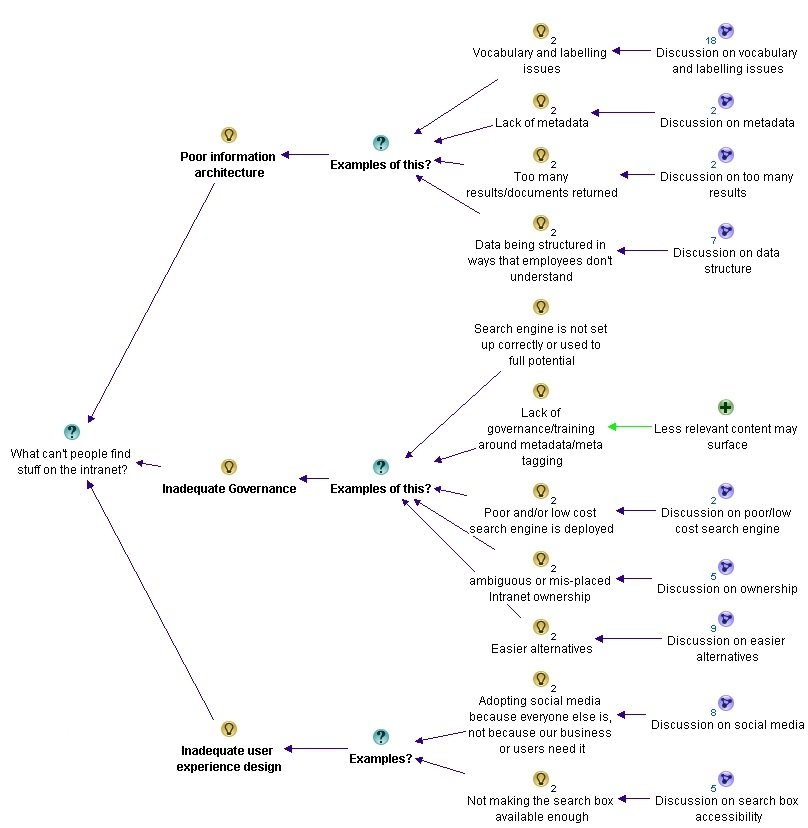
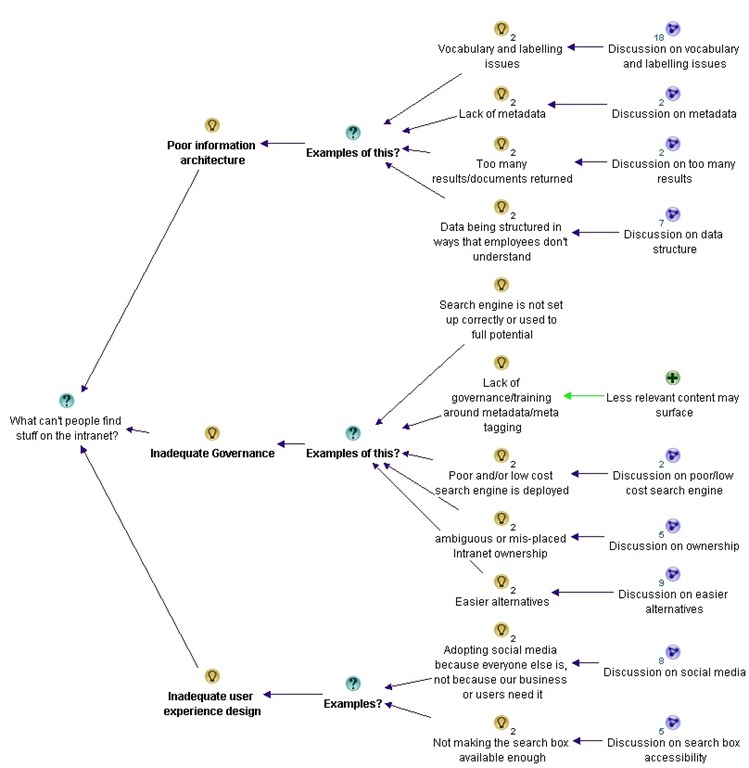
With the addition of Suzanne’s contributions, I felt that it was a good time to take stock and adjust the map. First up, I felt that a lot of topics were starting to revolve around the notion of information architecture, governance and user experience design. So I grouped the themes of vocabulary, lack of metadata, excessive results and issues around structure of data as part of a meta theme of “information architecture”. I similarly grouped a bunch of answers into “governance” and “user experience design”. These for me, seemed to be the three meta-themes that were emerging so far…

For the trainspotters, Suzanne’s comment about document naming conventions was added to the “Vocabulary and labelling issues” sub-map. You can’t see it here because I collapsed the detailed so you can see the full picture of themes as they are at this point.
part2map1

Patrik Bergman • Several of you mention the importance of adding good metadata. Since this doesn’t come natural to all employees, and the wording they use can differ – how do you establish a baseline for all regarding how to use metadata consistently? I have seen this in a KM product from Layer 2 for example, but it can of course be managed without this too, but maybe to a higher cost, or?

Patrick’s comment was a little hard to map. I captured his point that metadata does not come natural to employees as a pro, supporting the idea that lack of metadata is an example of poor information architecture. The other points I opted to leave off, because they were not really related to the core question on why people can’t find stuff on the intranet.

image_thumb[7]

Luc de Ruijter • @Patrik. Metadata are crucial. I’ve been using them since 2005 (Tridion at that time).You can build a lot of functionality with it. And it requires standardisation. If everyone adds his own meta, this will not enable you to create solutions. You can standardize anything in any CMS. So use your CMS to include metadata. If you have a DMS the same applies. (DMS are a more logical tool for intranets, as most enterprise content exists as documenst. Software such as LiveLink can facilitate adding meta in the save as process. You just have to tick some fields before you can save a document on to the intranet.)
@Suzanne. There’s been a lot of buzz about governance. You don’t need governance over meta, you just need a sound metastructure (and a dept of function to manage it – such as library of information management). Basically a lot of ‘governance’ can be automated instead of being discussed all the time :-).

Like Patricks comment, much of what Luc said here wasn’t really related to the question at hand or has been captured already. But I did acknowledge his contribution to the governance debate, and he specifically argued against Suzanne’s point about lack of governance around metadata tagging.

image_thumb[11]

Next we have a series of answers, but you will notice that most of the points are re-iterating points that have already been made.

Patrik Bergman • Thanks Luc. It seems SharePoint gives us some basic metadata handling, but perhaps we need something strong in addition to SharePoint later.

Simon Evans • My top three?
1) The information being searched does not actually exist or exists only in an unrecognisable form and therefore cannot be found!
2) As Karen says above, info is organised by departmental function rather than focussed on end to end business process.
3) Lack of metadata as above

Mahmood Ahmad • @Simon evan. I want to also add Poor Information Structure in the list. Therefore Information Management should be an important factor.

Luc de Ruijter • @Patrik. Sharepoint 2010 is the first version that does something with it. Ms is a bit slow in pushing the possibilities with it.
@Simon @Mahmood Let’s say that information structure is the foundation for an intranet (or any website), and that a lack of metadata is only a symptom of a bad foundation?

Patrik Bergman • Good thing we use the 2010 version then 😀 I will see how good it handles it, and see if we need additional software.

Erin Dammen • I believe 1) lack of robust metadata, resulting in poor search results; 2) structure is not tailored to the way the user thinks; 3) lack of motivation on the part of contributors to make their information easy to use (we have a big problem with people just PDFing EVERYTHING instead of posting HTML pages.) I like that in SP 2010, users have the power to add their own keywords and flag pages as "I like it." Let your community do some of the legwork, I think it helps!

Simon’s first point that the information searched may not exist or may not be in the right format was new, so that was captured under governance. (After all, its hard to architect information when its not there!).

image_thumb[16]

I also added Erin’s third point about lack of motivation on the part of contributors. I mulled over this and decided it was a new theme, so I added it to the root question, rather than trying to make it fit into information architecture, governance or user experience design. I also captured her point on letting the community do the legwork through user tagging (known as folksonomy).

image_thumb[19]

Luc de Ruijter • @all. The list of root causes remains small. This is not surprising (it would be really worrying if the list of causes would be a long list). And it is good to learn that we encounter the same (few but not so easy to solve) issues.
Still, in our line of work these root causes lack overall attention. What could be the reason for that? 🙂
@Erin Motivation is not the issue, I think; and facilitation is. If it is easier to PDF everything, than everyone will do so. And apparently everyone has the tools to do so. (If you don’t want people to PDF stuff, don’t offer them the quick fix.)
If another method of sharing documents is easier, then people will migrate. How easy is it to find PDF’s through search? How easy is it to add metadata to PDF’s? And are colleagues explained why consistent(!) meta is so relevant? Can employees add their own meta keywords? How do you maintain the quality and integrity of your keywords?
Of course it depends on your professional usergroup whether professionals will use "I like" buttons. Its a bit on the Facebook consumer edge if you’d ask me. Very en vogue perhaps, but in my view not so business ‘like’.

Luc, who is playing the devils advocate role as this discussion progresses, provides three counter arguments to Erin’s argument around user motivation. They are all captured as con’s.

image_thumb[21]

Steven Osborne • 1) Its not there and never was
2) Its there but inactive so can no longer be accessed
3) Its not where someone thought it would be or should be or its not called what they thought it was called or should be called.

Marcus Hamilton-Mills • 1) The main navigation is poor
2) The content is titled poorly (e.g internal branding, uncommon wording, not easy to differentiate from other content etc.)
3) Search can’t find it due to poor meta data

patrick c walsh • 1) Navigation breaks down because there’s too much stuff
2) There’s too much crap content hidden away because there’s just too much stuff
and
3) er…there’s just too much stuff

Mark Smith • 1. Poor navigation, information architecture and content sign-posting
2. Lack of content governance, meta-data and inconsistent taxonomy, resulting in poor search capability.
3. The content they are trying to find is out of date, cannot be trusted or isn’t even available on the intranet

Luc de Ruijter • @Steven Had a bit of a laugh there
@all Am I right in making the connection between
– the huge amount of content is an issue
– that internal branding causes confusion (in labeling and titles).
and
the fact that – in most cases – these causes can be back tracked to the owners of intranet, the comms department? They produce most content clutter.
Or am I too quick in drawing that conclusion?

Now the conversation is really starting to saturate. Most of the contributions above are captured already in the map as it is, so I only added two nodes: Patrick’s point about navigation (an information architecture issue) and too much information.

image_thumb[25]

Where are we at now?

We will end part 2 with a summary below. Like the first post, you can click here to see the maps exported in more detail. In part 3, the conversation got richer again, so the maps will change once again.

Until then, thanks for reading

Paul Culmsee

CoverProof29

www.sevensigma.com.au

part2map2


Why can’t users find stuff on the intranet? An IBIS synthesis–Part 1

Hi

There was an interesting discussion on the Intranet Professionals group on LinkedIn recently where Luc De Ruijter asked the question:

What are the main three reasons users cannot find the content they were looking for on intranet?

As you can imagine there were a lot of responses, and a lot more than three answers. As I read through them, I thought it might be a good exercise to use IBIS (the language behind issue mapping) to map the discussion and see what the collective wisdom of the group has to say. So in these posts, I will illustrate the utility of IBIS and Issue mapping for this work, and make some comments about the way the conversation progressed.

So what is IBIS and Issue/Dialogue Mapping?

Issue Mapping captures the rationale behind a conversation or dialogue—the emergent ideas and solutions that naturally arise from robust debate. This rationale is graphically represented using a simple, but powerful, visual structure called IBIS (Issue Based Information System). This allows all elements and rationale of a conversation, and subsequent decisions, to be captured in a manner that can be easily reflected upon.

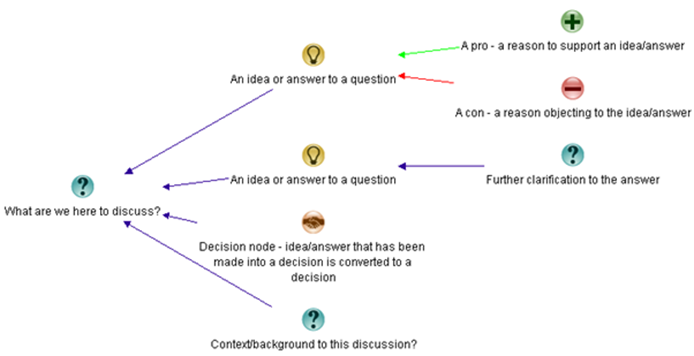
The elements of the IBIS grammar are below. Questions give rise to ideas, or potential answers. Ideas have pros or cons arguing for or against those ideas.

image_thumb81

Dialogue Mapping is essentially Issue Mapping a conversation live, where the mapper is also a facilitator. When it is done live it is powerful stuff. As participants discuss a problem, they watch the IBIS map unfold on the screen. This allows participants to build shared context, identify patterns in the dialogue and move from analysis to synthesis in complex situations. What makes this form of mappingcompelling is that everything is captured. No idea, pro or con is ignored. In a group scenario, this is an extremely efficient way of meeting what social psychologist Hugh Mackay says is the first of the ten human desires which drives us – this being the desire to be taken seriously. Once an idea is mapped, the idea and the person who put it forth are taken seriously. This process significantly reduces “wheel spinning” in meetings where groups get caught up in a frustrating tangled mess of going over the same old ground. It also allows the dialogue to move more effectively to decision points (commitments) around a shared understanding.

In this case though, this was a long discussion on a LinkedIn group so we do not get the benefit of being able to map live. So in this case I will create a map to represent the conversation as it progresses and make some comments here and there…

So let’s kick off with the first reply from Bob Meier.

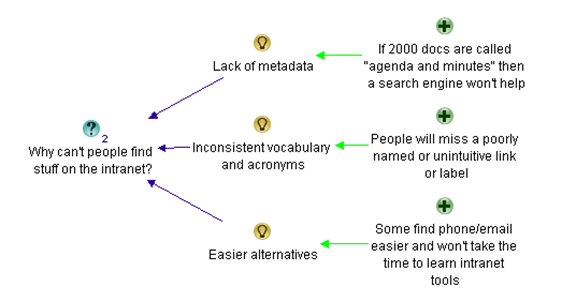
Bob Meier • Don’t know if these are top 3, but they’re pretty common find-ability issues:
1. Lack of metadata. If there are 2000 documents called “agenda and minutes” then a search engine, fancy intranet, or integrated social tool won’t help.
2. Inconsistent vocabulary and acronyms. If you’ve branded the expense report system with some unintuitive name (e.g. a vendor name like Concur) then I’ll scan right past a link looking for “expense reports” or some variation.
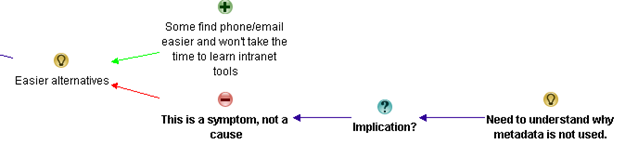
3. Easier alternatives. If it’s easier for me to use phone/email/etc. to find what I want, then I won’t take the time to learn how to use the intranet tools. Do grade schools still teach library search skills? I don’t think many companies do…

In IBIS this was fairly straightforward. Bob listed his three answers with some supporting arguments. I reworded his supporting argument of point 2, but otherwise it pretty much reflects what was said…

image_thumb2

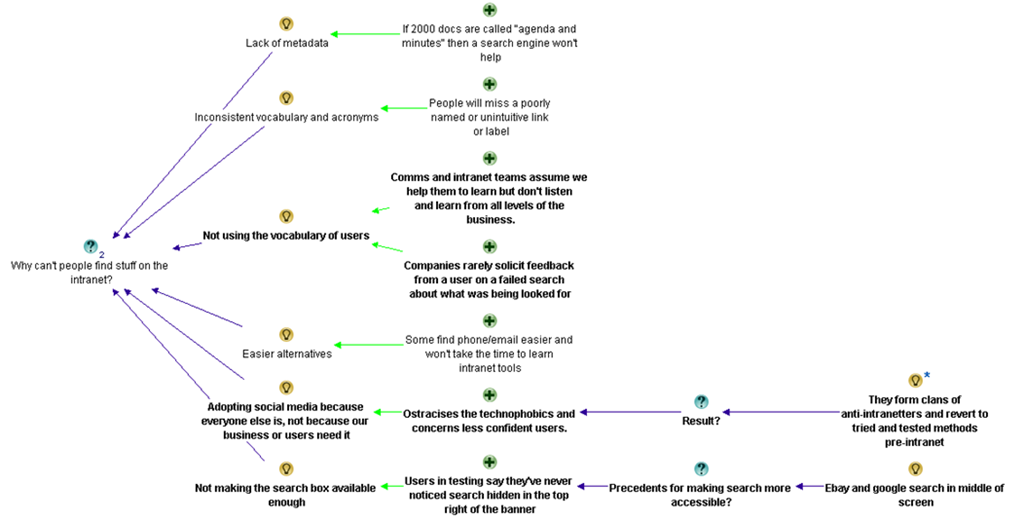
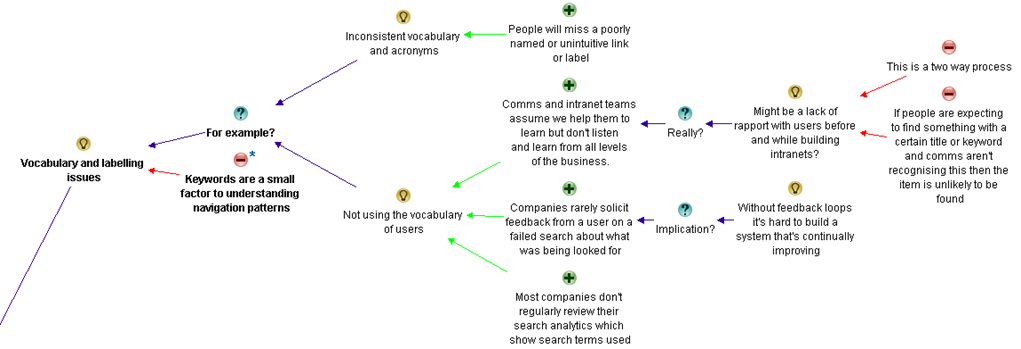
Nigel Williams (LION) • I agree with Bob but I’d add to point two not speaking our user base’s language. How many companies offer a failure to find for example (i.e.if you fail to find something in a search you submit a brief form which pops up automatically stating what you were looking for and where you expected to find it? Lots of comms and intranet teams are great at telling people and assuming we help them to learn but don’t listen and learn from all levels of the business.
If I make that number 1 I’ll also add:
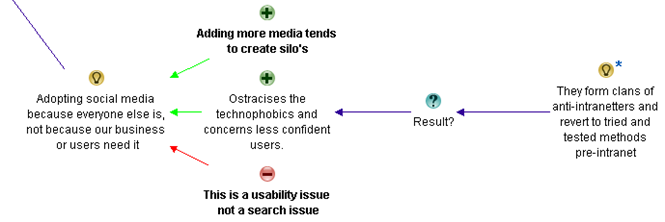
2) Adopting social media because everyone else is, not because our business or users need it. This then ostracises the technophobics and concerns some of our less confident regular users. They then form clans of anti-intranetters and revert to tried and tested methods pre-intranet (instant messaging, shared drives, email etc.)
3) Not making the search box available enough. I’m amazed how many users in user testing say they’ve never noticed search hidden in the top right of the banner – “ebay has their’s in the middle of the screen, so does Google. Where’s ours?” is a typical response. If you have a user group at your mercy ask them to search for an item on on Google, then eBay, then Amazon, then finally your intranet. Note whether they search in the first three and then use navigation (left hand side or top menu) when in your intranet.

Nigel’s starts out by supporting Bob’s answer and I therefore add them as pros in the map. Having done this though, I can already see some future conversational patterns. Bob’s two supporting arguments for “not using the vocabulary of users”, actually are two related issues. One is about user experience and the other is about user engagement/governance. Nevertheless, I have mapped it as he stated it at this point and we see what happens.

image_thumb3

Luc de Ruijter • @Bob. I recognise your first 2 points. The third however might be a symptom or result, not a cause. Or is it information skills you are refering to?
How come metadata are not used? Clearly there is a rationale to put some effort in this?
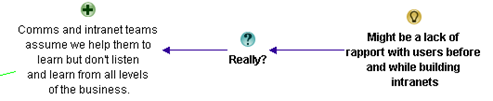
@Nigel. Is the situation in which Comm. depts don’t really listen to users a reason for not finding stuff? Or would it be a lack of rapport with users before and while building intranets? Is the cause concepetual, rather than editorial for instance?
(I’m really looking for root causes, the symptoms we all know from daily experience).
Adding more media is something we’ve seen for years indeed. Media tend to create silo’s.
Is your third point about search or about usability/design?

In following sections I will not reproduce the entire map in the blog post – just relevant sections.

In this part of the conversation, Luc doesn’t add any new answers to the root question, but queries three that have been put forward thus far. Also note at this point I believe one of Luc’s answers is for a different question. Bob’s “easier alternatives” point was never around metadata. But Luc asks “how come metadata is not used?”. I have added it to the map here, changing the framing from a rhetorical question to an action. Having said that, if I was facilitating this conversation, I would have clarified that point before committing it to the map.

image_thumb27

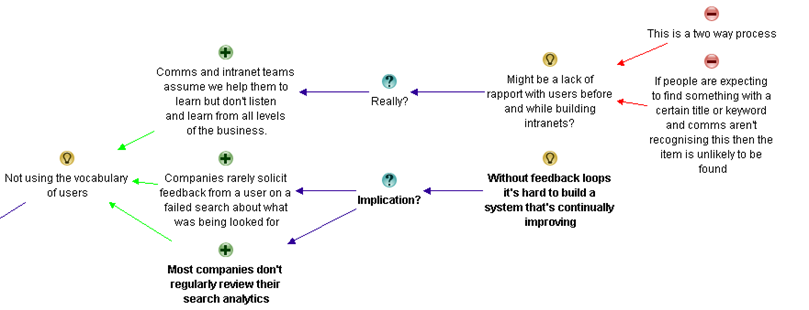
Luc also indicates that the issue around communications and intranet teams not listening might be due to a lack of rapport.

image_thumb25

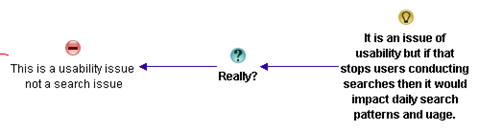
Finally, he adds an additional argument why social media may not be the utopia it is made out to be, by arguing that adding more media channels creates more information silos. He also argues against the entire notion on the grounds that this is a usability issue, rather than a search issue.

image_thumb80

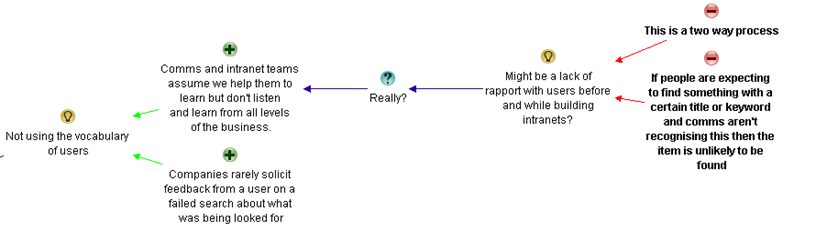
Nigel Williams (LION) • Hi Luc, I think regarding Comms not listening that it is two way. If people are expecting to find something with a certain title or keyword and comms aren’t recognising this (or not providing adequate navigation to find it) then the item is unlikely to be found.
Similarly my third point is again both, it is an issue of usability but if that stops users conducting searches then it would impact daily search patterns and usage.

I interpret this reply as Nigel arguing against Luc’s assertion around lack of rapport being the reason behind intranet and comms teams not listening and learning from all levels of the user base.

image_thumb34

Nigel finishes by arguing that even if social media issues are usability issues, they might still impede search and the idea is therefore valid.

image_thumb84

Bob Meier • I really like Nigel’s point about the importance of feedback loops on Intranets, and without those it’s hard to build a system that’s continually improving. I don’t have any data on it, but I suspect most companies don’t regularly review their search analytics even if they have them enabled. Browse-type searching is harder to measure/quantify, but I’d argue that periodic usability testing can be used in place of path analysis.
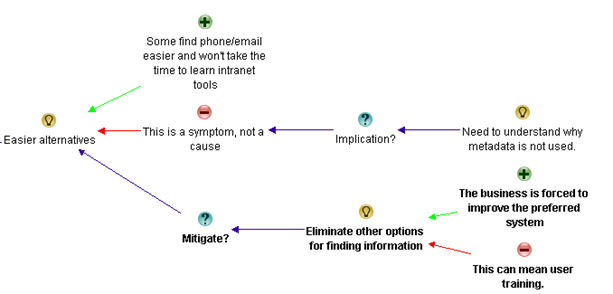
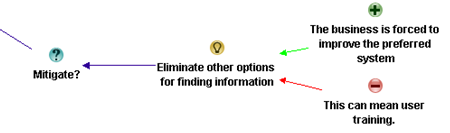
I also agree with Luc – my comment on users gravitating from the Intranet to easier alternatives could be a symptom rather than a cause. However, I think it’s a self-reinforcing symptom. When you eliminate other options for finding information, then the business is forced to improve the preferred system, and in some cases that can mean user training. Not seeing a search box is a great example of something that could be fixed with a 5-minute Intranet orientation.
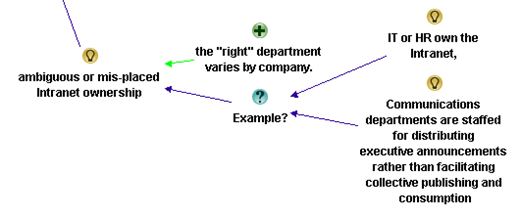
If I were to replace my third reason, I’d point at ambiguous or mis-placed Intranet ownership . Luc mentions Communications departments, but in my experience many of those are staffed for distributing executive announcements rather than facilitating collective publishing and consumption. I’ve seen many companies where IT or HR own the Intranet, and I think the “right” department varies by company. Communications could be the right place depending on how their role is defined.

Bob makes quite a number of points in this answer, right across various elements of the unfolding discussion. Firstly, he makes a point about analytics and the fact that a lack of feedback loops makes it hard to build a system that continually improves.

image_thumb45

In term of the discussion around easier alternatives, Bob offers some strategies to mitigate the issue. He notes that there are training implications when eliminating the easier alternatives.

image_thumb41

Finally, Bob identifies issues around the ownership of the intranet as another answer to the original question of people not being able to find stuff on the intranet. He also lists a couple of common examples.

image_thumb69

Karen Glynn • I think the third one listed by Bob is an effect not a cause.
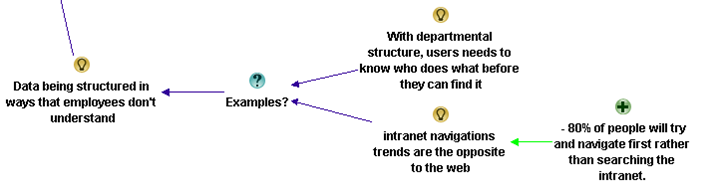
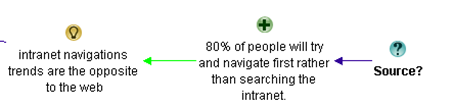
Another cause could be data being structured in ways that employees don’t understand – that might be when it is structured by departments, so that users need to know who does what before they can find it, or when it is structured by processes that employees don’t know about or understand. Don’t forget intranet navigations trends are the opposite to the web – 80% of people will try and navigate first rather than searching the intranet.

In this answer, Karen’s starts by agreeing with the point Luc made about “easier alternatives” being a symptom rather than a cause, so there is no need to add it to the map as it is already there. However she provides a new answer to the original question: the structure of information (this by the way is called top-down information architecture – and it was bound to come out of this discussion eventually). She also makes a claim that 80% of people will navigate prior to search on the intranet. I wonder if you can tell what will happen next? Smile

image_thumb49

Luc de Ruijter • @Nigel Are (customer) keywords the real cause for not finding stuff? In my opinion this limits the chalenge (of building effective intranet/websites) to building understandable navigation patters. But is navigation the complete story? Where do navigation paths lead users to?
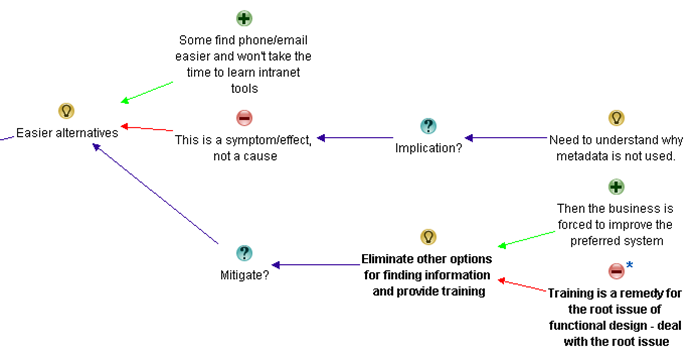
@Bob Doesn’t an investiment in training in order to have colleagues use the search function sound a bit like attacking the symptom? Why is search not easy to locate in the first place? I’d argue you’re looking at a (functional) design flaw (cause) for which the (where is the search?) training is a mere remedy, but not a solution.
@Karen You mention data. How does data relate to what we conventionally call content, when we need to bring structure in it?
Where did you read the 80% intranet-users navigate before searching?

Okay, so this is the first time thus far where I do a little bit of map restructuring. In the discussion so far, we had two ideas offered around the common notion of vocabulary. In this reply, Luc states “Are (customer) keywords the real cause for not finding stuff?” I wasn’t sure which vocabulary issue he was referring to, so this prompted me to create a “meta idea” called “Vocabulary and labelling issues”, of which there are two examples cited thus far. This allowed me to capture the essence of Luc’s comment as a con against the core idea of issues around vocabulary and labelling.

image_thumb52

Luc then calls into question Bob’s suggestion of training and eliminating the easier alternatives. Prior to Luc’s counter arguments, I had structured Bob’s argument like this:

image_thumb58

To capture Luc’s argument effectively, I restructured the original argument and made a consolidated idea to “eliminate other options and provide training”. This allowed me to capture Luc’s counter argument as shown below.

image_thumb55

Finally, Luc asked Karen for the source of her contention that 80% of users navigate intranets, rather than use the search engine first up.

image_thumb61

In this final bit of banter for now, the next three conversations did not add too many nodes to the map, so I have grouped them below…

Karen Glynn • Luc, the info came from the Neilsen group.

Helen Bowers • @Karen Do you know if the Neilsen info is available for anyone to look at?

Karen Glynn • I don’t know to be honest – it was in one of the ‘paid for’ reports if I remember correctly.

Luc de Ruijter • @Karen. OK in that case, could you provide us with the title and page reference of the source? Than it can become usable as a footnote (in a policy for instance).Thanks
Reasons so far for not finding stuff:
1. Lack of metadata (lack of content structure).
2. Inconsistent vocabulary and acronyms (customer care words).
3. Adopting social media from a hype-driven motivation (lack of coherence)
4. Bad functional design (having to search for the search box)
5. Lack of measuring and feedback on (quality, performance of) the intranet
6. Silo’s. Site structures suiting senders instead of users

So for all that Banter, here is what I added to what has already been captured.

image_thumb65

Where are we at?

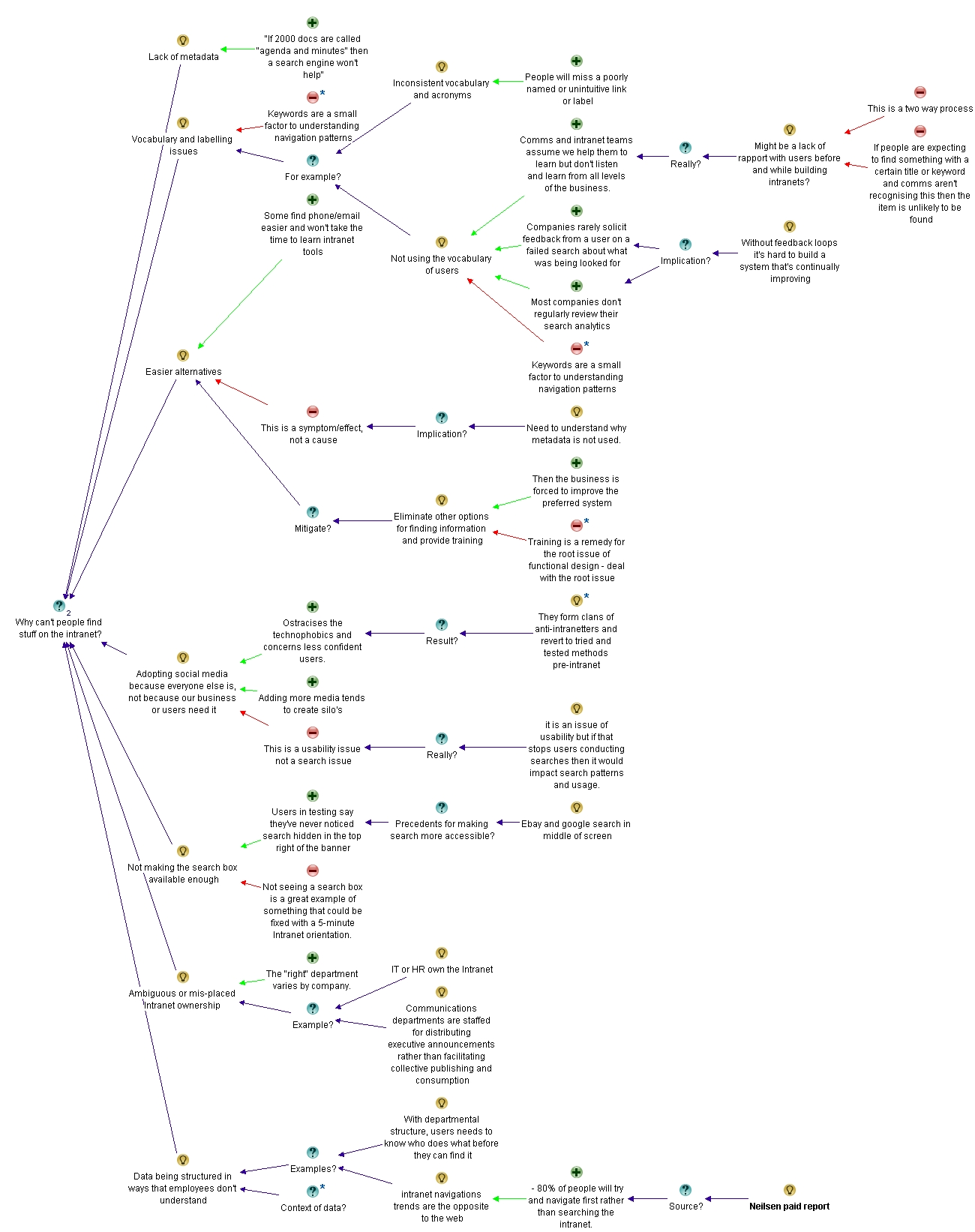
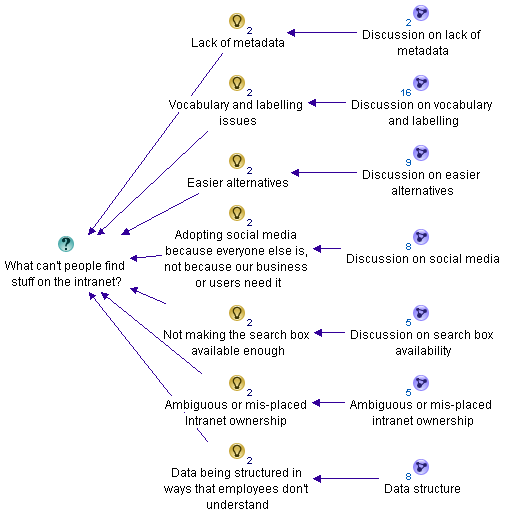
At this point, let’s take a breath and summarise what has been discussed so far. Below is the summary map with core answers to the question so far. I have deliberately tucked away the detail into sub maps so you can see what is emerging. Please note I have not synthesised this map yet (well … not too much anyway). I’ll do that in the next post.

image_thumb72

If you want to take a look at the entire map as it currently stands, take a look at the final image at the very bottom of this post. (click to enlarge). I have also exported the entire map so far for you to view things in more context. Please note that the map will change significantly as we continue to capture and synthesise the rationale, so as we continue to unpack the discussion, expect this map to change quite a bit..

Thanks for reading

Paul Culmsee
CoverProof29

www.sevensigma.com.au

Map25


Today is: Friday 6 March 2026 -