
The (new current) best way to update SharePoint document metadata using Flow
Hi
Some time back I documented an approach to updating document library metadata using Flow. To recap, the issue was that the “SharePoint : Create File” action provided no way to update library metadata when uploading a file, nor did it return the item ID of the newly created file. Since I wrote that post, Microsoft has updated things. First, the create file action now does return an ID, and some new Flow actions have been released, including one called “SharePoint – Update File Properties”.
This now makes the whole metadata situation much less sucky…
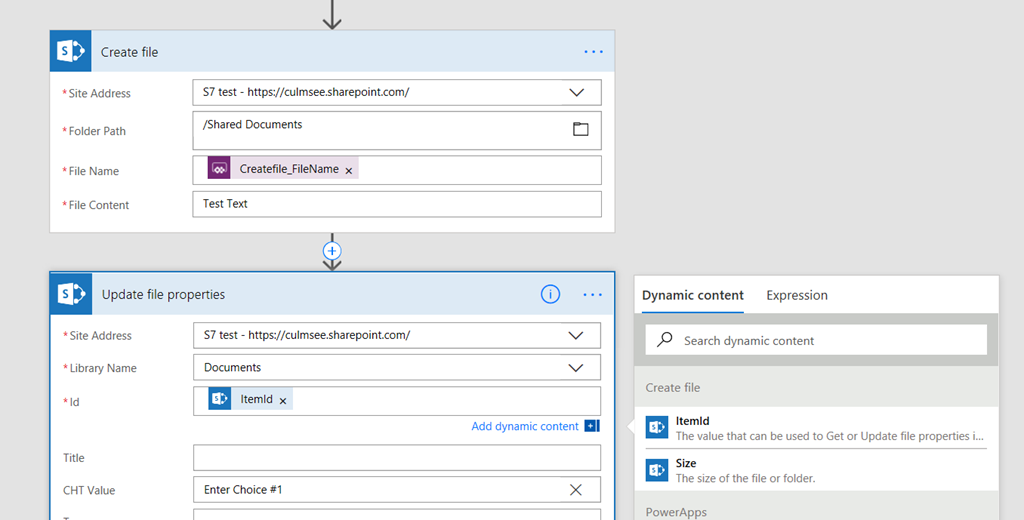
Check out the image below. In it, I have used a PowerApps trigger, and added a Create File action, and followed it up with an Update File Properties action. Notice that when I click the ID textbox in the Update File Properties action, I now have ItemID available from the Create File action. Much simpler than before!
Hope this helps someone…
Paul Culmsee






October 12th, 2017 at 9:58 pm |
Thanks for the post. I’m glad my build on your previous workaround is no longer necessary!
http://sympmarc.com/2017/09/20/microsoft-flow-updating-file-metadata-when-you-have-more-than-5000-items/
M.
December 30th, 2017 at 1:34 pm |
Thanks for this. One limitation of the ‘Update file properties’ Flow step appears to be that it does not support Image Libraries 🙁
After entering the site address, Image Libraries do not appear in the Library Names drop down.
Couple this with the fact that Image Libraries are also not supported by the feature allowing ’embedded’ PowerApps forms in libraries and I wonder if Image Libraries are on their way out.
February 23rd, 2018 at 9:46 am |
paul, you can select \’enter a custom value\’ and type in the name of your photo library.
April 27th, 2018 at 4:03 am |
This works for create file action but i have a similar issue with the copy file action. I want to copy a file from one library to another and then set the metadata. Copy file does not emit a handle to the copied file — at least not one I can find.
Any suggestions?
August 16th, 2018 at 9:39 pm |
I have a flow responsible for filing e-mail attachments. However, the destination Site and Document Library are different based upon the sender, and are determined by referencing a Lookup List. So, these values are not known until RunTime. It appears that the Update File Properties action does not allow for this, and requires the Site and Library during Design so that it can pull the properties available for update. Does anyone know of a workaround for this? I really don’t want to have to convert my lookup list to a dozen or more different conditional chains.
December 13th, 2019 at 6:46 pm |
Experiência de 23 anos no mercado de eventos.
March 14th, 2020 at 12:31 am |
Thanks for sharing!