Back to Cleverworkarounds mainpage
 

Whatever you do, do not ignore legacy

On the twitterverse recently, someone stated that because of a problem of excessive SharePoint site sprawl, they were going to institute a new site approval process. On the surface this remedy seems to be perfectly reasonable. After all, there is a clear problem that has emerged and in the name of governance, we have taken steps to address it via this new process.

There is only one small problem with this. It’s probably the wrong thing to do or at best, a minor facet of what to do.

Before I explain why, consider another scenario that I am sure all of us have experienced. You have a problem so you call your bank, ISP or some other provider of services that you have paid for. You encounter an operator or customer service representative who seems hell-bent on closing your call at all costs, whether you think the problem is solved or not. Common examples of how this plays out is the oft used “well I will close this call and you can call back and log a new one if there is still an issue” line. A more subtle, yet equally frustrating one that even Microsoft have used on me is the “well you logged the problem as X, but in reality its Y. So you will need to close this call and re-log a new call for problem Y”.

The underlying reason for this is very likely that the performance of the person on the other end of the line is judged on time spent handling your call. The logic would be that the speedier a call is closed, means the less time users have spent on tech support, which indicates good outcomes for customers.

Alas, if only that were true. Anybody who has been on the receiving end of this sort of treatment knows full well that the opposite happens. As a customer, you get frustrated and pissed off. More dangerously for the organization, this sort of indicator conveys a warped representation of reality. Essentially the operator has altered their behaviour to maximise their performance according to this measure of “effectiveness”. Customers who are paying the money are not necessarily satisfied. In fact they are more often than not dissatisfied. Therefore, the notion that length of support calls somehow lead to happier customers is a fallacy. In the longer term, customers will tire of crappy outcomes and take their business elsewhere.

This success indicator is a mirage, and in actual fact contributes to the nastier, longer term problems of customers ending up with competitors.

So with that said, lets go back to our Sharepoint site sprawl issue. Before instituting such a policy, I ask the following simple question.

So why are there lots of sites?

Now there will be various reasons, but the most common answer I get back from this is:

Users don’t know any better.

This assertion is pretty easy to test too. Take a look at the sites in the wild west of a chaotic SharePoint install. Since most site templates in SharePoint have a single document library, it is common to see many hundreds of sites with a single document library in them. Clearly, people simply aren’t aware that they can do things like add more libraries or lists to a site or they are unwilling or unable to do so. I have experienced users telling me that if they had have known, they would have never created a site for a particular collaborative activity.

Side Note: SharePoint’s own attempts to be “intuitive” is the problem here. For a start, sites build navigation by default so people get duped into using sites to create navigational structure when its wholly inappropriate. Secondly, creating a new site is inferred as the right thing to do. To see why, go to the site actions menu and what is a default action there? You guessed it – create a site. SharePoint out of the box actually contributes to users forming this mental model of how SharePoint hangs together).

So clearly, many instances of excess site sprawl is symptomatic of something deeper. Users do not know that there are potentially better alternatives. This leads us to a somewhat rhetorical, yet critical question:

What does an approval process do about users not knowing any better?

Many times such approval processes shift the burden of creating the site to an authorised party like IT, after a requestor’s boss has given it the go ahead. Naturally, people will have to do more paperwork to get approval and it might take longer. Furthermore, maybe their request will be rejected under certain circumstances. But at what point will they learn that there is more to life than sub sites? Even after instituting the approval process, we still may end up with a heap of sites with a single document library in them. Have we really addressed the real issue?

Do you see the parallel? The sort of thinking that decided an approval policy is the answer to site sprawl is the same sort of thinking that decided that call times are a reliable indicator of customer outcomes being met. Both treat the superficial, visible symptoms of a problem, not the underlying cause. Furthermore, both end up leaving stakeholders with crappy outcomes in the longer term. Your support calls are still frustrating and you are still using SharePoint in a sub optimal fashion.

More scarily though is that we have deluded ourselves into thinking we have dealt with the problem. SharePoint governance is often built around this sort of superficial thinking. If a governance plan weighs as much as a door stop, and gets about as much attention as a door stop, then you might be making this mistake.

What about legacy?

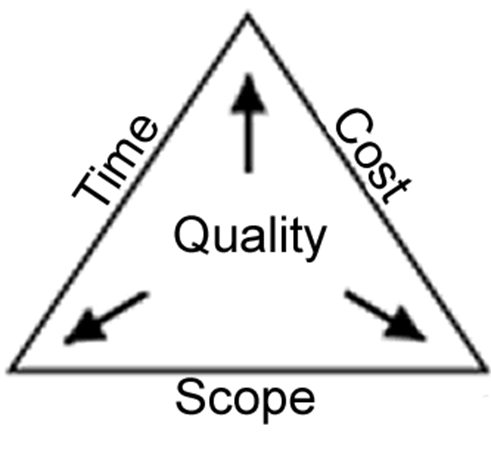
This problem is more common than you think. There is a more systematic pattern of delusion that can happen in project management. Check out the diagram below.
image

Seen this diagram before? It is very common on project management books and presentations. We have a pyramid that implying that to have quality, we have to have time, cost and scope balanced and understood. Like the site approval policy, this seems perfectly reasonable on the surface. But unfortunately, by its very nature can cloud us to what is really important.

Below is an example of a project output – the Sydney Opera House. During my classes, everyone recognises it and there is always someone who has been there. In fact people come to Sydney just to see it. In term of economic significance to Sydney, it is priceless and irreplaceable. the architect who designed it, Jørn Utzon, was awarded the Pritzker Prize (architecture’s highest honour) for it in 2003.

image

So I ask you the question:

Was this a successful project?

I ask this question to people all around the world and the answer is always a great big Yes. But if we look at this project through the lens of our quality triangle above, the view changes.

Why?

Well, here are a few fun filled facts about the Sydney Opera House.

  • The Opera House was formally completed in 1973, having cost $102 million.
  • The original cost estimate in 1957 was $7 million.
  • The original completion date set by the government was 1963.
  • Thus, the project was completed ten years late and over-budget by more than fourteen times.
  • Ultzon, the designer of the opera house never lived to set foot in it, having left Australia in disgust, swearing never to come back.

“Utzon soon found himself in conflict with the new Minister. Attempting to rein in the escalating cost of the project, Hughes began questioning Utzon’s capability, his designs, schedules and cost estimates. Hughes eventually stopped payments to Utzon. Unable to pay his staff, Utzon was forced to resign as chief architect in February 1966 and left the country never to return. Utzon has never seen the completed work that brought him international renown

Harsh huh? Clearly, when judged through the “quality” lens of time, cost and scope, this project was a unmitigated epic fail that makes SharePoint look like a walk in the park.

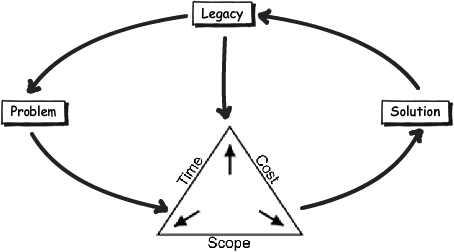
The example of the Sydney Opera House serves to remind us that when all is said and done, we judge quality across something deeper than time, cost and scope alone. That something is legacy.

People remember legacy, not scope

So when you look at the Opera house through the lens of the quality triangle, you are making the same mistake as the call-center KPI and the well intentioned site creation policy. You are taking a superficial view of things and in doing so, missing more subtle, but ultimately important factors. In fact you are treating symptoms and not looking for the “story beneath the story” that caused the visible symptoms in the first place.

Yet…

Why do we go to the time, effort and cost to put in tools like SharePoint? It is because we see that it can take us to a better place than we are now. After all, if we didn’t believe this fundamental truth, then we wouldn’t spend the that time and money working on it. This notion of a “better place” implies that we are trying to escape a legacy of the past – such as poor information management practices, inefficient process, silo organisations and so forth.

As illustrated by the Opera House example, people do not remember time, cost and scope. What they do remember acutely however is legacy.

So what is a more reliable indicator of quality? Who visits the Opera house and takes a photo of it because it was such a breathtakingly bad example of project management 101? No, they take their photo because it is unique, has value and people want to experience it for themselves. Its the legacy that they remember, cherish and want to be a part of.

As a result, there is a critical lesson here for all SharePoint practitioners (from the nerdiest of nerds to the hippiest of web 2.0 pundits). Ask yourself, “what legacy is my governance actions going to leave”, because if you fail to consider the legacy of your approaches to SharePoint delivery, you are probably dooming your organisation to the very same legacy you wanted to escape in the first place!

And that’s just tragic.

So I think that PM 101 diagram needs to be redrawn because it misleads – especially for complex, adaptive or wicked problems. To me, considering time, cost and scope without legacy is delusional and plain dumb. Legacy informs time, cost and scope and challenges us to look beyond the visible symptoms of what we perceive as the problem to what’s really going on.
image

When I get time, I will post several examples of how I was able to utilise this sort of thinking in a future post, but I hope this gives you some food for thought.


Thanks for reading


Paul Culmsee

www.sevensigma.com.au

www.spgovia.com


Seattle is go! SharePoint Governance and Information Architecture class

For one night only USA…

Ah, Erica Toelle – what a legend! Thanks to Erica and Fpweb, I’m thrilled to confirm that the Seattle SharePoint Governance and Information Architecture class is all systems go. Save the date as its very likely indeed to be the only SPIA class in the USA in 2011.  If it wasn’t enough that Erica will be joining me, but Ruven Gotz will be there too.

Thursday and Friday, May 05-06, 2011. (http://spiaseattle.eventbrite.com/)

The location is the Silvercloud Inn, 14632 SE Eastgate Way Bellevue, WA 98004

Map picture

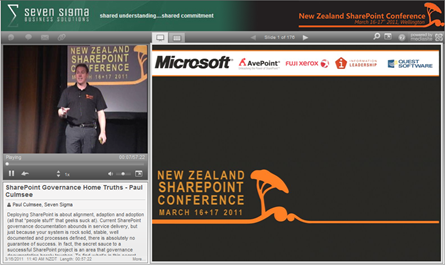
In this multimedia extravaganza of a blog post, lets take a closer look at this class and what you can expect. Below is a snippet of a talk I did in New Zealand called “SharePoint Governance  Home Truths”. This clip shows a little diagnostic test that I do on my audience, to see whether they have experienced the visible signs of wicked problems. If you want to know why you should go to SPGov+IA, then take my 2 minute test yourself.

Do you need SPGov+IA? Take the two minute test to find out…

If the two minute test has taken your fancy, then you might want to see what is in store on the course itself. Below is the first half-hour of module 1 (in the form of a conference session), as well as the accompanying slide deck.

image 

View more presentations from paulculmsee

Course Information:

imageDownload Course Outline (PDF)

Download Class Flyer (PDF)

Most people understand that deploying SharePoint is much more than getting it installed.  Despite this, current SharePoint governance documentation abounds in service delivery aspects. However, just because your system is rock-solid, stable, well-documented and governed through good process, there is absolutely no guarantee of success.  Similarly, if Information Architecture for SharePoint was as easy as putting together lists, libraries and metadata the right way, then why doesn’t Microsoft publish the obvious best practices?

In fact, the secret to a successful SharePoint project is an area that the governance documentation barely touches.

This Master Class pinpoints the critical success factors for SharePoint Governance and Information Architecture and rectifies this blind spot.  Paul Culmsee’s style takes an ironic and subversive view on how SharePoint Governance really works within organizations while presenting a model and the tools necessary to get it right.

Drawing on inspiration from many diverse sources, disciplines and case studies, Paul Culmsee has distilled the "what" and "how" of governance down to a simple and accessible, yet rigorous and comprehensive set of tools and methods that organizations, large and small, can utilize to achieve the level of commitment required to see SharePoint become a successful part of your enterprise.

Some workshop sessions are hands on, we provide all of the tools and samples needed but please bring your own laptop.

Course Structure:

The course is split into 7 modules, run across two days.

Module 1: SharePoint Governance f-Laws 1-17:

Module 1 is all about setting context in the form of clearing some misconceptions about the often muddy topic of SharePoint governance. This module sheds some light onto these less visible SharePoint governance factors in the form of Governance f-Laws, which will also help to provide the context for the rest of this course

  • Why users don’t know what they want
  • The danger of platitudes
  • Why IT doesn’t get it
  • The adaptive challenge – how to govern SharePoint for the hidden organisation
  • The true forces of organisational chaos
  • Wicked problems and how to spot them
  • The myth of best practices and how to determine when a “practice” is really best

Module 2: The Shared Understanding Toolkit – part 1:

Module 2 pinpoints the SharePoint governance blind spot and introduces the Seven Sigma Shared Understanding Toolkit to counter it. The toolkit is a suite of tools, patterns and practices that can be used to improve SharePoint outcomes. This module builds upon the f-laws of module 1 and specifically examines the “what” and “why” questions of SharePoint Governance. Areas covered include how to identify particular types of problems, how to align the diverse goals of stakeholders, leverage problem structuring methods and constructing a solid business case.

Module 3: The Shared Understanding Toolkit – part 2:

Module 3 continues the Seven Sigma Shared Understanding Toolkit, and focuses on the foundation of “what” and “why” by examining the “who” and “how”. Areas covered include aligning stakeholder expectations, priorities and focus areas and building this alignment into a governance structure and written governance plan that actually make sense and that people will read. We round off by examining user engagement/stakeholder communication and training strategy.

Module 4: Information Architecture trends, lessons learned and key SharePoint challenges

Module 4 examines the hidden costs of poor information management practices, as well as some of the trends that are impacting on Information Architecture and the strategic direction of Microsoft as it develops the SharePoint road map. We will also examine the results from what other organisations have attempted and their lessons learned. We then distil those lessons learned into some the fundamental tenants of modern information architecture and finish off by examining the key SharePoint challenges from a technical, strategic and organisational viewpoint.

Module 5: Information organisation and facets of collaboration

Module 5 dives deeper into the core Information Architecture topics of information structure and organisation. We explore the various facets of enterprise collaboration and identify common Information Architecture mistakes and the strategies to avoid making them.

Module 6: Information Seeking, Search and metadata

Module 6 examines the factors that affect how users seek information and how they manifest in terms of patterns of use. Building upon the facets of collaboration of module 5, we examine several strategies to improving SharePoint search and navigation. We then turn our attention to taxonomy and metadata, and what SharePoint 2010 has to offer in terms of managed metadata

Module 7: Shared understanding and visual representation – documenting your Information Architecture

Module 7 returns to the theme of governance in the sense of communicating your information architecture through visual or written form. To achieve shared understanding among participants, we need to document our designs in various forms for various audiences.

Putting it all together: From vision to execution

Attendees will be taking home a manual ~480 pages, containing the Seven Sigma Shared Understanding Toolkit CD with a sample performance framework, governance plan, SharePoint ROI calculator (Spreadsheet), sample mind maps of Information Architecture. These tools are the result of years of continual development and refinement "out in the field" by Paul Culmsee and have only been recently released to the public through this Master Class.

More Information:

Refund Policy:

No refunds will be issued for attendee cancellations once payment is recieved.  Class cancellation by the organizer will result in a refund less transaction fees.

image

http://spiaseattle.eventbrite.com/


Praise for SharePoint Governance and IA Masterclass

I received this today and I had to post it. In New Zealand recently, Paul McTaggart of Gen-i stopped me and complimented the governance and information architecture course that some of his staff have attended. I am truly humbled by the feedback that he just sent through…

Practical, relevant and seriously funny: These attributes are seldom seen together in a training session.

However, Paul Culmsee has practical, real world experience having worked on complex (wicked) projects which provides him with the background and understanding of what works and why.

Discover the immutable f-laws of SharePoint projects. Cry and laugh when you identify the reality of you own organizational platitudes, but breathe a sigh of relief when you see that there is a way out and that SharePoint Governance and Information Architecture can be achieved with everyone sharing the same understanding of where you are now and where you are trying to get to.

Paul also supports you new found realization of what needs to be done by providing you with the guidance, tools and methods that you can take from the classroom and apply to your complex (wicked) problem projects to make them work.

Basically it is all about people (gaining shared understanding), process (knowing how to get from here to there) and then the technology (SharePoint).

My team now uses the concept of shared understanding and the tools that the Governance and Information Architecture Class has provided to get customers “on page” before we design and code in SharePoint land.

Paul McTaggart

ECM Business Manager

Gen-i a division of Telecom New Zealand

Thanks for reading

Paul Culmsee


The facets of collaboration part 5: It’s all Gen-Y’s fault – or is it?


Hi all

imageWelcome to another exploration of the collaborative world through a lens called the facets of collaboration. If you are joining us for the first time, I am writing a series of posts that looks at how our perception of collaboration influences our penchant for certain collaborative tools and approaches. SharePoint, given that it is touted as a collaboration platform, inevitably results in consultants never being able to give a straight answer. This is because SharePoint is so feature-rich (and as a result caveat-rich), that there are always fifty different ways a situation can be approached. Add the fact that many clients do not necessarily know what they want and learn about their problem by examining potential solutions, we have all the hallmarks of a wicked problem in the making.

These wicked problems, underpinning SharePoint, often results in Robot Barbie situations (cue the image to the left), which is the metaphor that I started this series with. Robot Barbie represents everything wrong about SharePoint deployments, as it is symptomatic of throwing features at a platitude, pretending to be solving a real problem and then wondering why the result doesn’t gel at all. It is a pattern of behaviour that is similar to an observation made by the very wise (and profane) Ted Dziuba who once spoke these words of wisdom.

If there’s one thing all engineers love to do, it’s create APIs. It’s so awesome because you can draw on a white board and feel like you put in a good day’s work, despite having solved no real, actual problems. Web 2.0 engineers, in addition to their intrinsic love of APIs, have a real hard-on for anything having to do with a social network. For example, developing a Facebook application lets them call their shitty little PHP program an "application" running on a "platform," like a real, live computer programmer does. Make-believe time is so much fun, even for adults.

Apart from making me giggle, Dziuba may have a point. Elsewhere on this blog I have spent time explaining that there are different types of problems that require different approaches to solving them (wicked vs. tame). My conjecture is that collaboration itself is exactly the same in this regard. People who espouse a particular type of tool or approach as the utopian solution to collaboration are taking a one size fits all approach to a multifaceted area and even worse, treating that area as a platitude. Anyone who calls themselves an Information Architect and doesn’t at least give cursory examination to the dimensions or facets of collaboration is likely to be doing their stakeholders a disservice.

All of us have certain biases, and I am no exception. For a start, I am generation X – the so-called cynical generation. Apparently we whinge and whine about everything and then blame it all on generation-Y. Thus, if cynicism is the gen-X stereotype, then I will happily accept being the poster child. I mean seriously, all of you vanity obsessed, self interested generation y’ers, if you spend a little less time preening and more time thinking, we might get some wisdom out of you (see – I am such a cynical gen-X right now).

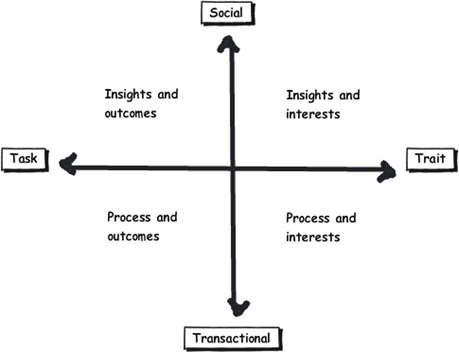
So let’s recap the facets of collaboration. The model I came up with identifies four major facets for collaborative work: Task, Trait, Social and Transactional.

  • Task: Because the outcome drives the members’ attention and participation
  • Trait: Because the interest drives the members’ attention and participation
  • Transactional: Because the process drives the members’ attention and participation
  • Social: Because the shared insight drives the members’ attention and participation

image

In the last post, I used the model to examine the notion of Business Process Management versus Human Process Management and looked at some of the claims and counter claims made by proponents of each. This time let’s up the ante and talk about something curlier. We will examine the notion that social networking in the enterprise is the answer to improving collaboration within the enterprise. On first thought, it makes perfect sense, given the incredible success of Facebook, LinkedIn and Twitter. Nevertheless, there is ongoing debate about the use and value of social tools in the enterprise driven by their rise outside of organisational contexts. One particularly strongly worded quote is from Aaron Fulkerson, co-founder and CEO of MindTouch who doesn’t mince his words:

This class of software forces business users to adopt the myopic social visions imagined by the developers, which are nearly identical to their corresponding consumer web implementations. In short, social software is not solving business problems. In fact, these applications only serve to treat symptoms of the problems businesses face. They exacerbate the real problems within businesses by creating distractions and, worse, proliferate more disconnected data and application silos.

Ouch! Even within the SharePoint community there is significant variation of opinions as to the value of social. While I better protect the innocent and not name names, I have spoken with several well known SharePointers who think social is a giant waste of time, versus those who see real value in it. Irrespective of your opinion, you cannot ignore the fact that social is a significant game changer with effects still being felt. While web 2.0 has dropped off the Gartner hype cycle, its effect on particular sectors has been far reaching. Now it seems that all sectors have a 2.0 on the end of their name. For example:

  • Enterprise 2.0
  • Education 2.0
  • Legal 2.0
  • Government 2.0

Clearly, if things were just a flash in the pan, why are governments around the world trying to revitalise their public sector by utilising these tools?

Look at Microsoft as another example. They have, I think smartly, recognised industry trends and reacted to them via the introduction of a number of new SharePoint features, such as tagging/folksonomy via managed metadata, ratings columns, enhanced wiki capabilities and a significant investment in the capabilities of my-sites. Their clients now have the option to leverage these features should they choose to do so.

So just as there are naysayers, there are the pundits. Many people cite the reasoning that these features are necessary to attract and retain the next generation of workers, who have grown up with these tools in their personal lives. Whether this claim is valid is debatable, but I have to say, I really like the Enterprise 2.0 slide deck below by Scott Gavin for a number of reasons. I think it encapsulates the 2.0 vision, underpinned by social/cloud technologies very nicely. I sometimes ask people to discuss this slide deck in my IA classes and discussion is equally polarising as social networking in the enterprise itself. Some people think it represents the vision for the future, and others think it is hopelessly idealistic and doesn’t reflect cold, hard reality. Take a look for yourself below…

And the survey says…

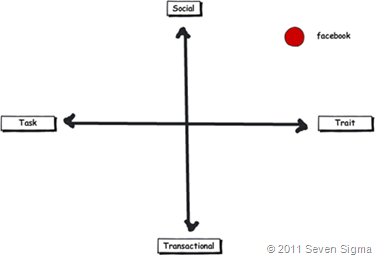
Using the facets quadrants, we can start to see patterns for success of these tools for the enterprise and whether Aaron Fulkerson’s argument has merit or whether Scott Gavin is on the right track. An interesting use of the facet diagram is to plot where various tools and technologies are located. in my classes, I ask people to plot where Facebook belongs on facets diagram. Guess where it is usually drawn? 

image

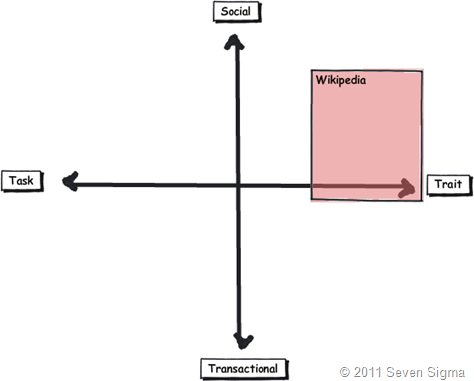
While some people will draw Facebook at various levels on the vertical axis, everyone pretty much describes Facebook (and LinkedIn)  as trait based, while being highly dominant on the social quadrant. As discussed in the last article, if I ask people to plot a crowdsourced tool like Wikipedia, the dominant characteristic is always trait/social. In other words, people maintain and update Wikipedia articles because of their interest in the topic area, not because it helps them get something done.

image_thumb29

Clearly, big social networking technologies are successful in the "trait based social” quadrant. In other words, we tend to use Facebook more for common interest collaboration than to solve a task based collaborative issue (such as deliver a project). Another interesting thing about a lot of social networking technologies is that for many, our work-based collaborative life tends to be more task based, compared to our non-work which is more trait based. In other words, for a lot of us, our work life revolves around working with a group of people for a common outcome and if it was not for that common outcome, we wouldn’t necessarily have much in common (I risk falling victim to my own generalisation here – so I will come back to this later in the section titled “Why User Buy-In Is Hard”).

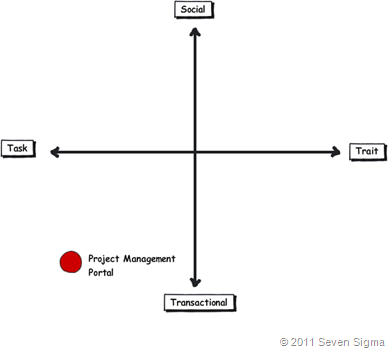
When you look at where Facebook sits in the quadrant, it begs the question of how well this type of tool (or the building blocks it is based on) would work in an organisation that is project (task) based and highly transactional. To that end, consider a project management information system, such as the basic one that Dux espouses in his book or the more complex one that Microsoft sell to organisations. Where do you think it belongs on the quadrant?

When I ask people to plot their project management information system, I typically get this response:

image

I speculate that the further away two tools lie on the spectrum, the more likely we are to have a robot-barbie solution if you blindly mix features that work well in each individual quadrant. The wiki argument I made in part 3 seems to support this contention. If you recall, in part 3 of this series, I mentioned that I ask every attendee of my classes if they had ever seen a successful project management wiki.  Irrespective of the location of the class, the answer was pretty much “no”. I noted that where I had seen successful wikis tended to be where the users of the wiki were linked by strong traits.

Looking Deeper

While that is interesting, I think the facets diagram tells you more than it intends. Obviously, it is clear that these project management systems such as MS Project Server are oriented toward task/transactional (“getting things done”) aspect of project delivery (ie, time, cost, scope, budget and the like). While some people might point to this and say “there you go – I told you all that social crap was a waste of time – bloody gen-Y and their social networking hubris”, I feel this is naive. If task based transactional tools are sufficient, then why do so many projects fail?

I have stated many times on this blog that shared commitment to a course of action requires shared understanding of the problem at hand. The act of aligning a team to project goals and developing this shared understanding is the realm of the task/social quadrant (the top left), where insights and outcomes come together. When I ask people to name tools that live in this space, few can name anything. Obviously, most project management systems are devoid here. Worst still, we subsequently delude ourselves to thinking that shared understanding can come from a few platitudinal paragraphs labelled as a “problem statement”.

Social networking pundits implicitly recognise this issue (and frequently butt heads against command and control type project managers as a result). But i feel they make the mistake in applying a one size fits all approach to collaboration and apply trait based tools as a panacea when they are not wholly appropriate. The social tools seem to fit exceptionally well into the top right quadrant, but not in the top left.

In fact the only tools that spring to mind that belong in the top left category are the sensemaking tools that my company practice, such as Dialogue Mapping.

Where’s the proof, Paul?

So I guess I am arguing that using social tools because they are the “choice of the new generation” ignores a few home truths about the nature of these tools versus the nature of organisational life. Just because Microsoft provide the tools for you, tells you that they are hedging their bets rather than having any more insight than you or me. So to test all of this, let’s use the facets model in a different way to back up some of my observations and suggestions in this post. Guess what happens when I ask people to plot SharePoint itself on the facets map?

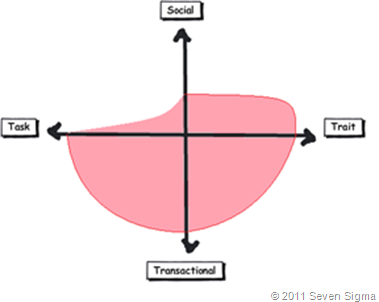
When I asked SharePoint practitioners to do this, they initially drew SharePoint 2007 as a circle over the entire model. Once they did so, they would very often adjust the drawing to emphasise transactional over social collaboration as shown below.

Sharepoint 2007 

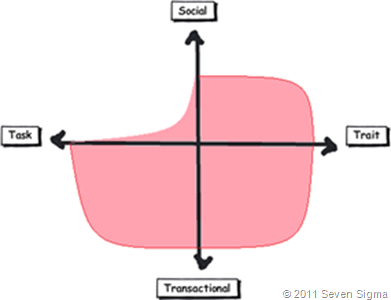
When practitioners were asked to draw SharePoint 2010, they usually indicated a higher representation in in the two social quadrants, but favoured the trait based social over task based social as shown below.

image

What was interesting about this experiment is that very few people drew SharePoint over the entire facets of collaboration. Social collaboration with SharePoint it seems, only stretches so far. This leads me onto more conjecture, and now we get to the bit in the post where we name a giant SharePoint elephant in the room.

Structured tools for social collaboration?

Many collaborative tools purport themselves as operating in the social space. SharePoint 2010 clearly does so, principally due to the Managed Metadata service, pimped MySites with tagging/rating capabilities. But SharePoint’s core heritage is database/metadata driven, document based collaboration. If we go back to our definition of social collaboration as dynamic, unstructured, with sharing of perspectives and insight through pattern sensing, then social collaboration is clearly not a predefined interaction.

Yet, database driven tools like SharePoint, and its building blocks like site columns and content types require considerable up-front planning to install and govern. Many, many inputs need to be well defined and furthermore, unless you have learnt through living the pain of things like content type definitions in declarative CAML, SharePoint buildings blocks are difficult to maintain/change over time. SharePoint suffers from a problem of reduced resiliency over time in that the more you customise it to suit your ends, the less flexible it gets. In the case of social collaboration the problem is worse because we are trying design for outputs where the inputs are not controlled. Trying to turn something that is inherently organic and emergent to something that has an X and Y on it may be misfocused and destined to fail in many circumstances. The realm of well-defined inputs is the realm of transactional collaboration, where workflow and business process management thrive and change is much more controlled before SharePoint ever gets a look in.

SharePoint excels at transactional scenarios as this is its heritage – after all, the majority of its feature set is oriented to transactional collaboration. The fact that people are prepared to draw SharePoint as dominating across across the transactional half of the facets diagram illustrates this.

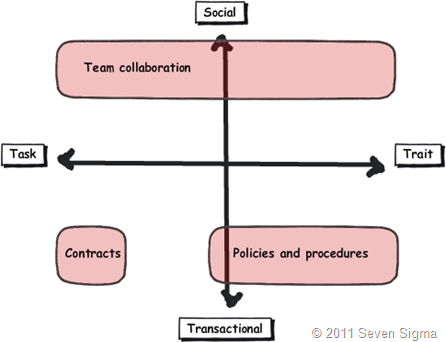
But this raises interesting, if not slightly heretical question. If we need to use information architects to get a collaborative tool deployed for social collaboration (to get those inputs defined), then are we pushing the solution into the transactional side of the fence? Recall that in part 3 of this series, I looked at document collaboration and noted that when asked to draw team based document collaboration, people typically drew it operating in the social half of the matrix (pasted below for reference). I also noted in part 3 that for team based collaboration, rules and process are much less rigid or formalised with regards to document use and structure. I then referred to a recent NothingbutSharePoint article where a large organisation’s attempts to introduce the usage of content types largely failed. Like the seeming lack of success of wiki’s for task based collaboration, maybe content types simply are not the ideal construct as you move up the Y axis from transactional to social?

Now do not assume that I am anti metadata/content types here as this is not the case at all. Content types rock when it comes to search and surfacing of related information across a site collection (and beyond if you use search web parts). What I am calling out is the fact that if the SharePoint constructs that we have at our disposal were the panacea for social collaboration, where are the best practices that tell us how to leverage them for success? Perhaps the nature of the collaboration taking place plays a part in the lack of take-up reported in the aforementioned article? Those who advocate highly structured metadata as the only true solution may in fact be pushing a transactional paradigm onto a collaborative model that is ill-suited to it?

The knowledge worker paradox – one of the reasons why user buy-in is hard

Finally for now I’d like to cover one more aspect to this issue. Last year, one of my students looked at the facets and said “Now I know why my users aren’t seeing the value that I see in SharePoint”. When I asked him why, he explained:

“Many of my users are transactional and governed by process – that’s their KPI. Here I am as a knowledge worker, seeing all of these great collaborative features, but I am not judged by a process or transaction. I don’t live in that world. I forget that someone whose performance is judged by process consistency is not going to get all excited by a wiki or tagging or a blog.”

I call this the knowledge worker paradox and it is reminiscent of what I said in part 4 where we looked at BPM vs. HPM. Each role on an organisation is multifaceted. For many roles, there is varying degrees of transactional work taking place. Accordingly some people are very much process driven just as much as they are social driven. Gross generalisations that make statements that “80% of people are knowledge workers or perform knowledge work” do not help matters. In fact they serve to feed the one size fits all mentality that has proven to be detrimental to projects when people fail to recognise that some projects have wicked aspects.

SharePoint people are almost always knowledge workers. Thus if you, as a knowledge worker who is rarely governed by transactional process, think that you have the vision to prescribe a SharePoint driven meta-utopia to meet transactional needs without having lived that world, then if your results are not what you hoped for then to me its hardly surprising.  My student in this case realised that he had been approaching his user base the wrong way. Like Jane in part 1, he did not take into account the dominant facets of collaboration for the roles that he was trying to sell SharePoint into.

When you think about it, the whole argument around records management versus collaborative document management is in effect, an argument between a transactional oriented approach, versus a social oriented one. It is the same pattern as BPM vs. HPM. In records management, the paradigm is that management of the record is more important than the content of the record. Furthermore, that record shouldn’t change. Yet with team based document collaboration, without content there is no document as such and furthermore, the document will change frequently and require less strict controls to grease the gears of collaboration.

Both records oriented people and social pundits commonly make the same mistake of my student, where they force their dominant paradigm on everyone else.

Conclusion

Food for thought, eh?

This is probably my last facets of collaboration post for a while. It is one of these series of articles that I feel has value, but I know it won’t be read by too many 🙂 Nevertheless, I do hope that anyone who has gotten this far through has gotten some value from this examination and sees value in the model to help users make more informed Information Architecture decisions for SharePoint and beyond. I certainly use it now in most engagements and hope that it can be improved upon as a tool, or somehow incorporated into some of the SharePoint standards or maturity model stuff that is out there.

Remember the most important thing of all though. Despite all I have said, it is still definitely all generation y’s fault!

Thanks for reading


Paul Culmsee

www.sevensigma.com.au


Australian SharePoint Conference Community Challenge–How we did it.

Hiya

image

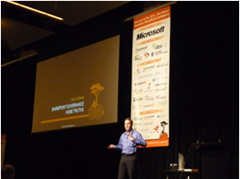
I recently participated in the Australian and New Zealand community SharePoint conferences and had a blast. First up, I was given the opportunity to keynote the Australian conference on day 2, where I spoke about SharePoint Governance home truths. It received very positive feedback and I was told by a lot of people that it really made them rethink their governance approach. In fact, in the New Zealand session, as I was going through some of the common mistakes people make, I could see people cringing as they knew they were guilty as charged. One attendee buried her head in her hands when I started talking about the “buffet of platitudes” (what is the “buffet of platitudes” you ask? Come to my class to find out! 🙂

The community challenge in Australia was a real highlight. This was a new addition to the conference where a group of conference attendees delivered a SharePoint solution for a not for profit organisation. WorkVentures was the organisation selected and the challenge progressed over three sessions, facilitated by SharePoint community leaders. Session one (Define and Design), was a business session which aimed to work through the high level requirements that WorkVentures had for an intranet, their aims for what they hope it would achieve and what they wanted included.  

This post was written on the assumption that you are familiar with some of Seven Sigma’s methods. If not, then we suggest you stop and read a couple of foundational posts first – especially if these maps do not mean much to you.

The Importance of Goal Alignment…

Nick Hadlee was supposed to chair this define and design session, but was unable to get to the Australian conference due to the earthquake events in Christchurch. As a result, I ended up inheriting this role, so I roped in Andrew Jolly to help me on this, because we have a lot in common and work in a similar way. User surveys had been conducted with WorkVentures staff and management, which gave some insights into potential focus areas for SharePoint. Even so, I had no way of knowing whether those potential focus areas made strategic sense. To resolve this issue, we examined WorkVentures 2009 Annual Report to understand their core purpose and strategic focus areas and various business units. After all, it is all well and good to develop some SharePoint functionality, but if you can’t see how that component helps achieve strategic objectives, how do you know it is the right thing to do?

The annual report proved to be a goldmine. It stated that WorkVentures had embarked on an enterprise improvement strategy prior to SharePoint and the community challenge being on the radar. This enterprise improvement plan, incorporating quality management, IT, HR and business strategy development, provided us the context to focus SharePoint as an enabler that fitted within the plan.

Andrew wasn’t due to fly into Sydney until the evening before the conference. So the day before the conference, Debbie Ireland and I visited WorkVentures on-site, meeting with the CEO, CFO and Marketing Director. The purpose of this visit was to ensure a shared understanding among us all of the alignment of the SharePoint community challenge outputs to the WorkVentures vision, purpose and strategic focus areas. From this conversation, which I mapped, some really interesting stories enabled them to pinpoint one of the key success factors for any SharePoint implementation at WorkVentures – “Bridging Silos”.

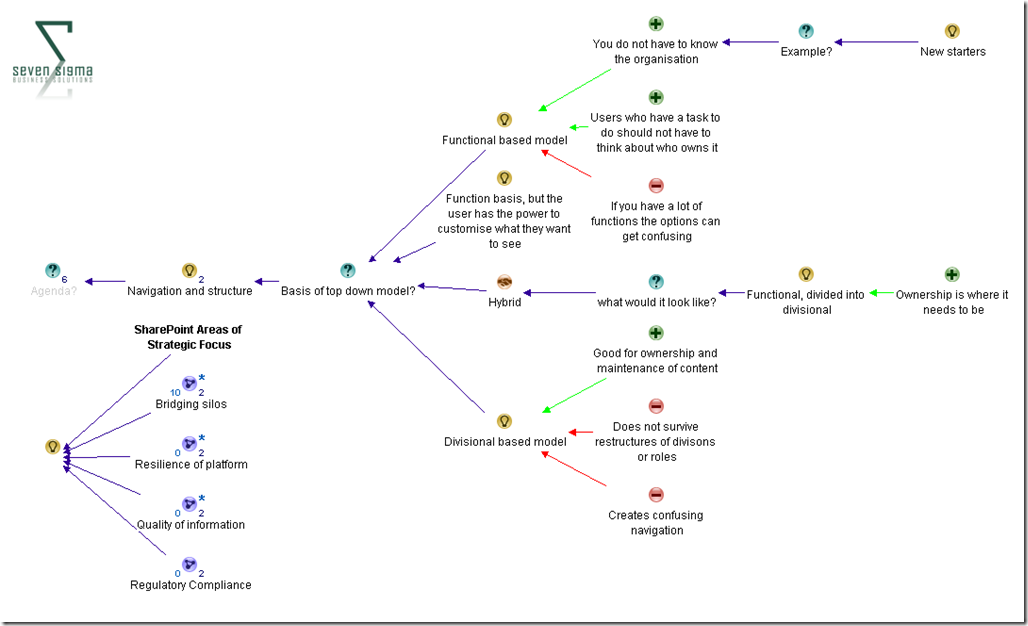
Ultimately, we identified four key areas of strategic focus for SharePoint that aligned to WorkVentures strategic goals. Below is a screenshot of the end-to-end alignment in map format . This map was used during the “define and design” conference session to help focus attendees on the purpose of SharePoint for this organisation, as well as noting the key areas that we would have to do well, to consider SharePoint a success.

FocusAreas

Stories that led to the goal

Lawrence Luk – the CFO of WorkVentures told Debbie and I several captivating stories that surfaced the bridging silos area of focus. One interesting facet of WorkVentures was that staff from the whole organisation came together once per year – at the Christmas party. This is because each WorkVentures “division” or “business unit” is in effect a separate mini-company, with different goals, customers, vertical markets and regulatory requirements. Thus the problem of silos isn’t a negative one in the sense where dysfunctional “culture” is blamed as such. More that it was the simple fact that each business unit didn’t have a lot in common with other business units. The silo effect was a by-product and it was not driven by negative behaviours.

A great example of this was one particular business unit, Connect IT. It solicits organisations to donate old PC’s, which provides opportunities for skills development for disadvantaged people by teaching them how to refurbish these PC’s. These refurbished PC’s are then sold at low cost. A KPI for this program is the number of organisations donating old PC’s to WorkVentures to sustain ConnectIT. Lawrence had the experience where WorkVentures financial auditors, who had been doing the books for two years prior, asked him why they hadn’t been approached to donate PC’s as they had some. Lawrence realised that he almost missed a great opportunity to help the ConnectIT division achieve one of their key KPI’s. Furthermore, the auditor should never have had to ask themselves. Instead all WorkVentures staff should have this core KPI instilled and internalised so that they could proactively seek out these opportunities to help the other business units.

Another couple of interesting contextual facets illustrated that there were other forms of silo that went beyond a purely divisional basis:

  • Most backoffice staff had never been to the Campbelltown office, where all of the “coal face” work took place with the community.
  • English was a second language to many staff.
  • Not all staff had their own PC’s.

These stories catalysed the conversation to many other examples of missed opportunities, where one business unit has the means to make a massive difference to the results of another. On reflection, it was realised that the nature of WorkVentures business units, being so independent of each-other, inevitably had a silo effect. There was a lack of awareness organisation-wide of the core KPI’s of each unit, hence bridging (not breaking) these silos became a key theme. If SharePoint was to have a long lasting, successful legacy, then it had to play a part in addressing this issue.

The define and design session live…

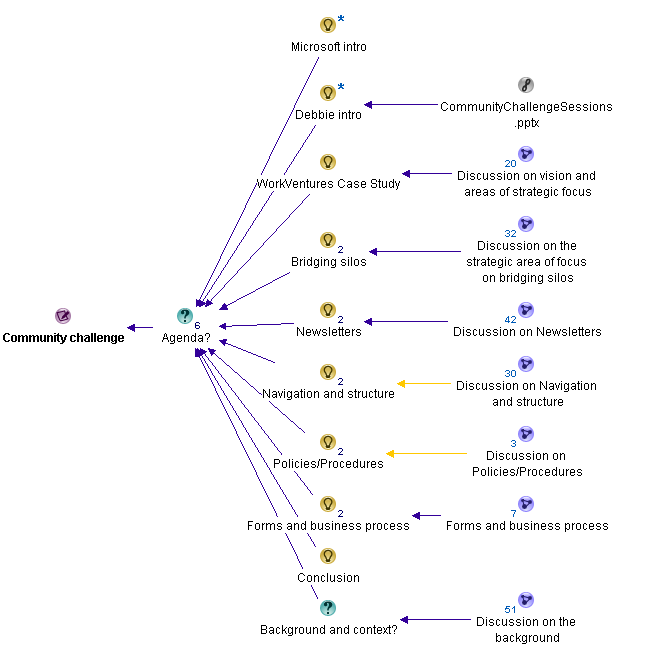
From there, with invaluable help from Andrew Jolly, we planned and then executed the requirements session with a conference audience of around one hundred people. We split the session up into several areas and the map below shows how we structured it.

After Microsoft did their intro, Debbie explained the context of the community challenge via a short PowerPoint presentation. I then took the chair and explained the vision and areas of focus map (the image above) and stressed to the audience that they were going to be participating in this session as well. I also stressed that no matter what solutions or ideas they came up with, they had to justify them against the four key focus areas, which I went through.

image

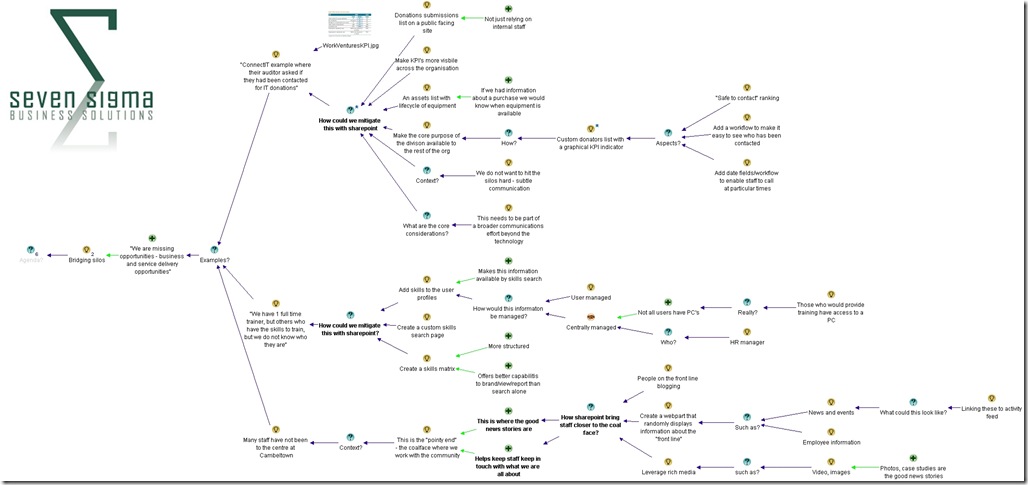
Then we got down to business where I dialogue mapped, with Andrew and I co-facilitating. We decided to focus people’s attention to the core goal of bridging silos as a topic area itself, and ask the audience how SharePoint could indeed bridge silos. We utilised three of the examples that Lawrence gave us  and then leveraged the wisdom of the (large) crowd to solicit ideas. Below is the dialogue map that shows the richness of this discussion (click to enlarge). You will see in this map that for each story told to us by Lawrence, we asked the question “How could we mitigate this with SharePoint?”. The purpose of asking the question this way helped the audience to focus on SharePoint as an enabler to a greater end – and not to be a tool looking for a problem to solve.


Silos

Given that we only had around 45 minutes to work with, Andrew and I could only spend around 15 minutes on the bridging silos area. But the map above shows that a lot of very valuable rationale from the audience was captured. The real benefit though was focusing the audience onto the broader goals and how SharePoint could enable them. This was critical to do, because now we had to switch focus from the lofty world of goal alignment to focusing on how SharePoint building blocks could be used to achieve specific ends.

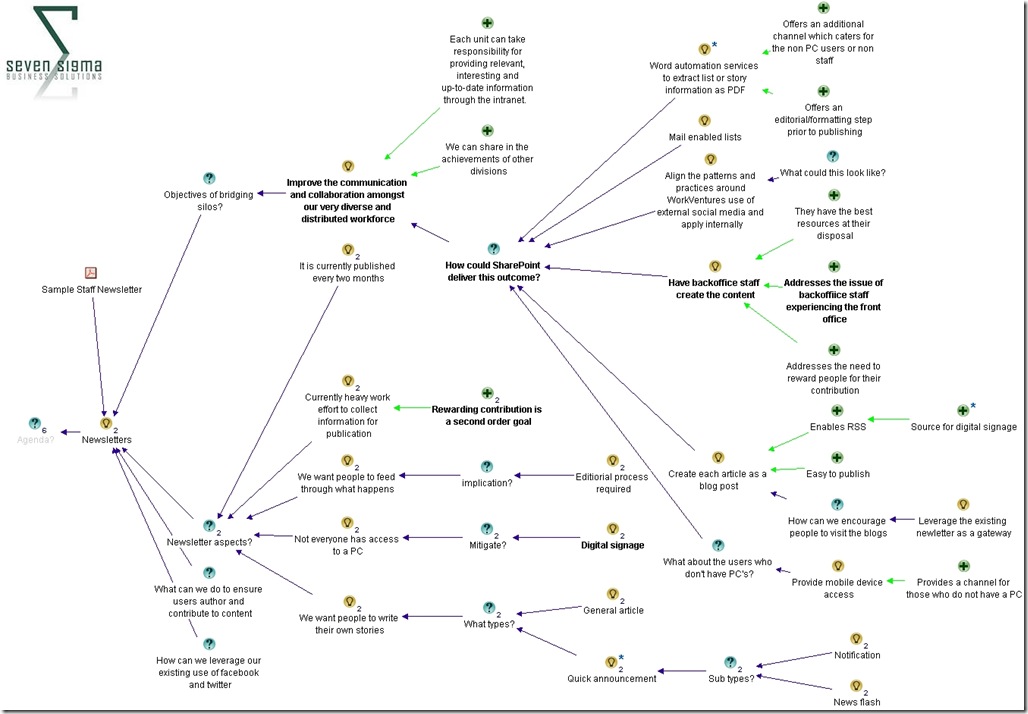
We examined how SharePoint could augment the existing newsletter based method for dissemination of information within WorkVentures. We showed the audience what sample WorkVentures newsletter looked like and reviewed some of the key contextual aspects to newsletters within WorkVentures in terms of their creation, management, reach and format.  We reminded the audience about the importance of bridging silos and then called for ideas from the audience as to how SharePoint could improve the dissemination of news. What was particularly great about this session was that audience members began to relate SharePoint ideas against the key focus areas and identify some of the governance aspects that would be required to make it work.

For example, if you look at the map below (click to enlarge), one of the ideas for the newsletter was a fairly technical one: leveraging “word automation services to extract list or story items and create a PDF”. On first glance one might think “wow that’s fairly heavy” (and not to mention quite nerdy), but the justification for this idea was that it would still account for those WorkVentures users who do not have a PC and therefore access to the portal. Another idea was “Have backoffice staff create the content” on the basis that in doing so, they would get a better feel for coal-face issues that they typically do not see normally. When you think about it, this idea is not SharePoint at all, but more of a strategy for how SharePoint should be adopted and accountabilities for doing so (i.e. a governance approach!)

The key point here is that In both of these examples, audience members were clearly relating their ideas back to the previously established goals, which in turn were aligned to the WorkVentures vision, purpose and key strategic focus areas. Not bad for a couple hours work eh? Smile

Newsletters

With the little time that we had left, we also looked at site navigation and structure, where the audience resolved that WorkVentures would be best served by a hybrid navigation model that was functionally driven primarily (i.e. task based navigation), but then divided into divisional areas. (As opposed to a purely organisational structure driven navigation model).

As you can see below, we made a point of always showing the four areas of focus for SharePoint overall, to ensure that decisions made were informed by them.

image

Conclusion

I have to say that given the timeframe and constraints, I think we did a great job of developing a shared vision for SharePoint, how it fitted into WorkVentures organisational and strategic context, and then focusing a diverse audience into looking at SharePoint building blocks through that lens. The dialogue maps were very rich, with some terrific ideas, and WorkVentures staff were thrilled to see the alignment of SharePoint to their strategic goals.

I use similar methods to this for non IT projects too, and I think that if we had a week to work on WorkVentures, we would have created something really special. Nevertheless, from my point of view, I think that the community challenge is an terrific idea, I enjoyed being a part of it, and I have to offer special thanks to Debbie and Andrew in particular for helping to make this into a really great mini-engagement. Hopefully we can do it all again next year.

Thanks for reading

Paul Culmsee
www.sevensigma.com.au


« Previous Page

Today is: Wednesday 3 June 2026 -