Back to Cleverworkarounds mainpage
 

Index index everywhere but not a result in sight.

I have been doing a bit more tech work than normal lately – SP2010 popularity I guess, and was asked to remediate a few issues on a problematic server that I hadn’t set up. The server in question had a number of issues (over and above the usual “lets all run it as one account” type stuff) that had a single root cause, so I thought I’d quickly document the symptoms and the cause here.

Symptom 1: SQL Server Event ID 28005:

“An exception occurred while enqueueing a message in the target queue. Error: 15404, State: 19. Could not obtain information about Windows NT group/user ‘DOMAIN\someuser’, error code 0x5”

This error would be reported in the Application log around 70 times per minute. As it happened, I had removed the account in question from running any of the SharePoint web, application or windows services, but this still persisted. I suspect SharePoint was installed as this account because it was the db owner of many of the databases on the SQL Server. Whatever the case, SQL was whinging about it despite its lack of actual need to be there.

Symptom 2: Event ID 4625:

At a similar rate of knots as the SQL error, was the rate of 4625 errors in the security log. These logs were not complaining about the account that the SQL event complained about, but instead it complained about ANY account running the SQL Server instance. I tried network service, a domain account and a local account and saw similar errors (although the local one had a different code).

Log Name:      Security
Source:        Microsoft-Windows-Security-Auditing
Event ID:      4625
Task Category: Logon
Keywords:      Audit Failure
Description:  An account failed to log on. 

Subject:
    Security ID:        NETWORK SERVICE
    Account Name:        COMPUTER$
    Account Domain:        DOMAIN
    Logon ID:        0x3e4 

Failure Information:
    Failure Reason:        Unknown user name or bad password.
    Status:            0xc000006d
    Sub Status:        0xc0000064 

Process Information:
    Caller Process ID:    0x7e0
    Caller Process Name:    E:\Program Files\Microsoft SQL Server\MSSQL10_50.MSSQLSERVER\MSSQL\Binn\sqlservr.exe 

Detailed Authentication Information:
    Logon Process:        Authz   
    Authentication Package:    Kerberos

When using a local, rather than a domain user account the code was:

Failure Information:
    Failure Reason:        An Error occured during Logon.
    Status:            0xc000005e
    Sub Status:        0x0 

Symptom 3: Search only working for domain administrators

On top of the logs being filled by endless entries of the previous two, I had another error (the original reason why I was called in actually). A SharePoint search would yield zip, nada, zero, no results for a regular user, but a domain administrator could happily search SP2010 and get results. (well actually regular users did get some results – people searched actually worked fine).

The crawler was fine and dandy and the default content source had not been messed with. There were no errors or logs to suggest anything untoward.

The resolution:

It was the second symptom that threw me because I thought that the problem must have been kerberos config. But I quickly discounted that after checking SPN’s and the like (notwithstanding the fact this was a single server install anyway!)

On a hunch (helped by the fact that I had dealt with the issue of registering managed accounts not so long ago), I concentrated on the user account that was causing SQL Server all the trouble (Event ID 28005). I loaded up Active Directory and temporarily changed the security of this user account so that “Authenticated Users” had “READ” access to it.

image

As soon as I did this, both event ID 28005 and 4625 stopped.

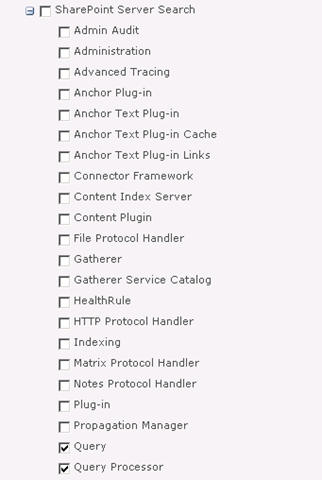
I then checked the search (symptom 3) and it was still barfing. In this case I decided to turn up the debug juice on the “Query” and “Query Processor” functions of “SharePoint Server Search”.

image

After upping the level of verbosity, I found what I was looking for.

08/12/2010 22:13:41.00     w3wp.exe (0x2228)                           0x1F0C    SharePoint Server Search          Query Processor                   g2j3    High        AuthzInitializeContextFromSid failed with ERROR_ACCESS_DENIED. This error indicates that the account under which this process is executing may not have read access to the tokenGroupsGlobalAndUniversal attribute on the querying user’s Active Directory object. Query results which require non-Claims Windows authorization will not be returned to this querying user.    debd2c54-d6a5-41b8-bf26-c4697b36f4d4

I knew immediately that this was very likely the same issue as the first two symptoms and when I googled this result, my Perth compatriot, Jeremy Thake had hit the same issue in July. The fix is to add your search service account to a group called “Pre-Windows 2000 Compatibility Access” group. This group happens to have the right required to read this attribute. Whether it is the same attribute I needed for my SQL issue, or the registering managed accounts issue I don’t know, but what I do know is that this group loosens up permissions enough to cure all four of these issues.

The little security guy in me keeps telling me I should confirm the least privilege in each of these scenarios, but hey if Microsoft are saying to put the accounts into this group, then who am I to argue?

Finally, it turns out that SP2010 re-introduced something that was in SP2003. A call to a function called AuthzInitializeContextFromSid which seems to be the root of it all. Apparently it was not used in SP2007, but its sure there now. I assume that one of the many stored procedures that SharePoint would call in SQL may have been the cause of Symptom 1. When you look at Symptom 2, it now makes sense because AD was faithfully reporting an access denied when the call to AuthzInitializeContextFromSid was made. It reported SQL Server as the culprit, I assume, because of a stored proc doing the work perhaps? It just sucks that the security event logged is a fairly stock message that doesn’t give you enough specifics to really work out what is going on.

Anyway, I hope that helps someone else – as googling the event ID details is not overly helpful


Thanks for reading

Paul Culmsee

www.sevensigma.com.au


SQL Server oddities

So its Saturday night and where I should be out having fun, I am instead sitting in a training room in Wellington New Zealand, configuring a lab for a course I am running on Monday.

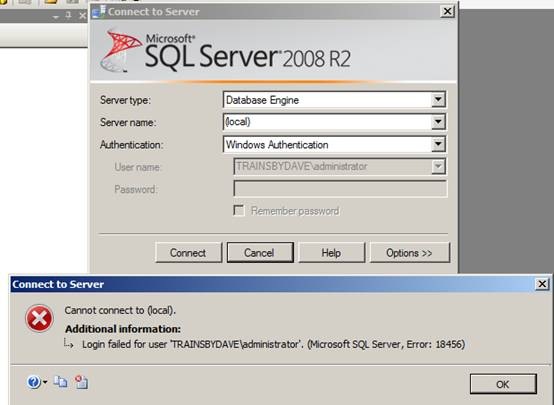
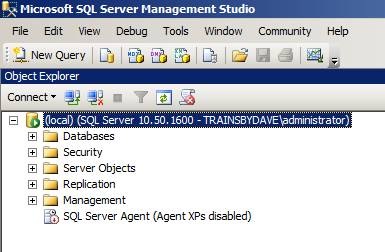
Each student lab setup is two virtual machines. The first being a fairly stock standard AD domain controller and the second being a SQL/SharePoint 2010 box. Someone else set up the machines, and I came in to make some changes for the labs next week. But as soon as I fired up the first student VM’s I hit a snag. I loaded SQL Server Management Studio, only to find that I was unable to connect to it as the domain administrator, despite being fairly certain that the account had been granted the sysadmin role in SQL.

clip_image002

Checking the event logs, showed an error that I had not seen before. “Token-based server access validation failed with an infrastructure error”. hmmm

Log Name: Application

Source: MSSQLSERVER

Date: 31/07/2010 6:45:37 p.m.

Event ID: 18456

Task Category: Logon

Level: Information

Keywords: Classic,Audit Failure

User: TRAINSBYDAVE\administrator

Computer: SP01.trainsbydave.com

Description:

Login failed for user ‘TRAINSBYDAVE\administrator’. Reason: Token-based server access validation failed with an infrastructure error. Check for previous errors.

[CLIENT: <local machine>]

Event Xml:

<Event xmlns="http://schemas.microsoft.com/win/2004/08/events/event">

<System>

<Provider Name="MSSQLSERVER" />

<EventID Qualifiers="49152">18456</EventID>

<Level>0</Level>

<Task>4</Task>

<Keywords>0x90000000000000</Keywords>

<TimeCreated SystemTime="2010-07-31T06:45:37.000000000Z" />

<EventRecordID>8281</EventRecordID>

<Channel>Application</Channel>

<Computer>SP01.trainsbydave.com</Computer>

<Security UserID="S-1-5-21-3713613819-1395520312-4192346095-500" />

</System>

<EventData>

<Data>TRAINSBYDAVE\administrator</Data>

<Data> Reason: Token-based server access validation failed with an infrastructure error. Check for previous errors.</Data>

<Data> [CLIENT: &lt;local machine&gt;]</Data>

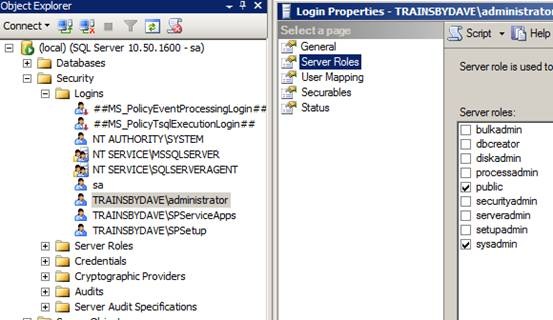
As it happened, whoever set it up had SQL Server in mixed mode authentication, so I was able to sign in as the sa account and have a poke around. All things considered, it should have worked. The user account in question was definitely in the logins and set with sysadmin server rights as shown below.

clip_image004

Uncle google showed a few people with the error but not as many as I expected to see since half the world gets nailed on authentication issues. I also took the event log suggestion and looked for a previous error. A big nope on that suggestion. In fact in all respects, everything looked sweet. The machine was valid on the domain and I was able to perform any other administrative task.

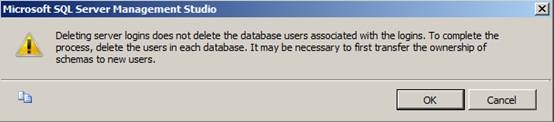
Finally, I removed the TRAINSBYDAVE\administrator account from the list of Logins in SQL Server. It gave the unsurprising whinge about orphaned database users, but luckily for AD accounts when you re-add the same account back it is smart enough to re-establish the link.

clip_image006

As soon as I re-added the account, all was good again. If I was actually interested enough I’d delve into why this happened, but not tonight – I have another 6 student machines to configure 🙂

Goodnight!

clip_image008


SharePoint Webcasts: Reporting Services for the Really Really Good Looking

imageLast year, Peter Serzo and I presented at the SharePoint Best Practices Conference in DC. We did an extremely serious talk called “SharePoint and SQL Reporting Services 2008 for the really really good looking” which rated rather well. As part of this, we recorded a bunch of screencasts that have never seen the light of day, so I thought that some would benefit from this being released to a wider audience.

Note: This post and content is really going make utterly no sense unless you have watched Zoolander. Even if you have seen the movie, before you launch into the webcasts, some scene setting is required.

The business need

Some time ago, Peter and I were contracted by the Derek Zoolander School for the Really, Really Good Looking after Derek saw Microsoft’s new SharePoint diagram when he accidentally picked up a “Computerworld” magazine. Apart from matching Derek’s suit colour rather nicely, the diagram captivated his imagination with the notion of “Insights”.

Zoolander thought that “Insight”, sounded like the perfect look to follow up from the highly successful “Magnum”, which he used to save the Malaysian prime ministers life. He took the diagram to his wife, and demanded that he must have “Insights” at all costs.

image

Zoolander’s wife saw the business problem that “Insights” would help to address. You see, the Derek Zoolander School for the Really, Really Good Looking, at great expense, custom developed an ERP system to manage everything you needed to know about male models. The system was called the “Computerised Records for Attractive People”…

image

The CRAP system stored all sorts of interesting information about male models, such as tracking their “hotness”, as well as important detail such as stated age versus actual age, and any cosmetic procedures that they have undertaken. After a long and expensive consultation, Peter and I concluded that SharePoint 2007, integrated with SQL Reporting Services, was the perfect solution to create the all important “Insights” that Zoolander so desperately needed.

As a result, we conducted a project kickoff meeting with Hansel and Peter tried to explain the architecture of reporting services using a nice diagram.

image

… but we worked out pretty quickly that this was not the way to explain how it all worked to poor old Hansel…

image

So instead, we went the live demo route. Being male models, custom development was totally out of the question. This solution had to be done using all out of the box methods in a quick and easy manner. Below are the four live demos that were recorded and now you can use them as inspiration for your own male modelling school.

  • Our first webcast illustrates how we were able to create a meaningful report from the CRAP system within five minutes.
  • The second webcast expanded on this idea, by illustrating how reports can be parameterised and linked together for drilldown reporting.
  • The third demo modifies the user profile store to allow for recording of each users unique ID in the CRAP system
  • The last webcast strings this all together for the final demonstration where we pimp the report to make it dynamic with no custom code.


image  image

The 5 minute report

Drilling down with Derek
image image

User Profiles for the really really good looking

Pimp my report


We hope you find some value from these webcasts and we look forward to hearing about your hot new look as a result!

Thanks for reading


Paul Culmsee

www.sevensigma.com.au


SBS 2008, Hewlett Packard, WSS3, Search Server 2008 Express and a UPS – Oh the pain!

image

In the words of Doctor Smith from lost in space, while everyone else was in Vegas having a grand old time, I was at a client site, having to come to grips with the beast known as Windows Small Business Server 2008. I rarely work with SBS2003 and had never used SBS2008 until now.

This was one of those engagements that is somewhat similar to those awful dreams that you have when you are trying to get to some place, but you never quite get there and your subconscious puts all sorts of strange and surreal obstacles in your path. In my case, the surreal obstacles were very real, yet some of them were really really dumb. Whatsmore, it is a very sad indictment on IT at several levels and a testament to how complexity will never be tamed with yet more complexity.

As a result, I really fear the direction that IT in general is heading.

So where to begin? This project was easy enough in theory. A former colleague called me up because he knew of my dim, dark past in the world of Cisco, Active Directory and SharePoint. He asked me to help put in SBS2008 for him, configuring Exchange/AD/SharePoint and migrating his environment over to it.

“Sure”, I say, “it’ll be a snap” (famous last words)

image

I haven’t use the coffee or tequila ratings for a while, so I thought that this post was apt for dusting them off. If you check the Why do SharePoint Projects Fail series, you will see that I use tequila shots or coffee at times. In this case, I will use the tequila shots to demonstrate my stress levels.

Attempt 1

We start our sorry tale a few weeks ago, where my client had ordered Small Business Server 2008 and the media/key had not arrived by the time I was due to start. The supplier came to the rescue by sending them a copy of the media and promised to send the license key in a couple of days.

The server was a HP Proliant DL360 G6, a seemingly nice box with some good features at a reasonable price. HP/Compaq people will be familiar with the SmartStart software and process, where instead of using the windows media, you pop in the supplied SmartStart CD and it will perform some admin tasks, before asking for the windows media, auto-magically slipstreaming drivers and semi-automating the install.

On client machines, I never use the CD from the vendor because there is always too much bloatware crap. However on servers I generally do use the CD, because it tends to come with all the tools necessary to manage disk storage, firmware and the like. I dutifully popped in SmartStart CD, answered a few basic questions, and it asked for the windows media CD.

Cleverworkarounds stress rating: Good so far

Next it asked me for the Windows SBS2008 licence key. Of course, I was using media that had been lent to us from the supplier because my client’s media (and keys) had not arrived. Thus, since I did not have a license key I was unable to proceed with the install using this preferred manner. HP, in their infinite wisdom, have assumed that you always have the license key when you install via their SmartStart CD, despite Microsoft giving you 30 days to activate the product. To be fair on HP, they are hooking into Microsoft’s unattended installation framework, so perhaps the blame should be shared.

All was not lost however. The SmartStart CD can be run after windows has been installed. It then will install all the necessary “HP bits” like graphics and system board drivers. So I booted off the Windows CD and fortunately, windows installer detected the HP storage controller and the disk array,  and proceeded to let me partition it and install.

Cleverworkarounds stress rating: Minor annoyance, but good so far

Small Business Server 2008 did its thing and then loaded up a post install wizard that sets the timezone, active directory domain name and the like. At a certain step when running this wizard, SBS2008 informed me that there was no network card with a driver loaded, so it could not continue. As it turns out, Microsoft’s initial SBS2008 configuration wizard simply will not proceed unless it finds a valid network card. But since this is the pre-install wizard, we are not yet at the point in the installation where we have a proper windows desktop with start menu and windows explorer. All is not lost (apparently), because SBS allows you to start device manager from within the wizard and search for the driver.

Fair enough, I think to myself, so I pop in the HP SmartStart CD and tell device manager to search the media.

Cleverworkarounds stress rating: Spider senses tingle that today might not turn out well

image

Windows device manager comes back and tells me that it cannot find any drivers.

Why?

Well after some examination, the SmartStart drivers are all self extracting executables and therefore device manager could not find them when I told it to. Of course, the self extracting zip files have hugely meaningful names like C453453.EXE making it really obvious to work out what driver set is the one required… not!

Luckily, Ctrl+Alt+Del gave me task manager which allowed me to start a windows explorer session, and I was able to browse to the CD and run the autorun of the SmartStart CD manually. This loaded up HP’s fancy schamsy driver install software that produces a nice friendly report on what system software is missing and proceeds to install it all for you.

SmartStart did its thing, finding all of the driverless hardware and installed the various drivers. A few minutes and a reboot later and SBS2008 reruns its configuration wizard and this time finds the network and allows me to complete the wizard. This triggers another thirty minutes of configuration and another reboot and we have ourselves a small business server!

Cleverworkarounds stress rating: Spider senses subside – back on track?

Next I did something that is a habit that has served me well over the years (until now). I reran the Smartstart CD, now with a network and internet access. This time I told the driver management utility to connect to HP.COM. It scanned HP and reported to me that most drivers on the SmartStart CD were out of date. This is unsurprising because most of the time I do server builds for any vendor, I find that about half of the drivers, BIOS and various firmwares have been replaced by newer versions since the CD was pressed.

Since this is a brand new server build, it is a habit of mine to upgrade to the latest drivers, BIOS and firmware before going any further.

Among the things found to be out of date was the BIOS, the firmware on the RAID Storage controller as well as the network card. The SmartStart software downloaded all of these updates, and another reboot later, all are installed happily. Another hour of patching via Windows update, and we have a ready to go SBS2008 server with WSS3, Exchange, SQL Express and WSUS all configured automatically for you.

Cleverworkarounds stress rating: This SBS2008 stuff isn’t so bad right?

Okay, so things were good so far, but now here is where the fun really begins.

Windows 2008 SBS comes with a pre-installed WSS3 site called http://Companyweb. As we all know, search completely sucks in WSS3. It has a bunch of limitations and isn’t a patch on what you get with MOSS. But no problem – we have Microsoft Search Server Express now, a free upgrade which turns WSS search from complete horribleness to niceness fairly quickly.

For those of you reading this who run WSS3 and have not installed Search Server Express, I suggest you investigate it as it does offer a significant upgrade of functionality. Search server express pretty much makes WSS3 have the same search capabilities of MOSS 2007.

So, I proceeded to install Search Server 2008 express onto this Small Business Server 2008 box. I have installed Search Server Express quite a few times before and I have to admit, it is a tricky install at times. But given that this was a fresh Small Business Server 2008 install and not in production, as well as having successfully installed it on Small Business Server 2003 previously, I felt that I should be safe.

I commenced the Search Server 2008 express install, and the first warning sign that my day was about to turn bad showed itself. The install of search server express only allowed me to choose the “Basic” option. The option that I wanted to use, “Advanced” was greyed out and therefore unavailable.

Cleverworkarounds stress rating: Spider senses tingling again

imageimage

Knowing this server was not in production, I went ahead and allowed Search Server Express to install as per the forced basic setting. The install itself appeared to work, but it died during the SharePoint configuration wizard. It specifically crapped out on step 9, with the error message

“Failed to create sample data. An exception of type Microsoft.SharePoint.SPException was thrown.  Additional exception information: User cannot be found”.

“Curses!” I say, “another trip to logs folder in the 12 hive”. For the nerds, the log is pasted below.

[SPManager] [INFO] [10/21/2009 3:38:47 PM]: Finished upgrading SPContentDatabase Name=ShareWebDb Parent=SPDatabaseServiceInstance Name=Microsoft##SSEE.
[SPManager] [DEBUG] [10/21/2009 3:38:47 PM]: Using cached [SPContentDatabase Name=ShareWebDb Parent=SPDatabaseServiceInstance Name=Microsoft##SSEE] NeedsUpgrade value: False.
[SharedResourceProviderSequence] [DEBUG] [10/21/2009 3:38:47 PM]: Unable to locate SearchDatabase. Exception thrown was: System.Data.SqlClient.SqlException: Cannot open database "SharedServices_DB_ed3872ca-06b1-44c5-8ede-5a81b52265f9" requested by the login. The login failed.
Login failed for user ‘NT AUTHORITY\NETWORK SERVICE’.
   at System.Data.SqlClient.SqlInternalConnection.OnError(SqlException exception, Boolean breakConnection)
   at System.Data.SqlClient.TdsParser.ThrowExceptionAndWarning(TdsParserStateObject stateObj)
   at System.Data.SqlClient.TdsParser.Run(RunBehavior runBehavior, SqlCommand cmdHandler, SqlDataReader dataStream, BulkCopySimpleResultSet bulkCopyHandler, TdsParserStateObject stateObj)
   at System.Data.SqlClient.SqlInternalConnectionTds.CompleteLogin(Boolean enlistOK)

The long and short of this error takes a little while to explain. First we need to explain the historical difference between SQL Server Express edition and SQL Server Embedded edition (also known as the Windows internal database). From wikipedia:

SQL Server 2005 Embedded Edition (SSEE): SQL Server 2005 Embedded Edition is a specially configured named instance of the SQL Server Express database engine which can be accessed only by certain Windows Services.

SQL Server Express Edition: SQL Server Express Edition is a scaled down, free edition of SQL Server, which includes the core database engine. While there are no limitations on the number of databases or users supported, it is limited to using one processor, 1 GB memory and 4 GB database files.

Why does this matter? Well Microsoft, being the wise chaps that they are, decided that when you perform a SharePoint installation using the “basic” option, different editions of SharePoint use different editions of SQL Server! Mark Walsh explains it here:

  • When you use the "Basic" install option during MOSS 2007 installation it will install and use SQL Server 2005 Express Edition and you have a 4GB database size limit.
  • When you use the "Basic" install option during WSS 3.0 installation it DOES NOT use SQL Express, it uses SQL Server 2005 Embedded edition and it DOES NOT have a 4GB size limit.

It happens that Small Business Server 2008 comes with WSS3 preinstalled. Annoyingly, but unsurprisingly, the Small Business Server team opted to use the BASIC installation mode. As described above, SQL Server Embedded Edition (known on Win2008 as the Windows Internal Database) is used. For reference, WSUS on Small Business Server 2008 also uses this database instance.

BUT BUT BUT…

Search Server 2008 Express, uses SQL Server Express edition when performing a basic install. As a result, an additional SQL Server Express instance (SERVERNAME\OFFICESERVERS) gets installed onto the Small Business 2008 server. Then, to make matters worse, the installer gets mixed up and installs some Search Server express databases into the new instance (a Shared Service Provider), but then uses the SQL Embedded Edition instance to install other databases (like the searchDB). Then later during the configuration wizard, it cannot find the databases that it needs because it searches the wrong instance!

The net result is the error shown in the log above. I tried all sorts of things like copying the Express databases into the embedded edition, but I couldn’t disentangle this dependency issue. Some parts of SharePoint (the search server express bits no doubt) looked in the SQL Express instance and the WSS bits looked in the Embedded SQL instance. Eventually, conscious of time, I proceeded to uninstall Search Server Express.

Cleverworkarounds stress rating: Some swear words now uttered

imageimageimage

Uninstalling Search Server Express was attempted and tells me that it has successfully completed and wants a reboot. Unfortunately SharePoint is now even more hosed than it was before and I tried a few things to get things back on track (psconfig to create a new farm and the like). After more frustration, and conscious of time I decided to uninstall WSS3 altogether and then reinstall it according to the SBS Repair guide for WSS3.

This had the effect of stuffing up WSUS as well! (I assume because it shares the same Windows Internal Database instance), and after a couple of hours of trying all sorts of increasingly hacky ways of getting all of this working, I was forced to give up.

Note: Whatever you do, do not attempt this method. At one point I tried to trick WSS3 into temporarily thinking it was not a basic mode install so get Search Server Express to prompt for Advanced mode, but it made things worse because the configuration database got confused.

Cleverworkarounds stress rating: Installing SharePoint in basic mode is committing a crime against humanity.

imageimageimageimage

Attempt 2

image

At this point I hear Doctor Smith abusing me like the poor old robot. “You bubble-headed booby, you ludicrous lump, adlepated amateur, dottering dunderhead”.

Since WSUS got completely screwed, as well as the Windows Internal Database through relentless uninstallation and repair attempts, I started to get nervous. Small Business Server 2008 is a very fussy beast. Essentially it can get very upset at seemingly benign changes. I felt that I had messed about so much that I could no longer guarantee the integrity of this server so I wiped clean and reinstalled.

I installed Windows as per the previous method, and once again the install wizard stopped, asking me for a network driver. Once again I popped in the HP SmartStart CD and proceeded to run the driver install program from the SBS configuration wizard.

This time, no network card was detected!

What the? During attempt 1, I happily installed the necessary HP drivers using the same %$^#% SmartStart CD! Why is it not detecting now??

Cleverworkarounds stress rating: Now thinking about how much fun everyone is having in Vegas while I am fighting this server

imageimageimageimageimage

After some teeth gnashing, the cause of this problem hit me as I was driving home from the site. I had upgraded the firmware of the network card during attempt 1, as well as the storage controller and system BIOS. I realised that the stupid, brain-dead HP network card drivers likely could no longer recognise its own network card with a newer firmware.

The next day I came back refreshed, and found that indeed, there were newer network drivers at the HP site. I downloaded them and extracted them and sure enough, suddenly the network card was found and I was back in business. How dumb is that! Surely if you are going to write a driver, at the very least make it recognise the hardware irrespective of firmware!  

Once I got past this stupid annoyance, it did not take too long for SBS2008 to be installed and ready to go. Remember that WSS3 is installed for you in basic mode, so to change it requires an uninstall of WSS and then to reinstall it in a different mode. But the problem here is SBS2008 and its fussiness about messing with configuration. In going down this path, you risk future service packs and updates breaking because things are not as expected. Additionally you would have to create companyweb manually and it raises the risk of a misconfiguration or mistake along the way.

I logged a call with Microsoft and got a pretty good engineer (hey Ai Wa) and she was able to consistently reproduce all of my issues in the lab, but was unable to work out a supportable fix. In the meantime, I tried to force Search Server 2008 to install into advanced mode using a scripted install, using an article written by my old mate Ben Curry. Alas, I could not bend it to my will and at the time of writing this article, I had to give up on Search Server 2008 with SBS2008 for now.

For what its worth, I know that I can make this work by installing WSS3 differently, but I planned to properly nail this issue in my lab using the out of the box installs and then publish this article, but I didn’t have the sufficient hardware to run Small Business Server 2008. It requires a lot of grunt to run! So I will revisit this issue once my new VM server arrives and post an update.

But there is more…

If the whole Smartstart, network driver, SBS2008 with its dodgy scripted WSS3 install, with Search Server Express dumb installation assumptions were not enough, I hit more dumb things that resulted in showing how ill equipped HP’s support is able to deal with these sorts of issues.

The server, not surprisingly, supplied with a nice hardware RAID configuration and my client opted to buy some additional disk. When the disks arrived and were installed, we found that the RAID controller could see the disks, but we were unable to add the disks to the existing array using HP’s management tools. HP’s “friendly” support was unable to work out the issue and asked me to do things that were never going to work and insulted my intelligence. Eventually I worked out what was going on myself, via HP’s own forums. It turns out that the HP Server requires a write cache module to be able to grow an array. We had one of these installed. Upon further examination by opening up the chassis, we were missing a battery to go with the write cache module. HP were unable to determine the part number that we needed and we ended up working it out ourselves and telling our supplier.

Then HP stuffed up the order and after following up for two weeks, it turned out they accidentally forgot to put the order through to Singapore to get the part. It seemed that once we went outside of the normal supply chain system at HP, it all broke down. After two weeks and numerous calls, they suddenly realised that the part was available in Sydney all along and it was shipped over next day!. The irony was that next day the part from Singapore arrived!

So now we had two batteries.

Grrrr. It shouldn’t be this hard! Why supply a write cache module and not supply the battery! Dumb Dumb Dumb!

Cleverworkarounds stress rating: Really hating HP and Microsoft at this point.

imageimageimageimageimageimage

… and piece de resistance!

Okay so we had a few frustrating struggles, but we more or less got there. But here is the absolute showstopper – the final issue that for me, really made me question this IT discipline that I have worked in for twenty years now.

My client rang me on Monday morning to tell me the server was powered off when we arrived on site. This was unusual because the rack was UPS protected and no other devices were off. We ran HP’s diagnostic tools and no faults were reported. The UPS was a fairly recent APC model, and we installed a serial cable to the server and loaded the APC UPS Management software. The software (which looks scarily like what 16 bit apps used to look like in the early 90’s), found the UPS and showed that was all hunky dory.

We decided to perform a battery test using the software. No sooner than I clicked OK, the server powered off with no warning or shutdown. Whoa!!

I put in a call to APC, and was told that the UPS was not compatible with HP’s new fancy shmansy green star rating power supplies. We had to buy a new UPS because of some “sine wave” mumbo jumbo (UPS engineer talk that I really wasn’t interested in). If the UPS switched to battery, this server would think power was dodgy and do a pre-emptive shutdown. The reason that the server was powered off on the Monday morning was that the UPS has a built in self test that runs every 7 days that cannot be disabled!

Cleverworkarounds stress rating: For %%$$ sake!.

imageimageimageimageimageimageimageimageimageimageimageimage

Conclusion

Now I don’t know about you, but once a UPS cannot be “compatible” with a server, that’s it – things have gone too far. For crying out loud, a UPS supplies power. How $%#^ hard can that be? How is an organization supposed to get value out of their IT investments with this sort of crap to deal with.

Then add in the added complexity of Blade servers, Citrix, Virtualisation, shared storage, and I truly feel that some sites are sitting on time bombs. The supposed benefits in terms of efficiency, resiliency and scalability that these technologies bring, come at an often intangible and insidious cost – sheer risk from incredible complexity. If you look at this case study of a small organisation putting in a basic server, most of the issues I have encountered are the side effects of this complexity and the lack of ability for the vendors to be able to help with it.

As the global financial crisis has aptly demonstrated, when things are complex and no-one person can understand everything, when something bad does happen, it tends to do it in a spectacularly painful and costly way.

Finally, before you reply to this likely immature rant and tell me I am a whiner, remember this all you Vegas people. You got to have fun and marvel at all the new (complex) SP2010 toys, while I sat on the other side of the planet in a small computer room, all bitter and twisted, sprouting obscenities to HP, Microsoft and APC dealing with this crap. When you put that into perspective, I think this article is quite balanced! 🙂

Thanks for reading

Paul Culmsee

www.sevensigma.com.au


Missing metadata with Office 2003 – yet another “duh” moment…

I had a problem this week that got resolved with something quite obvious, but I learned a lot in the process, so I am detailing it here.

Symptoms: Using MOSS 2007 SP2 and Office 2003 SP3, users complained that metadata on documents went missing. Consider the scenario below where we have a sample document library.

image

Our user opens the “Memo to Council re Convenor” document into Word 2003, makes a change and saves it. Note the difference. Where’s my metadata?

image

I asked about this on the ozmoss mailing list, and others noted the same issue. Some had applied the June 2009 cumulative update for WSS3 and the problem was solved for them. I applied this update, and it improved the situation, but did not cure the problem totally.

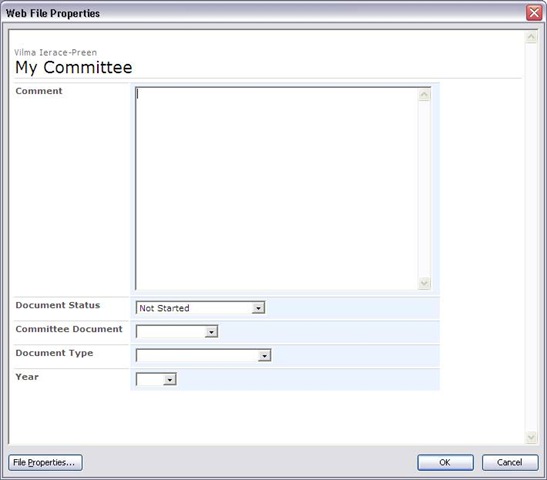
Upon further investigation, we were able to ascertain that the problem would only happen on certain PCs. The same user could update the same document on a different PC and it would work fine. A fiddler trace of the process allowed me to narrow down the issue and understand the sequence of events. The root cause of the issue was incorrect handling of HTML/JavaScript by Office 2003 and/or Internet Explorer. This manifests itself in an inconsistency in the display of properties in the Office “Web File Properties” dialog box (file->properties in an office 2003 app). Consider the example below.

clip_image002  clip_image002[5]

Note that the first dialog shows that values for the metadata columns are blank or default. Now consider the same document opened on a different PC. Well what do you know – we have metadata!

Fiddler confirmed that when saving a document to SharePoint from an Office 2003 application, the same HTTP request is made to SharePoint as is done when displaying the document properties in the above example.

In both cases, A HTTP GET request is made to the owssvr.dll  (WSS RPC)  and the dialogview method is called. Therefore, the root of my problem has something to do with the fact that the data returned by this call was not being parsed properly by MSWord on one PC (as illustrated by the first of the above dialog box screenshots). When a user than saved their edits, blank or default values are being written back to SharePoint, in effect “losing” the metadata.

So let’s take a look at the HTTP call and the data returned. The call to owssvr.dll  looks like this.

GET /somesite/_vti_bin/owssvr.dll?location=My%20Committee/Agenda%20attachment%20July%2009.doc&dialogview=SaveForm HTTP/1.1

The output returned by SharePoint is a bunch of HTML and JavaScript that MSWord then renders by calling the Internet Explorers rendering framework programmatically. (I’ve included sample output at the end of the post for the hardcore nerds).

So the question now becomes, what was preventing the correct HTML rendering on one PC and not the other? This was a difficult question to answer because I was unable to find a way to debug JavaScript when the output was rendered in Office 2003 apps.

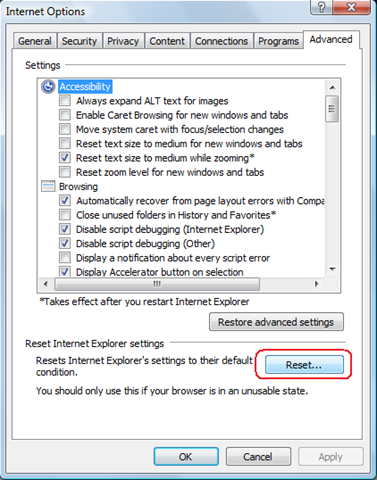
When you think about it, there can be many potential causes here. Given that Internet Explorer is effectively doing the work (WinINet), this whole process could be adversely affected by add-ins, zone settings, AD policies, virus scanning, etc. On one affected PC I disabled all all-ins to Internet Explorer and retried without success. After around half an hour of frustration, I decided to reset IE’s configuration as shown below.

image

After accepting the various warnings, I retried the test and it all worked! Metadata was now being properly saved. “Awesome”, I thought. I’m not quite sure what the true root cause is, but at least I know how to cure it.

Then it suddenly dawned on me that I’d been stupid. For all of my low level examination of the office 2003/RPC interaction with SharePoint, picking the brain of gurus like MCM Spence Harbar, I’d never thought to clear the temporary internet files cache. Doh!

On the next affected PC I did so, and the problem also went away instantly.

*Blush*

In my defence of my dumbness however, I had never examined the behind the scenes integration with Office 2003 and SharePoint, and it did not even twig that Internet Explorer would be involved in the picture. Given that this problem manifests itself within Office 2003 applications, it is not immediately obvious that your temporary internet files would cause an issue here – but now I know better :-).

And now I get it…

Now Office 2007 is not affected by this because it does not use this method at all. In 2007, the document information panel uses InfoPath to render metadata. At the time I naively thought that was a dumb idea because the document information panel cannot display custom column types. For example, let’s say you created a custom column type to hold a phone number with the correct formatting for country code and the like. In a SharePoint site you can display it fine, but in the Office 2007 document information panel, you will never see it. InfoPath only will work with the out of the box in column types.

My rationale was that if Office 2007 instead used JavaScript and HTML, then it should be able to display these sorts of custom columns. That may actually be true, but it is irrelevant. When you think of the sheer number of ways that the rendering of the code could be interfered with (Temporary Internet Files being one precedent), you can see why the Office team might have opted for the safety of InfoPath instead.

Now that I understand that this is how Office 2003 does it, I can plainly see that it leaves too much room for error.

So even though my problem was solved by a simple clearing of the cache, it still remains that things like a bad add-in or a bad AD policy setting could interfere with the Office 2003/SharePoint integration. So if you ever have this issue crop up, try the temporary internet files thing or reset IE’s configuration completely. It may save you a lot of time and pain troubleshooting.

Thanks for reading

Paul Culmsee

www.sevensigma.com.au


<html dir="ltr">
<HEAD>
    <META Name="GENERATOR" Content="Microsoft SharePoint">
    <META HTTP-EQUIV="Content-Type" CONTENT="text/html; charset=utf-8">
    <META HTTP-EQUIV="Expires" content="0">
    <!-- _locID="id_PageTitle" _locComment="{StringCategory=TTL}" -->
    <Title ID=onetidTitle>File Properties</Title>
<Link REL="stylesheet" Type="text/css" HREF="/_layouts/1033/styles/core.css">
    <META Name="Microsoft Theme" Content="default">
    <META Name="Microsoft Border" Content="none">
<script src="/_layouts/1033/init.js"></script>
<script src="/_layouts/1033/core.js"></script>
 
<script src="/_layouts/1033/bform.js"></script>
 
</HEAD>
<Script ID="Form_Validate">
function Form_Validate(fVisible)
{
    if (frm.FValidate(fVisible))
        document.OWSForm.IsFormValid.value="true";
    else
        document.OWSForm.IsFormValid.value="false";
}
</Script>
<Script ID="Update_UI_From_Values">
var bFormFieldsInited = false;
function Update_UI_From_Values()
{
    frm.SetFirstFocus(bFormFieldsInited);
    bFormFieldsInited = true;
    frm.DataBind();
    DefaultControls();
}
</Script>
<Script ID="Update_Values_From_UI">
function Update_Values_From_UI()
{
    frm.SetFirstFocus(bFormFieldsInited);
    bFormFieldsInited = true;
    frm.FValidate(false);
}
</Script>
<script language="JavaScript">
L_tooltipfile_Text = "";
L_tooltipfolder_Text = "";
selectedElement = null
inChangeSelection = false
slElem = null;
oldSelection = "";
bIsFileDialogView = true;
function selectrow()
{
    if (slElem) {
        slElem.className=oldSelection;
        slElem.title="";
        }
    selectedElement = window.event.srcElement;
    while (selectedElement.tagName!="TR") {
           selectedElement=selectedElement.parentElement;
           }
    slElem = selectedElement;
    oldSelection=slElem.className;        
    slElem.className="ms-selected";
    if (slElem.getAttribute("fileattribute") == "file")
        slElem.title=L_tooltipfile_Text;
    else
        slElem.title=L_tooltipfolder_Text;
    document.selection.empty();
}
function checkScroll()
{
    if (document.body.scrollHeight > document.body.offsetHeight ||
        document.body.scrollWidth > document.body.offsetWidth)
       document.body.scroll="yes";
}
</script>
<BODY marginwidth=0 marginheight=0 onload="checkScroll()" onresize="checkScroll()" scroll=no>
<!-- Banner -->
<TABLE  CELLPADDING=0 CELLSPACING=0 BORDER=0 WIDTH="100%" >
  <TR>
   <TD COLSPAN=3 STYLE="width:100%">
    <TABLE class=ms-bannerframe CELLPADDING=0 CELLSPACING=0 BORDER=0 STYLE="width:100%">
     <TR>
      <TD VALIGN=BOTTOM WITDH=25>
      <font size=1>&nbsp;</font>
      </TD>
     </TR>
    </TABLE>
   </TD>
  </TR>
</table>
<table width=100% cellpadding=4 cellspacing=0>
 <tr>
  <td>
   <TABLE CELLPADDING=0 CELLSPACING=0 BORDER=0 WIDTH="100%" >
    <tr>
     <td>
      <table cellpadding=0 cellspacing=0 style="margin-left: 3px;margin-bottom:2px">
       <tr>
        <td nowrap class="ms-titlearea">Some User</td>
       </tr>
       <tr>
        <td ID=onetidPageTitle nowrap class="ms-pagetitle">My Committee</td>
       </tr>
      </table>
     </td>
    </tr>
    <tr>
     <td>
      <table border=0 width=100% cellpadding=0 cellspacing=0 style="margin-left: 3px;margin-bottom: 3px">
       <tr>
        <td class="ms-sectionline" height=1><img src="/_layouts/images/blank.gif"></td>
       </tr>
      </table>
     </td>
    </tr>
        <!-- Item Form -->
        
<SCRIPT>
var frm = new OWSForm("OWSForm", false, "http:\u002f\u002fintranetdev\u002fsomesite\u002f_layouts\u002f");
</SCRIPT>
 
<SCRIPT> frm.dopt.chDateSep = "\u002f"; frm.dopt.chTimeSep = ":"; frm.dopt.SetTimeFormat(0); frm.dopt.SetDateOrder(1); frm.dopt.SetDOW(0); frm.dopt.stAM = "AM"; frm.dopt.stPM = "PM"; frm.dopt.TimeMarkPosn = 0; frm.dopt.webTZOffsetMin = -480;  frm.nopt.chDigSep = ","; frm.nopt.chDecimal = "."; frm.nopt.chMinus = "-"; frm.nopt.iNegNumber = 1; frm.nopt.SetGrouping("3;0"); 
frm.stFieldPrefix = "urn:schemas-microsoft-com:office:office#";
frm.stImagesPath = "\u002f_layouts\u002fimages\u002f";
frm.wBaseType = 1;
</SCRIPT><Form Name="OWSForm" id=OWSForm EncType="multipart/form-data" Action="http://intranetdev/somesite/_vti_bin/owssvr.dll?CS=65001" Method=POST onSubmit="return false;">
<INPUT Type=Hidden Name="_charset_" Value="utf-8">
<INPUT ID=onetidCmd Type=Hidden Name="Cmd" Value="Save">
<INPUT ID=onetidIsFormValid type=hidden name="IsFormValid">
<INPUT ID=onetidFormWasPosted type=hidden name="FormWasPosted">
<INPUT ID="MustUpdateForm" type=hidden name="MustUpdateForm" value="true">
<INPUT type=hidden name="NextID" id="NextID" value="-1">
<INPUT type=hidden name="NextUsing" id="NextUsing" value="">
<SPAN id='part1'><INPUT ID=onetidIOHidden TYPE=HIDDEN NAME="List" VALUE="{EF494645-1D24-4761-A874-0CB866FA494C}">
<INPUT ID=onetidIOHidden TYPE=HIDDEN NAME="ID" VALUE="New">
<TABLE border=0 cellpadding=2>
<SCRIPT>var _g_tp_fNewForm = true;</SCRIPT>
<TR style="display:none"><TH nowrap valign=top class="ms-formlabel"><nobr>Comment<font color=red></font></nobr></TH><TD class="ms-formbody"><SCRIPT>fld = new NoteField(frm,"Comment1","Comment","");fld.stNumLines = "20";fld.IMEMode="";fld.BuildUI();</SCRIPT>&nbsp;<br><SPAN class="ms-formdescription"></SPAN></TD></TR><TR style="display:none"><TH nowrap valign=top class="ms-formlabel"><nobr>Document&nbsp;Status<font color=red></font></nobr></TH><TD class="ms-formbody"><SCRIPT>fld = new ChoiceField(frm,"Corro_x0020_Status","Document Status","Not Started"); fld.format = "Dropdown"; fld.AddChoice("Not Started", "");fld.AddChoice("No Action Required", "");fld.AddChoice("In Progress", "");fld.AddChoice("Completed", "");fld.AddChoice("Deferred", "");fld.AddChoice("Waiting on someone else", "");fld.IMEMode="";fld.BuildUI();</SCRIPT><SPAN class="ms-formdescription"></SPAN></TD></TR><TR style="display:none"><TH nowrap valign=top class="ms-formlabel"><nobr>Content&nbsp;Type<font color=red></font></nobr></TH><TD class="ms-formbody"><SCRIPT>fld = new ChoiceField(frm,"ContentType","Content Type","LSWA Document"); fld.format = "Dropdown"; fld.AddChoice("LSWA Document", "");fld.AddChoice("Folder", "");fld.IMEMode="";fld.BuildUI();</SCRIPT><SPAN class="ms-formdescription"></SPAN></TD></TR><TR style="display:none"><TH nowrap valign=top class="ms-formlabel"><nobr>Committee&nbsp;Document<font color=red></font></nobr></TH><TD class="ms-formbody"><SCRIPT>fld = new ChoiceField(frm,"Committee_x0020_Document","Committee Document",""); fld.format = "Dropdown"; fld.AddChoice("Agendas", "");fld.AddChoice("Minutes", "");fld.AddChoice("Actions", "");fld.AddChoice("Administration", "");fld.IMEMode="";fld.BuildUI();</SCRIPT><SPAN class="ms-formdescription"></SPAN></TD></TR><TR style="display:none"><TH nowrap valign=top class="ms-formlabel"><nobr>Document&nbsp;Type<font color=red></font></nobr></TH><TD class="ms-formbody"><SCRIPT>fld = new ChoiceField(frm,"Document_x0020_Types","Document Type",""); fld.format = "Dropdown"; fld.AddChoice("Incoming Correspondence", "");fld.AddChoice("Outgoing Correspondence", "");fld.AddChoice("Internal Document", "");fld.AddChoice("Fax", "");fld.AddChoice("E-mail", "");fld.AddChoice("Memo", "");fld.IMEMode="";fld.BuildUI();</SCRIPT><SPAN class="ms-formdescription"></SPAN></TD></TR><TR style="display:none"><TH nowrap valign=top class="ms-formlabel"><nobr>Year<font color=red></font></nobr></TH><TD class="ms-formbody"><SCRIPT>fld = new ChoiceField(frm,"Year","Year",""); fld.format = "Dropdown"; fld.AddChoice("2000", "");fld.AddChoice("2001", "");fld.AddChoice("2002", "");fld.AddChoice("2003", "");fld.AddChoice("2004", "");fld.AddChoice("2005", "");fld.AddChoice("2006", "");fld.AddChoice("2007", "");fld.AddChoice("2008", "");fld.AddChoice("2009", "");fld.AddChoice("2010", "");fld.IMEMode="";fld.BuildUI();</SCRIPT><SPAN class="ms-formdescription"></SPAN></TD></TR></TABLE>
<script type="text/javascript">
_g_tp_rgctNames = new Array;
</script><SCRIPT>var _tp_rgctfld = null;var _tp_ctfld = null;var _g_tp_rgcts = new Array;</SCRIPT>
<script type="text/javascript">
_g_tp_rgctNames.push("LSWA Document");
</script>
 
            <SCRIPT>
            _tp_rgctfld = new Array;
            
                _tp_ctfld = new Object(null);
                _tp_ctfld.stName="ContentType";
                _tp_ctfld.fRequired = BoolFromString("");
                _tp_ctfld.fHidden = BoolFromString("");
                _tp_ctfld.fShowInNewForm = BoolFromString2("", true);
                _tp_ctfld.fShowInEditForm = BoolFromString2("", true);
                _tp_ctfld.fReadOnly = BoolFromString("");
                _tp_ctfld.stDisplay ="";
                    _tp_rgctfld.push(_tp_ctfld);
                
                _tp_ctfld = new Object(null);
                _tp_ctfld.stName="SelectFilename";
                _tp_ctfld.fRequired = BoolFromString("");
                _tp_ctfld.fHidden = BoolFromString("");
                _tp_ctfld.fShowInNewForm = BoolFromString2("", true);
                _tp_ctfld.fShowInEditForm = BoolFromString2("", true);
                _tp_ctfld.fReadOnly = BoolFromString("");
                _tp_ctfld.stDisplay ="";
                    _tp_rgctfld.push(_tp_ctfld);
                
                _tp_ctfld = new Object(null);
                _tp_ctfld.stName="FileLeafRef";
                _tp_ctfld.fRequired = BoolFromString("TRUE");
                _tp_ctfld.fHidden = BoolFromString("");
                _tp_ctfld.fShowInNewForm = BoolFromString2("", true);
                _tp_ctfld.fShowInEditForm = BoolFromString2("", true);
                _tp_ctfld.fReadOnly = BoolFromString("");
                _tp_ctfld.stDisplay ="";
                    _tp_rgctfld.push(_tp_ctfld);
                
                _tp_ctfld = new Object(null);
                _tp_ctfld.stName="Created";
                _tp_ctfld.fRequired = BoolFromString("");
                _tp_ctfld.fHidden = BoolFromString("TRUE");
                _tp_ctfld.fShowInNewForm = BoolFromString2("", true);
                _tp_ctfld.fShowInEditForm = BoolFromString2("", true);
                _tp_ctfld.fReadOnly = BoolFromString("");
                _tp_ctfld.stDisplay ="";
                    _tp_rgctfld.push(_tp_ctfld);
                
                _tp_ctfld = new Object(null);
                _tp_ctfld.stName="Title";
                _tp_ctfld.fRequired = BoolFromString("FALSE");
                _tp_ctfld.fHidden = BoolFromString("");
                _tp_ctfld.fShowInNewForm = BoolFromString2("FALSE", true);
                _tp_ctfld.fShowInEditForm = BoolFromString2("TRUE", true);
                _tp_ctfld.fReadOnly = BoolFromString("");
                _tp_ctfld.stDisplay ="";
                    _tp_rgctfld.push(_tp_ctfld);
                
                _tp_ctfld = new Object(null);
                _tp_ctfld.stName="Modified";
                _tp_ctfld.fRequired = BoolFromString("");
                _tp_ctfld.fHidden = BoolFromString("TRUE");
                _tp_ctfld.fShowInNewForm = BoolFromString2("", true);
                _tp_ctfld.fShowInEditForm = BoolFromString2("", true);
                _tp_ctfld.fReadOnly = BoolFromString("");
                _tp_ctfld.stDisplay ="";
                    _tp_rgctfld.push(_tp_ctfld);
                
                _tp_ctfld = new Object(null);
                _tp_ctfld.stName="Modified_x0020_By";
                _tp_ctfld.fRequired = BoolFromString("");
                _tp_ctfld.fHidden = BoolFromString("FALSE");
                _tp_ctfld.fShowInNewForm = BoolFromString2("", true);
                _tp_ctfld.fShowInEditForm = BoolFromString2("", true);
                _tp_ctfld.fReadOnly = BoolFromString("");
                _tp_ctfld.stDisplay ="";
                    _tp_rgctfld.push(_tp_ctfld);
                
                _tp_ctfld = new Object(null);
                _tp_ctfld.stName="Created_x0020_By";
                _tp_ctfld.fRequired = BoolFromString("");
                _tp_ctfld.fHidden = BoolFromString("FALSE");
                _tp_ctfld.fShowInNewForm = BoolFromString2("", true);
                _tp_ctfld.fShowInEditForm = BoolFromString2("", true);
                _tp_ctfld.fReadOnly = BoolFromString("");
                _tp_ctfld.stDisplay ="";
                    _tp_rgctfld.push(_tp_ctfld);
                
                _tp_ctfld = new Object(null);
                _tp_ctfld.stName="Comment1";
                _tp_ctfld.fRequired = BoolFromString("");
                _tp_ctfld.fHidden = BoolFromString("");
                _tp_ctfld.fShowInNewForm = BoolFromString2("", true);
                _tp_ctfld.fShowInEditForm = BoolFromString2("", true);
                _tp_ctfld.fReadOnly = BoolFromString("");
                _tp_ctfld.stDisplay ="";
                    _tp_rgctfld.push(_tp_ctfld);
                
                _tp_ctfld = new Object(null);
                _tp_ctfld.stName="Corro_x0020_Status";
                _tp_ctfld.fRequired = BoolFromString("");
                _tp_ctfld.fHidden = BoolFromString("");
                _tp_ctfld.fShowInNewForm = BoolFromString2("", true);
                _tp_ctfld.fShowInEditForm = BoolFromString2("", true);
                _tp_ctfld.fReadOnly = BoolFromString("");
                _tp_ctfld.stDisplay ="";
                    _tp_rgctfld.push(_tp_ctfld);
                
                _tp_ctfld = new Object(null);
                _tp_ctfld.stName="Committee_x0020_Document";
                _tp_ctfld.fRequired = BoolFromString("FALSE");
                _tp_ctfld.fHidden = BoolFromString("");
                _tp_ctfld.fShowInNewForm = BoolFromString2("", true);
                _tp_ctfld.fShowInEditForm = BoolFromString2("", true);
                _tp_ctfld.fReadOnly = BoolFromString("");
                _tp_ctfld.stDisplay ="";
                    _tp_rgctfld.push(_tp_ctfld);
                
                _tp_ctfld = new Object(null);
                _tp_ctfld.stName="Document_x0020_Types";
                _tp_ctfld.fRequired = BoolFromString("FALSE");
                _tp_ctfld.fHidden = BoolFromString("");
                _tp_ctfld.fShowInNewForm = BoolFromString2("", true);
                _tp_ctfld.fShowInEditForm = BoolFromString2("", true);
                _tp_ctfld.fReadOnly = BoolFromString("");
                _tp_ctfld.stDisplay ="";
                    _tp_rgctfld.push(_tp_ctfld);
                
                _tp_ctfld = new Object(null);
                _tp_ctfld.stName="Year";
                _tp_ctfld.fRequired = BoolFromString("FALSE");
                _tp_ctfld.fHidden = BoolFromString("");
                _tp_ctfld.fShowInNewForm = BoolFromString2("", true);
                _tp_ctfld.fShowInEditForm = BoolFromString2("", true);
                _tp_ctfld.fReadOnly = BoolFromString("");
                _tp_ctfld.stDisplay ="";
                    _tp_rgctfld.push(_tp_ctfld);
                
                _tp_ctfld = new Object(null);
                _tp_ctfld.stName="MoveDocu";
                _tp_ctfld.fRequired = BoolFromString("FALSE");
                _tp_ctfld.fHidden = BoolFromString("");
                _tp_ctfld.fShowInNewForm = BoolFromString2("", true);
                _tp_ctfld.fShowInEditForm = BoolFromString2("", true);
                _tp_ctfld.fReadOnly = BoolFromString("TRUE");
                _tp_ctfld.stDisplay ="Move Document";
                    _tp_rgctfld.push(_tp_ctfld);
                
            _g_tp_rgcts.push(_tp_rgctfld);
            </SCRIPT>
            
<script type="text/javascript">
_g_tp_rgctNames.push("Folder");
</script>
 
            <SCRIPT>
            _tp_rgctfld = new Array;
            _g_tp_rgcts.push(_tp_rgctfld);
            </SCRIPT>
            
<script type="text/javascript">
function _FixMpCt2Flds()
{
    var frm = frmCurrent;
    var rgn1 = frm.rgctNames;
    var rgn2 = _g_tp_rgctNames;
    var rgctflds = _g_tp_rgcts;
    if (rgctflds.length < rgn1.length)
    {
        var rgnew = new Array;
        var i;
        var j = 0;
        for (i = 0; i < rgn1.length; i++)
        {
            var n1 = rgn1[i];
            var n2 = rgn2[j];
            if (n1 != n2)
            {
                rgnew.push(new Array);
            }
            else
            {
                rgnew.push(rgctflds[j]);
                j++;
            }
        }
        _g_tp_rgcts = rgnew;
    }
}
_FixMpCt2Flds();
</script>
 
</SPAN></form>
<SCRIPT>
</SCRIPT>
 
        <!-- FooterBanner closes the TD, TR, TABLE, BODY, And HTML regions opened above -->
&nbsp;
</td></tr></table></PlaceHolder></TD></TR>
</TABLE>
</BODY>
</HTML>


Troubleshooting SPSearch and good practices for moving large files

Every so often I get back into geek mode and roll up the sleeves and get my SharePoint hands dirty. Not so long ago I was assisting a small WSS3 based organisation with a major disk subsystem upgrade (iSCSI SAN) and locally attached storage upgrade, driven by content database growth and a need to convert some sites to site collections. By the end of it all, we had a much better set-up with a much better performing disk subsystem, but I was hit by two problems. One was WSS Search being broken and needing a fix and the other was the appallingly slow speed of copying large files around.

So, let’s talk about fixing broken search and then talk about copying large files.

1. When SPSearch breaks…

The SharePoint install in question was a WSS3 site with SP1, and Search Server 2008 had not been installed. The partition that contained the indexes (F:\) had to be moved to another partition (G:), so to achieve this I used the command

stsadm –o spsearch indexlocation G:\DATA\INDEX

Now, 99.9% of the time this will happily do its thing. But today was the 0.01% of the time when it decided to be difficult. Upon executing this command, I received an RPC error. Unfortunately for me, I was out of time, so I decided to completely re-provision search and start all over again.

It didn’t matter whether I tried this in Central Administration->Operations->Services on Server, or via the command line below. Both methods would not work.

stsadm -o spsearch -action stop

On each attempt, search would get stuck on unprovisioning (stopping) with a sequence of events in the event log (eventID 2457, 2429 and 2428).

===========================================================================================
Event Source: Windows SharePoint Services 3 Search 
Event Category: Gatherer 
Event ID: 2457 
Description: 

The plug-in manager <SPSearch.Indexer.1> cannot be initialized. 
Context: Application 'Search index file on the search server' 

Details: 
The system cannot find the path specified. (0x80070003) 

===========================================================================================  
Event Source: Windows SharePoint Services 3 Search 
Event Category: Gatherer 
Event ID: 2429 
Description: 

The plug-in in <SPSearch.Indexer.1> cannot be initialized. 
Context: Application '93a1818d-a5ec-40e1-82d2-ffd8081e3b6e', Catalog 'Search' 

Details: 
The specified object cannot be found. Specify the name of an existing object. (0x80040d06) 

===========================================================================================
Event Source: Windows SharePoint Services 3 Search 
Event Category: Gatherer 
Event ID: 2428 
Description: 

The gatherer object cannot be initialized. 
Context: Application 'Search index file on the search server', Catalog 'Search' 

Details: 
The specified object cannot be found. Specify the name of an existing object. (0x80040d06) 


So, as you can see I was stuck. I couldn’t not clear the existing configuration and the search service would never actually stop. In the end, I started to wonder whether the problem was that my failed attempt to change the index partition had perhaps not reapplied permissions to the new location. To be sure I reapplied permissions using the following STSADM command

psconfig -cmd secureresources

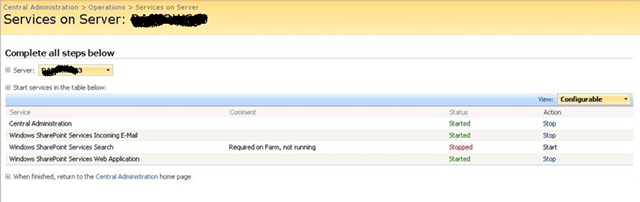
This seemed to do the trick. Re-executing the stsadm spsearch stop command finally did not come up with an error and the service was listed as stopped.

image

Once stopped, we repartitioned the disks accordingly and now all I had to do was start the damn thing 🙂

Through the Central Administration GUI I clicked Start and re-entered all of the configuration settings, including service accounts and the new index location (G:\DATA\INDEX). After a short time, I received the ever helpful “Unknown Error” error message.

image

Rather than change debug settings in web.config, I simply checked the SharePoint logs and the event viewer. Now, I had a new event in the logs.

Event Type: Warning 
Event Source: Windows SharePoint Services 3 Search 
Event Category: Gatherer 
Event ID: 10035 
Description: 
Could not import the registry hive into the registry because it does not exist in the configuration database. 
Context: Application '93a1818d-a5ec-40e1-82d2-ffd8081e3b6e' 

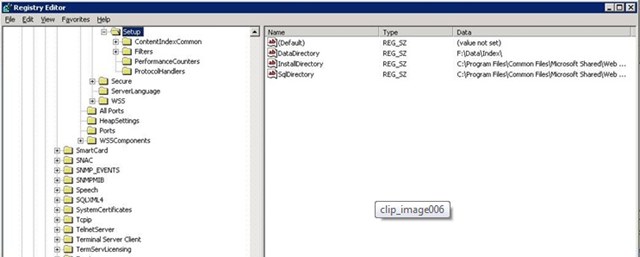
Hmm… It suggests a registry issue, so I checked the registry.

image


Although the error message really made no sense to me, checking the registry turned out to be the key to solving this mystery. If you look carefully in the above screenshot, note that the registry key DataDirectory was set to “F:\DATA\INDEX”.

I was surprised at this, because I had re-provisioned the SPSearch to use the new location (G:\DATA\INDEX). I would have thought that changing the default index location would alter the value of this key. A delve into the ULS logs showed events like this.

STSADM.EXE (0x0B38) 0x0830 Search Server Common MS Search Administration 95k1 High WSS Search index move: Changing index location from ‘F:\data\index’ to ‘G:\data\index’.

STSADM.EXE (0x0B38) 0x0830 Search Server Common MS Search Administration 95k2 High WSS Search index move: Index location changed to ‘G:\data\index’.

STSADM.EXE (0x0B38) 0x0830 Search Server Common MS Search Administration 0 High CopyIndexFiles: Source directory ‘F:\data\index\93a1818d-a5ec-40e1-82d2-ffd8081e3b6e’ not found for application ’93a1818d-a5ec-40e1-82d2-ffd8081e3b6e’.

STSADM.EXE (0x0F10) 0x1558 Windows SharePoint Services Topology 8xqz Medium Updating SPPersistedObject SPSearchServiceInstance Parent=SPServer Name=DAPERWS03. Version: 218342 Ensure: 0, HashCode: 54267293, Id: 305c06d7-ec6d-465a-98be-1eafe64d8752, Stack: at Microsoft.SharePoint.Administration.SPPersistedObject.Update() at Microsoft.SharePoint.Administration.SPServiceInstance.Update() at Microsoft.SharePoint.Search.Administration.SPSearchServiceInstance.Update() at Microsoft.Search.Administration.CommandLine.ActionParameter.Run(StringBuilder& output) at Microsoft.SharePoint.Search.Administration.CommandLine.SPSearch.Execute() at Microsoft.Search.Administration.CommandLine.CommandBase.Run(String command, StringDictionary keyValues, String& output) at Microsoft.SharePoint.StsAdmin.SPStsAdmin.RunOperation(SPGlobalAdmin globalAdmin, String st…

mssearch.exe (0x1654) 0x1694 Search Server Common IDXPIPlugin 0 Monitorable CTripoliPiMgr::InitializeNew – _CopyNoiseFiles returned 0x80070003 – File:d:\office\source\search\ytrip\search\tripoliplugin\tripolipimgr.cxx Line:519

mssearch.exe (0x1654) 0x1694 Search Server Common Exceptions 0 Monitorable <Exception><HR>0x80070003</HR><eip>0000000001D4127F</eip><module>d:\office\source\search\ytrip\search\tripoliplugin\tripolipimgr.cxx</module><line>520</line></Exception>

Note the second last line above (marked bold and italic). It showed that a function called CopyNoiseFiles returned a code of 0x8007003. This code happens to be “The system cannot find the path specified,” so it appears something is missing.

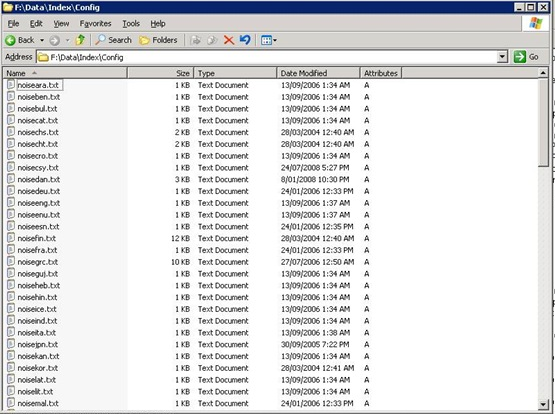
It then dawned on me. Perhaps the SharePoint installer puts some files into the initially configured index location and despite moving the index to another location, SharePoint still looks to this original location for some necessary files. To test this, I loaded up a blank Windows 2003 VM and installed SharePoint SP1 *without* running the configuration wizard. When I looked in the location of the index files, sure enough – there are some files as shown below.

image

It turned out that during our disk reconfiguration, the path of F:\DATA\INDEX no longer existed. So I recreated the path specified in the registry (F:\DATA\INDEX) and copied the contents of the CONFIG folder from my fresh VM install. I then started the search service from Central Administration and… bingo! Search finally started successfully…Wohoo!

Now that I had search successfully provisioned, I re-ran the command to change the index location to G:\DATA\INDEX and then started a full crawl.

C:\>stsadm -o spsearch -indexlocation G:\DATA\INDEX

Operation completed successfully.

C:\>stsadm -o spsearch -action fullcrawlstart

Operation completed successfully.

I then checked the event logs and now it seems we are cooking with gas!

Event Type: Information 
Event Source: Windows SharePoint Services 3 Search 
Event Category: Gatherer 
Event ID: 10045 
Description: 

Successfully imported the application configuration snapshot into the registry. 
Context: Application '93a1818d-a5ec-40e1-82d2-ffd8081e3b6e' 

Event Type: Information 
Event Source: Windows SharePoint Services 3 Search 
Event Category: Gatherer 
Event ID: 10044 
Description: 

Successfully stored the application configuration registry snapshot in the database. 
Context: Application 'Serve search queries over help content' 

As a final check, I re-examined the registry and noted that the DataDirectory key had not changed to reflect G:\. Bear that in mind when moving your index to another location. The original path may still be referred to in the configuration.

2. There are RAID cards and there are RAID cards

Since part of the upgrade work was to improve disk performance, we had to detach databases and move them around while we upgraded the disk infrastructure and repartitioned existing disk arrays. The server had an on-board Intel RAID controller with two arrays configured. One was a two-disk RAID 0 SCSI and the other was a three-disk RAID 5 SATA array. The performance of the RAID 5 SATA had always been crap – even crappier than you would expect from onboard RAID 5. When I say crap, I am talking around 35 megabytes per second transfer rate – even on the two-disk SCSI RAID 0 array.

Now, 35MB/sec isn’t great, but not completely intolerable. But, what made this much, much worse however, was the extreme slowness in copying large files (ie >4GB). When trying to copy files like this to the array, the throughput dropped to as low as 2MBs.

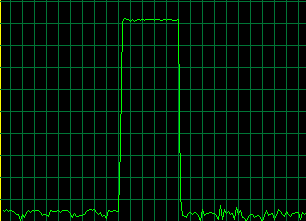
No matter whether it was Windows Explorer drag and drop or a command line utility like ROBOCOPY, the behaviour was the same. Throughput would be terrific for around 60 seconds, and then it would drop as shown below.

image

My client called the server vendor and was advised to purchase 4 SCSI disks to replace the SATA’s. Apparently the poor SATA performance was actually because SCSI and SATA were mixed on the same RAID bard and bus. That was a no-no.

Sounded plausible, but of course, after replacing the RAID 5 with the SCSI disks, there was no significant improvement in disk throughput at all. The performance of large files still reflected the pattern illustrated in the screenshot above.

Monitoring disk queue length on the new RAID array showed that disk queues were off the planet in terms of within normal boundaries. Now, I know that some people view disk queue length as a bit of an urban myth in terms of disk performance, but copying the same files to the iSCSI SAN yielded a throughput rate of around 95MBs and the disk queue value rarely spiked above 2.

Damn! My client wasn’t impressed with his well known server vendor! Not only does the onboard RAID card have average to crappy performance to begin with, RAID 5 with large files makes it positively useless.

Fun with buffers

To me, this smelt like a buffer type of issue. Imagine you are pouring sand into a bucket and the bucket has a hole in it. If you pour sand into the bucket at a faster rate than the hole allows sand to pour out, then eventually you will overflow the bucket. I suspected this sort of thing was happening here. The periods of high throughput were when the bucket was empty and the sand filled it fast. Then the bucket filled up and things slowed to a crawl while all of that sand passed through the metaphorical hole in the bottom. Once the bucket emptied, there was another all-too-brief burst of throughput as it filled quickly again.

I soon found a terrific article from EPS Windows Server Performance Team that explain what was going on very clearly.

Most file copy utilities like Robocopy or Xcopy call API functions that try and improve performance by keeping data in a buffer. The idea is that files that are changed or accessed frequently can be pulled from the buffer, thereby improving performance and responsiveness. But there is a trade-off. Adding this cache layer introduces an overhead in creating this buffer in the first place. If you are never going to access to copy this file again, adding it to the buffer is actually a bad idea.

Now imagine a huge file. Not only do you have the buffer overhead, but you now are also filling the buffer (and forcing it to be flushed), over and over again.

With a large file, you are actually better off avoiding the buffer altogether and doing a raw file copy. Any large file on a slow RAID card will still take time, but it’s a heck of a lot quicker than when combined with the buffering overhead.

Raw file copy methods

In the aforementioned article from the Microsoft EPS Server performance team, they suggest ESEUTIL as an alternative method. I hope they don’t mind me quoting them…

For copying files around the network that are very large, my copy utility of choice is ESEUTIL which is one of the database utilities provided with Exchange.  To get ESEUTIL working on a non-Exchange server, you just need to copy the ESEUTIL.EXE and ESE.DLL from your Exchange server to a folder on your client machine.  It’s that easy.  There are x86 & x64 versions of ESEUTIL, so make sure you use the right version for your operating system.  The syntax for ESEUTIL is very simple: eseutil /y <srcfile> /d <destfile>.  Of course, since we’re using command line syntax – we can use ESEUTIL in batch files or scripts.  ESEUTIL is dependent on the Visual C++ Runtime Library which is available as a redistributable package

I found an alternative to this, however, that proved its worth to me. It is called Teracopy and we tried the free edition to see what difference it would make in terms of copy times. As it happens, the difference was significant and the time taken to transfer large files around was reduced by a factor of 5. Teracopy also produced a nice running summary of the copy thoughput in MB/sec.The product definitely proved its worth and at a whopping $15 bucks, is not going to break the bank.

So, if you are doing any sort of large file copies and your underlying disk subsystem is not overly fast, then I recommend taking a look at this product. Believe me, it will save you a heap of time.

3. Test your throughput

A final note about this saga. Anyone who deals with SQL Server will have likely read articles about best practice disk configuration in terms of splitting data/logs/backups to different disk arrays to maximise throughput. This client had done this, but since Teracopy gave us nice throughput stats, we took the opportunity to test the read/write performance of all disk subsystems and it turned out that putting ALL data onto the SAN array had significantly better performance than using any of the onboard arrays.

This meant that the by-the-book configuration was hamstrung by a poorly performing onboard RAID controller and even if the idea of using separate disks/spindles seemed logical, the cold hard facts of direct throughput testing proved otherwise.

After reconfiguring the environment to leverage this fact, the difference in response time of WSS, when performing bulk uploads was immediately noticeable.

The moral of the story?

If you are a smaller organisation and can’t afford the high end server gear like Compaq/IBM, then take the time to run throughput tests before you go to production. The results may surprise you.

Thanks for reading

Paul Culmsee

www.sevensigma.com.au


SPD workflows: “ERROR: request not found in the TrackedRequests”

I’ve written this post to document a dumbass thing that I did and the error that it caused. Hopefully it might help someone googling in desperation sometime…

The popularity of the “Tribute to the humble leave form” series over at SharePoint Magazine, has meant that we actually get a few gigs implementing – surprise, surprise – InfoPath leave forms with SharePoint Designer workflows! This was actually quite unexpected, as I wrote that series as a joke and for end-user training purposes.

Now, I fully realise that many people don’t like tools like SharePoint Designer in the hands of mere mortals, but I personally think it is a terrific means to encourage buy-in and user evangelism and I encourage its sustainable use. Although “real developers” may disagree with me here, SPD workflows enable quick results without the embarrassing aftermath of premature code compilation (which always leads to frustration, right girls? 😀 ).

Anyhow enough sexual innuendo – here is my error with my lessons learned

The symptoms

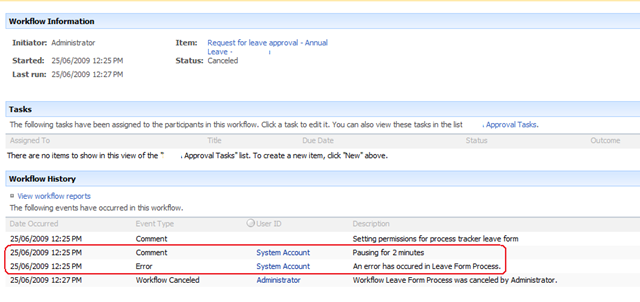
Recently, a happily running leave form workflow ground to a halt with an error as shown below. What the screenshot below shows is that the workflow died right after a “Pause for duration” workflow action. (Note the “pausing for 2 minutes” line, just before the actual workflow error).

image

Now, the interesting thing here is that the pause action never happened. The workflow bombed out straight away and there was no pause at all. Yet, the fact that the pause action logged to the history list meant that it attempted to do so. It seemed that the pause action ran for long enough to log that it was about to pause, but died when actually trying to.

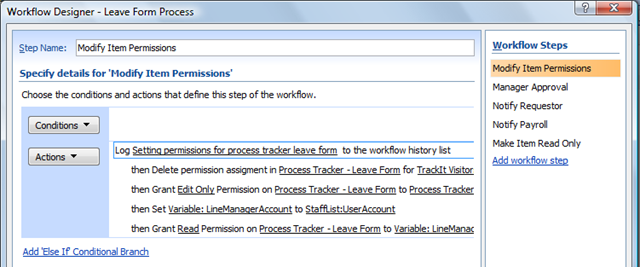
The pause action occurred in step 2 of my workflow, but it is worthwhile showing you the first workflow step first.

Below is a screenshot of step 1 of the workflow. This first step is called “Modify Item Permissions” and we are using the codeplex custom workflow actions to modify permissions of the submitted leave form, ensuring that only the requestor of the leave (and their boss) can see or modify the form.

image

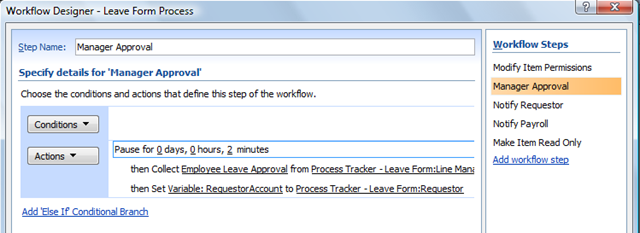
The step in the workflow, called “Manager Approval”, shows where we pause for 2 minutes. The reason we pause is to get around another workflow error that I will explain at the end of the post. After the pause action was completed and the workflow recommenced, it performed a “Collect data from user” task as shown below. This created a task for the requestors manager to approve the leave request.

image

We know that the “Collect data from user” action never ran, because the “Employee Leave Approval” task never actually got created in the task list. Thus, we know the error occurred at the pause action. Or, did it?

This error occurred consistently whether the workflow was manually started or auto-triggered. Checked all the usual suspects – timber jobs ok, permissions unchanged and working well, etc. Scanning the ULS logs at this time showed an interesting error with a much less interesting stack trace (that I have pasted at the end of the post for readability).

“Unexpected    ERROR: request not found in the TrackedRequests. We might be creating and closing webs on different threads”

Hmm, what is TrackedRequests and why is a request not found? Googling that error message wasn’t much help at all. Although it is quite common, nothing matched my particular context. But then I received a lucky break. When I cancelled the running workflow that was in this error state, I received a new error that made it quite easy to work out what was going on.

WinWF Internal Error, terminating workflow Id# 02334a17-3211-4d30-902f-bf34e20354c6    
Unexpected    System.Workflow.Runtime.Hosting.PersistenceException: Object reference not set to an instance of an object. —> System.NullReferenceException: Object reference not set to an instance of an object.     at DP.Sharepoint.Workflow.Common.RemoveListItemPermissionEntry(SPListItem item, String principalName, Boolean breakRoleInheritance)    

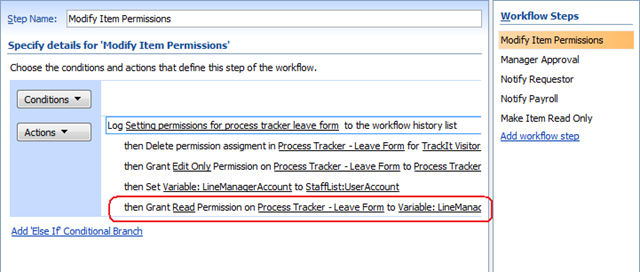
It was this error that gave it away. For a start, the method being called was DP.Sharepoint.Workflow.Common.RemoveListItemPermissionEntry and the exception was a null reference. RemoveListItemPermissionEntry sounded suspiciously like the permission based workflow actions of the “Modify Item Permissions” step as highlighted below.

image

But wait… the workflow never failed at this line at all. It actually failed at the first action of the next step (“Manager Approval”)  with the “request not found in the TrackedRequests” error. Interesting, eh?

Let’s put aside the issue of what step and what action the workflow failed on for a moment, and examine the second error message more closely. If you examine the “Modify Item Permissions” action highlighted above, can you think of any reason that I would get a null reference exception?

Ah! What happens if the previous action called “Set Variable”, set a blank or null value? I suspect that the “Grant permissions on an item” workflow action will attempt to change permissions of the item to a blank or null user. The result? That workflow action will die with a null reference exception – precisely what the error states.

When I checked the source of the variable “LineManagerAccount”, it was looking up a contact list for the manager of the requestor. Sure enough, it did turn out that that column was blank for some users. Thus, a simple exercise in input validation combined with a small correction to that list item and the problem was solved.

Further questions and further information

I could stop this post there I suppose and perhaps someone, sometime might find this post and think “Wohoo!”. But this problem raised a couple of issues, as well as made it clear to me that I had been stupid in how I designed this one. Let’s tackle them one by one.

1. When did it die again?

Clearly the error that caused all of this, occurred at the last action of the “Modify Item Permissions” step. We know this because the step before was where the lookup to the contact list happened, and this is where the null value came from that caused the exception. But then why did the workflow not stop at this point? Why did it continue onward and attempt to move to the “Manager Approval” steps and die on the “Pause for duration” action?

Whether this is default behaviour of SPD workflows or a logic fault in the exception handling code in the codeplex-based “Grant Permission on an Item” action, this makes life hard to troubleshoot because the error message never made sense. I only found out the true root cause when I terminated the workflow manually and got lucky because the offending exception suddenly appeared.

So, the conclusion to draw? If your SPD workflow dies with “ERROR: request not found in the TrackedRequests” in the logs, it may be that the real cause of the problem is a previous workflow step and not the step where the workflow actually stopped.

2. Paul is a dumbass

Okay, so let’s talk about lessons learnt. Some people reading this may wonder why I never used Active Directory or the user profile store to store manager details for a user and to do the lookup from there. The answer is that this contact list approach simply made sense for this client and this is actually not the dumb thing that I did. The dumb thing that I did was to forget that all of the necessary business logic and data validation steps could have been performed in the InfoPath form itself.

Remember that InfoPath forms can have data connections to all sorts of sources such as SharePoint lists, web services and relational databases. (I am not going into detail on how to do that here because I have already covered it in quite a lot in part 5 of the “Leave Form Tribute” series). We can have a published InfoPath form connect to any SharePoint list or library across the entire farm to look up business logic details, such as an approver. This is something that SharePoint Designer workflows cannot do out of the box – it can only lookup from the site where the workflow has been created.

But, more important than that, we can easily use InfoPath rules and data validation functionality to ensure that the values are not null before submitting.

What this all means is that your SPD workflows end up being simpler and easier to maintain because InfoPath is providing all of the data to the workflow as well as the validation of the data. Therefore, the workflow now doesn’t have to do the lookup work and have unnecessary steps and actions.

For these reasons I think that, if you can, grab all of the data you need for a business process using the InfoPath form using hidden fields. Then publish the form and ensure these hidden fields are published as site columns.

For this particular purpose, I think that InfoPath is a lesser evil than SharePoint Designer workflows.

3. What are the pause actions there for anyway?

Finally, I promised I’d explain why I had a pause action in the workflow. This is to get around a race condition with workflows that produces an intermittent error message:

“This task is currently locked by a running workflow and cannot be edited”

I’ve seen this occur in several situations and it pretty much boils down to some workflow actions being synchronous and subsequent actions starting before the previous action properly completed. Consider this example.

One workflow creates or updates an item in a list, say a task list. But the task list also has a workflow attached to it. This means that the first workflow creates the task item and then moves onto the next step. Meanwhile, a new workflow has been triggered for that new task list item. This secondary workflow refers to information stored in the main item which causes the race condition.  If the information in the main item is not committed before this workflow attempts to use it, you’ll get null values when the main item is a new item.  When working with SPD workflows, these null values will show up as ????. 

To resolve the race condition, I had to ensure that the main item was committed before the secondary workflow was started by pausing the workflow.  Why does pausing the workflow cause the changes to be committed?  According to the MSDN article “How Windows SharePoint Services Processes Workflow Activities” http://msdn.microsoft.com/en-us/library/ms442249.aspx

Windows SharePoint Services runs the workflow until it reaches a point where it cannot proceed because it is waiting for some event to occur: for example, a user must designate a task as completed. Only at this "commit point" does Windows SharePoint Services commit the changes made in the previous Windows SharePoint Services-specific workflow activities…

The not-so-clever workaround is to pause the workflow in between actions. When you add a pause, the workflow “cannot proceed because it is waiting for some event to occur” and therefore makes it a commit point. Not pretty – but works.

I hope that you find this article of use in your SharePoint Designer workflow troubleshooting endeavours. Below, I have pasted the complete stack traces (for the search engines).

Thanks for reading

Paul Culmsee

06/25/2009 12:25:20.46 w3wp.exe (0x0BA8) 0x16F8 Windows SharePoint Services General 0 Unexpected ERROR: request not found in the TrackedRequests. We might be creating and closing webs on different threads. ThreadId = 1, Free call stack = at Microsoft.SharePoint.SPRequestManager.Release(SPRequest request) at Microsoft.SharePoint.SPWeb.Invalidate() at Microsoft.SharePoint.SPWeb.Close() at Microsoft.SharePoint.SPSite.Close() at Microsoft.SharePoint.SPSite.Dispose() at Microsoft.SharePoint.Workflow.SPWorkflowManager.<>c__DisplayClass1.<StartWorkflow>b__0() at Microsoft.SharePoint.SPSecurity.CodeToRunElevatedWrapper(Object state) at Microsoft.SharePoint.SPSecurity.<>c__DisplayClass4.<RunWithElevatedPrivileges>b__2() at Microsoft.SharePoint.Utilities.SecurityContext.RunAsProcess(CodeToRunElevated secureCode) at Microsoft.SharePoint.SPSecurity.RunWithEl…

06/25/2009 12:25:20.46* w3wp.exe (0x0BA8) 0x16F8 Windows SharePoint Services General 0 Unexpected …evatedPrivileges(WaitCallback secureCode, Object param) at Microsoft.SharePoint.SPSecurity.RunWithElevatedPrivileges(CodeToRunElevated secureCode) at Microsoft.SharePoint.Workflow.SPWorkflowManager.StartWorkflow(SPListItem item, SPWorkflowAssociation association, SPWorkflowEvent startEvent, Boolean bAutoStart, Boolean bCreateOnly) at Microsoft.SharePoint.Workflow.SPWorkflowManager.StartWorkflow(SPListItem item, SPWorkflowAssociation association, String eventData, Boolean isAutoStart) at Microsoft.SharePoint.Workflow.SPWorkflowManager.StartWorkflow(SPListItem item, SPWorkflowAssociation association, String eventData) at Microsoft.SharePoint.WebControls.SPWorkflowDataSourceView.Insert(IDictionary values) at Microsoft.SharePoint.WebControls.SPWorkflowDataSourceView.Ins…

06/25/2009 12:25:20.46* w3wp.exe (0x0BA8) 0x16F8 Windows SharePoint Services General 0 Unexpected …ert(IDictionary values, DataSourceViewOperationCallback callback) at Microsoft.SharePoint.WebPartPages.DataFormWebPart.FlatCommit() at Microsoft.SharePoint.WebPartPages.DataFormWebPart.PerformCommit() at Microsoft.SharePoint.WebPartPages.DataFormWebPart.HandleOnSave(Object sender, EventArgs e) at Microsoft.SharePoint.WebPartPages.DataFormWebPart.RaisePostBackEvent(String eventArgument) at System.Web.UI.Page.RaisePostBackEvent(IPostBackEventHandler sourceControl, String eventArgument) at System.Web.UI.Page.RaisePostBackEvent(NameValueCollection postData) at System.Web.UI.Page.ProcessRequestMain(Boolean includeStagesBeforeAsyncPoint, Boolean includeStagesAfterAsyncPoint) at System.Web.UI.Page.ProcessRequest(Boolean includeStagesBeforeAsyncPoint, Boolean includ…

06/25/2009 12:25:20.46* w3wp.exe (0x0BA8) 0x16F8 Windows SharePoint Services General 0 Unexpected …eStagesAfterAsyncPoint) at System.Web.UI.Page.ProcessRequest() at System.Web.UI.Page.ProcessRequestWithNoAssert(HttpContext context) at System.Web.UI.Page.ProcessRequest(HttpContext context) at System.Web.HttpApplication.CallHandlerExecutionStep.System.Web.HttpApplication.IExecutionStep.Execute() at System.Web.HttpApplication.ExecuteStep(IExecutionStep step, Boolean& completedSynchronously) at System.Web.HttpApplication.ApplicationStepManager.ResumeSteps(Exception error) at System.Web.HttpApplication.System.Web.IHttpAsyncHandler.BeginProcessRequest(HttpContext context, AsyncCallback cb, Object extraData) at System.Web.HttpRuntime.ProcessRequestInternal(HttpWorkerRequest wr) at System.Web.HttpRuntime.ProcessRequestNoDemand(HttpWorkerRequest wr) at Sys…

06/25/2009 12:25:20.46* w3wp.exe (0x0BA8) 0x16F8 Windows SharePoint Services General 0 Unexpected …tem.Web.Hosting.ISAPIRuntime.ProcessRequest(IntPtr ecb, Int32 iWRType) , Allocation call stack (if present) at Microsoft.SharePoint.Library.SPRequest..ctor() at Microsoft.SharePoint.SPGlobal.CreateSPRequestAndSetIdentity(Boolean bNotGlobalAdminCode, String strUrl, Boolean bNotAddToContext, Byte[] UserToken, String userName, Boolean bIgnoreTokenTimeout, Boolean bAsAnonymous) at Microsoft.SharePoint.SPWeb.InitializeSPRequest() at Microsoft.SharePoint.SPWeb.EnsureSPRequest() at Microsoft.SharePoint.SPWeb.get_Request() at Microsoft.SharePoint.SPWeb.InitWebPublic() at Microsoft.SharePoint.SPWeb.get_ServerRelativeUrl() at Microsoft.SharePoint.SPWeb.get_Url() at Microsoft.SharePoint.SPUser.InitMember() at Microsoft.SharePoint.SPUser..ctor(SPWeb web, ISecura…

06/25/2009 12:25:20.46* w3wp.exe (0x0BA8) 0x16F8 Windows SharePoint Services General 0 Unexpected …bleObject scope, String strIdentifier, Object[,] arrUsersData, UInt32 index, Int32 iByParamId, String strByParamSID, String strByParamEmail, SPUserCollectionType userCollectionType, Boolean isSiteAuditor) at Microsoft.SharePoint.SPUser..ctor(SPWeb web, ISecurableObject scope, String strIdentifier, Object[,] arrUsersData, UInt32 index, Int32 iByParamId, String strByParamSID, String strByParamEmail, SPUserCollectionType userCollectionType) at Microsoft.SharePoint.SPUserCollection.GetByIDNoThrow(Int32 id) at Microsoft.SharePoint.SPSite.get_SystemAccount() at Microsoft.SharePoint.WorkflowActions.Helper.ResolveUserField(WorkflowContext context, Object fvalue) at Microsoft.SharePoint.WorkflowActions.Helper.LookupUser(WorkflowContext context, Guid listId, Int32 listItem, Strin…

06/25/2009 12:25:20.46* w3wp.exe (0x0BA8) 0x16F8 Windows SharePoint Services General 0 Unexpected …g fieldName) at Microsoft.SharePoint.WorkflowActions.Helper.LookupUser(WorkflowContext context, String listIdOrName, Int32 listItem, String fieldName) at Microsoft.SharePoint.WorkflowActions.LookupActivity.Execute(ActivityExecutionContext provider) at System.Workflow.ComponentModel.ActivityExecutor`1.Execute(T activity, ActivityExecutionContext executionContext) at System.Workflow.ComponentModel.ActivityExecutor`1.Execute(Activity activity, ActivityExecutionContext executionContext) at System.Workflow.ComponentModel.ActivityExecutorOperation.Run(IWorkflowCoreRuntime workflowCoreRuntime) at System.Workflow.Runtime.Scheduler.Run() at System.Workflow.Runtime.WorkflowExecutor.RunScheduler() at System.Workflow.Runtime.WorkflowExecutor.RunSome(Object ignored) …

06/25/2009 12:25:20.46* w3wp.exe (0x0BA8) 0x16F8 Windows SharePoint Services General 0 Unexpected …at System.Workflow.Runtime.Hosting.DefaultWorkflowSchedulerService.WorkItem.Invoke(WorkflowSchedulerService service) at System.Workflow.Runtime.Hosting.DefaultWorkflowSchedulerService.QueueWorkerProcess(Object state) at System.Threading._ThreadPoolWaitCallback.WaitCallback_Context(Object state) at System.Threading.ExecutionContext.runTryCode(Object userData) at System.Runtime.CompilerServices.RuntimeHelpers.ExecuteCodeWithGuaranteedCleanup(TryCode code, CleanupCode backoutCode, Object userData) at System.Threading.ExecutionContext.RunInternal(ExecutionContext executionContext, ContextCallback callback, Object state) at System.Threading.ExecutionContext.Run(ExecutionContext executionContext, ContextCallback callback, Object state) at System.Threading._ThreadPoolW…

06/25/2009 12:25:20.46* w3wp.exe (0x0BA8) 0x16F8 Windows SharePoint Services General 0 Unexpected …aitCallback.PerformWaitCallbackInternal(_ThreadPoolWaitCallback tpWaitCallBack) at System.Threading._ThreadPoolWaitCallback.PerformWaitCallback(Object state)


06/25/2009 12:27:16.49 w3wp.exe (0x0BA8) 0x1CB4 Windows SharePoint Services Workflow Infrastructure 88xr Unexpected WinWF Internal Error, terminating workflow Id# 02334a17-3211-4d30-902f-bf34e20354c6

06/25/2009 12:27:16.49 w3wp.exe (0x0BA8) 0x1CB4 Windows SharePoint Services Workflow Infrastructure 98d4 Unexpected System.Workflow.Runtime.Hosting.PersistenceException: Object reference not set to an instance of an object. —> System.NullReferenceException: Object reference not set to an instance of an object. at DP.Sharepoint.Workflow.Common.RemoveListItemPermissionEntry(SPListItem item, String principalName, Boolean breakRoleInheritance) at DP.Sharepoint.Workflow.PermissionsService.<>c__DisplayClass1.<ProcessGrantRequest>b__0() at Microsoft.SharePoint.SPSecurity.CodeToRunElevatedWrapper(Object state) at Microsoft.SharePoint.SPSecurity.<>c__DisplayClass4.<RunWithElevatedPrivileges>b__2() at Microsoft.SharePoint.Utilities.SecurityContext.RunAsProcess(CodeToRunElevated secureCode) at Microsoft.SharePoint.SPSecurity.RunWithElevatedPrivileges(WaitCallback secureCode, Object param)…

06/25/2009 12:27:16.49* w3wp.exe (0x0BA8) 0x1CB4 Windows SharePoint Services Workflow Infrastructure 98d4 Unexpected … at Microsoft.SharePoint.SPSecurity.RunWithElevatedPrivileges(CodeToRunElevated secureCode) at DP.Sharepoint.Workflow.PermissionsService.ProcessGrantRequest(PermissionRequest pr) at DP.Sharepoint.Workflow.PermissionsService.Commit(Transaction transaction, ICollection items) at System.Workflow.Runtime.WorkBatch.PendingWorkCollection.Commit(Transaction transaction) at System.Workflow.Runtime.WorkBatch.Commit(Transaction transaction) at System.Workflow.Runtime.VolatileResourceManager.Commit() at System.Workflow.Runtime.WorkflowExecutor.DoResourceManagerCommit() at System.Workflow.Runtime.Hosting.WorkflowCommitWorkBatchService.CommitWorkBatch(CommitWorkBatchCallback commitWorkBatchCallback) at System.Workflow.Runtime.Hosting.DefaultWorkflowCommitWorkBatchSer…

06/25/2009 12:27:16.49* w3wp.exe (0x0BA8) 0x1CB4 Windows SharePoint Services Workflow Infrastructure 98d4 Unexpected …vice.CommitWorkBatch(CommitWorkBatchCallback commitWorkBatchCallback) at System.Workflow.Runtime.WorkflowExecutor.CommitTransaction(Activity activityContext) at System.Workflow.Runtime.WorkflowExecutor.Persist(Activity dynamicActivity, Boolean unlock, Boolean needsCompensation) — End of inner exception stack trace — at System.Workflow.Runtime.WorkflowExecutor.Persist(Activity dynamicActivity, Boolean unlock, Boolean needsCompensation) at System.Workflow.Runtime.WorkflowExecutor.ProtectedPersist(Boolean unlock)


Why InfoPath rocks

At the San Diego Best Practices SharePoint conference, I sat quietly and listened to the governance godfather himself, Robert Bogue, discussing with the other SharePoint "big kids" various reasons why InfoPath sucks in many situations and some of its current design faults. I mean, anybody who has used forms services knows what a pain redeployment is, how much of a pain managed code is, the horrible performance of web services, branding crap and the like. Thus, all were perfectly valid points.

But irrespective of how correct those points are, I’d like to categorically state why InfoPath 2007 and Forms Services are the best pieces of technology that Microsoft has ever invented.

The simple reason is this.

My wife likes it!

To fully explain the implications of why InfoPath rocks, I have created an IBIS issue map that makes the argumentation quite clear.

image

I rest my case.


Thanks for reading

Paul Culmsee

www.sevensigma.com.au


Tribute to the "humble leave form" part 7 is out

Tags: InfoPath,SharePoint,Training @ 7:49 am

Hi!

I’ve just noticed that Arno Nel over at SharePoint Magazine has published part 7 of my "Tribute to the Humble Leave Form" series on InfoPath and forms services.

Bye!


More on the Best Practice SharePoint Conference – Feb 2-4 2009 in San Diego!

Hi all

I have been extremely quiet on the blogging front lately, because I have been extremely busy, splitting my time between working on my two presentations for the up-coming Best Practices SharePoint Conference, as well as wearing my undies on the outside (ala superman), deep in the bowels of some unhealthy SharePoint farms, nailing various technical and governance issues and helping organisations regain some lost assurance. On top of that, I’ve also been doing a lot of non IT related work in a group facilitation discipline.

image

I thought it’s about time I emerged from this big mushroom I find myself under to let you know more about what I will be speaking about, as well as some of the other speakers and topics that I really looking forward to. Seriously, we are in the company of giants with this conference. The caliber and quality of the speakers has me wondering what the hell I am doing there!

I mean we have all the "A list" big kids of the SharePoint world there. Gary Lapointe is a freakin’ bona fide superstar! – via his STSADM extensions, he has saved the asses of more SharePoint admins and developers than even Joel has. Robert Bogue is an even better all-rounder than Andrew Symonds (sorry non cricketing countries you won’t get that analogy) and touches on a wider variety of topics than anyone else I have ever come across. Then there the likes of Andrew Woodward, Ben Curry, Bob Mixon, Eric Shupps, fellow metalhead Mike Watson, Ruven Gotz and Todd Bleeker just to name a few!

Somehow I have to squeeze in a beer with all of them yet stay sober enough to present. That’s a tough ask!

Anyway, both of my sessions are in the CIO stream and I think are rather topical given the current financial crisis crap that is happening around the world.

My first session is called "How to avoid SharePoint becoming a wicked problem". This is a pet topic of mine – something that I have spent a lot of time on, and developing new skills in (hence the aforementioned facilitation work). For the record, I didn’t make up the term "wicked problem" – its been a subject of academic research since the term was first coined in the early 1970’s. This session is going to cover a lot of what I have learned on this topic including how to spot SharePoint wickedness early, recognise it for what it is, and apply the *right* sort of tools and techniques to mitigate it.

I do worry that people will find some of my stuff a little too left field, but I do have the results to attest to the value and power of these techniques and I am really looking forward to sharing my methods and comparing with what has worked for other presenters and attendees.

The second topic is on the topic of good old SharePoint Return on Investment (ROI). I’m one of these people that believe most things can be measured or quantified. I’ve always wanted to return to my series on "How to Speak to your CFO" and continue down that road. Given we have entered once in a lifetime era of falling profit, plummeting asset prices, reduced budgets, costlier finance and great uncertainty, my quest for bringing a lasting peace to the cold war between managers and geeks moves to San Diego 🙂

My aim for this session is to allow non SharePoint people to understand where some of the hidden costs are SharePoint, as well as show SharePoint people the basic financial tools for ROI modelling and secondly, I will explain how to build an ROI decision model and provide a scenario that we will try out some different assumptions with.

As for the rest of the veritable *buffet* of topics – where do you start? First up, I am torn between Bill’s "Aligning your Information and Findability Architectures using SharePoint Server 2007 Technologies" and Yoda Bogue’s "Selling Governance in your Organization". If I go to Bill’s session, then I’ll definitely be attending Robert’s Governing Development in SharePoint session.

In the afternoon, it gets even harder! You have "Transform the My Site into an Information Hub" by Mark Eichenberger, Bob Mixon’s "Learn why Taxonomies are the Most Important Part of any Document or Information Asset Management System, How to Facilitate the Government out of Governance by Virgin Carrol and Nuts and Bolts Governance- Practical Application of the Concepts

.. and that’s just day one!

Seriously people, no matter that sort of SharePoint sub disciplines push your buttons, you are going to get extreme value for money here. You will come away with an amazing amount of material that will result in real and tangible cost savings across various areas of the SharePoint realm.

If you live in California or anywhere in the US – there is no excuse 🙂 If *I* have to spend 25+ hours cooped up in  plane just to get there and survive the jet-lag to present, then you should come on down and join the fun.

Hope to see you there!

Paul Culmsee


« Previous PageNext Page »

Today is: Wednesday 3 June 2026 -