Back to Cleverworkarounds mainpage
 

Complexity bites: When SharePoint = Risk

I think as you age, you become more and more like your parents. Not so long ago I went out paintballing with some friends and we all agreed that the 16-18 year olds who also happened to be there were all obnoxious little twerps who needed a good kick in the rear. At the same time, we also agreed that we were just as obnoxious back when we were that age. Your perspective changes as you learn and your experience grows, but you don’t forget where you came from.

I now find myself saying stuff to my kids that my parents said to me, I think today’s music is crap, I have taken a liking to drinking quality scotch. Essentially all I need now to complete the metamorphosis to being my father is for all my hair to fall out!

So when I write an article whining about an assertion that IT has a credibility issue and has gone backwards in its ability to cope with various challenges, I fear that I have now officially become my parents. I’ll sound like grandpa who always tells you that life was so much simpler back in the 1940’s.

Consequences of complexity…

Before I go and dump on IT as a discipline, how about we dump on finance as a discipline, just so you can be assured that my cynicism extends far beyond nerds.

I previously wrote about how Sarbanes Oxley legislation was designed to, yet ultimately failed to, provide assurance to investors and regulators that public companies had adequate controls over their financial risk. As I write this, we are in the midst of a once in a generation-or-two credit crisis where some seven hundred billion dollars ($700,000,000,000) of US taxpayers’ money will be used to take ownership of crap assets (foreclosed or unpaid mortgages).

Part of the problem with the credit crisis was through the use of "collateralized debt obligations". This is a fancy, yet complex, way of taking a bunch of mortgages, and turning them into an "asset" that someone else who has some spare cash invests in. If you are wondering why the hell someone would invest in such a thing, then consider people with home loans, supposedly happily paying interest on those mortgages. It is that interest that finds its way to the holder (investor) of the CDO. So a CDO is supposedly an income stream.

Now if that explanation makes your eyes glaze over then I have bad news for you: that’s supposed to be the easy part. The reality is that the CDO’s are actually extremely complex things. They can be backed by residential property, commercial property, something called mortgage backed securities, corporate loans – essentially anything that someone is paying interest on can find its way into a CDO that someone else buys into, to get the income stream from the interest paid.

To provide "assurance" that these CDO’s are "safe", ratings agencies give them a mark that investors rely upon when making their investment. So a "AAA" CDO is supposed to have been given the tick of approval by experts in debt instrument style finance.

Here’s the rub about rating agencies. Below is a news article from earlier in the year with some great quotes

http://www.nytimes.com/2008/03/23/business/23how.html?pagewanted=print

Credit rating agencies, paid by banks to grade some of the new products, slapped high ratings on many of them, despite having only a loose familiarity with the quality of the assets behind these instruments.

Even the people running Wall Street firms didn’t really understand what they were buying and selling, says Byron Wien, a 40-year veteran of the stock market who is now the chief investment strategist of Pequot Capital, a hedge fund. “These are ordinary folks who know a spreadsheet, but they are not steeped in the sophistication of these kind of models,” Mr. Wien says. “You put a lot of equations in front of them with little Greek letters on their sides, and they won’t know what they’re looking at.”

Mr. Blinder, the former Fed vice chairman, holds a doctorate in economics from M.I.T. but says he has only a “modest understanding” of complex derivatives. “I know the basic understanding of how they work,” he said, “but if you presented me with one and asked me to put a market value on it, I’d be guessing.”

What do we see here? How many people really *understand* what’s going on underneath the complexity?

Of course, we now know that many of the mortgages backing these CDO’s were made to people with poor credit history, or with a high risk of not being able to pay the loans back. Jack up the interest rate or the cost of living and people foreclose or do not pay the mortgage. When that happens en masse, we have a glut of houses for sale, forcing down prices, lowering the value of the assets, eliminating the "income stream" that CDO investors relied upon, making them pretty much worthless.

My point is that the complexity of the CDO’s were such that even a guy with a doctorate in economics only had a ‘modest understanding’ of them. Holy crap! If he doesn’t understand it then who the hell does?

Thus, the current financial crisis is a great case study in the relationship between complexity and risk.

Consequences of complexity (IT version)…

One thing about doing what I do, is that you spent a lot of time on-site. You get to see the IT infrastructure  and development at many levels. But more importantly, you also spend a lot of time talking to IT staff and organisation stakeholders with a very wide range of skills and experience. Finally and most important of all, you get to see first hand organisational maturity at work.

My conclusion? IT is completely f$%#ed up across all disciplines and many will have their own mini equivalent of the US $700 billion dollar haemorrhage. Not only that, it is far worse today than it previously was – and getting worse! IT staff are struggling with ever accelerating complexity and the "disconnect" between IT and the business is getting worse as well. To many businesses, the IT department has a credibility problem, but to IT the feeling is completely mutual 🙂

You can find a nice thread about this topic on slashdot. My personal favourite quote from that thread is this one

Let me just say, after 26 years in this business, of hearing this every year, the systems just keep getting more complex and harder to maintain, rather than less and easier.

Windows NT was supposed to make it so anyone who could use Windows could manage a server.

How many MILLION MSCEs do we have in the world now?

Storage systems with Petabytes of data are complex things. Cloud computing is a complex thing. Supercomputing clusters are complex things. World-spanning networks are complex things.

No offense intended, but the only people who think things are getting easier are people who don’t know how they work in the first place

Also there is this…

There are more software tools, programming languages, databases, report writers, operating systems, networking protocols, etc than ever before. And all these tools have a lot more features than they used to. It’s getting increasingly harder to know "some" of them well. Gone are the days when just knowing DOS, UNIX, MVS, VMS, and OS/400 would basically give you knowledge of 90% of the hardware running. Or knowing just Assembly/C/Cobol/C++ would allow you to read and maintain most of the source code being used. So I would argue that the need for IT staff is going to continue to increase.

I think the "disconnect" between IT and Business has a lot more to do with the fact that business "knows" they depend on IT, but they are frustrated that IT can’t seem to deliver what they want when they want it. On the other side, IT has to deal with more and more tools and IT staff has to learn more and more skills. And to increase frustration in IT, business users frequently don’t deliver clear requirements or they "change" their mind in the middle of projects….

So it seems that I am not alone 🙂

I mentioned previously that more often than not, SQL Server is poorly maintained – I see it all the time. Yet today I was speaking to a colleague who is a storage (SAN) and VMware virtualisation god. I asked him what the average VMware setup was like and his answer was similar to my SQL Server and SharePoint experience. In his experience, most of them were sub-optimally configured, poorly maintained, poorly documented and he could not provide any assurance as to the stability of the platform.

These sorts of quality assurance issues are rampant in application development too. I see the same thing most definitely in the security realm too.

As the above quote sates, "it’s increasingly harder to know *some* of them well". These days I am working with specialists who live and breathe their particular discipline (such as storage, virtualisation, security or comms). Those disciplines over time grow more complex and sub-disciplines appear.

Pity then, the poor developer/sysadmin/IT manager who is trying to keep a handle on all of this and try to provide a decent service to their organisation!

Okay, so what? IT has always been complex – I sound like a Gartner cliche. What’s this got to do with SharePoint?

Consequences of SharePoint complexity…

SharePoint, for a number of reasons, is one of those products that has a way of really laying bare any gaps that the organisation has in terms of their overall maturity around technology and strategy.

Why?

Because it is so freakin’ complex! That complexity transcends IT disciplines and goes right to the heart organisational/people issues as well.

It’s bad enough getting nerds to agree on something, let alone organisation-wide stakeholders!

Put simply, if you do a half-arsed job of putting SharePoint in, you will be punished in so many ways! The simple fact is that the odds are against you before you even start because it only takes a mistake in one particular part of the complex layers of hardware, systems, training, methodology, information architecture and governance, to devalue the whole project.

When I first started out, I was helping organizations get SharePoint installed. However lately I am visiting a lot of sites where SharePoint has already been installed, but it has not been a success. There are various reasons;I have cited them in detail in the project failure series, so I won’t rehash all that here. (I’d suggest reading parts three, four and five in particular).

I am firmly of the conclusion that much of SharePoint is more art than science, and what’s more, the organisation has to be ready to come with you. Due to differing learning styles and poor communication of strategy, this is actually pretty rare. Unfortunately, IT are not the people who are well suited to "getting the organisation ready for SharePoint."

If that wasn’t enough, then there is this question. If IT already struggle to manage the underlying infrastructure and systems that underpin SharePoint, then how can you have any assurance that IT will have a "governance epiphany" and start doing things the right way?

This translates to risk, people! I will be writing all about risk in a similar style to the CFO Return on Investment series very soon. I am very interested in methods to quantify the risk brought about by the complexity of SharePoint and the IT services it relies on. For me, I see a massive parallel from the complexity factor in the current financial crisis and I think that a lot can be learned from it. SOX was supposed to provide assurance and yet did nothing to prevent the current crisis. Therefore, SOX represents a great example of mis-focused governance where a lot of effort can be put in for no tangible gain.

A quick test of "assurance"…

Governance is like learning to play the guitar. It takes practice, and it does not give up its secrets easily and despite good intent, you will be crap at it for a while. It is easy to talk about, but putting it into practice is another thing.

Just remember this. The whole point of the exercise is to provide *assurance* to stakeholders. When you set any rule, policy, procedure, standard (or similar), just ask yourself: Does this provide me the assurance I need that gives me confidence to vouch for the service I am providing? Just because you may be adopting ITIL principles, does *not* mean that you are necessarily providing the right sort assurance that is required.

I’ll leave you with a somewhat biased, yet relatively easy litmus test that you can use to test your current level of assurance.

It might be simplistic, but if you are currently scared to apply a service pack to SharePoint, then you might have an assurance issue. 🙂


Thanks for reading


Paul Culmsee
www.sevensigma.com.au


Sometimes "Microsoft bashing" is justified

Microsoft bashing is a favourite pastime of many a nerd. Whether it is justified or not in many cases is debatable since M$ will never please everyone. But the point is, it is cathartic and in actual fact, good therapy because venting your frustrations at Bill Gates is much healthier than at your colleagues or family.

To my Microsoft employee friends reading this. Don’t feel all defensive – some of the very best Microsoft bashing I have ever heard comes from you guys anyway 🙂

So although sometimes the M$ bashing is completely unjustified, long shall it continue to preserve the sanity of IT professionals around the globe.

Having said that, on occasion you will hit some Microsoft induced pain that is legitimately and frustratingly dumb. By "legitimately", I mean that you cannot say "although in hindsight it was dumb, I can actually understand why they decided to do that". Instead you get caught out and experience pain and frustration simply because of a silly Microsoft oversight.

In this case, the oversight is with the SharePoint Configuration Wizard

Continue reading “Sometimes "Microsoft bashing" is justified”


SQL God? No… I just know how to do a maintenance plan

image 

I am working on an essay about IT complexity at the moment, and one thing that sprung into my mind while thinking about this, is the fact that many of my clients seem to think I am some sort of SQL Server guru.

There are two sad realities inferred by this.

Firstly, I am far from a SQL Server god. Yes I have experience with it, but the only reason people think I’m any good at it stems from the general lack of knowledge that they have about the product. Often all I have to do is waltz in with my Michael Buble like smooth charm and recommend a maintenance plan be set up and I am instantly the guy to talk to in all things SQL.

The truth of the matter is that I’m not fit to lick the boots of a skilled DBA. But like all former system administrators/infrastructure managers who have had to deal with the pressure and consequences of downtime, irrespective of the product, I developed a reflex to learn what I need to to cover my butt. Often I didn’t care less how a product operated from the end-user perspective. All I cared about was how it hung together so I could recover it when it inevitably failed in some way.

Continue reading “SQL God? No… I just know how to do a maintenance plan”


All in the name of "security"…

Here is a recent little story about when, in the name of "security", a really dumb thing was done, and the response that said a lot about the security posture of those behind the response.

A client of mine has 4 servers (2 for an Active Directory domain, and two for SharePoint/SQL server) hosted with an external provider. I was commissioned to perform a fairly standard install of MOSS 2007 enterprise.

My former life in security still influences me to this day, and thus I always build SharePoint in a fairly locked down fashion. So, apart from some strict naming conventions among components, I used a bunch of user accounts to run the various SharePoint services. I made sure that none of which have any privileges over and above what they absolutely require for SharePoint to work.

The install was fairly flawless and was over in a couple of hours, however my client called me half a day later to let me know that search was broken.

Continue reading “All in the name of "security"…”


"Ain’t it cool?" – Integrating SharePoint and real-time performance data – Part 2

Hi again

This article is the second half of a pair of articles explaining how I integrated real-time performance data with an SharePoint based IT operational portal, designed around the principle of passive compliance with legislative or organisational controls.

In the first post, I introduced the PI product by OSIsoft, and explained how SQL Reporting services is able to generate reports from more than just SQL Server databases. I demonstrated how I created a report server report from performance data stored in the PI historian via an OLE DB provider for PI, and I also demonstrated how I was able to create a report that accepted a parameter, so that the output of the report could be customised.

I also showed how a SharePoint provides a facility to enter parameter data when using the report viewer web part.

We will now conclude this article by explaining a little about my passively compliant IT portal, and how I was able to enhance it with seamless integration with the real-time performance data stored in the PI historian.

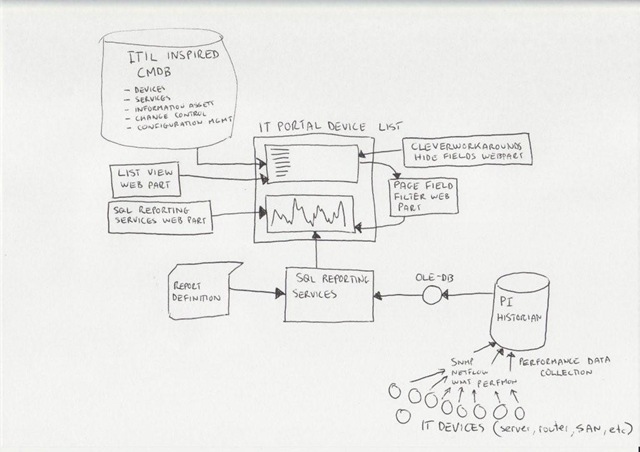
Just to remind you, here is my conceptual diagram in "acoustic Visio" format

The IT portal

This is the really ultra brief explanation of the thinking that went into my IT portal

I spent a lot of time thinking about how critical IT information could be stored in SharePoint to achieve the goals of quick and easy access to information, make tasks like change/configuration management more transparent and efficient, as well as capture knowledge and documentation. I was influenced considerably by ISO17799 as it was called back then, especially in the area of asset management. I liked the use of the term "IT Assets" in ISO17799 and the strong emphasis on ownership and custodianship.

ISO defined asset as "any tangible or intangible thing that has value to an organization". It maintained that "…to achieve and maintain appropriate protection of organizational assets. All assets should be accounted for and have a nominated owner. Owners should be identified for all assets and the responsibility for the maintenance of appropriate controls should be assigned. The implementation of specific controls may be delegated by the owner as appropriate but the owner remains responsible for the proper protection of the assets."

That idea of delegation is that an owner of an asset can delegate the day-to-day management of that asset to a custodian, but the owner still bears ultimate responsibility.

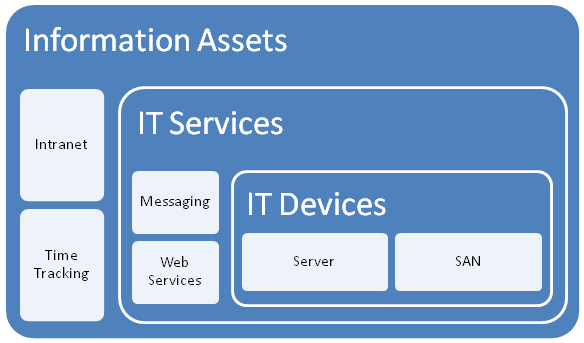
So I developed a portal around this idea, but soon was hit by some constraints due to the broad ISO definition of an asset. Since assets have interdependencies, geeks have a tendency to over-complicate things and product a messy web of interdependencies. After some trial and error, as well as some soul searching I was able to come up with a 3 tier model that worked.

I changed the use of the word "asset", and split it into three broad asset types.

  • Devices (eg Server, SAN, Switch, Router, etc)
  • IT Services (eg Messaging, Databases, IP Network, etc)
  • Information Assets (eg Intranet, Timesheets,
image

The main thing to note about this model is to explain the different between an IT Service and an Information Asset. The distinction is in the area of ownership. In the case of an "Information Asset", the ownership of that asset is not IT. IT are a service provider, and by definition the IT view of the world is different to the rest of the organisation. An "IT Service" on the other hand, is always owned by IT and it is the IT services that underpin information assets.

So there is a hierarchical relationship there. You can’t have an information asset without an IT service providing it. Accountabilities are clear also. IT own the service, but are not responsible for the information asset itself – that’s for other areas of the organisation. (an Information Asset can also depend on other information assets as well as many IT services.

While this may sound so obvious that its not worth writing, my experience is that IT department often view information assets and the services providing those assets as one and the same thing.

Devices and Services

So, as an IT department, we provide a variety of services to the organisation. We provide them with an IP network, potentially a voice over IP system, a database subsystem, a backup and recovery service, etc.

It is fairly obvious that each IT service consists of a combination of IT devices (and often other IT services). an IP network is an obvious one and a basic example. The devices that underpin the "IP Network" service are routers, switches and wireless access points.

For devices we need to store information like

  • Serial Number
  • Warranty Details
  • Physical Location
  • Vendor information
  • Passwords
  • Device Type
  • IP Address
  • Change/Configuration Management history
  • IT Services that depend on this device (there is usually more than 1)

For services, we need to store information like

  • Service Owner
  • Service Custodian
  • Service Level Agreement (uptime guarantees, etc)
  • Change/Configuration Management history
  • IT Devices that underpin this service (there is usually more than 1)
  • Dependency relationships with other IT services
  • Information Assets that depend on this IT service

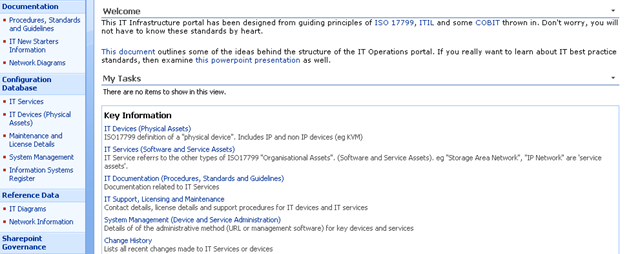
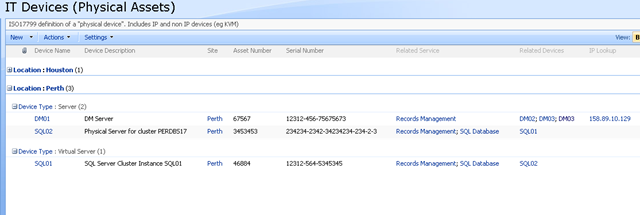
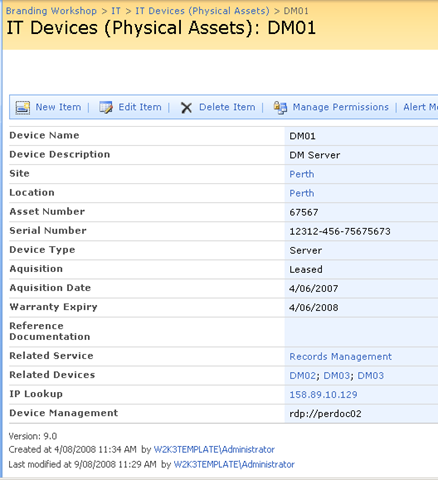
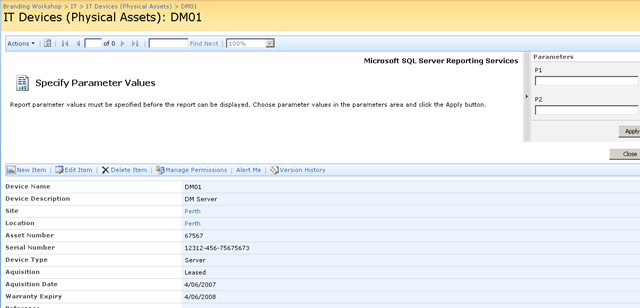
Keen eyed ITIL practitioners will realise that all I am describing here is a SharePoint based CMDB. I have a site template, content types, lists, event handlers and workflows that allow the above information to be managed in SharePoint. Below is three snippets showing sections of the portal, drilling down into the device view by location (click to expand), before showing the actual information about the server "DM01"

image image

image

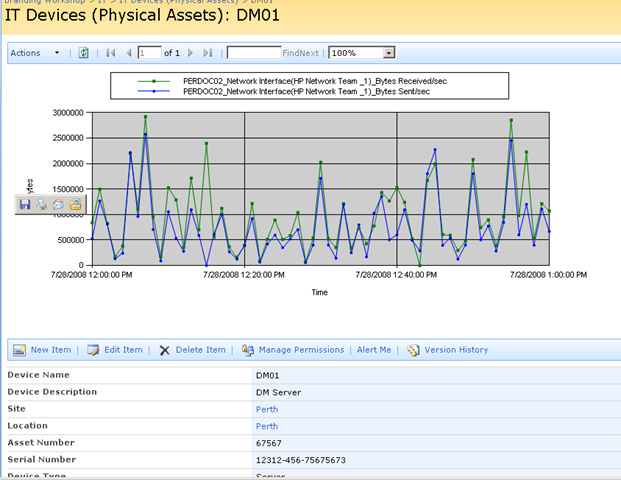
Now the above screen is the one that I am interested in. You may also notice that the page above is a system generated page, based on the list called "IT Devices". I want to add real-time performance data to this screen, so that as well as being able to see asset information about a device, I also want to see its recent performance.

Modifying a system page

I talked about making modifications to system pages in detail in part 3 of my branding using Javascript series. Essentially, a system page is an automatically generated ASPX page that SharePoint creates. Think about what happens each time you add a column to a list or library. The NewForm.aspx, Editform.Aspx and Dispform.aspx are modified as they have to be rebuild to display the new or modified column.

SharePoint makes it a little tricky to edit these pages on account of custom modifications running the risk of breaking things. But as I described in the branding series, using the ToolPaneView hack does the job for us in a safe manner.

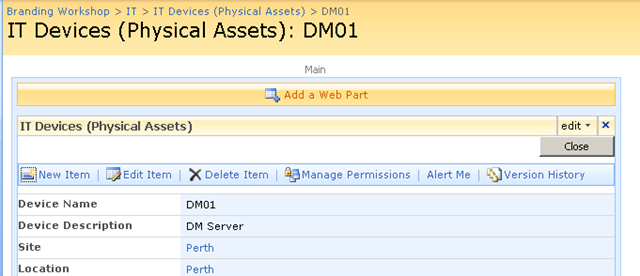
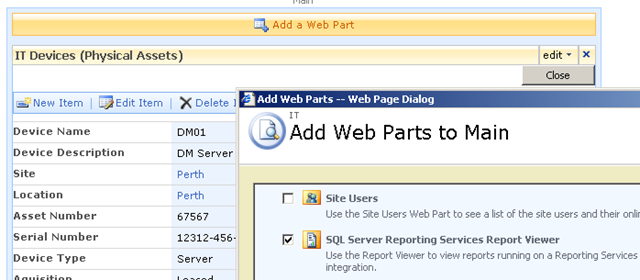
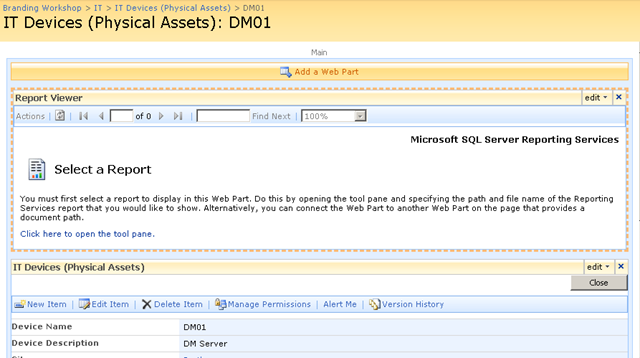
So using this hack, I was able to add a report viewer web part to the Dispform.aspx of the "IT devices" list as shown below.

image image

imageimage

Finally, we have our report viewer webpart, linked to our report that accesses PI historian data. As you can see below, the report that I created actually is expecting two parameters to be supplied. These parameters will be used to retrieve specific performance data and turn it into a chart.

image

Web Part Connection Magic

Now as it stands, the report is pretty much useless to us in the sense that we have to enter parameters to it manually, to get it to actually present us the information that we want. But on the same page as this report is a bunch of interesting information about a particular device, such as its name, IP Address, location and description. Wouldn’t it be great if we could somehow pass the device name (or some other device information) to the report web part automatically.

That way, each time you opened up a device entry, the report would retrieve performance information for the device currently being viewed. That would be very, very cool.

Fortunately for us it can be easily done. The report services web part, like many other web parts is connectable. This means that it can accept information from other web parts. This means that it is possible to have the parameters automatically passed to the report! 

Wohoo!

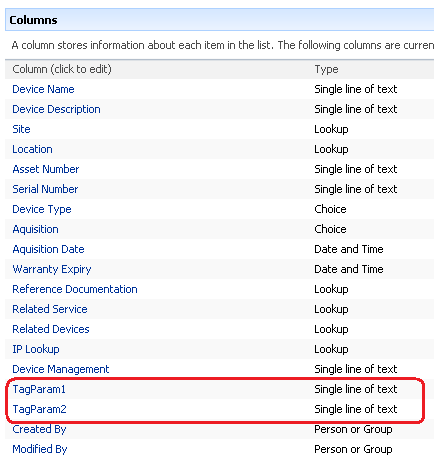
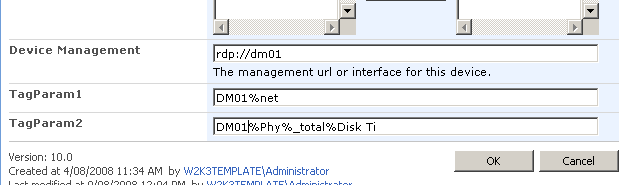
So here is how I am going to do this. I am going to add two new columns to my device list. Each column will be the parameter passed to the report. This way, I can tailor the report being generated on a device by device basis. For example, for a SAN device I might want to report on disk I/O, but a server I might want CPU. If I store the parameter as a column, the report will be able to retrieve whatever performance data I need.

Below shows the device list with the additional two columns added. the columns are called TAGPARAM1 and TAGPARAM2. The next screen below, shows the values I have entered for each column against the device DM01. These values will be passed to the report server report and used to find matching performance data.

image image

So the next question becomes, how do I now transparently pass these two parameters to the report? We now have the report and the parameters on the same page, but no obvious means to pass the value of TagParam1 and TagParam2 to the report viewer web part.

The answer my friends, is to use a filter web part!

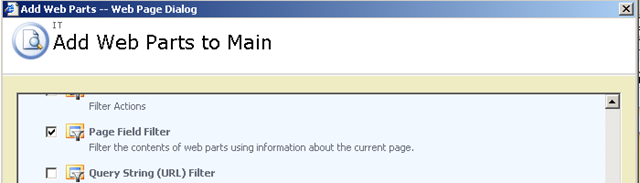
Using the toolpane view hack, we once again edit the view item page for the Device List. We now need to add two additional web parts (because we have two parameters). Below is the web part to add.

image

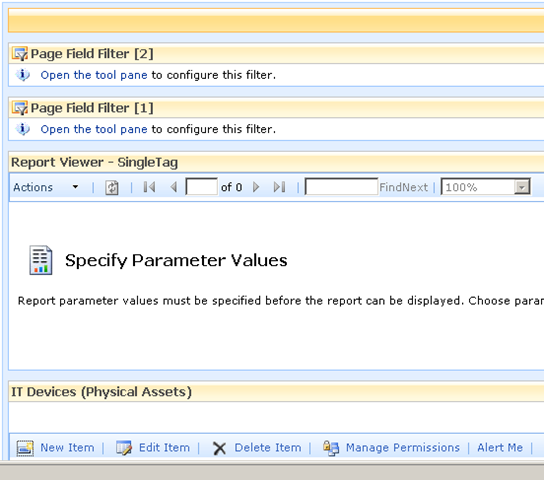
The result should be a screen looking like the figure below

image

Filter web parts are not visible when a page is rendered in the browser. They are instead used to pass data between other web parts. There are various filter web parts that work in different ways. The Page Field filter is capable of passing the value of any column to another web part.

Confused? Check out how I use this web part below…

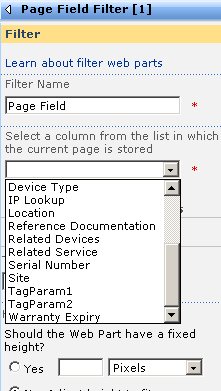
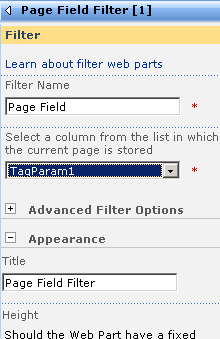
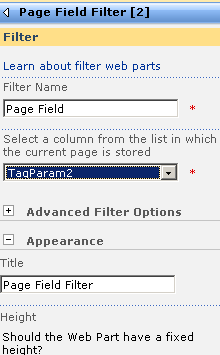
The screen above shows that the two Page Field filters web parts are not configured. They are prompting you to open the tool pane and configure them. Below is the configuration pane for the page field filter. Can you see how it has enumerated all of the columns for the "IT device" list? In the second and third screen we have chosen TagParam1 for the first page filter and TagParam2 for the second page filter web part.

image image image

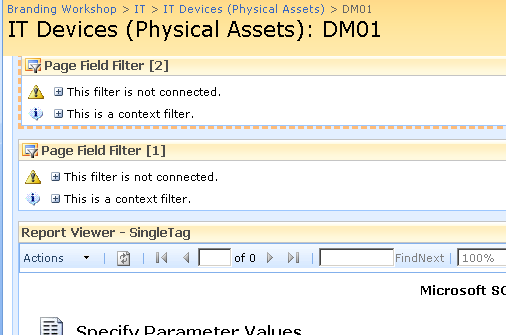
Now take a look at the page in edit mode. The page filters now change display to say that they are not connected. All we have done so far is tell the web parts which columns to grab the parameter values from

image

Almost Home – Connecting the filters

So now we need to connect each Page Field filter web part to the report viewer web part. This will have the effect of passing to the report viewer web part, the value of TagParam1 and TagParam2. Since these values change from device to device, the report will display unique data for each device.

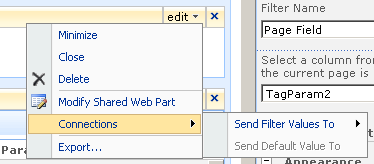
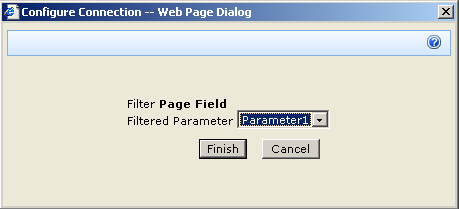
To to connect each page filter web part you click the edit dropdown for each page filter. From the list of choices, choose "Connections", and it will expand out to the choice of "Send Filter Values To". If you click on this, you will be promoted to send the filter values to the report viewer web part on the page. Since in my example, the report viewer web part requires two parameters, you will be asked to choose which of the two parameters to send the value to.

image image

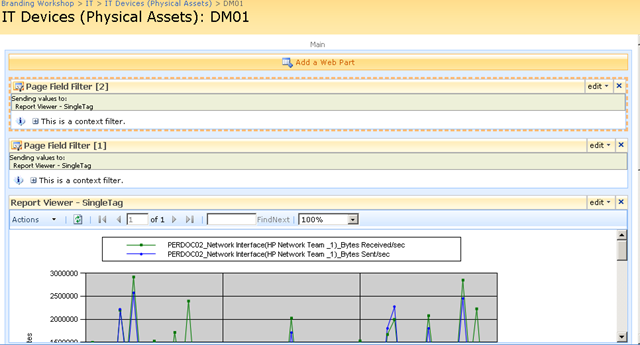
Repeat this step for both page filter web parts and something amazing happens, we see a performance report on the devices page!! The filter has passed the values of TagParam1 and tagParam2 to the report and it has retrieved the matching data!

image

Let’s now save this page and view it in all of its glory! Sweet eh!

image 

Conclusion (and Touchups)

So let’s step back and look at what we have achieved. We can visit our IT Operations portal, open the devices list and immediately view real-time performance statistics for that device. Since I am using a PI historian, the performance data could have been collected via SNMP, netflow, ping, WMI, Performance Monitor counters, a script or many, many methods. But we do not need to worry about that, we just ask PI for the data that we want and display it using reporting services.

Because the parameters are stored as additional metadata with each device, you have complete control over the data being presented back to SharePoint. You might decide that servers should always return CPU stats, but a storage area network return disk I/O stats. It is all controllable just by the values you enter into the columns being used as report parameters.

The only additional thing that I did was to use my CleverWorkArounds Hide Field Web Part, to subsequently hide the TagParam1 and TagParam2 fields from display, so that when IT staff are looking at the integrated asset and performance data, the ‘behind the scenes’ glue is hidden from them.

So looking at this from a IT portal/compliance point of view, we now have an integrated platform where we can:

  • View device asset information (serial number, purchase date, warranty, physical location)
  • View IT Service information (owners, custodians and SLA’s)
  • View Information Asset information (owners, custodians and SLA’s)
  • Understand the relationships between devices, services and information assets
  • Access standards, procedures and work instructions pertaining to devices, services and information assets
  • Manage change and configuration management for devices, services and information assets
  • Quickly and easily view detailed, real time performance statistics of devices

All in all, not a bad afternoons work really! And not one line of code!

As i said way back at the start of the first article, this started out as a quick idea for a demo and it seems to have a heck of a lot of potential. Of course, I used PI but there is no reason why you can’t use similar techniques in your own IT portals to integrate your operational and performance data into the one place.

I hope that you enjoyed this article and I look forward to feedback.

<Blatant Plug>Want an IT Portal built in passive compliance? Then let’s talk!</Blatant Plug>

cheers

Paul Culmsee


OSISoft addendum

Now someone at OSISoft at some point will read this article and wonder why I didn’t write about RTWebparts. Essentially PI has some web parts that can be used to display historian data in SharePoint. There were two reasons why I did not mention them.

  1. To use RTWebparts you have to install a lot of PI components onto your web front end servers. Nothing wrong with that, but with Report Services, those components only need to go onto the report server. For my circumstances and what I had to demonstrate, this was sufficient.
  2. This post was actually not about OSISoft or PI per se. It was used to demonstrate how it is possible to use SharePoint to integrate performance and operational information into one integrated location. In the event that you have PI in your enterprise and want to leverage it with SharePoint, I suggest you contact me about it because we do happen to be very good at it 🙂


"Ain’t it cool?" – Integrating SharePoint and real-time performance data – Part 1

Hi

This is one of those nerdy posts in the category of "look at me! look at me! look at what I did, isn’t it cool?". Normally application developers write posts like this, demonstrating some cool bit of code they are really proud of. Being only a part-time developer and more of a security/governance/compliance kind of guy, my "aint it cool" post is a little different.

So if you are a non developer and you are already tempted to skip this one, please reconsider. If you are a CIO, IT manager, Infrastructure manager or are simply into ITIL, COBiT or compliance around IT operations in general, this post may have something for you. It offers something for knowledge managers too. Additionally it gives you a teensy tiny glimpse into my own personal manifesto of how you can integrate different types of data to achieve the sort of IT operational excellence that is a step above where you may be now.

Additionally, if you are a Cisco nerd or an infrastructure person who has experience with monitoring, you will also find something potentially useful here.

In this post, I am going to show you how I leveraged three key technologies, along with a dash of best practice methodology to create an IT Portal that I think is cool.

The Premise – "Passive Compliance"

In my career I have filled various IT roles and drunk the kool-aid of most of the vendors, technologies, methodologies and practices. Nowadays I am a product of all of these influences, leaving me slightly bitter and twisted, somewhat of a security nerd, but at the same time fairly pragmatic and always mindful of working to business goals and strategy.

One or the major influences to my current view of the world, was a role working for OSI Software from 2000-2004, via a former subsidiary company called WiredCity. OSISoft develop products in the process control space, and their core product is a data historian called PI. At WiredCity, we took this product out of the process control market and right into the IT enterprise and OSISoft now market this product as "IT Monitor". I’ll talk about PI/IT monitor in detail in a moment, but humour me and just accept my word that it is a hellishly fast number crunching database for storing lots of juicy performance data.

An addition I like to read all the various best practice frameworks and methodologies and I write about them a fair bit. As a result of this interest, I have a SharePoint IT portal template that I have developed over the last couple of years, designed around the guiding principle of passive compliance. That is, by utilising the portal for IT various operational tasks, structured in a certain way, you implicitly address some COBiT/ISO27001 controls as well as leverage ITIL principles. I designed it in such a way that an auditor could take a look at it and it would demonstrate the assurance around IT controls for operational system support. It also had the added benefit of being a powerful addition to disaster recovery strategy. (In the second article, to be published soon, I will describe my IT portal in more detail).

Finally, I have SQL Reporting Services integrated with SharePoint, used to present enterprise data from various databases into the IT Portal – also as part of the principle of passive compliance via business intelligence.

Recently, I was called in to help conduct a demonstration of the aforementioned PI software, so I decided to add PI functionality to my existing "passive compliance" IT portal to integrate asset and control data (like change/configuration management) along with real-time performance data. All in all I was very pleased with the outcome as it was done in a day with pretty impressive effect. I was able to do this with minimal coding, utilising various features of all three of the above applications with a few other components and pretty much wrote no code at all.

Below I have built a conceptual diagram of the solution. Unfortunately I don’t have Visio installed, but I found a great freeware alternative 😉

Image0003

I know, there is a lot to take in here (click to enlarge), but if you look in the center of the diagram, you will see a mock up of a SharePoint display. All of the other components drawn around it combine to produce that display. I’ll now talk about the main combination, PI and SQL Reporting Services.

A slice of PI

Okay so let’s explain PI because I think most people have a handle on SharePoint :-).

To the right is the terminator looking at data from a PI historian showing power flow in California. So this product is not a lightweight at all. It’s heritage lies in this sort of critical industrial monitoring.

Just to get the disclaimers out of the way, I do not work for OSISoft anymore nor are they even aware of this post. Just so hard-core geeks don’t flame me and call me a weenie, let me just say that I love RRDTool and SmokePing and prefer Zabbix over Nagios. Does that make me cool enough to make comment on this topic now? 🙂  

Like RRDTool, PI is a data historian, designed and optimised for time-series data.

"Data historian? Is that like a database of some kind?", you may ask. The answer is yes, but its not a relational database like SQL Server or Oracle. Instead, it is a "real-time, time series" data store. The English translation of that definition, is that PI is extremely efficient at storing time based performance data.

"So what, you can store that in SQL Server, mySQL or Oracle", I hear you say. Yes you most certainly can. But PI was designed from the ground up for this kind of data, whereas relational databases are not. As a result, PI is blisteringly fast and efficient. Pulling say, 3 months of data that was collected at 15 second intervals would literally take seconds to do, with no loss of fidelity, even going back months.

As an example, let’s say you needed to monitor CPU usage of a critical server. PI could collect this data periodically, save it into the historian for later view/review/reporting or analysis. Getting data into the historian can be performed a number of ways. OSISoft have written ‘interfaces’ to allow collection of data from sources such as SNMP, WMI, TCP-Response, Windows Performance Monitor counters, Netflow and many others.

The main point is that once the data is inside the historian, it really doesn’t matter whether the data was collected via SNMP, Performance Monitor, a custom script, etc. All historian data can now be viewed, compared, analysed and reported via a variety of tools in a consistent fashion.

SQL Reporting Services

For those of you not aware, Reporting Services has been part of SQL Server since SQL 2000 and allows for fairly easy generation of reports out of SQL databases. More recently, Microsoft updated SQL Server 2005 with tight integration with SharePoint. Now when creating a report server report, it is "published" to SharePoint in a similar manner to the publishing of InfoPath forms.

Creating reports is performed via two ways, but I am only going to discuss the Visual Studio method. Using Visual Studio, you are able to design a tailored report, consisting of tables and charts. An example of a SQL Reporting Services Report in visual studio is below. (from MSDN)


The interesting thing about SQL Reporting services is that it can pull data from data sources other than SQL Server databases. Data sources include Oracle, Web Services, ODBC and OLE-DB. Depending on your data source, reports can be parameterised (did I just make up a new word? 🙂 ). This is particularly important to SharePoint as you will soon see. It essentially means that you can feed your report values that customise the output of that report. In doing so, reports can be written and published once, yet be flexible in the sort of data that is returned.

Below is a basic example:

Here is a basic SQL statement that retrieves three fields from a data table called "picomp2". Those fields are "Tag", "Time" and "Value". This example selects values only where "Time" is between 12-1pm on July 28th and where "tag" contains the string "MYSERVER"

SELECT    "tag", "time", "value"
FROM      picomp2
WHERE     (tag LIKE '%MYSERVER%') AND ("time" >= '7/28/2008 12:00:00 PM') AND ("time" <= '7/28/2008 1:00:00 PM')

Now what if we wanted to make the value for TAG flexible? So instead of "MYSERVER", use the string "DISK" or "PROCESSOR". Fortunately for most data sources, SQL Reporting Services allows you to pass parameters into the SQL. Thus, consider this modified version of the above SQL statement.

SELECT    "tag", "time", "value"
FROM      picomp2
WHERE     (tag LIKE '%' + ? + '%') AND ("time" >= '7/28/2008 12:00:00 PM') AND ("time" <= '7/28/2008 1:00:00 PM') 

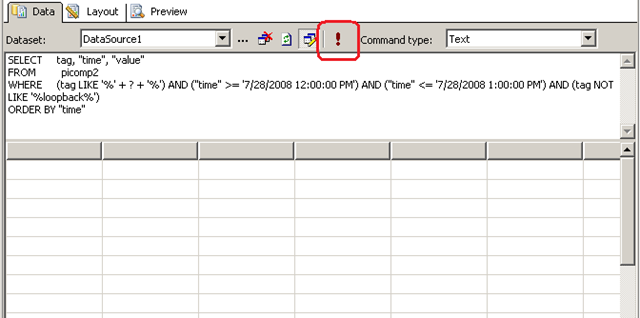
Look carefully at the WHERE clause in the above line. Instead of specifying %MYSERVER%, I have modified it to %?%. The question mark has special meaning. It means that you will be prompted to specify the string to be added to the SQL on the fly. Below I illustrate the sequence using three screenshots. The first screenshot shows the above SQL inside a visual studio report project. Clicking the exclamation mark will execute this SQL.

image

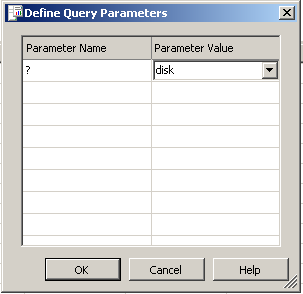
Immediately we get asked to fill out the parameter as shown below. (I have added the string "DISK")

image

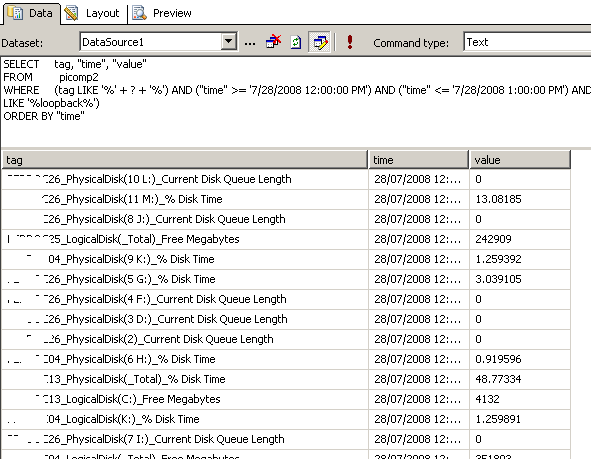
Clicking OK, and the SQL will now be executed against the datasource, with the matching results returned as shown below. Note the all data returned contains the word "disk" in the name. (I have scrubbed identifiable information to protect the innocent).

image

Reporting Services and SharePoint Integration

Now we get to the important bit. As mentioned earlier, SharePoint and SQL Reporting Services are now tightly integrated. I am not going to explain this integration in detail, but what I am going to show you is how a parameterised query like the example above is handled in SharePoint.

In short, if you want to display a Reporting Services report in SharePoint, you use a web part called the "SQL Server Reporting Services Report Viewer"

image

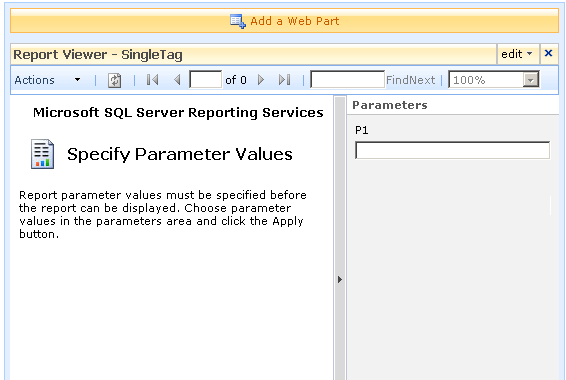
After dropping this webpart onto a SharePoint page, you pick the report to display, and if it happens to be a parameterised report, you see a screen that looks something like the following.

image

Notice anything interesting? The webpart recognises that the report requires a parameter and asks for you to enter it. As you will see in the second article, this is very useful indeed! But first let’s get reporting services talking to the PI historian.

Fun with OLEDB

So, I have described (albeit extremely briefly) enough information about PI and Reporting services. I mentioned earlier that PI is not a relational database, but a time series database. This didn’t stop OSISoft from writing an OLEDB provider 🙂

Thus it is possible to get SQL reporting services to query PI using SQL syntax. In fact the SQL example that I showed in the previous section was actually querying the PI historian.

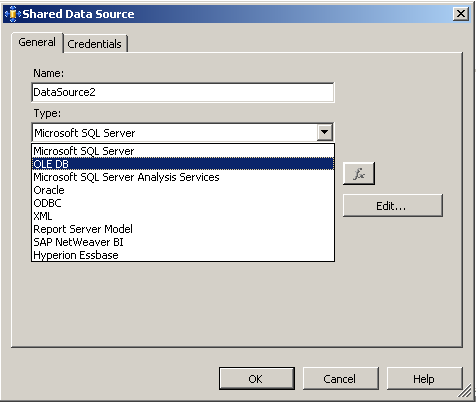
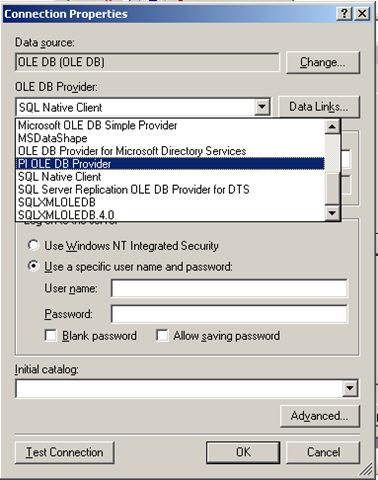
To get reporting services to be able to talk to PI, I need to create a report server Data Source as shown below. When selecting the data source type, I choose OLE DB from the list. The subsequent screen allows you to pick the specific OLEDB provider for PI from the list.

image image

Now I won’t go into the complete details of completing the configuration of the PI OLE DB provider, as my point here is to demonstrate the core principle of using OLE DB to allow SQL Reporting Services to query a non-relational data store.

Once the data source had been configured and tested (see the test button in the above screenshot), I was able to then create my SQL query and then design a report layout. Here is the sample SQL again.

SELECT    "tag", "time", "value"
FROM      picomp2
WHERE     (tag LIKE '%' + ? + '%') AND ("time" >= '7/28/2008 12:00:00 PM') AND ("time" <= '7/28/2008 1:00:00 PM') 

As I previously explained, this SQL statement contains a parameter, which is passed to the report when it is run, thereby providing the ability to generate a dynamic report.

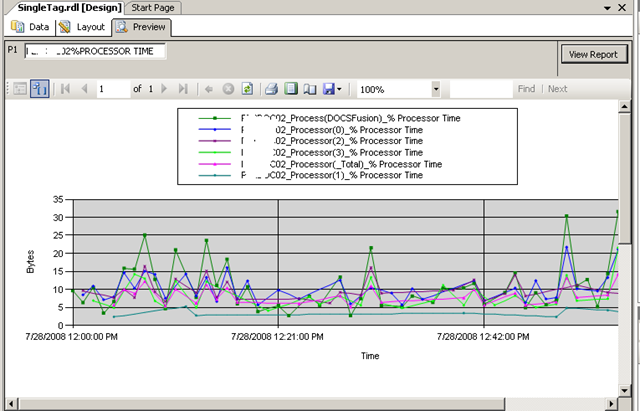
Using Visual Studio I created a new report and added a chart from the toolbox. Once again the purpose of this post is not to teach how to create a report layout, but below is a screenshot to illustrate the report layout being designed. You will see that I have previewed my design and it has displayed a textbox (top left) allowing the parameter to be entered for the report to be run. The report has pulled the relevant data from the PI historian and rendered it in a nice chart that I created.

image

Conclusion

Right! I think that’s about enough for now. To sum up this first post, we talked a little about my IT portal and the principle of "passive compliance". We examined OSISoft’s PI software and how it can be used to monitor your enterprise infrastructure. We then took a dive into SQL Reporting services and I illustrated how we can access PI historian data via OLE DB.

In the second and final post, I will introduce my IT Portal template in a brief overview, and will then demonstrate how I was able to integrate PI data into my IT portal to combine IT asset data with real-time performance metrics with no code 🙂

I hope that you found this post useful. Look out for the second half soon where this will all come together nicely

cheers

Paul


Good advice hidden in the Infrastructure Update

I guess the entire SharePoint world now is aware of the post SP1 "Infrastructure updates" put out by Microsoft recently. Probably the best thing about them are that the flaky "content deployment" feature has had some serious work done on it. (My advice has always been use with extreme caution or avoid it, but now I will have to reassess).

Anyway, that is not what I am writing about. Being a former IT Security consultant, I have always installed SharePoint in a "least privilege" configuration. I use different service accounts for search, farm, SSP, reporting services and web applications. The farm account in particular, is one that needs to be very carefully managed given its control over the heart of SharePoint – the configuration database.

Specifically, the farm account never should have any significant rights on any SharePoint farm server, over and above what it minimally needs (which is some SQL Server rights and some DCOM permission stuff). For what it’s worth, I do not use the Network Service account either, as it is actually more risky than a low privileged domain or local user account.

Developers on the other hand tend to run their boxes as full admin. I have no problem with this, so long as there is a QA or test server that is running least privilege.

However, as always with tightening the screws, there are some potential side effects in doing this. There are occasions when the farm account actually needs to perform a task that requires higher privileges, over and above what it has by default. Upgrading SharePoint from a standard to enterprise license is one such example, and it seems that performing the infrastructure update may be another.

If you take the time to read the installation instructions for the infrastructure update, there is this gem of advice:

To ensure that you have the correct permissions to install the software update and run the SharePoint Products and Technologies Configuration Wizard, we recommend that you add the account for the SharePoint Central Administration v3 application pool identity to the Administrators group on each of the local Web servers and application servers and then log on by using that account

You may wonder why this even matters? After all, it is exceedingly likely that you logged into the server as an administrator or domain administrator anyway. Surely you have all the permission that you need, right?

The answer is that not all update tasks are run by your logged-in account. Although you start the installation using your account, at a certain point during the install, many tasks are performed by the SharePoint Central Administration application. Thus, despite you having administrative permissions, SharePoint (using the farm account) will not have.

So the advice above essentially says, temporarily add the SharePoint farm account to the local administrators group and then log into the server as that user account. Now perform the action as instructed. That way the account that starts the installation is the same account that runs SharePoint and thus we know that we are using the correct account with the correct server privileges.

Once the installation has been completed, you can log out of the farm account and then revoke its administrator access, and we are back to the original locked down configuration.

So keep this in mind when performing farm tasks that are likely to require some privileges at the operating system level. It is a good habit to get into (provided you remember to lock down permissions afterwards 🙂 ).

Cheers

Paul


Lots of writing (just not here)

Hi all

My poor-old cleverworkarounds blog has been sadly neglected lately (and my numbers are reflecting that too dammit). But I have actually been doing a while lot of writing for other SharePoint online publications, namely EndUserSharePoint and SharePoint Magazine.

The feedback from both has been great and much appreciated. If you haven’t read these articles, then here is your quick reference.

Series 1: Rethinking SharePoint

This is a 4 part series that was a serious attempt to delve into SharePoint headspace. I focused very much on the human/social side of SharePoint projects. I was pretty pleased with how it came out and look forward to the final part being published soon.

Series 2: A tribute to the leave form

This series is an offbeat look at the world of InfoPath Forms Services and SharePoint Designer workflow. Although I am having a bit of fun with this, there is a serious message behind it. While forms services looks terrific in demos, sometimes looks can be deceiving! The trick with this series is that they are also written to cater for a large audience, and that will be quite a challenge when we get into web services and code behind in InfoPath.

I’ve written 4 articles so far and I’d say there could easily be a dozen by the time I am done. The feedback has been really good, so here’s hoping I can deliver the rest!

  • A tribute to the humble “leave form” – Part 1
  • A tribute to the humble “leave form” – Part 2 *not yet released*
  • A tribute to the humble “leave form” – Part 3 *not yet released*
  • A tribute to the humble “leave form” – Part 4 *not yet released*
  • .
  • .
  • A tribute to the humble “leave form” – Part n *not yet written* 🙂

I have a large list of topics to also get well and truly stuck into, so hopefully I’ll have some quality stuff for you fairly soon.

Stay tuned

Paul Culmsee


Office Server Search memory leak and stuck on "crawling"

Tags: SQL Server,Troubleshooting @ 11:18 pm

It is the typical scenario isn’t it. Site works fine for a week and then is officially launched on a Monday morning and the site breaks after an hour complaining that it cannot connect to the configuration database. Whoa?

The SQL Server was checked and confirmed to be running fine, and in checking the SharePoint web front end server I I noticed was MSSEARCH.EXE was chewing memory at a rapid rate of knots. Checking the event logs showed up a steady sequence of event ID 7888, 10036 and 3355 messages. Later I noticed that the search crawl was stuck on "Crawling".

If you search on this topic, many people recommend recreating your Shared Service Provider. In this case, this is unnecessary (not to mention drastic).

It turned out to be an unfortunate combination of factors.

  • The client was using SQL Server 2005 with SP1
  • The client had a SQL Server maintenance plan with a "rebuild index" task.

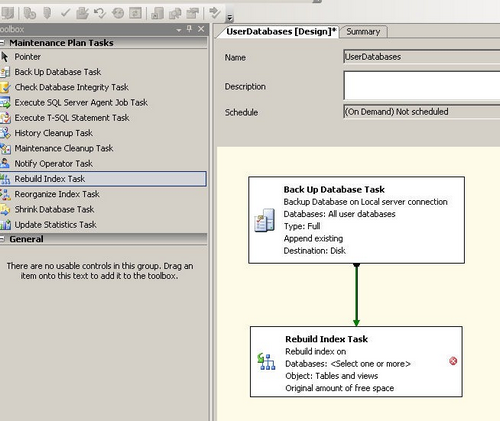
imageNon SQL reader? Maintenance plans are a "good thing". Think of it as a fitness regime for your SQL Server. You can regularly perform integrity checks, tasks to optimise performance, run backups and the like. A screenshot of a basic SQL2005 maintenance plan is to the right.

As it turns out, my client ran a maintenance plan each Sunday (hence why this broke on the Monday of go-live). It also turns out that the "rebuild index" maintenance plan task in SQL Server prior to SP2 has a teeny weenie problem. (By "rebuilding" an index, we mean that it is in effect, deleting and recreating it again).

When rebuilt, various options set on the indexes are not recreated the same way as they were originally created. As you may have guessed, this is extremely uncool, since SharePoint set various indexes in a certain way, it expects things to remain consistent.

There is a KB that you can read all about it here.

http://support.microsoft.com/kb/930887/en-us

Also, another great blog post about the issue is here:

http://blogs.vertigo.com/personal/michael/Blog/Lists/Posts/Post.aspx?ID=4

Some of effects of this dodgily recreated index are listed in the KB article, including:

  1. In Shared Services, the "indexing status" remains stuck in the "Crawling" state
  2. The number of handles that are opened by the MSSearch.exe process increases
  3. The number of TCP connections to the computer that is running SQL Server increases
  4. Several error are recorded in the SharePoint logfiles.
  • "SqlCrawl::ExecuteCommand fails Error 0x80040e2f"
  • CGathererQueueManager::FlushQueue failed with recoverable error 0x80040e2f
  • CGathererFilterSink::CommitLinks : pGatherAddLink->AddLinkComplete error=0x80040e2f

Additionally, in my case, MSSEARCH.EXE leaked memory very rapidly when viewed in Task Manager and I received the event logs as shown at the end of this post.

To resolve it, follow the instructions at Michael’s blog as the KB article is poorly written, but make sure that you do it for all tables as listed in the KB article! Michael’s post only covers 2 indexes and there actually are more in the search database as shown below.

Table Index
MSSAlertDocHistory IX_AlertDocHistory
MSSAnchorChangeLog IX_MSSAnchorChangeLog
MSSAnchorPendingChangeLog IX_MSSAnchorPendingChangeLog
MSSCrawlChangedSourceDocs IX_MSSCrawlChangedSourceDocs
MSSCrawlChangedTargetDocs IX_MSSCrawlChangedTargetDocs
MSSCrawledPropSamples IX_MSSCrawledPropSamplesByDocid
MSSCrawlErrorList IX_MSSCrawlErrorList_hrResult
MSSCrawlHostList IX_MSSCrawlHostList_Name
MSSCrawlQueue IX_MSSCrawlQueue
MSSDocSdids IX_MSSDocSdids

Hope this helps someone

Paul

Error log entries below for the google crawler. You can stop reading now! 🙂

  • Event Type:      Error
  • Event Source:   Office SharePoint Server
  • Event Category:            Office Server General
  • Event ID:          7888
  • Date:                1/07/2008
  • Time:                12:03:03 PM
  • User:                N/A
  • Computer:         MyServer

Description:

Message: A connection was successfully established with the server, but then an error occurred during the pre-login handshake.  When connecting to SQL Server 2005, this failure may be caused by the fact that under the default settings SQL Server does not allow remote connections. (provider: Named Pipes Provider, error: 0 – No process is on the other end of the pipe.)


  • Event Type:      Error
  • Event Source:   Office Server Search
  • Event Category:            Gatherer
  • Event ID:          10036
  • Date:                1/07/2008
  • Time:                12:03:38 PM
  • User:                N/A
  • Computer:         MyServer

Description:

A database error occurred.

Source: Microsoft OLE DB Provider for SQL Server

Code: 17 occurred 1 time(s)

Description: [DBNETLIB][ConnectionOpen (Connect()).]SQL Server does not exist or access denied.


  • Event Type:      Error
  • Event Source:   Windows SharePoint Services 3
  • Event Category:            Database
  • Event ID:          3355
  • Date:                1/07/2008
  • Time:                12:04:08 PM
  • User:                N/A
  • Computer:         MyServer

Description:

Cannot connect to SQL Server. MyServer not found. Additional error information from SQL Server is included below.

[DBNETLIB][ConnectionOpen (Connect()).]SQL Server does not exist or access denied.

  • Event Type:      Error
  • Event Source:   Office SharePoint Server
  • Event Category:            Office Server Shared Services
  • Event ID:          6482
  • Date:                1/07/2008
  • Time:                12:05:12 PM
  • User:                N/A
  • Computer:         MyServer

Description:

Application Server Administration job failed for service instance Microsoft.Office.Server.Search.Administration.SearchServiceInstance (009e9001-5c8f-4705-9b4d-ee514c442fc7).

Reason: Exception from HRESULT: 0x80040D1B

Techinal Support Details:

System.Runtime.InteropServices.COMException (0x80040D1B): Exception from HRESULT: 0x80040D1B

   at Microsoft.Office.Server.Search.Administration.SearchServiceInstance.SynchronizeDefaultContentSource(IDictionary applications)

   at Microsoft.Office.Server.Search.Administration.SearchServiceInstance.Synchronize()

   at Microsoft.Office.Server.Administration.ApplicationServerJob.ProvisionLocalSharedServiceInstances(Boolean isAdministrationServiceJob)

For more information, see Help and Support Center at http://go.microsoft.com/fwlink/events.asp.

07/01/2008 12:25:01.85 mssearch.exe (0x0E20)                          0x0E38 Search Server Common             GathererSql                               0          Monitorable       CSqlCrawl::ExecuteCommand fails Error 0x80040e2f – File:d:\office\source\search\search\gather\server\gathersql.cxx Line:407 


Globalisation, Strategy, Technology and Organisational Maturity

This post is going a little off-track from the previous 5 posts around SharePoint project failure and I promise I will get back on track again soon. I felt that I had to talk about this topic while we are looking at the nature of project failure, wicked problems and SharePoint. Not sure if it is really a part 6 so I have made a new, separate interlude in between the project failure series. Why don’t you let me know, reader, if you think this belongs as a part of the “project failure” series!

My wife is studying a business course at university and I have been reading some of her reference books. One book was particularly good and really got me thinking about technology’s contribution to global organisations and how at this scale, most problems likely have a large degree of wickedness.

This edited book is called Global Strategies: Insights from the World’s Leading Thinkers (The Harvard Business Review Book Series), and it is well worth reading – even for you technical geeks.

What it does is look at the strategy, and execution of strategy, that has led some organisations to make the transition from regional to global success story at the expense of their competitors. We are talking corporations with tens of thousands of employees here too, and the CEO perspective really hits home to you – the sheer *mammoth scale* of it all.

Trying to change a culture at an organisation of 20 employees can be an insurmountable challenge. Try 45,000 employees across 15 subsidiaries in 10 different countries. (Makes a SharePoint rollout seem like a walk in the park.)

Continue reading “Globalisation, Strategy, Technology and Organisational Maturity”


« Previous PageNext Page »

Today is: Wednesday 3 June 2026 -