Back to Cleverworkarounds mainpage
 

The cloud isn’t the problem–Part 2: When complex technology meets process…

Hi all

Welcome to my second post that delves into the irrational world of cloud computing. In the first post, I described my first foray into the world of web hosting, which started way back in 2000. Back then I was more naive than I am now (although when it comes to predicting the future I am as naive as anybody else.) I concluded Part 1 by asserting that cloud computing is an adaptive change. We are going to explore the effects of this and the challenges it poses in the next few posts.

Adaptive change occurs in a number of areas, including the companies providing a cloud application – especially if on-premise has been the basis of their existence previously. To that end, I’d like to tell you an Office 365 fail story and then see what lessons we can draw from it.

Office 365 and Software as a Service…

For those who have ignored the hype, Office 365 known in cloud speak as “Software as a Service” (SaaS). Basically one gets SharePoint, Exchange mail, web versions of Office Applications and Lync all bundled up together. In Office 365, SharePoint is not run on-premise at all, and instead it is all run from Microsoft servers in a subscription arrangement. Once a month you pay Microsoft for the number of users using the service and the world is a happy place.

Office 365, like many SaaS models, keeps much of the complexity of managing SharePoint in the hands of Microsoft. A few years back, Office 365 would have been described in hosting terms as a managed service. Like all managed services, one sacrifices a certain level of control by outsourcing the accompanying complexity. You do not manage or control the underlying cloud infrastructure including network, servers, operating systems, SharePoint farm settings or storage. Furthermore, limited custom code will run on Office 365, because developers do not have back-end access. Only sandbox solutions are available, and even then, there are some additional limitations when compared to on-premise sandbox solutions. You have limited control of SharePoint service applications too, so the best way to think about Office 365 is that your administrative control extends to the site collection level (this is not actually true but suffices for this series.)

One key reason why its hard to get feature parity between on-premise and SaaS equivalents is because many SaaS architectures are based around the concept of multitenancy. If you have heard this word bandied about in SharePoint land is because it is something that is supported in SharePoint 2010. But the concept extends to the majority of SaaS providers. To understand it, imagine an swanky office building in the up-market part of town. It has a bunch of companies that rent out office space and are therefore tenants. No tenant can afford an entire building, so they all lease office space from the building and enjoy certain economies of scale like a great location, good parking, security and so on. This does have a trade-off though. The tenants have to abide by certain restrictions. An individual tenant can’t just go and paint the building green because it matches their branding. Since the building is a shared resource, it is unlikely the other tenants would approve.

Multi tenancy allows the SaaS vendor to support multiple customers with a single platform. The advantages of this model is economies of scale, but the trade-off is the aforementioned customisation flexibility. SaaS vendors will talk up this by telling you that SaaS applications can be updated more frequently than on-premise software, since there is less customisation complexity from each individual customer. While that’s true, it nevertheless means a loss of control or choice in areas like data security, integration with on-premise systems, latency and flexibility of the application to accommodate change as an organisation grows.

A small example of the restricting effect of multi-tenancy is when you upload a PDF into a SharePoint document library in Office 365. You cannot open the PDF in the browser and instead you are prompted to save it locally. This is because of a well-known issue with a security feature that was added to IE8. In the on-premise SharePoint world, you can modify the behaviour by changing the “Browser File Handling” option in the settings of the affected Web Application. But with Office 365, you have to live with it (or use a less than elegant workaround) because you do not have any access at a web application level to change the behaviour. Changing it will affect any tenants serviced by that web application.

Minor annoyances aside, if you are a small organisation or you need to mobilise quickly on a project with a geographically dispersed team, Office 365 is a very sweet offering. It is powerful and integrated, and while not fully featured compared to on-premise SharePoint, it is nonetheless impressive. One can move very quickly and be ready to go with within one or two business days – that is, if you don’t make a typo…

How a typo caused the world to cave in…

A while back, I was part of a geographically dispersed, multi-organisation team that needed a collaborative portal for around a year. Given the project team was distributed across varying organisations, various parts of Australia, the fact that one of the key stakeholders had suggested SharePoint, and the fact that Office 365 behaved much better than Google apps behind overly paranoid proxy servers of participating organisations, Office 365 seemed ideal and we resolved to use it. I signed up to a Microsoft Office 365 E3 service.

Now when I say sign up, Microsoft uses Telstra in Australia as their Office 365 partner, so I was directed to Telstra’s sign up site. My first hint of trouble to come was when I was asked to re-enter my email address in the signup field. Through some JavaScript wizard no doubt, I was unable to copy/paste my email address into the confirmation field. They actually made me re-type it. “Hmm” I thought, “they must really be interested in data validation. At least it reduces the chance that people do not copy/paste the wrong information into a critical field.” I also noted that there was also some nice JavaScript that suggested the strength of the password chosen as it was typed.

But that’s where the fun ended. Soon after entering the necessary detail, and obligatory payment details, I am asked to enter a mysterious thing listed only as an Organization Level Attribute and more specifically, “Microsoft Online Services Company Identifier.” Checking the question mark icon tells me that it is “used to create your Microsoft Online Services account identity.”
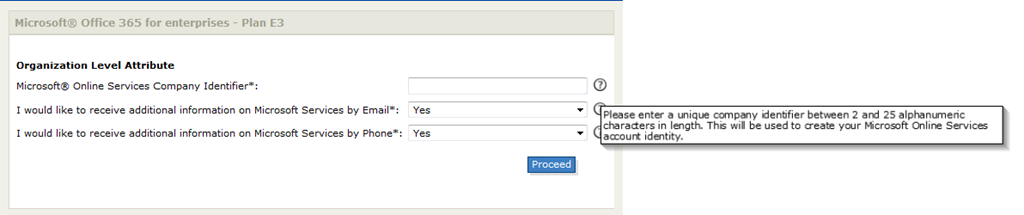
image

I wondered if this was the domain name for the site, as there was no descriptive indicator as to the significance of this code. For all I knew, it could be a Microsoft admin code or accounting code. Nevertheless I assumed it was the domain name because I just had a feeling it was. So I entered my online identity and away I went. I got a friendly email message to say things were in motion and I waited my obligatory hour or so for things to provision.

The inbox sound chimes and I received two emails. One told me I now have a “Telstra t-Suite account” and the other is entitled “Registration confirmation from Microsoft online.” I was thanked for purchasing and the email stated that “the services are managed via Microsoft Online Portal (MOP), a separate portal to the Telstra T-Suite Management Console.” I had no idea what the Telstra T-Suite Management Console was at this point, but I was invited to log into the Microsoft Online Portal with a supplied username and password.

At this point I swore…I could see by my username, that I made a typo in the Microsoft Online Services Company Identifier. Username: admin@SampleProjject.onmicrosoft.com – which means I typed in “SampleProjject” instead of “SampleProject” (Aargh!)

The saga begins…

Swearing at my dyslexic typing, I logged a support call to Telstra in the faint hope that I can change this before it’s too late… Below is the anonymised mail I sent:

“Hiya

In relation to the order below I accidentally set SampleProjject as the identifier when it should be SampleProject. Can this be rectified before things are commissioned?

Thanks

Paul”

Another hour passed by and my inbox chimed again with a completely unsurprising reply to my query.

“Hi Paul , sorry but company identifier can not be changed because it is used to identify the account in Office 365 database.”

Cursing once again at my own lack of checking, I cannot help but shake my head in that while I was forced to type in my email address twice (and with cut and paste disabled) when I signed up to Office 365, I was given no opportunity to verify the Microsoft Online Services Company Identifier (henceforth known as MOSI) before giving the final go-ahead. Surely this identifier is just as important as the email address? Therefore, why not ask for it to be entered twice or visually make it clear what the purpose of this identifier is? Then dumb users like me would get a second chance before opening the hellgate, unleashing forces that can never be contained.

At the end of the day though, the fault was mine so while I think Telstra could do better with their validation and conveying the significance of the MOSI, I caused the issue.

Forces are unleashed…

So I log into Telstra’s t-suite system and try and locate my helpdesk call entry. The t-suite site, although not SharePoint, has a bit of a web part feel about it – only like when you have fixed the height of a web part far too small. It turned out that their site doesn’t handle IE9 well. If you look closely the “my helpdesk cases” and “my service access” are collapsed to the point that I can’t actually see anything. So I tried Chrome and was able to operate the portal like a normal person would. My teeth gnashed once more…
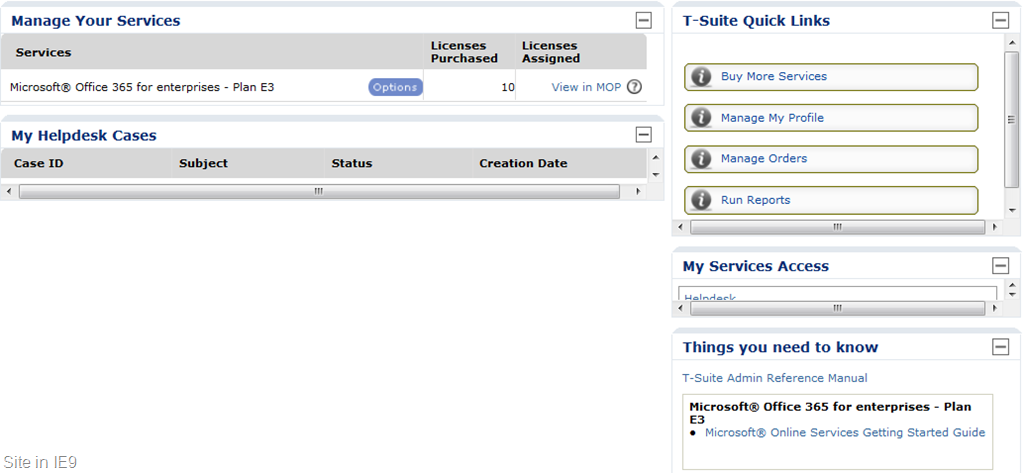
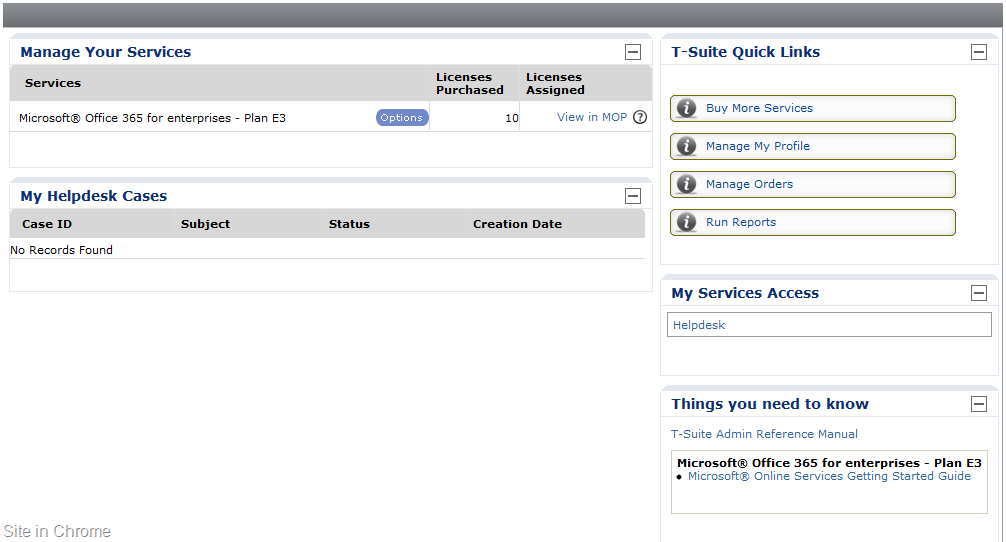
image  image

Finally, being able to take an action, I open my support request and ask the following:

*** NOTES created by Paul Culmsee
Can I cancel this account and re provision? A typo was made when the MOSI was entered.  The domain name is incorrect for the site.

A few emails went back and forth and I received a confirmation that the account is cancelled. I then return to the Office 365 site and re-apply for an E3 service. This time I triple checked my spelling of the MOSI and clicked “proceed.” I received an email that thanked me for my application and that I should receive a provisioning notification within an hour or so.

So I wait…

and wait…

and wait…

and wait…

24 hours went by and I received no notification of the E3 service being provisioned. I log into Telstra’s t-suite and log a new call, asking when things will be provisioned. Here is what I asked…

Hi there, I have had no notification of this being provisioned from Microsoft. Surely this should be done by now?

In typical level 1 helpdesk fashion, the guy on the other end did not actually read what I wrote. He clearly missed the word “no”

Hi Paul,

that’s affirmative. Your T-Suite order has been provisioned. As per the instructions in the welcome email you can follow the links to log in to portal.

Contact me on 1800TSUITE Option 2.3 to discuss it further. I’ll keep this case open for a week.

*sigh* – this sort of bad level 1 email support actually does a lot of damage to the reputation of the organisation so I mail back…

But I received no welcome email from Microsoft with the online password details… I have no means to log into the portal

This inane exchange costs me half a day, so I took Telstra’s friendly advice and contacted them “on 1800TSUITE Option 2.3 to discuss it further.” I got a pretty good tech who realised there indeed was a problem. He told me he would look into it and I thanked him for his time. Sometime later he called back and advised me that something was messed up in the provisioning process and that the easiest thing to do, was for him to delete my most recent E3 application, and for me to sign up from scratch using a totally different email address and a totally new MOSI. Somehow, either Telstra’s or Microsoft’s systems had associated my email address and MOSI with the original, failed attempt to sign up (the one with the typo), and it was causing the provisioning process to have an exception somewhere along the line.

In hearing this, I can imagine some giant PowerShell provisioning script with dodgy exception handling getting halfway through and then dying on them. So I was happy to follow the tech’s advice went through the entire Office 365 sign up process from the very beginning again (this is the third time). This time I used a fresh email address and quadruple checked all of the fields before I provisioned. Eureka! This time things worked as planned. I received all the right confirmation emails and I was able to sign into the Microsoft online portal. From there I created user accounts, provisioned a SharePoint site collection and we were ready to rock and roll. Although the entire saga ended up taking 5 business days from start to finish, I have my portal and the project team got down to business.

Now for what it’s worth, it should be noted that if you are an integrator or are in the business of managing multiple Office 365 services, Telstra requires a different email address to be used for each Office 365 service you purchase. One cannot have an alias like provision@myoffice365supportprovider as the general account used to provision multiple E1-E4 services. Each needs its own t-suite account with a different email address.

Plunged into darkness…

Things hummed along for a couple of months with no hiccups. We received an invoice for the service by email, and then a couple of days later, received a mail to confirm that in fact the invoice has been automatically paid via credit card. For our purposes, Office 365 was a really terrific solution and the project team really liked it and were getting a lot of value out off it.

I then had to travel overseas and while I was gone, suddenly the project team were unable to login to the portal. They would receive a “subscription expired” message when attempting to login. Now this was pretty serious as a project team was coming to an important deadline and now no-one could log in.  We checked the VISA records and it seemed that the latest invoice had not been deducted from the account as there was still a balance owing. Since I was in overseas, one of my colleagues immediately called up Telstra support (it was now after hours in Perth) and was stuck in a queue for an hour and then ended up speaking to two support people. After all of the fuss with the provisioning issues around the MOSI and my typo, it seemed that Telstra support didn’t actually know what a MOSI was in any event. This is what my colleague said:

I was asked for an account number straight away both times, and I explained that I didn’t have one, but I did have the invoice number in question, and that this was a Microsoft Office 365 subscription. They were still unable to locate the account or invoice. I then gave them the MOSI, thinking this would help. Unfortunately, they both had no idea what I was talking about! I explained that users were unable to login to the site with a ‘subscription expired’ error message. I also explained the fact that the VISA had not been processed for this period (although it was fine in the last period).

Both support staff could not access the Office 365 subscription information (even after I gave them our company name). Because I called after hours, t-suite department was not available. The two staff I talked to could not access the account, so could not pull up any of the relevant details. It turns out that after business hours, Telstra redirect t-suite support to the mobile and phones department. The first support person passed me onto technical but the transfer was rerouted to the original call menu – so I went through the whole thing again, press x for this, press x for that, etc. The second time round, I explained it all over again. The tech assured me that it couldn’t be a billing issue and that Telstra generally would not suspend an account because of a few days late payment. If that was the case, prior to suspension, Telstra would send out an email to notify customers of overdue payment. I told him that no such email had been sent. He then said that it would most likely be a technical problem and would have to be dealt with the next day as the T-suite department would not be available til next morning between office hours 9-5pm EST.

I hung up frustrated, no closer to solving the problem after two hours on the phone.

My colleague then got up early and called Telstra at 6am the next day (9am EST is 3 hours ahead of Perth time). She explained the situation again to Telstra t-suite support person all over again. Here again is the words of my colleague:

The first person who took my call (who I will call “girl one”) couldn’t give me an answer and said she’d get someone to call back, and in the meantime she’d check with another department for me. She put me on hold and during this time the call was re-routed back to the original menu when you first call. I thought that instead of waiting for a call that I may not receive soon as this was an emergency, I went through the menu again. This time I got “girl two” and explained the whole thing *again*. I got her to double check that the E3 subscription was set to automatically deduct from the VISA supplied – yes, it was. She noticed that it said 0 licenses available. She told me that she was not sure what that was all about, so would log a call with Microsoft. Girl two advised me that it could take any time between an hour to a few days for a response from Microsoft.

I then got a call from Telstra (girl three) on the cell-phone just after I finished with girl two. This was the person who girl one promised would call back. I told her what I’d gone through with all support staff so far, and that “girl two” was going to log a call with Microsoft. Girl three, like girl two, noticed the 0 licenses available. She wasn’t sure that it was because there were none to begin with or that there were no more available. I stated that the site had been working fine till yesterday. I explained that no one could access the site and that they all got the same message. Same as girl two, girl three advised that she would also log a call with Microsoft. Again, I was told that it could take up to several days before I could get a reply.

Half an hour later, we received an email from Telstra t-suite support. It stated the following:

Case Number: xxxxxxxx-xxxxxxx

Case Subject: subscription has expired for all users

I checked your account info and invoices. The invoice xxxxx paid for 01 Oct to 01 Nov was for company ID SampleProjject not SampleProject. Please call billing department to change it for you.

With this email, we now knew that the core problem here was related to billing in some way. As far as we had been told, Telstra had deleted the original two failed Office 365 subscriptions, but apparently not from their billing systems. The bill was paid against a phantom E3 service – the deleted one called “SampleProjject”. Accordingly the live service had expired and users were locked out of the system.

As instructed in the above email, my colleague called up t-suite billing (there was a phone number on the invoice). In her words:

Once again, the support person asked for the account number to which I said I didn’t have one. I offered him the invoice number and the MOSI, thinking someone’s got to know what it was since it was ‘used to identify the account in Office 365 database.’ He stated he could not ‘pull up an account with the MOSI’ and said something to the effect that he didn’t know what the MOSI ‘was all about’. He asked what company registered the service and I gave him our details. He immediately saw several ‘accounts’ in the billing system related to our company. He noted that the production E3 was a trial subscription and the trial had now expired and he surmised that the problem was most likely due to that fact. I queried why this was the case when the payment subscription was set to automatically deduct from the supplied visa account. He told me that as going from trial to production was a sales thing, I would have to speak to t-suite sales department. He also added that we were lucky because there was a risk that the mistakenly expired E3 service could have been deleted from Office 365.

I called up sales and finally, they were able to correct the problem.

So after a long, stressful and chaotic evening and morning, Armageddon was averted and the portal users were able to log in again.

Reflections…

This whole story started from something seemingly innocuous – a typo that I made on a poorly described text box (MOSI). From it, came a chain of events that could have resulted in a production E3 service being mistakenly deleted. There were multiple failures at various levels (including my bad typing that set this whole thing off). Nevertheless, first thing that becomes obvious is that this was a high risk issue that had utterly nothing to do with the Office 365 service itself. As I said, the feedback from the project team has been overwhelmingly positive for Office 365. There was no bug or no extended outage because of any technical factors. Instead, it was the lack of resilience in the systems and processes that surround the Office 365 service. At the end of the day, we got almost nailed because of a billing screw-up. It was exacerbated by some poor technical support outcomes. Witness the number of people and departments my colleague had to go through to get a straight answer, as well as the two times she was redirected back to the main phone menuing system when she was supposed to be transferred.

Now I don’t blame any of the tech support staff (okay, except the first guy who did not read my initial query). I think that the tech support themselves were equally hamstrung by immature process and poor integration of systems. What was truly scary about this issue was that it snuck up upon us from left field. We thought the issue was resolved once the service was finally provisioned (third time lucky), and had email receipts of paid invoices. Yet this near fatal flaw was there all along, only manifesting some three months later when the evaluation period expired.

I think there are a number of specific aspects to this story that Microsoft needs to reflect on. I have summarised these below:

  • Why is the registration process to sign up to Office 365 via Telstra such a complete fail of the “Don’t Make Me Think” test.
  • Why is the significance of the MOSI not made more clear when you first enter it (given you have to enter your email address twice)?
  • Why did no-one at all in Telstra support have the faintest idea what a MOSI is?
  • When you entrust your data and service to a cloud provider how confident do you feel when tech support completely misinterprets your query and answers a completely opposite question?
  • How do you think customers with a critical issue feel when the company that sits between you and Microsoft tells you that it will take “between an hour to a few days for a response from Microsoft”. Vote of confidence?
  • How do you think customers with a critical issue feel when the company that sits between you and Microsoft redirects tech support to their cell phone division after hours?
  • How do you think customers with a critical issue feel when the company that sits between you and Microsoft has to pass you around from department to department to solve an issue, and along the way, re-route you back to the main support line?
  • We were advised to delete our E3 accounts and start all over again. Why did Telstra’s systems not delete the service out of their billing systems? Presumably they are not integrated, given that from a billing perspective, the old E3 service was still there?

Now I hope that I don’t sound bitter and twisted from this experience. In fact, the experience reinforced what most in IT strategy already know. It’s not about the technology. I still like what Office 365 offers and I will continue to use and recommend it under the right circumstances. This experience was simply a sobering reality check though that all of the cool features amounts to naught when it can be undone by dodgy underlying supporting structures. I hope that Microsoft and Telstra read this and learn from it too. From a customer perspective, having to work through Telstra as a proxy for Microsoft feels like additional layers of defence on behalf of Microsoft. Is all of this duplication really necessary? Why can’t Australian customers work directly with Microsoft like the US can?

Moving on…

No cloud provider is immune to these sorts of stories – and for that matter no on-premise provider is immune either. So for Amazon fanboys out there who want to take this post as evidence to dump on Microsoft, I have some news for you too. In the next post in this series, I am going to tell you an Amazon EC2 story that, while not being an issue that resulted in an outage, nevertheless represents some very short sighted dumbass policies. The result of which, we are literally forced to hand our business to another cloud provider.

Until then, thanks for reading and happy clouding 🙂

Paul Culmsee

www.sevensigma.com.au


The cloud is not the problem–Part 1: Has it been here all along?

Hiya

I have been meaning to write a post or three on cloud computing, and its benefits, challenges and eventual legacy. I’ve finally had some time to do so. This series will span over a few posts (not sure how many at this stage) and will focus mainly on SharePoint. In short, I think the cloud is a shining example of innovation, combined with human irrationality, poorly thought out process with a dash of organisational dysfunction. In this first post, I will give you a little cloud history lesson, through the eyes of a slightly jaded IT infrastructure person. To that end, I will try and do the following throughout this series:

  • Educate readers to some conceptual aspects of cloud computing and why it matters
  • Highlight aspects to cloud computing that are current being conveniently overlooked by proponents (and opponents)
  • Look at what the real challenges are, not just for organisations utilising it, but for the organisations providing cloud services
  • Highlight what the future might look like from a couple of perspectives
  • As always, take a relatively dry topic and try and make this entertaining enough that you will want to read it through 🙂

So let’s roll the clock back a decade or so and set the scene…

In the beginning…

In the height of the dotcom boom of 2000, I took a high paying contract position for a miner-turned-ISP. You see, back then it was all the rage for “penny stock” mining companies – who had never actually dug anything of value out of the ground – to embrace “The interweb” by becoming an Internet Service Provider. Despite having no idea whatsoever about what it entailed to be an ISP, instantly they would enjoy at least a fiftyfold increase in stock price and all the adulation of those dotcom investors who actually believed that there was money to be made.

Lured from my stable job by the hubris-funded per-hour rate and a cooler job title, I designed and ran an ISP from late 1999 till late 2004, doing all things security, Linux, Cisco and Microsoft. Back then, the buzzword of choice was “hosting”. Of course, the dotcom bubble popped big time and the market collapsed back to cold hard reality pretty quickly. Like all organisations that rode the wave, we then had to survive the backwash of a pretty severe bear market. Accordingly, my hourly rate went down and our ISP sales guys dutifully sold “hosting solutions” to clients that were neither useful nor appropriate. The best example of this is when someone sold a hosted exchange server to a company of 300 staff with no consideration whatsoever of bandwidth, security and authentication (remember that this was the era of Exchange 2000, immature Active Directory deployments and 1.5/256 megabit ADSL connections).

We actually learnt a lot from dumbass stuff like this (and we went through a seemingly endless number of sales guys as a result). By the end of the journey, we did some good work and had a few success stories. The net result of riding the highs and lows of the dotcom boom, was my conclusion that if you had a public IP address and a communications rack with decent air conditioning, you were pretty much a hosting provider.

Then in 2004 I took a different job with a different company. They hired me because they had just acquired a fairly well-known “hosting provider” who had gone through some tough times. I was tasked with migrating the hosting infrastructure – and the sites hosted on it – to the parent company premises and integrate it with the existing infrastructure. So imagine my shock when on day one, I arrive onsite to see that the infrastructure of this hosting provider was essentially a store room, full of clone PC’s with panels removed, sitting in a couple of communications racks, with a cheap portable fan blowing onto it all to keep it cool and with no redundant power (in fact one power cord was sticky taped to the floor and led out the room to the nearest outlet). As it happened, some very high profile websites ran on this infrastructure.

This period I describe as “my bitter and twisted days” as I had a limited time to somehow migrate this mess to the more robust infrastructure of the parent company. This was the period where I became a bit of an IT control freak and used to take a dim view of web developers who dared to ask me a dumb question. I also subsequently revised my view of hosting. I decided that if you had a public IP address and a comms rack with completely crap air conditioning, you were pretty much a hosting provider. After all, when you access a website, did you ever stop to consider where it physically might reside?

…and henceforth came “the cloud”

Before SharePoint 2010 came out, I used to do talks where I put up the SharePoint 2007 pie and asked people what buzzword was missing. Many hands would rise and the answer was always “cloud”. Cognisant of this, I redrew Microsoft’s marketing diagram to try and capture the essence of this this new force in enterprise IT. I suggested that Microsoft would jump on the cloud big-time with SharePoint 2010. How do you think I did? Smile


image

As it turned out, Microsoft for some reason opted not to use my suggested logo and instead went with that blue Frisbee with fresh buzzwords to replace the 2007 ones that had reached their saturation point. Nevertheless, the picture above did turn out to be prophetic: The era of the cloud is most definitely upon us, along with the gushing praise that often accompanies any flavour of the year technology.

Now in one sense, nothing much has changed from the days of web hosting. If you have an IP address with a webserver on the end of it, you can pretty much call yourself a cloud provider. This is because at the end of the day, we are still using the core ingredients of TCPIP, DNS, HTTP, communications racks and supposedly good air conditioning. When you access something in “the cloud”, you have no visibility as to the quality of the infrastructure on the other end. For all you know, it could be a store room being kept cool with a dodgy fan and some sticky tape :-).

But while that’s a cynical view, its is also naively simplistic. Like all fads that come and go, things are always changed as a result. The truth is that there has been changes from the days of web hosting that will change the entire face of IT in the coming years.

The major difference between this era and the last is the advancement in technology beyond those core ingredients of TCPIP, DNS and HTTP. Bandwidth has became significantly cheaper, faster and more reliable. Virtualisation of servers (and services) not only gained momentum, but is now a mature technology. My own evidence for this fact is that I haven’t put SharePoint web front end servers onto non-virtualised infrastructure for a couple of years now. Add to that the fact that the tools and systems that we use to build web solutions are now much more powerful and sophisticated. As a result, “cloud” applications now reflect a level of sophistication and features way beyond their web based email origins. Look at Office 365 as a case in point. Microsoft have bet big-time on this type of offering. I’m sure that most architectural diagrams currently drawn all over Microsoft whiteboards for SharePoint vNext, will be all about reworking the plumbing to create feature parity between on-premise SharePoint and it’s cloud based equivalent.

It’s interesting stuff indeed.

Now, perhaps because I had an ISP/hosting ringside seat,  I could see all of this happening way back in 2000 – more than a decade ago. Not only could I see it, I experienced the pain of early adopters trying to do it (witness the example of the hosted Exchange 2000 “solution” I started this post with). But a decade later, cloud based infrastructure now realises the sort of capabilities that I was able to foresee in my ISP days. We have access to unlimited storage and scalability. With it, I can save massive time and effort to get complex systems up and running. In this fast-moving age we find ourselves in, being able to mobilise resources and be productive quickly is hugely important. Recognising this, companies like Amazon, Google and Microsoft leverage their incredible economies of scale, as well as the sheer depth of technical expertise to make some rather compelling offerings. Bean counters (i.e. CFO’s and CIO’s with tight budgets) suddenly realised that the cost to “jack-in” to a cloud based solution is way less costly than the traditional manner of up-front costs of hardware, licensing, procurement and configuration.

The cloud offers minimal entry cost because for the most part, it is based on a pay-for-use model. You stop paying for it when you stop using it. Buying servers are forever, but the cloud is apparently not. Furthermore, the economies of scale that the big boys of the cloud space offer, usually far exceeds what can be done via internal IT resources anyway. This extends past sheer hardware scalability and includes security, reliability and performance monitoring. As a cloud provider customer, you will not just expect, but assume that companies like Microsoft, Amazon and Google can use their deep pockets to hire the best of the best engineers, architects and security practitioners. Organisational decision makers look increasingly longingly at the cloud, in the face of internal IT costs being high.

Even the most traditional on-premise IT vendors are getting in on the act. Consider SAP, previously a bastion of the “on-premise” model. Their American division just shelled out US$3.4 billion to buy a cloud provider called SuccessFactors (3.4 billion = 50% premium to SuccessFactors share price.) Why did they do this? According to Paul Hamerman (the bold areas are mine).

“SAP’s cloud strategy has been struggling with time-to-market issues, and its core on-premise HR management software has been at competitive disadvantage with best-of-breed solutions in areas such as employee performance, succession planning and learning management. By acquiring SuccessFactors, SAP puts itself into a much stronger competitive position in human resources applications and reaffirms its commitment to software-as-a-service as a key business model.”

If that wasn’t enough, consider some of Gartner’s predictions for 2012 and beyond. One notable predictions is that by year-end 2016, more than 50 percent of Global 1000 companies will have stored customer-sensitive data in the public cloud. Closer to home for me, I have a client who has a ten-year BHAG (known as a Big, Hairy Audacious Goal). While I can’t tell you what this goal is, I can tell you that they have identified a key success metric that currently takes them around 12 months to achieve. Their BHAG is to reduce this time from 12 months to 4 weeks and achieve this within a decade. Essentially they have a time-to-market issue – similar to what Hamerman outlined with SAP. By utilising cloud technology and being able to procure the necessary scalability at the click of a button and the swipe of a credit card, I was able to save them one month almost straight away and make a massive inroad to their organisation-wide strategic goal.

So it seems that in the rational world of key performance indicators and return on investment, and given the market trends of large, mainstream vendors going “cloud”, it would seem that we are in the midst of a revolution that has an unstoppable momentum. But of course, the world is not rational is it? If it were, then someone would be able to explain to me why the US still uses the imperial system given that every other country (save for Liberia and Myanmar) has now changed to metric (yes my US readers, the UK is actually metric).

The irrational road ahead…

In this first post I have painted a picture of the “new reality” – the realisation of what I first saw in 2000 is now upon us. While this first post might sound like gushing praise of all things cloud, rest assured that this is not the case. I deliberately titled this post “the cloud is not the problem” because we are going to dive into the seedy underbelly of this brave new cloudy world we find ourselves in. My contention is that cloud computing is an adaptive challenge, which by definition, questions certain established ways of doing things. Therefore it has an effect on the roles, beliefs, assumptions and values behind the established order. In the next post or three, we are going to explore some of the less rational sides of “the cloud” at a number of levels. Furthermore, the irrationality often tends to be dressed up as rationality, so we have to look behind the positive and negative straw-man arguments we are currently hearing about, to what is really going on. Along the way I hope to develop your “cloud computing strawman argument” radar, so you can smell manure when its inevitably dished out to you 🙂

The general breakdown of this series will be as follows:

I’ll start by chronicling my experience with Microsoft’s new Software as a Service (Saas) offering: Office 365, as well as Amazon’s Platform as a Service Offering (EC2). Both are terrific offerings, but are let down by things that have nothing to do with the technology. From there we will move into looking at some of the existing roles and paradigms that are impacted by the move to cloud solutions, and the defence mechanisms that will be employed to counter it. I’ll end the series by taking a look at the cloud from a longer term perspective, based on the notion of systems theory (which despite its drop-dead boring sounding premise is actually quite interesting).

Thanks for reading

Paul Culmsee
www.sevensigma.com.au


Troubleshooting SharePoint (People) Search 101

I’ve been nerding it up lately SharePointwise, doing the geeky things that geeks like to do like ADFS and Claims Authentication. So in between trying to get my book fully edited ready for publishing, I might squeeze out the odd technical SharePoint post. Today I had to troubleshoot a broken SharePoint people search for the first time in a while. I thought it was worth explaining the crawl process a little and talking about the most likely ways in which is will break for you, in order of likelihood as I see it. There are articles out on this topic, but none that I found are particularly comprehensive.

Background stuff

If you consider yourself a legendary IT pro or SharePoint god, feel free to skip this bit. If you prefer a more gentle stroll through SharePoint search land, then read on…

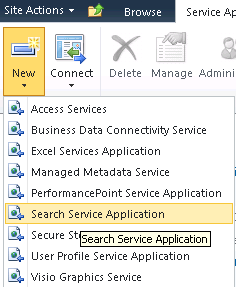
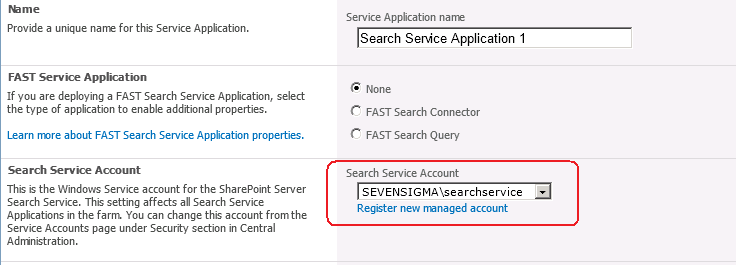
When you provision a search service application as part of a SharePoint installation, you are asked for (among other things), a windows account to use for the search service. Below shows the point in the GUI based configuration step where this is done. First up we choose to create a search service application, and then we choose the account to use for the “Search Service Account”. By default this is the account that will do the crawling of content sources.

image    image

Now the search service account is described as so: “.. the Windows Service account for the SharePoint Server Search Service. This setting affects all Search Service Applications in the farm. You can change this account from the Service Accounts page under Security section in Central Administration.”

In reading this, suggests that the windows service (“SharePoint Server Search 14”) would run under this account. The reality is that the SharePoint Server Search 14 service account is the farm account. You can see the pre and post provisioning status below. First up, I show below where SharePoint has been installed and the SharePoint Server Search 14 service is disabled and with service credentials of “Local Service”.

image

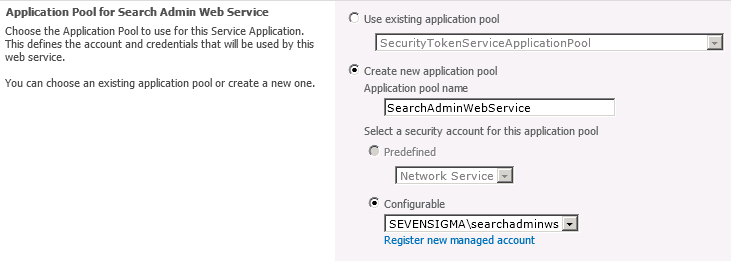
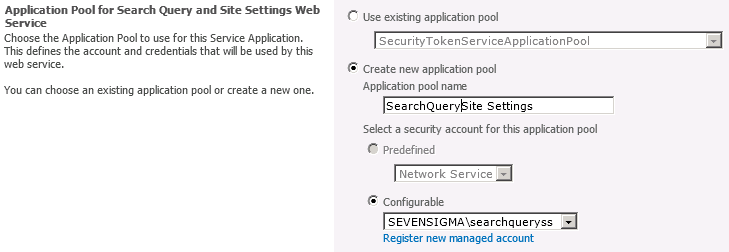
The next set of pictures show the Search Service Application provisioned according to the following configuration:

  • Search service account: SEVENSIGMA\searchservice
  • Search admin web service account: SEVENSIGMA\searchadminws
  • Search query and site settings account: SEVENSIGMA\searchqueryss

You can see this in the screenshots below.

image

imageimage

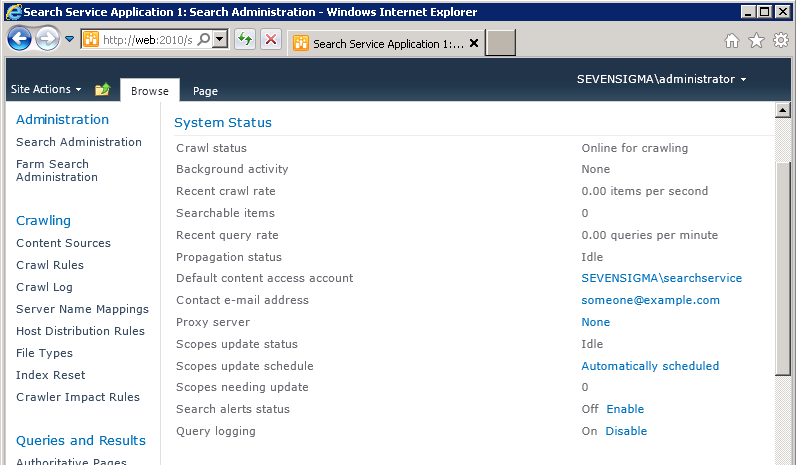
Once the service has been successfully provisioned, we can clearly see the “Default content access account” is based on the “Search service account” as described in the configuration above (the first of the three accounts).

image

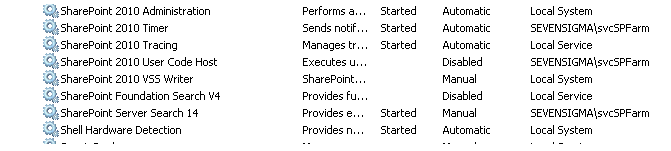
Finally, as you can see below, once provisioned, it is the SharePoint farm account that is running the search windows service.

image

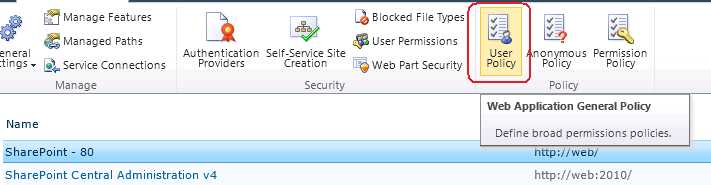
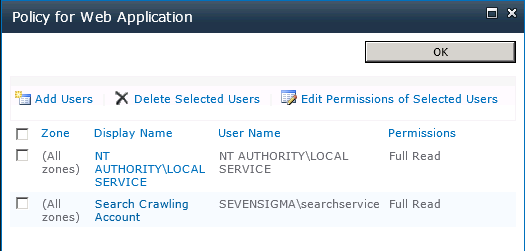
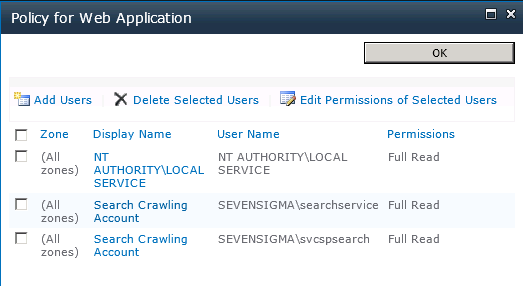
Once you have provisioned the Search Service Application, the default content access (in my case SEVENSIGMA\searchservice), it is granted “Read” access to all web applications via Web Application User Policies as shown below. This way, no matter how draconian the permissions of site collections are, the crawler account will have the access it needs to crawl the content, as well as the permissions of that content. You can verify this by looking at any web application in Central Administration (except for central administration web application) and choosing “User Policy” from the ribbon. You will see in the policy screen that the “Search Crawler” account has “Full Read” access.

image

image

In case you are wondering why the search service needs to crawl the permissions of content, as well as the content itself, it is because it uses these permissions to trim search results for users who do not have access to content. After all, you don’t want to expose sensitive corporate data via search do you?

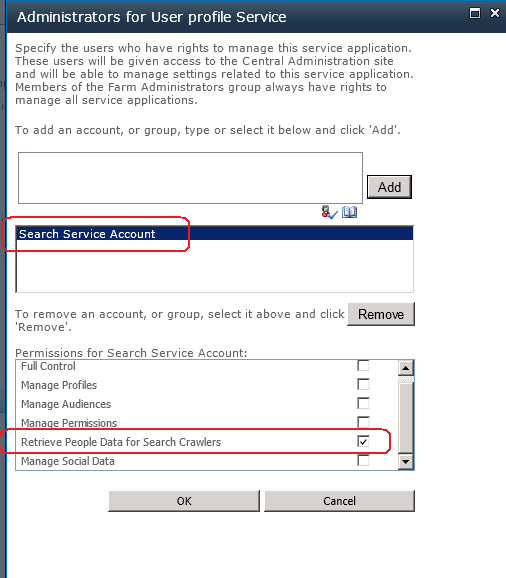
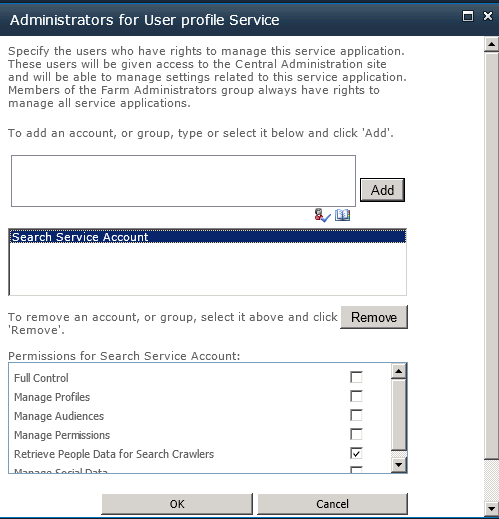
There is another more subtle configuration change performed by the Search Service. Once the evilness known as the User Profile Service has been provisioned, the Search service application will grant the Search Service Account specific permission to the User Profile Service. SharePoint is smart enough to do this whether or not the User Profile Service application is installed before or after the Search Service Application. In other words, if you install the Search Service Application first, and the User Profile Service Application afterwards, the permission will be granted regardless.

The specific permission by the way, is “Retrieve People Data for Search Crawlers” permission as shown below:

image    image

Getting back to the title of this post, this is a critical permission, because without it, the Search Server will not be able to talk to the User Profile Service to enumerate user profile information. The effect of this is empty "People Search results.

How people search works (a little more advanced)

Right! Now that the cool kids have joined us (who skipped the first section), lets take a closer look at SharePoint People Search in particular. This section delves a little deeper, but fear not I will try and keep things relatively easy to grasp.

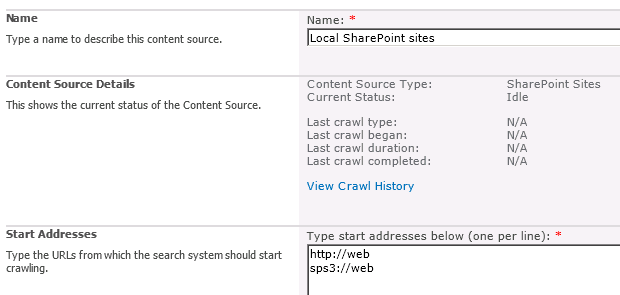
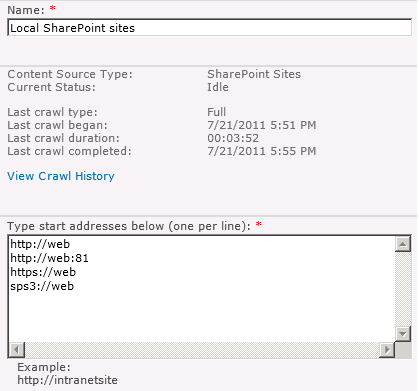
Once the Search Service Application has been provisioned, a default content source, called – originally enough – “Local SharePoint Sites” is created. Any web applications that exist (and any that are created from here on in) will be listed here. An example of a freshly minted SharePoint server with a single web application, shows the following configuration in Search Service Application:

image

Now hopefully http://web makes sense. Clearly this is the URL of the web application on this server. But you might be wondering that sps3://web is? I will bet that you have never visited a site using sps3:// site using a browser either. For good reason too, as it wouldn’t work.

This is a SharePointy thing – or more specifically, a Search Server thing. That funny protocol part of what looks like a URL, refers to a connector. A connector allows Search Server to crawl other data sources that don’t necessarily use HTTP. Like some native, binary data source. People can develop their own connectors if they feel so inclined and a classic example is the Lotus Notes connector that Microsoft supply with SharePoint. If you configure SharePoint to use its Lotus Notes connector (and by the way – its really tricky to do), you would see a URL in the form of:

notes://mylotusnotesbox

Make sense? The protocol part of the URL allows the search server to figure out what connector to use to crawl the content. (For what its worth, there are many others out of the box. If you want to see all of the connectors then check the list here).

But the one we are interested in for this discussion is SPS3: which accesses SharePoint User profiles which supports people search functionality. The way this particular connector works is that when the crawler accesses this SPS3 connector, it in turns calls a special web service at the host specified. The web service is called spscrawl.asmx and in my example configuration above, it would be http://web/_vti_bin/spscrawl.asmx

The basic breakdown of what happens next is this:

  1. Information about the Web site that will be crawled is retrieved (the GetSite method is called passing in the site from the URL (i.e the “web” of sps3://web)
  2. Once the site details are validated the service enumerates all of the use profiles
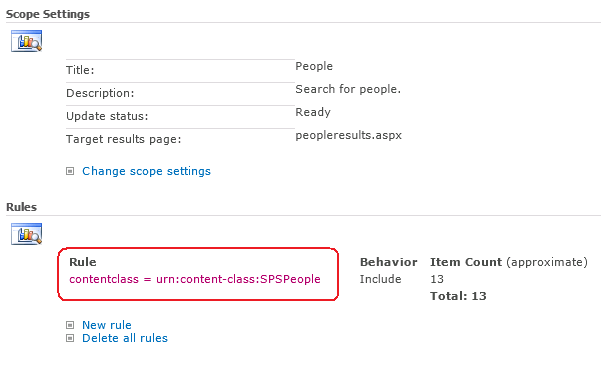
  3. For each profile, the method GetItem is called that retrieves all of the user profile properties for a given user. This is added to the index and tagged as content class of “urn:content-class:SPSPeople” (I will get to this in a moment)

Now admittedly this is the simple version of events. If you really want to be scared (or get to sleep tonight) you can read the actual SP3 protocol specification PDF.

Right! Now lets finish this discussion by this notion of contentclass. The SharePoint search crawler tags all crawled content according to its class. The name of this “tag” – or in correct terminology “managed property” – is contentclass. By default SharePoint has a People Search scope. It is essentially a limits the search to only returning content tagged as “People” contentclass.

image

Now to make it easier for you, Dan Attis listed all of the content classes that he knew of back in SharePoint 2007 days. I’ll list a few here, but for the full list visit his site.

  • “STS_Web” – Site
  • “STS_List_850″ – Page Library
  • “STS_List_DocumentLibrary” – Document Library
  • “STS_ListItem_DocumentLibrary” – Document Library Items
  • “STS_ListItem_Tasks” – Tasks List Item
  • “STS_ListItem_Contacts” – Contacts List Item
  • “urn:content-class:SPSPeople” – People

(why some properties follow the universal resource name format I don’t know *sigh* – geeks huh?)

So that was easy Paul! What can go wrong?

So now we know that although the protocol handler is SPS3, it is still ultimately utilising HTTP as the underlying communication mechanism and calling a web service, we can start to think of all the ways that it can break on us. Let’s now take a look at common problem areas in order of commonality:

1. The Loopback issue.

This has been done to death elsewhere and most people know it. What people don’t know so well is that the loopback fix was to prevent an extremely nasty security vulnerability known as a replay attack that came out a few years ago. Essentially, if you make a HTTP connection to your server, from that server and using a name that does not match the name of the server, then the request will be blocked with a 401 error. In terms of SharePoint people search, the sps3:// handler is created when you create your first web application. If that web application happens to be a name that doesn’t match the server name, then the HTTP request to the spscrawl.asmx webservice will be blocked due to this issue.

As a result your search crawl will not work and you will see an error in the logs along the lines of:

  • Access is denied: Check that the Default Content Access Account has access to the content or add a crawl rule to crawl the content (0x80041205)
  • The server is unavailable and could not be accessed. The server is probably disconnected from the network.   (0x80040d32)
  • ***** Couldn’t retrieve server http://web.sevensigma.com policy, hr = 80041205 – File:d:\office\source\search\search\gather\protocols\sts3\sts3util.cxx Line:548

There are two ways to fix this. The quick way (DisableLoopbackCheck) and the right way (BackConnectionHostNames). Both involve a registry change and a reboot, but one of them leaves you much more open to exploitation. Spence Harbar wrote about the differences between the two some time ago and I recommend you follow his advice.

(As an slightly related side note, I hit an issue with the User Profile Service a while back where it gave an error: “Exception occurred while connecting to WCF endpoint: System.ServiceModel.Security.MessageSecurityException: The HTTP request was forbidden with client authentication scheme ‘Anonymous’. —> System.Net.WebException: The remote server returned an error: (403) Forbidden”. In this case I needed to disable the loopback check but I was using the server name with no alternative aliases or full qualified domain names. I asked Spence about this one and it seems that the DisableLoopBack registry key addresses more than the SMB replay vulnerability.)

2. SSL

If you add a certificate to your site and mark the site as HTTPS (by using SSL), things change. In the example below, I installed a certificate on the site http://web, removed the binding to http (or port 80) and then updated SharePoint’s alternate access mappings to make things a HTTPS world.

Note that the reference to SPS3://WEB is unchanged, and that there is also a reference still to HTTP://WEB, as well as an automatically added reference to HTTPS://WEB

image

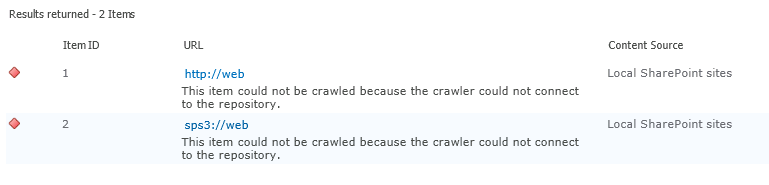
So if we were to run a crawl now, what do you think will happen? Certainly we know that HTTP://WEB will fail, but what about SPS3://WEB? Lets run a full crawl and find out shall we?

Checking the logs, we have the unsurprising error “the item could not be crawled because the crawler could not contact the repository”. So clearly, SPS3 isn’t smart enough to work out that the web service call to spscrawl.asmx needs to be done over SSL.

image

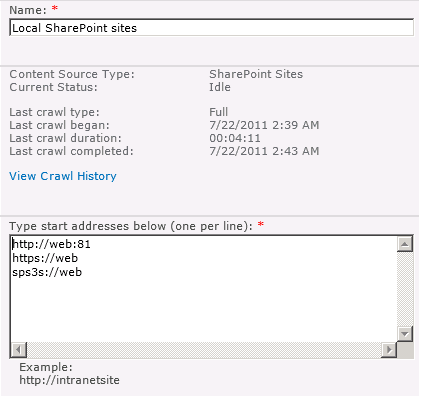
Fortunately, the solution is fairly easy. There is another connector, identical in function to SPS3 except that it is designed to handle secure sites. It is “SPS3s”. We simple change the configuration to use this connector (and while we are there, remove the reference to HTTP://WEB)

image

Now we retry a full crawl and check for errors… Wohoo – all good!

image

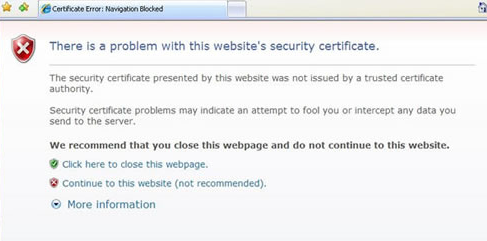
It is also worth noting that there is another SSL related issue with search. The search crawler is a little fussy with certificates. Most people have visited secure web sites that warning about a problem with the certificate that looks like the image below:

image

Now when you think about it, a search crawler doesn’t have the luxury of asking a user if the certificate is okay. Instead it errs on the side of security and by default, will not crawl a site if the certificate is invalid in some way. The crawler also is more fussy than a regular browser. For example, it doesn’t overly like wildcard certificates, even if the certificate is trusted and valid (although all modern browsers do).

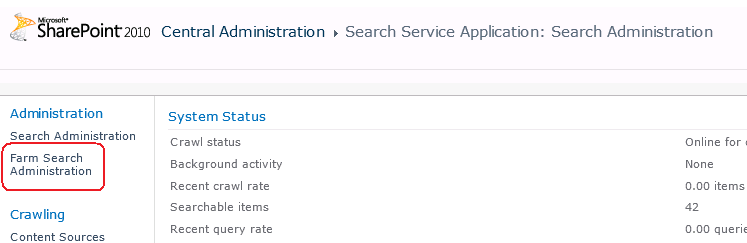
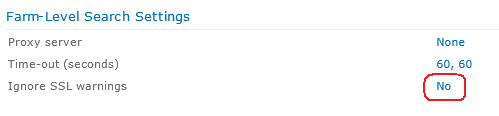
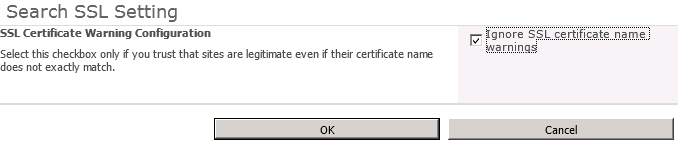
To alleviate this issue, you can make the following changes in the settings of the Search Service Application: Farm Search Administration->Ignore SSL warnings and tick “Ignore SSL certificate name warnings”.

image  image

image

The implication of this change is that the crawler will now accept any old certificate that encrypts website communications.

3. Permissions and Change Legacy

Lets assume that we made a configuration mistake when we provisioned the Search Service Application. The search service account (which is the default content access account) is incorrect and we need to change it to something else. Let’s see what happens.

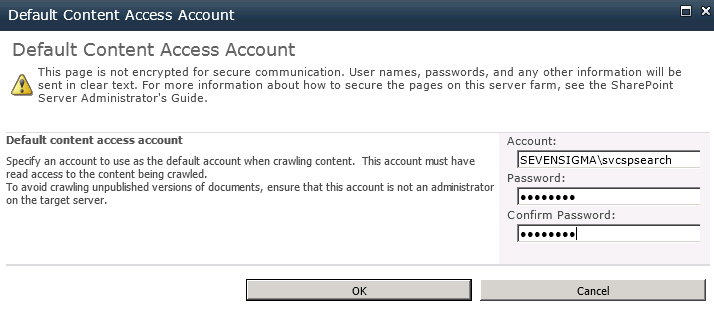
In the search service application management screen, click on the default content access account to change credentials. In my example I have changed the account from SEVENSIGMA\searchservice to SEVENSIGMA\svcspsearch

image

Having made this change, lets review the effect in the Web Application User Policy and User Profile Service Application permissions. Note that the user policy for the old search crawl account remains, but the new account has had an entry automatically created. (Now you know why you end up with multiple accounts with the display name of “Search Crawling Account”)

image

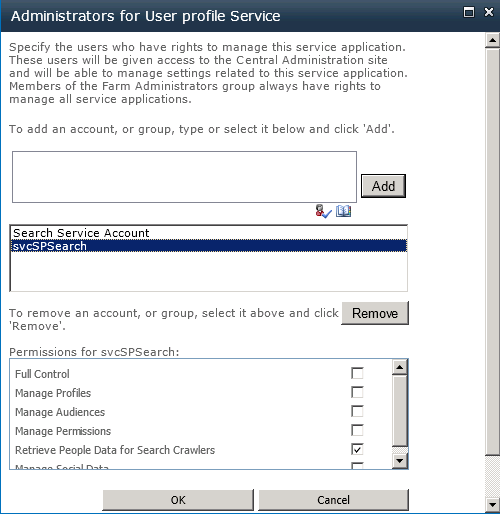
Now lets check the User Profile Service Application. Now things are different! The search service account below refers to the *old* account SEVENSIGMA\searchservice. But the required permission of “Retrieve People Data for Search Crawlers” permission has not been granted!

image


image

If you traipsed through the ULS logs, you would see this:

Leaving Monitored Scope (Request (GET:https://web/_vti_bin/spscrawl.asmx)). Execution Time=7.2370958438429 c2a3d1fa-9efd-406a-8e44-6c9613231974
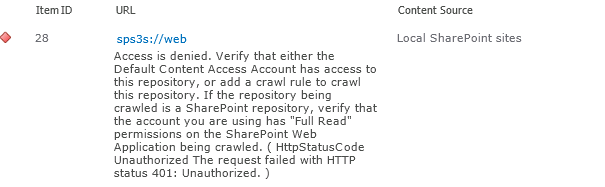
mssdmn.exe (0x23E4) 0x2B70 SharePoint Server Search FilterDaemon e4ye High FLTRDMN: Errorinfo is "HttpStatusCode Unauthorized The request failed with HTTP status 401: Unauthorized." [fltrsink.cxx:553] d:\office\source\search\native\mssdmn\fltrsink.cxx
mssearch.exe (0x02E8) 0x3B30 SharePoint Server Search Gatherer cd11 Warning The start address sps3s://web cannot be crawled. Context: Application ‘Search_Service_Application’, Catalog ‘Portal_Content’ Details: Access is denied. Verify that either the Default Content Access Account has access to this repository, or add a crawl rule to crawl this repository. If the repository being crawled is a SharePoint repository, verify that the account you are using has "Full Read" permissions on the SharePoint Web Application being crawled. (0x80041205)

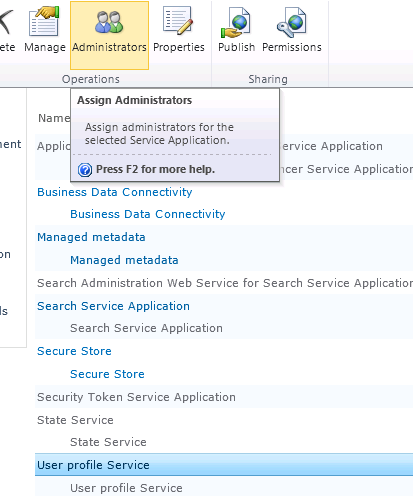
To correct this issue, manually grant the crawler account the “Retrieve People Data for Search Crawlers” permission in the User Profile Service. As a reminder, this is done via the Administrators icon in the “Manage Service Applications” ribbon.

image

Once this is done run a fill crawl and verify the result in the logs.4.

4. Missing root site collection

A more uncommon issue that I once encountered is when the web application being crawled is missing a default site collection. In other words, while there are site collections defined using a managed path, such as http://WEB/SITES/SITE, there is no site collection defined at HTTP://WEB.

The crawler does not like this at all, and you get two different errors depending on whether the SPS or HTTP connector used.

  • SPS:// – Error in PortalCrawl Web Service (0x80042617)
  • HTTP:// – The item could not be accessed on the remote server because its address has an invalid syntax (0x80041208)

image

The fix for this should be fairly obvious. Go and make a default site collection for the web application and re-run a crawl.

5. Alternative Access Mappings and Contextual Scopes

SharePoint guru (and my squash nemesis), Nick Hadlee posted recently about a problem where there are no search results on contextual search scopes. If you are wondering what they are Nick explains:

Contextual scopes are a really useful way of performing searches that are restricted to a specific site or list. The “This Site: [Site Name]”, “This List: [List Name]” are the dead giveaways for a contextual scope. What’s better is contextual scopes are auto-magically created and managed by SharePoint for you so you should pretty much just use them in my opinion.

The issue is that when the alternate access mapping (AAM) settings for the default zone on a web application do not match your search content source, the contextual scopes return no results.

I came across this problem a couple of times recently and the fix is really pretty simple – check your alternate access mapping (AAM) settings and make sure the host header that is specified in your default zone is the same url you have used in your search content source. Normally SharePoint kindly creates the entry in the content source whenever you create a web application but if you have changed around any AAM settings and these two things don’t match then your contextual results will be empty. Case Closed!

Thanks Nick

6. Active Directory Policies, Proxies and Stateful Inspection

A particularly insidious way to have problems with Search (and not just people search) is via Active Directory policies. For those of you who don’t know what AD policies are, they basically allow geeks to go on a power trip with users desktop settings. Consider the image below. Essentially an administrator can enforce a massive array of settings for all PC’s on the network. Such is the extent of what can be controlled, that I can’t fit it into a single screenshot. What is listed below is but a small portion of what an anal retentive Nazi administrator has at their disposal (mwahahaha!)

image

Common uses of policies include restricting certain desktop settings to maintain consistency, as well as enforce Internet explorer security settings, such as proxy server and security settings like maintaining the trusted sites list. One of the common issues encountered with a global policy defined proxy server in particular is that the search service account will have its profile modified to use the proxy server.

The result of this is that now the proxy sits between the search crawler and the content source to be crawled as shown below:

Crawler —–> Proxy Server —–> Content Source

Now even though the crawler does not use Internet Explorer per se, proxy settings aren’t actually specific to Internet Explorer. Internet explorer, like the search crawler, uses wininet.dll. Wininet is a module that contains Internet-related functions used by Windows applications and it is this component that utilises proxy settings.

Sometimes people will troubleshoot this issue by using telnet to connect to the HTTP port. "ie: “Telnet web 80”. But telnet does not use the wininet component, so is actually not a valid method for testing. Telnet will happily report that the web server is listening on port 80 or 443, but it matters not when the crawler tries to access that port via the proxy. Furthermore, even if the crawler and the content source are on the same server, the result is the same. As soon as the crawler attempts to index a content source, the request will be routed to the proxy server. Depending on the vendor and configuration of the proxy server, various things can happen including:

  • The proxy server cannot handle the NTLM authentication and passes back a 400 error code to the crawler
  • The proxy server has funky stateful inspection which interferes with the allowed HTTP verbs in the communications and interferes with the crawl

For what its worth, it is not just proxy settings that can interfere with the HTTP communications between the crawler and the crawled. I have seen security software also get in the way, which monitors HTTP communications and pre-emptively terminates connections or modifies the content of the HTTP request. The effect is that the results passed back to the crawler are not what it expects and the crawler naturally reports that it could not access the data source with suitably weird error messages.

Now the very thing that makes this scenario hard to troubleshoot is the tell-tale sign for it. That is: nothing will be logged in the ULS logs, not the IIS logs for the search service. This is because the errors will be logged in the proxy server or the overly enthusiastic stateful security software.

If you suspect the problem is a proxy server issue,  but do not have access to the proxy server to check logs, the best way to troubleshoot this issue is to temporarily grant the search crawler account enough access to log into the server interactively. Open internet explorer and manually check the proxy settings. If you confirm a policy based proxy setting, you might be able to temporarily disable it and retry a crawl (until the next AD policy refresh reapplies the settings). The ideal way to cure this problem is to ask your friendly Active Directory administrator to either:

  • Remove the proxy altogether from the SharePoint server (watch for certificate revocation slowness as a result)
  • Configure an exclusion in the proxy settings for the AD policy to that the content sources for crawling are not proxied
  • Create a new AD policy specifically for the SharePoint box so that the default settings apply to the rest of the domain member computers.

If you suspect the issue might be overly zealous stateful inspection, temporarily disable all security-type software on the server and retry a crawl. Just remember, that if you have no logs on the server being crawled, chances are its not being crawled and you have to look elsewhere.

7. Pre-Windows 2000 Compatibility Access Group

In an earlier post of mine, I hit an issue where search would yield no results for a regular user, but a domain administrator could happily search SP2010 and get results. Another symptom associated with this particular problem is certain recurring errors event log – Event ID 28005 and 4625.

  • ID 28005 shows the message “An exception occurred while enqueueing a message in the target queue. Error: 15404, State: 19. Could not obtain information about Windows NT group/user ‘DOMAIN\someuser’, error code 0×5”.
  • The 4625 error would complain “An account failed to log on. Unknown user name or bad password status 0xc000006d, sub status 0xc0000064” or else “An Error occured during Logon, Status: 0xc000005e, Sub Status: 0x0”

If you turn up the debug logs inside SharePoint Central Administration for the “Query” and “Query Processor” functions of “SharePoint Server Search” you will get an error “AuthzInitializeContextFromSid failed with ERROR_ACCESS_DENIED. This error indicates that the account under which this process is executing may not have read access to the tokenGroupsGlobalAndUniversal attribute on the querying user’s Active Directory object. Query results which require non-Claims Windows authorization will not be returned to this querying user.

image

The fix is to add your search service account to a group called “Pre-Windows 2000 Compatibility Access” group. The issue is that SharePoint 2010 re-introduced something that was in SP2003 – an API call to a function called AuthzInitializeContextFromSid. Apparently it was not used in SP2007, but its back for SP2010. This particular function requires a certain permission in Active Directory and the “Pre-Windows 2000 Compatibility Access” group happens to have the right required to read the “tokenGroupsGlobalAndUniversal“ Active Directory attribute that is described in the debug error above.

8. Bloody developers!

Finally, Patrick Lamber blogs about another cause of crawler issues. In his case, someone developed a custom web part that had an exception thrown when the site was crawled. For whatever reason, this exception did not get thrown when the site was viewed normally via a browser. As a result no pages or content on the site could be crawled because all the crawler would see, no matter what it clicked would be the dreaded “An unexpected error has occurred”. When you think about it, any custom code that takes action based on browser parameters such as locale or language might cause an exception like this – and therefore cause the crawler some grief.

In Patricks case there was a second issue as well. His team had developed a custom HTTPModule that did some URL rewriting. As Patrick states “The indexer seemed to hate our redirections with the Response.Redirect command. I simply removed the automatic redirection on the indexing server. Afterwards, everything worked fine”.

In this case Patrick was using a multi-server farm with a dedicated index server, allowing him to remove the HTTP module for that one server. in smaller deployments you may not have this luxury. So apart from the obvious opportunity to bag programmers :-), this example nicely shows that it is easy for a 3rd party application or code to break search. What is important for developers to realise is that client web browsers are not the only thing that loads SharePoint pages.

If you are not aware, the user agent User Agent string identifies the type of client accessing a resource. This is the means by which sites figure out what browser you are using. A quick look at the User Agent parameter by SharePoint Server 2010 search reveals that it identifies itself as “Mozilla/4.0 (compatible; MSIE 4.01; Windows NT; MS Search 6.0 Robot)“. At the very least, test any custom user interface code such as web parts against this string, as well as check the crawl logs when it indexes any custom developed stuff.

Conclusion

Well, that’s pretty much my list of gotchas. No doubt there are lots more, but hopefully this slightly more detailed exploration of them might help some people.


Thanks for reading

Paul Culmsee
www.sevensigma.com.au

www.spgovia.com


Consequences of complexity–the evilness of the SharePoint 2010 User Profile Service

Hiya

A few months back I posted a relatively well behaved rant over the ridiculously complex User Profile Service Application of SharePoint 2010. I think this component in particular epitomises SharePoint 2010’s awful combination of “design by committee” clunkiness, along with real-world sheltered Microsoft product manager groupthink which seems to rate success on the number of half baked features packed in, as opposed to how well those features install logically, integrate with other products and function properly in real-world scenarios.

Now truth be told, until yesterday, I have had an unblemished record with the User Profile Service – being able to successfully provision it first time at all sites I have visited (and no I did not resort to running it all as administrator). Of course, we all have Spence to thank for this with his rational guide. Nevertheless, I am strongly starting to think that I should write the irrational guide as a sort of bizzaro version of Spencers articles, which combines his rigour with some mega-ranting ;-).

So what happened to blemish my perfect record? Bloody Active Directory policies – that’s what.

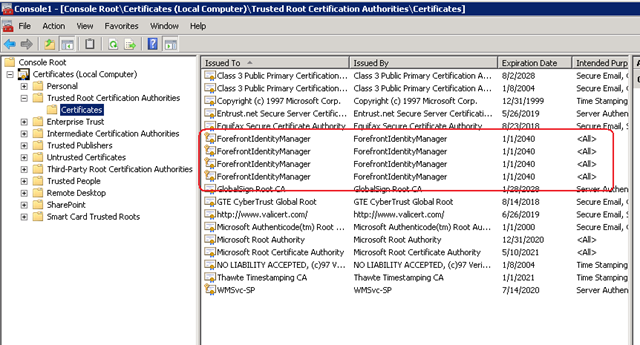
In case you didn’t know, SharePoint uses a scaled down, pre-release version of Forefront Identify Manager. Presumably the logic here to this was to allow more flexibility, by two-way syncing to various directory services, thereby saving the SharePoint team development time and effort, as well as being able to tout yet another cool feature to the masses. Of course, the trade-off that the programmers overlooked is the insane complexity that they introduced as a result. I’m sure if you asked Microsoft’s support staff what they think of the UPS, they will tell you it has not worked out overly well. Whether that feedback has made it way back to the hallowed ground of the open-plan cubicles of SharePoint product development I can only guess. But I theorise that if Microsoft made their SharePoint devs accountable for providing front-line tech support for their components, they will suddenly understand why conspiracy theorist support and infrastructure guys act the way they do.

Anyway I better supress my desire for an all out rant and tell you the problem and the fix. The site in question was actually a fairly simple set-up. Two server farm and a single AD forest. About the only thing of significance from the absolute stock standard setup was that the active directory NETBIOS name did not match the active directory fully qualified domain name. But this is actually a well known and well covered by TechNet and Spence. A quick bit of PowerShell goodness and some AD permission configuration sorts the issue.

Yet when I provisioned the User Profile Service Application and then tried to start the User Profile Synchronisation Service on the server (the big, scary step that strikes fear into practitioners), I hit the sadly common “stuck on starting” error. The ULS logs told me utterly nothing of significance – even when i turned the debug juice to full throttle. The ever helpful windows event logs showed me Event ID 3:

ForeFront Identity Manager,
Level: Error

.Net SqlClient Data Provider: System.Data.SqlClient.SqlException: HostId is not registered
at Microsoft.ResourceManagement.Data.Exception.DataAccessExceptionManager.ThrowException(SqlException innerException)
at Microsoft.ResourceManagement.Data.DataAccess.RetrieveWorkflowDataForHostActivator(Int16 hostId, Int16 pingIntervalSecs, Int32 activeHostedWorkflowDefinitionsSequenceNumber, Int16 workflowControlMessagesMaxPerMinute, Int16 requestRecoveryMaxPerMinute, Int16 requestCleanupMaxPerMinute, Boolean runRequestRecoveryScan, Boolean& doPolicyApplicationDispatch, ReadOnlyCollection`1& activeHostedWorkflowDefinitions, ReadOnlyCollection`1& workflowControlMessages, List`1& requestsToRedispatch)
at Microsoft.ResourceManagement.Workflow.Hosting.HostActivator.RetrieveWorkflowDataForHostActivator()
at Microsoft.ResourceManagement.Workflow.Hosting.HostActivator.ActivateHosts(Object source, ElapsedEventArgs e)

The most common issue with this message is the NETBIOS issue I mentioned earlier. But in my case this proved to be fruitless. I also took Spence’s advice and installed the Feb 2011 cumulative update for SharePoint 2010, but to no avail. Every time I provisioned the UPS sync service, I received the above persistent error – many, many, many times. 🙁

For what its worth, forget googling the above error because it is a bit of a red herring and you will find issues that will likely point you to the wrong places.

In my case, the key to the resolution lay in understanding my previously documented issue with the UPS and self-signed certificate creation. This time, I noticed that the certificates were successfully created before the above error happened.  MIISCLIENT showed no configuration had been written to Forefront Identity Manager at all. Then I remembered that the SharePoint User Profile Service Application talks to Forefront over HTTPS on port 5725. As soon as I remembered that HTTP was the communication mechanism, I had a strong suspicion on where the problem was – as I have seen this sort of crap before…

I wondered if some stupid proxy setting was getting in the way. Back in the halcyon days of SharePoint 2003, I had this issue when scheduling SMIGRATE tasks, where the account used to run SMIGRATE is configured to use a proxy server, would fail. To find out if this was the case here, a quick execute of the GPRESULT tool and we realised that there was a proxy configuration script applied at the domain level for all users. We then logged in as the farm account interactively (given that to provision the UPS it needs to be Administrator anyway this was not a problem). We then disabled all proxy configuration via Internet explorer and tried again.

Blammo! The service provisions and we are cooking with gas! it was the bloody proxy server. Reconfigure group policy and all is good.

Conclusion

The moral of the story is this. Anytime windows components communicate with each-other via HTTP, there is always a chance that some AD induced dumbass proxy setting might get in the way. If not that, stateful security apps that check out HTTP traffic or even a corrupted cache (as happened in this case). The ULS logs will never tell you much here, because the problem is not SharePoint per se, but the registry configuration enforced by policy.

So, to ensure that you do not get affected by this, configure all SharePoint servers to be excluded from proxy access, or configure the SharePoint farm account not to use a proxy server at all. (Watch for certificate revocation related slowness if you do this though).

Finally, I called this post “consequences of complexity” because this sort of problem is very tricky to identify the root cause. With so many variables in the mix, how the hell can people figure this sort of stuff out?

Seriously Microsoft, you need to adjust your measures of success to include resiliency of the platform!


Thanks for reading

Paul Culmsee
www.sevensigma.com.au


A brief sojourn into the world of Exchange 2010

Okay so this post is going to seem way out of place because it has utterly nothing to do with SharePoint and instead focuses on Microsoft Exchange Server. To explain why I have to give you a quick history lesson.

Before I was a SharePoint guy, I was a networking, infrastructure and security guy. In fact I met and worked with Jeremy Thake before either of us were full-time SharePoint guys. If you were to ask him I’m sure he would tell you I was a bit of an infrastructure and security nazi back then. What warms my heart though is that since then I have mellowed out and now Jeremy has taken on some of those nazi tendencies (I have heard him threaten to “hunt you down if you do that” at user group presentation – referring to some dodgy SharePoint developer practice that will hurt you later).

Anyways, I still get asked to do the odd bit of Cisco, Active Directory and Exchange work. Although my interest in these areas is practically nil, some part of me likes to have a crack at it every so often to make sure I can get on the bike again – so to speak. Each time I get on the bike, I then remember why I got off in the first place ;-( (It’s a bit like eating KFC – you swear you will never do it again but given enough time, the pain seems to fade)

This time around, I agreed to help a client extricate themselves from the evil nightmare that is Small Business Server 2008, to real, grown up Windows Server environment. They had outgrown SBS and had been taken over by a foreign company and there was a need for AD domain trusts, among many other things – something that SBS can’t do. As part of this I had to get Exchange, SharePoint, AD, WSUS, Certificate services and various other things like RRAS, DHCP and DNS off the Small Business Server and onto real servers.

So first up my big Exchange 2010 lesson learned and then some detail on how you too can make Small Business Server 2008 history in your organisation.

My first and last exchange post: Exchange 2010 RTM and SP1 do not play nice!

Due to the nature of this upgrade, I had to set up a temporary exchange server 2010 box to be a temporary mailbox store. Provided that any Exchange 2007 servers in the organisation are running Service Pack 1, mail can happily route between Exchange 2007 and 2010 servers. Once the migration of mailboxes was complete, we decommissioned the Small Business Server following the steps outlined in the next section. We then installed a fresh, new Win2008R2 + Exchange 2010 as the final server – only this time with Exchange 2010 service pack 1 (the client used newer media this time).

All went well, the new server installed fine. So now I had two Exchange 2010 servers in the organisation, one RTM and one SP1. I was able to manage both servers using Exchange system manager on both servers and there was nothing untoward in the logs on either server.

However, when I tried to move a mailbox from the RTM box to the SP1 box, I received the following error:

Service ‘net.tcp://<servername>/Microsoft.Exchange.MailboxReplicationService’ encountered an exception. Error: MapiExceptionNoAccess: Unable to open message store. (hr=0x80070005, ec=-2147024891)

Diagnostic context:
    Lid: 18969   EcDoRpcExt2 called [length=132]

[blah blah blah skip ugly stack trace stuff]

Exception details: MapiExceptionNoAccess (80070005): MapiExceptionNoAccess: Unable to open message store. (hr=0x80070005, ec=-2147024891)

[blah blah blah skip more ugly stack trace stuff]

As you can see, not a helpful message at all. So I tried to initiate the mailbox move from the SP1 server instead of the RTM server. This time, I received a different error:

There are no available servers that are running the Mailbox Replication Service.
+ CategoryInfo : NotSpecified: (0:Int32) [New-MoveRequest], MailboxReplicationTransientException + FullyQualifiedErrorId : 5C08CF31,Microsoft.Exchange.Management.RecipientTasks.NewMoveRequest

Now as Johnny says, this error suggests that no exchange server in the organisation is running the mailbox replication service. However in my case the RTM box was running this service and it was started. Clearly something was amiss.

Google didn’t show much about this problem, and I considered calling Microsoft support, but knew full well that they would probably make me install SP1 on both boxes before investigating. So I installed SP1, following Gnawgnu’s advice about surviving an Exchange 2010 Service Pack 1 install. All went smoothly and when I reattempted the mailbox move, everything worked fine.

Moral of the story, apparently a stack trace is an appropriate error message for an incompatibility between Exchange versions. C’mon exchange product team, you are no better than SharePoint in terms of horrible error messages. Surely a version check would be an easy use-case to test for?

How to extricate yourself from Small Business Server 2008

For what its worth, getting SBS2008 out of your domain is a bit like pulling teeth. It really doesn’t want to go. Nevertheless it can be done and I largely followed this unofficial guide and can confirm that it works for me (I have added a couple of steps below, and also remember, this is SBS2008 we are talking about so its bound to go wrong somewhere)

1. Upgrade the AD schema of the SBS2008 domain

  • Using your new Win2008 R2 media find the adprep utility and run: Adprep /forestprep and Adprep /domainPrep
  • On SBS 2008 ensure that the schema version is updated to 47 and *not* 44 by checking the HKLM\SYSTEM\CurrentControlSet\Services\NTDS\Parameters\Schema Version registry key

2. Install Win2008R2 on your soon to be new domain controller and add it as a member server of your SBS2008 domain

3. Install the Active Directory Domain Services role and then launch the Active Directory Domain Services Installation Wizard (dcpromo.exe).

  • On the Choose a Deployment Configuration page, click Existing forest
  • On the Additional Domain Controller Options page, make sure the DNS and Global Catalog is checked
  • Check all of your group policies for reference to the original SBS server and repoint to the new AD server (recreating share folders where necessary)
  • Move FSMO roles to the new AD server: http://support.microsoft.com/default.aspx?scid=kb;EN-US;255504
  • Add the AD certificate services role and backup/restore the certificate store
  • Install DHCP and backup/restore config from SBS box and then remove DHCP role from SBS2008
  • Change DHCP scopes so DNS points to the new DC, as well as statically assigned devices

6. Install Win2008R2 on your soon to be Exchange Server and install Exchange 2010 (with the hub, client access server and mailbox roles)

  • Patch Exchange 2007 on your SBS2008 Server to SP1 if it is not already (otherwise you cannot move mailboxes to the Exchange 2010 server)
  • Note: You need to download a special Exchange SP1 installer for Small Business Server as the default installer will refuse to install on account that a SBS box does not meet minimum conditions for install
  • Move mailboxes and public folders from SBS2008 server to the new Exchange 2010 Server
  • Export IIS certificates from the SBS2008 server to the new server and then set up client access (OWA, ActiveSync and Outlook Anywhere) with the same certificate
  • Reconfigue your router/firewall to the ne server for OWA/Activesync/Outlook Anywhere

7. Uninstall Exchange 2007 from SBS 2008

8. Install Win2008R2 on your soon to be SharePoint Server and install Search Server Express 2010 or whatever SharePoint edition you have paid for

  • Create a new web application
  • Restore Companyweb site using database reattach method
  • Reconfigure companyweb search to use enterprise search template that comes with Search Server Express 2010
  • Install Microsoft fax (if you used faxing in SBS2008) and enable email based fax routing
  • Configure incoming email to SharePoint by configuring a subdomain in active directory and configuring a remote domain in Exchange 2010 Hub Transport
  • Mail enable the Faxes document library in companyweb
  • Set the destination for faxes to be the Faxes document library in companyweb

8. DCPromo down SBS 2008 and remove SBS 2008 from the network.

9. Crack open a beer and celebrate your victory


Thanks for reading

Paul Culmsee

www.sevensigma.com.au


Un-Managed Metadata: A couple of gotchas

As the SharePoint 2010 dust settles, gushing praise and inflated expectations are slowly replaced by the cold hard reality, as people come to grips with the limitations of the product. One such area is with the managed metadata service. Don’t get me wrong, I like managed metadata a lot and I can see a little ecosystem building around that functionality specifically. But it does have a couple of big gotchas that you should be aware of before making a big investment with it.

The sad irony is that these issues are actually not the fault of the managed metadata service, but the applications that are supposed to embrace and extend SharePoint and therefore accommodate it.

The reason I am calling out these two particular issues, is that I can see many people making assumptions that this will just work, make a significant investment in time and effort to develop an IA based around that assumption and then face the painful truth of having to work around them. After examining two issues that I suspect will cause some pain, we will then have a quick look through some of the implications and mixed messages that Microsoft are sending to organisations.

InfoPath Web Suckiness

The first issue that has gotten a bit of attention is the fact that the managed metadata columns cannot be used in browser based InfoPath forms. In other words, if you have a list with a managed metadata column and think that it would be cool to customise that list forms using InfoPath, you will be in for a nasty surprise. You will receive the following error message:

image

"The following fields in the SharePoint list are not supported because of their data type and will not be available in InfoPath Designer:

MyColumn (TaxonomyFieldType)”

I have a screenshot pasted above – which actually has come from a nice explanation of the problem made by Alana Helbig (hope you don’t mind Alana). Alana shows that if you persist and open the form in InfoPath, the managed metadata field will be hidden away, never to be edited again (and therefore pointless). She also also demonstrates that the behaviour is even worse if the managed metadata column is marked as mandatory. In this case, SharePoint totally spits the dummy if you modify the form with InfoPath and then try to load it. You will get a message along the lines of: “The following required fields are missing from the form” and a ULS correlation ID for your trouble.

Paradocially, InfoPath does support managed metadata when forms are displayed natively (ie not web based). This is proven by the fact that the MSOffice Document Information Panel (DIP) contains a control to display managed metadata information (in case you are not aware the DIP is an InfoPath form). The screengrab below shows Word showing two managed metadata columns (one with the imaginative name of “aaa” which I have clicked on) allowing me to pick terms from the term set.

image

Taking a closer look, if I edit the Document Information Panel settings in InfoPath, I can clearly see that there is a Managed Metadata picker control.

image

I never bothered with the SP2010 betas because I was doing a lot of non SharePoint work at the time. But from my reading, it seems that at one point, InfoPath could display managed metadata in the browser but it was yanked from the RTM because of quality issues. Some forums suggest it won’t be corrected in any service packs soon. I certainly hope they are wrong.

Conclusion? I assume Microsoft knew the implications of this decision – yet still, I feel that this will cause a lot of frustration and grief.

SharePoint Workspace 2010 Suckiness

This is the same issue, just using a different Microsoft client application: SharePoint Workspace 2010. SPW2010, if you haven’t seen it, provides a client for SharePoint 2010 that enables real-time synchronization of desktop content with SharePoint documents and lists.

This gotcha is one I fear might be even more insidious than the InfoPath one in certain geographic locations. This is because offline access tends to be an area people will think about later in the project. Where I live (Western Australia), is remote and dominated by mining. As a result, Groove had considerable popularity when you are in the middle of nowhere with nothing but a poor satellite link with >1 second latency ;-). Many organisations will flock to SharePoint Workspace 2010 because of its much improved compatibility with synchronising SharePoint lists, libraries and views.

The problem is that managed metadata columns can be viewed in SharePoint Workspace 2010 but not edited at all. 

Below I show a custom list with a managed metadata column called Projects.  The next image shows the same list in SharePoint Workspace 2010.  Note how the Project column is displayed in the list of projects, but is not displayed in the view/edit item form below it.

image

image

Now some of you might be thinking that this is fairly minor, and that not being able to modify managed metadata columns is not a problem. But check out what happens when the managed metadata column is made mandatory. SharePoint Workspace 2010 displays the error below when attempting to view the list.

image

Ouch! When you click on the More Info link in the ribbon, you are presented with a scarily similar message to InfoPath.

image

It gets better (mixed messages)

Office 2010 has finally gotten past the use-case I described in my “folders are bad and other urban legends” post. In Office 2010, application centric users have the option to browse document libraries not just by folders, but by metadata as shown below. Note how we are browsing a managed metadata term store in the File>Open dialog box in Word 2010.

image

The rub with this functionality though, is it only works for managed metadata columns. You might have configured a choice field for metadata navigation and in the browser, you can sort, slide and dice via those columns as well. But in Office 2010, you can only use managed metadata or folders. No views, and no other column types. This will inevitably lead organisations to invest time and effort to create an information architecture around the managed metadata construct. Yet by utilising managed metadata in this way, we consign ourselves to not being able to edit any of this data when we take it offline using SharePoint Workspace 2010.

*sigh* So basically, the more you try and move to a metadata driven, taxonomy approach, the more you make yourself rigid and inflexible.

But there is more…

By the way, managed metadata is not the only column type that suffers this fate. If you enable ratings on a list or library you will see the same problem. The first screengrab below is InfoPath and the next two are SharePoint Workspace 2010.

image

image 

image

Conclusion: Violating the laws of motion

More than ever, SharePoint is a minefield of caveats. These examples conclusively disprove Newtons laws of motion because for every possible action, there are just not equal and opposite reactions, but potentially many more opposite reactions. More then ever, practitioners have to understand these complex dependencies, and then somehow explain them to stakeholders without giving them a brain explosion. Is it little wonder that there is commonly a big gap between the slick demos and the reality on the ground?


Thanks for reading


Paul Culmsee
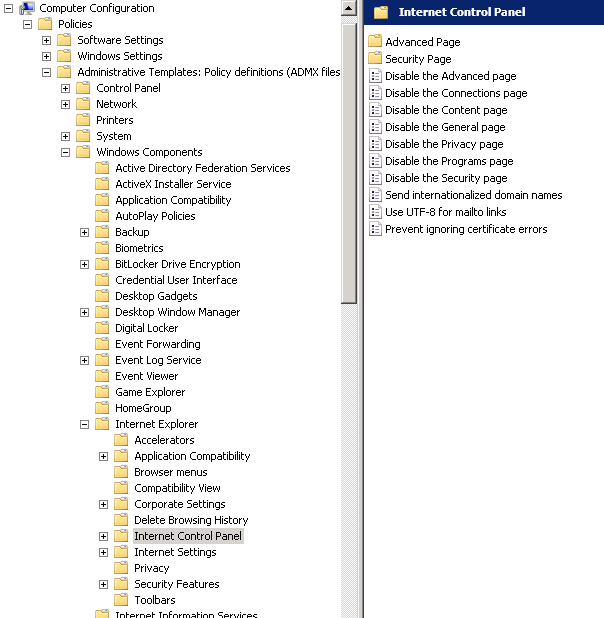


Sack Justin Bieber with SPD2010 and Forms Services – Part 2

Hi

This is part 2 of a quick (but huge) post on my experiences working with SharePoint Designer 2010 workflows and Forms Services. In part 1, we used the scenario of an employee termination form, and sacked Justin Bieber. Now we want to ensure that the SharePoint user experience for sacking Justin Bieber is seamless and intuitive.

Truth be told, I have never actually heard a Justin Bieber song because we have not had a television in the house for over a year. Ignorance is bliss, but I have seen enough news reports that I still want to sack him!

In part 1, we examined the ability of SPD2010 to leverage InfoPath for tailoring forms used by workflows. We then covered creating a workflow utilising the Start Approval Process action, which enables us to do a couple of cool things without custom programming.

Now we are onto the next two steps.

Continue reading “Sack Justin Bieber with SPD2010 and Forms Services – Part 2”


Sack Justin Bieber with SPD2010 and Forms Services – Part 1

Hi all

A very long time ago now, I had the ambition to write an end-to-end blog post series called “A Humble Tribute to the Leave Form”. The intent was to show InfoPath Forms Services 2007 in all its glory – from its initially seductive, demo friendly first impressions, through to all of the dodgy workarounds and .net code required to get it to adequately handle a relatively simple business process like employee leave applications.

As it happened, I got through seven and a half blog posts and never finished it as events kind of overtook me. Its a pity because I didn’t get to the nasty bits. But one of the side effects of getting as far as I did, was that I ended up getting a lot of work developing leave forms!

Thus, now that SharePoint 2010 is upon us, it was inevitable that I would eventually get called to develop a leave form for this new edition. I now have done so, and in the process learnt a couple of new things that I thought were blogworthy – especially around getting things to play nice in a sustainable manner.

I came to realise that anytime you write any content that involves InfoPath, you end up with a stupid number of screenshots, and you are perpetually torn on the amount of detail to cover. So this time, rather than do a twelve post monster, I’ll just do 2 posts (real programmers will still find this post waffly but hopefully normal humans won’t).

I am not going to do a total beginners course here, I will assume instead you have done some basic InfoPath and SharePoint Designer workflows previously, and now want to know some interesting ways to do a general approval type process using SharePoint 2010. My main focus here is to deal with handling browser based InfoPath forms with SharePoint Designer workflows.

Continue reading “Sack Justin Bieber with SPD2010 and Forms Services – Part 1”


Why me? Web part errors on new web applications

Oh man, it’s just not my week. After nailing a certificate issue yesterday that killed user profile provisioning, I get an even better one today! I’ve posted it here as a lesson on how not to troubleshoot this issue!

The symptoms:

I created a brand new web application on a SP2010 farm, and irrespective of the site collection I subsequently create, I get the dreaded error "Web Part Error: This page has encountered a critical error. Contact your system administrator if this problem persists"

Below is a screenshot of a web app using the team site template. Not so good huh?

image

The swearing…

So faced with this broken site, I do what any other self respecting SharePoint consultant would do. I silently cursed Microsoft for being at the root of all the world’s evils and took a peek into that very verbose and very cryptic place known as the ULS logs. Pretty soon I found messages like:

0x3348 SharePoint Foundation         General                       8sl3 High     DelegateControl: Exception thrown while building custom control ‘Microsoft.SharePoint.SPControlElement’: This page has encountered a critical error. Contact your system administrator if this problem persists. eff89784-003b-43fd-9dde-8377c4191592

0x3348 SharePoint Foundation         Web Parts                     7935 Information http://sp:81/default.aspx – An unexpected error has been encountered in this Web Part.  Error: This page has encountered a critical error. Contact your system administrator if this problem persists.,

Okay, so that is about as helpful as a fart in an elevator, so I turned up the debug juice using that new, pretty debug juicer turner-upper (okay, the diagnostic logging section under monitoring in central admin). I turned on a variety of logs at different times including.

  • SharePoint Foundation           Configuration                   Verbose
  • SharePoint Foundation           General                         Verbose
  • SharePoint Foundation           Web Parts                       Verbose
  • SharePoint Foundation           Feature Infrastructure          Verbose
  • SharePoint Foundation           Fields                          Verbose
  • SharePoint Foundation           Web Controls                    Verbose
  • SharePoint Server               General                         Verbose
  • SharePoint Server               Setup and Upgrade               Verbose
  • SharePoint Server               Topology                        Verbose

While my logs got very big very quickly, I didn’t get much more detail apart from one gem,to me, seemed so innocuous amongst all the detail, yet so kind of.. fundamental 🙂

0x3348 SharePoint Foundation         Web Parts                     emt7 High     Error: Failure in loading assembly: Microsoft.SharePoint, Version=12.0.0.0, Culture=neutral, PublicKeyToken=b03f5f7f11d50a3a eff89784-003b-43fd-9dde-8377c4191592

That rather scary log message was then followed up by this one – which proved to be the clue I needed.

0x3348 SharePoint Foundation         Runtime                       6610 Critical Safe mode did not start successfully. This page has encountered a critical error. Contact your system administrator if this problem persists. eff89784-003b-43fd-9dde-8377c4191592

It was about this time that I also checked the event logs (I told you this post was about how not to troubleshoot) and I saw the same entry as above.

Log Name:      Application
Source:        Microsoft-SharePoint Products-SharePoint Foundation
Event ID:      6610
Description:
Safe mode did not start successfully. This page has encountered a critical error. Contact your system administrator if this problem persists.

I read the error message carefully. This problem was certainly persisting and I was the system administrator, so I contacted myself and resolved to search google for the “Safe mode did not start successfully” error.

The 46 minute mark epiphany

image

If you watch the TV series “House”, you will know that House always gets an epiphany around the 46 minute mark of the show, just in time to work out what the mystery illness is and save the day. Well, this is the 46 minute mark of this post!

I quickly found that others had this issue in the past, and it was the process where SharePoint checks web.config to process all of the controls marked as safe. If you have never seen this, it is the section of your SharePoint web application configuration file that looks like this:

image 

This particular version of the error is commonly seen when people deploy multiple servers in their SharePoint farm, and use a different file path for the INETPUB folder. In my case, this was a single server. So, although I knew I was on the right track, I knew this wasn’t the issue.

My next thought was to run the site in full trust mode, to see if that would make the site work. This is usually a setting that makes me mad when developers ask for it because it tells me they have been slack. I changed the entry

<trust level="WSS_Minimal" originUrl="" />

to

<trust level="Full" originUrl="" />

But to no avail. Whatever was causing this was not affected by code access security.

I reverted back to WSS_Minimal and decided to remove all of the SafeControl entries from the web.config file, as shown below. I knew the site would bleat about it, but was interested if the “Safe Mode” error would go away.

image

The result? My broken site was now less broken. It was still bitching, but now it appeared to be bitching more like what I was expecting.

image

After that, it was a matter of adding back the <safecontrol> elements and retrying the site. It didn’t take long to pinpoint the offending entry.

<SafeControl Assembly="Microsoft.SharePoint, Version=12.0.0.0, Culture=neutral, PublicKeyToken=b03f5f7f11d50a3a" Namespace="Microsoft.SharePoint.WebPartPages" TypeName="ContentEditorWebPart" Safe="False" />

As soon as I removed this entry the site came up fine. I even loaded up the content editor web part without this entry and it worked a treat. Therefore, how this spurious entry got there is still a mystery.

The final mystery

My colleague and I checked the web.config file in C:\Program Files\Common Files\Microsoft Shared\Web Server Extensions\14\CONFIG. This is the one that gets munged with other webconfig.* files when a new web application is provisioned.

Sure enough, its modified date was July 29 (just outside the range of the SharePoint and event logs unfortunately). When we compared against a known good file from another SharePoint site, we immediately saw the offending entry.

image

The solution store on this SharePoint server is empty and no 3rd party stuff to my knowledge has been installed here. But clearly this file has been modified. So, we did what any self respecting SharePoint consultant would do…

…we blamed the last guy.


Thanks for reading

Paul Culmsee
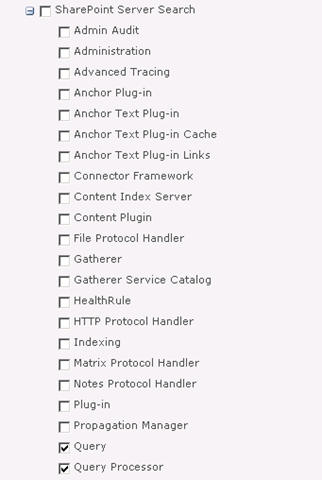
www.sevensigma.com.au


More User Profile Sync issues in SP2010: Certificate Provisioning Fun

Wow, isn’t the SharePoint 2010 User Profile Service just a barrel of laughs. Without a bit of context, when you compare it to SP2007, you can do little but shake your head in bewilderment at how complex it now appears.

I have a theory about all of this. I think that this saga started over a beer in 2008 or so.

I think that Microsoft decided that SharePoint 2010 should be able to write back to Active Directory (something that AD purists dislike but sold Bamboo many copies of their sync tool). Presumably the SharePoint team get on really well with the Forefront Identify Manager team and over a few Friday beers, the FIM guys said “Why write your own? Use our fit for purpose tool that does exactly this. As an added bonus, you can sync to other directories easily too”.

“Damn, that *is* a good idea”, says the SharePoint team and the rest is history. Remember the old saying, the road to hell is paved with good intentions?

Anyways, when you provision the UPS enough times, and understand what Forefront Identity Manager does, it all starts to make sense. Of course, to have it make sense, requires you to mess it up in the first place and I think that everyone universally will do this – because it is essentially impossible to get it right the first time unless you run everything as domain administrator. This is a key factor that I feel did not get enough attention within the product team. I have now visited three sites where I have had to correct issues with the user profile service. Remember, not all of us do SharePoint all day – for the humble system administrator that is also catering with the overall network, this implementation is simply too complex. Result? Microsoft support engineers are going to get a lot of calls here – and its going to cost Microsoft that way.

One use-case they never tested

I am only going to talk about one of the issues today because Spence has written the definitive article that will get you through if you are doing it from scratch.

I went to a client site where they had attempted to provision the user profile synchronisation unsuccessfully. I have no idea of the things they tried because I wasn’t there unfortunately, but I made a few changes to permissions, AD rights and local security policy as per Spencers post. I then provisioned user profile sync again and I hit this issue. A sequence of 4 event log entries.

Event ID:      234
Description:
ILM Certificate could not be created: Cert step 2 could not be created: C:\Program Files\Microsoft Office Servers\14.0\Tools\MakeCert.exe -pe -sr LocalMachine -ss My -a sha1 -n CN=”ForefrontIdentityManager” -sky exchange -pe -in “ForefrontIdentityManager” -ir localmachine -is root

Event ID:      234
Description:
ILM Certificate could not be created: Cert could not be added: C:\Program Files\Microsoft Office Servers\14.0\Tools\CertMgr.exe -add -r LocalMachine -s My -c -n “ForefrontIdentityManager” -r LocalMachine -s TrustedPeople

Event ID:      234
Description:
ILM Certificate could not be created: netsh http error:netsh http add urlacl url=
http://+:5725/ user=Domain\spfarm sddl=D:(A;;GA;;;S-1-5-21-2972807998-902629894-2323022004-1104)

Event ID:      234
Description:
Cannot get the self issued certificate thumbprint:

The theory

Luckily this one of those rare times where the error message actually makes sense (well – if you have worked with PKI stuff before). Clearly something went wrong in the creation of certificates. Looking at the sequence of events, it seems that as part of provisioning ForeFront Identity Manager, a self signed certificate was created for the Computer Account, added to the Trusted People certificate store and then is used for SSL on a web application or web service listening on port 5725.

By the way, don’t go looking for the web app listening on such a port in IIS because its not there. Just like SQL Reporting Services, FIM likely uses very little of IIS and doesn’t need the overhead.  

The way I ended up troubleshooting this issue was to take a good look at the first error in the sequence and what the command was trying to do. Note the description in the event log is important here. “ILM Certificate could not be created: Cert step 2 could not be created”. So this implies that this command is the second step in a sequence and there was a step 1 that must have worked. Below is the step 2 command that was attempted.

C:\Program Files\Microsoft Office Servers\14.0\Tools\MakeCert.exe -pe -sr LocalMachine -ss My -a sha1 -n CN=”ForefrontIdentityManager” -sky exchange -pe -in “ForefrontIdentityManager” -ir localmachine -is root

When you create a certificate, it has to have a trusted issuer. Verisign and Thawte are examples and all browsers consider them trustworthy issuers. But we are not using 3rd party issuers here. Forefront uses a self-signed certificate. In other words, it trusts itself. We can infer that step 1 is the creation of this self-trusted certificate issuer by looking at the parameters of the MakeCert command that step 2 is using.

Now I am not going to annotate every Makecert parameter here, but the English version of the command above says something like:

Make me a shiny new certificate for the local machine account and call it “ForefrontIdentityManager”, issued by a root certificate that can be found in the trusted root store also called ForeFrontIdentityManager.

So this command implies that step 1 was the creation of that root certificate that issues the other certificates. (Product team – you could have given the name of the root issuer certificate something different to the issued certificate)

The root cause

Now that we have established a theory of what is going on, the next step is to run the failing Makecrt command from a prompt and see what we get back. Make sure you do this as the Sharepoint farm account so you are comparing apples with apples.

C:\Program Files\Microsoft Office Servers\14.0\Tools>MakeCert.exe -pe -sr LocalMachine -ss My -a sha1 -n CN=”ForefrontIdentityManager” -sky exchange -pe -in “ForefrontIdentityManager” -ir localmachine -is root

Error: There are more than one matching certificate in the issuer’s root cert store. Failed

Aha! so what do we have here? The error message states that we have more than 1 matching certificate in the issuers root certificate store.

For what its worth it is the parameters “-ir localmachine -is root” that specifies the certificate store to use. In this case, it is the trusted root certificate store on the local computer.

So lets go and take a look. Run the Microsoft Management Console (MMC) and Choose “Add/Remove Snap In” from the File Menu.

image

From the list of snap ins choose Certificates and then choose “Computer Account”

image

Now in the list of certificate stores, we need to examine the one that the command refers to: The Trusted Root Certification Authorities store. Well, look at that, the error was telling the truth!

image

Clearly the Forefront Identity Manager provisioning/unprovisioning code does not check for all circumstances. I can only theorise what my client did to cause this situation because I wasn’t privy to what was done on this particular install before I got there. but step 1 of this provisioning process would create an issuing certificate whether one existed already or not. Step 2 then failed because it had no way to determine which of these certificates is the authoritative one.

This was further exacerbated because each re-attempt creates another root certificate because there is no check whether a certificate already exists.

The cure is quite easy. Just delete all of the ForefrontIdentityManager certificates from the Trusted Root Certification Authorities and re-provision the user profile sync in SharePoint. Provided that there is no certificate in this store to begin with, step 1 will create it and step 2 will then be able to create the self signed certificate using this issuer just fine.

Conclusion (and minor rant)

Many SharePoint pros have commented on the insane complexity of the new design of the user profile sync system. Yes I understand the increased flexibility offered by the new regime, leveraging a mature product like Forefront, but I see that with all of this flexibility comes risk that has not been well accounted for. SP2010 is twice as tough to learn as SP2007 and it is more likely that you will make a mistake than not making one. The more components added, the more points of failure and the less capable over-burdened support staff are in dealing with it when it happens.

SharePoint 2010 is barely out of nappies and I have already been in a remediation role for several sites over the user profile service alone.

I propose that Microsoft add a new program level KPI to rate how well they are doing with their SharePoint product development. That KPI should be something like % of time a system administrator can provision a feature without making a mistake or resorting to running it all as admin. The benefit to Microsoft would be tangible in terms of support calls and failed implementations. Such a KPI would force the product team to look at an example like the user profile service and think “How can we make this more resilient?”. “How can we remove the number of manual steps that are not obvious?”, “how can we make the wizard clearer to understand?” (yes they *will* use the wizard).

Right now it feels like the KPI was how many features could be crammed, in as well as how much integration between components there is. If there is indeed a KPI for that they definitely nailed it this time around.

Don’t get me wrong – its all good stuff, but if Microsoft are stumping seasoned SharePoint pros with this stuff, then they definitely need to change the focus a bit in terms of what constitutes a good product.

Thanks for reading

Paul Culmsee
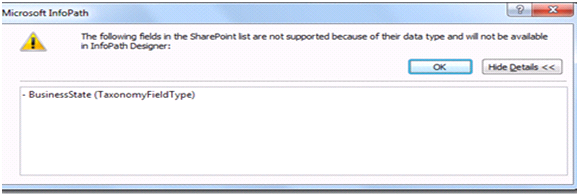
www.sevensigma.com.au


« Previous PageNext Page »
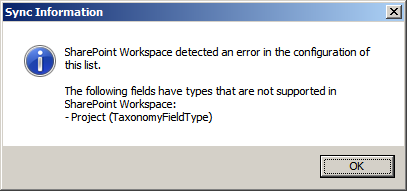
Today is: Wednesday 3 June 2026 -