Back to Cleverworkarounds mainpage
 

Demystifying SharePoint Performance Management Part 1 – How to stop developers blaming the infrastructure

Hi all

It seems to me that many SharePoint consultancies think their job is done when recommending a topology based on:

  • Looking up Microsoft’s server recommendations for CPU and RAM and then doubling them for safety
  • Giving the SQL Database Administrators heart palpitations by ‘proactively’ warning them about how big SharePoint databases can get.
  • Recommending putting database files and logs files on different disks with appropriate RAID levels.

Then satisfied that they have done the due diligence required, deploy a SharePoint farm chock-full of dodgy code and poor configuration.

Now if you are more serious about SharePoint performance, then chances are you had a crack at reading all 307 pages of Microsoft’s “Planning guide for server farms and environments for Microsoft SharePoint Server 2010.” If you indeed read this document, then it is even more likely that you worked your way through the 367 pages of Microsoft whitepaper goodness known as “Capacity Planning for Microsoft SharePoint Server 2010”. If you really searched around you might have also taken a look through the older but very excellent 23 pages of “Analysing Microsoft SharePoint Products and Technologies Usage” whitepaper.

Now let me state from the outset that these documents are hugely valuable for anybody interested in building a high performing SharePoint farm. They have some terrific stuff buried in there – especially the insights from Microsoft’s performance measurement of their own very large SharePoint topologies. But nevertheless, 697 pages is 697 pages (and you thought that my blog posts are wordy!). It is a lot of material to cover.

Having read and digested them recently, as well as chatting to SharePoint luminary Robert Bogue on all things related to performance, I was inspired to write a couple of blog posts on the topic of SharePoint performance management with the aim of making the entire topic a little more accessible. As such, all manner of SharePoint people should benefit from these posts because performance is a misunderstood area by geek and business user alike.

Here is what I am planning to cover in these posts.

  • Highlight some common misconceptions and traps for younger players in this area
  • Understand the way to think about measuring SharePoint performance
  • Understand the most common performance indicators and easy ways to measure them
  • Outline a lightweight, but rigorous method for estimating SharePoint performance requirements

In this introductory post, we will start proceedings by clearing up one of the biggest misconceptions about measuring SharePoint performance – and for that matter, many other performance management efforts. As an added bonus, understanding this issue will help you to put a permanent stop to developers who blame the infrastructure when things slow down. Furthermore you will also prevent rampant over-engineering of infrastructure.

Lead vs. lag indicators

Let’s say for a moment that you are the person responsible for road safety in your city. What is your ultimate indicator of success? I bet many readers will answer something like “reduced number of traffic fatalities per year” or something similar. While that is a definitive metric, it is also pretty macabre. It is also suffers from the problem of being measured after something undesirable has happened. (Despite millions of dollars in research, death is still relatively permanent at the time of writing).

Of course, you want to prevent road fatality, so you might create road safety education campaigns, add more traffic lights, improve signage on the roads and so forth. None of these initiatives are guaranteed to make any difference to road fatalities, but they very likely to make a difference nonetheless! Thus, we should also measure these sorts of things because if it contributes to reducing road fatalities, it is a good thing.

So where am I going with this?

In short, the number of road signage is a lead indicator, while the number of road fatalities is a lag indicator. A lead indicator is something that can help predict an outcome. A lag indicator is something that can only be tracked after a result has been achieved (or not). Therefore lag indicators don’t predict anything, but rather, they show the results of an outcome that has already occurred.

Now Robert Bogue made a great point when we were talking about this topic. He said that SharePoint performance and capacity planning is like trying to come up with drakes equation. For those of you not aware, Drakes equation attempts to estimate how much intelligent life might exist in the galaxy. But it is criticised because there are so many variables and assumption made in it. If any of them are wrong, the entire estimate is called into question. Consider this criticism of the equation by Michael Crighton:

The only way to work the equation is to fill in with guesses. As a result, the Drake equation can have any value from "billions and billions" to zero. An expression that can mean anything means nothing. Speaking precisely, the Drake equation is literally meaningless…

Back to SharePoint land…

Roberts point was that a platform like SharePoint can run many different types of applications with different patterns of performance. An obvious example is that saving a 10 megabyte document to SharePoint has a very different performance pattern than rendering a SharePoint page with a lot of interactive web parts on it. Add to that all of the underlying components that an application might use (for example, PowerPivot, Workflows, Information Management Policies, BCS and Search) and it becomes very difficult to predict future SharePoint performance. Accordingly, it is reasonable to conclude that the only way to truly measure SharePoint performance is via measuring SharePoint response times under some load. At least that performance indicator is reasonably definitive. Response time correlates fairly strongly to user experience.

So now that I have explained lead vs. lag indicators, guess which type of indicator response time is? Yup – you guessed it – a lag indicator. In terms of lag indicator thinking, it is completely true that page response time measures the outcome of all your SharePoint topology and design decisions.

But what if we haven’t determined our SharePoint topology yet? What if your manager wants to know what specification of server and storage will be required? What if your response time is terrible and users are screaming at you? How will response time help you to determine what to do? How can we predict the sort of performance that we will need?

Enter the lead indicator.  These provide assurance that the underlying infrastructure is sound and will scale appropriately. But by themselves, they no a guarantee of SharePoint performance (especially when there are developers and excessive use of foreach loops involved!) But what they do ensure is that you have a baseline of performance that can be used to compare with any future custom work. It is the difference between the baseline and whatever the current reality is that is the interesting bit.

So what lead indicators matter?

The three Microsoft documents I referred above list many useful performance monitor counters (particularly at a SQL Server level) that are useful to monitor. Truth be told I was sorely tempted to go through them in this series of posts, but instead I opted to pitch these articles to a wider audience. So rather than rehash what is in those documents, lets look at the obvious ones that are likely to come up in any sort of conversation around SharePoint performance. In terms of lead indicators there are several important metrics

  • Requests per second (RPS)
  • Disk I/O per second (IOPS)
  • Disk Megabytes transferred per second (MBPS)
  • Disk I/O latency

In the next couple of posts, I will give some more details on each of these indicators (their strengths and weaknesses) and how to go about collecting them.

A final Kaizen addendum

Kaizen? What the?

I  mentioned at the start of this post that performance management is not done well in many other industries. Some of you may have experienced the pain of working for a company that chases short term profit (lag indicator) at the expense of long term sustainability (measured by lead indicators). To that end, I recently read an interesting book on the Japanese management philosophy of Kaizen by Masaaki Imai. Imai highlighted the difference between Western attitudes to management in terms of “process-oriented management vs. result-oriented management”. The contention in the book was that western attitudes to management is all about results whereas Japanese approaches are all about the processes used to deliver the result.

In the United States, generally speaking, no matter how hard a person works, lack of results will result in a poor personal rating and lower income or status. The individuals contribution is valued only for its concrete results. Only results count in a result oriented society.

So as an example, a result society would look at the revenue from sales made over a given timeframe – the short term profit focused lag indicator. But according to the Kaizen philosophy, process oriented management would consider factors like:

  • Time spent calling new customers
  • Time spent on outside customer calls versus time devoted to clerical work

What sort of indicators are these? To me they are clearly lead indicators as they do not guarantee a sale in themselves.

It’s food for thought when we think about how to measure performance across the board. Lead and lag indicators are two sides of the same coin. You need both of them.

Thanks for reading

Paul Culmsee

www.hereticsguidebooks.com


I’m published in a PM Journal

Hi all

Just a quick note for those of you who are of the academic persuasion or who have an interest in research and academic literature. Kailash and I wrote a paper for the International Journal for Managing Projects in Business. The article is called “Towards a holding environment: building shared understanding and commitment in projects”. The paper is about how to improve shared understanding on projects – particularly at the early stages where ambiguity around objectives tends to be at its highest. While it covers a similar territory to the Heretics Guide, it covers some literature that we did not use for the book. Plus it is peer reviewed of course.

This paper presents a viewpoint on how to build a shared understanding of project goals and a shared commitment to achieving them. One of the ways to achieve shared understanding is through open dialogue, free from political and other constraints. In this paper (and in the Heretics Book) we flesh out what it takes for this to happen and call an environment which fosters such dialogue a holding environment. We illustrate, via a case study:

  1. How an alliance-based approach to projects can foster a holding environment.
  2. The use of argument visualisation tools such as IBIS (Issue-Based Information System) to clarify different points of view and options within such an environment.

This was my first experience with the peer review process of writing a journal paper. I have to say that, despite the odd bit of teeth gnashing, the review process did make this paper much better than it originally was. Of course, none of this would have even happened without Kailash. This was definitely his baby, and this paper would not exist without his intellect and wide-ranging knowledge.

Thanks for reading

Paul Culmsee

www.hereticsguidebooks.com


Warts and all SharePoint caveats in Melbourne and Auckland

image   image

Hi all

There are a couple of conferences happening this month that you should seriously consider attending. The New Zealand and Australian SharePoint Community Conferences. This year things have changed. There are over 50 Sessions designed to cater to a wide audience of the SharePoint landscape and the most varied range of international speakers I have seen so far. What is all the more pleasing this year is that aside from 20 sessions of technical content, the business side of SharePoint focus has been given greater coverage and there are over 20 customer case studies, which give great insight into how organisations large and small are making the most of their SharePoint deployments. This stuff is gold because it is what happens in the trenches of reality, rather than the nuanced, airbrushed one you tend to get when people are trying to sell you something.

My involvement will include some piano accompaniment while Christian Buckley hits the high notes Smile, and in terms of talks, I will be “keeping it real“ by presenting a talk called “Aligning Business Objectives with SharePoint“. I will also be running a 1 day class on one of the hardest aspects of SharePoint delivery: Business goal alignment. This is workshop is the “how” of goal alignment (plenty of people can tell you the “what”). If you are a BA, PM or recovering tech dude, do not miss this session. It draws a lot of inspiration from my facilitation and sensemaking work and has been very well received wherever I have run it.

The other session I am really looking forward to is a talk called SharePoint 2010 Caveats: Don’t get caught out! Now anybody in SharePoint for long enough has learnt the hard way to test all assumptions. This is because SharePoint is a complex beast with lots of moving parts. Unfortunately these moving parts don’t always integrate the way they one would assume. Usually the result of such an untested assumption is a lot of teeth gnashing and heavily adjusted project plans.

I mentioned airburshed reality before – this is something that occasionally frustrates me, especially when you see SharePoint demonstrations full of gushing praise, via a use case that glosses over inconvenient facts. Michal Pisarek of SharePointAnlystHQ fame, is a SharePoint practitioner who shares my view and a while back, we both decided to present a talk about some of the most common, dangerous and some downright strange caveats that SharePoint has to offer. The session outline is below.

"Yes but…" is a common answer given by experienced SharePoint consultants when asked if a particular solution design "will work". One of the key reasons for this is that SharePoint’s greatest strength is one of its weaknesses. The sheer number of components or features jam packed into the product, means that there are many complex interactions between them – often with small gotchas or large caveats that were not immediately apparent while the sales guy was dutifully taking you through the SharePoint pie diagram.

Unfortunately, some organizations trip up on such untested assumptions at times, and in turn it can render the logical edifice of their solution design invalid. This is costly in terms of lost time to change approaches, but increased complexity since sometimes workarounds are worse than the caveats. In this fun, lively and interactive session, Michal Pisarek will put his MVP (not really) on the line, and with a little help from Paul Culmsee, examine some of SharePoint’s common caveats. Make no mistake, understanding these caveats and the approaches for mitigating them will save you considerable time, money and heartache.

Don’t miss this informative and eye opening session

Now let me state up front that our aim is not to walk into a session and just spent all of the time bitching about all the ills of SharePoint. In fact the aim and intent of this session was from the point of view of “knowing this will save you money”. To that end, if there is a workaround for an issue, we will outline it for you.

Now just about every person who I have mentioned this talk to, have said something along the lines of “Oh I could give you some good ones”. So to that end, we want to hear any of the weird and wacky things that have stopped you in your tracks. If you have any rippers, then leave a comment below or submit them to Michal (michalpisarek@sharepointanlysthq.com)

We will also make this session casual and interactive. So expect some audience participation!

Thanks for reading


Paul Culmsee

www.sevensigma.com.au

www.hereticsguidebooks.com


The cloud isn’t the problem–Part 6: The pros and cons of patriotism

Hi all and welcome to my 6th post on the weird and wonderful world of cloud computing. The recurring theme in this series has been to point out that the technological aspects of cloud computing have never really been the key issue. Instead, I feel It is everything else around the technology, ranging from immature process, through to the effects of the industry shakeout and consolidation, through to the adaptive change required for certain IT roles. To that end, in the last post, we had fun at the expense of server huggers and the typical defence mechanisms they use to scare the rest of the organization into fitting into their happy-place world of in-house managed infrastructure. In that post I made a note on how you can tell an IT FUD defence because risk averse IT will almost always try use their killer argument up-front to bury the discussion. For many server huggers or risk averse IT, the killer defence is US Patriot Act Issue.

Now just in case you have never been hit with the “…ah but what about the Patriot Act?” line and have no idea what the Patriot Act is all about, let me give you a nice metaphor. It is basically a legislative version of the “Men in Black” movies. Why Men in Black? Because in those movies, Will Smith and Tommy Lee Jones had the ability to erase the memories of anyone who witnessed any extra-terrestrial activity with that silvery little pen-like device. With the Patriot Act, US law enforcement now has a similar instrument. Best of all, theirs doesn’t need batteries – it is all done on paper.

image

In short, the Patriot Act provides a means for U.S. law enforcement agencies, to seek a court order allowing access to the personal records of anyone without their knowledge, provided that it is in relation to an anti-terrorism investigation. This act applies to pretty much any organisation who has any kind of presence in the USA and the rationale behind introducing it was to make it much easier for agencies to conduct terrorism investigations and better co-ordinate their efforts. After all, in the reflection and lessons learnt from the 911 tragedy, the need for for better inter-agency co-ordination was a recurring theme.

The implication of this act is for cloud computing should be fairly clear. Imagine our friendly MIB’s Will Smith (Agent J) and Tommy Lee Jones (Agent K) bursting into Google’s headquarters, all guns blazing, forcing them to hand over their customers data. Then when Google staff start asking too many questions, they zap them with the memory eraser gizmo. (Cue Tommy Lee jones stating “You never saw us and you never handed over any data to us.” )

Scary huh? It’s the sort of scenario that warms the heart of the most paranoid server hugger, because surely no-one in their right mind could mount a credible counter-argument to that sort of risk to the confidentiality and integrity of an organisations sensitive data.

But at the end of the day, cloud computing is here to stay and will no doubt grow. Therefore we need to unpack this issue and see what lies behind the rhetoric on both sides of the debate. Thus, I decided to look into the Patriot act a bit further to understand it better. Of course, it should be clear here that I am not a lawyer, and this is just my own opinions from my research and synthesis of various articles, discussion papers and interviews. My personal conclusion is that all the hoo-hah about the Patriot Act is overblown. Yet in stating this, I have to also state that we are more or less screwed anyway (and always were). As you will see later in this post, there are great counter arguments that pretty much dismantle any anti-cloud arguments that are FUD based, but be warned – in using these arguments, you will demonstrate just how much bigger this thing is beyond cloud computing and get a sense of the broader scale of the risk.

So what is the weapon?

The first thing we have to do is understand some specifics about the Patriot Act’s memory erasing device. Within the vast scope of the act, the two areas for greatest concern in relation to data is the National Security Letter and the Section 215 order. Both provide authorities access to certain types of data and I need to briefly explain them:

A National Security Letter (NSL) is a type of subpoena that permits certain law enforcement agencies to compel organisations or individuals to provide certain types of information like financial and credit records, telephone and ISP records (Internet searches, activity logs, etc). Now NSL’s existed prior to the Patriot Act, but the act loosened some of the controls that previously existed. Prior to the act, the information being sought had to be directly related a foreign power or the agent of a foreign power – thereby protecting US citizens. Now, all agencies have to do is assert that the data being sought is relevant in some way to any international terrorism or foreign espionage investigations.

Want to see what a NSL looks like? Check this redacted one from wikipedia.

A Section 215 Order is similar to an NSL in that it is an instrument that law enforcement agencies can use to obtain data. It is also similar to NSL’s in that it existed prior to the Patriot Act – except back then it was called a FISA Order – named after the Foreign Intelligence Surveillance Act that enacted it. The type of data available under a Section 215 Order is more expansive than what you can eke out of an NSL, but a Section 215 Order does require a judge to let you get hold of it (i.e. there is some judicial oversight). In this case, the FBI obtains a 215 order from the Foreign Intelligence Surveillance Court which reviews the application. What the Patriot Act did different to the FISA Order was to broaden the definition of what information could be sought. Under the Patriot Act, a Section 215 Order can relate to “any tangible things (including books, records, papers, documents, and other items).” If these are believed to be relevant to an authorised investigation they are fair game. The act also eased the requirements for obtaining such an order. Previously, the FBI had to present “specific articulable facts” that provided evidence that the subject of an investigation was a “foreign power or the agent of a foreign power.” From my reading, now there is no requirement for evidence and the reviewing judge therefore has little discretion. If the application meets the requirements of Section 215, they will likely issue the order.

So now that we understand the two weapons that are being wielded, let’s walk through the key concerns being raised.

Concern 1: Impacted cloud providers can’t guarantee that sensitive client data won’t be turned over to the US government

CleverWorkArounds short answer:

Yes this is dead-set true and it has happened already.

CleverWorkArounds long answer:

This concern stems from the “loosening” of previous controls on both NSL’s and Section 215 Orders. NSL’s for example, require no probable cause or judicial oversight at all, meaning that the FBI can issue these at their own volition. Now it is important to note that they could do this before the Patriot Act came into being too, but back then the parameters for usage was much stricter. Section 215 Orders on the other hand, do have judicial oversight, but that oversight has also been watered down. Additionally the breadth of information that can be collected is now greater. Add to that the fact that both NSL’s and Section 215 Orders almost always include a compulsory non-disclosure or “gag” order, preventing notification to the data owner that this has even happened.

This concern is not only valid but it has happened and continues to happen. Microsoft has already stated that it cannot guarantee customers would be informed of Patriot Act requests and furthermore, they have also disclosed that they have complied with Patriot Act requests. Amazon and Google are in the same boat. Google also have also disclosed that they have handed data stored in European datacenters back to U.S. law enforcement.

Now some of you – particularly if you live or work in Europe – might be wondering how this could happen, given the European Union’s strict privacy laws. Why is it that these companies have complied with the US authorities regardless of those laws?

That’s where the gag orders come in – which brings us onto the second concern.

Concern 2: The reach of the act goes beyond US borders and bypasses foreign legislation on data protection for affected providers

CleverWorkArounds short answer:

Yes this is dead-set true and it has happened already.

CleverWorkArounds long answer:

The example of Google – a US company – handing over data in its EU datacentres to US authorities, highlights that the Patriot Act is more pervasive than one might think. In terms of who the act applies to, a terrific article put out by Alex C. Lakatos put it really well when he said.

Furthermore, an entity that is subject to US jurisdiction and is served with a valid subpoena must produce any documents within its “possession, custody, or control.” That means that an entity that is subject to US jurisdiction must produce not only materials located within the United States, but any data or materials it maintains in its branches or offices anywhere in the world. The entity even may be required to produce data stored at a non-US subsidiary.

Think about that last point – “non-US subsidiary”.  This gives you a hint to how pervasive this is. So in terms of jurisdiction and whether an organisation can be compelled to hand over data and be subject to a gag order, the list is expansive. Consider these three categories:

  • – US based company? Absolutely: That alone takes out Apple, Amazon, Dell, EMC (and RSA), Facebook, Google, HP, IBM, Symantec, LinkedIn, Salesforce.com, McAfee, Adobe, Dropbox and Rackspace
  • – Subsiduary company of a US company (incorporated anywhere else in the world)? It seems so.
  • – Non US company that has any form of US presence? It also seems so. Now we are talking about Samsung, Sony, Nokia, RIM and countless others.

The crux of this argument about bypassing is the gag order provisions. If the US company, subsidiary or regional office of a non US company receives the order, they may be forbidden from disclosing anything about it to the rest of the organisation.

Concern 3: Potential for abuse of Patriot Act powers by authorities

CleverWorkArounds short answer:

Yes this is true and it has happened already.

CleverWorkArounds long answer:

Since the Patriot Act came into place, there was a significant marked increase in the FBI’s use of National Security Letters. According to this New York Times article, there were 143,000 requests  between 2003 to 2005. Furthermore, according to a report from the Justice Department’s Inspector General in March 2007, as reported by CNN, the FBI was guilty of “serious misuse” of the power to secretly obtain private information under the Patriot Act. I quote:

The audit found the letters were issued without proper authority, cited incorrect statutes or obtained information they weren’t supposed to. As many as 22% of national security letters were not recorded, the audit said. “We concluded that many of the problems we identified constituted serious misuse of the FBI’s national security letter authorities,” Inspector General Glenn A. Fine said in the report.

The Liberty and Security Coalition went into further detail on this. In a 2009 article, they list some of the specific examples of FBI abuses:

  • – FBI issued NSLs when it had not opened the investigation that is a predicate for issuing an NSL;
  • – FBI used “exigent letters” not authorized by law to quickly obtain information without ever issuing the NSL that it promised to issue to cover the request;
  • – FBI used NSLs to obtain personal information about people two or three steps removed from the subject of the investigation;
  • – FBI has used a single NSL to obtain records about thousands of individuals; and
  • – FBI retains almost indefinitely the information it obtains with an NSL, even after it determines that the subject of the NSL is not suspected of any crime and is not of any continuing intelligence interest, and it makes the information widely available to thousands of people in law enforcement and intelligence agencies.

Concern 4: Impacted cloud providers cannot guarantee continuity of service during investigations

CleverWorkArounds short answer:

Yes this is dead-set true and it has happened already.

CleverWorkArounds long answer:

An oft-overlooked side effect of all of this is that other organisations can be adversely affected. One aspect of cloud computing scalability that we talked about in part 1 is that of multitenancy. Now consider a raid on a datacenter. If cloud services are shared between many tenants, innocent tenants who had nothing whatsoever to do with the investigation can potentially be taken offline. Furthermore, the hosting provider may be gagged from explaining to these affected parties what is going on. Ouch!

An example of this happening was reported in the New York TImes in mid 2011 and concerned Curbed Network, a New York blog publisher. Curbed, along with some other companies, had their service disrupted after an F.B.I. raid on their cloud providers datacenter. They were taken down for 24 hours because the F.B.I.’s raid on the hosting provider seized three enclosures which, unfortunately enough, included the gear they ran on.

Ouch! Is there any coming back?

As I write this post, I wonder how many readers are surprised and dismayed by my four risk areas. The little security guy in me says If you are then that’s good! It means I have made you more aware than you were previously which is a good thing. I also wonder if some readers by now are thinking to themselves that their paranoid server huggers are right?

To decide this, let’s now examine some of the the counter-arguments of the Patriot Act issue.

Rebuttal 1: This is nothing new – Patriot Act is just amendments to pre-existing laws

One common rebuttal is that the Patriot Act legislation did not fundamentally alter the right of the government to access data. This line of argument was presented in August 2011 by Microsoft legal counsel Jeff Bullwinkel in Microsoft Australia’s GovTech blog. After all, it was reasoned, the areas frequently cited for concern (NSL’s and Section 215/FISA orders) were already there to begin with. Quoting from the article:

In fact, U.S. courts have long held that a company with a presence in the United States is obligated to respond to a valid demand by the U.S. government for information – regardless of the physical location of the information – so long as the company retains custody or control over the data. The seminal court decision in this area is United States v. Bank of Nova Scotia, 740 F.2d 817 (11th Cir. 1984) (requiring a U.S. branch of a Canadian bank to produce documents held in the Cayman Islands for use in U.S. criminal proceedings)

So while the Patriot Act might have made it easier in some cases for the U.S. government to gain access to certain end-user data, the right was always there. Again quoting from Bullwinkel:

The Patriot Act, for example, enabled the U.S. government to use a single search warrant obtained from a federal judge to order disclosure of data held by communications providers in multiple states within the U.S., instead of having to seek separate search warrants (from separate judges) for providers that are located in different states. This streamlined the process for U.S. government searches in certain cases, but it did not change the underlying right of the government to access the data under applicable laws and prior court decisions.

Rebuttal 2: Section 215’s are not often used and there are significant limitations on the data you can get using an NSL.

Interestingly, it appears that the more powerful section 215 orders have not been used that often in practice. The best article to read to understand the detail is one by Alex Lakatos. According to him, less than 100 applications for section 215 orders were made in 2010. He says:

In 2010, the US government made only 96 applications to the Foreign Intelligence Surveillance Courts for FISA Orders granting access to business records. There are several reasons why the FBI may be reluctant to use FISA Orders: public outcry; internal FBI politics necessary to obtain approval to seek FISA Orders; and, the availability of other, less controversial mechanisms, with greater due process protections, to seek data that the FBI wants to access. As a result, this Patriot Act tool poses little risk for cloud users.

So while section 215 orders seem less used, NSL’s seem to be used a dime a dozen – which I suppose is understandable since you don’t have to deal with a pesky judge and all that annoying due process. But the downside of NSL’s from a law enforcement point of view is that the the sort of data accessible via the NSL is somewhat limited. Again quoting from Lakatos (with emphasis mine):

While the use of NSLs is not uncommon, the types of data that US authorities can gather from cloud service providers via an NSL is limited. In particular, the FBI cannot properly insist via a NSL that Internet service providers share the content of communications or other underlying data. Rather [.] the statutory provisions authorizing NSLs allow the FBI to obtain “envelope” information from Internet service providers. Indeed, the information that is specifically listed in the relevant statute is limited to a customer’s name, address, and length of service.

The key point is that the FBI has no right to content via an NSL. This fact may not stop the FBI from having a try at getting that data anyway, but it seems that savvy service providers are starting to wise up to exactly what information an NSL applies to. This final quote from the Lakato article summarises the point nicely and at the same time, offers cloud providers a strategy to mitigate the risk to their customers.

The FBI often seeks more, such as who sent and received emails and what websites customers visited. But, more recently, many service providers receiving NSLs have limited the information they give to customers’ names, addresses, length of service and phone billing records. “Beginning in late 2009, certain electronic communications service providers no longer honored” more expansive requests, FBI officials wrote in August 2011, in response to questions from the Senate Judiciary Committee. Although cloud users should expect their service providers that have a US presence to comply with US law, users also can reasonably ask that their cloud service providers limit what they share in response to an NSL to the minimum required by law. If cloud service providers do so, then their customers’ data should typically face only minimal exposure due to NSLs.

Rebuttal 3: Too much focus on cloud data – there are other significant areas of concern

This one for me is a perverse slam-dunk counter argument that puts the FUD defence of a server hugger back in its box. The reason it is perverse is that it opens up the debate that for some server huggers, may mean that they are already exposed to the risks they are raising. You see, the thing to always bear in mind is that the Patriot Act applies to data, not just the cloud. This means that data, in any shape or form is susceptible in some circumstances if a service provider exercises some degree of control over it. When you consider all the applicable companies that I listed earlier in the discussion like IBM, Accenture, McAfee, EMC, RIM and Apple, you then start to think about the other services where this notion of “control” might come into play.

What about if you have outsourced your IT services and management to IBM, HP or Accenture? Are they running your datacentres? Are your executives using Blackberry services? Are you using an outsourced email spam and virus scanning filter supplied by a security firm like McAfee? Using federated instant messaging? Performing B2B transactions with a US based company?

When you start to think about all of the other potential touch-points where control over data is exercised by a service provider, things start to look quite disturbing. We previously established that pretty much any organisation with a US interest (whether US owned or not), falls under Patriot Act jurisdiction and may be gagged from disclosing anything. So sure. . .cloud applications are a potential risk, but it may well be that any one of these companies providing services regarded as “non cloud” might receive an NSL or section 215 order with a gag provision, ordering them to hand over some data in their control. In the case of an outsourced IT provider, how can you be sure that the data is not straight out of your very own datacenter?

Rebuttal 4: Most other countries have similar laws

It also turns out that many other jurisdictions have similar types of laws. Canada, the UK, most countries in the EU, Japan and Australia are some good examples. If you want to dig into this, examine Clive Gringa’s article on the UK’s Regulation of Investigatory Powers Act 2000 (RIPA) and an article published by the global law firm Linklaters (a SharePoint site incidentally), on the legislation of several EU countries.

In the UK, RIPA governs the prevention and detection of acts of terrorism, serious crime and “other national security interests”. It is available to security services, police forces and authorities who investigate and detect these offenses. The act regulates interception of the content of communications as well as envelope information (who, where and when). France has a bunch of acts which I won’t bore you too much with, but after 911, they instituted act 2001-1062 of 15 November 2001 which strengthens the powers of French law enforcement agencies. Now agencies can order anyone to provide them with data relevant to an inquiry and furthermore, the data may relate to a person other than the one being subject to the disclosure order.

The Linklaters article covers Spain and Belgium too and the laws are similar in intent and power. They specifically cite a case study in Belgium where the shoe was very much on the other foot. US company Yahoo was fined for not co-operating with Belgian authorities.

The court considered that Yahoo! was an electronic communication services provider (ESP) within the meaning of the Belgian Code of Criminal Procedure and that the obligation to cooperate with the public prosecutor applied to all ESPs which operate or are found to operate on Belgian territory, regardless of whether or not they are actually established in Belgium

I could go on citing countries and legal cases but I think the point is clear enough. Smile

Rebuttal 5: Many countries co-operate with US law enforcement under treaties

So if the previous rebuttal argument that other countries have similar regimes in place is not convincing enough, consider this one. Lets assume that data is hosted by a major cloud services provider with absolutely zero presence in, or contacts with, the United States. There is still a possibility that this information may still be accessible to the U.S. government if needed in connection with a criminal case. The means by which this can happen is via international treaties relation to legal assistance. These are called Mutual Assistance Legal Treaties (MLAT).

As an example, US and Australia have had a longstanding bilateral arrangement. This provides for law enforcement cooperation between the two countries and under this arrangement, either government can potentially gain access to data located within the territory of the other. To give you an idea of what such a treaty might look like consider the scope of the Australia-US one. The scope of assistance is wide and I have emphasised the more relevant ones:

  • (a) taking the testimony or statements of persons;
  • (b) providing documents, records, and other articles of evidence;
  • (c) serving documents;
  • (d) locating or identifying persons;
  • (e) transferring persons in custody for testimony or other purposes;
  • (f) executing requests for searches and seizures and for restitution;
  • (g) immobilizing instrumentalities and proceeds of crime;
  • (h) assisting in proceedings related to forfeiture or confiscation; and
  • (i) any other form of assistance not prohibited by the laws of the Requested State.

For what its worth, if you are interested in the boundaries and limitations of the treaty, it states that the “Central Authority of the Requested State may deny assistance if”:

  • (a) the request relates to a political offense;
  • (b) the request relates to an offense under military law which would not be an offense under ordinary criminal law; or
  • (c) the execution of the request would prejudice the security or essential interests of the Requested State.

Interesting huh? Even if you host in a completely independent country, better check the treaties they have in place with other countries.

Rebuttal 6: Other countries are adjusting their laws to reduce the impact

The final rebuttal to the whole Patriot Act argument that I will cover is that things are moving fast and countries are moving to mitigate the issue regardless of the points and counterpoints that I have presented here. Once again I will refer to an article from Alex Lakatos, who provides a good example. Lakatos writes that the EU may re-write their laws to ensure that it would be illegal for the US to invoke the Patriot Act in certain circumstances.

It is anticipated, however, that at the World Economic Forum in January 2012, the European Commission will announce legislation to repeal the existing EU data protection directive and replace it with more a robust framework. The new legislation might, among other things, replace EU/US Safe Harbor regulations with a new approach that would make it illegal for the US government to invoke the Patriot Act on a cloud-based or data processing company in efforts to acquire data held in the European Union. The Member States’ data protection agency with authority over the company’s European headquarters would have to agree to the data transfer.

Now Lakatos cautions that this change may take a while before it actually turns into law, but nevertheless is something that should be monitored by cloud providers and cloud consumers alike.

Conclusion

So what do you think? Are you enlightened and empowered or confused and jaded? Smile

I think that the Patriot Act issue is obviously a complex one that is not well served by arguments based on fear, uncertainty and doubt. The risks are real and there are precedents that demonstrate those risks. Scarily, it doesn’t make much digging to realise that those risks are more widespread than one might initially consider. Thus, if you are going to play the Patriot Act card for FUD reasons, or if you are making a genuine effort to mitigate the risks, you need to look at all of the touch points where service provider might exercise a degree of control. They may not be where you think they are.

In saying all of this, I think this examination highlights some strategy that can be employed by cloud providers and cloud consumers alike. Firstly, If I were a cloud provider, I would state my policy about how much data will be given when confronted by an NSL (since that has clear limitations). Many providers may already do this, so to turn it around to the customer, it is incumbent on cloud consumers to confirm with the providers as to where they stand. I don’t know if there is that much value in asking a cloud provider if they are exempt from the reach of the Patriot Act. Maybe its better to assume they are affected and instead, ask them how they intend to mitigate their customers downlevel risks.

Another obvious strategy for organisations is to encrypt data before it is stored on cloud infrastructure. While that is likely not going to be an option in a software as a service model like Office 365, it is certainly an option in the infrastructure and platform as a service models like Amazon and Azure. That would reduce the impact of a Section 215 Order being executed as the cloud provider is unlikely going to have the ability to decrypt the data.

Finally (and to sound like a broken record), a little information management governance would not go astray here. Organisations need to understand what data is appropriate for what range of cloud services. This is security 101 folks and if you are prudent in this area, cloud shouldn’t necessarily be big and scary.

Thanks for reading

Paul Culmsee

www.hereticsguidebooks.com

www.sevensigma.com.au

p.s Now do not for a second think this article is exhaustive as this stuff moves fast. So always do your research and do not rely on an article on some guys blog that may be out of date before you know it.



An obscure “failed to create the configuration database” issue…

Hi all

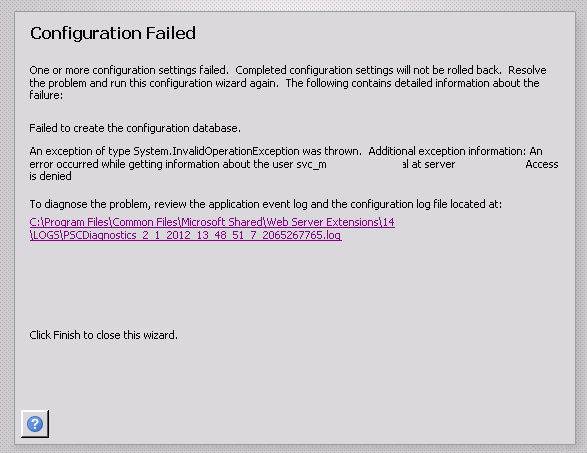
You would think that after years of installing SharePoint in various scenarios, that I would be able to get past step 3 in the configuration wizard (the step that creates the configuration database). But today I almost got nailed by an issue that – while in hindsight is dead-set obvious – was rather difficult to diagnose.

Basically it was a straightforward two server farm installation. The installer account had local admin rights on the web front end server and sysadmin rights on the SQL box. SQL was a dedicated named instance using an alias. I was tutoring the install while an engineer did the driving and as soon as we hit step 3, blammo! – the Installation failed claiming that the configuration database could not be created.

image

Looking a little deeper into the log, the error message stated:

An error occurred while getting information about the user svc-spfarm at server mydomain.com: Access is denied

Hmm.. After double checking all the obvious things (SQL dbcreator and securityadmin on the farm account, group policy interference, etc) it was clear this was something different. The configuration database was successfully created on the SQL server, although the permissions of the farm account had not been applied. This proved that SQL permissions were appropriate. Clearly this was an issue around authentication and active directory.

There were very few reports of similar symptoms online and the closest I saw was a situation where the person ran the SharePoint configuration wizard using the local machine administrator account by mistake, rather than a domain account. Of course, the local account had no rights to access active directory and the wizard had failed because it had no way to verify the SharePoint farm account in AD to grant it permissions to the configuration database. But in this case we were definitely using a valid domain account.

As part of our troubleshooting, we opted to explicitly give the farm account “Log on as a service” rights (since this is needed for provisioning the user profile service later anyhow). It was then we saw some really bizarre behaviour. We were unable to find the SharePoint farm account in Active Directory. Any attempt to add the farm account to the “log on as a service” right would not resolve and therefore we could not assign that right. We created another service account to test this behaviour and and the same thing happened. This immediately smelt like an issue with Active directory replication – where the domain controller being accessed was not replicating with the others domain controllers. A quick repladmin check and we ascertained that all was fine.

Hmm…

At this point, we started experimenting with various accounts, old and new. We were able to conclude that irrespective of the age of the account, some accounts could be found in Active Directory no problem, whereas others could not be. Yet those that could not be found were valid and working on the domain.

Finally one of the senior guys in the organisation realised the problem. In their AD topology, there was an OU for all service accounts. The permissions of that OU had been modified from the default. The “Domain users” group did not have any access to that OU at all. This prevented service accounts from being enumerated by regular domain accounts (a security design they had adopted some time back). Interestingly, even service accounts that live in this OU cannot enumerate any other accounts in that OU, including themselves.

This caused several problems with SharePoint. First the configuration wizard could not finish because it needed to assign the farm account permissions to the config and central admin databases. Additionally, the farm account would not be able to register managed accounts if those accounts were stored in this OU.

Fortunately, when they created this setup, they made a special group called “Enumerate Service Account OU”. By adding the installer account and the farm account to this group all was well.

I have to say, I thought I had seen most of the ways Active Directory configuration might trip me up – but this was a first. Anyone else seen this before?

Thanks for reading

Paul Culmsee

www.sevensigma.com.au

www.hereticsguidebooks.com

p.s The error log detail is below….


Log Name:      Application

Source:        SharePoint 2010 Products Configuration Wizard

Date:          1/02/2012 2:22:52 PM

Event ID:      104

Task Category: None

Level:         Error

Keywords:      Classic

User:          N/A

Computer:      Mycomputer

Description:

Failed to create the configuration database.

An exception of type System.InvalidOperationException was thrown.  Additional exception information: An error occurred while getting information about the user svc-spfarm at server mydomain: Access is denied

System.InvalidOperationException: An error occurred while getting information about the user svc-spfarm at server mydomain

   at Microsoft.SharePoint.Win32.SPNetApi32.NetUserGetInfo1(String server, String name)

   at Microsoft.SharePoint.Administration.SPManagedAccount.GetUserAccountControl(String username)

   at Microsoft.SharePoint.Administration.SPManagedAccount.Update()

   at Microsoft.SharePoint.Administration.SPProcessIdentity.Update()

   at Microsoft.SharePoint.Administration.SPApplicationPool.Update()

   at Microsoft.SharePoint.Administration.SPWebApplication.CreateDefaultInstance(SPWebService service, Guid id, String applicationPoolId, SPProcessAccount processAccount, String iisServerComment, Boolean secureSocketsLayer, String iisHostHeader, Int32 iisPort, Boolean iisAllowAnonymous, DirectoryInfo iisRootDirectory, Uri defaultZoneUri, Boolean iisEnsureNTLM, Boolean createDatabase, String databaseServer, String databaseName, String databaseUsername, String databasePassword, SPSearchServiceInstance searchServiceInstance, Boolean autoActivateFeatures)

   at Microsoft.SharePoint.Administration.SPWebApplication.CreateDefaultInstance(SPWebService service, Guid id, String applicationPoolId, IdentityType identityType, String applicationPoolUsername, SecureString applicationPoolPassword, String iisServerComment, Boolean secureSocketsLayer, String iisHostHeader, Int32 iisPort, Boolean iisAllowAnonymous, DirectoryInfo iisRootDirectory, Uri defaultZoneUri, Boolean iisEnsureNTLM, Boolean createDatabase, String databaseServer, String databaseName, String databaseUsername, String databasePassword, SPSearchServiceInstance searchServiceInstance, Boolean autoActivateFeatures)

   at Microsoft.SharePoint.Administration.SPAdministrationWebApplication.CreateDefaultInstance(SqlConnectionStringBuilder administrationContentDatabase, SPWebService adminService, IdentityType identityType, String farmUser, SecureString farmPassword)

   at Microsoft.SharePoint.Administration.SPFarm.CreateAdministrationWebService(SqlConnectionStringBuilder administrationContentDatabase, IdentityType identityType, String farmUser, SecureString farmPassword)

   at Microsoft.SharePoint.Administration.SPFarm.CreateBasicServices(SqlConnectionStringBuilder administrationContentDatabase, IdentityType identityType, String farmUser, SecureString farmPassword)

   at Microsoft.SharePoint.Administration.SPFarm.Create(SqlConnectionStringBuilder configurationDatabase, SqlConnectionStringBuilder administrationContentDatabase, IdentityType identityType, String farmUser, SecureString farmPassword, SecureString masterPassphrase)

   at Microsoft.SharePoint.Administration.SPFarm.Create(SqlConnectionStringBuilder configurationDatabase, SqlConnectionStringBuilder administrationContentDatabase, String farmUser, SecureString farmPassword, SecureString masterPassphrase)

   at Microsoft.SharePoint.PostSetupConfiguration.ConfigurationDatabaseTask.CreateOrConnectConfigDb()

   at Microsoft.SharePoint.PostSetupConfiguration.ConfigurationDatabaseTask.Run()

   at Microsoft.SharePoint.PostSetupConfiguration.TaskThread.ExecuteTask()


An opportunity to learn about aligning SharePoint to business goals in Vancouver

Hi all

Just a quick note to mention that I’m off travelling again, this time swapping 39 degree Celsius summer weather of Perth for somewhere between –6 to 5 degrees of Canada. I’ll be spending a week in Canada running two classes – one public and one private. The first class is a public SharePoint Governance and Information Architecture class running in Vancouver. MVP Michal Pisarek of SharePointAnalystHQ fame will be there and it should be a terrific two days of learning how to think a little differently to govern SharePoint strategy and deployment. You will learn a bunch of new skills, techniques and perspectives. Best of all, the skills learnt are applicable for many other types of complex projects.

The class flyer is here: http://www.sevensigma.com.au/wp-content/uploads/downloads/2011/02/SPIA.pdf

The registration site is here: http://spiavancouver.eventbrite.com/

In terms of course coverage and content it is worth noting the research performed by the Eventful group (who run the Share conferences). According to them, the hot topic areas for SharePoint are governance, user adoption, change management, information architecture and user empowerment. These sort of topics are the sort where plenty of people tell you what the issues are, but are typically lighter on what to do about them. This class covers why this is, as well as dealing with all of these areas and presents detailed strategies, tools and methods to address them. Furthermore, aside from the 500+ page manual of meaty governance goodness, as a take home, we supply a CD for attendees with a sample performance framework, governance plan, SharePoint ROI calculator and sample mind maps of Information Architecture.

At last count there were 5 places left for the Vancouver class, so if you have been pondering if it is a worthwhile class, check out some of the feedback from the class web site. Also, if you know anybody who might be interested in attending, please pass the course flyer and registration site details to them. We always end up with people who tell us “Ah – if only I knew about the class!!”

Thanks for reading

Paul Culmsee

www.sevensigma.com.au

www.hereticsguidebooks.com


The cloud isn’t the problem–Part 5: Server huggers and a crisis of identity

Hi all

Welcome to my fifth post that delves into the irrational world of cloud computing. After examining the not-so-obvious aspects of Microsoft, Amazon and the industry more broadly, its time to shift focus a little. Now the appeal of the cloud really depends on your perspective. To me, there are three basic motivations for getting in on the act…

  1. I can make a buck
  2. I can save a buck
  3. I can save a buck (and while I am at it, escape my pain-in-the-ass IT department)

If you haven’t guessed it, this post will examine #3, and look at what the cloud means for the the perennial issue of the IT department and business disconnect. I recently read an article over at CIO magazine where they coined the term “Server Huggers” to describe the phenomenon I am about to describe. So to set the flavour for this discussion, let me tell you about the biggest secret in organisational life…

We all have an identity crisis (so get over it).

In organizations, there are roles that I would call transactional (i.e. governed by process and clear KPI’s) and those that are knowledge-based (governed by gut feel and insight). Whilst most roles actually entail both of these elements, most of us in SharePoint land are the latter. In fact we actually spend a lot of time in meeting rooms “strategizing” the solutions that our more transactionally focused colleagues will be using to meet their KPI’s. Beyond SharePoint, this also applies to Business Analysts, Information Architects, Enterprise Architects, Project Managers and pretty much anyone with the word “senior”, “architect”, “analyst”  or “strategic” in their job title.

But there is a big, fat, elephant in the “strategizing room” of certain knowledge worker roles that is at the root of some irrational organisational behaviour. Many of us are suffering a role-based identity crisis. To explain this, lets pick a straw-man example of one of the most conflicted roles of all right now: Information Architects.

One challenge with the craft of IA is pace of change, since IA today looks very different from its library and taxonomic roots. Undoubtedly, it will look very different ten years from now too as it gets assailed from various other roles and perspectives, each believing their version of rightness is more right. Consider this slightly abridged quote from Joshua Porter:

Worse, the term “information architecture” has over time come to encompass, as suggested by its principal promoters, nearly every facet of not just web design, but Design itself. Nowhere is this more apparent than in the latest update of Rosenfeld and Morville’s O’Reilly title, where the definition has become so expansive that there is now little left that isn’t information architecture […] In addition, the authors can’t seem to make up their minds about what IA actually is […] (a similar affliction pervades the SIGIA mailing list, which has become infamous for never-ending definition battles.) This is not just academic waffling, but evidence of a term too broadly defined. Many disciplines often reach out beyond their initial borders, after catching on and gaining converts, but IA is going to the extreme. One technologist and designer I know even referred to this ever-growing set of definitions as the “IA land-grab”, referring to the tendency that all things Design are being redefined as IA.

You can tell when a role is suffering an identity crisis rather easily too. It is when people with the current role start to muse that the title no longer reflects what they do and call for new roles to better reflect the environment they find themselves in. Evidence for this exists further in Porter’s post. Check out the line I marked with bold below:

In addition, this shift is already happening to information architects, who, recognizing that information is only a byproduct of activity, increasingly adopt a different job title. Most are moving toward something in the realm of “user experience”, which is probably a good thing because it has the rigor of focusing on the user’s actual experience. Also, this as an inevitable move, given that most IAs are concerned about designing great things. IA Scott Weisbrod, sees this happening too: “People who once identified themselves as Information Architects are now looking for more meaningful expressions to describe what they do – whether it’s interaction architect or experience designer

So while I used the example of Information Architects as an example of how pace of change causes an identity crisis, the advent of the cloud doesn’t actually cause too many IA’s (or whatever they choose to call themselves) to lose too much sleep. But there are other knowledge-worker roles that have not really felt the effects of change in the same way as their IA cousins. In fact, for the better part of twenty years one group have actually benefited greatly from pace of change. Only now is the ground under their feet starting to shift, and the resulting behaviours are starting to reflect the emergence of an identity crisis that some would say is long overdue.

IT Departments and the cloud

At a SharePoint Saturday in 2011, I was on a panel and we were asked by an attendee what effect Office 365 and other cloud based solutions might have on a traditional IT infrastructure role. This person asking was an infrastructure guy and his question was essentially around how his role might change as cloud solutions becomes more and more mainstream. Of course, all of the SharePoint nerds on the panel didn’t want to touch that question with a bargepole and all heads turned to me since apparently I am “the business guy”. My reply was that he was sensing a change – commoditisation of certain aspects of IT roles. Did that mean he was going to lose his job? Unlikely, but nevertheless when  change is upon us, many of us tend to place more value on what we will lose compared to what we will gain. Our defence mechanisms kick in.

But lets take this a little further: The average tech guy comes in two main personas. The first is the tech-cowboy who documents nothing, half completes projects then loses interest, is oblivious to how much they are in over their head and generally gives IT a bad name. They usually have a lot of intellectual intelligence (IQ), but not so much emotional intelligence (EQ). Ben Curry once referred to this group as “dumb smart guys.” The second persona is the conspiracy theorist who had to clean up after such a cowboy. This person usually has more skills and knowledge than the first guy, writes documentation and generally keeps things running well. Unfortunately, they also can give IT a bad name. This is because, after having to pick up the pieces of something not of their doing, they tend to develop a mother hen reflex based on a pathological fear of being paged at 9pm to come in and recover something they had no part in causing. The aforementioned cowboys rarely last the distance and therefore over time, IT departments begin to act as risk minimisers, rather than business enablers.

Now IT departments will never see it this way of course, instead believing that they enable the business because of their risk minimisation. Having spent 20 years being a paranoid conspiracy theorist, security-type IT guy, I totally get why this happens as I was the living embodiment of this attitude for a long time. Technology is getting insanely complex while users innate ability to do some really risky and dumb is increasing. Obviously, such risk needs to be managed and accordingly, a common characteristic of such an IT department is the word “no” to pretty much any question that involves introducing something new (banning iPads or espousing the evils of DropBox are the best examples I can think of right now). When I wrote about this issue in the context of SharePoint user adoption back in 2008, I had this to say:

The mother hen reflex should be understood and not ridiculed, as it is often the user’s past actions that has created the reflex. But once ingrained, the reflex can start to stifle productivity in many different ways. For example, for an employee not being able to operate at full efficiency because they are waiting 2 days for a helpdesk request to be actioned is simply not smart business. Worse still, a vicious circle emerges. Frustrated with a lack of response, the user will take matters into their own hands to improve their efficiency. But this simply plays into the hands of the mother hen reflex and for IT this reinforces the reason why such controls are needed. You just can’t trust those dog-gone users! More controls required!

The long term legacy of increasing technical complexity and risk is that IT departments become slow-moving and find it difficult to react to pace of change. Witness the number of organisations still running parts of their business on Office 2003, IE6 and Windows XP. The rest of the organisation starts to resent using old tools and the imposition of process and structure for no tangible gain. The IT department develops a reputation of being difficult to deal with and taking ages to get anything done. This disconnect begins to fester, and little by little both IT and “the business” develop a rose-tinged view of themselves (which is known as groupthink) and a misguided perception of the other.

At the end of the day though, irrespective of logic or who has the moral high ground in the debate, an IT department with a poor reputation will eventually lose. This is because IT is no longer seen as a business enabler, but as a cost-center. Just as organisations did with the IT outsourcing fad over the last decade, organisational decision makers will read CIO magazine articles about server huggers look longingly to the cloud, as applications become more sophisticated and more and more traditional vendors move into the space, thus legitimising it. IT will be viewed, however unfairly, as a burden where the cost is not worth the value realised. All the while, to conservative IT, the cloud represents some of their worst fears realised. Risk! risk! risk! Then the vicious circle of the mother-hen reflex will continue because rogue cloud applications will be commissioned without IT knowledge or approval. Now we are back to the bad old days of rogue MSAccess or SharePoint deployments that drives the call for control based governance in the first place!

<nerd interlude>

Now to the nerds reading this post who find it incredibly frustrating that their organisation will happily pump money into some cloud-based flight of fancy, but whine when you want to upgrade the network, I want you to take take note of this paragraph as it is really (really) important! I will tell you the simple reason why people are more willing to spend more money on fluffy marketing than IT. In the eyes of a manager who needs to make a profit, sponsoring a conference or making the reception area look nice is seen as revenue generating. Those who sign the cheques do not like to spend capital on stuff unless they can see that it directly contributes to revenue generation! Accordingly, a bunch of servers (and for that matter, a server room) are often not considered expenditure that generates revenue but are instead considered overhead! Overhead is something that any smart organisation strives to reduce to remain competitive. The moral of the story? Stop arguing cloud vs. internal on what direct costs are incurred because people will not care! You would do much better to demonstrate to your decision makers that IT is not an overhead. Depending on how strong your mother hen reflex is and how long it has been in place, that might be an uphill battle.

</nerd interlude>

Defence mechanisms…

Like the poor old Information Architect, the rules of the game are changing for IT with regards to cloud solutions. I am not sure how it will play out, but I am already starting to see the defence mechanisms kicking in. There was a CIO interviewed in the “Server Huggers” article that I referred to earlier (Scott Martin) who was hugely pro-cloud. He suggested that many CIO’s are seeing cloud solutions as a threat to the empire they have built:

I feel like a lot of CIOs are in the process of a kind of empire building.  IT empire builders believe that maintaining in-house services helps justify their importance to the company. Those kinds of things are really irrational and not in the best interest of the company […] there are CEO’s who don’t know anything about technology, so their trusted advisor is the guy trying to protect his job.

A client of mine in Sydney told me he enquired to his IT department about the use of hosted SharePoint for a multi-organisational project and the reply back was a giant “hell no,” based primarily on fear, uncertainty and doubt. With IT, such FUD is always cloaked in areas of quite genuine risk. There *are* many core questions that we must ask cloud vendors when taking the plunge because to not do so would be remiss (I will end this post with some of those questions). But the key issue is whether the real underlying reason behind those questions is to shut down the debate or to genuinely understand the risks and implications of moving to the cloud.

How can you tell an IT department is likely using a FUD defence? Actually, it is pretty easily because conservative IT is very predictable – they will likely try and hit you with what they think is their slam-dunk counter argument first up. Therefore, they will attempt to bury the discussion with the US Patriot Act Issue. I’ve come across this issue and and Mark Miller at FPWeb mentioned to me that this comes up all the time when they talk about SharePoint hosting to clients. (I am going to cover the Patriot Act issue in the next post because it warrants a dedicated post).

If the Patriot Act argument fails to dent unbridled cloud enthusiasm, the next layer of defence is to highlight cloud based security (identity, authentication and compliance) as well as downtime risk, citing examples such as the September outage of Office 365, SalesForce.com’s well publicized outages, the Amazon outage that took out Twitter, Reddit, Foursquare, Turntable.fm, Netflix and many, many others. The fact that many IT departments do not actually have the level of governance and assurance of their systems that they aspire to will be conveniently overlooked. 

Failing that, the last line of defence is to call into question the commercial viability of cloud providers. We talked about the issues facing the smaller players in the last post, but It is not just them. What if the provider decides to change direction and discontinue a service? Google will likely be cited, since it has a habit of axing cloud based services that don’t reach enough critical mass (the most recent casualty is Google health being retired as I write this).  The risk of a cloud provider going out of business or withdrawing a service is a much more serious risk than when a software supplier fails. At least when its on premise you still have the application running and can use it.

Every FUD defence is based on truth…

Now as I stated above, all of the concerns listed above are genuine things to consider before embarking on a cloud strategy. Prudent business managers and CIOs must weigh the pros and cons of cloud offering before rushing into a deployment that may not be appropriate for their organisation. Equally though, its important to be able to see through a FUD defence when its presented. The easiest way to do this is do some of your own investigations first.

To that end, you can save yourself a heap of time by checking out the work of Richard Harbridge. Richard did a terrific cloud talk at the most recent Share 2011 conference. You can view his slide deck here and I recommend really going through slides 48-81. He has provided a really comprehensive summary of considerations and questions to ask. Among other things, he offered a list of questions that any organisation should be asking providers of cloud services. I have listed some of them below and encourage you to check out his slide deck as it is really comprehensive and covers way more than what I have covered here.

Security Storage Identity & Access
Who will have access to my data?
Do I have full ownership of my data?
What type of employee / contractor screening you do, before you hire them?
How do you detect if an application is being attacked (hacked), and how is that
reported to me and my employees?
How do you govern administrator access to the service?
What firewalls and anti-virus technology are in place?
What controls do you have in place to ensure safety for my data while it is
stored in your environment?
What happens to my data if I cancel my service?
Can I archive environments?
Will my data be replicated to any other datacenters around the world (If
yes, then which ones)?
Do you offer single sign-on for your services?
Active directory integration?
Do all of my users have to rely on solely web based tools?
Can users work offline?
Do you offer a way for me to run your application locally and how quickly I can revert to the local installation?
Do you offer on-premise, web-based, or mixed environments?
     
Reliability & Support Performance  
What is your Disaster Recovery and Business Continuity strategy?
What is the retention period and recovery granularity?
Is your Cloud Computing service compliant with [insert compliance regime here]?
What measures do you provide to assist compliance and minimize legal risk?
What types of support do you offer?
How do you ensure we are not affected by upgrades to the service?
What are your SLAs and how do you compensate when it is not met?
How fast is the local network?
What is the storage architecture?
How many locations do you have and how are they connected?
Have you published any benchmark scores for your infrastructure?
What happens when there is over subscription?
How can I ensure CPU and memory are guaranteed?
 

Conclusion and looking forward…

For some organisations, the lure of cloud solutions is very seductive. From a revenue perspective, it saves a lot of capital expenditure. From a time perspective, it can be deployed very quickly and and from a maintenance perspective, takes the burden away from IT. Sounds like a winner when put that way. But the real issue is that the changing cloud paradigm potentially impacts the wellbeing of some IT professionals and IT departments because it calls into question certain patterns and practices within established roles. It also represents a loss of control and as I said earlier, people often place a higher value on what they will lose compared to what they will gain.

Irrespective of this, whether you are a new age cloud loving CIO or a server hugger, any decision to move to the cloud should be about real business outcomes. Don’t blindly accept what the sales guy tells you. Understand the risks as well as the benefits. Leverage the work Richard has done and ask the cloud providers the hard questions. Look for real world stories (like my second and third articles in this series) which illustrate where the services have let people down.

For some, cloud will be very successful. For others, the gap between expectations and reality will come with a thud.

Thanks for reading

Paul Culmsee

www.sevensigma.com.au

www.hereticsguidebooks.com


Why can’t people find stuff on the intranet?–Final summary

Hi

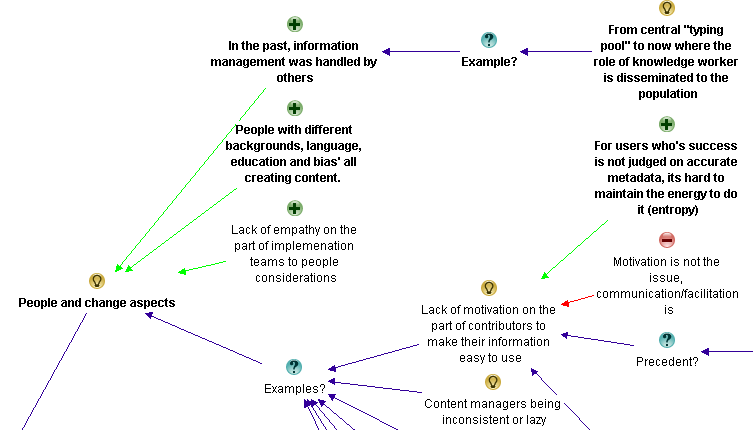
Those of you who get an RSS feed of this blog might have noticed it was busy over last week. This is because I pushed out 4 blog posts that showed my analysis using IBIS of a detailed linear discussion on LinkedIn. To save people getting lost in the analysis, I thought I’d quickly post a bit of an executive summary from the exercise.

To set context, Issue Mapping is a technique of visually capturing rationale. It is graphically represented using a simple, but powerful, visual structure called IBIS (Issue Based Information System). IBIS allows all elements and rationale of a conversation to be captured in a manner that can be easily reflected upon. Unlike prose, which is linear, the advantage of visually representing argument structure is it helps people to form a better mental model of the nature of a problem or issue. Even better, when captured this way, makes it significantly easier to identify emergent themes or key aspects to an issue.

You can find out all about IBIS and Dialogue Mapping in my new book, at the Cognexus site or the other articles on my blog.

The challenge…

On the Intranet Professionals group on LinkedIn recently, the following question was asked:

What are the main three reasons users cannot find the content they were looking for on intranet?

In all, there were more than 60 responses from various people with some really valuable input. I decided that it might be an interesting experiment to capture this discussion using the IBIS notion to see if it makes it easier for people to understand the depth of the issue/discussion and reach a synthesis of root causes.

I wrote 4 posts, each building on the last, until I had covered the full conversation. For each post, I supplied an analysis of how I created the IBIS map and then exported the maps themselves. You can follow those below:

Part 1 analysis: http://www.cleverworkarounds.com/2012/01/15/why-cant-users-find-stuff-on-the-intranet-in-ibis-synthesispart-1/
Part 2 analysis: http://www.cleverworkarounds.com/2012/01/15/why-cant-users-find-stuff-on-the-intranet-an-ibis-synthesispart-2/
Part 3 analysis: http://www.cleverworkarounds.com/2012/01/16/why-cant-users-find-stuff-on-the-intranet-an-ibis-synthesispart-3/
Part 4 analysis: http://www.cleverworkarounds.com/2012/01/16/why-cant-users-find-stuff-on-the-intranet-an-ibis-synthesispart-4/

Final map: http://www.cleverworkarounds.com/maps/findstuffpart4/Linkedin_Discussion__192168031326631637693.html

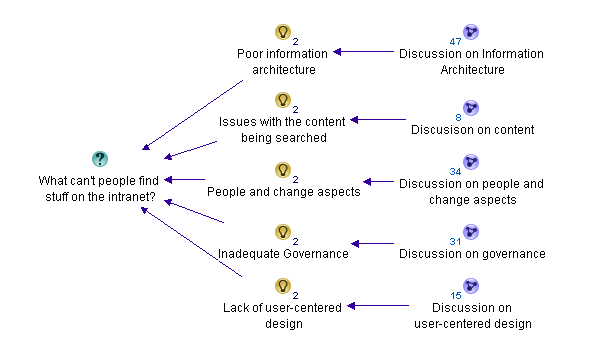
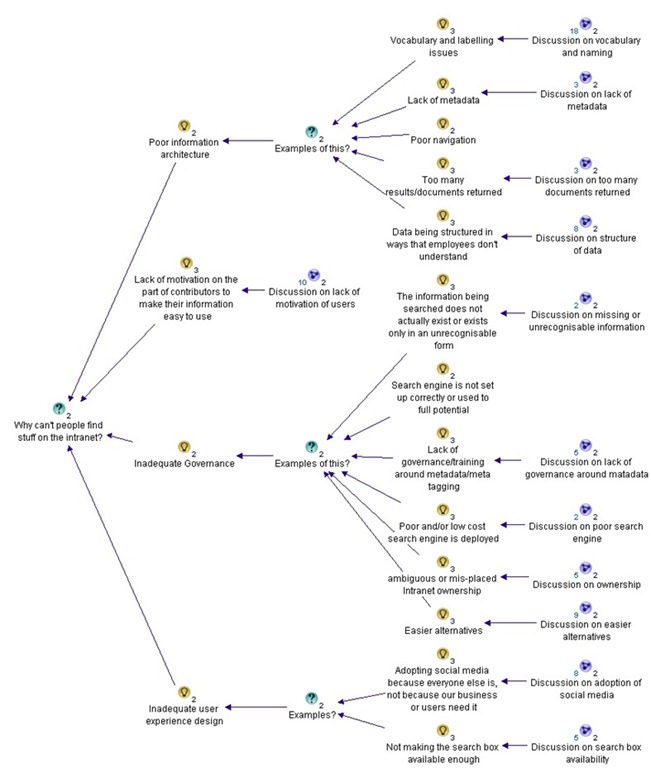
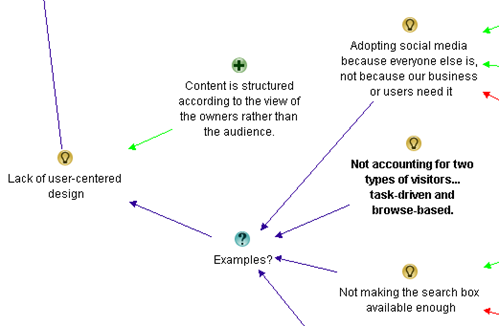
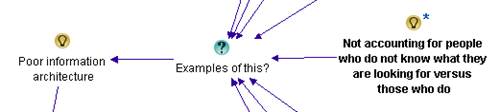
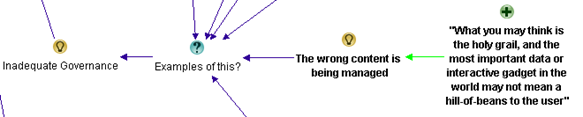
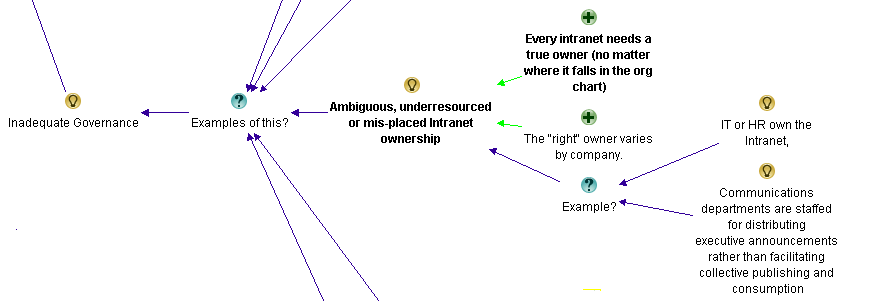
For what its worth, the summary of themes from the discussion was that there were 5 main reasons for users not finding what they are looking for on the intranet.

  1. Poor information architecture
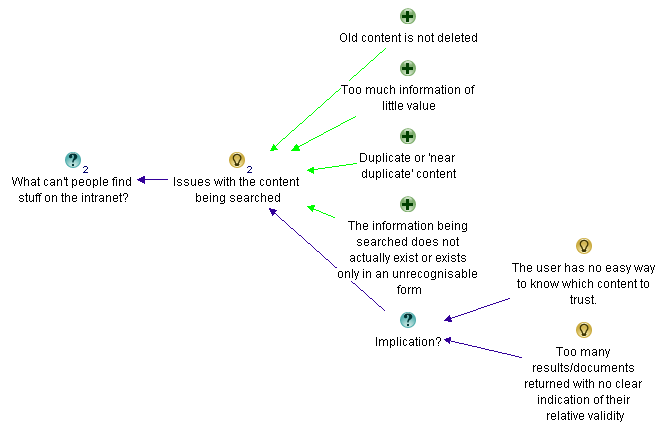
  2. Issues with the content itself
  3. People and change aspects
  4. Inadequate governance
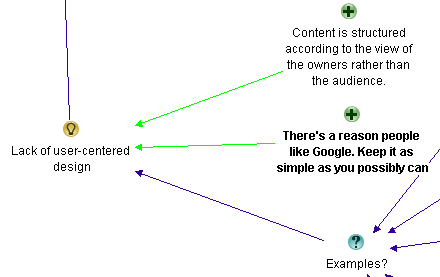
  5. Lack of user-centred design

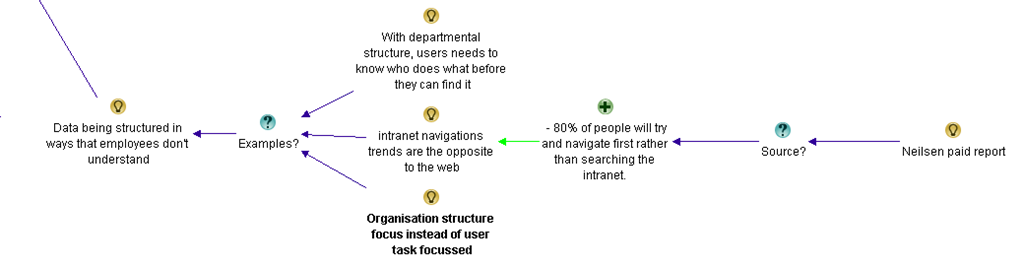
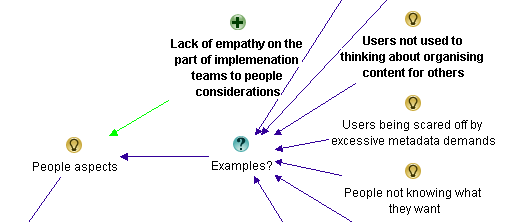
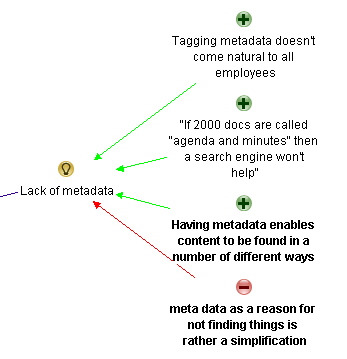
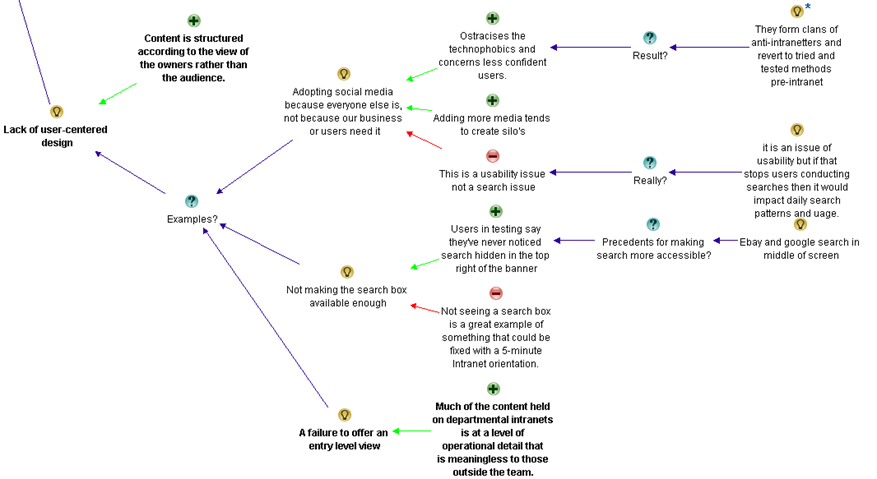
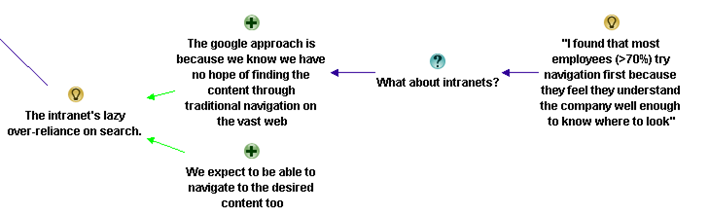
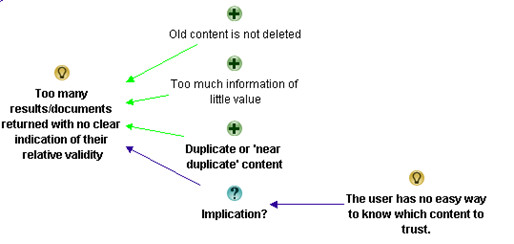
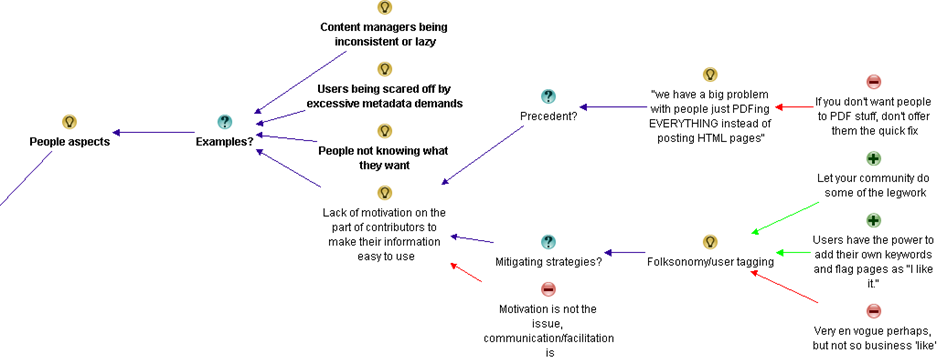
Within these areas or “meta-themes” there were varied sub issues. These are captured in the table below.

Poor information architecture Issues with content People and change aspects Inadequate governance Lack of user-centred design
Vocabulary and labelling issues

· Inconsistent vocabulary and acronyms

· Not using the vocabulary of users

· Documents have no naming convention

Poor navigation

Lack of metadata

· Tagging does not come naturally to employees

Poor structure of data

· Organisation structure focus instead of user task focussed

· The intranet’s lazy over-reliance on search

Old content not deleted

Too much information of little value

Duplicate or “near duplicate” content

Information does not exist or an unrecognisable form

People with different backgrounds, language, education and bias’ all creating content

Too much “hard drive” thinking

People not knowing what they want

Lack of motivation for contributors to make information easier to use

Google inspired inflated expectations on search functionality on intranet

Adopting social media from a hype driven motivation

Lack of governance/training around metadata and tagging

Not regularly reviewing search analytics

Poor and/or low cost search engine is deployed

Search engine is not set up properly or used to full potential

Lack of “before the fact” coordination with business communications and training

Comms and intranet don’t listen and learn from all levels of the business.

Ambiguous, under-resourced or misplaced Intranet ownership

The wrong content is being managed

There are easier alternatives available

Content is structured according to the view of the owners rather than the audience

Not accounting for two types of visitors… task-driven and browse-based

No social aspects to search

Not making the search box available enough

A failure to offer an entry level view

Not accounting for people who do not know what they are looking for versus those who do

Not soliciting feedback from a user on a failed search about what was being looked for

So now you have seen the final output, be sure to visit the maps and analysis and read about the journey on how this table emerged. One thing is for sure, it sure took me a hell of a lot longer to write about it than to actually do it!

Thanks for reading

Paul Culmsee

www.sevensigma.com.au

www.hereticsguidebooks.com


Why can’t users find stuff on the intranet? An IBIS synthesis–Part 4

Hi and welcome to my final post on the linkedin discussion on why users cannot find what they are looking for on intranets. This time the emphasis is on synthesis… so let’s get the last few comments done shall we?

Michael Rosager • @ Simon. I agree.
Findability and search can never be better than the content available on the intranet.
Therefore, non-existing content should always be number 1
Some content may not be published with the terminology or language used by the users (especially on a multilingual intranet). The content may lack the appropriate meta tags. – Or maybe you need to adjust your search engine or information structure. And there can be several other causes…
But the first thing that must always be checked is whether they sought information / data is posted on the intranet or indexed by the search engine.

Rasmus Carlsen • in short:
1: Too much content (that nobody really owns)
2: Too many local editors (with less knowledge of online-stuff)
3: Too much “hard-drive-thinking” (the intranet is like a shared drive – just with a lot of colors = a place you keep things just to say that you have done your job)

Nick Morris • There are many valid points being made here and all are worth considering.
To add a slightly different one I think too often we arrange information in a way that is logical to us. In large companies this isn’t necessarily the same for every group of workers and so people create their own ‘one stop shop’ and chaos.
Tools and processes are great but somewhere I believe you need to analyse what information is needed\valued and by whom and create a flexible design to suit. That is really difficult and begins to touch on how organisations are structured and the roles and functions of employees.

Taino Cribb • Hi everyone
What a great discussion! I have to agree to any and all of the above comments. Enabling users to find info can definately be a complicated undertaking that involves many facets. To add a few more considerations to this discussion:
Preference to have higher expectations of intranet search and therefore “blame” it, whereas Google is King – I hear this too many times, when users enter a random (sometimes misspelled) keyword and don’t get the result they wish in the first 5 results, therefore the “search is crap, we should have Google”. I’ve seen users go through 5 pages of Google results, but not even scroll down the search results page on the intranet.
Known VS Learned topics – metadata and user-tagging is fantastic to organise content we and our users know about, but what about new concepts where everyone is learning for the first time? It is very difficult to be proactive and predict this content value, therefore we often have to do so afterwards, which may very well miss our ‘window of opportunity’ if the content is time-specific (ie only high value for a month or so).
Lack of co-ordination with business communications/ training etc (before the fact). Quite often business owners will manage their communications, but may not consider the search implications too. A major comms plan will only go so far if users cannot search the keywords contained in that message and get the info they need. Again, we miss our window if the high content value is valid for only a short time.
I very much believe in metadata, but it can be difficult to manage in SP2007. Its good to see the IM changes in SP2010 are much improved.

Of the next four comments most covered old ground (a sure sign the conversation is now fairly well saturated). Nick says he is making a “a slightly different” point, but I think issues of structure not suiting a particular audience has been covered previously. I thought Taino’s reply was interesting because she focused on the issue of not accounting for known vs. learned topics and the notion of a “window of opportunity” in relation to appropriate tagging. Perhaps this reply was inspired by what Nick was getting at? In any event, adding it was a line call between governance and information architecture and for now, I chose the latter (and I have a habit of changing my mind with this stuff :-).

image_thumb[12]

I also liked Taino’s point about user expectations around the “google experience” and her examples. I also loved earlier Rasmus’s point about “hard-drive thinking” (I’m nicking that one for my own clients Rasmus Smile). Both of these issues are clearly people aspects, so I added them as examples around that particular theme.

image_thumb[14]

Finally, I added Taino’s “lack of co-ordination” comments as another example of inadequate governance.

image_thumb[18]

Anne-Marie Low • The one other thing I think missing from here (other than lack of metadata, and often the search tool itself) is too much content, particularly out of date information. I think this is key to ensuring good search results, making sure all the items are up to date and relevant.

Andrew Wright • Great discussion. My top 3 reasons why people can’t find content are:
* Lack of meta data and it’s use in enabling a range of navigation paths to content (for example, being able to locate content by popularity, ownership, audience, date, subject, etc.) See articles on faceted classification:
http://en.wikipedia.org/wiki/Faceted_classification
and
Contextual integration
http://cibasolutions.typepad.com/wic/2011/03/contextual-integration-how-it-can-transform-your-intranet.html#tp
* Too much out-of-date, irrelevant and redundant information
See slide 11 from the following presentation (based on research of over 80 intranets)
http://www.slideshare.net/roowright/intranets2011-intranet-features-that-staff-love
* Important information is buried too far down in the hierarchy
Bonus 2 reasons 🙂
* Web analytics and measures not being used to continuously improve how information is structured
* Over reliance on Search instead of Browsing – see the following article for a good discussion about this
Browse Versus Search: Stumbling into the Unknown
http://idratherbewriting.com/2010/05/26/browse-versus-search-organizing-content-9/

Both Anne and Andrew make good points and Andrew supplies some excellent links too, but all of these issues have been covered in the map so nothing more has been added from this part of the discussion.

Juan Alchourron • 1) that particular, very important content, is not yet on the intranet, because “the” director don’t understand what the intranet stands for.
2) we’re asuming the user will know WHERE that particular content will be placed on the intranet : section, folder and subfolder.
3) bad search engines or not fully configured or not enough SEO applied to the intranet

John Anslow • Nowt new from me
1. Search ineffective
2. Navigation unintuitive
3. Useability issues
Too often companies organise data/sites/navigation along operational lines rather than along more practical means, team A is part of team X therefore team A should be a sub section of team X etc. this works very well for head office where people tend to have a good grip of what team reports where but for average users can cause headaches.
The obvious and mostly overlooked method of sorting out web sites is Multi Variant Testing (MVT) and with the advent of some pretty powerful tools this is no longer the headache that it once was, why not let the users decide how they want to navigate, see data, what colour works best, what text encourages them to follow what links, in fact how it works altogether?
Divorcing design, usability, navigation and layout from owners is a tough step to take, especially convincing the owners but once taken the results speak for themselves.

Most of these points are already well discussed, but I realised I had never made a reference to John’s point about organisational structures versus task based structures for intranets. I had previously captured rationale around the fact that structures were inappropriate, so I added this as another example to that argument within information architecture…

image

Edwin van de Bospoort • I think one of the main reasons for not finding the content is not poor search engines or so, but simply because there’s too much irrelevant information disclosed in the first place.
It’s not difficult to start with a smaller intranet, just focussing on filling out users needs. Which usually are: how do I do… (service-orientated), who should I ask for… (corporate facebok), and only 3rd will be ‘news’.
So intranets should be task-focussed instead if information-focussed…
My 2cnts 😉

Steven Kent • Agree with Suzanne’s suggestion “Old content is not deleted and therefore too many results/documents returned” – there can be more than one reason why this happens, but it’s a quick way to user frustration.

Maish Nichani • It is interesting to see how many of us think metadata and structure are key to finding information on the intranet. I agree too. But come to think of it, staff aren’t experts in information management. It’s all very alien to them. Not too long ago, they had their desktops and folders and they could find their information when they wanted. All this while it was about “me and my content”. Now we have this intranet and shared folders and all of a sudden they’re supposed to be thinking about how “others” would like to find and use the information. They’ve never done this before. They’ve never created or organized information for “others”. Metadata and structure are just “techie” stuff that they have to do as part of their publishing, but they don’t know why they’re doing it or for what reason. They real problem, in my opinion, is lack of empathy.

Barry Bassnett • * in establishing a corporate taxonomy.1. Lack of relevance to the user; search produces too many documents.3. Not training people in the concept that all documents are not created by the individual for the same individual but as a document that is meant to be shared. e.g. does anybody right click PDFs to add metadata to its properties? Emails with a subject line stat describe what is in it.

Luc de Ruijter • @Maish. Good point about information management.
Q: Who’d be responsible to oversee the management of information?
Shouldn’t intranet managers/governors have that responsibility?
I can go along with (lack of) empathy as an underlying reason why content isn’t put away properly. This is a media management legacy reason: In media management content producers never had to have empathy with participating users, for there were only passive audiences.
If empathy is an issue. Then it proves to me that communication strategies are still slow to pick up on the changes in communication behaviour and shift in mediapower, in the digital age.
So if we step back from technological reasons for not finding stuff (search, meta, office automation systems etc.) another big reason looks around the corner of intranet management: those responsible for intranet policies and strategy.

Most of this discussion covers stuff already represented in the map, although I can see that in this part of the conversation there is a preoccupation with content and its relevance. Maish also makes a couple of good points. First up he makes the point that staff are not experts in information management and don’t tend to think about how someone else might wish to find the information later. He also concludes by stating the real problem is a lack of empathy. I liked this and felt that this was a nice supporting argument to the whole conjecture that “people issues” is a major theme in this discussion, so I added it as a pro.

image


Now we have an interesting bit in the conversation (for me anyway). Terry throws a curveball question. (Side note: Curveball questions are usually asked with genuine intent, but tend to have a negative effect on live meetings. Dialogue Mapping loves curveball questions as it is often able to deflect its negative impacts).

Terry Golding • Can I play devils advocate and ask WHY you feel meta data is so vital? Dont misunderstand me I am not saying that it is not important, but I cant help feeling that just saying meta data as a reason for not finding things is rather a simplification. Let me ask it another way, what is GOOD meta data, can you give examples please ?

Luc de Ruijter • @Terry. Good questions which can have many answers (see all comments above where you’ll find several answers already). Why do library books have labels on their covers? Those labels are in fact metadata (avant la lettre) which help library people ordering their collection, and clients to find titles. How do you create tag clouds which offer a more intuitive and user centered way to navigate a website/blog? By tagging all content with (structured) meta tags.Look around a bit and you’ll see that metadata are everywhere and that they serve you in browsing and retrieving content. That’s why metadata are vital these days.I think there are no strict right and good meta structures. Structures depend on organisational contexts. Some metastructures are very complex and formal (see comments about taxonomies above), others are quite simple.Metadata can enable users to browse information blocks. By comparisson navigation schemes can only offer rigid sender driven structures to navigate to pages.

Andrew Wright • @Terry. Meta data enables content to be found in a number of different ways – not just one as is typical of paper based content (and many intranets as well unfortunately).
For instance, if you advertise a house for sale you may have meta data about the house such as location, number of rooms and price. This then allows people to locate the house using this meta data (eg. search by number of bedrooms, price range, location). Compare this with how houses are advertised in newspapers (ie. by location only) and you can see the benefits of meta data.
For a good article about the benefits of meta data, read Card Sorting Doesn’t Cut the Custard:
http://www.zefamedia.com/websites/card-sorting-doesnt-cut-the-custard/
To read a more detailed example about how meta data can be applied to intranets, read:
Contextual integration: how it can transform your intranet
http://cibasolutions.typepad.com/wic/2011/03/contextual-integration-how-it-can-transform-your-intranet.html

Terry questions the notion of metadata. I framed it as a con against the previous metadata arguments. Both Luc and Andrew answer and I think the line that most succinctly captures the essence of than answer is Andrew’s “Meta data enables content to be found in a number of different ways”. So I reframe that slightly as a pro supporting the notion that lack of metadata is one of the reasons why users can;t find stuff on the intranet.

image

Next is yours truly…

Paul Culmsee • Hi all
Terry a devils advocate flippant answer to your devils advocate question comes from Corey Doctrow with his dated, but still hilarious essay on the seven insurmountable obstacles to meta-utopia 🙂 Have a read and let me know what you think.
http://www.well.com/~doctorow/metacrap.htm
Further to your question (and I *think* I sense the undertone behind your question)…I think that the discussion around metadata can get a little … rational and as such, rational metadata metaphors are used when they are perhaps not necessarily appropriate. Yes metadata is all around us – humans are natural sensemakers and we love to classify things. BUT usually the person doing the information architecture has a vested interest in making the information easy for you. That vested interest drives the energy to maintain the metadata.
In user land in most organisations, there is not that vested interest unless its on a persons job description and their success is measured on it. For the rest of us, the energy required to maintain metadata tends to dissipate over time. This is essentially entropy (something I wrote about in my SharePoint Fatigue Syndrome post)
http://www.cleverworkarounds.com/2011/10/12/sharepoint-fatigue-syndrome/

Bob Meier • Paul, I think you (and that metacrap post) hit the nail on the head describing the conflict between rational, unambiguous IA vs. the personal motivations and backgrounds of the people tagging and consuming content. I suspect it’s near impossible to develop a system where anyone can consistently and uniquely tag every type of information.
For me, it’s easy to get paralyzed thinking about metadata or IA abstractly for an entire business or organization. It becomes much easier for me when I think about a very specific problem – like the library book example, medical reports, or finance documents.

Taino Cribb • @Terry, brilliant question – and one which is quite challenging to us that think ‘metadata is king’. Good on you @Paul for submitting that article – I wouldn’t dare start to argue that. Metadata certainly has its place, in the absence of content that is filed according to an agreed taxonomy, correctly titled, the most recent version (at any point in time), written for the audience/purpose, valued and ranked comparitively to all other content, old and new. In the absence of this technical writer’s utopia, the closest we can come to sorting the wheat from the chaff is classifcation. It’s not a perfect workaround by any means, though it is a workaround.
Have you considered that the inability to find useful information is a natural by-product of the times? Remember when there was a central pool to type and file everything? It was the utopia and it worked, though it had its perceived drawbacks. Fast forward, and now the role of knowledge worker is disseminated to the population – people with different backgrounds, language, education and bias’ all creating content.
It is no wonder there is content chaos – it is the price we pay for progress. The best we as information professionals can do is ride the wave and hold on the best we can!

Now my reply to Terry was essentially speaking about the previously spoken of issue around lack of motivation on the part of users to make their information easy to use. I added a pro to that existing idea to capture my point that users who are not measured on accurate metadata have little incentive to put in the extra effort. Taino then refers to pace of change more broadly with her “natural by-product of the times” comment. This made me realise my meta theme of “people aspects” was not encompassing enough. I retitled it “people and change aspects” and added two of Taino’s points as supporting arguments for it.

image

At this point I stopped as enough had been captured the the conversation had definitely reached saturation point. It was time to look at what we had…

For those interested, the final map had 139 nodes.

The second refactor

At this point is was time to sit back and look at the map with the view of seeing if my emergent themes were correct and to consolidate any conversational chaff. Almost immediately, the notion of “content” started to bubble to the surface of my thinking. I had noticed that a lot of conversation and re-iteration by various people related to the content being searched in the first place. I currently had some of that captured in Information Architecture and in light of the final map, I felt that this wasn’t correct. The evidence for this is that Information Architecture topics dominated the maps. There were 55 nodes for information architecture, compared to 34 for people and change and 31 for governance.

Accordingly, I took all of the captured rationale related to content and made it its own meta-theme as shown below…

image

Within the “Issues with the content being searched” map are the following nodes…

image

I also did another bit of fine tuning too here and there and overall, I was pretty happy with the map in its current form.

The root causes

If you have followed my synthesis of what the dialogue from the discussion told me, it boiled down to 5 key recurring themes.

  1. Poor Information Architecture
  2. Issues with the content itself
  3. People and change aspects
  4. Inadequate governance
  5. Lack of user-centred design

I took the completed maps, exported the content to word and then pared things back further. This allowed me to create the summary table below:

Poor Information Architecture Issues with content People and change aspects Inadequate governance Lack of user-centred design
Vocabulary and labelling issues

· Inconsistent vocabulary and acronyms

· Not using the vocabulary of users

· Documents have no naming convention

Poor navigation

Lack of metadata

· Tagging does not come naturally to employees

Poor structure of data

· Organisation structure focus instead of user task focussed

· The intranet’s lazy over-reliance on search

Old content not deleted

Too much information of little value

Duplicate or “near duplicate” content

Information does not exist or an unrecognisable form

People with different backgrounds, language, education and bias’ all creating content

Too much “hard drive” thinking

People not knowing what they want

Lack of motivation for contributors to make information easier to use

Google inspired inflated expectations on search functionality on intranet

Adopting social media from a hype driven motivation

Lack of governance/training around metadata and tagging

Not regularly reviewing search analytics

Poor and/or low cost search engine is deployed

Search engine is not set up properly or used to full potential

Lack of “before the fact” coordination with business communications and training

Comms and intranet don’t listen and learn from all levels of the business.

Ambiguous, under-resourced or misplaced Intranet ownership

The wrong content is being managed

There are easier alternatives available

Content is structured according to the view of the owners rather than the audience

Not accounting for two types of visitors… task-driven and browse-based

No social aspects to search

Not making the search box available enough

A failure to offer an entry level view

Not accounting for people who do not know what they are looking for versus those who do

Not soliciting feedback from a user on a failed search about what was being looked for

The final maps

The final map can be found here (for those who truly like to see full context I included an “un-chunked” map which would look terrific when printed on a large sized plotter). Below however, is a summary as best I can do in a blog post format (click to enlarge). For a decent view of proceedings, visit this site.

Poor Information Architecture

part4map1

Issues with the content itself

part4map2

People and change aspects

part4map3

Inadequate governance

part4map4

Lack of user-centred design

part4map5

Thanks for reading.. as an epilogue I will post a summary with links to all maps and discussion.

Paul Culmsee

www.sevensigma.com.au


Why can’t users find stuff on the intranet? An IBIS synthesis–Part 3

Hi all

This is the third post in a quick series that attempts to use IBIS to analyse an online discussion. The map is getting big now, but luckily, we are halfway through the discussion and will have most of the rationale captured by the end of this post. We finished the part 2 with a summary map that has grouped the identified reasons why it is hard to find information on intranets into core themes. Right now there are 4 themes that have emerged. In this post we see if there are any more to emerge and fully flesh out the existing ones. Below is our starting point for part 3.

part3map1_thumb5

Our next two responses garnered more nodes in the map than most others. I think this is a testament to the quality of their input to the discussion. First up Dan…

Dan Benatan • Having researched this issue across many diffferent company and departmental intranets, my most frequent findings are:
1. A complete lack of user-centred design. Content that many members of the organization need to access is structured according to the view of the content owners rather than the audience. This should come as no surprise, it remains the biggest challenge in public websites.
2. A failure to offer an entry level view. Much of the content held on departmental intranets is at a level of operational detail that is meaningless to those outside the team. The information required is there, but it is buried so deep in the documents that people outside the team can’t find it.
3. The intranet’s lazy over-reliance on search. Although many of us have become accustomed to using Google as our primary entry point to find content across the web, we may do this because we know we have no hope of finding the content through traditional navigation. The web is simply far too vast. We do not, however, rely purely on search once we are in the website we’ve chosen. We expect to be able to navigate to the desired content. Navigation offers context and enables us to build an understanding of the knowledge area as we approach the destination. In my research I found that most employees (>70%) try navigation first because they feel they understand the company well enough to know where to look.
4. Here I agree with many of the comments posted above. Once the user does try search, it still fails. The search engine returns too many results with no clear indication of their relative validity. There is a wealth of duplicate content on most intranets and , even worse, there is a wealth of ‘near duplicate’ content; some of which is accurate and up-to-date and much that is neither. The user has no easy way to know which content to trust. This is where good intranet management and good metadata can help.

My initial impression was that this was an excellent reply and Dan’s experience shone through it. I thought this was one of the best contributions to the discussion thus far. Let’s see what I added shall we?

First up, Dan returned to the user experience issue, which was one of the themes that had emerged. I liked his wording of the issue, so I also changed the theme node of “Inadequate user experience design” to Dan’s framing of “Lack of user-centred design”, which I thought was better put. I then added his point about content structured to the world view of owner, rather than audience. His second point about an “entry level view” relates to the first point in the sense that both are user centred design issues. So I added the entry level view point as an example…

image_thumb14

I added Dan’s point about the intranet’s lazy over-reliance on search to the information architecture theme. I did this because he was discussing the relationship between navigation and search, and navigation had already come up as an information architecture issue.

image_thumb23

Dan’s final point about too many results returned was already covered previously, but he added a lot of valuable arguments around it. I restructured that section of the map somewhat and incorporated his input.

image_thumb6

Next we have Rob, who also made a great contribution (although not as concise as Dan)

Rob Faulkner • Wow… a lot of input, and a lot of good ideas. In my experience there can be major liabilities with all of these more “global” concepts, however.
No secret… Meta data is key for both getting your site found to begin with, as well as aiding in on-site search. The weak link in this is the “people aspect” of the exercise, as has been alluded to. I’ve worked on interactive vehicles with ungodly numbers of pages and documents that rely on meta data for visibility and / or “findability” (yes, I did pay attention in English class once in a while… forgive me), and the problem — more often than not — stems from content managers either being lazy and doing a half ass job of tagging, if at all, or inconsistency of how things are tagged by those that are gung-ho about it. And, as an interactive property gets bigger, so too does the complexity tagging required to make it all work. Which circles back to freaking out providers into being lazy on the one hand, or making it difficult for anyone to get it “right” on the other. Vicious circle. Figure that one out and you win… from my perspective.
Another major issue that was also alluded to is organization. For an enterprise-class site, thorough taxonomy / IA exercises must be hammered out by site strategists and THEN tested for relevance to target audiences. And I don’t mean asking targets what THEY want… because 9 times out of 10 you’re either going to get hair-brained ideas at best, or blank stares at worst. You’ve just got to look at the competitive landscape to figure out where the bar has been set, what your targets are doing with your product (practical application, OEMing, vertical-specific use, etc… then Test the result of your “informed” taxonomy and IA to ensure that it does, in fact, resonate with your targets once you’ve gotten a handle on it.
Stemming from the above, and again alluded to, be cautious about how content is organized in order to reflect how your targets see it, not how internal departments handle it. Most of the time they are not one in the same. Further, you’ve got to assume that you’re going to have at least two types of visitors… task-driven and browse-based. Strict organization by product or service type may be in order for someone that knows what they’re looking for, but may not mean squat to those that don’t. Hence, a second axis of navigation that organizes your solutions / products by industry, pain point, what keeps you up at night, or whatever… will enable those that are browsing, or researching, a back door into the same ultimate content. Having a slick dynamic back-end sure helps pull this off
Finally, I think a big mistake made across all verticals is what the content consists of to begin with. What you may think is the holy grail, and the most important data or interactive gadget in the world may not mean a hill-of-beans to the user. I’ve conducted enough focus groups, worldwide, to know that this is all typically out of alignment. I never cease to be amazed at exactly what it is that most influences decision makers.
I know a lot of this was touched upon by many of you. Sorry about that… damn thread is just getting too long to go back and figure out exactly who said what!
Cheers…

Now Rob was the first to explicitly mention “People aspects”, and I immediately realised this was the real theme that “Lack of motivation on the part of contributors…”was getting at. So I restructured the map so that “people aspects” was the key theme and the previous point of “Lack of motivation” was an example. I then added Rob’s other examples.

image_thumb27

After making his points around people aspects, Rob then covers some areas well covered already (metadata, content organsiation), so I did not add any more nodes. But at the end, he added a point about browse oriented vs. search oriented users, which I did add to the user-centred design discussion.

image_thumb33

Rob also made a point about users who know what they want when searching for information vs. those who do not. (In Information Architecture terms, this is called “Known item seeking” vs “exploratory seeking”). That had not been covered previously, so I added it to the Information Architecture discussion.

image_thumb31

Finally, I captured Rob’s point about the wrong content being managed in the first place. This is a governance issue since the best Information architecture or user experience design won;t matter a hoot if you’re not making the right content available in the first place.

image_thumb32

Hans Leijström • Great posts! I would also like to add lack of quality measurements (e.g. number of likes, useful or not) and the fact that the intranets of today are not social at all…

Caleb Lamz • I think everyone has provided some great reasons for users not being able to find what they are looking for. I lean toward one of the reasons Bob mentions above – many intranets are simply not actively managed, or the department managing it is not equipped to do so.
Every intranet needs a true owner (no matter where it falls in the org chart) that acts a champion of the user. Call it the intranet manager, information architect, collaboration manager, or whatever you want, but their main job needs to be make life easier for users. Responsibilities include doing many of the things mentioned above like refining search, tweaking navigation, setting up a metadata structure, developing social tools (with a purpose), conducting usability tests, etc.
Unfortunately, with the proliferation of platforms like SharePoint, many IT departments roll out a system with no true ownership, so you end up with content chaos.

There is no need to add anything from Hans as he was re-iterating a previous comment about analytics which was captured already. Caleb makes a good point about ownership of content/intranet which is a governance issue in my book. So I added his contribution there…

image

Dena Gazin • @Suzanne. Yes, yes, yes – a big problem is old content. Spinning up new sites (SharePoint) and not using, or migrating sites and not deleting old or duplicative content. Huge problem! I’m surprised more people didn’t mention this. Here’s my three:
1. Metadata woes (@Erin – lack of robust metadata does sound better as improvements can be remedied on multiple levels)
2. Old or duplicate content (Data or SharePoint Governance)
3. Poorly configured search engine
Bonus reason: Overly complicated UIs. There’s a reason people like Google. Why do folks keep trying to mess up a good thing? Keep it as simple as you possibly can. Create views for those who need more. 80/20 rule!

Dena’s points are a reiteration of previous points, but I did like her “there is a reason people like google” point, which I considered to be a nice supporting argument of the entire user-centric design theme.

image

Next up we have another group of discussions. What is interesting here is that there is some disagreement – and a lot of prose – but not a lot of information was added to the map from it.

Luc de Ruijter • @Rob. Getting information and metastructures in place requires interactions with the owners of information. I doubt whether they are lazy or blank staring people – I have different experiences with engaging users in preparing digital working environments. People may stare back at you when you offer complete solutions they can say “yea” or “nay” to. And this is still common practice amogst Communication specialists (who like creating stuff themselves first and then communicate about them to others later). And if colleagues stare blank at your proposal, they obviously are resisting change and in need of some compelling communciation campaign…
Communication media legacy models are a root cause for failing intranets.
Tagging is indeed a complex excercise. And we come from a media-age in which fun predominated and we were all journalists and happy bunnies writing post after post, page after page, untill the whole cluttered intranet environment was ready again for a redesign.
Enterprise content is not media content, but enterprise content. Think about it (again please 🙂 ). If you integrate the storage process of enterprise content into the “saving as” routine, you’ll have no problems anymore with keeping your content clean and consistent. All wil be channeled through consistent routines. This doesn’t kill adding free personal meta though, it just puts the content in a enterprise structure. Think enterprise instead of media and tagging solutions are for grabs.
I agree that working on taxonomies can become a drag. Leadership and vison can speed up the process. And mandate of course.
I believe that the whole target rationale behind websites is part of the Communication media legacy we need to loose in order to move forward in better communication services to eployees. Target-thinking hampers the construction of effectve user centered websites, for it focusses on targets, persona, audiences, scenario’s and the whole extra paper media works.
While users only need flexibility, content in context, filters and sorting options. Filtering and sorting are much more effective than adding one navigation tree ater another. And they require a 180° turn in conventional communciation thinking.
@Caleb. Who manages an intranet?
Is that a dedicated team of intranet managers, previously known as content managers, previously known as communciation advisors, previously known as mere journalists? Or is intranet a community affair in which the community IS the manager of content? Surely you want a metamodel to be managed by a specialist. And make general management as much a non-silo activity as possible. Collaboration isn’t confined to silo’s so intranet shouldn’t be either.
A lot of intranets are run by a small group of ‘experts’ whose basic reasoning is that intranet is a medium like an employee magazine. If you want content management issues, start making such groups responsible for intranet.
In my experience intranets work once you integrate them in primary processes. Itranet works for you if you make intranet part of your work. De-medialise the intranet and you have more chance for sustainable success.
Rolling out Sharepoints is a bit like rolling back time. We’ll end up somewhere where we already were in 2001, when digital IC was IT policy. The fact that we are turning back to that situation is a good and worrying illustration of the fact that strategy on digital communications is lacking in the Communications department – otherwise they wouldn’t loose out to IT.
@Dena. I think your bonus reason is a specific Sharepoint reason. Buy Sharepoint and get a big bonus bag of bad design stuff with it – for free! An offer you can’t refuse 🙂

Luc de Ruijter • @Dena. My last weeks tweet about search: Finding #intranet content doesn’t start with #search #SEO. It starts with putting information in a content #structure which is #searchable. Instead of configuring your search engine, think about configuring your content first.

Once again Luc is playing the devils advocate role with some broader musings. I might have been able to add some of this to the map, but it was mostly going over old ground or musings that were not directly related to the question being asked. This time around, Rob takes issue with some of his points and Caleb agrees…

Rob Faulkner • @Luc, Thanks for your thoughtful response, but I have to respectfully disagree with you on a few points. While my delivery may have been a bit casual, the substance of my post is based on experience.
First of all, my characterizations of users being 1) lazy or 2) blank staring we’re not related to the same topic. Lazy: in reference to tagging content. Blank Staring: related to looking to end users for organizational direction.
Lazy, while not the most diplomatic means of description, I maintain, does occur. I’ve experienced it, first hand. A client I’m thinking of is a major technology, Fortune 100 player with well over 100K tech-focused, internet savvy (for the most part) employees. And while they are great people and dedicated to their respective vocation, they don’t always tag documents and / or content-chunks correctly. It happens. And, it IS why a lot of content isn’t being located by targets — internally or externally. This is especially the case when knowledge or content management grows in complexity as result of content being repurposed for delivery via different vehicles. It’s not as simple as a “save as” fix. This is why I find many large sites that provide for search via pre-packed variables, — i.e. drop-downs, check-boxes, radio-buttons, etc — somewhat suspect, because if you elect to also engage in keyword index search you will, many times, come up with a different set of results. In other words, garbage in, garbage out. That being said, you asked “why,” not “what to do about it” and they are two completely different topics. I maintain that this IS definitely a potential “why.”
As far as my “blank stare” remark, it had nothing to do with the above, which you tied it to… but I am more than fluent in engaging and empowering content owners in the how’s and why’s of content tagging without confusing them or eliciting blank stares. While the client mentioned above is bleeding-edge, I also have vast experience with less tech-sophisticated entities — i.e. 13th-century country house hotels — and, hence, understand the need to communicate with contributors appropriate to what will resonate with them. This is Marketing 101.
In regard to the real aim of my “blank stare” comment, it is very germane to the content organization conversation in that it WILL be one of your results if you endeavour to ask end-users for direction. It is, after all, what we as experts should be bringing to the table… albeit being qualified by user sounding boards.
Regarding my thoughts on taxonomy exercises… I don’t believe I suggested it was a drag, at all. The fact is, I find this component of interactive strategy very engaging… and a means to create a defensible, differentiated marketing advantage if handled with any degree of innovation.
In any event, I could go on and on about this post and some of the assumptions, or misinterpretations, you’ve made, but why bother? When I saw your post initially, it occurred to me you were looking for input and perhaps insight into what could be causing a problem you’re encountering… hence the “why does this happen” tone. Upon reviewing the thread again, it appears you’re far more interested in establishing a platform to pontificate. If you want to open a discussion forum you may want to couch your topic in more of a “what are your thoughts about x, y, z?”… rather than “what could be causing x, y, z?” As professionals, if we know the causes we’re on track to address the problem.

Caleb Lamz • I agree with Rob, that this thread has gone from “looking for input” to “a platform to pontificate”. You’re better off making this a blog post rather than asking for input and then making long and sometimes off the cuff remarks on what everyone else has graciously shared. It’s unproductive to everyone when you jump to conclusions based on the little information that other users can provide in a forum post.

Luc de Ruijter • The list:
Adopting social media from a hype-driven motivation (lack of coherence)
big problem with people just PDFing EVERYTHING instead of posting HTML pages
Comms teams don’t listen and learn from all levels of the business
Content is not where someone thought it would be or should be or its not called what they thought it was called or should be called.
content is titled poorly
content managers either being lazy and doing a half ass job of tagging
content they are trying to find is out of date, cannot be trusted or isn’t even available on the intranet.
Documents have no naming convention
failure to offer an entry level view
inconsistency of how things are tagged
Inconsistent vocabulary and acronyms
info is organised by departmental function rather than focussed on end to end business process.
information being searched does not actually exist or exists only in an unrecognisable form and therefore cannot be found!
intranet’s lazy over-reliance on search
intranets are simply not actively managed, or the department managing it is not equipped to do so.
intranets of today are not social at all
just too much stuff
Lack of content governance, meta-data and inconsistent taxonomy, resulting in poor search capability.
Lack of measuring and feedback on (quality, performance of) the intranet
Lack of metadata
lack of motivation on the part of contributors to make their information easy to use
lack of quality measurements (e.g. number of likes, useful or not
lack of robust metadata
lack of robust metadata, resulting in poor search results;
lack of user-centred design
main navigation is poor
not fitting the fact that there are at least two types of visitors… task-driven and browse-based
Not making the search box available enough
Old content is not deleted and therefore too many results/documents returned
Old or duplicate content (Data or SharePoint Governance)
Overly complicated UIs
Poor navigation, information architecture and content sign-posting
Poorly configured search engine
proliferation of platforms like SharePoint
relevance of content (what’s hot for one is not for another)
Search can’t find it due to poor meta data
Search engine is not set up correctly
search engine returns too many results with no clear indication of their relative validity
structure is not tailored to the way the user thinks

Luc de Ruijter • This discussion has produced a qualitative and limited list of root causes for not finding stuff. I think we can all work with this.
@Rob & @Caleb My following question is always what to do after digesting and analysing information. I’m after solutions, that;s why I asked about root causes (and not symptoms). Reading all the comments triggers me in sharing some points of view. Sometimes that’s good to fuel the conversation sometimes. For if there is only agreement, there is no problem. And if there is no problem, what will we do in our jobs? If I came across clerical, blame it on Xmas.
Asking the “what to do with this input?” is pehaps a question for another time.

The only thing I added to the map from this entire exchange is Rob’s point of no social aspects to search. I thought this was interesting because of an earlier assertion that applying social principles to an intranet caused more silos. Seems Luc and Rob have differing opinions on this point.

image

Where are we at now?

At this point, we are almost at the end of the discussion. In this post, I added 25 nodes against 10 comments. Nevertheless, we are not done yet. In part 4 I will conclude the synthesis of the discussion and produce a final map. I’ll also export the map to MSWord, summarising the discussion as it happened. Like the last three posts, you can click here to see the maps exported in more detail.

There are four major themes that have emerged. Information Architecture, People aspects, Inadequate governance and lack of user-centred design. The summary maps for each of these areas are below (click to enlarge):

Information Architecture

part3map2[5]

People aspects

part3map3[5]

Inadequate Governance

part3map4[5]

Lack of user-centred design

part3map5[5]

Thanks for sticking with me thus far – almost done now…

Paul Culmsee

CoverProof29

www.sevensigma.com.au


« Previous PageNext Page »

Today is: Saturday 7 March 2026 -