Back to Cleverworkarounds mainpage
 

Exciting news for Governance and Information Architecture classes

Hi all

I just thought I would check-in with some updates on happenings and some upcoming travels. In less then 2 weeks now, I will be in London with Andrew Woodward and Ant Clay of 21apps for the second SharePoint Governance and Information Architecture Master Class. There are still places available on this class so if you have been thinking about attending, now is the time to act.

Also in Europe, a class is being run in Utrecht, Netherlands in May by Ant Clay.

I am proud to be chosen to be a keynote speaker at the Australian SharePoint conference in Sydney in March. I am still wondering if I should dialogue map 600 people! I will also be running a two-day class after this conference – the only one in Sydney for this year. The week after I am in NZ at the SharePoint conference there, also running a 2 day class and hopefully the first ever Issue Mapping class in New Zealand.

After a small break (begging forgiveness of clients who have to put up with my “international man of mystery” gallivanting), I’ll be heading to North American shores to run classes over there. Confirmed cities at this stage are Boston and Toronto, but DC and Chicago are in the works and I am hopeful to run one on the west coast, perhaps in San Francisco or Seattle.

If you are a SharePoint consultancy in these areas and would like to partner with us on this, please contact me on twitter @paulculmsee or email me via the address at the about page of this blog.

Below is the current itinerary for Governance and Information Architecture classes. Things are still being solidified, and will obviously change a little between now and then. Keep an eye on twitter @paulculmsee for more detail.

Date Location Class Hashtag Comments
Feb 21-22 London SharePoint Governance and Information Architecture #SPIAUK  
March 10-11 Sydney SharePoint Governance and Information Architecture #SPIAAU  
March 14-15 Wellington SharePoint Governance and Information Architecture #SPIANZ  
March 21-22 Wellington Issue Mapping Master Class #IBISNZ  
April 28-29 Washington DC SharePoint Governance and Information Architecture #SPIADC Tentative date: to be confirmed
May 2-3 Indianapolis SharePoint Governance and Information Architecture #SPIAIA Tentative date: to be confirmed
May 5-6 Boston SharePoint Governance and Information Architecture #SPIABN Tentative date: to be confirmed
May 9-10 Netherlands SharePoint Governance and Information Architecture #SPIANL Ant Clay of 21apps is running this class as I am in the USA
May 9-10 Chicago SharePoint Governance and Information Architecture ? Tentative date: to be confirmed
we will arrange some kind of hookup to the Netherlands class
May 12-13 Toronto SharePoint Governance and Information Architecture #SPIATO Announced
May 16-17 West coast USA SharePoint Governance and Information Architecture   Looking for a partner for this region
June London Issue Mapping Master Class   in the works…
July South Atrica SharePoint Governance and Information Architecture   in the works…

if you live in any of the regions that are either “tentative” or “in the works”, please contact me and register your interest so I can work with local partners on the ground in these locations.


Thanks for reading

Paul Culmsee


The facets of collaboration part 4–BPM vs. HPM


Hi all and welcome to part four of my series on unpacking this buzzword phenomenon that is “collaboration”. Like it or not, Collaboration is a word that is very in-vogue right now. I see it being used all over the place, particularly as a by-product of the success of x2.0 tools and technologies. Yet if you do your research, most of the values being espoused actually hark back to the 1950’s and even earlier. (More on that topic in my forthcoming Beyond Best Practices book).

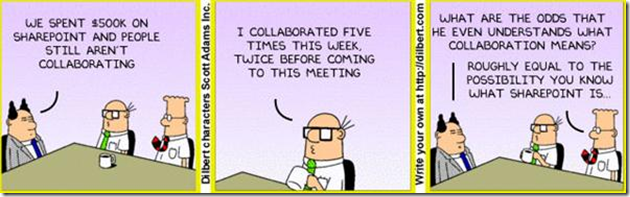
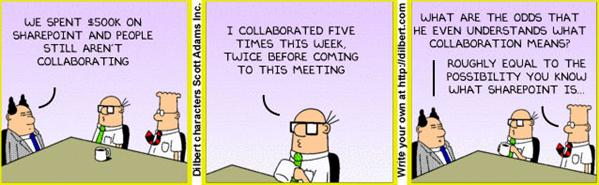
As it happens, Dilbert is quite a useful buzzword KPI. Once a buzzword graces a Scott Adams cartoon, you know that it has officially made it – as shown below:
image

So back to business! Way back in the first article, I introduced you to Robot Barbie, a metaphor that represents all of those horrid SharePoint sites remind you of a cross-dressing Frankenstein’s monster. I had an early experience with a client who championed a particular vision for a SharePoint project, only to find little buy-in within the organisation for that vision. This, and a bunch of other things, got me interested in the softer areas of SharePoint governance, where no tried and tested best practices really exist. If they did and were so obvious, Microsoft would published them as its in their interest to do so.

image

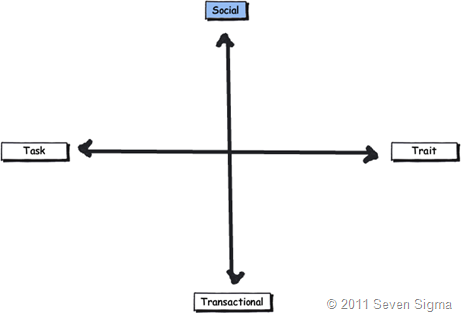
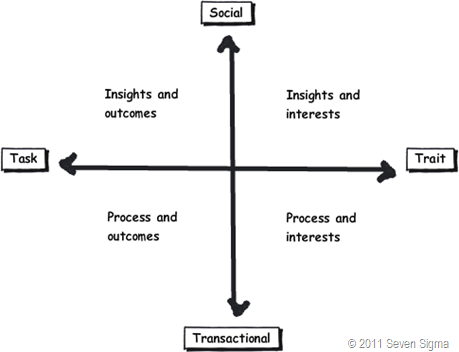
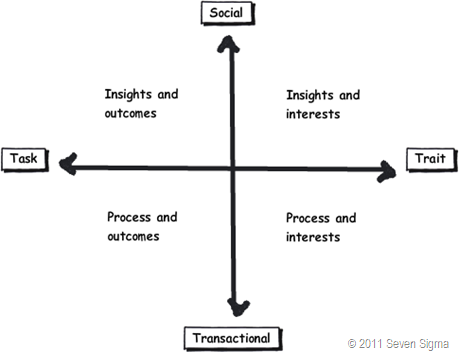
This all culminated in when I wrote a SharePoint Governance and Information Architecture training course last year. I read a lot of material where authors attempted to unpack what collaboration actually meant. My rationale for doing so would be to hopefully avoid creating SharePoint solutions that were Robot-Barbie Frankensteins. The model that I came up with is illustrated below:
image

The basic model is covered in detail in part 2. But to recap here is the basic summary: This model identifies four major facets for collaborative work: Task, Trait, Social and Transactional.

  • Task: Because the outcome drives the members’ attention and participation
  • Trait: Because the interest drives the members’ attention and participation
  • Transactional: Because the process drives the members’ attention and participation
  • Social: Because the shared insight drives the members’ attention and participation

In the last post, I used the model to compare and contrast the use of particular SharePoint features, such as wikis, SharePoint lists and the different aspects of document collaboration. With regards to the latter of these three, I l looked at the effectiveness of certain SharePoint building blocks like content types and site columns within the different facets.

In this post and the next, we will use the facets in a different manner. We will take a quick tour through some common philosophical smackdowns that manifest in organisational life. These smackdowns emanate because of the different viewpoints that people with particular job titles and respective bodies of knowledge have.

Any suggestion that a philosophy might be wrong or incomplete often calls into question the self-identify of the practitioner, which causes much angst among adherents. For this reason, I will leave the “agile is great” vs. “agile sucks” debate for another time, because if you search the internet for criticisms of agile you tend see really passionate programmers get all riled up and flame the hell out of you.

Instead, I will start with a relatively easy one…
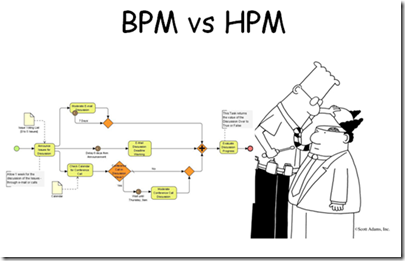
Business Process Management v.s. Human Process Management

image

What does painting the Golden Gate Bridge and Business Process Management have in common? With both, you find that by the time you get to the end, you need to go back to the beginning again. I have personally seen organisations fill an office full of people and take literally years to define and then document key processes all in the name of various best practice frameworks or a regulatory requirement. They then find that, once a thick process manual is created, no-one actually follows it unless an auditor is watching or their performance-based remuneration is directly measured by adherence to it. Of course, I’m not the only one to notice this. In fact, the entire discipline of business process management has taken a bit of a battering in recent years.

If we consider a “process” as the means by which we convert inputs of some description into outputs, Business Process Management has long been the discipline that concerns itself with process optimisation. But in a pattern that is seen in all disciplines like Project Management and Business Analysis, someone will inevitably come along, tell you that you have it wrong or are not being “holistic” and invent a new term to account for your wrongness. In the case of BPM, we now have people arguing for various terms: such as Human Interaction Management, Human Centric Business Process Management, Non-Linear Business Process (thanks Sadie!) or Human Process Management. We will use the latter term, but they are essentially talking about the same thing.

So before we see an example Human Process Management (HPM), let’s review Business Process Management and see what the HPM fanboys are whining about.

Business Process Management
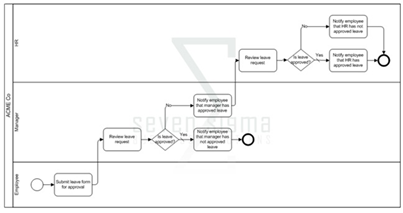
image

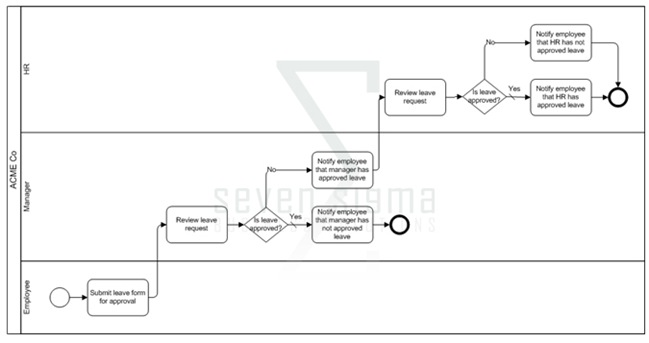
BPM is a structured approach to analyse and continually improve and optimise process activities. Process structure and flow are modelled via diagrammatic tools, allowing organizations to abstract business process from technology infrastructure and organisational departmental/jurisdictional boundaries. This abstracted view allows business to holistically examine process and increase their efficiency and respond rapidly to changing circumstances. This in turn creates competitive advantage.

BPM is often used within the broader context of process improvement methodologies such as Six Sigma (which if you have never read about it, will finally prove to you that all that high-school mathematics that you found mind-numbingly boring was actually useful). While BPM on its own provides excellent visibility of process via modelling them, Six Sigma also incorporates additional analytical tools to solve difficult and complex process problems. Thus, BPM and Six Sigma augment each-other, because process improvement efforts can be more focused via BPM modelling. Thomas Gomez, in an article entitled “The Marriage of BPM and Six Sigma", had the following to say:

“Without BPM, Six Sigma may flounder because executives lack the critical data needed to focus their efforts. Instead, the executives bounce all over the place looking for performance weaknesses, or they focus on areas where successful performance improvements provide only marginal results. With BPM, Six Sigma projects can pinpoint problems and address the underlying causes.”

But that is where the fun ends according to the BPM critics. BPM nerds have had to suffer the indignation of hurtful labels like “Sick Sigma” and stories of long term problems with innovation because of such initiatives. They cite examples such as  George Buckley of 3M, who wound back many of his predecessor’s Six Sigma initiatives.

"Invention is by its very nature a disorderly process. You can’t put a Six Sigma process into that area and say, well, I’m getting behind on invention, so I’m going to schedule myself for three good ideas on Wednesday and two on Friday. That’s NOT how creativity works."

Ouch! Its enough to make a BPM feel all flustered and defensive of their craft. Nevertheless the above quote echoes the main points made by BPM critics. That many processes are not structured, predictable or logical and therefore, BPM approaches force a structured paradigm when none necessarily exists (Mind you, many other methodologies do precisely the same). In an appropriately titled article “The H-Bomb of Business Processes: Humans”, Ayal Steiner makes a point that also cuts to the heart of tame vs wicked problems debate too.

“The modern idea of BPM stresses a well-defined business process as the starting point but this is not always the case. Therefore, in a project that involves new practices or a cross-functional learning among participants, BPM has always had a tough time dealing with the humans.”

The notion of the well-defined starting or ending point is one of the characteristics of a tame problem. Wicked problems are often characterised by poorly defined staring and ending points. In fact with a wicked problem, often participants cannot agree on what the problem is in the first place!

Critics like Steiner also argue that many roles within an organisation, tend to deal with more tacit, dynamic situations and as such spend a large amount of their work time performing collaborative human work, when compared to transactional business process work (knowledge workers is the prevailing label for this type of role). While the main area of benefit for BPM’s is its ability to increase the efficiency of a core business process, the sort of thinking required to re-think processes in a systematic manner involves collaboration and systems thinking (in other words, beyond the process in front of us and how it interacts and interrelates more broadly since the whole of the broader system is greater than the sum of its parts). This is a human-driven activity as it is based on humans collaborating and innovating.

Closer to SharePoint home, Sadie Van Buren noted this same distinction in May 2010 which was around the same time I started the development of my IA class.

Human Process Management

So if BPM is incomplete, enter Human Process Management (HPM). HPM is concerned with process that is not easily defined, nor well structured, where it is hard to prescribe the execution of the process based on some model of the business. With human process, it is generally known how to achieve an intended result, but each case is handled separately and requires tacit judgment (for both decisions and flow) as part of the process. There is not enough standardization between instances of the process that allows for a formal, complete and rigorous description of the process end-to-end.

The obvious downside of human processes, say the critics, is that they are far too fluid and dynamic to be made part of an Enterprise BPM system. As a result, these processes tend to be handled through email, which in turn contributes to information overload and poor information worker productivity – precisely why we look to tools like SharePoint in the first place! The implication of HPM is that we need to shift emphasis to tools and practices that help us deal with unstructured or ad-hoc processes (and the information created/used during that process) more so than tools that deal with the well-defined world of BPM.

To be fair to the BPM crowd, these above criticisms will be seen by BPM practitioners as naive, since from their point of view, the less structured side is simply a part of the entire BPM spectrum. They argue that critics do not properly understand the principles and philosophy of BPM in the first place (Agile and PMBOK defenders say essentially the same thing when defending from critics). Supporting this counterargument is a key theme for BPM success that is regularly emphasised. That is, the critical pre-requisite of clarity of purpose and shared understanding of the end in mind. Mohamed Zairi, in a paper called “Business process management: a boundaryless approach to modern competitiveness” stated:

“The achievement of a BPM culture depends very much on the establishment of total alignment to corporate goals and having every employee’s efforts focused on adding value to the end customer.”

Therefore the BPM crowd are arguing for the same human process that HPM base their criticism on. Developing a culture of alignment to corporate goals is very much a human process. Are the HPM fanboy criticisms well founded or is it more a case that some BPM guys forget about strategic goal alignment and optimise process in isolation?

What do the facets say?

Clearly, there is a natural tension between these two polarities of BPM and HPM and this often plays out in organisational life in how we collaborate to deliver organisational outcomes. While there have always been process nazis, the emergence of social collaboration platforms that do not have a great deal of formal structure (think tagging and folksonomies) has led to a great deal of debate and self examination in BPM circles and beyond. Understanding these traits is critically important on the use of SharePoint tools, because SharePoint – and in particular SP2010 offers features for both BPM and HPM aficionados. Putting the two together however might risk Robot Barbie scenarios.

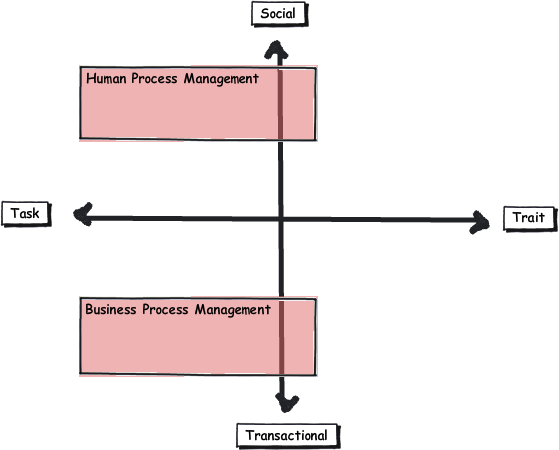
Straight away, it seems that the transactional vs. social axis of the facets of collaboration neatly explain the Business Process Management (BPM)/Human Process Management (HPM) challenge. Both areas are concerned with producing an output or getting something done. Therefore I have drawn BPM and HPM leaning toward the task side of the model. HPM proponents argue that human process is unstructured or semi-structured, dynamic, intertwined and borderless, which fits in well with the task/social trait of process and insight. BPM naturally fits into the lower transactional half where inputs are well defined.
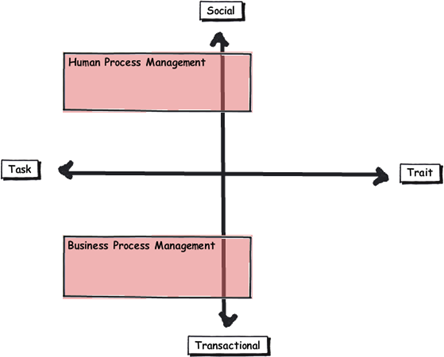
image


While I would agree with the assertion that many processes are ill-defined and rely on tacit knowledge to be completed, HPM proponents go further though. For example, Ayal Steiner who I quoted earlier, argues that “analysts are now realising that human processes account for 80% of the business processes carried out in most organisations”. That is a big call, in effect, arguing that the majority of workplace interactions occupy the social quadrants above. I disagree. From my experience, most organisational roles have extremely varying degrees of transactional vs. social collaboration and some roles are in fact dominated by transactional collaboration. Perhaps there is some confirmation bias going on here, where knowledge workers who put in collaborative systems tend to think that everyone are knowledge workers too.

Here is an example. Mrs CleverWorkarounds used to be a medical nurse. When I first showed her this model I asked her to describe where nurses would fit in terms of their collaboration. She indicated two areas.

  • Firstly, nurses are strongly linked by trait and transaction. This is because they all have a minimum degree of knowledge and skill. As stated in part 2, the key tell-tale sign of a role with transactional collaboration is how easily individuals performing that role can be replaced by someone else with similar experience at short notice. Supporting this, if a nurse is sick or unavailable, a replacement nurse can be called in to perform the same tasks.  Collaboration between nurses according to Mrs Cleverworkarounds is quite transactional as well. Routine and process consistency via tracking the status of patient care is a critical task – patient status is everything. Thus, data driven tools with version history and well defined inputs make this form of collaboration easier. In fact, Mrs CleverWorkarounds taught herself InfoPath and SPD Workflows because she was so convinced that automated forms with consistent audit trails via workflow would make her job easier.
  • Yet at the same time, the sort of collaboration between nurses and patients is completely different and highly social in nature. No process is going to govern the interaction between nurse and patient. The type of care and counselling to get someone well is going to vary the type of interaction. A broken leg is one thing, health problems from say – alcoholism is something else entirely. The latter has much deeper symptoms than just the illness as presented. Here the focus is on patient well-being and goes beyond status of meds, when doctors have visited or accurate handover notes from one nursing shift to another.

State machine workflows?

Interestingly, even seemingly well-defined business processes tend to have ad-hoc and dynamic aspects to them. When there is an exception to the standard process, those exceptions tend to be handled in a relatively ad-hoc, case-by-case manner. Microsoft developer Pravin Indurkar cited an example of a seemingly transactional purchase ordering system.

“Often the business processes contain a prescribed path to the end goal but then there are a lot of alternate ways the same goal can be achieved. For example, a purchase order can contain a prescribed path where the PO goes from being created, to approved, to shipped, and then to completed. But then there a multitude of other ways in which the PO can be completed. The PO can get changed, or back ordered or cancelled and then Reopened. All these paths must be accounted for.”

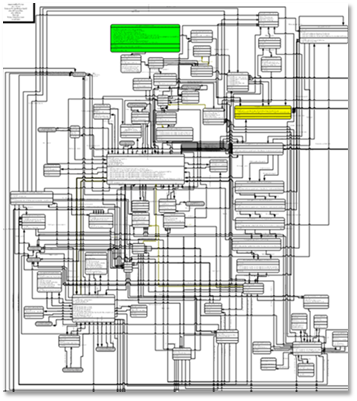
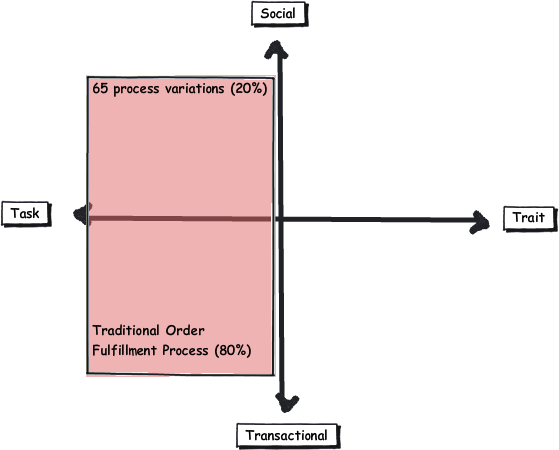
Indurkar studied the purchase order system of a small business and found that apart from the one standard traditional order fulfilment process, there were about 65 different variations on the same process depending on the nature of the order. This is when BPM diagrams start to get scary. If you think that this workflow below is scary, then be more scared. It is page 12 of a 136 page process!
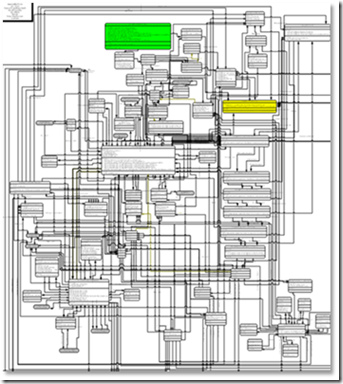
image

Naturally, trying to hardwire such a large number of alternate paths is very difficult and traditionally, there were two ways in which this was dealt with;

  • Either the business process was hard wired to accommodate all the paths as shown in figure 1, which made the implementation of the business process extremely complex, brittle and hard to maintain.
  • The alternate paths are simply not dealt with and any situation of the ordinary was dealt outside the domain of the process. This meant that tracking and visibility were lost because people would create manual systems to track such out of the ordinary situations. The facet diagram below illustrates this:
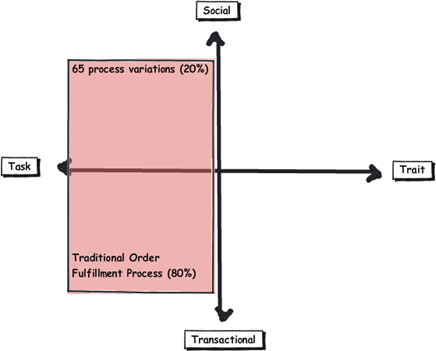
image

In Indurkar’s article that I quoted with the purchase order example, he argued that the solution to this sort of problem was via state-based or state-machine workflows which SharePoint has supported in a basic fashion, out of the box since SP2007. This kind of workflow, if you are not aware, is when the workflow waits for one or more events to move it into another state. There is no sequence as such, because this new target state can be any of the defined states in the workflow. This makes state workflows reflect the unpredictable nature of process variations.

Thus, it could be argued that BPM is not incomplete as what the HPM fanboys think, but that critics have a less than holistic understanding of the craft?

Conclusion: A Process Analysis Tool…

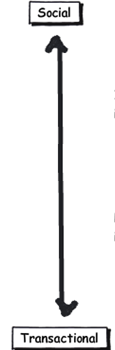
To be honest, I don’t want to answer the question of which fanboy is right because it is a bit of a zero sum game. When you think about process, many seem to have elements of transactional and social in them (just like job roles). For example, an “Approval” decision diamond in a business process diagram will determine the path a process takes. Apart from stating the fact that this process is a gateway where a decision is made, this says nothing about whether the activity of making that decision is transactional or social. In some processes the decision may be made by a rigorous data driven process (like a point-score based credit check for a loan applicant). In others it may be on gut feel (such as choosing the right applicant for a job position).

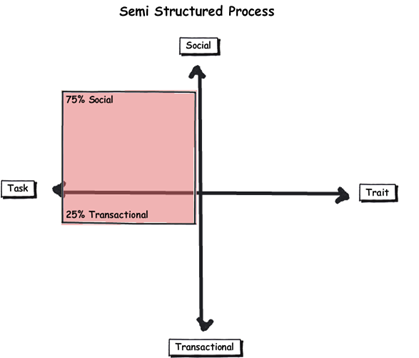
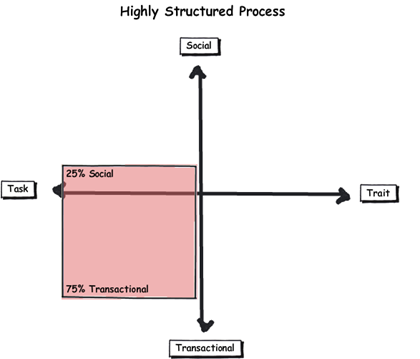
So to me, whether you are the most regimented process nazi or the most cowboyish non-conformist hippie, modelling a business process according to its ratio of transactional to social facets is probably very useful indeed to complement a BPM model. It help us understand how much tacit judgement is required in a given process and whether modelling every variation in a sequential workflow is worthwhile. Check out some examples on how this could be done below. In first example on the left, a business process where the majority of the steps are performed by tacit judgement might look like something like how I have drawn, with a task based social dominance. If the process in question indeed looks like this, then attempting to document every minute variation on the paths the process can take might not be worthwhile. Perhaps documenting the broad process (within the constraints of any compliance regime requirements) might be a better idea. In the second example, the process seems to be oriented around a repeatable set of choices (task based transactional dominant). As a result it may be worthwhile formally documenting these variations.
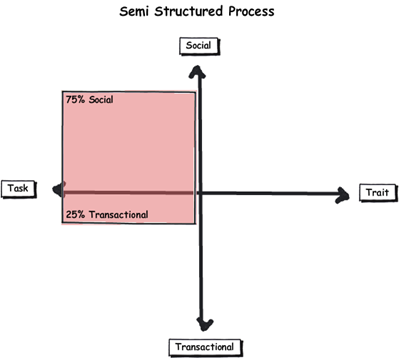
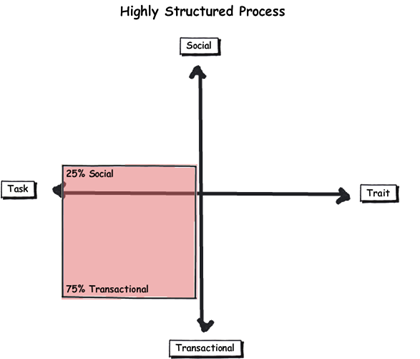
image  image

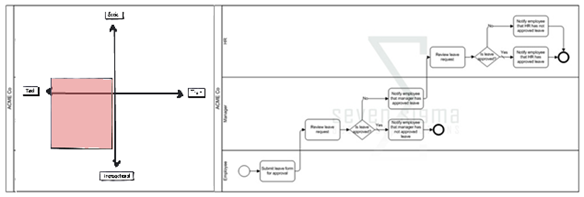
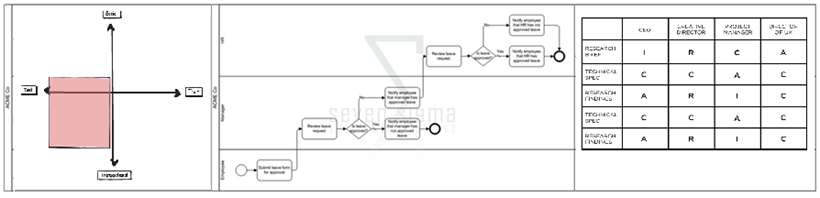
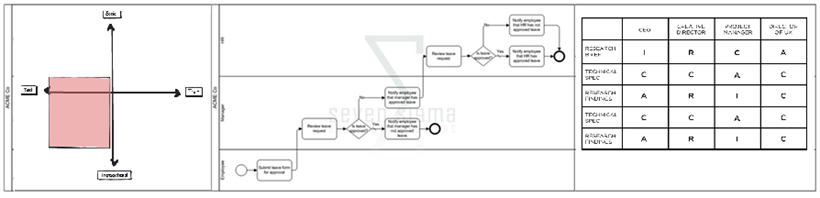
By combining these “process diagnostics” with the actual diagram, we might now offer additional insights into how the organisation really works with a certain process and do crazy stuff like produce something akin to my mockup below:
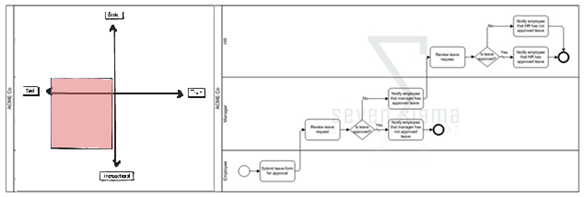
image

Hell, throw in a RACI chart and now you start to see process accountabilities as well!
image

Of course, you could always remove the task/trait axis if it is not needed and simply use a sliding scale. Nevertheless, what this shows is that the facets of collaboration model offers an extra dimension to any process being modelled and would help many to better understand the nature of the process being modelled, as well as strategies for improving that process via SharePoint.

Thanks for reading


Paul Culmsee

www.sevensigma.com.au

p.s If you are a real trainspotter/glutton for punishment and want to dive deeper, google “Human Interaction Management” and “Role Activity Diagrams”


The facets of collaboration Part 3–The feature jigsaw


Hi all and welcome to part three of my series on unpacking this mysterious phenomenon known as collaboration. In case you missed the first two articles (and I highly suggest that you read part 1 and part 2), I spent some 500 odd hours last year developing a SharePoint Governance and Information Architecture course. Amongst the sweat and tears of that particular endeavour, I researched many papers and online articles that attempt to look at the multitude of factors and variables that impact on collaborative scenarios where SharePoint might be leveraged. I also talked about Robot-Barbie, which represents the tendency for SharePoint features to be combined in such a way where the benefit gained is much less than the potential of the individual parts. Robot-Barbie solutions are to be avoided at all costs.

image

In part 2, I explained each of the facets using the model above, identifying four key facets for collaborative facets: Task, Trait, Social and Transactional.

  • Task: Because the outcome drives the members’ attention and participation
  • Trait: Because the interest drives the members’ attention and participation
  • Transactional: Because the process drives the members’ attention and participation
  • Social: Because the shared insight drives the members’ attention and participation
  • An interesting use of the facet diagram is to plot where various tools and technologies are located and therefore, where their strengths may be. In this article, we will go through some of SharePoint’s collaborative components and see how they fit together.

    The document is dead – long live wikis?

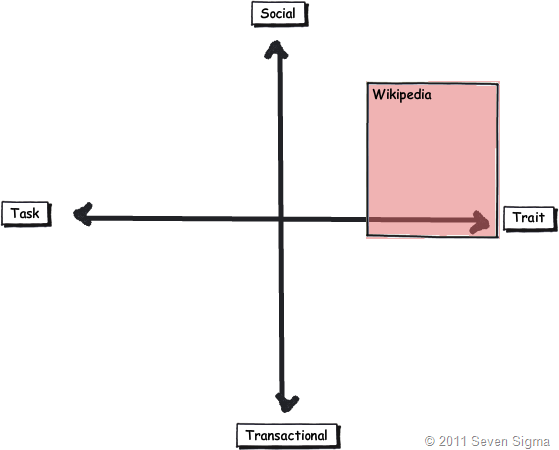
    When I have asked people to draw where Wikipedia lies on the facets, the most common answer by far is on the trait side of the collaborative fence. This seems relatively straightforward. After all, the authors of Wikipedia articles obviously have a shared interest in the topic matter. Without an interest in the topic, there would be little incentive to take the time to write about it. Furthermore with Wikipedia, authors are highly unlikely to be working on the same project or task, since the author can be anybody in the world. But, authors are likely to be performing similar tasks in their respective organisations. A classic trait based scenario.

    Wikis also are open and essentially unstructured, relying on authors to link to other content to build contextual relevance. By this logic, Wikipedia is a strong trait based collaborative system and the dominant process driving the use of the tool is insight more than process. Therefore wikis are socially oriented more than transactional. I would suggest that very few Wikipedia authors indeed would be driven by a process that mandating they update an entry.

    Closer to SharePoint home, Look at the success of SPDevWiki as another example. If you were to plot it across the spectrum (and remember this is about collaboration using the tool, not individual use), it would appear in a similar position on the model to Wikipedia. People use SpDevWiki because they wish to develop and contribute to a repository of knowledge to help others in similar situations. This reciprocal behaviour serves to help the individual in their own endeavours.

    image

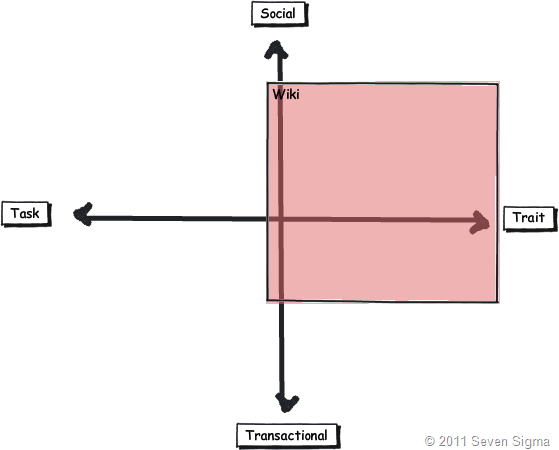
    But there is an interesting change if I ask people to simply draw “a wiki” on the model, rather than the specific example of Wikipedia (the mother of all wikis). The model tends to look something like the image below. Suddenly the scope of wikis expands more into transactional, but few people draw a wiki across the whole collaboration spectrum. As a result of this pattern, one question I make a point of asking people in all of my classes is whether they have ever seen or used a successful project management wiki. I have asked this question in London, New Zealand and around Australia, and the overwhelming answer is no. One respondent stated that his organisation had implemented a project management wiki, but conceded that he was the only one who maintained it.

    image

    The reason I continually ask this question is that I wanted to know if the pattern I had observed was common, as I can only base observation from my own client base. Using my clients, I have seen two occasions where wikis were particularly successful. The first was a wiki for programmers who worked for the same company and the second was a school, where teachers maintained a wiki as part of a SharePoint solution that we put in. Both of these examples are clearly trait dominant in that the authors were in a very similar role. Perhaps a gross generalisation is that wiki’s are best suited to trait/social based collaborative scenarios? If so, it raises an important issue. If a task based collaboration effort has a varied mix of participants, then using the model suggests a wiki may not necessarily be the way to go.

    By the way, I have learned over the years that as soon as you make an assertion to rightness, someone will come along and prove you wrong. For example, I strongly advise people not to use the Microsoft pizza/pie diagram to introduce SharePoint to new users, but Ruven Gotz proves that it is perfectly acceptable to do so. Therefore in the example above I am only reporting on my observations, plus feedback from those who have attended my classes. I am not trying to prove right or wrong here as I know many will disagree with the diagram. But what I am interested in, if you can prove the assertion wrong, is what you did to make a wiki successful in the other quadrants?

    Wikis vs. Custom lists

    In typical SharePoint fashion, there is always ten ways to do something, each with their own pros and cons. Both wikis and SharePoint lists are flexible information repositories, that differ by the degree of structure imposed. Lists offer the creation of custom columns of different kinds, that allow tables of information to be stored and via the use of views, to make sense of the content. You get a few other niceties like datasheet view, attaching files, and export to Excel/MSAccess. In fact, many people like to adopt lists because they previously used Excel for storing information and Sharepoint offers similar functionality with improved data entry and multi-user support.

    Someone once told me that more critical corporate data is stored in excel than any other database system in the world. I am not surprised in the slightest.

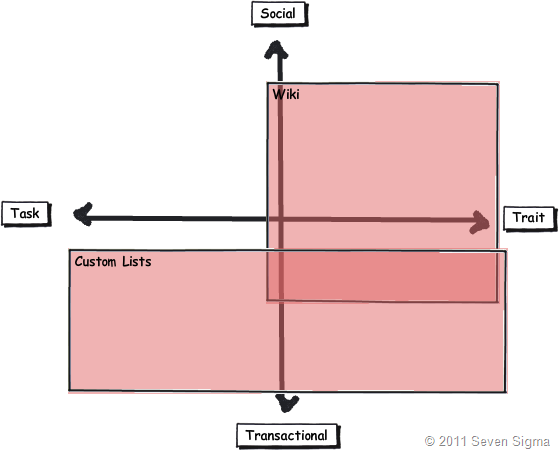
    When asked to place where SharePoint lists fit on the facets model, many users tend to link it to transactional based collaboration that is equally task or trait based. Lists it seems, are well suited to tracking “stuff”, which lends itself naturally to transactional collaboration where process tends to govern interaction.

    Lists also tend to need more up-front work where a wiki usually does not. Before content can be effectively added to a list, you need to define columns or content types in advance and hope that you get it right. Information Architects routinely get paid to help do this. Remember that transactional collaboration is the world of well-defined inputs, because process governs the interaction. As such, project delivery (a transactional/task oriented process) often uses list based techniques because of the improved ability to track, slice and dice information, when compared to a wiki. Dux Sy’s book on using SharePoint for Project Management is a good illustration of this approach. Wiki’s do not even get mentioned in Dux’s book. Why is this? Perhaps the tracking of time, resources, costs, risks, constraints and work performed is best delivered via lists? Certainly, more fully fledged PMIS systems like Microsoft Project Server are highly database driven and designed for transactional work.

    It is then quite interesting to overlay SharePoint lists and wiki’s together. Is it possible to make a more educated call as to when one option is more suited than the other? Take a knowledgebase scenario which could easily be either a wiki or a list. Perhaps the decision as to use wiki or list should be based on the nature of the collaboration? If a bunch of people linked by trait are creating a knowledge repository, a wiki is a proven approach – Wikipedia shows this to be the case. But if this is for say, a more transactional scenario such as a call-center, where KPI’s are based around quick turnaround and resolution of common problems, a list approach might be better?

    image

    At this point I can feel the heat of offended Enterprise 2.0 fanboys. Please understand, I am not anti wiki’s or anything 2.0 – we use these tools in our practice. Furthermore SharePoint blurs the above distinction anyway. Columns can be added to wikis and they leverage SharePoint’s version history too. In other words, you can make a wiki look and feel somewhat like a list. Furthermore, SharePoint wikis can be integrated with information management policies and workflow. When you add those additional capabilities to the mix, you might draw things differently. Nevertheless, I think this is a useful exercise because it might offer insight as to why certain portal features rarely, if ever get used in certain situations.

    Document Collaboration – Transactional or Social?

    Finally for now, document based collaboration seems to fit into any quadrant (and is therefore quite tricky at times). This is because the “document” is simply a medium of collaboration (as is a wiki for that matter).

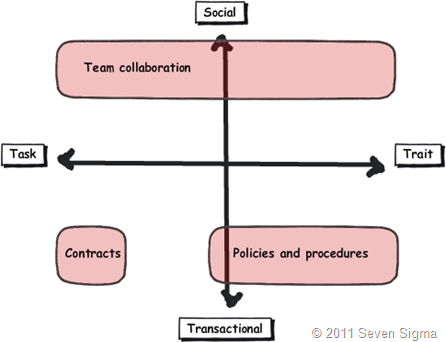
    For one extreme, take the example of a quality management system (policies, procedures, manuals). Given that a QMS is usually part of a compliance regime, requiring audits and demonstrated conformance, document collaboration is fairly rule-based and managed via well defined and understood process. Therefore, we are talking transactional work. In this world, SharePoint features like content types, metadata, policies and workflow are fairly easy to define and implement.

    But a QMS, via policies and procedures, guide the behaviour and decision making in organisations. So while transactional, it is oriented towards trait based. This is because a QMS is rarely installed to deliver a single project, but to guide delivery of many projects. One thing that might be guided by a QMS is the creation of a legal contract that outlines the scope and responsibilities of two parties undertaking a project. Documents such as contracts, while also usually transactional, are task based they outline a legal commitment to achieving an agreed outcome.

    Contrast this with a team collaborating via documents. A team can be driven by an outcome or common interest (department) and as a result covers both the task and trait based quadrants. Often the rules of engagement are much less rigid or formalised with regards to document use and structure. Thus, a lot of team document collaboration is more social and trying to fit this into an overly strict or complex taxonomy can do more harm than good. I noticed with great interest that recently, certain SharePoint elephants in the room are starting to be named. The recent articles on NothingButSharePoint entitled “SharePoint Content Types: Is this a lost cause?”, highlights what I mean. In this article, repeated attempts were made to try and harness the value and power of content types into a large enterprise. However despite the effort, they were rarely used.

    To me, this highlights the characteristic of team collaboration – particularly knowledge workers. If collaboration is not a predefined interaction, then content types, which by definition, force us to go to a lot of effort to define inputs when those inputs are not necessarily known. Perhaps the nature of the collaboration taking place played a part in the lack of take-up reported in the aforementioned article? Those who advocate metadata as the only true solution may in fact be pushing a transactional paradigm onto a collaborative model that is ill-suited?


    image

    As a general rule, in transactional scenarios, the classification of the document is of more importance than the content of the document. This is the records management and compliance paradigm, where the fact that the document is controlled is the key driver. However, in team collaborative scenarios, the content of the document is usually more important than the metadata classifying it. From a team members point of view, metadata that helps to indicate content is more important than metadata that indicates compliance.

    As documents age however, the value of the content tends to diminish and the value of the classification increases. Balancing the need for compliance against the need for collaboration is a key document management challenge irrespective of the tools and systems that underpin it. There is a large smackdown looming between the worlds of compliance vs. the world of government and enterprise 2.0 and I will eventually write on that topic.

    Once again, the key point here is context. Some document oriented collaborative scenarios are highly structured and well suited to well-defined taxonomy and metadata. Others are somewhat less so. Perhaps a tool like this helps to work out when certain information architecture decisions are applicable when it comes to document collaboration?

    Conclusion

    You might have noticed that this post has more questions than answers. In doing a model, I never said I would provide more answers. Instead, more of a frame or perspective to ask certain types of questions that many SharePoint practitioners have increasingly be asking (as evidenced by the content type post above). In the next post, I will conclude by using the facets to examine several common arguments seen in organisations, where people in particular roles are in effect, predisposed to having a bias in one or more of these facets. We will also look at SharePoint as a whole, as well as examine what we can glean about user engagement and buy-in.

    Until then, thanks for reading.

    Paul Culmsee

    www.sevensigma.com.au


    The facets of collaboration Part 2–Enter the matrix!


    Hi all

    In my first post in this series, I introduced you “Jane” and a true story about her missteps when implementing popular social networking technologies within her organisation. We then asked some deep and ponderous questions, before meeting Robot Barbie and the crazy world of SharePoint Robot Barbie solutions. Finally I outlined a simple mental model that I developed that I have found to be quite a useful method to look at collaboration more holistically and help with the user engagement and information architecture aspects of SharePoint governance.

    Now before we start, I want to make a four points to pre-empt the type of replies that I anticipate from putting this model out there.

    1. Kailash once told me that the problem with models is that their creators fall in love with them. They forget that they exist to help us to understand the reality around us, but this doesn’t make them reality. For that reason, I do not love my model and see lots of flaws. I also look forward to seeing better ones that people come up with. The key point is this: No model can ever capture the total sum of variables combine to make a collaborative situation look or feel a certain way, all it can do is approximate. This is my attempt at approximation.
    2. Imagine watching the Matrix movies without the car chases or kung-fu. It would be long, full of nonsensical dialogue and you would come out saying “I have no idea was that all about”. Mental models are a little like that too. This model is designed to be simple and explainable within 2 minutes. Any concept that takes more than a beer to explain will forever be in the realm of academia and get little real-world use.
    3. Some people (particularly scientist types), will look at a matrix like mine and automatically think that is measuring something. This is because there is an X and Y axis and usually, their presence indicates two variables that can have a range of values. In my case though, I was not thinking about an axis in that way. I just saw that each of the facets identified (task vs trait and social vs transactional) seem to me to be the extreme ends of an axis that I as yet, have not worked out :-). The point is, matrixes don’t always work for these people and they tend to avoid drawing quadrants with explicit lines because of the implicit suggestion that a situation falls into one quadrant or another. If you are of this persuasion feel free to develop it in a way that works for you. I think when we hit part 3, you will see that I use the model in different ways.
    4. Remember that this model is about collaboration. By definition, this involves more than 1 person. I was not thinking of individual people when putting it together. It assumes a bunch of people interacting and each facet I guess, highlights a dominant collaborative trait.

    So let’s examine each facet in turn

    Task Based Collaboration (Outcome driven)

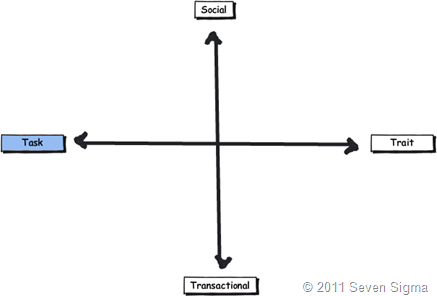
    Task based collaboration is typically characterised by short(ish)-term groups, comprised of people with a shared goal or common outcome (i.e. a "project”). The membership of a task based group is typically fairly diverse because it is the outcome drives the members’ attention and participation. Members are chosen because of their ability to play a part in achieving the outcome and it is not necessarily true that they have a say in that outcome.

    The dominant characteristic of a task based collaborative group is that members do not necessarily have shared interests beyond the outcome being delivered. A SharePoint project team is a good example of this, because of the multidisciplinary skill set required to deliver it. Outside of that project, people may have vastly different interests and skills, and may have nothing in common beyond the outcome being sought. Some organisations are like this, where the people you work with you do not necessarily have any social interaction with beyond the interactions required to get the job done.

    When you look at the matrix below, the top and bottom left quadrants are therefore driven by outcome. (i.e. getting something done).

    image

    Trait Based Collaboration (Interest Driven)

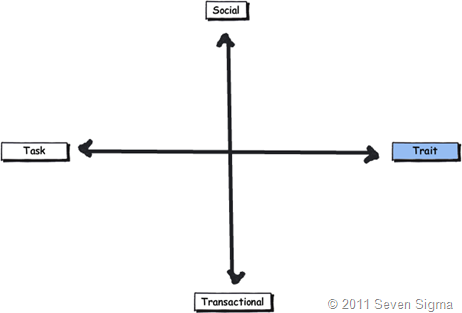
    Trait based collaboration is comprised of users who are related through shared traits or long-term interests. As I stated in the first post, members may not be consciously collaborating on the same task or outcome, but may be highly likely to repeat or augment tasks already accomplished by other group members. Therefore, trait based groups tend to come together to share their learning and experiences. It is the shared interest that drives the members’ attention and participation. There is no deadline as such, or a specific task being shared among the group.

    Examples of trait based groups are special interest groups (fans of a particular musical group) and occupational groups (via job role or even department). When you think about it, Facebook is the mother of all trait based collaborative platforms because members almost overwhelmingly are there connect with people who have a shared trait of some fashion. Also consider a community driven site like NothingButSharePoint or a conference such as SharePoint Best Practices. Both are excellent examples of trait based collaborative scenarios. We use these collaborative environments to gain insight and learning from sharing experiences with like-minded individuals.

    When you look at the matrix below, the top and bottom right quadrants are therefore driven by interest.

     image


    Transactional Based Collaboration (Process Driven)

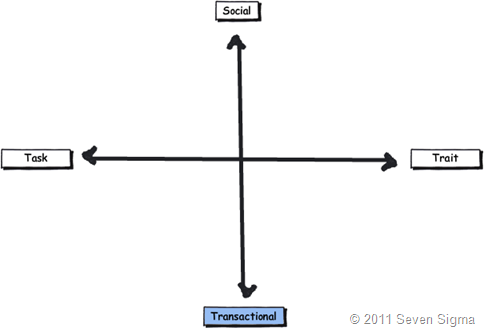
    Transactional collaboration takes the form of a business process where various people or groups interact to get something done. In this scenario, inputs and outputs are fairly well defined and the process is repetitive by nature. Think of airport baggage handling as a great example. This is a process that has to be run efficiently and consistently. As a traveller, I want baggage handlers to be making sure my suitcase is on the right flight. I don’t want them all sitting on say, Yammer or MSN to co-ordinate the delivery of baggage. But I sure as tell want them to be able to tell me the status of my bag pretty much instantly.

    One interesting characteristic of transactional based collaboration is that the people in the process can often be “swapped out” with other people, because transactional process is designed to be well defined, optimised and easy to follow consistently. It is the process that drives the members’ attention and participation, and governs the interaction between participants.

    As stated in part 1, another characteristic of transactional collaboration is that it is usually not a place of spontaneity. Consistency is key to success and processes are designed to run with a minimum of variation and margin for error. As a result, this is the sort of stuff that well defined business rules, metadata and rule-based workflows handle well.

    When you look at the matrix below, the left and right bottom quadrants are therefore driven by the process that governs the collaboration.


    image


    Social Based Collaboration (Insight Driven)

    Social based collaboration is an interesting one. Truth be told, I knew that this one would have the greatest connotations because of the wildly different interpretations of the word social. From the point of view of my model, I offer the following explanation.

    Social collaboration is the other extreme of transactional. This is usually characterised by more ad-hoc sharing of perspectives and information. It is realisation or insight through pattern sensing via group interaction, rather than structured business rules. It looks beyond the process and attempts to get to the ‘big picture’ of an issue, problem or constellation of problems.

    Therefore social collaboration cannot really be a predefined interaction in the transactional sense. It is not a structured workflow, a rule or something with well defined inputs. But it is the place where tacit knowledge creation, development and exchange typically occurs. It is where hard decisions sometimes have to be made and where innovation tends to come from because it is the shared insight that drives the members’ attention and participation. It is the world of wisdom of the crowds – collaboration in all its messy glory.

    As a simple example of what I mean, even the best business process modelling guru will never be able to document the process a board of directors would go through when performing strategic decision making. If for example, someone worked out the business process diagram that would tell any organization how to develop the next iPod or to master the stock market, then we wouldn’t marvel at Steve Jobs sixth sense for product delivery or Warren Buffets ability to consistently out-perform the market.

    Therefore in the matrix below, the two top quadrants are therefore driven by the insight gained from the collaboration.

    image


    To Summarise

    Hopefully after that explanation, each of the quadrants start to make more sense. The facets of collaboration can be summarised as follows:

    • Task: Because the outcome drives the members’ attention and participation
    • Trait: Because the interest drives the members’ attention and participation
    • Transactional: Because the process drives the members’ attention and participation
    • Social: Because the shared insight drives the members’ attention and participation

    image


    In the next post, we will use this simple model to examine several common scenarios and see what insight we can glean from looking at collaborative tools and situations through this lens.

    Thanks for reading

    Paul Culmsee

    www.sevensigma.com.au


    The facets of collaboration Part 1–Meet robot barbie


    Hi all

    I have a friend, lets call her Jane (not her real name), who was a huge web2.0 fan. Seriously, if it was a wiki, blog, tweet or anything remotely sounding like RSS, Jane would wax lyrical about how it was the answer to all that was wrong with the silos of the old world and if only people would get with this new paradigm and embrace the social revolution, collaboration within her organisation would markedly improve. After all, look at the popularity of sites like facebook, wikipedia and twitter. Jane also had a very strong vision for what this new world would look like and had spent a lot of time and money investing in customising SharePoint to meet this vision.

    Much to Jane’s dismay, her project failed miserably. Her organisation ultimately wanted something much more boring – a solution to help them manage their files better. All of this “new-age gen Y social crap “ was of little interest to the masses.

    Janes story is actually a very common pattern with SharePoint projects. As it happened, Jane had committed probably the most cardinal sin of information architecture. She had projected her ideals onto an organisation that did not necessarily subscribe to her view. Therefore SharePoint represented her vision and little else. Few others shared it and to this day I think she blames the culture organisation she worked for. I say that she did not do enough to develop a shared understanding of the problem, and shared envisioning of the solution.

    Now most of us know that SharePoint can be a platform for going gung-ho social if you wish, given that it has features like wikis, blogs, folksonomy and RSS. But it can can also be a platform for structured business process via features like workflow, BCS, information management policies, content approvals and the like.

    So that raises a really important question. Why is it that a particular collaboration feature (such as a wiki) might be total nirvana for one situation and can be a project killing fatal flaw in another? Since SharePoint has a ton of collaborative tools in its toolkit that can be rolled up in different ways, when do certain features work well together and when do they completely suck balls together? Why do some people have such wildly differing views on the nature of collaboration and what potential solutions should look like? Why do some people look at the SharePoint feature-set and say “meh”, while others are totally charmed by it?

    This was a question worth pondering and I did look into this in some detail while I was creating my SharePoint 2010 Information Architecture course. In this short series of posts, I am going to introduce you to a way of looking at the wide spectrum of activities that all fall under the guise of this term called collaboration. This mental model seems to help paint a more realistic picture of the collaborative world than the simplistic views that Jane and her ilk use. It goes some way to many of the questions that I raised above. Furthermore, the model has been very well received at my courses. Maybe there is something to this?

    Introducing “robot barbie” – the yardstick for SharePoint information architecture

    Say hello to Robot Barbie, my all-time favourite SharePoint metaphor. I use this picture in all of my classes and talks, such is its persuasive power.

    image

    I first saw this picture via a talk that Joel Oleson gave. The story behind it was that Joel came across this very real toy in a market somewhere in Asia. When Joel asked the storekeeper what the idea was behind the toy, the reply he got was along the lines of:

    “Well, boys like robots and girls like Barbie. Therefore, if we put Barbie’s head on a robot, then logically both boys and girls will like it.”

    Hmm.

    Now I don’t know about you, but I can’t see that boys and girls would suddenly drop their respective robots and Barbies and start playing with this ugly hybrid. In fact, when you look at the result, it is this bizarre, somewhat disturbing combination of features that brilliantly demonstrates the folly of taking two things that work really well alone and expecting that by combining them, things will work even better. Instead, we have a combination that is much less than the sum of its parts and unlikely to satisfy anybody.

    Robot Barbie is a very powerful visual metaphor for SharePoint information architecture because SharePoint is full of Barbies and full of robots. In fact the global SharePoint information architecture mantra should be “avoid robot barbie”. To that end, when I show this image to clients or conference attendees, I ask them the question, “So is your SharePoint implementation a robot-barbie solution?”.

    Many people will admit to varying degrees of robot-barbie. How then to avoid it?

    Research into collaboration itself

    The only SharePoint person I have met who goes to a university library to research more than me is Erica Toelle. In this section I am attempting to make her proud – hehe 🙂

    Since these questions around collaboration came to me while I was developing an Information Architecture course, I became curious as to whether academics, authors or bloggers had ever actually attempted to deconstruct collaboration itself into its core elements (in effect, performing an information architecture exercise on collaboration itself). Surely understanding the some of these elements would help us gain some hints or insights into how collaboration works and in turn, help us avoid Robot Barbie?

    So I hit the journals and did some digging. As it happened, some academic research had been undertaken over a long period of time, trying to codify this lofty ideal called collaboration. As expected, authors looked at the issue from various angles. Some looked at it through the lens of the type of conversation taking place, some via the nature of the problem solved, some through “business activities”, some via the characteristics of group doing the collaborating and others examining the underlying purpose that drove the collaboration in the first place.

    Some of the more interesting writing that I examined in developing my own model included:

    I read all of these papers in detail and then converted the arguments made by each into IBIS and created a single (admittedly very large) issue map to try and draw out any patterns from them. I would group all of the various concepts in the map together in different ways to try and elicit some sort of insight. This proved to be quite a frustrating process because of the various different ways each writer tackled the subject matter. The map was huge and I was at first, unable to find a pattern that worked for me. All of them seemed to have some interesting elements, but they all seemed incomplete or over-thought in some way.

    In frustration, I gave up and slept on it. During the night my subconscious must have kept working to unscramble the map because the next morning, I had my model within a few minutes. I looked at the map again and saw a pattern immediately. It was in essence, a combination of some work by Chuck Hollis and interestingly, Microsoft Research (The last two of the above references).

    Meredith Ringel Morris and Jaime Teevan of Microsoft research wrote a brilliant paper called “Understanding Groups’ Properties as a Means of Improving Collaborative Search Systems”. For the record, anyone that is looking to leverage user profile data via mysites should read it. In this paper, Morris and Teevan divide collaborative groups into trait or task, based around the longevity of a group. They also use group identification in the form of group membership being implicit or explicit. For my own purposes, the implicit vs. explicit membership of a group was not overly relevant so I discarded it. But I found the notion of trait and task based groups fascinating.

    Morris and Teevan characterised task based groups as short term and comprised of people with a shared goal and working together to achieve that goal. (They are describing every project team right there). Trait based groups on the other hand were comprised of users who were related through shared traits of long term interests. Here was the quote that really made me sit up and take notice however. They also suggested that trait based “group members may not be consciously collaborating on the same task, but may be highly likely to repeat or augment tasks already accomplished by other group members” (Love it – they are describing every discussion forum right there).

    So I had my first dimension of collaboration. Task vs trait.

    image

    In 2007 Chuck Hollis of EMC wrote a really insightful blog post entitled “Beyond Document Collaboration”, where recognised that via the advent of social media, organisational collaboration was changing and that “different collaboration models are emerging, each one with entirely different value propositions”. Hollis identified three such models and labelled them transactional collaboration, document collaboration and social collaboration.

    Hollis described transactional collaboration as “workflow, or business process management, or something else” and was characterised by “humans are largely automatons; repetitively processing the output of one function for input by another function.  Not much spontaneous creativity interaction here, nor is it usually encouraged!”. Hollis then spoke of document collaboration and explicitly mentioned both Documentum and SharePoint. He finished with social collaboration, which he described as “It’s not predefined interaction.  It’s not a structured workflow.  It’s something entirely different than the other two collaboration models”.

    After reading that post, I thought Hollis was definitely on to something but I felt his descriptions didn’t quite encompass what I was looking for. Like the Ringel/Teevan paper, I felt that elements of Hollis’s breakdown didn’t quite fit for me. After I had slept on it, it dawned on me that document collaboration was the odd one out. I liked his distinction between transactional and social collaboration, of structure and predictability versus a non predefined interaction because the social dimension to me was describing knowledge work. But document collaboration did not work for me at all. A document is simply a medium, as is a wiki or a forum. Structured, process driven collaboration can still use documents, and so can relatively unstructured social collaboration. They just use them in different ways. The same can also be said for whether the collaboration is task based (ie outcome driven) or trait based (interest driven).

    So I discarded document based collaboration and in doing so had my second dimension.

    image

    Making a model

    Out of all of the material that I researched, I found that these four dimensions or facets of collaboration (task, trait, transactional, social) helped me explain most collaborative scenarios and understand why Robot Barbie solutions occur. Of course, the great thing about distilling it down to four dimensions is that I then I got to do what academics live for. Make a 2*2 matrix!

    Academics simply love doing this, because it helps them deal with over-analysing everything that moves and justify all that R&D that they do! :-). In all seriousness though, people love creating 2*2 or 3*3 matrixes to explain concepts for the simple reason that they make good mental models to help us understand reality. After all, one of the key purposes of information architecture itself is to help users create mental models of a site (“Don’t Make Me Think ”).

    So here is my complete model. In part 2 I will explain how I use this model and the insights that it gives in preventing robot-barbie outcomes.


    image


    Thanks for reading

    Paul Culmsee

    www.sevensigma.com.au


    More SharePoint Governance, Information Architecture and *Sensemaking* Classes Planned

    imageHi all

    A big chunk of last year had me off under a metaphorical mushroom, putting together several days of courseware on the topic of SharePoint Governance and Information Architecture. My take on these topics are influenced from some odd places, and the course drew on a lot of the non IT work that I do, that involves collaboration on some very complex problems indeed.

    In November and December of 2010, we took this “on the road”, so to speak, firstly in Dublin, then London and Sydney. The courses were sold out and feedback was terrific. Here are a few choice quotes (check out the hyperlinks for full reviews)


    “Did it meet my expectations? Well I’d have to say that it far exceeded them. There had obviously been a large amount of effort in preparing the courseware and modules. They covered the important missing links currently absent from the Microsoft and traditional training courses” – Wes Hackett.

    “I’ve just finished the second day of the SharePoint 2010 Governance and Information Architecture Master Class presented by Paul Culmsee with the support of Andrew Woodward . I can wholeheartedly say it was one of the best courses I’ve attended both in content and presentation style and they deserve a lot of credit for putting together a fantastic course. Paul in particular has put a huge amount of effort into the slidedeck, sample documents and enormous manual (almost 500 pages worth!) let alone all the great additional insight he could provide in person over both days” – Brendan Newell

    “Finally …. after 12 years in the IT industry a course which covers some of the fundamental issues governing project success.   This course is a real eye opener and a must for any IT professional involved in project planning and delivery” -  Stephen McWilliams

    “I just came back from the best technology training I have had in years: a world-first Microsoft SharePoint Elite Information Architecture course designed and delivered by Paul Culmsee. It has taught me a great deal across ALL facets of the day-to-day work that I do as a SharePoint architect” – Jess Kim

    Based on this and similar feedback, we are going to do it again. Locations confirmed so far are London (#SPIAUK), Sydney (#SPIAAU) and Wellington (#SPIANZ) in February and March 2011 and in the pipeline is The Netherlands (#SPIANL) and at least a couple of US cities!

    In addition to the unique content on these classes, I am honoured to announce that I am now authorised to teach the official Cognexus Issue Mapping courseware – the only non Cognexus Dialogue Mapping practitioner authorised to do so. As such, we will be running the inaugural Issue Mapping class in London in late February as well (wohoo!)

    So, here are the details for each location:

  • (Register now) February 21, 2011, London   #SPIAUK SharePoint Governance and Information Architecture Master Class (Download Flyer)
  • (Register now) February 23, 2011, London #IBISUK Issue Mapping Master Class (Download Flyer)
  • (Register now) March 10, 2011, Sydney  #SPIAAU SharePoint Governance and Information Architecture Master Class (Download Flyer)
  • (Register now)March 14, 2011, Wellington #SPIANZ SharePoint Governance and Information Architecture Master Class (Download Flyer)
  • (Register soon) May 9, 2011, Utrecht, Netherlands (watch this space)
  • Wondering what to expect in these classes? Read on!

     SharePoint Governance and Information Architecture Master Class. 2 full days of real world, examples knowledge and techniques

    Most people understand that deploying SharePoint is much more than getting it installed. Despite this, current SharePoint governance documentation abounds in service delivery aspects. However, just because your system is rock solid, stable, well documented and governed through good process, there is absolutely no guarantee of success. Similarly, if Information Architecture for SharePoint was as easy as putting together lists, libraries and metadata the right way, then why doesn’t Microsoft publish the obvious best practices?

    In fact, the secret to a successful SharePoint project is an area that the governance documentation barely touches.

    This master class pinpoints the critical success factors for SharePoint governance and Information Architecture and rectifies this blind spot. Paul‘s style takes an ironic and subversive take on how SharePoint governance really works within organisations, while presenting a model and the tools necessary get it right.

    Drawing on inspiration from many diverse sources, disciplines and case studies, Paul has distilled the “what” and “how” of governance down a simple and accessible, yet rigorous and comprehensive set of tools and methods that organisations large and small can utilise to achieve the level of commitment required to see SharePoint become successful.

    Master class aims:

    • Present SharePoint governance and Information Architecture in a new light – focus on the “blind spots” where the current published material is inadequate
    • Cover lessons learned from Paul’s non IT work as a facilitator and sensemaker in complex large scale projects
    • Examine the latest trends in the information landscape for industry and government and review studies that inform governance and Information Architecture efforts
    • Present an alternative approach to business-as-usual SharePoint governance planning that focuses on real collaboration
    • Provide quality information that is rigorous yet accessible, entertaining and interesting

    Master class outcomes:

    • Understand the SharePoint governance lens beyond an IT service delivery focus
    • Develop your ‘wicked problem’ radar and apply appropriate governance practices, tools and techniques accordingly
    • Learn how to align SharePoint projects to broad organisational goals, avoid chasing platitudes and ensure that the problem being solved is the right problem
    • Learn how to account for cognitive bias and utilise tools and techniques that help stakeholders align to a common vision
    • Understand the relationship between governance and assurance, why both are needed and how they affect innovation and user engagement
    • Understand the underlying, often hidden forces of organisational chaos that underpins projects like SharePoint
    • Understand the key challenges and opportunities that SharePoint presents for Information Architecture
    • Learn how to document your information architecture
    • Practical knowledge: Add lots more tools to your governance and IA toolkit!

    Course Structure: The course is split into 7 modules, run across the two days.

    Module 1: SharePoint Governance f-Laws 1-17:

    Module 1 is all about setting context in the form of clearing some misconceptions about the often muddy topic of SharePoint governance. This module sheds some light onto these less visible SharePoint governance factors in the form of Governance f-Laws, which will also help to provide the context for the rest of this course

    • Why users don’t know what they want
    • The danger of platitudes
    • Why IT doesn’t get it
    • The adaptive challenge – how to govern SharePoint for the hidden organisation
    • The true forces of organisational chaos
    • Wicked problems and how to spot them
    • The myth of best practices and how to determine when a “practice” is really best

    Module 2: The Shared Understanding Toolkit – part 1:

    Module 2 pinpoints the SharePoint governance blind spot and introduces the Seven Sigma Shared Understanding Toolkit to counter it. The toolkit is a suite of tools, patterns and practices that can be used to improve SharePoint outcomes. This module builds upon the f-laws of module 1 and specifically examines the “what” and “why” questions of SharePoint Governance. Areas covered include how to identify particular types of problems, how to align the diverse goals of stakeholders, leverage problem structuring methods and constructing a solid business case.

    Module 3: The Shared Understanding Toolkit – part 2:

    Module 3 continues the Seven Sigma Shared Understanding Toolkit, and focuses on the foundation of “what” and “why” by examining the “who” and “how”. Areas covered include aligning stakeholder expectations, priorities and focus areas and building this alignment into a governance structure and written governance plan that actually make sense and that people will read. We round off by examining user engagement/stakeholder communication and training strategy.

    Module 4: Information Architecture trends, lessons learned and key SharePoint challenges

    Module 4 examines the hidden costs of poor information management practices, as well as some of the trends that are impacting on Information Architecture and the strategic direction of Microsoft as it develops the SharePoint road map. We will also examine the results from what other organisations have attempted and their lessons learned. We then distil those lessons learned into some the fundamental tenants of modern information architecture and finish off by examining the key SharePoint challenges from a technical, strategic and organisational viewpoint.

    Module 5: Information organisation and facets of collaboration

    Module 5 dives deeper into the core Information Architecture topics of information structure and organisation. We explore the various facets of enterprise collaboration and identify common Information Architecture mistakes and the strategies to avoid making them.

    Module 6: Information Seeking, Search and metadata.

    Module 6 examines the factors that affect how users seek information and how they manifest in terms of patterns of use. Building upon the facets of collaboration of module 5, we examine several strategies to improving SharePoint search and navigation. We then turn our attention to taxonomy and metadata, and what SharePoint 2010 has to offer in terms of managed metadata

    Module 7: Shared understanding and visual representation – documenting your Information Architecture

    Module 7 returns to the theme of governance in the sense of communicating your information architecture through visual or written form. To achieve shared understanding among participants, we need to document our designs in various forms for various audiences.

    Putting it all together: From vision to execution

    As a take home, we will also supply a USB stick for attendees with a sample performance framework, governance plan, SharePoint ROI calculator (Spreadsheet), sample mind maps of Information Architecture. These tools are the result of years of continual development and refinement “out in the field” and until now have never been released to the public.

    Note: The workshop sessions will be hands on, we provide all of the tools and samples needed but please bring your own laptop.

    Issue Mapping Master Class. Your path towards shared understanding and shared commitment

    “Some problems are so complex that you have to be highly intelligent and well informed just to be undecided about them.” Laurence J. Peter

    Presented by: Paul Culmsee

    Courseware by: Cognexus Institute and Seven Sigma

    “Not another $#%@*$ meeting!”

    All of us have felt the frustration of walking from yet another unproductive meeting, wondering where the agenda went. Yet, as problems become more complex, meetings are still the place where critical strategic decisions are made.

    ibis-map

    What is Issue Mapping?

    Issue-Based Information Systems (IBIS) is a sense-making framework used to support group discussions to assist all involved to come to a shared understanding. It visually maps participants’ points of views, problems voiced, the rationale and reasons leading up to decision(s). The maps can be easily read and understood by everyone, even by those not part of the discussion group.

    Why Issue Mapping?

    • Maps detailed rationale behind decision-making as well as the decision; maps the thinking process of the group
    • Concentrates on pros and cons to an idea, encourages and explores all views, taking the sting out of differences
    • Represents and clarifies diverse points of views, conflicting interpretations and goals, inconsistent information and other forms of complexity
    • Everyone gets a chance to speak, if they want. People are heard and contributions are acknowledged. Interruptions, repetition and dominance of the loudest decreases
    • Keeps participants on topic because they can visually see the progress of the discussion
    • Keeps everyone’s attention
    • Meeting progress/result can be seen
    • Map helps participants come up with ideas/arguments
    • Visual display of progress to review summary if need so the brain can absorb the bigger picture and appreciate the validity and value of a larger perspective
    • Avoids jumping to easy answers or superficial conclusions
    • Promotes deeper reasoning, rigor and even wisdom
    • Everyone can visually see everything discussed- leaves no room for misunderstandings
    • Documents can easily be attached to map to back up ideas
    • Participants can see effectiveness of mapping and genuine will try to make it more productive

    About Seven Sigma

    Issue Mapping is a life skill that can be applied to many different problem domains and scenarios. Participants will gain proficiency in a craft that can be applied long into the future, to help them and others bring clarity and convergence to the management of complex problems. At Seven Sigma, we practice Issue and Dialogue Mapping routinely and this has brought us many satisfied clients. The Mapping in itself is part of the ‘secret sauce’ that makes Seven Sigma’s reputation renowned.

    Seven Sigma Business Solutions is the only recognised designated partner of Cognexus Institute, founder of the art of Issue Mapping, in the world. We recognise that without reaching shared understanding, you will find yourself at yet another meeting, rehashing the same unresolved problems, listening to the same arguments month after month. Or, if a decision has been made, it has not been followed up to fruition due to lack of commitment/buy-in.

    We are proud to be part of your journey towards shared understanding and shared commitment.

    Master Class aims and outcomes:

    • Be able to create great maps – issue maps that are clear, coherent, and inviting
    • Immediately start using Issue Mapping effectively in your work and life; the class will focus on practical experience and map building
    • Command a rich range of options for publishing and sharing maps
    • Lead with maps: create direction, momentum, and energy with issue maps
    • Quickly and effectively do critical analysis in dynamic situations
    • Organize unstructured information and discover patterns and connections within it
    • Make critical thinking visible for inspection and analysis
    • Recognise early, the symptoms of wicked problems and the forces behind group divergence
    • Recognise the importance of capturing the rationale behind decisions, as well as the decisions themselves
    • Rethink the traditional approach to meetings and decision making
    • Start capturing the rationale leading up to the decisions by using IBIS and Compendium software

    It will also give you a deeper understanding of:

    • The fundamentals of IBIS and Compendium
    • The structural patterns that give clarity and power to issue maps
    • How decision rationale is represented in a map

    This master class will be hands on – please bring your own laptop with Compendium software (freeware) installed.

    Duration: 2 days, with homework after the first day

    Audience: For both IT and non-IT audience; those involved in highly complex projects including leaders, consultants, facilitators, organisational development professionals, change agents, managers and engineers.

    Prerequisite: An open mind geared for shared understanding and shared commitment


    Migrating managed metadata term sets to another farm on another domain

    Hiya

    [Note: I have written another article that illustrates a process for migrating the entire term store between farms.]

    My colleague Chris Tomich, recently saved the day with a nice PowerShell script that makes the management and migration of managed metadata between farms easier. If you are an elite developer type, you can scroll down to the end of this post. if you are a normal human, read on for background and context.

    The Issue

    Recently, I had a client who was decommissioning an old active directory domain and starting afresh. Unfortunately for me, there was a SharePoint 2010 farm on the old domain and they had made considerable effort in leveraging managed metadata.

    Under normal circumstances, migrating SharePoint in this scenario is usually done via a content database migration into a newly set up farm. This is because the built in SharePoint 2010 backup/restore, although better than 2007, presumes that the underlying domain that you are restoring to is the same (bad things happen if it is not). Additionally, the complex interdependencies between service applications (especially the user profile service) means that restoring one service application like Managed metadata is fiddly and difficult.

    I was constrained severely by time, so I decided to try a quick and dirty approach to see what would happen. I created a new, clean farm and provisioned a managed metadata service application. The client in question had half a dozen term sets in the old SP2010 farm and around 20 managed metadata columns in the site collection that leveraged them. I migrated the content database from the old farm to the new farm via the database attach method and that worked fine.

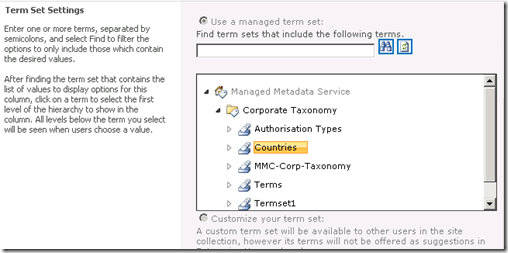
    I then used the SolidQ export tool from codeplex to export those term sets from the managed metadata service of the source farm. Since the new SP2010 farm had a freshly provisioned managed metadata service application, re-importing those terms and term sets into this farm was a trivial process and went without a hitch.

    I knew that managed metadata stores each term as a unique identifier (GUID I presume because programmers love GUID’s). Since I was migrating a content database to a different farm there were two implications.

    1. The terms stored in lists and libraries in that database would reference the GUID’s of the original managed metadata service
    2. The site columns themselves, would reference the GUID of the term sets of the source managed metadata service

    But the GUIDs on the managed metadata service on the new farm will not match the originals. I did not import the terms with their GUID’s intact. Instead I simply imported terms which created new GUID’s. Now everything was orphaned. Managed metadata columns would not know which term store they are assigned to. For example: just because a term set called, say “Clients” exists in the source farm, when a term set is created in the destination farm with the same name, the managed metadata columns will not automatically “re-link” to the clients term set.

    So what does a managed metadata column orphaned from a term set look like? Fortunately, SharePoint handles this gracefully. The leftmost image below shows a managed metadata column happily linked to its term set. The rightmost image shows what it looks like when that term set is deleted while the column remains. As you can see we now have no reference to a term set. However, it is easy to re-point the column to another term set.

    image_thumb36 image_thumb37

    When you examine list or library items that have managed metadata entered for them prior to the term set being deleted, SharePoint prevents the managed metadata control from being used (the Project Phase column below is greyed out). Importantly, the original data is not lost since SharePoint actually stores the term along with the rest of the item metadata, but the term cannot be updated of course as there is no term set to refer to.

    image_thumb8

    Once you reconnect a managed metadata column to a term set, the existing term will still be orphaned. The process of reconnecting does not do any sort of processing of terms to reconnect them. I show this below. In the example below, notice how this time, the managed metadata control is enabled again (as it has a valid term set), but the terms within it are marked red, signalling that they are invalid terms that do not exist in this term set. Notice though the second screen. By clicking on the orphaned term, managed metadata finds it in the associated term set and offers the right suggestion. With a single click, the term is re-linked back to the term store and the updated GUID is stored for the item. Too easy.

    image_thumb21

    image_thumb22

    image_thumb23

    As the sequence of events above show, it is fairly easy to re-link a term to the term set by clicking on it and letting managed metadata find that term in the term set. However, it is not something you would want to do for 10000 items in a list! In addition, the relative ease of relinking a term like the Location column above is elegant only because it is a single term that does not show the hierarchy. This is not the only configuration available for managed metadata though.

    If you have set up your column to use multiple managed metadata entries, as well as allow multiple entries, you will have something like the screen below. In this example, we have three terms selected. “Borough”, “District” and “Neighbourhood”. All three of these terms are at the bottom of a deep hierarchy of terms. (eg Continent > Political Entity > Country > province or State > County or Region > City). As a result, things look ugly.

    image_thumb25

    Unfortunately in this use-case, our single click method will not work. Firstly, we have to click each and every term that has been added to this column one at a time. Secondly and more importantly, even if we do click it, the term will not be found in in the new term set. The only way to deal with this is to manually remove the term and re-enter or use the rather clumsy term picker as the sequence below shows.

    image_thumb33

    Note how as each term is selected, it is marked in black. We have to manually delete the orphaned terms in red.

    image_thumb34 image_thumb35

    Finally, after far too many mouse clicks, we are back in business.

    image_thumb31

    A better approach?

    I showed this behaviour to my Seven Sigma colleague, Chris Tomich. Chris took a look at this issue and within a few hours trotted out a terrific PowerShell script to programmatically reconnect terms to a new term set. You can grab the source code for this script from Chris’s blog. The one thing Chris did tell me was that he wasn’t able to re-link a site or list column to its replacement term set. That bit you have to do yourself. This is because only the GUID of a term set is used against a column, which means without access to the original server, you do not know which term set to reattach.

    Fortunately, there are not that many term sets to deal with, and the real pain is reattaching orphaned terms anyway.

    Chris also added a ‘test’ mode to the script, so that it will flag if a field is currently connected to an invalid term set. This is very handy because you can run the script against a site collection and it will help you narrow down which columns are managed metadata and which need to be updated.

    From the SharePoint 2010 Management Shell, the script syntax is: (assuming you call your script ReloadTermSets.ps1) –

    .\ReloadTermSets.ps1 -web “http://localhost” -test -recurse

    web – This is the web address to use. test – This uses a ‘test’ mode that will output lines detailing found fields and the values found for them in the term store and won’t save the items. recurse – This flag will cause the script to recurse through all child sites.

    Of course, the usual disclaimers apply. Use the script/advice at your own risk. By using/viewing/distributing it you accept responsibility for any loss/corruption of data that may be incurred by said actions.

    I hope that people find this useful. I sure did

    Thanks for reading

    Paul Culmsee

    www.sevensigma.com.au


    SharePoint Analysts–Stop analysing!

    Michal Pisarek wrote a nice write-up of what makes a good SharePoint Analyst. I feel I have something to offer here, given that I…

    1. am a cynical old bastard
    2. am an opinionated old bastard
    3. have had some opportunities that not too many SharePoint people have had
    4. wrote this post on a plane while suffering jetlag 🙂

    I am going to argue that as a SharePoint ”analyst”, the worst thing you can do is act like an analyst.

    I previously wrote about the identity crisis that Business Analysts have which became apparent to me when I spoke at a BA World Conference last year. The gist of my point in that post came from my observations of a panel discussion on role of a BA within Agile development. I noted that the whole discussion seemed based on an underlying presumption that the role of the BA was to translate between IT and “the business". Agile by its very nature, shifts the ground out from under this assumption which caused a bit of consternation on the part of the panel. My takeaway from this, was that a role does not define the person. The body of knowledge of your discipline (in this case BABOK) is not the one truth. When you think about it, the body of knowledge by definition, consists of the lowest common denominators of a discipline of knowledge – a starting point. This is because the skills that you have built are your skills. Sure, you can write about them, but that only conveys a small dimension of what your skills entail.

    Essentially, if everybody followed the BOK as the source of the truth then all consultancies would look the same. (Thinking about it, now you know why all large and expensive management consulting firms tend to sound the same…hehehe 🙂 )

    image

    The point is that it is the knowledge that you have earned that makes you what you are and what customers want. Knowledge comes from making mistakes, not by confirming your rightness. Therefore, people who practise constant learning by trying things out, challenging their models of reality, always build a hugely valuable corpus of tacit knowledge that is locked up in their brain where knowledge is connected and related in ways that form insight. It is because of this unique insight, that customers rarely want a “Business Analyst”.  They want Joe or Bob because of what Joe or Bob, as individuals, bring to the table. (Kailash writes about this in more detail if I am leaving you scratching your head at this point. I am going to quote him in a reply to Richard Harbridge).

    The point I would like to emphasise, however, is that best practices cannot capture tacit knowledge. Codified best practices (or standards) are therefore necessarily incomplete. One of the things standards don’t tell you is how you should “practice the practice”. Practices have to be customised or adapted to specific organisational contexts before they can be practiced. The process of customisation invariably involves the creation of tacit knowledge to fill in the missing bits. This is why I used the word “rediscover” to describe this process, rather than “customise” (or “adapt”) : the former gives a better sense for the magnitude and type of effort involved whereas the latter suggests that minor tinkering will do the job (which it won’t).

    So, here is a tip. Don’t define your own wellbeing by a role title or adherence to a body of knowledge because, if you do, you will inevitable have an identity crisis. The world simply moves on and with it, the problems that people are trying to solve tend to wriggle out of the domain of any single BOK. Any attempts to resist this will eventually become dogma and then we have “memetic smackdowns” as I describe in this EUSP Post.

    image

    Okay, so now that I have finished a mini rant, I’d like to address the whole “analyst” thing. Don’t get me wrong – it’s not the title of the role I am going to talk about here, but the analyst paradigm itself. That is, the notion that my purpose in life is to take some requirements, go to a back room, spend time “processing” and “synthesising” those requirements, translating away between "IT and “the business”, before formulating a solution for the customer.

    This does not work well with most SharePoint projects! Especially ones that seek to “improve collaboration”.

    Many people fail to see why this is the case, yet given the huge gap between the SharePoint that Microsoft shows you versus what you see on the ground, you would think that it would be kind of obvious. For what it’s worth, understanding why the analyst paradigm is dangerous also neatly explains why IT is generically predisposed to struggling with SharePoint.

    Consider the following projects:

    • Implementing Microsoft Exchange for a global organisation
    • Implementing Active Directory for unified and policy based user and resource management
    • Replacing PBX with a Voice over IP system
    • Upgrading your wide area network from site to site VPN’s to MPLS managed WAN
    • Determining support and escalation procedures for a SharePoint deployment
    • Replacing a Windows XP/Office 2003 desktop environment with Windows 7/Office 2010

    In the above list, if you ask the question “Will users accept and adopt this?” the answer is a fairly clear yes. At the end of the day, no matter what version of Exchange is in, Microsoft Outlook is still Microsoft Outlook. What the user sees is an Inbox and so long as mail comes in and goes out – they are happy. All Active Directory is to a user is a username and password to get to their computer. Irrespective of how clever the routing is in a Voice over IP system or a WAN network, a phone is just a phone. You can plan for support and escalation procedures for SharePoint, but at the end of the day, people will use the SharePoint system because it is the right solution for them. Sure they might get pissed if they have bad technical support, but if the solution is crap then no amount of awesome support structure is going to change this.

    This, my friends, is the realm of the analyst paradigm!

    You see, if you ask me to deploy Active Directory or Exchange, I will ask you a bunch of questions about your number of sites, number of users, communications infrastructure and the like, and I know that users will use it. I actually don’t need to talk to them. Oh sure, someone might do some communications planning, but I don’t need to address user adoption because adoption is already there! People adapted to email, telephone and Microsoft Windows years ago.

    Instead, I can go into a back room, read a bunch of whitepapers and design/deployment guides and blammo. Here is your solution and here is how much I think it will cost. Better still, I can use waterfall style of project methodology because as a specialist, I have done this before and have expertise. I can tell you what needs to be done in considerable detail and break it down into a plan.

    What it all boils down to is that there is a clear relationship between cause and effect, characterised by answering YES to the “If I do this, will users accept and adopt this” test. But most IT departments (and most IT integrators) are going to default to the analyst paradigm because many of their other projects tend to be in the above category. This analysis based mode of project delivery is very much ingrained into the reptile brain of a lot of IT professionals through years of repetition of implementing these types of projects. After all, it’s just IT, right?

    Also, note that many of these type of projects are characterised by being very technically complicated. Some are insanely so and require specialist technical expertise. This is the realm of the supremely skilled person who performs an analyst function with a body of knowledge behind them. The whole industry certification process is built on this fundamental underpinning and works really well with things like Cisco and Microsoft in areas like Exchange, Active Directory and the like.

    Now, consider the following projects or initiatives (I am deliberately picking things where people may disagree with me so go with me, ok).

    • Coming up with an navigational structure for a SharePoint collaborative portal
    • Installing SharePoint to improve collaboration
    • Replacing a folder based file share with a metadata based document repository
    • Designing a new road layout for a local suburb
    • Putting in a new intranet
    • Putting in a records management system
    • Installing a new time tracking system

    In all of these problems, it is difficult to answer yes to the “Will users accept and adopt this” question. Sure, you can go all big stick and say “We will force them to” but that fails the “accept” part of the test. Therein lies the danger for the analyst paradigm. You can go off to the “back room” and use your body of knowledge, read best practices and “analyse” until the cows come home. Until you deliver the solution, you will not know if it will be accepted.  The cause and effect relationship is not clear until after an action has been taken!

    image

    The reason you can’t confidently answer yes is that all of these projects above require adaption on the part of the target audience. Adaption leading to adoption is a hit and miss affair. While we might like to think that we are all rational, clearly we are not. If you want rational, think Dr Spock from Star Trek – and even he got mad sometimes! Office politics and organisational inertia stems from the irrational world. Butt covering by positioning for “blame avoidance” for decisions made by fear and anxiety are commonplace. If you work in a large organisation and listen carefully to a typical meeting, the logic and facts that are spoken out loud are rarely what matters compared to the complex non spoken interplays that go on underneath the words.

    For what it’s worth, I added a non IT example of designing a new road layout for a suburb. A rational analyst might think that residents have to accept the solution by definition because, after all, once a road is in, that’s it. But what typically happens is that residents of that neighbourhood see the plan, petition, form lobby groups and harass the hell out of their local political representatives. If this is enough to make the politician edgy then they will vote the plan down before it ever happens. Sure it might have been a good plan, but it’s gone now and the chances of further buy-in are greatly reduced.

    The pure analyst is often taking a rational approach to an irrational problem space. Sorry folks – this is simply asking for trouble. Like the politician who does what they think will keep them in power versus what is logical shows the rational world does not always get a good look in. A good example in SharePoint land, is the “metadata is good and folders are bad” thing. Any metadata fanboy with this mantra often find the hidden organisation will beg to differ 🙂

    So, what do we do then?

    image

    The facilitator paradigm instead aims to elicit resolution of problems using dialogue between stakeholders by achieving a greater degree of shared perception of the problem situation. Unlike the analyst paradigm, there is no back-room approach as such. By definition, we need to collaborate to do this. (Fancy that, eh? Collaborating to deliver a collaborative platform – who would have thought!)

    Now, I am not talking about facilitation in the classic sense with everybody sitting in a room in a circle and plays team building games. Some of the best project managers and business analysts I have met are facilitators without necessarily knowing it. What I mean by facilitation is that our starting point is to leverage the wisdom of the crowd, by creating an environment conducive to participants being able to surface the irrational as well as the rational. Only in this way, can we come to a shared understanding of a problem and what should be done about it.

    I previously termed this the holding environment, and it really is. A great business analyst or project manager knows this instinctively, and uses many tools (as well as some coercion and sometimes their own ego surrendering) to bring it about.

    If you take anything away from this post, remember this. Anytime you cannot confidently answer the “Will users accept and adopt this” question, it is highly likely that not all users see that there is even a problem yet. Therefore, expecting people to magically buy-in and adapt when they don’t recognise the problem is never going to fly. Like trying to get a Darwinist to accept that intelligent design should be taught in schools, someone who does not believe in it to begin with, is not going to easily buy into a solution that requires them to change their beliefs and therefore behaviour. 

    Conclusion

    When you think about it (rationally!) we usually look at SharePoint as an enabling technology that can address a legacy of poor collaboration and information management. Yet, how can the world of the analyst work out if their solution will create the very same legacy without all stakeholders being on the same page?

    So remember, in a project where the cause and effect relationship is not clear, use the facilitator paradigm and stop being such a bloody analyst!

    Thanks for reading. Comments most welcomed Smile.

    Paul Culmsee

    www.sevensigma.com.au


    In 2011, I will be posting sections of my Governance and Information Master Class here. Much of the content consists of mental models, alternative frames of reference, pattern and practices as well as other tools and methods, specifically for the facilitator paradigm. This is my interest area and feel the analyst paradigm is already well represented in the SharePoint space.


    Dialogue Mapping: The Ying to SharePoint Yang

    I don’t know about you, but as a SharePoint practitioner, I love the fact that I do not do SharePoint full-time anymore. I’d like to take some time to explain why this is the case, and how my non IT work helps me be a better SharePoint practitioner. To do so, I will talk about a recent non IT project I worked on. Who knows? This may give you some insights into how you view and approach collaborative work.

    Western Australia is BIG

    File:Kimberley region of western australia.JPGIn case you don’t know already, I live in Perth, Western Australia. You can see Perth if you squint at the map on your left and look to the south west area.

    Western Australia is a bloody big land area and extremely isolated. One claim to fame about living in Perth is its distinction for being one of the most isolated cities in the world. In fact we has a population density is on par with Mongolia (this is dead-set true – I researched this fact). Of the 2.2 million people that live in the state, 1.8 million live in the Perth metropolitan area and the rest are scattered far and wide. In terms of distribution, there are no other major cities in Western Australia. The next most populated town outside of Perth is Mandurah with some 83,000 people. 

    In the north of Western Australia, these towns are often separated by anywhere from a couple hundred to more than a thousand kilometres. The weather is very hot, the landscape is breathtakingly beautiful and the isolation here is hard to comprehend without visiting. The wealth of Western Australia (“GFC? What GFC?”) comes from the north of this vast state, via huge mineral deposits that China seems happy to buy from us, which in turn keep me and my colleagues busy putting in SharePoint around the place.

    Now if you think Western Australia is big, get this: The Kimberley region of Western Australia (the top section marked in red) is almost as big as the entire country of Germany. For American readers, it alone is three fifths the size of Texas. For all that space, only around 45000-50000 people live there.

    These wide distances create all sorts of challenges. At a most basic level, think about the cost of basic services to such a remote location with such a small population density. Cost of living is high and services like health care are always stretched and people living here have to accept that they will never be able to enjoy the same level of service enjoyed by their city slicker cousins.

    Now that I have painted that picture in your mind, let me intersect that with one of Australia’s biggest wicked problems. The indigenous people’s of Australia have many social and health issues that have had a massive human cost to them. We are talking chronic alcoholism, physical and sexual abuse, depression, suicide and the whole range of mental illnesses. Families and communities tear themselves apart in a seemingly an endless negatively reinforcing cycle. Like many indigenous groups around the world, intervention approaches from earlier periods have had catastrophic long term consequences that were never considered at the time (a classic wicked problem characteristic). When you read the stories about the stolen generations, you cannot help but be deeply moved by the long term effects, the damage done and the sad legacy left behind.

    Continue reading “Dialogue Mapping: The Ying to SharePoint Yang”


    Un-Managed Metadata: A couple of gotchas

    As the SharePoint 2010 dust settles, gushing praise and inflated expectations are slowly replaced by the cold hard reality, as people come to grips with the limitations of the product. One such area is with the managed metadata service. Don’t get me wrong, I like managed metadata a lot and I can see a little ecosystem building around that functionality specifically. But it does have a couple of big gotchas that you should be aware of before making a big investment with it.

    The sad irony is that these issues are actually not the fault of the managed metadata service, but the applications that are supposed to embrace and extend SharePoint and therefore accommodate it.

    The reason I am calling out these two particular issues, is that I can see many people making assumptions that this will just work, make a significant investment in time and effort to develop an IA based around that assumption and then face the painful truth of having to work around them. After examining two issues that I suspect will cause some pain, we will then have a quick look through some of the implications and mixed messages that Microsoft are sending to organisations.

    InfoPath Web Suckiness

    The first issue that has gotten a bit of attention is the fact that the managed metadata columns cannot be used in browser based InfoPath forms. In other words, if you have a list with a managed metadata column and think that it would be cool to customise that list forms using InfoPath, you will be in for a nasty surprise. You will receive the following error message:

    image

    "The following fields in the SharePoint list are not supported because of their data type and will not be available in InfoPath Designer:

    MyColumn (TaxonomyFieldType)”

    I have a screenshot pasted above – which actually has come from a nice explanation of the problem made by Alana Helbig (hope you don’t mind Alana). Alana shows that if you persist and open the form in InfoPath, the managed metadata field will be hidden away, never to be edited again (and therefore pointless). She also also demonstrates that the behaviour is even worse if the managed metadata column is marked as mandatory. In this case, SharePoint totally spits the dummy if you modify the form with InfoPath and then try to load it. You will get a message along the lines of: “The following required fields are missing from the form” and a ULS correlation ID for your trouble.

    Paradocially, InfoPath does support managed metadata when forms are displayed natively (ie not web based). This is proven by the fact that the MSOffice Document Information Panel (DIP) contains a control to display managed metadata information (in case you are not aware the DIP is an InfoPath form). The screengrab below shows Word showing two managed metadata columns (one with the imaginative name of “aaa” which I have clicked on) allowing me to pick terms from the term set.

    image

    Taking a closer look, if I edit the Document Information Panel settings in InfoPath, I can clearly see that there is a Managed Metadata picker control.

    image

    I never bothered with the SP2010 betas because I was doing a lot of non SharePoint work at the time. But from my reading, it seems that at one point, InfoPath could display managed metadata in the browser but it was yanked from the RTM because of quality issues. Some forums suggest it won’t be corrected in any service packs soon. I certainly hope they are wrong.

    Conclusion? I assume Microsoft knew the implications of this decision – yet still, I feel that this will cause a lot of frustration and grief.

    SharePoint Workspace 2010 Suckiness

    This is the same issue, just using a different Microsoft client application: SharePoint Workspace 2010. SPW2010, if you haven’t seen it, provides a client for SharePoint 2010 that enables real-time synchronization of desktop content with SharePoint documents and lists.

    This gotcha is one I fear might be even more insidious than the InfoPath one in certain geographic locations. This is because offline access tends to be an area people will think about later in the project. Where I live (Western Australia), is remote and dominated by mining. As a result, Groove had considerable popularity when you are in the middle of nowhere with nothing but a poor satellite link with >1 second latency ;-). Many organisations will flock to SharePoint Workspace 2010 because of its much improved compatibility with synchronising SharePoint lists, libraries and views.

    The problem is that managed metadata columns can be viewed in SharePoint Workspace 2010 but not edited at all. 

    Below I show a custom list with a managed metadata column called Projects.  The next image shows the same list in SharePoint Workspace 2010.  Note how the Project column is displayed in the list of projects, but is not displayed in the view/edit item form below it.

    image

    image

    Now some of you might be thinking that this is fairly minor, and that not being able to modify managed metadata columns is not a problem. But check out what happens when the managed metadata column is made mandatory. SharePoint Workspace 2010 displays the error below when attempting to view the list.

    image

    Ouch! When you click on the More Info link in the ribbon, you are presented with a scarily similar message to InfoPath.

    image

    It gets better (mixed messages)

    Office 2010 has finally gotten past the use-case I described in my “folders are bad and other urban legends” post. In Office 2010, application centric users have the option to browse document libraries not just by folders, but by metadata as shown below. Note how we are browsing a managed metadata term store in the File>Open dialog box in Word 2010.

    image

    The rub with this functionality though, is it only works for managed metadata columns. You might have configured a choice field for metadata navigation and in the browser, you can sort, slide and dice via those columns as well. But in Office 2010, you can only use managed metadata or folders. No views, and no other column types. This will inevitably lead organisations to invest time and effort to create an information architecture around the managed metadata construct. Yet by utilising managed metadata in this way, we consign ourselves to not being able to edit any of this data when we take it offline using SharePoint Workspace 2010.

    *sigh* So basically, the more you try and move to a metadata driven, taxonomy approach, the more you make yourself rigid and inflexible.

    But there is more…

    By the way, managed metadata is not the only column type that suffers this fate. If you enable ratings on a list or library you will see the same problem. The first screengrab below is InfoPath and the next two are SharePoint Workspace 2010.

    image

    image 

    image

    Conclusion: Violating the laws of motion

    More than ever, SharePoint is a minefield of caveats. These examples conclusively disprove Newtons laws of motion because for every possible action, there are just not equal and opposite reactions, but potentially many more opposite reactions. More then ever, practitioners have to understand these complex dependencies, and then somehow explain them to stakeholders without giving them a brain explosion. Is it little wonder that there is commonly a big gap between the slick demos and the reality on the ground?


    Thanks for reading


    Paul Culmsee


    « Previous PageNext Page »

    Today is: Saturday 7 March 2026 -