Back to Cleverworkarounds mainpage
 

New book preview – SharePoint 2007 Developers Guide to the Business Data Catalog

I’ve been busy on a number of fronts and some of the fruits of that work will appear soon enough, but I thought that I would pop up to let you know about a forthcoming book written by Brett Lonsdale and Nick Swan on a SharePoint component that has until now, been seriously under-represented in the plethora of SharePoint books out there in the marketplace.

The Business Data Catalog is one of those SharePoint components that is easy enough to understand conceptually, but then will scare the utter crap out of you when you delve into the guts of its XML based complexity.  At least that was my experience the first time I toyed with it in early 2007. Luckily for me, my ass was saved by a tool that had just been released as a public beta called BDC MetaMan. I downloaded this tool and within around 15 minutes I used it to set up a BDC connection to Microsoft’s Systems Management Server v4 to pull software package details into a SharePoint list and felt very proud of myself indeed. 

Fast forward to mid 2009 and BDC MetaMan has come a hell of a long way, as have its creators. Nick and Brett are about as world-authoritative as you can possibly get on the BDC and if you wish to become a Jedi in the dark arts of the BDC “force” then you now have your official bible. This book is absolutely crammed with detail and the expertise of the authors in this feature shines throughout.

The book is split up across 11 chapters and although it is not explicitly stated by the authors, seems to be made of 3 broad parts. Chapter 1 introduces the BDC, how it is architected (web parts, BDC column, BDC Search, and integration with User Profile import and the SDK). Also covered is the range of data sources, an introduction to Application Definition Files (ADF) and how it all integrates into the Shared Service Provider model.

Once the intro chapter is done with, Brett and Nick don’t waste too much time in diving deep. 

Chapters 2 and 3 deal with the structure of BDC Application Definition (ADF) files, and follows up with the complex world of how authentication plays out with the BDC. Chapter 2 delves far more into the ADF files than I ever wished to tread, but Nick and Brett somehow manage to describe a long, boring XML file in a logical, easy to follow manner and there was a lot of stuff that I learned here that I had simply missed from trawling MSDN articles. The authentication chapter is covered in excellent detail in Chapter 3 and goes way beyond the usual NTLM/Kerberos double-hop stuff. Authentication in the Microsoft world has become very complex these days, and there are various options and trade-offs. This chapter covers all of this and more, brilliant stuff.

After the deep dive of ADF and authentication, we surface a little from the previous two chapters into what I think really, is part 2 of this book. That is, several chapters that deal with how you leverage the BDC once you have connected to a line of business application. Chapter 4 introduces the built-in web parts that come with the BDC, shows how they are used and how they can be modified either using SharePoint Designer or tweaking XSL styles directly. Chapter 5 explores the BDC column type, how it can be used in the Office document information panel, in SharePoint Designer workflows, as well as its limitations. Chapter 6 explains how to leverage the BDC for allowing SharePoint to crawl your back-end line of business data and present it in search results. In addition to this, chapter 6 has a lot to offer just from the point of view of customising the search experience, whether using BDC or not. Finally, Chapter 7 examines how the BDC can be utilised to add data into user profiles that is leveraged via audience targeting.

Next we dive back into “real programmer” territory and what I think makes part 3 of this book. Chapter 8 delves deep into the BDC object model, for those times when the out of the box stuff just won’t quite cut it for you. The example used to demonstrate this object model is a web service that exposes BDC data via several methods. Chapter 9 then covers the creation of a custom web part that is in effect, an Ajax version of the out of the box “Business Data List web part” that refreshes data every few seconds without requiring a page load. Chapter 10 is particularly interesting because it examines how the BDC is used in conjunction with another oft overlooked suite of technologies known as “Office Business Applications”. The combination of BDC and OBA offer many interesting capabilities and among the examples, there are examples of Excel and Word leveraging the BDC as well as creating custom task panes, custom ribbons and the like. Finally, chapter 11 deals with using the BDC to write data back to the line of business applications and finishes with a great example of using InfoPath to submit data to a line of business application via a webservice that calls the BDC. That is hellishly cool in a nerdy developer kind of a way.

Phew! First up, *man* these guys are smart! I have to say this is the hardest SharePoint book that I have reviewed. It is obviously aimed at developers but it has so much to offer beyond the BDC. The content is very technical at times and obviously low-level. That, itself, is not the problem. Conversely, complex topics are handled really well and everything is extremely logically organised and flows well. The book is simply very, very comprehensive! There is plenty of meat for developers to sink their teeth into and this book will keep you going for a long time.

The preface of the book states that it has been written for an audience of “Microsoft SharePoint 2007 Information Workers and Developers who need to learn how to use, customize and create solutions using the Business Data Catalog”. I would agree with this, but I hope that information workers do not get put off by chapter 2 (and to some extent, chapter 3). This book dives deep straight off the bat and it is actually the middle chapters that offer the sort of insights that information workers will find the most useful.

So, if you think that the BDC deserves more than one single chapter towards the back of a SharePoint book, then this is your answer. As well as becoming an expert on the BDC, It will open your eyes to many possibilities beyond it.

Thanks for reading

Paul Culmsee



Listen to me blab on about crap ;-)

Hi

I have been very busy on a number of fronts – which is why the blog hasn’t had much attention lately. I’ll be back soon enough though – once I get a few big jobs done.

For those of you that are not aware, there is a podcast interview that I did with Brett Lonsdale at Sharepoint Pod Show where he allowed me to blab on and on and on and on 🙂 Poor Brett – he didn’t know what he was getting himself into at all!

So if you think my posts are boring and wordy, wait till you hear me talk! 🙂

Paul


Developers who do a “Russell Crowe”

Hi all

If you were going to slot me into a little stereotype box, then you would slot me into the “IT pro” side of the fence. My coding is okay, but my real vein of expertise lay in infrastructure and over my career, I developed what I think is a reasonable troubleshooting instinct.

I’ve also worked with developers for the whole of my career and have the scars to prove it. The thing about developers is that they have this in-built reflex that until yesterday I did not have a word for. Then it came to me.

All developers have a little Russell Crowe inside of them!

imageWhy do I think this? Am I suggesting that developers are handsome, rugged types who melt your heart with their piercing eyes?  Oh, please. Allow me to explain with a simple mythical conversation with Mr Crowe. Let’s pretend you are a movie director.

You: “Hey Russell, we need to do another take, your dialogue wasn’t quite right.”

Russell: “Yes it was.”

You: “No seriously, I think if you had a look you’ll find that you missed a word or two.”

Russell: “Completely impossible. You are obviously an amateur and have no idea about acting.”

You: “I’ve directed twenty films and…”

BAM!!!  (Flying telephone hits you in the head at high speed, knocking you unconscious.)

Russell: (2 days later). Okay, so there was a minor issue with my dialogue, but the script was bad to begin with”


This exchange is somewhat representative of how programmers can occasionally be when it comes to troubleshooting. I remember one case where I was the “Cisco guy” who had problems with a developer who was so utterly fixated on “the network” being the cause of problems with his media streaming application. This created the classic “dev vs infrastructure guy” showdown, which we all know is usually won by the person whose home turf the battle is fought on. Therefore, the developer blaming “the network” and then going up against the “Cisco guy” is like Microsoft trying to win search market share off Google. The battle is so one sided it’s almost cruel to participate – but you feel it is your duty to put the little upstarts in their place anyway.

I have won the majority of such battles, not because I am any good, but because the developers have thrown the metaphorical phone at me before I’ve finished asking them if they would like a coffee. As a result of their inner Russell Crowe hurling the phone so quickly, their aim is way off, and the phone usually misses me, bounces off the wall and takes out their boss or some other authoritative figure.

So, they cop some heat and sulk in the corner for awhile, but do developers learn from this? Hell, no! The reason why this is so, is because little Russell doesn’t like to lose, and when he re-emerges, he causes temporary amnesia of all previous battles. Of course, his opponent remembers all, and the next battle is even more cruel that the previous one and the outcome is assured.

So, yesterday, my friend and colleague did his first “Russell Crowe” for some time. He hit a problem, and misinterpreted the cause and went down a path that led him to a very tunnel-vision view of what was wrong and what the solution was. He described the problem he was having to me and it didn’t feel “right”, but he was pretty insistent he was on the right path. So, I asked Twitter and got back a couple of suggestions and as soon as I put one to him… BAM!! Russell Crowe appeared and threw a phone at me.

“Well, they are obviously amateurs and haven’t a clue about the SharePoint SDK” was the gist of the response.

One of the respondents was Bjorn Furuknap, who I can assure you is *not* an amateur :-).

Anyway a few minutes later we found a different way to troubleshoot which pretty quickly pinpointed the problem. My colleague was very contrite and good natured about it as I teased him mercilessly. I later mentioned to Bjorn that I had just dodged a metaphorical flying phone and he said this wonderful quote which I think sums it up.

“Of course. He’s a developer. We’re all like that. It is always some else’s fault!”


Thanks for reading


Paul Culmsee

www.sevensigma.com.au


Perth SharePoint Users Group wrap

Today I presented a session at the Perth SharePoint Users Group. I was a little unsure whether my non-technically focussed content would be of interest to the geeks but the turnout was terrific and the feedback has been brilliant. (The 3 copies I gave away of Dux’s excellent “SharePoint for Project Management” book may have sweetened the deal – hehe )

My sincere thanks to new user group president Sezai Komur for giving me the opportunity to present this material as it was the first time it has seen the light of day in Perth.

If you want to check out the slide deck from the session, you will find it below. Expanded information that builds on this content can be found at the Seven Sigma site, as well as here at CleverWorkarounds.

Thanks for reading

Paul Culmsee
www.sevensigma.com.au


Cannot restore from recycle bin – nested folders

Oh my god – I have written a short, useful post instead of a bloated theory fest! What is the world coming to?

I was all set to go and catch up with SharePoint Sezai today, when the phone rang and the IT guy from one of my clients had a wee problem. Someone had been doing some serious file rearrangement surgery on a large document library with folders (yeah, yeah, I know – “folders are evil”  blah, blah). In one of those typical right mouse click spasms that we sometimes have, a large folder was blown away.

“No problem”, thinks the IT guy. “I’ll use my trusty SharePoint recycle bin to restore it.”

Sure enough, there is the folder listed, so they select it and choose to restore.

Uh-oh – error!

image

The IT guy took the above screenshot and mailed it through to me. From looking at the <sacrasm>incredibly useful, non threatening and clear error message above</sacrasm>, it was the presence of the LoadRecursive() function that gave me a hunch as to what was going on.

Turns out that it wasn’t just this particular folder that was accidentally deleted. The parent folder had been deleted also. But the problem was that during this major file rearrangement surgery that I mentioned at the start of this article, that parent folder had been replaced with a new one with the same name.

The recycler cannot handle this. It seems to make two assumptions

  1. It assumes that you always want to restore something back to the original location that it was deleted from
  2. It expects that if something has been deleted from a list of library, it sure as hell should not exist when you attempt to restore it back to the site.

I asked the IT guy to rename the second, identically named folder to something different and then reattempt the restore.

Bingo! My client is happy, their IT guy lives to fight another day and I now have learned the meaning behind yet another barely decipherable SharePoint stack trace :-).

(Turns out I shouldn’t have cancelled on Sezai after all!)

Thanks for reading

Paul Culmsee


P.S: Now for the Google crawler, the text version of the error in teensy font 🙂

The item cannot be restored. at Microsoft.SharePoint.SPRecycleBinUtility.ThrowAppropriateRestoreException(SPException ex, SPRecycleBinItem lastItem)

at Microsoft.SharePoint.SPRecycleBinItemCollection.RestoreCore(Guid[] ids)

at Microsoft.SharePoint.SPRecycleBinItemCollection.Restore(Guid[] ids)

at Microsoft.SharePoint.ApplicationPages.RecycleBinPage.ProcessAction(String action, String guidString)

at Microsoft.SharePoint.ApplicationPages.RecycleBinPage.OnLoad(EventArgs e)

at System.Web.UI.Control.LoadRecursive()

at System.Web.UI.Page.ProcessRequestMain(Boolean includeStagesBeforeAsyncPoint, Boolean includeStagesAfterAsyncPoint)


Meet Agile Boy :-)

Tags: Offbeat @ 8:33 am

Not so long ago I wrote about the adventures of Governance Man and Dr Wicked. I also mentioned that there was another partner in crime. Agile Boy. Here he is in-between fighting SharePoint chaos and participating in SharePint’s!


AgileBoy

  • Name: Agile Boy
  • Secret Identify: Andrew Woodward
  • Special Powers: Extreme agility, TDD guruness, MVP
  • Weakness: Beer and Waterfalls
  • Catch-Phrase: “Beat futility with Agility!” 


Review – Balsamiq Mockup Tool (for SharePoint)

image

Hi

It’s review week here at CleverworkArounds, and the next one on my list that I have been meaning to speak about is an application called Balsamiq Mockups. Mr Mindmapper himself, Ruven Gotz first turned me onto this application some time back, and I have found it very useful in taming RBO (rampant branding obsession).

Although I have written various posts on SharePoint branding, most of the time I find it a tiresome task that for many sites, is pushed way too far up the priority list to the point that much more critical success factors are overlooked or given lip service. Now in saying that, I will admit straight up that although I know how branding *should* be done from a sustainable governance point of view, I suck royally at making a site look good myself and I compensate by relentlessly pummelling SharePoint branding governance best-practices onto completely unsuspecting web designers.

Such fun 🙂

Balsamiq Mockups has adopted a visual based site wireframing approach that takes the opposite approach to the “Photoshop” approach to site design. A web designer using a tool like Photoshop will attempt to create an accurate visual representation of a site based on a stakeholder’s tastes (or lack thereof). The risk here with SharePoint is that the branding vision that is created using Photoshop can often be quite tricky to achieve in SharePoint without being “governance naughty”, particularly for collaborative sites that make extensive use of web parts, application pages and document libraries.

Some of the most difficult SharePoint recovery jobs that I have had to do were a direct result of seemingly innocent “customisations” that came from branding requirements.

So, how can Balsamiq help?

For a start, a complete design-challenged person like me can actually produce something useful :-).

More importantly, however, it is designed on a completely different premise than the Photoshop style approach to design. This tool works on a principle of emulating hand-drawn designs, supplying you with a bunch of drag-and-drop widgets and interface elements which allow you to construct the basic structure of a site in minutes. Out of the box, there are around 70 elements that can be used to construct a web site and you can see the results of my 5 minute effort in the image at the start of this article.

Want to see how easy it is? Then check the video below (assuming your IT department has not blocked Youtube).

Although the video shows how easy it is to create a mock up, you may be wondering if there are any SharePoint specific design elements. Out of the box there are not. But fear not, there is a flourishing community around this product that creates additional elements for you to use. SharePoint is well represented here.

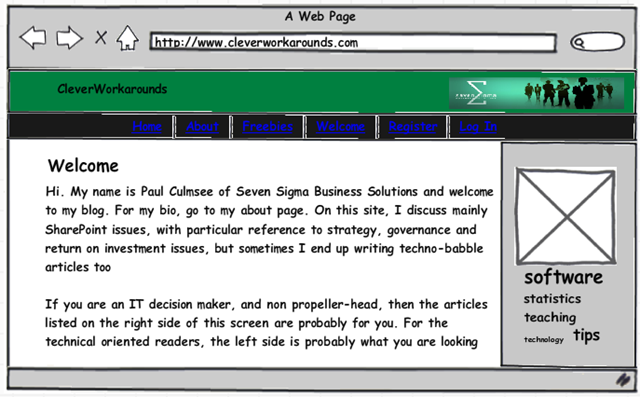
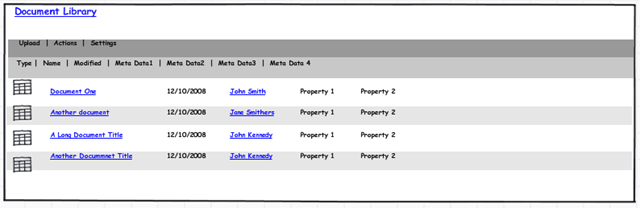
Want to drop a SharePoint document library onto the page? Too easy.

image 

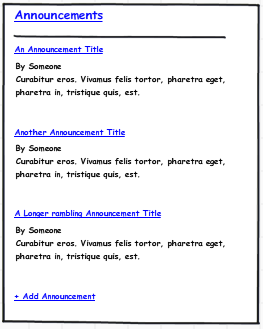
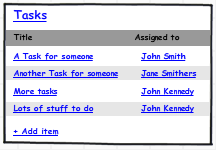
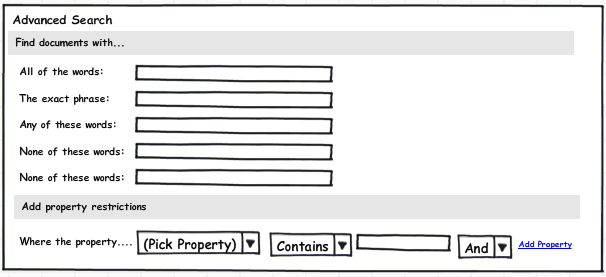
Did someone say calendar, tasks or search?

image image image

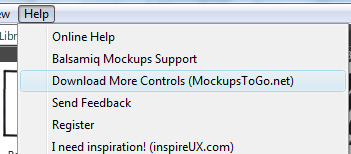
This application does not take much of an investment in learning. One can pretty much learn the product just by watching the Youtube video and learning how to import other design elements is just a matter of clicking the help menu and choosing the “Download More Controls” option.

image

Would hard-core web designers may find the application cramps their artistic style? Maybe – I can only speculate. But for me, I spend most of my time in a PM, training, architect or advisory role. As a result, Balsamiq Mockups is perfect for me because, it above all else, it is quick to produce results. I can flesh out a SharePoint basic site design without having to fiddle around with master pages, SharePoint designer or CSS files (and for that I am eternally grateful!)

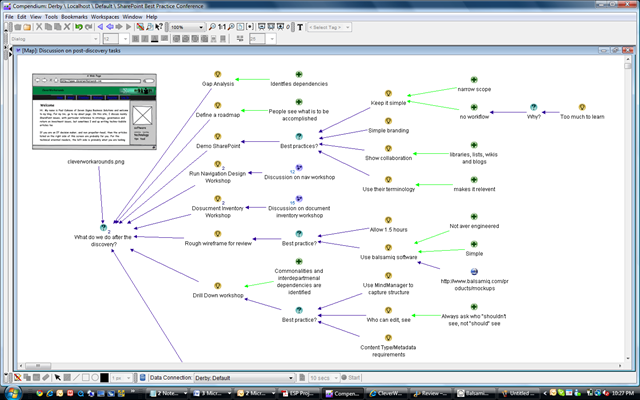
I can then export the mockup to a PNG file and use that in documentation, presentations, and best of all, my issue and dialogue maps which makes great strides in achieving the all-important goal of shared understanding among project participants.

image

Try Balsamiq Mockups out. It’s a great tool to add to your armoury.

Thanks for reading

Paul Culmsee
www.sevensigma.com.au


See you in New Zealand in July!

Tags: Conference,SharePoint @ 8:25 am

image

It looks like they know how to throw a conference in Australia’s ‘other’ state (just kidding, Kiwis).

I will be speaking at the New Zealand Community SharePoint Conference in July 2009 and I’m really looking forward to it. This will be the New Zealand conference to learn about SharePoint 2007 with a whole bunch of expert local and international speakers. Some big international names are joining in the fun, including Joel “Governance Man” Oleson himself so we can continue our buzzword battles in the flesh! But to whet your appetite, we have Ben Curry, Erica Toelle, Michael Sampson, Paul Stork, Steve Smith and Adam Cogan, to name a few.

There are a wide variety of topics that are on offer, and the session that I am most looking forward to is Erica Toelle’s session entitled “SharePoint User Adoption: Fostering Shared Understanding throughout your Company”. Unfortunately, with the current schedule, it clashes with mine, but I hope that it gets rearranged as I know there are some great synergies there. Here is her synopsis

SharePoint projects usually involve some kind of organizational change related to culture, process, or structure.  The change process is something that must be carefully managed, approached methodically and tailored to your organization’s culture.
In this session you will learn how to ensure your SharePoint project’s success by using frameworks to manage the change process, resulting in higher user adoption of the end solution.  This is done by gaining leadership and stakeholder commitment, creating a strategic communication plan and planning a learning strategy.  You will walk away with templates and checklists to help you with your SharePoint project.

I am also especially looking forward to Pete Sayers’ talk on South Taranaki District Council as an EDRMS solution as I work with local government here in Perth myself and sometimes have to grapple with the conflicting requirements of the state records act, the web team hating the records management team, and the IT team hating them both :-).

Also looking tempting is Lulu Pachuau’s Information Architecture session, and Patrick van Rinsvelt’s session on organisational cultural considerations for SharePoint deployments. I think I’ll also go deep (level 300), and listen to Chandima Kulathilake dive into the depths of SQL Server administration for SharePoint as well as sit in on Joel’s Infrastructure and Administration Fundamentals just to heckle 😉 .

It all happens in Wellington, 2nd and 3rd July, 2009. I’ve never been to New Zealand before, but have heard that it’s picturesque, so I am really looking forward to it.

See you there!

Paul Culmsee

www.sevensigma.com.au


p.s I could make some Lord of the Rings inspired comment, but for me the pinnacle of New Zealand film making was Peter Jackson’s Brain Dead!


Issue Mapping Webinar Series in April 09

Hi all

There are a few people in my life who have had a big influence on me as a person, consultant and trainer. Jeff Conklin from CogNexus Institute is one of them. If I was to rank Conklin, I’d say he comes in somewhere between Jackie Chan and Freddie Mercury – illustrious company indeed. 🙂

Jeff armed me with the right set of skills and way of thinking that allowed me to defeat the likes of “SharePoint vs Skype guy”, a highly skilled foe that I previously wrote about in the “One Best Practice” series of posts. As it happens, Jeff is running another of his Issue Mapping webinar based training series starting April 8 2009. Anyone who is involved in highly complex projects (whether technically or socially challenging), including managers, project leaders, consultants and facilitators should consider attending.

SharePoint people? You are dealing with technical and social challenges almost by definition. Issue Mapping is the most effective craft I have come across to:

  • be able to lead a group to a robust decision that endures and that inspires consistent actions and outcomes despite the cross-currents of hidden and competing agendas
  • get traction in the "swamp" of a project that is cursed with both technical and social complexity
  • have real dialogue without getting bogged down in politics, personalities or an overload of information
  • help a group get its bearings in the fog of confusion, contradictory objectives and changing constraints
  • be able to focus a group’s energy in a way that boosts collective intelligence: the capacity to work with ambiguity and equivocal knowledge
  • be able to capture and organize a large volume of unstructured information to create a coherent foundation for thinking and learning in an organization

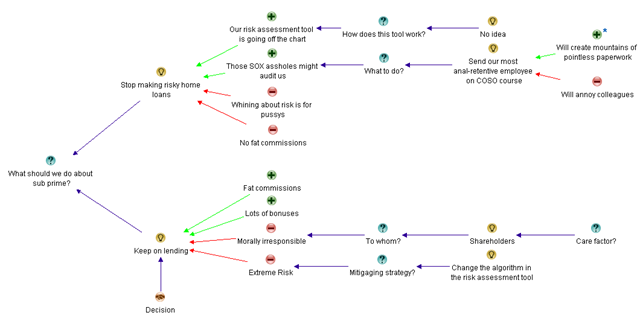
Consider my example below: I have summed up the entire global financial crisis in a single issue map – neat eh!

image

Like my above example, you will learn how to create great issue maps – maps that are clear, coherent, and expose the deep structure of an issue. (okay so I am being just a *tad* tongue in cheek with my example)

In all seriousness, it is a great course and well worth attending. If you enjoyed the “one best practice” series or my “wicked problems” sessions, this is your opportunity to learn from the master.

Thanks for reading

Paul Culmsee
www.sevensigma.com.au


Review – Understanding SharePoint Journal

I have been a huge fan of Bjørn Furuknap ever since I first read his amazing series of posts on on customising the user experience at SharePointMagazine.

What struck me about Bjørn is the quality of his content and his fluid, entertaining and accessible style of writing. Although I can code okay enough, I am not a serious developer by any stretch. But Bjørn’s ability to weave his way through some large, fairly prickly programming topics and at the same time keep a part-timer like me, not only following it all, but really interested from start to finish, is a testament to his skill as a writer and trainer.

Learning SharePoint with USP Journal

So when I found out he had started a series of SharePoint journals, I was very keen to provide a review and asked him nicely if I could :-).

In short, I’m glad I did.

This debut edition starts on a relatively simple premise. “How do we see who is logged into my SharePoint site at any time”? We learn pretty quickly that this is not as simple as it sounds, but Bjørn deftly teases apart this question into the true problem statement, via basic user stories and easy to understand examples. The proposed solution is described at a high level, with a description on what you need to solve the problem and then summarises it with a mission statement, covering the goals of the solution and the “rules of engagement”

The “rules of engagement” are clear and have a strong governance/assurance affinity (brings a tear to my eye). The rules are;

  • Use only supportable methods and not harm a single Microsoft-provided file
  • Use the least amount of effort as possible
  • Utilize SharePoint native techniques as much as possible

I’m sure that “Governance man” would approve…

The final component of the introduction is a preview of the completed project (with screenshots – including one that I have pasted here).

image

Chapter 2-5 gets right into the think of things. Bjørn doesn’t assume too much (he skips programming 101 stuff like SharePoint features), but takes the time to explain setting up your project in Visual Studio for each component of this solution. He balances the theory with the practical extremely well, and manages to pack in a whole bunch of really important tools and key concepts such as:

  • WSPBuilder
  • DelegateControl (I love DelegateControl and I‘m not even a developer 🙂 )
  • List creation via feature (and code)
  • FeatureReceivers
  • SharePoint Manager 2007
  • CAML
  • Feature scopes and dependencies (via the object model)
  • Custom application pages
  • CustomAction methods

All chapters come with review questions to ensure key concepts have been learned. Even better still, all code from the journals are posted on codeplex so you can download the complete solutions. Brilliant stuff!

All in all, I have to say that of all of the development oriented authors that I read, Bjørn is one of the best writers out there, If you liked his work on SharePointMagazine and his own blog, then you will love these journals. If you are starting out your career in SharePoint development and want to learn a whole lot of different concepts in a fashion that is underpinned by sustainable development practices, then I strongly suggest that you grab yourself a copy.

Well done mate, great work!

Paul Culmsee

www.sevensigma.com.au


« Previous PageNext Page »

Today is: Sunday 8 March 2026 -