Back to Cleverworkarounds mainpage
 

Trials or tribulation? Inside SharePoint 2013 workflows–Part 1

Hi all

Workflows are big business in SharePoint land, despite the capability of SharePoint Designer Workflows being a fairly weak link in the overall SharePoint value proposition. If this wasn’t the case, then products like Nintex or K2 would not be so popular and workflow vendors wouldn’t have the biggest booths at the average SharePoint conference.

One of the serious strategic advantages of going with the SharePoint stack is the amazing 3rd party ecosystem that flourishes around the base product. No other platform in the space has the level of 3rd party support that SharePoint enjoys. But while its nice to be able to have great options for serious SharePoint workflow development, with each successive version of SharePoint that comes out, there is always that hope that one can use the base functionality without having to jump straight away to the 3rd party tools.  After all, it is quite common for organisations, having just gone to the time and expense of adopting SharePoint, to be dismayed that they have to part with yet more cash for 3rd party tools to address large functional gaps that were not apparent in the contrived product demos.

Another important trend being hidden by cloud hubris is the rise of the citizen developer. The CIO’s fountain of knowledge known as Gartner, stated that by 2014 25% of new business applications will be delivered by Citizen Developers.  They defined citizen developers as “a user operating outside of the scope of enterprise IT and its governance who creates new business applications for consumption by others either from scratch or by composition.” Elaborating, Gartner stated that

“Future citizen-developed applications will leverage IT investments below the surface, allowing IT to focus on deeper architectural concerns, while end users focus on wiring together services into business processes and workflows. Furthermore, citizen development introduces the opportunity for end users to address projects that IT has never had time to get to — a vast expanse of departmental and situational projects that have lain beneath the surface.”

So with SharePoint 2013, Microsoft has indeed changed things up a notch in the workflow world. Is it enough to enable and empower citizen developers?

That is what this series aims to find out… First up, lets take a quick look at the forces we are going to be meddling with…

What’s new with SharePoint 2013 and workflow…

Workflow in SharePoint 2013 is significantly different from SharePoint 2010. It fact, it is essentially a completely separate product called Workflow Manager. Technically, Workflow Manager is not part of SharePoint at all – there is no “workflow” service application or “service on a server” to be found. Instead, it is a separate process that works by communicating with SharePoint over the HTTP protocol in various ways.

This means that we have the option of deploying Workflow Manager onto its own server, or set of servers (although for you smaller sites, it happily installs onto your SharePoint servers and coexists with the rest of SharePoint too). This loosely coupled model has scalability benefits as workflow load can now be separated from the rest of SharePoint. It also means badly behaved workflows are less likely to affect SharePoint sites because they run in a separate process or separate servers. 3rd party applications (think about solutions built using the SharePoint 2013 apps model here) can also interact and communicate with workflow manager separately to SharePoint. It also helps Microsoft to realise their strategy of “encouraging” everyone to their vision of a cloud-based happy place.

Now new does not always equate to good – and Microsoft have a bit of a dubious history with V1 products and technology. So in this series, I’d like to show you an example of what the SharePoint 2013 new workflow regime can do. The example that I am going to use for this set of articles is useful for this purpose for several reasons:

  • 1. It is a common use-case that many organisations would find familiar – particularly those with compliance regimes
  • 2. It demonstrates a fairly typical SharePoint consulting “oh crap” moment, where you realise your masterpiece of a solution is completely undone by an untested assumption or a SharePoint caveat that you forgot about.
  • 3. It demonstrates a path to redemption that is an excellent utilisation of the new capabilities of SharePoint 2013 and Workflow Manager
  • 4. It gives you a great sense as to whether workflows are a real developer, information worker or citizen developer tool. In other words, after reading this, you should have a good idea what you are getting yourself into!

I have a lot to cover, so this series will be multi-part. This first post will outline the scenario that we are dealing with.

The scenario: Document Control at Megacorp

Many organisations operate in industries where they are required to manage documentation in a systematic way. Documents that are subject to any sort of quality or compliance regime are often referred to as “Controlled Documents”. Typically, a controlled document will have an assigned responsible party who is accountable for the management (i.e. approving the issuing of updates) of that document.

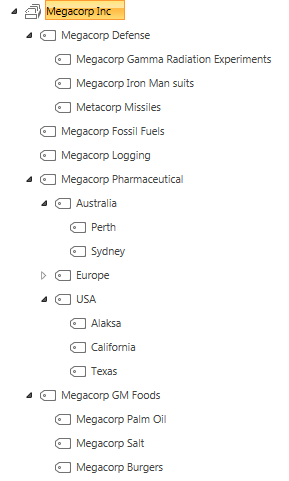
To illustrate, consider the document control requirements of Megacorp Inc – a mythical multinational conglomerate with a vide variety of businesses in many different industries and locations. Megacorp is your typical diversified multinational, making everything from Iron Man suits to hamburgers. A managed metadata term set illustrating the Megacorp conglomerate structure can be seen below. If you look closely, Megacorp Inc, actually consists of several companies and each is structured differently. For example: Megacorp Pharmaceutical divides itself based on country and state jurisdiction, whereas Megacorp GM foods divides itself up on the particular food it is generically modifying.

image

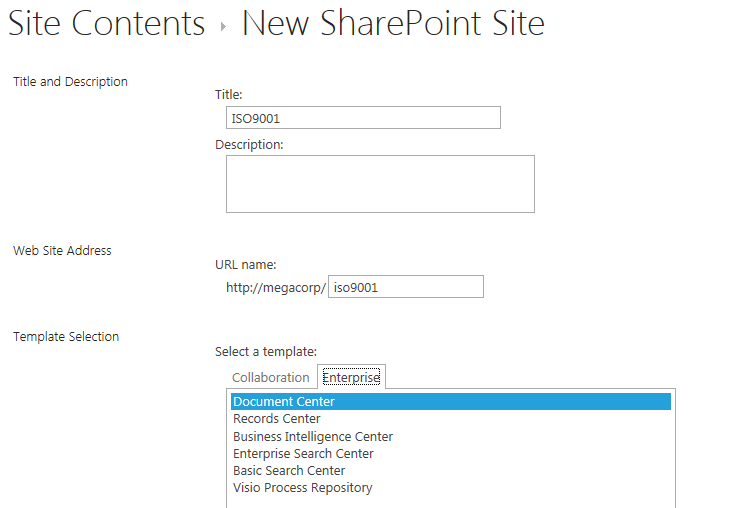
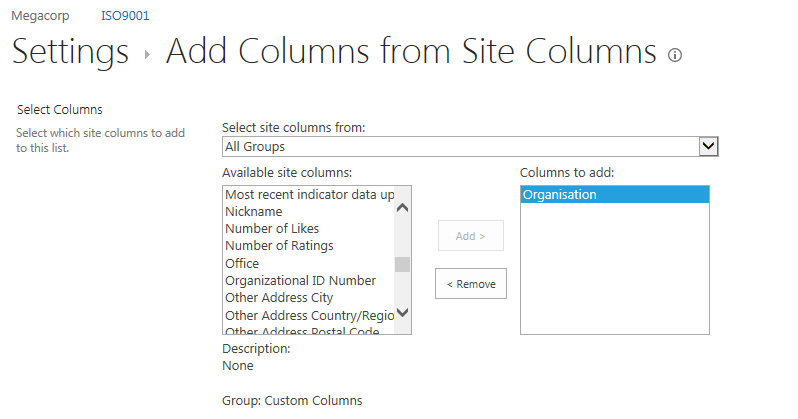
So let’s say that Megacorp is maintaining ISO9001 certification for assurance purposes and therefore has to control their documents as I have stated above. Let’s create a SharePoint site called ISO9001 to handle this requirement. We perform the following steps:

  1. Build a term set (called Megacorp Inc)that stores all of the Megacorp businesses (you can see that in the image above)
  2. Create a site based on the built-in Document Center template
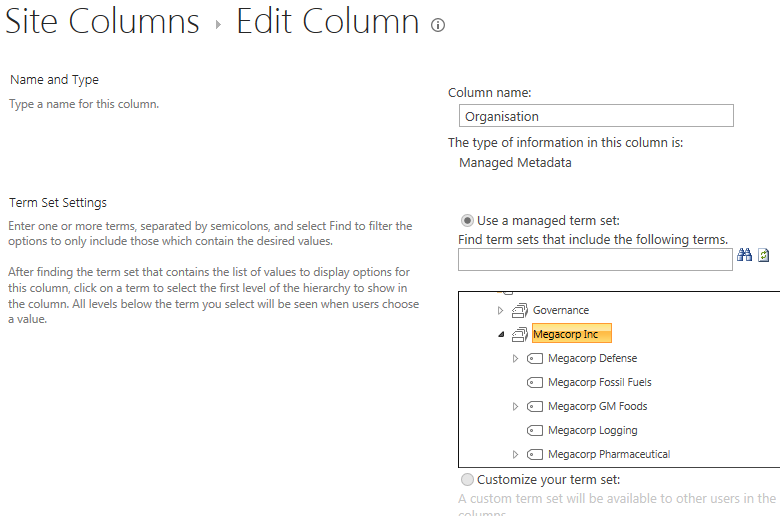
  3. Create a managed metadata site column called Organisation and associate it to the Megacorp term set
  4. Add the organisation column to the document library (called Documents) in the Document Center site
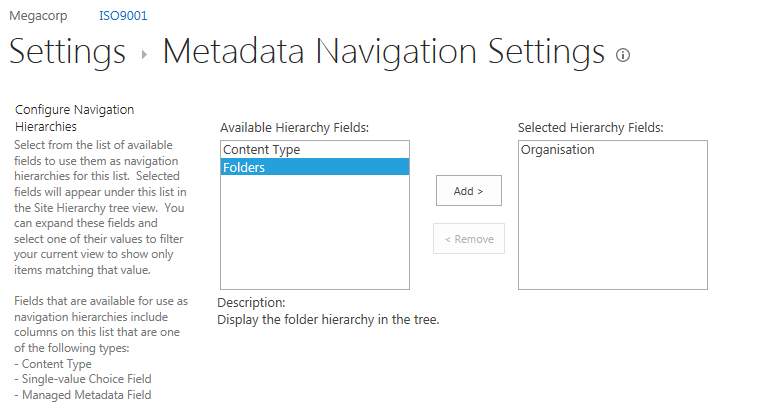
  5. Enable Metadata Navigation on the Documents library and add the Organisation column as a hierarchy field

For those of you who are new to SharePoint, below are screenshots from those steps to help you with the above steps… I am not going through this stuff in detail, so hopefully this suffices…

image  image

imageimage

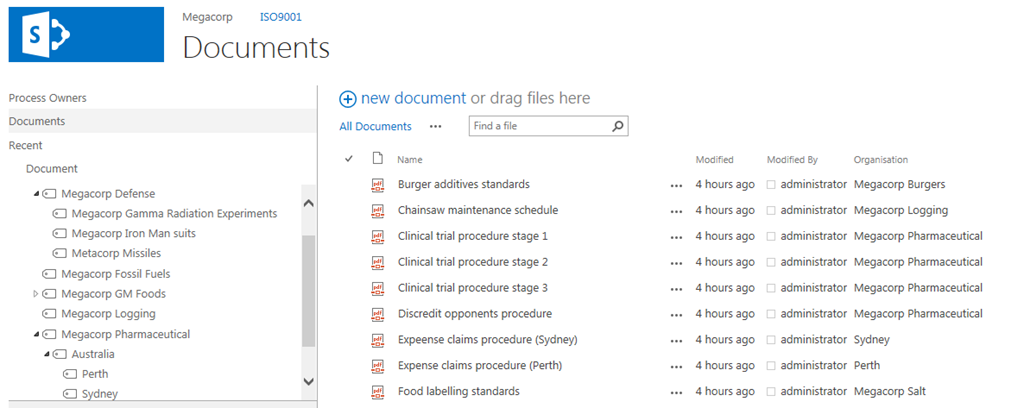
Now that the above plumbing is done, a few documents have been added to the Documents library and tagged to their organisation. With Metadata Navigation enabled, we now have the easy means to browse and filter documents to the specific organisation who owns them as shown below…

image

So let’s now think through a workflow scenario. Each organisation that makes up Megacorp has a process owner and when a document is ready for publishing, the process owner needs to approve it. Now we could do this by adding a “Person or Group” column to the document library and call it “process owner.” But Megacorp has some additional considerations that need to be pondered…

  • 1. They have thousands of documents in the library
  • 2. The process owner is a role, not an individual person. For audit purposes, Megacorp wants to have a record of when a person was in a particular process owner role.

The reason this complicates things is twofold. If we use a person’s user account in Active directory for tagging the process owner, we can easily track when a process owner changes because it will show up in the version history of the documents. But the downside is that we would have to update each document individually when that process owner changes to someone else. Not to mention that we may not want this change to be a version change in the document itself.

Now I know what your thinking – “Just use an Active Directory Group instead of an account”. Yes, it is a good and logical suggestion, since a SharePoint or Active Directory group allows us to easily manage changes in personnel between roles by changing group members. But the downside is that we have no easy way to see the history of who was in the process owner role at a given time because SharePoint would see and store the group, not the members of that group.

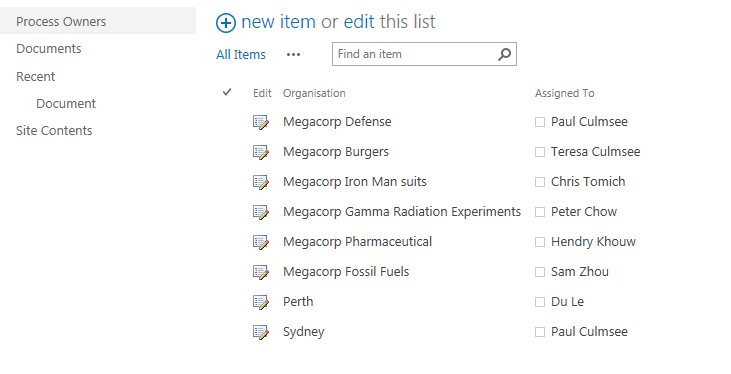
So let’s try an alternative approach. We will make a custom list called “Process Owners” and add two columns to it. We will add the Organisation site column that we created and used earlier, and we will add the “Assigned To” column that is built-into SharePoint and used in task lists. This will give us a list of process owners for a given Megacorp company or division. Even better – if we turn on version history on the Process Owners list, we now have a record of who was in the process owner role at any given time because it will show up in the changes in the “Assigned to” field over time.

The image below illustrates the Process Owners list.

image

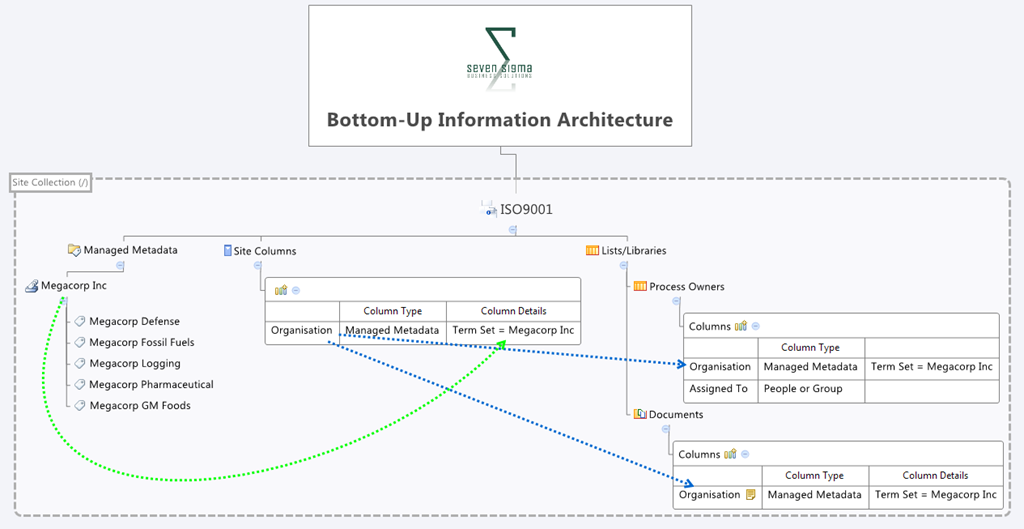
So to summarise, we have a document library where all documents are tagged to the organisation that they belong to. We have a list of the process owners for each organisation. To better visualise this, I have drawn an xmind map to show you the Information Architecture of the Megacorp document control site

image

Now we turn our attention to the document approval workflow. It should be able to:

  • Look at a document and determine the Organisation that a document belongs to
  • Look in the process owners list for that organisation and then determine the process owner for the organisation by grabbing the information in the “Assigned To” field
  • Create an Approval task for the Process owner to approve the release of a controlled document.

Now this all sounds straightforward enough in theory but as we will see as this series progresses, when it comes to SharePoint, theory and reality are two very different things. So in part 2, we will build out the workflow..

Thanks for reading

Paul Culmsee

h2bp2013_thumb.jpg

www.heretisguidebooks.com


Another cause of “The server returned a non-specific error when trying to get the data view from the data source”

Hiya

Here is me in tech/troubleshooting mode so you business-types who read this blog can skip this post Smile

The Issue

There are often times when its very useful to use a SOAP webservice call to a SharePoint 2010 list when binding it to a Data View Web Part. Among other things, being able to specify a particular view on a list when calling the GetListItems method is really handy. But today I came across an issue that manifested itself in two different ways. I had a test SharePoint 2010 farm with SP2 and I was working with SharePoint Designer on the server itself. I created two claims based web applications that use NTLM.  One was on port 80 and the other on port 82. Each had a single site collection using the team site template so they are about as stock as you can get.

In each site I then added a single item to the built-in links list that you get with the Team Site template…

image

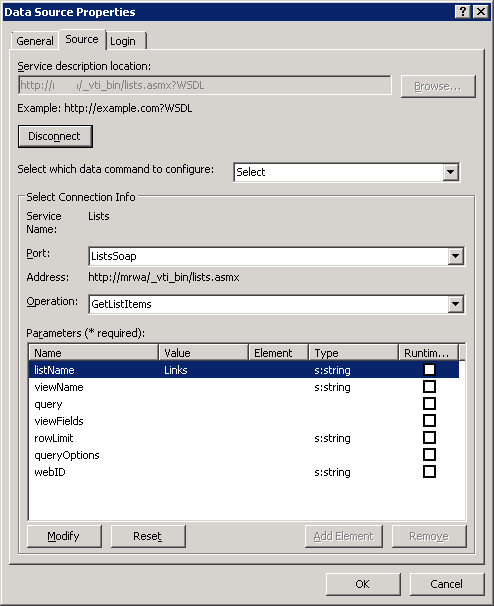
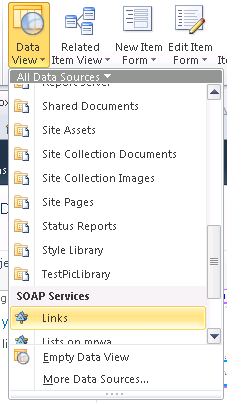
Then using SPD, I then created a Data Source in each site to the above list using SOAP as follows:

image

  • Service Description Location: http://site/_vti_bin/lists.asmx?WSDL
  • Port: ListsSoap
  • Operation: GetListItems
  • listName: Links


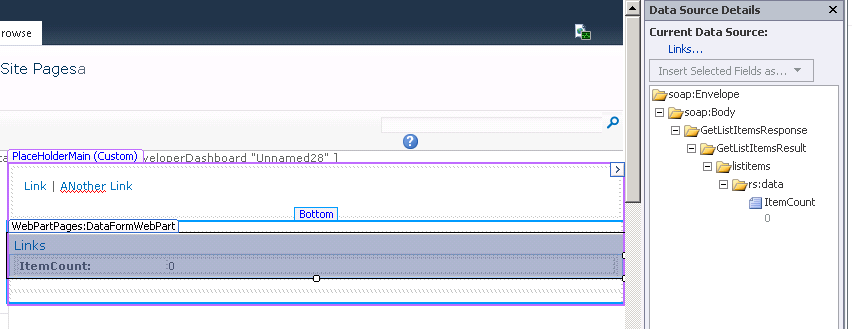
Okay… fairly straightforward so far. Now when I go to use this datasource in a page, look what happens on the port 80 site. I can add the data source but I get an item count of zero, even though I know there is an item in there.

image  image

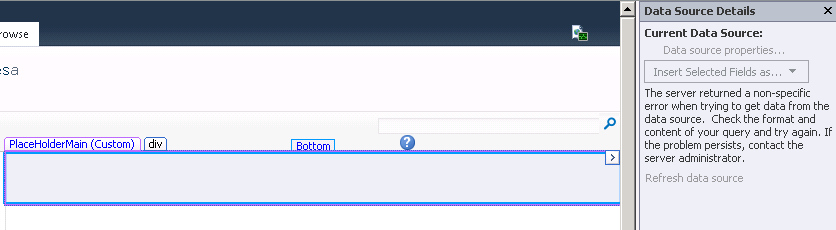
Now lets try the same thing on the web app listening on port 82. This time we get a common message that can mean many things. The very annoying “The server returned a non-specific error when trying to get data from the data source.”

image

For what its worth, if you create a site that uses classic mode authentication, things will work just fine. So what gives with these two claims authentication web applications?

Looking in the IIS logs for the offending web applications when attempting to access the data source, we get a bit of a hint to what is going on. Below are 4 entries in the IIS logs.

   1:  POST /_vti_bin/lists.asmx - 82 - fe80::416a:c7c4:4b41:d558%10 - 401 0 0 0
   2:  POST /_vti_bin/lists.asmx - 82 - fe80::416a:c7c4:4b41:d558%10 - 401 1 2148074254 0
   3:  POST /_vti_bin/lists.asmx - 82 0#.w|nt+authority\iusr fe80::416a:c7c4:4b41:d558%10 - 401 0 0 296
   4:  POST /_vti_bin/webpartpages.asmx - 82 0#.w|ad\paul fe80::416a:c7c4:4b41:d558%10 Mozilla/4.0+(compatible;+MS+FrontPage+14.0) 500 0 0 328

First up take a look at line 2 (I will come back to line 1 at the end of this post). It shows an attempt to access lists.asmx and it received and error code of 401 1 2148074254.  Breaking those up shows a response code of 401 means that the request was unauthorised. 1 means that authorisation problem was due to an access denied because of user credentials. The large third number is actually a win32 status of “2148074254” is saying that no credentials were supplied. This sort of entry is actually very common in IIS logs because of the way windows authentication works in IIS. A browser will first attempt an anonymous request before reattempting the request using other authentication methods.

Take a look at line 3 in particular. It shows the reattempt, this time using some credentials… the NT AUTHORITY\IUSR Account. But this new attempt has failed too, as it received a 401 0 0 296 error code. This in turn has caused SharePoint Designer’s attempt to add the web part to fail also (note line 4 with an internal server error code of 500).

Now if you are not aware, NT AUTHORITY\IUSR is a built in account that is used by default in IIS7 when Anonymous authentication is switched on. So this begs the question…why would the anonymous account be attempting to access the list webservice we have been using? After all, SharePoint by default does not have anonymous access enabled, and I am performing the above steps logged in as an administrative account.

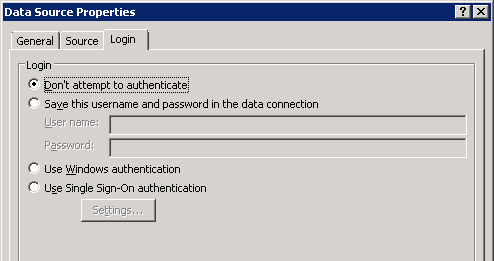
The answer is twofold. First up, go back to the SOAP data source in SPD  and have a look at the “Login” tab of the data source properties. You will see that the default setting is “Don’t attempt to authenticate”. In this situation, SharePoint has to make use of impersonation to service the request since it has no credentials to access this data source. Impersonation enables this request to be serviced by a different account – in this case being the NT AUTHORITY\IUSR account. Problem is that is has insufficient permissions somewhere.

image

The second part to the answer is an ASP.NET configuration setting in IIS…

The fixes…

So what can we do about it? Well, if you look online, you will see references to this option in the web.config for your web application and changing aspnet:AllowAnonymousImpersonation from “true” to “false”:

<appSettings>
  <add key="aspnet:AllowAnonymousImpersonation" value="false" />
</appSettings>

If you set the value to false, IIS alters its behaviour. Instead of using the anonymous account for impersonation, it will change to use the application pool account for this web application. In this case, creating a DVWP based on a SOAP datasource will work fine. The logs will show now that the application pool account is impersonated:

   1:  POST /_vti_bin/lists.asmx - 80 - fe80::416a:c7c4:4b41:d558%10 - 401 0 0 15
   2:  POST /_vti_bin/lists.asmx - 80 - fe80::416a:c7c4:4b41:d558%10 - 401 1 2148074254 0
   3:  POST /_vti_bin/lists.asmx - 80 0#.w|ad\sp_webapp-pool fe80::416a:c7c4:4b41:d558%10 - 200 0 0 343
   4:  POST /_vti_bin/webpartpages.asmx - 80 0#.w|ad\paul fe80::416a:c7c4:4b41:d558%10 Mozilla/4.0+(compatible;+MS+FrontPage+14.0) 200 0 0 1312

Notice this time line 3 shows the account ad\wp-webapp-pool being used and being the app pool, it has full permissions to SharePoint. Accordingly line 4 now shows a successful call to webpartpages.aspx and SharePoint designer successfully displays the content.

So is that the answer then? Just change aspnet:AllowAnonymousImpersonation from “true” to “false”? The answer is not necessarily. It is critical that you understand why that entry was added to IIS and don’t just go and change it because it gets you out of a pickle.

Microsoft has a KB article describing the setting and why it was put in. Let’s just say you have a web part that does something super important and it is just needed for one site. So instead of deploying it to the GAC, you opt to deploy it to bin folder of the web application and give it a partial trust level instead. But then when using that web part, it has more permissions in SharePoint than what you gave it and your security guys freak out, fearing this is an avenue for a privilege escalation attack. In this scenario, the application pool account is being used as the impersonation account and in SharePoint land, the app pool account usually has significantly more permissions than regular user accounts.

As stated in the above article “This issue occurs because of an error in the ASP.NET 2.0 authentication component. The error causes the partially trusted Web parts to impersonate the application pool account. Therefore, the Web parts have full permission to access the SharePoint site”.

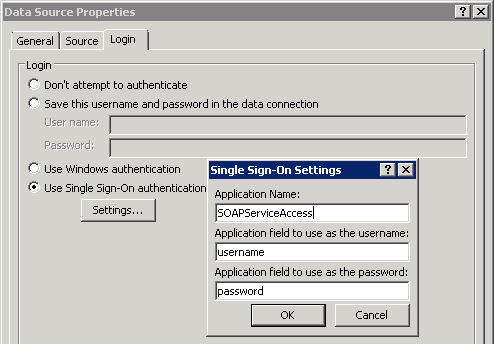
So in changing this setting, you are reintroducing the risk of privilege escalation. Anytime impersonation is required, the app pool account will be used which has the potential to make requests and execute code with greater privilege than the currently logged in user. So another alternative is to add credentials to the secure store for the data source and use them in the login tab. That way when requests are made to access the webservice, these credentials will be used. If you already are using an unattended data access account for say, PerformancePoint or Excel Services, you might consider that account here as well. Below is an example of what configuring the data connection using a secure store entry would look like.

image

By the way… whatever you do, do not choose to hard-code a user account and password because data connection details are stored in clear text XML in each site collection.

A couple final things…

When I was playing around with this, I wondered how classic mode authentication behaved. Below are the logs…

POST /_vti_bin/lists.asmx - 81 - fe80::416a:c7c4:4b41:d558%10 - 401 2 5 0
POST /_vti_bin/lists.asmx - 81 - fe80::416a:c7c4:4b41:d558%10 - 401 1 2148074254 0
POST /_vti_bin/lists.asmx - 81 ad\paul fe80::416a:c7c4:4b41:d558%10 - 200 0 0 406
POST /_vti_bin/webpartpages.asmx - 81 ad\paul fe80::416a:c7c4:4b41:d558%10 Mozilla/4.0+(compatible;+MS+FrontPage+14.0) 200 0 0 1249

Note how this time there was no need for impersonation because SharePoint was using my windows credentials and the SharePoint and Windows identifies are the same thing. In claims mode they are not – and in fact in claims mode you might have users who do not use Windows authentication at all (such a forms auth user who has authenticated via SQL membership provider). In that case they will have no windows identity and impersonation will need to be used as described above.

Another thing that  bugged me was the error code of 401.0.0 from the IIS logs. If you have ever attempted to use IIS request tracing, to track 401 errors, it will not let you trace 401.0 errors because a substatus code of 401.0 actually doesn’t exist officially. So I decided to enable IIS request tracing for all 400 errors to see what was causing that 401.0 error. Fairly quickly I found that the culprit was the SPRequestModule which “provides most of the additional configuration and processing needed for SharePoint pages” (thanks Josh). Whoever wrote that module decided that it was okay to issue the mythical 401.0 errors.

  • 10/20/2013 06:46:33.85     w3wp.exe (0x14AC)                           0x1534    SharePoint Foundation             Claims Authentication             ftc8    Verbose     Access Denied: Authentication is required.
  • ModuleName: SPRequestModule
  • Notification: 2
  • HttpStatus: 401
  • HttpReason: Unauthorized
  • HttpSubStatus: 0
  • ErrorCode: 0
  • ConfigExceptionInfo: Notification AUTHENTICATE_REQUEST
  • ErrorCode: The operation completed successfully. (0x0)

Thanks for reading…

Paul Culmsee

www.cleverworkarounds.com


Un-Managed Metadata: A couple of gotchas

As the SharePoint 2010 dust settles, gushing praise and inflated expectations are slowly replaced by the cold hard reality, as people come to grips with the limitations of the product. One such area is with the managed metadata service. Don’t get me wrong, I like managed metadata a lot and I can see a little ecosystem building around that functionality specifically. But it does have a couple of big gotchas that you should be aware of before making a big investment with it.

The sad irony is that these issues are actually not the fault of the managed metadata service, but the applications that are supposed to embrace and extend SharePoint and therefore accommodate it.

The reason I am calling out these two particular issues, is that I can see many people making assumptions that this will just work, make a significant investment in time and effort to develop an IA based around that assumption and then face the painful truth of having to work around them. After examining two issues that I suspect will cause some pain, we will then have a quick look through some of the implications and mixed messages that Microsoft are sending to organisations.

InfoPath Web Suckiness

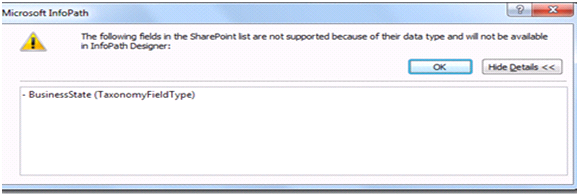
The first issue that has gotten a bit of attention is the fact that the managed metadata columns cannot be used in browser based InfoPath forms. In other words, if you have a list with a managed metadata column and think that it would be cool to customise that list forms using InfoPath, you will be in for a nasty surprise. You will receive the following error message:

image

"The following fields in the SharePoint list are not supported because of their data type and will not be available in InfoPath Designer:

MyColumn (TaxonomyFieldType)”

I have a screenshot pasted above – which actually has come from a nice explanation of the problem made by Alana Helbig (hope you don’t mind Alana). Alana shows that if you persist and open the form in InfoPath, the managed metadata field will be hidden away, never to be edited again (and therefore pointless). She also also demonstrates that the behaviour is even worse if the managed metadata column is marked as mandatory. In this case, SharePoint totally spits the dummy if you modify the form with InfoPath and then try to load it. You will get a message along the lines of: “The following required fields are missing from the form” and a ULS correlation ID for your trouble.

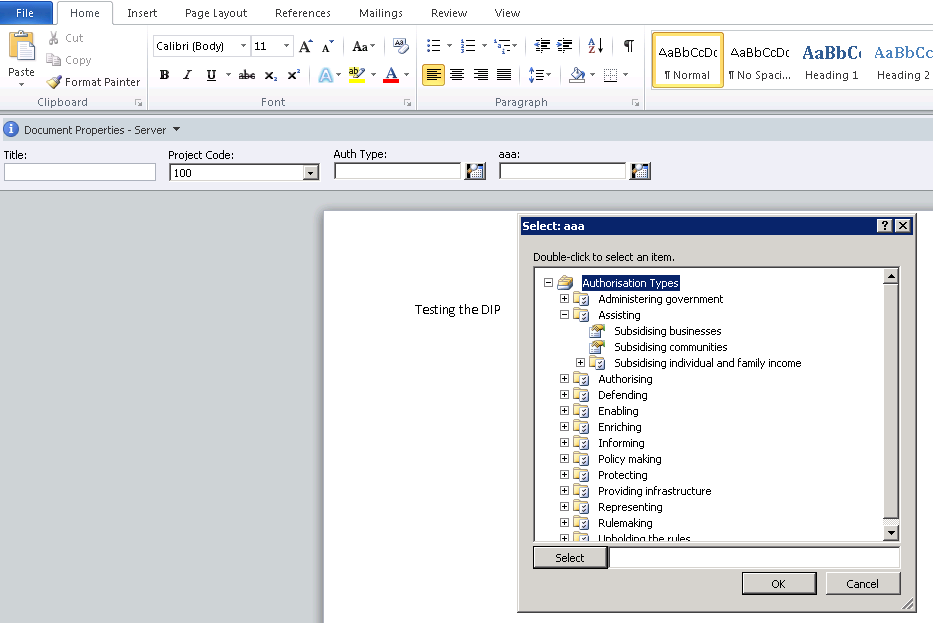
Paradocially, InfoPath does support managed metadata when forms are displayed natively (ie not web based). This is proven by the fact that the MSOffice Document Information Panel (DIP) contains a control to display managed metadata information (in case you are not aware the DIP is an InfoPath form). The screengrab below shows Word showing two managed metadata columns (one with the imaginative name of “aaa” which I have clicked on) allowing me to pick terms from the term set.

image

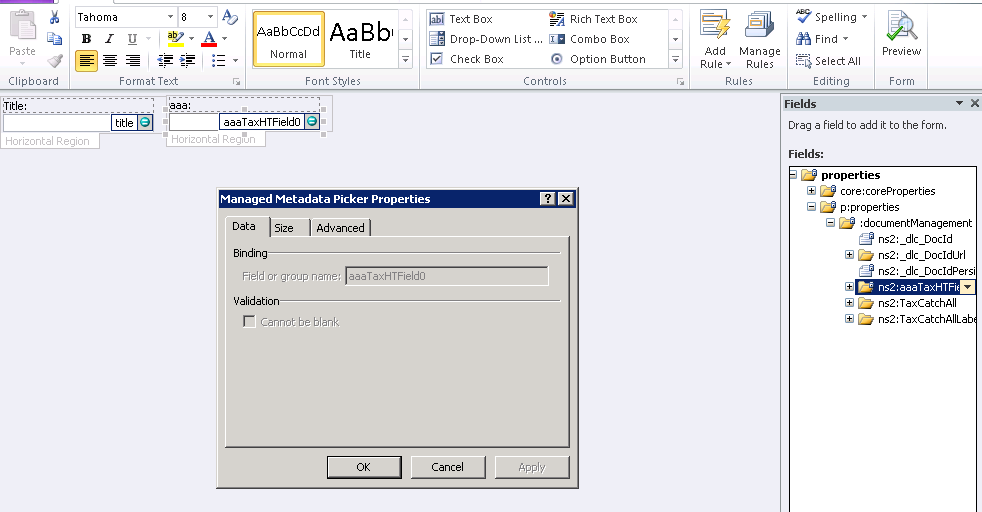
Taking a closer look, if I edit the Document Information Panel settings in InfoPath, I can clearly see that there is a Managed Metadata picker control.

image

I never bothered with the SP2010 betas because I was doing a lot of non SharePoint work at the time. But from my reading, it seems that at one point, InfoPath could display managed metadata in the browser but it was yanked from the RTM because of quality issues. Some forums suggest it won’t be corrected in any service packs soon. I certainly hope they are wrong.

Conclusion? I assume Microsoft knew the implications of this decision – yet still, I feel that this will cause a lot of frustration and grief.

SharePoint Workspace 2010 Suckiness

This is the same issue, just using a different Microsoft client application: SharePoint Workspace 2010. SPW2010, if you haven’t seen it, provides a client for SharePoint 2010 that enables real-time synchronization of desktop content with SharePoint documents and lists.

This gotcha is one I fear might be even more insidious than the InfoPath one in certain geographic locations. This is because offline access tends to be an area people will think about later in the project. Where I live (Western Australia), is remote and dominated by mining. As a result, Groove had considerable popularity when you are in the middle of nowhere with nothing but a poor satellite link with >1 second latency ;-). Many organisations will flock to SharePoint Workspace 2010 because of its much improved compatibility with synchronising SharePoint lists, libraries and views.

The problem is that managed metadata columns can be viewed in SharePoint Workspace 2010 but not edited at all. 

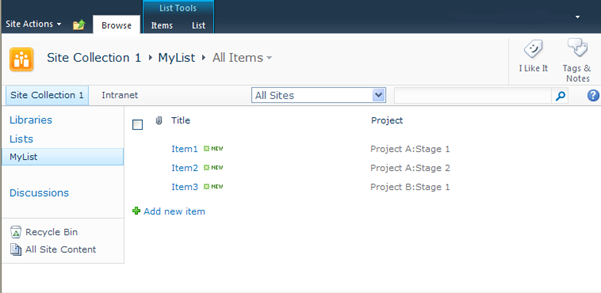
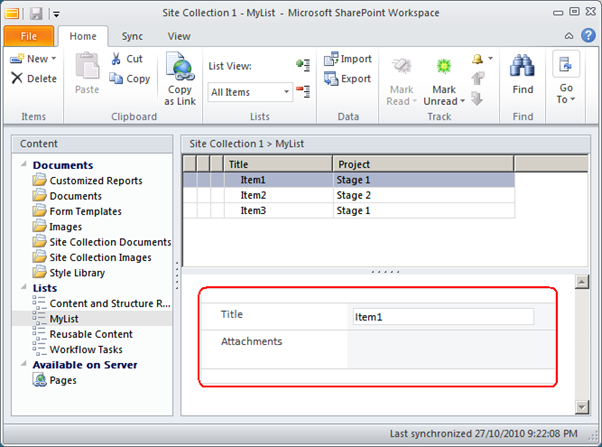
Below I show a custom list with a managed metadata column called Projects.  The next image shows the same list in SharePoint Workspace 2010.  Note how the Project column is displayed in the list of projects, but is not displayed in the view/edit item form below it.

image

image

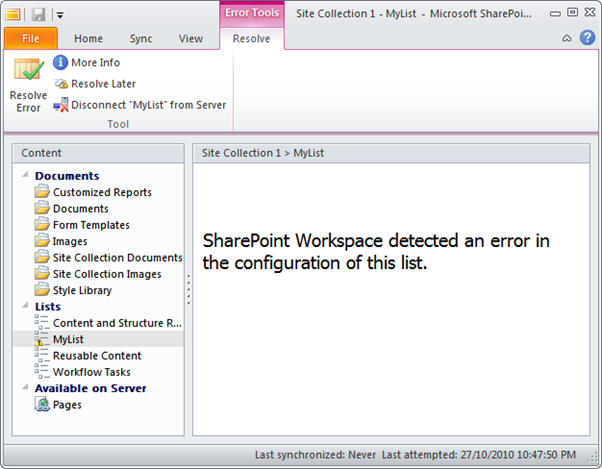
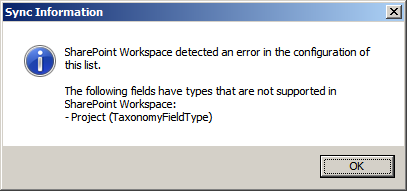
Now some of you might be thinking that this is fairly minor, and that not being able to modify managed metadata columns is not a problem. But check out what happens when the managed metadata column is made mandatory. SharePoint Workspace 2010 displays the error below when attempting to view the list.

image

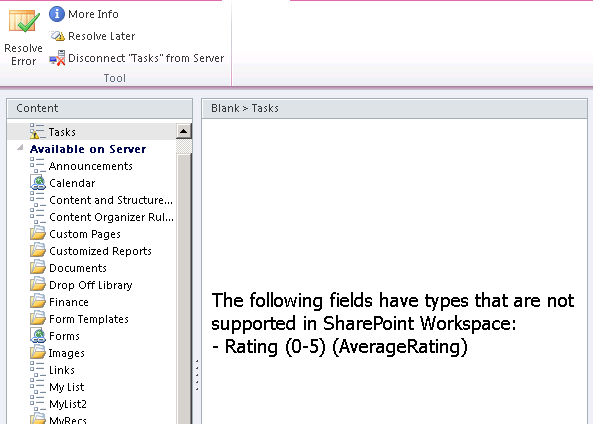
Ouch! When you click on the More Info link in the ribbon, you are presented with a scarily similar message to InfoPath.

image

It gets better (mixed messages)

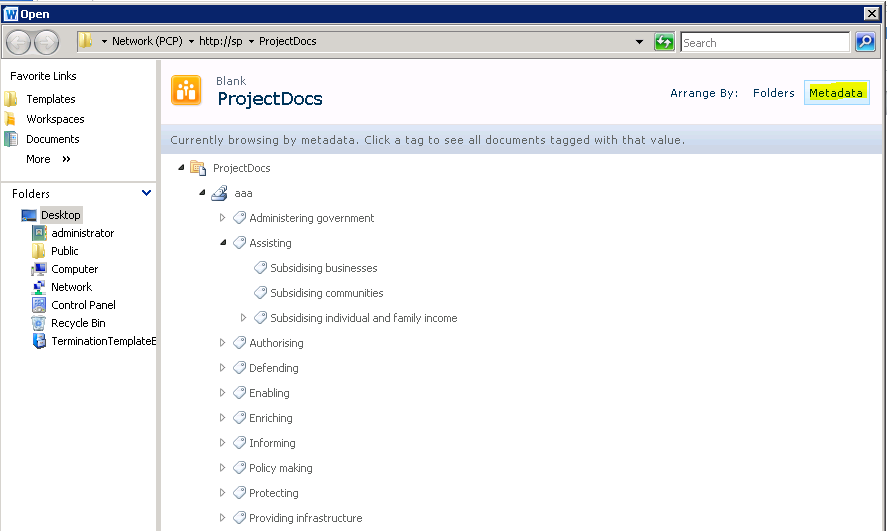
Office 2010 has finally gotten past the use-case I described in my “folders are bad and other urban legends” post. In Office 2010, application centric users have the option to browse document libraries not just by folders, but by metadata as shown below. Note how we are browsing a managed metadata term store in the File>Open dialog box in Word 2010.

image

The rub with this functionality though, is it only works for managed metadata columns. You might have configured a choice field for metadata navigation and in the browser, you can sort, slide and dice via those columns as well. But in Office 2010, you can only use managed metadata or folders. No views, and no other column types. This will inevitably lead organisations to invest time and effort to create an information architecture around the managed metadata construct. Yet by utilising managed metadata in this way, we consign ourselves to not being able to edit any of this data when we take it offline using SharePoint Workspace 2010.

*sigh* So basically, the more you try and move to a metadata driven, taxonomy approach, the more you make yourself rigid and inflexible.

But there is more…

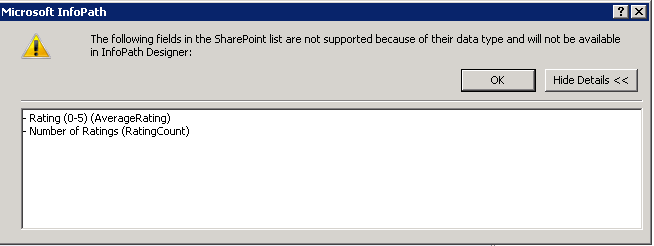
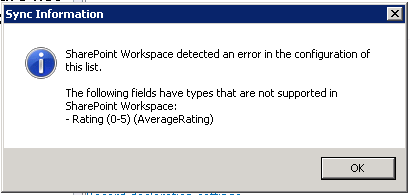
By the way, managed metadata is not the only column type that suffers this fate. If you enable ratings on a list or library you will see the same problem. The first screengrab below is InfoPath and the next two are SharePoint Workspace 2010.

image

image 

image

Conclusion: Violating the laws of motion

More than ever, SharePoint is a minefield of caveats. These examples conclusively disprove Newtons laws of motion because for every possible action, there are just not equal and opposite reactions, but potentially many more opposite reactions. More then ever, practitioners have to understand these complex dependencies, and then somehow explain them to stakeholders without giving them a brain explosion. Is it little wonder that there is commonly a big gap between the slick demos and the reality on the ground?


Thanks for reading


Paul Culmsee


Sack Justin Bieber with SPD2010 and Forms Services – Part 2

Hi

This is part 2 of a quick (but huge) post on my experiences working with SharePoint Designer 2010 workflows and Forms Services. In part 1, we used the scenario of an employee termination form, and sacked Justin Bieber. Now we want to ensure that the SharePoint user experience for sacking Justin Bieber is seamless and intuitive.

Truth be told, I have never actually heard a Justin Bieber song because we have not had a television in the house for over a year. Ignorance is bliss, but I have seen enough news reports that I still want to sack him!

In part 1, we examined the ability of SPD2010 to leverage InfoPath for tailoring forms used by workflows. We then covered creating a workflow utilising the Start Approval Process action, which enables us to do a couple of cool things without custom programming.

Now we are onto the next two steps.

Continue reading “Sack Justin Bieber with SPD2010 and Forms Services – Part 2”


Sack Justin Bieber with SPD2010 and Forms Services – Part 1

Hi all

A very long time ago now, I had the ambition to write an end-to-end blog post series called “A Humble Tribute to the Leave Form”. The intent was to show InfoPath Forms Services 2007 in all its glory – from its initially seductive, demo friendly first impressions, through to all of the dodgy workarounds and .net code required to get it to adequately handle a relatively simple business process like employee leave applications.

As it happened, I got through seven and a half blog posts and never finished it as events kind of overtook me. Its a pity because I didn’t get to the nasty bits. But one of the side effects of getting as far as I did, was that I ended up getting a lot of work developing leave forms!

Thus, now that SharePoint 2010 is upon us, it was inevitable that I would eventually get called to develop a leave form for this new edition. I now have done so, and in the process learnt a couple of new things that I thought were blogworthy – especially around getting things to play nice in a sustainable manner.

I came to realise that anytime you write any content that involves InfoPath, you end up with a stupid number of screenshots, and you are perpetually torn on the amount of detail to cover. So this time, rather than do a twelve post monster, I’ll just do 2 posts (real programmers will still find this post waffly but hopefully normal humans won’t).

I am not going to do a total beginners course here, I will assume instead you have done some basic InfoPath and SharePoint Designer workflows previously, and now want to know some interesting ways to do a general approval type process using SharePoint 2010. My main focus here is to deal with handling browser based InfoPath forms with SharePoint Designer workflows.

Continue reading “Sack Justin Bieber with SPD2010 and Forms Services – Part 1”


SPD workflows: “ERROR: request not found in the TrackedRequests”

I’ve written this post to document a dumbass thing that I did and the error that it caused. Hopefully it might help someone googling in desperation sometime…

The popularity of the “Tribute to the humble leave form” series over at SharePoint Magazine, has meant that we actually get a few gigs implementing – surprise, surprise – InfoPath leave forms with SharePoint Designer workflows! This was actually quite unexpected, as I wrote that series as a joke and for end-user training purposes.

Now, I fully realise that many people don’t like tools like SharePoint Designer in the hands of mere mortals, but I personally think it is a terrific means to encourage buy-in and user evangelism and I encourage its sustainable use. Although “real developers” may disagree with me here, SPD workflows enable quick results without the embarrassing aftermath of premature code compilation (which always leads to frustration, right girls? 😀 ).

Anyhow enough sexual innuendo – here is my error with my lessons learned

The symptoms

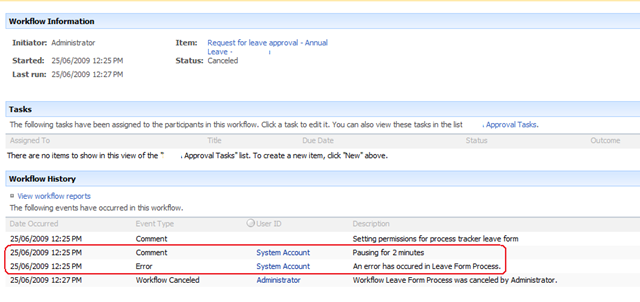
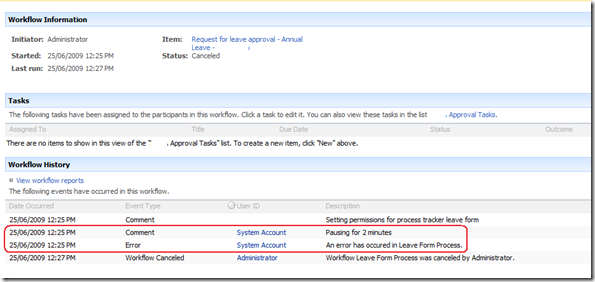
Recently, a happily running leave form workflow ground to a halt with an error as shown below. What the screenshot below shows is that the workflow died right after a “Pause for duration” workflow action. (Note the “pausing for 2 minutes” line, just before the actual workflow error).
image

Now, the interesting thing here is that the pause action never happened. The workflow bombed out straight away and there was no pause at all. Yet, the fact that the pause action logged to the history list meant that it attempted to do so. It seemed that the pause action ran for long enough to log that it was about to pause, but died when actually trying to.

The pause action occurred in step 2 of my workflow, but it is worthwhile showing you the first workflow step first.

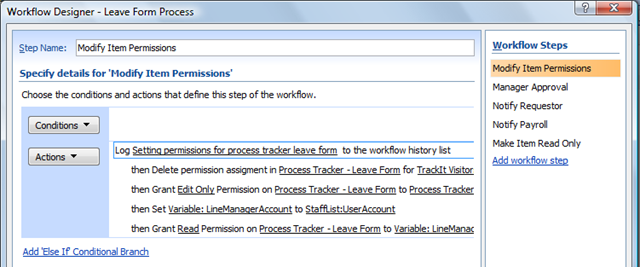
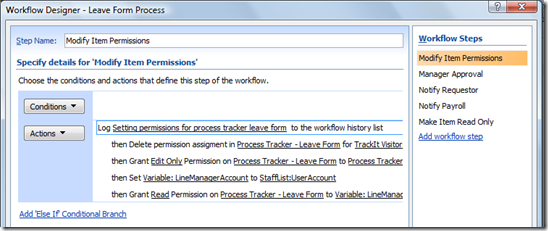
Below is a screenshot of step 1 of the workflow. This first step is called “Modify Item Permissions” and we are using the codeplex custom workflow actions to modify permissions of the submitted leave form, ensuring that only the requestor of the leave (and their boss) can see or modify the form.
image

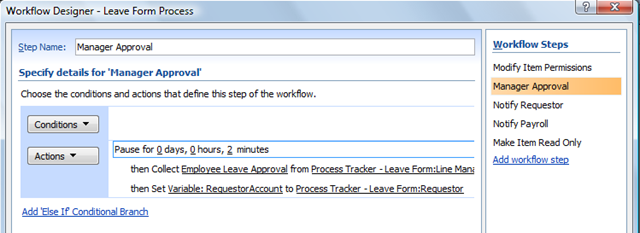
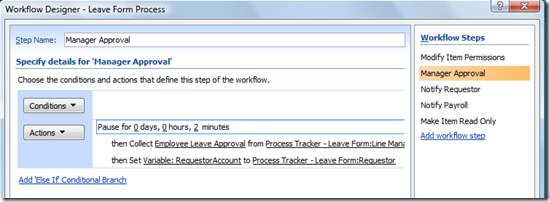
The step in the workflow, called “Manager Approval”, shows where we pause for 2 minutes. The reason we pause is to get around another workflow error that I will explain at the end of the post. After the pause action was completed and the workflow recommenced, it performed a “Collect data from user” task as shown below. This created a task for the requestors manager to approve the leave request.
image

We know that the “Collect data from user” action never ran, because the “Employee Leave Approval” task never actually got created in the task list. Thus, we know the error occurred at the pause action. Or, did it?

This error occurred consistently whether the workflow was manually started or auto-triggered. Checked all the usual suspects – timber jobs ok, permissions unchanged and working well, etc. Scanning the ULS logs at this time showed an interesting error with a much less interesting stack trace (that I have pasted at the end of the post for readability).

“Unexpected    ERROR: request not found in the TrackedRequests. We might be creating and closing webs on different threads”

Hmm, what is TrackedRequests and why is a request not found? Googling that error message wasn’t much help at all. Although it is quite common, nothing matched my particular context. But then I received a lucky break. When I cancelled the running workflow that was in this error state, I received a new error that made it quite easy to work out what was going on.

WinWF Internal Error, terminating workflow Id# 02334a17-3211-4d30-902f-bf34e20354c6    
Unexpected    System.Workflow.Runtime.Hosting.PersistenceException: Object reference not set to an instance of an object. —> System.NullReferenceException: Object reference not set to an instance of an object.     at DP.Sharepoint.Workflow.Common.RemoveListItemPermissionEntry(SPListItem item, String principalName, Boolean breakRoleInheritance)    

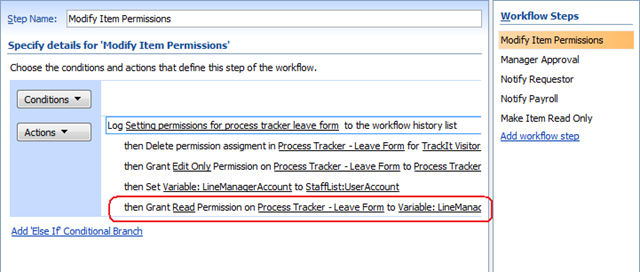
It was this error that gave it away. For a start, the method being called was DP.Sharepoint.Workflow.Common.RemoveListItemPermissionEntry and the exception was a null reference. RemoveListItemPermissionEntry sounded suspiciously like the permission based workflow actions of the “Modify Item Permissions” step as highlighted below.
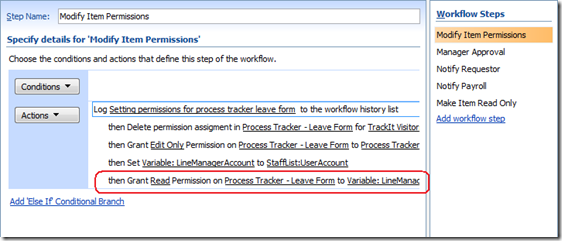
image

But wait… the workflow never failed at this line at all. It actually failed at the first action of the next step (“Manager Approval”)  with the “request not found in the TrackedRequests” error. Interesting, eh?

Let’s put aside the issue of what step and what action the workflow failed on for a moment, and examine the second error message more closely. If you examine the “Modify Item Permissions” action highlighted above, can you think of any reason that I would get a null reference exception?

Ah! What happens if the previous action called “Set Variable”, set a blank or null value? I suspect that the “Grant permissions on an item” workflow action will attempt to change permissions of the item to a blank or null user. The result? That workflow action will die with a null reference exception – precisely what the error states.

When I checked the source of the variable “LineManagerAccount”, it was looking up a contact list for the manager of the requestor. Sure enough, it did turn out that that column was blank for some users. Thus, a simple exercise in input validation combined with a small correction to that list item and the problem was solved.

Further questions and further information

I could stop this post there I suppose and perhaps someone, sometime might find this post and think “Wohoo!”. But this problem raised a couple of issues, as well as made it clear to me that I had been stupid in how I designed this one. Let’s tackle them one by one.

1. When did it die again?

Clearly the error that caused all of this, occurred at the last action of the “Modify Item Permissions” step. We know this because the step before was where the lookup to the contact list happened, and this is where the null value came from that caused the exception. But then why did the workflow not stop at this point? Why did it continue onward and attempt to move to the “Manager Approval” steps and die on the “Pause for duration” action?

Whether this is default behaviour of SPD workflows or a logic fault in the exception handling code in the codeplex-based “Grant Permission on an Item” action, this makes life hard to troubleshoot because the error message never made sense. I only found out the true root cause when I terminated the workflow manually and got lucky because the offending exception suddenly appeared.

So, the conclusion to draw? If your SPD workflow dies with “ERROR: request not found in the TrackedRequests” in the logs, it may be that the real cause of the problem is a previous workflow step and not the step where the workflow actually stopped.

2. Paul is a dumbass

Okay, so let’s talk about lessons learnt. Some people reading this may wonder why I never used Active Directory or the user profile store to store manager details for a user and to do the lookup from there. The answer is that this contact list approach simply made sense for this client and this is actually not the dumb thing that I did. The dumb thing that I did was to forget that all of the necessary business logic and data validation steps could have been performed in the InfoPath form itself.

Remember that InfoPath forms can have data connections to all sorts of sources such as SharePoint lists, web services and relational databases. (I am not going into detail on how to do that here because I have already covered it in quite a lot in part 5 of the “Leave Form Tribute” series). We can have a published InfoPath form connect to any SharePoint list or library across the entire farm to look up business logic details, such as an approver. This is something that SharePoint Designer workflows cannot do out of the box – it can only lookup from the site where the workflow has been created.

But, more important than that, we can easily use InfoPath rules and data validation functionality to ensure that the values are not null before submitting.

What this all means is that your SPD workflows end up being simpler and easier to maintain because InfoPath is providing all of the data to the workflow as well as the validation of the data. Therefore, the workflow now doesn’t have to do the lookup work and have unnecessary steps and actions.

For these reasons I think that, if you can, grab all of the data you need for a business process using the InfoPath form using hidden fields. Then publish the form and ensure these hidden fields are published as site columns.

For this particular purpose, I think that InfoPath is a lesser evil than SharePoint Designer workflows.

3. What are the pause actions there for anyway?

Finally, I promised I’d explain why I had a pause action in the workflow. This is to get around a race condition with workflows that produces an intermittent error message:

“This task is currently locked by a running workflow and cannot be edited”

I’ve seen this occur in several situations and it pretty much boils down to some workflow actions being synchronous and subsequent actions starting before the previous action properly completed. Consider this example.

One workflow creates or updates an item in a list, say a task list. But the task list also has a workflow attached to it. This means that the first workflow creates the task item and then moves onto the next step. Meanwhile, a new workflow has been triggered for that new task list item. This secondary workflow refers to information stored in the main item which causes the race condition.  If the information in the main item is not committed before this workflow attempts to use it, you’ll get null values when the main item is a new item.  When working with SPD workflows, these null values will show up as ????. 

To resolve the race condition, I had to ensure that the main item was committed before the secondary workflow was started by pausing the workflow.  Why does pausing the workflow cause the changes to be committed?  According to the MSDN article “How Windows SharePoint Services Processes Workflow Activities” http://msdn.microsoft.com/en-us/library/ms442249.aspx

Windows SharePoint Services runs the workflow until it reaches a point where it cannot proceed because it is waiting for some event to occur: for example, a user must designate a task as completed. Only at this "commit point" does Windows SharePoint Services commit the changes made in the previous Windows SharePoint Services-specific workflow activities…

The not-so-clever workaround is to pause the workflow in between actions. When you add a pause, the workflow “cannot proceed because it is waiting for some event to occur” and therefore makes it a commit point. Not pretty – but works.

I hope that you find this article of use in your SharePoint Designer workflow troubleshooting endeavours. Below, I have pasted the complete stack traces (for the search engines).

Thanks for reading

Paul Culmsee

06/25/2009 12:25:20.46 w3wp.exe (0x0BA8) 0x16F8 Windows SharePoint Services General 0 Unexpected ERROR: request not found in the TrackedRequests. We might be creating and closing webs on different threads. ThreadId = 1, Free call stack = at Microsoft.SharePoint.SPRequestManager.Release(SPRequest request) at Microsoft.SharePoint.SPWeb.Invalidate() at Microsoft.SharePoint.SPWeb.Close() at Microsoft.SharePoint.SPSite.Close() at Microsoft.SharePoint.SPSite.Dispose() at Microsoft.SharePoint.Workflow.SPWorkflowManager.<>c__DisplayClass1.<StartWorkflow>b__0() at Microsoft.SharePoint.SPSecurity.CodeToRunElevatedWrapper(Object state) at Microsoft.SharePoint.SPSecurity.<>c__DisplayClass4.<RunWithElevatedPrivileges>b__2() at Microsoft.SharePoint.Utilities.SecurityContext.RunAsProcess(CodeToRunElevated secureCode) at Microsoft.SharePoint.SPSecurity.RunWithEl…

06/25/2009 12:25:20.46* w3wp.exe (0x0BA8) 0x16F8 Windows SharePoint Services General 0 Unexpected …evatedPrivileges(WaitCallback secureCode, Object param) at Microsoft.SharePoint.SPSecurity.RunWithElevatedPrivileges(CodeToRunElevated secureCode) at Microsoft.SharePoint.Workflow.SPWorkflowManager.StartWorkflow(SPListItem item, SPWorkflowAssociation association, SPWorkflowEvent startEvent, Boolean bAutoStart, Boolean bCreateOnly) at Microsoft.SharePoint.Workflow.SPWorkflowManager.StartWorkflow(SPListItem item, SPWorkflowAssociation association, String eventData, Boolean isAutoStart) at Microsoft.SharePoint.Workflow.SPWorkflowManager.StartWorkflow(SPListItem item, SPWorkflowAssociation association, String eventData) at Microsoft.SharePoint.WebControls.SPWorkflowDataSourceView.Insert(IDictionary values) at Microsoft.SharePoint.WebControls.SPWorkflowDataSourceView.Ins…

06/25/2009 12:25:20.46* w3wp.exe (0x0BA8) 0x16F8 Windows SharePoint Services General 0 Unexpected …ert(IDictionary values, DataSourceViewOperationCallback callback) at Microsoft.SharePoint.WebPartPages.DataFormWebPart.FlatCommit() at Microsoft.SharePoint.WebPartPages.DataFormWebPart.PerformCommit() at Microsoft.SharePoint.WebPartPages.DataFormWebPart.HandleOnSave(Object sender, EventArgs e) at Microsoft.SharePoint.WebPartPages.DataFormWebPart.RaisePostBackEvent(String eventArgument) at System.Web.UI.Page.RaisePostBackEvent(IPostBackEventHandler sourceControl, String eventArgument) at System.Web.UI.Page.RaisePostBackEvent(NameValueCollection postData) at System.Web.UI.Page.ProcessRequestMain(Boolean includeStagesBeforeAsyncPoint, Boolean includeStagesAfterAsyncPoint) at System.Web.UI.Page.ProcessRequest(Boolean includeStagesBeforeAsyncPoint, Boolean includ…

06/25/2009 12:25:20.46* w3wp.exe (0x0BA8) 0x16F8 Windows SharePoint Services General 0 Unexpected …eStagesAfterAsyncPoint) at System.Web.UI.Page.ProcessRequest() at System.Web.UI.Page.ProcessRequestWithNoAssert(HttpContext context) at System.Web.UI.Page.ProcessRequest(HttpContext context) at System.Web.HttpApplication.CallHandlerExecutionStep.System.Web.HttpApplication.IExecutionStep.Execute() at System.Web.HttpApplication.ExecuteStep(IExecutionStep step, Boolean& completedSynchronously) at System.Web.HttpApplication.ApplicationStepManager.ResumeSteps(Exception error) at System.Web.HttpApplication.System.Web.IHttpAsyncHandler.BeginProcessRequest(HttpContext context, AsyncCallback cb, Object extraData) at System.Web.HttpRuntime.ProcessRequestInternal(HttpWorkerRequest wr) at System.Web.HttpRuntime.ProcessRequestNoDemand(HttpWorkerRequest wr) at Sys…

06/25/2009 12:25:20.46* w3wp.exe (0x0BA8) 0x16F8 Windows SharePoint Services General 0 Unexpected …tem.Web.Hosting.ISAPIRuntime.ProcessRequest(IntPtr ecb, Int32 iWRType) , Allocation call stack (if present) at Microsoft.SharePoint.Library.SPRequest..ctor() at Microsoft.SharePoint.SPGlobal.CreateSPRequestAndSetIdentity(Boolean bNotGlobalAdminCode, String strUrl, Boolean bNotAddToContext, Byte[] UserToken, String userName, Boolean bIgnoreTokenTimeout, Boolean bAsAnonymous) at Microsoft.SharePoint.SPWeb.InitializeSPRequest() at Microsoft.SharePoint.SPWeb.EnsureSPRequest() at Microsoft.SharePoint.SPWeb.get_Request() at Microsoft.SharePoint.SPWeb.InitWebPublic() at Microsoft.SharePoint.SPWeb.get_ServerRelativeUrl() at Microsoft.SharePoint.SPWeb.get_Url() at Microsoft.SharePoint.SPUser.InitMember() at Microsoft.SharePoint.SPUser..ctor(SPWeb web, ISecura…

06/25/2009 12:25:20.46* w3wp.exe (0x0BA8) 0x16F8 Windows SharePoint Services General 0 Unexpected …bleObject scope, String strIdentifier, Object[,] arrUsersData, UInt32 index, Int32 iByParamId, String strByParamSID, String strByParamEmail, SPUserCollectionType userCollectionType, Boolean isSiteAuditor) at Microsoft.SharePoint.SPUser..ctor(SPWeb web, ISecurableObject scope, String strIdentifier, Object[,] arrUsersData, UInt32 index, Int32 iByParamId, String strByParamSID, String strByParamEmail, SPUserCollectionType userCollectionType) at Microsoft.SharePoint.SPUserCollection.GetByIDNoThrow(Int32 id) at Microsoft.SharePoint.SPSite.get_SystemAccount() at Microsoft.SharePoint.WorkflowActions.Helper.ResolveUserField(WorkflowContext context, Object fvalue) at Microsoft.SharePoint.WorkflowActions.Helper.LookupUser(WorkflowContext context, Guid listId, Int32 listItem, Strin…

06/25/2009 12:25:20.46* w3wp.exe (0x0BA8) 0x16F8 Windows SharePoint Services General 0 Unexpected …g fieldName) at Microsoft.SharePoint.WorkflowActions.Helper.LookupUser(WorkflowContext context, String listIdOrName, Int32 listItem, String fieldName) at Microsoft.SharePoint.WorkflowActions.LookupActivity.Execute(ActivityExecutionContext provider) at System.Workflow.ComponentModel.ActivityExecutor`1.Execute(T activity, ActivityExecutionContext executionContext) at System.Workflow.ComponentModel.ActivityExecutor`1.Execute(Activity activity, ActivityExecutionContext executionContext) at System.Workflow.ComponentModel.ActivityExecutorOperation.Run(IWorkflowCoreRuntime workflowCoreRuntime) at System.Workflow.Runtime.Scheduler.Run() at System.Workflow.Runtime.WorkflowExecutor.RunScheduler() at System.Workflow.Runtime.WorkflowExecutor.RunSome(Object ignored) …

06/25/2009 12:25:20.46* w3wp.exe (0x0BA8) 0x16F8 Windows SharePoint Services General 0 Unexpected …at System.Workflow.Runtime.Hosting.DefaultWorkflowSchedulerService.WorkItem.Invoke(WorkflowSchedulerService service) at System.Workflow.Runtime.Hosting.DefaultWorkflowSchedulerService.QueueWorkerProcess(Object state) at System.Threading._ThreadPoolWaitCallback.WaitCallback_Context(Object state) at System.Threading.ExecutionContext.runTryCode(Object userData) at System.Runtime.CompilerServices.RuntimeHelpers.ExecuteCodeWithGuaranteedCleanup(TryCode code, CleanupCode backoutCode, Object userData) at System.Threading.ExecutionContext.RunInternal(ExecutionContext executionContext, ContextCallback callback, Object state) at System.Threading.ExecutionContext.Run(ExecutionContext executionContext, ContextCallback callback, Object state) at System.Threading._ThreadPoolW…

06/25/2009 12:25:20.46* w3wp.exe (0x0BA8) 0x16F8 Windows SharePoint Services General 0 Unexpected …aitCallback.PerformWaitCallbackInternal(_ThreadPoolWaitCallback tpWaitCallBack) at System.Threading._ThreadPoolWaitCallback.PerformWaitCallback(Object state)


06/25/2009 12:27:16.49 w3wp.exe (0x0BA8) 0x1CB4 Windows SharePoint Services Workflow Infrastructure 88xr Unexpected WinWF Internal Error, terminating workflow Id# 02334a17-3211-4d30-902f-bf34e20354c6

06/25/2009 12:27:16.49 w3wp.exe (0x0BA8) 0x1CB4 Windows SharePoint Services Workflow Infrastructure 98d4 Unexpected System.Workflow.Runtime.Hosting.PersistenceException: Object reference not set to an instance of an object. —> System.NullReferenceException: Object reference not set to an instance of an object. at DP.Sharepoint.Workflow.Common.RemoveListItemPermissionEntry(SPListItem item, String principalName, Boolean breakRoleInheritance) at DP.Sharepoint.Workflow.PermissionsService.<>c__DisplayClass1.<ProcessGrantRequest>b__0() at Microsoft.SharePoint.SPSecurity.CodeToRunElevatedWrapper(Object state) at Microsoft.SharePoint.SPSecurity.<>c__DisplayClass4.<RunWithElevatedPrivileges>b__2() at Microsoft.SharePoint.Utilities.SecurityContext.RunAsProcess(CodeToRunElevated secureCode) at Microsoft.SharePoint.SPSecurity.RunWithElevatedPrivileges(WaitCallback secureCode, Object param)…

06/25/2009 12:27:16.49* w3wp.exe (0x0BA8) 0x1CB4 Windows SharePoint Services Workflow Infrastructure 98d4 Unexpected … at Microsoft.SharePoint.SPSecurity.RunWithElevatedPrivileges(CodeToRunElevated secureCode) at DP.Sharepoint.Workflow.PermissionsService.ProcessGrantRequest(PermissionRequest pr) at DP.Sharepoint.Workflow.PermissionsService.Commit(Transaction transaction, ICollection items) at System.Workflow.Runtime.WorkBatch.PendingWorkCollection.Commit(Transaction transaction) at System.Workflow.Runtime.WorkBatch.Commit(Transaction transaction) at System.Workflow.Runtime.VolatileResourceManager.Commit() at System.Workflow.Runtime.WorkflowExecutor.DoResourceManagerCommit() at System.Workflow.Runtime.Hosting.WorkflowCommitWorkBatchService.CommitWorkBatch(CommitWorkBatchCallback commitWorkBatchCallback) at System.Workflow.Runtime.Hosting.DefaultWorkflowCommitWorkBatchSer…

06/25/2009 12:27:16.49* w3wp.exe (0x0BA8) 0x1CB4 Windows SharePoint Services Workflow Infrastructure 98d4 Unexpected …vice.CommitWorkBatch(CommitWorkBatchCallback commitWorkBatchCallback) at System.Workflow.Runtime.WorkflowExecutor.CommitTransaction(Activity activityContext) at System.Workflow.Runtime.WorkflowExecutor.Persist(Activity dynamicActivity, Boolean unlock, Boolean needsCompensation) — End of inner exception stack trace — at System.Workflow.Runtime.WorkflowExecutor.Persist(Activity dynamicActivity, Boolean unlock, Boolean needsCompensation) at System.Workflow.Runtime.WorkflowExecutor.ProtectedPersist(Boolean unlock)
« Previous Page

Today is: Wednesday 3 June 2026 -