
Rush Blog: Managed metadata support for PowerApps and Flow just dropped!
Okay so I have never, ever done a rush blog post before, but a feature just dropped that I’ve been waiting ages for and I think it will make a lot of people happy. Currently I am working on a project that uses extensive Managed Metadata, PowerApps and Flow. I have used various hacky ways to make this work. For the most part, these methods are now redundant as native managed metadata support was just deployed to First release tenants.
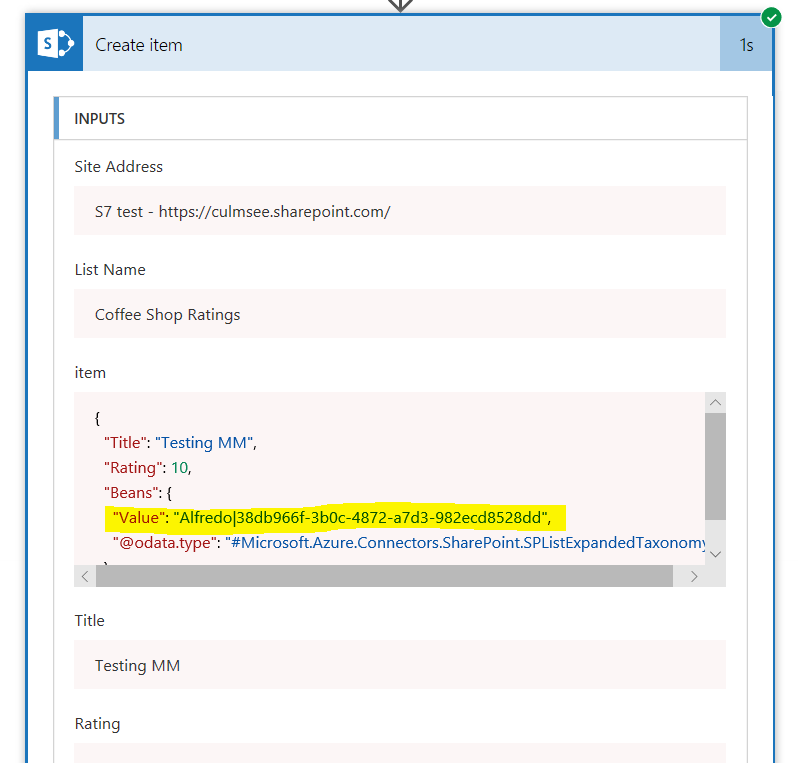
You can read the announcement here. In my quick testing I confirmed it to be working and will suit my particular needs. One thing to note is if you want to use Flow variables to set managed metadata values, you will need to set the variable in a “Term Name|Term GUID format” for it to work – otherwise you will get a “The data returned from the tagging UI was not formatted correctly” error.
You can see the correct format highlighted below…
So on the downside, now the series of four blogposts I wrote in mid October on how to workaround this prior limitation are redundant. At that time I did say that “Due to this pace of change, this is very likely the last multi-part blog series I will do” – so it took two months for Microsoft to pull it off.
So now let’s go write some content on how to leverage this functionality in interesting ways eh?
Paul






November 22nd, 2017 at 10:36 pm |
Good news, I think I understand why the term | guid thing is needed, a termstore can have multiple instances of the same term or independent instances of the same term, the guid provides the unique identifier to ensure the correct one is used. Will have to experiment.
February 15th, 2018 at 1:55 am |
Do you know if a Flow can be used to add terms to a Managed Metadata term set in SPO?
February 15th, 2018 at 7:33 pm |
only via HTTP actions and using Rest API…
February 27th, 2018 at 4:08 am |
Thanks for the post.
If you have a quick minute can you point me to where I can learn how to execute the correct formatting you suggested? I’m an amateur at PowerApps & Flow. Just started getting into this stuff about 3 months ago for the benefit of the law firm and architectural firm I own. So needless to say my background is not in programming or information systems, but I’m learning :-).
Any insight/feedback you have would be greatly appreciated.
Thanks,
February 28th, 2018 at 7:38 am |
Disregard my previous post question. After experimenting with it for a little while I realized that what you are describing is a simple syntax solution. I was making things more complicated by assuming the solution was expression based. (Like I said, I’m new to this)
My app now works correctly!
Thanks again for your blog post.
December 7th, 2018 at 2:23 am |
Here’s something I just discovered, there’s a hidden list that you can get all sorts of details about terms, including their GUID. Instead of going to Flow and creating a bogus Flow to pull the deets, you can go to this list.
Only issue is that you must have used the term in on the site for it to show-up here. Very Handy-dandy!
Path for hidden list:
…../Lists/TaxonomyHiddenList/AllItems.aspx
January 23rd, 2026 at 12:45 am |
Grow your income stream—apply to our affiliate program today!