Back to Cleverworkarounds mainpage
 

Why can’t people find stuff on the intranet?–Final summary

Hi

Those of you who get an RSS feed of this blog might have noticed it was busy over last week. This is because I pushed out 4 blog posts that showed my analysis using IBIS of a detailed linear discussion on LinkedIn. To save people getting lost in the analysis, I thought I’d quickly post a bit of an executive summary from the exercise.

To set context, Issue Mapping is a technique of visually capturing rationale. It is graphically represented using a simple, but powerful, visual structure called IBIS (Issue Based Information System). IBIS allows all elements and rationale of a conversation to be captured in a manner that can be easily reflected upon. Unlike prose, which is linear, the advantage of visually representing argument structure is it helps people to form a better mental model of the nature of a problem or issue. Even better, when captured this way, makes it significantly easier to identify emergent themes or key aspects to an issue.

You can find out all about IBIS and Dialogue Mapping in my new book, at the Cognexus site or the other articles on my blog.

The challenge…

On the Intranet Professionals group on LinkedIn recently, the following question was asked:

What are the main three reasons users cannot find the content they were looking for on intranet?

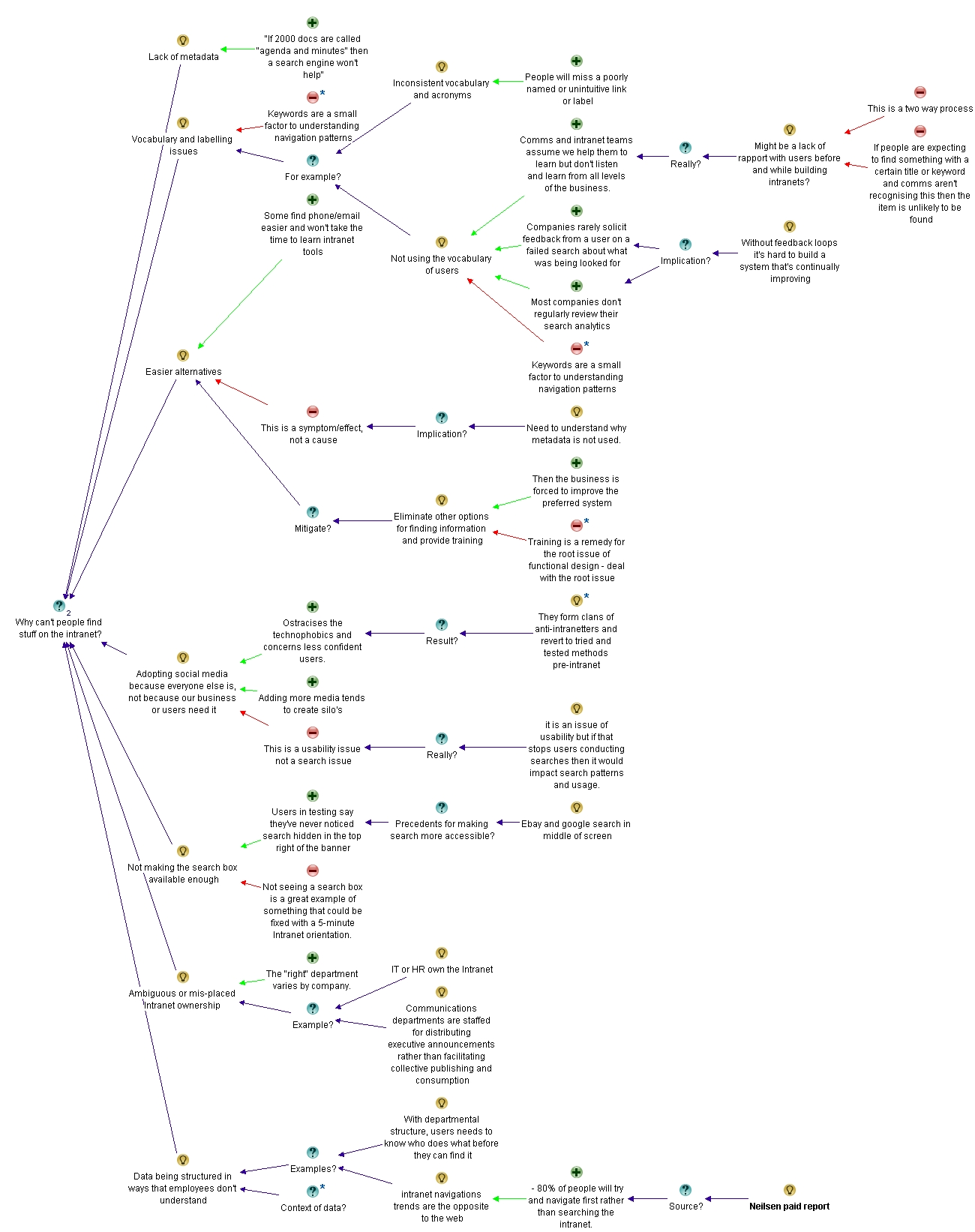
In all, there were more than 60 responses from various people with some really valuable input. I decided that it might be an interesting experiment to capture this discussion using the IBIS notion to see if it makes it easier for people to understand the depth of the issue/discussion and reach a synthesis of root causes.

I wrote 4 posts, each building on the last, until I had covered the full conversation. For each post, I supplied an analysis of how I created the IBIS map and then exported the maps themselves. You can follow those below:

Part 1 analysis: http://www.cleverworkarounds.com/2012/01/15/why-cant-users-find-stuff-on-the-intranet-in-ibis-synthesispart-1/
Part 2 analysis: http://www.cleverworkarounds.com/2012/01/15/why-cant-users-find-stuff-on-the-intranet-an-ibis-synthesispart-2/
Part 3 analysis: http://www.cleverworkarounds.com/2012/01/16/why-cant-users-find-stuff-on-the-intranet-an-ibis-synthesispart-3/
Part 4 analysis: http://www.cleverworkarounds.com/2012/01/16/why-cant-users-find-stuff-on-the-intranet-an-ibis-synthesispart-4/

Final map: http://www.cleverworkarounds.com/maps/findstuffpart4/Linkedin_Discussion__192168031326631637693.html

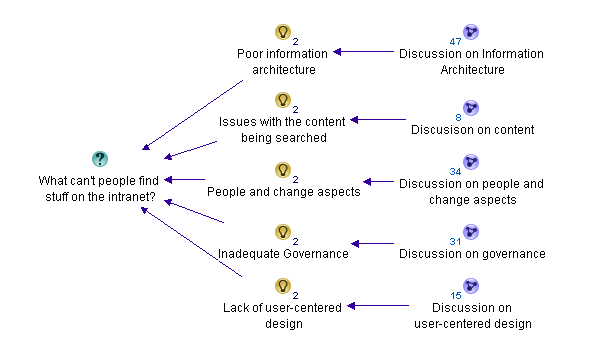
For what its worth, the summary of themes from the discussion was that there were 5 main reasons for users not finding what they are looking for on the intranet.

  1. Poor information architecture
  2. Issues with the content itself
  3. People and change aspects
  4. Inadequate governance
  5. Lack of user-centred design

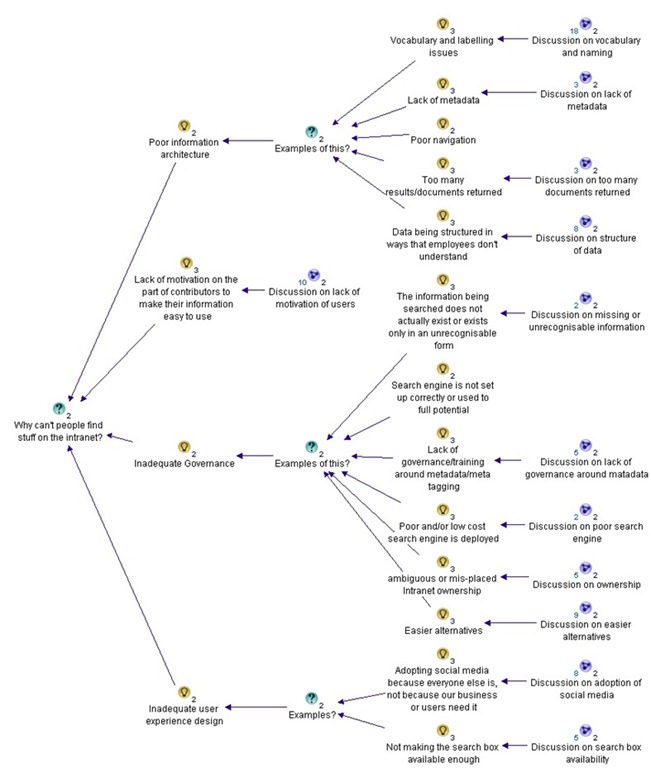
Within these areas or “meta-themes” there were varied sub issues. These are captured in the table below.

Poor information architecture Issues with content People and change aspects Inadequate governance Lack of user-centred design
Vocabulary and labelling issues

· Inconsistent vocabulary and acronyms

· Not using the vocabulary of users

· Documents have no naming convention

Poor navigation

Lack of metadata

· Tagging does not come naturally to employees

Poor structure of data

· Organisation structure focus instead of user task focussed

· The intranet’s lazy over-reliance on search

Old content not deleted

Too much information of little value

Duplicate or “near duplicate” content

Information does not exist or an unrecognisable form

People with different backgrounds, language, education and bias’ all creating content

Too much “hard drive” thinking

People not knowing what they want

Lack of motivation for contributors to make information easier to use

Google inspired inflated expectations on search functionality on intranet

Adopting social media from a hype driven motivation

Lack of governance/training around metadata and tagging

Not regularly reviewing search analytics

Poor and/or low cost search engine is deployed

Search engine is not set up properly or used to full potential

Lack of “before the fact” coordination with business communications and training

Comms and intranet don’t listen and learn from all levels of the business.

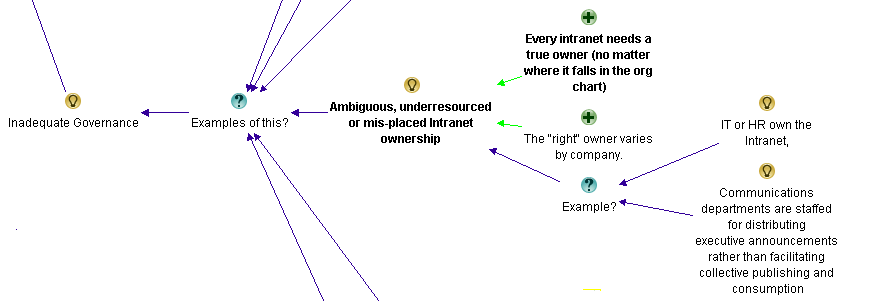
Ambiguous, under-resourced or misplaced Intranet ownership

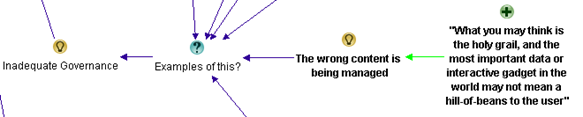
The wrong content is being managed

There are easier alternatives available

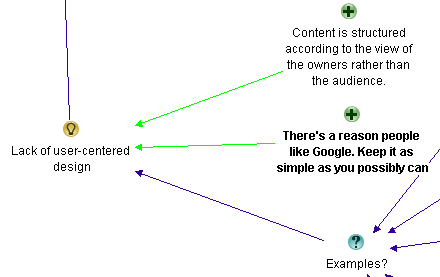
Content is structured according to the view of the owners rather than the audience

Not accounting for two types of visitors… task-driven and browse-based

No social aspects to search

Not making the search box available enough

A failure to offer an entry level view

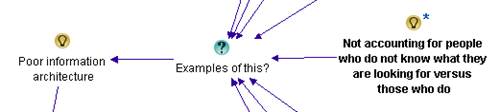
Not accounting for people who do not know what they are looking for versus those who do

Not soliciting feedback from a user on a failed search about what was being looked for

So now you have seen the final output, be sure to visit the maps and analysis and read about the journey on how this table emerged. One thing is for sure, it sure took me a hell of a lot longer to write about it than to actually do it!

Thanks for reading

Paul Culmsee

www.sevensigma.com.au

www.hereticsguidebooks.com


Why can’t users find stuff on the intranet? An IBIS synthesis–Part 4

Hi and welcome to my final post on the linkedin discussion on why users cannot find what they are looking for on intranets. This time the emphasis is on synthesis… so let’s get the last few comments done shall we?

Michael Rosager • @ Simon. I agree.
Findability and search can never be better than the content available on the intranet.
Therefore, non-existing content should always be number 1
Some content may not be published with the terminology or language used by the users (especially on a multilingual intranet). The content may lack the appropriate meta tags. – Or maybe you need to adjust your search engine or information structure. And there can be several other causes…
But the first thing that must always be checked is whether they sought information / data is posted on the intranet or indexed by the search engine.

Rasmus Carlsen • in short:
1: Too much content (that nobody really owns)
2: Too many local editors (with less knowledge of online-stuff)
3: Too much “hard-drive-thinking” (the intranet is like a shared drive – just with a lot of colors = a place you keep things just to say that you have done your job)

Nick Morris • There are many valid points being made here and all are worth considering.
To add a slightly different one I think too often we arrange information in a way that is logical to us. In large companies this isn’t necessarily the same for every group of workers and so people create their own ‘one stop shop’ and chaos.
Tools and processes are great but somewhere I believe you need to analyse what information is needed\valued and by whom and create a flexible design to suit. That is really difficult and begins to touch on how organisations are structured and the roles and functions of employees.

Taino Cribb • Hi everyone
What a great discussion! I have to agree to any and all of the above comments. Enabling users to find info can definately be a complicated undertaking that involves many facets. To add a few more considerations to this discussion:
Preference to have higher expectations of intranet search and therefore “blame” it, whereas Google is King – I hear this too many times, when users enter a random (sometimes misspelled) keyword and don’t get the result they wish in the first 5 results, therefore the “search is crap, we should have Google”. I’ve seen users go through 5 pages of Google results, but not even scroll down the search results page on the intranet.
Known VS Learned topics – metadata and user-tagging is fantastic to organise content we and our users know about, but what about new concepts where everyone is learning for the first time? It is very difficult to be proactive and predict this content value, therefore we often have to do so afterwards, which may very well miss our ‘window of opportunity’ if the content is time-specific (ie only high value for a month or so).
Lack of co-ordination with business communications/ training etc (before the fact). Quite often business owners will manage their communications, but may not consider the search implications too. A major comms plan will only go so far if users cannot search the keywords contained in that message and get the info they need. Again, we miss our window if the high content value is valid for only a short time.
I very much believe in metadata, but it can be difficult to manage in SP2007. Its good to see the IM changes in SP2010 are much improved.

Of the next four comments most covered old ground (a sure sign the conversation is now fairly well saturated). Nick says he is making a “a slightly different” point, but I think issues of structure not suiting a particular audience has been covered previously. I thought Taino’s reply was interesting because she focused on the issue of not accounting for known vs. learned topics and the notion of a “window of opportunity” in relation to appropriate tagging. Perhaps this reply was inspired by what Nick was getting at? In any event, adding it was a line call between governance and information architecture and for now, I chose the latter (and I have a habit of changing my mind with this stuff :-).

image_thumb[12]

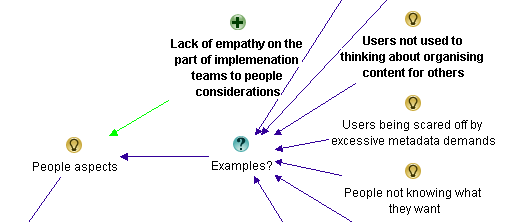
I also liked Taino’s point about user expectations around the “google experience” and her examples. I also loved earlier Rasmus’s point about “hard-drive thinking” (I’m nicking that one for my own clients Rasmus Smile). Both of these issues are clearly people aspects, so I added them as examples around that particular theme.

image_thumb[14]

Finally, I added Taino’s “lack of co-ordination” comments as another example of inadequate governance.

image_thumb[18]

Anne-Marie Low • The one other thing I think missing from here (other than lack of metadata, and often the search tool itself) is too much content, particularly out of date information. I think this is key to ensuring good search results, making sure all the items are up to date and relevant.

Andrew Wright • Great discussion. My top 3 reasons why people can’t find content are:
* Lack of meta data and it’s use in enabling a range of navigation paths to content (for example, being able to locate content by popularity, ownership, audience, date, subject, etc.) See articles on faceted classification:
http://en.wikipedia.org/wiki/Faceted_classification
and
Contextual integration
http://cibasolutions.typepad.com/wic/2011/03/contextual-integration-how-it-can-transform-your-intranet.html#tp
* Too much out-of-date, irrelevant and redundant information
See slide 11 from the following presentation (based on research of over 80 intranets)
http://www.slideshare.net/roowright/intranets2011-intranet-features-that-staff-love
* Important information is buried too far down in the hierarchy
Bonus 2 reasons 🙂
* Web analytics and measures not being used to continuously improve how information is structured
* Over reliance on Search instead of Browsing – see the following article for a good discussion about this
Browse Versus Search: Stumbling into the Unknown
http://idratherbewriting.com/2010/05/26/browse-versus-search-organizing-content-9/

Both Anne and Andrew make good points and Andrew supplies some excellent links too, but all of these issues have been covered in the map so nothing more has been added from this part of the discussion.

Juan Alchourron • 1) that particular, very important content, is not yet on the intranet, because “the” director don’t understand what the intranet stands for.
2) we’re asuming the user will know WHERE that particular content will be placed on the intranet : section, folder and subfolder.
3) bad search engines or not fully configured or not enough SEO applied to the intranet

John Anslow • Nowt new from me
1. Search ineffective
2. Navigation unintuitive
3. Useability issues
Too often companies organise data/sites/navigation along operational lines rather than along more practical means, team A is part of team X therefore team A should be a sub section of team X etc. this works very well for head office where people tend to have a good grip of what team reports where but for average users can cause headaches.
The obvious and mostly overlooked method of sorting out web sites is Multi Variant Testing (MVT) and with the advent of some pretty powerful tools this is no longer the headache that it once was, why not let the users decide how they want to navigate, see data, what colour works best, what text encourages them to follow what links, in fact how it works altogether?
Divorcing design, usability, navigation and layout from owners is a tough step to take, especially convincing the owners but once taken the results speak for themselves.

Most of these points are already well discussed, but I realised I had never made a reference to John’s point about organisational structures versus task based structures for intranets. I had previously captured rationale around the fact that structures were inappropriate, so I added this as another example to that argument within information architecture…

image

Edwin van de Bospoort • I think one of the main reasons for not finding the content is not poor search engines or so, but simply because there’s too much irrelevant information disclosed in the first place.
It’s not difficult to start with a smaller intranet, just focussing on filling out users needs. Which usually are: how do I do… (service-orientated), who should I ask for… (corporate facebok), and only 3rd will be ‘news’.
So intranets should be task-focussed instead if information-focussed…
My 2cnts 😉

Steven Kent • Agree with Suzanne’s suggestion “Old content is not deleted and therefore too many results/documents returned” – there can be more than one reason why this happens, but it’s a quick way to user frustration.

Maish Nichani • It is interesting to see how many of us think metadata and structure are key to finding information on the intranet. I agree too. But come to think of it, staff aren’t experts in information management. It’s all very alien to them. Not too long ago, they had their desktops and folders and they could find their information when they wanted. All this while it was about “me and my content”. Now we have this intranet and shared folders and all of a sudden they’re supposed to be thinking about how “others” would like to find and use the information. They’ve never done this before. They’ve never created or organized information for “others”. Metadata and structure are just “techie” stuff that they have to do as part of their publishing, but they don’t know why they’re doing it or for what reason. They real problem, in my opinion, is lack of empathy.

Barry Bassnett • * in establishing a corporate taxonomy.1. Lack of relevance to the user; search produces too many documents.3. Not training people in the concept that all documents are not created by the individual for the same individual but as a document that is meant to be shared. e.g. does anybody right click PDFs to add metadata to its properties? Emails with a subject line stat describe what is in it.

Luc de Ruijter • @Maish. Good point about information management.
Q: Who’d be responsible to oversee the management of information?
Shouldn’t intranet managers/governors have that responsibility?
I can go along with (lack of) empathy as an underlying reason why content isn’t put away properly. This is a media management legacy reason: In media management content producers never had to have empathy with participating users, for there were only passive audiences.
If empathy is an issue. Then it proves to me that communication strategies are still slow to pick up on the changes in communication behaviour and shift in mediapower, in the digital age.
So if we step back from technological reasons for not finding stuff (search, meta, office automation systems etc.) another big reason looks around the corner of intranet management: those responsible for intranet policies and strategy.

Most of this discussion covers stuff already represented in the map, although I can see that in this part of the conversation there is a preoccupation with content and its relevance. Maish also makes a couple of good points. First up he makes the point that staff are not experts in information management and don’t tend to think about how someone else might wish to find the information later. He also concludes by stating the real problem is a lack of empathy. I liked this and felt that this was a nice supporting argument to the whole conjecture that “people issues” is a major theme in this discussion, so I added it as a pro.

image


Now we have an interesting bit in the conversation (for me anyway). Terry throws a curveball question. (Side note: Curveball questions are usually asked with genuine intent, but tend to have a negative effect on live meetings. Dialogue Mapping loves curveball questions as it is often able to deflect its negative impacts).

Terry Golding • Can I play devils advocate and ask WHY you feel meta data is so vital? Dont misunderstand me I am not saying that it is not important, but I cant help feeling that just saying meta data as a reason for not finding things is rather a simplification. Let me ask it another way, what is GOOD meta data, can you give examples please ?

Luc de Ruijter • @Terry. Good questions which can have many answers (see all comments above where you’ll find several answers already). Why do library books have labels on their covers? Those labels are in fact metadata (avant la lettre) which help library people ordering their collection, and clients to find titles. How do you create tag clouds which offer a more intuitive and user centered way to navigate a website/blog? By tagging all content with (structured) meta tags.Look around a bit and you’ll see that metadata are everywhere and that they serve you in browsing and retrieving content. That’s why metadata are vital these days.I think there are no strict right and good meta structures. Structures depend on organisational contexts. Some metastructures are very complex and formal (see comments about taxonomies above), others are quite simple.Metadata can enable users to browse information blocks. By comparisson navigation schemes can only offer rigid sender driven structures to navigate to pages.

Andrew Wright • @Terry. Meta data enables content to be found in a number of different ways – not just one as is typical of paper based content (and many intranets as well unfortunately).
For instance, if you advertise a house for sale you may have meta data about the house such as location, number of rooms and price. This then allows people to locate the house using this meta data (eg. search by number of bedrooms, price range, location). Compare this with how houses are advertised in newspapers (ie. by location only) and you can see the benefits of meta data.
For a good article about the benefits of meta data, read Card Sorting Doesn’t Cut the Custard:
http://www.zefamedia.com/websites/card-sorting-doesnt-cut-the-custard/
To read a more detailed example about how meta data can be applied to intranets, read:
Contextual integration: how it can transform your intranet
http://cibasolutions.typepad.com/wic/2011/03/contextual-integration-how-it-can-transform-your-intranet.html

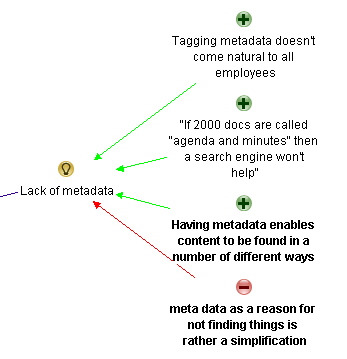
Terry questions the notion of metadata. I framed it as a con against the previous metadata arguments. Both Luc and Andrew answer and I think the line that most succinctly captures the essence of than answer is Andrew’s “Meta data enables content to be found in a number of different ways”. So I reframe that slightly as a pro supporting the notion that lack of metadata is one of the reasons why users can;t find stuff on the intranet.

image

Next is yours truly…

Paul Culmsee • Hi all
Terry a devils advocate flippant answer to your devils advocate question comes from Corey Doctrow with his dated, but still hilarious essay on the seven insurmountable obstacles to meta-utopia 🙂 Have a read and let me know what you think.
http://www.well.com/~doctorow/metacrap.htm
Further to your question (and I *think* I sense the undertone behind your question)…I think that the discussion around metadata can get a little … rational and as such, rational metadata metaphors are used when they are perhaps not necessarily appropriate. Yes metadata is all around us – humans are natural sensemakers and we love to classify things. BUT usually the person doing the information architecture has a vested interest in making the information easy for you. That vested interest drives the energy to maintain the metadata.
In user land in most organisations, there is not that vested interest unless its on a persons job description and their success is measured on it. For the rest of us, the energy required to maintain metadata tends to dissipate over time. This is essentially entropy (something I wrote about in my SharePoint Fatigue Syndrome post)
http://www.cleverworkarounds.com/2011/10/12/sharepoint-fatigue-syndrome/

Bob Meier • Paul, I think you (and that metacrap post) hit the nail on the head describing the conflict between rational, unambiguous IA vs. the personal motivations and backgrounds of the people tagging and consuming content. I suspect it’s near impossible to develop a system where anyone can consistently and uniquely tag every type of information.
For me, it’s easy to get paralyzed thinking about metadata or IA abstractly for an entire business or organization. It becomes much easier for me when I think about a very specific problem – like the library book example, medical reports, or finance documents.

Taino Cribb • @Terry, brilliant question – and one which is quite challenging to us that think ‘metadata is king’. Good on you @Paul for submitting that article – I wouldn’t dare start to argue that. Metadata certainly has its place, in the absence of content that is filed according to an agreed taxonomy, correctly titled, the most recent version (at any point in time), written for the audience/purpose, valued and ranked comparitively to all other content, old and new. In the absence of this technical writer’s utopia, the closest we can come to sorting the wheat from the chaff is classifcation. It’s not a perfect workaround by any means, though it is a workaround.
Have you considered that the inability to find useful information is a natural by-product of the times? Remember when there was a central pool to type and file everything? It was the utopia and it worked, though it had its perceived drawbacks. Fast forward, and now the role of knowledge worker is disseminated to the population – people with different backgrounds, language, education and bias’ all creating content.
It is no wonder there is content chaos – it is the price we pay for progress. The best we as information professionals can do is ride the wave and hold on the best we can!

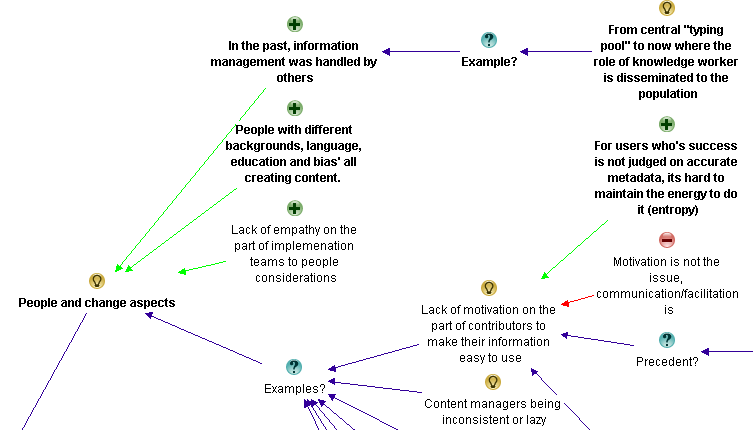
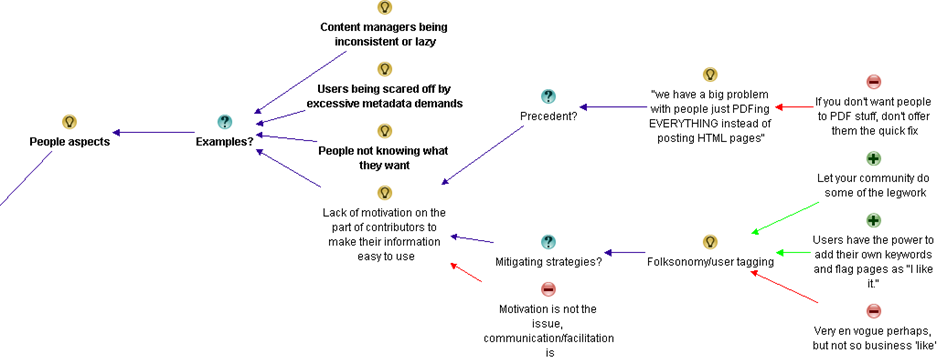
Now my reply to Terry was essentially speaking about the previously spoken of issue around lack of motivation on the part of users to make their information easy to use. I added a pro to that existing idea to capture my point that users who are not measured on accurate metadata have little incentive to put in the extra effort. Taino then refers to pace of change more broadly with her “natural by-product of the times” comment. This made me realise my meta theme of “people aspects” was not encompassing enough. I retitled it “people and change aspects” and added two of Taino’s points as supporting arguments for it.

image

At this point I stopped as enough had been captured the the conversation had definitely reached saturation point. It was time to look at what we had…

For those interested, the final map had 139 nodes.

The second refactor

At this point is was time to sit back and look at the map with the view of seeing if my emergent themes were correct and to consolidate any conversational chaff. Almost immediately, the notion of “content” started to bubble to the surface of my thinking. I had noticed that a lot of conversation and re-iteration by various people related to the content being searched in the first place. I currently had some of that captured in Information Architecture and in light of the final map, I felt that this wasn’t correct. The evidence for this is that Information Architecture topics dominated the maps. There were 55 nodes for information architecture, compared to 34 for people and change and 31 for governance.

Accordingly, I took all of the captured rationale related to content and made it its own meta-theme as shown below…

image

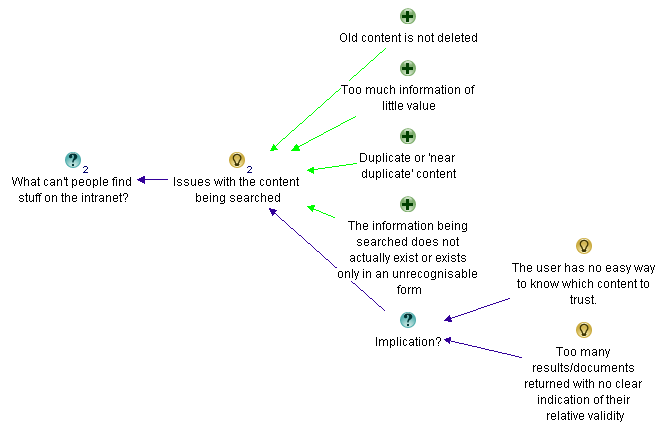
Within the “Issues with the content being searched” map are the following nodes…

image

I also did another bit of fine tuning too here and there and overall, I was pretty happy with the map in its current form.

The root causes

If you have followed my synthesis of what the dialogue from the discussion told me, it boiled down to 5 key recurring themes.

  1. Poor Information Architecture
  2. Issues with the content itself
  3. People and change aspects
  4. Inadequate governance
  5. Lack of user-centred design

I took the completed maps, exported the content to word and then pared things back further. This allowed me to create the summary table below:

Poor Information Architecture Issues with content People and change aspects Inadequate governance Lack of user-centred design
Vocabulary and labelling issues

· Inconsistent vocabulary and acronyms

· Not using the vocabulary of users

· Documents have no naming convention

Poor navigation

Lack of metadata

· Tagging does not come naturally to employees

Poor structure of data

· Organisation structure focus instead of user task focussed

· The intranet’s lazy over-reliance on search

Old content not deleted

Too much information of little value

Duplicate or “near duplicate” content

Information does not exist or an unrecognisable form

People with different backgrounds, language, education and bias’ all creating content

Too much “hard drive” thinking

People not knowing what they want

Lack of motivation for contributors to make information easier to use

Google inspired inflated expectations on search functionality on intranet

Adopting social media from a hype driven motivation

Lack of governance/training around metadata and tagging

Not regularly reviewing search analytics

Poor and/or low cost search engine is deployed

Search engine is not set up properly or used to full potential

Lack of “before the fact” coordination with business communications and training

Comms and intranet don’t listen and learn from all levels of the business.

Ambiguous, under-resourced or misplaced Intranet ownership

The wrong content is being managed

There are easier alternatives available

Content is structured according to the view of the owners rather than the audience

Not accounting for two types of visitors… task-driven and browse-based

No social aspects to search

Not making the search box available enough

A failure to offer an entry level view

Not accounting for people who do not know what they are looking for versus those who do

Not soliciting feedback from a user on a failed search about what was being looked for

The final maps

The final map can be found here (for those who truly like to see full context I included an “un-chunked” map which would look terrific when printed on a large sized plotter). Below however, is a summary as best I can do in a blog post format (click to enlarge). For a decent view of proceedings, visit this site.

Poor Information Architecture

part4map1

Issues with the content itself

part4map2

People and change aspects

part4map3

Inadequate governance

part4map4

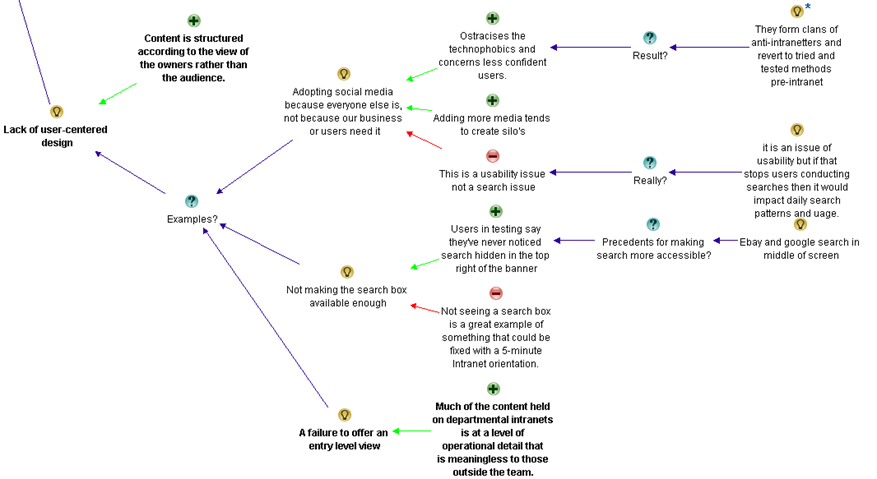
Lack of user-centred design

part4map5

Thanks for reading.. as an epilogue I will post a summary with links to all maps and discussion.

Paul Culmsee

www.sevensigma.com.au


Why can’t users find stuff on the intranet? An IBIS synthesis–Part 3

Hi all

This is the third post in a quick series that attempts to use IBIS to analyse an online discussion. The map is getting big now, but luckily, we are halfway through the discussion and will have most of the rationale captured by the end of this post. We finished the part 2 with a summary map that has grouped the identified reasons why it is hard to find information on intranets into core themes. Right now there are 4 themes that have emerged. In this post we see if there are any more to emerge and fully flesh out the existing ones. Below is our starting point for part 3.

part3map1_thumb5

Our next two responses garnered more nodes in the map than most others. I think this is a testament to the quality of their input to the discussion. First up Dan…

Dan Benatan • Having researched this issue across many diffferent company and departmental intranets, my most frequent findings are:
1. A complete lack of user-centred design. Content that many members of the organization need to access is structured according to the view of the content owners rather than the audience. This should come as no surprise, it remains the biggest challenge in public websites.
2. A failure to offer an entry level view. Much of the content held on departmental intranets is at a level of operational detail that is meaningless to those outside the team. The information required is there, but it is buried so deep in the documents that people outside the team can’t find it.
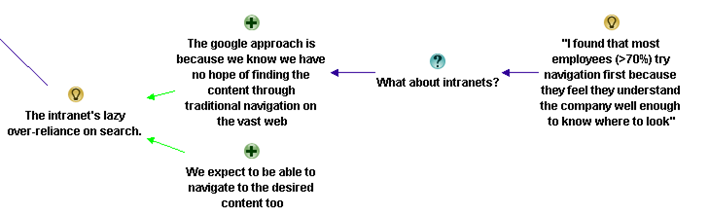
3. The intranet’s lazy over-reliance on search. Although many of us have become accustomed to using Google as our primary entry point to find content across the web, we may do this because we know we have no hope of finding the content through traditional navigation. The web is simply far too vast. We do not, however, rely purely on search once we are in the website we’ve chosen. We expect to be able to navigate to the desired content. Navigation offers context and enables us to build an understanding of the knowledge area as we approach the destination. In my research I found that most employees (>70%) try navigation first because they feel they understand the company well enough to know where to look.
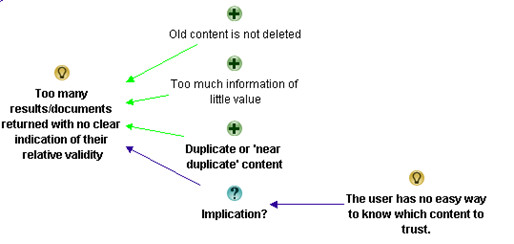
4. Here I agree with many of the comments posted above. Once the user does try search, it still fails. The search engine returns too many results with no clear indication of their relative validity. There is a wealth of duplicate content on most intranets and , even worse, there is a wealth of ‘near duplicate’ content; some of which is accurate and up-to-date and much that is neither. The user has no easy way to know which content to trust. This is where good intranet management and good metadata can help.

My initial impression was that this was an excellent reply and Dan’s experience shone through it. I thought this was one of the best contributions to the discussion thus far. Let’s see what I added shall we?

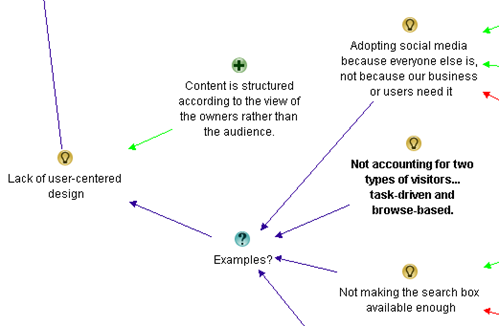
First up, Dan returned to the user experience issue, which was one of the themes that had emerged. I liked his wording of the issue, so I also changed the theme node of “Inadequate user experience design” to Dan’s framing of “Lack of user-centred design”, which I thought was better put. I then added his point about content structured to the world view of owner, rather than audience. His second point about an “entry level view” relates to the first point in the sense that both are user centred design issues. So I added the entry level view point as an example…

image_thumb14

I added Dan’s point about the intranet’s lazy over-reliance on search to the information architecture theme. I did this because he was discussing the relationship between navigation and search, and navigation had already come up as an information architecture issue.

image_thumb23

Dan’s final point about too many results returned was already covered previously, but he added a lot of valuable arguments around it. I restructured that section of the map somewhat and incorporated his input.

image_thumb6

Next we have Rob, who also made a great contribution (although not as concise as Dan)

Rob Faulkner • Wow… a lot of input, and a lot of good ideas. In my experience there can be major liabilities with all of these more “global” concepts, however.
No secret… Meta data is key for both getting your site found to begin with, as well as aiding in on-site search. The weak link in this is the “people aspect” of the exercise, as has been alluded to. I’ve worked on interactive vehicles with ungodly numbers of pages and documents that rely on meta data for visibility and / or “findability” (yes, I did pay attention in English class once in a while… forgive me), and the problem — more often than not — stems from content managers either being lazy and doing a half ass job of tagging, if at all, or inconsistency of how things are tagged by those that are gung-ho about it. And, as an interactive property gets bigger, so too does the complexity tagging required to make it all work. Which circles back to freaking out providers into being lazy on the one hand, or making it difficult for anyone to get it “right” on the other. Vicious circle. Figure that one out and you win… from my perspective.
Another major issue that was also alluded to is organization. For an enterprise-class site, thorough taxonomy / IA exercises must be hammered out by site strategists and THEN tested for relevance to target audiences. And I don’t mean asking targets what THEY want… because 9 times out of 10 you’re either going to get hair-brained ideas at best, or blank stares at worst. You’ve just got to look at the competitive landscape to figure out where the bar has been set, what your targets are doing with your product (practical application, OEMing, vertical-specific use, etc… then Test the result of your “informed” taxonomy and IA to ensure that it does, in fact, resonate with your targets once you’ve gotten a handle on it.
Stemming from the above, and again alluded to, be cautious about how content is organized in order to reflect how your targets see it, not how internal departments handle it. Most of the time they are not one in the same. Further, you’ve got to assume that you’re going to have at least two types of visitors… task-driven and browse-based. Strict organization by product or service type may be in order for someone that knows what they’re looking for, but may not mean squat to those that don’t. Hence, a second axis of navigation that organizes your solutions / products by industry, pain point, what keeps you up at night, or whatever… will enable those that are browsing, or researching, a back door into the same ultimate content. Having a slick dynamic back-end sure helps pull this off
Finally, I think a big mistake made across all verticals is what the content consists of to begin with. What you may think is the holy grail, and the most important data or interactive gadget in the world may not mean a hill-of-beans to the user. I’ve conducted enough focus groups, worldwide, to know that this is all typically out of alignment. I never cease to be amazed at exactly what it is that most influences decision makers.
I know a lot of this was touched upon by many of you. Sorry about that… damn thread is just getting too long to go back and figure out exactly who said what!
Cheers…

Now Rob was the first to explicitly mention “People aspects”, and I immediately realised this was the real theme that “Lack of motivation on the part of contributors…”was getting at. So I restructured the map so that “people aspects” was the key theme and the previous point of “Lack of motivation” was an example. I then added Rob’s other examples.

image_thumb27

After making his points around people aspects, Rob then covers some areas well covered already (metadata, content organsiation), so I did not add any more nodes. But at the end, he added a point about browse oriented vs. search oriented users, which I did add to the user-centred design discussion.

image_thumb33

Rob also made a point about users who know what they want when searching for information vs. those who do not. (In Information Architecture terms, this is called “Known item seeking” vs “exploratory seeking”). That had not been covered previously, so I added it to the Information Architecture discussion.

image_thumb31

Finally, I captured Rob’s point about the wrong content being managed in the first place. This is a governance issue since the best Information architecture or user experience design won;t matter a hoot if you’re not making the right content available in the first place.

image_thumb32

Hans Leijström • Great posts! I would also like to add lack of quality measurements (e.g. number of likes, useful or not) and the fact that the intranets of today are not social at all…

Caleb Lamz • I think everyone has provided some great reasons for users not being able to find what they are looking for. I lean toward one of the reasons Bob mentions above – many intranets are simply not actively managed, or the department managing it is not equipped to do so.
Every intranet needs a true owner (no matter where it falls in the org chart) that acts a champion of the user. Call it the intranet manager, information architect, collaboration manager, or whatever you want, but their main job needs to be make life easier for users. Responsibilities include doing many of the things mentioned above like refining search, tweaking navigation, setting up a metadata structure, developing social tools (with a purpose), conducting usability tests, etc.
Unfortunately, with the proliferation of platforms like SharePoint, many IT departments roll out a system with no true ownership, so you end up with content chaos.

There is no need to add anything from Hans as he was re-iterating a previous comment about analytics which was captured already. Caleb makes a good point about ownership of content/intranet which is a governance issue in my book. So I added his contribution there…

image

Dena Gazin • @Suzanne. Yes, yes, yes – a big problem is old content. Spinning up new sites (SharePoint) and not using, or migrating sites and not deleting old or duplicative content. Huge problem! I’m surprised more people didn’t mention this. Here’s my three:
1. Metadata woes (@Erin – lack of robust metadata does sound better as improvements can be remedied on multiple levels)
2. Old or duplicate content (Data or SharePoint Governance)
3. Poorly configured search engine
Bonus reason: Overly complicated UIs. There’s a reason people like Google. Why do folks keep trying to mess up a good thing? Keep it as simple as you possibly can. Create views for those who need more. 80/20 rule!

Dena’s points are a reiteration of previous points, but I did like her “there is a reason people like google” point, which I considered to be a nice supporting argument of the entire user-centric design theme.

image

Next up we have another group of discussions. What is interesting here is that there is some disagreement – and a lot of prose – but not a lot of information was added to the map from it.

Luc de Ruijter • @Rob. Getting information and metastructures in place requires interactions with the owners of information. I doubt whether they are lazy or blank staring people – I have different experiences with engaging users in preparing digital working environments. People may stare back at you when you offer complete solutions they can say “yea” or “nay” to. And this is still common practice amogst Communication specialists (who like creating stuff themselves first and then communicate about them to others later). And if colleagues stare blank at your proposal, they obviously are resisting change and in need of some compelling communciation campaign…
Communication media legacy models are a root cause for failing intranets.
Tagging is indeed a complex excercise. And we come from a media-age in which fun predominated and we were all journalists and happy bunnies writing post after post, page after page, untill the whole cluttered intranet environment was ready again for a redesign.
Enterprise content is not media content, but enterprise content. Think about it (again please 🙂 ). If you integrate the storage process of enterprise content into the “saving as” routine, you’ll have no problems anymore with keeping your content clean and consistent. All wil be channeled through consistent routines. This doesn’t kill adding free personal meta though, it just puts the content in a enterprise structure. Think enterprise instead of media and tagging solutions are for grabs.
I agree that working on taxonomies can become a drag. Leadership and vison can speed up the process. And mandate of course.
I believe that the whole target rationale behind websites is part of the Communication media legacy we need to loose in order to move forward in better communication services to eployees. Target-thinking hampers the construction of effectve user centered websites, for it focusses on targets, persona, audiences, scenario’s and the whole extra paper media works.
While users only need flexibility, content in context, filters and sorting options. Filtering and sorting are much more effective than adding one navigation tree ater another. And they require a 180° turn in conventional communciation thinking.
@Caleb. Who manages an intranet?
Is that a dedicated team of intranet managers, previously known as content managers, previously known as communciation advisors, previously known as mere journalists? Or is intranet a community affair in which the community IS the manager of content? Surely you want a metamodel to be managed by a specialist. And make general management as much a non-silo activity as possible. Collaboration isn’t confined to silo’s so intranet shouldn’t be either.
A lot of intranets are run by a small group of ‘experts’ whose basic reasoning is that intranet is a medium like an employee magazine. If you want content management issues, start making such groups responsible for intranet.
In my experience intranets work once you integrate them in primary processes. Itranet works for you if you make intranet part of your work. De-medialise the intranet and you have more chance for sustainable success.
Rolling out Sharepoints is a bit like rolling back time. We’ll end up somewhere where we already were in 2001, when digital IC was IT policy. The fact that we are turning back to that situation is a good and worrying illustration of the fact that strategy on digital communications is lacking in the Communications department – otherwise they wouldn’t loose out to IT.
@Dena. I think your bonus reason is a specific Sharepoint reason. Buy Sharepoint and get a big bonus bag of bad design stuff with it – for free! An offer you can’t refuse 🙂

Luc de Ruijter • @Dena. My last weeks tweet about search: Finding #intranet content doesn’t start with #search #SEO. It starts with putting information in a content #structure which is #searchable. Instead of configuring your search engine, think about configuring your content first.

Once again Luc is playing the devils advocate role with some broader musings. I might have been able to add some of this to the map, but it was mostly going over old ground or musings that were not directly related to the question being asked. This time around, Rob takes issue with some of his points and Caleb agrees…

Rob Faulkner • @Luc, Thanks for your thoughtful response, but I have to respectfully disagree with you on a few points. While my delivery may have been a bit casual, the substance of my post is based on experience.
First of all, my characterizations of users being 1) lazy or 2) blank staring we’re not related to the same topic. Lazy: in reference to tagging content. Blank Staring: related to looking to end users for organizational direction.
Lazy, while not the most diplomatic means of description, I maintain, does occur. I’ve experienced it, first hand. A client I’m thinking of is a major technology, Fortune 100 player with well over 100K tech-focused, internet savvy (for the most part) employees. And while they are great people and dedicated to their respective vocation, they don’t always tag documents and / or content-chunks correctly. It happens. And, it IS why a lot of content isn’t being located by targets — internally or externally. This is especially the case when knowledge or content management grows in complexity as result of content being repurposed for delivery via different vehicles. It’s not as simple as a “save as” fix. This is why I find many large sites that provide for search via pre-packed variables, — i.e. drop-downs, check-boxes, radio-buttons, etc — somewhat suspect, because if you elect to also engage in keyword index search you will, many times, come up with a different set of results. In other words, garbage in, garbage out. That being said, you asked “why,” not “what to do about it” and they are two completely different topics. I maintain that this IS definitely a potential “why.”
As far as my “blank stare” remark, it had nothing to do with the above, which you tied it to… but I am more than fluent in engaging and empowering content owners in the how’s and why’s of content tagging without confusing them or eliciting blank stares. While the client mentioned above is bleeding-edge, I also have vast experience with less tech-sophisticated entities — i.e. 13th-century country house hotels — and, hence, understand the need to communicate with contributors appropriate to what will resonate with them. This is Marketing 101.
In regard to the real aim of my “blank stare” comment, it is very germane to the content organization conversation in that it WILL be one of your results if you endeavour to ask end-users for direction. It is, after all, what we as experts should be bringing to the table… albeit being qualified by user sounding boards.
Regarding my thoughts on taxonomy exercises… I don’t believe I suggested it was a drag, at all. The fact is, I find this component of interactive strategy very engaging… and a means to create a defensible, differentiated marketing advantage if handled with any degree of innovation.
In any event, I could go on and on about this post and some of the assumptions, or misinterpretations, you’ve made, but why bother? When I saw your post initially, it occurred to me you were looking for input and perhaps insight into what could be causing a problem you’re encountering… hence the “why does this happen” tone. Upon reviewing the thread again, it appears you’re far more interested in establishing a platform to pontificate. If you want to open a discussion forum you may want to couch your topic in more of a “what are your thoughts about x, y, z?”… rather than “what could be causing x, y, z?” As professionals, if we know the causes we’re on track to address the problem.

Caleb Lamz • I agree with Rob, that this thread has gone from “looking for input” to “a platform to pontificate”. You’re better off making this a blog post rather than asking for input and then making long and sometimes off the cuff remarks on what everyone else has graciously shared. It’s unproductive to everyone when you jump to conclusions based on the little information that other users can provide in a forum post.

Luc de Ruijter • The list:
Adopting social media from a hype-driven motivation (lack of coherence)
big problem with people just PDFing EVERYTHING instead of posting HTML pages
Comms teams don’t listen and learn from all levels of the business
Content is not where someone thought it would be or should be or its not called what they thought it was called or should be called.
content is titled poorly
content managers either being lazy and doing a half ass job of tagging
content they are trying to find is out of date, cannot be trusted or isn’t even available on the intranet.
Documents have no naming convention
failure to offer an entry level view
inconsistency of how things are tagged
Inconsistent vocabulary and acronyms
info is organised by departmental function rather than focussed on end to end business process.
information being searched does not actually exist or exists only in an unrecognisable form and therefore cannot be found!
intranet’s lazy over-reliance on search
intranets are simply not actively managed, or the department managing it is not equipped to do so.
intranets of today are not social at all
just too much stuff
Lack of content governance, meta-data and inconsistent taxonomy, resulting in poor search capability.
Lack of measuring and feedback on (quality, performance of) the intranet
Lack of metadata
lack of motivation on the part of contributors to make their information easy to use
lack of quality measurements (e.g. number of likes, useful or not
lack of robust metadata
lack of robust metadata, resulting in poor search results;
lack of user-centred design
main navigation is poor
not fitting the fact that there are at least two types of visitors… task-driven and browse-based
Not making the search box available enough
Old content is not deleted and therefore too many results/documents returned
Old or duplicate content (Data or SharePoint Governance)
Overly complicated UIs
Poor navigation, information architecture and content sign-posting
Poorly configured search engine
proliferation of platforms like SharePoint
relevance of content (what’s hot for one is not for another)
Search can’t find it due to poor meta data
Search engine is not set up correctly
search engine returns too many results with no clear indication of their relative validity
structure is not tailored to the way the user thinks

Luc de Ruijter • This discussion has produced a qualitative and limited list of root causes for not finding stuff. I think we can all work with this.
@Rob & @Caleb My following question is always what to do after digesting and analysing information. I’m after solutions, that;s why I asked about root causes (and not symptoms). Reading all the comments triggers me in sharing some points of view. Sometimes that’s good to fuel the conversation sometimes. For if there is only agreement, there is no problem. And if there is no problem, what will we do in our jobs? If I came across clerical, blame it on Xmas.
Asking the “what to do with this input?” is pehaps a question for another time.

The only thing I added to the map from this entire exchange is Rob’s point of no social aspects to search. I thought this was interesting because of an earlier assertion that applying social principles to an intranet caused more silos. Seems Luc and Rob have differing opinions on this point.

image

Where are we at now?

At this point, we are almost at the end of the discussion. In this post, I added 25 nodes against 10 comments. Nevertheless, we are not done yet. In part 4 I will conclude the synthesis of the discussion and produce a final map. I’ll also export the map to MSWord, summarising the discussion as it happened. Like the last three posts, you can click here to see the maps exported in more detail.

There are four major themes that have emerged. Information Architecture, People aspects, Inadequate governance and lack of user-centred design. The summary maps for each of these areas are below (click to enlarge):

Information Architecture

part3map2[5]

People aspects

part3map3[5]

Inadequate Governance

part3map4[5]

Lack of user-centred design

part3map5[5]

Thanks for sticking with me thus far – almost done now…

Paul Culmsee

CoverProof29

www.sevensigma.com.au


Why can’t users find stuff on the intranet? An IBIS synthesis–Part 2

Hi all

This is the second post in a quick series that attempts to use IBIS to analyse an online discussion. Strange as it may sound, but I believe that issue mapping and IBIS is one of the most pure forms of information architecture you can do. This is because a mapper, you are creating a navigable mental model of speech as it is uttered live. This post is semi representative of this. I am creating an IBIS based issue map, but I’m not interacting live with participants. nevertheless, imagine if you will, you sitting in a room with a group of stakeholders answering the question on why users cannot find what they are looking for on the intranet. Can you see its utility in creating shared understanding of a multifaceted issue?

Where we left off…

We finished the previous discussion with a summary map that identified several reasons why it is hard to find information on intranets. In this post we will continue our examination of this topic. What you will notice in this post is that the number of nodes that I capture are significantly less than in part 1. This is because some topics start to become saturated and people’s contributions are the same as what is already captured. In Part 1, I captured 55 nodes from the first 11 replies to the question. In this post, I capture an additional 33 nodes from the next 15 replies.

image_thumb72

So without further adieu, lets get into it!

Suzanne Thornley • Just another few to add (sorry 5 not 3 :-):
1. Search engine is not set up correctly or used to full potential
2. Old content is not deleted and therefore too many results/documents returned
3. Documents have no naming convention and therefore it is impossible to clearly identify what they are and if they are current.
4. Not just a lack of metadata but also a lack of governance/training around metadata/meta tagging so that less relevant content may surface because the tagging and metadata is better.
5. Poor and/or low cost search engine is deployed in the mistaken belief that users will be happy/capable of finding content by navigating through a complex intranet structure.

Suzanne offered 5 additional ideas to the original map from where we last left off. She was also straight to the point too, which always makes a mappers job of expressing it in IBIS easier. You might notice that I reversed “Old content is not deleted and therefore too many results/documents returned” in the resulting map. This is because I felt that old content not being deleted was one of a number arguments supporting why too many results are returned.

image_thumb[26]

My first map refactor

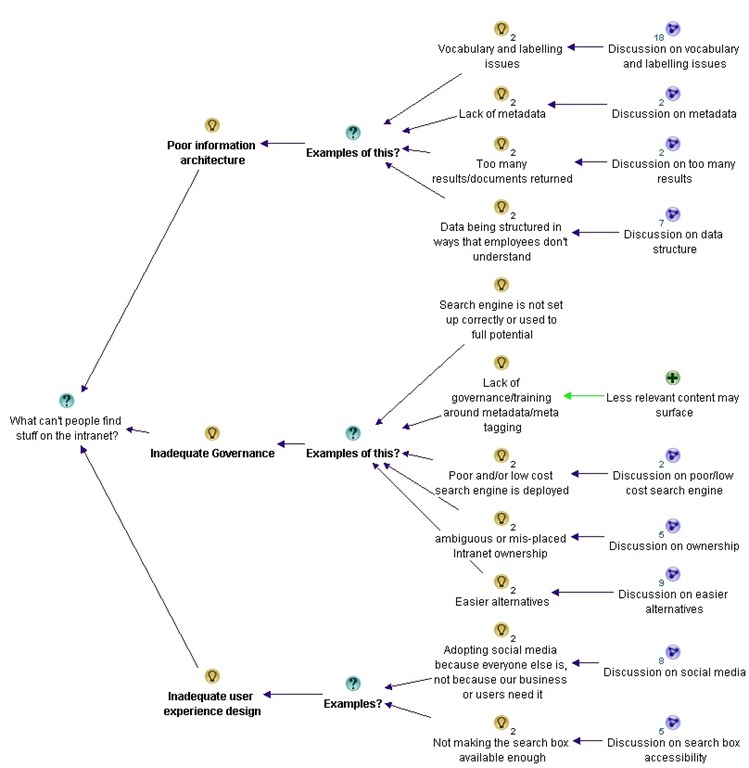
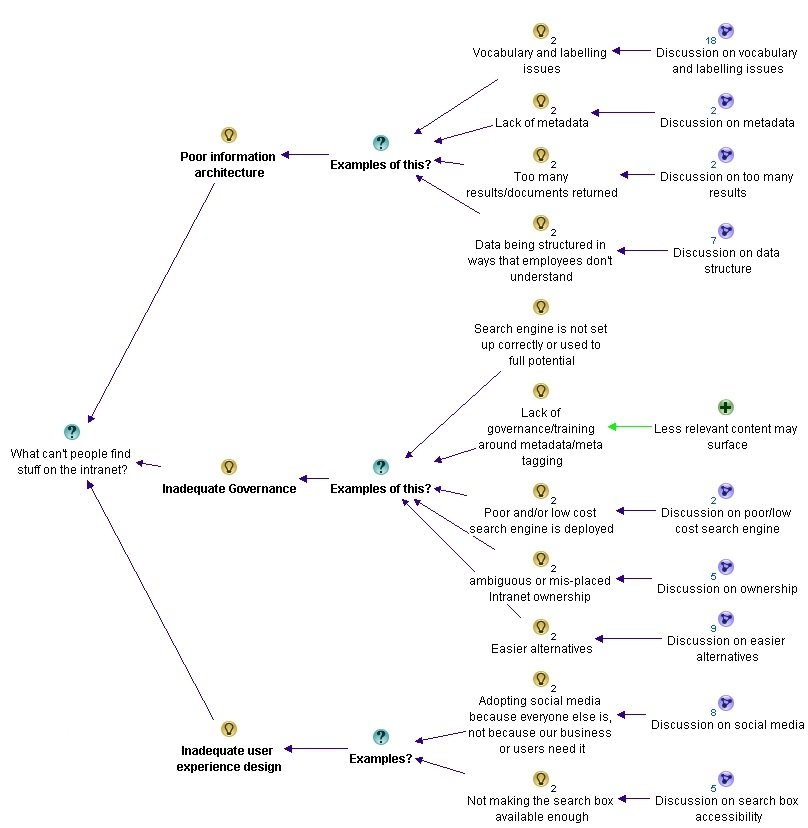
With the addition of Suzanne’s contributions, I felt that it was a good time to take stock and adjust the map. First up, I felt that a lot of topics were starting to revolve around the notion of information architecture, governance and user experience design. So I grouped the themes of vocabulary, lack of metadata, excessive results and issues around structure of data as part of a meta theme of “information architecture”. I similarly grouped a bunch of answers into “governance” and “user experience design”. These for me, seemed to be the three meta-themes that were emerging so far…

For the trainspotters, Suzanne’s comment about document naming conventions was added to the “Vocabulary and labelling issues” sub-map. You can’t see it here because I collapsed the detailed so you can see the full picture of themes as they are at this point.

part2map1

Patrik Bergman • Several of you mention the importance of adding good metadata. Since this doesn’t come natural to all employees, and the wording they use can differ – how do you establish a baseline for all regarding how to use metadata consistently? I have seen this in a KM product from Layer 2 for example, but it can of course be managed without this too, but maybe to a higher cost, or?

Patrick’s comment was a little hard to map. I captured his point that metadata does not come natural to employees as a pro, supporting the idea that lack of metadata is an example of poor information architecture. The other points I opted to leave off, because they were not really related to the core question on why people can’t find stuff on the intranet.

image_thumb[7]

Luc de Ruijter • @Patrik. Metadata are crucial. I’ve been using them since 2005 (Tridion at that time).You can build a lot of functionality with it. And it requires standardisation. If everyone adds his own meta, this will not enable you to create solutions. You can standardize anything in any CMS. So use your CMS to include metadata. If you have a DMS the same applies. (DMS are a more logical tool for intranets, as most enterprise content exists as documenst. Software such as LiveLink can facilitate adding meta in the save as process. You just have to tick some fields before you can save a document on to the intranet.)
@Suzanne. There’s been a lot of buzz about governance. You don’t need governance over meta, you just need a sound metastructure (and a dept of function to manage it – such as library of information management). Basically a lot of ‘governance’ can be automated instead of being discussed all the time :-).

Like Patricks comment, much of what Luc said here wasn’t really related to the question at hand or has been captured already. But I did acknowledge his contribution to the governance debate, and he specifically argued against Suzanne’s point about lack of governance around metadata tagging.

image_thumb[11]

Next we have a series of answers, but you will notice that most of the points are re-iterating points that have already been made.

Patrik Bergman • Thanks Luc. It seems SharePoint gives us some basic metadata handling, but perhaps we need something strong in addition to SharePoint later.

Simon Evans • My top three?
1) The information being searched does not actually exist or exists only in an unrecognisable form and therefore cannot be found!
2) As Karen says above, info is organised by departmental function rather than focussed on end to end business process.
3) Lack of metadata as above

Mahmood Ahmad • @Simon evan. I want to also add Poor Information Structure in the list. Therefore Information Management should be an important factor.

Luc de Ruijter • @Patrik. Sharepoint 2010 is the first version that does something with it. Ms is a bit slow in pushing the possibilities with it.
@Simon @Mahmood Let’s say that information structure is the foundation for an intranet (or any website), and that a lack of metadata is only a symptom of a bad foundation?

Patrik Bergman • Good thing we use the 2010 version then 😀 I will see how good it handles it, and see if we need additional software.

Erin Dammen • I believe 1) lack of robust metadata, resulting in poor search results; 2) structure is not tailored to the way the user thinks; 3) lack of motivation on the part of contributors to make their information easy to use (we have a big problem with people just PDFing EVERYTHING instead of posting HTML pages.) I like that in SP 2010, users have the power to add their own keywords and flag pages as "I like it." Let your community do some of the legwork, I think it helps!

Simon’s first point that the information searched may not exist or may not be in the right format was new, so that was captured under governance. (After all, its hard to architect information when its not there!).

image_thumb[16]

I also added Erin’s third point about lack of motivation on the part of contributors. I mulled over this and decided it was a new theme, so I added it to the root question, rather than trying to make it fit into information architecture, governance or user experience design. I also captured her point on letting the community do the legwork through user tagging (known as folksonomy).

image_thumb[19]

Luc de Ruijter • @all. The list of root causes remains small. This is not surprising (it would be really worrying if the list of causes would be a long list). And it is good to learn that we encounter the same (few but not so easy to solve) issues.
Still, in our line of work these root causes lack overall attention. What could be the reason for that? 🙂
@Erin Motivation is not the issue, I think; and facilitation is. If it is easier to PDF everything, than everyone will do so. And apparently everyone has the tools to do so. (If you don’t want people to PDF stuff, don’t offer them the quick fix.)
If another method of sharing documents is easier, then people will migrate. How easy is it to find PDF’s through search? How easy is it to add metadata to PDF’s? And are colleagues explained why consistent(!) meta is so relevant? Can employees add their own meta keywords? How do you maintain the quality and integrity of your keywords?
Of course it depends on your professional usergroup whether professionals will use "I like" buttons. Its a bit on the Facebook consumer edge if you’d ask me. Very en vogue perhaps, but in my view not so business ‘like’.

Luc, who is playing the devils advocate role as this discussion progresses, provides three counter arguments to Erin’s argument around user motivation. They are all captured as con’s.

image_thumb[21]

Steven Osborne • 1) Its not there and never was
2) Its there but inactive so can no longer be accessed
3) Its not where someone thought it would be or should be or its not called what they thought it was called or should be called.

Marcus Hamilton-Mills • 1) The main navigation is poor
2) The content is titled poorly (e.g internal branding, uncommon wording, not easy to differentiate from other content etc.)
3) Search can’t find it due to poor meta data

patrick c walsh • 1) Navigation breaks down because there’s too much stuff
2) There’s too much crap content hidden away because there’s just too much stuff
and
3) er…there’s just too much stuff

Mark Smith • 1. Poor navigation, information architecture and content sign-posting
2. Lack of content governance, meta-data and inconsistent taxonomy, resulting in poor search capability.
3. The content they are trying to find is out of date, cannot be trusted or isn’t even available on the intranet

Luc de Ruijter • @Steven Had a bit of a laugh there
@all Am I right in making the connection between
– the huge amount of content is an issue
– that internal branding causes confusion (in labeling and titles).
and
the fact that – in most cases – these causes can be back tracked to the owners of intranet, the comms department? They produce most content clutter.
Or am I too quick in drawing that conclusion?

Now the conversation is really starting to saturate. Most of the contributions above are captured already in the map as it is, so I only added two nodes: Patrick’s point about navigation (an information architecture issue) and too much information.

image_thumb[25]

Where are we at now?

We will end part 2 with a summary below. Like the first post, you can click here to see the maps exported in more detail. In part 3, the conversation got richer again, so the maps will change once again.

Until then, thanks for reading

Paul Culmsee

CoverProof29

www.sevensigma.com.au

part2map2


Why can’t users find stuff on the intranet? An IBIS synthesis–Part 1

Hi

There was an interesting discussion on the Intranet Professionals group on LinkedIn recently where Luc De Ruijter asked the question:

What are the main three reasons users cannot find the content they were looking for on intranet?

As you can imagine there were a lot of responses, and a lot more than three answers. As I read through them, I thought it might be a good exercise to use IBIS (the language behind issue mapping) to map the discussion and see what the collective wisdom of the group has to say. So in these posts, I will illustrate the utility of IBIS and Issue mapping for this work, and make some comments about the way the conversation progressed.

So what is IBIS and Issue/Dialogue Mapping?

Issue Mapping captures the rationale behind a conversation or dialogue—the emergent ideas and solutions that naturally arise from robust debate. This rationale is graphically represented using a simple, but powerful, visual structure called IBIS (Issue Based Information System). This allows all elements and rationale of a conversation, and subsequent decisions, to be captured in a manner that can be easily reflected upon.

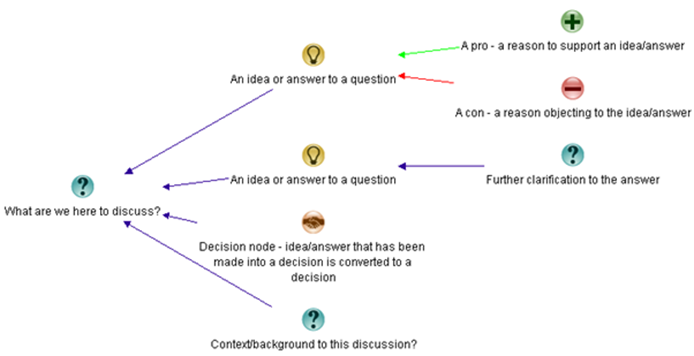
The elements of the IBIS grammar are below. Questions give rise to ideas, or potential answers. Ideas have pros or cons arguing for or against those ideas.

image_thumb81

Dialogue Mapping is essentially Issue Mapping a conversation live, where the mapper is also a facilitator. When it is done live it is powerful stuff. As participants discuss a problem, they watch the IBIS map unfold on the screen. This allows participants to build shared context, identify patterns in the dialogue and move from analysis to synthesis in complex situations. What makes this form of mappingcompelling is that everything is captured. No idea, pro or con is ignored. In a group scenario, this is an extremely efficient way of meeting what social psychologist Hugh Mackay says is the first of the ten human desires which drives us – this being the desire to be taken seriously. Once an idea is mapped, the idea and the person who put it forth are taken seriously. This process significantly reduces “wheel spinning” in meetings where groups get caught up in a frustrating tangled mess of going over the same old ground. It also allows the dialogue to move more effectively to decision points (commitments) around a shared understanding.

In this case though, this was a long discussion on a LinkedIn group so we do not get the benefit of being able to map live. So in this case I will create a map to represent the conversation as it progresses and make some comments here and there…

So let’s kick off with the first reply from Bob Meier.

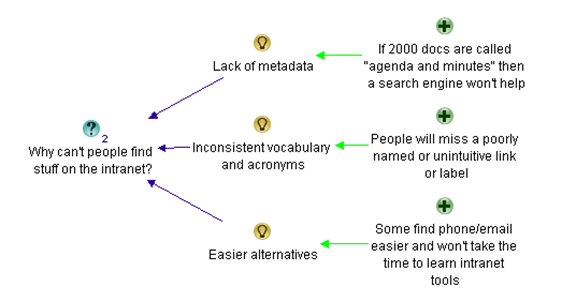
Bob Meier • Don’t know if these are top 3, but they’re pretty common find-ability issues:
1. Lack of metadata. If there are 2000 documents called “agenda and minutes” then a search engine, fancy intranet, or integrated social tool won’t help.
2. Inconsistent vocabulary and acronyms. If you’ve branded the expense report system with some unintuitive name (e.g. a vendor name like Concur) then I’ll scan right past a link looking for “expense reports” or some variation.
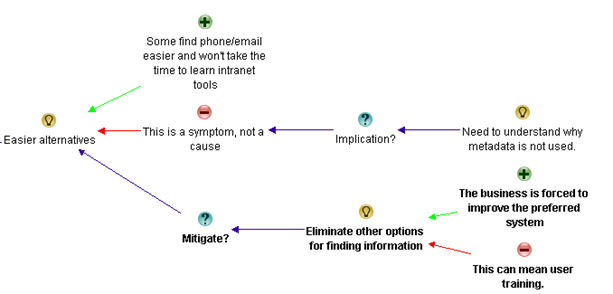
3. Easier alternatives. If it’s easier for me to use phone/email/etc. to find what I want, then I won’t take the time to learn how to use the intranet tools. Do grade schools still teach library search skills? I don’t think many companies do…

In IBIS this was fairly straightforward. Bob listed his three answers with some supporting arguments. I reworded his supporting argument of point 2, but otherwise it pretty much reflects what was said…

image_thumb2

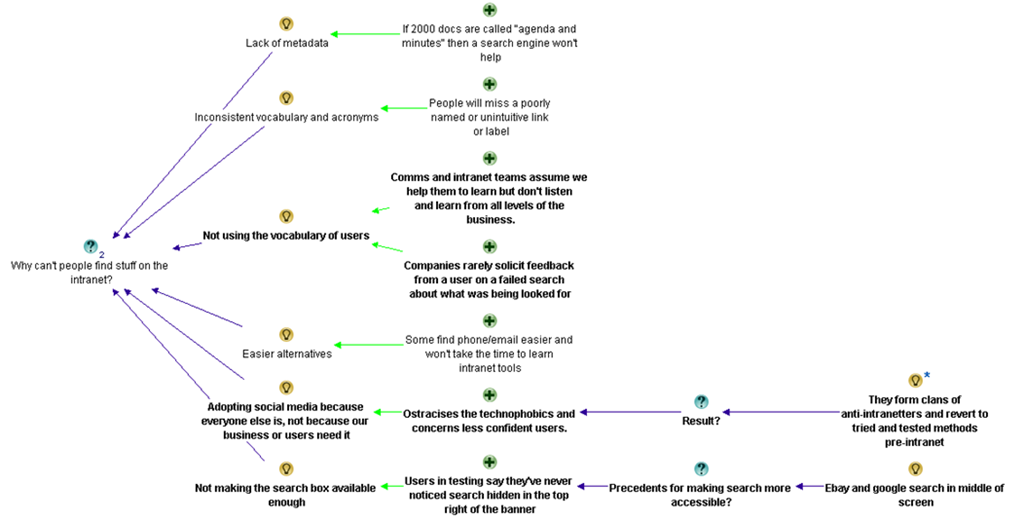
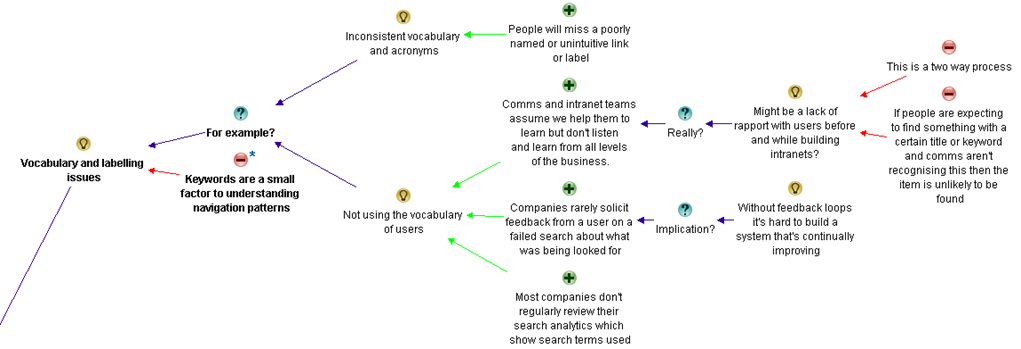
Nigel Williams (LION) • I agree with Bob but I’d add to point two not speaking our user base’s language. How many companies offer a failure to find for example (i.e.if you fail to find something in a search you submit a brief form which pops up automatically stating what you were looking for and where you expected to find it? Lots of comms and intranet teams are great at telling people and assuming we help them to learn but don’t listen and learn from all levels of the business.
If I make that number 1 I’ll also add:
2) Adopting social media because everyone else is, not because our business or users need it. This then ostracises the technophobics and concerns some of our less confident regular users. They then form clans of anti-intranetters and revert to tried and tested methods pre-intranet (instant messaging, shared drives, email etc.)
3) Not making the search box available enough. I’m amazed how many users in user testing say they’ve never noticed search hidden in the top right of the banner – “ebay has their’s in the middle of the screen, so does Google. Where’s ours?” is a typical response. If you have a user group at your mercy ask them to search for an item on on Google, then eBay, then Amazon, then finally your intranet. Note whether they search in the first three and then use navigation (left hand side or top menu) when in your intranet.

Nigel’s starts out by supporting Bob’s answer and I therefore add them as pros in the map. Having done this though, I can already see some future conversational patterns. Bob’s two supporting arguments for “not using the vocabulary of users”, actually are two related issues. One is about user experience and the other is about user engagement/governance. Nevertheless, I have mapped it as he stated it at this point and we see what happens.

image_thumb3

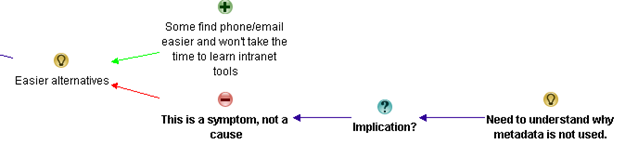
Luc de Ruijter • @Bob. I recognise your first 2 points. The third however might be a symptom or result, not a cause. Or is it information skills you are refering to?
How come metadata are not used? Clearly there is a rationale to put some effort in this?
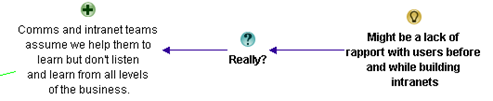
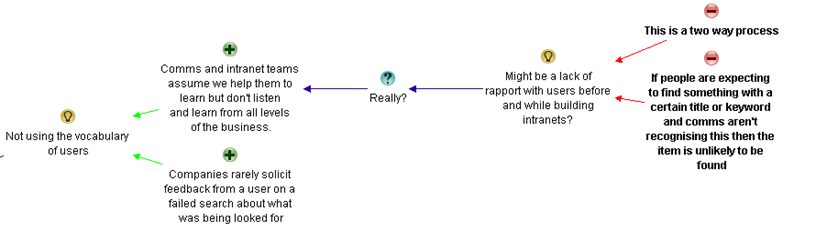
@Nigel. Is the situation in which Comm. depts don’t really listen to users a reason for not finding stuff? Or would it be a lack of rapport with users before and while building intranets? Is the cause concepetual, rather than editorial for instance?
(I’m really looking for root causes, the symptoms we all know from daily experience).
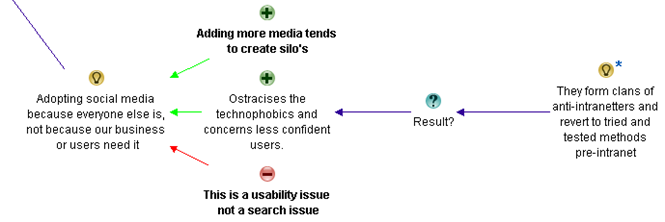
Adding more media is something we’ve seen for years indeed. Media tend to create silo’s.
Is your third point about search or about usability/design?

In following sections I will not reproduce the entire map in the blog post – just relevant sections.

In this part of the conversation, Luc doesn’t add any new answers to the root question, but queries three that have been put forward thus far. Also note at this point I believe one of Luc’s answers is for a different question. Bob’s “easier alternatives” point was never around metadata. But Luc asks “how come metadata is not used?”. I have added it to the map here, changing the framing from a rhetorical question to an action. Having said that, if I was facilitating this conversation, I would have clarified that point before committing it to the map.

image_thumb27

Luc also indicates that the issue around communications and intranet teams not listening might be due to a lack of rapport.

image_thumb25

Finally, he adds an additional argument why social media may not be the utopia it is made out to be, by arguing that adding more media channels creates more information silos. He also argues against the entire notion on the grounds that this is a usability issue, rather than a search issue.

image_thumb80

Nigel Williams (LION) • Hi Luc, I think regarding Comms not listening that it is two way. If people are expecting to find something with a certain title or keyword and comms aren’t recognising this (or not providing adequate navigation to find it) then the item is unlikely to be found.
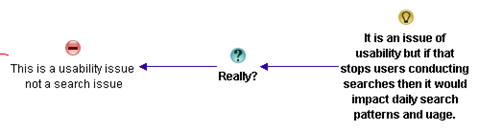
Similarly my third point is again both, it is an issue of usability but if that stops users conducting searches then it would impact daily search patterns and usage.

I interpret this reply as Nigel arguing against Luc’s assertion around lack of rapport being the reason behind intranet and comms teams not listening and learning from all levels of the user base.

image_thumb34

Nigel finishes by arguing that even if social media issues are usability issues, they might still impede search and the idea is therefore valid.

image_thumb84

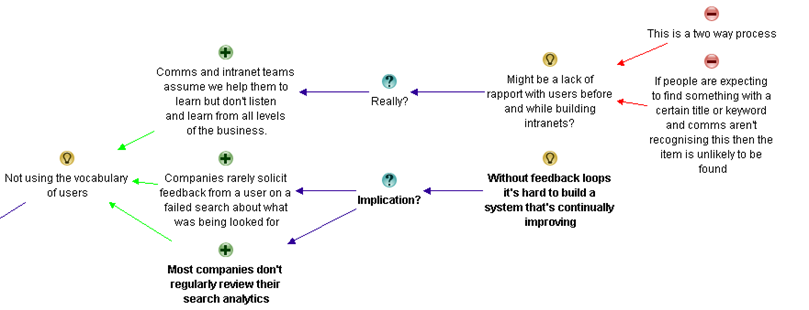
Bob Meier • I really like Nigel’s point about the importance of feedback loops on Intranets, and without those it’s hard to build a system that’s continually improving. I don’t have any data on it, but I suspect most companies don’t regularly review their search analytics even if they have them enabled. Browse-type searching is harder to measure/quantify, but I’d argue that periodic usability testing can be used in place of path analysis.
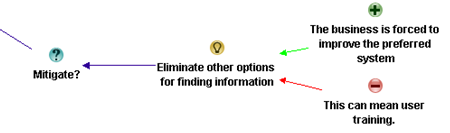
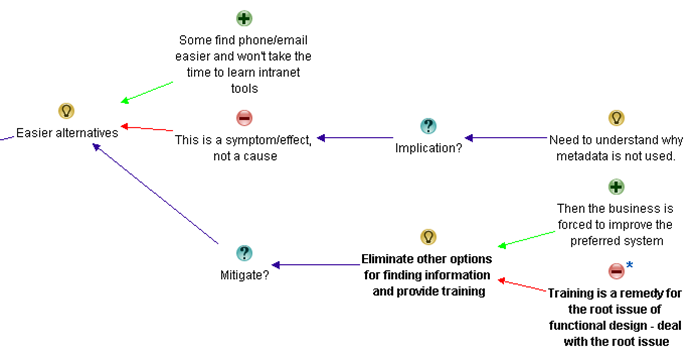
I also agree with Luc – my comment on users gravitating from the Intranet to easier alternatives could be a symptom rather than a cause. However, I think it’s a self-reinforcing symptom. When you eliminate other options for finding information, then the business is forced to improve the preferred system, and in some cases that can mean user training. Not seeing a search box is a great example of something that could be fixed with a 5-minute Intranet orientation.
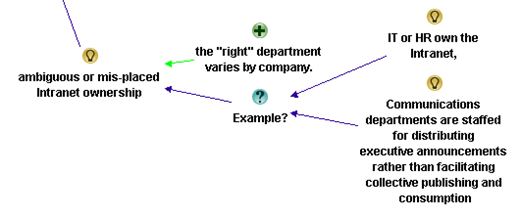
If I were to replace my third reason, I’d point at ambiguous or mis-placed Intranet ownership . Luc mentions Communications departments, but in my experience many of those are staffed for distributing executive announcements rather than facilitating collective publishing and consumption. I’ve seen many companies where IT or HR own the Intranet, and I think the “right” department varies by company. Communications could be the right place depending on how their role is defined.

Bob makes quite a number of points in this answer, right across various elements of the unfolding discussion. Firstly, he makes a point about analytics and the fact that a lack of feedback loops makes it hard to build a system that continually improves.

image_thumb45

In term of the discussion around easier alternatives, Bob offers some strategies to mitigate the issue. He notes that there are training implications when eliminating the easier alternatives.

image_thumb41

Finally, Bob identifies issues around the ownership of the intranet as another answer to the original question of people not being able to find stuff on the intranet. He also lists a couple of common examples.

image_thumb69

Karen Glynn • I think the third one listed by Bob is an effect not a cause.
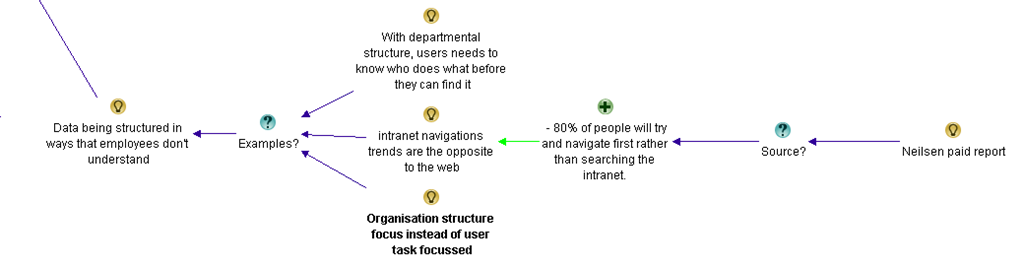
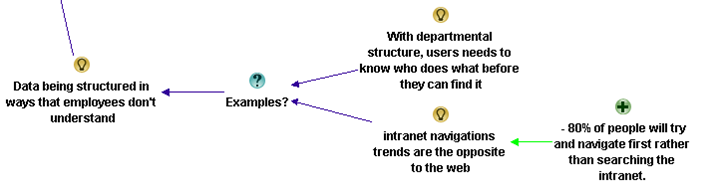
Another cause could be data being structured in ways that employees don’t understand – that might be when it is structured by departments, so that users need to know who does what before they can find it, or when it is structured by processes that employees don’t know about or understand. Don’t forget intranet navigations trends are the opposite to the web – 80% of people will try and navigate first rather than searching the intranet.

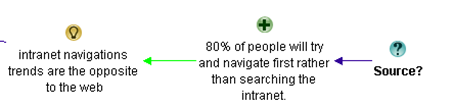
In this answer, Karen’s starts by agreeing with the point Luc made about “easier alternatives” being a symptom rather than a cause, so there is no need to add it to the map as it is already there. However she provides a new answer to the original question: the structure of information (this by the way is called top-down information architecture – and it was bound to come out of this discussion eventually). She also makes a claim that 80% of people will navigate prior to search on the intranet. I wonder if you can tell what will happen next? Smile

image_thumb49

Luc de Ruijter • @Nigel Are (customer) keywords the real cause for not finding stuff? In my opinion this limits the chalenge (of building effective intranet/websites) to building understandable navigation patters. But is navigation the complete story? Where do navigation paths lead users to?
@Bob Doesn’t an investiment in training in order to have colleagues use the search function sound a bit like attacking the symptom? Why is search not easy to locate in the first place? I’d argue you’re looking at a (functional) design flaw (cause) for which the (where is the search?) training is a mere remedy, but not a solution.
@Karen You mention data. How does data relate to what we conventionally call content, when we need to bring structure in it?
Where did you read the 80% intranet-users navigate before searching?

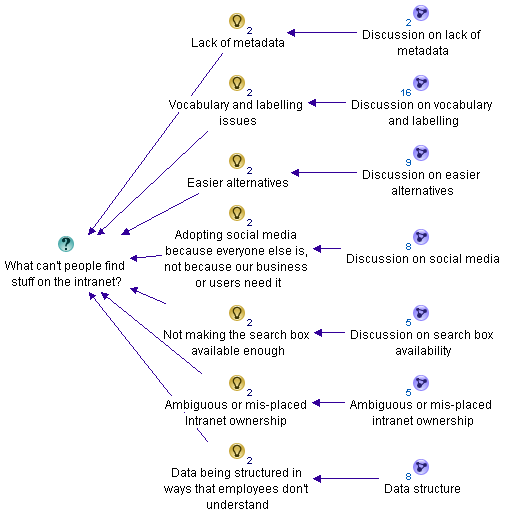
Okay, so this is the first time thus far where I do a little bit of map restructuring. In the discussion so far, we had two ideas offered around the common notion of vocabulary. In this reply, Luc states “Are (customer) keywords the real cause for not finding stuff?” I wasn’t sure which vocabulary issue he was referring to, so this prompted me to create a “meta idea” called “Vocabulary and labelling issues”, of which there are two examples cited thus far. This allowed me to capture the essence of Luc’s comment as a con against the core idea of issues around vocabulary and labelling.

image_thumb52

Luc then calls into question Bob’s suggestion of training and eliminating the easier alternatives. Prior to Luc’s counter arguments, I had structured Bob’s argument like this:

image_thumb58

To capture Luc’s argument effectively, I restructured the original argument and made a consolidated idea to “eliminate other options and provide training”. This allowed me to capture Luc’s counter argument as shown below.

image_thumb55

Finally, Luc asked Karen for the source of her contention that 80% of users navigate intranets, rather than use the search engine first up.

image_thumb61

In this final bit of banter for now, the next three conversations did not add too many nodes to the map, so I have grouped them below…

Karen Glynn • Luc, the info came from the Neilsen group.

Helen Bowers • @Karen Do you know if the Neilsen info is available for anyone to look at?

Karen Glynn • I don’t know to be honest – it was in one of the ‘paid for’ reports if I remember correctly.

Luc de Ruijter • @Karen. OK in that case, could you provide us with the title and page reference of the source? Than it can become usable as a footnote (in a policy for instance).Thanks
Reasons so far for not finding stuff:
1. Lack of metadata (lack of content structure).
2. Inconsistent vocabulary and acronyms (customer care words).
3. Adopting social media from a hype-driven motivation (lack of coherence)
4. Bad functional design (having to search for the search box)
5. Lack of measuring and feedback on (quality, performance of) the intranet
6. Silo’s. Site structures suiting senders instead of users

So for all that Banter, here is what I added to what has already been captured.

image_thumb65

Where are we at?

At this point, let’s take a breath and summarise what has been discussed so far. Below is the summary map with core answers to the question so far. I have deliberately tucked away the detail into sub maps so you can see what is emerging. Please note I have not synthesised this map yet (well … not too much anyway). I’ll do that in the next post.

image_thumb72

If you want to take a look at the entire map as it currently stands, take a look at the final image at the very bottom of this post. (click to enlarge). I have also exported the entire map so far for you to view things in more context. Please note that the map will change significantly as we continue to capture and synthesise the rationale, so as we continue to unpack the discussion, expect this map to change quite a bit..

Thanks for reading

Paul Culmsee

CoverProof29

www.sevensigma.com.au

Map25


Whatever you do, do not ignore legacy

On the twitterverse recently, someone stated that because of a problem of excessive SharePoint site sprawl, they were going to institute a new site approval process. On the surface this remedy seems to be perfectly reasonable. After all, there is a clear problem that has emerged and in the name of governance, we have taken steps to address it via this new process.

There is only one small problem with this. It’s probably the wrong thing to do or at best, a minor facet of what to do.

Before I explain why, consider another scenario that I am sure all of us have experienced. You have a problem so you call your bank, ISP or some other provider of services that you have paid for. You encounter an operator or customer service representative who seems hell-bent on closing your call at all costs, whether you think the problem is solved or not. Common examples of how this plays out is the oft used “well I will close this call and you can call back and log a new one if there is still an issue” line. A more subtle, yet equally frustrating one that even Microsoft have used on me is the “well you logged the problem as X, but in reality its Y. So you will need to close this call and re-log a new call for problem Y”.

The underlying reason for this is very likely that the performance of the person on the other end of the line is judged on time spent handling your call. The logic would be that the speedier a call is closed, means the less time users have spent on tech support, which indicates good outcomes for customers.

Alas, if only that were true. Anybody who has been on the receiving end of this sort of treatment knows full well that the opposite happens. As a customer, you get frustrated and pissed off. More dangerously for the organization, this sort of indicator conveys a warped representation of reality. Essentially the operator has altered their behaviour to maximise their performance according to this measure of “effectiveness”. Customers who are paying the money are not necessarily satisfied. In fact they are more often than not dissatisfied. Therefore, the notion that length of support calls somehow lead to happier customers is a fallacy. In the longer term, customers will tire of crappy outcomes and take their business elsewhere.

This success indicator is a mirage, and in actual fact contributes to the nastier, longer term problems of customers ending up with competitors.

So with that said, lets go back to our Sharepoint site sprawl issue. Before instituting such a policy, I ask the following simple question.

So why are there lots of sites?

Now there will be various reasons, but the most common answer I get back from this is:

Users don’t know any better.

This assertion is pretty easy to test too. Take a look at the sites in the wild west of a chaotic SharePoint install. Since most site templates in SharePoint have a single document library, it is common to see many hundreds of sites with a single document library in them. Clearly, people simply aren’t aware that they can do things like add more libraries or lists to a site or they are unwilling or unable to do so. I have experienced users telling me that if they had have known, they would have never created a site for a particular collaborative activity.

Side Note: SharePoint’s own attempts to be “intuitive” is the problem here. For a start, sites build navigation by default so people get duped into using sites to create navigational structure when its wholly inappropriate. Secondly, creating a new site is inferred as the right thing to do. To see why, go to the site actions menu and what is a default action there? You guessed it – create a site. SharePoint out of the box actually contributes to users forming this mental model of how SharePoint hangs together).

So clearly, many instances of excess site sprawl is symptomatic of something deeper. Users do not know that there are potentially better alternatives. This leads us to a somewhat rhetorical, yet critical question:

What does an approval process do about users not knowing any better?

Many times such approval processes shift the burden of creating the site to an authorised party like IT, after a requestor’s boss has given it the go ahead. Naturally, people will have to do more paperwork to get approval and it might take longer. Furthermore, maybe their request will be rejected under certain circumstances. But at what point will they learn that there is more to life than sub sites? Even after instituting the approval process, we still may end up with a heap of sites with a single document library in them. Have we really addressed the real issue?

Do you see the parallel? The sort of thinking that decided an approval policy is the answer to site sprawl is the same sort of thinking that decided that call times are a reliable indicator of customer outcomes being met. Both treat the superficial, visible symptoms of a problem, not the underlying cause. Furthermore, both end up leaving stakeholders with crappy outcomes in the longer term. Your support calls are still frustrating and you are still using SharePoint in a sub optimal fashion.

More scarily though is that we have deluded ourselves into thinking we have dealt with the problem. SharePoint governance is often built around this sort of superficial thinking. If a governance plan weighs as much as a door stop, and gets about as much attention as a door stop, then you might be making this mistake.

What about legacy?

This problem is more common than you think. There is a more systematic pattern of delusion that can happen in project management. Check out the diagram below.

image

Seen this diagram before? It is very common on project management books and presentations. We have a pyramid that implying that to have quality, we have to have time, cost and scope balanced and understood. Like the site approval policy, this seems perfectly reasonable on the surface. But unfortunately, by its very nature can cloud us to what is really important.

Below is an example of a project output – the Sydney Opera House. During my classes, everyone recognises it and there is always someone who has been there. In fact people come to Sydney just to see it. In term of economic significance to Sydney, it is priceless and irreplaceable. the architect who designed it, Jørn Utzon, was awarded the Pritzker Prize (architecture’s highest honour) for it in 2003.

image

So I ask you the question:

Was this a successful project?

I ask this question to people all around the world and the answer is always a great big Yes. But if we look at this project through the lens of our quality triangle above, the view changes.

Why?

Well, here are a few fun filled facts about the Sydney Opera House.

  • The Opera House was formally completed in 1973, having cost $102 million.
  • The original cost estimate in 1957 was $7 million.
  • The original completion date set by the government was 1963.
  • Thus, the project was completed ten years late and over-budget by more than fourteen times.
  • Ultzon, the designer of the opera house never lived to set foot in it, having left Australia in disgust, swearing never to come back.

“Utzon soon found himself in conflict with the new Minister. Attempting to rein in the escalating cost of the project, Hughes began questioning Utzon’s capability, his designs, schedules and cost estimates. Hughes eventually stopped payments to Utzon. Unable to pay his staff, Utzon was forced to resign as chief architect in February 1966 and left the country never to return. Utzon has never seen the completed work that brought him international renown

Harsh huh? Clearly, when judged through the “quality” lens of time, cost and scope, this project was a unmitigated epic fail that makes SharePoint look like a walk in the park.

The example of the Sydney Opera House serves to remind us that when all is said and done, we judge quality across something deeper than time, cost and scope alone. That something is legacy.

People remember legacy, not scope

So when you look at the Opera house through the lens of the quality triangle, you are making the same mistake as the call-center KPI and the well intentioned site creation policy. You are taking a superficial view of things and in doing so, missing more subtle, but ultimately important factors. In fact you are treating symptoms and not looking for the “story beneath the story” that caused the visible symptoms in the first place.

Yet…

Why do we go to the time, effort and cost to put in tools like SharePoint? It is because we see that it can take us to a better place than we are now. After all, if we didn’t believe this fundamental truth, then we wouldn’t spend the that time and money working on it. This notion of a “better place” implies that we are trying to escape a legacy of the past – such as poor information management practices, inefficient process, silo organisations and so forth.

As illustrated by the Opera House example, people do not remember time, cost and scope. What they do remember acutely however is legacy.

So what is a more reliable indicator of quality? Who visits the Opera house and takes a photo of it because it was such a breathtakingly bad example of project management 101? No, they take their photo because it is unique, has value and people want to experience it for themselves. Its the legacy that they remember, cherish and want to be a part of.

As a result, there is a critical lesson here for all SharePoint practitioners (from the nerdiest of nerds to the hippiest of web 2.0 pundits). Ask yourself, “what legacy is my governance actions going to leave”, because if you fail to consider the legacy of your approaches to SharePoint delivery, you are probably dooming your organisation to the very same legacy you wanted to escape in the first place!

And that’s just tragic.

So I think that PM 101 diagram needs to be redrawn because it misleads – especially for complex, adaptive or wicked problems. To me, considering time, cost and scope without legacy is delusional and plain dumb. Legacy informs time, cost and scope and challenges us to look beyond the visible symptoms of what we perceive as the problem to what’s really going on.

image

When I get time, I will post several examples of how I was able to utilise this sort of thinking in a future post, but I hope this gives you some food for thought.


Thanks for reading


Paul Culmsee

www.sevensigma.com.au

www.spgovia.com


Seattle is go! SharePoint Governance and Information Architecture class

For one night only USA…

Ah, Erica Toelle – what a legend! Thanks to Erica and Fpweb, I’m thrilled to confirm that the Seattle SharePoint Governance and Information Architecture class is all systems go. Save the date as its very likely indeed to be the only SPIA class in the USA in 2011.  If it wasn’t enough that Erica will be joining me, but Ruven Gotz will be there too.

Thursday and Friday, May 05-06, 2011. (http://spiaseattle.eventbrite.com/)

The location is the Silvercloud Inn, 14632 SE Eastgate Way Bellevue, WA 98004

Map picture

In this multimedia extravaganza of a blog post, lets take a closer look at this class and what you can expect. Below is a snippet of a talk I did in New Zealand called “SharePoint Governance  Home Truths”. This clip shows a little diagnostic test that I do on my audience, to see whether they have experienced the visible signs of wicked problems. If you want to know why you should go to SPGov+IA, then take my 2 minute test yourself.

Do you need SPGov+IA? Take the two minute test to find out…

If the two minute test has taken your fancy, then you might want to see what is in store on the course itself. Below is the first half-hour of module 1 (in the form of a conference session), as well as the accompanying slide deck.

image 

View more presentations from paulculmsee

Course Information:

imageDownload Course Outline (PDF)

Download Class Flyer (PDF)

Most people understand that deploying SharePoint is much more than getting it installed.  Despite this, current SharePoint governance documentation abounds in service delivery aspects. However, just because your system is rock-solid, stable, well-documented and governed through good process, there is absolutely no guarantee of success.  Similarly, if Information Architecture for SharePoint was as easy as putting together lists, libraries and metadata the right way, then why doesn’t Microsoft publish the obvious best practices?

In fact, the secret to a successful SharePoint project is an area that the governance documentation barely touches.

This Master Class pinpoints the critical success factors for SharePoint Governance and Information Architecture and rectifies this blind spot.  Paul Culmsee’s style takes an ironic and subversive view on how SharePoint Governance really works within organizations while presenting a model and the tools necessary to get it right.

Drawing on inspiration from many diverse sources, disciplines and case studies, Paul Culmsee has distilled the "what" and "how" of governance down to a simple and accessible, yet rigorous and comprehensive set of tools and methods that organizations, large and small, can utilize to achieve the level of commitment required to see SharePoint become a successful part of your enterprise.

Some workshop sessions are hands on, we provide all of the tools and samples needed but please bring your own laptop.

Course Structure:

The course is split into 7 modules, run across two days.

Module 1: SharePoint Governance f-Laws 1-17:

Module 1 is all about setting context in the form of clearing some misconceptions about the often muddy topic of SharePoint governance. This module sheds some light onto these less visible SharePoint governance factors in the form of Governance f-Laws, which will also help to provide the context for the rest of this course

  • Why users don’t know what they want
  • The danger of platitudes
  • Why IT doesn’t get it
  • The adaptive challenge – how to govern SharePoint for the hidden organisation
  • The true forces of organisational chaos
  • Wicked problems and how to spot them
  • The myth of best practices and how to determine when a “practice” is really best

Module 2: The Shared Understanding Toolkit – part 1:

Module 2 pinpoints the SharePoint governance blind spot and introduces the Seven Sigma Shared Understanding Toolkit to counter it. The toolkit is a suite of tools, patterns and practices that can be used to improve SharePoint outcomes. This module builds upon the f-laws of module 1 and specifically examines the “what” and “why” questions of SharePoint Governance. Areas covered include how to identify particular types of problems, how to align the diverse goals of stakeholders, leverage problem structuring methods and constructing a solid business case.

Module 3: The Shared Understanding Toolkit – part 2:

Module 3 continues the Seven Sigma Shared Understanding Toolkit, and focuses on the foundation of “what” and “why” by examining the “who” and “how”. Areas covered include aligning stakeholder expectations, priorities and focus areas and building this alignment into a governance structure and written governance plan that actually make sense and that people will read. We round off by examining user engagement/stakeholder communication and training strategy.

Module 4: Information Architecture trends, lessons learned and key SharePoint challenges

Module 4 examines the hidden costs of poor information management practices, as well as some of the trends that are impacting on Information Architecture and the strategic direction of Microsoft as it develops the SharePoint road map. We will also examine the results from what other organisations have attempted and their lessons learned. We then distil those lessons learned into some the fundamental tenants of modern information architecture and finish off by examining the key SharePoint challenges from a technical, strategic and organisational viewpoint.

Module 5: Information organisation and facets of collaboration

Module 5 dives deeper into the core Information Architecture topics of information structure and organisation. We explore the various facets of enterprise collaboration and identify common Information Architecture mistakes and the strategies to avoid making them.

Module 6: Information Seeking, Search and metadata

Module 6 examines the factors that affect how users seek information and how they manifest in terms of patterns of use. Building upon the facets of collaboration of module 5, we examine several strategies to improving SharePoint search and navigation. We then turn our attention to taxonomy and metadata, and what SharePoint 2010 has to offer in terms of managed metadata

Module 7: Shared understanding and visual representation – documenting your Information Architecture

Module 7 returns to the theme of governance in the sense of communicating your information architecture through visual or written form. To achieve shared understanding among participants, we need to document our designs in various forms for various audiences.

Putting it all together: From vision to execution

Attendees will be taking home a manual ~480 pages, containing the Seven Sigma Shared Understanding Toolkit CD with a sample performance framework, governance plan, SharePoint ROI calculator (Spreadsheet), sample mind maps of Information Architecture. These tools are the result of years of continual development and refinement "out in the field" by Paul Culmsee and have only been recently released to the public through this Master Class.

More Information:

Refund Policy:

No refunds will be issued for attendee cancellations once payment is recieved.  Class cancellation by the organizer will result in a refund less transaction fees.

image

http://spiaseattle.eventbrite.com/


The facets of collaboration part 5: It’s all Gen-Y’s fault – or is it?


Hi all

imageWelcome to another exploration of the collaborative world through a lens called the facets of collaboration. If you are joining us for the first time, I am writing a series of posts that looks at how our perception of collaboration influences our penchant for certain collaborative tools and approaches. SharePoint, given that it is touted as a collaboration platform, inevitably results in consultants never being able to give a straight answer. This is because SharePoint is so feature-rich (and as a result caveat-rich), that there are always fifty different ways a situation can be approached. Add the fact that many clients do not necessarily know what they want and learn about their problem by examining potential solutions, we have all the hallmarks of a wicked problem in the making.

These wicked problems, underpinning SharePoint, often results in Robot Barbie situations (cue the image to the left), which is the metaphor that I started this series with. Robot Barbie represents everything wrong about SharePoint deployments, as it is symptomatic of throwing features at a platitude, pretending to be solving a real problem and then wondering why the result doesn’t gel at all. It is a pattern of behaviour that is similar to an observation made by the very wise (and profane) Ted Dziuba who once spoke these words of wisdom.

If there’s one thing all engineers love to do, it’s create APIs. It’s so awesome because you can draw on a white board and feel like you put in a good day’s work, despite having solved no real, actual problems. Web 2.0 engineers, in addition to their intrinsic love of APIs, have a real hard-on for anything having to do with a social network. For example, developing a Facebook application lets them call their shitty little PHP program an "application" running on a "platform," like a real, live computer programmer does. Make-believe time is so much fun, even for adults.

Apart from making me giggle, Dziuba may have a point. Elsewhere on this blog I have spent time explaining that there are different types of problems that require different approaches to solving them (wicked vs. tame). My conjecture is that collaboration itself is exactly the same in this regard. People who espouse a particular type of tool or approach as the utopian solution to collaboration are taking a one size fits all approach to a multifaceted area and even worse, treating that area as a platitude. Anyone who calls themselves an Information Architect and doesn’t at least give cursory examination to the dimensions or facets of collaboration is likely to be doing their stakeholders a disservice.

All of us have certain biases, and I am no exception. For a start, I am generation X – the so-called cynical generation. Apparently we whinge and whine about everything and then blame it all on generation-Y. Thus, if cynicism is the gen-X stereotype, then I will happily accept being the poster child. I mean seriously, all of you vanity obsessed, self interested generation y’ers, if you spend a little less time preening and more time thinking, we might get some wisdom out of you (see – I am such a cynical gen-X right now).

So let’s recap the facets of collaboration. The model I came up with identifies four major facets for collaborative work: Task, Trait, Social and Transactional.

  • Task: Because the outcome drives the members’ attention and participation
  • Trait: Because the interest drives the members’ attention and participation
  • Transactional: Because the process drives the members’ attention and participation
  • Social: Because the shared insight drives the members’ attention and participation

image

In the last post, I used the model to examine the notion of Business Process Management versus Human Process Management and looked at some of the claims and counter claims made by proponents of each. This time let’s up the ante and talk about something curlier. We will examine the notion that social networking in the enterprise is the answer to improving collaboration within the enterprise. On first thought, it makes perfect sense, given the incredible success of Facebook, LinkedIn and Twitter. Nevertheless, there is ongoing debate about the use and value of social tools in the enterprise driven by their rise outside of organisational contexts. One particularly strongly worded quote is from Aaron Fulkerson, co-founder and CEO of MindTouch who doesn’t mince his words:

This class of software forces business users to adopt the myopic social visions imagined by the developers, which are nearly identical to their corresponding consumer web implementations. In short, social software is not solving business problems. In fact, these applications only serve to treat symptoms of the problems businesses face. They exacerbate the real problems within businesses by creating distractions and, worse, proliferate more disconnected data and application silos.

Ouch! Even within the SharePoint community there is significant variation of opinions as to the value of social. While I better protect the innocent and not name names, I have spoken with several well known SharePointers who think social is a giant waste of time, versus those who see real value in it. Irrespective of your opinion, you cannot ignore the fact that social is a significant game changer with effects still being felt. While web 2.0 has dropped off the Gartner hype cycle, its effect on particular sectors has been far reaching. Now it seems that all sectors have a 2.0 on the end of their name. For example:

  • Enterprise 2.0
  • Education 2.0
  • Legal 2.0
  • Government 2.0

Clearly, if things were just a flash in the pan, why are governments around the world trying to revitalise their public sector by utilising these tools?

Look at Microsoft as another example. They have, I think smartly, recognised industry trends and reacted to them via the introduction of a number of new SharePoint features, such as tagging/folksonomy via managed metadata, ratings columns, enhanced wiki capabilities and a significant investment in the capabilities of my-sites. Their clients now have the option to leverage these features should they choose to do so.

So just as there are naysayers, there are the pundits. Many people cite the reasoning that these features are necessary to attract and retain the next generation of workers, who have grown up with these tools in their personal lives. Whether this claim is valid is debatable, but I have to say, I really like the Enterprise 2.0 slide deck below by Scott Gavin for a number of reasons. I think it encapsulates the 2.0 vision, underpinned by social/cloud technologies very nicely. I sometimes ask people to discuss this slide deck in my IA classes and discussion is equally polarising as social networking in the enterprise itself. Some people think it represents the vision for the future, and others think it is hopelessly idealistic and doesn’t reflect cold, hard reality. Take a look for yourself below…

And the survey says…

Using the facets quadrants, we can start to see patterns for success of these tools for the enterprise and whether Aaron Fulkerson’s argument has merit or whether Scott Gavin is on the right track. An interesting use of the facet diagram is to plot where various tools and technologies are located. in my classes, I ask people to plot where Facebook belongs on facets diagram. Guess where it is usually drawn? 
image

While some people will draw Facebook at various levels on the vertical axis, everyone pretty much describes Facebook (and LinkedIn)  as trait based, while being highly dominant on the social quadrant. As discussed in the last article, if I ask people to plot a crowdsourced tool like Wikipedia, the dominant characteristic is always trait/social. In other words, people maintain and update Wikipedia articles because of their interest in the topic area, not because it helps them get something done.
image_thumb29

Clearly, big social networking technologies are successful in the "trait based social” quadrant. In other words, we tend to use Facebook more for common interest collaboration than to solve a task based collaborative issue (such as deliver a project). Another interesting thing about a lot of social networking technologies is that for many, our work-based collaborative life tends to be more task based, compared to our non-work which is more trait based. In other words, for a lot of us, our work life revolves around working with a group of people for a common outcome and if it was not for that common outcome, we wouldn’t necessarily have much in common (I risk falling victim to my own generalisation here – so I will come back to this later in the section titled “Why User Buy-In Is Hard”).

When you look at where Facebook sits in the quadrant, it begs the question of how well this type of tool (or the building blocks it is based on) would work in an organisation that is project (task) based and highly transactional. To that end, consider a project management information system, such as the basic one that Dux espouses in his book or the more complex one that Microsoft sell to organisations. Where do you think it belongs on the quadrant?

When I ask people to plot their project management information system, I typically get this response:
image

I speculate that the further away two tools lie on the spectrum, the more likely we are to have a robot-barbie solution if you blindly mix features that work well in each individual quadrant. The wiki argument I made in part 3 seems to support this contention. If you recall, in part 3 of this series, I mentioned that I ask every attendee of my classes if they had ever seen a successful project management wiki.  Irrespective of the location of the class, the answer was pretty much “no”. I noted that where I had seen successful wikis tended to be where the users of the wiki were linked by strong traits.

Looking Deeper

While that is interesting, I think the facets diagram tells you more than it intends. Obviously, it is clear that these project management systems such as MS Project Server are oriented toward task/transactional (“getting things done”) aspect of project delivery (ie, time, cost, scope, budget and the like). While some people might point to this and say “there you go – I told you all that social crap was a waste of time – bloody gen-Y and their social networking hubris”, I feel this is naive. If task based transactional tools are sufficient, then why do so many projects fail?

I have stated many times on this blog that shared commitment to a course of action requires shared understanding of the problem at hand. The act of aligning a team to project goals and developing this shared understanding is the realm of the task/social quadrant (the top left), where insights and outcomes come together. When I ask people to name tools that live in this space, few can name anything. Obviously, most project management systems are devoid here. Worst still, we subsequently delude ourselves to thinking that shared understanding can come from a few platitudinal paragraphs labelled as a “problem statement”.

Social networking pundits implicitly recognise this issue (and frequently butt heads against command and control type project managers as a result). But i feel they make the mistake in applying a one size fits all approach to collaboration and apply trait based tools as a panacea when they are not wholly appropriate. The social tools seem to fit exceptionally well into the top right quadrant, but not in the top left.

In fact the only tools that spring to mind that belong in the top left category are the sensemaking tools that my company practice, such as Dialogue Mapping.

Where’s the proof, Paul?

So I guess I am arguing that using social tools because they are the “choice of the new generation” ignores a few home truths about the nature of these tools versus the nature of organisational life. Just because Microsoft provide the tools for you, tells you that they are hedging their bets rather than having any more insight than you or me. So to test all of this, let’s use the facets model in a different way to back up some of my observations and suggestions in this post. Guess what happens when I ask people to plot SharePoint itself on the facets map?

When I asked SharePoint practitioners to do this, they initially drew SharePoint 2007 as a circle over the entire model. Once they did so, they would very often adjust the drawing to emphasise transactional over social collaboration as shown below.
Sharepoint 2007 

When practitioners were asked to draw SharePoint 2010, they usually indicated a higher representation in in the two social quadrants, but favoured the trait based social over task based social as shown below.
image

What was interesting about this experiment is that very few people drew SharePoint over the entire facets of collaboration. Social collaboration with SharePoint it seems, only stretches so far. This leads me onto more conjecture, and now we get to the bit in the post where we name a giant SharePoint elephant in the room.

Structured tools for social collaboration?

Many collaborative tools purport themselves as operating in the social space. SharePoint 2010 clearly does so, principally due to the Managed Metadata service, pimped MySites with tagging/rating capabilities. But SharePoint’s core heritage is database/metadata driven, document based collaboration. If we go back to our definition of social collaboration as dynamic, unstructured, with sharing of perspectives and insight through pattern sensing, then social collaboration is clearly not a predefined interaction.

Yet, database driven tools like SharePoint, and its building blocks like site columns and content types require considerable up-front planning to install and govern. Many, many inputs need to be well defined and furthermore, unless you have learnt through living the pain of things like content type definitions in declarative CAML, SharePoint buildings blocks are difficult to maintain/change over time. SharePoint suffers from a problem of reduced resiliency over time in that the more you customise it to suit your ends, the less flexible it gets. In the case of social collaboration the problem is worse because we are trying design for outputs where the inputs are not controlled. Trying to turn something that is inherently organic and emergent to something that has an X and Y on it may be misfocused and destined to fail in many circumstances. The realm of well-defined inputs is the realm of transactional collaboration, where workflow and business process management thrive and change is much more controlled before SharePoint ever gets a look in.

SharePoint excels at transactional scenarios as this is its heritage – after all, the majority of its feature set is oriented to transactional collaboration. The fact that people are prepared to draw SharePoint as dominating across across the transactional half of the facets diagram illustrates this.

But this raises interesting, if not slightly heretical question. If we need to use information architects to get a collaborative tool deployed for social collaboration (to get those inputs defined), then are we pushing the solution into the transactional side of the fence? Recall that in part 3 of this series, I looked at document collaboration and noted that when asked to draw team based document collaboration, people typically drew it operating in the social half of the matrix (pasted below for reference). I also noted in part 3 that for team based collaboration, rules and process are much less rigid or formalised with regards to document use and structure. I then referred to a recent NothingbutSharePoint article where a large organisation’s attempts to introduce the usage of content types largely failed. Like the seeming lack of success of wiki’s for task based collaboration, maybe content types simply are not the ideal construct as you move up the Y axis from transactional to social?
Now do not assume that I am anti metadata/content types here as this is not the case at all. Content types rock when it comes to search and surfacing of related information across a site collection (and beyond if you use search web parts). What I am calling out is the fact that if the SharePoint constructs that we have at our disposal were the panacea for social collaboration, where are the best practices that tell us how to leverage them for success? Perhaps the nature of the collaboration taking place plays a part in the lack of take-up reported in the aforementioned article? Those who advocate highly structured metadata as the only true solution may in fact be pushing a transactional paradigm onto a collaborative model that is ill-suited to it?

The knowledge worker paradox – one of the reasons why user buy-in is hard

Finally for now I’d like to cover one more aspect to this issue. Last year, one of my students looked at the facets and said “Now I know why my users aren’t seeing the value that I see in SharePoint”. When I asked him why, he explained:

“Many of my users are transactional and governed by process – that’s their KPI. Here I am as a knowledge worker, seeing all of these great collaborative features, but I am not judged by a process or transaction. I don’t live in that world. I forget that someone whose performance is judged by process consistency is not going to get all excited by a wiki or tagging or a blog.”

I call this the knowledge worker paradox and it is reminiscent of what I said in part 4 where we looked at BPM vs. HPM. Each role on an organisation is multifaceted. For many roles, there is varying degrees of transactional work taking place. Accordingly some people are very much process driven just as much as they are social driven. Gross generalisations that make statements that “80% of people are knowledge workers or perform knowledge work” do not help matters. In fact they serve to feed the one size fits all mentality that has proven to be detrimental to projects when people fail to recognise that some projects have wicked aspects.

SharePoint people are almost always knowledge workers. Thus if you, as a knowledge worker who is rarely governed by transactional process, think that you have the vision to prescribe a SharePoint driven meta-utopia to meet transactional needs without having lived that world, then if your results are not what you hoped for then to me its hardly surprising.  My student in this case realised that he had been approaching his user base the wrong way. Like Jane in part 1, he did not take into account the dominant facets of collaboration for the roles that he was trying to sell SharePoint into.

When you think about it, the whole argument around records management versus collaborative document management is in effect, an argument between a transactional oriented approach, versus a social oriented one. It is the same pattern as BPM vs. HPM. In records management, the paradigm is that management of the record is more important than the content of the record. Furthermore, that record shouldn’t change. Yet with team based document collaboration, without content there is no document as such and furthermore, the document will change frequently and require less strict controls to grease the gears of collaboration.

Both records oriented people and social pundits commonly make the same mistake of my student, where they force their dominant paradigm on everyone else.

Conclusion

Food for thought, eh?

This is probably my last facets of collaboration post for a while. It is one of these series of articles that I feel has value, but I know it won’t be read by too many 🙂 Nevertheless, I do hope that anyone who has gotten this far through has gotten some value from this examination and sees value in the model to help users make more informed Information Architecture decisions for SharePoint and beyond. I certainly use it now in most engagements and hope that it can be improved upon as a tool, or somehow incorporated into some of the SharePoint standards or maturity model stuff that is out there.

Remember the most important thing of all though. Despite all I have said, it is still definitely all generation y’s fault!

Thanks for reading


Paul Culmsee

www.sevensigma.com.au


The facets of collaboration Part 3–The feature jigsaw


Hi all and welcome to part three of my series on unpacking this mysterious phenomenon known as collaboration. In case you missed the first two articles (and I highly suggest that you read part 1 and part 2), I spent some 500 odd hours last year developing a SharePoint Governance and Information Architecture course. Amongst the sweat and tears of that particular endeavour, I researched many papers and online articles that attempt to look at the multitude of factors and variables that impact on collaborative scenarios where SharePoint might be leveraged. I also talked about Robot-Barbie, which represents the tendency for SharePoint features to be combined in such a way where the benefit gained is much less than the potential of the individual parts. Robot-Barbie solutions are to be avoided at all costs.

image

In part 2, I explained each of the facets using the model above, identifying four key facets for collaborative facets: Task, Trait, Social and Transactional.

  • Task: Because the outcome drives the members’ attention and participation
  • Trait: Because the interest drives the members’ attention and participation
  • Transactional: Because the process drives the members’ attention and participation
  • Social: Because the shared insight drives the members’ attention and participation
  • An interesting use of the facet diagram is to plot where various tools and technologies are located and therefore, where their strengths may be. In this article, we will go through some of SharePoint’s collaborative components and see how they fit together.

    The document is dead – long live wikis?

    When I have asked people to draw where Wikipedia lies on the facets, the most common answer by far is on the trait side of the collaborative fence. This seems relatively straightforward. After all, the authors of Wikipedia articles obviously have a shared interest in the topic matter. Without an interest in the topic, there would be little incentive to take the time to write about it. Furthermore with Wikipedia, authors are highly unlikely to be working on the same project or task, since the author can be anybody in the world. But, authors are likely to be performing similar tasks in their respective organisations. A classic trait based scenario.

    Wikis also are open and essentially unstructured, relying on authors to link to other content to build contextual relevance. By this logic, Wikipedia is a strong trait based collaborative system and the dominant process driving the use of the tool is insight more than process. Therefore wikis are socially oriented more than transactional. I would suggest that very few Wikipedia authors indeed would be driven by a process that mandating they update an entry.

    Closer to SharePoint home, Look at the success of SPDevWiki as another example. If you were to plot it across the spectrum (and remember this is about collaboration using the tool, not individual use), it would appear in a similar position on the model to Wikipedia. People use SpDevWiki because they wish to develop and contribute to a repository of knowledge to help others in similar situations. This reciprocal behaviour serves to help the individual in their own endeavours.

    image

    But there is an interesting change if I ask people to simply draw “a wiki” on the model, rather than the specific example of Wikipedia (the mother of all wikis). The model tends to look something like the image below. Suddenly the scope of wikis expands more into transactional, but few people draw a wiki across the whole collaboration spectrum. As a result of this pattern, one question I make a point of asking people in all of my classes is whether they have ever seen or used a successful project management wiki. I have asked this question in London, New Zealand and around Australia, and the overwhelming answer is no. One respondent stated that his organisation had implemented a project management wiki, but conceded that he was the only one who maintained it.

    image

    The reason I continually ask this question is that I wanted to know if the pattern I had observed was common, as I can only base observation from my own client base. Using my clients, I have seen two occasions where wikis were particularly successful. The first was a wiki for programmers who worked for the same company and the second was a school, where teachers maintained a wiki as part of a SharePoint solution that we put in. Both of these examples are clearly trait dominant in that the authors were in a very similar role. Perhaps a gross generalisation is that wiki’s are best suited to trait/social based collaborative scenarios? If so, it raises an important issue. If a task based collaboration effort has a varied mix of participants, then using the model suggests a wiki may not necessarily be the way to go.

    By the way, I have learned over the years that as soon as you make an assertion to rightness, someone will come along and prove you wrong. For example, I strongly advise people not to use the Microsoft pizza/pie diagram to introduce SharePoint to new users, but Ruven Gotz proves that it is perfectly acceptable to do so. Therefore in the example above I am only reporting on my observations, plus feedback from those who have attended my classes. I am not trying to prove right or wrong here as I know many will disagree with the diagram. But what I am interested in, if you can prove the assertion wrong, is what you did to make a wiki successful in the other quadrants?

    Wikis vs. Custom lists

    In typical SharePoint fashion, there is always ten ways to do something, each with their own pros and cons. Both wikis and SharePoint lists are flexible information repositories, that differ by the degree of structure imposed. Lists offer the creation of custom columns of different kinds, that allow tables of information to be stored and via the use of views, to make sense of the content. You get a few other niceties like datasheet view, attaching files, and export to Excel/MSAccess. In fact, many people like to adopt lists because they previously used Excel for storing information and Sharepoint offers similar functionality with improved data entry and multi-user support.

    Someone once told me that more critical corporate data is stored in excel than any other database system in the world. I am not surprised in the slightest.

    When asked to place where SharePoint lists fit on the facets model, many users tend to link it to transactional based collaboration that is equally task or trait based. Lists it seems, are well suited to tracking “stuff”, which lends itself naturally to transactional collaboration where process tends to govern interaction.

    Lists also tend to need more up-front work where a wiki usually does not. Before content can be effectively added to a list, you need to define columns or content types in advance and hope that you get it right. Information Architects routinely get paid to help do this. Remember that transactional collaboration is the world of well-defined inputs, because process governs the interaction. As such, project delivery (a transactional/task oriented process) often uses list based techniques because of the improved ability to track, slice and dice information, when compared to a wiki. Dux Sy’s book on using SharePoint for Project Management is a good illustration of this approach. Wiki’s do not even get mentioned in Dux’s book. Why is this? Perhaps the tracking of time, resources, costs, risks, constraints and work performed is best delivered via lists? Certainly, more fully fledged PMIS systems like Microsoft Project Server are highly database driven and designed for transactional work.

    It is then quite interesting to overlay SharePoint lists and wiki’s together. Is it possible to make a more educated call as to when one option is more suited than the other? Take a knowledgebase scenario which could easily be either a wiki or a list. Perhaps the decision as to use wiki or list should be based on the nature of the collaboration? If a bunch of people linked by trait are creating a knowledge repository, a wiki is a proven approach – Wikipedia shows this to be the case. But if this is for say, a more transactional scenario such as a call-center, where KPI’s are based around quick turnaround and resolution of common problems, a list approach might be better?

    image

    At this point I can feel the heat of offended Enterprise 2.0 fanboys. Please understand, I am not anti wiki’s or anything 2.0 – we use these tools in our practice. Furthermore SharePoint blurs the above distinction anyway. Columns can be added to wikis and they leverage SharePoint’s version history too. In other words, you can make a wiki look and feel somewhat like a list. Furthermore, SharePoint wikis can be integrated with information management policies and workflow. When you add those additional capabilities to the mix, you might draw things differently. Nevertheless, I think this is a useful exercise because it might offer insight as to why certain portal features rarely, if ever get used in certain situations.

    Document Collaboration – Transactional or Social?

    Finally for now, document based collaboration seems to fit into any quadrant (and is therefore quite tricky at times). This is because the “document” is simply a medium of collaboration (as is a wiki for that matter).

    For one extreme, take the example of a quality management system (policies, procedures, manuals). Given that a QMS is usually part of a compliance regime, requiring audits and demonstrated conformance, document collaboration is fairly rule-based and managed via well defined and understood process. Therefore, we are talking transactional work. In this world, SharePoint features like content types, metadata, policies and workflow are fairly easy to define and implement.

    But a QMS, via policies and procedures, guide the behaviour and decision making in organisations. So while transactional, it is oriented towards trait based. This is because a QMS is rarely installed to deliver a single project, but to guide delivery of many projects. One thing that might be guided by a QMS is the creation of a legal contract that outlines the scope and responsibilities of two parties undertaking a project. Documents such as contracts, while also usually transactional, are task based they outline a legal commitment to achieving an agreed outcome.

    Contrast this with a team collaborating via documents. A team can be driven by an outcome or common interest (department) and as a result covers both the task and trait based quadrants. Often the rules of engagement are much less rigid or formalised with regards to document use and structure. Thus, a lot of team document collaboration is more social and trying to fit this into an overly strict or complex taxonomy can do more harm than good. I noticed with great interest that recently, certain SharePoint elephants in the room are starting to be named. The recent articles on NothingButSharePoint entitled “SharePoint Content Types: Is this a lost cause?”, highlights what I mean. In this article, repeated attempts were made to try and harness the value and power of content types into a large enterprise. However despite the effort, they were rarely used.

    To me, this highlights the characteristic of team collaboration – particularly knowledge workers. If collaboration is not a predefined interaction, then content types, which by definition, force us to go to a lot of effort to define inputs when those inputs are not necessarily known. Perhaps the nature of the collaboration taking place played a part in the lack of take-up reported in the aforementioned article? Those who advocate metadata as the only true solution may in fact be pushing a transactional paradigm onto a collaborative model that is ill-suited?


    image

    As a general rule, in transactional scenarios, the classification of the document is of more importance than the content of the document. This is the records management and compliance paradigm, where the fact that the document is controlled is the key driver. However, in team collaborative scenarios, the content of the document is usually more important than the metadata classifying it. From a team members point of view, metadata that helps to indicate content is more important than metadata that indicates compliance.

    As documents age however, the value of the content tends to diminish and the value of the classification increases. Balancing the need for compliance against the need for collaboration is a key document management challenge irrespective of the tools and systems that underpin it. There is a large smackdown looming between the worlds of compliance vs. the world of government and enterprise 2.0 and I will eventually write on that topic.

    Once again, the key point here is context. Some document oriented collaborative scenarios are highly structured and well suited to well-defined taxonomy and metadata. Others are somewhat less so. Perhaps a tool like this helps to work out when certain information architecture decisions are applicable when it comes to document collaboration?

    Conclusion

    You might have noticed that this post has more questions than answers. In doing a model, I never said I would provide more answers. Instead, more of a frame or perspective to ask certain types of questions that many SharePoint practitioners have increasingly be asking (as evidenced by the content type post above). In the next post, I will conclude by using the facets to examine several common arguments seen in organisations, where people in particular roles are in effect, predisposed to having a bias in one or more of these facets. We will also look at SharePoint as a whole, as well as examine what we can glean about user engagement and buy-in.

    Until then, thanks for reading.

    Paul Culmsee

    www.sevensigma.com.au


    SharePoint Analysts–Stop analysing!

    Michal Pisarek wrote a nice write-up of what makes a good SharePoint Analyst. I feel I have something to offer here, given that I…

    1. am a cynical old bastard
    2. am an opinionated old bastard
    3. have had some opportunities that not too many SharePoint people have had
    4. wrote this post on a plane while suffering jetlag 🙂

    I am going to argue that as a SharePoint ”analyst”, the worst thing you can do is act like an analyst.

    I previously wrote about the identity crisis that Business Analysts have which became apparent to me when I spoke at a BA World Conference last year. The gist of my point in that post came from my observations of a panel discussion on role of a BA within Agile development. I noted that the whole discussion seemed based on an underlying presumption that the role of the BA was to translate between IT and “the business". Agile by its very nature, shifts the ground out from under this assumption which caused a bit of consternation on the part of the panel. My takeaway from this, was that a role does not define the person. The body of knowledge of your discipline (in this case BABOK) is not the one truth. When you think about it, the body of knowledge by definition, consists of the lowest common denominators of a discipline of knowledge – a starting point. This is because the skills that you have built are your skills. Sure, you can write about them, but that only conveys a small dimension of what your skills entail.

    Essentially, if everybody followed the BOK as the source of the truth then all consultancies would look the same. (Thinking about it, now you know why all large and expensive management consulting firms tend to sound the same…hehehe 🙂 )

    image

    The point is that it is the knowledge that you have earned that makes you what you are and what customers want. Knowledge comes from making mistakes, not by confirming your rightness. Therefore, people who practise constant learning by trying things out, challenging their models of reality, always build a hugely valuable corpus of tacit knowledge that is locked up in their brain where knowledge is connected and related in ways that form insight. It is because of this unique insight, that customers rarely want a “Business Analyst”.  They want Joe or Bob because of what Joe or Bob, as individuals, bring to the table. (Kailash writes about this in more detail if I am leaving you scratching your head at this point. I am going to quote him in a reply to Richard Harbridge).

    The point I would like to emphasise, however, is that best practices cannot capture tacit knowledge. Codified best practices (or standards) are therefore necessarily incomplete. One of the things standards don’t tell you is how you should “practice the practice”. Practices have to be customised or adapted to specific organisational contexts before they can be practiced. The process of customisation invariably involves the creation of tacit knowledge to fill in the missing bits. This is why I used the word “rediscover” to describe this process, rather than “customise” (or “adapt”) : the former gives a better sense for the magnitude and type of effort involved whereas the latter suggests that minor tinkering will do the job (which it won’t).

    So, here is a tip. Don’t define your own wellbeing by a role title or adherence to a body of knowledge because, if you do, you will inevitable have an identity crisis. The world simply moves on and with it, the problems that people are trying to solve tend to wriggle out of the domain of any single BOK. Any attempts to resist this will eventually become dogma and then we have “memetic smackdowns” as I describe in this EUSP Post.

    image

    Okay, so now that I have finished a mini rant, I’d like to address the whole “analyst” thing. Don’t get me wrong – it’s not the title of the role I am going to talk about here, but the analyst paradigm itself. That is, the notion that my purpose in life is to take some requirements, go to a back room, spend time “processing” and “synthesising” those requirements, translating away between "IT and “the business”, before formulating a solution for the customer.

    This does not work well with most SharePoint projects! Especially ones that seek to “improve collaboration”.

    Many people fail to see why this is the case, yet given the huge gap between the SharePoint that Microsoft shows you versus what you see on the ground, you would think that it would be kind of obvious. For what it’s worth, understanding why the analyst paradigm is dangerous also neatly explains why IT is generically predisposed to struggling with SharePoint.

    Consider the following projects:

    • Implementing Microsoft Exchange for a global organisation
    • Implementing Active Directory for unified and policy based user and resource management
    • Replacing PBX with a Voice over IP system
    • Upgrading your wide area network from site to site VPN’s to MPLS managed WAN
    • Determining support and escalation procedures for a SharePoint deployment
    • Replacing a Windows XP/Office 2003 desktop environment with Windows 7/Office 2010

    In the above list, if you ask the question “Will users accept and adopt this?” the answer is a fairly clear yes. At the end of the day, no matter what version of Exchange is in, Microsoft Outlook is still Microsoft Outlook. What the user sees is an Inbox and so long as mail comes in and goes out – they are happy. All Active Directory is to a user is a username and password to get to their computer. Irrespective of how clever the routing is in a Voice over IP system or a WAN network, a phone is just a phone. You can plan for support and escalation procedures for SharePoint, but at the end of the day, people will use the SharePoint system because it is the right solution for them. Sure they might get pissed if they have bad technical support, but if the solution is crap then no amount of awesome support structure is going to change this.

    This, my friends, is the realm of the analyst paradigm!

    You see, if you ask me to deploy Active Directory or Exchange, I will ask you a bunch of questions about your number of sites, number of users, communications infrastructure and the like, and I know that users will use it. I actually don’t need to talk to them. Oh sure, someone might do some communications planning, but I don’t need to address user adoption because adoption is already there! People adapted to email, telephone and Microsoft Windows years ago.

    Instead, I can go into a back room, read a bunch of whitepapers and design/deployment guides and blammo. Here is your solution and here is how much I think it will cost. Better still, I can use waterfall style of project methodology because as a specialist, I have done this before and have expertise. I can tell you what needs to be done in considerable detail and break it down into a plan.

    What it all boils down to is that there is a clear relationship between cause and effect, characterised by answering YES to the “If I do this, will users accept and adopt this” test. But most IT departments (and most IT integrators) are going to default to the analyst paradigm because many of their other projects tend to be in the above category. This analysis based mode of project delivery is very much ingrained into the reptile brain of a lot of IT professionals through years of repetition of implementing these types of projects. After all, it’s just IT, right?

    Also, note that many of these type of projects are characterised by being very technically complicated. Some are insanely so and require specialist technical expertise. This is the realm of the supremely skilled person who performs an analyst function with a body of knowledge behind them. The whole industry certification process is built on this fundamental underpinning and works really well with things like Cisco and Microsoft in areas like Exchange, Active Directory and the like.

    Now, consider the following projects or initiatives (I am deliberately picking things where people may disagree with me so go with me, ok).

    • Coming up with an navigational structure for a SharePoint collaborative portal
    • Installing SharePoint to improve collaboration
    • Replacing a folder based file share with a metadata based document repository
    • Designing a new road layout for a local suburb
    • Putting in a new intranet
    • Putting in a records management system
    • Installing a new time tracking system

    In all of these problems, it is difficult to answer yes to the “Will users accept and adopt this” question. Sure, you can go all big stick and say “We will force them to” but that fails the “accept” part of the test. Therein lies the danger for the analyst paradigm. You can go off to the “back room” and use your body of knowledge, read best practices and “analyse” until the cows come home. Until you deliver the solution, you will not know if it will be accepted.  The cause and effect relationship is not clear until after an action has been taken!

    image

    The reason you can’t confidently answer yes is that all of these projects above require adaption on the part of the target audience. Adaption leading to adoption is a hit and miss affair. While we might like to think that we are all rational, clearly we are not. If you want rational, think Dr Spock from Star Trek – and even he got mad sometimes! Office politics and organisational inertia stems from the irrational world. Butt covering by positioning for “blame avoidance” for decisions made by fear and anxiety are commonplace. If you work in a large organisation and listen carefully to a typical meeting, the logic and facts that are spoken out loud are rarely what matters compared to the complex non spoken interplays that go on underneath the words.

    For what it’s worth, I added a non IT example of designing a new road layout for a suburb. A rational analyst might think that residents have to accept the solution by definition because, after all, once a road is in, that’s it. But what typically happens is that residents of that neighbourhood see the plan, petition, form lobby groups and harass the hell out of their local political representatives. If this is enough to make the politician edgy then they will vote the plan down before it ever happens. Sure it might have been a good plan, but it’s gone now and the chances of further buy-in are greatly reduced.

    The pure analyst is often taking a rational approach to an irrational problem space. Sorry folks – this is simply asking for trouble. Like the politician who does what they think will keep them in power versus what is logical shows the rational world does not always get a good look in. A good example in SharePoint land, is the “metadata is good and folders are bad” thing. Any metadata fanboy with this mantra often find the hidden organisation will beg to differ 🙂

    So, what do we do then?

    image

    The facilitator paradigm instead aims to elicit resolution of problems using dialogue between stakeholders by achieving a greater degree of shared perception of the problem situation. Unlike the analyst paradigm, there is no back-room approach as such. By definition, we need to collaborate to do this. (Fancy that, eh? Collaborating to deliver a collaborative platform – who would have thought!)

    Now, I am not talking about facilitation in the classic sense with everybody sitting in a room in a circle and plays team building games. Some of the best project managers and business analysts I have met are facilitators without necessarily knowing it. What I mean by facilitation is that our starting point is to leverage the wisdom of the crowd, by creating an environment conducive to participants being able to surface the irrational as well as the rational. Only in this way, can we come to a shared understanding of a problem and what should be done about it.

    I previously termed this the holding environment, and it really is. A great business analyst or project manager knows this instinctively, and uses many tools (as well as some coercion and sometimes their own ego surrendering) to bring it about.

    If you take anything away from this post, remember this. Anytime you cannot confidently answer the “Will users accept and adopt this” question, it is highly likely that not all users see that there is even a problem yet. Therefore, expecting people to magically buy-in and adapt when they don’t recognise the problem is never going to fly. Like trying to get a Darwinist to accept that intelligent design should be taught in schools, someone who does not believe in it to begin with, is not going to easily buy into a solution that requires them to change their beliefs and therefore behaviour. 

    Conclusion

    When you think about it (rationally!) we usually look at SharePoint as an enabling technology that can address a legacy of poor collaboration and information management. Yet, how can the world of the analyst work out if their solution will create the very same legacy without all stakeholders being on the same page?

    So remember, in a project where the cause and effect relationship is not clear, use the facilitator paradigm and stop being such a bloody analyst!

    Thanks for reading. Comments most welcomed Smile.

    Paul Culmsee

    www.sevensigma.com.au


    In 2011, I will be posting sections of my Governance and Information Master Class here. Much of the content consists of mental models, alternative frames of reference, pattern and practices as well as other tools and methods, specifically for the facilitator paradigm. This is my interest area and feel the analyst paradigm is already well represented in the SharePoint space.


    « Previous Page

    Today is: Wednesday 3 June 2026 -