Back to Cleverworkarounds mainpage
 

A tribute to the humble “leave form” – Part 3

[Note: It appears that SharePoint magazine has bitten the dust and with it went my old series on the “tribute to the humble leave form”. I am still getting requests to a) finish it and b) republish it. So I am reposting it to here on cleverworkarounds. If you have not seen this before, bear in mind it was first published in 2008.]

Hi and welcome to part 3 of a series of article that are dedicated to raising awareness of the plight of the much-misused leave form. Long has it been the favourite “real world” example of consultants and IT departments worldwide, to demonstrate how SharePoint product features can be used to achieve a utopian dream of reliable, consistent and optimised processes.

The leave form is a phenomena that is enigmatic. It’s simplicity and suitability to demonstrate the concepts of SharePoint cannot be denied. But at the same time, you need to be very careful since it can set expectations that can be difficult to meet when it comes to other business processes that are more complex and representative of more critical business function. In this series I am neither promoting nor dumping on the suitability of the leave form as a real-world example. Instead, I hope that the reader will be in a better position to make up their own mind as we progress through the series and it slowly gets tougher.

To that end, at the end of part 2, we were left with an incomplete InfoPath form for the Springfield nuclear power plant. This form was created by importing an MSWord version of the original form, along with a little graphical manipulation. So let’s pick up from where we left off …

The objective is part 3 is to get the form functional and into a form ready to be published to SharePoint.

InfoPath Next Steps – Adding Controls
image

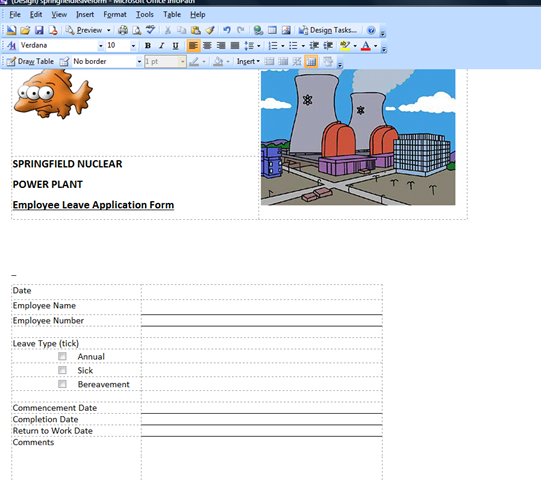
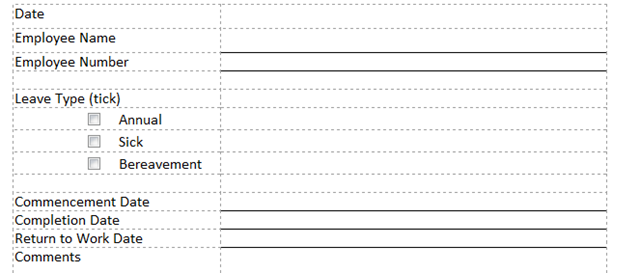
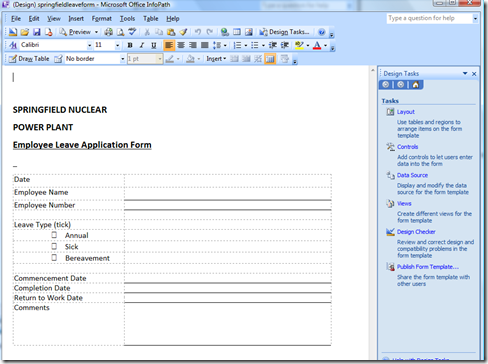
Okay so here is where we are at (click to see the large version of the form above). We have finished the graphics in the header of the form, and now we need to turn our attention to where the action happens. InfoPath attempts to automatically create form textboxes, checkboxes and buttons based on what is has gleaned from any MSWord or Excel based form that you have imported. In my Springfield Nuclear Plant form, during the import, it created checkboxes for us for the leave types, but did not create textboxes for the other fields that we require. What you will notice however, is that InfoPath created a table to hold this information as shown below.
image

So we need to now create those fields (called “Controls”) to allow the user to fill in the form.
image

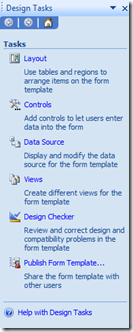
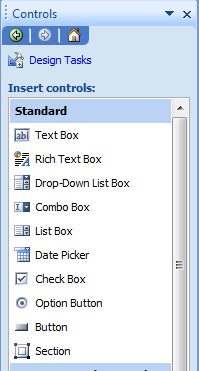
In the “Design Tasks” pane, click the “Controls” link, and you will be presented with the interface to add controls to the form (see the screengrab above). I am not going to explain the functionality of each InfoPath control in this article, but what I will say is that we will use three of controls from those available. The “Text Box”, the “Option Button” and the “Date Picker”.

TextBox Controls

First up, let’s deal with the “Employee Name” field. We will make this a text box so that an employee can enter their name.

Click on the “Text Box” control in the “Design Tasks” pane and drag it across to the blank cell next to the text “Employee Name”.

The result will be a fairly nondescript text box in that cell. InfoPath has named this cell “field4″, and if you try this yourself, you will receive a similar name.

image

Why is this control called “field4″? It is because the original import from MSWord created three checkboxes for the Leave type. Therefore they were named, “field1″, “field2″, and “field3″, respectively.

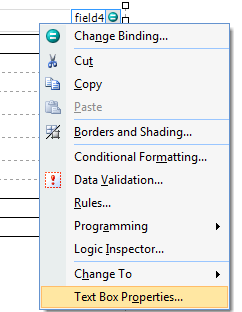
Now field4 is not a good name for a text box. So we will change its name to something that makes sense. (Why we do this will become apparent in future posts). Right click on the newly created text box and choose “Properties”. In the next dialog box, change the field name from “field4″ to “EmployeeName”.
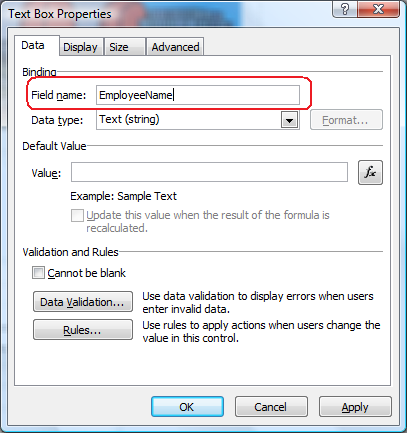
imageimage

While we have this dialog box open, it is worth examining some of the other options available here. We can

  • Set a default value for the text box
  • Set some validation properties. For example, ticking the “cannot be blank” box means that the form cannot be completed unless this textbox has been filled in. When you think about it, it doesn’t make a hell of a lot of sense to have a leave form without the employee name being mandatory (and therefore not blank).
  • Set some rules. Rules allow actions to be taken *after* data has been entered into the form. (We will be utilising rules very soon, and will examine this in more detail then)

We have some additional text boxes to create as well. The “Employee Number” and “Comments” fields will also require text box controls to be added to the form.

The steps are identical to what we just performed for the “Employee Name” field. Drag them to the form, and rename them via the properties menu.

Once the textbox controls have been added to the forms and renamed, the form now looks like screenshot below. (The “LeaveComments” textbox is a single line by default and has been resized)
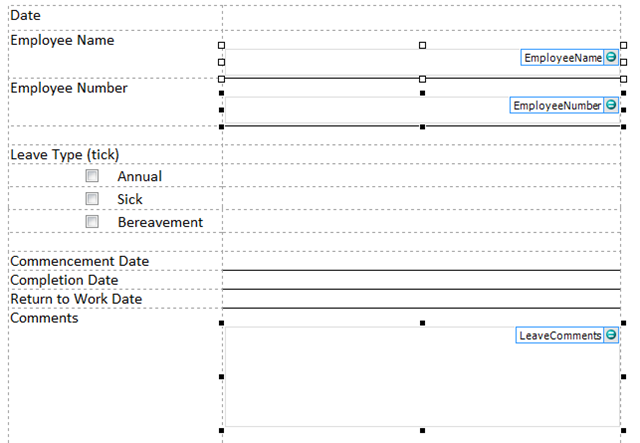
image

Date Picker Control

Usually by this time in a demonstration situation, clients are starting to get interested, as they can see where we are going with this. Have a guess what the “Date Picker” control does? By jove, it picks dates! Who would have thought?

Click on the “Date Picker” control in the “Design Tasks” pane and drag it across to the blank cell next to the text “Commencement Date”.

Do the same for “Completion Date” and “Return to Work Date”.

As per the textboxes, rename the controls to match the data being entered. So for the Commencement Date field, rather than “field6″, make it “CommencementDate”.

Below shows the result of performing this task on all three date fields.

image

Option Button Control

With the option boxes for the type of leave being requested, we have a little more work to do. When InfoPath imported the MSWord document, it decided to use checkboxes for the leave type. As it happens, this is not the behaviour that we want because checkboxes allow multiple selections.

Instead we want only one option to be selected. So we will delete the controls created by the import, and add back “option button” controls in their place.

Clicking on each checkbox on the form, we can delete the existing ones with a tap of the delete key.

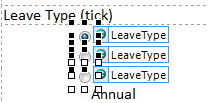
Now click on the “Option Button” control in the “Design Tasks” pane and drag it across to the the left of the word “Annual”. Unlike the other two controls that we have used, this time we need to supply more information before it gets added to the form. We have three types of leave on this form, and as it happens, InfoPath defaults to three option buttons.

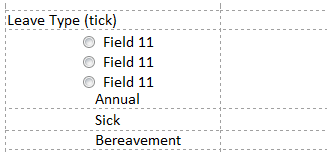
imageimage

Click OK, and you will see the screen is now slightly messy. We have our three option buttons, but they are all in the one cell, and are all labelled the same (Field11 in my example).

Why are they labelled the same you may ask? The reason is that although there are three option buttons, they are all linked as a single field. So if I right click on any one of the three option buttons and rename it via the properties dialog box, all three option buttons are renamed! If you are wondering why this is, consider that the whole point of using option buttons is because you can only select one option. If you can only select one option, then you only have one value to store.

Right click on the first option button and I will show you what I mean.

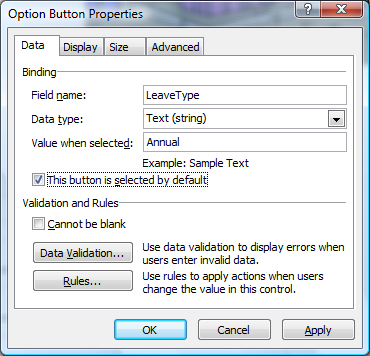
Below I have renamed the first option button to “LeaveType”. Look closely and you will see a “Value When Selected” text box.

I have changed the value to “Annual”, to represent annual leave being selected. I have also set it as the default value for the checkbox as most of the time leave is annual (vacation leave).

After cllicking OK, you will see that the other two controls are also now named “LeaveType”.
imageimage

Now right click on the second option button and examine its properties. You will see that it is named LeaveType. I have changed the “Value when selected” field to “Sick”, to represent sick leave. For the third option button I have labelled it “Bereavement”
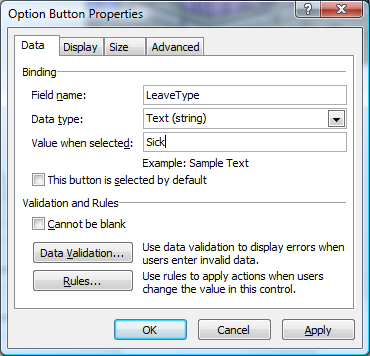
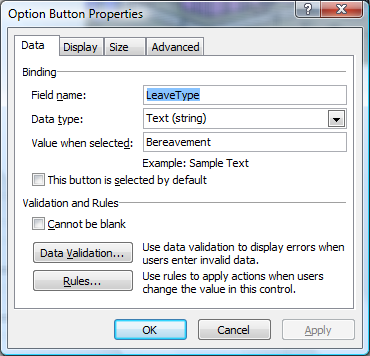
image image

The final thing to do is now to move the last two option buttons into the proper cells and tidy it up. This is a straightforward drag and drop operation. While here I have also moved a few of the other cells around and resized them. At any time you can preview your work by clicking the “Preview” button on the InfoPath toolbar.

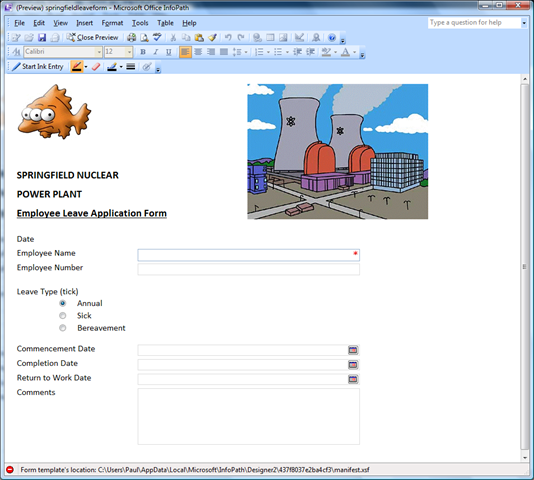
At this point, a preview looks like this:
image

Looks nice enough to me (but hey I’m not hired for my design skills!). Note that the Employee Name field is marked with a red asterisk, meaning that it must be filled in. Additionally the date fields now have buttons allowing you to easily pick a day from a calendar view.

Are we done yet? I wanna get to SharePoint…

So here we are with a semi-functional InfoPath form. At this point we haven’t really used SharePoint at all! So in the next article I will cover publishing the form in its current state into SharePoint and viewing the form within a browser.

We still have some significant work to do however, since we haven’t covered all many of the requirements yet. For example, we still haven’t covered data validation in the form. Additionally, we do not yet have a field on the form showing the number of days absent (incorporating the calculation of weekends). The form doesn’t automatically fill in your name when the form is loaded either. Finally, we will also want to add a SUMBIT and CANCEL button to the form.

Until then, thanks for reading

Paul Culmsee


A tribute to the humble “leave form” – Part 2

[Note: It appears that SharePoint magazine has bitten the dust and with it went my old series on the “tribute to the humble leave form”. I am still getting requests to a) finish it and b) republish it. So I am reposting it to here on cleverworkarounds. If you have not seen this before, bear in mind it was first published in 2008.]

Hi again and welcome to the next exciting instalment in the series that pays tribute to the consultant “get out of jail free” card that is the organisational “leave form”. My experience of SharePoint implementations may be somewhat skewed by regional and/or cultural bias of course, but many SharePoint installations tend to follow a script of something like

  • IT Manager attends an “information session” from a Microsoft Gold Partner, has one two many chardonnays and is convinced that SharePoint is the *answer*, but isn’t sure of the question just yet…
  • IT Manager calls aforementioned Microsoft Gold Partner and I am sent out to dazzle them with my wit, charm and technical brilliance
  • IT Manager agrees with me that SharePoint has to be sold to (and owned by) “the business”, so chooses the first candidate business process that pops into his head
  • All hail the mighty “leave form

Me sarcastic? never! :-)

image

Note: I was recently certified as a Microsoft Certified Trainer for SharePoint, and I am using this series as practice for my training material! Thus this entire series of articles is pitched at a very high (end user) level. Readers with some exposure to SharePoint may find this article from the series is particularly easy-going, but rest assured, by the time I am done, I will be delving into web services, code and all sorts of goodies. Writing that stuff for the non developer will be a challenge – so stay with me, I will slowly ramp up the concepts as we go on.

So to recap the introductory article, we have documented the leave application and approval process for the Springfield nuclear power plant, and they have kindly supplied us with their existing leave form that their employees print out and fill in by hand. So our very first job is to see how InfoPath handles importing this MSWord based form to InfoPath.

InfoPath 101

Even though InfoPath is part of MSOffice, many people do not know about it, let alone used it. If you have never seen InfoPath before now, then I suggest you do some reading about it and maybe even download the evaluation.  My one sentence explanation is that it allows you to create electronic forms for data entry or data collection. Among its features is that it can import Word or Excel documents to speed up the form creation process. So let’s do that first up.

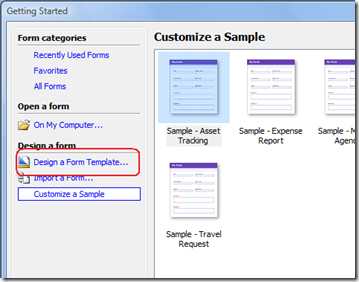
Upon starting up InfoPath 2007 we are presented with a “Getting Started” wizard. Our job is to design a new form, so the option to choose is to Design a Form Template as marked in the screen-grab below.

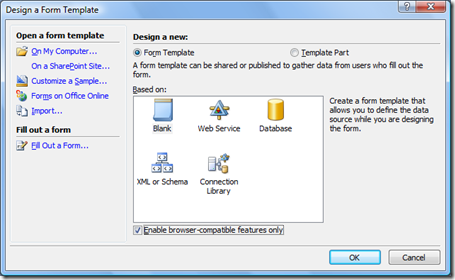
The next screen is to choose various options in relation to designing a form. We are starting from a completely blank form (which is the default option anyway), but this form is going to web browser based, so that people filling it in do not need InfoPath installed on their PC’s. SharePoint enterprise edition provides support for browser based forms via the “Forms Services” feature. InfoPath 2007 has built-in support for forms services, but the form must be marked as “browser compatible”.

This is not a default setting, so be sure to check the “Enable browser-compatible features only” box before clicking the OK button.

image image

Now we are at the main form designer screen within InfoPath. Being part of the MSOffice suite, it has a set of toolbars that looks very much like the other applications in the MSOffice suite. To the right of the InfoPath screen is the “design tasks” tool pane. I’ve shown it below.

image

You will come to know the “design tasks” pane very well soon enough. From here we can perform all sorts of actions to construct a new electronic form such as create textboxes, buttons, drop down lists and the like. Not only that, but we can instruct InfoPath to connect to “data sources” to populate the values in say, a drop down list box. Imagine for example that all of your clients are listed in your CRM system. InfoPath has the capability to access those client details and display them on the form. Think of the data entry duplication that this will save,  not to mention the  maintenance of data accuracy, eh?

But hey, we are here to impress the clients with our technical wizardry and to show how InfoPath allows non-developers to create sophisticated electronic forms. So what we will do first-up is import the existing MSWord based leave document and see what we get out of the box.

Importing the old form

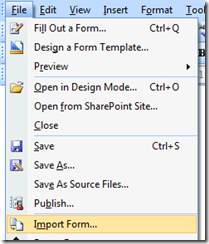
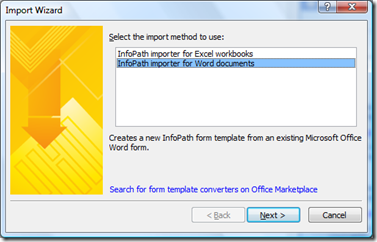
So, you should be at the main InfoPath screen to perform this action. From the “File” menu, choose “Import Form”. On the next screen, choose “InfoPath importer for Word documents” and click “next”

image   image

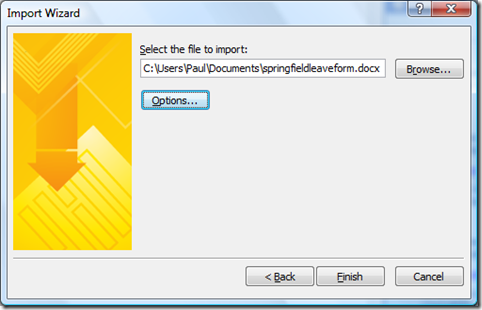
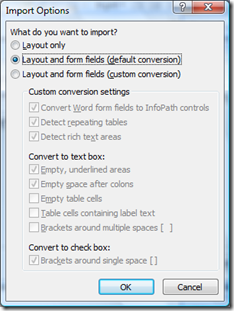
You will be prompted to browse to a file to import. In this example, I have chosen the “springfieldleaveform.doc”. The “options” button allows you to control the specifics of the import process. In this example, I will simply import the form with all of the default import settings.

image   image

Click “Finish” and InfoPath will do its thing – viola! We have the beginnings of a leave form!

image

Graphics?

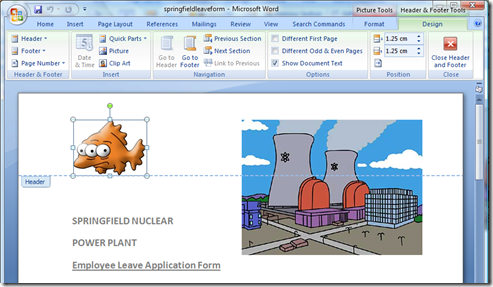
Ah, but wait, what happened to the graphics? The original MSWord form had two pictures in the header of the document – a 3-eyed fish and a picture of the towers. It turns out it seems, that graphics in the header or footer of an MSWord document do not get imported into InfoPath. Bummer – I really liked that 3-eyed fish!

But fear not, importing graphics is as easy as a cut and paste. If I open my original word version of the form, I can double click near the top of the document, and the header/footer will now be available to edit as shown below.

image   image

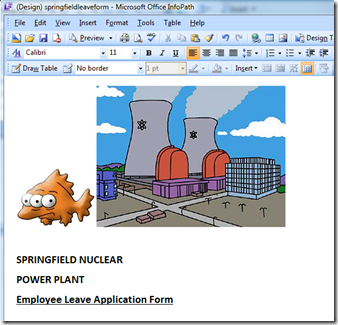
Now you can click to highlight both images and they will paste into InfoPath. Not exactly earth shattering, is it?

image

It’s still not right…

Okay, so it wasn’t a perfect import. In fact I’d give it about a 6 out of 10. But the point is we have our images and our text inside InfoPath. Also to be fair, MSWord files were not designed for the web either, so it is unsurprising that it wasn’t flawless.

So, now we can use the native features of Infopath to tidy up this form. First, we will tidy up the arrangement of the two images, and then we will add some graphical elements like textboxes and option buttons to allow the form to be electronically filled in. We will create a table on the form that looks like this

image

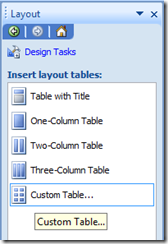
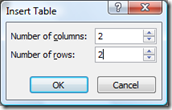
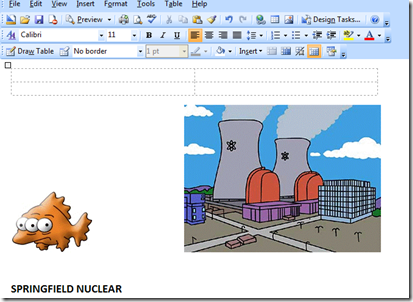
In the right-hand “design task” bar, we select “Layout” and then choose to create a “custom table”. Choose a 2*2 table and you should see the table as shown in the third image below (look above the fish graphic).

image  image image

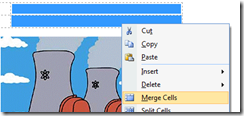
The next step is to format the table correctly. Highlight the two rightmost cells, right click on them and choose “merge cells”. The result should be a table looking like the rightmost image below.

image   image
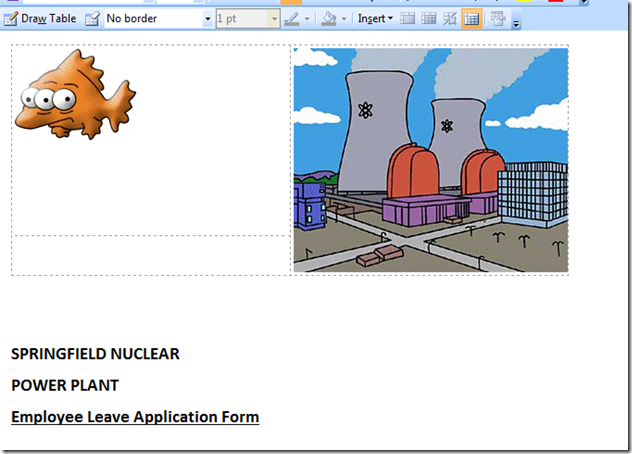
Now drag and drop the three-eye fish to the leftmost cell and the plant picture to the rightmost cell of the top row of the table. Your result should look something like this.

image

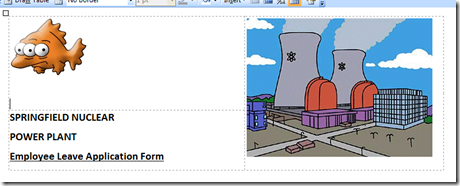
Now highlight the remaining title text, and then cut and paste it into the empty bottom left cell . Aha! We are starting to look better! A bit of resizing of the table cells width and it is looking more like the original.

image

Are we impressed yet?

Okay, sorry that is very much a rhetorical question, I know. I haven’t exactly written the most technically complex article ever.

But at least we have gotten the InfoPath version of the form to look much more like the MSWord version. If I had been running that as a client demonstration, it all in all would be around 2-3 minutes work. Is the client blown away in amazement and opening the chequebook yet?

Not exactly, but we haven’t gotten to the good stuff yet. In part 3, we will add some textboxes and other graphical elements (called “controls”) to the form, and then we will do some smart things to reduce manual data entry, as well as ensure that the data that we have collected is accurate.

Bye for now

Paul Culmsee

www.cleverworkarounds.com


A tribute to the humble “leave form” – Part 1

[Note: It appears that SharePoint magazine has bitten the dust and with it went my old series on the “tribute to the humble leave form”. I am still getting requests to a) finish it and b) republish it. So I am reposting it to here on cleverworkarounds. If you have not seen this before, bear in mind it was first published in 2008.]

Hi all. It’s a pleasure to be involved in the launch and first edition of SharePoint Magazine. My name is Paul Culmsee and I’ll be your host for this series of articles. If you have not read my stuff before, then I’ll say that I am an opinionated, underpaid and overworked SharePoint consultant based in Perth, Western Australia. clip_image001

I had previously decided to write an educational series of articles to pay tribute to the humble, good old leave (vacation) form and I think it is perfect fodder for SharePoint Magazine’s wide variety of audience.

Where would SharePoint consultants worth their grain of salt be without the leave form, eh? When all else is lost, there it is to save your ass from the wrath of the CIO who is wondering where his two hundred grand of license fees, hardware and programming went.

image

Why the leave form?

From a demo perspective the leave form is pure gold. You can knock out an InfoPath form in minutes, publish it to a SharePoint site using Forms Services and top it off with an easy-to-understand SharePoint Designer workflow that creates some tasks for the boss to approve the request and to notify payroll of the approval. All within the space of a 1 hour demo session. Genius! No wonder Microsoft sell all of those licenses!

For a client who is still coming to grips with the possibilities what forms and workflow offer, the leave form is an excellent starting point. It is a simple process and almost universally understood. There really aren’t that many owners/stakeholders involved in the process, and thus even the most extreme anal-retentive “process nazi” can’t really make it too onerous. So turning this process into a “non-programmer” workflow is not that hard.

Being a simple process, you can use SharePoint Designer workflows. Now some developers reading this will probably start protesting, and believe me I know where you are coming from. But let’s face it – you guys are damn expensive!

Thus, SharePoint Designer based workflows are a great *prototyping* tool. Non programmers can develop them, and making modifications and changes do not require a lot of time or cost. For an organisation unused to workflows and the inevitable “process debates” that arise as a result, delving straight into Visual Studio and expensive developers I do not recommend. Workflows tend to evolve fairly quickly at first as people learn more about them. Additionally, whatever you *think* you want in the first phase has a very high likelihood of being ripped out or seriously modified once it starts to get real-world use.

So in using the leave form, we are using a process that is well suited to a SharePoint Designer based workflow. Once the process is mature and you have enough SharePoint experience to appreciate the governance costs, then you can rewrite it as a “proper” Visual Studio based workflow template.

Why not the leave form?

The leave form unfortunately is not representative of the sort of process where automation or improvement justifies a SharePoint investment. If your company is suffering a cash-flow bleed because you can’t get your leave forms done, then I can say with some confidence that you are *seriously* screwed and SharePoint isn’t going to solve your issues.

The point is, the leave form is not going to have too much real business relevance in terms of tangible return on investment. In fact the leave form is *too easy*. As a demo, it can mislead an organisation into thinking that the answer to life, the universe and everything is contained within the everyday world of mere mortals armed with nothing more than InfoPath and SharePoint Designer.

The real life of organisational process and workflow is completely different. Most workflows tend to be more complex because they involve more teams and team members. Because they involve more teams, they have a tendency to be unoptimised, undocumented, inconsistently followed and over-complex, due in part to to past screwups, lack of co-operation and organisational mistrust and politics. This is a reflection of much bigger issues than SharePoint of course, but to entertain the notion that SharePoint is going to miraculously change cultural issues is about as ludicrous as suggesting that Guns N’ Roses will actually ever release their “Chinese Democracy” album anytime soon.

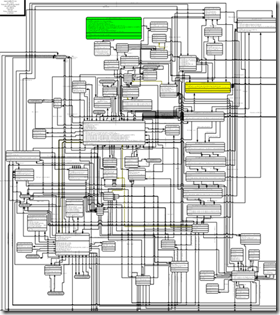
image

Believe it or not, the image above is a real workflow. Check out this story behind it here – it’s funny in a very scary kind of way. Whilst this may be an extreme example, it should hopefully make it clear that despite best intentions, your first few attempts at trying to improve something like this via SharePoint aren’t likely to go all that well if your process is crappy to begin with clip_image004

Why use the leave form an example then?

That’s easy! I actually want to finish this series of articles in a reasonable time!

Additionally, it still suffices to demonstrate fairly convincingly how it doesn’t take very long at all before we need to delve deeper into the potential no-mans-land of custom development. So the outcome of this series of articles is two-fold.

  1. Readers will get a good understanding of the tools and SharePoint features that combine to produce an automated version of the leave form process
  2. (But more importantly) They get a glimpse behind the virtual green door of InfoPath and SharePoint’s dirty little secrets.

Is it humanly possible to write a series articles for normal people *and* technical geeks? We shall soon find out!

A recent real-world engagement clip_image004[1]

The leave process that I have outlined here is going to have a little more depth to it than the sort that would be demonstrated in a pre-sales demo, but it is still not industrial strength. I’ve put enough in there to assist the reader to really understand just what it takes to implement a semi-real world case.

I hope that readers have watched the Simpsons!

Conveniently for all of us, my company Seven Sigma’s office in Springfield recently completed a SharePoint engagement for the local Nuclear Power Plant. After some initial requirements gathering, we ascertained that like most companies, the leave process for the plant was problematic. It was an MSWord file that employees have to open, print out, fill in and then hand to their boss. The boss (some old-dude named Burns) was an old-fashioned, unpredictable kind of guy and he tended to forget the names of particular employees. Thus sometimes applications went unprocessed, misfiled or inconsistently handled.

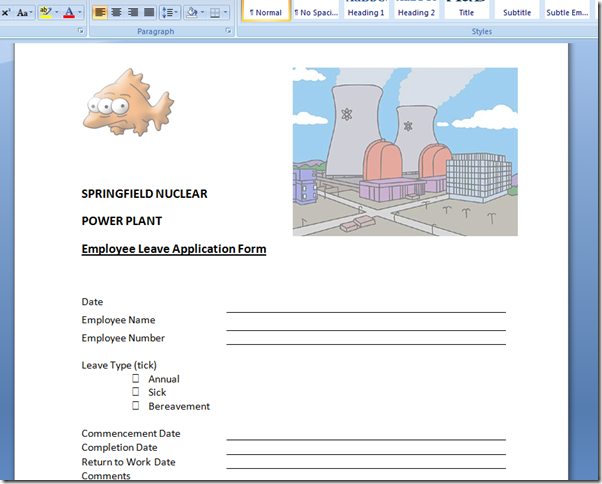
Below is the leave form in its original MSWord format.

image

After gathering requirements and running some workshops, we were able to determine what the client wanted with their automated leave form workflow…

The Requirements

Roles
Requestor Approver Payroll
image image image

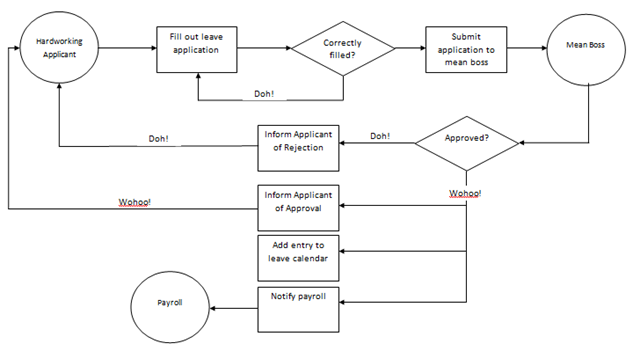
The leave workflow steps to be implemented are as follows.

image

  1. Hardworking and dedicated employee (Requestor) completes an online form to apply for hard earned leave. The form automatically identifies the requestor (a good thing because spelling your own name can be hard). Additionally, the type of leave (sick, annual, bereavement, etc), start date, end date and the return to work date are all entered into the form. Importantly, the number of days absent from work are automatically calculated to exclude weekends.
  2. The evil overlord boss (Approver), receives a task notification to approve an application for leave. The approver reviews the leave details and approves or rejects the leave application. If the leave is approved, proceed to the next step, otherwise the leave is rejected and proceed to step 8
  3. Evil overload boss curses industrial relations laws allowing employee leave in the first place, but belatedly marks the leave request as approved.
  4. Requestor is emailed a confirmation that his application has been approved
  5. The leave is added to the corporate leave calendar
  6. Blatant brown nosing suck-ups (Payroll) are notified by email of the approved leave and adjusts leave remaining in the HR system
  7. End of workflow
  8. The evil overlord boss (Approver) has had a call from the Nuclear safety watchdog and all safety inspectors need to be on-hand to hide the evidence. Thus the approver rejects the leave application
  9. Requestor is emailed a confirmation that his application has been rejected with the reason why
  10. End of workflow

From the above process, a number of key requirements are apparent and some more were determined.

  • Automatic identification of requestor
  • Reduce data entry
  • Validation of dates, specifically the automatic calculation of days absent (excluding weekends)
  • Mr Burns is not the only approver, we will need the workflow to route the leave approval to the right supervisor
  • We have a central leave calendar to update

Additionally, Mr Burns likes to keep an eye on things and has a large series of monitors in his office that he uses to watch what is going on around the plant. Thus, he requires a dashboard that shows him a birds-eye view of the leave process from end-to-end.

Next steps..

The first step is to convert the existing manual leave form into its InfoPath equivalent. So in the next exciting article, we will get to see just how easy (or not) InfoPath really is!

Thanks for reading

Paul Culmsee
www.cleverworkarounds.com


Powerful questions part 3: The “I told you so” question

Hi all

I just recorded the third video on the topic of powerful questions. The purpose of this series of videos is to help facilitators, project managers, business analysts and SharePoint peeps ask better questions of their stakeholders. The first video introduced the platitude buster question and the second video unveiled the key focus area question. Both are hugely important – especially for SharePoint projects and any SharePoint governance efforts because failure to answer these two will positively kill your project. This 3rd powerful question is related to risk perception and how you can frame questions to get a much better sense of what the real risks are in projects or problems. In this video, I made the contention that asking “What are the risks” is not a great way to identify and subsequently manage risks. The inference for SharePoint people here is that if you think you have done your job by creating a risks and issues list (ala Project Server) and asking for people to fill it in, I am here to tell you that there is much more to the story…

Don’t believe me? Then watch the video. 

Like the previous post, I suggest you watch this video in full screen. Enjoy!

How to find out what the real risks are…


Introduction to Dialogue Mapping class in Melbourne June 13-14

Hi all

We have all felt the pain of a meeting or workshop where no-one is engaged, the conversation is being dominated by the loudest or everyone is mired in a tangle of complexity and there is no sense of progress. Not only is it incredibly frustrating for participants, but it is really inefficient in terms of time and effort, reduced collaboration and can lead to really poor project outcomes.

The big idea behind the technique of Dialogue Mapping is to address this problem. Dialogue Mapping is an approach where a project manager or business analyst acts as a facilitator while visually mapping the conversation of a group onto a projected display. This approach reduces repetition by acknowledging contributions, unpacks implicit assumptions and leads to much better alignment and understanding among a group.

For SharePoint projects, this is a must and I have been using the technique for years now. Other SharePoint luminaries like Michal Pisarek, Ruven Gotz and Andrew Woodward also use the approach, and Ruven even dedicated a chapter to Dialogue Mapping in his brilliant Information Architecture book.

In Melbourne, I am going to be running a 2 day Introduction to Dialogue Mapping class to teach this technique. There are only 10 places available and this is one of the few public classes I will be running this year. So if you are attending the Australian SharePoint conference, or live near Melbourne and deal with collaborative problem solving, stakeholder engagement or business analysis, this is a great opportunity to come and learn this excellent problem solving technique.

Hope to see you there!

Paul


Powerful questions part 2: The key focus area question

Hiya

I just recorded the second video on the topic of powerful questions. These powerful questions are the result of the years I’ve spent dialogue mapping many different groups of people on many different problems. As time has gone on, I’ve learnt a lot about collaborative problem solving, and concluded that some questions tend to lead to breakthrough more than others.

In the previous video, I introduced you to the platitude buster question. This time around, I have recorded a video on one of the best questions you can ask in any form of strategy development meeting – the key focus area question. For all you SharePoint types, I always use this question during SharePoint governance planning and when drawing up a project charter, but it is equally effective when working with an executive team who are working out their short and long term strategies.

Like the previous post, I suggest you watch this video in full screen. Enjoy!

How to eke out key focus areas from a discussion

Thanks for reading

Paul Culmsee
HGBP_Cover-236x300


Making Sense of SharePoint and Digital Records Management…

Hi all

One of the conversation areas in SharePoint life that is inevitably complex is that of records management since there are just as many differing opinions on records management as there are legal jurisdictions and different standards to choose from. Accordingly, a lot of confusion abounds as we move into a world dominated by cloud computing, inter-agency collaboration, changes in attitudes to information assets via the open data/government 2.0 movements, and of course, the increasing usage of enterprise collaboration systems like SharePoint. As a result, I feel for record managers because generally they are an unloved lot and it is not really their fault. They have to meet legal compliance requirements governed by various acts of legislation, but their job is made all the harder by the paradox that the more one tries to enforce compliance, the less likely one is to be compliant. This is because more compliance generally equates to more effort on the part of users for little perceived benefit. This results in direct avoidance of using record management systems or the plain misuse of those systems (both which in turn results in a lack of compliance).

As it happens, my company works with many government agencies primarily in the state of Western Australia, both at a state agency and local government level. We have seen most enterprise document management systems out there such as HP Trim, Objective, Hummingbird/OpenText and have to field questions on how SharePoint should integrate and interact with them (little known fact – I started my career with Hummingbird in 1998 when it was called PCDOCS Open and before SharePoint existed).

Now while I am sympathetic to the plight of your average records management professional, I have also seen the other side of the coin, where records management is used to create fear, uncertainty and doubt. “You can’t do that, because of the records act” is a refrain that is oft-levelled at initiatives like SharePoint or cloud based solutions to try and shut them down or curtail their scope. What makes it hard to argue against such statements is that few ever read such acts (including those who make these sort of statements). So being a sucker for punishment, I decided to read the Western Australian State Records Act 2000 and the associated standard on digital recordkeeping, published by the State Records Office. My goal was to understand the intent of these standards and the minimum compliance requirements they mandate, so I could better help clients integrate potentially disruptive tools into their compliance strategies.

I did this by starting out with the core standard in Western Australia – SRC Standard 8: Digital Recordkeeping. I created an IBIS Issue Map of this standard using Compendium software. What I soon discovered was that Standard 8 refers to other standards, such as Standard 2: Recordkeeping Plans and Standard 3: Appraisal of Records. That meant that I had to add these to the map, as well as any other documents they referred to. In the end, I followed every standard, policy or guideline in a recursive fashion, until I was back at the digital recordkeeping standard where I started. This took a while, but I eventually got there. You can click the image below to examine the standards in all of their detail and watch the video to see more about how I created it.

Map   

Now I need to make it clear that my map is not endorsed by the State Records Office, so it is provided as-is with a disclaimer that it is not intended to drive policy or be used as anything more than an example of the mapping approaches I use. I felt that by putting the standards into a IBIS based issue map, I feel I was able to reduce some of the complexity of understanding them, because now one can visually see how the standards relate to each other. Additionally, by taking advantage of Compendiums ability to have the same node in multiple maps, it allowed me to create a single ‘meta map’ that pulled in all of the compliance requirements into a single integrated place. One can look at the compliance requirements of all the standards in one place and ask themselves “Am I meeting the intent of these standards?”

Reflections…

In terms of my conclusions undertaking this work, there are a few. For a start, everything is a record, so people should just get over the whole debate of “is it or isn’t it”. In short, if you work for a government agency and are doing actual work, then your work outputs are records. The issue is not what is and is not a record, but how you control and manage them. Secondly, the notion that there has to be “one RMS system to rule them all” to ensure compliance is plain rubbish and does not stand up to any form of serious scrutiny. While it is highly desirable to have a single management point for digital recordkeeping, it is often not practical and insistence in doing this often makes agencies less compliant because of the aforementioned difficulties of use, resulting in passive resistance and outright subversion of such systems. It additionally causes all sorts of unnecessary stress in the areas of new initiatives or inter-agency collaboration efforts. In fact, to meet the intent of the standards I mapped, one by definition, has to take a portfolio approach to the management of records as data will reside in multiple repositories. It was Andrew Jolly who first suggested the portfolio idea to me and provided this excellent example: There is nothing stopping records management departments designating MS Exchange 2013 Site mailboxes as part of the records management portfolio and at the same time having a much better integrated email and document management story for users.

For me, the real crux of the digital records management challenge is hidden away in SRC Standard 8, Principle 5 (preservation). One of the statements of compliance in relation to preservation is that “digital records and their metadata remain accessible and usable for as long as they are required in accordance with an approved disposal authority.”  In my opinion, the key challenge for agencies and consultancies alike is being able to meet the requirements of Disposal Authorities (DA’s) without over burdening users. DA’s are the legal documents published by the State Records Commission that specify how data is handled in terms of whether it is archived or deleted and when this should happen. They are also quite prescriptive (some are mandated), and their classification of content from a retention and disposal point of view poses many challenges, both technically and organisationally. While for the sake of size, this article is not going to get into this topic in detail, I would advise any SharePoint practitioner to understand the relevant disposal authorities that their organisation has to adhere to. You will come away with a new respect for the challenges that record managers face, an understanding on why they use the classification schemes that they do, why records management systems are not popular among users of the systems and why the paradox around “chasing compliance only to become non-compliant” happens.

Maybe you might come away with some insights on how to better integrate SharePoint into the story? Then you can tell the rest of us Smile

Thanks for reading

Paul Culmsee
paul.culmssee@sevensigma.com.au


A Very Potter Audit – A Best Practices Parable

Once upon a time there lived a rather round wizard named Hocklart who worked at the FogWorts school of witchcraft and wizardry. Hocklart was a very proud wizard, perhaps the proudest in all of FogWorts. His pride did not stem from being a great wizard or a great teacher; in reality, he was neither of those. In fact Hocklart was never much good at wizardry itself, but he knew a lot of people who were – and therein lay the reason for his pride. For what Hocklart lacked in magic ability, he more than made up for with his attention to detail, love of process and determination to rise to the top. From the day he arrived at FogWorts as one apprentice amongst many, he was the first to realise that the influential wizards liked to unwind on Friday nights with a cold ale at the Three and a Half Broomsticks Inn. Hocklart sacrificed many Friday nights at that pub, shouting rounds of frothy brew to thirsty senior wizards, befriending them all, listening to their stories and building up peerless knowledge of FogWorts organisational politics and juicy gossip.

This organisational knowledge brought just enough influence for Hocklart to climb the corporate ladder ahead of his more magically adept colleagues and presently he was very proud. As far as Hocklart was concerned, he had the most important job in all of FogWorts – Manager of the Department Responsible for the Integrity of Potions (or DRIP for short).

You see, in schools of witchcraft and wizardry, wizards and witches concoct all sorts of potions for all sorts of magical purposes. Potions of course require various ingredients in just the right amount and often prepared in just the right way. Some of these ingredients are highly dangerous and need to be handed with utmost care, while others might be harmless by themselves, but dangerous when mixed with something else or prepared incorrectly. Obviously one has to be careful in such a situation because a mix-up could be potentially life threatening or at the very least, turn you into some sort of rodent or small reptile.

The real reason why Hocklart was proud was because of his DRIP track record. You see, over the last six years, Hocklart had ensured that Fogwarts met all its statutory regulatory requirements as per the International Spell-casters Standards Organisation (ISSO). This included the “ISSO 9000 and a half” series of standards for quality management as well as the “ISSO 14000 and a sprinkle more” series for Environmental Management and Occupational Health and Safety. (Like all schools of witchcraft and wizardry, Fogwarts needed to maintain these standards to keep their license to operate current and in good standing).

When Hocklart became manager of DRIP, he signed himself up for a week-long training course to understand the family of ISSO standards in great detail. Enlightened by this training, he now appreciated the sort of things the ISSO auditors would likely audit FogWorts on. Accordingly, he engaged expensive consultants from an expensive consultancy to develop detailed management plans in accordance with wizardry best practices. To deliver this to the detail that Hocklart required, the consultants conjured a small army of business analysts, enterprise architects, system administrators, coordinators, admin assistants, documenters, quality engineers and asset managers who documented all relevant processes that were considered critical to safety and quality for potions.

Meticulous records were kept of all activities and these were sequestered in a secure filing room which was, among other things, guaranteed to be spell-proof. Hocklart was particularly fond of this secure filing room, with its rows and rows of neatly labelled, colour coded files that lovingly held Material Safety Data Sheets (MSDS) for each potion ingredient. These sheets provided wizards the procedures for handling or working with the ingredients in a safe manner, including information of interest to wizards such as fulmination point, spell potency, extra-magical strength, reversal spells as well as routine data such as boiling point, toxicity, health effects, first aid, reactivity, storage, disposal, protective equipment and spill-handling procedures. All potion ingredients themselves were stored in the laboratory in jars with colour coded lids that represented the level of hazard and spell-potency. Ever the perfectionist, Hocklart ensured that all jars had the labels perfectly aligned, facing the front. The system was truly was a thing of beauty and greatly admired by all and sundry, including past ISSO auditors, who were mesmerised by what they saw (especially the colour coded filing system and the symmetry of the labels of the jars).

And so it came to pass that for six years Hocklart, backup up by his various consultants and sub-contractors, saw off every ISSO auditor who ever came to audit things. All of them left FogWorts mightily impressed, telling awestruck tales of Hocklart’s quality of documentation, attention to detail and beautiful presentation. This made Hocklart feel good inside. He was a good wizard…nay, a great one: no one in the wizard-world had emerged from an ISSO audit unscathed more than twice in a row…

On the seventh year of his term as FogWarts head of DRIP, Hocklart’s seventh audit approached. Although eagerly waiting to impress the new auditor (as he did with all the previous auditors), Hocklart did not want to appear overly prepared, so he tried to look as nonchalant as possible by casually reviewing a draft memo he was working on as the hour approached. Only you and I, and of course Hocklart himself, knew that in the weeks prior to today, Hocklart was at his meticulous best in his preparation. He had reviewed all of the processes and documentation and made sure it was all up to date and watertight. There was no way fault could be found.

Presently, there was a rap on the open door, and in walked the auditor.

“Potter – Chris Potter,” the gentleman introduced himself. “Hocklart I presume?”

Hocklart had never met Potter before so as they shook hands he sized up his opponent. The first thing he noticed was that Potter wasn’t carrying anything – no bag, notebook and not even a copy of the ISSO standards. “Have you been doing this sort of work long?” he enquired.

“Long enough,” came the reply. “Let’s go for a walk…”

“Sure,” replied Hocklart. “Where would you like to go?”

For what seemed like an uncomfortably long time to Hocklart, Potter was silent. Then he replied, “Let’s go and have a look at the lab.”

Ha! Nice try, thought Hocklart as he led the auditor to the potion laboratory. Yesterday I had the lab professionally cleaned with a high potency Kleenit spell and we did a stocktake of the ingredients the week before.

Potter cast his sharp eyes around as they walked (as is common with auditors), but remained silent. Soon enough they arrived at a gleaming, most immaculate lab, with nothing out of place. Without a word, Potter surveyed the scene and walked to the shelves of jars that held the ingredients, complete with colour coded lids and perfectly aligned labels. He picked up one of the red labelled jars that contained Wobberworm mucus – a substance that, while not fatal, was known to cause damage if not handled with care. Holding the jar, he turned to Hocklart.

“You have a Materials Safety Data Sheet for this?”

Hocklart grinned. “Absolutely… would you like to see it?”

Potter did not answer. Instead he continued to examine the jar. After another uncomfortable silence, Potter looked up announcing, “I’ve just got this in my eyes.” His eyes fixed on Hocklart.

Hocklart looked at Potter in confusion. The Wobberworm mucus was certainly not in Potter’s eyes because the jar had not been opened.

“What?” he asked hesitantly.

Potter, eyes unwaveringly locked on Hocklart, remained silent. The silence seemed an eternity to Hocklart. A quick glance at his watch then Potter, holding up the jar in his hand, repeated more slowly, “I’ve just got this in my eyes.”

Hocklart’s heart rate began to rise. What is this guy playing at? He asked himself. Potter, meanwhile, looked at his watch again, looked back at Hocklart and sighed. “It’s been a minute now and my eye’s really starting to hurt. I risk permanent eye damage here… What should you be doing?”

A trickle of sweat rolled down Hocklart’s brow. He had not anticipated this at all.

Potter waited, sighed again and grated, “Where is the Materials Safety Data Sheet with the treatment procedure?”

A cog finally shifted in Hocklart’s mind as he realised what Potter was doing. Whilst he was mightily annoyed that Potter had caught him off guard (he would have to deal with that later), right now however he had to play Potter’s game and win.

“We have a secure room with all of that information,” he replied proudly. “I can’t have any of the other wizards messing with my great filing system, it’s my system…”

“Well,” Potter grated, “let’s get in there. My eye isn’t getting any better standing here.”

Hocklart gestured to a side door. “They are in there.” But as he said it his heart skipped a beat as a sense of dread came over him.

“It’s… “ he stammered then cleared his throat. “It’s locked.”

Potter looked straight into Hocklart with a stare that seemed to pierce his very soul. “Now I’m in agony,” he stated. “Where is the key?”

“I keep it in my office…” he replied.

“Well,” Potter said, “I now have permanent scarring on my eye and have lost partial sight. You better get it pronto…”

Hocklart continued to stare at Potter for a moment in disbelief, before turning and running out of the room as fast as his legs could carry his rotund body.

It is common knowledge that wizards are not known for being renowned athletes, and Hocklart was no exception. Nevertheless, he hurtled down corridors, up stairs and through open plan cubicles as if he was chased by a soulsucker. He steamed into his office, red faced and panting. Sweat poured from his brow as he flung a picture from the wall, revealing a safe. With shaking hands, he entered the combination and got it wrong twice before managing to open the safe door. He grabbed the key, turned and made for the lab as if his life depended on it.

Potter was standing exactly where he was, and said nothing as Hocklart surged into the room and straight to the door. He unlocked the door and burst into the secure room. Recalling the jar had a red lid, Hocklart made a beeline for the shelf of files with red labels, grabbed the one labelled with the letter W for Wobberworm and started to flick through it. To his dismay, there was no sign of a material safety data sheet for Wobberworm mucus.

“It’s…it’s not…it’s not here,” he stuttered weakly.

“Perhaps it was filed under “M” for mucus?” Potter offered.

“Yes that must be it”, cried Hocklart (who at this stage was ready to grasp at anything). He grabbed the file labelled M and flicked through each page. Sadly, once again there was no sign of Mucus or Wobberworm.

“Well,” said Potter looking at his watch again. “I’m now permanently blind in one eye… let’s see if we can save the other one eh? Perhaps there is a mismatch between the jar colour and the file?”

Under normal circumstances, Hocklart would snort in derision at such a suggestion, but with the clock ticking and one eye left to save, it seemed feasible.

“Dammit”, he exclaimed, “Someone must have mixed up the labels.” After all, while Wobberworm mucus was damaging, it was certainly not fatal and therefore did not warrant a red cap on the jar. This is why I can’t trust anyone with my system! he thought, as he grabbed two orange files (one labelled W for Wobberworm and one labelled M for mucus) and opened them side by side so he could scan them at the same time.

Eureka! On the fifth page of the file labelled M, he found the sheet for Wobberworm mucus. Elated, he showed the sheet to Potter, breathing a big sigh of relief. He had saved the other eye after all.

Potter took the sheet and studied it. “It has all the necessary information, is up to date – and the formatting is really nice I must say.” He handed the sheet back to Hocklart. “But your system is broken”

Hocklart was still panting from his sprint to his office and back and as you can imagine, was absolutely infuriated at this. How dare this so-called auditor call his system broken. It had been audited for six years until now, and Potter had pulled a nasty trick on him.

“My system is not broken”, he spat vehemently. “The information was there, it was current and properly maintained. I just forgot my key that’s all. Do you even know how much effort it takes to maintain this system to this level of quality?”

A brief wave of exasperation flickered across Potter’s face.

“You still don’t get it…” he countered. “What was my intent when I told you I spilt Wobberworm mucus in my eye?”

To damn well screw me over, thought Hocklart, before icily replying “I don’t care what your intent was, but it was grossly unfair what you did. You were just out to get me because we have passed ISSO audits for the last six years.”

“No,” replied Potter. “My intent was to see whether you have confused the system with the intent of the system.”

Potter gestured around the room to the files. “This is all great eye candy,” he said, “you have dotted the I’s, and crossed the T’s. In fact this is probably the most comprehensive system of documentation I have ever seen. But the entire purpose of this system is to keep people safe and I just demonstrated that it has failed.“

Hocklart was incredulous. “How can I demonstrate the system works when you deliberately entrapped me?”, he spat in rage.

Potter sighed. “No wizards can predict when they will have an accident you know,” he countered. “Then it wouldn’t be an accident would it? For you, this is all about the system and not about the outcome the system enables. It is all about keeping the paperwork up to date and putting it in the files… I’m sorry Hocklart, but you have lost sight of the fact the system is there to keep people safe. Your organisation is at significant risk and you are blind to that risk. You think you have mitigated it when in fact you have made it worse. For all the time, effort and cost, you have not met the intent of the ISSO standards.“

Hocklart’s left eye started to twitch as he struggled to stop himself from throwing red jars at Potter. “Get out of my sight,” he raged. “I will be reporting your misconduct to my and your superiors this afternoon. I don’t know how you can claim to be an auditor when you were clearly out to entrap me. I will not stand for it and I will see you disciplined for this!”

Potter did not answer. He turned from Hocklart, put the jar of Wobberworm mucus back on the shelf where he had found it and turned to leave.

“For pete’s sake”, Hocklart grated, “the least you could do is face the label to the front like the other jars!”

=========================


I wrote this parable after being told the real life version of a audit by a friend of mine… This is very much based on a true story. My Harry Potter obsessed daughter also helped me with some of the finer details. Thanks to Kailash and Mrs Cleverworkarounds for fine tuning…

.

Paul Culmsee

HGBP_Cover-236x300


Confessions of a (post) SharePoint architect: Black belt platitude kung-fu

Hello kung-fu students and thanks for dropping by to complete your platitude training. If you have been dutifully following the prior 5 articles so far in this series, you will have now earned your yellow belt in platitude kung-fu and should be able to spot a platitude a mile away. Of course, yellow belt is entry level – like what a Padwan is to a Jedi. In this post, you can earn your black-belt by delving further into the mystic arts of the (post) SharePoint architect and develop simple but effective methods to neutralise the hidden danger of platitudes on SharePoint projects.

If this is your first time reading this series, then stop now! Go back and (ideally) read the other articles that have led to here. Now in reality I know full well that you will not actually do that so read the previous post before proceeding. Of course, I know you will not do that either, so therefore I need to fill you in a little. This series of articles outline much of what I have learnt about successful SharePoint delivery, strongly influenced from my career in sensemaking. I have been using Russell Ackoff’s concept of f-laws – truth bombs about the way people behave in organisations – to outline all of the common mistakes and issues that plague organisations trying to deliver great SharePoint outcomes.

So far in this series we have explored four f-laws, namely:

In the last post, we took a look at the danger of conflating a superlative (like biggest, best, improved and efficient) with a buzzword like (search, portal, collaboration, social). The minute you combine these and dupe yourself into thinking that you now have a goal, you will find that your project starts to become become complex, which in turn results in over-engineered solutions solving everything and anything, and finally your project will eventually collapse under its own weight after consuming far too many financial (and emotional) resources.

This is because the goal you are chasing looks seductively simple, but ultimately is an illusion. All of your stakeholders might use the same words, but have very different interpretations of what the goal actually looks like to them. The diagram that shows the problem with this is below. On the left is the mirage and to the right is the reality behind the mirage. Essentially your fuzzy goal actually is a proxy for a whole heap of unaligned and often unarticulated goals from all of your stakeholders.

Snapshot   Snapshot

Now in theory, you have read the last post and now have a newly calibrated platitude radar. You will sit at a table and hear platitudes come in thick and fast because you will be using Ackoff’s approach of inverting a goal and seeing if a) the opposite makes any logical sense and b) could be measured in any meaningful way. As an example, here are three real-world strategic objectives that I have seen adorning some wordy strategic plans. All three set off my platitude radar big time…

“Collaboration will be encouraged”

“A best-practice collaboration platform”

“It’s a SharePoint project” Smile

I look at the first statement and think “so… would you discourage collaboration? Of course not.” Ackoff would take a statement like that and say “Stop telling me what you need to do to survive, and tell me what you need to do to thrive”.

What do you mean by?

So if I asked you how to unpack a platitude into reality, what might you do?

For many, it might seem logical to ask people what they really mean by the platitude. It might seem equally logical to come up with a universal definition to bring people to a common understanding of the platitude. Unfortunately, both are about as productive as a well-meaning Business Analyst asking users “So, what are your requirements?”

With the “what do you mean by [insert platitude here]” question, the person likely won’t be able to articulate what they mean particularly well. That is precisely why they are unconsciously using the platitude in the first place! Remember that a platitude is a mental shortcut that we often make because it saves us the cognitive effort of making sense of something. This might sound strange that we would do this, but in the rush to get things done in organisations, it is unsurprising. How often do you feel a sense of guilt when you are reflecting on something because it doesn’t feel like progress? Put a whole bunch of people feeling that way into a meeting room and of course people will latch into a platitude.

By the way, the “mental shortcut” that makes a platitude feel good seems to be a part of being human and sometimes it can work for us. When it works, it is called a heuristic, When it doesn’t its called a cognitive bias. Consult chapter 2 in my book for more information on this.

Okay, so asking what someone means by their platitude has obvious issues. Thus, it might seem logical that we should develop a universal definition for everyone to fall in behind. If we can all go with that then we would have less diversity in viewpoints. Unfortunately this has its issues too – only they are a little more subtle. As we discovered in part 2 of this series appropriately entitled “don’t define governance”, definitions tend to have a limited shelf life. Additionally, like best-practice standards, there are always lots of them to choose from and they actually have an affect of blinding people to what really matters.

So is there a better way?

It’s all in the question and its framing…

If there is one thing I have learnt above all else, is that project teams often do not ask the right question of themselves. Yet asking the right question is one of the most critical aspects to helping organisations solve their problems. The right question has the ability to cast the problem in a completely different light and change the cognitive process that people are using when answering it. In other words, the old saying is true: ask a silly question, get a silly answer.

Let me give you a real life example: Chris Tomich is a co-owner of Seven Sigma and was working with some stakeholders to understand the rationale for how content had been structured in a knowledge management portal. Chris is a dialogue mapper like me – and he’s extremely good at it. One thing Dialogue Mapping teaches you is to recognise different question types and listen for hidden questions. The breakthrough question in this case when he got some face time with a key stakeholder and asked:

  • What was your intent when you designed this structure for your content?

The answer he got?

  • “Well, we only did it that way because search was so useless”
  • “So if I am hearing you, you are saying that if search was up to scratch you would not have done it that way”
  • “Definitely not”

Neat huh? By asking a question that took the stakeholder back to the original outcome sought for taking a certain course of action, we learnt that poor search was such a constraint they compensated by altering page template design. Up until that point, the organisation itself did not realise how much of an impact a crappy search experience had made. So guess where Chris focused most of his time?

In a similar fashion, my platitude defeater question is this:

So if we had [insert platitude here], how would things be different to now?

Can you see the difference in framing compared to “what do you mean by [insert platitude here]?”. Like Chris with his “What was your intent”, we are getting people to shift from the platitude, to the difference it would make if we achieved the platitude. No definitions required in this case, and the answer you will get almost by definition has to be measurable. This is because asking what difference something would make involves a transition of some kind and people will likely answer with “increased this”  or “decreased that”.

Now be warned – a hard core middle manager might serve you up another platitude as an answer to the above question. To handle this, just ask the question again and use the new platitude instead. For example:

  • Me: Okay so if you had improved collaboration, how would things be different to now?
  • Them: We would have increased adoption
  • Me: And what difference would that make to things?

I call this the KPI question because if you keep on prodding, you will find themes start to emerge and you will get a strong sense of potential Key Performance Indicators. This doesn’t mean they are the right ones, but now people are thinking about the difference that SharePoint will make, as opposed to arguing over a definition. Trust me – its a much more productive conversation.

Now to validate that these emerging KPI’s are good ones, I ask another question, similarly framed to elicit the sort of response I am looking for…

What aspects should we consider with this initiative to [insert platitude here]?

This question is deliberately framed as neutral is possible. I am not asking for issues, opportunities or risks, but just aspects. By using the term aspects I open the question up to a wider variety of inputs. Like the KPI question above, it does not take long for themes to emerge from the resulting conversation. I call this the key focus area question, because as these themes coalesce, you will be able to ensure your emerging KPI’s link to them. You can also find gaps where there is a focus area with no KPI to cover it. As an added bonus, you often get some emergent guiding principles out of a question like this too.

The thing to note is that rather than follow up with “what are the risks?” and “what should our guiding principles be?”, I try and get participants to synthesize those from the answers I capture. I can do this because I use visual tools to collect and display collective group wisdom. In other words, rather than ask those questions directly, I get people to sort the answers into risks, opportunities and principles. This synthesis is a great way to develop a shared understanding among participants of the problem space they are tackling.

If we were unconstrained, how would we solve this problem?

This is the purpose question and is designed to find the true purpose of a project or solution to a problem. I don’t always need to use this one for SharePoint, but I certainly use it a lot in non IT projects. This question asks people to put aside all of the aspects captured by the previous question and give the ideal solution assuming that there were no constraints to worry about. The reason this question is very handy is that in exploring these “pie in the sky” solutions, people can have new insights about the present course of action. This permits consideration of aspects that would not otherwise be considered and sometimes this is just the tonic required. As an example, I vividly recall doing some strategic planning work with the environmental division of a mining company where we asked this exact question. In answering the question, the participants had a major ‘aha’ moment which in turn, altered the strategy they were undertaking significantly.

Note: If you want some homework, then check Ackoff’s notion of idealised design and the Breakthrough Thinking principle called the purpose principle. Both espouse this sort of framed question.

Sharpening the saw…

Via  the use of the above questions, you will have a  better sense of purpose, emergent focus areas and potential measures. That platitude that was causing so much wheel spinning should be starting to get more meaty and real for your stakeholders. For some scenarios, this is enough to start developing a governance structure for a solution and formulating your tactical approaches to making it happen. But often there is a need to sharpen the saw a bit and prioritise the good stuff from the chaff. Here are the sort of questions that allow you to do that:

No matter what happens, what else do we need to be aware of?

This question is called the criterial question and I learnt it when I was learning the art of Dialogue Mapping. When Dialogue Mapping you are taught to listen for the “no matter what…” preamble because it surfaces assumptions and unarticulated criteria that can be critical to the conversation and will apply to whatever the governance approach taken. Thus I will often ask this question in sessions, towards the end and it is amazing what else falls out of the conversation.

What are the things that keep you up at night?

I picked this up from reading Sue Hanley’s excellent whitepaper a while back and listening to hear speak at Share2012 in Melbourne reminded me why it is so useful. This question is very cleverly framed and is so much better than asking “What are your issues?”. It pushes the emotive buttons of stakeholders more and gets to the aspects that really matter to them at an gut level rather than purely at a rational level. (I plan to test out dialogue mapping a workshop with this as the core question sometime and will report on how it goes)

What is the intent behind [some blocker]?

This is the constraint buster question and is also one of my personal favourites. If say, someone is using a standard or process to block you with no explanation except that “we cannot do that because it violates the standards”, ask them what is the intent of the standard. When you think about it, this is like the platitude buster question above. It requires the person to tell you the difference the standard makes, rather than focus on the standard itself. As I demonstrated with my colleague Chris earlier, the intent question is also particularly useful for understanding previous context  by asking users to outline the gap between previous expectation and reality.

Conclusion…

To there you go – a black belt has been awarded. Now you should be armed with the necessary kung-fu skills required to deflect, disarm and defeat a platitude.

Of course, knowing the right questions to ask and the framing of them is one thing. Capturing the answers in an efficient way is another. For years now, I have advocated the use of visual tools like mind mapping, dialogue mapping and causal mapping tools as they all allow you to visually represent a complex problem. So as we move through this series, I will introduce some of the tools I use to augment the questions above.

Thanks for reading


Paul Culmsee


Confessions of a (post) SharePoint architect: Yellow belt platitude kung-fu

Hi all. It’s been a while I know, but it is time to continue along my journey of confessions of a post SharePoint architect. As I write this, the SharePoint community is in Vegas, soaking up the love of the biggest SharePoint conference yet. For the other twelve SharePoint professionals who are not there, I know your pain.

If this is your first  foray into this series of articles, consider it the closest I will ever get to a SharePoint governance book. Since all new knowledge is gained through the lens of existing knowledge, it is important to note that my world view has been shaped by the increasing amount of non IT work I do in various complex problem solving areas. Essentially this work has had a major effect on the lens that I view SharePoint projects and the approaches I use to steer them. When developing a class on the topic of SharePoint Governance and Information Architecture, I found a fun yet effective way to put coherence around things via Russell Ackoff’s concept of f-laws. These are simple home truths about the way people behave in organisations than explain much more than the complex ones proposed by theorists of various persuasions.

So far in this series we have explored three f-laws, namely:

The next f-law is straight from Ackoff himself and is a universal truth in any project, but absolutely chronic in SharePoint projects as well as many SharePoint slide decks:

F-Law 4: Most  SharePoint governance objectives are platitudes. They say nothing but hide behind words

Most people in the IT industry (with the obvious exclusion of sales guys, Office365 MVP’s and Google employees) tend to inwardly cringe or outrightly roll their eyes when the word “cloud” is uttered during conversation. This is because people instinctively know that what follows is either:

  • Gushing hyperbole squarely aimed at getting you to part with some cash
  • Gushing hyperbole squarely aimed at convincing you that they know what they are talking about
  • Gushing hyperbole in the form of FUD laden counter-arguments from server hugging sysadmins who reject “cloud” outright because they fear irrelevance

These reactions in such conversations result from the term “Cloud” being used in a platitudinal sense. In case you were not aware, a platitude is referred to as “a trite, meaningless, biased, or prosaic statement, often presented as if it were significant and original”. Platitudes are everywhere and usually unavoidable since many people use them unconsciously – especially politicians, senior executives and the aforementioned sales guys. Want proof? Just look on the wall behind the reception area of your office – chances are there is a mission statement there somewhere that would read something like:

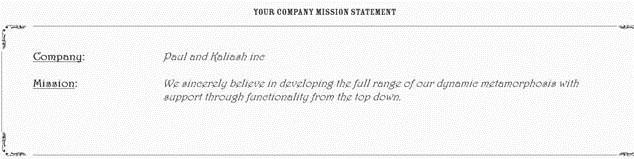
“We are dedicated to ensuring a long-term commitment to stakeholder value from performance and improved returns at all levels.”

Does a mission like that sound familiar? What if I told you the line above was generated from a website that generates mission statements like a poker machine. Just pull the lever and within a few seconds, a random assortment of small quotes are mashed together to create a cool sounding sentence. If you enter your company name into it, you can even print a certificate.  I generated this  one for the Heretic’s Guide book. Neat, huh?

clip_image002

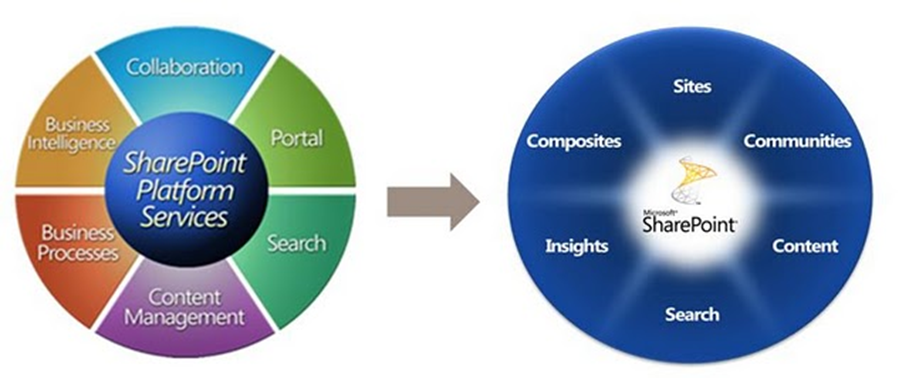
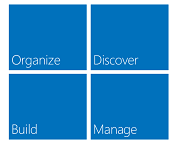
The problem, of course, with a platitude is that while it sounds significant, it doesn’t actually tell you much at all. So this f-law states that most SharePoint governance objectives are platitudes. One of the core reasons for this is a side effect of Microsoft’s marketing approach. Consider Microsoft’s SharePoint marketing material as it has evolved. Take a look at how many words survived the transition from Microsoft’s SharePoint pie of 2007, the Frisbee of 2010 and now the square of 2013. Do you see a pattern? What is the average shelf life of a word in each of these diagrams?

image image

Now, let me start out by stating that I have no problems with any of these diagrams. Microsoft is perfectly entitled to develop the message it wants to convey in whatever means it sees fit. The biggest travesty is when people frame the above words as deliverables. They take a superlative word like “improved”, “best practice” or “effective” and then add one of the above words to it. This combination inevitably forms the basis for the justification of putting SharePoint in.

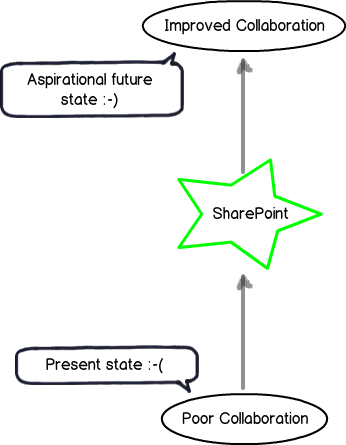
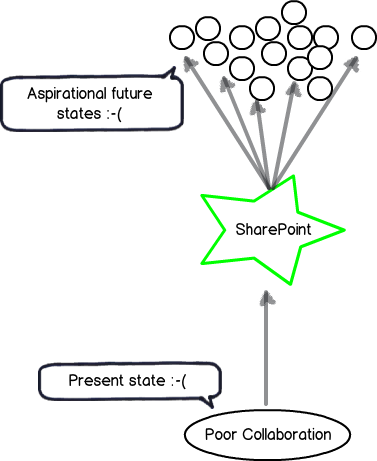
The classic example that still pervades SharePoint projects to this day is the perennial mirage of “Improved Collaboration.” If we return to the “here” and “there” diagrams of the previous posts, it looks like this… note the aspiration goal has a happy smiley on it!

Snapshot

Platitude detection 101

So the first thing you have to do as a SharePoint architect or practitioner is to develop a finely tuned platitude radar. The thing to be aware of is that platitudes come in many forms – some which are obvious and some much more subtle. Thus we will start your platitude radar calibration via a quick and easy method that Ackoff came up with. Years ago, Russel Ackoff critically examined mission statements and said that a mission statement that merely restates the obvious does not say anything that is truly aspirational. To quote from Ackoff:

They often formulate necessities as objectives: For example, ‘to achieve sufficient profit’. This is like a person saying his mission is to breathe sufficiently.

Ackoff’s test to judge the quality of a mission statement was to inverse the statement and see it still made logical sense. If you could not reasonably disagree with this negative version, then the original statement was a platitude. As an example, consider this mission statement from a well-known global organisation:

… our mission and values are to help people and businesses throughout the world realize their full potential.

So, our inverse here is that we are working to hinder people and businesses to realise their full potential. Who in the hell would ever do that? Well – given this is Microsoft’s mission statement, suddenly Windows Vista is finally starting to make sense to me. Smile

Now, go and take any word from the 3 diagrams above and put a superlative like “biggest”, “best”, “optimum” or “improved” in front. If I use my example – “Improved Collaboration” – Ackoff’s inversion approach results in “Worse Collaboration” and is therefore a platitude. I mean – aside from the odd command and control boss, would anybody seriously want to make collaboration less effective?

So, to put it simply – stop stating the bloody obvious! If your SharePoint goal doesn’t satisfy Ackoff’s simple platitude test, you have a problem.

The seeds of doom are sown at the start…

Now that I have wired up your platitude detector via Ackoff’s inversion test, you will start to notice how utterly pervasive they are in SharePoint projects and beyond. As Kailash and I state in the Heretics Guide book:

A platitude is a mental shortcut we take, a deceptively quick way to cut through uncertainty. We clump our unclear, unarticulated aspirations in a bunch of platitudes. It is easy to do and it gives us a sense of achievement. But it is a mirage because the objective is not clear and we cannot define sensible measurements of success if the goal is fuzzy. It never fails to amaze us that many organisational endeavours are given the go-ahead on the basis of platitudinous goals. Mind-boggling, isn’t it?

What is really amazing and sad at the same time is how badly the platitude problem is misattributed. One of my students at a recent SPGovIA class said that with SharePoint projects “the seeds of doom are sown at the very beginning”. He’s right too…project teams will commit significant time and money into a project that is chasing a platitude, and when things inevitably go haywire, will blame the process, methodology, people… everything but the mirage at the root of it all.

The seduction of a platitude is strong. Many have been entranced by some nice sounding desirable future state incorporating some superlative like “Improved quality” or “Best practice collaboration”. But the key point is this: The platitude becomes a sort of proxy for the end in mind rather than the real end. We have no shared understanding of what where we want to get to. Empty words preclude a shared understanding because they mean nothing at all.

The image below illustrates the effect of a platitude being confused with the actual desired state. We do not have an aspirational future state at all. Instead, we have many possible, fuzzily-defined future states.

Snapshot

If you look really closely, the future state is a sad smiley. This is because the visible symptoms of a project with a divergent understanding among participants are well documented. Scope creep and vague requirements mean that the project will start to unravel, yet the platitude-driven journey towards the mirage will continue. The project will lurch from crisis to crisis, with scope blowing out, tensions and frustrations rising. This is accompanied by classic blame-shift or hind-covering moves that people make when they realise that their ship’s taking water.

How to defeat a platitude…

I am going to conclude this post at this point because it is starting to get too long. But I will leave you with a teaser about the next post…

One of the most important things about dealing with a platitude is knowing what *not* to do. I know that what I am about to say may sound counter intuitive to many readers, but trust me when I tell you that there are two things you should avoid doing.

  1. Never, never, never ask someone what they mean when they use a platitude
  2. Never try and come up with a definition for a platitude

In the next post, I will elaborate on these two contentions and provide you with a much better way to get past the seductive danger of platitudes, so you can find out what really matters to your stakeholders.

Until then, thanks for reading…


Paul Culmsee

www.sevensigma.com.au

Falling Books Stack


« Previous PageNext Page »

Today is: Wednesday 3 June 2026 -