Back to Cleverworkarounds mainpage
 

Save the date in October: SharePoint Governance and Dialogue Mapping in the UK

Hi all

Just to let you know that in October, I will be in the UK to run a SharePoint Governance and Information Architecture class with Andrew Woodward. Additionally, I am very pleased to offer a Dialogue Mapping introductory course for the first time in the UK as well. Work has been extremely busy this year and this is my only UK/Europe trip in the next 9-12 months. In short, this is likely to be a once-off opportunity as I travel less and less these days.

Introductory Dialogue Mapping October 17-18, 2012

  • Venue: The Custard Factory, Birmingham, UK
  • Cost: £995

Eventbrite - UK: Solving Complex Problems with Issue Mapping

The introductory Dialogue mapping class will arm you with a life skill that can be used in many different situations and has changed my career. If you have been following my “confessions of a (post) SharePoint Architect” series, a lot of the content is based on my experiences of Dialogue Mapping many different projects in many different industries. Dialogue Mapping is a novel, powerful and inclusive method to elicit requirements, capture knowledge and develop shared understanding in complex projects, such as SharePoint or broader strategic planning. It was pioneered by CogNexus Institue in California, and is used by NASA, the World Bank and United Nations.

My book, “The Heretics Guide to Best Practices” is based on my Dialogue Mapping work and if you liked the book, then I know you will love the course!

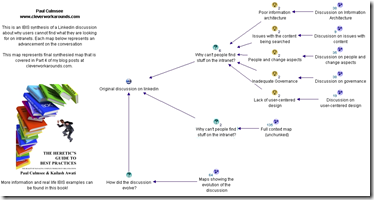
What does a map look like? Check out my map of the AA1000 Stakeholder Engagement Standard or my synthesis on problems with intranet search below…

image  image

I should stress that this is not a SharePoint course. If you are an organisational development practitioner, facilitator, reformed project manager, all-round agitator or are simply interested in helping groups make sense of complex situations, then you would find this class to be highly valuable in your personal arsenal of tools and techniques. When performed live during a facilitated session, it is a highly efficient and engaging experience for participants.

Please note that seats are limited in this class and it cannot be more than  10.

  • Date: October 17-18, 2012
  • Venue: The Custard Factory, Birmingham, UK
  • Cost: £995

Eventbrite - UK: Solving Complex Problems with Issue Mapping


Aligning SharePoint Governance & Information Architecture to Business Goals October 15-16 2012

  • Venue: The Custard Factory, Birmingham, UK
  • Cost: £995
  • Limited seats available: 12

Eventbrite - #SPGov+IA Aligning SharePoint Governance & Information Architecture to Business Goals with Paul Culmsee

Previous Master Class Feedback:

  • "This course has been the most insightful two days of my SharePoint career"
  • "…Was the best targetted and jargon free course I’ve ever been on"
  • "Re-doing my draft SharePoint Governance. Moving away from blah, blah technical stuff"
  • "Easily one of the best courses I’ve been to and has left me wanting more!"
  • "Had a great couple of days at #SPIAUK loving IBIS"
  • "The content covered was about the things technically focussed peeps miss.."

Most people understand that deploying SharePoint is much more than getting it installed. Despite this, current SharePoint governance documentation abounds in service delivery aspects. However, just because your system is rock solid, stable, well documented and governed through good process, there is absolutely no guarantee of success. Similarly, if Information Architecture for SharePoint was as easy as putting together lists, libraries and metadata the right way, then why doesn’t Microsoft publish the obvious best practices?

In fact, the secret to a successful SharePoint project is an area that the governance documentation barely touches.

This master class pinpoints the critical success factors for SharePoint governance and Information Architecture and rectifies this blind spot. Based upon content provided by Paul Culmsee (Seven Sigma) which takes an ironic and subversive take on how SharePoint governance really works within organisations, while presenting a model and the tools necessary to get it right.

Drawing on inspiration from many diverse sources, disciplines and case studies, Paul Culmsee has distilled in this Master Class the “what” and “how” of governance down to a simple and accessible, yet rigorous and comprehensive set of tools and methods, that organisations large and small can utilise to achieve the level of commitment required to see SharePoint become successful.

Seven Sigma, together with 21apps, are bringing the the acclaimed SharePoint Governance and Information Architecture Master class back to the UK, October 2012.

  • Date: October 15-16, 2012
  • Venue: The Custard Factory, Birmingham, UK
  • Cost: £995
  • Limited seats available: 12

Eventbrite - #SPGov+IA Aligning SharePoint Governance & Information Architecture to Business Goals with Paul Culmsee


Thanks for reading

Paul Culmsee


Confessions of a (post) SharePoint Architect: Don’t define “governance”

Hi all and welcome to the second post of a series that I have been wanting to write for a while. In this series, I am going to cover some of the lesser considered areas of being a SharePoint architect and by association, key aspects to SharePoint governance. In the first confessional post I alluded to the fact that a good SharePoint architect also need to architect the right conditions for SharePoint success. As I work through this series of articles, I will elaborate further on what those conditions are and how to go about creating them.

To do this, I am drawing from my non IT work as a Dialogue Mapper and facilitator, and where applicable, will cover these case studies to see if they give us any insights for SharePoint. I also hope to dispel some common myths and misconceptions about SharePoint project delivery in organisations. Some of these might challenge some notions you hold dear. But for the most part, I hope that many of you reading this find this material to be instinctively compatible with what you have already come to believe. If you are in the latter group and feel as if you are an organisational agitator, this just might give you that rigour and ammo that you need when getting through to the powers that be. Better still, tell them to read this series and let them decide for themselves.

Backstory: Ackoff and f-Laws

image

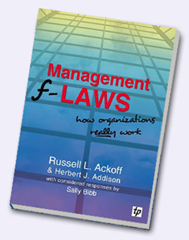
For what it’s worth, a fair chunk of this material comes from my book, as well as the first module of my SharePoint Governance and Information Architecture class that I run a few times a year in various places around the world. When I designed that class, I was inspired by Russell Ackoff, who co-wrote a funny and highly readable book called “Management f-LAWS: How organisations really work”. F-Laws were defined as:

“truths about organisations that we might wish to deny or ignore – simple and more reliable guides to everyday behaviour than the complex truths proposed by scientists, economists, sociologists, politicians and philosophers”

In case you hadn’t noticed, if you remove the hyphen, each f-law become a flaw. You could also consider them as #fail laws. Years ago, I laughed and at the same time, inwardly cringed when I read each f-Law that Ackoff and his co-authors had come up with. I came to realise that SharePoint problems are simply a microcosm of broader issues that plague organisations. If you read Ackoff’s book (and I highly recommend it), you will soon realise that the word “Management” could easily be substituted with “SharePoint” and it doesn’t take much to come up with a few of your own f-laws. This is exactly what I did and at last count, I have 17 of them. In this post, I will detail the very first one.

F-Law 1: The more comprehensive the definition of governance is, the less it will be understood by all

The first condition that I need to design as a SharePoint architect is to put to bed the many misconceptions about SharePoint governance. In this f-Law, I state that the more you try and define what SharePoint governance is, the less anybody will actually understand it. If you consider this counter-intuitive, then let me take it even further. For any project that has a change management aspect (SharePoint projects often are), definitonising not only doesn’t work, but it is actually quite dangerous to your projects health.

To explain why I have come to this conclusion, I’d like to tell you a little story from my non IT work. Several years ago, I was working in a sensemaking capacity with an organisation to help them come up with a strategic plan and performance framework for a new city. This was not a trivial undertaking. The aim was to create a framework with an aligned set of KPI’s to realise the vision for what the city needed to be in the year 2030. While the vision for the city had been previously agreed and understood, the path to realise that vision had not been.

Now if you have ever been involved in strategic plan development, and think that working out your corporate strategy is difficult, I have news for you. Aligning an organisation to a 3 year plan is one thing. Working with a diverse group to determine performance measures of a future city 25 years away is a different thing altogether. I never realised at the time we did this work, just how unique and (dare I say) “cutting edge” it was. Participants were highly varied in skills and areas of interest, and to say each had their own world-view was an… understatement to say the least.

I my book I describe this case study in detail but for the sake of post size, let’s just say that the opportunity to do this work arose from a failed first attempt to create the framework. The first time around an excel spreadsheet was projected onto the wall that looked like the example below. Attempts were made in vain to fill in the strategic outcomes, strategic objectives, key result areas, key performance indicators and measures. After a frustrating few hours of trying this approach, we gave up because participants spent all of their time arguing over the labels and got bogged down in a tangle of definitions and ambiguous terminology. Was it a KPI (Key Performance Indicator) or a KRA (Key Result Area)? Was it a Guiding Principle or a Strategic Objective? Was it a KRA or a Critical Success Factor?  Attempts to resolve this issue with definitions got nowhere because even the definitions could not be agreed upon.

image

In the end, we solved this issue via a rather novel use of Dialogue Mapping along with a problem structuring approach outlined in a book called Breakthrough Thinking. If you’d like to know more on how it was done, then take a look in chapter 12 of the Heretics Guide.

The criticality of context…

The core problem boiled down to context – or lack of it. What I learnt from this is that in situations without a shared context (and the wrong tools to deal with it), we fall back to using definitions to try and fill the gap. When faced with a blank spreadsheet and just some labels, participants attention was fixated on the definitions of the labels, rather than the empty cells where the focus needed to be. This resulted in a bunch of long winded discussions about what terms meant. This seriously stymied efforts aimed at making progress.

I have since performed many workshops, both SharePoint and non SharePoint ones and the pattern is clear. In fact I contend that if you proceed down the road of trying to build context via definitions for complex problems, one of three things will happen.

  1. The definition becomes more verbose. There are a couple of reasons for this:
    • – The definition is expanded to incorporate new aspects of the topic space. In an organisational setting, this creates confusion because the definitions of multiple disciplines can often seemingly contradict each other and thus, careful “wordsmithing” is required to navigate a path through it.
    • – New qualifications or exceptional situations have to be excluded. This leads to more new terms being used in the definition.
  2. As a result of #1, a broader, fundamental definition is developed. This broader definition encompasses more and so is prone to motherly sounding platitudes. Further, such definitions also run the risk of being interpreted in ways other than the one intended by those who worked so hard on the definition.
  3. As a result of #1 and #2, a new word is used or an existing word is used in a new context to try and convey the new meanings or concepts proposed. I have heard governance described as “stewardship”, “risk management” and (guilty as charged), “assurance”.

The effect of this can be far reaching in a bad way because definitionising has a habit of blinding people to what really matters. This leads to terrible project decisions being made up front that have serious consequences. To understand why, consider the image below:

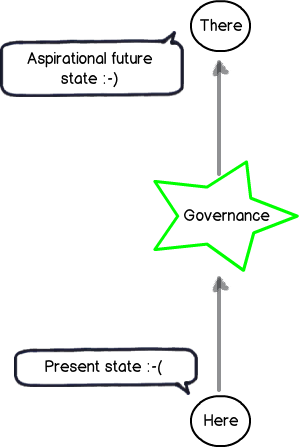
Snapshot

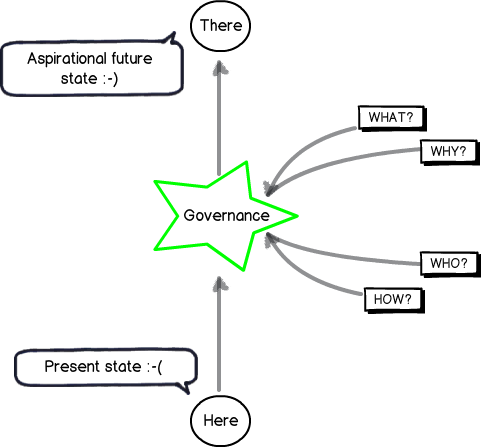
This image represents how governance of a SharePoint project should be viewed. A SharePoint initiative takes time and effort which costs money. We presumably have recognised that the present state is lacking in some way and want to get to somewhere better – an aspirational future place (if you look closely in the left above image note the happy and sad smilies). Accordingly we accept the cost of deploying SharePoint because we believe it will make a positive difference by doing so. If this was not the case, you would be wasting your time and resources on a pointless initiative. Therefore, it is the difference made by the initiative that will tell you if you have succeeded or not. As a result, we have to have a shared context on what that aspirational future looks like!

Don’t confuse the means with the ends…

Governance is, therefore, the means by which you will achieve the end of getting to some better place. It is informed by the end in mind and this is why I drew it in the star in the middle of the above diagram. For example; If the end in mind was compliance, then I will govern SharePoint a heck of a lot differently than say, if the end in mind was improving collaborative decision making.

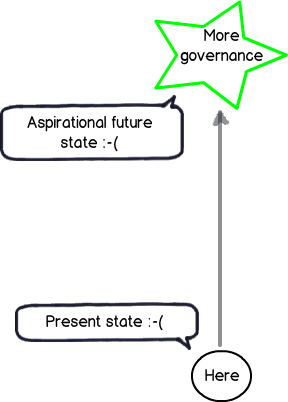
But consider the diagram below. In this context, it should be clear why working from a definition of governance is often problematic. It implies that:

  1. Governance is not being informed by the end in mind;
  2. Your team do not have a shared understanding of what the end in mind actually looks like.

When this happens, project teams rarely realize it and respond by substituting the end with the means. We overly focus on governance via definition without any clarity or context as to what the aspirational future state actually is. Like the example of the blank spreadsheet example I started with, reality starts to look more like the diagram below: (note the happy smilie is gone now)

Snapshot

Steering…

So how do we steer out of this definition pickle? Interestingly “steer” is a appropriate choice of word if we look at the origin of the word “Govern”. This is because “Govern” is a nautical term from Latin and actually means “to steer”. So if your SharePoint project has been more like the Titanic, and hit a giant iceberg along the way, then clearly you need to focus your governance efforts to looking at what is in front of you, rather than scrubbing the deck or keeping the engine room well oiled. The latter tasks are important of course, but you can do all that, still hit an iceberg and waste a lot of money.

To steer, we all have to understand what the destination is, or at the very least, all agree on the direction. To help you with that journey, consider my final diagram. To steer SharePoint the right way for your organisation requires you to answer four key questions:

  1. What is the aspirational future state and what does it look like?
  2. Why is this the aspirational future state we want?
  3. Who will do what to get us to that state?
  4. How will we get to that state?

Snapshot

The fundamental problem with most SharePoint projects is that questions 1 and 2 are not answered sufficiently, if at all. The next few posts will explore why this is the case, but in the meantime, remember that we could do a SharePoint project that is to scope, time and cost, yet still have no user up-take if we are solving the wrong problem in the first place. Therefore remember that:

  1. Governance is a means to an end, and not the end in itself.
  2. We shouldn’t undertake a “SharePoint governance” project, or consider “SharePoint governance” as deliverable on a project plan. The act of developing a shared context of what the problems are and using that to always steer the governance decision making is paramount. Failure to do this and and your best plans will not save you.

Conclusions and coming next…

This is the second post on what will be a large series – possibly the largest series I have written so far. In the next post in this series, I will continue into our journey of SharePoint governance mistakes and along the way, start to identify what we can do to better answer the “What”, “Why”, “Who” and “How” questions. If you enjoy this series, then consider signing up to one of my classes if one is running in your neck of the woods.


Thanks for reading

Paul Culmsee

www.sevensigma.com.au

www.hereticsguidebooks.com


Demystifying SharePoint Performance Management Part 9 – Don’t believe everything you R/W

Hi and welcome to Part 9 (bloody hell… nine!) of my series on trying to demystify SharePoint performance management a bit. If by any chance you have been asked to provide some sizing information for your organisation and you are finding the resources online a bit overwhelming, this series is for you. If you have been a part of our varied journey so far, the last few posts have been all about Disk IO performance in the form of latency, IOPS and MBPS. In the last two articles, we have been learning about the different IO patterns that SQL Server is likely to utilise, as well as using the jackhammer known as the SQLIO utility, that is used to simulate those IO patterns on unsuspecting disk infrastructure.

Now just to set the scene for this post (and conveniently perform some product placement), I recently published a book called “The Heretics Guide to Best Practices”. Now being the author and all, I am going to suggest you buy it because it is a completely riveting read! :-).

Now apart from blatant product placement, the real reason I mention it is because one of the chapters is called “Myths, Memes and Methodologies”. In it, we examine why some ideas gain legitimacy, even though they are based on often completely dodgy foundations. I mention this here, because in terms of SQL disk IO sizing, something similar has happened with Microsoft’s published material on the topic. So the focus of this article is to finish off our discussion on understanding disk IO patterns, while lifting the lid on some of the inconsistencies in the material that that end up being repeated by SharePoint consultants as gospel to their unsuspecting disciples.

Now harking way back to part 1 to the notion of lead vs. lag indicators, our use of SQLIO thus far has essentially been used as a lead indicator. While SQLIO puts a real load on disk infrastructure and faithfully reports the resulting IOPS, latency and MBPS, the reality is it can never truly capture the nuances of a production SharePoint farm doing its thing. But in terms of a lead indicator that is okay. After all, a lead indicator by definition cannot guarantee an outcome. It can merely suggest that an outcome should be able to be met.

So while we are thinking about the lead indicator world view, some of you might have noticed that I have not yet made any suggestions what are the minimum conditions of satisfaction for disk infrastructure used to underpin SharePoint. This has been deliberate until now, because I felt that it was critical to understand the relationship between the size of a disk IO operation, and its effect on IOPS, latency and MBPS first. To that end, hopefully I have instilled a reflex in you where – if you are given an arbitrary latency, IOPS or MBPS figure that you have to meet – you immediately ask questions like, “What sort of IO patterns?” or “how large is the IO request typically going to be?” or “is the IO random or sequential?”

When whitepapers mislead…

Now we are about to get into one area where Microsoft’s published documentation is quite weak. Remember the 367 page “Capacity Planning for Microsoft SharePoint Server 2010” whitepaper? Starting at page 326, there is a section with the promising title of “Estimate Core Storage and IOPS needs” (this topic is also available separately as a technet article too). The problem is in despite that title, very little IOPS guidance actually is given. Instead the content in the section overwhelmingly speaks about estimating storage requirements. In fact the best you get is one explicit mention of IOPS in relation to the SharePoint Search service application which states the following:

The IOPS requirements for Search are significant.

  • For the Crawl database, search requires from 3,500 to 7,000 IOPS.
  • For the Property database, search requires 2,000 IOPS.

Note: For the purpose of the rest of this article, lets add the above figures together and simply say between 5,500 to 9000 IOPS for search.

Do you see the problem here? This is simply an arbitrary IOPS figure with no guidance as to the IO patterns underpinning it. What about latency or the IO request size that you need to assume? Unfortunately, no guidance is given for these questions which makes this quoted figure not overly helpful. Plus, as you will soon see below, Microsoft seemingly contradict themselves elsewhere in the same whitepaper…

So what are good numbers to use?

In the absence of any hard data, the best way to deal with storage requirements is to think in terms of lead indicators. Indicators from a lead point of view, can be framed as targets – something to aim for. Targets then can be broken down into different categories ranging from “cover your arse” to “above and beyond”:

  • Aspired target: The “this would be bloody fantastic if we could get there” target.
  • Agreed target: The “this is what we are going to deliver no matter what” target.
  • Minimum Condition of Satisfaction (MCOS) target: The “If we don’t achieve this we may as well pack up and go home” target.

So given these sorts of targets, what should the disk IO performance targets for SharePoint be? To work this out, we can utilise information already out there. Well…that is, we could if the information out there wasn’t so disparate and disconnected. So unfortunately, it takes some digging to you can find what you need.

Our first point of call in this regard is indeed Microsoft and the very same capacity planning and configuration guide that I criticised earlier for poorly dealing with IOPS. Hidden in the bowls of that document, the following statement is made on page 334 (emphasis mine):

Any storage architecture must support your availability needs and perform adequately in IOPS and latency. To be supported, the system must consistently return the first byte of data within 20 milliseconds.

So the way I look at it, a 20ms latency should be our MCOS target (see the explanation above for MCOS). If we consistently do worse than this, then we do not have a lot of assurance about the scalability of the disk IO subsystem being used for SharePoint. But like the arbitrary IOPS figure quoted in the previous section, I wonder if readers have spotted the problem with specifying this latency figure alone?

In both cases, don’t forget the almost symbiotic type of relationships between IO size, IOPS and latency. If we assumed that all IO operations were small (for example SQL’s page size of 8KB) then we could likely stay way under the 20ms limit with a more modest disk infrastructure. But to sustain the same latency with a larger IO size would require a faster disk subsystem. Why? Well as we discussed in part 6, if the size of the IO writes are larger, such as 64KB, then latency will go up because servicing larger requests takes longer than smaller ones. Therefore, if we were to assume a larger IO size, we would need more/faster disks to be able to meet the same 20ms latency KPI.

So what disk IO size should we assume to give context to a latency figure? Some insight can be found back in part 6, when we examined SQL IO characteristics and established that it will likely be much more varied than SQL’s base IO unit of 8KB pages. My suggestion therefore, is to test 8KB but also ensure that 64KB can meet the latency target. This is because 64KB represents a reasonable average size between the 8KB to 256KB range most SQL Server’s IO operations will fall within. Thus, if a SQLIO test using random read/writes at 64K indicates more than 20ms latency consistently, then you should probably ask your storage people to take another look at it.

By the way, if you really want to give your storage guys a challenge, keep jacking up the IO size!

What about aspired latency targets?

So if you are cool with the notion that the minimum condition of satisfaction for a random IO test using 64K size should be less than 20ms latency, what about aiming higher with agreed or aspirational targets?

Luckily for all of us, we can once again stand on the shoulders of giants. In this case, the Bob Duffy indirectly answers this question by providing what he considers to be the indicators for optimal SQL Server performance in general. In an excellent article with the rather appropriate title of “How to Specify SQL Storage Requirements to your SAN Dude” Bob makes the following recommendations:

  • SQL Data files must have a response time averaging about 8ms and a maximum response time of around 20ms using 64k size IOs and that are random in nature
  • SQL Log Files must have a write response time averaging from 1-5ms. use 64k IO size and are sequential in nature

The nice thing about specifying a target or benchmark like this, is that you are able to sidestep discussions on RAID levels, stripe sizes and many other things that SAN nerds find interesting. We keep things focused on the lead indicators and in effect state “If you can meet these figures, configure it any way you like.” This gives the SAN guys the freedom to do their job, while giving you an indicator that can give you confidence in the disk infrastructure. So if we were to distil the figures above into lead indicator targets for storage gurus, it might look something like this:

  • MCOS target: Less than 20ms latency for random IO requests of 64KB
  • Agreed target: Average 8ms latency for random IO requests of 64KB with no more than 20ms max latency. Less than 5ms latency for sequential log IO
  • Aspired target: No more than 8ms latency for random SQL IO requests of 64KB and average of 1ms latency sequential log IO with max never going above 5ms

Now in the ProData article, Bob made a slightly tongue in cheek point that sums up the above thinking really well, as well as giving insight to a critical aspect we have not considered so far…

Nowadays most SQL consultants try and not talk about RAID types and types of disk, it can be best to leave that up to the storage guys. If the storage team can meet my requirement for 5,000 random 64k read/write IOPs at 8ms latency by using 50 old SATA drives at 5,400 rpm in RAID 5 then knock yourself out – I’m happy. Well maybe I’m happy till we have that chat about Service Level requirements during a disk degrade event but that’s a different story…

If you look closely at Bob’s quote, you will see that he has also specified the last critical variable in the mix. Bob’s mention of “5000 random 64k read/write IOPS” is in reference to another point he makes. Without an IOPS figure to work from, the targets we have come up with are effectively meaningless. Quoting Bob:

The main thing to specify apart form your latency requirement is the throughput (IOPs). It is no good meeting the 8ms target for 100 IOPs and then finding your workloads needs 5,000 IOPs. You wont be able to meet the 8ms target!!

Consider it this way… a SharePoint site that services 100,000 users, will process a lot more IO requests than a site that services 10 users. With the latter, it is quite likely that the latency targets we have been talking about (even the aspirational ones) would be pretty easy to meet with a single disk. (To hark back to our shopping centre metaphor, one check out operator is all that is needed at a corner store, whereas many are needed at the supermarket). This is presumably why Bob has used a figure like 5000 IOPS for his post. It is probably a figure that conveniently represents some fairly heavy disk usage. But it does beg two question:

  • How much IOPS should we use to simulate SharePoint IOPS?
  • In the absence of anything else, perhaps 5000 IOPS is a good figure to go with?

Don’t believe all you read…

Now if you go back and read the start of this post, you will recall I mentioned that Microsoft stated some IOPS figures for the SharePoint search application databases ranged between 5,500 to 9000. That would indicate that Bob’s base figure of 5000 is a bit low, especially given that SharePoint has many other components beyond search that have not been taken into account. So to put Bob’s 5000 IOPS figure in perspective, let’s re-examine Microsoft’s trusty capacity planning whitepaper. One of the great things about this document is that Microsoft detailed the performance stats of a typical day in the life of their internal SharePoint environments. Since Microsoft are so large, they have different SharePoint farms for different collaborative scenarios. The scenarios they covered were:

  1. Enterprise Intranet environment (also described as published intranet). In this scenario, employees view content like news, technical articles, employee profiles, documentation, and training resources. It is also the place where all search queries are performed for all of the other the SharePoint environments within the company.
  2. Enterprise intranet collaboration environment (also described as intranet collaboration). In this scenario, is where important team sites and publishing portals are housed. They are typically used for enterprise collaboration, organizations, teams, and projects. Sites created in this environment are used as communication portals, applications for business solutions, and general collaboration. No custom code runs in these sites.
  3. Departmental Collaboration environment. In this scenario, employees use this environment to track projects, collaborate on documents, and share information within their department.
  4. Social Collaboration Environment. This is the My Sites scenario. These connect employees with one another and the information that they need. Employees use this environment to present personal information such as areas of expertise, past projects, and colleagues to the wider organization. The environment also hosts personal sites and documents for viewing, editing, and collaboration.

Now reading about these scenarios is highly interesting and Microsoft provides some nice nuggets of information that we will use in a future post. But for now I will stick purely to a disk IOPS perspective. To that end, below are a few fun-filled facts about the number of users in each of the four scenarios:

  1. Enterprise Intranet environment:  33580 unique users per day, with an average of 172 concurrent and a peak concurrency of 376 users.
  2. Enterprise intranet collaboration environment: 69702 unique users per day, with an average of 420 concurrent users and a peak concurrency of 1433 users
  3. Departmental Collaboration environment. 9186 unique users per day, with an average of 189 concurrent users and a peak concurrency of 322 users
  4. Social Collaboration Environment. 69814 unique users per day, with an average of 639 concurrent users and a peak concurrency of 1186 users

So now you have a sense of the size of these scenarios and as an added bonus, gotten a glimpse into the difference that usage patterns can make. For example: social collaboration and enterprise collaboration have similar number of unique users but social has more average concurrency but less peak. But what about IOPS?

In the document, IOPS is split into reads per second and writes per second, so I added them to estimate IOPS. The results are rather surprising…

Metric

Social Collaboration

Departmental Collaboration

Published intranet

Intranet Collaboration

Unique visitors

69814

9186

33580

69702

Average concurrent

639

189

172

420

Max concurrent

1186

322

376

1433

IOPS

941

74

409.66

409.66

Now while it might be tempting to ponder why social collaboration has over double the IOPS, yet half the concurrency of enterprise intranet collaboration, we are not going to worry about here. Besides, we actually covered some of it already when we used logparser to get insights of usage patterns. What I will instead do is draw your attention to is the fact that that none of the IOPS scenarios come anywhere near the 5000 IOPS figures cited by ProData or Microsoft’s 5500-9000 IOPS cited for search (in the very same capacity planning document I might add!)

So something is amiss. If an organisation the size of Microsoft can have almost 70000 unique users per day, with a peak concurrency of 1433 users and only total 410 IOPS, then where the hell did the 5500-9000 IOPS figure for search alone come from? Even if you take the scenario with the highest IOPS (the Social collaboration scenario with 941 IOPS), that’s still less than one fifth 5500 IOPS which was at the low end of the search IOPS figure.

Now I am also suspicious that two different case studies have the exact same IOPS figure. If you compare the “published intranet” scenario with the “intranet collaboration” scenario, one has half the visitors, yet both have precisely the same IOPS (right down to decimal places). That seems highly unlikely to me and I suggest that a mistake has been made. Given the intranet collaboration has the highest max concurrency figure, I would have expected IOPS to be a higher than it is. Hmmm…

What can we take away from this? For one, the capacity planning document could seriously do with a rewrite in this area. Secondly, I don’t have a lot of faith in those IOPS figures quoted (although I have more confidence in the case studies that the arbitrary figures specified for search).

So if we put aside the doubt created by the issues with the capacity planning guide, there is one really interesting fact that remains… none of the reported IOPS figures came anywhere near 5000 IOPS.

Insights from HP…

It turns out that Hewlett Packard also did some load testing of SharePoint 2010 (among other things) and published a whitepaper called the “HP performance and configuration guide for Microsoft SharePoint 2010“.  In this guide, they detail the results of a scenario they tested based on what they termed an “Enterprise Workload”. The guide covers definition of enterprise workload in loving detail, but the gist of it is that it covers the following areas:

  • Document Center (30% of operations) Check-out, download, upload and check-in documents
  • Team Sites – (20% of operations) work with calendars, discussions and documents
  • Portal SItes – (20% of operations) work with event, announcements and surveys
  • My Sites – (10% of operations) work with documents in personal documents library
  • Search – (20% of operations) Submit searches with random word or phrases

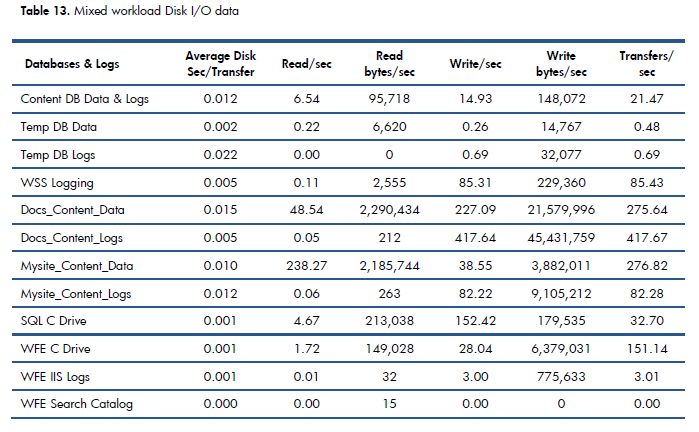
HP then simulates 500 concurrent users performing the actions above. In Table 13 of the report (page 28 of their document and reproduced below) , HP outline the performance and even break down the IO characteristics of each SharePoint database (which is really handy indeed). Adding up the last column of transfers/sec (which is essentially IOPS) we get a result of 1347.33 IOPS.

Thus we are still considerably under the 5000 IOPS that Bob Duffy suggests.

Conclusion…

Right! Remember our discussion above on MCOS, agreed and aspired targets? For an aspirational target, I think that we can reasonably use 5000 IOPS as a starting point for an enterprise organisation of Microsoft’s size. If we stick with 5000 IOPS, then my suggestion for an aspirational latency target would be:

  1. no more than 8ms latency for random SQL IO requests of 64KB
  2. average 1ms (and no more than 5ms max) latency of sequential log IO of 64KB

I think these figures are a pretty good test of a disk subsystem and think that Bob at ProData is therefore pretty close to the mark. Of course, you can use these figures to make your own judgement and adjust accordingly. Provided that you think of them as lead indicators that provide you a level of confidence in your disk infrastructure, you now have the tools and knowhow to run the tests too.

So if there was a moral of the story to this post, it would be to not believe everything you read and always verify espoused reality with actual reality via testing. On that note, the next post will finish off our examination of disk performance by going over 2 additional tools that I think are particularly good for testing assumptions. After that, we will be revisiting Microsoft’s case studies, as well as some findings, insights and recommendations from some additional lab scenarios that Microsoft conducted.

Thanks for reading

Paul Culmsee

www.sevensigma.com.au


Demystifying SharePoint Performance Management Part 6 – The unholy trinity of Latency, IOPS and MBPS

Hi all

Welcome to part 6 on my series in making SharePoint performance management that little more digestible. To recap where we have been, I introduced the series by comparing lead versus lag indicators before launching into an examination of Requests Per Second (RPS) as a performance indicator. I spent 3 posts on RPS and then in the last post, we turned our attention to the notion of latency. We watched a Wiggles Video and then looked at all of the interacting components that work together just to load a SharePoint home page. I spent some time explaining that some forms of latency cannot be reduced because of the laws of physics, but other forms of latency are man made. This is when any one of the interacting components are sub-optimally configured and therefore introduce unnecessary latency into the picture. I then asserted that disk latency was one of the most common area that is ripe for sub-optimal configuration. I then finished that post by looking at how a rotational disk works, the strategies employed to mitigate latency (Cache, RAID, SAN’s etc.)

Now on the note of Cache, RAID and SAN’s Robert Bogue who I mentioned in part 1, has also just published an article on this topic area called Computer Hard Disk Performance – From the Ground Up. You should consider Robert’s article part 5.5 of this series of posts because it expands on what I introduced in the last post and also spans a couple of the things I want to talk about in this one (and goes beyond it too). It is an excellent coverage of many aspects of disk latency and I highly recommend you check it out).

Right! In this post, where will look more closely at latency and understand its relationship with two other commonly cited disk performance measures: IOPS and MBPS. To do so, lets go shopping!

Why groceries help to explain disk performance

image

Most people dislike having to wait in a line for a check-out at a supermarket and supermarkets know this. So they always try and balance the number of open check-out counters so that they can scale when things are busy, but not pay the operators to standing around when its quiet. Accordingly, it is common to walk into a store when its quiet and only find only one or two check-out counter open, even if the supermarket has a dozen or more of them.

The trend in Australian supermarkets nowadays is to have some modified check-out counters that are labelled as “express.” In these check-outs, you can only use them if you are buying 15 items or less. While the notion of express check-outs has been around forever, the more recent trend is to modify the design of express check-out counters to have very limited counter space and no moving roller that pushes your goods toward the operator. This discourages people with a fully-loaded trolley/cart to use the express lane because there is simply not enough room to unload the goods, have them scanned and put them back in the trolley. Therefore, many more shoppers can go through express counters than regular counters because they all have smaller loads.

This in turn frees up the “regular” check-out counters for shoppers with a large amount of goods. Not only do they have a nice long conveyor belt with plenty of room for shoppers to unload all of their goods onto and rolls to the operator, but often there will be another operator who puts the goods into bags for you as well. Essentially this counter is optimised for people who have a lot of goods.

Now if you were to measure the “performance” of express lanes versus regular lanes, I bet you would see two trends.

  • Express lanes would have more shoppers go through them per hour, but less goods overall
  • Regular lanes would have more goods go through them per hour, but less shoppers overall

With that in mind, lets now delve back into the world of disk IO and see if the trend holds true there as well.

Disk latency and IOPS

In the last post, I specifically focused on disk latency by pointing out that most of the latency in a rotational hard drive is from rotation time and seek time. Rotation time is time taken for the drive to rotate the disk platter to the data being requested and seek time is how long it takes for the hard drive’s read/write head to then be positioned over that data. Depending on how far the rotation and head have to move, latency can vary. Closely related to disk latency is the notion of I/O per second or “IOPS”. IOPS refer to the maximum number of reads and writes that can be performed on a disk in any given second. If we think about our supermarket metaphor, IOPS is equivalent to the number of shoppers that go through a check-out.

The math behind IOPS and how latency affects it is relatively straightforward. Let’s assume a fixed latency for each IO operation for a moment. If for example, your disk has a large latency… say 25 milliseconds between each IO operation, then you would roughly have 40 IOPS. This is because 1 second = 1000 milliseconds. Divide 1000 by 25 and you get 40. Conversely, if you have 5 milliseconds latency, you would get 200 IOPS (1000 / 5 = 200).

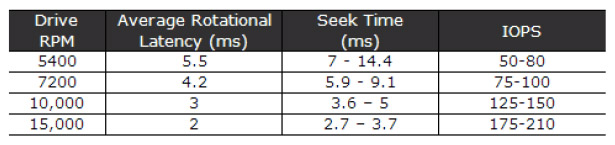
Now if you want to see a more detailed examination of IOPS/ latency and the maths behind it, take a look at an excellent post by Ian Atkin. Below I have listed the disk latency and IOPS figures he posted for different speed disks. Note that a 15k RPM disk came in at around 175-210 IOPS which suggests a typical latency average of between 4.7 and 5.7 milliseconds. (1000/175 = 5.7 and 1000/210 = 4.7). Note: Ian’s article explains in depth the maths behind the average calculation in this section of his post.

image

The big trolley theory of IOPS…

While that math is convenient, the real world is always different to the theoretical reality I painted above. In the world of shopping, imagine if someone with one or two trolleys full of goods like the picture below, decided to use the express check-out. It would mean that all of the other shoppers have to get annoyed and wait around for this shoppers goods to be scanned, bagged and put back into trolley. The net result of this is a reduced number of shoppers going through the check-out too.

image

While the inefficiencies of a supermarket is something that is easy to visualise for most people, disk infrastructure is less so. So while the size of our trolley has an impact on how many people come through a check-out, in the disk world, the size of the IO request has precisely the same effect. To demonstrate, I ran a basic test using a utility called SQLIO (which I will properly introduce you to in part 7) on one of my virtual machines. Below is the results of writing data randomly to a 500GB disk. In the first test we wrote to the disk using 64KB writes and in the second test we used 4KB writes. The results are below:

Size of Write IOPS Result
64KB 279
4KB 572

Clearly, writing 4KB of data over time resulted in a much higher IOPS than when using 64KB of data. But just because there is a higher IOPS for the 4KB write, do you think that is better performance?

Disk latency and MBPS

So far the discussion has been very IOPS focussed. It is now time to rectify this. In terms of the SQLIO test I performed above, there was one other performance result I omitted to show you – the Megabytes per second (MBPS) of each test. I will now add it to the table below:

Size of Write IOPS Result MBPS Result
64KB 279 17.5
4KB 572 2.25

Interesting eh? This additional performance metric paints a completely different picture. In terms of actual data transferred, the 4KB option did only 2.25 megabytes per second whereas the 64KB transferred almost 8 times that amount! Thus, if you were judging performance based on how much data has been transferred, then the 4KB option has been an epic fail. Imagine the response of 500 SharePoint users, loading the latest 30 megabyte annual report from a document library if SharePoint used 4KB reads … Ouch!

So the obvious question is why did a high IOPS equate to a low MBPS?

The answer is latency again (yup – it always comes back to latency). From the time the disk was given the request to the time it completed, writing 4KB simply doesn’t take as long to write as 64KB does. Therefore there are more IOPS that take place with smaller writes. Add to that, the latency from disk rotation and seek time per IO operation and you start to see why there is such a difference. Eric Slack at Storage Switzerland explains with this simple example:

As an illustration, let’s look at two ways a storage system can handle 7.5GB of data. The first is an application that requires reading ten 750MB files, which may take 100 seconds, meaning the transfer rate is 75MB/s and consumes 10 IOPS. The second application requires reading ten thousand 750KB byte files, the same amount of data, but consumes 10,000 IOPS. Given the fact that a typical disk drive provides less than 200 IOPS, the reads from the second application probably won’t get done in the same 100 seconds that the first application did. This is an example of how different ‘workloads’ can require significantly different performance, while using the same capacity of storage.

Now at this point if I haven’t completely lost you, it should become clear that each of the unholy trinity of latency, IOPS and MBPS should not be judged alone. For example, reporting on IOPS without having some idea of the nature of the IO could seriously mislead. To show you just how much, consider the next example…

Sequential vs. Random IO

Now while we are talking about the IO characteristics of applications, two really important point that I have neglected to mention so far is the range of latency and the impact of sequential IO.

The latency math I did above was deliberately simplified. Seek and rotation time are actually across a range of values because sometimes the disk does not have to rotate the spindle/move the head far. The result is a much reduced seek latency and accordingly, increased IOPS and MPBS. Nevertheless, the IO is still considered random.

Taking that one step further, often we are dealing with large sections of contiguous space on the hard disk. Therefore latency is reduced further because there is virtually no seek time involved. This is known as sequential access. Just to show you how much of a difference sequential access makes, I re-ran the two tests above, but this time writing to sequential areas of the disk and not random. With the reduced seek and rotation time, the difference in IOPS and MBPS is significant.

Size of Write IOPS Result MBPS Result
64KB 2095 131
4KB 4152 16

The IOPS and subsequent MBPS has improved significantly from the previous test to the tune of a 750% improvement. Nevertheless, the size of the request and its relation to IOPS and MPBS still holds true. The smaller the size of the IO request being read or written, the more IOPS requests can be sustained, but the less MBPS throughput can be achieved. The reverse then holds true with larger IO requests.

One conclusion that we can draw from this is that specifying IOPS or MBPS alone has the potential to really distort reality if one does not understand the nature of the IO request in terms of its characteristics. For example: Let’s say that you are told your disk infrastructure has to support 5000 IOPS. If you assumed a 4K IO size that is accessed sequentially, then far fewer disks would be required to achieve the result compared to a 64KB IO accessed randomly. In the 64KB case, you would need many disks in an array configuration.

SQL IO Characteristics

So now we get to the million dollar question. What sort of IO characteristics does SQL and SharePoint have?

I will answer this by again quoting from Ian Atkin’s brilliant “Getting the Hang of IOPS” article. Ian makes a really important point that is relevant to SQL and SharePoint in his article which I quote below:

The problem with databases is that database I/O is unlikely to be sequential in nature. One query could ask for some data at the top of a table, and the next query could request data from 100,000 rows down. In fact, consecutive queries might even be for different databases. If we were to look at the disk level whilst such queries are in action, what we’d see is the head zipping back and forth like mad -apparently moving at random as it tries to read and write data in response to the incoming I/O requests.

In the database scenario, the time it takes for each small I/O request to be serviced is dominated by the time it takes the disk heads to travel to the target location and pick up the data. That is to say, the disk’s response time will now dominate our performance.

Okay, so we know that SQL IO is likely to be random in nature. But what about the typical IO size?

Part of the answer to this question can be found in an appropriately titled article called Understanding Pages and Extents. It is appropriate because as far as SQL server database files and indexes are concerned, the fundamental unit of data storage in SQL Server is an 8KB page. The important point for our discussion is that Disk I/O many read and write operations are performed at the page level. Thus, one might assume that 8KB should be the size assumed when working with IOPS calculations because it is possible for SQL to write 8KB to disk at a time.

Unfortunately though, this is not quite correct for a number of reasons. Firstly, eight contiguous 8KB pages are grouped into something called an extent. Given than an extent is a set of 8 pages, the size of an extent is 64KB. SQL Server generally allocates space in a database on a per-extent basis and performs many reads across extents (64KB). Secondly, SQL Server also has a read-ahead algorithm that means SQL will try and proactively retrieve data pages that are going to be used in the immediate future. A read-ahead is typically from 1 to 128 pages for most editions which translates to between 8KB and 1024KB. (for the record, there is a huge amount of conflicting information online about SQL IO characteristics. Bob Door’s highly regarded SQL Server 2000 I/O basics article is the place to go for more gory detail if you find this stuff interesting).

A read-ahead interlude…

Before we get into SharePoint disk characteristics, it is worthwhile mentioning a great article by Linchi Shea called Performance Impact: Some Data Points on Read-Ahead.  Linchni did an experiment by disabling read-ahead behaviour in SQL Server and measured the performance of a query on 2 million rows. With read-ahead enabled, it took 80 seconds to complete. Without read-ahead it took 210 seconds. The key difference was the size of the IO requests. Without read-ahead the reads were all 8KB as per page size. With read-ahead, it was over 350KB per read. Linchi makes this conclusion:

Clearly, with read-ahead, SQL Server was able to take advantage of large sized I/Os (e.g. ~350KB per read). Large-sized I/Os are generally much more efficient than smaller-sized I/Os, especially when you actually need all the data read from the storage as was the case with the test query. From the table above, it’s evident that the read throughput was significantly higher when read-ahead was enabled than it was when read-ahead was disabled. In other words, without read-ahead, SQL Server was not pushing the storage I/O subsystem hard enough, contributing to a significantly longer query elapsed time.

So for our purposes, lets accept that there will be a range of IO sizes for read/writes to databases between 8KB to 1024KB. For disk IO performance testing purposes, lets assume that much of this is across the extent boundaries of 64KB. Based on our discussion of latency and MBPS where the larger the IO being worked with, the lower the IOPS, we can now get a better sense of just how much disk might need to be put into an array to achieve a particular IOPS target. As we saw with the examples earlier in this post, 64KB IO sizes result in more latency and lower IOPS. Therefore SharePoint components requiring a lot of IOPS may need some pretty serious disk infrastructure.

SharePoint IO Characteristics

This brings us onto our final point for this post. We need to understand what SharePoint components are IO intensive. The best place to start to determine this is page 29 of Microsoft’s capacity planning guide as it supplies a table listing the general performance requirements of SharePoint components. A similar table exists on page 217 of the Planning guide for server farms and environments for Microsoft SharePoint Server 2010. We will finish this post with a modified table that shows all the SharePoint components listed with medium to high IOPS requirements from the capacity planning guide, along with some of the comments from the server farm planning guide. This gives us some direction as to the SharePoint components that should be given particular focus in any sort of planning. Unfortunately, IOPS requirements are inconsistently written about in both documents. Sad smile

Service Application

Service Description

SQL Server IOPS

SharePoint Foundation Service

The core SharePoint service for content collaboration.

Almost all of the IOPS occurs in SharePoint content databases. IOPS requirements for content databases vary significantly based on how your environment is being used, and how much disk space and how many servers you have. Microsoft recommends that you compare the predicted workload in your environment to one of the solutions that they have tested. I will be covering this in part 8.

XXX

Logging Service

The service that records usage and health indicators for monitoring purposes.

The Usage database can grow very quickly and require significant IOPS. Use one of the following formulas to estimate the amount of IOPS required:
115 × page hits/second
5 × HTTP requests

XXX

SharePoint Search Service

The shared service application that provides indexing and querying capabilities. There is a dedicated document that among other things that covers IOPS requirements.

For the Crawl database, search requires from 3,500 to 7,000 IOPS.
For the Property database, search requires 2,000 IOPS.

XXX

User Profile Service

The service that powers the social scenarios in SharePoint Server 2010 and enables My Sites, Tagging, Notes, Profile sync with directories and other social capabilities

No mention of IOPS is made in both the planning guides

XXX

Web Analytics Service

The service that aggregates and stores statistics on the usage characteristics of the farm.

The planning guide suggests readers consult a dedicated planning guide for web analytics, but unfortunately no mention of IOPS is made, let alone a recommendation 

XXX

Project Server Service

The service that enables all the Microsoft Project Server 2010 planning and tracking capabilities in addition to SharePoint Server 2010

No mention of IOPS is made in both the planning guides

XXX

PowerPivot Service

The service to display PowerPivot enabled Excel worksheets directly from the browser

No mention of IOPS is made in both the planning guides

XX

(In case it is not obvious, XX – Indicates medium IOPS cost on the resource and XXX indicates high IOPS cost on the resource)

Conclusion (and coming up next)

Whew! I have to say, that was a fairly big post, but I think we have broken the back of latency, IOPS and MBPS. In the next post, we will put all of this theory to the test by looking at the performance counters that allow us to measure it all, as well as play with a couple of very useful utilities that allow us to simulate different scenarios. Subsequent to that, we will look at these measures from a lead indicator perspective and then examine some of Microsoft’s results from their testing.

Until then, thanks very for reading. As always, comments are greatly appreciated.

Paul Culmsee

www.hereticsguidebooks.com


Demystifying SharePoint Performance Management Part 5 – So what is latency anyway?

Hi all

Welcome to part 5 in my attempt to make SharePoint performance management a little more accessible. Now that we have dealt with the world of request per second in parts two, three and four, we will focus our attention somewhere different for a post or three.

To set the scene, we are going to take a bit of an end to end look at what it takes to load a SharePoint page. I suspect some readers do not have the full picture on just how many components interact together just to load the SharePoint home page. Things are much more complex in reality than the typical architectural view that adorns SharePoint blogs. A typical SharePoint diagram will list the servers and their roles, but what about all…

  • the network gear like routers, switches, reverse proxies and firewalls that are part of the mix?
  • the VMWare or HyperV virtual hosts that provide the virtualised servers? And
  • the storage area network and its associated paraphernalia that these virtual servers make use of for disk infrastructure?

Make no mistake people, configurations these days are hugely complex and have many moving parts. If any of the various components listed above were to fail or become a bottleneck, the performance of the entire system suffers. Therefore, we need assurance that each component has been optimised to ensure overall function.

This brings us onto the topic of latency. If you are not sure what latency is, I can guarantee that you actually do know. You see, if you have ever experienced a jittery skype call, or your pornography is slow to load, or you have watched a roving reporter respond several seconds after being asked a question from the studio, you are experiencing latency.

Now, the important point to make straight up is that latency is unavoidable because of the laws of physics. Take the example of one of the rovers that NASA sent to Mars. All radio signals to Mars travel at the speed of light (which despite Star Trek’s best efforts to persuade us otherwise, is the absolute speed limit of the universe). The speed of light is around 300,000 kilometres per second and the distance to Mars is currently around 150 million kilometres from Earth. So doing some basic math, we find that it takes a little over 8 minutes for a signal to get from Earth to Mars.

  • 150,000,000 / 300,000 = 500 seconds
  • 500 / 60 = 8.3 minutes

In this example of latency, no matter what  happens, there will always be around 8 minutes of latency between the time an instruction is sent to a rover, to the time it receives and acts on it. Unless Einstein was wrong, this isn’t about to change in a hurry either.

A “lean” view of latency…

Latency is a concept that extends beyond the forces of nature. Let me give you another form of latency that I am sure you have experienced, using Microsoft as the straw man. Let’s say you have a problem with SharePoint and you log a call with Microsoft or your support provider. You call the technical support line and after twiddling your thumbs in the telephone queue for an eternity, you get an inexperienced level 1 tech, who doesn’t understand your problem at all and is hell bent on closing your call anyway because someone higher up in the organisation actually believed that call-time is an indicator of happy customers. You repeat yourself each and every time as your call is slowly routed up the tech support hierarchy. Finally, by the time you get to level 3 or 4, you finally get a good tech who gives you the quick answer you were looking for. The problem is that three weeks have passed to get to this point.

This is also a form of latency. But unlike the first example. It was not the laws of nature this time, but man made laws that caused wasted time. I will call it organisational latency. Addressing this form of latency is a multi billion dollar industry, and keeps an army of organisational/process improvement consultants busy, trying to reduce wastage and improve customer outcomes (now you know what Lean is all about if you hear people taking about it).

So, returning to the SharePoint context – we have a lot of moving parts. We know we cannot alter the laws of physics, but how do we know whether all of the various components are working to their optimum level? Is there any man-made latency that we could reduce or eliminate?

Oh, yes, indeedie there is… and to put some context  to it, let’s utilise the musical genius that is the Wiggles. I found that their rendition of the old folk song “Dem bones” serves my purpose nicely.


The Wiggles, teaching us about SharePoint latency 🙂

When you perform the seemingly benign task of requesting a page with your browser, an amazing number of things have to happen. The browser forms a HTTP request and then passes this to the TCPIP stack on your PC, which takes the HTTP request and breaks it up into IP packets. These packets are passed to your network card driver that turns these packets into Ethernet frames and sends them over the wire. Each network device (switch, router, etc.) has to process each frame or IP packet and to work out where to forward it. Eventually the request finds it way to the destination server where the Ethernet frames are stripped, the IP packets are reassembled into the original HTTP request, passed to IIS and SharePoint then acts on it.

Now all I described above was the task of getting a HTTP request from a browser to a server. To see the entire picture, let’s all sing along with the Wiggles shall we? We will assume a two server deployment, utilising a VMware based virtual web front end SharePoint server and a physical SQL Server. Both servers use a Storage Area Network (SAN) for disk. Cue the melody from “Dem Bones”…

  • Your PC connects to a distribution switch
  • The distribution switch is connected to the core switch
  • The core switch connects to the HyperV host
  • The HyperV host connects to the virtual Web Front End Virtual Machine

… okay so we have managed to get from our browser to the SharePoint web front end but at this point, the web front end hasn’t really done anything yet.  In terms of latency, we had to get through the switches, as well as the virtualisation infrastructure to the virtual SharePoint web front end box. The switches had very little latency at all – probably around 1-2 microseconds (which translates about 0.001 to 0.002 milliseconds) for a network packet to go in one port and out the other. The virtualisation infrastructure also introduced some latency, because there is overhead in running a virtual machine within a physical machine. However, assuming it is well configured and that there aren’t too many virtual machines competing for physical resources like CPU and memory, then that latency is fairly negligible.

Now the virtual web front end server needs to actually deal with the request from your PC. This involves pulling data from the disk infrastructure, so back to the Wiggles we go…

  • the Web Front End Virtual Machine connects to the HyperV host
  • The HyperV host connects to the SAN Switch
  • The SAN Switch connects to the Storage Array
  • The Storage Array connects to the Web Front End disk
  • The Web Front End disk returns data to the SAN Switch
  • The SAN switch returns data to the HyperV host
  • The HyperV host returns data to the Web Front End Virtual Machine

…at this point, the web front end server has retrieved any data it needs to from the disk subsystem. There was definitely latency here. The SAN switches have a similar latency to network switches which is negligible, but the physical disks on the SAN are another story (which we will get to soon). But wait a second – that just loads the stuff the web front end server stores or caches locally, as well as writing to the IIS and SharePoint logs. What about all those sexy web parts you have on the front page that aggregate the latest news feed? That stuff needs to pull information from the SharePoint content database on the SQL Server. So let’s continue, now incorporating the connection between the virtual web front end and SQL Server (Remember, I am assuming the SQL box is not virtualised).

  • The Web Front End Virtual Machine connects to SQL box (via the network on TCPIP port 1433)
  • The SQL Box connects to the SAN Switch
  • The San Switch connects to the Storage Array
  • The Storage Array connects to the SQL disk
  • The SQL disk returns data to the SAN Switch
  • The SAN switch connects to the SQL box
  • The SQL Box connects to Web Front End Virtual Machine (via the network on TCP port 1433)
  • The Web Front End Server returns the page to your PC (via the network on TCP port 80)

Now at this point, non tech oriented readers might be thinking, “Bloody hell! I didn’t realise there were that many interactions.” For you guys… now you know why tech guys are the way they are. Tech guys reading this would know full well that I glossed over many things. For example, I did not include the authentication process in the sequence above, nor did I describe important virtualisation aspects such as VM memory compression. On top of that I glossed big-time over the full gamut of SAN I/O paths.

There is a form of man-made latency that can occur in any of these steps outlined above as a result of the complexity. It is very easy to overlook an important aspect, or to misconfigure something or to assume the default configuration is optimal. In my consulting experience I have seen sub optimal configuration in all of the above touchpoints, but out of all of them, there is one area that is far more likely to have latency issues than any of the other areas: The disk infrastructure.

We will round out this post by taking a fairly high level view at disk infrastructure and why it is latency prone.

Understanding disk latency

Below is a Wikipedia picture that shows the essential components of most hard drives. This type of hard drive is really not that different from its original design in 1954. It is called a rotational hard drive and the spindle rotates, while the actuator arm moves the head to the right position to read data off the platter. As you can imagine, this happens pretty fast too. Most high end hard drives spin the platter at 15000RPM – dizzying, eh?


But to put disk performance in perspective, consider my previous example of a network switch with a 1-2 microsecond latency to process an Ethernet frame as it transits through one network port to another. By comparison, a modern hard drive takes a hell of a lot longer to do what it needs to do. As a simple example, the time taken just for the drive to rotate the disk platter takes around 2 milliseconds (or 2000 microseconds). Not only is this a staggering 2000 times slower than the network switch but it does not take into account the time it takes for the hard drive’s read/write head to then be positioned over the sector (this is called seek time and can take anywhere between 3 and 15 milliseconds).

This latency clearly is problematic, and vendors compensate by utilising multiple sets of disks and liberal use of cache technology to mitigate it. Imagine putting 10 hard disks together and when data is saved, parts of it is written to each hard disk. Now you have reduced latency because each drive is handling a smaller part instead of a single drive handling it all. It is important to note that we have done nothing about laws of physics latency per single drive (thanks Robert Bogue for pointing that out) , but throughput induced latency has reduced by using them all. It is just like when you are out the supermarket and there are ten check-out operators working instead of 1. The wait times are much shorter because there are more check out operators available to service the request. (This is the essence of RAID technology and should be familiar to most readers).

But there is still more to the latency story than disks taking time to do their thing. At the operating system level, there are various layers and drivers doing stuff. I won’t go too much into this is except to suggest that if the world of the Class Drivers, Port Drivers, Device Miniport Drivers and Disk Subsystems rock your world then Jeff Hughes has a great writeup where he describes the whole Windows disk IO system in detail.

A note on SSD

I would be remiss not to make a point about these newfangled Solid State Drives (You might have heard them mentioned as SSD). This is a newer technology for hard drives that do not employ any moving mechanical components, like platters and movable read/write heads. Solid State Drives have some seriously improved performance in terms of latency, because they store the data in persistent memory. Wikipedia cites that SSD latency is around 0.1 millisecond compared to rotational drives being around 5-10 milliseconds. The downside is that they are more expensive than traditional rotational disks. According to a May 2012 article, SSDs cost approximately US$0.65 per GB whereas traditional hard disks cost about US$0.05 per GB. Expect prices to continue to fall and for them to appear in more and more solutions.

Then there are SANs

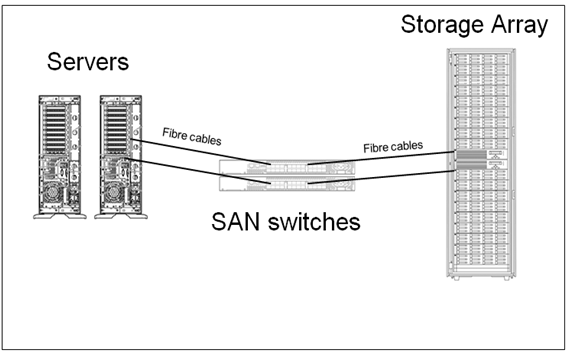
In terms of disk infrastructure and latency aspects, most organisation’s utilise a Storage Area Network (SAN) topology. I previously mentioned the idea of RAID configurations that make use of multiple disks to improve latency (among other things). SANs take the RAID idea and abstracts it further as shown below.

image

(credit for this image is Orbis solutions: http://orbissolutionsinc.com/blog/tag/storage-arrays/)

I sometimes describe SANs to people as a “fridge full of hard drives connected to multiple servers”. What the above diagram shows is that the disks are physically not connected to the servers that use them. Instead they are connected to a storage array via cables, with a switch or three in between. Each server has some disk space reserved for it on the SAN. So the result is we have one centralised high performing disk array where we can take advantage of all of the disks housed within.

But it’s important to understand here that each time data is read from or written to disk, it passes across those cables and through the switches. Like an internet connection, the SAN switch and cables not only have bandwidth limitations, but are prone to misconfiguration. Imagine 50 servers writing data at the same time. If things are not well configured, the SAN switch infrastructure might become overwhelmed like a freeway during peak hour. Direct attached storage (i.e. – the hard drive or RAID array is plugged into the server directly) typically have a higher bandwidth. This quote from a nice sqlteam.com article on SAN performance explains it well.

For instance, if a server is equipped with two older 1-Gbps host bus adapters (HBAs), its MBps throughput would be capped at about 200MB per second no matter how powerful the rest of the SAN is. Replacing the 1-Gbps HBAs with two newer 4-Gbps HBAs or adding more HBAs may improve the throughput, if the HBAs are indeed the throughput bottleneck. But the SAN drive throughput could also be limited by the maximum throughput of the inter-switch links in the SAN switched fabric. Further down the I/O paths, the front-side adapter ports on the disk array, the cache in the disk array, the disk controllers, and the disk spindles can all become the bottleneck limiting the MBps throughput of the SAN drive.

Conclusion and coming next…

Okay… at this point let’s take a breather. For the tech guys reading this post, none of what I covered may seem particularly earth shattering, but it was important to set the context for a deeper dive into disk latency in the next couple of posts. If you are not normally of the tech persuasion, then I hope that this post has opened your eyes a little to just how complicated deployments can be and accordingly, how hard it can sometimes be to pinpoint latency issues when they occur.

In the next post, we will take a deeper look at disk latency and its relationship to the indicators of IOPS and MBPS. We will then examine tools to measure latency and how to best use it as a lead indicator.

Until then, thanks for reading and be sure to check out my recent business book “The Heretics Guide to Best Practices

Paul Culmsee

www.sevensigma.com.au


I’m published in a PM Journal

Hi all

Just a quick note for those of you who are of the academic persuasion or who have an interest in research and academic literature. Kailash and I wrote a paper for the International Journal for Managing Projects in Business. The article is called “Towards a holding environment: building shared understanding and commitment in projects”. The paper is about how to improve shared understanding on projects – particularly at the early stages where ambiguity around objectives tends to be at its highest. While it covers a similar territory to the Heretics Guide, it covers some literature that we did not use for the book. Plus it is peer reviewed of course.

This paper presents a viewpoint on how to build a shared understanding of project goals and a shared commitment to achieving them. One of the ways to achieve shared understanding is through open dialogue, free from political and other constraints. In this paper (and in the Heretics Book) we flesh out what it takes for this to happen and call an environment which fosters such dialogue a holding environment. We illustrate, via a case study:

  1. How an alliance-based approach to projects can foster a holding environment.
  2. The use of argument visualisation tools such as IBIS (Issue-Based Information System) to clarify different points of view and options within such an environment.

This was my first experience with the peer review process of writing a journal paper. I have to say that, despite the odd bit of teeth gnashing, the review process did make this paper much better than it originally was. Of course, none of this would have even happened without Kailash. This was definitely his baby, and this paper would not exist without his intellect and wide-ranging knowledge.

Thanks for reading

Paul Culmsee

www.hereticsguidebooks.com


An opportunity to learn about aligning SharePoint to business goals in Vancouver

Hi all

Just a quick note to mention that I’m off travelling again, this time swapping 39 degree Celsius summer weather of Perth for somewhere between –6 to 5 degrees of Canada. I’ll be spending a week in Canada running two classes – one public and one private. The first class is a public SharePoint Governance and Information Architecture class running in Vancouver. MVP Michal Pisarek of SharePointAnalystHQ fame will be there and it should be a terrific two days of learning how to think a little differently to govern SharePoint strategy and deployment. You will learn a bunch of new skills, techniques and perspectives. Best of all, the skills learnt are applicable for many other types of complex projects.

The class flyer is here: http://www.sevensigma.com.au/wp-content/uploads/downloads/2011/02/SPIA.pdf

The registration site is here: http://spiavancouver.eventbrite.com/

In terms of course coverage and content it is worth noting the research performed by the Eventful group (who run the Share conferences). According to them, the hot topic areas for SharePoint are governance, user adoption, change management, information architecture and user empowerment. These sort of topics are the sort where plenty of people tell you what the issues are, but are typically lighter on what to do about them. This class covers why this is, as well as dealing with all of these areas and presents detailed strategies, tools and methods to address them. Furthermore, aside from the 500+ page manual of meaty governance goodness, as a take home, we supply a CD for attendees with a sample performance framework, governance plan, SharePoint ROI calculator and sample mind maps of Information Architecture.

At last count there were 5 places left for the Vancouver class, so if you have been pondering if it is a worthwhile class, check out some of the feedback from the class web site. Also, if you know anybody who might be interested in attending, please pass the course flyer and registration site details to them. We always end up with people who tell us “Ah – if only I knew about the class!!”

Thanks for reading

Paul Culmsee

www.sevensigma.com.au

www.hereticsguidebooks.com


The cloud isn’t the problem–Part 5: Server huggers and a crisis of identity

Hi all

Welcome to my fifth post that delves into the irrational world of cloud computing. After examining the not-so-obvious aspects of Microsoft, Amazon and the industry more broadly, its time to shift focus a little. Now the appeal of the cloud really depends on your perspective. To me, there are three basic motivations for getting in on the act…

  1. I can make a buck
  2. I can save a buck
  3. I can save a buck (and while I am at it, escape my pain-in-the-ass IT department)

If you haven’t guessed it, this post will examine #3, and look at what the cloud means for the the perennial issue of the IT department and business disconnect. I recently read an article over at CIO magazine where they coined the term “Server Huggers” to describe the phenomenon I am about to describe. So to set the flavour for this discussion, let me tell you about the biggest secret in organisational life…

We all have an identity crisis (so get over it).

In organizations, there are roles that I would call transactional (i.e. governed by process and clear KPI’s) and those that are knowledge-based (governed by gut feel and insight). Whilst most roles actually entail both of these elements, most of us in SharePoint land are the latter. In fact we actually spend a lot of time in meeting rooms “strategizing” the solutions that our more transactionally focused colleagues will be using to meet their KPI’s. Beyond SharePoint, this also applies to Business Analysts, Information Architects, Enterprise Architects, Project Managers and pretty much anyone with the word “senior”, “architect”, “analyst”  or “strategic” in their job title.

But there is a big, fat, elephant in the “strategizing room” of certain knowledge worker roles that is at the root of some irrational organisational behaviour. Many of us are suffering a role-based identity crisis. To explain this, lets pick a straw-man example of one of the most conflicted roles of all right now: Information Architects.

One challenge with the craft of IA is pace of change, since IA today looks very different from its library and taxonomic roots. Undoubtedly, it will look very different ten years from now too as it gets assailed from various other roles and perspectives, each believing their version of rightness is more right. Consider this slightly abridged quote from Joshua Porter:

Worse, the term “information architecture” has over time come to encompass, as suggested by its principal promoters, nearly every facet of not just web design, but Design itself. Nowhere is this more apparent than in the latest update of Rosenfeld and Morville’s O’Reilly title, where the definition has become so expansive that there is now little left that isn’t information architecture […] In addition, the authors can’t seem to make up their minds about what IA actually is […] (a similar affliction pervades the SIGIA mailing list, which has become infamous for never-ending definition battles.) This is not just academic waffling, but evidence of a term too broadly defined. Many disciplines often reach out beyond their initial borders, after catching on and gaining converts, but IA is going to the extreme. One technologist and designer I know even referred to this ever-growing set of definitions as the “IA land-grab”, referring to the tendency that all things Design are being redefined as IA.

You can tell when a role is suffering an identity crisis rather easily too. It is when people with the current role start to muse that the title no longer reflects what they do and call for new roles to better reflect the environment they find themselves in. Evidence for this exists further in Porter’s post. Check out the line I marked with bold below:

In addition, this shift is already happening to information architects, who, recognizing that information is only a byproduct of activity, increasingly adopt a different job title. Most are moving toward something in the realm of “user experience”, which is probably a good thing because it has the rigor of focusing on the user’s actual experience. Also, this as an inevitable move, given that most IAs are concerned about designing great things. IA Scott Weisbrod, sees this happening too: “People who once identified themselves as Information Architects are now looking for more meaningful expressions to describe what they do – whether it’s interaction architect or experience designer

So while I used the example of Information Architects as an example of how pace of change causes an identity crisis, the advent of the cloud doesn’t actually cause too many IA’s (or whatever they choose to call themselves) to lose too much sleep. But there are other knowledge-worker roles that have not really felt the effects of change in the same way as their IA cousins. In fact, for the better part of twenty years one group have actually benefited greatly from pace of change. Only now is the ground under their feet starting to shift, and the resulting behaviours are starting to reflect the emergence of an identity crisis that some would say is long overdue.

IT Departments and the cloud

At a SharePoint Saturday in 2011, I was on a panel and we were asked by an attendee what effect Office 365 and other cloud based solutions might have on a traditional IT infrastructure role. This person asking was an infrastructure guy and his question was essentially around how his role might change as cloud solutions becomes more and more mainstream. Of course, all of the SharePoint nerds on the panel didn’t want to touch that question with a bargepole and all heads turned to me since apparently I am “the business guy”. My reply was that he was sensing a change – commoditisation of certain aspects of IT roles. Did that mean he was going to lose his job? Unlikely, but nevertheless when  change is upon us, many of us tend to place more value on what we will lose compared to what we will gain. Our defence mechanisms kick in.

But lets take this a little further: The average tech guy comes in two main personas. The first is the tech-cowboy who documents nothing, half completes projects then loses interest, is oblivious to how much they are in over their head and generally gives IT a bad name. They usually have a lot of intellectual intelligence (IQ), but not so much emotional intelligence (EQ). Ben Curry once referred to this group as “dumb smart guys.” The second persona is the conspiracy theorist who had to clean up after such a cowboy. This person usually has more skills and knowledge than the first guy, writes documentation and generally keeps things running well. Unfortunately, they also can give IT a bad name. This is because, after having to pick up the pieces of something not of their doing, they tend to develop a mother hen reflex based on a pathological fear of being paged at 9pm to come in and recover something they had no part in causing. The aforementioned cowboys rarely last the distance and therefore over time, IT departments begin to act as risk minimisers, rather than business enablers.

Now IT departments will never see it this way of course, instead believing that they enable the business because of their risk minimisation. Having spent 20 years being a paranoid conspiracy theorist, security-type IT guy, I totally get why this happens as I was the living embodiment of this attitude for a long time. Technology is getting insanely complex while users innate ability to do some really risky and dumb is increasing. Obviously, such risk needs to be managed and accordingly, a common characteristic of such an IT department is the word “no” to pretty much any question that involves introducing something new (banning iPads or espousing the evils of DropBox are the best examples I can think of right now). When I wrote about this issue in the context of SharePoint user adoption back in 2008, I had this to say:

The mother hen reflex should be understood and not ridiculed, as it is often the user’s past actions that has created the reflex. But once ingrained, the reflex can start to stifle productivity in many different ways. For example, for an employee not being able to operate at full efficiency because they are waiting 2 days for a helpdesk request to be actioned is simply not smart business. Worse still, a vicious circle emerges. Frustrated with a lack of response, the user will take matters into their own hands to improve their efficiency. But this simply plays into the hands of the mother hen reflex and for IT this reinforces the reason why such controls are needed. You just can’t trust those dog-gone users! More controls required!

The long term legacy of increasing technical complexity and risk is that IT departments become slow-moving and find it difficult to react to pace of change. Witness the number of organisations still running parts of their business on Office 2003, IE6 and Windows XP. The rest of the organisation starts to resent using old tools and the imposition of process and structure for no tangible gain. The IT department develops a reputation of being difficult to deal with and taking ages to get anything done. This disconnect begins to fester, and little by little both IT and “the business” develop a rose-tinged view of themselves (which is known as groupthink) and a misguided perception of the other.

At the end of the day though, irrespective of logic or who has the moral high ground in the debate, an IT department with a poor reputation will eventually lose. This is because IT is no longer seen as a business enabler, but as a cost-center. Just as organisations did with the IT outsourcing fad over the last decade, organisational decision makers will read CIO magazine articles about server huggers look longingly to the cloud, as applications become more sophisticated and more and more traditional vendors move into the space, thus legitimising it. IT will be viewed, however unfairly, as a burden where the cost is not worth the value realised. All the while, to conservative IT, the cloud represents some of their worst fears realised. Risk! risk! risk! Then the vicious circle of the mother-hen reflex will continue because rogue cloud applications will be commissioned without IT knowledge or approval. Now we are back to the bad old days of rogue MSAccess or SharePoint deployments that drives the call for control based governance in the first place!

<nerd interlude>

Now to the nerds reading this post who find it incredibly frustrating that their organisation will happily pump money into some cloud-based flight of fancy, but whine when you want to upgrade the network, I want you to take take note of this paragraph as it is really (really) important! I will tell you the simple reason why people are more willing to spend more money on fluffy marketing than IT. In the eyes of a manager who needs to make a profit, sponsoring a conference or making the reception area look nice is seen as revenue generating. Those who sign the cheques do not like to spend capital on stuff unless they can see that it directly contributes to revenue generation! Accordingly, a bunch of servers (and for that matter, a server room) are often not considered expenditure that generates revenue but are instead considered overhead! Overhead is something that any smart organisation strives to reduce to remain competitive. The moral of the story? Stop arguing cloud vs. internal on what direct costs are incurred because people will not care! You would do much better to demonstrate to your decision makers that IT is not an overhead. Depending on how strong your mother hen reflex is and how long it has been in place, that might be an uphill battle.

</nerd interlude>

Defence mechanisms…

Like the poor old Information Architect, the rules of the game are changing for IT with regards to cloud solutions. I am not sure how it will play out, but I am already starting to see the defence mechanisms kicking in. There was a CIO interviewed in the “Server Huggers” article that I referred to earlier (Scott Martin) who was hugely pro-cloud. He suggested that many CIO’s are seeing cloud solutions as a threat to the empire they have built:

I feel like a lot of CIOs are in the process of a kind of empire building.  IT empire builders believe that maintaining in-house services helps justify their importance to the company. Those kinds of things are really irrational and not in the best interest of the company […] there are CEO’s who don’t know anything about technology, so their trusted advisor is the guy trying to protect his job.

A client of mine in Sydney told me he enquired to his IT department about the use of hosted SharePoint for a multi-organisational project and the reply back was a giant “hell no,” based primarily on fear, uncertainty and doubt. With IT, such FUD is always cloaked in areas of quite genuine risk. There *are* many core questions that we must ask cloud vendors when taking the plunge because to not do so would be remiss (I will end this post with some of those questions). But the key issue is whether the real underlying reason behind those questions is to shut down the debate or to genuinely understand the risks and implications of moving to the cloud.

How can you tell an IT department is likely using a FUD defence? Actually, it is pretty easily because conservative IT is very predictable – they will likely try and hit you with what they think is their slam-dunk counter argument first up. Therefore, they will attempt to bury the discussion with the US Patriot Act Issue. I’ve come across this issue and and Mark Miller at FPWeb mentioned to me that this comes up all the time when they talk about SharePoint hosting to clients. (I am going to cover the Patriot Act issue in the next post because it warrants a dedicated post).

If the Patriot Act argument fails to dent unbridled cloud enthusiasm, the next layer of defence is to highlight cloud based security (identity, authentication and compliance) as well as downtime risk, citing examples such as the September outage of Office 365, SalesForce.com’s well publicized outages, the Amazon outage that took out Twitter, Reddit, Foursquare, Turntable.fm, Netflix and many, many others. The fact that many IT departments do not actually have the level of governance and assurance of their systems that they aspire to will be conveniently overlooked. 

Failing that, the last line of defence is to call into question the commercial viability of cloud providers. We talked about the issues facing the smaller players in the last post, but It is not just them. What if the provider decides to change direction and discontinue a service? Google will likely be cited, since it has a habit of axing cloud based services that don’t reach enough critical mass (the most recent casualty is Google health being retired as I write this).  The risk of a cloud provider going out of business or withdrawing a service is a much more serious risk than when a software supplier fails. At least when its on premise you still have the application running and can use it.

Every FUD defence is based on truth…

Now as I stated above, all of the concerns listed above are genuine things to consider before embarking on a cloud strategy. Prudent business managers and CIOs must weigh the pros and cons of cloud offering before rushing into a deployment that may not be appropriate for their organisation. Equally though, its important to be able to see through a FUD defence when its presented. The easiest way to do this is do some of your own investigations first.

To that end, you can save yourself a heap of time by checking out the work of Richard Harbridge. Richard did a terrific cloud talk at the most recent Share 2011 conference. You can view his slide deck here and I recommend really going through slides 48-81. He has provided a really comprehensive summary of considerations and questions to ask. Among other things, he offered a list of questions that any organisation should be asking providers of cloud services. I have listed some of them below and encourage you to check out his slide deck as it is really comprehensive and covers way more than what I have covered here.

Security Storage Identity & Access
Who will have access to my data?
Do I have full ownership of my data?
What type of employee / contractor screening you do, before you hire them?
How do you detect if an application is being attacked (hacked), and how is that
reported to me and my employees?
How do you govern administrator access to the service?
What firewalls and anti-virus technology are in place?
What controls do you have in place to ensure safety for my data while it is
stored in your environment?
What happens to my data if I cancel my service?
Can I archive environments?
Will my data be replicated to any other datacenters around the world (If
yes, then which ones)?
Do you offer single sign-on for your services?
Active directory integration?
Do all of my users have to rely on solely web based tools?
Can users work offline?
Do you offer a way for me to run your application locally and how quickly I can revert to the local installation?
Do you offer on-premise, web-based, or mixed environments?
     
Reliability & Support Performance  
What is your Disaster Recovery and Business Continuity strategy?
What is the retention period and recovery granularity?
Is your Cloud Computing service compliant with [insert compliance regime here]?
What measures do you provide to assist compliance and minimize legal risk?
What types of support do you offer?
How do you ensure we are not affected by upgrades to the service?
What are your SLAs and how do you compensate when it is not met?
How fast is the local network?
What is the storage architecture?
How many locations do you have and how are they connected?
Have you published any benchmark scores for your infrastructure?
What happens when there is over subscription?
How can I ensure CPU and memory are guaranteed?
 

Conclusion and looking forward…

For some organisations, the lure of cloud solutions is very seductive. From a revenue perspective, it saves a lot of capital expenditure. From a time perspective, it can be deployed very quickly and and from a maintenance perspective, takes the burden away from IT. Sounds like a winner when put that way. But the real issue is that the changing cloud paradigm potentially impacts the wellbeing of some IT professionals and IT departments because it calls into question certain patterns and practices within established roles. It also represents a loss of control and as I said earlier, people often place a higher value on what they will lose compared to what they will gain.

Irrespective of this, whether you are a new age cloud loving CIO or a server hugger, any decision to move to the cloud should be about real business outcomes. Don’t blindly accept what the sales guy tells you. Understand the risks as well as the benefits. Leverage the work Richard has done and ask the cloud providers the hard questions. Look for real world stories (like my second and third articles in this series) which illustrate where the services have let people down.

For some, cloud will be very successful. For others, the gap between expectations and reality will come with a thud.

Thanks for reading

Paul Culmsee

www.sevensigma.com.au

www.hereticsguidebooks.com


Why can’t people find stuff on the intranet?–Final summary

Hi

Those of you who get an RSS feed of this blog might have noticed it was busy over last week. This is because I pushed out 4 blog posts that showed my analysis using IBIS of a detailed linear discussion on LinkedIn. To save people getting lost in the analysis, I thought I’d quickly post a bit of an executive summary from the exercise.

To set context, Issue Mapping is a technique of visually capturing rationale. It is graphically represented using a simple, but powerful, visual structure called IBIS (Issue Based Information System). IBIS allows all elements and rationale of a conversation to be captured in a manner that can be easily reflected upon. Unlike prose, which is linear, the advantage of visually representing argument structure is it helps people to form a better mental model of the nature of a problem or issue. Even better, when captured this way, makes it significantly easier to identify emergent themes or key aspects to an issue.

You can find out all about IBIS and Dialogue Mapping in my new book, at the Cognexus site or the other articles on my blog.

The challenge…

On the Intranet Professionals group on LinkedIn recently, the following question was asked:

What are the main three reasons users cannot find the content they were looking for on intranet?

In all, there were more than 60 responses from various people with some really valuable input. I decided that it might be an interesting experiment to capture this discussion using the IBIS notion to see if it makes it easier for people to understand the depth of the issue/discussion and reach a synthesis of root causes.

I wrote 4 posts, each building on the last, until I had covered the full conversation. For each post, I supplied an analysis of how I created the IBIS map and then exported the maps themselves. You can follow those below:

Part 1 analysis: http://www.cleverworkarounds.com/2012/01/15/why-cant-users-find-stuff-on-the-intranet-in-ibis-synthesispart-1/
Part 2 analysis: http://www.cleverworkarounds.com/2012/01/15/why-cant-users-find-stuff-on-the-intranet-an-ibis-synthesispart-2/
Part 3 analysis: http://www.cleverworkarounds.com/2012/01/16/why-cant-users-find-stuff-on-the-intranet-an-ibis-synthesispart-3/
Part 4 analysis: http://www.cleverworkarounds.com/2012/01/16/why-cant-users-find-stuff-on-the-intranet-an-ibis-synthesispart-4/

Final map: http://www.cleverworkarounds.com/maps/findstuffpart4/Linkedin_Discussion__192168031326631637693.html

For what its worth, the summary of themes from the discussion was that there were 5 main reasons for users not finding what they are looking for on the intranet.

  1. Poor information architecture
  2. Issues with the content itself
  3. People and change aspects
  4. Inadequate governance
  5. Lack of user-centred design

Within these areas or “meta-themes” there were varied sub issues. These are captured in the table below.

Poor information architecture Issues with content People and change aspects Inadequate governance Lack of user-centred design
Vocabulary and labelling issues

· Inconsistent vocabulary and acronyms

· Not using the vocabulary of users

· Documents have no naming convention

Poor navigation

Lack of metadata

· Tagging does not come naturally to employees

Poor structure of data

· Organisation structure focus instead of user task focussed

· The intranet’s lazy over-reliance on search

Old content not deleted

Too much information of little value

Duplicate or “near duplicate” content

Information does not exist or an unrecognisable form

People with different backgrounds, language, education and bias’ all creating content

Too much “hard drive” thinking

People not knowing what they want

Lack of motivation for contributors to make information easier to use

Google inspired inflated expectations on search functionality on intranet

Adopting social media from a hype driven motivation

Lack of governance/training around metadata and tagging

Not regularly reviewing search analytics

Poor and/or low cost search engine is deployed

Search engine is not set up properly or used to full potential

Lack of “before the fact” coordination with business communications and training

Comms and intranet don’t listen and learn from all levels of the business.

Ambiguous, under-resourced or misplaced Intranet ownership

The wrong content is being managed

There are easier alternatives available

Content is structured according to the view of the owners rather than the audience

Not accounting for two types of visitors… task-driven and browse-based

No social aspects to search

Not making the search box available enough

A failure to offer an entry level view

Not accounting for people who do not know what they are looking for versus those who do

Not soliciting feedback from a user on a failed search about what was being looked for

So now you have seen the final output, be sure to visit the maps and analysis and read about the journey on how this table emerged. One thing is for sure, it sure took me a hell of a lot longer to write about it than to actually do it!

Thanks for reading

Paul Culmsee

www.sevensigma.com.au

www.hereticsguidebooks.com


The cloud isn’t the problem–Part 2: When complex technology meets process…

Hi all

Welcome to my second post that delves into the irrational world of cloud computing. In the first post, I described my first foray into the world of web hosting, which started way back in 2000. Back then I was more naive than I am now (although when it comes to predicting the future I am as naive as anybody else.) I concluded Part 1 by asserting that cloud computing is an adaptive change. We are going to explore the effects of this and the challenges it poses in the next few posts.

Adaptive change occurs in a number of areas, including the companies providing a cloud application – especially if on-premise has been the basis of their existence previously. To that end, I’d like to tell you an Office 365 fail story and then see what lessons we can draw from it.

Office 365 and Software as a Service…

For those who have ignored the hype, Office 365 known in cloud speak as “Software as a Service” (SaaS). Basically one gets SharePoint, Exchange mail, web versions of Office Applications and Lync all bundled up together. In Office 365, SharePoint is not run on-premise at all, and instead it is all run from Microsoft servers in a subscription arrangement. Once a month you pay Microsoft for the number of users using the service and the world is a happy place.

Office 365, like many SaaS models, keeps much of the complexity of managing SharePoint in the hands of Microsoft. A few years back, Office 365 would have been described in hosting terms as a managed service. Like all managed services, one sacrifices a certain level of control by outsourcing the accompanying complexity. You do not manage or control the underlying cloud infrastructure including network, servers, operating systems, SharePoint farm settings or storage. Furthermore, limited custom code will run on Office 365, because developers do not have back-end access. Only sandbox solutions are available, and even then, there are some additional limitations when compared to on-premise sandbox solutions. You have limited control of SharePoint service applications too, so the best way to think about Office 365 is that your administrative control extends to the site collection level (this is not actually true but suffices for this series.)

One key reason why its hard to get feature parity between on-premise and SaaS equivalents is because many SaaS architectures are based around the concept of multitenancy. If you have heard this word bandied about in SharePoint land is because it is something that is supported in SharePoint 2010. But the concept extends to the majority of SaaS providers. To understand it, imagine an swanky office building in the up-market part of town. It has a bunch of companies that rent out office space and are therefore tenants. No tenant can afford an entire building, so they all lease office space from the building and enjoy certain economies of scale like a great location, good parking, security and so on. This does have a trade-off though. The tenants have to abide by certain restrictions. An individual tenant can’t just go and paint the building green because it matches their branding. Since the building is a shared resource, it is unlikely the other tenants would approve.

Multi tenancy allows the SaaS vendor to support multiple customers with a single platform. The advantages of this model is economies of scale, but the trade-off is the aforementioned customisation flexibility. SaaS vendors will talk up this by telling you that SaaS applications can be updated more frequently than on-premise software, since there is less customisation complexity from each individual customer. While that’s true, it nevertheless means a loss of control or choice in areas like data security, integration with on-premise systems, latency and flexibility of the application to accommodate change as an organisation grows.

A small example of the restricting effect of multi-tenancy is when you upload a PDF into a SharePoint document library in Office 365. You cannot open the PDF in the browser and instead you are prompted to save it locally. This is because of a well-known issue with a security feature that was added to IE8. In the on-premise SharePoint world, you can modify the behaviour by changing the “Browser File Handling” option in the settings of the affected Web Application. But with Office 365, you have to live with it (or use a less than elegant workaround) because you do not have any access at a web application level to change the behaviour. Changing it will affect any tenants serviced by that web application.

Minor annoyances aside, if you are a small organisation or you need to mobilise quickly on a project with a geographically dispersed team, Office 365 is a very sweet offering. It is powerful and integrated, and while not fully featured compared to on-premise SharePoint, it is nonetheless impressive. One can move very quickly and be ready to go with within one or two business days – that is, if you don’t make a typo…

How a typo caused the world to cave in…

A while back, I was part of a geographically dispersed, multi-organisation team that needed a collaborative portal for around a year. Given the project team was distributed across varying organisations, various parts of Australia, the fact that one of the key stakeholders had suggested SharePoint, and the fact that Office 365 behaved much better than Google apps behind overly paranoid proxy servers of participating organisations, Office 365 seemed ideal and we resolved to use it. I signed up to a Microsoft Office 365 E3 service.

Now when I say sign up, Microsoft uses Telstra in Australia as their Office 365 partner, so I was directed to Telstra’s sign up site. My first hint of trouble to come was when I was asked to re-enter my email address in the signup field. Through some JavaScript wizard no doubt, I was unable to copy/paste my email address into the confirmation field. They actually made me re-type it. “Hmm” I thought, “they must really be interested in data validation. At least it reduces the chance that people do not copy/paste the wrong information into a critical field.” I also noted that there was also some nice JavaScript that suggested the strength of the password chosen as it was typed.

But that’s where the fun ended. Soon after entering the necessary detail, and obligatory payment details, I am asked to enter a mysterious thing listed only as an Organization Level Attribute and more specifically, “Microsoft Online Services Company Identifier.” Checking the question mark icon tells me that it is “used to create your Microsoft Online Services account identity.”
image

I wondered if this was the domain name for the site, as there was no descriptive indicator as to the significance of this code. For all I knew, it could be a Microsoft admin code or accounting code. Nevertheless I assumed it was the domain name because I just had a feeling it was. So I entered my online identity and away I went. I got a friendly email message to say things were in motion and I waited my obligatory hour or so for things to provision.

The inbox sound chimes and I received two emails. One told me I now have a “Telstra t-Suite account” and the other is entitled “Registration confirmation from Microsoft online.” I was thanked for purchasing and the email stated that “the services are managed via Microsoft Online Portal (MOP), a separate portal to the Telstra T-Suite Management Console.” I had no idea what the Telstra T-Suite Management Console was at this point, but I was invited to log into the Microsoft Online Portal with a supplied username and password.

At this point I swore…I could see by my username, that I made a typo in the Microsoft Online Services Company Identifier. Username: admin@SampleProjject.onmicrosoft.com – which means I typed in “SampleProjject” instead of “SampleProject” (Aargh!)

The saga begins…

Swearing at my dyslexic typing, I logged a support call to Telstra in the faint hope that I can change this before it’s too late… Below is the anonymised mail I sent:

“Hiya

In relation to the order below I accidentally set SampleProjject as the identifier when it should be SampleProject. Can this be rectified before things are commissioned?

Thanks

Paul”

Another hour passed by and my inbox chimed again with a completely unsurprising reply to my query.

“Hi Paul , sorry but company identifier can not be changed because it is used to identify the account in Office 365 database.”

Cursing once again at my own lack of checking, I cannot help but shake my head in that while I was forced to type in my email address twice (and with cut and paste disabled) when I signed up to Office 365, I was given no opportunity to verify the Microsoft Online Services Company Identifier (henceforth known as MOSI) before giving the final go-ahead. Surely this identifier is just as important as the email address? Therefore, why not ask for it to be entered twice or visually make it clear what the purpose of this identifier is? Then dumb users like me would get a second chance before opening the hellgate, unleashing forces that can never be contained.

At the end of the day though, the fault was mine so while I think Telstra could do better with their validation and conveying the significance of the MOSI, I caused the issue.

Forces are unleashed…

So I log into Telstra’s t-suite system and try and locate my helpdesk call entry. The t-suite site, although not SharePoint, has a bit of a web part feel about it – only like when you have fixed the height of a web part far too small. It turned out that their site doesn’t handle IE9 well. If you look closely the “my helpdesk cases” and “my service access” are collapsed to the point that I can’t actually see anything. So I tried Chrome and was able to operate the portal like a normal person would. My teeth gnashed once more…
image  image

Finally, being able to take an action, I open my support request and ask the following:

*** NOTES created by Paul Culmsee
Can I cancel this account and re provision? A typo was made when the MOSI was entered.  The domain name is incorrect for the site.

A few emails went back and forth and I received a confirmation that the account is cancelled. I then return to the Office 365 site and re-apply for an E3 service. This time I triple checked my spelling of the MOSI and clicked “proceed.” I received an email that thanked me for my application and that I should receive a provisioning notification within an hour or so.

So I wait…

and wait…

and wait…

and wait…

24 hours went by and I received no notification of the E3 service being provisioned. I log into Telstra’s t-suite and log a new call, asking when things will be provisioned. Here is what I asked…

Hi there, I have had no notification of this being provisioned from Microsoft. Surely this should be done by now?

In typical level 1 helpdesk fashion, the guy on the other end did not actually read what I wrote. He clearly missed the word “no”

Hi Paul,

that’s affirmative. Your T-Suite order has been provisioned. As per the instructions in the welcome email you can follow the links to log in to portal.

Contact me on 1800TSUITE Option 2.3 to discuss it further. I’ll keep this case open for a week.

*sigh* – this sort of bad level 1 email support actually does a lot of damage to the reputation of the organisation so I mail back…

But I received no welcome email from Microsoft with the online password details… I have no means to log into the portal

This inane exchange costs me half a day, so I took Telstra’s friendly advice and contacted them “on 1800TSUITE Option 2.3 to discuss it further.” I got a pretty good tech who realised there indeed was a problem. He told me he would look into it and I thanked him for his time. Sometime later he called back and advised me that something was messed up in the provisioning process and that the easiest thing to do, was for him to delete my most recent E3 application, and for me to sign up from scratch using a totally different email address and a totally new MOSI. Somehow, either Telstra’s or Microsoft’s systems had associated my email address and MOSI with the original, failed attempt to sign up (the one with the typo), and it was causing the provisioning process to have an exception somewhere along the line.

In hearing this, I can imagine some giant PowerShell provisioning script with dodgy exception handling getting halfway through and then dying on them. So I was happy to follow the tech’s advice went through the entire Office 365 sign up process from the very beginning again (this is the third time). This time I used a fresh email address and quadruple checked all of the fields before I provisioned. Eureka! This time things worked as planned. I received all the right confirmation emails and I was able to sign into the Microsoft online portal. From there I created user accounts, provisioned a SharePoint site collection and we were ready to rock and roll. Although the entire saga ended up taking 5 business days from start to finish, I have my portal and the project team got down to business.

Now for what it’s worth, it should be noted that if you are an integrator or are in the business of managing multiple Office 365 services, Telstra requires a different email address to be used for each Office 365 service you purchase. One cannot have an alias like provision@myoffice365supportprovider as the general account used to provision multiple E1-E4 services. Each needs its own t-suite account with a different email address.

Plunged into darkness…

Things hummed along for a couple of months with no hiccups. We received an invoice for the service by email, and then a couple of days later, received a mail to confirm that in fact the invoice has been automatically paid via credit card. For our purposes, Office 365 was a really terrific solution and the project team really liked it and were getting a lot of value out off it.

I then had to travel overseas and while I was gone, suddenly the project team were unable to login to the portal. They would receive a “subscription expired” message when attempting to login. Now this was pretty serious as a project team was coming to an important deadline and now no-one could log in.  We checked the VISA records and it seemed that the latest invoice had not been deducted from the account as there was still a balance owing. Since I was in overseas, one of my colleagues immediately called up Telstra support (it was now after hours in Perth) and was stuck in a queue for an hour and then ended up speaking to two support people. After all of the fuss with the provisioning issues around the MOSI and my typo, it seemed that Telstra support didn’t actually know what a MOSI was in any event. This is what my colleague said:

I was asked for an account number straight away both times, and I explained that I didn’t have one, but I did have the invoice number in question, and that this was a Microsoft Office 365 subscription. They were still unable to locate the account or invoice. I then gave them the MOSI, thinking this would help. Unfortunately, they both had no idea what I was talking about! I explained that users were unable to login to the site with a ‘subscription expired’ error message. I also explained the fact that the VISA had not been processed for this period (although it was fine in the last period).

Both support staff could not access the Office 365 subscription information (even after I gave them our company name). Because I called after hours, t-suite department was not available. The two staff I talked to could not access the account, so could not pull up any of the relevant details. It turns out that after business hours, Telstra redirect t-suite support to the mobile and phones department. The first support person passed me onto technical but the transfer was rerouted to the original call menu – so I went through the whole thing again, press x for this, press x for that, etc. The second time round, I explained it all over again. The tech assured me that it couldn’t be a billing issue and that Telstra generally would not suspend an account because of a few days late payment. If that was the case, prior to suspension, Telstra would send out an email to notify customers of overdue payment. I told him that no such email had been sent. He then said that it would most likely be a technical problem and would have to be dealt with the next day as the T-suite department would not be available til next morning between office hours 9-5pm EST.

I hung up frustrated, no closer to solving the problem after two hours on the phone.

My colleague then got up early and called Telstra at 6am the next day (9am EST is 3 hours ahead of Perth time). She explained the situation again to Telstra t-suite support person all over again. Here again is the words of my colleague:

The first person who took my call (who I will call “girl one”) couldn’t give me an answer and said she’d get someone to call back, and in the meantime she’d check with another department for me. She put me on hold and during this time the call was re-routed back to the original menu when you first call. I thought that instead of waiting for a call that I may not receive soon as this was an emergency, I went through the menu again. This time I got “girl two” and explained the whole thing *again*. I got her to double check that the E3 subscription was set to automatically deduct from the VISA supplied – yes, it was. She noticed that it said 0 licenses available. She told me that she was not sure what that was all about, so would log a call with Microsoft. Girl two advised me that it could take any time between an hour to a few days for a response from Microsoft.

I then got a call from Telstra (girl three) on the cell-phone just after I finished with girl two. This was the person who girl one promised would call back. I told her what I’d gone through with all support staff so far, and that “girl two” was going to log a call with Microsoft. Girl three, like girl two, noticed the 0 licenses available. She wasn’t sure that it was because there were none to begin with or that there were no more available. I stated that the site had been working fine till yesterday. I explained that no one could access the site and that they all got the same message. Same as girl two, girl three advised that she would also log a call with Microsoft. Again, I was told that it could take up to several days before I could get a reply.

Half an hour later, we received an email from Telstra t-suite support. It stated the following:

Case Number: xxxxxxxx-xxxxxxx

Case Subject: subscription has expired for all users

I checked your account info and invoices. The invoice xxxxx paid for 01 Oct to 01 Nov was for company ID SampleProjject not SampleProject. Please call billing department to change it for you.

With this email, we now knew that the core problem here was related to billing in some way. As far as we had been told, Telstra had deleted the original two failed Office 365 subscriptions, but apparently not from their billing systems. The bill was paid against a phantom E3 service – the deleted one called “SampleProjject”. Accordingly the live service had expired and users were locked out of the system.

As instructed in the above email, my colleague called up t-suite billing (there was a phone number on the invoice). In her words:

Once again, the support person asked for the account number to which I said I didn’t have one. I offered him the invoice number and the MOSI, thinking someone’s got to know what it was since it was ‘used to identify the account in Office 365 database.’ He stated he could not ‘pull up an account with the MOSI’ and said something to the effect that he didn’t know what the MOSI ‘was all about’. He asked what company registered the service and I gave him our details. He immediately saw several ‘accounts’ in the billing system related to our company. He noted that the production E3 was a trial subscription and the trial had now expired and he surmised that the problem was most likely due to that fact. I queried why this was the case when the payment subscription was set to automatically deduct from the supplied visa account. He told me that as going from trial to production was a sales thing, I would have to speak to t-suite sales department. He also added that we were lucky because there was a risk that the mistakenly expired E3 service could have been deleted from Office 365.

I called up sales and finally, they were able to correct the problem.

So after a long, stressful and chaotic evening and morning, Armageddon was averted and the portal users were able to log in again.

Reflections…

This whole story started from something seemingly innocuous – a typo that I made on a poorly described text box (MOSI). From it, came a chain of events that could have resulted in a production E3 service being mistakenly deleted. There were multiple failures at various levels (including my bad typing that set this whole thing off). Nevertheless, first thing that becomes obvious is that this was a high risk issue that had utterly nothing to do with the Office 365 service itself. As I said, the feedback from the project team has been overwhelmingly positive for Office 365. There was no bug or no extended outage because of any technical factors. Instead, it was the lack of resilience in the systems and processes that surround the Office 365 service. At the end of the day, we got almost nailed because of a billing screw-up. It was exacerbated by some poor technical support outcomes. Witness the number of people and departments my colleague had to go through to get a straight answer, as well as the two times she was redirected back to the main phone menuing system when she was supposed to be transferred.

Now I don’t blame any of the tech support staff (okay, except the first guy who did not read my initial query). I think that the tech support themselves were equally hamstrung by immature process and poor integration of systems. What was truly scary about this issue was that it snuck up upon us from left field. We thought the issue was resolved once the service was finally provisioned (third time lucky), and had email receipts of paid invoices. Yet this near fatal flaw was there all along, only manifesting some three months later when the evaluation period expired.

I think there are a number of specific aspects to this story that Microsoft needs to reflect on. I have summarised these below:

  • Why is the registration process to sign up to Office 365 via Telstra such a complete fail of the “Don’t Make Me Think” test.
  • Why is the significance of the MOSI not made more clear when you first enter it (given you have to enter your email address twice)?
  • Why did no-one at all in Telstra support have the faintest idea what a MOSI is?
  • When you entrust your data and service to a cloud provider how confident do you feel when tech support completely misinterprets your query and answers a completely opposite question?
  • How do you think customers with a critical issue feel when the company that sits between you and Microsoft tells you that it will take “between an hour to a few days for a response from Microsoft”. Vote of confidence?
  • How do you think customers with a critical issue feel when the company that sits between you and Microsoft redirects tech support to their cell phone division after hours?
  • How do you think customers with a critical issue feel when the company that sits between you and Microsoft has to pass you around from department to department to solve an issue, and along the way, re-route you back to the main support line?
  • We were advised to delete our E3 accounts and start all over again. Why did Telstra’s systems not delete the service out of their billing systems? Presumably they are not integrated, given that from a billing perspective, the old E3 service was still there?

Now I hope that I don’t sound bitter and twisted from this experience. In fact, the experience reinforced what most in IT strategy already know. It’s not about the technology. I still like what Office 365 offers and I will continue to use and recommend it under the right circumstances. This experience was simply a sobering reality check though that all of the cool features amounts to naught when it can be undone by dodgy underlying supporting structures. I hope that Microsoft and Telstra read this and learn from it too. From a customer perspective, having to work through Telstra as a proxy for Microsoft feels like additional layers of defence on behalf of Microsoft. Is all of this duplication really necessary? Why can’t Australian customers work directly with Microsoft like the US can?

Moving on…

No cloud provider is immune to these sorts of stories – and for that matter no on-premise provider is immune either. So for Amazon fanboys out there who want to take this post as evidence to dump on Microsoft, I have some news for you too. In the next post in this series, I am going to tell you an Amazon EC2 story that, while not being an issue that resulted in an outage, nevertheless represents some very short sighted dumbass policies. The result of which, we are literally forced to hand our business to another cloud provider.

Until then, thanks for reading and happy clouding 🙂

Paul Culmsee

www.sevensigma.com.au
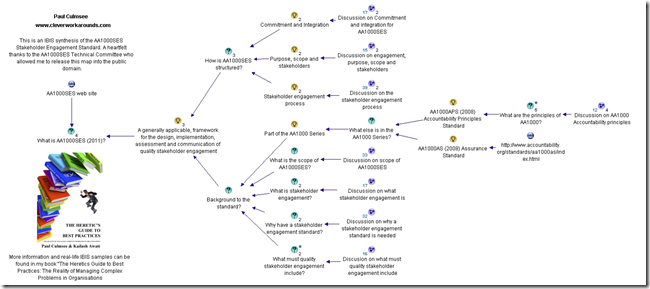


« Previous PageNext Page »

Today is: Wednesday 3 June 2026 -