Back to Cleverworkarounds mainpage
 

The one best practice to rule them all – Part 5

gandalv17

Hi again and welcome to the fifth article on this series of posts on the topic of group sense-making and the pursuit of shared understanding among a group of participants trying to solve a problem. If you haven’t read the previous articles of this series, then I strongly recommend you go back and read the previous articles in order.

If you have read through the first 4 posts, you should have a pretty good appreciation now for the sort of “lens” that I view the world of problems and the projects undertaken to try and solve those problems. You should also have a pretty solid appreciation of the concept of wicked problems, their characteristics, and the ways and means that those characteristics can turn a happy project into a toxic wasteland, destroying all of the initial enthusiasm and commitment among the participants. Microsoft’s Jason Guthridge recently nailed SharePoint’s place in it all when he wrote the immutable law of SharePoint that “By itself, SharePoint can neither create nor destroy organizational chaos, but does an excellent job of reflecting the level of organizational chaos that existed at the time of deployment” – hehe love that!

I approach all my engagements these days from the point of view that project failure is not due to a lack of rigour or governance around any project management methodology. More often than not, the root cause is in “organisational chaos” and this is *not* a process problem. It all boils down to the fact that shared understanding among a diverse team is an illusive goal which is deceptively difficult to achieve and maintain. That is because SharePoint’s technical complexity gives rise to social complexity. At the end of the day, we all have vastly varying behavioural and learning styles, we all come from varying organisational cultures, have different skills in varying disciplines and have different value sets and life skills. A collaborative platform almost by definition forces us to confront and work through this social complexity and that is where chaos and wicked problem characteristics find a fertile breeding ground.

It is this same underlying social complexity that makes SharePoint governance so hard. That is because governance at its essence is about accountabilities and risk. In short, governance is an attitude and the fact that it is a shared responsibility among participants gives rise to those same “people issues”.

But of course, none of this is helped by the common misdiagnosis that project failure is a failure of process. Although I believe that process is part of the answer, when we look at project failure as a process issue only, we inevitably apply process oriented tools and methods to get things back on track. But if you agree with me that a lot of the time, the real issue is the lack of shared understanding among participants, then it is clear that we are missing a critical step before we dive into process oriented solutions. How do we know that we are all on the same page? Will a 40 page project charter and project management plan do the trick? History tells us fairly convincingly that the answer is no.

Thus, in my last post I described IBIS (Issue based Information System). IBIS is an issue based argumentation system developed in the 1970’s by Horst Rittel and further refined by Jeff Conklin. I described the craft of Dialogue Mapping – a *practical* method that leverages a simple grammar and a shared display, to help groups gain understanding of complex problems right at the very beginning of the journey. This prevents the usual problem of jumping past the sense-making phase too quickly by diving headlong into process and rigour. Even before a project charter is committed to paper, IBIS fills that sense-making void that most of the other methodologies presume exists, but is rarely there in sufficient detail.

For an interesting little experiment, if you have found this series to your liking, now go back and look at your last project management plan and specifically re-read the charter and problem statement. Is it more than two paragraphs? Would all stakeholders read it and then tell you the exact same understanding of the problem being solved?

More IBIS and Issue Mapping

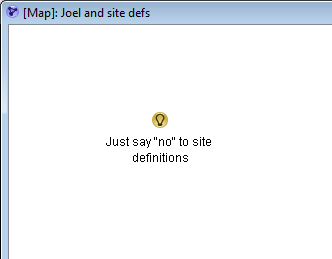
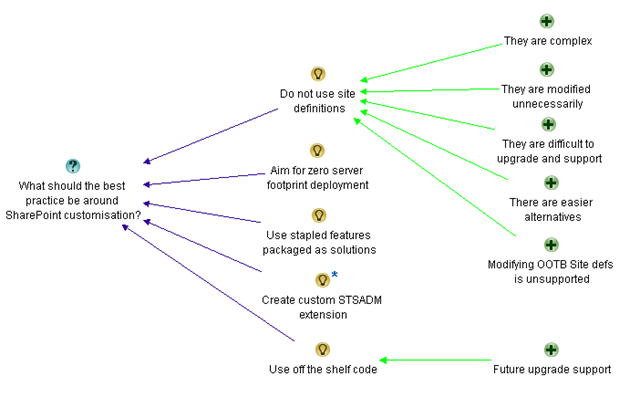
Now if you recall part 4, I created an IBIS issue map to demonstrate the arguments made by Joel Oleson some time back, when he wrote an article that was originally entitled “Just say no to site definitions”. It caused some vigorous debate at the time, and I demonstrated how I was able to both simplify and objectify Joel’s post into a simple issue map that was very easy for any reader to understand. That map is below and this is our starting point for part 5. Have a good look and if you need a refresher on how it was created, refer to part 4.
image

Now it is time to map some of the counter arguments made by those who responded to Joel’s ideas. The first response was anonymous and made various counter points. Let’s take a look at the first half of the counter spray :-).

Are you serious? You prefer STP files over a custom site definition? Man, you obviously have never had to try to build a solution around STP files before.

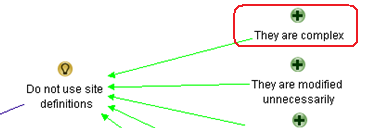
The first line of the response is actually very interesting from an IBIS nerd viewpoint because and it a perfect example of social complexity playing out and it made decide to change major aspects of the map. The above respondent immediately honed in on something that wasn’t actually all that clear to me to begin with. When I first mapped Joel’s statement in part 4, I never actually put the idea of using site templates into the issue map. Why? because Joel never actually suggested it! The closest he came was the statement “Site Templates as tough to work with as they are, are better than custom site definitions”. But I interpreted this as using the example of site templates to highlight the complexity shortcomings of site definitions. I simply captured the argument of “complexity”, supporting the idea “Do not use site definitions”.
image

But look here! Our first respondent interpreted it completely differently to me. They inferred (likely correctly) that Joel prefers site templates over site definitions. But the response then takes a shot at Joel’s credibility.

Are you serious? You prefer STP files over a custom site definition? Man, you obviously have never had to try to build a solution around STP files before

If that exchange happened in a meeting, you may as well call it quits, because it would be very likely that very little valuable dialogue would be obtained after such an exchange. Participants are on the defensive and the meeting will likely get derailed on this tangent. But this is a terrific example of how using IBIS grammar is extremely effective at teasing out ambiguous or poorly formed argumentation, thereby removing the “sting” out of these sorts of debates.

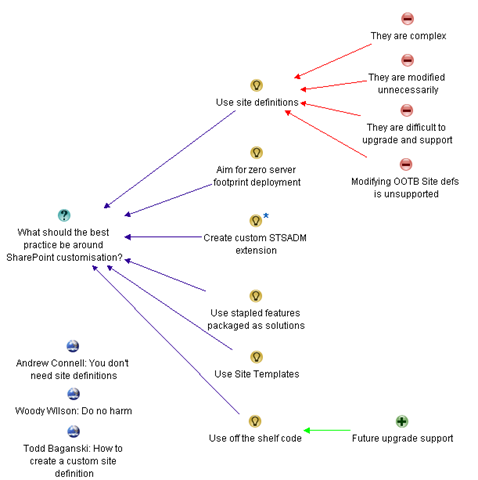
So what should this map look like then? Below is a new version with a few key adjustments.
image

The most obvious change that I have made to the argumentation presented above is Joel’s original idea. I have removed the negative connotation of “Do not use site definitions” to “Use site definitions”. As a result, the previous pros now become cons, because they are no longer supporting the idea. I did this because I have also added the idea “Use Site Templates”, so now we have presented the two ideas without any inferred bias and can simply examine the characteristics, pros and cons of each idea.

For what it’s worth, engineers sometimes unconsciously word questions in a manner that non engineers find biased because of the implied connotation. You can read more about this in my “it’s all how you ask the question” post.

Finally, I also removed the “there are easier alternatives” pro from the map altogether. I did this because this argument has became somewhat redundant. Note how we are now exploring all of the alternatives as separate ideas in the map anyway. More importantly, what does “easier” mean anyway? What is “easier” for an IT pro type person like Joel may be very different to what is “easier” for a SharePoint developer”.

Stepping back

The ability to restructure a map on the fly is one of the key benefits of IBIS. A skilled IBIS practitioner is able to quickly restructure the map as the conversation moves around the various topics, all the time leveraging collective intelligence of the group as they dissect the problem together.

Another key improvement from the previous map is that we have further objectified things. Our first respondent also supplied some great factual counter arguments to Joel, but hid it behind an initial barb that could easily be inferred as a cheap shot.

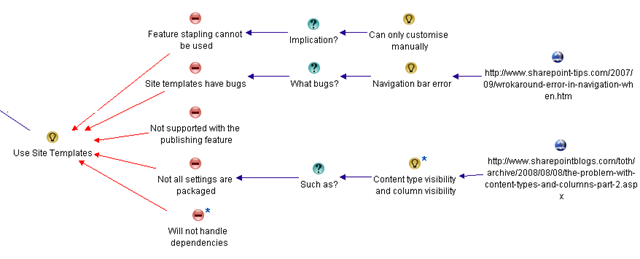
Nevertheless, here is the portion of the map with showing the additional argumentation from the respondent about using site templates. Now we are getting somewhere!
image

Let’s examine each of the statements of the respondent. All of the arguments made were dumping on site templates in some way, so we capture them as cons to the “Use site templates” idea. The respondent actually did a very good job with his arguments and they were very easy to add to the map.

  • The statement “For one, you can’t feature staple to an STP file, so you are simply limited to the manual UI customizations. To run automation when a site is created, you need to use a site definition with a provision handler or feature stapling”, is a bundled up statement. There is the con argument “feature stapling cannot be used”, with an implication of that argument being “Can only customise manually”. I broke that out into three IBIS elements
  • “STP files are buggy, and sometimes you will randomly get errors like this one in your navigation bars” is stating that there are bugs, and supports that argument by stating a specific example of one. I split this out into separate IBIS elements and additionally linked to the specific example.
  • “STP Files do not support sites with the publishing feature activated” is a nice, simple argument that I captured as “Not supported with the publishing feature”.
  • “STP files do not package all your settings, especially content type visibility and column visibility on lists and libraries” is again a nice counter argument backed up with examples.
  • Finally, the comment “If an STP relies on elements from other higher-level sites or lower-level subsites, good luck”, is in effect stating a counter argument that site template files to not handle dependencies. In case this paraphrased statement is ambiguous, I added additional detail to this node with the original argument as shown below.

image

More arguments against?

Below is the rest of the response that is nowhere near as clear as the first half. Let’s drill down…

I disagree, I think it is lazy devs that want to use an STP file, instead of creating a custom site definition, just like it’s laziness to create a content type through the UI for a custom solution instead of in XML with a feature (which can then easily be moved from environment to environment).
And honestly, is it really easier to go through the machinations to customize the MySite template as recommended here (http://blogs.msdn.com/sharepoint/archive/2007/03/22/customizing-moss-2007-my-sites-within-theenterprise.aspx) to simply move a few web parts around, rather than just make a tweak to the original site definition? Honestly which is less maintenance for a customer, a quick documented change to an XML file in a folder, or a Feature+WebControl+Custom master page+stsadm commands to activate etc.?

I think you are way off base here, and painting with broad brushes.
(I do agree with zero footprint efforts, and only editing built-in site definitions for tiny tweaks).

The first argument is actually now a moot point. Joel did indulge in a bit of developer bashing in his post (and who doesn’t enjoy a bit of that from time to time) and this respondent is simply reacting to that. But since I have already objectified Joel’s original point then arguments about “lazy developers” is actually answering a different question altogether and does not belong here.

I previously removed Joel’s “it is easier” argument and what do we see here? We see the respondent questioning what is “easier”! This respondent argues that a documented tweak is “easier” than applying manual changes. Once again in a real meeting I can see where this would go. One party would probably then say “yeah but you lazy devs never document it” and we are off into a conversational tangent that will not achieve much. So like Joel’s arguments earlier, I am removing the “my easier is better then your easier” arguments.

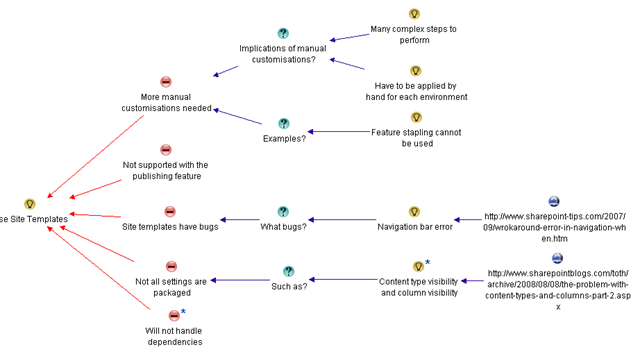
What’s left? Well, pretty much this entire bit of the conversation is talking about how much manual work is involved to manage changes when not utilising site definitions. So we can summarise this counter argument as “more manual customisation needed”. When I look at the map, I see that our existing argument “feature stapling cannot be used” is actually an example of this. So the adjusted arguments against site definitions now look like the map below. Note how I have removed the con of “Feature stapling cannot be used” and reworked it as an example of a new con, called “More manual customisations needed”. This now looks better.
 

image

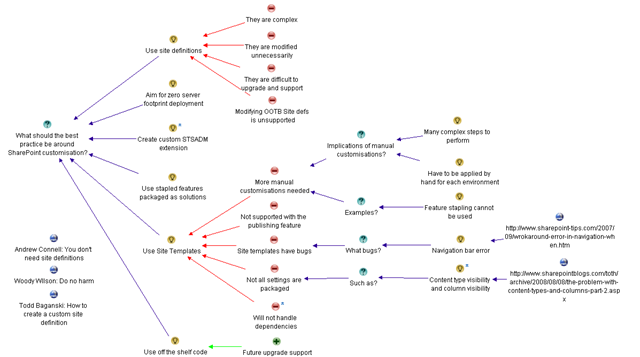
And finally for now, I have this consolidated map to represent our current understanding of the question “What should the best practice be around SharePoint customisation”. There are still other counterpoints, and we still have to add the pro argument into the map too. But by now, you should be getting the idea. Imagine yourself having this discussion in a meeting. Would this map, displayed on a projector have helped keep the meeting on track?
image

Thanks for reading

Paul Culmsee
www.sevensigma.com.au


The one best-practice to rule them all – Part 4

image

Hi there

Welcome to the fourth post in my series on how to deal with the true root cause of project failure. The first three posts were really to set the scene for this post where I will explain the basics of my craft for resolving some of this. First up, I described my journey through the maze of of well known methodologies and best-practice standards, trying to make sense of a character known as “SharePoint vs Skype guy”. After seemingly taking one step back for every two steps forward, I finally found an area of research that I strongly identified with – the concepts and phenomena of wicked problems. I described how I have come to believe very strongly in the principle that understanding a problem comes from exploration of potential solutions, and that the act of exploring solutions will change your understanding of the problem. Traditional methodologies tend not to recognise this fact, and in fact, many force you into a problem solving model that precludes this perfectly natural sense-making activity.

This sense-making process is utterly critical to project success. The fact is, almost any project failure symptom (such as scope creep) can be traced back to a single root cause. That cause is a lack of shared understanding among participants of the problem behind the project. If you presume, however unlikely, that every stakeholder had an identical deep understanding of a problem and maintain that understanding, then almost by definition, things like “scope creep” and “unrealistic expectations” would not happen

In my last post, I turned my attention to the “inappropriate methods” that are all-too commonly used to tackle projects that have taken on wicked tendencies. We looked at the flawed logic of throwing “process” at a wicked problem, the sometimes misguided reasoning behind many scope restrictions, as well as the pros and cons of competitive and authoritative strategies. Finally, we examined the paradoxical effect where, to fully understand a problem, we have to understand all points of view. Yet in doing this, we leave ourselves susceptible to falling foul of wicked problem characteristics.

Hmm…Such a conundrum…Is there a way out?

From Rittel to Conklin (and IBIS)

Once again, we have to take a brief sojourn to the era of sideburns, flared jeans and excessive amounts of pubic hair…The 1970’s.

Years before Rittel wrote his seminal wicked problem paper in 1973, he had already come to the belief that the relationship of problem understanding was dependent on the solution being considered at any given time. He had also been thinking about tools and methods to overcome the problem. By 1970, Rittel had invented what he termed a “design augmentation” system that he called Issue-Based Information System (IBIS). Here is how IBIS was described back then.

Issue-Based Information Systems (IBIS) are meant to support coordination and planning of political decision processes. IBIS guides the identification, structuring, and settling of issues raised by problem-solving groups, and provides information pertinent to the discourse … Elements of the system are topics, issues, questions of fact, positions, arguments, and model problems.

For you trainspotters, You can read Rittel’s 1970 paper mentioning IBIS for the first time here. This paper is quite amusing when you read it nowadays as it is positively antiquated. But, hey, we are talking about a time before PC’s and when my father still had all his hair. The first time Rittel compared and contrasted “wicked to tame problems” was actually in a 1972 article. Rittel was also not alone in the search for tools and instruments to assist sense-making. He was influenced by the legendary Douglas Englebert (the dude who invented the mouse), who had spent the early half of the sixties examining tools and methods to “augment human intellect“.

Rittel’s original 1970 incarnation of IBIS had many elements to it. He called one component in particular an “Issue Map”. Rittel described the issue map as:

Representation of the various relations between issues, questions, etc., by graphic display of the state of argument

The issue map, 1970 style, involved pen and paper (probably those lead-laced black marker pens that made your head spin from the fumes). But over the following years, IBIS was refined and further developed. Many of the components of the 1970’s version were made obsolete by advances in technology and business practices, but Issue Maps in particular, remained. In the 1980’s, the era of personal computers dawned and later pioneers such as Jeff Conklin (who had worked with Rittel from 1984), could see the potential that IBIS had by utilising a computer-based visual display.

Independently from Rittel, Conklin was pursuing ways of capturing design rationale and had created his own notation called ISAAC. He recognized IBIS as the perfect solution when he heard Horst Rittel give a talk about it.

“His IBIS structure was simpler than my ISAAC structure, and his field experience with using IBIS showed that he understood the social and cognitive issues far better than any of us.  (Someone asked him what the IBIS process was for making decisions and he replied, “There is none.  Decision making is completely context and culture dependent)”

Conklin then adapted IBIS for use in software engineering and created the gIBIS (graphical IBIS) hypertext system to support this use of IBIS. Later Conklin used Rittel’s ideas about wicked problems to help motivate engineers and managers to use gIBIS on their projects. Conklin spent twenty years working with IBIS and sense-making software and systems, and all of that work now culminates today in a software tool called Compendium and a facilitation method called Dialogue Mapping. These days, utilising a projector, Compendium type software, a skilled IBIS practitioner can make a massive difference in helping a group develop a shared understanding and commitment of a problem.

To explain IBIS, let’s take a look at it being used for a well known SharePoint debate.

IBIS by example…

IBIS, at its heart, is a language specifically designed to break down the often convoluted and complex structure of a conversation into something much more simple to understand and digest. The premise of IBIS is that no matter how complex or argumentative an issue is, we can break it all down to just three basic artifacts:

  • Questions
  • Ideas
  • Arguments (pros and cons)

There are a couple of very basic rules by which these artifacts interact (the grammar behind the language). Ideas respond to questions, offering possible solutions to the question. The arguments argue for and against the various ideas. Questions can then be expanded on or challenge other questions, ideas, or arguments.

Here is a great example of IBIS in action for a SharePoint wicked problem. Mr Oleson well and truly got himself into trouble a while back when he made disparaging comments about site definitions and hurt the sensitive feelings of many a SharePoint developer. A large thread of discussion ensued, where various people voiced their opinion in a long series of replies.

A blog, along with its comment system is typical of many collaborative mediums that are not particularly well suited to dealing with a complex issue. The whole linear nature of a blog and its comments, means that the last person to comment, in effect tends to have the last word. That is also why newsgroups and discussion forums have flame-wars that degenerate into deep threads of point-counterpoint discussion that go nowhere because the positions taken get more and more intractable. Any linear based collaborative tool suffers from the last poster having the moral high ground – until someone posts below them.

So, let’s instead build the subsequent debate into an IBIS issue map.

Joel started out with a nice, controversial statement, along the lines of “Just Say NO to Custom Site Definitions“. Sounds like an idea to me, so let’s get it into the map.

image

One of the rules in IBIS is that an idea is always an answer to a question. Sometimes that question can take a little while to tease out (and you may change the question a couple of times before it feels right), but it is very important that the root question be defined.

Why is this important? Well look at what happened – Joel eventually had to *clarify* his original post because of the fact that readers had different interpretations of the question he was answering. As a result, some missed the real message that he was trying to get across.

“After a lengthy conversation with all our favorite SharePoint MVPs from Andrew Connell, Robert Bogue, Todd Baginski… I need to soften some of the language here, but emphasizing in clarity what I’m concerned about in the spirit of this post”

Now, we have Joel’s “Just say no” comment captured as an idea. When you start using IBIS, you quickly find that a “comment” can take a couple of forms. As previously stated, it can simply be an idea, that is answering a question that hasn’t been specifically asked yet, but it can be a ‘bundled up’ question, idea and a supporting argument in one terse (or extremely verbose) statement.

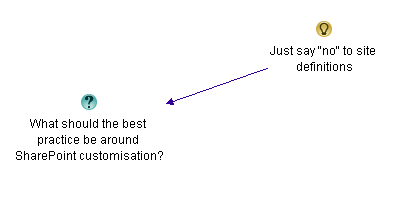
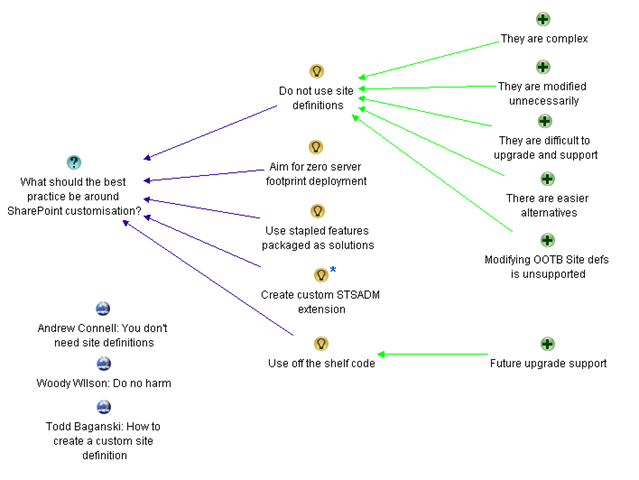
Let’s think about the inferred question that Joel’s idea is answering. My guess is that the root question is along the lines of “What should the best practice be around SharePoint customisation?” I have worded the question quite deliberately and I’ll explain the logic a little later. I represent this new question on the issue map using the following IBIS notation.

image

Joel made various arguments to support his position. Let’s see if we can disentangle his very first supporting paragraph into IBIS artifacts and issue based structure.

If you don’t need to modify [site definitions] don’t do it.  Consider them product code!  If you need to build something, do it in a feature, staple the feature and deploy it in a solution.  Site Templates as tough to work with as they are, are better than custom site definitions.  Even the use of site templates is controversial in the community due to the customizations that it causes in the database.  From an upgrade perspective, it’s Much Much easier to upgrade a site based on a site template than it is a site based on a custom site definition.  Now a site template based on a custom site definition is just as bad if not worse

image

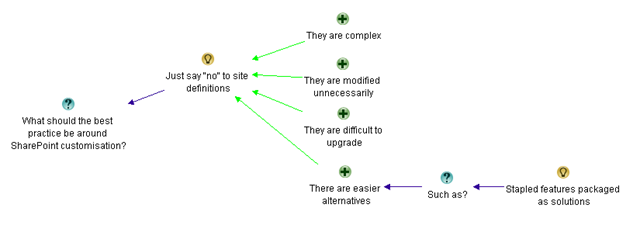
Above I have created 4 supporting arguments to support Joel’s idea of not using site definitions.

  • The statement “Site Templates as tough to work with as they are, are better than custom site definitions”, is really using the example of site templates to highlight that site definitions are complex.
  • “If you don’t need to modify them don’t do it.  Consider them product code!” is to me arguing that site definitions are used or modified unnecessarily.
  • “From an upgrade perspective, it’s Much Much easier to upgrade a site based on a site template than it is a site based on a custom site definition” is another example based proposition that site definitions are difficult to upgrade.
  • Finally, the suggestion “If you need to build something, do it in a feature, staple the feature and deploy it in a solution” is in fact one of those “bundled” statements that I mentioned before. Here, Joel is making a supporting argument that there are alternatives, and goes onto suggest an alternative. I captured that in IBIS by breaking up the statement “If you need to build something, do it in a feature, staple the feature and deploy it in a solution” into the supporting argument (pro) “There are easier alternatives”, followed up by a question “Such as” and the idea of using stapled features packaged as solutions.

Objectification is the name of the game!

Now step back and take a look at what we have done here. We have two major advantages over the original statement.

Firstly, participants now do not have to read a potentially convoluted set of paragraphs where the question being answered is subject to interpretation. The issue map above is simple to read, logical and easy to understand. Secondly, and most critically, I have objectified the whole thing. When you look at this map, it is pretty hard to get all fired up and defensive at it, because the root question that I placed onto the map is in effect, calling for ideas, of which Joel’s is simply one of those ideas.

Cool huh? Shall we do some more Issue Mapping?

Back to the map…

Here is Joel’s next 3 statements and the updated map

Ok so it’s easier to modify an existing site definition.  WRONG Answer!  You just broke the out of the box product and you will have a hard time getting support.  Maybe the dev support people will help you, but poor customer.  Poor support.  Poor everyone who has to pay to try to undo what’s taken place.

Don’t modify the out of the box site definitions unless you are following some MSDN article…  Even then, make sure there is no other way and you know what you are doing so you can back it out.  Always back it up.  You may even consider backing it up to disk so you’ve got it for later.

I had to listen to customers crying about what consultants came in and did to their environments in the name of “Good SharePoint Development.”  If you can, leave the site def alone, and package up your code so it can be added and later removed or replaced at least.

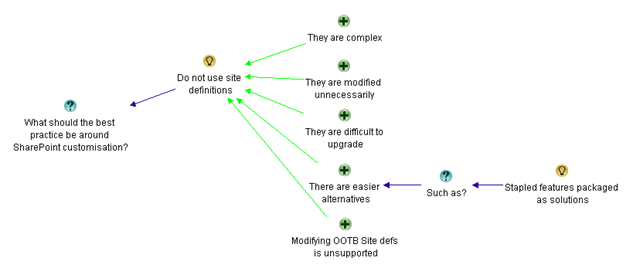
If you look at the map below, all I have done is reworded Joel’s idea and added a single additional supporting argument. Seems to me that the above three statements were really saying the same thing, that modifying the out of the box site definitions are unsupported by Microsoft. The rest of the arguments still fit within the first four that I captured previously.

image

I need someone to give me a list of reasons WHY you need to mess around with the site definitions.  I’ve had a couple of devs take me up on it, but I still think it’s WAY better if you just leave it alone and pretend like you can’t.  It will keep you honest and it will make upgrade and support TONS easier.

You’ve recently seen me in favour of client side code running server side elsewhere.  That’s great.  See if you can take things to a higher level and go with a zero server footprint deployment.  Or go with Off the shelf code where you get support for upgrade from an outside company with assurance.

I’m not totally against custom code, but I do want to see it thought through.

I’m sure nearly all SharePoint Dev classes have info on creating custom site definitions.  You may even have something in the certification test on them.

Any SharePoint developer can create a custom site definition, but the challenge is to see if they can fulfill those same requirements without using a custom site definition (The albatross around an admins neck).

Worried about users turning off the features?  Make an STSADM extension for provisioning your special site that activates the hidden feature.  Or consider feature stapling.  Get creative and think outside the V2 Box.  If you’re building custom site definitions on a regular basis you haven’t learned how to do things in the new world.

Now things get interesting. To me, Joel actually contradicts himself a little without realising. We started out with the premise of “Just say ‘no’ to site definitions”, but here he is actually adding *more* good ideas around best practices for customising SharePoint sites and less about why you should say no to site definitions. Example?

  • “See if you can take things to a higher level and go with a zero server footprint deployment”
  • “Go with Off the shelf code where you get support for upgrade from an outside company with assurance”
  • “challenge is to see if they can fulfill those same requirements without using a custom site definition”

Remember that we now have a clear root question “What should the best practice be around SharePoint customisation?”.

I also adjusted the “They are difficult to upgrade” supporting argument to “They are difficult to upgrade and support”, acknowledging Joel’s “It will keep you honest and it will make upgrade and support TONS easier” comment.

Finally, Joel has actually offered us up two more alternative ideas, an STSADM extension, off-the-shelf code and he also mentioned again the option for feature stapling. I decided to capture these as separate ideas now and remove the “such as” argumentation that I previously used.

Below is my updated map that I think reflects where we are so far.

image

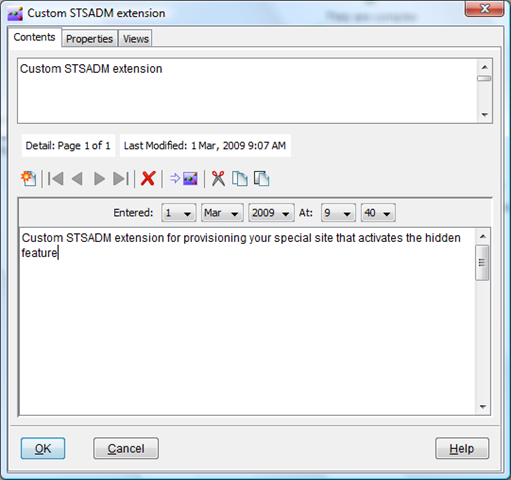
If you are *really* observant, then you may wonder what the little (*) is by the “Custom STSADM extension” node on the above map. All that it means is that I have more detail in that node as shown below.

image

Below is the rest of Joel’s opening salvo

Let’s continue to talk through the trade offs of site templates, feature stapling, and site definitions.  I think this is an important discussion.  In the future I’d love to see it to not be common at all when even hard things need to happen.

Ok, so developers don’t think much about upgrade, but let’s start preaching… Can we do this without custom Site Defs without a note from the teacher that agrees to says it’s a Requirement.  On the hierarchy of Scary Customizations.  The Custom Site Def is nearly the worst.  The only ones worse are customizing the out of the box site definitions and messing with the database and adding your own triggers and “fixing” the inefficient SharePoint stored procedures.

Todd Posts  “How to Create a Custom Site Definition” , but agrees we need to minimize what we do with them (see above).  Good job Todd, my friend, you show up as #1 using keywords… custom site definition)

I do think we need to see more about “How to NOT Create a Custom Site Definition” or

You don’t need to use Site Definitions (This is AC’s Love and the discussion) please point your devs to this one.  I continue to plan to point customers and developers to that one.

If you’re a lost developer or even one that’s looking to go through a ten step program, I recommend the Hippocratic Oath of SharePoint – First Do No Harm  (Thanks Woody).  There’s also SharePoint Dev guidance at by the Patterns & Practices Group. AC talks about it.  I’m anxious to see them provide guidance on when site definitions are necessary (yes as an IT pro, I want to see them used when features and solutions don’t do the job).

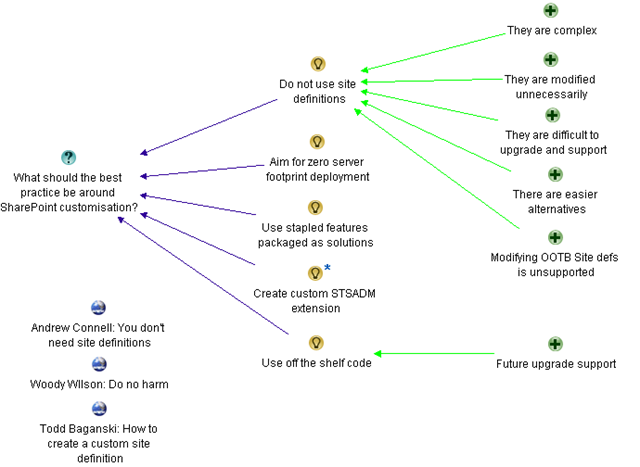
The first two paragraphs don’t really offer anything new to what has already been captured. But he then refers to Todd, Andrew and Woody’s posts. I have incorporated those URL’s into my map as reference material. If Joel had paraphrased specifically what their recommendations were, I would have created more idea or argument nodes in the map but for now, it if sufficient to simply reference those maps without linking them anywhere yet.

Remember, ideas can often “sit out there” for a while, before being worked into a cohesive issue map.

image

Conclusion

I believe that this issue map, as it stands, has captured the essence of Joel’s arguments thus far. As you might have guessed, part 5 is going to continue to dissect the site definition debate and continue to build out this issue map. As we delve deeper, the map will get frequently restructured. As a result, there will be lots of pretty map pictures. So, for all you readers who say you read playboy “just for the articles”, you can stop reading this series now :-).

Thanks for reading

Paul Culmsee
www.sevensigma.com.au


The one best practice to rule them all – Part 2

image

Hi all

This is part of a somewhat self-indulgent story of how I came to practice a craft that has made a profound difference on how I approach and manage SharePoint projects. If you have not read part 1, then I suggest you stop now and read that first. This post will really not make a lot of sense, otherwise :-).

In my last exciting instalment, I had concluded with the time where I discovered the term “Wicked problems” and the work of Horst Rittel, who coined the term. In his landmark 1973 paper, Rittel identified ten common characteristics of wicked problems. I remember quite distinctly, reading through that list for the first time, having this strange sense of relief. Of the characteristics, most of them had *clearly* manifested in my SharePoint-gone-haywire project. The relief stemmed from the fact that it was a recognised phenomena with a tendency to defy traditional problem solving techniques. The characteristics with which I immediately identified are marked in bold below.

  1. There is no definitive formulation of a wicked problem.
  2. Wicked problems have no stopping rule.
  3. Solutions to wicked problems are not true-or-false, but better or worse.
  4. There is no immediate and no ultimate test of a solution to a wicked problem.
  5. Every solution to a wicked problem is a “one-shot operation”; because there is no opportunity to learn by trial-and-error, every attempt counts significantly.
  6. Wicked problems do not have an enumerable (or an exhaustively describable) set of potential solutions, nor is there a well-described set of permissible operations that may be incorporated into the plan.
  7. Every wicked problem is essentially unique.
  8. Every wicked problem can be considered to be a symptom of another problem.
  9. The existence of a discrepancy representing a wicked problem can be explained in numerous ways. The choice of explanation determines the nature of the problem’s resolution.
  10. The planner has no right to be wrong (planners are liable for the consequences of the actions they generate).

But the real clincher – the moment that made me realise that my frustrating journey through standards, methodologies and best practices was finally coming to an end was the 5th characteristic. “Every solution to a wicked problem is a “one -shot operation”. When I read that one, it was as if my famous “Skype-vs-SharePoint” guy suddenly materialised in front of me and mooned me saying over and over again “I can collaborate on Skype, too!”

For those of you who skipped part 1 despite warnings, “We only have one shot at this” was pretty much a word-for-word quote on what was said to me in the haywire project that started all of this.

Is it any surprise that I felt I was onto something here?

Digging deeper

When I read Rittel’s 1973 paper, I began to get a deeper understanding of what he meant by his first two characteristics that I didn’t immediately identify with. Namely “there is no definitive formulation of a wicked problem” and “wicked problems have no stopping rule”.

I soon realised that these two characteristics were actually the most *prevalent* characteristics of complex IT projects and therefore, the list was even *more* relevant to me than I had originally thought. After that, I was a convert. Rittel explained the first characteristic as follows…

The information needed to understand the problem depends upon one’s idea for solving it. That is to say: In order to describe a wicked-problem in sufficient detail, one has to develop an exhaustive inventory of all conceivable solutions ahead of time. The reason is that every question asking for additional information depends upon the understanding of the problem–and its resolution–at that time. Problem understanding and problem resolution are concomitant to each other.

The second characteristic, “no stopping rule”, is a natural consequence of the above issue. Again, quoting Rittel from 1973…

Because (according to Proposition 1) the process of solving the problem is identical with the process of understanding its nature, because there are no criteria for sufficient understanding […] , the would-be planner can always try to do better. Some additional investment of effort might increase the chances of finding a better solution.

Skype-vs-SharePoint guy, who now has the credit of being one of the most significant unwitting teachers of my career, went from not knowing any difference between SharePoint and Skype, to suggesting work items that already existed in the project plan, to telling us how we should build our information architecture based on 1990’s era document management systems. It was crystal clear that he went through this iterative process of changing his understanding of the problem based on how much thought he had put into the solution.

The sad fact was that Skype-vs-SharePoint guy was not unique. He might have been an extreme case, but in reality, he was simply the latest in a long line of users and stakeholders who I would have previously dismissed as idiots, computer illiterate or just plain tossers. Is it any wonder why we have the scourge of “scope creep” and “vague and incomplete requirements” that are so commonly cited as project failure factors? How many times have you banged your head against the wall thinking “How can we build a system when they don’t know what they want!”?

Problem fundamentalism

So in a way, we, as solution architects, developers and consultants, are just as much at fault as those users who we chastise because they “don’t know what they want”. Why? We fail to recognise or account for the immutable fact that understanding of a problem is not cut-and-dry. It almost certainly will change over time as people mull over, work through, learn from and grapple with the nature of a problem and the complexities of the interlocking issues that form the problem. To make matters worse, we all do this *individually* and at *different speeds* with *different value sets*. Inevitably, we arrive at different conclusions based on different paths we take on making sense of it all.

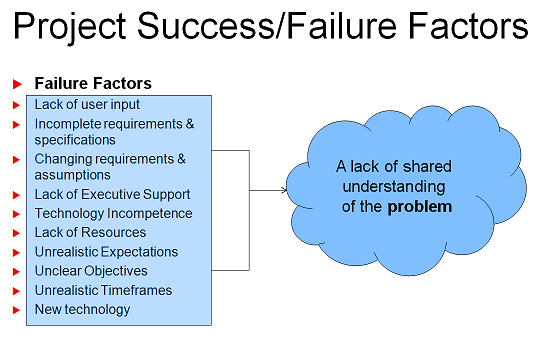
That cyclical nature of understanding the problem, based on understanding the solution, does not automatically stop once the scope document has been signed off, either. It will continue over and over again as a perfectly natural part of the learning process. With that in mind, consider all of the studies that have looked into factors causing project failure (uncle google shows up many studies). All of the usual suspects are there. For example…

  • Scope creep
  • Incomplete requirements
  • Unclear objectives
  • Lack of user involvement
  • Unrealistic or overly optimistic time frames
  • Lack of resources

blah…blah…blah – I am sure that you have seen these before.

If you accept Rittel’s assertion that the problem and the solution are intertwined and concomitant, then it is clear that the sorts of factors listed above are merely *symptoms*, not causes. *Of course* there are incomplete requirements and scope creep. There would have to be incomplete requirements and scope creep almost by *definition* for a complex project. For a long time I had instinctively felt this way, but I couldn’t quite put my finger on it… until SharePoint-vs-Skype guy, Horst Rittel and Jeff Conklin showed me the way.

At the end of the day, it all boils down to this:

Projects fail principally because there is a lack of *shared understanding* among the participants of that project. Additionally, shared understanding is a prerequisite before the key thing that makes or breaks a project – shared commitment.

image

(Stunned silence … Paul hears pin drop)

I can imagine some reader comments at this point:

  • “Big $%#$ deal, tell me something I don’t know”.
  • “What the….you made me read through one and a half blog posts for *that*?”
  • “So what theory-boy, tell me *how* to actually develop shared understanding”
  • “Paul can you tell me the difference between SharePoint and Twitter?” 🙂

To be fair, I think most people know instinctively that a lack of shared understanding is the major cause of projects being comatose before they barely got off the ground. But if it was so obvious why does scope continue to creep? Why are objectives still unclear? And, why are requirements and specifications incomplete? To answer that, we need to turn the “shared understanding” assertion around and ask it in this way.

Let’s suspend reality and just assume for a minute that all participants have an *identical* deep and tacit understanding of a really complex problem. Would we still have the incomplete requirements, unclear objectives, scope creep, unrealistic time frames that are cited as project failure factors?

I say “no” from a philosophical standpoint, but a “Well, yes… but much less than what normally happens” from a pragmatic standpoint.

Thus, I started to look at my SharePoint engagements through different eyes and became what I now think should be called a “problem fundamentalist”. I began to believe that if you could achieve the utopian dream of complete shared understanding among participants at the very start of a project, then really, you could use any methodology you like to actually manage the problem and implement the solution. The common factors of project failure would fall drastically.

So finally for now, is it simply just a matter of dealing with the little question of *how* to actually achieve this goal of shared understanding?

We will talk about that in part 3…


Thanks for Reading

Paul Culmsee


The one best practice to rule them all – Part 1

image

This is a post or three that I have really been looking forward to writing, and it is a long time in the making for various reasons. Some of you, after reading it, will no doubt wonder if I have been taking magic mushrooms or something similar, but if the feedback from the SharePoint Best Practices conference is anything to go by, then maybe a couple of readers will have the same sense of realisation and clarity that I had.

I am going to tell you the first best practice that you should master. If you master this, all of the other best practices will fall into place. It goes beyond SharePoint too. Failure to do this, and all of your other best practices may not necessarily save you. In fact they can actually work against you. Hence the “Lord of the Rings” inspired title of this post.

Before we begin, I have to make a confession. I am not a 100% full time SharePoint consultant anymore. Don’t get me wrong. I still do, and will continue to perform a *heck* of a lot of SharePoint advisory and pick through the wreckage of many a chaotic installation. But I have worked hard to develop a new skill over the last year that has proven to be particularly powerful and profound in my SharePoint practice. The response of those SharePoint clients with whom I have used this craft has been overwhelmingly positive. The thing is though, this craft has started to take on a life of its own and now I am being called on to use it outside the SharePoint realm – despite SharePoint being the whole reason I found it in the first place.

So to explain this craft I really need to explain how I came to find it.

“I don’t know what I am delivering anymore”

Back in  late 2006, I was the infrastructure architect at a mid sized MOSS early adopter. This organisation came from a place of pretty low maturity around their document, knowledge and information management practices. As I have subsequently come to understand and recognise, many organisations coming from this place have a tendency to try to boil the ocean, via a phenomena that I previously termed the “panacea effect“. At one level, a big ambitious SharePoint platform was brilliant learning for me personally because I got to put in a multi-server farm as well as the IBM SAN storage, clustered SQL, network load balanced web front end servers, extranet config, custom authentication, publishing and just about everything in between. All in all the perfect site for the tech geek to learn the guts of SharePoint infrastructure and develop an early instinct for governance at that level.

But that wasn’t the problem area – that was actually the *tame* part of the SharePoint project. This project started to unwind pretty quickly for other reasons. Under pressure and eager to produce, the Microsoft enamoured sponsor pushed hard. Each stakeholder had *radically* different world views of what we were doing, and pinning down scope and requirements was an exercise in futility, project time estimates were crashed by more than half because they were more than the sponsors original naive estimate that went to the board of directors. The thoroughly frustrated project manager said to me one day “I don’t know what I am delivering anymore”.

CleverWorkarounds’ Hindsight Rating: Stop now – just stop now.

Around this time I decided to have a chat with some of the major stakeholders because I was really worried about this project to the point that I was thinking of resigning. It seemed that the various stakeholders never actually spoke to each other, instead using the project manager as a kind of proxy. I thought that maybe a few one-on-one, more casual meetings might break a few deadlocks and frustrations.

So, sitting in a coffee place with one particular stakeholder, I was asked the question that was the catalyst for where I am today.

“Paul, can you tell me the difference between SharePoint and Skype?”

(When I told the audience this at the Best Practice conference, I was met with disbelieving laughter. I can tell you that at the time I didn’t laugh – I was so taken aback by the question I just about choked on my double-shot latte!). 

“Well”, he explained, “I can collaborate with anybody in the world using Skype for free, and even call regular land lines very cheaply. Why should I pay half a million bucks for SharePoint to collaborate?”

CleverWorkarounds’ Hindsight Rating: Project participants can hide a lack of understanding longer than you think. Have you ever been in a meeting where you are unsure or do not feel fully informed? It is very common for people to sit quietly rather than stop and say “Sorry, I don’t understand this.”

I spent a lot of time with this stakeholder after that, and little by little I was able to get across various SharePoint basics like libraries, lists, columns and views. What happened next though was that this stakeholder started to suggest we do things that were already in the project plan (he never read it originally because he didn’t understand it). Later he gave me a records based taxonomy from a company that he used to work for in the mid nineties. It was one of those library inspired, record centric taxonomies like what I described in the document management/death metal article. He had decided that all document libraries farm-wide should use 5 common site columns – no more.

He said another thing to me around this time which was also very influential.

“We have one shot to get this right. If we get this wrong, we are going to set the company back years”.

You will understand the significance of this comment soon enough…

Off to the cave…

I think I have told enough of this story that you already know the outcome. There were other stakeholders of course with their own peculiar views of the world, and there were various things we could have done better at all levels. But fundamentally, I was dealing with a guy who’s understanding of the problem clearly changed, the more he learned and the more he thought about the collaboration problem. All of the other stakeholders went through this thought/learning process as well.

This project was something that stuck in my mind for a long time after and I was determined to never ever let this happen again. I mean, we all know SharePoint is technically complex, but the “SharePoint vs Skype” conversation for me was a watershed moment. If I were the PM, how could I have seen this coming and mitigated it early? How could we have gotten into the implementation phase for someone to ask such a question? He sat in all the meetings with everyone else and he saw the famous SharePoint pie chart like everyone else. What was wrong with our processes? Did we need to use a best-practice methodology? Did I need to learn to train people better?

It was time to go off to the metaphorical cave and meditate for a while. (Jeremy Thake once called me the theory master – now you know why).

I dug out my PMBOK books. “Maybe the PMO was implemented too rigidly or with too much dogma?” I thought. But after re-reading that stuff I still couldn’t satisfactorily reconcile the Skype question. We spent days and days developing the project management plan – it was a good plan for its time and anticipated a lot of stuff. It was clear that at least one of the stakeholders never read it beyond a basic skim or perhaps the executive summary.

So I looked at COBiT as it was supposed to be about controls and oversight. I really liked COBiT, especially the RACI charts and the maturity model. To this day I think it is one of the best designed and most elegantly constructed standards out there, but it suffers from being *so* high level and abstract that is really only useful at CIO/board level. In fact COBiT really is an umbrella that sits across all of the other ones, so by itself I think it is next to useless. Thus, it really wasn’t going to be a practical help in dealing with this problem of stakeholder understanding.

What about ISO9001? I mean, it is all about quality right? Maybe we had a quality issue? Maybe some insights were to be found there? Would a quality management plan have helped? Maybe a little bit – I mean I learned the fun you can have with the non conformance clauses. But the issue was *not* what to do once I found a quality problem. The fact that it had become a quality issue means that by definition, something went unnoticed or ignored and then caused some unwanted event to occur. Thus, I needed to recognise it much, much earlier than when it becomes a quality issue.

(ISO9001, if you have not yet read it, will cure even the most hard-core insomniac – guaranteed).

Hmmm, perhaps the answer lies in process improvement? Maybe if we used a best-practice methodology to map out and understand our processes, it would have resulted in a more optimal information architecture exercise. I had watched teams argue over process and accountabilities when we started talking to them about metadata and workflows during the information architecture sessions. So I hit the books on process improvement and business process modelling methodologies – a very crowded space with many standards and theories.

Three things popped up here. IBM’s BPMN (Business Process Modelling Notation), the process improvement methodology Six Sigma (and its variants) and a great book by Geary Rummler called “Improving Performance: How to Manage the White Space in the Organization Chart (Jossey Bass Business and Management Series)“.

I became excited as this was definitely getting closer to what I was looking for. As I read more, I saw potential. BPMN was simply a method to create consistent, easy to understand process flow diagrams and in fact, one of my colleagues has become a master at this craft. But that didn’t address the ‘art’ of process improvement. I found that often when trying to map a process with a group, the group would often start to recognise flaws or flat out disagree on how the process ran within the organisation. Inevitably, as a process mapper, you would sit back and “process debates” would take over the meeting. Clearly there was a step missing.

I also liked the emphasis on data centric decision making of Six Sigma and the emphasis on measurement. I went very low-brow and bought Six Sigma for Dummies and devoured it. As I read it, I started to remember my old high school maths because Six Sigma is very analytical and data driven. Much of what Six Sigma teaches is very, very good from a philosophical standpoint, but it did seem so “epic” and seemed to be geared around “big bang” change.

All of process improvement methodologies were process-heavy and structure-heavy. I feared that the same dogma that I had seen derail the good intentions of PMBOK would affect Six Sigma in the sorts of organisations that I had involvement with. I read a great online document later that suggested Six Sigma in real life had more of a two sigma success rate which I found unsurprising.

I also looked at Lean/Kaizen and a zillion variants. In the end I started to get lost and frustrated. Process improvement (and by association, strategy theory) is an insanely crowded place and some other time, I will write about the various fads as they have come and gone.

The Eureka Moment

Okay so I read a lot of stuff (and now have forgotten most of it). All of the methodologies and practices that I studied had some excellent parts to them, and in fact, most *encourage* you to take the bits that make logical sense for you. As I wrote in Part 8 of the “SharePoint Project Failure…” series, I found it ironic that implementation of many of these methodologies fell victim to the same sorts of “people” issues that derail the original project. The whole ‘big bang’ style approach, whether it was a software project or a best-practice methodology seemed to suffer the same sort of hit-or-miss fate.

Then in one of those times when you randomly surf wikipedia (the fountain of all authoritive knowledge 😉 ), I came across the term “Wicked problems” and the work of Horst Rittel from the early 1970’s. In Rittel’s era, he was talking about a particular class of social policy and planning problems like “What shall we do about the global financial crisis” or “What should we do about global warming”, “What should we do to solve the Palistinian issue?”. Such problems are insanely tough to solve. But as I read about the *characteristics* of a wicked problem as described by Rittel, and subsequently by his student Conklin, I realised that both were describing *exactly* my first MOSS 2007 project.

While I am not suggesting a MOSS project is a wicked problem the way that Rittel or Conklin envision it to be, those “characteristics” or “properties” of wicked problems were so applicable to my experience that is was scary.

Phew!

Since I have been waffling on far too long, I’ll stop things now, and in the next post, I will delve into wicked problems in more detail, both Rittel and Conklin’s definitions, as well as my own definition, that I used at my Best Practices SharePoint Conference session.


Thanks for reading

Paul Culmsee



« Previous Page

Today is: Wednesday 3 June 2026 -