I had a problem this week that got resolved with something quite obvious, but I learned a lot in the process, so I am detailing it here.
Symptoms: Using MOSS 2007 SP2 and Office 2003 SP3, users complained that metadata on documents went missing. Consider the scenario below where we have a sample document library.

Our user opens the “Memo to Council re Convenor” document into Word 2003, makes a change and saves it. Note the difference. Where’s my metadata?

I asked about this on the ozmoss mailing list, and others noted the same issue. Some had applied the June 2009 cumulative update for WSS3 and the problem was solved for them. I applied this update, and it improved the situation, but did not cure the problem totally.
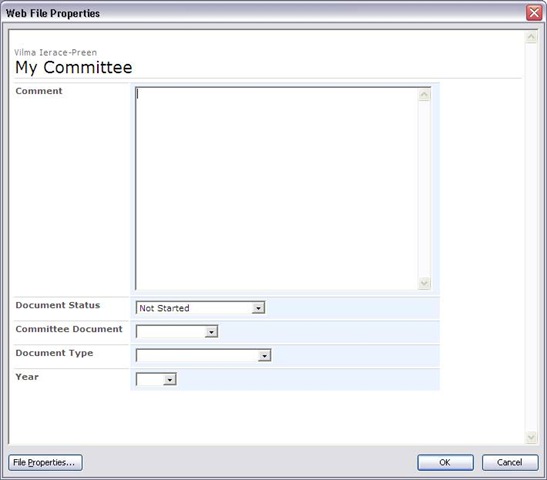
Upon further investigation, we were able to ascertain that the problem would only happen on certain PCs. The same user could update the same document on a different PC and it would work fine. A fiddler trace of the process allowed me to narrow down the issue and understand the sequence of events. The root cause of the issue was incorrect handling of HTML/JavaScript by Office 2003 and/or Internet Explorer. This manifests itself in an inconsistency in the display of properties in the Office “Web File Properties” dialog box (file->properties in an office 2003 app). Consider the example below.
![clip_image002[5]](http://www.cleverworkarounds.com/wp-content/uploads/2009/09/clip_image00251.jpg "clip_image002[5]")
Note that the first dialog shows that values for the metadata columns are blank or default. Now consider the same document opened on a different PC. Well what do you know – we have metadata!
Fiddler confirmed that when saving a document to SharePoint from an Office 2003 application, the same HTTP request is made to SharePoint as is done when displaying the document properties in the above example.
In both cases, A HTTP GET request is made to the owssvr.dll (WSS RPC) and the dialogview method is called. Therefore, the root of my problem has something to do with the fact that the data returned by this call was not being parsed properly by MSWord on one PC (as illustrated by the first of the above dialog box screenshots). When a user than saved their edits, blank or default values are being written back to SharePoint, in effect “losing” the metadata.
So let’s take a look at the HTTP call and the data returned. The call to owssvr.dll looks like this.
GET /somesite/_vti_bin/owssvr.dll?location=My%20Committee/Agenda%20attachment%20July%2009.doc&dialogview=SaveForm HTTP/1.1
The output returned by SharePoint is a bunch of HTML and JavaScript that MSWord then renders by calling the Internet Explorers rendering framework programmatically. (I’ve included sample output at the end of the post for the hardcore nerds).
So the question now becomes, what was preventing the correct HTML rendering on one PC and not the other? This was a difficult question to answer because I was unable to find a way to debug JavaScript when the output was rendered in Office 2003 apps.
When you think about it, there can be many potential causes here. Given that Internet Explorer is effectively doing the work (WinINet), this whole process could be adversely affected by add-ins, zone settings, AD policies, virus scanning, etc. On one affected PC I disabled all all-ins to Internet Explorer and retried without success. After around half an hour of frustration, I decided to reset IE’s configuration as shown below.
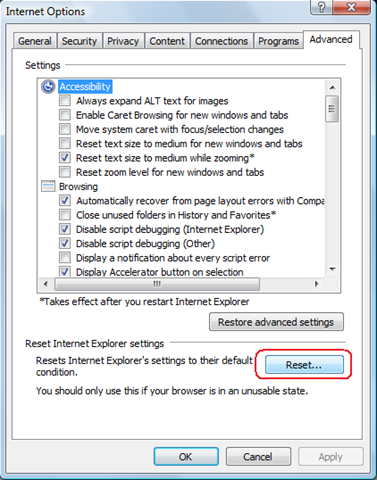
After accepting the various warnings, I retried the test and it all worked! Metadata was now being properly saved. “Awesome”, I thought. I’m not quite sure what the true root cause is, but at least I know how to cure it.
Then it suddenly dawned on me that I’d been stupid. For all of my low level examination of the office 2003/RPC interaction with SharePoint, picking the brain of gurus like MCM Spence Harbar, I’d never thought to clear the temporary internet files cache. Doh!
On the next affected PC I did so, and the problem also went away instantly.
*Blush*
In my defence of my dumbness however, I had never examined the behind the scenes integration with Office 2003 and SharePoint, and it did not even twig that Internet Explorer would be involved in the picture. Given that this problem manifests itself within Office 2003 applications, it is not immediately obvious that your temporary internet files would cause an issue here – but now I know better :-).
And now I get it…
Now Office 2007 is not affected by this because it does not use this method at all. In 2007, the document information panel uses InfoPath to render metadata. At the time I naively thought that was a dumb idea because the document information panel cannot display custom column types. For example, let’s say you created a custom column type to hold a phone number with the correct formatting for country code and the like. In a SharePoint site you can display it fine, but in the Office 2007 document information panel, you will never see it. InfoPath only will work with the out of the box in column types.
My rationale was that if Office 2007 instead used JavaScript and HTML, then it should be able to display these sorts of custom columns. That may actually be true, but it is irrelevant. When you think of the sheer number of ways that the rendering of the code could be interfered with (Temporary Internet Files being one precedent), you can see why the Office team might have opted for the safety of InfoPath instead.
Now that I understand that this is how Office 2003 does it, I can plainly see that it leaves too much room for error.
So even though my problem was solved by a simple clearing of the cache, it still remains that things like a bad add-in or a bad AD policy setting could interfere with the Office 2003/SharePoint integration. So if you ever have this issue crop up, try the temporary internet files thing or reset IE’s configuration completely. It may save you a lot of time and pain troubleshooting.
Thanks for reading
Paul Culmsee
<html dir="ltr">
<HEAD>
<META Name="GENERATOR" Content="Microsoft SharePoint">
<META HTTP-EQUIV="Content-Type" CONTENT="text/html; charset=utf-8">
<META HTTP-EQUIV="Expires" content="0">
<!-- _locID="id_PageTitle" _locComment="{StringCategory=TTL}" -->
<Title ID=onetidTitle>File Properties</Title>
<Link REL="stylesheet" Type="text/css" HREF="/_layouts/1033/styles/core.css">
<META Name="Microsoft Theme" Content="default">
<META Name="Microsoft Border" Content="none">
<script src="/_layouts/1033/init.js"></script>
<script src="/_layouts/1033/core.js"></script>
<script src="/_layouts/1033/bform.js"></script>
</HEAD>
<Script ID="Form_Validate">
function Form_Validate(fVisible)
{
if (frm.FValidate(fVisible))
document.OWSForm.IsFormValid.value="true";
else
document.OWSForm.IsFormValid.value="false";
}
</Script>
<Script ID="Update_UI_From_Values">
var bFormFieldsInited = false;
function Update_UI_From_Values()
{
frm.SetFirstFocus(bFormFieldsInited);
bFormFieldsInited = true;
frm.DataBind();
DefaultControls();
}
</Script>
<Script ID="Update_Values_From_UI">
function Update_Values_From_UI()
{
frm.SetFirstFocus(bFormFieldsInited);
bFormFieldsInited = true;
frm.FValidate(false);
}
</Script>
<script language="JavaScript">
L_tooltipfile_Text = "";
L_tooltipfolder_Text = "";
selectedElement = null
inChangeSelection = false
slElem = null;
oldSelection = "";
bIsFileDialogView = true;
function selectrow()
{
if (slElem) {
slElem.className=oldSelection;
slElem.title="";
}
selectedElement = window.event.srcElement;
while (selectedElement.tagName!="TR") {
selectedElement=selectedElement.parentElement;
}
slElem = selectedElement;
oldSelection=slElem.className;
slElem.className="ms-selected";
if (slElem.getAttribute("fileattribute") == "file")
slElem.title=L_tooltipfile_Text;
else
slElem.title=L_tooltipfolder_Text;
document.selection.empty();
}
function checkScroll()
{
if (document.body.scrollHeight > document.body.offsetHeight ||
document.body.scrollWidth > document.body.offsetWidth)
document.body.scroll="yes";
}
</script>
<BODY marginwidth=0 marginheight=0 onload="checkScroll()" onresize="checkScroll()" scroll=no>
<!-- Banner -->
<TABLE CELLPADDING=0 CELLSPACING=0 BORDER=0 WIDTH="100%" >
<TR>
<TD COLSPAN=3 STYLE="width:100%">
<TABLE class=ms-bannerframe CELLPADDING=0 CELLSPACING=0 BORDER=0 STYLE="width:100%">
<TR>
<TD VALIGN=BOTTOM WITDH=25>
<font size=1> </font>
</TD>
</TR>
</TABLE>
</TD>
</TR>
</table>
<table width=100% cellpadding=4 cellspacing=0>
<tr>
<td>
<TABLE CELLPADDING=0 CELLSPACING=0 BORDER=0 WIDTH="100%" >
<tr>
<td>
<table cellpadding=0 cellspacing=0 style="margin-left: 3px;margin-bottom:2px">
<tr>
<td nowrap class="ms-titlearea">Some User</td>
</tr>
<tr>
<td ID=onetidPageTitle nowrap class="ms-pagetitle">My Committee</td>
</tr>
</table>
</td>
</tr>
<tr>
<td>
<table border=0 width=100% cellpadding=0 cellspacing=0 style="margin-left: 3px;margin-bottom: 3px">
<tr>
<td class="ms-sectionline" height=1><img src="/_layouts/images/blank.gif"></td>
</tr>
</table>
</td>
</tr>
<!-- Item Form -->
<SCRIPT>
var frm = new OWSForm("OWSForm", false, "http:\u002f\u002fintranetdev\u002fsomesite\u002f_layouts\u002f");
</SCRIPT>
<SCRIPT> frm.dopt.chDateSep = "\u002f"; frm.dopt.chTimeSep = ":"; frm.dopt.SetTimeFormat(0); frm.dopt.SetDateOrder(1); frm.dopt.SetDOW(0); frm.dopt.stAM = "AM"; frm.dopt.stPM = "PM"; frm.dopt.TimeMarkPosn = 0; frm.dopt.webTZOffsetMin = -480; frm.nopt.chDigSep = ","; frm.nopt.chDecimal = "."; frm.nopt.chMinus = "-"; frm.nopt.iNegNumber = 1; frm.nopt.SetGrouping("3;0");
frm.stFieldPrefix = "urn:schemas-microsoft-com:office:office#";
frm.stImagesPath = "\u002f_layouts\u002fimages\u002f";
frm.wBaseType = 1;
</SCRIPT><Form Name="OWSForm" id=OWSForm EncType="multipart/form-data" Action="http://intranetdev/somesite/_vti_bin/owssvr.dll?CS=65001" Method=POST onSubmit="return false;">
<INPUT Type=Hidden Name="_charset_" Value="utf-8">
<INPUT ID=onetidCmd Type=Hidden Name="Cmd" Value="Save">
<INPUT ID=onetidIsFormValid type=hidden name="IsFormValid">
<INPUT ID=onetidFormWasPosted type=hidden name="FormWasPosted">
<INPUT ID="MustUpdateForm" type=hidden name="MustUpdateForm" value="true">
<INPUT type=hidden name="NextID" id="NextID" value="-1">
<INPUT type=hidden name="NextUsing" id="NextUsing" value="">
<SPAN id='part1'><INPUT ID=onetidIOHidden TYPE=HIDDEN NAME="List" VALUE="{EF494645-1D24-4761-A874-0CB866FA494C}">
<INPUT ID=onetidIOHidden TYPE=HIDDEN NAME="ID" VALUE="New">
<TABLE border=0 cellpadding=2>
<SCRIPT>var _g_tp_fNewForm = true;</SCRIPT>
<TR style="display:none"><TH nowrap valign=top class="ms-formlabel"><nobr>Comment<font color=red></font></nobr></TH><TD class="ms-formbody"><SCRIPT>fld = new NoteField(frm,"Comment1","Comment","");fld.stNumLines = "20";fld.IMEMode="";fld.BuildUI();</SCRIPT> <br><SPAN class="ms-formdescription"></SPAN></TD></TR><TR style="display:none"><TH nowrap valign=top class="ms-formlabel"><nobr>Document Status<font color=red></font></nobr></TH><TD class="ms-formbody"><SCRIPT>fld = new ChoiceField(frm,"Corro_x0020_Status","Document Status","Not Started"); fld.format = "Dropdown"; fld.AddChoice("Not Started", "");fld.AddChoice("No Action Required", "");fld.AddChoice("In Progress", "");fld.AddChoice("Completed", "");fld.AddChoice("Deferred", "");fld.AddChoice("Waiting on someone else", "");fld.IMEMode="";fld.BuildUI();</SCRIPT><SPAN class="ms-formdescription"></SPAN></TD></TR><TR style="display:none"><TH nowrap valign=top class="ms-formlabel"><nobr>Content Type<font color=red></font></nobr></TH><TD class="ms-formbody"><SCRIPT>fld = new ChoiceField(frm,"ContentType","Content Type","LSWA Document"); fld.format = "Dropdown"; fld.AddChoice("LSWA Document", "");fld.AddChoice("Folder", "");fld.IMEMode="";fld.BuildUI();</SCRIPT><SPAN class="ms-formdescription"></SPAN></TD></TR><TR style="display:none"><TH nowrap valign=top class="ms-formlabel"><nobr>Committee Document<font color=red></font></nobr></TH><TD class="ms-formbody"><SCRIPT>fld = new ChoiceField(frm,"Committee_x0020_Document","Committee Document",""); fld.format = "Dropdown"; fld.AddChoice("Agendas", "");fld.AddChoice("Minutes", "");fld.AddChoice("Actions", "");fld.AddChoice("Administration", "");fld.IMEMode="";fld.BuildUI();</SCRIPT><SPAN class="ms-formdescription"></SPAN></TD></TR><TR style="display:none"><TH nowrap valign=top class="ms-formlabel"><nobr>Document Type<font color=red></font></nobr></TH><TD class="ms-formbody"><SCRIPT>fld = new ChoiceField(frm,"Document_x0020_Types","Document Type",""); fld.format = "Dropdown"; fld.AddChoice("Incoming Correspondence", "");fld.AddChoice("Outgoing Correspondence", "");fld.AddChoice("Internal Document", "");fld.AddChoice("Fax", "");fld.AddChoice("E-mail", "");fld.AddChoice("Memo", "");fld.IMEMode="";fld.BuildUI();</SCRIPT><SPAN class="ms-formdescription"></SPAN></TD></TR><TR style="display:none"><TH nowrap valign=top class="ms-formlabel"><nobr>Year<font color=red></font></nobr></TH><TD class="ms-formbody"><SCRIPT>fld = new ChoiceField(frm,"Year","Year",""); fld.format = "Dropdown"; fld.AddChoice("2000", "");fld.AddChoice("2001", "");fld.AddChoice("2002", "");fld.AddChoice("2003", "");fld.AddChoice("2004", "");fld.AddChoice("2005", "");fld.AddChoice("2006", "");fld.AddChoice("2007", "");fld.AddChoice("2008", "");fld.AddChoice("2009", "");fld.AddChoice("2010", "");fld.IMEMode="";fld.BuildUI();</SCRIPT><SPAN class="ms-formdescription"></SPAN></TD></TR></TABLE>
<script type="text/javascript">
_g_tp_rgctNames = new Array;
</script><SCRIPT>var _tp_rgctfld = null;var _tp_ctfld = null;var _g_tp_rgcts = new Array;</SCRIPT>
<script type="text/javascript">
_g_tp_rgctNames.push("LSWA Document");
</script>
<SCRIPT>
_tp_rgctfld = new Array;
_tp_ctfld = new Object(null);
_tp_ctfld.stName="ContentType";
_tp_ctfld.fRequired = BoolFromString("");
_tp_ctfld.fHidden = BoolFromString("");
_tp_ctfld.fShowInNewForm = BoolFromString2("", true);
_tp_ctfld.fShowInEditForm = BoolFromString2("", true);
_tp_ctfld.fReadOnly = BoolFromString("");
_tp_ctfld.stDisplay ="";
_tp_rgctfld.push(_tp_ctfld);
_tp_ctfld = new Object(null);
_tp_ctfld.stName="SelectFilename";
_tp_ctfld.fRequired = BoolFromString("");
_tp_ctfld.fHidden = BoolFromString("");
_tp_ctfld.fShowInNewForm = BoolFromString2("", true);
_tp_ctfld.fShowInEditForm = BoolFromString2("", true);
_tp_ctfld.fReadOnly = BoolFromString("");
_tp_ctfld.stDisplay ="";
_tp_rgctfld.push(_tp_ctfld);
_tp_ctfld = new Object(null);
_tp_ctfld.stName="FileLeafRef";
_tp_ctfld.fRequired = BoolFromString("TRUE");
_tp_ctfld.fHidden = BoolFromString("");
_tp_ctfld.fShowInNewForm = BoolFromString2("", true);
_tp_ctfld.fShowInEditForm = BoolFromString2("", true);
_tp_ctfld.fReadOnly = BoolFromString("");
_tp_ctfld.stDisplay ="";
_tp_rgctfld.push(_tp_ctfld);
_tp_ctfld = new Object(null);
_tp_ctfld.stName="Created";
_tp_ctfld.fRequired = BoolFromString("");
_tp_ctfld.fHidden = BoolFromString("TRUE");
_tp_ctfld.fShowInNewForm = BoolFromString2("", true);
_tp_ctfld.fShowInEditForm = BoolFromString2("", true);
_tp_ctfld.fReadOnly = BoolFromString("");
_tp_ctfld.stDisplay ="";
_tp_rgctfld.push(_tp_ctfld);
_tp_ctfld = new Object(null);
_tp_ctfld.stName="Title";
_tp_ctfld.fRequired = BoolFromString("FALSE");
_tp_ctfld.fHidden = BoolFromString("");
_tp_ctfld.fShowInNewForm = BoolFromString2("FALSE", true);
_tp_ctfld.fShowInEditForm = BoolFromString2("TRUE", true);
_tp_ctfld.fReadOnly = BoolFromString("");
_tp_ctfld.stDisplay ="";
_tp_rgctfld.push(_tp_ctfld);
_tp_ctfld = new Object(null);
_tp_ctfld.stName="Modified";
_tp_ctfld.fRequired = BoolFromString("");
_tp_ctfld.fHidden = BoolFromString("TRUE");
_tp_ctfld.fShowInNewForm = BoolFromString2("", true);
_tp_ctfld.fShowInEditForm = BoolFromString2("", true);
_tp_ctfld.fReadOnly = BoolFromString("");
_tp_ctfld.stDisplay ="";
_tp_rgctfld.push(_tp_ctfld);
_tp_ctfld = new Object(null);
_tp_ctfld.stName="Modified_x0020_By";
_tp_ctfld.fRequired = BoolFromString("");
_tp_ctfld.fHidden = BoolFromString("FALSE");
_tp_ctfld.fShowInNewForm = BoolFromString2("", true);
_tp_ctfld.fShowInEditForm = BoolFromString2("", true);
_tp_ctfld.fReadOnly = BoolFromString("");
_tp_ctfld.stDisplay ="";
_tp_rgctfld.push(_tp_ctfld);
_tp_ctfld = new Object(null);
_tp_ctfld.stName="Created_x0020_By";
_tp_ctfld.fRequired = BoolFromString("");
_tp_ctfld.fHidden = BoolFromString("FALSE");
_tp_ctfld.fShowInNewForm = BoolFromString2("", true);
_tp_ctfld.fShowInEditForm = BoolFromString2("", true);
_tp_ctfld.fReadOnly = BoolFromString("");
_tp_ctfld.stDisplay ="";
_tp_rgctfld.push(_tp_ctfld);
_tp_ctfld = new Object(null);
_tp_ctfld.stName="Comment1";
_tp_ctfld.fRequired = BoolFromString("");
_tp_ctfld.fHidden = BoolFromString("");
_tp_ctfld.fShowInNewForm = BoolFromString2("", true);
_tp_ctfld.fShowInEditForm = BoolFromString2("", true);
_tp_ctfld.fReadOnly = BoolFromString("");
_tp_ctfld.stDisplay ="";
_tp_rgctfld.push(_tp_ctfld);
_tp_ctfld = new Object(null);
_tp_ctfld.stName="Corro_x0020_Status";
_tp_ctfld.fRequired = BoolFromString("");
_tp_ctfld.fHidden = BoolFromString("");
_tp_ctfld.fShowInNewForm = BoolFromString2("", true);
_tp_ctfld.fShowInEditForm = BoolFromString2("", true);
_tp_ctfld.fReadOnly = BoolFromString("");
_tp_ctfld.stDisplay ="";
_tp_rgctfld.push(_tp_ctfld);
_tp_ctfld = new Object(null);
_tp_ctfld.stName="Committee_x0020_Document";
_tp_ctfld.fRequired = BoolFromString("FALSE");
_tp_ctfld.fHidden = BoolFromString("");
_tp_ctfld.fShowInNewForm = BoolFromString2("", true);
_tp_ctfld.fShowInEditForm = BoolFromString2("", true);
_tp_ctfld.fReadOnly = BoolFromString("");
_tp_ctfld.stDisplay ="";
_tp_rgctfld.push(_tp_ctfld);
_tp_ctfld = new Object(null);
_tp_ctfld.stName="Document_x0020_Types";
_tp_ctfld.fRequired = BoolFromString("FALSE");
_tp_ctfld.fHidden = BoolFromString("");
_tp_ctfld.fShowInNewForm = BoolFromString2("", true);
_tp_ctfld.fShowInEditForm = BoolFromString2("", true);
_tp_ctfld.fReadOnly = BoolFromString("");
_tp_ctfld.stDisplay ="";
_tp_rgctfld.push(_tp_ctfld);
_tp_ctfld = new Object(null);
_tp_ctfld.stName="Year";
_tp_ctfld.fRequired = BoolFromString("FALSE");
_tp_ctfld.fHidden = BoolFromString("");
_tp_ctfld.fShowInNewForm = BoolFromString2("", true);
_tp_ctfld.fShowInEditForm = BoolFromString2("", true);
_tp_ctfld.fReadOnly = BoolFromString("");
_tp_ctfld.stDisplay ="";
_tp_rgctfld.push(_tp_ctfld);
_tp_ctfld = new Object(null);
_tp_ctfld.stName="MoveDocu";
_tp_ctfld.fRequired = BoolFromString("FALSE");
_tp_ctfld.fHidden = BoolFromString("");
_tp_ctfld.fShowInNewForm = BoolFromString2("", true);
_tp_ctfld.fShowInEditForm = BoolFromString2("", true);
_tp_ctfld.fReadOnly = BoolFromString("TRUE");
_tp_ctfld.stDisplay ="Move Document";
_tp_rgctfld.push(_tp_ctfld);
_g_tp_rgcts.push(_tp_rgctfld);
</SCRIPT>
<script type="text/javascript">
_g_tp_rgctNames.push("Folder");
</script>
<SCRIPT>
_tp_rgctfld = new Array;
_g_tp_rgcts.push(_tp_rgctfld);
</SCRIPT>
<script type="text/javascript">
function _FixMpCt2Flds()
{
var frm = frmCurrent;
var rgn1 = frm.rgctNames;
var rgn2 = _g_tp_rgctNames;
var rgctflds = _g_tp_rgcts;
if (rgctflds.length < rgn1.length)
{
var rgnew = new Array;
var i;
var j = 0;
for (i = 0; i < rgn1.length; i++)
{
var n1 = rgn1[i];
var n2 = rgn2[j];
if (n1 != n2)
{
rgnew.push(new Array);
}
else
{
rgnew.push(rgctflds[j]);
j++;
}
}
_g_tp_rgcts = rgnew;
}
}
_FixMpCt2Flds();
</script>
</SPAN></form>
<SCRIPT>
</SCRIPT>
<!-- FooterBanner closes the TD, TR, TABLE, BODY, And HTML regions opened above -->
</td></tr></table></PlaceHolder></TD></TR>
</TABLE>
</BODY>
</HTML>
