Back to Cleverworkarounds mainpage
 

Seattle is go! SharePoint Governance and Information Architecture class

For one night only USA…

Ah, Erica Toelle – what a legend! Thanks to Erica and Fpweb, I’m thrilled to confirm that the Seattle SharePoint Governance and Information Architecture class is all systems go. Save the date as its very likely indeed to be the only SPIA class in the USA in 2011.  If it wasn’t enough that Erica will be joining me, but Ruven Gotz will be there too.

Thursday and Friday, May 05-06, 2011. (http://spiaseattle.eventbrite.com/)

The location is the Silvercloud Inn, 14632 SE Eastgate Way Bellevue, WA 98004

Map picture

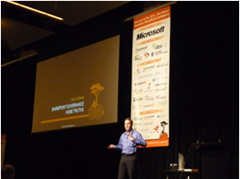
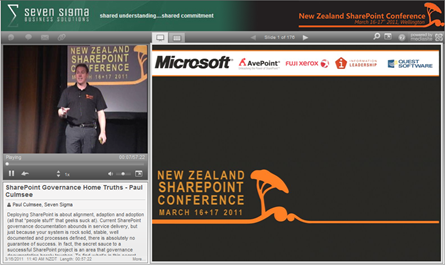
In this multimedia extravaganza of a blog post, lets take a closer look at this class and what you can expect. Below is a snippet of a talk I did in New Zealand called “SharePoint Governance  Home Truths”. This clip shows a little diagnostic test that I do on my audience, to see whether they have experienced the visible signs of wicked problems. If you want to know why you should go to SPGov+IA, then take my 2 minute test yourself.

Do you need SPGov+IA? Take the two minute test to find out…

If the two minute test has taken your fancy, then you might want to see what is in store on the course itself. Below is the first half-hour of module 1 (in the form of a conference session), as well as the accompanying slide deck.

image 

View more presentations from paulculmsee

Course Information:

imageDownload Course Outline (PDF)

Download Class Flyer (PDF)

Most people understand that deploying SharePoint is much more than getting it installed.  Despite this, current SharePoint governance documentation abounds in service delivery aspects. However, just because your system is rock-solid, stable, well-documented and governed through good process, there is absolutely no guarantee of success.  Similarly, if Information Architecture for SharePoint was as easy as putting together lists, libraries and metadata the right way, then why doesn’t Microsoft publish the obvious best practices?

In fact, the secret to a successful SharePoint project is an area that the governance documentation barely touches.

This Master Class pinpoints the critical success factors for SharePoint Governance and Information Architecture and rectifies this blind spot.  Paul Culmsee’s style takes an ironic and subversive view on how SharePoint Governance really works within organizations while presenting a model and the tools necessary to get it right.

Drawing on inspiration from many diverse sources, disciplines and case studies, Paul Culmsee has distilled the "what" and "how" of governance down to a simple and accessible, yet rigorous and comprehensive set of tools and methods that organizations, large and small, can utilize to achieve the level of commitment required to see SharePoint become a successful part of your enterprise.

Some workshop sessions are hands on, we provide all of the tools and samples needed but please bring your own laptop.

Course Structure:

The course is split into 7 modules, run across two days.

Module 1: SharePoint Governance f-Laws 1-17:

Module 1 is all about setting context in the form of clearing some misconceptions about the often muddy topic of SharePoint governance. This module sheds some light onto these less visible SharePoint governance factors in the form of Governance f-Laws, which will also help to provide the context for the rest of this course

  • Why users don’t know what they want
  • The danger of platitudes
  • Why IT doesn’t get it
  • The adaptive challenge – how to govern SharePoint for the hidden organisation
  • The true forces of organisational chaos
  • Wicked problems and how to spot them
  • The myth of best practices and how to determine when a “practice” is really best

Module 2: The Shared Understanding Toolkit – part 1:

Module 2 pinpoints the SharePoint governance blind spot and introduces the Seven Sigma Shared Understanding Toolkit to counter it. The toolkit is a suite of tools, patterns and practices that can be used to improve SharePoint outcomes. This module builds upon the f-laws of module 1 and specifically examines the “what” and “why” questions of SharePoint Governance. Areas covered include how to identify particular types of problems, how to align the diverse goals of stakeholders, leverage problem structuring methods and constructing a solid business case.

Module 3: The Shared Understanding Toolkit – part 2:

Module 3 continues the Seven Sigma Shared Understanding Toolkit, and focuses on the foundation of “what” and “why” by examining the “who” and “how”. Areas covered include aligning stakeholder expectations, priorities and focus areas and building this alignment into a governance structure and written governance plan that actually make sense and that people will read. We round off by examining user engagement/stakeholder communication and training strategy.

Module 4: Information Architecture trends, lessons learned and key SharePoint challenges

Module 4 examines the hidden costs of poor information management practices, as well as some of the trends that are impacting on Information Architecture and the strategic direction of Microsoft as it develops the SharePoint road map. We will also examine the results from what other organisations have attempted and their lessons learned. We then distil those lessons learned into some the fundamental tenants of modern information architecture and finish off by examining the key SharePoint challenges from a technical, strategic and organisational viewpoint.

Module 5: Information organisation and facets of collaboration

Module 5 dives deeper into the core Information Architecture topics of information structure and organisation. We explore the various facets of enterprise collaboration and identify common Information Architecture mistakes and the strategies to avoid making them.

Module 6: Information Seeking, Search and metadata

Module 6 examines the factors that affect how users seek information and how they manifest in terms of patterns of use. Building upon the facets of collaboration of module 5, we examine several strategies to improving SharePoint search and navigation. We then turn our attention to taxonomy and metadata, and what SharePoint 2010 has to offer in terms of managed metadata

Module 7: Shared understanding and visual representation – documenting your Information Architecture

Module 7 returns to the theme of governance in the sense of communicating your information architecture through visual or written form. To achieve shared understanding among participants, we need to document our designs in various forms for various audiences.

Putting it all together: From vision to execution

Attendees will be taking home a manual ~480 pages, containing the Seven Sigma Shared Understanding Toolkit CD with a sample performance framework, governance plan, SharePoint ROI calculator (Spreadsheet), sample mind maps of Information Architecture. These tools are the result of years of continual development and refinement "out in the field" by Paul Culmsee and have only been recently released to the public through this Master Class.

More Information:

Refund Policy:

No refunds will be issued for attendee cancellations once payment is recieved.  Class cancellation by the organizer will result in a refund less transaction fees.

image

http://spiaseattle.eventbrite.com/


Praise for SharePoint Governance and IA Masterclass

I received this today and I had to post it. In New Zealand recently, Paul McTaggart of Gen-i stopped me and complimented the governance and information architecture course that some of his staff have attended. I am truly humbled by the feedback that he just sent through…

Practical, relevant and seriously funny: These attributes are seldom seen together in a training session.

However, Paul Culmsee has practical, real world experience having worked on complex (wicked) projects which provides him with the background and understanding of what works and why.

Discover the immutable f-laws of SharePoint projects. Cry and laugh when you identify the reality of you own organizational platitudes, but breathe a sigh of relief when you see that there is a way out and that SharePoint Governance and Information Architecture can be achieved with everyone sharing the same understanding of where you are now and where you are trying to get to.

Paul also supports you new found realization of what needs to be done by providing you with the guidance, tools and methods that you can take from the classroom and apply to your complex (wicked) problem projects to make them work.

Basically it is all about people (gaining shared understanding), process (knowing how to get from here to there) and then the technology (SharePoint).

My team now uses the concept of shared understanding and the tools that the Governance and Information Architecture Class has provided to get customers “on page” before we design and code in SharePoint land.

Paul McTaggart

ECM Business Manager

Gen-i a division of Telecom New Zealand

Thanks for reading

Paul Culmsee


The facets of collaboration part 5: It’s all Gen-Y’s fault – or is it?


Hi all

imageWelcome to another exploration of the collaborative world through a lens called the facets of collaboration. If you are joining us for the first time, I am writing a series of posts that looks at how our perception of collaboration influences our penchant for certain collaborative tools and approaches. SharePoint, given that it is touted as a collaboration platform, inevitably results in consultants never being able to give a straight answer. This is because SharePoint is so feature-rich (and as a result caveat-rich), that there are always fifty different ways a situation can be approached. Add the fact that many clients do not necessarily know what they want and learn about their problem by examining potential solutions, we have all the hallmarks of a wicked problem in the making.

These wicked problems, underpinning SharePoint, often results in Robot Barbie situations (cue the image to the left), which is the metaphor that I started this series with. Robot Barbie represents everything wrong about SharePoint deployments, as it is symptomatic of throwing features at a platitude, pretending to be solving a real problem and then wondering why the result doesn’t gel at all. It is a pattern of behaviour that is similar to an observation made by the very wise (and profane) Ted Dziuba who once spoke these words of wisdom.

If there’s one thing all engineers love to do, it’s create APIs. It’s so awesome because you can draw on a white board and feel like you put in a good day’s work, despite having solved no real, actual problems. Web 2.0 engineers, in addition to their intrinsic love of APIs, have a real hard-on for anything having to do with a social network. For example, developing a Facebook application lets them call their shitty little PHP program an "application" running on a "platform," like a real, live computer programmer does. Make-believe time is so much fun, even for adults.

Apart from making me giggle, Dziuba may have a point. Elsewhere on this blog I have spent time explaining that there are different types of problems that require different approaches to solving them (wicked vs. tame). My conjecture is that collaboration itself is exactly the same in this regard. People who espouse a particular type of tool or approach as the utopian solution to collaboration are taking a one size fits all approach to a multifaceted area and even worse, treating that area as a platitude. Anyone who calls themselves an Information Architect and doesn’t at least give cursory examination to the dimensions or facets of collaboration is likely to be doing their stakeholders a disservice.

All of us have certain biases, and I am no exception. For a start, I am generation X – the so-called cynical generation. Apparently we whinge and whine about everything and then blame it all on generation-Y. Thus, if cynicism is the gen-X stereotype, then I will happily accept being the poster child. I mean seriously, all of you vanity obsessed, self interested generation y’ers, if you spend a little less time preening and more time thinking, we might get some wisdom out of you (see – I am such a cynical gen-X right now).

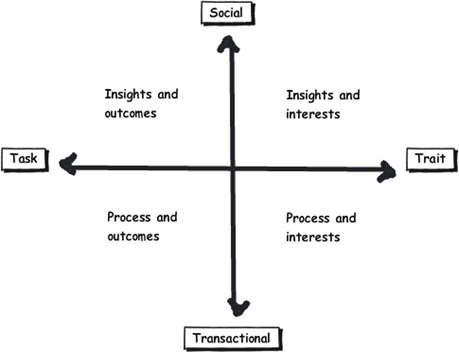
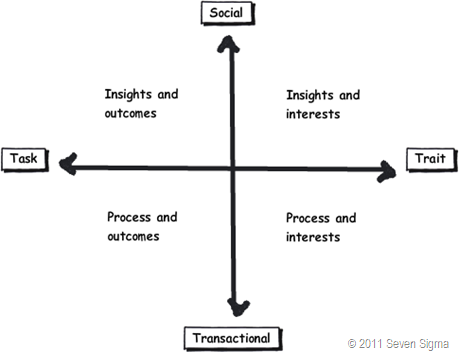
So let’s recap the facets of collaboration. The model I came up with identifies four major facets for collaborative work: Task, Trait, Social and Transactional.

  • Task: Because the outcome drives the members’ attention and participation
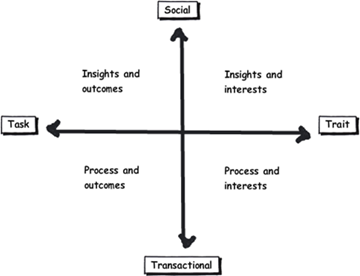
  • Trait: Because the interest drives the members’ attention and participation
  • Transactional: Because the process drives the members’ attention and participation
  • Social: Because the shared insight drives the members’ attention and participation

image

In the last post, I used the model to examine the notion of Business Process Management versus Human Process Management and looked at some of the claims and counter claims made by proponents of each. This time let’s up the ante and talk about something curlier. We will examine the notion that social networking in the enterprise is the answer to improving collaboration within the enterprise. On first thought, it makes perfect sense, given the incredible success of Facebook, LinkedIn and Twitter. Nevertheless, there is ongoing debate about the use and value of social tools in the enterprise driven by their rise outside of organisational contexts. One particularly strongly worded quote is from Aaron Fulkerson, co-founder and CEO of MindTouch who doesn’t mince his words:

This class of software forces business users to adopt the myopic social visions imagined by the developers, which are nearly identical to their corresponding consumer web implementations. In short, social software is not solving business problems. In fact, these applications only serve to treat symptoms of the problems businesses face. They exacerbate the real problems within businesses by creating distractions and, worse, proliferate more disconnected data and application silos.

Ouch! Even within the SharePoint community there is significant variation of opinions as to the value of social. While I better protect the innocent and not name names, I have spoken with several well known SharePointers who think social is a giant waste of time, versus those who see real value in it. Irrespective of your opinion, you cannot ignore the fact that social is a significant game changer with effects still being felt. While web 2.0 has dropped off the Gartner hype cycle, its effect on particular sectors has been far reaching. Now it seems that all sectors have a 2.0 on the end of their name. For example:

  • Enterprise 2.0
  • Education 2.0
  • Legal 2.0
  • Government 2.0

Clearly, if things were just a flash in the pan, why are governments around the world trying to revitalise their public sector by utilising these tools?

Look at Microsoft as another example. They have, I think smartly, recognised industry trends and reacted to them via the introduction of a number of new SharePoint features, such as tagging/folksonomy via managed metadata, ratings columns, enhanced wiki capabilities and a significant investment in the capabilities of my-sites. Their clients now have the option to leverage these features should they choose to do so.

So just as there are naysayers, there are the pundits. Many people cite the reasoning that these features are necessary to attract and retain the next generation of workers, who have grown up with these tools in their personal lives. Whether this claim is valid is debatable, but I have to say, I really like the Enterprise 2.0 slide deck below by Scott Gavin for a number of reasons. I think it encapsulates the 2.0 vision, underpinned by social/cloud technologies very nicely. I sometimes ask people to discuss this slide deck in my IA classes and discussion is equally polarising as social networking in the enterprise itself. Some people think it represents the vision for the future, and others think it is hopelessly idealistic and doesn’t reflect cold, hard reality. Take a look for yourself below…

And the survey says…

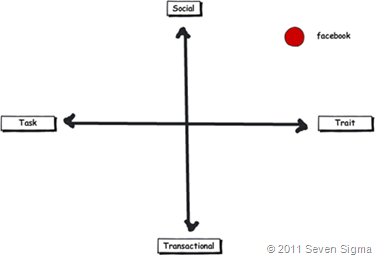
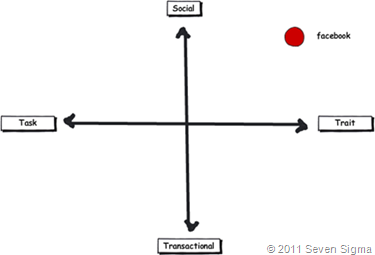
Using the facets quadrants, we can start to see patterns for success of these tools for the enterprise and whether Aaron Fulkerson’s argument has merit or whether Scott Gavin is on the right track. An interesting use of the facet diagram is to plot where various tools and technologies are located. in my classes, I ask people to plot where Facebook belongs on facets diagram. Guess where it is usually drawn? 
image

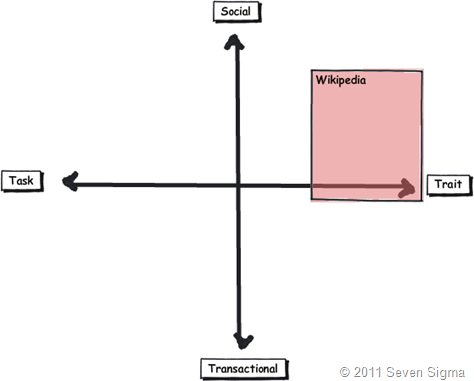
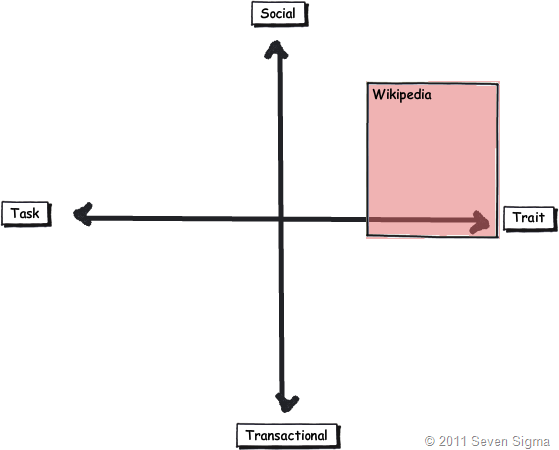
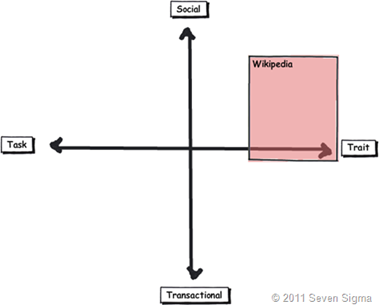
While some people will draw Facebook at various levels on the vertical axis, everyone pretty much describes Facebook (and LinkedIn)  as trait based, while being highly dominant on the social quadrant. As discussed in the last article, if I ask people to plot a crowdsourced tool like Wikipedia, the dominant characteristic is always trait/social. In other words, people maintain and update Wikipedia articles because of their interest in the topic area, not because it helps them get something done.
image_thumb29

Clearly, big social networking technologies are successful in the "trait based social” quadrant. In other words, we tend to use Facebook more for common interest collaboration than to solve a task based collaborative issue (such as deliver a project). Another interesting thing about a lot of social networking technologies is that for many, our work-based collaborative life tends to be more task based, compared to our non-work which is more trait based. In other words, for a lot of us, our work life revolves around working with a group of people for a common outcome and if it was not for that common outcome, we wouldn’t necessarily have much in common (I risk falling victim to my own generalisation here – so I will come back to this later in the section titled “Why User Buy-In Is Hard”).

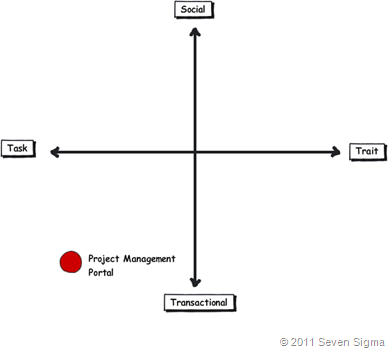
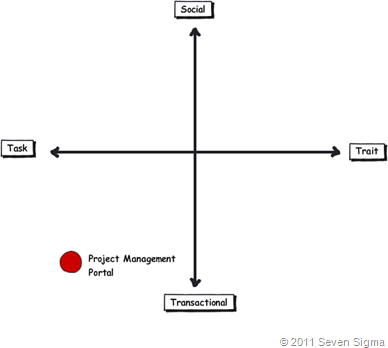
When you look at where Facebook sits in the quadrant, it begs the question of how well this type of tool (or the building blocks it is based on) would work in an organisation that is project (task) based and highly transactional. To that end, consider a project management information system, such as the basic one that Dux espouses in his book or the more complex one that Microsoft sell to organisations. Where do you think it belongs on the quadrant?

When I ask people to plot their project management information system, I typically get this response:
image

I speculate that the further away two tools lie on the spectrum, the more likely we are to have a robot-barbie solution if you blindly mix features that work well in each individual quadrant. The wiki argument I made in part 3 seems to support this contention. If you recall, in part 3 of this series, I mentioned that I ask every attendee of my classes if they had ever seen a successful project management wiki.  Irrespective of the location of the class, the answer was pretty much “no”. I noted that where I had seen successful wikis tended to be where the users of the wiki were linked by strong traits.

Looking Deeper

While that is interesting, I think the facets diagram tells you more than it intends. Obviously, it is clear that these project management systems such as MS Project Server are oriented toward task/transactional (“getting things done”) aspect of project delivery (ie, time, cost, scope, budget and the like). While some people might point to this and say “there you go – I told you all that social crap was a waste of time – bloody gen-Y and their social networking hubris”, I feel this is naive. If task based transactional tools are sufficient, then why do so many projects fail?

I have stated many times on this blog that shared commitment to a course of action requires shared understanding of the problem at hand. The act of aligning a team to project goals and developing this shared understanding is the realm of the task/social quadrant (the top left), where insights and outcomes come together. When I ask people to name tools that live in this space, few can name anything. Obviously, most project management systems are devoid here. Worst still, we subsequently delude ourselves to thinking that shared understanding can come from a few platitudinal paragraphs labelled as a “problem statement”.

Social networking pundits implicitly recognise this issue (and frequently butt heads against command and control type project managers as a result). But i feel they make the mistake in applying a one size fits all approach to collaboration and apply trait based tools as a panacea when they are not wholly appropriate. The social tools seem to fit exceptionally well into the top right quadrant, but not in the top left.

In fact the only tools that spring to mind that belong in the top left category are the sensemaking tools that my company practice, such as Dialogue Mapping.

Where’s the proof, Paul?

So I guess I am arguing that using social tools because they are the “choice of the new generation” ignores a few home truths about the nature of these tools versus the nature of organisational life. Just because Microsoft provide the tools for you, tells you that they are hedging their bets rather than having any more insight than you or me. So to test all of this, let’s use the facets model in a different way to back up some of my observations and suggestions in this post. Guess what happens when I ask people to plot SharePoint itself on the facets map?

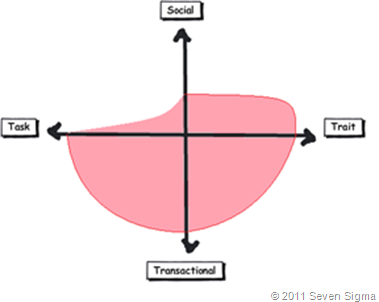
When I asked SharePoint practitioners to do this, they initially drew SharePoint 2007 as a circle over the entire model. Once they did so, they would very often adjust the drawing to emphasise transactional over social collaboration as shown below.
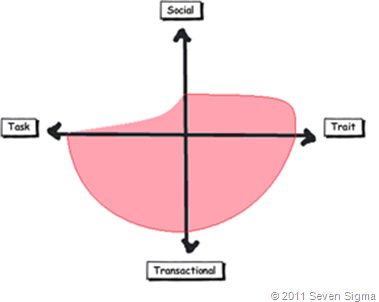
Sharepoint 2007 

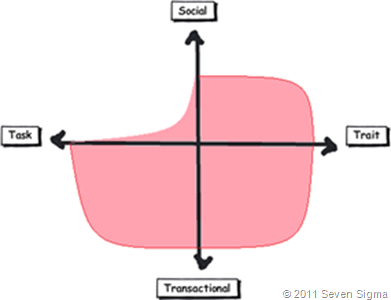
When practitioners were asked to draw SharePoint 2010, they usually indicated a higher representation in in the two social quadrants, but favoured the trait based social over task based social as shown below.
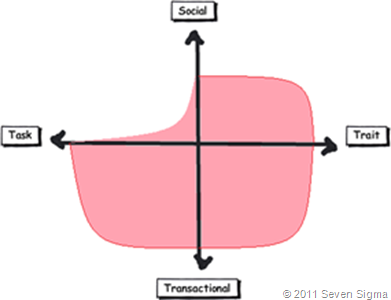
image

What was interesting about this experiment is that very few people drew SharePoint over the entire facets of collaboration. Social collaboration with SharePoint it seems, only stretches so far. This leads me onto more conjecture, and now we get to the bit in the post where we name a giant SharePoint elephant in the room.

Structured tools for social collaboration?

Many collaborative tools purport themselves as operating in the social space. SharePoint 2010 clearly does so, principally due to the Managed Metadata service, pimped MySites with tagging/rating capabilities. But SharePoint’s core heritage is database/metadata driven, document based collaboration. If we go back to our definition of social collaboration as dynamic, unstructured, with sharing of perspectives and insight through pattern sensing, then social collaboration is clearly not a predefined interaction.

Yet, database driven tools like SharePoint, and its building blocks like site columns and content types require considerable up-front planning to install and govern. Many, many inputs need to be well defined and furthermore, unless you have learnt through living the pain of things like content type definitions in declarative CAML, SharePoint buildings blocks are difficult to maintain/change over time. SharePoint suffers from a problem of reduced resiliency over time in that the more you customise it to suit your ends, the less flexible it gets. In the case of social collaboration the problem is worse because we are trying design for outputs where the inputs are not controlled. Trying to turn something that is inherently organic and emergent to something that has an X and Y on it may be misfocused and destined to fail in many circumstances. The realm of well-defined inputs is the realm of transactional collaboration, where workflow and business process management thrive and change is much more controlled before SharePoint ever gets a look in.

SharePoint excels at transactional scenarios as this is its heritage – after all, the majority of its feature set is oriented to transactional collaboration. The fact that people are prepared to draw SharePoint as dominating across across the transactional half of the facets diagram illustrates this.

But this raises interesting, if not slightly heretical question. If we need to use information architects to get a collaborative tool deployed for social collaboration (to get those inputs defined), then are we pushing the solution into the transactional side of the fence? Recall that in part 3 of this series, I looked at document collaboration and noted that when asked to draw team based document collaboration, people typically drew it operating in the social half of the matrix (pasted below for reference). I also noted in part 3 that for team based collaboration, rules and process are much less rigid or formalised with regards to document use and structure. I then referred to a recent NothingbutSharePoint article where a large organisation’s attempts to introduce the usage of content types largely failed. Like the seeming lack of success of wiki’s for task based collaboration, maybe content types simply are not the ideal construct as you move up the Y axis from transactional to social?
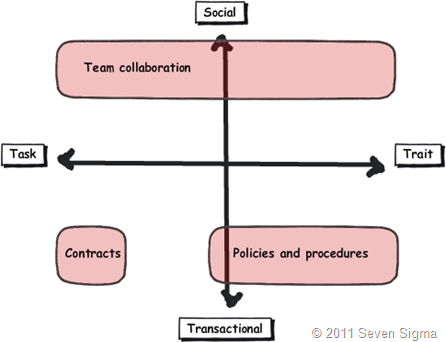
Now do not assume that I am anti metadata/content types here as this is not the case at all. Content types rock when it comes to search and surfacing of related information across a site collection (and beyond if you use search web parts). What I am calling out is the fact that if the SharePoint constructs that we have at our disposal were the panacea for social collaboration, where are the best practices that tell us how to leverage them for success? Perhaps the nature of the collaboration taking place plays a part in the lack of take-up reported in the aforementioned article? Those who advocate highly structured metadata as the only true solution may in fact be pushing a transactional paradigm onto a collaborative model that is ill-suited to it?

The knowledge worker paradox – one of the reasons why user buy-in is hard

Finally for now I’d like to cover one more aspect to this issue. Last year, one of my students looked at the facets and said “Now I know why my users aren’t seeing the value that I see in SharePoint”. When I asked him why, he explained:

“Many of my users are transactional and governed by process – that’s their KPI. Here I am as a knowledge worker, seeing all of these great collaborative features, but I am not judged by a process or transaction. I don’t live in that world. I forget that someone whose performance is judged by process consistency is not going to get all excited by a wiki or tagging or a blog.”

I call this the knowledge worker paradox and it is reminiscent of what I said in part 4 where we looked at BPM vs. HPM. Each role on an organisation is multifaceted. For many roles, there is varying degrees of transactional work taking place. Accordingly some people are very much process driven just as much as they are social driven. Gross generalisations that make statements that “80% of people are knowledge workers or perform knowledge work” do not help matters. In fact they serve to feed the one size fits all mentality that has proven to be detrimental to projects when people fail to recognise that some projects have wicked aspects.

SharePoint people are almost always knowledge workers. Thus if you, as a knowledge worker who is rarely governed by transactional process, think that you have the vision to prescribe a SharePoint driven meta-utopia to meet transactional needs without having lived that world, then if your results are not what you hoped for then to me its hardly surprising.  My student in this case realised that he had been approaching his user base the wrong way. Like Jane in part 1, he did not take into account the dominant facets of collaboration for the roles that he was trying to sell SharePoint into.

When you think about it, the whole argument around records management versus collaborative document management is in effect, an argument between a transactional oriented approach, versus a social oriented one. It is the same pattern as BPM vs. HPM. In records management, the paradigm is that management of the record is more important than the content of the record. Furthermore, that record shouldn’t change. Yet with team based document collaboration, without content there is no document as such and furthermore, the document will change frequently and require less strict controls to grease the gears of collaboration.

Both records oriented people and social pundits commonly make the same mistake of my student, where they force their dominant paradigm on everyone else.

Conclusion

Food for thought, eh?

This is probably my last facets of collaboration post for a while. It is one of these series of articles that I feel has value, but I know it won’t be read by too many 🙂 Nevertheless, I do hope that anyone who has gotten this far through has gotten some value from this examination and sees value in the model to help users make more informed Information Architecture decisions for SharePoint and beyond. I certainly use it now in most engagements and hope that it can be improved upon as a tool, or somehow incorporated into some of the SharePoint standards or maturity model stuff that is out there.

Remember the most important thing of all though. Despite all I have said, it is still definitely all generation y’s fault!

Thanks for reading


Paul Culmsee

www.sevensigma.com.au


Australian SharePoint Conference Community Challenge–How we did it.

Hiya

image

I recently participated in the Australian and New Zealand community SharePoint conferences and had a blast. First up, I was given the opportunity to keynote the Australian conference on day 2, where I spoke about SharePoint Governance home truths. It received very positive feedback and I was told by a lot of people that it really made them rethink their governance approach. In fact, in the New Zealand session, as I was going through some of the common mistakes people make, I could see people cringing as they knew they were guilty as charged. One attendee buried her head in her hands when I started talking about the “buffet of platitudes” (what is the “buffet of platitudes” you ask? Come to my class to find out! 🙂

The community challenge in Australia was a real highlight. This was a new addition to the conference where a group of conference attendees delivered a SharePoint solution for a not for profit organisation. WorkVentures was the organisation selected and the challenge progressed over three sessions, facilitated by SharePoint community leaders. Session one (Define and Design), was a business session which aimed to work through the high level requirements that WorkVentures had for an intranet, their aims for what they hope it would achieve and what they wanted included.  

This post was written on the assumption that you are familiar with some of Seven Sigma’s methods. If not, then we suggest you stop and read a couple of foundational posts first – especially if these maps do not mean much to you.

The Importance of Goal Alignment…

Nick Hadlee was supposed to chair this define and design session, but was unable to get to the Australian conference due to the earthquake events in Christchurch. As a result, I ended up inheriting this role, so I roped in Andrew Jolly to help me on this, because we have a lot in common and work in a similar way. User surveys had been conducted with WorkVentures staff and management, which gave some insights into potential focus areas for SharePoint. Even so, I had no way of knowing whether those potential focus areas made strategic sense. To resolve this issue, we examined WorkVentures 2009 Annual Report to understand their core purpose and strategic focus areas and various business units. After all, it is all well and good to develop some SharePoint functionality, but if you can’t see how that component helps achieve strategic objectives, how do you know it is the right thing to do?

The annual report proved to be a goldmine. It stated that WorkVentures had embarked on an enterprise improvement strategy prior to SharePoint and the community challenge being on the radar. This enterprise improvement plan, incorporating quality management, IT, HR and business strategy development, provided us the context to focus SharePoint as an enabler that fitted within the plan.

Andrew wasn’t due to fly into Sydney until the evening before the conference. So the day before the conference, Debbie Ireland and I visited WorkVentures on-site, meeting with the CEO, CFO and Marketing Director. The purpose of this visit was to ensure a shared understanding among us all of the alignment of the SharePoint community challenge outputs to the WorkVentures vision, purpose and strategic focus areas. From this conversation, which I mapped, some really interesting stories enabled them to pinpoint one of the key success factors for any SharePoint implementation at WorkVentures – “Bridging Silos”.

Ultimately, we identified four key areas of strategic focus for SharePoint that aligned to WorkVentures strategic goals. Below is a screenshot of the end-to-end alignment in map format . This map was used during the “define and design” conference session to help focus attendees on the purpose of SharePoint for this organisation, as well as noting the key areas that we would have to do well, to consider SharePoint a success.

FocusAreas

Stories that led to the goal

Lawrence Luk – the CFO of WorkVentures told Debbie and I several captivating stories that surfaced the bridging silos area of focus. One interesting facet of WorkVentures was that staff from the whole organisation came together once per year – at the Christmas party. This is because each WorkVentures “division” or “business unit” is in effect a separate mini-company, with different goals, customers, vertical markets and regulatory requirements. Thus the problem of silos isn’t a negative one in the sense where dysfunctional “culture” is blamed as such. More that it was the simple fact that each business unit didn’t have a lot in common with other business units. The silo effect was a by-product and it was not driven by negative behaviours.

A great example of this was one particular business unit, Connect IT. It solicits organisations to donate old PC’s, which provides opportunities for skills development for disadvantaged people by teaching them how to refurbish these PC’s. These refurbished PC’s are then sold at low cost. A KPI for this program is the number of organisations donating old PC’s to WorkVentures to sustain ConnectIT. Lawrence had the experience where WorkVentures financial auditors, who had been doing the books for two years prior, asked him why they hadn’t been approached to donate PC’s as they had some. Lawrence realised that he almost missed a great opportunity to help the ConnectIT division achieve one of their key KPI’s. Furthermore, the auditor should never have had to ask themselves. Instead all WorkVentures staff should have this core KPI instilled and internalised so that they could proactively seek out these opportunities to help the other business units.

Another couple of interesting contextual facets illustrated that there were other forms of silo that went beyond a purely divisional basis:

  • Most backoffice staff had never been to the Campbelltown office, where all of the “coal face” work took place with the community.
  • English was a second language to many staff.
  • Not all staff had their own PC’s.

These stories catalysed the conversation to many other examples of missed opportunities, where one business unit has the means to make a massive difference to the results of another. On reflection, it was realised that the nature of WorkVentures business units, being so independent of each-other, inevitably had a silo effect. There was a lack of awareness organisation-wide of the core KPI’s of each unit, hence bridging (not breaking) these silos became a key theme. If SharePoint was to have a long lasting, successful legacy, then it had to play a part in addressing this issue.

The define and design session live…

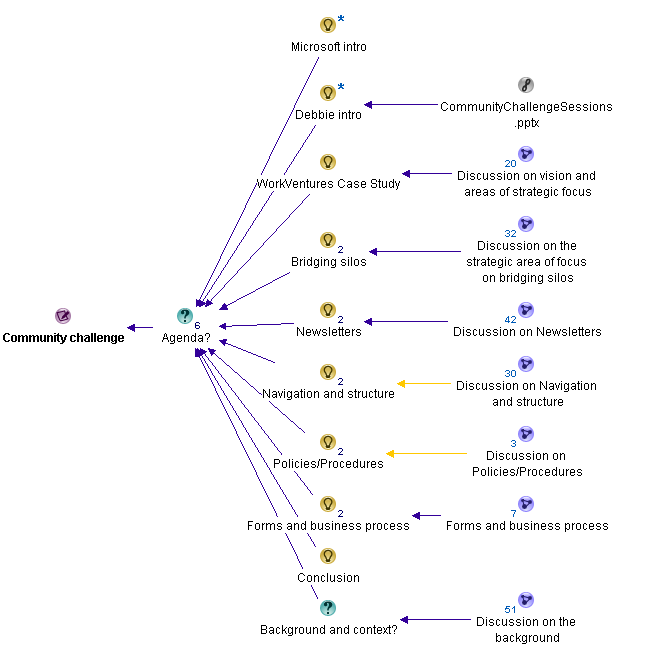
From there, with invaluable help from Andrew Jolly, we planned and then executed the requirements session with a conference audience of around one hundred people. We split the session up into several areas and the map below shows how we structured it.

After Microsoft did their intro, Debbie explained the context of the community challenge via a short PowerPoint presentation. I then took the chair and explained the vision and areas of focus map (the image above) and stressed to the audience that they were going to be participating in this session as well. I also stressed that no matter what solutions or ideas they came up with, they had to justify them against the four key focus areas, which I went through.

image

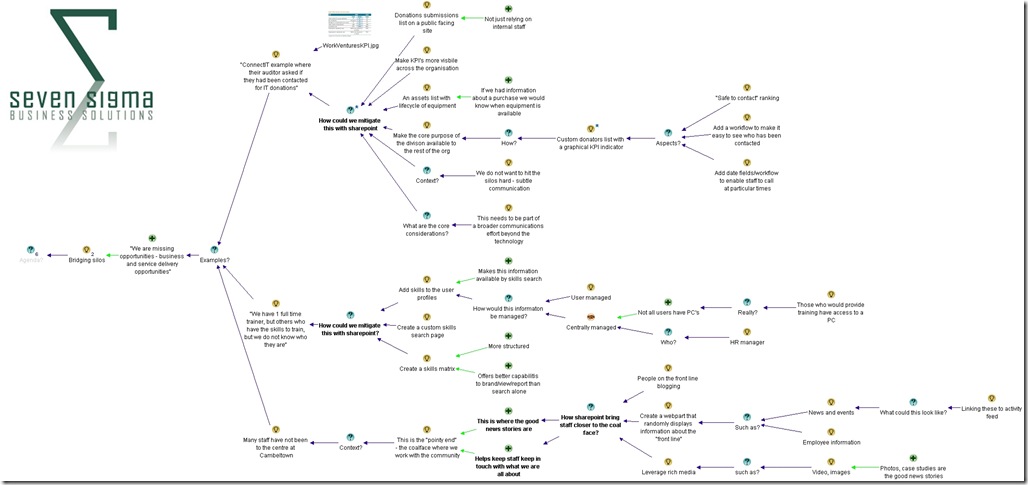
Then we got down to business where I dialogue mapped, with Andrew and I co-facilitating. We decided to focus people’s attention to the core goal of bridging silos as a topic area itself, and ask the audience how SharePoint could indeed bridge silos. We utilised three of the examples that Lawrence gave us  and then leveraged the wisdom of the (large) crowd to solicit ideas. Below is the dialogue map that shows the richness of this discussion (click to enlarge). You will see in this map that for each story told to us by Lawrence, we asked the question “How could we mitigate this with SharePoint?”. The purpose of asking the question this way helped the audience to focus on SharePoint as an enabler to a greater end – and not to be a tool looking for a problem to solve.


Silos

Given that we only had around 45 minutes to work with, Andrew and I could only spend around 15 minutes on the bridging silos area. But the map above shows that a lot of very valuable rationale from the audience was captured. The real benefit though was focusing the audience onto the broader goals and how SharePoint could enable them. This was critical to do, because now we had to switch focus from the lofty world of goal alignment to focusing on how SharePoint building blocks could be used to achieve specific ends.

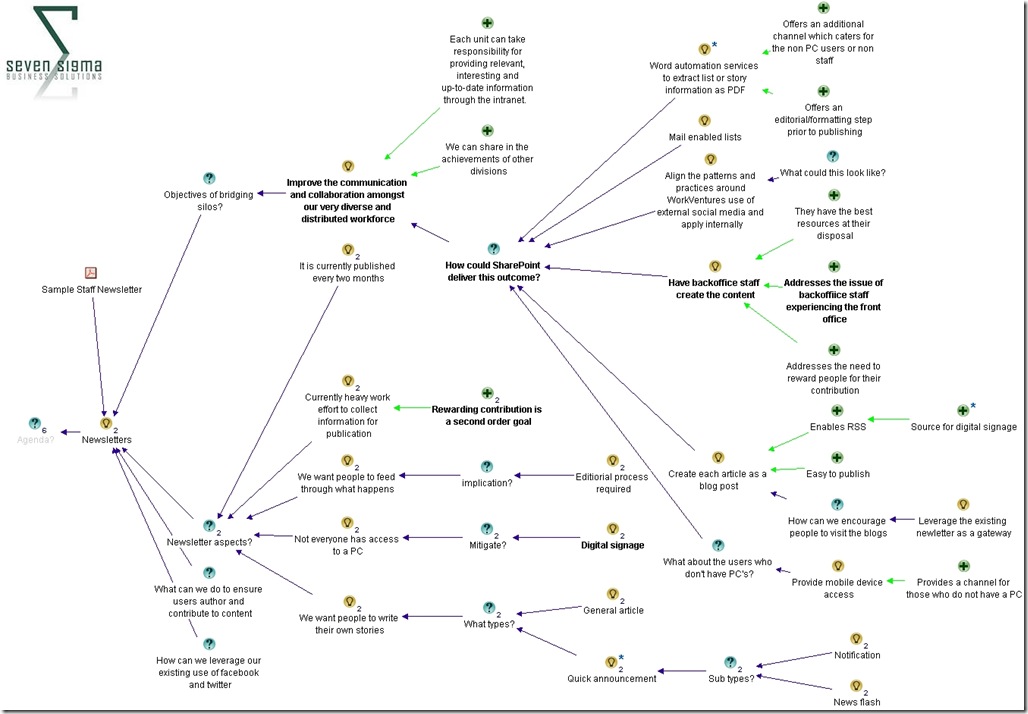
We examined how SharePoint could augment the existing newsletter based method for dissemination of information within WorkVentures. We showed the audience what sample WorkVentures newsletter looked like and reviewed some of the key contextual aspects to newsletters within WorkVentures in terms of their creation, management, reach and format.  We reminded the audience about the importance of bridging silos and then called for ideas from the audience as to how SharePoint could improve the dissemination of news. What was particularly great about this session was that audience members began to relate SharePoint ideas against the key focus areas and identify some of the governance aspects that would be required to make it work.

For example, if you look at the map below (click to enlarge), one of the ideas for the newsletter was a fairly technical one: leveraging “word automation services to extract list or story items and create a PDF”. On first glance one might think “wow that’s fairly heavy” (and not to mention quite nerdy), but the justification for this idea was that it would still account for those WorkVentures users who do not have a PC and therefore access to the portal. Another idea was “Have backoffice staff create the content” on the basis that in doing so, they would get a better feel for coal-face issues that they typically do not see normally. When you think about it, this idea is not SharePoint at all, but more of a strategy for how SharePoint should be adopted and accountabilities for doing so (i.e. a governance approach!)

The key point here is that In both of these examples, audience members were clearly relating their ideas back to the previously established goals, which in turn were aligned to the WorkVentures vision, purpose and key strategic focus areas. Not bad for a couple hours work eh? Smile

Newsletters

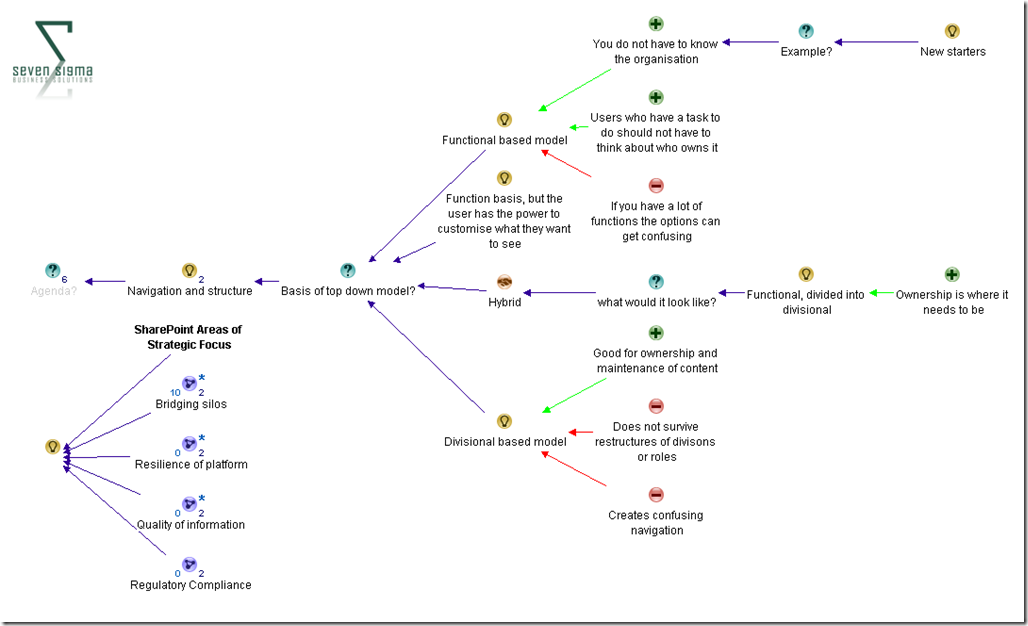
With the little time that we had left, we also looked at site navigation and structure, where the audience resolved that WorkVentures would be best served by a hybrid navigation model that was functionally driven primarily (i.e. task based navigation), but then divided into divisional areas. (As opposed to a purely organisational structure driven navigation model).

As you can see below, we made a point of always showing the four areas of focus for SharePoint overall, to ensure that decisions made were informed by them.

image

Conclusion

I have to say that given the timeframe and constraints, I think we did a great job of developing a shared vision for SharePoint, how it fitted into WorkVentures organisational and strategic context, and then focusing a diverse audience into looking at SharePoint building blocks through that lens. The dialogue maps were very rich, with some terrific ideas, and WorkVentures staff were thrilled to see the alignment of SharePoint to their strategic goals.

I use similar methods to this for non IT projects too, and I think that if we had a week to work on WorkVentures, we would have created something really special. Nevertheless, from my point of view, I think that the community challenge is an terrific idea, I enjoyed being a part of it, and I have to offer special thanks to Debbie and Andrew in particular for helping to make this into a really great mini-engagement. Hopefully we can do it all again next year.

Thanks for reading

Paul Culmsee

www.sevensigma.com.au


Exciting news for Governance and Information Architecture classes

Hi all

I just thought I would check-in with some updates on happenings and some upcoming travels. In less then 2 weeks now, I will be in London with Andrew Woodward and Ant Clay of 21apps for the second SharePoint Governance and Information Architecture Master Class. There are still places available on this class so if you have been thinking about attending, now is the time to act.

Also in Europe, a class is being run in Utrecht, Netherlands in May by Ant Clay.

I am proud to be chosen to be a keynote speaker at the Australian SharePoint conference in Sydney in March. I am still wondering if I should dialogue map 600 people! I will also be running a two-day class after this conference – the only one in Sydney for this year. The week after I am in NZ at the SharePoint conference there, also running a 2 day class and hopefully the first ever Issue Mapping class in New Zealand.

After a small break (begging forgiveness of clients who have to put up with my “international man of mystery” gallivanting), I’ll be heading to North American shores to run classes over there. Confirmed cities at this stage are Boston and Toronto, but DC and Chicago are in the works and I am hopeful to run one on the west coast, perhaps in San Francisco or Seattle.

If you are a SharePoint consultancy in these areas and would like to partner with us on this, please contact me on twitter @paulculmsee or email me via the address at the about page of this blog.

Below is the current itinerary for Governance and Information Architecture classes. Things are still being solidified, and will obviously change a little between now and then. Keep an eye on twitter @paulculmsee for more detail.

Date Location Class Hashtag Comments
Feb 21-22 London SharePoint Governance and Information Architecture #SPIAUK  
March 10-11 Sydney SharePoint Governance and Information Architecture #SPIAAU  
March 14-15 Wellington SharePoint Governance and Information Architecture #SPIANZ  
March 21-22 Wellington Issue Mapping Master Class #IBISNZ  
April 28-29 Washington DC SharePoint Governance and Information Architecture #SPIADC Tentative date: to be confirmed
May 2-3 Indianapolis SharePoint Governance and Information Architecture #SPIAIA Tentative date: to be confirmed
May 5-6 Boston SharePoint Governance and Information Architecture #SPIABN Tentative date: to be confirmed
May 9-10 Netherlands SharePoint Governance and Information Architecture #SPIANL Ant Clay of 21apps is running this class as I am in the USA
May 9-10 Chicago SharePoint Governance and Information Architecture ? Tentative date: to be confirmed
we will arrange some kind of hookup to the Netherlands class
May 12-13 Toronto SharePoint Governance and Information Architecture #SPIATO Announced
May 16-17 West coast USA SharePoint Governance and Information Architecture   Looking for a partner for this region
June London Issue Mapping Master Class   in the works…
July South Atrica SharePoint Governance and Information Architecture   in the works…

if you live in any of the regions that are either “tentative” or “in the works”, please contact me and register your interest so I can work with local partners on the ground in these locations.


Thanks for reading

Paul Culmsee


The facets of collaboration Part 3–The feature jigsaw


Hi all and welcome to part three of my series on unpacking this mysterious phenomenon known as collaboration. In case you missed the first two articles (and I highly suggest that you read part 1 and part 2), I spent some 500 odd hours last year developing a SharePoint Governance and Information Architecture course. Amongst the sweat and tears of that particular endeavour, I researched many papers and online articles that attempt to look at the multitude of factors and variables that impact on collaborative scenarios where SharePoint might be leveraged. I also talked about Robot-Barbie, which represents the tendency for SharePoint features to be combined in such a way where the benefit gained is much less than the potential of the individual parts. Robot-Barbie solutions are to be avoided at all costs.

image

In part 2, I explained each of the facets using the model above, identifying four key facets for collaborative facets: Task, Trait, Social and Transactional.

  • Task: Because the outcome drives the members’ attention and participation
  • Trait: Because the interest drives the members’ attention and participation
  • Transactional: Because the process drives the members’ attention and participation
  • Social: Because the shared insight drives the members’ attention and participation
  • An interesting use of the facet diagram is to plot where various tools and technologies are located and therefore, where their strengths may be. In this article, we will go through some of SharePoint’s collaborative components and see how they fit together.

    The document is dead – long live wikis?

    When I have asked people to draw where Wikipedia lies on the facets, the most common answer by far is on the trait side of the collaborative fence. This seems relatively straightforward. After all, the authors of Wikipedia articles obviously have a shared interest in the topic matter. Without an interest in the topic, there would be little incentive to take the time to write about it. Furthermore with Wikipedia, authors are highly unlikely to be working on the same project or task, since the author can be anybody in the world. But, authors are likely to be performing similar tasks in their respective organisations. A classic trait based scenario.

    Wikis also are open and essentially unstructured, relying on authors to link to other content to build contextual relevance. By this logic, Wikipedia is a strong trait based collaborative system and the dominant process driving the use of the tool is insight more than process. Therefore wikis are socially oriented more than transactional. I would suggest that very few Wikipedia authors indeed would be driven by a process that mandating they update an entry.

    Closer to SharePoint home, Look at the success of SPDevWiki as another example. If you were to plot it across the spectrum (and remember this is about collaboration using the tool, not individual use), it would appear in a similar position on the model to Wikipedia. People use SpDevWiki because they wish to develop and contribute to a repository of knowledge to help others in similar situations. This reciprocal behaviour serves to help the individual in their own endeavours.

    image

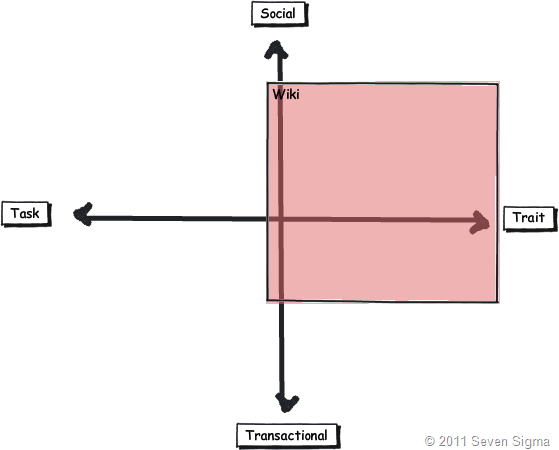
    But there is an interesting change if I ask people to simply draw “a wiki” on the model, rather than the specific example of Wikipedia (the mother of all wikis). The model tends to look something like the image below. Suddenly the scope of wikis expands more into transactional, but few people draw a wiki across the whole collaboration spectrum. As a result of this pattern, one question I make a point of asking people in all of my classes is whether they have ever seen or used a successful project management wiki. I have asked this question in London, New Zealand and around Australia, and the overwhelming answer is no. One respondent stated that his organisation had implemented a project management wiki, but conceded that he was the only one who maintained it.

    image

    The reason I continually ask this question is that I wanted to know if the pattern I had observed was common, as I can only base observation from my own client base. Using my clients, I have seen two occasions where wikis were particularly successful. The first was a wiki for programmers who worked for the same company and the second was a school, where teachers maintained a wiki as part of a SharePoint solution that we put in. Both of these examples are clearly trait dominant in that the authors were in a very similar role. Perhaps a gross generalisation is that wiki’s are best suited to trait/social based collaborative scenarios? If so, it raises an important issue. If a task based collaboration effort has a varied mix of participants, then using the model suggests a wiki may not necessarily be the way to go.

    By the way, I have learned over the years that as soon as you make an assertion to rightness, someone will come along and prove you wrong. For example, I strongly advise people not to use the Microsoft pizza/pie diagram to introduce SharePoint to new users, but Ruven Gotz proves that it is perfectly acceptable to do so. Therefore in the example above I am only reporting on my observations, plus feedback from those who have attended my classes. I am not trying to prove right or wrong here as I know many will disagree with the diagram. But what I am interested in, if you can prove the assertion wrong, is what you did to make a wiki successful in the other quadrants?

    Wikis vs. Custom lists

    In typical SharePoint fashion, there is always ten ways to do something, each with their own pros and cons. Both wikis and SharePoint lists are flexible information repositories, that differ by the degree of structure imposed. Lists offer the creation of custom columns of different kinds, that allow tables of information to be stored and via the use of views, to make sense of the content. You get a few other niceties like datasheet view, attaching files, and export to Excel/MSAccess. In fact, many people like to adopt lists because they previously used Excel for storing information and Sharepoint offers similar functionality with improved data entry and multi-user support.

    Someone once told me that more critical corporate data is stored in excel than any other database system in the world. I am not surprised in the slightest.

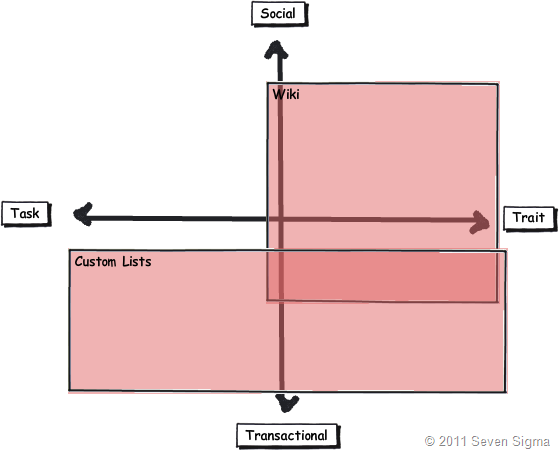
    When asked to place where SharePoint lists fit on the facets model, many users tend to link it to transactional based collaboration that is equally task or trait based. Lists it seems, are well suited to tracking “stuff”, which lends itself naturally to transactional collaboration where process tends to govern interaction.

    Lists also tend to need more up-front work where a wiki usually does not. Before content can be effectively added to a list, you need to define columns or content types in advance and hope that you get it right. Information Architects routinely get paid to help do this. Remember that transactional collaboration is the world of well-defined inputs, because process governs the interaction. As such, project delivery (a transactional/task oriented process) often uses list based techniques because of the improved ability to track, slice and dice information, when compared to a wiki. Dux Sy’s book on using SharePoint for Project Management is a good illustration of this approach. Wiki’s do not even get mentioned in Dux’s book. Why is this? Perhaps the tracking of time, resources, costs, risks, constraints and work performed is best delivered via lists? Certainly, more fully fledged PMIS systems like Microsoft Project Server are highly database driven and designed for transactional work.

    It is then quite interesting to overlay SharePoint lists and wiki’s together. Is it possible to make a more educated call as to when one option is more suited than the other? Take a knowledgebase scenario which could easily be either a wiki or a list. Perhaps the decision as to use wiki or list should be based on the nature of the collaboration? If a bunch of people linked by trait are creating a knowledge repository, a wiki is a proven approach – Wikipedia shows this to be the case. But if this is for say, a more transactional scenario such as a call-center, where KPI’s are based around quick turnaround and resolution of common problems, a list approach might be better?

    image

    At this point I can feel the heat of offended Enterprise 2.0 fanboys. Please understand, I am not anti wiki’s or anything 2.0 – we use these tools in our practice. Furthermore SharePoint blurs the above distinction anyway. Columns can be added to wikis and they leverage SharePoint’s version history too. In other words, you can make a wiki look and feel somewhat like a list. Furthermore, SharePoint wikis can be integrated with information management policies and workflow. When you add those additional capabilities to the mix, you might draw things differently. Nevertheless, I think this is a useful exercise because it might offer insight as to why certain portal features rarely, if ever get used in certain situations.

    Document Collaboration – Transactional or Social?

    Finally for now, document based collaboration seems to fit into any quadrant (and is therefore quite tricky at times). This is because the “document” is simply a medium of collaboration (as is a wiki for that matter).

    For one extreme, take the example of a quality management system (policies, procedures, manuals). Given that a QMS is usually part of a compliance regime, requiring audits and demonstrated conformance, document collaboration is fairly rule-based and managed via well defined and understood process. Therefore, we are talking transactional work. In this world, SharePoint features like content types, metadata, policies and workflow are fairly easy to define and implement.

    But a QMS, via policies and procedures, guide the behaviour and decision making in organisations. So while transactional, it is oriented towards trait based. This is because a QMS is rarely installed to deliver a single project, but to guide delivery of many projects. One thing that might be guided by a QMS is the creation of a legal contract that outlines the scope and responsibilities of two parties undertaking a project. Documents such as contracts, while also usually transactional, are task based they outline a legal commitment to achieving an agreed outcome.

    Contrast this with a team collaborating via documents. A team can be driven by an outcome or common interest (department) and as a result covers both the task and trait based quadrants. Often the rules of engagement are much less rigid or formalised with regards to document use and structure. Thus, a lot of team document collaboration is more social and trying to fit this into an overly strict or complex taxonomy can do more harm than good. I noticed with great interest that recently, certain SharePoint elephants in the room are starting to be named. The recent articles on NothingButSharePoint entitled “SharePoint Content Types: Is this a lost cause?”, highlights what I mean. In this article, repeated attempts were made to try and harness the value and power of content types into a large enterprise. However despite the effort, they were rarely used.

    To me, this highlights the characteristic of team collaboration – particularly knowledge workers. If collaboration is not a predefined interaction, then content types, which by definition, force us to go to a lot of effort to define inputs when those inputs are not necessarily known. Perhaps the nature of the collaboration taking place played a part in the lack of take-up reported in the aforementioned article? Those who advocate metadata as the only true solution may in fact be pushing a transactional paradigm onto a collaborative model that is ill-suited?


    image

    As a general rule, in transactional scenarios, the classification of the document is of more importance than the content of the document. This is the records management and compliance paradigm, where the fact that the document is controlled is the key driver. However, in team collaborative scenarios, the content of the document is usually more important than the metadata classifying it. From a team members point of view, metadata that helps to indicate content is more important than metadata that indicates compliance.

    As documents age however, the value of the content tends to diminish and the value of the classification increases. Balancing the need for compliance against the need for collaboration is a key document management challenge irrespective of the tools and systems that underpin it. There is a large smackdown looming between the worlds of compliance vs. the world of government and enterprise 2.0 and I will eventually write on that topic.

    Once again, the key point here is context. Some document oriented collaborative scenarios are highly structured and well suited to well-defined taxonomy and metadata. Others are somewhat less so. Perhaps a tool like this helps to work out when certain information architecture decisions are applicable when it comes to document collaboration?

    Conclusion

    You might have noticed that this post has more questions than answers. In doing a model, I never said I would provide more answers. Instead, more of a frame or perspective to ask certain types of questions that many SharePoint practitioners have increasingly be asking (as evidenced by the content type post above). In the next post, I will conclude by using the facets to examine several common arguments seen in organisations, where people in particular roles are in effect, predisposed to having a bias in one or more of these facets. We will also look at SharePoint as a whole, as well as examine what we can glean about user engagement and buy-in.

    Until then, thanks for reading.

    Paul Culmsee

    www.sevensigma.com.au


    More SharePoint Governance, Information Architecture and *Sensemaking* Classes Planned

    imageHi all

    A big chunk of last year had me off under a metaphorical mushroom, putting together several days of courseware on the topic of SharePoint Governance and Information Architecture. My take on these topics are influenced from some odd places, and the course drew on a lot of the non IT work that I do, that involves collaboration on some very complex problems indeed.

    In November and December of 2010, we took this “on the road”, so to speak, firstly in Dublin, then London and Sydney. The courses were sold out and feedback was terrific. Here are a few choice quotes (check out the hyperlinks for full reviews)


    “Did it meet my expectations? Well I’d have to say that it far exceeded them. There had obviously been a large amount of effort in preparing the courseware and modules. They covered the important missing links currently absent from the Microsoft and traditional training courses” – Wes Hackett.

    “I’ve just finished the second day of the SharePoint 2010 Governance and Information Architecture Master Class presented by Paul Culmsee with the support of Andrew Woodward . I can wholeheartedly say it was one of the best courses I’ve attended both in content and presentation style and they deserve a lot of credit for putting together a fantastic course. Paul in particular has put a huge amount of effort into the slidedeck, sample documents and enormous manual (almost 500 pages worth!) let alone all the great additional insight he could provide in person over both days” – Brendan Newell

    “Finally …. after 12 years in the IT industry a course which covers some of the fundamental issues governing project success.   This course is a real eye opener and a must for any IT professional involved in project planning and delivery” -  Stephen McWilliams

    “I just came back from the best technology training I have had in years: a world-first Microsoft SharePoint Elite Information Architecture course designed and delivered by Paul Culmsee. It has taught me a great deal across ALL facets of the day-to-day work that I do as a SharePoint architect” – Jess Kim

    Based on this and similar feedback, we are going to do it again. Locations confirmed so far are London (#SPIAUK), Sydney (#SPIAAU) and Wellington (#SPIANZ) in February and March 2011 and in the pipeline is The Netherlands (#SPIANL) and at least a couple of US cities!

    In addition to the unique content on these classes, I am honoured to announce that I am now authorised to teach the official Cognexus Issue Mapping courseware – the only non Cognexus Dialogue Mapping practitioner authorised to do so. As such, we will be running the inaugural Issue Mapping class in London in late February as well (wohoo!)

    So, here are the details for each location:

  • (Register now) February 21, 2011, London   #SPIAUK SharePoint Governance and Information Architecture Master Class (Download Flyer)
  • (Register now) February 23, 2011, London #IBISUK Issue Mapping Master Class (Download Flyer)
  • (Register now) March 10, 2011, Sydney  #SPIAAU SharePoint Governance and Information Architecture Master Class (Download Flyer)
  • (Register now)March 14, 2011, Wellington #SPIANZ SharePoint Governance and Information Architecture Master Class (Download Flyer)
  • (Register soon) May 9, 2011, Utrecht, Netherlands (watch this space)
  • Wondering what to expect in these classes? Read on!

     SharePoint Governance and Information Architecture Master Class. 2 full days of real world, examples knowledge and techniques

    Most people understand that deploying SharePoint is much more than getting it installed. Despite this, current SharePoint governance documentation abounds in service delivery aspects. However, just because your system is rock solid, stable, well documented and governed through good process, there is absolutely no guarantee of success. Similarly, if Information Architecture for SharePoint was as easy as putting together lists, libraries and metadata the right way, then why doesn’t Microsoft publish the obvious best practices?

    In fact, the secret to a successful SharePoint project is an area that the governance documentation barely touches.

    This master class pinpoints the critical success factors for SharePoint governance and Information Architecture and rectifies this blind spot. Paul‘s style takes an ironic and subversive take on how SharePoint governance really works within organisations, while presenting a model and the tools necessary get it right.

    Drawing on inspiration from many diverse sources, disciplines and case studies, Paul has distilled the “what” and “how” of governance down a simple and accessible, yet rigorous and comprehensive set of tools and methods that organisations large and small can utilise to achieve the level of commitment required to see SharePoint become successful.

    Master class aims:

    • Present SharePoint governance and Information Architecture in a new light – focus on the “blind spots” where the current published material is inadequate
    • Cover lessons learned from Paul’s non IT work as a facilitator and sensemaker in complex large scale projects
    • Examine the latest trends in the information landscape for industry and government and review studies that inform governance and Information Architecture efforts
    • Present an alternative approach to business-as-usual SharePoint governance planning that focuses on real collaboration
    • Provide quality information that is rigorous yet accessible, entertaining and interesting

    Master class outcomes:

    • Understand the SharePoint governance lens beyond an IT service delivery focus
    • Develop your ‘wicked problem’ radar and apply appropriate governance practices, tools and techniques accordingly
    • Learn how to align SharePoint projects to broad organisational goals, avoid chasing platitudes and ensure that the problem being solved is the right problem
    • Learn how to account for cognitive bias and utilise tools and techniques that help stakeholders align to a common vision
    • Understand the relationship between governance and assurance, why both are needed and how they affect innovation and user engagement
    • Understand the underlying, often hidden forces of organisational chaos that underpins projects like SharePoint
    • Understand the key challenges and opportunities that SharePoint presents for Information Architecture
    • Learn how to document your information architecture
    • Practical knowledge: Add lots more tools to your governance and IA toolkit!

    Course Structure: The course is split into 7 modules, run across the two days.

    Module 1: SharePoint Governance f-Laws 1-17:

    Module 1 is all about setting context in the form of clearing some misconceptions about the often muddy topic of SharePoint governance. This module sheds some light onto these less visible SharePoint governance factors in the form of Governance f-Laws, which will also help to provide the context for the rest of this course

    • Why users don’t know what they want
    • The danger of platitudes
    • Why IT doesn’t get it
    • The adaptive challenge – how to govern SharePoint for the hidden organisation
    • The true forces of organisational chaos
    • Wicked problems and how to spot them
    • The myth of best practices and how to determine when a “practice” is really best

    Module 2: The Shared Understanding Toolkit – part 1:

    Module 2 pinpoints the SharePoint governance blind spot and introduces the Seven Sigma Shared Understanding Toolkit to counter it. The toolkit is a suite of tools, patterns and practices that can be used to improve SharePoint outcomes. This module builds upon the f-laws of module 1 and specifically examines the “what” and “why” questions of SharePoint Governance. Areas covered include how to identify particular types of problems, how to align the diverse goals of stakeholders, leverage problem structuring methods and constructing a solid business case.

    Module 3: The Shared Understanding Toolkit – part 2:

    Module 3 continues the Seven Sigma Shared Understanding Toolkit, and focuses on the foundation of “what” and “why” by examining the “who” and “how”. Areas covered include aligning stakeholder expectations, priorities and focus areas and building this alignment into a governance structure and written governance plan that actually make sense and that people will read. We round off by examining user engagement/stakeholder communication and training strategy.

    Module 4: Information Architecture trends, lessons learned and key SharePoint challenges

    Module 4 examines the hidden costs of poor information management practices, as well as some of the trends that are impacting on Information Architecture and the strategic direction of Microsoft as it develops the SharePoint road map. We will also examine the results from what other organisations have attempted and their lessons learned. We then distil those lessons learned into some the fundamental tenants of modern information architecture and finish off by examining the key SharePoint challenges from a technical, strategic and organisational viewpoint.

    Module 5: Information organisation and facets of collaboration

    Module 5 dives deeper into the core Information Architecture topics of information structure and organisation. We explore the various facets of enterprise collaboration and identify common Information Architecture mistakes and the strategies to avoid making them.

    Module 6: Information Seeking, Search and metadata.

    Module 6 examines the factors that affect how users seek information and how they manifest in terms of patterns of use. Building upon the facets of collaboration of module 5, we examine several strategies to improving SharePoint search and navigation. We then turn our attention to taxonomy and metadata, and what SharePoint 2010 has to offer in terms of managed metadata

    Module 7: Shared understanding and visual representation – documenting your Information Architecture

    Module 7 returns to the theme of governance in the sense of communicating your information architecture through visual or written form. To achieve shared understanding among participants, we need to document our designs in various forms for various audiences.

    Putting it all together: From vision to execution

    As a take home, we will also supply a USB stick for attendees with a sample performance framework, governance plan, SharePoint ROI calculator (Spreadsheet), sample mind maps of Information Architecture. These tools are the result of years of continual development and refinement “out in the field” and until now have never been released to the public.

    Note: The workshop sessions will be hands on, we provide all of the tools and samples needed but please bring your own laptop.

    Issue Mapping Master Class. Your path towards shared understanding and shared commitment

    “Some problems are so complex that you have to be highly intelligent and well informed just to be undecided about them.” Laurence J. Peter

    Presented by: Paul Culmsee

    Courseware by: Cognexus Institute and Seven Sigma

    “Not another $#%@*$ meeting!”

    All of us have felt the frustration of walking from yet another unproductive meeting, wondering where the agenda went. Yet, as problems become more complex, meetings are still the place where critical strategic decisions are made.

    ibis-map

    What is Issue Mapping?

    Issue-Based Information Systems (IBIS) is a sense-making framework used to support group discussions to assist all involved to come to a shared understanding. It visually maps participants’ points of views, problems voiced, the rationale and reasons leading up to decision(s). The maps can be easily read and understood by everyone, even by those not part of the discussion group.

    Why Issue Mapping?

    • Maps detailed rationale behind decision-making as well as the decision; maps the thinking process of the group
    • Concentrates on pros and cons to an idea, encourages and explores all views, taking the sting out of differences
    • Represents and clarifies diverse points of views, conflicting interpretations and goals, inconsistent information and other forms of complexity
    • Everyone gets a chance to speak, if they want. People are heard and contributions are acknowledged. Interruptions, repetition and dominance of the loudest decreases
    • Keeps participants on topic because they can visually see the progress of the discussion
    • Keeps everyone’s attention
    • Meeting progress/result can be seen
    • Map helps participants come up with ideas/arguments
    • Visual display of progress to review summary if need so the brain can absorb the bigger picture and appreciate the validity and value of a larger perspective
    • Avoids jumping to easy answers or superficial conclusions
    • Promotes deeper reasoning, rigor and even wisdom
    • Everyone can visually see everything discussed- leaves no room for misunderstandings
    • Documents can easily be attached to map to back up ideas
    • Participants can see effectiveness of mapping and genuine will try to make it more productive

    About Seven Sigma

    Issue Mapping is a life skill that can be applied to many different problem domains and scenarios. Participants will gain proficiency in a craft that can be applied long into the future, to help them and others bring clarity and convergence to the management of complex problems. At Seven Sigma, we practice Issue and Dialogue Mapping routinely and this has brought us many satisfied clients. The Mapping in itself is part of the ‘secret sauce’ that makes Seven Sigma’s reputation renowned.

    Seven Sigma Business Solutions is the only recognised designated partner of Cognexus Institute, founder of the art of Issue Mapping, in the world. We recognise that without reaching shared understanding, you will find yourself at yet another meeting, rehashing the same unresolved problems, listening to the same arguments month after month. Or, if a decision has been made, it has not been followed up to fruition due to lack of commitment/buy-in.

    We are proud to be part of your journey towards shared understanding and shared commitment.

    Master Class aims and outcomes:

    • Be able to create great maps – issue maps that are clear, coherent, and inviting
    • Immediately start using Issue Mapping effectively in your work and life; the class will focus on practical experience and map building
    • Command a rich range of options for publishing and sharing maps
    • Lead with maps: create direction, momentum, and energy with issue maps
    • Quickly and effectively do critical analysis in dynamic situations
    • Organize unstructured information and discover patterns and connections within it
    • Make critical thinking visible for inspection and analysis
    • Recognise early, the symptoms of wicked problems and the forces behind group divergence
    • Recognise the importance of capturing the rationale behind decisions, as well as the decisions themselves
    • Rethink the traditional approach to meetings and decision making
    • Start capturing the rationale leading up to the decisions by using IBIS and Compendium software

    It will also give you a deeper understanding of:

    • The fundamentals of IBIS and Compendium
    • The structural patterns that give clarity and power to issue maps
    • How decision rationale is represented in a map

    This master class will be hands on – please bring your own laptop with Compendium software (freeware) installed.

    Duration: 2 days, with homework after the first day

    Audience: For both IT and non-IT audience; those involved in highly complex projects including leaders, consultants, facilitators, organisational development professionals, change agents, managers and engineers.

    Prerequisite: An open mind geared for shared understanding and shared commitment


    A different kind of SharePoint Governance Master Class in London and Dublin

    The background

    Over the last three years, my career trajectory had altered somewhat where I spent half my time as a SharePoint practitioner, doing all of the things that us SharePoint practitioners do, and the other half was spent in a role that I would call sensemaking. Essentially group facilitation work, on some highly complex, non IT problems. These ranged from areas such as city planning, (envisioning and community engagement) to infrastructure delivery (think freeways, schools and hospitals), to mental health, team and relationship building, performance management, board meetings and various other scenarios.

    Imagine how much of a different world this is, where a group is coming together from often very different backgrounds and base positions, to come to grips with a complex set of interlocking problems and somehow try and align enough to move forward. We cannot simply throw a “SharePoint” at these problems and think it will all be better. By their very nature, we have to collaborate on them to move forward – true collaboration in all its messy, sometimes frustrating glory.

    As a result of this experience, I’ve also learned many highly effective collaborative techniques and approaches that I have never seen used in my 20+ years of being an IT practitioner. Additionally, I’ve had the opportunity to work with (and still do), some highly skilled people who I learned a huge amount from. This is “standing on the shoulders of giants” stuff. As you can imagine, this new learning has had a significant effect on how Seven Sigma now diagnoses and approaches SharePoint projects and has altered the lens through which I view problem solving with SharePoint.

    It also provided me the means to pinpoint a giant blind spot in the SharePoint governance material that’s out there, and what to do about it.

    The first catalyst – back injury

    In January this year, my family and I went on a short holiday, down to the wine country of Western Australia called the Margaret River region. On the very first day of that trip, I was at the beach, watching my kids run amok, when I totally put my back out (*sigh* such an old man). Needless to say, I could barely move for the next week or two after. My family, ever concerned for my welfare, promptly left me behind at the chalet and took off each day to sample wines, food and generally do the things that tourists do.

    Left to my own devices, and not overly mobile I had little to do but ponder – and ponder I did (even more than my usual pondering – so this was an Olympic class ponder). Reflecting on all of my learning and experiences from sensemaking work, my use of it within SharePoint projects, as well as the subsequent voracious reading in a variety of topics, I came to realise that SharePoint governance is looked through a lens that clouds some of the most critical success factors. I knew exactly how to lift that fog, and had a vision for a holistic view of SharePoint governance that at the same time, simplifies it and makes it easy for people to collectively understand.

    So I set to work, distilling all of this learning and experience and put it into something coherent, rigorous and accessible. After all, SharePoint is a tool that is an enabler for “improved collaboration”, and I had spent half of my time on deeply collaborative non IT scenarios where to my knowledge, no other SharePoint practitioner has done so. Since sensemaking lies in all that ‘softer’ stuff that traditionally IT is a bit weaker on, I thought I could add some dimensions to SharePoint governance in a way that could be made accessible, practical and useful.

    By the end of that week I still had a sore back, but I had the core of what I wanted to do worked out, and I knew that it would be a rather large undertaking to finish it (if it ever could be finished).

    The second catalyst – Beyond Best Practices

    I also commenced writing a non SharePoint book on this topic area with Kailash Awati from the Eight to Late blog, called Beyond Best Practices. This book examines why most best practices don’t work and what can be done about them. The plethora of tools, systems and best practices that are generally used to tackle organisational problems rarely help and when people apply these methods, they often end up solving the wrong problem. After all, if best practices were best, then we would all follow them and projects would be delivered on time, on budget and with deliriously happy stakeholders right?

    The work and research that has gone into this book has been significant. We studied the work of many people who have recognised and written about this, as well as many case studies. The problem these authors had is that these works challenged many widely accepted views, patterns and practices of various managerial disciplines. As a result these ideas have been rejected, ignored or considered outright heretical, and thus languish (largely unread) in journals. The recent emergence of anything x2.0 and a renewed focus on collaboration might seem radical or new for some, but these early authors were espousing very similar things many years ago.

    The third catalyst – 3grow

    Some time later in the year, 3grow asked me to develop a 4 day SharePoint 2010 Governance and Information Architecture course for Microsoft NZ’s Elite program. I agreed and used my “core” material, as well as some Beyond Best Practice ideas to develop the course. Information Architecture is a bloody tough course to write. It would be easy to cheat and just do a feature dump of every building block that SharePoint has to offer and call that Information Architecture. But that’s the science and not the art – and the science is easy to write about. From my experience, IA is not that much different to the sensemaking work that I do, so I had a very different foundation to base the entire course from.

    The IA course took 450 man hours to write and produced an 800 page manual (and just about killed me in the process), but the feedback from attendees surpassed all expectations.  This motivated me to complete the vision I originally had for a better approach to SharePoint governance and this has now been completed as well (with another 200 pages and a CD full of samples and other goodies).

    The result

    I have distilled all of this work into a master class format, which ranges from 1 to 5 days, suited to Business Analysts, Project and Program Managers, Enterprise and Information Architects, IT Managers and those in strategic roles who have to bridge the gap between organisational aspirations and the effective delivery of SharePoint solutions. I speak the way I write, so if the cleverworkarounds writing style works for you, then you will probably enjoy the manner in which the material is presented. I like rigour, but I also like to keep people awake! 🙂

    One of my pet hates is when the course manual is just a printout of the slide deck with space for notes. In this master class, the manual is a book in itself and covers additional topic areas in a deeper level of detail from the class. So you will have some nice bedtime reading after attending.

    Andrew Woodward has been a long time collaborator on this work, before we formalised this collaboration with the SamePage Alliance, we had discussed running a master class session in the UK on this material. At the same time, thanks to Michael Sampson, an opportunity arose to conduct a workshop in Ireland. As a result, you have an opportunity to be a part of these events.

    Dublin

    Storm_long_banner

    The first event is terrific as it is a free event in Dublin on November 17, hosted by Storm Technology a Microsoft Gold Partner in Dublin. As a result of the event being free, it is by invitation only and numbers are limited. This is a one day event, focussing on the SharePoint Governance blind spots and what to do about them, but also wicked problems and Dialogue Mapping, as well as learning to look at SharePoint from outside the IT lens, and translate its benefits to a wider audience (ie “Learn to speak to your CFO”).

    So if you are interested in learning how to view SharePoint governance in a new light, and are tired of the governance material that rehashes the same tired old approaches that give you a mountain of work to do that still doesn’t change results, then register your interest with Rosemary at the email address in the image above ASAP and she can reserve a spot for you. We will supply a 200 page manual, as well as a CD of sample material for attendees, including a detailed governance plan.

    London

    SamePage-Rect-BannerMed

    In London on November 22 and 23, I will be running a two day master class along side Andrew Woodward on SharePoint Governance and Information Architecture. The first day is similar to the Ireland event, where we focus on governance holistically, shattering a few misconceptions and seeing things in a different light, before switching focus to various facets of Information Architecture for SharePoint. In essence, I have taken the detail of the 4 days of the New Zealand Elite course and created a single day version (no mean feat by the way).

    Participants on this course will receive a 400 page manual, chock full of SharePoint Governance and Information Architecture goodness, as well as a CD/USB of sample material such as a SharePoint governance plan, as well as IA maps of various types. Unlike Ireland, this is an open event, available to anyone, and you can find more detail and register at the eventbrite site http://spiamasterclass.eventbrite.com/. In case you are wondering, this event is non technical. Whether you have little hands on experience with SharePoint or a deep knowledge, you will find a lot of value in this event for the very reason that the blind spots I focus on are kind of universally applicable irrespective of your role.

    Much of what you will learn is applicable for many projects, beyond SharePoint and you will come away with a slew of new approaches to handle complex projects in general.

    So if you are in the UK or somewhere in Europe, look us up. It will be a unique event, and Andrew and I are very much looking forward to seeing you there!

    Thanks for reading

    Paul Culmsee

    www.sevensigma.com.au


    Announcing the SamePage Alliance

    image

    This is really great, and something that’s been a long time coming. On behalf of my partners at Seven Sigma, I’m announcing the formation of the SamePage Alliance. A strategic partnership with Seven Sigma and 21Apps, founded by Andrew Woodward, as founding members. SamePage is a commercial relationship where we will be pooling the respective talents of our organisations together and expanding our service offerings to clients.

    I first met Andrew in San Diego in 2008, the SharePoint Best Practices Conference, where I was a very nervous first-time presenter, wondering if all of my wicked problem stuff would resonate with the US audience. Andrew was there, presenting on TDD and Scrum, and apart from having someone in the US I could talk about the cricket with, it was immediately clear that we had a hell of a lot in common. It was like he held a big piece to a puzzle, and I held another piece. The irony was that I never got to see his talk as, if I recall, we presented at the same time. But back then (Feb 08) I made a rather prophetic statement at the end of my report of that conference.

    “I feel some future collaboration in the very near future.  Andrew Woodward will definitely be a part of it (although he doesn’t know it yet…Hehehe).”

    Funny how things turn out. We have collaborated on a number of different things since then, both within the SharePoint realm and beyond it. The common interests run deep and between 21apps and Seven Sigma, there is a lot of experience there. During the SharePoint Evolutions conference, where a certain volcano prevented me attending, Andrew ran my wicked problems/SharePoint/IBIS talk for me and did a tremendous job (I watched all the tweets from Perth).

    In terms of practicalities, we will be reselling each-others products and services. Seven Sigma entered the training space this year, writing the SharePoint 2010 Governance and Information Architecture course that 3Grow and Microsoft New Zealand use to certify gold partners for SharePoint prowess. Seven Sigma also developed a unique 1 and 2-day SharePoint Governance f-Laws course, with content drawn from our sensemaking work that we ran in the New Zealand and Sydney conferences. When it came to who could possibly teach Seven Sigma courseware, the obvious answer was Andrew Woodward, given our shared interests and his sterling job at Evolutions.

    21apps released their first SharePoint product into the marketplace this year – 21scrum, and 21apps authors and teaches workshops and training for development teams looking to improve their quality of development around the SharePoint space.

    Further to this, we will be co-developing products as well. Seven Sigma has been brewing some things in the cauldron for some time and 21apps will be part of this development effort.

    In general terms, we offer great SharePoint competencies across training, governance, infrastructure, development and delivery. Our combined offerings means that we can offer:

  • Global software development and round the clock SharePoint managed services and support
  • World-unique strategic advisory services and collaborative facilitation services, incorporating goal alignment, shared visioning and performance framework development, large group facilitation, user and community engagement, enquiry by design, risk analysis, critical thinking and decision methodologies, process improvement
  • Beyond SharePoint, we can provide full enterprise architecture and analysis services over the program life cycle
  • The first output of this new arrangement is a two-day course to be run in London in mid November. Andrew will be there too, and we will cover my SharePoint Governance f-Laws course as well as material from the recent Information Architecture course in New Zealand. If you have SharePoint competencies and find yourself having to bridge the gap between organisational aspirations and SharePoint as the enabler to that aspiration, then this session is for you.

    You can find out more about this event and register at the 21apps site.

    Looking forward to seeing you all there!

    www.samepage.co

    www.21apps.co.uk

    www.sevensigma.com.au


    Also why I’ve been quiet…

    I’m in an airport (again), typing this on my way back from my latest trip to New Zealand – a country I am loving more and more each time I go there. (Anywhere that I can go that uses the same power plugs as back home is a great place in my book).

    image

    A while back I posted about the book I am writing with Kailash Awati (Beyond Best Practices). If that project wasn’t taking enough time, dedication and brain cells, I have just finished an undertaking that has essentially consumed me for four months (some 450 man hours). This week it was delivered and the student responses far surpassed my expectations and made it all worthwhile.

    I created a 4 day SharePoint 2010 Governance and Information Architecture training course as part of Microsoft New Zealand’s Elite initiative. (760 pages of SharePoint governance and IA goodness!) If you are not aware of the Elite initiative, it is a novel initiative by Microsoft in New Zealand to improve the quality of SharePoint practitioners in the Microsoft partner ecosystem. Now I tell you – Darryl Burling and his team down there at Microsoft have their ear to the ground – and really do listen to their customers. They initiated this program to allow local solution providers to take the next step beyond technical knowhow and turn it into deeper proficiency.

    The SharePoint Elite Partner Initiative is designed to recognise those New Zealand Partners who have built skills excellence and a track record for success with SharePoint into their business. When it comes to SharePoint, these are the elite – the best of the best. If you are looking for a partner who can help you plan and deploy your SharePoint implementation, these are the best in the business.

    This Elite program is unique in its focus and via the insight of those who conceived it, allowed me the flexibility to create a course that was a balance of technical labs, sensemaking, governance, critical thinking and user engagement. I was going through the course feedback just now and the key trend from it all was that the students really enjoyed the softer stuff that I teach, more so than the “here is a SharePoint feature and look at what it can do!” type material (they can get that sort of material anywhere).

    So all in all it was a great week, which made all the effort, sweat and tears leading up to it worth it.

    So thanks attendees, it was a great 4 days. For other readers, hopefully the course might come to a city near you in the not too distant future.


    Thanks for reading

    Paul Culmsee

    www.sevensigma.com.au
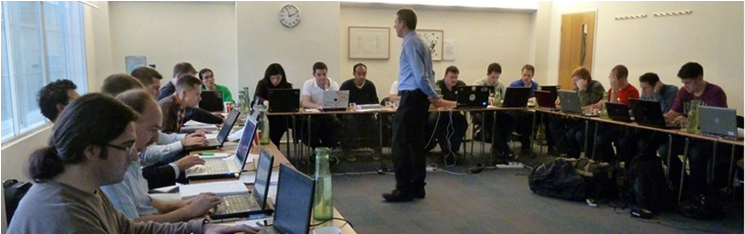


    « Previous PageNext Page »

    Today is: Tuesday 26 May 2026 -