Back to Cleverworkarounds mainpage
 

Jan 09 2011

More SharePoint Governance, Information Architecture and *Sensemaking* Classes Planned

imageHi all

A big chunk of last year had me off under a metaphorical mushroom, putting together several days of courseware on the topic of SharePoint Governance and Information Architecture. My take on these topics are influenced from some odd places, and the course drew on a lot of the non IT work that I do, that involves collaboration on some very complex problems indeed.

In November and December of 2010, we took this “on the road”, so to speak, firstly in Dublin, then London and Sydney. The courses were sold out and feedback was terrific. Here are a few choice quotes (check out the hyperlinks for full reviews)


“Did it meet my expectations? Well I’d have to say that it far exceeded them. There had obviously been a large amount of effort in preparing the courseware and modules. They covered the important missing links currently absent from the Microsoft and traditional training courses” – Wes Hackett.

“I’ve just finished the second day of the SharePoint 2010 Governance and Information Architecture Master Class presented by Paul Culmsee with the support of Andrew Woodward . I can wholeheartedly say it was one of the best courses I’ve attended both in content and presentation style and they deserve a lot of credit for putting together a fantastic course. Paul in particular has put a huge amount of effort into the slidedeck, sample documents and enormous manual (almost 500 pages worth!) let alone all the great additional insight he could provide in person over both days” – Brendan Newell

“Finally …. after 12 years in the IT industry a course which covers some of the fundamental issues governing project success.   This course is a real eye opener and a must for any IT professional involved in project planning and delivery” -  Stephen McWilliams

“I just came back from the best technology training I have had in years: a world-first Microsoft SharePoint Elite Information Architecture course designed and delivered by Paul Culmsee. It has taught me a great deal across ALL facets of the day-to-day work that I do as a SharePoint architect” – Jess Kim

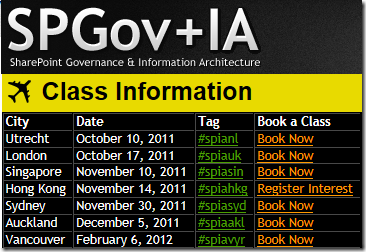
Based on this and similar feedback, we are going to do it again. Locations confirmed so far are London (#SPIAUK), Sydney (#SPIAAU) and Wellington (#SPIANZ) in February and March 2011 and in the pipeline is The Netherlands (#SPIANL) and at least a couple of US cities!

In addition to the unique content on these classes, I am honoured to announce that I am now authorised to teach the official Cognexus Issue Mapping courseware – the only non Cognexus Dialogue Mapping practitioner authorised to do so. As such, we will be running the inaugural Issue Mapping class in London in late February as well (wohoo!)

So, here are the details for each location:

  • (Register now) February 21, 2011, London   #SPIAUK SharePoint Governance and Information Architecture Master Class (Download Flyer)
  • (Register now) February 23, 2011, London #IBISUK Issue Mapping Master Class (Download Flyer)
  • (Register now) March 10, 2011, Sydney  #SPIAAU SharePoint Governance and Information Architecture Master Class (Download Flyer)
  • (Register now)March 14, 2011, Wellington #SPIANZ SharePoint Governance and Information Architecture Master Class (Download Flyer)
  • (Register soon) May 9, 2011, Utrecht, Netherlands (watch this space)
  • Wondering what to expect in these classes? Read on!

     SharePoint Governance and Information Architecture Master Class. 2 full days of real world, examples knowledge and techniques

    Most people understand that deploying SharePoint is much more than getting it installed. Despite this, current SharePoint governance documentation abounds in service delivery aspects. However, just because your system is rock solid, stable, well documented and governed through good process, there is absolutely no guarantee of success. Similarly, if Information Architecture for SharePoint was as easy as putting together lists, libraries and metadata the right way, then why doesn’t Microsoft publish the obvious best practices?

    In fact, the secret to a successful SharePoint project is an area that the governance documentation barely touches.

    This master class pinpoints the critical success factors for SharePoint governance and Information Architecture and rectifies this blind spot. Paul‘s style takes an ironic and subversive take on how SharePoint governance really works within organisations, while presenting a model and the tools necessary get it right.

    Drawing on inspiration from many diverse sources, disciplines and case studies, Paul has distilled the “what” and “how” of governance down a simple and accessible, yet rigorous and comprehensive set of tools and methods that organisations large and small can utilise to achieve the level of commitment required to see SharePoint become successful.

    Master class aims:

    • Present SharePoint governance and Information Architecture in a new light – focus on the “blind spots” where the current published material is inadequate
    • Cover lessons learned from Paul’s non IT work as a facilitator and sensemaker in complex large scale projects
    • Examine the latest trends in the information landscape for industry and government and review studies that inform governance and Information Architecture efforts
    • Present an alternative approach to business-as-usual SharePoint governance planning that focuses on real collaboration
    • Provide quality information that is rigorous yet accessible, entertaining and interesting

    Master class outcomes:

    • Understand the SharePoint governance lens beyond an IT service delivery focus
    • Develop your ‘wicked problem’ radar and apply appropriate governance practices, tools and techniques accordingly
    • Learn how to align SharePoint projects to broad organisational goals, avoid chasing platitudes and ensure that the problem being solved is the right problem
    • Learn how to account for cognitive bias and utilise tools and techniques that help stakeholders align to a common vision
    • Understand the relationship between governance and assurance, why both are needed and how they affect innovation and user engagement
    • Understand the underlying, often hidden forces of organisational chaos that underpins projects like SharePoint
    • Understand the key challenges and opportunities that SharePoint presents for Information Architecture
    • Learn how to document your information architecture
    • Practical knowledge: Add lots more tools to your governance and IA toolkit!

    Course Structure: The course is split into 7 modules, run across the two days.

    Module 1: SharePoint Governance f-Laws 1-17:

    Module 1 is all about setting context in the form of clearing some misconceptions about the often muddy topic of SharePoint governance. This module sheds some light onto these less visible SharePoint governance factors in the form of Governance f-Laws, which will also help to provide the context for the rest of this course

    • Why users don’t know what they want
    • The danger of platitudes
    • Why IT doesn’t get it
    • The adaptive challenge – how to govern SharePoint for the hidden organisation
    • The true forces of organisational chaos
    • Wicked problems and how to spot them
    • The myth of best practices and how to determine when a “practice” is really best

    Module 2: The Shared Understanding Toolkit – part 1:

    Module 2 pinpoints the SharePoint governance blind spot and introduces the Seven Sigma Shared Understanding Toolkit to counter it. The toolkit is a suite of tools, patterns and practices that can be used to improve SharePoint outcomes. This module builds upon the f-laws of module 1 and specifically examines the “what” and “why” questions of SharePoint Governance. Areas covered include how to identify particular types of problems, how to align the diverse goals of stakeholders, leverage problem structuring methods and constructing a solid business case.

    Module 3: The Shared Understanding Toolkit – part 2:

    Module 3 continues the Seven Sigma Shared Understanding Toolkit, and focuses on the foundation of “what” and “why” by examining the “who” and “how”. Areas covered include aligning stakeholder expectations, priorities and focus areas and building this alignment into a governance structure and written governance plan that actually make sense and that people will read. We round off by examining user engagement/stakeholder communication and training strategy.

    Module 4: Information Architecture trends, lessons learned and key SharePoint challenges

    Module 4 examines the hidden costs of poor information management practices, as well as some of the trends that are impacting on Information Architecture and the strategic direction of Microsoft as it develops the SharePoint road map. We will also examine the results from what other organisations have attempted and their lessons learned. We then distil those lessons learned into some the fundamental tenants of modern information architecture and finish off by examining the key SharePoint challenges from a technical, strategic and organisational viewpoint.

    Module 5: Information organisation and facets of collaboration

    Module 5 dives deeper into the core Information Architecture topics of information structure and organisation. We explore the various facets of enterprise collaboration and identify common Information Architecture mistakes and the strategies to avoid making them.

    Module 6: Information Seeking, Search and metadata.

    Module 6 examines the factors that affect how users seek information and how they manifest in terms of patterns of use. Building upon the facets of collaboration of module 5, we examine several strategies to improving SharePoint search and navigation. We then turn our attention to taxonomy and metadata, and what SharePoint 2010 has to offer in terms of managed metadata

    Module 7: Shared understanding and visual representation – documenting your Information Architecture

    Module 7 returns to the theme of governance in the sense of communicating your information architecture through visual or written form. To achieve shared understanding among participants, we need to document our designs in various forms for various audiences.

    Putting it all together: From vision to execution

    As a take home, we will also supply a USB stick for attendees with a sample performance framework, governance plan, SharePoint ROI calculator (Spreadsheet), sample mind maps of Information Architecture. These tools are the result of years of continual development and refinement “out in the field” and until now have never been released to the public.

    Note: The workshop sessions will be hands on, we provide all of the tools and samples needed but please bring your own laptop.

    Issue Mapping Master Class. Your path towards shared understanding and shared commitment

    “Some problems are so complex that you have to be highly intelligent and well informed just to be undecided about them.” Laurence J. Peter

    Presented by: Paul Culmsee

    Courseware by: Cognexus Institute and Seven Sigma

    “Not another $#%@*$ meeting!”

    All of us have felt the frustration of walking from yet another unproductive meeting, wondering where the agenda went. Yet, as problems become more complex, meetings are still the place where critical strategic decisions are made.

    ibis-map

    What is Issue Mapping?

    Issue-Based Information Systems (IBIS) is a sense-making framework used to support group discussions to assist all involved to come to a shared understanding. It visually maps participants’ points of views, problems voiced, the rationale and reasons leading up to decision(s). The maps can be easily read and understood by everyone, even by those not part of the discussion group.

    Why Issue Mapping?

    • Maps detailed rationale behind decision-making as well as the decision; maps the thinking process of the group
    • Concentrates on pros and cons to an idea, encourages and explores all views, taking the sting out of differences
    • Represents and clarifies diverse points of views, conflicting interpretations and goals, inconsistent information and other forms of complexity
    • Everyone gets a chance to speak, if they want. People are heard and contributions are acknowledged. Interruptions, repetition and dominance of the loudest decreases
    • Keeps participants on topic because they can visually see the progress of the discussion
    • Keeps everyone’s attention
    • Meeting progress/result can be seen
    • Map helps participants come up with ideas/arguments
    • Visual display of progress to review summary if need so the brain can absorb the bigger picture and appreciate the validity and value of a larger perspective
    • Avoids jumping to easy answers or superficial conclusions
    • Promotes deeper reasoning, rigor and even wisdom
    • Everyone can visually see everything discussed- leaves no room for misunderstandings
    • Documents can easily be attached to map to back up ideas
    • Participants can see effectiveness of mapping and genuine will try to make it more productive

    About Seven Sigma

    Issue Mapping is a life skill that can be applied to many different problem domains and scenarios. Participants will gain proficiency in a craft that can be applied long into the future, to help them and others bring clarity and convergence to the management of complex problems. At Seven Sigma, we practice Issue and Dialogue Mapping routinely and this has brought us many satisfied clients. The Mapping in itself is part of the ‘secret sauce’ that makes Seven Sigma’s reputation renowned.

    Seven Sigma Business Solutions is the only recognised designated partner of Cognexus Institute, founder of the art of Issue Mapping, in the world. We recognise that without reaching shared understanding, you will find yourself at yet another meeting, rehashing the same unresolved problems, listening to the same arguments month after month. Or, if a decision has been made, it has not been followed up to fruition due to lack of commitment/buy-in.

    We are proud to be part of your journey towards shared understanding and shared commitment.

    Master Class aims and outcomes:

    • Be able to create great maps – issue maps that are clear, coherent, and inviting
    • Immediately start using Issue Mapping effectively in your work and life; the class will focus on practical experience and map building
    • Command a rich range of options for publishing and sharing maps
    • Lead with maps: create direction, momentum, and energy with issue maps
    • Quickly and effectively do critical analysis in dynamic situations
    • Organize unstructured information and discover patterns and connections within it
    • Make critical thinking visible for inspection and analysis
    • Recognise early, the symptoms of wicked problems and the forces behind group divergence
    • Recognise the importance of capturing the rationale behind decisions, as well as the decisions themselves
    • Rethink the traditional approach to meetings and decision making
    • Start capturing the rationale leading up to the decisions by using IBIS and Compendium software

    It will also give you a deeper understanding of:

    • The fundamentals of IBIS and Compendium
    • The structural patterns that give clarity and power to issue maps
    • How decision rationale is represented in a map

    This master class will be hands on – please bring your own laptop with Compendium software (freeware) installed.

    Duration: 2 days, with homework after the first day

    Audience: For both IT and non-IT audience; those involved in highly complex projects including leaders, consultants, facilitators, organisational development professionals, change agents, managers and engineers.

    Prerequisite: An open mind geared for shared understanding and shared commitment

     Digg  Facebook  StumbleUpon  Technorati  Deli.cio.us  Slashdot  Twitter  Sphinn  Mixx  Google  DZone 

    No Tags


    Oct 19 2010

    A different kind of SharePoint Governance Master Class in London and Dublin

    The background

    Over the last three years, my career trajectory had altered somewhat where I spent half my time as a SharePoint practitioner, doing all of the things that us SharePoint practitioners do, and the other half was spent in a role that I would call sensemaking. Essentially group facilitation work, on some highly complex, non IT problems. These ranged from areas such as city planning, (envisioning and community engagement) to infrastructure delivery (think freeways, schools and hospitals), to mental health, team and relationship building, performance management, board meetings and various other scenarios.

    Imagine how much of a different world this is, where a group is coming together from often very different backgrounds and base positions, to come to grips with a complex set of interlocking problems and somehow try and align enough to move forward. We cannot simply throw a “SharePoint” at these problems and think it will all be better. By their very nature, we have to collaborate on them to move forward – true collaboration in all its messy, sometimes frustrating glory.

    As a result of this experience, I’ve also learned many highly effective collaborative techniques and approaches that I have never seen used in my 20+ years of being an IT practitioner. Additionally, I’ve had the opportunity to work with (and still do), some highly skilled people who I learned a huge amount from. This is “standing on the shoulders of giants” stuff. As you can imagine, this new learning has had a significant effect on how Seven Sigma now diagnoses and approaches SharePoint projects and has altered the lens through which I view problem solving with SharePoint.

    It also provided me the means to pinpoint a giant blind spot in the SharePoint governance material that’s out there, and what to do about it.

    The first catalyst – back injury

    In January this year, my family and I went on a short holiday, down to the wine country of Western Australia called the Margaret River region. On the very first day of that trip, I was at the beach, watching my kids run amok, when I totally put my back out (*sigh* such an old man). Needless to say, I could barely move for the next week or two after. My family, ever concerned for my welfare, promptly left me behind at the chalet and took off each day to sample wines, food and generally do the things that tourists do.

    Left to my own devices, and not overly mobile I had little to do but ponder – and ponder I did (even more than my usual pondering – so this was an Olympic class ponder). Reflecting on all of my learning and experiences from sensemaking work, my use of it within SharePoint projects, as well as the subsequent voracious reading in a variety of topics, I came to realise that SharePoint governance is looked through a lens that clouds some of the most critical success factors. I knew exactly how to lift that fog, and had a vision for a holistic view of SharePoint governance that at the same time, simplifies it and makes it easy for people to collectively understand.

    So I set to work, distilling all of this learning and experience and put it into something coherent, rigorous and accessible. After all, SharePoint is a tool that is an enabler for “improved collaboration”, and I had spent half of my time on deeply collaborative non IT scenarios where to my knowledge, no other SharePoint practitioner has done so. Since sensemaking lies in all that ‘softer’ stuff that traditionally IT is a bit weaker on, I thought I could add some dimensions to SharePoint governance in a way that could be made accessible, practical and useful.

    By the end of that week I still had a sore back, but I had the core of what I wanted to do worked out, and I knew that it would be a rather large undertaking to finish it (if it ever could be finished).

    The second catalyst – Beyond Best Practices

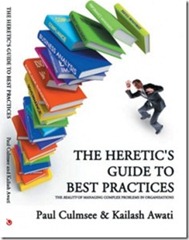
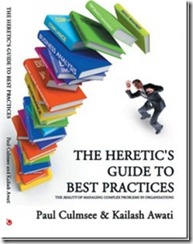
    I also commenced writing a non SharePoint book on this topic area with Kailash Awati from the Eight to Late blog, called Beyond Best Practices. This book examines why most best practices don’t work and what can be done about them. The plethora of tools, systems and best practices that are generally used to tackle organisational problems rarely help and when people apply these methods, they often end up solving the wrong problem. After all, if best practices were best, then we would all follow them and projects would be delivered on time, on budget and with deliriously happy stakeholders right?

    The work and research that has gone into this book has been significant. We studied the work of many people who have recognised and written about this, as well as many case studies. The problem these authors had is that these works challenged many widely accepted views, patterns and practices of various managerial disciplines. As a result these ideas have been rejected, ignored or considered outright heretical, and thus languish (largely unread) in journals. The recent emergence of anything x2.0 and a renewed focus on collaboration might seem radical or new for some, but these early authors were espousing very similar things many years ago.

    The third catalyst – 3grow

    Some time later in the year, 3grow asked me to develop a 4 day SharePoint 2010 Governance and Information Architecture course for Microsoft NZ’s Elite program. I agreed and used my “core” material, as well as some Beyond Best Practice ideas to develop the course. Information Architecture is a bloody tough course to write. It would be easy to cheat and just do a feature dump of every building block that SharePoint has to offer and call that Information Architecture. But that’s the science and not the art – and the science is easy to write about. From my experience, IA is not that much different to the sensemaking work that I do, so I had a very different foundation to base the entire course from.

    The IA course took 450 man hours to write and produced an 800 page manual (and just about killed me in the process), but the feedback from attendees surpassed all expectations.  This motivated me to complete the vision I originally had for a better approach to SharePoint governance and this has now been completed as well (with another 200 pages and a CD full of samples and other goodies).

    The result

    I have distilled all of this work into a master class format, which ranges from 1 to 5 days, suited to Business Analysts, Project and Program Managers, Enterprise and Information Architects, IT Managers and those in strategic roles who have to bridge the gap between organisational aspirations and the effective delivery of SharePoint solutions. I speak the way I write, so if the cleverworkarounds writing style works for you, then you will probably enjoy the manner in which the material is presented. I like rigour, but I also like to keep people awake! :-)

    One of my pet hates is when the course manual is just a printout of the slide deck with space for notes. In this master class, the manual is a book in itself and covers additional topic areas in a deeper level of detail from the class. So you will have some nice bedtime reading after attending.

    Andrew Woodward has been a long time collaborator on this work, before we formalised this collaboration with the SamePage Alliance, we had discussed running a master class session in the UK on this material. At the same time, thanks to Michael Sampson, an opportunity arose to conduct a workshop in Ireland. As a result, you have an opportunity to be a part of these events.

    Dublin

    Storm_long_banner

    The first event is terrific as it is a free event in Dublin on November 17, hosted by Storm Technology a Microsoft Gold Partner in Dublin. As a result of the event being free, it is by invitation only and numbers are limited. This is a one day event, focussing on the SharePoint Governance blind spots and what to do about them, but also wicked problems and Dialogue Mapping, as well as learning to look at SharePoint from outside the IT lens, and translate its benefits to a wider audience (ie “Learn to speak to your CFO”).

    So if you are interested in learning how to view SharePoint governance in a new light, and are tired of the governance material that rehashes the same tired old approaches that give you a mountain of work to do that still doesn’t change results, then register your interest with Rosemary at the email address in the image above ASAP and she can reserve a spot for you. We will supply a 200 page manual, as well as a CD of sample material for attendees, including a detailed governance plan.

    London

    SamePage-Rect-BannerMed

    In London on November 22 and 23, I will be running a two day master class along side Andrew Woodward on SharePoint Governance and Information Architecture. The first day is similar to the Ireland event, where we focus on governance holistically, shattering a few misconceptions and seeing things in a different light, before switching focus to various facets of Information Architecture for SharePoint. In essence, I have taken the detail of the 4 days of the New Zealand Elite course and created a single day version (no mean feat by the way).

    Participants on this course will receive a 400 page manual, chock full of SharePoint Governance and Information Architecture goodness, as well as a CD/USB of sample material such as a SharePoint governance plan, as well as IA maps of various types. Unlike Ireland, this is an open event, available to anyone, and you can find more detail and register at the eventbrite site http://spiamasterclass.eventbrite.com/. In case you are wondering, this event is non technical. Whether you have little hands on experience with SharePoint or a deep knowledge, you will find a lot of value in this event for the very reason that the blind spots I focus on are kind of universally applicable irrespective of your role.

    Much of what you will learn is applicable for many projects, beyond SharePoint and you will come away with a slew of new approaches to handle complex projects in general.

    So if you are in the UK or somewhere in Europe, look us up. It will be a unique event, and Andrew and I are very much looking forward to seeing you there!

    Thanks for reading

    Paul Culmsee

    www.sevensigma.com.au

     Digg  Facebook  StumbleUpon  Technorati  Deli.cio.us  Slashdot  Twitter  Sphinn  Mixx  Google  DZone 

    No Tags


    Sep 20 2010

    Announcing the SamePage Alliance

    image

    This is really great, and something that’s been a long time coming. On behalf of my partners at Seven Sigma, I’m announcing the formation of the SamePage Alliance. A strategic partnership with Seven Sigma and 21Apps, founded by Andrew Woodward, as founding members. SamePage is a commercial relationship where we will be pooling the respective talents of our organisations together and expanding our service offerings to clients.

    I first met Andrew in San Diego in 2008, the SharePoint Best Practices Conference, where I was a very nervous first-time presenter, wondering if all of my wicked problem stuff would resonate with the US audience. Andrew was there, presenting on TDD and Scrum, and apart from having someone in the US I could talk about the cricket with, it was immediately clear that we had a hell of a lot in common. It was like he held a big piece to a puzzle, and I held another piece. The irony was that I never got to see his talk as, if I recall, we presented at the same time. But back then (Feb 08) I made a rather prophetic statement at the end of my report of that conference.

    “I feel some future collaboration in the very near future.  Andrew Woodward will definitely be a part of it (although he doesn’t know it yet…Hehehe).”

    Funny how things turn out. We have collaborated on a number of different things since then, both within the SharePoint realm and beyond it. The common interests run deep and between 21apps and Seven Sigma, there is a lot of experience there. During the SharePoint Evolutions conference, where a certain volcano prevented me attending, Andrew ran my wicked problems/SharePoint/IBIS talk for me and did a tremendous job (I watched all the tweets from Perth).

    In terms of practicalities, we will be reselling each-others products and services. Seven Sigma entered the training space this year, writing the SharePoint 2010 Governance and Information Architecture course that 3Grow and Microsoft New Zealand use to certify gold partners for SharePoint prowess. Seven Sigma also developed a unique 1 and 2-day SharePoint Governance f-Laws course, with content drawn from our sensemaking work that we ran in the New Zealand and Sydney conferences. When it came to who could possibly teach Seven Sigma courseware, the obvious answer was Andrew Woodward, given our shared interests and his sterling job at Evolutions.

    21apps released their first SharePoint product into the marketplace this year – 21scrum, and 21apps authors and teaches workshops and training for development teams looking to improve their quality of development around the SharePoint space.

    Further to this, we will be co-developing products as well. Seven Sigma has been brewing some things in the cauldron for some time and 21apps will be part of this development effort.

    In general terms, we offer great SharePoint competencies across training, governance, infrastructure, development and delivery. Our combined offerings means that we can offer:

  • Global software development and round the clock SharePoint managed services and support
  • World-unique strategic advisory services and collaborative facilitation services, incorporating goal alignment, shared visioning and performance framework development, large group facilitation, user and community engagement, enquiry by design, risk analysis, critical thinking and decision methodologies, process improvement
  • Beyond SharePoint, we can provide full enterprise architecture and analysis services over the program life cycle
  • The first output of this new arrangement is a two-day course to be run in London in mid November. Andrew will be there too, and we will cover my SharePoint Governance f-Laws course as well as material from the recent Information Architecture course in New Zealand. If you have SharePoint competencies and find yourself having to bridge the gap between organisational aspirations and SharePoint as the enabler to that aspiration, then this session is for you.

    You can find out more about this event and register at the 21apps site.

    Looking forward to seeing you all there!

    www.samepage.co

    www.21apps.co.uk

    www.sevensigma.com.au

     Digg  Facebook  StumbleUpon  Technorati  Deli.cio.us  Slashdot  Twitter  Sphinn  Mixx  Google  DZone 

    No Tags


    Aug 06 2010

    Also why I’ve been quiet…

    I’m in an airport (again), typing this on my way back from my latest trip to New Zealand – a country I am loving more and more each time I go there. (Anywhere that I can go that uses the same power plugs as back home is a great place in my book).

    image

    A while back I posted about the book I am writing with Kailash Awati (Beyond Best Practices). If that project wasn’t taking enough time, dedication and brain cells, I have just finished an undertaking that has essentially consumed me for four months (some 450 man hours). This week it was delivered and the student responses far surpassed my expectations and made it all worthwhile.

    I created a 4 day SharePoint 2010 Governance and Information Architecture training course as part of Microsoft New Zealand’s Elite initiative. (760 pages of SharePoint governance and IA goodness!) If you are not aware of the Elite initiative, it is a novel initiative by Microsoft in New Zealand to improve the quality of SharePoint practitioners in the Microsoft partner ecosystem. Now I tell you – Darryl Burling and his team down there at Microsoft have their ear to the ground – and really do listen to their customers. They initiated this program to allow local solution providers to take the next step beyond technical knowhow and turn it into deeper proficiency.

    The SharePoint Elite Partner Initiative is designed to recognise those New Zealand Partners who have built skills excellence and a track record for success with SharePoint into their business. When it comes to SharePoint, these are the elite – the best of the best. If you are looking for a partner who can help you plan and deploy your SharePoint implementation, these are the best in the business.

    This Elite program is unique in its focus and via the insight of those who conceived it, allowed me the flexibility to create a course that was a balance of technical labs, sensemaking, governance, critical thinking and user engagement. I was going through the course feedback just now and the key trend from it all was that the students really enjoyed the softer stuff that I teach, more so than the “here is a SharePoint feature and look at what it can do!” type material (they can get that sort of material anywhere).

    So all in all it was a great week, which made all the effort, sweat and tears leading up to it worth it.

    So thanks attendees, it was a great 4 days. For other readers, hopefully the course might come to a city near you in the not too distant future.


    Thanks for reading

    Paul Culmsee
    www.sevensigma.com.au

     Digg  Facebook  StumbleUpon  Technorati  Deli.cio.us  Slashdot  Twitter  Sphinn  Mixx  Google  DZone 

    No Tags


    Nov 29 2009

    SBS 2008, Hewlett Packard, WSS3, Search Server 2008 Express and a UPS – Oh the pain!

    image

    In the words of Doctor Smith from lost in space, while everyone else was in Vegas having a grand old time, I was at a client site, having to come to grips with the beast known as Windows Small Business Server 2008. I rarely work with SBS2003 and had never used SBS2008 until now.

    This was one of those engagements that is somewhat similar to those awful dreams that you have when you are trying to get to some place, but you never quite get there and your subconscious puts all sorts of strange and surreal obstacles in your path. In my case, the surreal obstacles were very real, yet some of them were really really dumb. Whatsmore, it is a very sad indictment on IT at several levels and a testament to how complexity will never be tamed with yet more complexity.

    As a result, I really fear the direction that IT in general is heading.

    So where to begin? This project was easy enough in theory. A former colleague called me up because he knew of my dim, dark past in the world of Cisco, Active Directory and SharePoint. He asked me to help put in SBS2008 for him, configuring Exchange/AD/SharePoint and migrating his environment over to it.

    “Sure”, I say, “it’ll be a snap” (famous last words)

    image

    I haven’t use the coffee or tequila ratings for a while, so I thought that this post was apt for dusting them off. If you check the Why do SharePoint Projects Fail series, you will see that I use tequila shots or coffee at times. In this case, I will use the tequila shots to demonstrate my stress levels.

    Attempt 1

    We start our sorry tale a few weeks ago, where my client had ordered Small Business Server 2008 and the media/key had not arrived by the time I was due to start. The supplier came to the rescue by sending them a copy of the media and promised to send the license key in a couple of days.

    The server was a HP Proliant DL360 G6, a seemingly nice box with some good features at a reasonable price. HP/Compaq people will be familiar with the SmartStart software and process, where instead of using the windows media, you pop in the supplied SmartStart CD and it will perform some admin tasks, before asking for the windows media, auto-magically slipstreaming drivers and semi-automating the install.

    On client machines, I never use the CD from the vendor because there is always too much bloatware crap. However on servers I generally do use the CD, because it tends to come with all the tools necessary to manage disk storage, firmware and the like. I dutifully popped in SmartStart CD, answered a few basic questions, and it asked for the windows media CD.

    Cleverworkarounds stress rating: Good so far

    Next it asked me for the Windows SBS2008 licence key. Of course, I was using media that had been lent to us from the supplier because my client’s media (and keys) had not arrived. Thus, since I did not have a license key I was unable to proceed with the install using this preferred manner. HP, in their infinite wisdom, have assumed that you always have the license key when you install via their SmartStart CD, despite Microsoft giving you 30 days to activate the product. To be fair on HP, they are hooking into Microsoft’s unattended installation framework, so perhaps the blame should be shared.

    All was not lost however. The SmartStart CD can be run after windows has been installed. It then will install all the necessary “HP bits” like graphics and system board drivers. So I booted off the Windows CD and fortunately, windows installer detected the HP storage controller and the disk array,  and proceeded to let me partition it and install.

    Cleverworkarounds stress rating: Minor annoyance, but good so far

    Small Business Server 2008 did its thing and then loaded up a post install wizard that sets the timezone, active directory domain name and the like. At a certain step when running this wizard, SBS2008 informed me that there was no network card with a driver loaded, so it could not continue. As it turns out, Microsoft’s initial SBS2008 configuration wizard simply will not proceed unless it finds a valid network card. But since this is the pre-install wizard, we are not yet at the point in the installation where we have a proper windows desktop with start menu and windows explorer. All is not lost (apparently), because SBS allows you to start device manager from within the wizard and search for the driver.

    Fair enough, I think to myself, so I pop in the HP SmartStart CD and tell device manager to search the media.

    Cleverworkarounds stress rating: Spider senses tingle that today might not turn out well

    image

    Windows device manager comes back and tells me that it cannot find any drivers.

    Why?

    Well after some examination, the SmartStart drivers are all self extracting executables and therefore device manager could not find them when I told it to. Of course, the self extracting zip files have hugely meaningful names like C453453.EXE making it really obvious to work out what driver set is the one required… not!

    Luckily, Ctrl+Alt+Del gave me task manager which allowed me to start a windows explorer session, and I was able to browse to the CD and run the autorun of the SmartStart CD manually. This loaded up HP’s fancy schamsy driver install software that produces a nice friendly report on what system software is missing and proceeds to install it all for you.

    SmartStart did its thing, finding all of the driverless hardware and installed the various drivers. A few minutes and a reboot later and SBS2008 reruns its configuration wizard and this time finds the network and allows me to complete the wizard. This triggers another thirty minutes of configuration and another reboot and we have ourselves a small business server!

    Cleverworkarounds stress rating: Spider senses subside – back on track?

    Next I did something that is a habit that has served me well over the years (until now). I reran the Smartstart CD, now with a network and internet access. This time I told the driver management utility to connect to HP.COM. It scanned HP and reported to me that most drivers on the SmartStart CD were out of date. This is unsurprising because most of the time I do server builds for any vendor, I find that about half of the drivers, BIOS and various firmwares have been replaced by newer versions since the CD was pressed.

    Since this is a brand new server build, it is a habit of mine to upgrade to the latest drivers, BIOS and firmware before going any further.

    Among the things found to be out of date was the BIOS, the firmware on the RAID Storage controller as well as the network card. The SmartStart software downloaded all of these updates, and another reboot later, all are installed happily. Another hour of patching via Windows update, and we have a ready to go SBS2008 server with WSS3, Exchange, SQL Express and WSUS all configured automatically for you.

    Cleverworkarounds stress rating: This SBS2008 stuff isn’t so bad right?

    Okay, so things were good so far, but now here is where the fun really begins.

    Windows 2008 SBS comes with a pre-installed WSS3 site called http://Companyweb. As we all know, search completely sucks in WSS3. It has a bunch of limitations and isn’t a patch on what you get with MOSS. But no problem – we have Microsoft Search Server Express now, a free upgrade which turns WSS search from complete horribleness to niceness fairly quickly.

    For those of you reading this who run WSS3 and have not installed Search Server Express, I suggest you investigate it as it does offer a significant upgrade of functionality. Search server express pretty much makes WSS3 have the same search capabilities of MOSS 2007.

    So, I proceeded to install Search Server 2008 express onto this Small Business Server 2008 box. I have installed Search Server Express quite a few times before and I have to admit, it is a tricky install at times. But given that this was a fresh Small Business Server 2008 install and not in production, as well as having successfully installed it on Small Business Server 2003 previously, I felt that I should be safe.

    I commenced the Search Server 2008 express install, and the first warning sign that my day was about to turn bad showed itself. The install of search server express only allowed me to choose the “Basic” option. The option that I wanted to use, “Advanced” was greyed out and therefore unavailable.

    Cleverworkarounds stress rating: Spider senses tingling again

    imageimage

    Knowing this server was not in production, I went ahead and allowed Search Server Express to install as per the forced basic setting. The install itself appeared to work, but it died during the SharePoint configuration wizard. It specifically crapped out on step 9, with the error message

    “Failed to create sample data. An exception of type Microsoft.SharePoint.SPException was thrown.  Additional exception information: User cannot be found”.

    “Curses!” I say, “another trip to logs folder in the 12 hive”. For the nerds, the log is pasted below.

    [SPManager] [INFO] [10/21/2009 3:38:47 PM]: Finished upgrading SPContentDatabase Name=ShareWebDb Parent=SPDatabaseServiceInstance Name=Microsoft##SSEE.
    [SPManager] [DEBUG] [10/21/2009 3:38:47 PM]: Using cached [SPContentDatabase Name=ShareWebDb Parent=SPDatabaseServiceInstance Name=Microsoft##SSEE] NeedsUpgrade value: False.
    [SharedResourceProviderSequence] [DEBUG] [10/21/2009 3:38:47 PM]: Unable to locate SearchDatabase. Exception thrown was: System.Data.SqlClient.SqlException: Cannot open database "SharedServices_DB_ed3872ca-06b1-44c5-8ede-5a81b52265f9" requested by the login. The login failed.
    Login failed for user ‘NT AUTHORITY\NETWORK SERVICE’.
       at System.Data.SqlClient.SqlInternalConnection.OnError(SqlException exception, Boolean breakConnection)
       at System.Data.SqlClient.TdsParser.ThrowExceptionAndWarning(TdsParserStateObject stateObj)
       at System.Data.SqlClient.TdsParser.Run(RunBehavior runBehavior, SqlCommand cmdHandler, SqlDataReader dataStream, BulkCopySimpleResultSet bulkCopyHandler, TdsParserStateObject stateObj)
       at System.Data.SqlClient.SqlInternalConnectionTds.CompleteLogin(Boolean enlistOK)

    The long and short of this error takes a little while to explain. First we need to explain the historical difference between SQL Server Express edition and SQL Server Embedded edition (also known as the Windows internal database). From wikipedia:

    SQL Server 2005 Embedded Edition (SSEE): SQL Server 2005 Embedded Edition is a specially configured named instance of the SQL Server Express database engine which can be accessed only by certain Windows Services.

    SQL Server Express Edition: SQL Server Express Edition is a scaled down, free edition of SQL Server, which includes the core database engine. While there are no limitations on the number of databases or users supported, it is limited to using one processor, 1 GB memory and 4 GB database files.

    Why does this matter? Well Microsoft, being the wise chaps that they are, decided that when you perform a SharePoint installation using the “basic” option, different editions of SharePoint use different editions of SQL Server! Mark Walsh explains it here:

    • When you use the "Basic" install option during MOSS 2007 installation it will install and use SQL Server 2005 Express Edition and you have a 4GB database size limit.
    • When you use the "Basic" install option during WSS 3.0 installation it DOES NOT use SQL Express, it uses SQL Server 2005 Embedded edition and it DOES NOT have a 4GB size limit.

    It happens that Small Business Server 2008 comes with WSS3 preinstalled. Annoyingly, but unsurprisingly, the Small Business Server team opted to use the BASIC installation mode. As described above, SQL Server Embedded Edition (known on Win2008 as the Windows Internal Database) is used. For reference, WSUS on Small Business Server 2008 also uses this database instance.

    BUT BUT BUT…

    Search Server 2008 Express, uses SQL Server Express edition when performing a basic install. As a result, an additional SQL Server Express instance (SERVERNAME\OFFICESERVERS) gets installed onto the Small Business 2008 server. Then, to make matters worse, the installer gets mixed up and installs some Search Server express databases into the new instance (a Shared Service Provider), but then uses the SQL Embedded Edition instance to install other databases (like the searchDB). Then later during the configuration wizard, it cannot find the databases that it needs because it searches the wrong instance!

    The net result is the error shown in the log above. I tried all sorts of things like copying the Express databases into the embedded edition, but I couldn’t disentangle this dependency issue. Some parts of SharePoint (the search server express bits no doubt) looked in the SQL Express instance and the WSS bits looked in the Embedded SQL instance. Eventually, conscious of time, I proceeded to uninstall Search Server Express.

    Cleverworkarounds stress rating: Some swear words now uttered

    imageimageimage

    Uninstalling Search Server Express was attempted and tells me that it has successfully completed and wants a reboot. Unfortunately SharePoint is now even more hosed than it was before and I tried a few things to get things back on track (psconfig to create a new farm and the like). After more frustration, and conscious of time I decided to uninstall WSS3 altogether and then reinstall it according to the SBS Repair guide for WSS3.

    This had the effect of stuffing up WSUS as well! (I assume because it shares the same Windows Internal Database instance), and after a couple of hours of trying all sorts of increasingly hacky ways of getting all of this working, I was forced to give up.

    Note: Whatever you do, do not attempt this method. At one point I tried to trick WSS3 into temporarily thinking it was not a basic mode install so get Search Server Express to prompt for Advanced mode, but it made things worse because the configuration database got confused.

    Cleverworkarounds stress rating: Installing SharePoint in basic mode is committing a crime against humanity.

    imageimageimageimage

    Attempt 2

    image

    At this point I hear Doctor Smith abusing me like the poor old robot. “You bubble-headed booby, you ludicrous lump, adlepated amateur, dottering dunderhead”.

    Since WSUS got completely screwed, as well as the Windows Internal Database through relentless uninstallation and repair attempts, I started to get nervous. Small Business Server 2008 is a very fussy beast. Essentially it can get very upset at seemingly benign changes. I felt that I had messed about so much that I could no longer guarantee the integrity of this server so I wiped clean and reinstalled.

    I installed Windows as per the previous method, and once again the install wizard stopped, asking me for a network driver. Once again I popped in the HP SmartStart CD and proceeded to run the driver install program from the SBS configuration wizard.

    This time, no network card was detected!

    What the? During attempt 1, I happily installed the necessary HP drivers using the same %$^#% SmartStart CD! Why is it not detecting now??

    Cleverworkarounds stress rating: Now thinking about how much fun everyone is having in Vegas while I am fighting this server

    imageimageimageimageimage

    After some teeth gnashing, the cause of this problem hit me as I was driving home from the site. I had upgraded the firmware of the network card during attempt 1, as well as the storage controller and system BIOS. I realised that the stupid, brain-dead HP network card drivers likely could no longer recognise its own network card with a newer firmware.

    The next day I came back refreshed, and found that indeed, there were newer network drivers at the HP site. I downloaded them and extracted them and sure enough, suddenly the network card was found and I was back in business. How dumb is that! Surely if you are going to write a driver, at the very least make it recognise the hardware irrespective of firmware!  

    Once I got past this stupid annoyance, it did not take too long for SBS2008 to be installed and ready to go. Remember that WSS3 is installed for you in basic mode, so to change it requires an uninstall of WSS and then to reinstall it in a different mode. But the problem here is SBS2008 and its fussiness about messing with configuration. In going down this path, you risk future service packs and updates breaking because things are not as expected. Additionally you would have to create companyweb manually and it raises the risk of a misconfiguration or mistake along the way.

    I logged a call with Microsoft and got a pretty good engineer (hey Ai Wa) and she was able to consistently reproduce all of my issues in the lab, but was unable to work out a supportable fix. In the meantime, I tried to force Search Server 2008 to install into advanced mode using a scripted install, using an article written by my old mate Ben Curry. Alas, I could not bend it to my will and at the time of writing this article, I had to give up on Search Server 2008 with SBS2008 for now.

    For what its worth, I know that I can make this work by installing WSS3 differently, but I planned to properly nail this issue in my lab using the out of the box installs and then publish this article, but I didn’t have the sufficient hardware to run Small Business Server 2008. It requires a lot of grunt to run! So I will revisit this issue once my new VM server arrives and post an update.

    But there is more…

    If the whole Smartstart, network driver, SBS2008 with its dodgy scripted WSS3 install, with Search Server Express dumb installation assumptions were not enough, I hit more dumb things that resulted in showing how ill equipped HP’s support is able to deal with these sorts of issues.

    The server, not surprisingly, supplied with a nice hardware RAID configuration and my client opted to buy some additional disk. When the disks arrived and were installed, we found that the RAID controller could see the disks, but we were unable to add the disks to the existing array using HP’s management tools. HP’s “friendly” support was unable to work out the issue and asked me to do things that were never going to work and insulted my intelligence. Eventually I worked out what was going on myself, via HP’s own forums. It turns out that the HP Server requires a write cache module to be able to grow an array. We had one of these installed. Upon further examination by opening up the chassis, we were missing a battery to go with the write cache module. HP were unable to determine the part number that we needed and we ended up working it out ourselves and telling our supplier.

    Then HP stuffed up the order and after following up for two weeks, it turned out they accidentally forgot to put the order through to Singapore to get the part. It seemed that once we went outside of the normal supply chain system at HP, it all broke down. After two weeks and numerous calls, they suddenly realised that the part was available in Sydney all along and it was shipped over next day!. The irony was that next day the part from Singapore arrived!

    So now we had two batteries.

    Grrrr. It shouldn’t be this hard! Why supply a write cache module and not supply the battery! Dumb Dumb Dumb!

    Cleverworkarounds stress rating: Really hating HP and Microsoft at this point.

    imageimageimageimageimageimage

    … and piece de resistance!

    Okay so we had a few frustrating struggles, but we more or less got there. But here is the absolute showstopper – the final issue that for me, really made me question this IT discipline that I have worked in for twenty years now.

    My client rang me on Monday morning to tell me the server was powered off when we arrived on site. This was unusual because the rack was UPS protected and no other devices were off. We ran HP’s diagnostic tools and no faults were reported. The UPS was a fairly recent APC model, and we installed a serial cable to the server and loaded the APC UPS Management software. The software (which looks scarily like what 16 bit apps used to look like in the early 90’s), found the UPS and showed that was all hunky dory.

    We decided to perform a battery test using the software. No sooner than I clicked OK, the server powered off with no warning or shutdown. Whoa!!

    I put in a call to APC, and was told that the UPS was not compatible with HP’s new fancy shmansy green star rating power supplies. We had to buy a new UPS because of some “sine wave” mumbo jumbo (UPS engineer talk that I really wasn’t interested in). If the UPS switched to battery, this server would think power was dodgy and do a pre-emptive shutdown. The reason that the server was powered off on the Monday morning was that the UPS has a built in self test that runs every 7 days that cannot be disabled!

    Cleverworkarounds stress rating: For %%$$ sake!.

    imageimageimageimageimageimageimageimageimageimageimageimage

    Conclusion

    Now I don’t know about you, but once a UPS cannot be “compatible” with a server, that’s it – things have gone too far. For crying out loud, a UPS supplies power. How $%#^ hard can that be? How is an organization supposed to get value out of their IT investments with this sort of crap to deal with.

    Then add in the added complexity of Blade servers, Citrix, Virtualisation, shared storage, and I truly feel that some sites are sitting on time bombs. The supposed benefits in terms of efficiency, resiliency and scalability that these technologies bring, come at an often intangible and insidious cost – sheer risk from incredible complexity. If you look at this case study of a small organisation putting in a basic server, most of the issues I have encountered are the side effects of this complexity and the lack of ability for the vendors to be able to help with it.

    As the global financial crisis has aptly demonstrated, when things are complex and no-one person can understand everything, when something bad does happen, it tends to do it in a spectacularly painful and costly way.

    Finally, before you reply to this likely immature rant and tell me I am a whiner, remember this all you Vegas people. You got to have fun and marvel at all the new (complex) SP2010 toys, while I sat on the other side of the planet in a small computer room, all bitter and twisted, sprouting obscenities to HP, Microsoft and APC dealing with this crap. When you put that into perspective, I think this article is quite balanced! :-)

    Thanks for reading

    Paul Culmsee
    www.sevensigma.com.au

     Digg  Facebook  StumbleUpon  Technorati  Deli.cio.us  Slashdot  Twitter  Sphinn  Mixx  Google  DZone 

    No Tags


    Jul 03 2009

    The secret to understanding governance

    I’m very tempted to start this post like a dodgy wealth-guru infomercial. You know the ones with lots of imagery of people living the dream of financial freedom. I am thinking a montage of a resort, a large yacht anchored in a topical bay, carving up the water with a jet-ski and then a shot of me standing next to my Ferrari, champagne in hand, with Megan Fox on my arm. My message would be that for a “small” fee of $10,000, you too could learn the secrets to your financial freedom in an intimate, exclusive but “intensive” weekend workshop. Just you and the 15,000 other people that pack into the convention hall :-)

    Alas, we both know that this is never going to happen but this post may have a little of that feeling to it. I have titled it “The secret to understanding governance”, because I think there is a way to understand governance that will help you, your colleagues and your team members significantly. Like all good “wealth guru” infomercials, I’m going to give you some hints and I’m kind of hoping that you will then be interested in attending a workshop to find out the rest.

    The one difference between the wealth guru and me, though, is that I will never have Megan Fox hanging off my arm, and I am actually going to tell you something useful in this post.

    So, what is this big “secret”, anyway?

    Definitions definitions definitions

    One thing that we all tend to get suckered into doing at times is feeling the urge to define “stuff”. Academics do it all the time. I’ve read countless papers where the authors start out with a ten page examination of all the past definitions of their given topic, before proceeding to tell you why those definitions are inadequate in some way, followed by their own revised definitions. They spend the rest of their essays justifying why their definitions are more correct than their predecessors.

    Defining stuff is a time consuming and tiring exercise. Since we live in a world of constant change there will always be new influences which shape and frame perceptions. Therefore, the definition that you spent so much effort on coming up with is redefined by the next academic or blogger who follows the path that you took. Sometimes a whole new word is invented, or an existing word is suddenly used in a new context and the whole cycle starts all over again.

    I once explained the philosophical and process aspects of Agile/Scrum to a seriously experienced project manager. This was a fellow who was the PM when skyscrapers were erected. He listened carefully to my explanation, sat back and said “I’ve been doing that for 30 years. There’s nothing new there”. I also found a similar observation in “The Small Business Guerrilla Guide to Six Sigma” by Jay Arthur.

    Over the years, I’ve had a chance to learn and study just about every “brand name” systematic improvement methodology. Guess what…they are all pretty much the same. To appear different, consultants have changed:
    - the name to Six Sigma (from Total Quality Management)
    - the acronyms to confuse the unwary (PDCA to DMAIC)
    - the number of tools required for success
    - the number of steps in the process (5 to 14 steps)
    but…
    - the key tools are the same
    - the process for using the tools is the same
    - and the results are identical assuming you can figure out how to use the wide range of tools and processes

    In my opinion, defining things to the nth degree is a zero sum game. Often you confuse the issue more than you clarify it because in your attempts to explain something, you incorporate new words that you then have to explain.

    Some ROI Wisdom

    Several years ago I was attending a job interview for a promotion and the topic of return on investment came up. I had made the point that most things could be quantified and one of the interviewers fired back “Well tell me how you measure quality?”

    That was a curveball that I wasn’t expecting, and I didn’t have an answer (and never got the job either).

    Some time later, I read a terrific book by Douglas Hubbard on measurement and return on investment called “How To Measure Anything”. It armed me with some new kung-fu skills and also gave me the perfect comeback answer that I sorely needed during that interview. The question “How do you measure quality?” actually makes very little sense to ask. The reason is quite simple. “Quality is not what you measure. It is the effect it has on something that you measure”.

    It is very easy to illustrate the logic behind this important point. Undertaking a quality initiative costs time, money and resources. You are only spending that money and investing those resources because you believe that undertaking this quality initiative will make a positive difference in some way. Otherwise, why bother? If you do not believe that it will make a positive difference, why throw money away?

    So, if asked “How do you measure quality?”, you can answer by asking questions back, along the lines of:

    • “What does improved quality look like to you?”
    • “What is the effect of quality?”
    • “How do you know your quality initiative is working?”

    The answers to these questions tend to start with “increased this” or “decreased that”. It now should be abundantly clear why asking “How do you measure quality?” actually makes no sense. In fact it is completely the wrong question to ask. Instead, by re-framing the question slightly, you suddenly have answers that can be quantified using the techniques that I detailed in my “Learn to speak to your CFO” series and provided in my free SharePoint ROI modelling spreadsheet.

    This same logic applies to other words that are better understood by examining their effect, rather than trying to (re)define them. Examples:

    • Security
    • Flexibility
    • Collaboration
    • Resilience
    • Wellbeing

    All of these share the same characteristic as “governance” in that they are easily understood by the effect they have, but harder to define in a universal way.

    The secret to understanding governance

    The really silly thing about all this is that I did a talk on SharePoint ROI at the Best Practice Conference in Feb 09. In that talk, I explained the above chain of logic and made the point that the way to find measurable success factors with anything that seems “unquantifiable” is to ask the “what will it look like if we do this?” type question. I used this logic to come up with measurable key performance indicators that enabled me to simulate the future financial return (internal rate of return and net present value) of a large SharePoint investment for a mid sized organisation (slide deck and spreadsheet can be downloaded here).

    But despite writing several articles and speaking on this topic, the ROI stuff was one of several clouds of “stuff” that was floating around my brain. SharePoint governance was also floating in one of those clouds too, as well as broader governance in a planning and sustainability context. It took a casual comment from Bjørn Furuknap that suddenly gave me one of those wonderful bolts of inspiration and clarify, where these disparate clouds of thought suddenly coalesced and I made a significant breakthrough in my understanding.

    Define “governance” in any way you want. I really don’t care – so long as you understand the difference it makes *for you* and you ask the same question of your other stakeholders and participants. Put aside the need to define governance for a while, and instead view “governance” as a means to attain a desirable future state. Agree with each-other on what that state is going to look like. Now tell me the differences between where you are now and that desirable future state.

    By asking the question this way, you not only stimulate much more meaningful debate, you will have a much better understanding of everybody else’s frame of reference and the emphasis that they place on various aspects of that difference. The “definition” of governance that you are trying to find will start to suggest itself through those differences between the current and desired state. At the end of the day, that is what really matters.

    Instead of reading a methodology like COBiT or ITIL, or following what people like me, Joel, Robert Bogue, Andrew Woodward, Dux Sy and Ruven Gotz say, look at your own needs as an individual, a team and then an organisation. Determine where you want to be, include IT and non IT views and then start to think about what you need to do to get to your desired state.

    Congratulations, you’re now officially “governing”. Wasn’t that hard, was it? :-)

    Best practices versus worst practices

    This same “secret” to understanding governance also provides the answer to why experts disagree on what is a “best practice”. I sometimes will read a “best practice” and think to myself “No way, that would never work”. Yet, although it doesn’t work for me, I rarely come away thinking the person making the recommendation is actually wrong. When you understand that the “best practice” made a positive difference, and it moved the organisation further along the road from the undesired present state toward the desired future state, then it is perfectly clear why one man’s best practice is another man’s worst practice. No matter what you did, you moved forward – and that is a good thing.

    Furthermore, if you agree with the notion that the “best” solution to a problem is the one that has the most shared commitment among participants to seeing it through, then I argue that a perceived “worst practice” with deep commitment and buy-in among stakeholders will deliver a better solution than a “best practice” with poor buy-in and commitment among stakeholders.

    Want to argue that point with me? (I’ve got more ammo than this!) Then you can spend 3 days doing that if you want!

    …for a small fee :-)

    My intent with this post was to try and lift some of the fog and confusion that surrounds this nebulous thing called governance by suggesting that defining it to the nth degree is not the way forward. “Best and worst” practices? Both are commonly context and culture dependant. Instead, your (multidisciplinary) team needs to agree on and understand your desired future state and where you are now. By starting with the end in mind you will be able to collectively determine what processes, tools and methods to use to get to that place.

    The philosophical approaches that I have described in this article are just the tip of the iceberg in relation to the work that I have been doing with Andrew Woodward, Dux Sy and Ruven Gotz for the planned “Governance Mentoring Workshop”, to run for 3 days prior to the August Best Practices Conference. This workshop will be unlike any other SharePoint governance training that is currently in existence and much of the material is completely original and not borrowed from any of the traditional SharePoint governance material that exists today.

    Finally, to go back to infomercial mode…

    This offer is for a limited time only. Act now! If you’re not completely satisfied, we offer a full “return to base” warranty :-)

    Act Now!

    This offer is strictly limited!

    Act Now!

    Pick up the phone and take the first step toward the new life that is waiting for you!

    Act Now!

    Thanks for reading

    Paul Culmsee
     Digg  Facebook  StumbleUpon  Technorati  Deli.cio.us  Slashdot  Twitter  Sphinn  Mixx  Google  DZone 

    No Tags


    Jun 23 2009

    Who wants to spend 3 days with me and the gang?

    A quick bit of background. My last 2 trips to the USA were particularly fruitful in meeting many like-minded SharePoint pros, all of which are well known and highly regarded. Some close friendships were made and what was really cool was that some people I met, despite having very different skills and experience (and physical locations!), seemed to connect on a level that gave us the desire and impetus to to work together very closely idealistically and commercially. More on that soon enough… :-)

    So who are the members of this global group of SharePoint mystery men?

    • Andrew (Agile Boy) Woodward – Agile extraordinaire. So damn agile in fact that blink and you’d never know he was there. Able to demolish long SharePoint projects into bite sized chunks in a single bound
    • Ruven (Magneto) Gotz. Mind mapping maestro with the ability to bend information architecture to his will, and able to know what you want before you even have formed the question
    • Dux (Mr Myagi) Sy. A sensei project Manager who will teach you the wax-on/wax-off approach to successful SharePoint delivery. He might even get you to paint his fence if you are lucky

    and me (aka Dr Wicked) round it off – pushing the boundaries of pop-culture metaphors for cheap laughs and the odd bit of work on shared understanding, ROI and SharePoint governance.

    So why does any of this matter?

    image

    It just so happens that all four of us are soon to be in the same place at the same time. This is actually a frustratingly rare occasion, given that Andrew is in the UK, I am in Western Australia, Dux is in DC and Ruven is in Toronto. But in August, we will all be presenting at the SharePoint Best Practices Conference in DC. We are all tremendously honoured to be presenters at this event and this time around, we have been collaborating together to try and really deliver some great sessions that capture the essence of our common philosophical approaches.

    It takes me around 30 hours of transit to get to the east coast, and Andrew also has to travel a fair distance too. Therefore when these sorts of opportunities present themselves, we like to make the most of it – and we are *not* just talking beer! (ok well that’s not strictly true – beer is a significant motivation :-D )

    Accordingly, we are planning a special “SharePoint Governance Mentoring” workshop that will run over a period of 3 days (August 19-21, 2009), prior to the conference itself. It will be a unique, one-off event and numbers will be strictly limited. We think that our combined skills cover the broad spectrum of the SharePoint universe very well, with a particularly strong governance underpinning. Participants will be able to delve into topics such as how to manage a SharePoint project, practical techniques in gathering requirements, achieving shared understanding and buy-in, information architecture, team dynamics and the root causes of organisational chaos that make SharePoint an attractive proposition in the first place. We will also cover making a great business case and understanding return on investment, how to approach application development on the SharePoint platform and above all, learning what governance is really all about, and applying the right sort of governance at the right time. 

    Additionally, plenty of time will be allocated for participants to discuss their SharePoint challenges in an open forum, so if you bring your SharePoint baggage, we will lend a sympathetic ear and then arm you with some new kung-fu skills to take back to your organisation.

    Does this event sound like your cup of tea? If so, we need to hear from you! We will publish the workshop details and outline in mid-July but we need to gauge interest now. The cost for this three day event will be $1750 per attendee, although anyone who is registered for SharePoint Best Practices Conference will be entitled to a 10% discount.

    So if this sounds good to you, then please register your interest at Dux’s site below:

    http://sp.meetdux.com/workshop_interest.aspx

    Thanks for reading (and we hope to see you there!)

    Paul Culmsee

    www.sevensigma.com.au

     Digg  Facebook  StumbleUpon  Technorati  Deli.cio.us  Slashdot  Twitter  Sphinn  Mixx  Google  DZone 

    No Tags


    Jun 15 2009

    SharePoint Governance – Debategraph style

    Quick note: This is another of the sort of posts where I cannot help but feel that some readers will wonder what I have been smoking. It is not essential, but reading the “one best practice” series will provide a lot of background to this post.

    imageOn the grand scale of world problems, your average messed up SharePoint project would not be considered particularly “wicked”. If you compare a haywire SharePoint project to the truly *global* wicked problems, such as global warming, the Israeli/Palestinian conflict and Tom Cruise, then it kind of makes you realise just how good we SharePoint architects, developers and engineers have it. I mean, hey, if a bunch of nerds can’t make little ol’ SharePoint a success, what hope do we have for the big issues like making Tom Cruise less of a tool?

    I know some people who have left SharePoint architecture work because of all the “people crap”. If you think “people crap” is bad in IT, imagine trying to mediate between the myriad of stakeholders involved in, say, cuts to carbon dioxide emissions. That is a world of hurt that is so huge that it pains my brain just to imagine it.

    Last year when I was learning the dark Jedi arts of dialogue mapping I got to know David Price, one of my fellow students who operated in that world of hurt. David is a very smart man indeed, with a Ph.D in organisational learning and environmental policy. His career has included public policy consultancy, TV documentary production, academic research and mediation.

    It was during that training course that David introduced me to a joint venture that he started with another scarily smart man named Peter Baldwin. Peter is an Australian who had a 15 year career in national politics, including six years as a federal minister in the Australian government. Unlike many Australian pollies, his background was engineering. After leaving politics, with a keen interest in how the web could “raise the quality of debate about public policy issues,” he cranked out visual studio and got down to some coding.

    The “baby” from this collaboration between David and Peter is a unique tool called Debategraph and it is a very interesting tool indeed.

    image

    DebateGraph was conceived as a tool to improve the quality of public debate on contentious or complex issues. Public debate, in general, is usually pretty awful. David and Peter explain why this is the case pretty comprehensively below.

    Public debates tend to be complex; with multiple data sources and perspectives and conflicting demands and values. In complex debates, the volume of information and arguments can seem like an overwhelming obstacle to someone, trying to develop a comprehensive understanding of the essential arguments advanced by all sides.

    Public debate is all too often characterized by repetitive contributions, digressions, argumentative fallacies, rhetorical flourishes, manipulative framing, obfuscation and personal attacks that result in a high noise-to-signal ratio and confusion rather than clarity.

    Conventional media reporting of public policy debates often struggles with the challenge of conveying nuanced, reasoned positions in a compressed linear form, when simple heated oppositions deliver a more dramatic and rewarding effect.

    This, in turn, makes it harder for established public figures to think tentatively and creatively in public about new policy approaches and to acknowledge strengths and common ground in opponents’ positions.

    We are talking about wicked problems here a lot of the time since public policy debates by definition respond to problems or questions where the general public are stakeholders. This means that there are a lot of varied stakeholders with even more varied world views and frames of reference. By creating a tool to improve the quality of a public policy discussion, DebateGraph is a tool that helps to deal with wicked problems themselves. What is interesting about DebateGraph is that like the IBIS based issue mapping that I practice, it is a visual, map based approach, yet it was developed independently from Conklin, Compendium or anything else in the space.

    image

    DebateGraph is a free online service. It allows the global community to collaboratively build maps of complex debates that accurately present all sides of the debate from a neutral standpoint, free of repetitive clutter and ‘noise’. Like a wiki, all aspects of the debate maps, both their content and structure, are continuously open to revision, refinement, comment, and evaluation by anyone who wants to join the community of thought. Each map is a cumulative work in progress.

    Readers and editors of the maps can explore the top-level structure of debates and delve into specific strands or sub-structures of a debate. What interested me was the fact that the debate maps can be embedded into other websites; with changes made to the map on one site updating immediately across every site on which it appears.

    DebateGraph also has RSS and email alerting like SharePoint, as well as a unique rating system where users can specify how much they relate to, or believe in a particular argument. The map then self reconfigures based on what arguments are considered the strongest. In effect, the map becomes a multi-dimensional poll or decision making tool.

    “Although consensus can emerge from such a process, not least because it promotes the discovery of previously unidentified options, our hope is as much that the people who continue to disagree will do so on the basis of an enriched understanding of the reasons for their disagreement and having had the chance to test each other’s reasoning to the fullest.”

    How DebateGraph works

    Using DebateGraph is pretty easy, given that you can embed it into other web sites as I have done here in this post. From the hundreds of maps that I can choose, I’ve decided to embed the map of the global financial crisis for you to explore. Click on the bubbles below and move them around. You will find that like bubble-wrap, you will spend your first few minutes immersing yourself in moving nodes around and navigating here and there. Go ahead and have a play – I’m patient – I’ll wait for you :-)

    Right! I’m guessing around seven minutes have passed. Now that you’ve had a play, click on the first arrow, below the map and above the bottom toolbar. This will take you back to the top level financial crisis map. Let’s take a closer look at what is going on here.

    Attached to this “Global Financial Crisis” map is several root questions covering the cause, consequences, triggers and response to this problem. If you hover your mouse over any of the nodes, you will find a more detailed view of the question. Hover your mouse over the arrows between nodes, and you will find that the questions “arise from” the central “global financial crisis” node.

    Also, note the thickness of the arrows between nodes. The width represents the importance placed on this node by the community of users that have developed this map.

    The node colours are important too. Click on the “Long term causes of the financial crisis?” node above, and it will break out to a sub-map. Here the nodes are blue, rather than orange as shown below. The difference in colour is because these nodes are possible responses to the question “Long term causes of the financial crisis?” Once again, the width of the arrows indicate the community’s view of the validity of the responses. Now let’s look at a response that would potentially be divisive. One of the potential answers to the long term causes of the current crisis is “Natural financial dynamics of the baby boom generation.” So, it’s all the baby boomers fault, is it? ;-)

    image

    Clicking on the “Natural financial dynamics of the baby boom generation” and we see a map with a few different coloured nodes. This is because there are some supporting and opposing arguments to this idea. The green nodes support the idea and the red nodes oppose the idea. This is the essence of the pro and con type arguments used when you create IBIS maps.

    image

    There are also some other nodes where the direction of the arrow is the opposite to the ones we have examined so far. These are links to other maps, and if you highlight the outward arrows, you can see that our current map relates to nodes in completely separate maps.

    This highlights a really important point about DebateGraph. It links related issues into a “web” of argumentation allowing readers to fully explore the myriad of interlocking issues that make up complex problems without “drowning” in information overload.

    Contributing to debates

    If you feel strongly on a particular subject then you are free to contribute to the debate. All DebateGraph maps have a toolbar that allows you to perform more advanced activities.

    image

    From left to right, the icons perform the following tasks

    • Open the DebateGraph home page
    • Show detailed text and comments for the currently selected item
    • Add comments to the selected item
    • Open this map in mapper (map edit) view
    • Edit this map in mapper (map edit) view
    • Search all DebateGraph maps for a given term
    • Share this map view or embed it in your own site
    • View the map in full screen mode
    • Key and explanatory notes for maps

    SharePoint Governance?

    Andrew Woodward suggested that I should create a DebateGraph map for us all to collectively explore how we could save Tom Cruise from complete agonising lameness. I chose not to do this for three reasons.

    1. Tom Cruise cannot be saved
    2. Tom Cruise’s lawyers would sue my ass
    3. There are more important topics to explore

    Let’s instead talk about a pet topic of mine: SharePoint governance.

    Governance in SharePoint is pretty misunderstood. There are many definitions of governance and they are all equally right, when judged through the lens of the person defining it. I have my own interpretation of governance (which is, of course, the definitive and completely correct one! – hehe). Maybe we should debate the issue?

    Joel talks about a SharePoint governance plan needing to be a ‘living’ document and in fact he states this explicitly in the sample governance plan that he did for Microsoft. I agree wholeheartedly on this notion. The reality is that documents like MSWord documents are not overly conducive to this ideal. The paradox is that the bigger and more comprehensive the governance plan is initially, the harder it can be to maintain and manage over time, and therefore, the greater the likelihood that it can go out of date or fall into disrepair over time.

    As a result, it occurred to me some time back that a DebateGraph map is the sort of “living” document that a governance plan really aspires to be. So, I roped in a couple of friends, most notably Andrew Jolly and Ruven Gotz, and together we experimented with DebateGraph to explore our own questions and ideas on the topic of SharePoint governance. The result is the map below which you can explore.

    Seven Sigma web part for DebateGraph

    It then occurred to me that others could benefit from this experimental exploration of the topic of SharePoint governance. This gave me the idea that having a “SharePoint governance web part” that could be added to any enterprise SharePoint portal would be a really great way to augment internal governance efforts. Additionally, one of my clients is responsible for conservation and sustainability at a local level in the community. They loved the DebateGraph debates around environmental, social and economic sustainability and this web part idea would work equally well for them.

    Accordingly, my company, Seven Sigma, has just released a free webpart for SharePoint that allows you to embed DebateGraph debate maps into your SharePoint sites and tune their display to fit into enterprise SharePoint portals. The default debate is the SharePoint Governance debate shown above, but you can view any of the many Debategraph maps via the web part properties.

    I have recorded a couple of webcasts, covering the installation and usage of the web part which can be viewed below. Otherwise, click here to download this free web part from the Seven Sigma web site.

    dginstall  dgusage

    Conclusion

    This new web part and the SharePoint governance debate, are essentially an experiment in trying to tackle collaboration a novel way. Like any wiki, to make it truly “living”, the maps need contributions from people who have something to offer on the topic. I fully accept that this initiative is not going to be everybody’s cup of tea, but I hope that it might get people to think about the sort of possibilities presented by this sort of wiki based display. The fact that all of the issues, ideas and argumentation can so easily be made available to a wide audience via a simple web part I think is unique.

    Thus, if you would like to contribute to this SharePoint governance debate sign up to Debategraph and we will add you to the governance debate.

    I think that DebateGraph, and applications like it, may well represent the next step in the evolution of collaborative applications. While Twitter and Facebook have found interesting ways to bring people together, those applications aren’t exactly going to provide you with the sort of ‘container’ required to tackle really wicked problems. I foresee a lot of development in this sub-genre of collaborative applications in the future.

    In other words, watch this space!

    Thanks for reading

    Paul Culmsee
    www.sevensigma.com.au

     Digg  Facebook  StumbleUpon  Technorati  Deli.cio.us  Slashdot  Twitter  Sphinn  Mixx  Google  DZone 

    No Tags


    May 22 2009

    Listen to me blab on about crap ;-)

    Hi

    I have been very busy on a number of fronts – which is why the blog hasn’t had much attention lately. I’ll be back soon enough though – once I get a few big jobs done.

    For those of you that are not aware, there is a podcast interview that I did with Brett Lonsdale at Sharepoint Pod Show where he allowed me to blab on and on and on and on :-) Poor Brett – he didn’t know what he was getting himself into at all!

    So if you think my posts are boring and wordy, wait till you hear me talk! :-)

    Paul

     Digg  Facebook  StumbleUpon  Technorati  Deli.cio.us  Slashdot  Twitter  Sphinn  Mixx  Google  DZone 

    No Tags


    Apr 21 2009

    Perth SharePoint Users Group wrap

    Today I presented a session at the Perth SharePoint Users Group. I was a little unsure whether my non-technically focussed content would be of interest to the geeks but the turnout was terrific and the feedback has been brilliant. (The 3 copies I gave away of Dux’s excellent “SharePoint for Project Management” book may have sweetened the deal – hehe )

    My sincere thanks to new user group president Sezai Komur for giving me the opportunity to present this material as it was the first time it has seen the light of day in Perth.

    If you want to check out the slide deck from the session, you will find it below. Expanded information that builds on this content can be found at the Seven Sigma site, as well as here at CleverWorkarounds.

    Thanks for reading

    Paul Culmsee
    www.sevensigma.com.au

     Digg  Facebook  StumbleUpon  Technorati  Deli.cio.us  Slashdot  Twitter  Sphinn  Mixx  Google  DZone 
    No Tags


    « Previous PageNext Page »

    Today is: Thursday 17 May 2012 |