Back to Cleverworkarounds mainpage
 

SBS 2008, Hewlett Packard, WSS3, Search Server 2008 Express and a UPS – Oh the pain!

image

In the words of Doctor Smith from lost in space, while everyone else was in Vegas having a grand old time, I was at a client site, having to come to grips with the beast known as Windows Small Business Server 2008. I rarely work with SBS2003 and had never used SBS2008 until now.

This was one of those engagements that is somewhat similar to those awful dreams that you have when you are trying to get to some place, but you never quite get there and your subconscious puts all sorts of strange and surreal obstacles in your path. In my case, the surreal obstacles were very real, yet some of them were really really dumb. Whatsmore, it is a very sad indictment on IT at several levels and a testament to how complexity will never be tamed with yet more complexity.

As a result, I really fear the direction that IT in general is heading.

So where to begin? This project was easy enough in theory. A former colleague called me up because he knew of my dim, dark past in the world of Cisco, Active Directory and SharePoint. He asked me to help put in SBS2008 for him, configuring Exchange/AD/SharePoint and migrating his environment over to it.

“Sure”, I say, “it’ll be a snap” (famous last words)

image

I haven’t use the coffee or tequila ratings for a while, so I thought that this post was apt for dusting them off. If you check the Why do SharePoint Projects Fail series, you will see that I use tequila shots or coffee at times. In this case, I will use the tequila shots to demonstrate my stress levels.

Attempt 1

We start our sorry tale a few weeks ago, where my client had ordered Small Business Server 2008 and the media/key had not arrived by the time I was due to start. The supplier came to the rescue by sending them a copy of the media and promised to send the license key in a couple of days.

The server was a HP Proliant DL360 G6, a seemingly nice box with some good features at a reasonable price. HP/Compaq people will be familiar with the SmartStart software and process, where instead of using the windows media, you pop in the supplied SmartStart CD and it will perform some admin tasks, before asking for the windows media, auto-magically slipstreaming drivers and semi-automating the install.

On client machines, I never use the CD from the vendor because there is always too much bloatware crap. However on servers I generally do use the CD, because it tends to come with all the tools necessary to manage disk storage, firmware and the like. I dutifully popped in SmartStart CD, answered a few basic questions, and it asked for the windows media CD.

Cleverworkarounds stress rating: Good so far

Next it asked me for the Windows SBS2008 licence key. Of course, I was using media that had been lent to us from the supplier because my client’s media (and keys) had not arrived. Thus, since I did not have a license key I was unable to proceed with the install using this preferred manner. HP, in their infinite wisdom, have assumed that you always have the license key when you install via their SmartStart CD, despite Microsoft giving you 30 days to activate the product. To be fair on HP, they are hooking into Microsoft’s unattended installation framework, so perhaps the blame should be shared.

All was not lost however. The SmartStart CD can be run after windows has been installed. It then will install all the necessary “HP bits” like graphics and system board drivers. So I booted off the Windows CD and fortunately, windows installer detected the HP storage controller and the disk array,  and proceeded to let me partition it and install.

Cleverworkarounds stress rating: Minor annoyance, but good so far

Small Business Server 2008 did its thing and then loaded up a post install wizard that sets the timezone, active directory domain name and the like. At a certain step when running this wizard, SBS2008 informed me that there was no network card with a driver loaded, so it could not continue. As it turns out, Microsoft’s initial SBS2008 configuration wizard simply will not proceed unless it finds a valid network card. But since this is the pre-install wizard, we are not yet at the point in the installation where we have a proper windows desktop with start menu and windows explorer. All is not lost (apparently), because SBS allows you to start device manager from within the wizard and search for the driver.

Fair enough, I think to myself, so I pop in the HP SmartStart CD and tell device manager to search the media.

Cleverworkarounds stress rating: Spider senses tingle that today might not turn out well

image

Windows device manager comes back and tells me that it cannot find any drivers.

Why?

Well after some examination, the SmartStart drivers are all self extracting executables and therefore device manager could not find them when I told it to. Of course, the self extracting zip files have hugely meaningful names like C453453.EXE making it really obvious to work out what driver set is the one required… not!

Luckily, Ctrl+Alt+Del gave me task manager which allowed me to start a windows explorer session, and I was able to browse to the CD and run the autorun of the SmartStart CD manually. This loaded up HP’s fancy schamsy driver install software that produces a nice friendly report on what system software is missing and proceeds to install it all for you.

SmartStart did its thing, finding all of the driverless hardware and installed the various drivers. A few minutes and a reboot later and SBS2008 reruns its configuration wizard and this time finds the network and allows me to complete the wizard. This triggers another thirty minutes of configuration and another reboot and we have ourselves a small business server!

Cleverworkarounds stress rating: Spider senses subside – back on track?

Next I did something that is a habit that has served me well over the years (until now). I reran the Smartstart CD, now with a network and internet access. This time I told the driver management utility to connect to HP.COM. It scanned HP and reported to me that most drivers on the SmartStart CD were out of date. This is unsurprising because most of the time I do server builds for any vendor, I find that about half of the drivers, BIOS and various firmwares have been replaced by newer versions since the CD was pressed.

Since this is a brand new server build, it is a habit of mine to upgrade to the latest drivers, BIOS and firmware before going any further.

Among the things found to be out of date was the BIOS, the firmware on the RAID Storage controller as well as the network card. The SmartStart software downloaded all of these updates, and another reboot later, all are installed happily. Another hour of patching via Windows update, and we have a ready to go SBS2008 server with WSS3, Exchange, SQL Express and WSUS all configured automatically for you.

Cleverworkarounds stress rating: This SBS2008 stuff isn’t so bad right?

Okay, so things were good so far, but now here is where the fun really begins.

Windows 2008 SBS comes with a pre-installed WSS3 site called http://Companyweb. As we all know, search completely sucks in WSS3. It has a bunch of limitations and isn’t a patch on what you get with MOSS. But no problem – we have Microsoft Search Server Express now, a free upgrade which turns WSS search from complete horribleness to niceness fairly quickly.

For those of you reading this who run WSS3 and have not installed Search Server Express, I suggest you investigate it as it does offer a significant upgrade of functionality. Search server express pretty much makes WSS3 have the same search capabilities of MOSS 2007.

So, I proceeded to install Search Server 2008 express onto this Small Business Server 2008 box. I have installed Search Server Express quite a few times before and I have to admit, it is a tricky install at times. But given that this was a fresh Small Business Server 2008 install and not in production, as well as having successfully installed it on Small Business Server 2003 previously, I felt that I should be safe.

I commenced the Search Server 2008 express install, and the first warning sign that my day was about to turn bad showed itself. The install of search server express only allowed me to choose the “Basic” option. The option that I wanted to use, “Advanced” was greyed out and therefore unavailable.

Cleverworkarounds stress rating: Spider senses tingling again

imageimage

Knowing this server was not in production, I went ahead and allowed Search Server Express to install as per the forced basic setting. The install itself appeared to work, but it died during the SharePoint configuration wizard. It specifically crapped out on step 9, with the error message

“Failed to create sample data. An exception of type Microsoft.SharePoint.SPException was thrown.  Additional exception information: User cannot be found”.

“Curses!” I say, “another trip to logs folder in the 12 hive”. For the nerds, the log is pasted below.

[SPManager] [INFO] [10/21/2009 3:38:47 PM]: Finished upgrading SPContentDatabase Name=ShareWebDb Parent=SPDatabaseServiceInstance Name=Microsoft##SSEE.
[SPManager] [DEBUG] [10/21/2009 3:38:47 PM]: Using cached [SPContentDatabase Name=ShareWebDb Parent=SPDatabaseServiceInstance Name=Microsoft##SSEE] NeedsUpgrade value: False.
[SharedResourceProviderSequence] [DEBUG] [10/21/2009 3:38:47 PM]: Unable to locate SearchDatabase. Exception thrown was: System.Data.SqlClient.SqlException: Cannot open database "SharedServices_DB_ed3872ca-06b1-44c5-8ede-5a81b52265f9" requested by the login. The login failed.
Login failed for user ‘NT AUTHORITY\NETWORK SERVICE’.
   at System.Data.SqlClient.SqlInternalConnection.OnError(SqlException exception, Boolean breakConnection)
   at System.Data.SqlClient.TdsParser.ThrowExceptionAndWarning(TdsParserStateObject stateObj)
   at System.Data.SqlClient.TdsParser.Run(RunBehavior runBehavior, SqlCommand cmdHandler, SqlDataReader dataStream, BulkCopySimpleResultSet bulkCopyHandler, TdsParserStateObject stateObj)
   at System.Data.SqlClient.SqlInternalConnectionTds.CompleteLogin(Boolean enlistOK)

The long and short of this error takes a little while to explain. First we need to explain the historical difference between SQL Server Express edition and SQL Server Embedded edition (also known as the Windows internal database). From wikipedia:

SQL Server 2005 Embedded Edition (SSEE): SQL Server 2005 Embedded Edition is a specially configured named instance of the SQL Server Express database engine which can be accessed only by certain Windows Services.

SQL Server Express Edition: SQL Server Express Edition is a scaled down, free edition of SQL Server, which includes the core database engine. While there are no limitations on the number of databases or users supported, it is limited to using one processor, 1 GB memory and 4 GB database files.

Why does this matter? Well Microsoft, being the wise chaps that they are, decided that when you perform a SharePoint installation using the “basic” option, different editions of SharePoint use different editions of SQL Server! Mark Walsh explains it here:

  • When you use the "Basic" install option during MOSS 2007 installation it will install and use SQL Server 2005 Express Edition and you have a 4GB database size limit.
  • When you use the "Basic" install option during WSS 3.0 installation it DOES NOT use SQL Express, it uses SQL Server 2005 Embedded edition and it DOES NOT have a 4GB size limit.

It happens that Small Business Server 2008 comes with WSS3 preinstalled. Annoyingly, but unsurprisingly, the Small Business Server team opted to use the BASIC installation mode. As described above, SQL Server Embedded Edition (known on Win2008 as the Windows Internal Database) is used. For reference, WSUS on Small Business Server 2008 also uses this database instance.

BUT BUT BUT…

Search Server 2008 Express, uses SQL Server Express edition when performing a basic install. As a result, an additional SQL Server Express instance (SERVERNAME\OFFICESERVERS) gets installed onto the Small Business 2008 server. Then, to make matters worse, the installer gets mixed up and installs some Search Server express databases into the new instance (a Shared Service Provider), but then uses the SQL Embedded Edition instance to install other databases (like the searchDB). Then later during the configuration wizard, it cannot find the databases that it needs because it searches the wrong instance!

The net result is the error shown in the log above. I tried all sorts of things like copying the Express databases into the embedded edition, but I couldn’t disentangle this dependency issue. Some parts of SharePoint (the search server express bits no doubt) looked in the SQL Express instance and the WSS bits looked in the Embedded SQL instance. Eventually, conscious of time, I proceeded to uninstall Search Server Express.

Cleverworkarounds stress rating: Some swear words now uttered

imageimageimage

Uninstalling Search Server Express was attempted and tells me that it has successfully completed and wants a reboot. Unfortunately SharePoint is now even more hosed than it was before and I tried a few things to get things back on track (psconfig to create a new farm and the like). After more frustration, and conscious of time I decided to uninstall WSS3 altogether and then reinstall it according to the SBS Repair guide for WSS3.

This had the effect of stuffing up WSUS as well! (I assume because it shares the same Windows Internal Database instance), and after a couple of hours of trying all sorts of increasingly hacky ways of getting all of this working, I was forced to give up.

Note: Whatever you do, do not attempt this method. At one point I tried to trick WSS3 into temporarily thinking it was not a basic mode install so get Search Server Express to prompt for Advanced mode, but it made things worse because the configuration database got confused.

Cleverworkarounds stress rating: Installing SharePoint in basic mode is committing a crime against humanity.

imageimageimageimage

Attempt 2

image

At this point I hear Doctor Smith abusing me like the poor old robot. “You bubble-headed booby, you ludicrous lump, adlepated amateur, dottering dunderhead”.

Since WSUS got completely screwed, as well as the Windows Internal Database through relentless uninstallation and repair attempts, I started to get nervous. Small Business Server 2008 is a very fussy beast. Essentially it can get very upset at seemingly benign changes. I felt that I had messed about so much that I could no longer guarantee the integrity of this server so I wiped clean and reinstalled.

I installed Windows as per the previous method, and once again the install wizard stopped, asking me for a network driver. Once again I popped in the HP SmartStart CD and proceeded to run the driver install program from the SBS configuration wizard.

This time, no network card was detected!

What the? During attempt 1, I happily installed the necessary HP drivers using the same %$^#% SmartStart CD! Why is it not detecting now??

Cleverworkarounds stress rating: Now thinking about how much fun everyone is having in Vegas while I am fighting this server

imageimageimageimageimage

After some teeth gnashing, the cause of this problem hit me as I was driving home from the site. I had upgraded the firmware of the network card during attempt 1, as well as the storage controller and system BIOS. I realised that the stupid, brain-dead HP network card drivers likely could no longer recognise its own network card with a newer firmware.

The next day I came back refreshed, and found that indeed, there were newer network drivers at the HP site. I downloaded them and extracted them and sure enough, suddenly the network card was found and I was back in business. How dumb is that! Surely if you are going to write a driver, at the very least make it recognise the hardware irrespective of firmware!  

Once I got past this stupid annoyance, it did not take too long for SBS2008 to be installed and ready to go. Remember that WSS3 is installed for you in basic mode, so to change it requires an uninstall of WSS and then to reinstall it in a different mode. But the problem here is SBS2008 and its fussiness about messing with configuration. In going down this path, you risk future service packs and updates breaking because things are not as expected. Additionally you would have to create companyweb manually and it raises the risk of a misconfiguration or mistake along the way.

I logged a call with Microsoft and got a pretty good engineer (hey Ai Wa) and she was able to consistently reproduce all of my issues in the lab, but was unable to work out a supportable fix. In the meantime, I tried to force Search Server 2008 to install into advanced mode using a scripted install, using an article written by my old mate Ben Curry. Alas, I could not bend it to my will and at the time of writing this article, I had to give up on Search Server 2008 with SBS2008 for now.

For what its worth, I know that I can make this work by installing WSS3 differently, but I planned to properly nail this issue in my lab using the out of the box installs and then publish this article, but I didn’t have the sufficient hardware to run Small Business Server 2008. It requires a lot of grunt to run! So I will revisit this issue once my new VM server arrives and post an update.

But there is more…

If the whole Smartstart, network driver, SBS2008 with its dodgy scripted WSS3 install, with Search Server Express dumb installation assumptions were not enough, I hit more dumb things that resulted in showing how ill equipped HP’s support is able to deal with these sorts of issues.

The server, not surprisingly, supplied with a nice hardware RAID configuration and my client opted to buy some additional disk. When the disks arrived and were installed, we found that the RAID controller could see the disks, but we were unable to add the disks to the existing array using HP’s management tools. HP’s “friendly” support was unable to work out the issue and asked me to do things that were never going to work and insulted my intelligence. Eventually I worked out what was going on myself, via HP’s own forums. It turns out that the HP Server requires a write cache module to be able to grow an array. We had one of these installed. Upon further examination by opening up the chassis, we were missing a battery to go with the write cache module. HP were unable to determine the part number that we needed and we ended up working it out ourselves and telling our supplier.

Then HP stuffed up the order and after following up for two weeks, it turned out they accidentally forgot to put the order through to Singapore to get the part. It seemed that once we went outside of the normal supply chain system at HP, it all broke down. After two weeks and numerous calls, they suddenly realised that the part was available in Sydney all along and it was shipped over next day!. The irony was that next day the part from Singapore arrived!

So now we had two batteries.

Grrrr. It shouldn’t be this hard! Why supply a write cache module and not supply the battery! Dumb Dumb Dumb!

Cleverworkarounds stress rating: Really hating HP and Microsoft at this point.

imageimageimageimageimageimage

… and piece de resistance!

Okay so we had a few frustrating struggles, but we more or less got there. But here is the absolute showstopper – the final issue that for me, really made me question this IT discipline that I have worked in for twenty years now.

My client rang me on Monday morning to tell me the server was powered off when we arrived on site. This was unusual because the rack was UPS protected and no other devices were off. We ran HP’s diagnostic tools and no faults were reported. The UPS was a fairly recent APC model, and we installed a serial cable to the server and loaded the APC UPS Management software. The software (which looks scarily like what 16 bit apps used to look like in the early 90’s), found the UPS and showed that was all hunky dory.

We decided to perform a battery test using the software. No sooner than I clicked OK, the server powered off with no warning or shutdown. Whoa!!

I put in a call to APC, and was told that the UPS was not compatible with HP’s new fancy shmansy green star rating power supplies. We had to buy a new UPS because of some “sine wave” mumbo jumbo (UPS engineer talk that I really wasn’t interested in). If the UPS switched to battery, this server would think power was dodgy and do a pre-emptive shutdown. The reason that the server was powered off on the Monday morning was that the UPS has a built in self test that runs every 7 days that cannot be disabled!

Cleverworkarounds stress rating: For %%$$ sake!.

imageimageimageimageimageimageimageimageimageimageimageimage

Conclusion

Now I don’t know about you, but once a UPS cannot be “compatible” with a server, that’s it – things have gone too far. For crying out loud, a UPS supplies power. How $%#^ hard can that be? How is an organization supposed to get value out of their IT investments with this sort of crap to deal with.

Then add in the added complexity of Blade servers, Citrix, Virtualisation, shared storage, and I truly feel that some sites are sitting on time bombs. The supposed benefits in terms of efficiency, resiliency and scalability that these technologies bring, come at an often intangible and insidious cost – sheer risk from incredible complexity. If you look at this case study of a small organisation putting in a basic server, most of the issues I have encountered are the side effects of this complexity and the lack of ability for the vendors to be able to help with it.

As the global financial crisis has aptly demonstrated, when things are complex and no-one person can understand everything, when something bad does happen, it tends to do it in a spectacularly painful and costly way.

Finally, before you reply to this likely immature rant and tell me I am a whiner, remember this all you Vegas people. You got to have fun and marvel at all the new (complex) SP2010 toys, while I sat on the other side of the planet in a small computer room, all bitter and twisted, sprouting obscenities to HP, Microsoft and APC dealing with this crap. When you put that into perspective, I think this article is quite balanced! 🙂

Thanks for reading

Paul Culmsee
www.sevensigma.com.au


The secret to understanding governance

I’m very tempted to start this post like a dodgy wealth-guru infomercial. You know the ones with lots of imagery of people living the dream of financial freedom. I am thinking a montage of a resort, a large yacht anchored in a topical bay, carving up the water with a jet-ski and then a shot of me standing next to my Ferrari, champagne in hand, with Megan Fox on my arm. My message would be that for a “small” fee of $10,000, you too could learn the secrets to your financial freedom in an intimate, exclusive but “intensive” weekend workshop. Just you and the 15,000 other people that pack into the convention hall 🙂

Alas, we both know that this is never going to happen but this post may have a little of that feeling to it. I have titled it “The secret to understanding governance”, because I think there is a way to understand governance that will help you, your colleagues and your team members significantly. Like all good “wealth guru” infomercials, I’m going to give you some hints and I’m kind of hoping that you will then be interested in attending a workshop to find out the rest.

The one difference between the wealth guru and me, though, is that I will never have Megan Fox hanging off my arm, and I am actually going to tell you something useful in this post.

So, what is this big “secret”, anyway?

Definitions definitions definitions

One thing that we all tend to get suckered into doing at times is feeling the urge to define “stuff”. Academics do it all the time. I’ve read countless papers where the authors start out with a ten page examination of all the past definitions of their given topic, before proceeding to tell you why those definitions are inadequate in some way, followed by their own revised definitions. They spend the rest of their essays justifying why their definitions are more correct than their predecessors.

Defining stuff is a time consuming and tiring exercise. Since we live in a world of constant change there will always be new influences which shape and frame perceptions. Therefore, the definition that you spent so much effort on coming up with is redefined by the next academic or blogger who follows the path that you took. Sometimes a whole new word is invented, or an existing word is suddenly used in a new context and the whole cycle starts all over again.

I once explained the philosophical and process aspects of Agile/Scrum to a seriously experienced project manager. This was a fellow who was the PM when skyscrapers were erected. He listened carefully to my explanation, sat back and said “I’ve been doing that for 30 years. There’s nothing new there”. I also found a similar observation in “The Small Business Guerrilla Guide to Six Sigma” by Jay Arthur.

Over the years, I’ve had a chance to learn and study just about every “brand name” systematic improvement methodology. Guess what…they are all pretty much the same. To appear different, consultants have changed:
– the name to Six Sigma (from Total Quality Management)
– the acronyms to confuse the unwary (PDCA to DMAIC)
– the number of tools required for success
– the number of steps in the process (5 to 14 steps)
but…
– the key tools are the same
– the process for using the tools is the same
– and the results are identical assuming you can figure out how to use the wide range of tools and processes

In my opinion, defining things to the nth degree is a zero sum game. Often you confuse the issue more than you clarify it because in your attempts to explain something, you incorporate new words that you then have to explain.

Some ROI Wisdom

Several years ago I was attending a job interview for a promotion and the topic of return on investment came up. I had made the point that most things could be quantified and one of the interviewers fired back “Well tell me how you measure quality?”

That was a curveball that I wasn’t expecting, and I didn’t have an answer (and never got the job either).

Some time later, I read a terrific book by Douglas Hubbard on measurement and return on investment called “How To Measure Anything”. It armed me with some new kung-fu skills and also gave me the perfect comeback answer that I sorely needed during that interview. The question “How do you measure quality?” actually makes very little sense to ask. The reason is quite simple. “Quality is not what you measure. It is the effect it has on something that you measure”.

It is very easy to illustrate the logic behind this important point. Undertaking a quality initiative costs time, money and resources. You are only spending that money and investing those resources because you believe that undertaking this quality initiative will make a positive difference in some way. Otherwise, why bother? If you do not believe that it will make a positive difference, why throw money away?

So, if asked “How do you measure quality?”, you can answer by asking questions back, along the lines of:

  • “What does improved quality look like to you?”
  • “What is the effect of quality?”
  • “How do you know your quality initiative is working?”

The answers to these questions tend to start with “increased this” or “decreased that”. It now should be abundantly clear why asking “How do you measure quality?” actually makes no sense. In fact it is completely the wrong question to ask. Instead, by re-framing the question slightly, you suddenly have answers that can be quantified using the techniques that I detailed in my “Learn to speak to your CFO” series and provided in my free SharePoint ROI modelling spreadsheet.

This same logic applies to other words that are better understood by examining their effect, rather than trying to (re)define them. Examples:

  • Security
  • Flexibility
  • Collaboration
  • Resilience
  • Wellbeing

All of these share the same characteristic as “governance” in that they are easily understood by the effect they have, but harder to define in a universal way.

The secret to understanding governance

The really silly thing about all this is that I did a talk on SharePoint ROI at the Best Practice Conference in Feb 09. In that talk, I explained the above chain of logic and made the point that the way to find measurable success factors with anything that seems “unquantifiable” is to ask the “what will it look like if we do this?” type question. I used this logic to come up with measurable key performance indicators that enabled me to simulate the future financial return (internal rate of return and net present value) of a large SharePoint investment for a mid sized organisation (slide deck and spreadsheet can be downloaded here).

But despite writing several articles and speaking on this topic, the ROI stuff was one of several clouds of “stuff” that was floating around my brain. SharePoint governance was also floating in one of those clouds too, as well as broader governance in a planning and sustainability context. It took a casual comment from Bjørn Furuknap that suddenly gave me one of those wonderful bolts of inspiration and clarify, where these disparate clouds of thought suddenly coalesced and I made a significant breakthrough in my understanding.

Define “governance” in any way you want. I really don’t care – so long as you understand the difference it makes *for you* and you ask the same question of your other stakeholders and participants. Put aside the need to define governance for a while, and instead view “governance” as a means to attain a desirable future state. Agree with each-other on what that state is going to look like. Now tell me the differences between where you are now and that desirable future state.

By asking the question this way, you not only stimulate much more meaningful debate, you will have a much better understanding of everybody else’s frame of reference and the emphasis that they place on various aspects of that difference. The “definition” of governance that you are trying to find will start to suggest itself through those differences between the current and desired state. At the end of the day, that is what really matters.

Instead of reading a methodology like COBiT or ITIL, or following what people like me, Joel, Robert Bogue, Andrew Woodward, Dux Sy and Ruven Gotz say, look at your own needs as an individual, a team and then an organisation. Determine where you want to be, include IT and non IT views and then start to think about what you need to do to get to your desired state.

Congratulations, you’re now officially “governing”. Wasn’t that hard, was it? 🙂

Best practices versus worst practices

This same “secret” to understanding governance also provides the answer to why experts disagree on what is a “best practice”. I sometimes will read a “best practice” and think to myself “No way, that would never work”. Yet, although it doesn’t work for me, I rarely come away thinking the person making the recommendation is actually wrong. When you understand that the “best practice” made a positive difference, and it moved the organisation further along the road from the undesired present state toward the desired future state, then it is perfectly clear why one man’s best practice is another man’s worst practice. No matter what you did, you moved forward – and that is a good thing.

Furthermore, if you agree with the notion that the “best” solution to a problem is the one that has the most shared commitment among participants to seeing it through, then I argue that a perceived “worst practice” with deep commitment and buy-in among stakeholders will deliver a better solution than a “best practice” with poor buy-in and commitment among stakeholders.

Want to argue that point with me? (I’ve got more ammo than this!) Then you can spend 3 days doing that if you want!

…for a small fee 🙂

My intent with this post was to try and lift some of the fog and confusion that surrounds this nebulous thing called governance by suggesting that defining it to the nth degree is not the way forward. “Best and worst” practices? Both are commonly context and culture dependant. Instead, your (multidisciplinary) team needs to agree on and understand your desired future state and where you are now. By starting with the end in mind you will be able to collectively determine what processes, tools and methods to use to get to that place.

The philosophical approaches that I have described in this article are just the tip of the iceberg in relation to the work that I have been doing with Andrew Woodward, Dux Sy and Ruven Gotz for the planned “Governance Mentoring Workshop”, to run for 3 days prior to the August Best Practices Conference. This workshop will be unlike any other SharePoint governance training that is currently in existence and much of the material is completely original and not borrowed from any of the traditional SharePoint governance material that exists today.

Finally, to go back to infomercial mode…

This offer is for a limited time only. Act now! If you’re not completely satisfied, we offer a full “return to base” warranty 🙂

Act Now!

This offer is strictly limited!

Act Now!

Pick up the phone and take the first step toward the new life that is waiting for you!

Act Now!

Thanks for reading

Paul Culmsee



Who wants to spend 3 days with me and the gang?

A quick bit of background. My last 2 trips to the USA were particularly fruitful in meeting many like-minded SharePoint pros, all of which are well known and highly regarded. Some close friendships were made and what was really cool was that some people I met, despite having very different skills and experience (and physical locations!), seemed to connect on a level that gave us the desire and impetus to to work together very closely idealistically and commercially. More on that soon enough… 🙂

So who are the members of this global group of SharePoint mystery men?

  • Andrew (Agile Boy) Woodward – Agile extraordinaire. So damn agile in fact that blink and you’d never know he was there. Able to demolish long SharePoint projects into bite sized chunks in a single bound
  • Ruven (Magneto) Gotz. Mind mapping maestro with the ability to bend information architecture to his will, and able to know what you want before you even have formed the question
  • Dux (Mr Myagi) Sy. A sensei project Manager who will teach you the wax-on/wax-off approach to successful SharePoint delivery. He might even get you to paint his fence if you are lucky

and me (aka Dr Wicked) round it off – pushing the boundaries of pop-culture metaphors for cheap laughs and the odd bit of work on shared understanding, ROI and SharePoint governance.

So why does any of this matter?

image

It just so happens that all four of us are soon to be in the same place at the same time. This is actually a frustratingly rare occasion, given that Andrew is in the UK, I am in Western Australia, Dux is in DC and Ruven is in Toronto. But in August, we will all be presenting at the SharePoint Best Practices Conference in DC. We are all tremendously honoured to be presenters at this event and this time around, we have been collaborating together to try and really deliver some great sessions that capture the essence of our common philosophical approaches.

It takes me around 30 hours of transit to get to the east coast, and Andrew also has to travel a fair distance too. Therefore when these sorts of opportunities present themselves, we like to make the most of it – and we are *not* just talking beer! (ok well that’s not strictly true – beer is a significant motivation :-D)

Accordingly, we are planning a special “SharePoint Governance Mentoring” workshop that will run over a period of 3 days (August 19-21, 2009), prior to the conference itself. It will be a unique, one-off event and numbers will be strictly limited. We think that our combined skills cover the broad spectrum of the SharePoint universe very well, with a particularly strong governance underpinning. Participants will be able to delve into topics such as how to manage a SharePoint project, practical techniques in gathering requirements, achieving shared understanding and buy-in, information architecture, team dynamics and the root causes of organisational chaos that make SharePoint an attractive proposition in the first place. We will also cover making a great business case and understanding return on investment, how to approach application development on the SharePoint platform and above all, learning what governance is really all about, and applying the right sort of governance at the right time. 

Additionally, plenty of time will be allocated for participants to discuss their SharePoint challenges in an open forum, so if you bring your SharePoint baggage, we will lend a sympathetic ear and then arm you with some new kung-fu skills to take back to your organisation.

Does this event sound like your cup of tea? If so, we need to hear from you! We will publish the workshop details and outline in mid-July but we need to gauge interest now. The cost for this three day event will be $1750 per attendee, although anyone who is registered for SharePoint Best Practices Conference will be entitled to a 10% discount.

So if this sounds good to you, then please register your interest at Dux’s site below:

http://sp.meetdux.com/workshop_interest.aspx

Thanks for reading (and we hope to see you there!)

Paul Culmsee

www.sevensigma.com.au


SharePoint Governance – Debategraph style

Quick note: This is another of the sort of posts where I cannot help but feel that some readers will wonder what I have been smoking. It is not essential, but reading the “one best practice” series will provide a lot of background to this post.

imageOn the grand scale of world problems, your average messed up SharePoint project would not be considered particularly “wicked”. If you compare a haywire SharePoint project to the truly *global* wicked problems, such as global warming, the Israeli/Palestinian conflict and Tom Cruise, then it kind of makes you realise just how good we SharePoint architects, developers and engineers have it. I mean, hey, if a bunch of nerds can’t make little ol’ SharePoint a success, what hope do we have for the big issues like making Tom Cruise less of a tool?

I know some people who have left SharePoint architecture work because of all the “people crap”. If you think “people crap” is bad in IT, imagine trying to mediate between the myriad of stakeholders involved in, say, cuts to carbon dioxide emissions. That is a world of hurt that is so huge that it pains my brain just to imagine it.

Last year when I was learning the dark Jedi arts of dialogue mapping I got to know David Price, one of my fellow students who operated in that world of hurt. David is a very smart man indeed, with a Ph.D in organisational learning and environmental policy. His career has included public policy consultancy, TV documentary production, academic research and mediation.

It was during that training course that David introduced me to a joint venture that he started with another scarily smart man named Peter Baldwin. Peter is an Australian who had a 15 year career in national politics, including six years as a federal minister in the Australian government. Unlike many Australian pollies, his background was engineering. After leaving politics, with a keen interest in how the web could “raise the quality of debate about public policy issues,” he cranked out visual studio and got down to some coding.

The “baby” from this collaboration between David and Peter is a unique tool called Debategraph and it is a very interesting tool indeed.

image

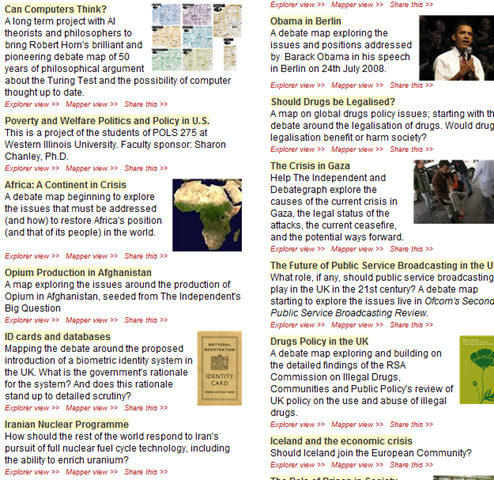
DebateGraph was conceived as a tool to improve the quality of public debate on contentious or complex issues. Public debate, in general, is usually pretty awful. David and Peter explain why this is the case pretty comprehensively below.

Public debates tend to be complex; with multiple data sources and perspectives and conflicting demands and values. In complex debates, the volume of information and arguments can seem like an overwhelming obstacle to someone, trying to develop a comprehensive understanding of the essential arguments advanced by all sides.

Public debate is all too often characterized by repetitive contributions, digressions, argumentative fallacies, rhetorical flourishes, manipulative framing, obfuscation and personal attacks that result in a high noise-to-signal ratio and confusion rather than clarity.

Conventional media reporting of public policy debates often struggles with the challenge of conveying nuanced, reasoned positions in a compressed linear form, when simple heated oppositions deliver a more dramatic and rewarding effect.

This, in turn, makes it harder for established public figures to think tentatively and creatively in public about new policy approaches and to acknowledge strengths and common ground in opponents’ positions.

We are talking about wicked problems here a lot of the time since public policy debates by definition respond to problems or questions where the general public are stakeholders. This means that there are a lot of varied stakeholders with even more varied world views and frames of reference. By creating a tool to improve the quality of a public policy discussion, DebateGraph is a tool that helps to deal with wicked problems themselves. What is interesting about DebateGraph is that like the IBIS based issue mapping that I practice, it is a visual, map based approach, yet it was developed independently from Conklin, Compendium or anything else in the space.

image

DebateGraph is a free online service. It allows the global community to collaboratively build maps of complex debates that accurately present all sides of the debate from a neutral standpoint, free of repetitive clutter and ‘noise’. Like a wiki, all aspects of the debate maps, both their content and structure, are continuously open to revision, refinement, comment, and evaluation by anyone who wants to join the community of thought. Each map is a cumulative work in progress.

Readers and editors of the maps can explore the top-level structure of debates and delve into specific strands or sub-structures of a debate. What interested me was the fact that the debate maps can be embedded into other websites; with changes made to the map on one site updating immediately across every site on which it appears.

DebateGraph also has RSS and email alerting like SharePoint, as well as a unique rating system where users can specify how much they relate to, or believe in a particular argument. The map then self reconfigures based on what arguments are considered the strongest. In effect, the map becomes a multi-dimensional poll or decision making tool.

“Although consensus can emerge from such a process, not least because it promotes the discovery of previously unidentified options, our hope is as much that the people who continue to disagree will do so on the basis of an enriched understanding of the reasons for their disagreement and having had the chance to test each other’s reasoning to the fullest.”

How DebateGraph works

Using DebateGraph is pretty easy, given that you can embed it into other web sites as I have done here in this post. From the hundreds of maps that I can choose, I’ve decided to embed the map of the global financial crisis for you to explore. Click on the bubbles below and move them around. You will find that like bubble-wrap, you will spend your first few minutes immersing yourself in moving nodes around and navigating here and there. Go ahead and have a play – I’m patient – I’ll wait for you 🙂

Right! I’m guessing around seven minutes have passed. Now that you’ve had a play, click on the first arrow, below the map and above the bottom toolbar. This will take you back to the top level financial crisis map. Let’s take a closer look at what is going on here.

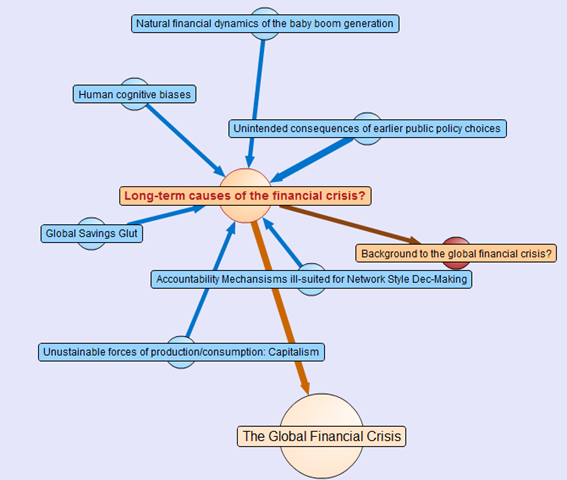
Attached to this “Global Financial Crisis” map is several root questions covering the cause, consequences, triggers and response to this problem. If you hover your mouse over any of the nodes, you will find a more detailed view of the question. Hover your mouse over the arrows between nodes, and you will find that the questions “arise from” the central “global financial crisis” node.

Also, note the thickness of the arrows between nodes. The width represents the importance placed on this node by the community of users that have developed this map.

The node colours are important too. Click on the “Long term causes of the financial crisis?” node above, and it will break out to a sub-map. Here the nodes are blue, rather than orange as shown below. The difference in colour is because these nodes are possible responses to the question “Long term causes of the financial crisis?” Once again, the width of the arrows indicate the community’s view of the validity of the responses. Now let’s look at a response that would potentially be divisive. One of the potential answers to the long term causes of the current crisis is “Natural financial dynamics of the baby boom generation.” So, it’s all the baby boomers fault, is it? 😉

image

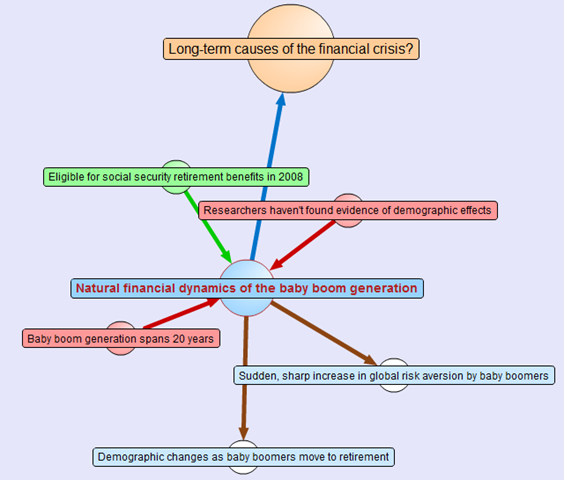
Clicking on the “Natural financial dynamics of the baby boom generation” and we see a map with a few different coloured nodes. This is because there are some supporting and opposing arguments to this idea. The green nodes support the idea and the red nodes oppose the idea. This is the essence of the pro and con type arguments used when you create IBIS maps.

image

There are also some other nodes where the direction of the arrow is the opposite to the ones we have examined so far. These are links to other maps, and if you highlight the outward arrows, you can see that our current map relates to nodes in completely separate maps.

This highlights a really important point about DebateGraph. It links related issues into a “web” of argumentation allowing readers to fully explore the myriad of interlocking issues that make up complex problems without “drowning” in information overload.

Contributing to debates

If you feel strongly on a particular subject then you are free to contribute to the debate. All DebateGraph maps have a toolbar that allows you to perform more advanced activities.

image

From left to right, the icons perform the following tasks

  • Open the DebateGraph home page
  • Show detailed text and comments for the currently selected item
  • Add comments to the selected item
  • Open this map in mapper (map edit) view
  • Edit this map in mapper (map edit) view
  • Search all DebateGraph maps for a given term
  • Share this map view or embed it in your own site
  • View the map in full screen mode
  • Key and explanatory notes for maps

SharePoint Governance?

Andrew Woodward suggested that I should create a DebateGraph map for us all to collectively explore how we could save Tom Cruise from complete agonising lameness. I chose not to do this for three reasons.

  1. Tom Cruise cannot be saved
  2. Tom Cruise’s lawyers would sue my ass
  3. There are more important topics to explore

Let’s instead talk about a pet topic of mine: SharePoint governance.

Governance in SharePoint is pretty misunderstood. There are many definitions of governance and they are all equally right, when judged through the lens of the person defining it. I have my own interpretation of governance (which is, of course, the definitive and completely correct one! – hehe). Maybe we should debate the issue?

Joel talks about a SharePoint governance plan needing to be a ‘living’ document and in fact he states this explicitly in the sample governance plan that he did for Microsoft. I agree wholeheartedly on this notion. The reality is that documents like MSWord documents are not overly conducive to this ideal. The paradox is that the bigger and more comprehensive the governance plan is initially, the harder it can be to maintain and manage over time, and therefore, the greater the likelihood that it can go out of date or fall into disrepair over time.

As a result, it occurred to me some time back that a DebateGraph map is the sort of “living” document that a governance plan really aspires to be. So, I roped in a couple of friends, most notably Andrew Jolly and Ruven Gotz, and together we experimented with DebateGraph to explore our own questions and ideas on the topic of SharePoint governance. The result is the map below which you can explore.

Seven Sigma web part for DebateGraph

It then occurred to me that others could benefit from this experimental exploration of the topic of SharePoint governance. This gave me the idea that having a “SharePoint governance web part” that could be added to any enterprise SharePoint portal would be a really great way to augment internal governance efforts. Additionally, one of my clients is responsible for conservation and sustainability at a local level in the community. They loved the DebateGraph debates around environmental, social and economic sustainability and this web part idea would work equally well for them.

Accordingly, my company, Seven Sigma, has just released a free webpart for SharePoint that allows you to embed DebateGraph debate maps into your SharePoint sites and tune their display to fit into enterprise SharePoint portals. The default debate is the SharePoint Governance debate shown above, but you can view any of the many Debategraph maps via the web part properties.

I have recorded a couple of webcasts, covering the installation and usage of the web part which can be viewed below. Otherwise, click here to download this free web part from the Seven Sigma web site.

dginstall  dgusage

Conclusion

This new web part and the SharePoint governance debate, are essentially an experiment in trying to tackle collaboration a novel way. Like any wiki, to make it truly “living”, the maps need contributions from people who have something to offer on the topic. I fully accept that this initiative is not going to be everybody’s cup of tea, but I hope that it might get people to think about the sort of possibilities presented by this sort of wiki based display. The fact that all of the issues, ideas and argumentation can so easily be made available to a wide audience via a simple web part I think is unique.

Thus, if you would like to contribute to this SharePoint governance debate sign up to Debategraph and we will add you to the governance debate.

I think that DebateGraph, and applications like it, may well represent the next step in the evolution of collaborative applications. While Twitter and Facebook have found interesting ways to bring people together, those applications aren’t exactly going to provide you with the sort of ‘container’ required to tackle really wicked problems. I foresee a lot of development in this sub-genre of collaborative applications in the future.

In other words, watch this space!

Thanks for reading

Paul Culmsee
www.sevensigma.com.au


Listen to me blab on about crap ;-)

Hi

I have been very busy on a number of fronts – which is why the blog hasn’t had much attention lately. I’ll be back soon enough though – once I get a few big jobs done.

For those of you that are not aware, there is a podcast interview that I did with Brett Lonsdale at Sharepoint Pod Show where he allowed me to blab on and on and on and on 🙂 Poor Brett – he didn’t know what he was getting himself into at all!

So if you think my posts are boring and wordy, wait till you hear me talk! 🙂

Paul


Perth SharePoint Users Group wrap

Today I presented a session at the Perth SharePoint Users Group. I was a little unsure whether my non-technically focussed content would be of interest to the geeks but the turnout was terrific and the feedback has been brilliant. (The 3 copies I gave away of Dux’s excellent “SharePoint for Project Management” book may have sweetened the deal – hehe )

My sincere thanks to new user group president Sezai Komur for giving me the opportunity to present this material as it was the first time it has seen the light of day in Perth.

If you want to check out the slide deck from the session, you will find it below. Expanded information that builds on this content can be found at the Seven Sigma site, as well as here at CleverWorkarounds.

Thanks for reading

Paul Culmsee

www.sevensigma.com.au


“Governance Man” has fallen into my trap! :-)

image

This post was supposed to be called “SharePoint Governance is not a deliverable” – hence the pizza above, but my secret evil plan has worked faster than expected! Read on…

When I met with Dux Sy for breakfast the other day in a diner that looked remarkably like the set from Happy Days, our conversation covered various areas of topics around US vs Australian culture, SharePoint governance, project management, food, wicked problems, sense-making and my two kilograms of Vietnamese coffee beans that came from a weasel’s digestive tract :-). Smart guy, is our Mr Sy indeed; good business acumen – well suited to being a SharePoint sensei.

But one part of that conversation triggered a memory about a post that I was supposed to write and then completely forgot about. Thanks for jogging my memory, Dux.

Right in the middle of writing said post, SharePoint Joel has just posted some thoughts about his recent excellent governance document, inspired in part by some twitter conversations with Andrew Woodward. Andrew, like me, dislikes the word “governance” because he has seen the same confusion that can arise. Joel in his post, nailed totally what I was going to write about here, and referred to an old post of mine written in October 2008 where I undertook an experiment on whether I could make my own buzzword.

So, I think I will kill two birds with one stone here. I’ll post my original idea – in effect echoing what Joel said with regards to how to best use his governance plan, and I will also talk about the exciting adventures of intrepid hero “Governance Man” and vain attempts to defeat his arch nemesis “Dr Wicked” :-).

The precedent…

I have had a couple of experiences now, where I have been called in by clients who have the typical SharePoint chaos. Things have gotten out of hand and as a result, key stakeholders started to lose faith, and the project team really felt the pressure from the powers to be. There were strong undercurrents of desperation to get things sorted, like… yesterday. Under these circumstances, they asked for help on “governance”. They needed “governance”, they must have “governance”  and they spoke about governance as if it was something that a pizza driver can deliver to their door (and if it was not there in 30 minutes, it was free).

I was being a bit flippant when I talked to Dux about it, because both times I was dealing with the project manager in charge of each SharePoint implementation. I recall saying something along the lines of “some project managers have a lot to answer for here”. What I meant by that was “governance” in their eyes was a 1 line item on a work breakdown structure on their project plan – a project deliverable. As a result, they had this impression that by getting me to produce a “governance document” would somehow solve the chaos. Therefore, I had to answer the standard HMHL question (how much, how long) so it slotted nicely into the work breakdown structure.

*Sigh* if only it was that simple.

This hopefully provides an insight to why I am uncomfortable with the word. What these clients, in fact, were dealing with, was a crisis of confidence with the platform. They were unable to provide a level of assurance to the organisation that the platform could meet their needs. The lack of confidence turned to user pessimism, and the pessimism turned to outright rejection of the platform by some sectors.

Adding to that, Joel Oleson recently published a major revision of his sample governance plan, which I had the opportunity to review and made a few suggestions here and there. It is a great template to use for many organisations, but my fear is that people will think that this plan alone will be all that is needed because it has “governance” in its name. I mean, as a template, it is the best thing by far that is out there right now and adds significantly more meat than the governance checklist guide does.

“Governance Man” vs “Dr Wicked” (and “Agile Boy")

I have listened to the governance godfather Robert Bogue suggest that governance is a process and I think that is pretty close to the mark. He has also suggested that governance at its core is about risk management which I also agree with – or at least I do partly. As previously stated, I’ve always found that “governance” never really succinctly nailed this risk management emphasis. Isn’t risk management about providing assurance to stakeholders? It certainly makes more logical sense than saying “providing governance to stakeholders”.

So, in October last year, I wrote a post about the curse of “governance” now achieving buzzword status which makes life confusing for all, given that “governance” is talked about a lot, yet seemingly hard to understand and/or execute. To make it interesting, I blamed it all on my arch nemesis – “Governance Man”. You can see him in the photo below (check the T-shirt). Although the disguise is almost perfect (like mine), can you pick who he is? 🙂

image

In that October 08 post, I also executed my “secret evil plan ™” which actually had little to do with the governance/assurance debate itself. I simply wanted to see how long it would take for a new buzzword to take hold. I spoke of “SharePoint Assurance” and with a little help from my trusted super-friend Andrew “Agile Boy” Woodward, my arch nemesis – that meddlesome “Governance Man” fell into my wicked trap by blogging about it!

Mwaahahahahah… more people debating it! Another piece of Dr Wicked’s secret evil buzzword plan falls into place :-).

The unified theory of everything…

I recently did some Dialogue Mapping work for a local government organisation. In performing that work, I finally came across a definition of governance that I liked because it was simple and succinct and did not come from IT. It also has the positive side effect of putting my assurance instinct into the right perspective, too. Governance was defined in these terms:

“The word ‘govern’ means to ‘steer’. We aim to steer the energy and resources available for the greatest benefit to all”

Now we look at the definition of assurance (ripped from quality assurance)

“Assurance provides confidence in a product’s suitability for its intended purpose. It is a set of activities intended to ensure that customer requirements are satisfied in a systematic, reliable fashion.”

I see these as quite distinct activities and the key words in the above definition are “intended purpose”. Defining and maintaining “intended purpose” is the realm of governance via ‘steering’. Thus, governance is all about achieving shared commitment among stakeholders to a solving business problem, whereas assurance is all about achieving and maintaining confidence in the solution.

Paradoxically, you actually need both governance and assurance, for each to stand on their own individually. I mean, how can you achieve shared commitment without confidence? How can you have confidence without a shared commitment to a course of action? This is wicked problem fodder right here, and for a more detailed exploration in the relationship between shared understanding, shared commitment and project failure, then read the one best practice to rule them all series.

This, I think gets, to the root of why I get nervous when I hear the term “governance” bandied around. So, I take Joel’s point that assurance may “lack legs”, but assurance, to me, has a clearer meaning for the “confidence” side of governance. As I mentioned earlier, a nice little test is to say out loud these two statements and see which one ‘feels’ right.

  • “We have to provide better SharePoint assurance to the business.”
  • “We have to provide better SharePoint governance to the business.”

For what it’s worth, this article is not the first one to try and unify these concepts in this way. John Miller previously wrote a nice article that relates these two concepts together neatly way before me.

Are we splitting hairs? Yup, totally. In fact the next section is really what is important.

It’s all in the attitude…

Joel talks about governance in terms of “defining a service offering” as well as “mitigating conflict within an organisation”. No objections to both of these arguments as that is not really assurance. But my own “high level” governance guides are usually 2-5 pages, and guess what? I define the service offering, the guiding principles and define the roles and then refer to the other documents where the bulk of the material ends up. More often than not, these documents are assurance oriented documents.

Let’s talk for a minute about the “mitigating conflict within an organisation”. If you have read my “project fail…” and especially the “one best practice” series of posts, the “conflict resolution” aims of governance is definitely not served by a “governance document”. This is the world of what Jeff Conklin calls social complexity – or put perhaps in a simpler way: people, strategy and politics.

This is where I differ slightly from Robert Bogue. I attended his Feb 09 Best Practices Conference session where he spoke of SharePoint governance as a process. I personally believe that SharePoint governance is more in common with a methodology, and should be looked at through similar lens to other methodologies, like Agile software development, PMBOK, SEI CMMI and the like. Agile is not considered a ‘process’, although process is a significant part of it. I think the difference is that a methodology requires attitude to support the process. It is the latter area where the problems are. Without the commitment to back up the process, “governance” will be nothing more than just another document that few will ever read and even less will understand.

A document cannot alone drive the shared commitment required to make governance work.

When you look at SharePoint governance through the “methodology lens”, you will see that the reasons for governance failure are the same as why methodologies themselves have a hit and miss fate. Most methodologies require significant attitude to support the rigour to succeed.

Lessons from Agile

Not so long ago, I spoke to SharePoint’s own Agile/TDD guru Andrew Woodward about the topic of rigour and attitude to make Scrum projects a success. I had read this terrific real life story on the attitude factor required in Agile and was interested in Andrew’s experience with this, specifically in the SharePoint realm. Andrew confirmed that attitude and shared commitment among the team were particularly critical. Here is what he had to say.

When discussing agile teams and why they fail, Malcom Gladwells theory about Broken Windows is often quoted.   The premise is that if a broken window is left unrepaired, people will conclude that no one cares and will stop caring themselves. This is a very relevant to agile development teams where they rely on team ownership; where the team as a whole have to care about what they are developing and the way it is developed.

Agile processes quickly start to fail if some team members don’t care;  the broken window could be something as seemingly small as a failed unit test not being fixed or continually forgetting what they did yesterday at the scrum, eventually if this broken window is not fixed other team members will stop caring and the team will reach their tipping point.

The rigor needed by all team members is significantly greater than traditionally applied to development,  the myths around lack of control and process could not be further from the truth.  To be successful with agile processes you need every team member to care

I think you would agree, that Andrew could have been talking about being successful with SharePoint itself. 

Finally something practical

I thought that I would end this post by being practical as the post thus far has been a bit of a theory-fest. If you take some lessons from why methodologies such as Agile/Scrum fail, then it is pretty easy to list some practices that are likely to help you with your SharePoint governance effort.

One size definitely does not fit all

  • Organisations vary in terms of size, industry and culture. A template cannot possible cover all scenarios.
  • It is unwise to submit Joel’s sample plan without a real concerted effort to make that plan your own

Systems thinking and commitment

  • We all rely on each other in complex and implicit interdependencies. Without a shared understanding among all participants, you will not have shared commitment among participants.
  • Without shared commitment, a governance plan is just another document that will be out of date within months.

Governance affects different participants in different ways

  • Culture is only changed if strong leadership makes it so, or participant accountabilities are crystal clear and completely unambiguous; therefore
  • Split accountability into service ownership (“service”, being the SharePoint platform, is the domain of the IT department) and the Information Asset ownership (the applications and running on the service) are the domains of the business; and
  • Identify owners versus custodians. Make sure that owners realise they are *always* accountable, even if they delegate day to day operational matters to custodians. If something goes wrong, the finger is pointed at *owners*. This has the benefit of making them suddenly much more interested in service and information assurance.
  • It is more than the geeks. Geeks are custodians 99% of the time. In fact, SharePoint chaos comes more from Information Architecture and poor strategic planning as much as from a poor installation.
  • Communicating the governance plan to more than the geeks is paramount. We should work to keep at least the high level material in planning as buzzword free as possible, my grandma should be able to read this stuff.
  • Provide training for custodians and owners (if an owner refuses, then they may not appreciate their accountabilities as described in the second point).

Use common sense

  • It doesn’t have to be bigger than Ben Hur. Doggedly following the written word to the last letter ignores the cultural commitment required by participants to make it work
  • People only want to read what applies to their responsibilities. Make your documentation relevant to the key roles.
  • One big document is just like meeting minutes – most will never read it. Split the document up if you have to.
  • User evangelism is a good thing; be too controlling and you will lose it. Once lost it takes a long time to recover (look at Microsoft who have spent years trying to win back support from the days when they acted like bullies in the marketplace).
  • Why put in SharePoint and then use a paper based change control or configuration management system? 

Put the supporting structures in place

  • Targeted training. For key roles in the governance framework bring someone into your organisation. Targeted training for this group is better than some generic course.

In short, attitude and commitment is a problem of social complexity. The documented plan is great, but that is unfortunately the tame bit.


Thanks for reading

Paul Culmsee

www.sevensigma.com.au


The one best practice to rule them all – Part 6

BoromirRing

Hi again and welcome to the sixth and final post in this series aimed at enlightening readers to the often overlooked importance of shared understanding of a problem. For those of you who have come across this article for the first time, I suggest very strongly that you stop and read through its predecessors. There is a lot that was covered to get to here.

To recap, we have spent the last two posts delving into the deep structure of problems by using an issue based mapping method. This post will continue in that same vein, but I am going to move a little faster this time and cover more argumentation with a little less explanation. I’ll also finish off with some other interesting aspects to IBIS and dialogue mapping that we haven’t covered so far.

The first 4 posts were all about one of the key root causes of the organisational chaos that causes projects to go haywire, whether it is a SharePoint installation or trying to get the coffee machine fixed. I believe very strongly that if a group of participants can attain and maintain a sufficient level of shared understanding, then often what seemed like a polarising problem with intractable stakeholder positions, can start to make real progress toward resolution. The collective intelligence of a group is a powerful tool to be leveraged, but all too often it can be brought undone by social complexity and the inherent inefficiency of meetings. SharePoint is prone to social complexity because of its technical complexity, malleability and the fact that it is sold by Microsoft and they use that damn six pillar pie chart :-).

By the way IT people – your projects are rarely actually “wicked problems” in the true sense of the term. Until you have been involved in dialogue mapping a planning or social policy type problem with countless sub-issues and stakeholders, then you do not know just how good you have it! 🙂  In saying that, I recognise that many, if not all, IT projects have a lot of wicked elements to them.

Previously on CleverWorkarounds…

In my last post, we had developed an IBIS based issue map that I think is a reasonable reflection of a blog article written by Joel Oleson, incorporating some feedback by readers who disagreed with many of his points. What is great about Joel’s style of writing is that he likes to use headline grabbing titles for his articles. As a result of this, he stimulates rigorous debate and I could probably spend the rest of my days on CleverWorkarounds simply IBIS mapping his posts and all of the responses.

But, we haven’t finished issue mapping this site definitions thing, so let’s finish it off by mapping the rest of the responses. Below is a scaled down view of the map that we had by the end of part 5 (click to enlarge).

image_thumb9

Now, let’s go through some more responses and work them into the issue map. First up was this incredible quote showing much wisdom and maturity. Who uttered such pearls of wisdom? Oh, wait, that was me  :-)!

Joel and I spoke about this earlier in the day actually before this was posted – I hate them also but accept their need in WCM scenarios.
My biased view of the world stems from a site that I visited where branding had been put above all else and so it was an undocumented site definition with custom controls, dodgy web.config hacks all running in full trust to make it all work. 2 days later and I had it migrated. But it was all so *unnecessary* and I think that’s Joel’s point. They get used when they shouldn’t.

The client in this case had never been shown columns, views, versioning and this was a document centric intranet for cryin’ out loud! Instead they get a pretty site with a 50gig content DB because of a hacked site definition with custom nav controls to look pretty, application.master hacks to make it consistent and no thought process into information architecture. They simply took their existing ugly filesystem and whacked it in!

Hmm, when you read my response, all I did was support Joel’s original assertion that site definitions are modified unnecessarily, so in essence I did not really add that much to the conversation and in fact the example that I used was a client who had way more issues than the custom site definition alone. So as it happens, my post really didn’t add anything *new* to the discussion.

Next we have this anonymous response:

In situations where lots of sites need to be created from one pattern and you want old sites to get new changes, site definitions are a must. As mentioned above, you can’t staple features to a template.

I think you’ve swung the pendulum too far with your comment. Yes, big, bulky, all encompassing site definitions aren’t very maintainable. So don’t use them this way! As AC and others have blogged about, create a blank site definition for stapling purposes, and package everything in features. You still need that first site definition though! STP’s are for end users, IMO, not for solution developers.

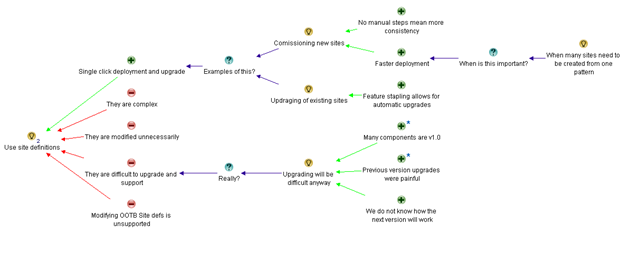
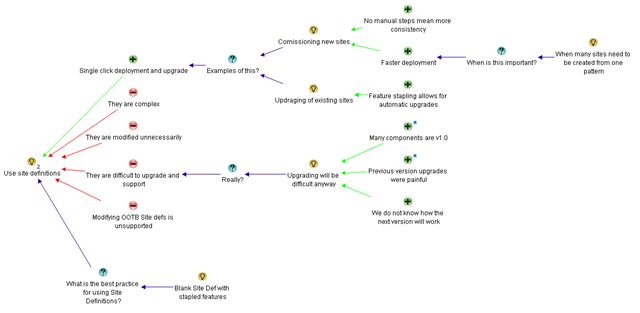
The quote above makes the important point that “if a lot of sites need to be created from one pattern” and “if you want old sites to get new changes”, then site definitions are pretty much required. I created an pro called “Single click deployment and upgrade” and then fleshed it out with the those ideas. The comment about pendulum is unimportant. Below is the new map

image

Next up Adam Toth makes an excellent, yet subjective counterpoint to the “difficult to upgrade” argument.

Since this is version 1.0 of Features, Solutions, Stapling, Content Types, Workflow, etc., I really believe that any upgrade to the next version is going to be a headache anyway. No matter what you did in sharepoint v1, it broke going to v2. v2 to v3 was also incredibly painful because the product changed so dramatically. We have no visibility into v4, and have no way to figure out what approach will make upgrades least painful. We can assume that things are starting to solidify, but there are no guarantees.

The above response from Adam questions the previous claim that site definitions “are difficult to upgrade and support” by arguing that upgrading will be difficult no matter what. I do not delete the original “difficult to upgrade and support” con, but incorporate Adam’s points as a new question “Really?” against the con, and then support that question with the idea that “Upgrading will be difficult anyway”. Adam supplied 3 arguments supporting his claim (many SharePoint components are V1, the previous versions were all painful upgrades and that we have no visibility into how the next SharePoint will work). Now the map looks like this.

image

Next is David Mann

Custom Site Definitions are a tool. Like any tool, they have benefits and drawbacks. Used properly, they provide much value. Used improperly, they cause pain.
Even the body of the article contradicts the sensationalist-headline by saying that there are some things you can’t do without a custom site def. The article of AC’s that this links to, and it’s comments, talk about a solution that is a totally blank CUSTOM SITE DEFINITION, that is then built up properly with Features/Solutions. They also mention publishing scenarios that the recommended approach is a custom site def.

So, the best approach is to do your homework. If a custom site def REALLY is the best approach, then feel free to use them. Just make it a conscious decision, knowing the trade-offs, not your default reaction because it’s easier.

At this point, it is time to add a new question to this map, as like other respondents, David is referencing Andrew Connell’s post on this subject. David mentions a specific application of site definitions (use a blank one and add to it with stapled features), which is in itself not a pro or con of site definitions, but a way of using them that mitigates many of the disadvantages of them.

Since we are IBIS, and we now have this new idea “Use a blank site definition with features/solutions”, and we need to infer the question behind the idea. My initial guess is “What is the best practice for using Site Definitions” and I have added it to the map as shown below. We could easily use Andrew Connell’s post on this subject to further flesh out the best practice for Site Definitions on this map, but for the sake of article size I have chosen to continue with the original responses to Joel’s post.

image

Chunk it up

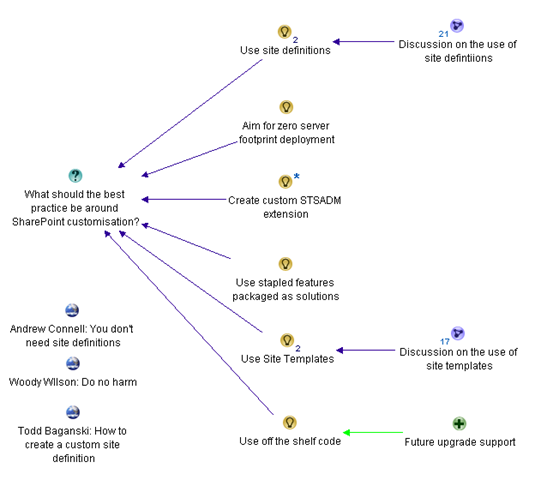
At this point, the map is getting large and we need to make it more manageable. Fortunately, this is very easy using tools like Compendium. I simply create a new sub-map and copy the nodes to the sub map. In effect I start to build a hierarchy of the logic behind the argumentation. Below shows the top level argument map at this point, now chunked into sections. Each sub map “Discussion on the use of site definitions” and “Discussion on the use of site templates” is now in its own sub-map that is accessed by clicking on the parent map.

image

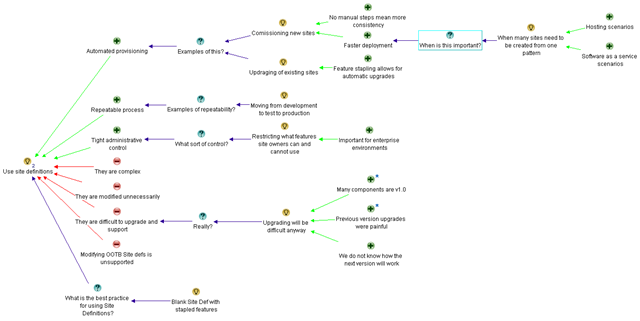
The final response that I will cover off for now is from SharePoint Yoda, Eric Shupps who writes a really excellent factual based response to the post.

There are many scenarios in which they are required:
1. Automated Provisioning – Self-contained solutions that have all necessary functionality baked in (think hosting and SAS models).
2. Repeatability – They migrate better from dev to staging to production better than any other method.
3. Maintainability – New Features can be added or removed as required and the solution upgraded. Try doing that with an STP file.
4. One Click Deployment – The user simply selects the proper definition on the site creation page, to which you can add descriptive text and sample images (what do you think all those other options are? They’re OOTB site defs, that’s what).
5. Control – Nothing beats a site def for restricting what features site owners can and cannot use. Very important in many enterprise environments.
6. Ease of use – There are lots of workarounds for the power and flexibility that site defs provide but all require a great deal more code than a simple site def with stapled features.
Sorry to burst your bubble but you’re wrong on this one. Next time, ask a developer with experience doing Site Definitions the proper way before you go off on an opinionated rant. I’d be happy to help!

Some of Eric’s arguments are already in the map, but not all of them. Furthermore, he further expands on some of the arguments that already are there. First up, I changed my original pro of “Single click deployment and upgrade” to “automated provisioning” because I think this captures that argument more succinctly. Even though Eric then lists “1 click deployment” as a separate criteria, I think they belong together and it’s my map! ;-).

Eric also highlighted “hosted” and ”software as a service” scenarios where automated provisioning is particularly important. Since I already have a nice string of argumentation, asking for criteria of when to use site definitions, I have added these as supporting arguments to this existing set of nodes.

“Repeatability” and “Control” are excellent points, and I have captured Eric’s arguments in this area. To make the idea clearer, I captured “Control” as “Tight administrative controls” as this is less ambiguous in its meaning than “control” alone.

Then Eric hits the one argument that no-one seems to agree on. “Ease of use”. Clearly Eric’s idea of ease of use is different to Joel’s. When you look at Eric’s supporting arguments for ease of use, it appears that he is really reiterating the “automated provisioning” pro for site definitions and supported the “more manual customisations needed” con for site templates.

The adjusted map for the site definitions idea has now morphed into this.

image


Emergent Themes

I am going to stop this IBIS map now because otherwise, I could spend another 5 posts just working through all of the contributions made by various people. But more importantly I want to highlight a few really important points that might get lost in all of the screen-shots.

One of the things that I notice when performing Dialogue Mapping with a group is that the action of utilising a shared display like IBIS allows people to make connections much more quickly and really starts to make clear some of the underlying themes behind the discussion. It is much quicker and more efficient for participants to achieve the necessary breakthroughs when argumentation is visually represented and lots of seemingly abstract concepts can be logically related to each other. It seems to be that as human beings, our brains are particularly well-wired to visual based representation.

I want you to picture yourself in a meeting scenario where we are discussing a problem. It doesn’t have to be a face to face meeting either (although this is usually the case). It can be a group collaborating on a problem using blogs, wikis, discussion forums or any other medium. Without the issue map, there will be a number of problems that will combine to derail the meeting.

First up, there is likely to be a lot of points that have been made. If we were following the meeting in a traditional, linear fashion the argumentation would look something like this:

image

What you are looking at above is in effect, a visual version of traditional meeting minutes. (You know those documents that get sent around that you never read?). This also is not too dissimilar to the structure of a blog post (and the subsequent comments). Contrast this to the issue map that uses an issue based structure that makes the logic and flow of the conversation visible. Which is more meaningful? Which is easier to “read”?

For a start, people do not have to decipher any convoluted dialogue – we do not spend half the meeting disagreeing and then realising that we are actually talking about the same thing. The objectifying of the dialogue reduces those situations where the defences are high because people have inferred some bias that can easily be misconstrued. Different points of view are made much clearer and we do not continually revisit the same old topics over and over again. As the argumentation is further fleshed out, participants are much less likely to get lost or lose track of the conversation. Even if they do, we have a beautiful ‘corporate memory’ system here that is starting to form. Just because one person wants to return to a previous point and ask a question or add an argument to it, doesn’t mean that the next person has to take up this point at his or her turn. They can jump to wherever in the map their current train of thought takes them.

Death by repetition is also mitigated nicely. Death by repetition is those times in a meeting where there is a “true believer” who believes very strongly in a course of action to the point that they will find a way to work their answer into every question asked. Don’t feel too guilty when reading that – we all have done this.  Of course, it annoys the crap out of everybody else present, but the true believer will doggedly persist because they feel that their answer has not been considered enough or given the recognition that it deserves. But once captured on the issue map, the idea is visible and has equal footing to all of the other ideas. If the true believer persists, then the mapper simply asks the true believer if they have anything more to add to what is there already. Usually this only happens once :-).

There are other phenomena that are guaranteed to derail a meeting, usually leaving all participants emerging from the meeting annoyed that they never got to the actual agenda. Conklin calls this “grenade lobbing” and this is where a participant, usually with the defence drawbridge raised, will challenge the whole frame of the meeting. “That is not the real issue here”, they will explain, “it is this”. (Remember wicked problem rule number 8, every problem is a symptom of another problem). Every time you have emerged from a meeting, feeling deflated and wondering what happened to the agenda, chances are a few grenades were lobbed and the entire purpose for coming together was caught up on a tangent.

But issue mapping makes dealing with this easier too. Usually when a grenade is lobbed, where the frame of the meeting is challenged, it means that the root question of the map is not correct. Fortunately with an issue map, the answer is quite easy. You simply shift the map to the right and work with the grenade lobber to infer the deeper question. Once captured, the group can continue to work with the implications of this new question or continue to work with the rest of the map. The previous disruptive power of the grenade lob is significantly mitigated.

Final Note – Tech geeks vs Developers

I previously said that performing Dialogue Mapping and IBIS allows people to make logical connections much more quickly and really start to clear some of the underlying themes behind the discussion. This “Joel vs developers on site definitions” example that I have been working with was actually not a great IBIS example. The reason is that if we had started the entire conversation using IBIS, then a lot of the subsequent argumentation would have been very different. If say, Joel had used IBIS to structure his arguments to begin with, apart from making my job a lot easier, the map would have underpinned a very different blog post in structure and clarity of argument.

But despite the somewhat artificial nature of my example, from the mapping that we have performed so far it is clear to me that the two distinct viewpoints have emerged. This argument cuts to the heart of the IT Pro vs Developer world. Certainly a strong indication of this was the disagreement behind what is actually “easier”. It seemed that Joel’s easier is very different to the developer view of “easier”. Of course, we haven’t even counted the other stakeholders either and I bet the end-users’ definition of “easier” would be completely different from the two themes that emerged.

I personally come from an IT pro background and IT pro’s have become paranoid types because they are always the ones who have to deal with the after-effects of bad customisations (See the “mother hen reflex” post for how that has come to be). But through mapping this issue out, I was able to make some definite connections with the developer centric replies too. I didn’t necessarily agree with all of the points made, but I now have a much better understanding of their point of view.

At the end of the day, understanding those points of view is going to give you that shared commitment required to see a problem through to an effective a solution.

Well that is it for this series. I hope that you found it of some use and welcome any feedback. Since I am a trained, practicing and designated Dialogue Mapper, expect to see a lot more IBIS on CleverWorkarounds and Seven Sigma over the coming months.


Thanks for reading

Paul Culmsee

www.sevensigma.com.au


The one best-practice to rule them all – Part 4

image

Hi there

Welcome to the fourth post in my series on how to deal with the true root cause of project failure. The first three posts were really to set the scene for this post where I will explain the basics of my craft for resolving some of this. First up, I described my journey through the maze of of well known methodologies and best-practice standards, trying to make sense of a character known as “SharePoint vs Skype guy”. After seemingly taking one step back for every two steps forward, I finally found an area of research that I strongly identified with – the concepts and phenomena of wicked problems. I described how I have come to believe very strongly in the principle that understanding a problem comes from exploration of potential solutions, and that the act of exploring solutions will change your understanding of the problem. Traditional methodologies tend not to recognise this fact, and in fact, many force you into a problem solving model that precludes this perfectly natural sense-making activity.

This sense-making process is utterly critical to project success. The fact is, almost any project failure symptom (such as scope creep) can be traced back to a single root cause. That cause is a lack of shared understanding among participants of the problem behind the project. If you presume, however unlikely, that every stakeholder had an identical deep understanding of a problem and maintain that understanding, then almost by definition, things like “scope creep” and “unrealistic expectations” would not happen

In my last post, I turned my attention to the “inappropriate methods” that are all-too commonly used to tackle projects that have taken on wicked tendencies. We looked at the flawed logic of throwing “process” at a wicked problem, the sometimes misguided reasoning behind many scope restrictions, as well as the pros and cons of competitive and authoritative strategies. Finally, we examined the paradoxical effect where, to fully understand a problem, we have to understand all points of view. Yet in doing this, we leave ourselves susceptible to falling foul of wicked problem characteristics.

Hmm…Such a conundrum…Is there a way out?

From Rittel to Conklin (and IBIS)

Once again, we have to take a brief sojourn to the era of sideburns, flared jeans and excessive amounts of pubic hair…The 1970’s.

Years before Rittel wrote his seminal wicked problem paper in 1973, he had already come to the belief that the relationship of problem understanding was dependent on the solution being considered at any given time. He had also been thinking about tools and methods to overcome the problem. By 1970, Rittel had invented what he termed a “design augmentation” system that he called Issue-Based Information System (IBIS). Here is how IBIS was described back then.

Issue-Based Information Systems (IBIS) are meant to support coordination and planning of political decision processes. IBIS guides the identification, structuring, and settling of issues raised by problem-solving groups, and provides information pertinent to the discourse … Elements of the system are topics, issues, questions of fact, positions, arguments, and model problems.

For you trainspotters, You can read Rittel’s 1970 paper mentioning IBIS for the first time here. This paper is quite amusing when you read it nowadays as it is positively antiquated. But, hey, we are talking about a time before PC’s and when my father still had all his hair. The first time Rittel compared and contrasted “wicked to tame problems” was actually in a 1972 article. Rittel was also not alone in the search for tools and instruments to assist sense-making. He was influenced by the legendary Douglas Englebert (the dude who invented the mouse), who had spent the early half of the sixties examining tools and methods to “augment human intellect“.

Rittel’s original 1970 incarnation of IBIS had many elements to it. He called one component in particular an “Issue Map”. Rittel described the issue map as:

Representation of the various relations between issues, questions, etc., by graphic display of the state of argument

The issue map, 1970 style, involved pen and paper (probably those lead-laced black marker pens that made your head spin from the fumes). But over the following years, IBIS was refined and further developed. Many of the components of the 1970’s version were made obsolete by advances in technology and business practices, but Issue Maps in particular, remained. In the 1980’s, the era of personal computers dawned and later pioneers such as Jeff Conklin (who had worked with Rittel from 1984), could see the potential that IBIS had by utilising a computer-based visual display.

Independently from Rittel, Conklin was pursuing ways of capturing design rationale and had created his own notation called ISAAC. He recognized IBIS as the perfect solution when he heard Horst Rittel give a talk about it.

“His IBIS structure was simpler than my ISAAC structure, and his field experience with using IBIS showed that he understood the social and cognitive issues far better than any of us.  (Someone asked him what the IBIS process was for making decisions and he replied, “There is none.  Decision making is completely context and culture dependent)”

Conklin then adapted IBIS for use in software engineering and created the gIBIS (graphical IBIS) hypertext system to support this use of IBIS. Later Conklin used Rittel’s ideas about wicked problems to help motivate engineers and managers to use gIBIS on their projects. Conklin spent twenty years working with IBIS and sense-making software and systems, and all of that work now culminates today in a software tool called Compendium and a facilitation method called Dialogue Mapping. These days, utilising a projector, Compendium type software, a skilled IBIS practitioner can make a massive difference in helping a group develop a shared understanding and commitment of a problem.

To explain IBIS, let’s take a look at it being used for a well known SharePoint debate.

IBIS by example…

IBIS, at its heart, is a language specifically designed to break down the often convoluted and complex structure of a conversation into something much more simple to understand and digest. The premise of IBIS is that no matter how complex or argumentative an issue is, we can break it all down to just three basic artifacts:

  • Questions
  • Ideas
  • Arguments (pros and cons)

There are a couple of very basic rules by which these artifacts interact (the grammar behind the language). Ideas respond to questions, offering possible solutions to the question. The arguments argue for and against the various ideas. Questions can then be expanded on or challenge other questions, ideas, or arguments.

Here is a great example of IBIS in action for a SharePoint wicked problem. Mr Oleson well and truly got himself into trouble a while back when he made disparaging comments about site definitions and hurt the sensitive feelings of many a SharePoint developer. A large thread of discussion ensued, where various people voiced their opinion in a long series of replies.

A blog, along with its comment system is typical of many collaborative mediums that are not particularly well suited to dealing with a complex issue. The whole linear nature of a blog and its comments, means that the last person to comment, in effect tends to have the last word. That is also why newsgroups and discussion forums have flame-wars that degenerate into deep threads of point-counterpoint discussion that go nowhere because the positions taken get more and more intractable. Any linear based collaborative tool suffers from the last poster having the moral high ground – until someone posts below them.

So, let’s instead build the subsequent debate into an IBIS issue map.

Joel started out with a nice, controversial statement, along the lines of “Just Say NO to Custom Site Definitions“. Sounds like an idea to me, so let’s get it into the map.

image

One of the rules in IBIS is that an idea is always an answer to a question. Sometimes that question can take a little while to tease out (and you may change the question a couple of times before it feels right), but it is very important that the root question be defined.

Why is this important? Well look at what happened – Joel eventually had to *clarify* his original post because of the fact that readers had different interpretations of the question he was answering. As a result, some missed the real message that he was trying to get across.

“After a lengthy conversation with all our favorite SharePoint MVPs from Andrew Connell, Robert Bogue, Todd Baginski… I need to soften some of the language here, but emphasizing in clarity what I’m concerned about in the spirit of this post”

Now, we have Joel’s “Just say no” comment captured as an idea. When you start using IBIS, you quickly find that a “comment” can take a couple of forms. As previously stated, it can simply be an idea, that is answering a question that hasn’t been specifically asked yet, but it can be a ‘bundled up’ question, idea and a supporting argument in one terse (or extremely verbose) statement.

Let’s think about the inferred question that Joel’s idea is answering. My guess is that the root question is along the lines of “What should the best practice be around SharePoint customisation?” I have worded the question quite deliberately and I’ll explain the logic a little later. I represent this new question on the issue map using the following IBIS notation.

image

Joel made various arguments to support his position. Let’s see if we can disentangle his very first supporting paragraph into IBIS artifacts and issue based structure.

If you don’t need to modify [site definitions] don’t do it.  Consider them product code!  If you need to build something, do it in a feature, staple the feature and deploy it in a solution.  Site Templates as tough to work with as they are, are better than custom site definitions.  Even the use of site templates is controversial in the community due to the customizations that it causes in the database.  From an upgrade perspective, it’s Much Much easier to upgrade a site based on a site template than it is a site based on a custom site definition.  Now a site template based on a custom site definition is just as bad if not worse

image

Above I have created 4 supporting arguments to support Joel’s idea of not using site definitions.

  • The statement “Site Templates as tough to work with as they are, are better than custom site definitions”, is really using the example of site templates to highlight that site definitions are complex.
  • “If you don’t need to modify them don’t do it.  Consider them product code!” is to me arguing that site definitions are used or modified unnecessarily.
  • “From an upgrade perspective, it’s Much Much easier to upgrade a site based on a site template than it is a site based on a custom site definition” is another example based proposition that site definitions are difficult to upgrade.
  • Finally, the suggestion “If you need to build something, do it in a feature, staple the feature and deploy it in a solution” is in fact one of those “bundled” statements that I mentioned before. Here, Joel is making a supporting argument that there are alternatives, and goes onto suggest an alternative. I captured that in IBIS by breaking up the statement “If you need to build something, do it in a feature, staple the feature and deploy it in a solution” into the supporting argument (pro) “There are easier alternatives”, followed up by a question “Such as” and the idea of using stapled features packaged as solutions.

Objectification is the name of the game!

Now step back and take a look at what we have done here. We have two major advantages over the original statement.

Firstly, participants now do not have to read a potentially convoluted set of paragraphs where the question being answered is subject to interpretation. The issue map above is simple to read, logical and easy to understand. Secondly, and most critically, I have objectified the whole thing. When you look at this map, it is pretty hard to get all fired up and defensive at it, because the root question that I placed onto the map is in effect, calling for ideas, of which Joel’s is simply one of those ideas.

Cool huh? Shall we do some more Issue Mapping?

Back to the map…

Here is Joel’s next 3 statements and the updated map

Ok so it’s easier to modify an existing site definition.  WRONG Answer!  You just broke the out of the box product and you will have a hard time getting support.  Maybe the dev support people will help you, but poor customer.  Poor support.  Poor everyone who has to pay to try to undo what’s taken place.

Don’t modify the out of the box site definitions unless you are following some MSDN article…  Even then, make sure there is no other way and you know what you are doing so you can back it out.  Always back it up.  You may even consider backing it up to disk so you’ve got it for later.

I had to listen to customers crying about what consultants came in and did to their environments in the name of “Good SharePoint Development.”  If you can, leave the site def alone, and package up your code so it can be added and later removed or replaced at least.

If you look at the map below, all I have done is reworded Joel’s idea and added a single additional supporting argument. Seems to me that the above three statements were really saying the same thing, that modifying the out of the box site definitions are unsupported by Microsoft. The rest of the arguments still fit within the first four that I captured previously.

image

I need someone to give me a list of reasons WHY you need to mess around with the site definitions.  I’ve had a couple of devs take me up on it, but I still think it’s WAY better if you just leave it alone and pretend like you can’t.  It will keep you honest and it will make upgrade and support TONS easier.

You’ve recently seen me in favour of client side code running server side elsewhere.  That’s great.  See if you can take things to a higher level and go with a zero server footprint deployment.  Or go with Off the shelf code where you get support for upgrade from an outside company with assurance.

I’m not totally against custom code, but I do want to see it thought through.

I’m sure nearly all SharePoint Dev classes have info on creating custom site definitions.  You may even have something in the certification test on them.

Any SharePoint developer can create a custom site definition, but the challenge is to see if they can fulfill those same requirements without using a custom site definition (The albatross around an admins neck).

Worried about users turning off the features?  Make an STSADM extension for provisioning your special site that activates the hidden feature.  Or consider feature stapling.  Get creative and think outside the V2 Box.  If you’re building custom site definitions on a regular basis you haven’t learned how to do things in the new world.

Now things get interesting. To me, Joel actually contradicts himself a little without realising. We started out with the premise of “Just say ‘no’ to site definitions”, but here he is actually adding *more* good ideas around best practices for customising SharePoint sites and less about why you should say no to site definitions. Example?

  • “See if you can take things to a higher level and go with a zero server footprint deployment”
  • “Go with Off the shelf code where you get support for upgrade from an outside company with assurance”
  • “challenge is to see if they can fulfill those same requirements without using a custom site definition”

Remember that we now have a clear root question “What should the best practice be around SharePoint customisation?”.

I also adjusted the “They are difficult to upgrade” supporting argument to “They are difficult to upgrade and support”, acknowledging Joel’s “It will keep you honest and it will make upgrade and support TONS easier” comment.

Finally, Joel has actually offered us up two more alternative ideas, an STSADM extension, off-the-shelf code and he also mentioned again the option for feature stapling. I decided to capture these as separate ideas now and remove the “such as” argumentation that I previously used.

Below is my updated map that I think reflects where we are so far.

image

If you are *really* observant, then you may wonder what the little (*) is by the “Custom STSADM extension” node on the above map. All that it means is that I have more detail in that node as shown below.

image

Below is the rest of Joel’s opening salvo

Let’s continue to talk through the trade offs of site templates, feature stapling, and site definitions.  I think this is an important discussion.  In the future I’d love to see it to not be common at all when even hard things need to happen.

Ok, so developers don’t think much about upgrade, but let’s start preaching… Can we do this without custom Site Defs without a note from the teacher that agrees to says it’s a Requirement.  On the hierarchy of Scary Customizations.  The Custom Site Def is nearly the worst.  The only ones worse are customizing the out of the box site definitions and messing with the database and adding your own triggers and “fixing” the inefficient SharePoint stored procedures.

Todd Posts  “How to Create a Custom Site Definition” , but agrees we need to minimize what we do with them (see above).  Good job Todd, my friend, you show up as #1 using keywords… custom site definition)

I do think we need to see more about “How to NOT Create a Custom Site Definition” or

You don’t need to use Site Definitions (This is AC’s Love and the discussion) please point your devs to this one.  I continue to plan to point customers and developers to that one.

If you’re a lost developer or even one that’s looking to go through a ten step program, I recommend the Hippocratic Oath of SharePoint – First Do No Harm  (Thanks Woody).  There’s also SharePoint Dev guidance at by the Patterns & Practices Group. AC talks about it.  I’m anxious to see them provide guidance on when site definitions are necessary (yes as an IT pro, I want to see them used when features and solutions don’t do the job).

The first two paragraphs don’t really offer anything new to what has already been captured. But he then refers to Todd, Andrew and Woody’s posts. I have incorporated those URL’s into my map as reference material. If Joel had paraphrased specifically what their recommendations were, I would have created more idea or argument nodes in the map but for now, it if sufficient to simply reference those maps without linking them anywhere yet.

Remember, ideas can often “sit out there” for a while, before being worked into a cohesive issue map.

image

Conclusion

I believe that this issue map, as it stands, has captured the essence of Joel’s arguments thus far. As you might have guessed, part 5 is going to continue to dissect the site definition debate and continue to build out this issue map. As we delve deeper, the map will get frequently restructured. As a result, there will be lots of pretty map pictures. So, for all you readers who say you read playboy “just for the articles”, you can stop reading this series now :-).

Thanks for reading

Paul Culmsee
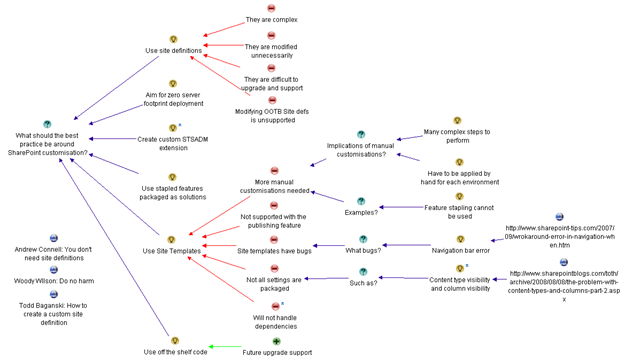
www.sevensigma.com.au


The one best-practice to rule them all – Part 3

Gollum the Ring (2)

This is the third post in a series that focuses on what I think is the Holy Grail of project success – particularly SharePoint projects. Like everybody else, I am a product of my experiences, and one of these experiences was a project that included one of my greatest career teachers – “SharePoint-vs-Skype guy”. If you have not yet heard of this luminary of SharePoint folklore, then I suggest you go back to Part 1 of this series and start there. Starting here at part 3 really makes no sense at all…seriously.

I’ve spent two posts explaining my so-called journey to enlightenment and in part 2 of this series, I made the assertion that the *true* root cause of failed projects is usually a lack of shared understanding (and therefore shared commitment) among project participants. This root cause is often misdiagnosed because it is reflected in more visible symptoms such as scope creep, vague/incomplete requirements, mismatched expectations and general all-round unpleasantness. I also spoke about my journey toward “problem fundamentalism”, where I have come to believe very strongly that if you can achieve and maintain that illusive “shared understanding” of a problem among participants, then the actual process that you adopt to implement the solution really doesn’t matter that much. In essence I am echoing the inventor Charles F. Kettering when he once said

A problem well stated is a problem half solved.

Let’s now turn our attention to the “how” of shared understanding.

“Inappropriate methods”

Rittel and Conklin say that many groups fail to recognise that they are dealing with a wicked problem, or a problem that has taken on wicked tendencies. As a result, they apply inappropriate methods to deal with them. There are a few reasons for this, but two major ones stick out in my mind.

The first reason is the “unconscious incompetency” factor, which is training speak for “you do not know what you do not know”. In other words, if you have never heard of wicked problems and their nature, how are you supposed to know how best to deal with them? Thus, like any other form of enlightenment, you have to move from unconsciously incompetent to consciously incompetent (you now know that you do not know) before anything else. This series of posts hopefully is doing the trick here.

The second reason is that the visible signs of wickedness manifest themselves as scope creep, incomplete requirements, wheel reinventing and the like. Since I have already asserted that these are actually symptoms and not the true root cause, the usual methods used to try and deal with them are treating those *symptoms* and not the true cause. At the very least, traditional techniques are inappropriate and at the very worst, they are going to make things significantly worse!

Jeff Conklin recently said this about shared commitment:

The ‘Holy Grail’ of effective collaboration is creating shared understanding, which is a precursor to shared commitment. If you accept that the crux of effective action is agreeing on what the problem is, then the challenge for organizations is coming to a shared understanding about what their particular dilemma is. Plenty has been written about how to get people ‘on board’ and create buy-in for a strategy; but the business of how to craft shared understanding – a deep and robust understanding of the circumstances – hasn’t been well understood. Shared understanding means that the stakeholders understand each other’s positions well enough to have intelligent dialogue about their different interpretations of the problem, and to exercise collective intelligence about how to solve it.

With Jeff’s quote in mind, let’s take a look at these traditional techniques and see how guilty we all are of using them 🙂 .

It’s the process stupid!

It is almost universal to blame all of the world’s faults on “process”. I went through this line of thinking as I was off in my “theory cave”, trying to make sense of “SharePoint vs Skype” guy and other mysteries of life. What logically follows from this is usually the implementation of some sort of best-practice methodology, in the guise of program or project management office. This in turn creates a lot of extra rigour around the activities and processes around *solving* problems. Don’t get me wrong. Process, structure and consistency are actually critical, but problem wickedness and shared understanding are in the *sensemaking* space. The problem is that most best-practice standards and methodologies are very much focused in the *solution space* and tend to work on a presumption of more shared understanding than is actually the case. Again, this is due to the focus on treating the symptoms of problem wickedness. For example: “You have a scope change? Well, let’s fill out a change request form then”.

As a result, the whole sensemaking half of the puzzle is entirely missing!

CleverWorkarounds’ Hindsight Rating: This is why a lot of SharePoint governance plans and information architecture exercises are misfocused or simply miss the point.

Nail the scope, baby!

The other common way to try and tame things is to restrict or lock down the scope. I’m sure all readers have engaged in this. The idea being that if we solve this smaller, more constrained bit of the problem, we can then solve the harder bits later. The great flaw in this logic is exposed once you understand the symbiotic relationship between problems and their solutions that I spoke about in part 2. To recap, each time you think of a potential solution, you will always have an effect on your understanding of the problem. This was Rittel’s first characteristic of a wicked problem and it fed the endless loop of the second wicked problem characteristic – the “no stopping rule”. Therefore, by restricting scope and implementing a smaller subset, you will likely significantly change the understanding of the problem among the participants to the point where you can be in an even more fragmented position than you were in the first place.

In other words, the goalposts have moved in the meantime and the scope is no longer relevant. Stakeholders with hindsight question the very logic of that original scope restriction!

CleverWorkarounds’ Hindsight Rating: It’s so easy in hindsight 🙂

The umpire is always right, right?

Sometimes a group will become so fragmented in their understanding of a problem and therefore become completely polarised on the various solutions. The positions become so intractable for some that even to talk about other options, gives those options more credence than deserved. For example, to an ardent mac or linux fanboy, Microsoft are so evil and nasty that you should not use their products like … ever, dude!

When this occurs, usually after a long, arduous and spiteful process of trying to reach consensus, parties will often give the problem to a “higher source” and agree to abide by their decision. This could be your mother, the CEO, or the International Court of Justice in the Hague. The point is that the decision process is transferred from many to a few. In doing so, we rely on the knowledge, expertise and authority of that higher source.

This does tend to speed things along because when buried in the mud of analysis paralysis (symptom of endless looping between problem and solution), the desire to “shut-up and make a decision already” can be very strong. The tradeoff with this approach however, is that the decision makers themselves are inherently subjective and may disregard what some see as critical considerations. Since this is a win/lose proposition, stakeholders can become disenfranchised and although the decision has been made, there is no true shared commitment to implementing that decision.

CleverWorkarounds’ Hindsight Rating: If there is no shared commitment then it doesn’t matter how technically valid the solution is. It’s still dead.

Selling Ice to Eskimos

Many organisations (and in particular, governments) use a competition based method to deal with complex problems. Just like the previous example with entrenched, seemingly intractable positions, outcome will be determined by the forces of competition. The theory is that the best ideas will stand up to scrutiny and rigour and via a process of natural selection, the best will survive.

This method of competition between potential solutions, and the stakeholders that propose them actually has some distinct benefits. For example, it can foster innovation, sharpen the sensemaking focus of participants and provide good solution choices.

Unfortunately, as with all forms of competition, someone has to lose, and as a result, people do not always like to play fair. Whether it is Olympic athletes drugging themselves with steroids or certain corporations taking illegal advantage of their dominant market position, competition is often a very dirty game. A great case in point is the debate around Intelligent Design. It is argued by some that intelligent design is a scientific theory and should be taught in schools. But critics argue that the concept is simply an ingenious way to get around the 1987 US Supreme court ruling that creationism based science being taught in science in public schools violated the constitution, because it advanced a particular religion. Whether the latter view is right or not, it is still a great case study in how the rules of the game can be manipulated.

CleverWorkarounds’ Hindsight Rating: Marketing has a lot to answer for!

The paradox of shared understanding

Given that complex problems have a lot of interlocking and multi-causal factors, combined with the social complexity of multiple stakeholders with different world views, is it any wonder that traditional methods of reining in haywire projects are largely ineffectual? Traditional thinking across many disciplines suggests that problem solving is a linear process. Whether you are trying to work out where to put a freeway offramp or install a SharePoint internet site, the process would usually start by defining the problem, gathering data, analysing that data and then planning and implementation of the solution. Call it “waterfall”, or the “scientific method” or whatever, this approach has been around since… forever.

I wrote in more detail about the perils of waterfall in the project fail series in the section “how we really solve problems”.

But here is the problem with that approach. Those complex, interlocking issues and social complexity cause significant differences in opinion on the best solution, yet we need all of the diverse views to really gain a true, deep understanding of the problem and obtain the critical shared commitment that we need. The “no stopping rule” means that it is exceedingly difficult to determine when participants have *sufficiently* defined the problem, gathered data or formulated a solution.

So, how can we reconcile this paradox?

Is it possible to have a holistic, systems approach to examining the deep structure of an issue, that somehow allows us all to see the illusive big picture, without the inefficiency of “analysis paralysis” and the endless loop of the “no stopping rule”? (not to mention and the other nine characteristics of wickedness that Rittel identified). How can we, as a diverse group of stakeholders, fully explore a problem and gain the deep understanding of an issue without social complexity and those wicked factors derailing everything?

This is a question that Horst Rittel spent a lot of time thinking about and by 1970, had developed a potential answer. In part 4 I will tell you what his answer was and what it has now become, thanks to Jeff Conklin.


Thanks for reading

Paul Culmsee
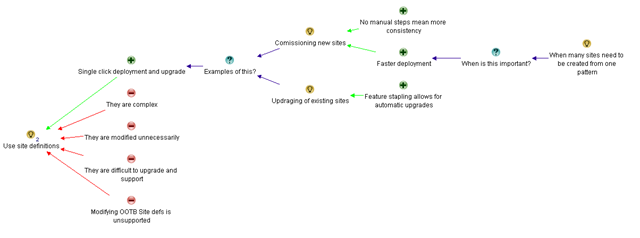


« Previous PageNext Page »

Today is: Tuesday 26 May 2026 -