Back to Cleverworkarounds mainpage
 

IT and the Corporate Immune Mechanism – the "Mother Hen" reflex

Recently, I came across the blog of Dux Raymond, a Project Manager, forthcoming author and trainer who looks at SharePoint from a project management perspective. Being rather interested in that area myself, I read his "Empowered by SharePoint" post.

He wrote about the theme of user empowerment that SharePoint provides and made this quote:

Typically, if a project manager wanted a collaborative platform (other than email) to facilitate sharing of project documents, schedule, contacts, and status updates, he or she would need the IT/IS department’s intervention and assistance to set it up. In addition to this, IT/IS would need to define the appropriate access privileges to limit who has access to these project information. Now, realistically, do you think IT/IS will get it done ASAP?

Dux went on to describe the features of SharePoint that can be used to empower users to be more efficient and productive.

The problem with this ideal (which I wholeheartedly agree with by the way) is that there is the problem of the corporate immune mechanism that likes to get in the way of any ideal that disagrees with its own. I wrote about the corporate immune mechanism in my kung-fu themed "You’re not ready" post (check the cool youtube clips of Jackie Chan, Jet Li and Tony Jaa 🙂 ). In that post, I defined the corporate immune mechanism as "the living embodiment of human nature’s resistance to change".

Now you might rightly ask me, "What the hell are you talking about? Why would users resist being empowered?"

The answer is that they are not! In fact, the users are not the problem. Sorry to disappoint you nerds reading this post. The corporate immune mechanism, in many cases, is the very department likely to be pushing the business down the SharePoint path in the first place… 

(cue the suspense music from the movie Jaws)

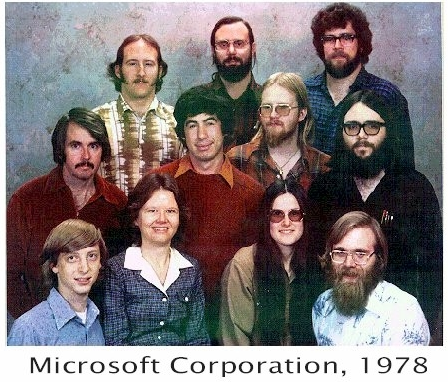
It is the IT Department!!! Nooooooo! How can these sweet, innocent looking people below be perpetrators of the corporate immune mechanism?
image

Shocked? Appalled at my statement? I can hear the indignant comments now…

  • "What! Us? We are the ones who understand technology" (Luddite IT Manager)
  • "What pills are you taking? – We are the innovators" (VB6 Developer)
  • "Use linux ‘cos Microsoft suck" (Technical Geek)
  • "Shut up and reboot" (Helpdesk Guy)
  • "No, you can’t do that because it’s insecure and I said so" (Security Guy)
  • "Users simply cannot be trusted" (System Administrator downloading mp3s on emule)

20 Years of users
imageLike everything else in this world, IT departments are a product of the experience of the team members and the culture of the organisation. Dealing with users is sometimes not fun. IT pretty much sees the user population as a bunch of rebellious, yet naive teenagers. Leave them alone and they will soon run amok and someone will get hurt. If it happens often enough, the teenagers are grounded and not allowed out of the house, except in controlled circumstances.

So, imagine dealing with rebellious teenagers for 20 years. Is it any wonder IT people are a little messed-up? 🙂

If the information worker revolution and the empowerment that comes with it means the IT administrators are out of the loop, then many IT administrators will push back to ensure that they are in the loop. They can’t help this because it has become a control reflex that I call it the "Mother Hen" reflex.

The mother hen reflex should be understood and not ridiculed, as it is often the user’s past actions that has created the reflex. But once ingrained, the reflex can start to stifle productivity in many different ways. For example, for an employee not being able to operate at full efficiency because they are waiting 2 days for a helpdesk request to be actioned is simply not smart business.

Worse still, a vicious circle emerges. Frustrated with a lack of response, the user will take matters into their own hands to improve their efficiency. But this simply plays into the hands of the mother hen reflex and for IT this reinforces the reason why such controls are needed. You just can’t trust those dog-gone users! More controls required!

So, if you think SharePoint is going to empower you, then you either ensure that the business takes ownership of it, with a sponsor senior enough to take on IT, or you had better start getting really friendly with your IT administrators. Many IT departments would positively have a heart attack, allowing end users the ability to say, modify the look and feel of a SharePoint site, use SharePoint Designer to create a workflow, modify permissions on items in a library, create a sub-site, create lists, modify lists with additional columns and the like.

I think it is a fully justifiable point of view when IT is looked at in isolation to the rest of the gears and pulleys that make up the organisational "machine". In IT’s mind, they are doing the right thing, yet they may very well be doing the organisation and SharePoint a disservice. They are scared that users are going to screw it all up and they will be left with picking up the pieces. But does the cost of IT’s compensation measures justify the real risk in terms of dollars and cents?

A recent example of the mother hen reflex completely going off the rails where inefficiency turned into real-life risk occurred in San Francisco with complete lockout of a fibre optic network by one rogue Cisco administrator. http://www.infoworld.com/archives/emailPrint.jsp?R=printThis&A=/article/08/07/18/30FE-sf-network-lockout_1.html. This is an example where in the administrator’s mind, he is being security-conscious, yet ultimately he was the biggest security risk of all.

Closer to SharePoint home, there was a thread on a SharePoint mailing list a month or so ago about managing SharePoint security groups, and the general consensus was that the groups should be set up and managed in Active Directory and then added into SharePoint. I am of the opinion that it is not as clear cut as this. IT generally controls Active Directory so group membership changes would remain in the perpetual 2 day turnaround that is typical of helpdesk SLA for the enterprise organisation.

But consider this. If for example, a project team has a project administrator who is trusted to manage access to all paper records, HR and payroll systems, then I have no problem delegating them the rights to manage a project sub-site or add/remove visitors to the site without having to wait 2 days for the request to get through IT’s helpdesk system. SharePoint provides the necessary audit trails, versioning and recycle bin recovery and the accountability can be pushed out to the project team. A win-win in my book.

Out of rehab

I’ll admit, a few years back I had a scary mother hen reflex. But later I realised that while I did a lot of security policy and compliance work, I was accountable for the IT service, not the information assets provided by that service. If I kept the service running, backed up and provided assurance as to the recoverability, then accountability for the information lay elsewhere.

Sadly, SharePoint does not make any of this easy. Complexity breeds confusion and it is exceptionally difficult to know *everything*. Fear of the unknown also breeds the mother hen reflex too. So, for that reason I am completely sympathetic to why IT departments tend to be very controlling, yet I recognise that it is too inward facing and can actually be damaging to organisational productivity and innovation too.

Unfortunately I don’t have any answers on where the line should be drawn either. That’s a function of many factors. However, what I can tell you is that empowerment is not always guaranteed.


Thanks for reading

Paul



Thinking SharePoint Part 3 – A tale of two clients

My third post on "Thinking SharePoint" for www.endusersharepoint.com reproduced here.

Hi all

[Quick reference: Part 1 and Part 2]

If you have followed the first two articles in this series, I have been attempting to talk about SharePoint "head-space". In other words, SharePoint success is so much more a people issue than a technical or architectural one. As a result, it can be a little difficult to write about!

As a MOSS2007 product specialist and architect, I have slowly developed a kind of spider sense that allows me to pick out likely problematic implementations fairly early in the process. This spider sense is most definitely not along the lines of "oh these guys know nothing about application development/security/collaboration/[insert word here]". Often there are excellent, really knowledgeable staff on hand with exemplary credentials. It is instead a feeling that I previously described as "organisational maturity". Want a better explanation than that? How about something like the "oh they are *so* not ready for what they are getting themselves into" factor.

In Part 2, I’ve touched on the potent combination of differing personality types and the different stages of learning along with all of the new SharePoint features and options at your disposal. If you did not read part 2, then I strongly suggest you do so before continuing with this article because I am going to revisit the learning types stuff here.

Another way to describe the "unconsciously incompetent" stage of learning (that sounds much less insulting 😉 ) can be summed up as "you don’t know what you don’t know". The "Ikea guy" example in the last post is a perfect example of low organisational maturity. In my example, the poor unloved Ikea guy turns up at a house to install an Ikea modular storage solution and has to satisfy the conflicting requirements of a family so dysfunctional that the Simpsons seem pretty tame by comparison. It is clear from an outside perspective, that they have called in the "Ikea guy" way too early in the piece and in fact he is completely the wrong guy to call anyway! Wrong guy? Who should we be calling then?

image    image

Who you really need is someone like Carson and the boys from "queer eye for the straight guy" – Either them or Doctor Phil. They might come on a bit strong at first, but they work by winning your trust, building your respect and slowly but surely give you the confidence to change your old, bad habits. Before long the dysfunctional family have turned a corner, to the amazement of yourself and those around you. As an added bonus, you had a lot of fun along the way and your dress sense has improved as your stress levels have dropped 🙂

You still need the Ikea guy, but at least now the family no longer argues so much over which drawer your socks should be stored in!

Of course, the ultimate SharePoint consultant is this mythical person. can deal with your emotional issues *and* install the system! 🙂

philTheIkeaMan (2)

Workshops, workshops!

Where possible, I always undertake SharePoint engagements in an advisory capacity before any time and cost estimates are made. Why? Because invariably, many/most clients start from a position of unconscious incompetence. Not just in term of the product itself, but in terms of a shared understanding of the problem with their colleagues and co-participants. Anyone who has been to a Microsoft sponsored SharePoint seminar and thought that SharePoint is the answer to their prayers is definitely in the first stage of their learning. In fact, when a client wants to skip the advisory stage and get straight into the "just tell me how much it costs", my spider senses tingle…

Thus, I run *plenty* of workshops. I don’t believe that "IT Integrators" who, for example, specialise in Exchange, Cisco networking and firewall type security are overly well suited to perform SharePoint implementations. Equally, I’m not convinced that a "Web Design House" is also particularly suited either. Yes, there is a big technical/architectural component (Ikea guys), but most of the work is in the facilitation, dialogue and requirements gathering stage of the process (Carson/Dr Phil guys). In other words, getting people from that "unconsciously incompetent" phase to "consciously incompetent" stage of learning.

I tend to keep the workshops to no more than two hours in a single day, with a break after an hour for everyone to recharge their brain cells with a jolt of caffeine :-). I also keep the workshops to 4 people or less and split into multiple workshops if there are more than 4 participants.

My goal in these workshops are threefold.

  • Teach some product basics, answer common questions and set the scene
  • Get participants thinking talking about what SharePoint means to them, and what they want to get out of it
  • Assess the personality/competency/maturity level among participants ("unconsciously incompetent" versus "consciously incompetent’)

Achieving these goals usually takes two to three workshops and it is unwise to pack all of those goals into one workshop anyway. The first workshop is all about the product basics (goal 1 above). I do not go into massive detail, just enough so that participants are not flying completely blind with their understanding of the product. Signs of success of this workshop are the shared realisation from participants of the huge potential of the product in certain areas, and an appreciation of the fact that there are a lot of organisational issues that will affect success, and thus it is much more than just whacking in the CD and running SETUP.EXE.

Politics, politics!

I prefer to wait a day or two before the second workshops, as it gives participants a chance to take in the content of the first. When we meet for the second time, I do a quick recap on workshop 1, and then we start talking through requirements, issues, constraints and risks. One sure sign of organisational maturity among participants is how long this workshop takes. This is a factor of the scope of the perceived "problem" to be solved, but more importantly, often this is the first time the participants have actually *talked though* a problem together (aside from previously all agreeing that it is sub-optimal in the first place). It is very easy for these workshop to go over time, or to finish unresolved.

Additionally in this sort of workshops, you can fairly quickly assess the political dynamic of the group (goal 3). Participants always have different agendas or belief on what needs to be done to solve organisational problems. Often participants have locked horns with each-other way before SharePoint came on the scene, and it doesn’t take long to see where the dynamics lie. Understanding this dynamic allows you to tailor your facilitation and teaching approach and build trust and respect among all of the participants.

This can be a frustrating stage among participants, especially while a shared understanding is still being developed. But right here is the root of project failure – not just SharePoint.

What I will do now is tell you briefly about two different client engagements that I was involved in some time back. Both of these client engagements happened at around the same time, and each client happened to be in the same vertical market, although they had nothing to do with each-other. Both were ultimately successful projects in terms of delivery, but one was much more successful in terms of laying a foundation for future projects. If any aspect of these two tales resonate with you, please send a comment through at the end of this article.

Client 1

The first client was a tender that had a fixed time constraint (spider-sense goes gangbusters at this point). However the client had attended one of my seminars where we talked about how to approach a SharePoint project. (The subject matter being a more distilled version of my various posts such as this one). Thus, I had the chance to sit down and have a long chat with the client in an informal environment and felt the theme of our seminar had resonated with them and they had a solid appreciation why we approach SharePoint projects the way we do. 

Despite the very tight time frame I was able to conduct a couple of workshops in two groups and we were able to agree on deliverables that were realistic and achievable. However the workshops were an interesting experience. There were too many people and the group dynamic was clearly political in nature and there was open, sometimes rigorous debate, about specifics of the deliverables. The skill levels varied, as did the agendas. This client also outsourced IT support, so was somewhat light on the ground in terms of infrastructure and application development skills. Thus, we made a conscious decision to stick to SharePoint designer and go out-of-the-box for this initial engagement as we felt that the timeframe and process maturity constraints meant that we would be better served using tools that were easy to make modifications to. We had made this clear (or so we thought ) to the client when we responded to the tender.

By the end of the project two deliverables had expectation mismatches in their functionality. A couple of sticking points were actually how SharePoint was architected as a product and the miscommunication stemmed from a lack of understanding of how the product worked in particular regards. To change the behaviour would require disproportionate custom development work that would very likely be redundant fairly quickly, once users started using the product. Additionally, custom application development for SharePoint adds to governance and they were not yet ‘ready’ to make that leap.

Now it is important to note here that the client was not really at fault. You can hardly blame someone when they "don’t know what they don’t know". The failure was on my part, in that I did not do enough to ensure that we had a shared understanding and full awareness of the constraints of our approach. At the time I thought that we had achieved this milestone, but looking back, it as clear that principally due to the very tight time-frames that we had to operate under, we under-invested in this part of the project.

Fortunately in this case, we were able to agree on workarounds that got the project over the line on-time, made logical sense and did not have any major impact on either party. But the major "lesson learnt" from this project is that we never actually guided the client properly to the "consciously incompetent" stage of their learning.

Client 2

Client 2 was an interesting case. They attended the same seminar as Client 1, principally because a competing integrator had sold them the idea of using SharePoint for their Internet site. Upon seeing the high cost of the licensing, the competing integrator then showed them "all of the other great features" that they would get from investing in SharePoint and overloaded them on recycled Microsoft "6 pillar" marketing material. The client liked all of these new features of course, and thus broadened the scope of the deliverables to help justify the cost.

Result? Even more confusion (and at this point they still had not actually *used* SharePoint). So they attended my seminar for some direction and I was subsequently engaged in an advisory capacity to help them make sense of it all.

I used the workshop approach as described above, and the first workshop was heavy going, because it took a while to sort out all of the marketing fluff from reality. They had been the victim of one too many PowerPoint slide decks and thus jumped around from topic to topic. I answered as best I could, occasionally having to use geek-speak but mostly was able to keep it pitched at the right sort of level. The client then had to reconcile the reality of SharePoint against this overly broad scope that they had created for themselves. It was frustrating for them, and I really felt for them. I even went as far as to offer to discuss things over a beer. (It’s amazing how much more progress you can make over beer 😉 .

A week went by, and the client called me back in. That week they had spent a lot of time soul searching and debating where, when and how SharePoint should be tackled. In the end they had re-examined the corporate strategy, which was a high level, 3 year plan that had been signed off by the organisation previously. They then examined the IT department’s 3 year plan which was developed to support the organisational strategy.

They came to the conclusion, that their external web site was not the place to start, for various reasons. Instead, they identified a much smaller scope project that slotted in perfectly with both the IT department strategy and more importantly, the organisational strategy. They asked me for feedback and I was very enthusiastic in how well they had done, considering the hard-slog workshops from the week before.

At this point, the transition from "unconsciously incompetent" to "consciously incompetent" was well underway

I met with them a few days later. Since the entire team was behind the agreed project, they had talked to the organisation stakeholders, mapped out and documented the process before I had arrived. They also were eager to learn SharePoint, and since the scope of this project was not large and the shared understanding was high, we were able to use this project as the training exercise to learn various concepts from Farm Administration, libraries, lists and columns, SharePoint Designer workflow and InfoPath Forms Services. When we hit an obstacle, we collectively were able to find creative, yet simple ways to get around them.

That smaller scope project was successfully delivered, and the benefits were significant. The team now has a much better understanding of the product, its constraints and limitations. It was now much easier to plan for and tackle the more significant project of web content management (Internet site) as there was a much greater level of shared understanding between participants. They felt more confident in their knowledge of the product, and now feel confident that they would be able to manage the expectations of the organisation.

All in all, it was a great engagement and I came away with a huge respect for that client. More importantly, the relationship continues to this day.

Conclusion

I wonder if the story of the first client is a familiar one to readers, either as being and end-user or being involved in the project itself? 

Certainly the second client had frustrations at the start, as they realised that SharePoint was not the panacea they were looking for, they stopped, took stock and co-operatively reassessed the situation. Unconstrained from a fixed time deadline, they realised that more thought was required. That action potentially saved them a lot of stress and heartache which they would have experienced had they ploughed on ahead with an ambitions project. It has now given them a great foundation to build upon for the future.

Thanks for reading

Paul Culmsee


Thinking SharePoint Part 2 – The "Unconsciously Incompetent" Ikea Mecca

My next post on "Thinking SharePoint" for www.endusersharepoint.com reproduced here.

Hi again. Sorry about the delay in continuing with this "how to think SharePoint" series, but in Australia, the month of June is the end of the financial year. I assume it works the same way in the rest of the world too. What happens here is that IT Managers suddenly realise that they have some budget funds left over and therefore feel an irrepressible urge to spend it all. (They tend to be fearful that they will get less money allocated for the next year if they don’t spend all that is allocated to them this year).

Usually what they spend surplus budget cash on depends on whatever product or technology is at the peak of the hype cycle for that year. Therefore instead of something morale boosting like paying their hardworking staff a bonus or purchasing training vouchers for them, this year a lot of IT managers will wander around showing off their shiny new Apple iPhone and a lot of SharePoint consultants like me are very busy indeed.

And this is relevant, why?

Okay so yes, I am busy and haven’t had much time to devote to writing. But the real reason that I bring this end of financial year stuff up, is to point out that if you took anything away from the first post, you would appreciate that I find it a warning sign. Despite best intentions, buying SharePoint because you have some budget left is not necessarily the best place to focus surplus funds. You are in effect perpetuating the whole issue of the "solution looking for a problem".

In this world of organisational politics, no manager or sponsor is going to purchase SharePoint without something with "wow factor" to show for it. So on top of a fixed deadline, it has to look great and solve a few pertinent business needs, so that the organisation endorses and evangelises it, right?

My SharePoint spider senses are tingling already…

The plight of the "Ikea guy"

image

In the last post I implied that the prevalent world of folders (or directories) originated from two stoned Multix programmers in the 1960’s. I also likened folders to a wooden toybox and compared it to SharePoint as an uber-cool Ikea style modular storage solution. Of course, it all looked absolutely fantastic when you saw it in the display room in the suburban mecca that is an Ikea store.

So I want you to picture the plight of the "Ikea guy". He’s the guy who arrives at a house with a truck full of Ikea boxes who is going to install it for you. Now I want you to think about your organisation (in all its messed-up glory) and try and picture it as a family living at this house. 

From the Ikea guy’s point of view, the house looks really nice as he walks up to the front door. The garden is neat and trimmed and the lounge room is clean and tidy. The family inside seem really polite. However, once pleasantries have been exchanged and he takes a look around the rest of the house, it takes about 10 minutes for the Ikea guy to know that it’s just not going to be a good day.

Why?

  • Mum and Dad are in marriage counselling and it’s not going well
  • The kids barely speak to each other and don’t respect their parents
  • Dad thinks he knows best and that everything should be strictly put away according to colour no matter which room
  • Mum doesn’t care how things are put away, so long as they are put away
  • One of the kids is a teenage goth/emo, and he wants it all painted black
  • One kid is anal retentive and has one of those label makers and likes to put "Property of xxx" on everything
  • Another kid is a greenie-stoner and "it all should be like.. whatever you want man…"
  • One of the kids is vain and self obsessed, wants more pocket money and wants to individualise everything with stickers all over the place
  • One kid is a toddler, needs nappies changed and leaves a mess everywhere he/she goes

Finally…

  • The husband never told the family that the Ikea guy was coming anyway and his measurements were out

So after much arguments between themselves, they turn to the Ikea guy and say "You tell us how should we do this?"

At this point the Ikea guy is completely screwed, no matter what he says, he is in trouble. It’s like when your wife or girlfriend asks if she looks fat in that dress. Even a pause before answering is going to be misconstrued in a way where you always lose.

Personalities, personalities…

In a lot of my writings I have fun with stereotypes. I tend to imply that IT managers are luddites or micro-managers, web designers and branding people are all vain metrosexuals and IT nerds have no people skills :-P. Senior managers all have a serious case of attention deficit disorder and the general user population is as varied as the kids I used in the Ikea example. The "human" side of SharePoint fascinates me greatly, as I have seen some people completely besotted with particular product features, such as wikis or blogs, yet have no interest at all in other features.

Not only are there different personalities, there are different leaning types. For people involved with SharePoint projects at any level, I recommend reading up on Myers-Briggs Indicators or the Marsden DISC quadrant model. I’ll blog in detail about these some other time, but the point here is that your version of the truth, if you’re lucky, will be shared by only 20% of your peers. So even if you put a bunch of SharePoint technical experts into a room and asked them to design a collaborative solution, the chances of them creating the same design is actually pretty low.

It’s like music taste. I’m sure that some readers thought to themselves "What’s wrong with the Backstreet Boys?", after reading my first post. Whilst I find that question too ridiculous to even contemplate, I recognise that part of the key to "thinking SharePoint" is recognising that Backstreet Boys fans do actually exist and therefore ensuring that their "special needs" are accommodated :-).

Moral? Chacun à son goût. Each to their own! Just remember that not everyone sees it the way you do and what will excite and interest you will not necessarily do the same for others.

Learning Styles

Another big contributor to effective "SharePoint thinking" is actually rooted in learning style theory. The theory says that when training people, there are different stages of awareness and competence. Personality types affect learning a lot, but here I present a bastardised SharePoint version of learning theory.

Stage 1 – SharePoint ‘unconscious incompetence’

  • The person is not aware of the relevance or considerations of the problem that SharePoint is being used to solve
  • The person is not aware that they have a particular deficiency in their knowledge of the applicability of SharePoint
  • The person might deny the relevance or usefulness of SharePoint
  • Conversely, the person might oversell the relevance or usefulness of SharePoint

Training theory states that the person must become conscious of their incompetence before development of the new skill or learning can begin. The aim of the trainer is to guide the person into the ‘conscious competence’ stage. In most problematic SharePoint projects, it is common that participants are at this unconscious incompetence stage and training without recognition of this fact is misfocused and wasteful. While the majority of participants in a SharePoint project are at this stage in their learning, then you are on a dangerous slope to SharePoint project failure if you proceed too fast.

Stage 2 – SharePoint conscious incompetence’

  • The person becomes aware of the existence and relevance of the problem that SharePoint is being used to solve
  • The person is therefore also aware of their deficiency in SharePoint knowledge and skill, ideally by attempting or trying to use the product
  • The person realises that by improving their skill or ability in SharePoint, their effectiveness will improve

Many people will feel that they are at this stage, but in fact they are still in stage 1. (It’s hard to put a quantifiable finger on how I personally determine this, but I think it is something that seasoned SharePoint professionals get a good feel for over time). Essentially any untested assumption on how SharePoint works or how it should be used to solve a problem is within the realm of stage 1!

I find that if I can get clients into Stage 2, then the nature of engagements change. The fixation on delivering the whole enchilada in a fixed time and fixed cost is replaced by dialogue, workshops, strategy sessions and the likes. At this point no scope of what is to be delivered has been fixed in stone as the client realises that they have to invest more in their learning and understanding for an ultimately positive outcome. The client has in effect made a commitment to learn and we proceed steadily to stage 3.

Stage 3 – SharePoint conscious competence

Note, In my opinion this period takes anywhere from two to twelve months, depending on the organisational size, culture, wickedness of the problem to solve, etc.

  • The person achieves ‘conscious competence’ in SharePoint when they can use it without feeling fearful or intimidated
  • The person will need to concentrate and think in order to understand the technical and organisational governance implications of a new SharePoint solution
  • The person will not reliably perform SharePoint work unless thinking about it – the skill is not yet ‘second nature’ or ‘automatic’
  • The person should be able to demonstrate SharePoint skills to another, but is unlikely to have the ability to teach it well to another person
  • The person should ideally continue to practice their skills, and if appropriate, commit to becoming ‘unconsciously competent’ at the new skill
  • Practice is the single most effective way to move from stage 3 to 4

Stage 4 – SharePoint unconscious competence.

Nirvana! Are any of us here yet???

  • Applying SharePoint features and capabilities to business problems skill becomes so practiced that estimates of time, effort and cost are accurate and met
  • Understanding of technical and organisational governance considerations of potential courses of action are implicitly understood

And then there was the Intranet

One of the reasons that folders have stuck for so many years would have to be its simplicity. For all of its suckiness, it has a somewhat constraining effect. Whilst folders can suck royally, it’s all you have available to use and therefore debates/arguments are not about whether to use folders or not, but how to use them. For most, there really was no alternative.

Then from around the mid nineties, there came the rise of the intranet. As a content delivery mechanism it proved hugely popular and suddenly corporate knowledge was made available via a much more accessible medium. But it was a different kind of content, and there was a significant "disconnect" with the corporate file system. Content authors would put their files onto the file-system and then on the intranet in a different format.

For the sake of article size and keeping it flowing, I am not going to talk too much about portals vs intranet’s because to the average end user, they are one and the same. I know people will beg to differ with me on this but I don’t think the distinction will be that relevant to this article.

Choices, choices, choices…

imageEven now more than a decade of "intranets" later, many clients who I talk to really struggle with the concept of a "SharePoint style intranet". The disconnection between the traditional intranet and the file-system is fairly ingrained, and in my experience, it is very common to find people initially unable to "connect" with the idea that your file-system, document management system and workflow system can be your intranet and visa versa.

This disconnect needs to be addressed early in the piece. Failure to do so and expectations will be unmet. Differing versions of the truth will abound and then how can participants and stakeholders possibly cope with the veritable smorgasbord of choices offered by SharePoint?

We still have folders of course, but now we have other elements as well, such as document libraries, columns of various types, webparts, versioning, approvals, lists, workflows, sites, site collections, web applications (oh and full text indexing/search too). So rather than debate on how, we now also have to argue on the what as well.

Combine organisational culture factors, SharePoint conscious or unconscious competence levels, the different personality types, life skills and values of participants, each with different buttons to push. Is it any great revelation then that too many choices can be more destructive than none at all?

Sheesh! It’s a wonder we don’t kill each other trying to work this all out!

Conclusion

I suspect that many reading this article would not be too offended if I suggest that they are "SharePoint consciously incompetent". It is actually where you need to start from, and in some ways I am preaching to the converted here. It is the people, not reading this article, who are likely to be in the unconsciously incompetent stage of learning. So, no matter what your role in your organisation is, one of the keys to "thinking SharePoint" as it were, is to move yourselves and your colleagues from stage 1 to stage 2.

In the next post I am going to tell you a tale of two clients, where one made the transition from SharePoint unconscious incompetence to SharePoint conscious incompetence and one who did not. I was the "Ikea guy" in both cases, and I think the stories offer some valuable insights.

Bye for now

Paul


Thinking SharePoint (and listen to your mother!)

Note: Special thanks to Andrew Jolly for his excellent ideas and feedback

I have to say, SharePoint is one of the most misunderstood products that Microsoft have ever released. The misunderstanding extends from executive management who signed the budget approval to put it in, to the geeks who actually put it in for us, and all the way to us end-users who are expected to find nirvana in its magical world of sites, lists, libraries, workflows and the like.

Misunderstanding creates confusion, and confusion leads to bad implementations, expectations unmet, teams deflated and the word “SharePoint” being spoken only in whispers in-case you’re overheard by the many ears of the corporate immune mechanism.

The outcome of this series is to give the reader an appreciation of a more human look at SharePoint. Therefore I will not be exhaustively examining every feature within SharePoint, but instead to take a high level look at some of the key SharePoint concepts and then try and put them into an organisational context. To get the best out of SharePoint requires forethought and soul searching. Despite the obvious temptation, diving straight in can be a little like wearing a Backstreet Boys t-shirt at a Metallica concert – you may live to regret that decision…

.. but you can hardly blame Metallica can you?

Article Pre-requisites

This series has been aimed at a broad cross section of the user base. If your circumstances match any of the following scenarios, then the material may be for you.

  • you have had SharePoint pushed at you by an overzealous IT department and you are wondering what the fuss is all about
  • you are a member of the overzealous IT department, a true believer and wonder why the masses don’t get it
  • you are a senior executive who’s computer literacy extends to the on-button of your laptop but your IT Manager tells you this “SharePoint” thing may be good for the organisation
  • your organisation is doing one of those heavily promoted organisational change frameworks with a fancy slogan, t-shirts and mouse-mats. SharePoint is touted as a key component
  • you find the myriad of documentation, blogs, and online references to be too intimidating or nerdy for your taste
  • SharePoint is deployed, you have been sent on a 2 day feature-fest training course but little real progress has been made since then.

For those not yet convinced

If you do not consider yourself a SharePoint true believer, then good on you! You are probably half way to a successful deployment already. It is not a panacea and it will not bring about world peace. It has massive potential – no doubt about it, but the propensity to fail is higher than you might expect. (For more on that topic see this series I wrote a little while back)

SharePoint has a myriad of features and ways to approach solving common business problems. Whether you are a senior manager, team lead or team member, chances are you can find a way to improve or optimise some aspect of your work using SharePoint. You can find plenty of great articles on endusersharepoint.com to introduce you to the product, solve common problems and learn from others. But at the end of the day, SharePoint is a tool and all tools are supposed to come with a safety manual to prevent misuse and accidental injury.

So to continue the above metaphor, the only way you would get out of the Metallica concert alive with the Backstreet Boys t-shirt would be to shout the bar and buy a lot of beers!

In this series, I hope to teach you which t-shirt to wear at a metal gig, as well as how and when to buy those beers when you get it wrong!

How Microsoft software products are normally delivered

SharePoint represents a change for users as well as IT people. Previously, when say, the latest MSOffice suite was deployed to a company, users had little say. If you were lucky, you would get sent off to some training, and then left to your own devices. But that was cool – its MSOffice. We have all used it, and using a new version isn’t really a major hindrance to producing Word, Excel or PowerPoint documents. Give it a day or two and you are pretty much back in business.

But SharePoint – that’s a whole different story. Not only do you need to be trained in how the product works, you need time to take it all in. You almost certainly need to also change the way you think about certain aspects to your work and you will almost certainly not get it right the first time. Thus, for some of you (likely all who are reading this article) will relish the opportunity to use some of the features to improve your productivity. However, many others will resist it and take a long time to come around.

What makes SharePoint such an interesting product is that the pro and anti crowds will have to accommodate each other if a SharePoint project is to really succeed. That is the tough bit!

40 years of folders

In 1965 an operating system called Multics was developed for mainframe computers. It wasn’t exactly a rampaging success back then. But hey, PC’s hadn’t been invented either and back then, “The Sound of Music” was everyone’s idea of a night out at the movies. Thus it wasn’t exactly dotcom times.

But it was here, where the first “Hierarchical file system” was developed.

“Hierarchical what the…” You exclaim?

You know it as folders, subfolders or directories and for over 40 years, the concept has essentially been unchanged. For most people, folders and subfolders have been your only option for categorising and collaborating on files.

I would have loved to be a fly on the wall when the Multics guys wrote the specification for the hierarchical file system. Since it’s the sixties, I’m sure that’s it happened something like this…

Engineer 1 (smoking a joint of weed) “Dude, imagine if we could like… put a filing cabinet in the computer man…”

Passes joint to Engineer 2 who takes a drag and laughs uncontrollably for ten minutes

Engineer 2: Whoa man, your freaking me out! – let’s order some pizza”

Listen to your mother (and clean up your room already)!

We adults are complete hypocrites. As kids, we were told relentlessly by our mothers to clean our rooms. We tell our children to clean up their rooms too, yet the shared file system in the typical workplace is messier than even the most rebellious teenager’s poster covered, mouldy sock smelling abode.

The corporate file system is like a giant play-area for adults, which has not been cleaned in years. In fact, whenever there is a suggestion to ‘clean up’ the play-area, the adult equivalent of “oh mum do I have to?” is heard down the corridors.

Why is it that people don’t like to put their toys away? As you mother said, “if you leave them lying around they will get broken, and may be accidently thrown out”.

Anybody who has ever worked for an organisation of more than 1 person will know the joy (not!) of trying to find that all important critical file. You know darn well it’s there somewhere, but do you think you can find it? Then you go to the trouble to recreate your work, only to find that someone changed permissions and you no longer see it.

The inefficiencies caused by the messy play area are pretty significant, not only on your individual stress levels, but at a departmental and organisational level too. Often files go missing, or the wrong versions are used. Multiple copies abound, and everyone seems to have an in-built reflex to file and name things slightly differently to everyone else. I’ve seen this cost big money too, an example being hundreds of thousands of dollars lost when a fixed price contract used a cost estimate based on the wrong specification. Ouch!

The Ikea effect

Forget the marketing fluff and the seemingly endless array of features on SharePoint slide decks. For most people SharePoint will be about sites, lists, libraries, forms and workflow. In subsequent articles I will talk about these as these concepts are really important, but if there is one theme I want to leave you with.

These new features are like going from a wooden toybox like this…

image

…to a fully decked out Ikea playroom like this

image

It might look pretty, and smell new and fresh at the start. But the moral of the story is this. You might have a fancier storage system with additional bells and whistles, but you still need to put your toys away and agree with everyone else where things should go! Furthermore, The IKEA guy who installs it all for you might make some suggestions, but at the end of the day, he isn’t going to be able to definitively tell you where things go and you wouldn’t listen to him anyhow as they are your toys.

So in the next post I’ll dig a little deeper into putting our toys away properly.

Thanks for reading

Paul Culmsee


A critique of the CMS Watch SharePoint Report

June 30 is the end of the financial year here in Australia, and it has become very busy for me, which is rather annoying as it distracts me from advancing my evil plans for world domination (oh and blogging too).

It seems IT departments are realising they still have some budget left, and of course well all know the prevailing wisdom that you want the same or bigger budget next year, you had better spend all of this year’s budget. So what better thing to do with that spare cash is to put in SharePoint, eh?

Unfortunately for me, I have been deep in SharePoint related proposals and tender responses that are motivated somewhat by budget spend. Thus I am dealing with questions like the obvious “how much does it cost” and “how long will it take”, without any knowledge of how the organisation sees SharePoint fitting into their circumstances. I think if you have followed my project failure series thus far you will appreciate that I find these two questions in particular, a sign of pain to come by client and integrator alike.

So if you are an IT Manager and have some budget left over, here are my suggestions.

  1. Do a team building exercise (like paint-balling) for your staff, and just accept the fact that they will gang up on you and hunt you mercilessly for all the crap you have put them through
  2. Take them to the pub for the afternoon, put a bar tab on in recognition of their efforts
  3. Go and buy the CMS Watch SharePoint report.

Continue reading “A critique of the CMS Watch SharePoint Report”


Globalisation, Strategy, Technology and Organisational Maturity

This post is going a little off-track from the previous 5 posts around SharePoint project failure and I promise I will get back on track again soon. I felt that I had to talk about this topic while we are looking at the nature of project failure, wicked problems and SharePoint. Not sure if it is really a part 6 so I have made a new, separate interlude in between the project failure series. Why don’t you let me know, reader, if you think this belongs as a part of the “project failure” series!

My wife is studying a business course at university and I have been reading some of her reference books. One book was particularly good and really got me thinking about technology’s contribution to global organisations and how at this scale, most problems likely have a large degree of wickedness.

This edited book is called Global Strategies: Insights from the World’s Leading Thinkers (The Harvard Business Review Book Series), and it is well worth reading – even for you technical geeks.

What it does is look at the strategy, and execution of strategy, that has led some organisations to make the transition from regional to global success story at the expense of their competitors. We are talking corporations with tens of thousands of employees here too, and the CEO perspective really hits home to you – the sheer *mammoth scale* of it all.

Trying to change a culture at an organisation of 20 employees can be an insurmountable challenge. Try 45,000 employees across 15 subsidiaries in 10 different countries. (Makes a SharePoint rollout seem like a walk in the park.)

Continue reading “Globalisation, Strategy, Technology and Organisational Maturity”


Why do SharePoint Projects Fail? – Part 2

Hey there.

Welcome to Part 2 of a series that examines why SharePoint projects fail. If you have come straight from Part 1, you probably still have a hang over and would most likely not want to see tequila ever again! But if you missed the first article, there is a drinking game to be played first 🙂 .

Now as it happens, we haven’t even gotten to SharePoint yet. That’s because to examine why SharePoint projects fail, one has to examine why “projects” fail. Part 1 introduced the work of Horst Rittel and the term ‘Wicked Problem’. His work was not related to IT problems per se, but most of the ten characteristics he described 35 years ago are applicable to IT projects. Although subsequent academic works have refined (and in some cases criticised) his work, it still stands up pretty well in my opinion.

When you examine the various survey based studies undertaken on the success rate of IT projects, bad projects have a significant root cause at the initiating and planning phases. My own personal experience pretty much corroborates the studies and in hindsight, it’s plain that the worst of them were wicked problems.

In this post, I am going to play the role of the “ghost of wicked problems past” (think Dickens: A Christmas Carol). I am going to take you on an exciting, magical journey back in time, to examine some of the early work on wicked problems, and show that in the 25-35 years since they were written, not a heck of the wisdom imparted has found its way to prominence 🙂

CleverWorkarounds tequila shot rating with a redbull thrown in (on account of the history lessons):

imageimageimageimage


Continue reading “Why do SharePoint Projects Fail? – Part 2”


SharePoint for Cisco FanBoys (final housekeeping) – Part 6

Hey there!

Sorry it has taken me a while to get back to the Cisco articles. The “choose your own adventure” post took longer than I thought it would and I also was side tracked blogging about annoying programming issues with XML and Javascript.

This is the last of the Cisco fanboy series of articles and really its more a tidying up of loose ends. To call this last article a Cisco fanboy article is a bit of a stretch actually, since we are now moving to a broader level of governance and accountability, and is therefore not really about Cisco, so I’ll start a new series more appropriately titled and continue from where this article leaves off. 

I started the series with the intent of starting with a seemingly innocuous scenario (Cisco TFTP backups), demonstrating how SharePoint can be leveraged as an okay point solution. I then tried to slowly expand the scope to the broader issues of complex infrastructure management management, while sticking to a Cisco/IP network oriented theme in an attempt to get technical thinkers (like Cisco guys) to think beyond nuts and bolts. This also demonstrated how thinking past ‘the point solution’ can being more substantive benefits. 

Continue reading “SharePoint for Cisco FanBoys (final housekeeping) – Part 6”


SharePoint for Cisco Fanboys – Part 1

Cisco nerds! This series is just for you! I know that you think you’re way too cool for collaborative portals, especially a Microsoft one at that. Instead you are more interested in delving into the IOS command line, to perform arcane arts such as debugging that OSPF route redistribution into BGP or getting off on planning and implementing a large scale DMVPN solution. Maybe you’re into QOS and VOIP and simply dig all of those DSCP-COS mappings, class and policy maps and the like.

Although packets, cells and frames are your world, *nix is cool, Nagios is your idea of a portal and anything remotely connected to Microsoft fills you with contempt and is beneath you right? 🙂

Well if this is you, I do understand your point of view because I was you once, but after some therapy, I’m now out of rehab and doing just fine!

Having Cisco/general networking expertise will help you with this article, so depending on who you are, the amount of caffeine required to follow this will vary:

CleverWorkArounds Coffee requirement rating (for a CCNP or CCIE): image 

CleverWorkArounds Coffee requirement rating (for a non Cisco person or CCNA 🙂 ): image  image image

Continue reading “SharePoint for Cisco Fanboys – Part 1”


"Fair, Good, Better, Best" or "Crap, Unbearable, Barely Tolerable, Good"?

I’m still on holidays, and the cricket between Australia and India was great (despite the poor umpiring), thus this post will be brief by my standards!

A question I often get asked by clients is along the lines of “Do I have to upgrade from Office [insert old version here] to use the latest version of SharePoint?”

Microsoft technology evangelists (very nice people too I might add) often mention the “Fair, Good, Better, Best” mantra when explaining the intricacy of integration with Office client tools and the Office Server (SharePoint). You can read it for yourself via the latest version of the white-paper can be found here.

The content in this white-paper is good, but I’m amused at the choice of terms for the client and server combinations. IT Managers, if you want me to paraphrase the entire content of the article I can summarise it like this.

  • Fair = Crap
  • Good = Unbearable
  • Better = Barely Tolerable
  • Best = Good

Continue reading “"Fair, Good, Better, Best" or "Crap, Unbearable, Barely Tolerable, Good"?”


« Previous PageNext Page »

Today is: Wednesday 3 June 2026 -