Back to Cleverworkarounds mainpage
 

More SharePoint Governance, Information Architecture and *Sensemaking* Classes Planned

imageHi all

A big chunk of last year had me off under a metaphorical mushroom, putting together several days of courseware on the topic of SharePoint Governance and Information Architecture. My take on these topics are influenced from some odd places, and the course drew on a lot of the non IT work that I do, that involves collaboration on some very complex problems indeed.

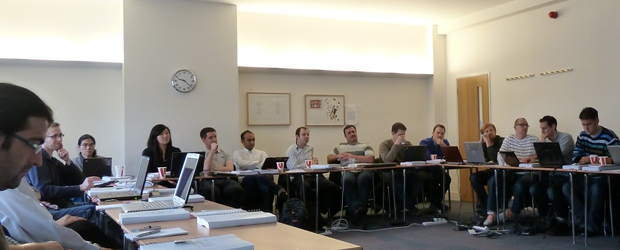
In November and December of 2010, we took this “on the road”, so to speak, firstly in Dublin, then London and Sydney. The courses were sold out and feedback was terrific. Here are a few choice quotes (check out the hyperlinks for full reviews)


“Did it meet my expectations? Well I’d have to say that it far exceeded them. There had obviously been a large amount of effort in preparing the courseware and modules. They covered the important missing links currently absent from the Microsoft and traditional training courses” – Wes Hackett.

“I’ve just finished the second day of the SharePoint 2010 Governance and Information Architecture Master Class presented by Paul Culmsee with the support of Andrew Woodward . I can wholeheartedly say it was one of the best courses I’ve attended both in content and presentation style and they deserve a lot of credit for putting together a fantastic course. Paul in particular has put a huge amount of effort into the slidedeck, sample documents and enormous manual (almost 500 pages worth!) let alone all the great additional insight he could provide in person over both days” – Brendan Newell

“Finally …. after 12 years in the IT industry a course which covers some of the fundamental issues governing project success.   This course is a real eye opener and a must for any IT professional involved in project planning and delivery” -  Stephen McWilliams

“I just came back from the best technology training I have had in years: a world-first Microsoft SharePoint Elite Information Architecture course designed and delivered by Paul Culmsee. It has taught me a great deal across ALL facets of the day-to-day work that I do as a SharePoint architect” – Jess Kim

Based on this and similar feedback, we are going to do it again. Locations confirmed so far are London (#SPIAUK), Sydney (#SPIAAU) and Wellington (#SPIANZ) in February and March 2011 and in the pipeline is The Netherlands (#SPIANL) and at least a couple of US cities!

In addition to the unique content on these classes, I am honoured to announce that I am now authorised to teach the official Cognexus Issue Mapping courseware – the only non Cognexus Dialogue Mapping practitioner authorised to do so. As such, we will be running the inaugural Issue Mapping class in London in late February as well (wohoo!)

So, here are the details for each location:

  • (Register now) February 21, 2011, London   #SPIAUK SharePoint Governance and Information Architecture Master Class (Download Flyer)
  • (Register now) February 23, 2011, London #IBISUK Issue Mapping Master Class (Download Flyer)
  • (Register now) March 10, 2011, Sydney  #SPIAAU SharePoint Governance and Information Architecture Master Class (Download Flyer)
  • (Register now)March 14, 2011, Wellington #SPIANZ SharePoint Governance and Information Architecture Master Class (Download Flyer)
  • (Register soon) May 9, 2011, Utrecht, Netherlands (watch this space)
  • Wondering what to expect in these classes? Read on!

     SharePoint Governance and Information Architecture Master Class. 2 full days of real world, examples knowledge and techniques

    Most people understand that deploying SharePoint is much more than getting it installed. Despite this, current SharePoint governance documentation abounds in service delivery aspects. However, just because your system is rock solid, stable, well documented and governed through good process, there is absolutely no guarantee of success. Similarly, if Information Architecture for SharePoint was as easy as putting together lists, libraries and metadata the right way, then why doesn’t Microsoft publish the obvious best practices?

    In fact, the secret to a successful SharePoint project is an area that the governance documentation barely touches.

    This master class pinpoints the critical success factors for SharePoint governance and Information Architecture and rectifies this blind spot. Paul‘s style takes an ironic and subversive take on how SharePoint governance really works within organisations, while presenting a model and the tools necessary get it right.

    Drawing on inspiration from many diverse sources, disciplines and case studies, Paul has distilled the “what” and “how” of governance down a simple and accessible, yet rigorous and comprehensive set of tools and methods that organisations large and small can utilise to achieve the level of commitment required to see SharePoint become successful.

    Master class aims:

    • Present SharePoint governance and Information Architecture in a new light – focus on the “blind spots” where the current published material is inadequate
    • Cover lessons learned from Paul’s non IT work as a facilitator and sensemaker in complex large scale projects
    • Examine the latest trends in the information landscape for industry and government and review studies that inform governance and Information Architecture efforts
    • Present an alternative approach to business-as-usual SharePoint governance planning that focuses on real collaboration
    • Provide quality information that is rigorous yet accessible, entertaining and interesting

    Master class outcomes:

    • Understand the SharePoint governance lens beyond an IT service delivery focus
    • Develop your ‘wicked problem’ radar and apply appropriate governance practices, tools and techniques accordingly
    • Learn how to align SharePoint projects to broad organisational goals, avoid chasing platitudes and ensure that the problem being solved is the right problem
    • Learn how to account for cognitive bias and utilise tools and techniques that help stakeholders align to a common vision
    • Understand the relationship between governance and assurance, why both are needed and how they affect innovation and user engagement
    • Understand the underlying, often hidden forces of organisational chaos that underpins projects like SharePoint
    • Understand the key challenges and opportunities that SharePoint presents for Information Architecture
    • Learn how to document your information architecture
    • Practical knowledge: Add lots more tools to your governance and IA toolkit!

    Course Structure: The course is split into 7 modules, run across the two days.

    Module 1: SharePoint Governance f-Laws 1-17:

    Module 1 is all about setting context in the form of clearing some misconceptions about the often muddy topic of SharePoint governance. This module sheds some light onto these less visible SharePoint governance factors in the form of Governance f-Laws, which will also help to provide the context for the rest of this course

    • Why users don’t know what they want
    • The danger of platitudes
    • Why IT doesn’t get it
    • The adaptive challenge – how to govern SharePoint for the hidden organisation
    • The true forces of organisational chaos
    • Wicked problems and how to spot them
    • The myth of best practices and how to determine when a “practice” is really best

    Module 2: The Shared Understanding Toolkit – part 1:

    Module 2 pinpoints the SharePoint governance blind spot and introduces the Seven Sigma Shared Understanding Toolkit to counter it. The toolkit is a suite of tools, patterns and practices that can be used to improve SharePoint outcomes. This module builds upon the f-laws of module 1 and specifically examines the “what” and “why” questions of SharePoint Governance. Areas covered include how to identify particular types of problems, how to align the diverse goals of stakeholders, leverage problem structuring methods and constructing a solid business case.

    Module 3: The Shared Understanding Toolkit – part 2:

    Module 3 continues the Seven Sigma Shared Understanding Toolkit, and focuses on the foundation of “what” and “why” by examining the “who” and “how”. Areas covered include aligning stakeholder expectations, priorities and focus areas and building this alignment into a governance structure and written governance plan that actually make sense and that people will read. We round off by examining user engagement/stakeholder communication and training strategy.

    Module 4: Information Architecture trends, lessons learned and key SharePoint challenges

    Module 4 examines the hidden costs of poor information management practices, as well as some of the trends that are impacting on Information Architecture and the strategic direction of Microsoft as it develops the SharePoint road map. We will also examine the results from what other organisations have attempted and their lessons learned. We then distil those lessons learned into some the fundamental tenants of modern information architecture and finish off by examining the key SharePoint challenges from a technical, strategic and organisational viewpoint.

    Module 5: Information organisation and facets of collaboration

    Module 5 dives deeper into the core Information Architecture topics of information structure and organisation. We explore the various facets of enterprise collaboration and identify common Information Architecture mistakes and the strategies to avoid making them.

    Module 6: Information Seeking, Search and metadata.

    Module 6 examines the factors that affect how users seek information and how they manifest in terms of patterns of use. Building upon the facets of collaboration of module 5, we examine several strategies to improving SharePoint search and navigation. We then turn our attention to taxonomy and metadata, and what SharePoint 2010 has to offer in terms of managed metadata

    Module 7: Shared understanding and visual representation – documenting your Information Architecture

    Module 7 returns to the theme of governance in the sense of communicating your information architecture through visual or written form. To achieve shared understanding among participants, we need to document our designs in various forms for various audiences.

    Putting it all together: From vision to execution

    As a take home, we will also supply a USB stick for attendees with a sample performance framework, governance plan, SharePoint ROI calculator (Spreadsheet), sample mind maps of Information Architecture. These tools are the result of years of continual development and refinement “out in the field” and until now have never been released to the public.

    Note: The workshop sessions will be hands on, we provide all of the tools and samples needed but please bring your own laptop.

    Issue Mapping Master Class. Your path towards shared understanding and shared commitment

    “Some problems are so complex that you have to be highly intelligent and well informed just to be undecided about them.” Laurence J. Peter

    Presented by: Paul Culmsee

    Courseware by: Cognexus Institute and Seven Sigma

    “Not another $#%@*$ meeting!”

    All of us have felt the frustration of walking from yet another unproductive meeting, wondering where the agenda went. Yet, as problems become more complex, meetings are still the place where critical strategic decisions are made.

    ibis-map

    What is Issue Mapping?

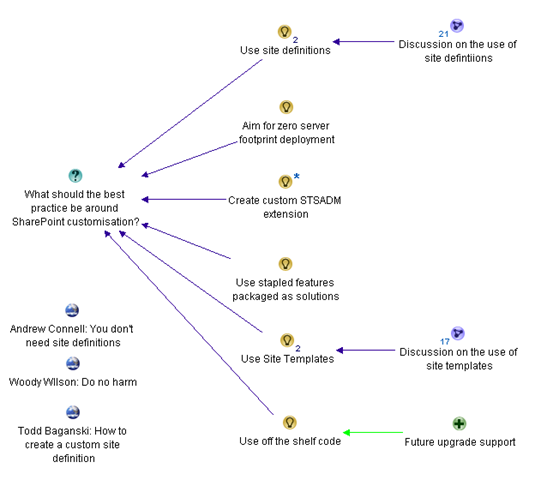
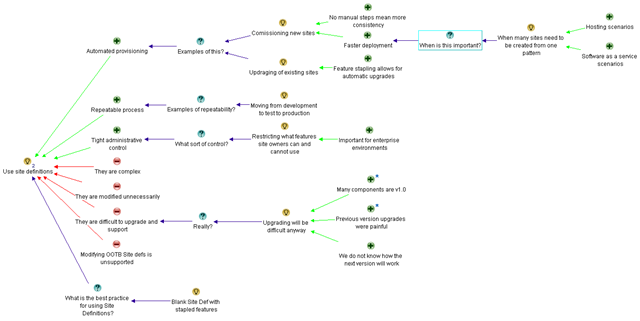
    Issue-Based Information Systems (IBIS) is a sense-making framework used to support group discussions to assist all involved to come to a shared understanding. It visually maps participants’ points of views, problems voiced, the rationale and reasons leading up to decision(s). The maps can be easily read and understood by everyone, even by those not part of the discussion group.

    Why Issue Mapping?

    • Maps detailed rationale behind decision-making as well as the decision; maps the thinking process of the group
    • Concentrates on pros and cons to an idea, encourages and explores all views, taking the sting out of differences
    • Represents and clarifies diverse points of views, conflicting interpretations and goals, inconsistent information and other forms of complexity
    • Everyone gets a chance to speak, if they want. People are heard and contributions are acknowledged. Interruptions, repetition and dominance of the loudest decreases
    • Keeps participants on topic because they can visually see the progress of the discussion
    • Keeps everyone’s attention
    • Meeting progress/result can be seen
    • Map helps participants come up with ideas/arguments
    • Visual display of progress to review summary if need so the brain can absorb the bigger picture and appreciate the validity and value of a larger perspective
    • Avoids jumping to easy answers or superficial conclusions
    • Promotes deeper reasoning, rigor and even wisdom
    • Everyone can visually see everything discussed- leaves no room for misunderstandings
    • Documents can easily be attached to map to back up ideas
    • Participants can see effectiveness of mapping and genuine will try to make it more productive

    About Seven Sigma

    Issue Mapping is a life skill that can be applied to many different problem domains and scenarios. Participants will gain proficiency in a craft that can be applied long into the future, to help them and others bring clarity and convergence to the management of complex problems. At Seven Sigma, we practice Issue and Dialogue Mapping routinely and this has brought us many satisfied clients. The Mapping in itself is part of the ‘secret sauce’ that makes Seven Sigma’s reputation renowned.

    Seven Sigma Business Solutions is the only recognised designated partner of Cognexus Institute, founder of the art of Issue Mapping, in the world. We recognise that without reaching shared understanding, you will find yourself at yet another meeting, rehashing the same unresolved problems, listening to the same arguments month after month. Or, if a decision has been made, it has not been followed up to fruition due to lack of commitment/buy-in.

    We are proud to be part of your journey towards shared understanding and shared commitment.

    Master Class aims and outcomes:

    • Be able to create great maps – issue maps that are clear, coherent, and inviting
    • Immediately start using Issue Mapping effectively in your work and life; the class will focus on practical experience and map building
    • Command a rich range of options for publishing and sharing maps
    • Lead with maps: create direction, momentum, and energy with issue maps
    • Quickly and effectively do critical analysis in dynamic situations
    • Organize unstructured information and discover patterns and connections within it
    • Make critical thinking visible for inspection and analysis
    • Recognise early, the symptoms of wicked problems and the forces behind group divergence
    • Recognise the importance of capturing the rationale behind decisions, as well as the decisions themselves
    • Rethink the traditional approach to meetings and decision making
    • Start capturing the rationale leading up to the decisions by using IBIS and Compendium software

    It will also give you a deeper understanding of:

    • The fundamentals of IBIS and Compendium
    • The structural patterns that give clarity and power to issue maps
    • How decision rationale is represented in a map

    This master class will be hands on – please bring your own laptop with Compendium software (freeware) installed.

    Duration: 2 days, with homework after the first day

    Audience: For both IT and non-IT audience; those involved in highly complex projects including leaders, consultants, facilitators, organisational development professionals, change agents, managers and engineers.

    Prerequisite: An open mind geared for shared understanding and shared commitment


    Dialogue Mapping: The Ying to SharePoint Yang

    I don’t know about you, but as a SharePoint practitioner, I love the fact that I do not do SharePoint full-time anymore. I’d like to take some time to explain why this is the case, and how my non IT work helps me be a better SharePoint practitioner. To do so, I will talk about a recent non IT project I worked on. Who knows? This may give you some insights into how you view and approach collaborative work.

    Western Australia is BIG

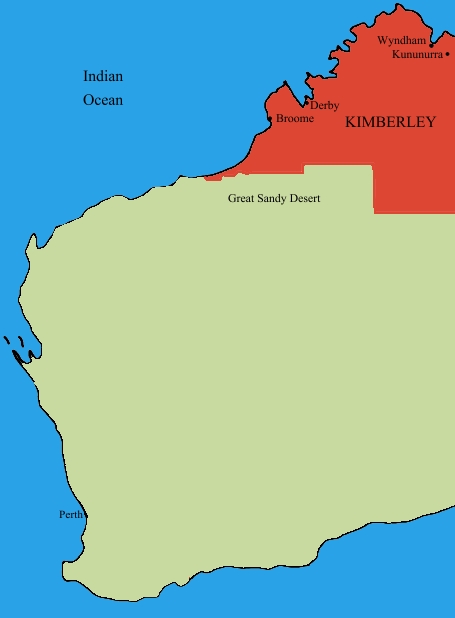
    File:Kimberley region of western australia.JPGIn case you don’t know already, I live in Perth, Western Australia. You can see Perth if you squint at the map on your left and look to the south west area.

    Western Australia is a bloody big land area and extremely isolated. One claim to fame about living in Perth is its distinction for being one of the most isolated cities in the world. In fact we has a population density is on par with Mongolia (this is dead-set true – I researched this fact). Of the 2.2 million people that live in the state, 1.8 million live in the Perth metropolitan area and the rest are scattered far and wide. In terms of distribution, there are no other major cities in Western Australia. The next most populated town outside of Perth is Mandurah with some 83,000 people. 

    In the north of Western Australia, these towns are often separated by anywhere from a couple hundred to more than a thousand kilometres. The weather is very hot, the landscape is breathtakingly beautiful and the isolation here is hard to comprehend without visiting. The wealth of Western Australia (“GFC? What GFC?”) comes from the north of this vast state, via huge mineral deposits that China seems happy to buy from us, which in turn keep me and my colleagues busy putting in SharePoint around the place.

    Now if you think Western Australia is big, get this: The Kimberley region of Western Australia (the top section marked in red) is almost as big as the entire country of Germany. For American readers, it alone is three fifths the size of Texas. For all that space, only around 45000-50000 people live there.

    These wide distances create all sorts of challenges. At a most basic level, think about the cost of basic services to such a remote location with such a small population density. Cost of living is high and services like health care are always stretched and people living here have to accept that they will never be able to enjoy the same level of service enjoyed by their city slicker cousins.

    Now that I have painted that picture in your mind, let me intersect that with one of Australia’s biggest wicked problems. The indigenous people’s of Australia have many social and health issues that have had a massive human cost to them. We are talking chronic alcoholism, physical and sexual abuse, depression, suicide and the whole range of mental illnesses. Families and communities tear themselves apart in a seemingly an endless negatively reinforcing cycle. Like many indigenous groups around the world, intervention approaches from earlier periods have had catastrophic long term consequences that were never considered at the time (a classic wicked problem characteristic). When you read the stories about the stolen generations, you cannot help but be deeply moved by the long term effects, the damage done and the sad legacy left behind.

    Continue reading “Dialogue Mapping: The Ying to SharePoint Yang”


    The practice of Dialogue Mapping – Part 4

    Three weeks ago my plasma TV broke, freeing the family from the magic spell of hi-def television. My family took the loss in different ways. My four year old was devastated at the lack of Nintendo Wii, and constantly whined about being bored. My ten year old is a bookworm anyway, and continued to be one. I suddenly found mountains of time to write, churning out three Dialogue Mapping articles that I had been meaning to write for ages.

    Today the repair man came and fixed the TV. I expect that the glow of the plasma screen will once again induce that zombie-like state, where my work-rate is dependant on what show happens to be on at the time (NCIS as I write this). Luckily, this is the last article of this particular series on Dialogue Mapping for now and I might have enough active brain cells to hang on long enough to squeeze this article out.

    This article builds on the last section of part three that was entitled “Nurture the holding environment”. In that section, I introduced the concept of the “holding environment” and I offered a basic example (the bus trip that was conducted prior to the Dialogue Mapping session). This concept is so fundamental and important to the success of Dialogue Mapping and projects more broadly that I want to do it proper justice here in part four.

    The paradox of individuality

    Put a bunch of right-brained geeks in a room to solve a problem and you will probably find that they get on relatively well. Put a bunch of creative left-brained marketing people in a room to solve a problem and you might expect the same thing. The solutions offered, when compared to each other, are likely to be quite different and will also likely be sub-optimal. For a truly good solution, we need diversity in perspectives and, although this pains me to say, marketing people are therefore actually needed. This creates a bit of a problem though with the paradox of individuality because, as geeks, we all know the notion of marketing people being needed goes against everything we stand for.

    I first read about the paradox of individuality in a book called Team Talk: The Power of Language in Team Dynamics and it was described as follows:

    The only way for a group to become a group is for individuals to express their individuality, yet the only way for individuals is to become fully individuated is to accept and develop more fully, their connections to the group.

    What? Geeks and marketing people accepting each other as equals? Unifying the laws of physics will come sooner and this is a classic example of what Conklin calls “social complexity”. Of course, social complexity goes much deeper than geeks vs. marketing people, but one of the effects of social complexity is a distinct lack of direct communication between parties. This is because conflict is not fun and avoidance is a natural reaction to situations that are not fun.

    The idea of the “holding environment” is best summed up with the image below. Here, you can see that we have an area set aside for kids to play in a safe, controlled environment.

    image

    A holding environment for an organisation or a team is actually not that dissimilar to the example above. You are attempting to create a state where participants can step out of their comfort zones, but at the same time, are shielded from counter productive tensions that cause paralysis, chaos and pullback.

    For this reason I maintain that beer is one of the best holding environments available and it forms a key part of my professional skill set 😉

    As I stated in part 1 of this series, Dialogue Mapping is a very useful holding environment on its own, but it can be augmented with other things as well and you should always be on the lookout for complimentary tools and techniques. In the following sections, I will outline where Dialogue Mapping has augmented another method, or where we have augmented Dialogue Mapping itself with another method.

    Information gathering for 40+ people

    There are practical limits to how many people should be involved in a standard Dialogue Mapping session. Mind you, there are practical limits for how many people should attend a meeting too and that limit seems to be any more than one person :-).

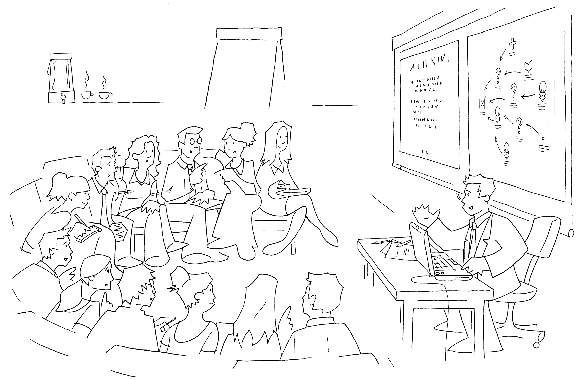
    By “standard”, I mean the sort of session illustrated below. The exact number that test the limits of Dialogue Mapping varies because it really depends on the wickedness of the problem being discussed and the past history of the group. For example, one of the teams I map for consists of around fifteen to eighteen members. They are working on a particularly wicked problem, yet I can work with this group alone quite easily. This is because over time, the group has worked out their decorum for the Dialogue Mapping sessions that work for all concerned. I also know everybody on a first name basis and some of the group have become personal friends of mine outside of work. In short, people are comfortable with each other and the process, and despite things getting heated people know that it is not personal. This is a simple, yet effective, example of a working holding environment.

    image

    A while back, my client invited representatives from academia, charities as well as various public sector government departments, to a half day workshop on the topic of social sustainability as part of a significant redevelopment project. There were approximately 40-45 attendees who were there for the first time. There was no way we would be able to cover off the required topics using a standard Dialogue Mapping set-up. With so many people, it would be hard for all attendees to have a say in the allotted time, let alone set up the room to handle that number of people for the process.

    The way we got around this issue was to run a pre-workshop session among a much smaller group, to create a series of “seed maps” for each of the sub-areas of social sustainability. By the end of this process, we had around a dozen maps on various subtopics with a few questions, ideas, pros and cons. These maps were not complete at all, but that was not the aim. Instead they were well formed IBIS argumentations.

    We then printed each of these maps out at large size. Initially each map was pinned to display boards, and when the attendees arrived they spent time wandering from map to map, examining the argumentation while mingling with other attendees. Below is a photo showing some of the seed maps prior to the attendees arriving.

    image

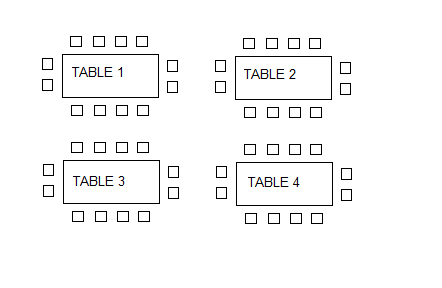
    Below is a diagram representing the table arrangement for the workshop. We started with a half hour overview and introduction as to the purpose of the workshop and why they had been invited. At this point, we removed four of the maps from the display boards above, and put a map on each table. We explained to the group that each table had a unique map on it and each map was on a particular topic. At this point attendees had the opportunity to move to a table where the topic was of most relevance or interest to them.

    image

    Each table contained copious amounts of marker pens. I then took the stage and explained the basics of IBIS grammar to the attendees and explained to them that we wanted them to start adding ideas to the existing maps. I did not belabour the grammar, nor did I expect them to suddenly know how to do IBIS properly, but what I made clear, was that I was going to walk from table to table and interrupt if I felt the additions to the map made no sense or were ambiguous in some way.

    The group had just under an hour to work on each map and at the end of the hour, we removed the updated paper maps and replaced them with the next four from the display boards. The process was then repeated and I walked from table to table, asking for clarification or calling out implied questions on parts of the maps that made no sense to me. Interestingly, IBIS novices seemed to have little problems with the usage of ideas, pros and cons, but they would forget to make the underlying question explicit. I would ask them what was the question being answered by a particular idea and would write the question into the map and redraw the lines.

    After the third iteration of this process we were done. The last half an hour was a “Where to from here?” session and an opportunity for the group to provide feedback to the organisers of the workshop.

    After the workshop was completed, I took all of the updated paper maps and added the additional rationales into the seed maps in Compendium. The process was surprisingly quick because the majority of the additional argumentations that were added were actually pretty good IBIS form. I think that having existing argumentations on the seed maps made it easier for attendees to add rationales that looked similar to what was there already. It wasn’t perfect IBIS by any means, but it was not a difficult task for me to refactor the additional information without losing any of the intent behind the rationales.

    For the record, additional workshops were conducted, but these reverted to standard Dialogue Mapping workshops with a subset of the attendees who had specialised skills and knowledge in the topic area. But what this particular process demonstrated was that with a little planning a single Dialogue Mapper could still manage to capture quality rationales from a very large group in a short space of time.

    Dialogue Mapping with a facilitator

    Dialogue mapping for a large group can be augmented with a facilitator and I have done this a few times. For a large group, this can be very helpful because the mapper can concentrate on capturing the dialogue and less on directing the meeting. Equally though, a facilitator can actually make the process more difficult. The key to a facilitator situation working is when the facilitator either knows IBIS or has been present in a number of Dialogue Mapping workshops and understands how the process works. This is because the facilitator is usually facing the group like the mapper, asking probing questions, directing the course of conversation and therefore is not looking at the map or listening in terms of IBIS translation of the dialogue. As a Dialogue Mapper, it is important for participants to verify what you have captured is correct, and if the facilitators are not following the map, they can easily get in the way of this verification process.

    Facilitators can also get you into trouble at times because they can sometimes be conditioned to traditional meeting decorum where topics are allocated at particular times with an agenda that can preclude deeper exploration of a topic. Dialogue Mapping is a rich enough container to allow a group that deeper exploration, but this is not something that some facilitators are used to. One prime example that sticks out in my mind to this day was a workshop where we had a lot of options to explore. Conscious of the agenda, in an attempt to make the process more efficient, the facilitator asked the group whether any of the options had any “fatal flaws” that enabled that option to be quickly discounted. It soon became apparent (in a negative way) that one person’s “fatal flaw” was diametrically opposed to another person’s “fatal flaw”. This attempt to shortcut deliberations backfired badly and resulted in this line of question being completely abandoned.

    This is a great example of the importance of nurturing the holding environment (lesson nine from part 3). After this “fatal flaws” episode, I deliberately stopped mapping while the group resolved the fatal flaw issue and resolved to try a different approach. This subsequent approach proved to be much more successful and we never deviated from it after that. “No fatal flaws” became a bit of a mantra among this group.

    A key to working with a facilitator is to remember the lesson on confidence and assertiveness from part 3. Just because a facilitator is directing the meeting and influencing the direction of the conversation, it doesn’t mean that the mapper is purely a scribe. Work out a system with the facilitator where, if you raise your hand or signal in some way, you are not ready to move on straight away. Another technique that I have used in a large group situation was to assign someone else the traffic warden role, where if I am having trouble keeping up with the various conversations, and my eyes are on the map, they can call the group to order.

    Dialogue Mapping, in tandem with another Dialogue Mapper ,can work very well and I have done many times with my colleagues at Seven Sigma. In this situation, you are both thinking in the IBIS grammar and both of you are mentally unpacking the conversation, although only one of you is actually performing the mapping. We have used this technique with particularly good results in SharePoint requirement gathering workshops, where one of us asks the questions and the other performs the mapping.

    Dialogue Mapping and Debategraph

    Compendium is one of several tools that can be used to create and render argument grammar like IBIS. For me, Compendium is the absolute best for Dialogue Mapping. Being a desktop application, I do not need internet access and once you are proficient with it, Compendium is very fast. This is of course, the biggest factor for Dialogue Mapping live. You do not want to be hindered by the limitations of the software tool that you are using.

    I noticed that some CleverworkArounds readers created IBIS maps in Visio and were also using mind mapping tools after I published the “One best practice” series. But the problem is, although you can technically make an IBIS map, those tools would never work in a live session because of how slow it would be to add rationales to the map. Seriously guys, it might be technically possibly but do not attempt to use those tools live.

    One size does not fit all and this is especially true of sense making tools. There are actually two main audiences for maps like this. Those who create the maps and those who consume the maps. The key point is that the ultimate audience for any map is quite often not the group creating the map in the first place. The whole point of capturing rationale is to make visible the process that a group went through when working on a problem, which ultimately shows why a particular decision was made or why a course of action was taken. Those who want to review the rationales are a very different audience to those who made the decision and wish to demonstrate justification. Just because the tool works well for the problem solving process, does not automatically assume that the tool is then best suited to the communication of that rationale to a wider audience.

    Compendium maps work brilliantly well during the Dialogue Mapping process and from a broader communication point of view, work exceptionally well when detailed maps are printed onto large sized paper. But as a communication and distribution tool, Compendium is weaker than some of the alternatives. Compendium maps do not translate overly well to the web at this point, and asking all interested parties to install compendium is out of the question. For the sake of article length, I will not go into detail why this is, but to appease the Compendium fanbois, this is direct feedback from my clients and not just my opinionated rant.

    For communicating the rationale that has come from Dialogue Mapping sessions to a wider audience, Debategraph is ideal. Unlike Compendium, Debategraph is a cloud based argument visualisation tool, designed to leverage the freeform updating capabilities of a wiki, along with the rigor of an argument grammar much like IBIS. Debategraph does not use a top down or left to right visualisation method. Instead each node is at the centre of the screen and surrounding issues, ideas, pros and cons surround the node, requiring the user to click nodes to explore further argumentation.

    The beauty of Debategraph is the combination of its argument navigation, along with the streaming view of related content as shown below. My clients absolutely love the stream view because it is so simple for people to explore and work with. The ability to embed a map at any point in the debate on any web site is also pretty handy and I have pasted a sample map below to illustrate this. Click a node on the left pane (the “*” means there are sub arguments) and the content in the right window will change, based on which argument node is currently being examined.

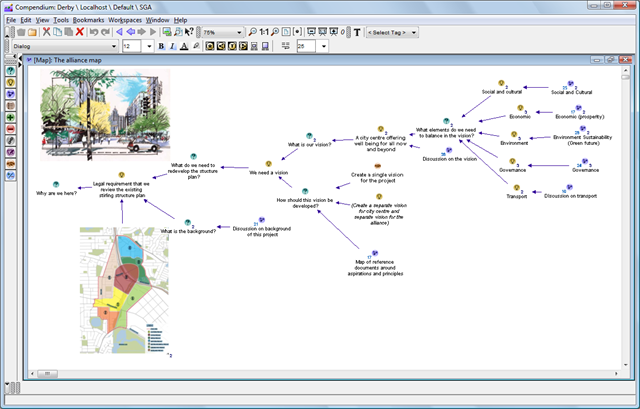
    Compare this to Compendium maps, where additional rich content like images, documents and the like are treated as additional nodes in the map. As you can see in the example below, it is possible to integrate rich content into the map very easily, but that rich content is linked in the same manner as the argumentation itself. Debategraph on the other hard, separates the argumentation from the supporting content and I think that this works much better and supports a richer form of argument based content delivery.

    image

    But once again, use the best tool that fits the purpose. From a dialogue and rationales collection point of view, Debategraph is an excellent way for a bunch of geographically dispersed people to debate a particular issue because the map will refactor on the fly as people self-contribute to it. But I personally would not use Debategraph for the Dialogue Mapping process, because it is not as fast as compendium and it is not as easy to view the map in full context as shown above. The over-arching point with all of this is that if the rationale has been captured in the first place, there are many ways to make creative use of it.

    Note: To be fair on the Compendium makers there are many excellent examples of Compendium being used for some pretty impressive things. I am talking here specifically about online collaboration and communication to a wider audience.

    Conclusion

    This series of posts has examined the practical aspects of Dialogue Mapping, explored some of the techniques that I have used to augment it. Although I do not intend to write any more articles on this topic right now, the series is by no means complete. This is an ongoing learning process for all practitioners of this craft and I am sure that other Dialogue Mappers have tried different techniques than those that I have covered. (Some interesting things are happening on the SharePoint integration front too, which should enrich this experience even further, but that is a whole separate topic 🙂 )

    But one final request. If you have used techniques such as these to enrich the experience for participants, then I’d love to hear from you. Even if it is not for Dialogue Mapping, any technique that is inclusive and augments the holding environment, please drop me a line or leave a comment.

    Thanks for reading

    Paul Culmsee

    www.sevensigma.com.au


    The practice of Dialogue Mapping – Part 3

    Hi there and welcome to part 3 of my series on the practice of Dialogue Mapping in the real-world. To recap, in part 1, I provided a brief overview of Dialogue Mapping and in part 2, I described a common real world usage scenario that we perform fairly often as SharePoint consultants.

    The rest of this series will change tack a little. In this article I am going to describe a very different Dialogue Mapping scenario to you. This was a huge challenge and a large leap from what I described in part 2. There were some wonderful lessons learned from this work which I will cover off here.

    The most “wicked” problems are not technical

    My first Dialogue Mapping gig where I was not a subject matter expert also happened to be a real baptism of fire. Here was a problem that I had no understanding of, no discipline knowledge and no sense of background history of the project, the dynamics of the group, nor any idea of the positions of stakeholders on the problem.

    By this time my IBIS fluency was pretty much down and I felt very confident with the usage of Compendium. I had not yet travelled to the USA yet to train under Jeff Conklin directly, but I carried his book around with me, and had read it many times over. I had performed Dialogue Mapping many times, however until this point all the projects or subjects that I was involved in I knew a lot about. This time I felt very vulnerable. Your domain knowledge is a form of armour, and it was unsettling to know that you’re going in stark naked. I was intimidated, yet excited at the same time.

    So imagine this scenario. There was myself, a facilitator, and *fifteen* strangers sitting across from me. This was double the group numbers of the typical IT scenarios I had previously mapped. I remember emailing Jeff for advice when I heard that there would be so many and I recall him saying that 15 was a lot of people for a newbie. What was I in for! 🙂

    Little did I know at the time that this group had been meeting for quite some time before that, but were really struggling on a complex urban planning issue. When I say complex, I mean complex in a social way, rather than technical. Interestingly, the issue was not a technically complicated issue at all. Anybody could have sat in the room and understood most of the dialogue (not necessarily the full context but you would not be completely blinded by science). What made this particular issue complex was the fact that the group members came from several different organisations, representing some quite diametrically opposing viewpoints. In part 2, I wrote about how it was hard enough just to get one IT department to come to the party and that was just one department of a single organisation – sheesh! If you have complained about organisational silos and think it is hard enough to get some degree of consensus within the realm of one organisation, imagine it when over a dozen representatives from different organisations are involved, organisations that straddle the full spectrum of public and private sectors, as well as the community.

    There were simply so many stakeholders and interconnected issues that it was very hard to not get bogged down into tangents, repetition and frustration. Now, imagine eighteen months of this environment and the stressful social complexity impacts.

    This is a long-term project that I am still involved with, so I will not be taking you through the specific details of this project just yet. Rest assured though, it has been such a great experience that I will write about it in detail in the future. For now, I will focus on lessons learnt so that others aspiring to perform this craft can learn from my own experiences.

    People often tell you the best way to learn is to dive right in, and Dialogue Mapping is no exception. No sooner than I had put up a “what should we do…” type root question, it didn’t take long for debate to get … shall we say … rigorous! So I will go over some of the key lessons that I learnt from this experience thus far.

    Lesson One: Confidence and assertiveness

    The first thing that I had to contend with was not being in control of the conversation to the same extent as before. As previously stated, with SharePoint workshops I tend to direct the flow of the workshop as a mapper and as a subject matter expert. But this scenario was very different. I didn’t know the topic area at all and therefore some of the terms and acronyms made no sense to me. Also being new and unused to the decorum of the group, I erred on what I thought was politeness, rather than annoy the group by being direct and at times, interrupting them.

    This, in my opinion, is a mistake and does a disservice to the other participants. It is also probably the most common thing a newbie mapper will experience when starting out, especially with a new group. As a result, the mapping in this first workshop ebbed and flowed. There were a few times where I was mapping the conversation really well, and the participants really engaged with the argumentation as it unfolded on the screen before them. Participants gestured to the map and asked me to add additional arguments and issues to what had already been built there. I could literally hear some of the initially sceptical, suddenly have that magic moment where they see it working. But at other times, during, say a particularly contentious issue, the conversation would fly at a rapid rate of knots. With so many people in the room, many wanted to have their say on these topics. This led to:

    1. Side conversations started up
    2. Some participants looked away from the map, and started debating directly to each other

    As soon as one of these happened, and especially with the latter, I, as the Mapper, had no hope of following the conversation. As you might expect, I would lose focus and the quality of what was captured suffered (hence lots of idea nodes with no connections to anything). The focussing power of the map would be diminished and the wheels would start to fall off.

    So remember this above all else. No matter what you do, you must be confident and assertive from the very start to keep the group focussed on the map. Don’t be afraid to interrupt someone to clarify a point, or pause them before they go too fast. If someone else starts to interject, interject back and make it clear that you will get to them as soon as you have finished capturing what someone else has said.

    Here is the other critical thing: You must be consistent. It is the first ten to twenty minutes that will set the tone for the rest of the session. This is where people will implicitly learn the decorum of a Dialogue Mapping session and know what to expect. Your actions as a mapper, during this period, is critical to the overall quality of the session. Start it well and it will generally end well.

    Jeff Conklin, of course, offers advice for this in his wonderful book on how to dealing with this. But of course, in the heat of dialogue, all of that advice goes straight out the window as you struggle to keep up with the rapid fire dialogue heading your way. Reading about how one should dialogue map is one thing, doing it is another. This is why I call Dialogue Mapping a craft and leads me to my second lesson learned.
    Lesson Two: Remember that one guitar lesson you had? (Be realistic)

    I think just about everybody at one point has had romantic notions of being a rock guitarist, banging out the blues like Clapton or blistering solos like Kirk Hammett or Brian May. A surprisingly large number of people have actually bought a guitar at some stage in their lives and have tried to live the dream. Most give it up once they find that the gap between their ability to play a G chord and their dream of playing the solo to Hotel California stretches to the moon and back. Inevitably, many guitars ends up collecting dust in the attic, along with the home gym set and many other items that were bought from late night infomercials.

    You will hit this with Dialogue Mapping. Remember that wicked problems breed social complexity. Some problems may have some stakeholders with diametrically opposed views and discussion can be quite heated. The romantic notion of your group suddenly solving their wicked problem from your wonderful dialogue mapping has to be viewed with the reality that you still have to learn the G chord and audience can be fickle.

    Thus, as far as audiences go, don’t go playing a stadium gig until you feel that you can handle sitting in the corner of a local bar or the school disco. In other words, start small and work your way up. A small, successful meeting will help you develop your style, confidence and then empower you to take on larger groups.

    As Ali-G would say, keep it real.

    Lesson Three: Stick to your domain of knowledge (at first)

    This is a logical extension of lesson two, and also a tricky one because it can be just as much of a worst practice as a best one. This I suspect is probably a lesson on where Jeff Conklin or other dialogue mappers may disagree with me. One of the transitions that you have to make as a mapper is to move from what I would call Issue Mapping to real Dialogue Mapping. Just because you are doing mapping in front of a group, doesn’t actually mean you are necessarily “dialogue” mapping. Dialogue Mapping is often called “Issue Mapping with facilitation”, and when you work within your domain of expertise and you are a mapper as well as participant. Therefore you are not an impartial facilitator. This is the situation I described in part 2 and discovered very quickly, that pure dialogue mapping was much harder and mentally tougher.

    But in terms of developing your skills, you will have good results when you are working in an area that you know well. You don’t have to worry about the meaning of acronyms and half of the questions you have likely heard before anyway. Remember though, that in a way it is kind of cheating because you are in effect, using the craft to get people to confront questions that you want answered. But it is an important stepping stone and will help you master lesson 4.

    Lesson Four: IBIS grammar in the reptile brain

    IBIS is the grammar that you use to map discourse. When mapping rapid-fire contributions from a group of people, they do not want to sit and wait for you to mull over whether their statement was an idea followed by a pro or an inferred question with an idea. If you find yourself having to do this, it is like trying to play a song on guitar and having to consciously think about how to play that G chord. Just think about how much you’d enjoy a Metallica concert if James Hetfield stopped every minute or so on a hard bit of a song and said “Wait, wait.. I’ve done this before… ok, hang on…oops, sorry”. This translation needs to burn itself into your reptile brain so that the process is as automatic as possible. To do this, you need to initially not worry about getting up in front of a group. As Conklin suggests in his book, listen to interviews on the radio or take an article, pull out its main points and create an IBIS map for it. There are a zillion ways to do this.

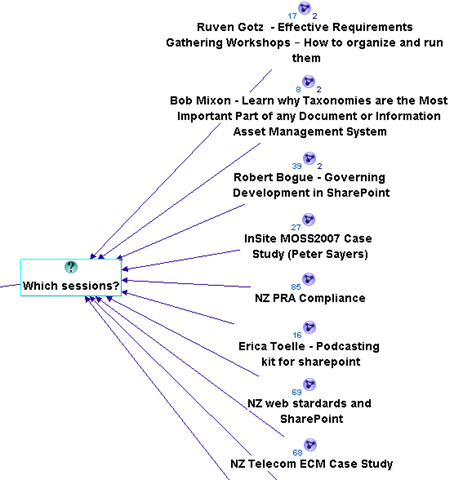
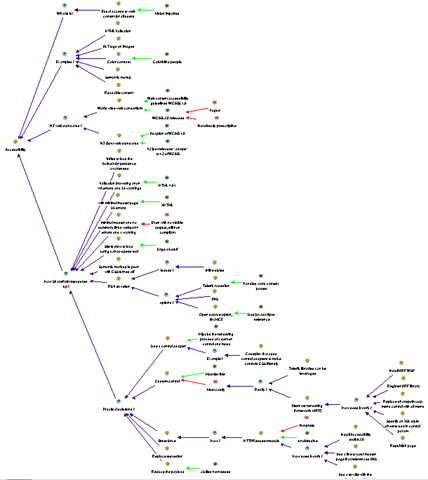
    For all of you SharePoint people, a really excellent, highly relevant way of practice that I use, is to sit in the audience of a presentation at SharePoint Saturday or a conference and issue map the presentation. Below is a sample of some of the sessions where I have done this and the image after that demonstrates how much rationale I captured in the “NZ Web Standards and SharePoint” session.

    image   image

    Another great way to learn is to send one of your maps to an IBIS practitioner and let them pull it to bits. Even those of us who have done this for a while need that constant reinforcement and feedback. Like any grammar, different things can be written in different ways and one person’s IBIS will not always look like someone else’s. (There is another blog post in the works that will show this in a funny way). At various times I have sent maps to Conklin for constructive feedback (and then ducked for cover! – hehe)

    Finally, if you are serious about this and like what you are reading, then do what I did – the 5 week Issue Mapping webinar based workshops that Jeff Conklin runs, or if you are in Australia and want something local, then contact me for a half or full-day in-house Issue Mapping intro workshop. Both will not teach you to dialogue map, but by the end of them you will dream in IBIS 🙂

    Lesson Five: IBIS translation in the reptile brain

    Once the language of IBIS is familiar to you, you can take any argumentation and form a consistent IBIS map. You then have to learn how to listen very carefully because that is half the art. Now you have to take prose and pontification by participants and somehow unpack the points made, articulate them into a summary, and form an IBIS based model in your head, and then commit it to the map.

    This can be hard – very hard, and it is nigh on impossible to do without applying what I told you in lesson one. A dialogue mapper is not superhuman and does not have photographic memory. The skill you are developing here is one where you pick out the IBIS elements of some dialogue quickly, as well as knowing when to interject to make sure you do not miss anything.

    A great example of this working is when someone has stated something, and although I cannot remember all points, I know that there was a question and three ideas offered. I might pause the conversation before it goes too far and say something like “Ah, that was important and I need to get this right. I heard you say three things there. You questioned the idea of X, and you offered an answer with 3 pros. One was Y, and what were the other two again?”

    Conklin explains meeting discourse and question types in his book and the aforementioned workshop in a lot of detail. But once again, to apply it to a real-world situation can only be done by practice (and more practice). The absolute best way to do this is to watch an experienced dialogue mapper perform this and look at how they handle the situation, which brings me onto lesson six.

    Lesson Six: Observe

    One of the most enjoyable training experiences of my career was to travel to the picturesque town of Annapolis and learn dialogue mapping from Jeff Conklin himself. Up until then, I had been practicing the craft, but after those two days, I returned as a much better practitioner.

    The single most important part of the time spent there was when we, the students, dialogue mapped each other as we discussed a real-world issue. We each sat in the hot seat for fifteen minutes or so, trying to map the discussion. We were all being completely evil, deliberately starting side conversations, interrupting and interjecting, playing the role of the dominant type A style participant, jumping all over the place and, overall, just being as difficult as we could.

    Unsurprisingly, we all sucked big time trying to dialogue map this. However, when Conklin took the floor, we then saw how exactly Dialogue Mapping was done and what twenty years of practice does. He effortlessly brushed off our attempts to trip him up by observing all of the lessons that I have thus far described, but also with some subtle tricks that we didn’t even notice until he told us afterwards.

    After Conklin had wiped the floor with us, so to speak, we all got to have another crack at it, with the benefit of observation and hindsight. This time the difference was significant in our performance and the way that we each handled the “mob”.

    Moral? The very best thing you can do is to be involved in a Dialogue Mapping session where it has been done well. Watch carefully what the mapper is doing and how they are conducting themselves and the process.

    Lesson Seven: It will make you tired

    If you think of all the various things that you have to do simultaneously (for examples listening, understanding, mapping, and managing the group) during Dialogue Mapping, it is amazing that anyone with a Y chromosome can manage it, given that men usually cannot multitask at all. (Case in point: If sport is on the radio and my wife is speaking to me, one of them has to be switched off…Sorry honey 🙂 ).

    When you are first learning this craft and you are going to be up in front of a group, plan for only an hour or so. While you have to think quite consciously about things, it will exhaust you even more. Once things become more automatic, you can go for longer. From my own experience, the limit for Dialogue Mapping a big group on a really wicked topic would be about four hours at the absolute maximum. (Usually by then the participants also need to take a break and sleep on it anyway).

    Some sessions can be intense, and you, as a mapper, need to be switched on for that entire time. You are listening carefully to every person speak because you are trying to form it into IBIS. So unlike everybody else who can sit there and look interested, yet be mentally switched off, you have to be interested by definition.

    One thing about this is that, while you are in the zone, you don’t need coffee. When mapping, you have enough endorphins racing around your system to keep quite alert, but as soon as there is a break, you can find that you will feel quite tired at times, and a well timed coffee can be very handy (real coffee, of course – none of that instant junk!)

    The one thing that compensates for what Dialogue Mapping can take out of you mentally, is that exhilarating experience when the group is really getting into the process and the positive feedback that you receive when a really well formed map has been developed.

    Lesson Eight: Learn to love “transclusions” and CTRL+R

    I thought that I would drop in a left-field lesson learned at this point that is still very important.

    Trans-what? Don’t worry – I don’t know why they called it that either. Ted Nelson, who also coined the term “hypertext”, came up with the name but I think the day “transclusion” sprung to mind, he was having an off-day. I asked Conklin what it meant and he said “It’s technically accurate … an "inclusion" of material *across* (‘trans’) several documents”. When I whined about the geekiness of the name he added “There was a time when the word "hypertext" was a wacko term for geeks, you know”. Damn! He’s got me there.

    My explanation that will suffice for now? Transclusions is a fancy way of describing the process of breaking your big map up into smaller, linked up sub-maps. I have also heard it referred to as chunking, and when maps get too big, this is a necessity. (For the hypertext nerds that is somewhat incomplete but suffices for this point).

    The compendium software that I choose to use for this work also has a great feature in it. Your map is re-drawn automatically when you hold down the control key and press R. I am now in the habit that after entering a node or three, I redraw the map via this method to keep it all looking orderly. That way, if there has been a lot of dialogue captured, you do not end up with a messy, cluttered map that participants find hard to follow. Like lesson number three and four, stopping conversation while you refactor a messy map will cost you group momentum so ideally if you have gotten into the Control+R habit, all you have to do is a quick transclusion at an opportune time.

    The best time to perform a map transclusion is when a thread of discussion has been exhausted and the group has moved onto a new idea or area in the map. A trick I learned from Anapolis was to sit up and say something like “Okay, let’s just pause for a minute.” (Holding up my hand), congratulate the group on the quality of what they have captured and then say something like “Let’s just put this stuff into its own pigeonhole, so we can now focus on X idea”.

    Lesson Nine: Nurture the holding environment

    Okay, so if there is to be one big serious lesson learned, it is this one. To make the point, I am going to quote Heifetz and Linsky from their excellent book Leadership on the Line. You can read a PDF press release here, specifically the section entitled “Control the temperature.”

    Changing the status quo generates tension and produces heat by surfacing hidden conflicts and challenging organizational culture. It’s a deep and natural human impulse to seek order and calm, and organizations and communities can tolerate only so much distress before recoiling.

    If you try to stimulate deep change, you have to control the temperature. There are really two tasks involved. The first is to raise the heat enough that people sit up, pay attention, and deal with the real threats and challenges facing them. Without some distress, there is no incentive for them to change anything. The second is to lower the temperature when necessary to reduce a counterproductive level of tension. Any community can only take so much pressure before it becomes either immobilized or spins out of control. The heat must stay within a tolerable range—not so high that people demand it be turned off completely, and not so low that they are lulled into inactivity.

    Heifetz and Linsky talk about maintaining the “the productive range of distress” but I have heard many metaphors like this. Another I like is “creative abrasion”, coined by Leonard and Swap in their excellent book When Sparks Fly . Both are essentially talking about making the whole environment conducive to getting the best out of the participants.
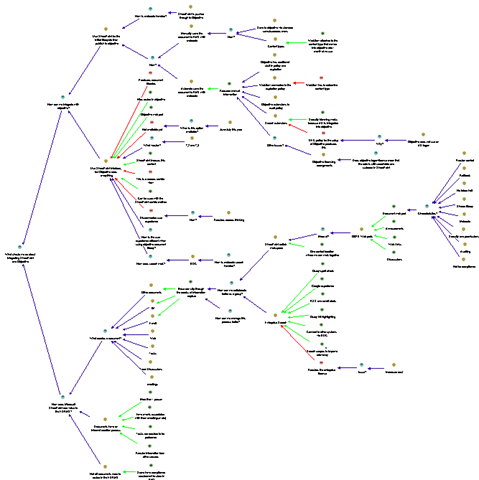
    The key takeaway is this: Each group is different and each situation is different. In the normal discourse of the meeting, there will be times where the group works together in almost perfect unison and times where one wrong word will destroy that balance and require the group to stop, reset things and move forward. This is not about IBIS either. The fact is that over time, a particular pattern will emerge in the decorum of the sessions, where conducting the sessions or approaching the mapping in a particular way, will work consistently well for the group.

    Let me give you a classic example that was absolute genius on the part of my client who did exactly this. Before Dialogue Mapping for a group of concerned residents who were facing the prospect of significant change to the amenity of their homes, a bus was hired and the residents were taken to an area where a similar urban transformation had been made ten years before. We all walked around the area for an hour, soaking in the vibe, learning about the history of the area, how the area was redeveloped and how certain planning challenges were overcome.

    This allowed the participants to get a real sense of the issues they needed to confront, and they felt it with all senses, sight, sound and tactile, rather than some cold, rather detached room with a projected map on the wall. Later, when I dialogue mapped the session after the bus tour, the group did a fantastic job and the quality of the rationale that was captured was much richer and faster, through that sensory immersion that took place before the mapping process began.

    So just remember, Dialogue Mapping is a great holding environment in the sense that Heifetz and Linsky talk about. It is a wonderful “rich container”, as Conklin puts it, for fostering and maintaining creative abrasion. But as the bus ride example shows, there is a lot of things that you can combine with it to enhance the experience further.

    More examples like this will be covered in part 4 of this series.

    Thanks for reading

    Paul Culmsee

    www.sevensigma.com.au


    The practice of Dialogue Mapping – Part 2

    Hi there.

    Welcome to part 2 of a series of articles on the craft of Dialogue Mapping – something that forms a significant chunk of my SharePoint and non SharePoint work. In the “One best practice” series of articles, I explained IBIS. In part 1 of this series, I introduced the facilitation part that goes along with IBIS. In this article, I’ll spend more time on how Dialogue Mapping works in real world scenarios.

    In the previous article, I wrote about how important it was for tools and methods like this to be intuitive and inclusive, allowing you to start from any given point. I also wrote about how methods need to be adaptable and grow, accepting and accommodating for the fact that understanding of the problem changes over time. In any project or problem that is novel or new, there is, invariably, a large degree of unknowns and uncertainties among participants. Solutions are not always obvious and we should be careful not to presume that we are doing something wrong if we reinterpret the problem, as a result of learning more or seeing a suggested solution.

    New IT projects, by definition, often fall into this bucket and SharePoint is a poster child for this type of project. But in saying that, some of the toughest problems on the planet are not technically complicated at all and SharePoint is actually not the most wicked problem that I have used this craft on. More on that in part 3…

    So, the first example of the practice of Dialogue Mapping that I will tell you about is how effective it is in dealing with IT department physics and nerd law.

    IT department physics and nerd law…

    Before consulting on any IT project, it is important to understand the inner workings of the IT department. For SharePoint this is particularly important because of its amazing ability for exposing the inherent constraints of IT departmental physics in a negative way.

    There are certain fundamental principles of how IT departments work that I have classified into several immutable laws. They are:

    1. The web team dislikes the corporate marketing team because marketing always wants the same garish lime-green colours they have for their printed brochures;
    2. The infrastructure team dislikes the web team because they see them as a bunch of cowboys who mess with forces they do not understand and do not have to deal with the consequences of it;
    3. The web team dislikes the infrastructure team because they are a bunch of control freaks who won’t even allow you to fart without filling in a change control form; and
    4. Nobody likes the misunderstood compliance/records management team at all. They unfortunately perpetuate this by droning on continually about whatever compliance standard/s the organisation has to adhere to.

    There are some interesting sub-laws that go along with the four immutable laws. For example, you have only one shot to ask the right question to a good infrastructure guy. In other words, the way you word the question will tell them a lot about your technical chops and if you word the question badly, you will be forever banished into the same sin bin where they hold most project managers and sales people. Once sin-binned, it takes an enormous amount of effort to get out. Similarly, when approaching an application developer, always start the question from the presumption that the error you are encountering is *not* in their code, despite you being fairly certain that it is.

    Ted Dzubia is a tech writer equivalent of Dr House. A terrific writer with brilliant insight woven between layers of blistering attitude and well placed vulgarity. He cites a classic example of what he calls “nerd law” and it cuts to the heart of the problem that projects like SharePoint face.

    The only way to adjudicate Nerd Law is to write about a transgression on your blog and hope that it gets to the front page of Digg. Nerd Law is the result of the pathological introversion software engineers carry around with them, being too afraid of confrontation after that one time in high school when you stood up to a jock and ended up getting your ass kicked.

    If you actually talk to people, network, and make agreements, you’ll find that most are reasonable…

    Defying the laws of IT physics

    One of my earliest uses of Dialogue Mapping was to deal with a classic case of IT department physics and nerd law. A completely new SharePoint project, with no in-house staff having significant expertise in the product, has decided to implement SharePoint for an intranet. To make it interesting, the project is instigated out of the web team. As the immutable laws explain the forces of IT nature, this means that several things happen by default:

    • The infrastructure team will automatically be against it because they don’t want to get saddled with, yet another, enterprise application to support and manage
    • The records management team, having already been scarred from trying to convince an uninterested workforce that the existing records software does not suck, now will assume that SharePoint is going to take over their area.
    • The software development team will assume that SharePoint is here to replace all of their lovingly coded, yet bloaty and insecure line-of-business systems.

    At this point, each side starts googling and discovers that the means by which they will address the “obviously” out-of-bounds web team is via this thing called “Governance”. Governance is then mentioned in every second sentence, in a manner to improve their respective positions. This is the nightmare scenario where governance is used as a tool to perpetuate nerd law. This is to be avoided at all costs.

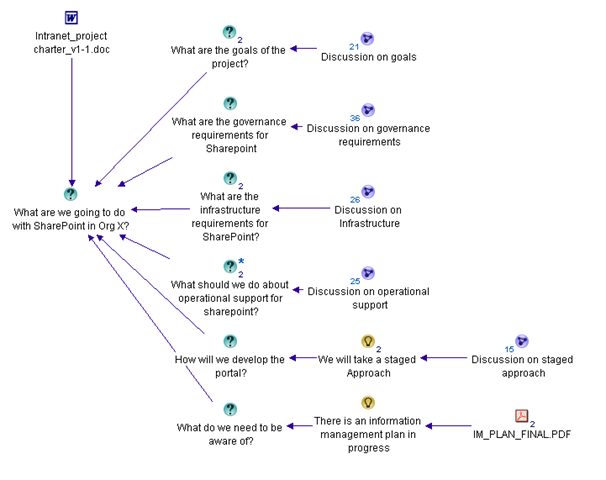
    In this project, I introduced the dialogue map from the very first meeting with a simple root question “What are we going to do with SharePoint in Organsiation X”?

    Now in this case, SharePoint is my core discipline, so unlike some of my subsequent engagements. I already had a bunch of questions that I wanted the client to start pondering. Being well aware of the destructive forces of the immutable laws of IT, I put down some immediate sub-questions.

    • What are the goals of the project?
    • What are the governance requirements of this project?
    • What are the infrastructure requirements for SharePoint?
    • What should we do about operational support for SharePoint?
    • How will we develop the project?
    • What else do we need to be aware of?

    The web team had also developed a project charter which explained, in some detail, the background to this project and how we came to be where we were. I linked this into the issue map. Something that also came up fairly quickly was that the organisation had just completed a large strategic review project and an Information Management Plan had been drafted and approved. This was a key document that pretty much set the direction of the organisation for the next four years.

    Below is the map showing these initial questions, along with the project charter and Information Management Plan. Note how I can attach documents into the IBIS map along with the argumentation.

    image

    Adaptive requirements gathering…

    As you can imagine, we started working through these questions. Given that the SharePoint was completely new to the team, I was perfectly happy for the web team to jump around to different areas of the map and fill it in. Fairly quickly, the participants identified that a staged approach would be needed for implementation, and we initially would flick between goals and stages until that began to solidify that the details of the implementation matched the goals.

    This map evolved over a period of time where we would spend time on-site with the team, performing training and advisory on SharePoint itself. As understanding of SharePoint’s capabilities grew from the use of a demonstration virtual machine, we refactored and re-examined the map as new knowledge, insights and/or understandings came to light. The team took to dialogue mapping like ducks to water, and the web team leader downloaded and installed compendium so that she always had the latest project rationale on her desktop.

    This also had advantages to my colleagues who were also involved in the training and advisory phase. Since each of us were trained in IBIS and dialogue mapping, any one of us was able to conduct a session and the new map would be redistributed to all participants. Thus, even if I did not attend a meeting, I was able to very quickly orient myself around any new questions, issues or ideas.

    Planting seeds of buy in…

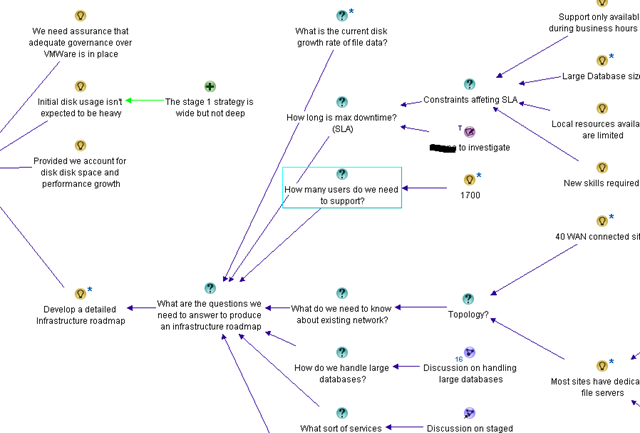
    One area that many web teams are weaker on in their knowledge is in infrastructure. In this case, I had a dual role as dialogue mapper and SharePoint consultant because I know how infrastructure guys think. After all, I used to be one myself. Therefore, I wanted to ensure that a lot of infrastructure considerations were captured and made explicit in the map before we took it to the other teams. I ensured that farm topology options were captured, backup and recovery implications, virtualisation and the like were covered. Additionally, many questions were captured but not answered, such as network topology, active directory configuration, large database management, SLA and the like. A snippet of this is below.

    image

    One thing that we were all aware of was to ensure that records management considerations were duly covered. By having a SharePoint environment to use and learn from, the team was able to quickly become much more informed about SharePoint’s view of the world, especially in relation to the orientation of metadata, sites and site collections. We confirmed that the goals of the project was an intranet and the sort of document management that would be required would be skewed very much towards team collaboration. The web team was aware that a records management system existed and also some members had some previous experience working with these systems. We ended up creating a very detailed map outlining the strategy for integration with records management, the options for integrating the current records system with SharePoint and most importantly, the golden rules around integration that ensured that the records management system was still the authoritative location for records. Later, Microsoft and the records management vendor visited the site and presented the latest information on the integration for the product and SharePoint, and the salient points were added to the map. Below is a snippet of the map discussing this topic (deliberately obscured for privacy, but you can get a good feel for the breadth of the discussion).

    image

    The acid test…

    Fast forward another couple of weeks, and the team now has a pretty good understanding of SharePoint and a very well factored map. By this time, others in the department had been called in at various times and added their rationale to the map, answering some of the open questions. Next stop was the ultimate test. A meeting was called, where all of the opposing forces were going to be in the one room at the same time. A dozen people in all, key decision makers who didn’t always enjoy a cosy relationship, crammed into a hot, tiny room with a portable projector.

    The web team manager introduced the project via the charter, and we all worked our way through the map. We discussed the goals of the project, how they related back to the strategic Information Management Plan, how we were structuring the phases to support those goals, what was in/out of phase 1 and why, and of course, the considerations that we had made in relation to the other IT Teams. After around 90 minutes, we were done and the group proceeded to give feedback.

    The records management team was clearly relieved. In producing the map, we had demonstrated a good awareness of records management considerations and we made it clear and explicit in the map that SharePoint was *not* going to replace or devalue what they already had in place. They loved the fact that we had captured rationale that discussed the pros and cons of the various methods and techniques we could use for integration between their tool and SharePoint as they did not know about this. The infrastructure team was also happy for the same reason. We had captured many of the questions that they would have asked themselves of the web team. We had managed to pass our “one shot” test and were not sin-binned for being naive to the nuances of IT infrastructure.

    Key success factors and conclusion

    All in all, in that one two hour meeting, everybody was on-side and excited about the project. It was fed back to us that achieving such buy-in within one meeting across these different IT departments was previously unheard of in this organisation.

    The key success factors boiled down to 3 major factors:

    1. The participants in the Dialogue Mapping process were extremely enthusiastic with the process. We did not sell Dialogue Mapping at all with this engagement – we just used it from the very first workshop. By the end of that first workshop, the participants were very impressed with the richness of what had been captured and it became the standard way we conducted workshops and requirements meetings.

    2. The visibility and clarity of the rationale meant that any major concerns of the other teams were mitigated by the fact that the questions they were interested in were either addressed or, at the very least, captured and visible on the map. For many parts of the map, the web team made no pretence to know all of the answers. However, by raising those questions in the map, it gave the other teams much more assurance that the web team were not running off and doing their own thing with a lack of consultation.

    3. As a mapper, knowing a fair amount about SharePoint meant that fast-tracking of learning was taking place, both at the map level and at the product capability level. Providing the team with a demo virtual machine allowed members to learn about the product, and then applying that learning back to their understanding of the problem in the map space. This was a great way for them to iterate and converge on the solution much more quickly than fumbling around with the product alone. As a SharePoint practitioner, I was able to foresee problem areas and then utilise the rationale in the map to help steer the various participants into determining the optimum solution for their circumstances.

    All in all, this was a great example of the power of Dialogue Mapping in speeding up the normally laborious process of stakeholder consultation and developing a shared sense of what was trying to be achieved. The one thing I would say about this method however, was that being a subject matter expert, as well as the dialogue mapper, meant that I was able to exercise a fair degree of control over the flow of the map. This is because I was both a participant as well as the mapper, both capturing as well as answering questions, raising concerns and flagging issues that may have been missed otherwise. For any aspiring dialogue mappers out there, this is actually a good way to start because you can concentrate on creating well formed IBIS, and not have to worry about whether you are articulating a participant’s dialogue correctly. Almost by definition in this case, you know exactly what the participant is talking about and getting the context onto the map in IBIS notation is not a huge mental challenge.

    But there is more…

    If I concluded this series now, I would be misleading you. The form of Dialogue Mapping that I undertook here was not what I would call pure Dialogue Mapping. In my explanation of the above process, I was a participant, strategist, mentor as well as mapper. My knowledge of the problem space was very detailed and I used Dialogue Mapping as a tool to help steer the group to a position that enabled them to improve their chances of a great outcome.

    In part 3, I will detail more about the craft of pure Dialogue Mapping. In this case, you are not in the room because of any particular expertise and you often do not know any of the stakeholders either. Your critical success factor is to produce a great map and thus, make a positive difference for a group in tackling a really wicked problem. As you will soon see, that changes things quite a bit…

    Until then, thanks for reading

    Paul Culmsee

    www.sevensigma.com.au


    Core Principles for User Engagement – a must read …er… explore!

    I listened to Steve Smith talk about user engagement on the SharePoint Pod Show today and found myself nodding in strong agreement with many points that he made. So while in that mood of stakeholder engagement and how to achieve it, twitter made me aware of a really terrific Debategraph map on the topic of “Core Principles of Public Engagements” and think it is mandatory learning material for any SharePoint architect/collaboration consultant/business analyst/business improvement specialists/<insert title here>.

    The map above, came from a collaborative effort called the “Public Engagement Principals Project”. This is a recent project (February 2009) and the aim was to “create clarity in our field about what we consider to be the fundamental components of quality public engagement”. The outcome of this project are seven recommendations that reflect the common beliefs and understandings of those working in the fields of public engagement, conflict resolution, and collaboration.

    1. Careful Planning and Preparation
    Through adequate and inclusive planning, ensure that the design, organization, and convening of the process serve both a clearly defined purpose and the needs of the participants.

    2. Inclusion and Demographic Diversity
    Equitably incorporate diverse people, voices, ideas, and information to lay the groundwork for quality outcomes and democratic legitimacy.

    3. Collaboration and Shared Purpose
    Support and encourage participants, government and community institutions, and others to work together to advance the common good.

    4. Openness and Learning
    Help all involved listen to each other, explore new ideas unconstrained by predetermined outcomes, learn and apply information in ways that generate new options, and rigorously evaluate public engagement activities for effectiveness.

    5. Transparency and Trust
    Be clear and open about the process, and provide a public record of the organizers, sponsors, outcomes, and range of views and ideas expressed.

    6. Impact and Action
    Ensure each participatory effort has real potential to make a difference, and that participants are aware of that potential.

    7. Sustained Engagement and Participatory Culture
    Promote a culture of participation with programs and institutions that support ongoing quality public engagement.

    Despite the fact this map is all about public engagement, this material is absolutely the best advice you could ever get for dealing with user engagement in your SharePoint endeavours. If you have any interest whatsoever in the mystical arts of getting true understanding and buy-in among your organisational stakeholder group, then this map (and its underlying documents), is for you.

    Also, be sure to use the Debategraph toolbar to explore the detailed information in the root node. There is a lot of supplementary information in this map that you can easily access by clicking on the “Show detailed text and comments” icon (highlighted below).

    image 

    If you are using the Seven Sigma Web Part for Debategraph, the Map ID is 16220 and you can incorporate this map into your broader governance site. I’ll be linking this map into my SharePoint governance map later as I think it complements, and expands upon the information contained there.

    I think these seven principles make a terrific starting point for developing your own guiding principles around user-engagement as part of your governance efforts.

    Finally, if you want more detailed information about how this map came to be, then consult the links below


    Thanks for reading

    Paul Culmsee


    Listen to me blab on about crap ;-)

    Hi

    I have been very busy on a number of fronts – which is why the blog hasn’t had much attention lately. I’ll be back soon enough though – once I get a few big jobs done.

    For those of you that are not aware, there is a podcast interview that I did with Brett Lonsdale at Sharepoint Pod Show where he allowed me to blab on and on and on and on 🙂 Poor Brett – he didn’t know what he was getting himself into at all!

    So if you think my posts are boring and wordy, wait till you hear me talk! 🙂

    Paul


    Perth SharePoint Users Group wrap

    Today I presented a session at the Perth SharePoint Users Group. I was a little unsure whether my non-technically focussed content would be of interest to the geeks but the turnout was terrific and the feedback has been brilliant. (The 3 copies I gave away of Dux’s excellent “SharePoint for Project Management” book may have sweetened the deal – hehe )

    My sincere thanks to new user group president Sezai Komur for giving me the opportunity to present this material as it was the first time it has seen the light of day in Perth.

    If you want to check out the slide deck from the session, you will find it below. Expanded information that builds on this content can be found at the Seven Sigma site, as well as here at CleverWorkarounds.

    Thanks for reading

    Paul Culmsee

    www.sevensigma.com.au


    A warning on “tame” metaphors

    image 

    Often people use metaphors to describe various aspects of SharePoint. I am guilty as charged here. One of the many that I use for SharePoint, is the metaphor of an Ikea modular storage solution to describe the new paradigm of moving from folders to document libraries, columns, views, workflow, sites, content types and the like.

    But, I see a very common mistake with a lot of SharePoint metaphors that you must be careful with. People use tame metaphors for SharePoint, and this misleads.

    Confused? Well consider this. There are two main types of problems in this world. Tame problems and wicked problems.

    This is what a tame problem looks like according to Conklin.

    • A tame problem has a relatively well-defined and stable problem statement.
    • A tame problem has a definite stopping point, i.e. we know when the solution or a solution is reached.
    • A tame problem has a solution which can be objectively evaluated as being right or wrong.
    • A tame problem belongs to a class of similar problems which can be solved in a similar manner.
    • A tame problem has solutions which can be tried and abandoned.

    A wicked problem on the other hand looks a little different.

    • A wicked problem is not understood until after formulation of a solution.
    • Stakeholders have radically different world views and different frames for understanding a wicked problem.
    • A wicked problem can be explained in different ways
    • A wicked problem is always considered a symptom of another problem. 
    • Constraints and resources to solve the problem change over time.
    • The problem is never solved.

    Yeah, I know – it’s a rhetorical question, but which category do you think many SharePoint projects fall under? 🙂

    Wicked metaphors

    So, just like problems, there are two types of metaphors in the world too, tame ones and wicked ones.

    The reason that my Ikea metaphor works has nothing to do with Ikea itself. The point I am  making is that even with the most spectacular modular Ikea storage solution, installing it is not that hard. I mean, if you read the instructions and take your time it can be done. Even if you rush, you might have a few scratches and hit your thumb with the hammer a few times, but you will get it installed. Even so, many prefer to get an Ikea guy to come in and do it.

    But, here is the rub – the Ikea guy can’t help you agree with your dysfunctional family about whose underpants should go where. Guess what – *that* is the wicked bit! Wickedness has little to do with the Ikea furniture itself. It is all about the social complexity of those who have to work with it together.

    So, be careful if you say something like “SharePoint is like building a house, you need to lay the foundations first…” Why? Remember that building a house is actually a very tame problem. People do them all the time and we pretty much follow the same script. Many collaborative solutions are not tame in this way. Therefore, this metaphor misleads and is completely inappropriate.

    In fact, if you wanted a more accurate house metaphor, you need to add the social complexity and organisational chaos element to it. In my version, it is still a house building exercise, but this time you are the foreman and the construction crew consists of your mother in law, Homer Simpson, Eric Cartman, Tom Cruise and Paris Hilton.

    I pity the project manager who has to deal with that combination of personalities!

    image image image image


    Thanks for reading!

    Paul Culmsee

    www.cleverworkarounds.com


    The one best practice to rule them all – Part 6

    BoromirRing

    Hi again and welcome to the sixth and final post in this series aimed at enlightening readers to the often overlooked importance of shared understanding of a problem. For those of you who have come across this article for the first time, I suggest very strongly that you stop and read through its predecessors. There is a lot that was covered to get to here.

    To recap, we have spent the last two posts delving into the deep structure of problems by using an issue based mapping method. This post will continue in that same vein, but I am going to move a little faster this time and cover more argumentation with a little less explanation. I’ll also finish off with some other interesting aspects to IBIS and dialogue mapping that we haven’t covered so far.

    The first 4 posts were all about one of the key root causes of the organisational chaos that causes projects to go haywire, whether it is a SharePoint installation or trying to get the coffee machine fixed. I believe very strongly that if a group of participants can attain and maintain a sufficient level of shared understanding, then often what seemed like a polarising problem with intractable stakeholder positions, can start to make real progress toward resolution. The collective intelligence of a group is a powerful tool to be leveraged, but all too often it can be brought undone by social complexity and the inherent inefficiency of meetings. SharePoint is prone to social complexity because of its technical complexity, malleability and the fact that it is sold by Microsoft and they use that damn six pillar pie chart :-).

    By the way IT people – your projects are rarely actually “wicked problems” in the true sense of the term. Until you have been involved in dialogue mapping a planning or social policy type problem with countless sub-issues and stakeholders, then you do not know just how good you have it! 🙂  In saying that, I recognise that many, if not all, IT projects have a lot of wicked elements to them.

    Previously on CleverWorkarounds…

    In my last post, we had developed an IBIS based issue map that I think is a reasonable reflection of a blog article written by Joel Oleson, incorporating some feedback by readers who disagreed with many of his points. What is great about Joel’s style of writing is that he likes to use headline grabbing titles for his articles. As a result of this, he stimulates rigorous debate and I could probably spend the rest of my days on CleverWorkarounds simply IBIS mapping his posts and all of the responses.

    But, we haven’t finished issue mapping this site definitions thing, so let’s finish it off by mapping the rest of the responses. Below is a scaled down view of the map that we had by the end of part 5 (click to enlarge).

    image_thumb9

    Now, let’s go through some more responses and work them into the issue map. First up was this incredible quote showing much wisdom and maturity. Who uttered such pearls of wisdom? Oh, wait, that was me  :-)!

    Joel and I spoke about this earlier in the day actually before this was posted – I hate them also but accept their need in WCM scenarios.
    My biased view of the world stems from a site that I visited where branding had been put above all else and so it was an undocumented site definition with custom controls, dodgy web.config hacks all running in full trust to make it all work. 2 days later and I had it migrated. But it was all so *unnecessary* and I think that’s Joel’s point. They get used when they shouldn’t.

    The client in this case had never been shown columns, views, versioning and this was a document centric intranet for cryin’ out loud! Instead they get a pretty site with a 50gig content DB because of a hacked site definition with custom nav controls to look pretty, application.master hacks to make it consistent and no thought process into information architecture. They simply took their existing ugly filesystem and whacked it in!

    Hmm, when you read my response, all I did was support Joel’s original assertion that site definitions are modified unnecessarily, so in essence I did not really add that much to the conversation and in fact the example that I used was a client who had way more issues than the custom site definition alone. So as it happens, my post really didn’t add anything *new* to the discussion.

    Next we have this anonymous response:

    In situations where lots of sites need to be created from one pattern and you want old sites to get new changes, site definitions are a must. As mentioned above, you can’t staple features to a template.

    I think you’ve swung the pendulum too far with your comment. Yes, big, bulky, all encompassing site definitions aren’t very maintainable. So don’t use them this way! As AC and others have blogged about, create a blank site definition for stapling purposes, and package everything in features. You still need that first site definition though! STP’s are for end users, IMO, not for solution developers.

    The quote above makes the important point that “if a lot of sites need to be created from one pattern” and “if you want old sites to get new changes”, then site definitions are pretty much required. I created an pro called “Single click deployment and upgrade” and then fleshed it out with the those ideas. The comment about pendulum is unimportant. Below is the new map

    image

    Next up Adam Toth makes an excellent, yet subjective counterpoint to the “difficult to upgrade” argument.

    Since this is version 1.0 of Features, Solutions, Stapling, Content Types, Workflow, etc., I really believe that any upgrade to the next version is going to be a headache anyway. No matter what you did in sharepoint v1, it broke going to v2. v2 to v3 was also incredibly painful because the product changed so dramatically. We have no visibility into v4, and have no way to figure out what approach will make upgrades least painful. We can assume that things are starting to solidify, but there are no guarantees.

    The above response from Adam questions the previous claim that site definitions “are difficult to upgrade and support” by arguing that upgrading will be difficult no matter what. I do not delete the original “difficult to upgrade and support” con, but incorporate Adam’s points as a new question “Really?” against the con, and then support that question with the idea that “Upgrading will be difficult anyway”. Adam supplied 3 arguments supporting his claim (many SharePoint components are V1, the previous versions were all painful upgrades and that we have no visibility into how the next SharePoint will work). Now the map looks like this.

    image

    Next is David Mann

    Custom Site Definitions are a tool. Like any tool, they have benefits and drawbacks. Used properly, they provide much value. Used improperly, they cause pain.
    Even the body of the article contradicts the sensationalist-headline by saying that there are some things you can’t do without a custom site def. The article of AC’s that this links to, and it’s comments, talk about a solution that is a totally blank CUSTOM SITE DEFINITION, that is then built up properly with Features/Solutions. They also mention publishing scenarios that the recommended approach is a custom site def.

    So, the best approach is to do your homework. If a custom site def REALLY is the best approach, then feel free to use them. Just make it a conscious decision, knowing the trade-offs, not your default reaction because it’s easier.

    At this point, it is time to add a new question to this map, as like other respondents, David is referencing Andrew Connell’s post on this subject. David mentions a specific application of site definitions (use a blank one and add to it with stapled features), which is in itself not a pro or con of site definitions, but a way of using them that mitigates many of the disadvantages of them.

    Since we are IBIS, and we now have this new idea “Use a blank site definition with features/solutions”, and we need to infer the question behind the idea. My initial guess is “What is the best practice for using Site Definitions” and I have added it to the map as shown below. We could easily use Andrew Connell’s post on this subject to further flesh out the best practice for Site Definitions on this map, but for the sake of article size I have chosen to continue with the original responses to Joel’s post.

    image

    Chunk it up

    At this point, the map is getting large and we need to make it more manageable. Fortunately, this is very easy using tools like Compendium. I simply create a new sub-map and copy the nodes to the sub map. In effect I start to build a hierarchy of the logic behind the argumentation. Below shows the top level argument map at this point, now chunked into sections. Each sub map “Discussion on the use of site definitions” and “Discussion on the use of site templates” is now in its own sub-map that is accessed by clicking on the parent map.

    image

    The final response that I will cover off for now is from SharePoint Yoda, Eric Shupps who writes a really excellent factual based response to the post.

    There are many scenarios in which they are required:
    1. Automated Provisioning – Self-contained solutions that have all necessary functionality baked in (think hosting and SAS models).
    2. Repeatability – They migrate better from dev to staging to production better than any other method.
    3. Maintainability – New Features can be added or removed as required and the solution upgraded. Try doing that with an STP file.
    4. One Click Deployment – The user simply selects the proper definition on the site creation page, to which you can add descriptive text and sample images (what do you think all those other options are? They’re OOTB site defs, that’s what).
    5. Control – Nothing beats a site def for restricting what features site owners can and cannot use. Very important in many enterprise environments.
    6. Ease of use – There are lots of workarounds for the power and flexibility that site defs provide but all require a great deal more code than a simple site def with stapled features.
    Sorry to burst your bubble but you’re wrong on this one. Next time, ask a developer with experience doing Site Definitions the proper way before you go off on an opinionated rant. I’d be happy to help!

    Some of Eric’s arguments are already in the map, but not all of them. Furthermore, he further expands on some of the arguments that already are there. First up, I changed my original pro of “Single click deployment and upgrade” to “automated provisioning” because I think this captures that argument more succinctly. Even though Eric then lists “1 click deployment” as a separate criteria, I think they belong together and it’s my map! ;-).

    Eric also highlighted “hosted” and ”software as a service” scenarios where automated provisioning is particularly important. Since I already have a nice string of argumentation, asking for criteria of when to use site definitions, I have added these as supporting arguments to this existing set of nodes.

    “Repeatability” and “Control” are excellent points, and I have captured Eric’s arguments in this area. To make the idea clearer, I captured “Control” as “Tight administrative controls” as this is less ambiguous in its meaning than “control” alone.

    Then Eric hits the one argument that no-one seems to agree on. “Ease of use”. Clearly Eric’s idea of ease of use is different to Joel’s. When you look at Eric’s supporting arguments for ease of use, it appears that he is really reiterating the “automated provisioning” pro for site definitions and supported the “more manual customisations needed” con for site templates.

    The adjusted map for the site definitions idea has now morphed into this.

    image


    Emergent Themes

    I am going to stop this IBIS map now because otherwise, I could spend another 5 posts just working through all of the contributions made by various people. But more importantly I want to highlight a few really important points that might get lost in all of the screen-shots.

    One of the things that I notice when performing Dialogue Mapping with a group is that the action of utilising a shared display like IBIS allows people to make connections much more quickly and really starts to make clear some of the underlying themes behind the discussion. It is much quicker and more efficient for participants to achieve the necessary breakthroughs when argumentation is visually represented and lots of seemingly abstract concepts can be logically related to each other. It seems to be that as human beings, our brains are particularly well-wired to visual based representation.

    I want you to picture yourself in a meeting scenario where we are discussing a problem. It doesn’t have to be a face to face meeting either (although this is usually the case). It can be a group collaborating on a problem using blogs, wikis, discussion forums or any other medium. Without the issue map, there will be a number of problems that will combine to derail the meeting.

    First up, there is likely to be a lot of points that have been made. If we were following the meeting in a traditional, linear fashion the argumentation would look something like this:

    image

    What you are looking at above is in effect, a visual version of traditional meeting minutes. (You know those documents that get sent around that you never read?). This also is not too dissimilar to the structure of a blog post (and the subsequent comments). Contrast this to the issue map that uses an issue based structure that makes the logic and flow of the conversation visible. Which is more meaningful? Which is easier to “read”?

    For a start, people do not have to decipher any convoluted dialogue – we do not spend half the meeting disagreeing and then realising that we are actually talking about the same thing. The objectifying of the dialogue reduces those situations where the defences are high because people have inferred some bias that can easily be misconstrued. Different points of view are made much clearer and we do not continually revisit the same old topics over and over again. As the argumentation is further fleshed out, participants are much less likely to get lost or lose track of the conversation. Even if they do, we have a beautiful ‘corporate memory’ system here that is starting to form. Just because one person wants to return to a previous point and ask a question or add an argument to it, doesn’t mean that the next person has to take up this point at his or her turn. They can jump to wherever in the map their current train of thought takes them.

    Death by repetition is also mitigated nicely. Death by repetition is those times in a meeting where there is a “true believer” who believes very strongly in a course of action to the point that they will find a way to work their answer into every question asked. Don’t feel too guilty when reading that – we all have done this.  Of course, it annoys the crap out of everybody else present, but the true believer will doggedly persist because they feel that their answer has not been considered enough or given the recognition that it deserves. But once captured on the issue map, the idea is visible and has equal footing to all of the other ideas. If the true believer persists, then the mapper simply asks the true believer if they have anything more to add to what is there already. Usually this only happens once :-).

    There are other phenomena that are guaranteed to derail a meeting, usually leaving all participants emerging from the meeting annoyed that they never got to the actual agenda. Conklin calls this “grenade lobbing” and this is where a participant, usually with the defence drawbridge raised, will challenge the whole frame of the meeting. “That is not the real issue here”, they will explain, “it is this”. (Remember wicked problem rule number 8, every problem is a symptom of another problem). Every time you have emerged from a meeting, feeling deflated and wondering what happened to the agenda, chances are a few grenades were lobbed and the entire purpose for coming together was caught up on a tangent.

    But issue mapping makes dealing with this easier too. Usually when a grenade is lobbed, where the frame of the meeting is challenged, it means that the root question of the map is not correct. Fortunately with an issue map, the answer is quite easy. You simply shift the map to the right and work with the grenade lobber to infer the deeper question. Once captured, the group can continue to work with the implications of this new question or continue to work with the rest of the map. The previous disruptive power of the grenade lob is significantly mitigated.

    Final Note – Tech geeks vs Developers

    I previously said that performing Dialogue Mapping and IBIS allows people to make logical connections much more quickly and really start to clear some of the underlying themes behind the discussion. This “Joel vs developers on site definitions” example that I have been working with was actually not a great IBIS example. The reason is that if we had started the entire conversation using IBIS, then a lot of the subsequent argumentation would have been very different. If say, Joel had used IBIS to structure his arguments to begin with, apart from making my job a lot easier, the map would have underpinned a very different blog post in structure and clarity of argument.

    But despite the somewhat artificial nature of my example, from the mapping that we have performed so far it is clear to me that the two distinct viewpoints have emerged. This argument cuts to the heart of the IT Pro vs Developer world. Certainly a strong indication of this was the disagreement behind what is actually “easier”. It seemed that Joel’s easier is very different to the developer view of “easier”. Of course, we haven’t even counted the other stakeholders either and I bet the end-users’ definition of “easier” would be completely different from the two themes that emerged.

    I personally come from an IT pro background and IT pro’s have become paranoid types because they are always the ones who have to deal with the after-effects of bad customisations (See the “mother hen reflex” post for how that has come to be). But through mapping this issue out, I was able to make some definite connections with the developer centric replies too. I didn’t necessarily agree with all of the points made, but I now have a much better understanding of their point of view.

    At the end of the day, understanding those points of view is going to give you that shared commitment required to see a problem through to an effective a solution.

    Well that is it for this series. I hope that you found it of some use and welcome any feedback. Since I am a trained, practicing and designated Dialogue Mapper, expect to see a lot more IBIS on CleverWorkarounds and Seven Sigma over the coming months.


    Thanks for reading

    Paul Culmsee

    www.sevensigma.com.au


    « Previous PageNext Page »

    Today is: Wednesday 3 June 2026 -