Back to Cleverworkarounds mainpage
 

SharePoint Analysts–Stop analysing!

Michal Pisarek wrote a nice write-up of what makes a good SharePoint Analyst. I feel I have something to offer here, given that I…

  1. am a cynical old bastard
  2. am an opinionated old bastard
  3. have had some opportunities that not too many SharePoint people have had
  4. wrote this post on a plane while suffering jetlag 🙂

I am going to argue that as a SharePoint ”analyst”, the worst thing you can do is act like an analyst.

I previously wrote about the identity crisis that Business Analysts have which became apparent to me when I spoke at a BA World Conference last year. The gist of my point in that post came from my observations of a panel discussion on role of a BA within Agile development. I noted that the whole discussion seemed based on an underlying presumption that the role of the BA was to translate between IT and “the business". Agile by its very nature, shifts the ground out from under this assumption which caused a bit of consternation on the part of the panel. My takeaway from this, was that a role does not define the person. The body of knowledge of your discipline (in this case BABOK) is not the one truth. When you think about it, the body of knowledge by definition, consists of the lowest common denominators of a discipline of knowledge – a starting point. This is because the skills that you have built are your skills. Sure, you can write about them, but that only conveys a small dimension of what your skills entail.

Essentially, if everybody followed the BOK as the source of the truth then all consultancies would look the same. (Thinking about it, now you know why all large and expensive management consulting firms tend to sound the same…hehehe 🙂 )

image

The point is that it is the knowledge that you have earned that makes you what you are and what customers want. Knowledge comes from making mistakes, not by confirming your rightness. Therefore, people who practise constant learning by trying things out, challenging their models of reality, always build a hugely valuable corpus of tacit knowledge that is locked up in their brain where knowledge is connected and related in ways that form insight. It is because of this unique insight, that customers rarely want a “Business Analyst”.  They want Joe or Bob because of what Joe or Bob, as individuals, bring to the table. (Kailash writes about this in more detail if I am leaving you scratching your head at this point. I am going to quote him in a reply to Richard Harbridge).

The point I would like to emphasise, however, is that best practices cannot capture tacit knowledge. Codified best practices (or standards) are therefore necessarily incomplete. One of the things standards don’t tell you is how you should “practice the practice”. Practices have to be customised or adapted to specific organisational contexts before they can be practiced. The process of customisation invariably involves the creation of tacit knowledge to fill in the missing bits. This is why I used the word “rediscover” to describe this process, rather than “customise” (or “adapt”) : the former gives a better sense for the magnitude and type of effort involved whereas the latter suggests that minor tinkering will do the job (which it won’t).

So, here is a tip. Don’t define your own wellbeing by a role title or adherence to a body of knowledge because, if you do, you will inevitable have an identity crisis. The world simply moves on and with it, the problems that people are trying to solve tend to wriggle out of the domain of any single BOK. Any attempts to resist this will eventually become dogma and then we have “memetic smackdowns” as I describe in this EUSP Post.
image

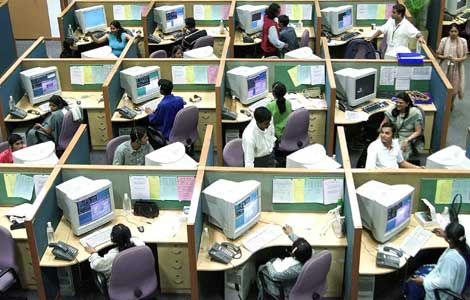
Okay, so now that I have finished a mini rant, I’d like to address the whole “analyst” thing. Don’t get me wrong – it’s not the title of the role I am going to talk about here, but the analyst paradigm itself. That is, the notion that my purpose in life is to take some requirements, go to a back room, spend time “processing” and “synthesising” those requirements, translating away between "IT and “the business”, before formulating a solution for the customer.

This does not work well with most SharePoint projects! Especially ones that seek to “improve collaboration”.

Many people fail to see why this is the case, yet given the huge gap between the SharePoint that Microsoft shows you versus what you see on the ground, you would think that it would be kind of obvious. For what it’s worth, understanding why the analyst paradigm is dangerous also neatly explains why IT is generically predisposed to struggling with SharePoint.

Consider the following projects:

  • Implementing Microsoft Exchange for a global organisation
  • Implementing Active Directory for unified and policy based user and resource management
  • Replacing PBX with a Voice over IP system
  • Upgrading your wide area network from site to site VPN’s to MPLS managed WAN
  • Determining support and escalation procedures for a SharePoint deployment
  • Replacing a Windows XP/Office 2003 desktop environment with Windows 7/Office 2010

In the above list, if you ask the question “Will users accept and adopt this?” the answer is a fairly clear yes. At the end of the day, no matter what version of Exchange is in, Microsoft Outlook is still Microsoft Outlook. What the user sees is an Inbox and so long as mail comes in and goes out – they are happy. All Active Directory is to a user is a username and password to get to their computer. Irrespective of how clever the routing is in a Voice over IP system or a WAN network, a phone is just a phone. You can plan for support and escalation procedures for SharePoint, but at the end of the day, people will use the SharePoint system because it is the right solution for them. Sure they might get pissed if they have bad technical support, but if the solution is crap then no amount of awesome support structure is going to change this.

This, my friends, is the realm of the analyst paradigm!

You see, if you ask me to deploy Active Directory or Exchange, I will ask you a bunch of questions about your number of sites, number of users, communications infrastructure and the like, and I know that users will use it. I actually don’t need to talk to them. Oh sure, someone might do some communications planning, but I don’t need to address user adoption because adoption is already there! People adapted to email, telephone and Microsoft Windows years ago.

Instead, I can go into a back room, read a bunch of whitepapers and design/deployment guides and blammo. Here is your solution and here is how much I think it will cost. Better still, I can use waterfall style of project methodology because as a specialist, I have done this before and have expertise. I can tell you what needs to be done in considerable detail and break it down into a plan.

What it all boils down to is that there is a clear relationship between cause and effect, characterised by answering YES to the “If I do this, will users accept and adopt this” test. But most IT departments (and most IT integrators) are going to default to the analyst paradigm because many of their other projects tend to be in the above category. This analysis based mode of project delivery is very much ingrained into the reptile brain of a lot of IT professionals through years of repetition of implementing these types of projects. After all, it’s just IT, right?

Also, note that many of these type of projects are characterised by being very technically complicated. Some are insanely so and require specialist technical expertise. This is the realm of the supremely skilled person who performs an analyst function with a body of knowledge behind them. The whole industry certification process is built on this fundamental underpinning and works really well with things like Cisco and Microsoft in areas like Exchange, Active Directory and the like.

Now, consider the following projects or initiatives (I am deliberately picking things where people may disagree with me so go with me, ok).

  • Coming up with an navigational structure for a SharePoint collaborative portal
  • Installing SharePoint to improve collaboration
  • Replacing a folder based file share with a metadata based document repository
  • Designing a new road layout for a local suburb
  • Putting in a new intranet
  • Putting in a records management system
  • Installing a new time tracking system

In all of these problems, it is difficult to answer yes to the “Will users accept and adopt this” question. Sure, you can go all big stick and say “We will force them to” but that fails the “accept” part of the test. Therein lies the danger for the analyst paradigm. You can go off to the “back room” and use your body of knowledge, read best practices and “analyse” until the cows come home. Until you deliver the solution, you will not know if it will be accepted.  The cause and effect relationship is not clear until after an action has been taken!

image

The reason you can’t confidently answer yes is that all of these projects above require adaption on the part of the target audience. Adaption leading to adoption is a hit and miss affair. While we might like to think that we are all rational, clearly we are not. If you want rational, think Dr Spock from Star Trek – and even he got mad sometimes! Office politics and organisational inertia stems from the irrational world. Butt covering by positioning for “blame avoidance” for decisions made by fear and anxiety are commonplace. If you work in a large organisation and listen carefully to a typical meeting, the logic and facts that are spoken out loud are rarely what matters compared to the complex non spoken interplays that go on underneath the words.

For what it’s worth, I added a non IT example of designing a new road layout for a suburb. A rational analyst might think that residents have to accept the solution by definition because, after all, once a road is in, that’s it. But what typically happens is that residents of that neighbourhood see the plan, petition, form lobby groups and harass the hell out of their local political representatives. If this is enough to make the politician edgy then they will vote the plan down before it ever happens. Sure it might have been a good plan, but it’s gone now and the chances of further buy-in are greatly reduced.

The pure analyst is often taking a rational approach to an irrational problem space. Sorry folks – this is simply asking for trouble. Like the politician who does what they think will keep them in power versus what is logical shows the rational world does not always get a good look in. A good example in SharePoint land, is the “metadata is good and folders are bad” thing. Any metadata fanboy with this mantra often find the hidden organisation will beg to differ 🙂

So, what do we do then?

image

The facilitator paradigm instead aims to elicit resolution of problems using dialogue between stakeholders by achieving a greater degree of shared perception of the problem situation. Unlike the analyst paradigm, there is no back-room approach as such. By definition, we need to collaborate to do this. (Fancy that, eh? Collaborating to deliver a collaborative platform – who would have thought!)

Now, I am not talking about facilitation in the classic sense with everybody sitting in a room in a circle and plays team building games. Some of the best project managers and business analysts I have met are facilitators without necessarily knowing it. What I mean by facilitation is that our starting point is to leverage the wisdom of the crowd, by creating an environment conducive to participants being able to surface the irrational as well as the rational. Only in this way, can we come to a shared understanding of a problem and what should be done about it.

I previously termed this the holding environment, and it really is. A great business analyst or project manager knows this instinctively, and uses many tools (as well as some coercion and sometimes their own ego surrendering) to bring it about.

If you take anything away from this post, remember this. Anytime you cannot confidently answer the “Will users accept and adopt this” question, it is highly likely that not all users see that there is even a problem yet. Therefore, expecting people to magically buy-in and adapt when they don’t recognise the problem is never going to fly. Like trying to get a Darwinist to accept that intelligent design should be taught in schools, someone who does not believe in it to begin with, is not going to easily buy into a solution that requires them to change their beliefs and therefore behaviour. 

Conclusion

When you think about it (rationally!) we usually look at SharePoint as an enabling technology that can address a legacy of poor collaboration and information management. Yet, how can the world of the analyst work out if their solution will create the very same legacy without all stakeholders being on the same page?

So remember, in a project where the cause and effect relationship is not clear, use the facilitator paradigm and stop being such a bloody analyst!

Thanks for reading. Comments most welcomed Smile.

Paul Culmsee

www.sevensigma.com.au


In 2011, I will be posting sections of my Governance and Information Master Class here. Much of the content consists of mental models, alternative frames of reference, pattern and practices as well as other tools and methods, specifically for the facilitator paradigm. This is my interest area and feel the analyst paradigm is already well represented in the SharePoint space.
Dialogue Mapping: The Ying to SharePoint Yang

I don’t know about you, but as a SharePoint practitioner, I love the fact that I do not do SharePoint full-time anymore. I’d like to take some time to explain why this is the case, and how my non IT work helps me be a better SharePoint practitioner. To do so, I will talk about a recent non IT project I worked on. Who knows? This may give you some insights into how you view and approach collaborative work.

Western Australia is BIG

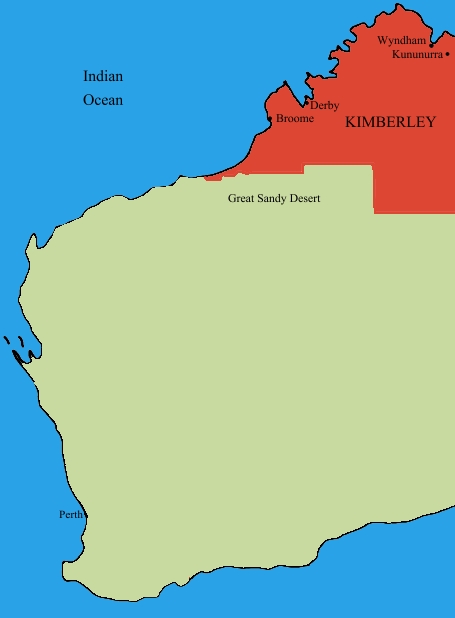
File:Kimberley region of western australia.JPGIn case you don’t know already, I live in Perth, Western Australia. You can see Perth if you squint at the map on your left and look to the south west area.

Western Australia is a bloody big land area and extremely isolated. One claim to fame about living in Perth is its distinction for being one of the most isolated cities in the world. In fact we has a population density is on par with Mongolia (this is dead-set true – I researched this fact). Of the 2.2 million people that live in the state, 1.8 million live in the Perth metropolitan area and the rest are scattered far and wide. In terms of distribution, there are no other major cities in Western Australia. The next most populated town outside of Perth is Mandurah with some 83,000 people. 

In the north of Western Australia, these towns are often separated by anywhere from a couple hundred to more than a thousand kilometres. The weather is very hot, the landscape is breathtakingly beautiful and the isolation here is hard to comprehend without visiting. The wealth of Western Australia (“GFC? What GFC?”) comes from the north of this vast state, via huge mineral deposits that China seems happy to buy from us, which in turn keep me and my colleagues busy putting in SharePoint around the place.

Now if you think Western Australia is big, get this: The Kimberley region of Western Australia (the top section marked in red) is almost as big as the entire country of Germany. For American readers, it alone is three fifths the size of Texas. For all that space, only around 45000-50000 people live there.

These wide distances create all sorts of challenges. At a most basic level, think about the cost of basic services to such a remote location with such a small population density. Cost of living is high and services like health care are always stretched and people living here have to accept that they will never be able to enjoy the same level of service enjoyed by their city slicker cousins.

Now that I have painted that picture in your mind, let me intersect that with one of Australia’s biggest wicked problems. The indigenous people’s of Australia have many social and health issues that have had a massive human cost to them. We are talking chronic alcoholism, physical and sexual abuse, depression, suicide and the whole range of mental illnesses. Families and communities tear themselves apart in a seemingly an endless negatively reinforcing cycle. Like many indigenous groups around the world, intervention approaches from earlier periods have had catastrophic long term consequences that were never considered at the time (a classic wicked problem characteristic). When you read the stories about the stolen generations, you cannot help but be deeply moved by the long term effects, the damage done and the sad legacy left behind.

Continue reading “Dialogue Mapping: The Ying to SharePoint Yang”


A different kind of SharePoint Governance Master Class in London and Dublin

The background

Over the last three years, my career trajectory had altered somewhat where I spent half my time as a SharePoint practitioner, doing all of the things that us SharePoint practitioners do, and the other half was spent in a role that I would call sensemaking. Essentially group facilitation work, on some highly complex, non IT problems. These ranged from areas such as city planning, (envisioning and community engagement) to infrastructure delivery (think freeways, schools and hospitals), to mental health, team and relationship building, performance management, board meetings and various other scenarios.

Imagine how much of a different world this is, where a group is coming together from often very different backgrounds and base positions, to come to grips with a complex set of interlocking problems and somehow try and align enough to move forward. We cannot simply throw a “SharePoint” at these problems and think it will all be better. By their very nature, we have to collaborate on them to move forward – true collaboration in all its messy, sometimes frustrating glory.

As a result of this experience, I’ve also learned many highly effective collaborative techniques and approaches that I have never seen used in my 20+ years of being an IT practitioner. Additionally, I’ve had the opportunity to work with (and still do), some highly skilled people who I learned a huge amount from. This is “standing on the shoulders of giants” stuff. As you can imagine, this new learning has had a significant effect on how Seven Sigma now diagnoses and approaches SharePoint projects and has altered the lens through which I view problem solving with SharePoint.

It also provided me the means to pinpoint a giant blind spot in the SharePoint governance material that’s out there, and what to do about it.

The first catalyst – back injury

In January this year, my family and I went on a short holiday, down to the wine country of Western Australia called the Margaret River region. On the very first day of that trip, I was at the beach, watching my kids run amok, when I totally put my back out (*sigh* such an old man). Needless to say, I could barely move for the next week or two after. My family, ever concerned for my welfare, promptly left me behind at the chalet and took off each day to sample wines, food and generally do the things that tourists do.

Left to my own devices, and not overly mobile I had little to do but ponder – and ponder I did (even more than my usual pondering – so this was an Olympic class ponder). Reflecting on all of my learning and experiences from sensemaking work, my use of it within SharePoint projects, as well as the subsequent voracious reading in a variety of topics, I came to realise that SharePoint governance is looked through a lens that clouds some of the most critical success factors. I knew exactly how to lift that fog, and had a vision for a holistic view of SharePoint governance that at the same time, simplifies it and makes it easy for people to collectively understand.

So I set to work, distilling all of this learning and experience and put it into something coherent, rigorous and accessible. After all, SharePoint is a tool that is an enabler for “improved collaboration”, and I had spent half of my time on deeply collaborative non IT scenarios where to my knowledge, no other SharePoint practitioner has done so. Since sensemaking lies in all that ‘softer’ stuff that traditionally IT is a bit weaker on, I thought I could add some dimensions to SharePoint governance in a way that could be made accessible, practical and useful.

By the end of that week I still had a sore back, but I had the core of what I wanted to do worked out, and I knew that it would be a rather large undertaking to finish it (if it ever could be finished).

The second catalyst – Beyond Best Practices

I also commenced writing a non SharePoint book on this topic area with Kailash Awati from the Eight to Late blog, called Beyond Best Practices. This book examines why most best practices don’t work and what can be done about them. The plethora of tools, systems and best practices that are generally used to tackle organisational problems rarely help and when people apply these methods, they often end up solving the wrong problem. After all, if best practices were best, then we would all follow them and projects would be delivered on time, on budget and with deliriously happy stakeholders right?

The work and research that has gone into this book has been significant. We studied the work of many people who have recognised and written about this, as well as many case studies. The problem these authors had is that these works challenged many widely accepted views, patterns and practices of various managerial disciplines. As a result these ideas have been rejected, ignored or considered outright heretical, and thus languish (largely unread) in journals. The recent emergence of anything x2.0 and a renewed focus on collaboration might seem radical or new for some, but these early authors were espousing very similar things many years ago.

The third catalyst – 3grow

Some time later in the year, 3grow asked me to develop a 4 day SharePoint 2010 Governance and Information Architecture course for Microsoft NZ’s Elite program. I agreed and used my “core” material, as well as some Beyond Best Practice ideas to develop the course. Information Architecture is a bloody tough course to write. It would be easy to cheat and just do a feature dump of every building block that SharePoint has to offer and call that Information Architecture. But that’s the science and not the art – and the science is easy to write about. From my experience, IA is not that much different to the sensemaking work that I do, so I had a very different foundation to base the entire course from.

The IA course took 450 man hours to write and produced an 800 page manual (and just about killed me in the process), but the feedback from attendees surpassed all expectations.  This motivated me to complete the vision I originally had for a better approach to SharePoint governance and this has now been completed as well (with another 200 pages and a CD full of samples and other goodies).

The result

I have distilled all of this work into a master class format, which ranges from 1 to 5 days, suited to Business Analysts, Project and Program Managers, Enterprise and Information Architects, IT Managers and those in strategic roles who have to bridge the gap between organisational aspirations and the effective delivery of SharePoint solutions. I speak the way I write, so if the cleverworkarounds writing style works for you, then you will probably enjoy the manner in which the material is presented. I like rigour, but I also like to keep people awake! 🙂

One of my pet hates is when the course manual is just a printout of the slide deck with space for notes. In this master class, the manual is a book in itself and covers additional topic areas in a deeper level of detail from the class. So you will have some nice bedtime reading after attending.

Andrew Woodward has been a long time collaborator on this work, before we formalised this collaboration with the SamePage Alliance, we had discussed running a master class session in the UK on this material. At the same time, thanks to Michael Sampson, an opportunity arose to conduct a workshop in Ireland. As a result, you have an opportunity to be a part of these events.

Dublin

Storm_long_banner

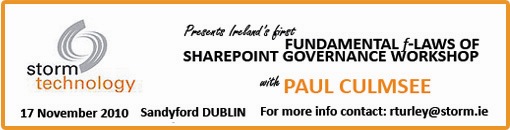
The first event is terrific as it is a free event in Dublin on November 17, hosted by Storm Technology a Microsoft Gold Partner in Dublin. As a result of the event being free, it is by invitation only and numbers are limited. This is a one day event, focussing on the SharePoint Governance blind spots and what to do about them, but also wicked problems and Dialogue Mapping, as well as learning to look at SharePoint from outside the IT lens, and translate its benefits to a wider audience (ie “Learn to speak to your CFO”).

So if you are interested in learning how to view SharePoint governance in a new light, and are tired of the governance material that rehashes the same tired old approaches that give you a mountain of work to do that still doesn’t change results, then register your interest with Rosemary at the email address in the image above ASAP and she can reserve a spot for you. We will supply a 200 page manual, as well as a CD of sample material for attendees, including a detailed governance plan.

London

SamePage-Rect-BannerMed

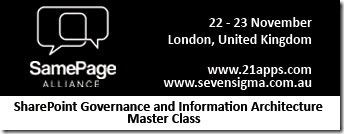
In London on November 22 and 23, I will be running a two day master class along side Andrew Woodward on SharePoint Governance and Information Architecture. The first day is similar to the Ireland event, where we focus on governance holistically, shattering a few misconceptions and seeing things in a different light, before switching focus to various facets of Information Architecture for SharePoint. In essence, I have taken the detail of the 4 days of the New Zealand Elite course and created a single day version (no mean feat by the way).

Participants on this course will receive a 400 page manual, chock full of SharePoint Governance and Information Architecture goodness, as well as a CD/USB of sample material such as a SharePoint governance plan, as well as IA maps of various types. Unlike Ireland, this is an open event, available to anyone, and you can find more detail and register at the eventbrite site http://spiamasterclass.eventbrite.com/. In case you are wondering, this event is non technical. Whether you have little hands on experience with SharePoint or a deep knowledge, you will find a lot of value in this event for the very reason that the blind spots I focus on are kind of universally applicable irrespective of your role.

Much of what you will learn is applicable for many projects, beyond SharePoint and you will come away with a slew of new approaches to handle complex projects in general.

So if you are in the UK or somewhere in Europe, look us up. It will be a unique event, and Andrew and I are very much looking forward to seeing you there!

Thanks for reading

Paul Culmsee

www.sevensigma.com.au


Also why I’ve been quiet…

I’m in an airport (again), typing this on my way back from my latest trip to New Zealand – a country I am loving more and more each time I go there. (Anywhere that I can go that uses the same power plugs as back home is a great place in my book).

image

A while back I posted about the book I am writing with Kailash Awati (Beyond Best Practices). If that project wasn’t taking enough time, dedication and brain cells, I have just finished an undertaking that has essentially consumed me for four months (some 450 man hours). This week it was delivered and the student responses far surpassed my expectations and made it all worthwhile.

I created a 4 day SharePoint 2010 Governance and Information Architecture training course as part of Microsoft New Zealand’s Elite initiative. (760 pages of SharePoint governance and IA goodness!) If you are not aware of the Elite initiative, it is a novel initiative by Microsoft in New Zealand to improve the quality of SharePoint practitioners in the Microsoft partner ecosystem. Now I tell you – Darryl Burling and his team down there at Microsoft have their ear to the ground – and really do listen to their customers. They initiated this program to allow local solution providers to take the next step beyond technical knowhow and turn it into deeper proficiency.

The SharePoint Elite Partner Initiative is designed to recognise those New Zealand Partners who have built skills excellence and a track record for success with SharePoint into their business. When it comes to SharePoint, these are the elite – the best of the best. If you are looking for a partner who can help you plan and deploy your SharePoint implementation, these are the best in the business.

This Elite program is unique in its focus and via the insight of those who conceived it, allowed me the flexibility to create a course that was a balance of technical labs, sensemaking, governance, critical thinking and user engagement. I was going through the course feedback just now and the key trend from it all was that the students really enjoyed the softer stuff that I teach, more so than the “here is a SharePoint feature and look at what it can do!” type material (they can get that sort of material anywhere).

So all in all it was a great week, which made all the effort, sweat and tears leading up to it worth it.

So thanks attendees, it was a great 4 days. For other readers, hopefully the course might come to a city near you in the not too distant future.


Thanks for reading

Paul Culmsee

www.sevensigma.com.au


Why I’ve been quiet…

As you may have noticed, this blog has been a bit of a dead zone lately. There are several very good reasons for this – one being that a lot of my creative energy has been going into co-writing a book – and I thought it was time to come clean on it.

So first up, just because I get asked this all the time, the book is definitely *not* “A humble tribute to the leave form – The Book”! In fact, it’s not about SharePoint per se, but rather the deeper dark arts of team collaboration in the face of really complex or novel problems.

It was late 2006 when my own career journey took an interesting trajectory, as I started getting into sensemaking and acquiring the skills necessary to help groups deal with really complex, wicked problems. My original intent was to reduce the chances of SharePoint project failure but in learning these skills, now find myself performing facilitation, goal alignment and sensemaking in areas miles away from IT. In the process I have been involved with projects of considerable complexity and uniqueness that make IT look pretty easy by comparison. The other fringe benefit is being able to sit in a room and listen to the wisdom of some top experts in their chosen disciplines as they work together.

Through this work and the professional and personal learning that came with it, I now have some really good case studies that use unique (and I mean, unique) approaches to tackling complex problems. I have a keen desire to showcase these and explain why our approaches worked.

My leanings towards sensemaking and strategic issues would be apparent to regular readers of CleverWorkarounds. It is therefore no secret that this blog is not really much of a technical SharePoint blog these days. The articles on branding, ROI, and capacity planning were written in 2007, just before the mega explosion of interest in SharePoint. This time around, there are legions of excellent bloggers who are doing a tremendous job on giving readers a leg-up onto this new beast known as SharePoint 2010.

BBP (3)

So back to the book. Our tentative title is “Beyond Best Practices” and it’s an ambitious project, co-authored with Kailash Awati – the man behind the brilliant eight to late blog. I had been a fan of Kailash’s work for a long time now, and was always impressed at the depth of research and effort that he put into his writing. Kailash is a scarily smart guy with two PHD’s under his belt and to this day, I do not think I have ever mentioned a paper or author to him that he hasn’t read already. In fact, usually he has read it, checked out the citations and tells me to go and read three more books!

Kailash writes with the sort of rigour that I aspire to and will never achieve, thus when the opportunity of working with him on a book came up, I knew that I absolutely had to do it and that it would be a significant undertaking indeed.

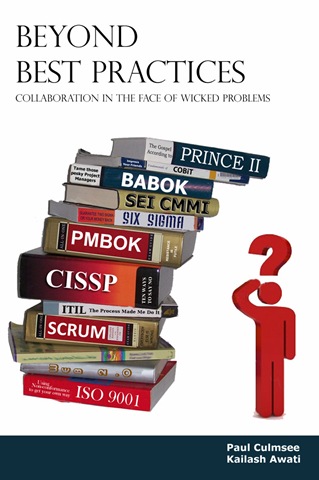
To the left is a mock-up picture to try and convey where we are going with this book. See the guy on the right? Is he scratching his head in confusion, saluting or both? (note, this is our mockup and the real thing may look nothing like this)

This book dives into the seedy underbelly of organisational problem solving, and does so in a way that no other book has thus far attempted. We examine why the very notion of “best practices” often makes no sense and have such a high propensity to go wrong. We challenge some mainstream ideas by shining light on some obscure, but highly topical and interesting research that some may consider radical or heretical. To counter the somewhat dry nature of some of this research (the topics are really interesting but the style in which academics write can put insomniacs to sleep), we give it a bit of the cleverworkarounds style treatment and are writing in a conversational style that loses none of the rigour, but won’t have you nodding off on page 2. If you liked my posts where I use odd metaphors like boy bands to explain SharePoint site collections, the Simpsons to explain InfoPath or death metal to explain records versus collaborative document management, then you should enjoy our journey through the world of cognitive science, memetics, scientific management and Willy Wonka (yup – Willy Wonka!).

Rather than just bleat about what the problems with best-practices are, we will also tell you what you can do to address these issues. We back up this advice by presenting a series of practical case studies, each of which illustrates the techniques used to address the inadequacies of best practices in dealing with wicked problems. In the end, we hope to arm our readers with a bunch of tools and approaches that actually work when dealing with complex issues. Some of these case studies are world unique and I am very proud of them.

Now at this point in the writing, this is not just an idea with an outline and a catchy title. We have been at this for about six months, and the results thus far (some 60-70,000 words) have been very, very exciting. Initially, we really had no idea whether the combination of our writing styles would work – whether we could take the degree of depth and skill of Kailash with my low-brow humour and my quest for cheap laughs (I am just as likely to use a fart joke if it helps me get a key point across)…

… But signs so far are good so stay tuned 🙂

Thanks for reading


Paul Culmsee

www.sevensigma.com.au


SharePoint Webcasts: Reporting Services for the Really Really Good Looking

imageLast year, Peter Serzo and I presented at the SharePoint Best Practices Conference in DC. We did an extremely serious talk called “SharePoint and SQL Reporting Services 2008 for the really really good looking” which rated rather well. As part of this, we recorded a bunch of screencasts that have never seen the light of day, so I thought that some would benefit from this being released to a wider audience.

Note: This post and content is really going make utterly no sense unless you have watched Zoolander. Even if you have seen the movie, before you launch into the webcasts, some scene setting is required.

The business need

Some time ago, Peter and I were contracted by the Derek Zoolander School for the Really, Really Good Looking after Derek saw Microsoft’s new SharePoint diagram when he accidentally picked up a “Computerworld” magazine. Apart from matching Derek’s suit colour rather nicely, the diagram captivated his imagination with the notion of “Insights”.

Zoolander thought that “Insight”, sounded like the perfect look to follow up from the highly successful “Magnum”, which he used to save the Malaysian prime ministers life. He took the diagram to his wife, and demanded that he must have “Insights” at all costs.

image

Zoolander’s wife saw the business problem that “Insights” would help to address. You see, the Derek Zoolander School for the Really, Really Good Looking, at great expense, custom developed an ERP system to manage everything you needed to know about male models. The system was called the “Computerised Records for Attractive People”…

image

The CRAP system stored all sorts of interesting information about male models, such as tracking their “hotness”, as well as important detail such as stated age versus actual age, and any cosmetic procedures that they have undertaken. After a long and expensive consultation, Peter and I concluded that SharePoint 2007, integrated with SQL Reporting Services, was the perfect solution to create the all important “Insights” that Zoolander so desperately needed.

As a result, we conducted a project kickoff meeting with Hansel and Peter tried to explain the architecture of reporting services using a nice diagram.

image

… but we worked out pretty quickly that this was not the way to explain how it all worked to poor old Hansel…

image

So instead, we went the live demo route. Being male models, custom development was totally out of the question. This solution had to be done using all out of the box methods in a quick and easy manner. Below are the four live demos that were recorded and now you can use them as inspiration for your own male modelling school.

  • Our first webcast illustrates how we were able to create a meaningful report from the CRAP system within five minutes.
  • The second webcast expanded on this idea, by illustrating how reports can be parameterised and linked together for drilldown reporting.
  • The third demo modifies the user profile store to allow for recording of each users unique ID in the CRAP system
  • The last webcast strings this all together for the final demonstration where we pimp the report to make it dynamic with no custom code.


image  image

The 5 minute report

Drilling down with Derek
image image

User Profiles for the really really good looking

Pimp my report


We hope you find some value from these webcasts and we look forward to hearing about your hot new look as a result!

Thanks for reading


Paul Culmsee

www.sevensigma.com.au


A roving we will go…

Hi all

I am finding it increasingly difficult to find the time to post at the moment. Too many projects, too many initiatives and too many evil plans coming to fruition. It’s like every seed I planted last year suddenly sprouted this year and I can barely keep up. Whilst this is a good thing for a growing business, it is not a good thing when it comes to writing blog posts.

In April I’ll be jumping on a very long flight to London, to attend and speak at the SharePoint Evolutions conference, held at the Queen Elizabeth II Conference Centre.

SP2010EvoBanner_Large (2)

This conference represents the evolution of the Best Practice conferences held over the last three years or so. It is one of the most unique and important SharePoint conferences of the year. SharePoint 2010 will be a key focus, yet unlike say a Tech-Ed, many of the topics have a heavy focus on the strategic side of the SharePoint challenge, in areas like Information Architecture, User Engagement and Planning and Deployment. There are five tracks in all, and over seventy speakers from all over the world.

  • For the techie geeks who like to hang in datacenters and like to get paged late at night to fix things that have died, the IT Pro track (ITP) will push their buttons. ITP sessions will focus on topics such as Document Management, Database Sizing, SharePoint and SQL optimization or server farm deployments scenarios.
  • For the developers and designers of the world, the DEV track is for you. DEV sessions will focus on topics in the areas of customization, development, and deployment best practices.
  • For all of the cool people, we have the information worker track where I speak (IW). In fact the IW track is so damn cool that there are two IW tracks! Sessions here will focus around business strategy and adoption, information architecture, training your organization or developing a culture of collaboration.
  • For the tech geeks who can code, who are therefore more elite than regular tech geeks and devs (looking at you Spence), there is a deep dive track to make you happy called level 400. In this track there will be IT Pro and Developer sessions that will be deep diving into the product and code. There will be very few slides, lots of source code and demonstrations.
  • Finally, there is a community track. This track has sessions for all verticals and will include speakers from all types of companies who have implemented SharePoint and what they learnt by doing so. All speakers are actively engaged in the SharePoint community and user group and have a wealth of knowledge to share.

This conference is organised by Steve Smith of Combined Knowledge, who is renowned for putting together something special for all participants. The speaker list is pretty much a who’s-who of the SharePoint world, and I am very much looking forward to catching up with (Paul takes deep breath) Andrew Woodward, Ben Curry, Brett Lonsdale, Chandima Kulathilake, Dux Sy, Joel Oleson, Laura Rogers, Michel Noel, Mike Watson and Zlatan Dzinic to name a few.

Bob Fox will also be there, so we finally have that beer that apparently I am supposed to buy – according to Bob anyway :-).

So if you are going to attend a SharePoint conference this year, then my strong suggestion is to make it this one.


Thanks for reading

Paul Culmsee

www.sevensigma.com.au


SharePoint Saturday Perth Wrap and SP2010 BOOTCAMPS!

Well, the event that I never thought would ever happen in Perth happened, and not only did it happen, it had more interest than expected and some people unfortunately missed out. Jeremy, as a result, had to take many upset phone calls. It seems that for Perth, once a few people got wind of SharePoint Saturday, everyone wanted in.

There were great sessions, great giveaways and I think overall, tremendous value for this free event. Seven Sigma sponsored the showbags, which we managed to fill with some awesome goodies, thanks to the generosity of Brett Lonsdale at Lightningtools, Michael Sampson, Bjoern Furuknap, Dux Sy, Combined Knowledge and the good folks at Colligo. If you attended the event, please show your support to these guys – they really went above and beyond. Mrs Cleverworkarounds, on the other hand, never wants to see or hear the word “showbag” ever again! 

For me personally, I enjoyed meeting Michael Noel. I think he and I were the only non devs at SharePint (okay well maybe Joshua Haebets too 🙂 ). Speaking of which, Joshua and Milan Goss were also great to meet too, and I’m sure that there might be projects in the future we will see each other on.

Seven Sigma also donated a seat on the first SharePoint 2010 week-long bootcamp to be held in Perth. As a background: I met Steve Smith in New Zealand last year and we got on very well. Recently, we asked him if he would consider Perth to run his 2010 bootcamps and he has agreed! This is a great outcome for Perth, having beat out Sydney and Melbourne for being the first to run them as this will be the first time the courses have been offered to the general public in Australia.

Steve Smith and Gary Yeoman will be flying in from the UK especially for this event, so it is not to be missed. Both Steve and Gary are internationally renowned for the quality of their training and the courseware itself is the very same material that Microsoft itself uses to train their own staff on SharePoint 2010. All you eastern states people reading this?  It’s about time you went west anyway, so come and check out Perth’s beer while you are here!

SharePoint 2010 Beta Developer Track     4 days

  • Delivered by Gary Yeoman
  • Date:  27th April  -  30th April 2010
  • Cost: $3000 (+GST)

This course guides you through essential 2010 elements, from pre-requisites to system integration, giving you the skills to work confidently and leverage full value from new technology.

Please note: Due to our ANZAC public holiday this course is a 4 day course from 08:30 – 6:00pm. One additional session is added per day to make up for the Monday public holiday.

SharePoint 2010 Beta Administrator Track    5 days

  • Delivered by Steve Smith – MVP
  • Date: 10th May – 14th May 2010
  • Cost: $3000 (+GST)

Step-by -step understanding is the key to successful implementation and deployment of SharePoint 2010. This 15-module course will guide you through each critical stage, giving you exactly the skills you need to leverage full value from the latest SharePoint technology.

Book now at Seven Sigma’s website:

http://www.sevensigma.com.au/2010/02/07/first-ever-sharepoint-2010-training-courses-2/

For more info visit: www.combined-knowledge.com.au

or contact: training@sevensigma.com.au


“Folders are bad” and other urban legends…

Hi all

This post is somewhat related to the whole “Zen and the art of SharePoint governance” idea where the notion of a “best practice” is so culture and context dependent that the worst practice is to insist that your best practice applies universally :-).

Let me explain with this example. Consider two problem/solution scenarios, A and B.

  • Scenario A: We have a technically inferior solution with a really deep commitment to that solution by the stakeholders and participants
  • Scenario B: We have a technically superior solution with “uneven” commitment to that solution by the stakeholders and participants

Which scenario has a better likelihood of success?

Everyone I have asked this question to, has without fail, chosen scenario A.

Why is this? Because people instinctively know that strong commitment to a course of action will trump technical superiority most of the time?

Now, let me change the scenario to something a little more interesting and potentially divisive.

  • Scenario A: We have a folder based document storage solution with a really deep commitment to that solution by the stakeholders and participants
  • Scenario B: We have a metadata based document storage solution with “uneven” commitment to that solution by the stakeholders and participants

Which scenario has a better likelihood of success? I bet this time you probably feel like answering “Well, it is not that clear cut” or “Scenario A but…” or “Scenario A only because…”, etc. It seems that putting a specific, tangible example against the scenario creates the urge to question the validity of “either/or” in the scenario. This is because you implicitly recognise that there is a little more to it.

This is interesting to me because it gives away what I think is the more “correct” answer. The ideal outcome is actually a third scenario where we, as SharePoint consultants and practitioners, recognise the technical merits of a solution, and start the process of steering a group toward a commitment to that technically superior solution.

Well…most of the time anyway. 🙂

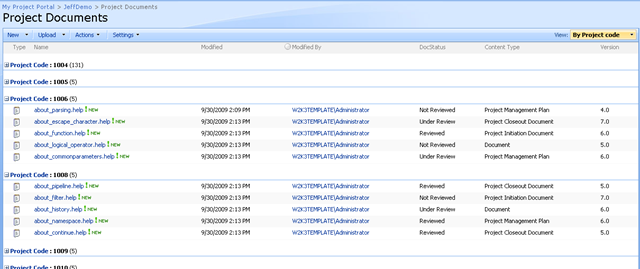
Considering the metadata vs. folders question above. Let me give you a common use-case where the metadata question actually gets murky. Let’s say you have a document library with four well defined metadata columns and have some views that are leveraging those columns. Some users are happily navigating to your site and uploading their files via the “Upload” options or the “New” option in the document library itself. In short, those users who are browser centric in their productivity habits find this to be a good solution. Let’s also say that some two hundred files have been uploaded to this library and are well classified and easy to find via the views. Below is a typical example that I doubt any SharePoint person would find unfamiliar.

image

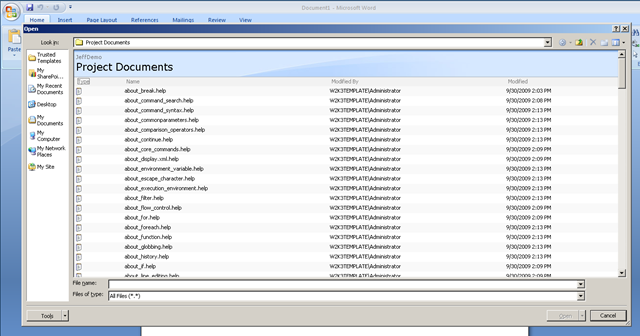
But there is another chunk of the user population who has very different productivity habits, in that they are application centric. Let’s say a user lives their life in Microsoft Word (you might scoff but plenty of people who work with a lot of documents do work this way). They start MSWord up and then decide what document to open or work with. They click the open toolbar button (or the office home button) to open a document and navigate to the document library.

Uh, oh…

  • Where is our metadata?
  • Where are our views?

image

Well isn’t that interesting. We don’t get to leverage columns and views when accessing documents in this way. All we see is a large listing of files with no metadata. If there is one thing worse than too many folders, then it is surely none at all (with several hundred files in the root folder to choose from).

So now we have a tricky balancing act. Let’s consider what to do, based around the lens of user engagement and commitment.

If you chose scenario A earlier, the technically inferior yet deeply committed option, then you may argue against bringing out the big stick and trying to force users out of their productivity habits (i.e. switch from application centric usage to browser centric usage). You would be concerned that the big stick approach may result in an erosion of commitment, leading to a lack of adoption, leading to the project being deemed a failure.

But then, if we leave it as it is, users will continue to create and manage folders to compensate for the sheer number of files. We have failed to make use of some of SharePoint’s great document management features. We risk creating a chaotic installation, where the same poor information management habits that have likely created the interest in SharePoint in the first place, actually work against SharePoint and devalue it as a platform. This would also lead to user frustration, leading to lack of adoption and project failure.

Interesting dilemma…two options and both with significant risks of an undesirable outcome. What would you do here?

For me, it depends completely on the organisation, department and user tolerance for productive distress. (Don’t worry I will define productive distress in a minute).

Learning by opportunity

When sitting around the bar with Best Practice Conference attendees and presenters in DC, a rigorous debate occurred over aspects of SharePoint branding. One particular person made a fairly generalised sweeping statement and everyone else disagreed quite strongly. The person making that statement actually knew his stuff and everything said was technically and logically correct. But the instinct that I think the rest of us at the table had developed is that the notion of “best” and “right” is actually extremely fluid. No-one disagreed with his frustration that led to his big catch-all conclusion, but we all instinctively rallied against his single “best” solution that would apply to all scenarios.

So I will tell you openly that we have clients for whom we have developed relatively sophisticated information architectures around content types, metadata, search and logical architecture of site collections and sites (Particularly for BMS/QMS scenarios). Yet we also have clients where we have not used metadata at all at first, or else it is quite piecemeal across sites or site collections. What I have come to realise is that sometimes you have to allow people to work with the technically inferior (some would say wrong) option, before you can take them to the technically superior solution with the commitment required to see it become successful.

You have to remember that you, in some way, are pushing someone out of their comfort zone. Depending on the nature of the project, those people did not necessarily ask for you to do this. Thus, push too hard and you will have chaos and pullback. Don’t push at all and you remain with the status quo.

“Obtain management buy-in” is the standard catch-cry for most methodologies, right? It is often cited as if it is the be-all and end-all critical success factor for a project success. To me, it now sounds like a cliché that you say because it is the right thing to say. The same goes with vision and mission statements. Just because you have done those things in your project charter or plan does not mean that everyone is suddenly on board. It goes deeper than that.

I believe that real commitment from the users requires them to believe that a new system will indeed make things better. If they are not convinced that the change initiative will make a positive difference to them, then you are looking forward to a chaotic project that has the odds stacked against it.

Productive Distress

If, like me, you sometimes opt for doing things that go against what SharePoint blogs or books tell you, you simply have to provide the right sort of oversight to support your course of action. This oversight is part of the “how” that I spoke of in the secret to understanding governance post. I *know* that “client X” may only be scratching the surface of SharePoint’s capability, and it may frustrate a seasoned SharePoint professional that they are not making optimal use of what is available. But based on the nature of questions asked, we assess where they are in terms of SharePoint maturity and decide that they are not ready to jump to the deep end. Instead, we help them to work within their level of maturity and allow them to better understand their problem by learning about the solution. This small step approach allows the user base to be pushed just enough out of their comfort zone, where they are still productive and not pulling back. (Hence the term “productive distress”). Pretty soon, that productive distress is forgotten, becomes the new “business as usual” and we now move up a notch.

Repeat process as necessary. Fast forward a few day or weeks and suddenly the nature of the questions change, reflecting the improved understanding of SharePoint and its capabilities. There is a certain maturity around the questions asked, the sophistication behind the scenarios conceived and you can tell that they are now ready to move to the next level of productive distress.

So it is not really that “folders are bad” or the equally common “Keep SharePoint Designer out of the hands of mortals!” because, to repeat an oft abused cliché, they are just tools. If you can convince your users that SharePoint will improve the situation and allow them the time to adjust to the new paradigm, then they will work out for themselves whether folders are bad or not. As the scenario above demonstrates, it can sometimes depend very much on how you look at the problem. Also remember that most of the time, commitment trumps technical superiority.

Thanks for reading

Paul Culmsee

www.sevensigma.com.au


The practice of Dialogue Mapping – Part 4

Three weeks ago my plasma TV broke, freeing the family from the magic spell of hi-def television. My family took the loss in different ways. My four year old was devastated at the lack of Nintendo Wii, and constantly whined about being bored. My ten year old is a bookworm anyway, and continued to be one. I suddenly found mountains of time to write, churning out three Dialogue Mapping articles that I had been meaning to write for ages.

Today the repair man came and fixed the TV. I expect that the glow of the plasma screen will once again induce that zombie-like state, where my work-rate is dependant on what show happens to be on at the time (NCIS as I write this). Luckily, this is the last article of this particular series on Dialogue Mapping for now and I might have enough active brain cells to hang on long enough to squeeze this article out.

This article builds on the last section of part three that was entitled “Nurture the holding environment”. In that section, I introduced the concept of the “holding environment” and I offered a basic example (the bus trip that was conducted prior to the Dialogue Mapping session). This concept is so fundamental and important to the success of Dialogue Mapping and projects more broadly that I want to do it proper justice here in part four.

The paradox of individuality

Put a bunch of right-brained geeks in a room to solve a problem and you will probably find that they get on relatively well. Put a bunch of creative left-brained marketing people in a room to solve a problem and you might expect the same thing. The solutions offered, when compared to each other, are likely to be quite different and will also likely be sub-optimal. For a truly good solution, we need diversity in perspectives and, although this pains me to say, marketing people are therefore actually needed. This creates a bit of a problem though with the paradox of individuality because, as geeks, we all know the notion of marketing people being needed goes against everything we stand for.

I first read about the paradox of individuality in a book called Team Talk: The Power of Language in Team Dynamics and it was described as follows:

The only way for a group to become a group is for individuals to express their individuality, yet the only way for individuals is to become fully individuated is to accept and develop more fully, their connections to the group.

What? Geeks and marketing people accepting each other as equals? Unifying the laws of physics will come sooner and this is a classic example of what Conklin calls “social complexity”. Of course, social complexity goes much deeper than geeks vs. marketing people, but one of the effects of social complexity is a distinct lack of direct communication between parties. This is because conflict is not fun and avoidance is a natural reaction to situations that are not fun.

The idea of the “holding environment” is best summed up with the image below. Here, you can see that we have an area set aside for kids to play in a safe, controlled environment.

image

A holding environment for an organisation or a team is actually not that dissimilar to the example above. You are attempting to create a state where participants can step out of their comfort zones, but at the same time, are shielded from counter productive tensions that cause paralysis, chaos and pullback.

For this reason I maintain that beer is one of the best holding environments available and it forms a key part of my professional skill set 😉

As I stated in part 1 of this series, Dialogue Mapping is a very useful holding environment on its own, but it can be augmented with other things as well and you should always be on the lookout for complimentary tools and techniques. In the following sections, I will outline where Dialogue Mapping has augmented another method, or where we have augmented Dialogue Mapping itself with another method.

Information gathering for 40+ people

There are practical limits to how many people should be involved in a standard Dialogue Mapping session. Mind you, there are practical limits for how many people should attend a meeting too and that limit seems to be any more than one person :-).

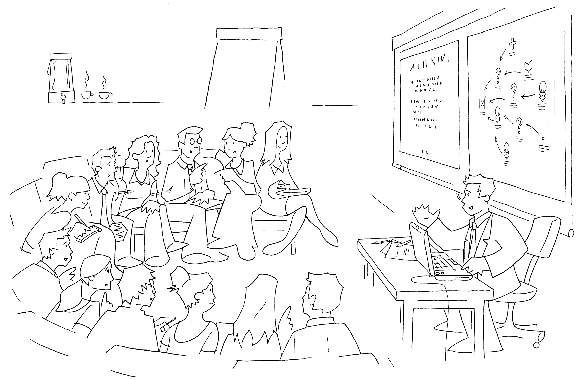
By “standard”, I mean the sort of session illustrated below. The exact number that test the limits of Dialogue Mapping varies because it really depends on the wickedness of the problem being discussed and the past history of the group. For example, one of the teams I map for consists of around fifteen to eighteen members. They are working on a particularly wicked problem, yet I can work with this group alone quite easily. This is because over time, the group has worked out their decorum for the Dialogue Mapping sessions that work for all concerned. I also know everybody on a first name basis and some of the group have become personal friends of mine outside of work. In short, people are comfortable with each other and the process, and despite things getting heated people know that it is not personal. This is a simple, yet effective, example of a working holding environment.

image

A while back, my client invited representatives from academia, charities as well as various public sector government departments, to a half day workshop on the topic of social sustainability as part of a significant redevelopment project. There were approximately 40-45 attendees who were there for the first time. There was no way we would be able to cover off the required topics using a standard Dialogue Mapping set-up. With so many people, it would be hard for all attendees to have a say in the allotted time, let alone set up the room to handle that number of people for the process.

The way we got around this issue was to run a pre-workshop session among a much smaller group, to create a series of “seed maps” for each of the sub-areas of social sustainability. By the end of this process, we had around a dozen maps on various subtopics with a few questions, ideas, pros and cons. These maps were not complete at all, but that was not the aim. Instead they were well formed IBIS argumentations.

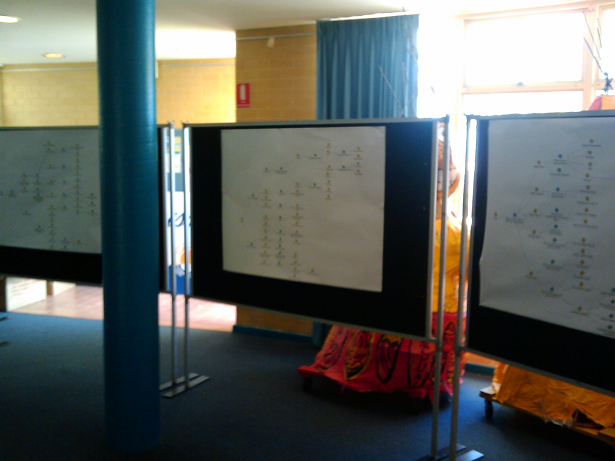
We then printed each of these maps out at large size. Initially each map was pinned to display boards, and when the attendees arrived they spent time wandering from map to map, examining the argumentation while mingling with other attendees. Below is a photo showing some of the seed maps prior to the attendees arriving.

image

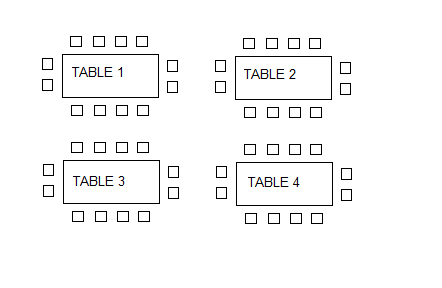
Below is a diagram representing the table arrangement for the workshop. We started with a half hour overview and introduction as to the purpose of the workshop and why they had been invited. At this point, we removed four of the maps from the display boards above, and put a map on each table. We explained to the group that each table had a unique map on it and each map was on a particular topic. At this point attendees had the opportunity to move to a table where the topic was of most relevance or interest to them.

image

Each table contained copious amounts of marker pens. I then took the stage and explained the basics of IBIS grammar to the attendees and explained to them that we wanted them to start adding ideas to the existing maps. I did not belabour the grammar, nor did I expect them to suddenly know how to do IBIS properly, but what I made clear, was that I was going to walk from table to table and interrupt if I felt the additions to the map made no sense or were ambiguous in some way.

The group had just under an hour to work on each map and at the end of the hour, we removed the updated paper maps and replaced them with the next four from the display boards. The process was then repeated and I walked from table to table, asking for clarification or calling out implied questions on parts of the maps that made no sense to me. Interestingly, IBIS novices seemed to have little problems with the usage of ideas, pros and cons, but they would forget to make the underlying question explicit. I would ask them what was the question being answered by a particular idea and would write the question into the map and redraw the lines.

After the third iteration of this process we were done. The last half an hour was a “Where to from here?” session and an opportunity for the group to provide feedback to the organisers of the workshop.

After the workshop was completed, I took all of the updated paper maps and added the additional rationales into the seed maps in Compendium. The process was surprisingly quick because the majority of the additional argumentations that were added were actually pretty good IBIS form. I think that having existing argumentations on the seed maps made it easier for attendees to add rationales that looked similar to what was there already. It wasn’t perfect IBIS by any means, but it was not a difficult task for me to refactor the additional information without losing any of the intent behind the rationales.

For the record, additional workshops were conducted, but these reverted to standard Dialogue Mapping workshops with a subset of the attendees who had specialised skills and knowledge in the topic area. But what this particular process demonstrated was that with a little planning a single Dialogue Mapper could still manage to capture quality rationales from a very large group in a short space of time.

Dialogue Mapping with a facilitator

Dialogue mapping for a large group can be augmented with a facilitator and I have done this a few times. For a large group, this can be very helpful because the mapper can concentrate on capturing the dialogue and less on directing the meeting. Equally though, a facilitator can actually make the process more difficult. The key to a facilitator situation working is when the facilitator either knows IBIS or has been present in a number of Dialogue Mapping workshops and understands how the process works. This is because the facilitator is usually facing the group like the mapper, asking probing questions, directing the course of conversation and therefore is not looking at the map or listening in terms of IBIS translation of the dialogue. As a Dialogue Mapper, it is important for participants to verify what you have captured is correct, and if the facilitators are not following the map, they can easily get in the way of this verification process.

Facilitators can also get you into trouble at times because they can sometimes be conditioned to traditional meeting decorum where topics are allocated at particular times with an agenda that can preclude deeper exploration of a topic. Dialogue Mapping is a rich enough container to allow a group that deeper exploration, but this is not something that some facilitators are used to. One prime example that sticks out in my mind to this day was a workshop where we had a lot of options to explore. Conscious of the agenda, in an attempt to make the process more efficient, the facilitator asked the group whether any of the options had any “fatal flaws” that enabled that option to be quickly discounted. It soon became apparent (in a negative way) that one person’s “fatal flaw” was diametrically opposed to another person’s “fatal flaw”. This attempt to shortcut deliberations backfired badly and resulted in this line of question being completely abandoned.

This is a great example of the importance of nurturing the holding environment (lesson nine from part 3). After this “fatal flaws” episode, I deliberately stopped mapping while the group resolved the fatal flaw issue and resolved to try a different approach. This subsequent approach proved to be much more successful and we never deviated from it after that. “No fatal flaws” became a bit of a mantra among this group.

A key to working with a facilitator is to remember the lesson on confidence and assertiveness from part 3. Just because a facilitator is directing the meeting and influencing the direction of the conversation, it doesn’t mean that the mapper is purely a scribe. Work out a system with the facilitator where, if you raise your hand or signal in some way, you are not ready to move on straight away. Another technique that I have used in a large group situation was to assign someone else the traffic warden role, where if I am having trouble keeping up with the various conversations, and my eyes are on the map, they can call the group to order.

Dialogue Mapping, in tandem with another Dialogue Mapper ,can work very well and I have done many times with my colleagues at Seven Sigma. In this situation, you are both thinking in the IBIS grammar and both of you are mentally unpacking the conversation, although only one of you is actually performing the mapping. We have used this technique with particularly good results in SharePoint requirement gathering workshops, where one of us asks the questions and the other performs the mapping.

Dialogue Mapping and Debategraph

Compendium is one of several tools that can be used to create and render argument grammar like IBIS. For me, Compendium is the absolute best for Dialogue Mapping. Being a desktop application, I do not need internet access and once you are proficient with it, Compendium is very fast. This is of course, the biggest factor for Dialogue Mapping live. You do not want to be hindered by the limitations of the software tool that you are using.

I noticed that some CleverworkArounds readers created IBIS maps in Visio and were also using mind mapping tools after I published the “One best practice” series. But the problem is, although you can technically make an IBIS map, those tools would never work in a live session because of how slow it would be to add rationales to the map. Seriously guys, it might be technically possibly but do not attempt to use those tools live.

One size does not fit all and this is especially true of sense making tools. There are actually two main audiences for maps like this. Those who create the maps and those who consume the maps. The key point is that the ultimate audience for any map is quite often not the group creating the map in the first place. The whole point of capturing rationale is to make visible the process that a group went through when working on a problem, which ultimately shows why a particular decision was made or why a course of action was taken. Those who want to review the rationales are a very different audience to those who made the decision and wish to demonstrate justification. Just because the tool works well for the problem solving process, does not automatically assume that the tool is then best suited to the communication of that rationale to a wider audience.

Compendium maps work brilliantly well during the Dialogue Mapping process and from a broader communication point of view, work exceptionally well when detailed maps are printed onto large sized paper. But as a communication and distribution tool, Compendium is weaker than some of the alternatives. Compendium maps do not translate overly well to the web at this point, and asking all interested parties to install compendium is out of the question. For the sake of article length, I will not go into detail why this is, but to appease the Compendium fanbois, this is direct feedback from my clients and not just my opinionated rant.

For communicating the rationale that has come from Dialogue Mapping sessions to a wider audience, Debategraph is ideal. Unlike Compendium, Debategraph is a cloud based argument visualisation tool, designed to leverage the freeform updating capabilities of a wiki, along with the rigor of an argument grammar much like IBIS. Debategraph does not use a top down or left to right visualisation method. Instead each node is at the centre of the screen and surrounding issues, ideas, pros and cons surround the node, requiring the user to click nodes to explore further argumentation.

The beauty of Debategraph is the combination of its argument navigation, along with the streaming view of related content as shown below. My clients absolutely love the stream view because it is so simple for people to explore and work with. The ability to embed a map at any point in the debate on any web site is also pretty handy and I have pasted a sample map below to illustrate this. Click a node on the left pane (the “*” means there are sub arguments) and the content in the right window will change, based on which argument node is currently being examined.

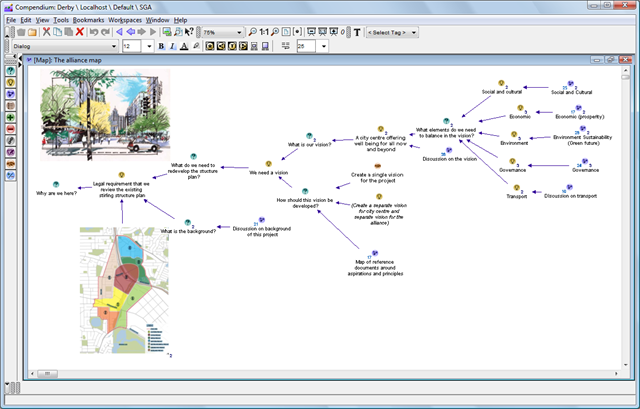
Compare this to Compendium maps, where additional rich content like images, documents and the like are treated as additional nodes in the map. As you can see in the example below, it is possible to integrate rich content into the map very easily, but that rich content is linked in the same manner as the argumentation itself. Debategraph on the other hard, separates the argumentation from the supporting content and I think that this works much better and supports a richer form of argument based content delivery.

image

But once again, use the best tool that fits the purpose. From a dialogue and rationales collection point of view, Debategraph is an excellent way for a bunch of geographically dispersed people to debate a particular issue because the map will refactor on the fly as people self-contribute to it. But I personally would not use Debategraph for the Dialogue Mapping process, because it is not as fast as compendium and it is not as easy to view the map in full context as shown above. The over-arching point with all of this is that if the rationale has been captured in the first place, there are many ways to make creative use of it.

Note: To be fair on the Compendium makers there are many excellent examples of Compendium being used for some pretty impressive things. I am talking here specifically about online collaboration and communication to a wider audience.

Conclusion

This series of posts has examined the practical aspects of Dialogue Mapping, explored some of the techniques that I have used to augment it. Although I do not intend to write any more articles on this topic right now, the series is by no means complete. This is an ongoing learning process for all practitioners of this craft and I am sure that other Dialogue Mappers have tried different techniques than those that I have covered. (Some interesting things are happening on the SharePoint integration front too, which should enrich this experience even further, but that is a whole separate topic 🙂 )

But one final request. If you have used techniques such as these to enrich the experience for participants, then I’d love to hear from you. Even if it is not for Dialogue Mapping, any technique that is inclusive and augments the holding environment, please drop me a line or leave a comment.

Thanks for reading

Paul Culmsee

www.sevensigma.com.au


« Previous PageNext Page »

Today is: Wednesday 3 June 2026 -