Back to Cleverworkarounds mainpage
 

SharePoint Fatigue Syndrome

Hiya

I have been wrong about many things – I am happy to admit that. In SharePoint land, one of my bigger naive assumptions was that in early 2007, I figured I’d have maybe a 6 month head start before the rest of the industry began to learn from its initial SharePoint deployment mistakes and start delivering SharePoint “properly.” I thought that I’d better make hay while the sun shines, so to speak, as the market would tighten up as more players entered it.

Yet here we are, heading to the latter half of 2011 – some five years later. As I continue to go into organisations, whether in a SharePoint remedial capacity, or a training/architect capacity, I am still seeing the legacy of really poor SharePoint outcomes. Furthermore I am seeing other, frankly disturbing trends that leave me both concerned and pessimistic. I now have a label for this concern: “SharePoint Fatigue Syndrome.” SharePoint Fatigue Syndrome is hard to define, yet its effects are there for all to see. I suffer from it at times, and I am certain others do too. As an example, recently on the Perth SharePoint User Group on LinkedIn the following topic for discussion was raised:

Hi folks, as you already know we have a worrying skills shortage in SharePoint Development / Architecture in Perth and things are getting worse. It’s getting to the stage where companies have to suspend or worse still abandon their SharePoint projects due to lack of available talent. As the core of the SharePoint community in Perth your suggestions are vital towards finding real solutions to this growing problem. What can be done?

Now I know that this problem is not just limited to Perth. There are consistently reports online that speak of SharePoint people being in demand. So you would think that in a “hot” sector like SharePoint, where the industry is crying out for talent, that the rate of attrition would not outpace the uptake of new talent. After all – money talks, right? If you are a .NET developer with half a brain, there is serious money to be made in SharePoint development land. On top of that, there is the collective realisation in the marketplace that actually talking to people about how SharePoint could make their lives easier, leads to better outcomes. Hence the emergence of this notion of a “SharePoint Architect” with a more varied skill-set that just tech or dev. This role has further been legitimised by entire conferences now just catering to the business this end of the market (I am thinking the Share conferences here).

So, we have all of this newfound collective wisdom spreading through the community via various channels, in terms of the skills and roles required in SharePoint circa 2011 and beyond. We have the fat pay-packets being commanded as a result of demand for these skills. So, with that in mind, why is the attrition rate growing?

As an example, I know personally, several exceptional SharePoint practitioners who are no longer in SharePoint. I’ve also had various quiet conversations with many SharePoint practitioners, right up to SharePoint MCM’s, who vent their various frustrations on how difficult it is to get truly lasting SharePoint solutions in their clients and organisations. I’ve reflected on the various reasons I have come to the conclusion that SharePoint is just plain tiring. As a result, people are burning themselves out.

7 causes of SharePoint Fatigue Syndrome…

Burnout, in case you are not aware, is actually a lack of emotional attachment to what you are doing.  Quoting about.com:

The term “burnout” is a relatively new term, first coined in 1974 by Herbert Freudenberger, in his book, “Burnout: The High Cost of High Achievement.” He originally defined ‘burnout’ as “the extinction of motivation or incentive, especially where one’s devotion to a cause or relationship fails to produce the desired results.

SharePoint Fatigue Syndrome is SharePoint manifested burnout. The symptoms include feeling physically and emotionally drained, difficulty maintaining optimism and energy levels, feeling that you have less to give as the burden of work seems overwhelming. Sound familiar?

So why does SharePoint work run this risk? I see 7 major reasons.

1: Cost pressure leading to overwork

First up, the lure of the big dollar is a double edged sword. Not long ago I shared a beer with a SharePoint developer who’s work I respect greatly, yet I can’t afford to hire. This is because the percentage of chargeable hours he would need to work just so I can break even, is very high. This puts me (the employer) under pressure and at risk. As a result, I need to ensure that my newly minted SharePoint employee is productive from day 1 and I need him to work a lot of hours. But here is the irony. When I had my beer with this developer, the conversation started with him lamenting to me that he is already pulling ridiculous hours (60 to 80 per week). He was looking for a job with less hours and yet more money. This is simply not sustainable, both for employer and employee. The more you chase one (work hours vs. money), the more you lose the other it seems.

2: Structures that force an inappropriate problem solving paradigm (and wicked problems of course)

Then there is the broader problem where structure influences behaviour. As a basic example: from the developers’ perspective, they have to put up with sales guys who promise the world, and project managers who then make their life hell and force them to cut corners delivering the impossible. Project managers find out that their beloved work breakdown structure gets chopped and changed when their pain-in-the-ass developers whine that they can’t make the schedule. As I have stated many times previously, SharePoint project are likely to have wicked problem aspects to them. The structures that work well to deliver tame problems, such as Exchange, a VOIP system or a network upgrade, are much less effective for SharePoint projects. While organisations persist with approaches that consistently fail to deliver good outcomes, and don’t look at the structural issues, the attrition rate will continue. There is only so much that someone can take putting up with these sorts of stresses.

3: Technical complexity

SharePoint’s technical complexity plays a part too. No-one person understands the product in its entirety. The closest person I know is Spence and ages ago on twitter he remarked that even within Microsoft no-one understood it all. As a result, it is simply too easy to make a costly mistake via an untested assumption. (I thought the user profile service was tough – until I did federated claims authentication and multitenancy that is). The utter myriad of features, design options and their even greater number of caveats, mean that one can make a simple design mistake that causes the entire logical edifice of an information architecture to come crashing down. Many have experienced the feeling of having to tell someone that the project time and cost is about to blow out because nobody realised that, say,  Managed Metadata has a bunch of issues that precludes its use in many circumstances. Accordingly, SharePoint architects learn pretty quickly that it is hard to answer a definite “yes” to many questions, because to do so would require a question worded like a contractual clause, to ensure it is framed with appropriate caveats. Even then, consultants would know that lingering feeling in the back of their mind that they might have missed an assumption. This brings me onto…

4: Pace of change

This is BIG…and becoming more acute. Remember the saying ‘The only certainties in life are death and taxes?’ Outside of that, the future is always unpredictable.

In between SharePoint 2003 and SharePoint 2007, the wave of Web 2.0 and social networking broke, forever changing how we collaborate and work with information online (and some of those effects are still to be felt). Microsoft, like any smart organisation, responds to the sentiment of its client base. Microsoft also, like most mature organisations, tends to hedge its bets in terms of marketplace strategy in which it tries to get in on the act with the cool kids, yet tries not to kill the goose that laid the golden egg. Just look at Windows 8’s new interface, tablets, app stores and the cloud.

But that is one facet. Change happens in many forms and at many scales. For example, at a project level, it may mean a key team member leaves the organisation suddenly (SharePoint fatigue no doubt). At a global and organisational level, events like the odd global financial crisis force organisations to change strategic focus very quickly indeed.

I don’t know about you, but when Windows 8 was announced recently I was not excited (in fact I was not excited by SharePoint 2010 either). I thought to myself “So soon? I am still figuring out the current platform!”

As an example of the effect of pace of change, consider all the Government 2.0 initiatives around the world. Collaboration is in-vogue baby, so information should be free and government agencies should engage with the community. While that’s nice and all, there is the world of compliance, security and records management that takes a very different view. So, we end up with market forces that push against each other in combination with vendors hedging strategy of being all things to all people. It’s little wonder that SharePoint projects become very complex very fast.

By the way, it is worthwhile checking out what Bill Brantley in this post sums up the whole government 2.0 issue when he said:

What exactly is the nature of the Gov 2.0 challenge? This question was inspired by Andrew Krzmarzick’s post (What Gov 2.0 Needs Now: Managers, Money and Models) and Christina Morrison’s post (What is Gov 2.0? A survey of Government IT pros) on the recent GovLoop survey about Gov 2.0. As Andrew and Christina argued, the survey demonstrates many differing perspectives on Gov 2.0 in terms of what it actually means and how to implement Gov 2.0. To me, this suggests that Gov 2.0 is the classic wicked problem

5: SharePoint Entropy

One of my clients (who you will meet in my book when it’s published), once said to me “All good ideas eventually deteriorate into hard work.” This is a nice way to lead into the concept of SharePoint entropy, which in some ways is the inevitable outcome from the first four symptoms. The easiest way to understand entropy is to watch this awesome TV series called the “Wonders of The Universe.” In that show, the concept of entropy was discussed and for me made a lot of intrinsic sense. Without getting into the detail, entropy is the notion that over time things move from an organised to less organised state. Rather than have me waste your time trying to explain it in prose, let’s listen to the show in question. (Don’t skip the video – this is important!)

Now what does this has to do with SharePoint fatigue? Gordon Whyte saw what I am getting at with his post on entropy within organisations, especially in relation to change management.

For example, when we build a car we take raw materials such as metal, leather, plastic and glass and arrange them in a highly organised way to make a car. But if we then leave that car for long enough the metal will rust, the glass will become brittle and break and the leather will dry out and turn to dust. If the car is left for a very long time it will eventually disappear altogether. This thought left me wondering about the nature of organisations. If a progression from order to chaos is the natural order of the universe, then is this same pressure present in organisations and, perhaps more importantly, what is the optimum position for an organisation between the extremes of rigid inflexibility (low entropy) and complete chaos (high entropy)? This question is not as crazy as it might at first appear”

Gordon has nailed the issue in his post. Any SharePoint solution that has a low entropic nature requires more energy and effort to maintain that order and control. Complex SharePoint solutions often have complex governance wrapped around them. Governance that is process and structure centric by definition, has low entropy and accordingly, needs higher effort to maintain over time. In fact, if you do not maintain that effort and energy, then any SharePoint solution will usually disintegrate back into the sort of information management chaos that gave rise to SharePoint in the first place!  Rather like the sandcastle in the video.

By the way, I feel that email and file shares are high entropy solutions – all failed SharePoint projects lead back to these tools because they require less structure to maintain (in the short term).

In short, if SharePoint is implemented with low entropy, more energy is needed to maintain it. Remove the energy and very quickly, things become chaotic again. Governance approaches that are not cognisant of this will never stand the test of time. The question then becomes whether people feel that the end in mind is worth the perceived extra effort that is being asked of them.

6. Social complexity

Social complexity is also somewhat of a result of the first five symptoms. Most organisations have a blame culture. If they didn’t, then people wouldn’t spend so much time trying to position themselves for blame avoidance. Social complexity is the result of turf wars, ideological smackdowns and all of the other sort of things that result in the cliché of “the silos” where people are not talking to each-other in organisations. SharePoint exacerbates social complexity for two main reasons.

Firstly, because it is a collaboration tool, it actually requires some collaboration to put it in! This is often easier said than done. Secondly, because it is a pervasive and disruptive technology, it almost always clashes with an established tool, process or practice where proponents aren’t willing to change. In fact, they may not even recognise that there is a problem to solve – especially when SharePoint has been thrust upon them. (In an old post, I wrote about the notion of memeplexes and the ideological immune mechanisms that they create and why it is so hard to get shared understanding across departmental boundaries in organisations. Memetic smackdowns are the result).

The long and the short of social complexity is that there is only so much stress people can take. We all seem to have a pathological need to seek order and safety, rather then remain in a stressful situation. Once social complexity bites, the merry-go-round of staff attrition really starts to bite…

7. Meaning over motivation…

Now if I haven’t completely depressed you, let me offer you a perverse glimmer of light. For those of us who understand the preceding 6 fatigue symptoms, recognise them for what they are and take steps to mitigating them, there is one other symptom that contributes to SharePoint Fatigue Syndrome. This is the trickiest of all – and I am a somewhat willing victim of it.

I have spent a lot of time learning techniques to help address the symptoms I outlined here and as it turns out, these skills are universally applicable, whether in SharePoint, IT or beyond IT. For years now, I have metaphorically had one foot out of the SharePoint world door and the other foot into the world of construction, health and management sectors. Hell…I have written what I think is the first business book ever by a SharePoint person that is a non SharePoint and non IT. I also have clients with SharePoint deployments who do not know me as a SharePoint person at all, but only as a sensemaker (and for that I am grateful.)

The point is this: While the investment in these skills enables me to counter the effects of SharePoint fatigue syndrome, it is also inexorably pulling me away from SharePoint work. It seems that once you crack this nut a little, your skills are in demand across the entire problem solving spectrum. Right now this is my coping mechanism for SharePoint Fatigue Syndrome – I get to step away from SharePoint for periods and work on something else. Eventually…inevitably…I will also be one of those attrition statistics.

Conclusion:

The problem is that SharePoint Fatigue Syndrome is a negatively reinforcing cycle. As evidenced by the SharePoint attrition rate, money isn’t that great a motivator. If it was, then the void of skilled resources would have been filled by now. Paying more money might give you a short term gain, but in the long term is not going to address my seven causes of SharePoint Fatigue Syndrome.

I will leave this admittedly negative sounding post with the key to breaking this cycle. While you can attend my SharePoint Governance and Information Architecture class or Issue Mapping Class to learn many ways, the video below says it all. I encourage you to watch and reflect on it, because it’s the same key point to understanding how to do effective user engagement.


Thanks for reading


Paul Culmsee


Seattle is go! SharePoint Governance and Information Architecture class

For one night only USA…

Ah, Erica Toelle – what a legend! Thanks to Erica and Fpweb, I’m thrilled to confirm that the Seattle SharePoint Governance and Information Architecture class is all systems go. Save the date as its very likely indeed to be the only SPIA class in the USA in 2011.  If it wasn’t enough that Erica will be joining me, but Ruven Gotz will be there too.

Thursday and Friday, May 05-06, 2011. (http://spiaseattle.eventbrite.com/)

The location is the Silvercloud Inn, 14632 SE Eastgate Way Bellevue, WA 98004

Map picture

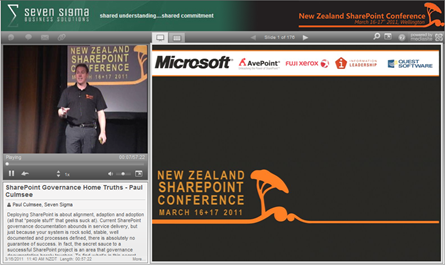
In this multimedia extravaganza of a blog post, lets take a closer look at this class and what you can expect. Below is a snippet of a talk I did in New Zealand called “SharePoint Governance  Home Truths”. This clip shows a little diagnostic test that I do on my audience, to see whether they have experienced the visible signs of wicked problems. If you want to know why you should go to SPGov+IA, then take my 2 minute test yourself.

Do you need SPGov+IA? Take the two minute test to find out…

If the two minute test has taken your fancy, then you might want to see what is in store on the course itself. Below is the first half-hour of module 1 (in the form of a conference session), as well as the accompanying slide deck.

image 

View more presentations from paulculmsee

Course Information:

imageDownload Course Outline (PDF)

Download Class Flyer (PDF)

Most people understand that deploying SharePoint is much more than getting it installed.  Despite this, current SharePoint governance documentation abounds in service delivery aspects. However, just because your system is rock-solid, stable, well-documented and governed through good process, there is absolutely no guarantee of success.  Similarly, if Information Architecture for SharePoint was as easy as putting together lists, libraries and metadata the right way, then why doesn’t Microsoft publish the obvious best practices?

In fact, the secret to a successful SharePoint project is an area that the governance documentation barely touches.

This Master Class pinpoints the critical success factors for SharePoint Governance and Information Architecture and rectifies this blind spot.  Paul Culmsee’s style takes an ironic and subversive view on how SharePoint Governance really works within organizations while presenting a model and the tools necessary to get it right.

Drawing on inspiration from many diverse sources, disciplines and case studies, Paul Culmsee has distilled the "what" and "how" of governance down to a simple and accessible, yet rigorous and comprehensive set of tools and methods that organizations, large and small, can utilize to achieve the level of commitment required to see SharePoint become a successful part of your enterprise.

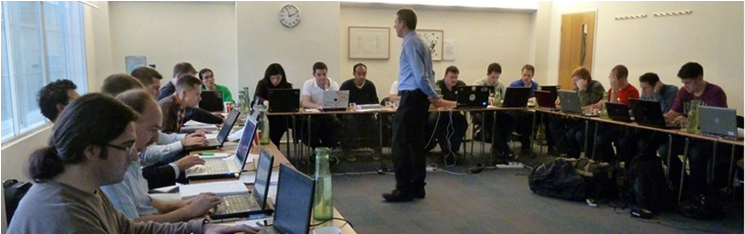
Some workshop sessions are hands on, we provide all of the tools and samples needed but please bring your own laptop.

Course Structure:

The course is split into 7 modules, run across two days.

Module 1: SharePoint Governance f-Laws 1-17:

Module 1 is all about setting context in the form of clearing some misconceptions about the often muddy topic of SharePoint governance. This module sheds some light onto these less visible SharePoint governance factors in the form of Governance f-Laws, which will also help to provide the context for the rest of this course

  • Why users don’t know what they want
  • The danger of platitudes
  • Why IT doesn’t get it
  • The adaptive challenge – how to govern SharePoint for the hidden organisation
  • The true forces of organisational chaos
  • Wicked problems and how to spot them
  • The myth of best practices and how to determine when a “practice” is really best

Module 2: The Shared Understanding Toolkit – part 1:

Module 2 pinpoints the SharePoint governance blind spot and introduces the Seven Sigma Shared Understanding Toolkit to counter it. The toolkit is a suite of tools, patterns and practices that can be used to improve SharePoint outcomes. This module builds upon the f-laws of module 1 and specifically examines the “what” and “why” questions of SharePoint Governance. Areas covered include how to identify particular types of problems, how to align the diverse goals of stakeholders, leverage problem structuring methods and constructing a solid business case.

Module 3: The Shared Understanding Toolkit – part 2:

Module 3 continues the Seven Sigma Shared Understanding Toolkit, and focuses on the foundation of “what” and “why” by examining the “who” and “how”. Areas covered include aligning stakeholder expectations, priorities and focus areas and building this alignment into a governance structure and written governance plan that actually make sense and that people will read. We round off by examining user engagement/stakeholder communication and training strategy.

Module 4: Information Architecture trends, lessons learned and key SharePoint challenges

Module 4 examines the hidden costs of poor information management practices, as well as some of the trends that are impacting on Information Architecture and the strategic direction of Microsoft as it develops the SharePoint road map. We will also examine the results from what other organisations have attempted and their lessons learned. We then distil those lessons learned into some the fundamental tenants of modern information architecture and finish off by examining the key SharePoint challenges from a technical, strategic and organisational viewpoint.

Module 5: Information organisation and facets of collaboration

Module 5 dives deeper into the core Information Architecture topics of information structure and organisation. We explore the various facets of enterprise collaboration and identify common Information Architecture mistakes and the strategies to avoid making them.

Module 6: Information Seeking, Search and metadata

Module 6 examines the factors that affect how users seek information and how they manifest in terms of patterns of use. Building upon the facets of collaboration of module 5, we examine several strategies to improving SharePoint search and navigation. We then turn our attention to taxonomy and metadata, and what SharePoint 2010 has to offer in terms of managed metadata

Module 7: Shared understanding and visual representation – documenting your Information Architecture

Module 7 returns to the theme of governance in the sense of communicating your information architecture through visual or written form. To achieve shared understanding among participants, we need to document our designs in various forms for various audiences.

Putting it all together: From vision to execution

Attendees will be taking home a manual ~480 pages, containing the Seven Sigma Shared Understanding Toolkit CD with a sample performance framework, governance plan, SharePoint ROI calculator (Spreadsheet), sample mind maps of Information Architecture. These tools are the result of years of continual development and refinement "out in the field" by Paul Culmsee and have only been recently released to the public through this Master Class.

More Information:

Refund Policy:

No refunds will be issued for attendee cancellations once payment is recieved.  Class cancellation by the organizer will result in a refund less transaction fees.

image

http://spiaseattle.eventbrite.com/


The facets of collaboration part 5: It’s all Gen-Y’s fault – or is it?


Hi all

imageWelcome to another exploration of the collaborative world through a lens called the facets of collaboration. If you are joining us for the first time, I am writing a series of posts that looks at how our perception of collaboration influences our penchant for certain collaborative tools and approaches. SharePoint, given that it is touted as a collaboration platform, inevitably results in consultants never being able to give a straight answer. This is because SharePoint is so feature-rich (and as a result caveat-rich), that there are always fifty different ways a situation can be approached. Add the fact that many clients do not necessarily know what they want and learn about their problem by examining potential solutions, we have all the hallmarks of a wicked problem in the making.

These wicked problems, underpinning SharePoint, often results in Robot Barbie situations (cue the image to the left), which is the metaphor that I started this series with. Robot Barbie represents everything wrong about SharePoint deployments, as it is symptomatic of throwing features at a platitude, pretending to be solving a real problem and then wondering why the result doesn’t gel at all. It is a pattern of behaviour that is similar to an observation made by the very wise (and profane) Ted Dziuba who once spoke these words of wisdom.

If there’s one thing all engineers love to do, it’s create APIs. It’s so awesome because you can draw on a white board and feel like you put in a good day’s work, despite having solved no real, actual problems. Web 2.0 engineers, in addition to their intrinsic love of APIs, have a real hard-on for anything having to do with a social network. For example, developing a Facebook application lets them call their shitty little PHP program an "application" running on a "platform," like a real, live computer programmer does. Make-believe time is so much fun, even for adults.

Apart from making me giggle, Dziuba may have a point. Elsewhere on this blog I have spent time explaining that there are different types of problems that require different approaches to solving them (wicked vs. tame). My conjecture is that collaboration itself is exactly the same in this regard. People who espouse a particular type of tool or approach as the utopian solution to collaboration are taking a one size fits all approach to a multifaceted area and even worse, treating that area as a platitude. Anyone who calls themselves an Information Architect and doesn’t at least give cursory examination to the dimensions or facets of collaboration is likely to be doing their stakeholders a disservice.

All of us have certain biases, and I am no exception. For a start, I am generation X – the so-called cynical generation. Apparently we whinge and whine about everything and then blame it all on generation-Y. Thus, if cynicism is the gen-X stereotype, then I will happily accept being the poster child. I mean seriously, all of you vanity obsessed, self interested generation y’ers, if you spend a little less time preening and more time thinking, we might get some wisdom out of you (see – I am such a cynical gen-X right now).

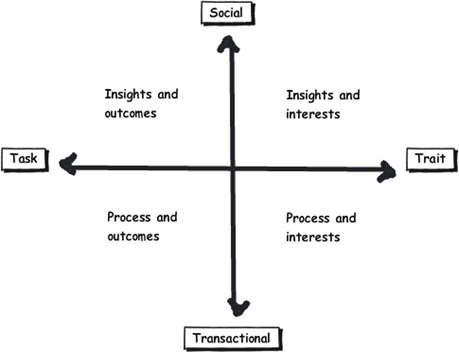
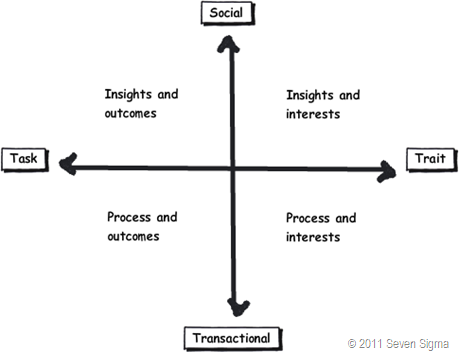
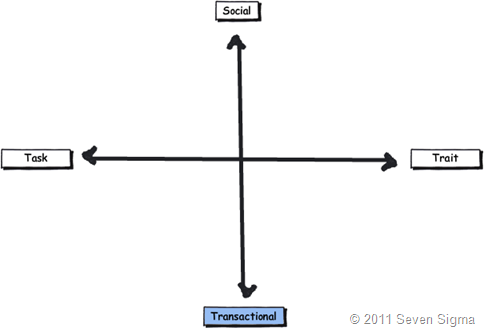
So let’s recap the facets of collaboration. The model I came up with identifies four major facets for collaborative work: Task, Trait, Social and Transactional.

  • Task: Because the outcome drives the members’ attention and participation
  • Trait: Because the interest drives the members’ attention and participation
  • Transactional: Because the process drives the members’ attention and participation
  • Social: Because the shared insight drives the members’ attention and participation

image

In the last post, I used the model to examine the notion of Business Process Management versus Human Process Management and looked at some of the claims and counter claims made by proponents of each. This time let’s up the ante and talk about something curlier. We will examine the notion that social networking in the enterprise is the answer to improving collaboration within the enterprise. On first thought, it makes perfect sense, given the incredible success of Facebook, LinkedIn and Twitter. Nevertheless, there is ongoing debate about the use and value of social tools in the enterprise driven by their rise outside of organisational contexts. One particularly strongly worded quote is from Aaron Fulkerson, co-founder and CEO of MindTouch who doesn’t mince his words:

This class of software forces business users to adopt the myopic social visions imagined by the developers, which are nearly identical to their corresponding consumer web implementations. In short, social software is not solving business problems. In fact, these applications only serve to treat symptoms of the problems businesses face. They exacerbate the real problems within businesses by creating distractions and, worse, proliferate more disconnected data and application silos.

Ouch! Even within the SharePoint community there is significant variation of opinions as to the value of social. While I better protect the innocent and not name names, I have spoken with several well known SharePointers who think social is a giant waste of time, versus those who see real value in it. Irrespective of your opinion, you cannot ignore the fact that social is a significant game changer with effects still being felt. While web 2.0 has dropped off the Gartner hype cycle, its effect on particular sectors has been far reaching. Now it seems that all sectors have a 2.0 on the end of their name. For example:

  • Enterprise 2.0
  • Education 2.0
  • Legal 2.0
  • Government 2.0

Clearly, if things were just a flash in the pan, why are governments around the world trying to revitalise their public sector by utilising these tools?

Look at Microsoft as another example. They have, I think smartly, recognised industry trends and reacted to them via the introduction of a number of new SharePoint features, such as tagging/folksonomy via managed metadata, ratings columns, enhanced wiki capabilities and a significant investment in the capabilities of my-sites. Their clients now have the option to leverage these features should they choose to do so.

So just as there are naysayers, there are the pundits. Many people cite the reasoning that these features are necessary to attract and retain the next generation of workers, who have grown up with these tools in their personal lives. Whether this claim is valid is debatable, but I have to say, I really like the Enterprise 2.0 slide deck below by Scott Gavin for a number of reasons. I think it encapsulates the 2.0 vision, underpinned by social/cloud technologies very nicely. I sometimes ask people to discuss this slide deck in my IA classes and discussion is equally polarising as social networking in the enterprise itself. Some people think it represents the vision for the future, and others think it is hopelessly idealistic and doesn’t reflect cold, hard reality. Take a look for yourself below…

And the survey says…

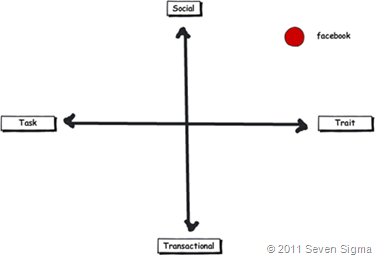
Using the facets quadrants, we can start to see patterns for success of these tools for the enterprise and whether Aaron Fulkerson’s argument has merit or whether Scott Gavin is on the right track. An interesting use of the facet diagram is to plot where various tools and technologies are located. in my classes, I ask people to plot where Facebook belongs on facets diagram. Guess where it is usually drawn? 

image

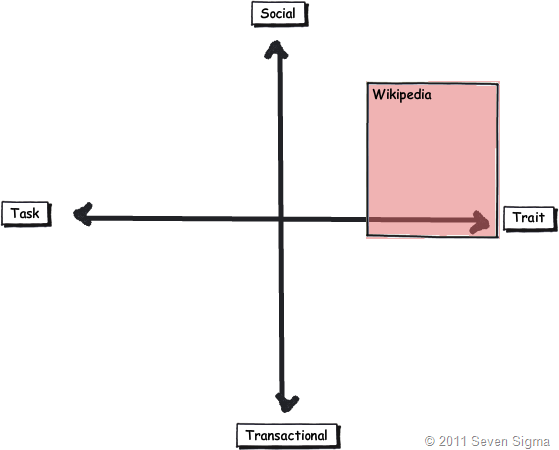
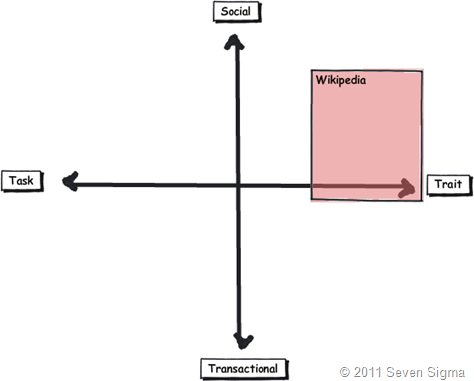
While some people will draw Facebook at various levels on the vertical axis, everyone pretty much describes Facebook (and LinkedIn)  as trait based, while being highly dominant on the social quadrant. As discussed in the last article, if I ask people to plot a crowdsourced tool like Wikipedia, the dominant characteristic is always trait/social. In other words, people maintain and update Wikipedia articles because of their interest in the topic area, not because it helps them get something done.

image_thumb29

Clearly, big social networking technologies are successful in the "trait based social” quadrant. In other words, we tend to use Facebook more for common interest collaboration than to solve a task based collaborative issue (such as deliver a project). Another interesting thing about a lot of social networking technologies is that for many, our work-based collaborative life tends to be more task based, compared to our non-work which is more trait based. In other words, for a lot of us, our work life revolves around working with a group of people for a common outcome and if it was not for that common outcome, we wouldn’t necessarily have much in common (I risk falling victim to my own generalisation here – so I will come back to this later in the section titled “Why User Buy-In Is Hard”).

When you look at where Facebook sits in the quadrant, it begs the question of how well this type of tool (or the building blocks it is based on) would work in an organisation that is project (task) based and highly transactional. To that end, consider a project management information system, such as the basic one that Dux espouses in his book or the more complex one that Microsoft sell to organisations. Where do you think it belongs on the quadrant?

When I ask people to plot their project management information system, I typically get this response:

image

I speculate that the further away two tools lie on the spectrum, the more likely we are to have a robot-barbie solution if you blindly mix features that work well in each individual quadrant. The wiki argument I made in part 3 seems to support this contention. If you recall, in part 3 of this series, I mentioned that I ask every attendee of my classes if they had ever seen a successful project management wiki.  Irrespective of the location of the class, the answer was pretty much “no”. I noted that where I had seen successful wikis tended to be where the users of the wiki were linked by strong traits.

Looking Deeper

While that is interesting, I think the facets diagram tells you more than it intends. Obviously, it is clear that these project management systems such as MS Project Server are oriented toward task/transactional (“getting things done”) aspect of project delivery (ie, time, cost, scope, budget and the like). While some people might point to this and say “there you go – I told you all that social crap was a waste of time – bloody gen-Y and their social networking hubris”, I feel this is naive. If task based transactional tools are sufficient, then why do so many projects fail?

I have stated many times on this blog that shared commitment to a course of action requires shared understanding of the problem at hand. The act of aligning a team to project goals and developing this shared understanding is the realm of the task/social quadrant (the top left), where insights and outcomes come together. When I ask people to name tools that live in this space, few can name anything. Obviously, most project management systems are devoid here. Worst still, we subsequently delude ourselves to thinking that shared understanding can come from a few platitudinal paragraphs labelled as a “problem statement”.

Social networking pundits implicitly recognise this issue (and frequently butt heads against command and control type project managers as a result). But i feel they make the mistake in applying a one size fits all approach to collaboration and apply trait based tools as a panacea when they are not wholly appropriate. The social tools seem to fit exceptionally well into the top right quadrant, but not in the top left.

In fact the only tools that spring to mind that belong in the top left category are the sensemaking tools that my company practice, such as Dialogue Mapping.

Where’s the proof, Paul?

So I guess I am arguing that using social tools because they are the “choice of the new generation” ignores a few home truths about the nature of these tools versus the nature of organisational life. Just because Microsoft provide the tools for you, tells you that they are hedging their bets rather than having any more insight than you or me. So to test all of this, let’s use the facets model in a different way to back up some of my observations and suggestions in this post. Guess what happens when I ask people to plot SharePoint itself on the facets map?

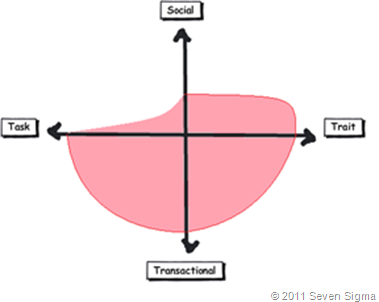
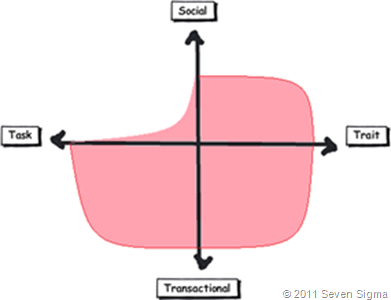
When I asked SharePoint practitioners to do this, they initially drew SharePoint 2007 as a circle over the entire model. Once they did so, they would very often adjust the drawing to emphasise transactional over social collaboration as shown below.

Sharepoint 2007 

When practitioners were asked to draw SharePoint 2010, they usually indicated a higher representation in in the two social quadrants, but favoured the trait based social over task based social as shown below.

image

What was interesting about this experiment is that very few people drew SharePoint over the entire facets of collaboration. Social collaboration with SharePoint it seems, only stretches so far. This leads me onto more conjecture, and now we get to the bit in the post where we name a giant SharePoint elephant in the room.

Structured tools for social collaboration?

Many collaborative tools purport themselves as operating in the social space. SharePoint 2010 clearly does so, principally due to the Managed Metadata service, pimped MySites with tagging/rating capabilities. But SharePoint’s core heritage is database/metadata driven, document based collaboration. If we go back to our definition of social collaboration as dynamic, unstructured, with sharing of perspectives and insight through pattern sensing, then social collaboration is clearly not a predefined interaction.

Yet, database driven tools like SharePoint, and its building blocks like site columns and content types require considerable up-front planning to install and govern. Many, many inputs need to be well defined and furthermore, unless you have learnt through living the pain of things like content type definitions in declarative CAML, SharePoint buildings blocks are difficult to maintain/change over time. SharePoint suffers from a problem of reduced resiliency over time in that the more you customise it to suit your ends, the less flexible it gets. In the case of social collaboration the problem is worse because we are trying design for outputs where the inputs are not controlled. Trying to turn something that is inherently organic and emergent to something that has an X and Y on it may be misfocused and destined to fail in many circumstances. The realm of well-defined inputs is the realm of transactional collaboration, where workflow and business process management thrive and change is much more controlled before SharePoint ever gets a look in.

SharePoint excels at transactional scenarios as this is its heritage – after all, the majority of its feature set is oriented to transactional collaboration. The fact that people are prepared to draw SharePoint as dominating across across the transactional half of the facets diagram illustrates this.

But this raises interesting, if not slightly heretical question. If we need to use information architects to get a collaborative tool deployed for social collaboration (to get those inputs defined), then are we pushing the solution into the transactional side of the fence? Recall that in part 3 of this series, I looked at document collaboration and noted that when asked to draw team based document collaboration, people typically drew it operating in the social half of the matrix (pasted below for reference). I also noted in part 3 that for team based collaboration, rules and process are much less rigid or formalised with regards to document use and structure. I then referred to a recent NothingbutSharePoint article where a large organisation’s attempts to introduce the usage of content types largely failed. Like the seeming lack of success of wiki’s for task based collaboration, maybe content types simply are not the ideal construct as you move up the Y axis from transactional to social?

Now do not assume that I am anti metadata/content types here as this is not the case at all. Content types rock when it comes to search and surfacing of related information across a site collection (and beyond if you use search web parts). What I am calling out is the fact that if the SharePoint constructs that we have at our disposal were the panacea for social collaboration, where are the best practices that tell us how to leverage them for success? Perhaps the nature of the collaboration taking place plays a part in the lack of take-up reported in the aforementioned article? Those who advocate highly structured metadata as the only true solution may in fact be pushing a transactional paradigm onto a collaborative model that is ill-suited to it?

The knowledge worker paradox – one of the reasons why user buy-in is hard

Finally for now I’d like to cover one more aspect to this issue. Last year, one of my students looked at the facets and said “Now I know why my users aren’t seeing the value that I see in SharePoint”. When I asked him why, he explained:

“Many of my users are transactional and governed by process – that’s their KPI. Here I am as a knowledge worker, seeing all of these great collaborative features, but I am not judged by a process or transaction. I don’t live in that world. I forget that someone whose performance is judged by process consistency is not going to get all excited by a wiki or tagging or a blog.”

I call this the knowledge worker paradox and it is reminiscent of what I said in part 4 where we looked at BPM vs. HPM. Each role on an organisation is multifaceted. For many roles, there is varying degrees of transactional work taking place. Accordingly some people are very much process driven just as much as they are social driven. Gross generalisations that make statements that “80% of people are knowledge workers or perform knowledge work” do not help matters. In fact they serve to feed the one size fits all mentality that has proven to be detrimental to projects when people fail to recognise that some projects have wicked aspects.

SharePoint people are almost always knowledge workers. Thus if you, as a knowledge worker who is rarely governed by transactional process, think that you have the vision to prescribe a SharePoint driven meta-utopia to meet transactional needs without having lived that world, then if your results are not what you hoped for then to me its hardly surprising.  My student in this case realised that he had been approaching his user base the wrong way. Like Jane in part 1, he did not take into account the dominant facets of collaboration for the roles that he was trying to sell SharePoint into.

When you think about it, the whole argument around records management versus collaborative document management is in effect, an argument between a transactional oriented approach, versus a social oriented one. It is the same pattern as BPM vs. HPM. In records management, the paradigm is that management of the record is more important than the content of the record. Furthermore, that record shouldn’t change. Yet with team based document collaboration, without content there is no document as such and furthermore, the document will change frequently and require less strict controls to grease the gears of collaboration.

Both records oriented people and social pundits commonly make the same mistake of my student, where they force their dominant paradigm on everyone else.

Conclusion

Food for thought, eh?

This is probably my last facets of collaboration post for a while. It is one of these series of articles that I feel has value, but I know it won’t be read by too many 🙂 Nevertheless, I do hope that anyone who has gotten this far through has gotten some value from this examination and sees value in the model to help users make more informed Information Architecture decisions for SharePoint and beyond. I certainly use it now in most engagements and hope that it can be improved upon as a tool, or somehow incorporated into some of the SharePoint standards or maturity model stuff that is out there.

Remember the most important thing of all though. Despite all I have said, it is still definitely all generation y’s fault!

Thanks for reading


Paul Culmsee

www.sevensigma.com.au


Exciting news for Governance and Information Architecture classes

Hi all

I just thought I would check-in with some updates on happenings and some upcoming travels. In less then 2 weeks now, I will be in London with Andrew Woodward and Ant Clay of 21apps for the second SharePoint Governance and Information Architecture Master Class. There are still places available on this class so if you have been thinking about attending, now is the time to act.

Also in Europe, a class is being run in Utrecht, Netherlands in May by Ant Clay.

I am proud to be chosen to be a keynote speaker at the Australian SharePoint conference in Sydney in March. I am still wondering if I should dialogue map 600 people! I will also be running a two-day class after this conference – the only one in Sydney for this year. The week after I am in NZ at the SharePoint conference there, also running a 2 day class and hopefully the first ever Issue Mapping class in New Zealand.

After a small break (begging forgiveness of clients who have to put up with my “international man of mystery” gallivanting), I’ll be heading to North American shores to run classes over there. Confirmed cities at this stage are Boston and Toronto, but DC and Chicago are in the works and I am hopeful to run one on the west coast, perhaps in San Francisco or Seattle.

If you are a SharePoint consultancy in these areas and would like to partner with us on this, please contact me on twitter @paulculmsee or email me via the address at the about page of this blog.

Below is the current itinerary for Governance and Information Architecture classes. Things are still being solidified, and will obviously change a little between now and then. Keep an eye on twitter @paulculmsee for more detail.

Date Location Class Hashtag Comments
Feb 21-22 London SharePoint Governance and Information Architecture #SPIAUK  
March 10-11 Sydney SharePoint Governance and Information Architecture #SPIAAU  
March 14-15 Wellington SharePoint Governance and Information Architecture #SPIANZ  
March 21-22 Wellington Issue Mapping Master Class #IBISNZ  
April 28-29 Washington DC SharePoint Governance and Information Architecture #SPIADC Tentative date: to be confirmed
May 2-3 Indianapolis SharePoint Governance and Information Architecture #SPIAIA Tentative date: to be confirmed
May 5-6 Boston SharePoint Governance and Information Architecture #SPIABN Tentative date: to be confirmed
May 9-10 Netherlands SharePoint Governance and Information Architecture #SPIANL Ant Clay of 21apps is running this class as I am in the USA
May 9-10 Chicago SharePoint Governance and Information Architecture ? Tentative date: to be confirmed
we will arrange some kind of hookup to the Netherlands class
May 12-13 Toronto SharePoint Governance and Information Architecture #SPIATO Announced
May 16-17 West coast USA SharePoint Governance and Information Architecture   Looking for a partner for this region
June London Issue Mapping Master Class   in the works…
July South Atrica SharePoint Governance and Information Architecture   in the works…

if you live in any of the regions that are either “tentative” or “in the works”, please contact me and register your interest so I can work with local partners on the ground in these locations.


Thanks for reading

Paul Culmsee


The facets of collaboration Part 3–The feature jigsaw


Hi all and welcome to part three of my series on unpacking this mysterious phenomenon known as collaboration. In case you missed the first two articles (and I highly suggest that you read part 1 and part 2), I spent some 500 odd hours last year developing a SharePoint Governance and Information Architecture course. Amongst the sweat and tears of that particular endeavour, I researched many papers and online articles that attempt to look at the multitude of factors and variables that impact on collaborative scenarios where SharePoint might be leveraged. I also talked about Robot-Barbie, which represents the tendency for SharePoint features to be combined in such a way where the benefit gained is much less than the potential of the individual parts. Robot-Barbie solutions are to be avoided at all costs.

image

In part 2, I explained each of the facets using the model above, identifying four key facets for collaborative facets: Task, Trait, Social and Transactional.

  • Task: Because the outcome drives the members’ attention and participation
  • Trait: Because the interest drives the members’ attention and participation
  • Transactional: Because the process drives the members’ attention and participation
  • Social: Because the shared insight drives the members’ attention and participation
  • An interesting use of the facet diagram is to plot where various tools and technologies are located and therefore, where their strengths may be. In this article, we will go through some of SharePoint’s collaborative components and see how they fit together.

    The document is dead – long live wikis?

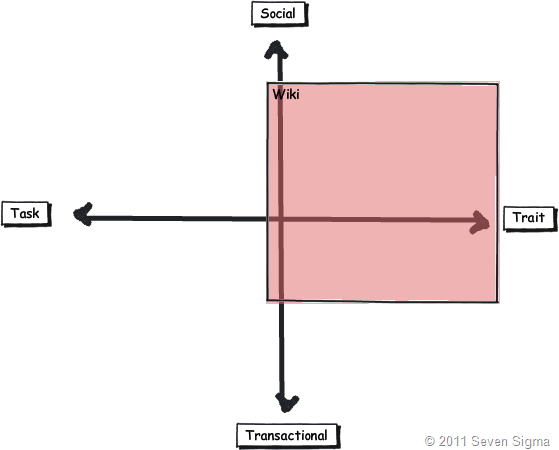
    When I have asked people to draw where Wikipedia lies on the facets, the most common answer by far is on the trait side of the collaborative fence. This seems relatively straightforward. After all, the authors of Wikipedia articles obviously have a shared interest in the topic matter. Without an interest in the topic, there would be little incentive to take the time to write about it. Furthermore with Wikipedia, authors are highly unlikely to be working on the same project or task, since the author can be anybody in the world. But, authors are likely to be performing similar tasks in their respective organisations. A classic trait based scenario.

    Wikis also are open and essentially unstructured, relying on authors to link to other content to build contextual relevance. By this logic, Wikipedia is a strong trait based collaborative system and the dominant process driving the use of the tool is insight more than process. Therefore wikis are socially oriented more than transactional. I would suggest that very few Wikipedia authors indeed would be driven by a process that mandating they update an entry.

    Closer to SharePoint home, Look at the success of SPDevWiki as another example. If you were to plot it across the spectrum (and remember this is about collaboration using the tool, not individual use), it would appear in a similar position on the model to Wikipedia. People use SpDevWiki because they wish to develop and contribute to a repository of knowledge to help others in similar situations. This reciprocal behaviour serves to help the individual in their own endeavours.

    image

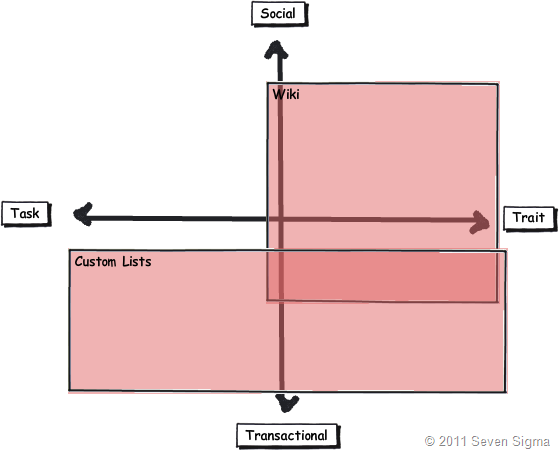
    But there is an interesting change if I ask people to simply draw “a wiki” on the model, rather than the specific example of Wikipedia (the mother of all wikis). The model tends to look something like the image below. Suddenly the scope of wikis expands more into transactional, but few people draw a wiki across the whole collaboration spectrum. As a result of this pattern, one question I make a point of asking people in all of my classes is whether they have ever seen or used a successful project management wiki. I have asked this question in London, New Zealand and around Australia, and the overwhelming answer is no. One respondent stated that his organisation had implemented a project management wiki, but conceded that he was the only one who maintained it.

    image

    The reason I continually ask this question is that I wanted to know if the pattern I had observed was common, as I can only base observation from my own client base. Using my clients, I have seen two occasions where wikis were particularly successful. The first was a wiki for programmers who worked for the same company and the second was a school, where teachers maintained a wiki as part of a SharePoint solution that we put in. Both of these examples are clearly trait dominant in that the authors were in a very similar role. Perhaps a gross generalisation is that wiki’s are best suited to trait/social based collaborative scenarios? If so, it raises an important issue. If a task based collaboration effort has a varied mix of participants, then using the model suggests a wiki may not necessarily be the way to go.

    By the way, I have learned over the years that as soon as you make an assertion to rightness, someone will come along and prove you wrong. For example, I strongly advise people not to use the Microsoft pizza/pie diagram to introduce SharePoint to new users, but Ruven Gotz proves that it is perfectly acceptable to do so. Therefore in the example above I am only reporting on my observations, plus feedback from those who have attended my classes. I am not trying to prove right or wrong here as I know many will disagree with the diagram. But what I am interested in, if you can prove the assertion wrong, is what you did to make a wiki successful in the other quadrants?

    Wikis vs. Custom lists

    In typical SharePoint fashion, there is always ten ways to do something, each with their own pros and cons. Both wikis and SharePoint lists are flexible information repositories, that differ by the degree of structure imposed. Lists offer the creation of custom columns of different kinds, that allow tables of information to be stored and via the use of views, to make sense of the content. You get a few other niceties like datasheet view, attaching files, and export to Excel/MSAccess. In fact, many people like to adopt lists because they previously used Excel for storing information and Sharepoint offers similar functionality with improved data entry and multi-user support.

    Someone once told me that more critical corporate data is stored in excel than any other database system in the world. I am not surprised in the slightest.

    When asked to place where SharePoint lists fit on the facets model, many users tend to link it to transactional based collaboration that is equally task or trait based. Lists it seems, are well suited to tracking “stuff”, which lends itself naturally to transactional collaboration where process tends to govern interaction.

    Lists also tend to need more up-front work where a wiki usually does not. Before content can be effectively added to a list, you need to define columns or content types in advance and hope that you get it right. Information Architects routinely get paid to help do this. Remember that transactional collaboration is the world of well-defined inputs, because process governs the interaction. As such, project delivery (a transactional/task oriented process) often uses list based techniques because of the improved ability to track, slice and dice information, when compared to a wiki. Dux Sy’s book on using SharePoint for Project Management is a good illustration of this approach. Wiki’s do not even get mentioned in Dux’s book. Why is this? Perhaps the tracking of time, resources, costs, risks, constraints and work performed is best delivered via lists? Certainly, more fully fledged PMIS systems like Microsoft Project Server are highly database driven and designed for transactional work.

    It is then quite interesting to overlay SharePoint lists and wiki’s together. Is it possible to make a more educated call as to when one option is more suited than the other? Take a knowledgebase scenario which could easily be either a wiki or a list. Perhaps the decision as to use wiki or list should be based on the nature of the collaboration? If a bunch of people linked by trait are creating a knowledge repository, a wiki is a proven approach – Wikipedia shows this to be the case. But if this is for say, a more transactional scenario such as a call-center, where KPI’s are based around quick turnaround and resolution of common problems, a list approach might be better?

    image

    At this point I can feel the heat of offended Enterprise 2.0 fanboys. Please understand, I am not anti wiki’s or anything 2.0 – we use these tools in our practice. Furthermore SharePoint blurs the above distinction anyway. Columns can be added to wikis and they leverage SharePoint’s version history too. In other words, you can make a wiki look and feel somewhat like a list. Furthermore, SharePoint wikis can be integrated with information management policies and workflow. When you add those additional capabilities to the mix, you might draw things differently. Nevertheless, I think this is a useful exercise because it might offer insight as to why certain portal features rarely, if ever get used in certain situations.

    Document Collaboration – Transactional or Social?

    Finally for now, document based collaboration seems to fit into any quadrant (and is therefore quite tricky at times). This is because the “document” is simply a medium of collaboration (as is a wiki for that matter).

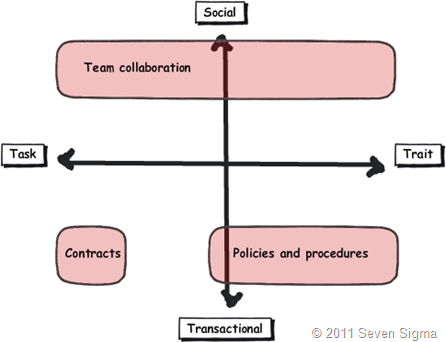
    For one extreme, take the example of a quality management system (policies, procedures, manuals). Given that a QMS is usually part of a compliance regime, requiring audits and demonstrated conformance, document collaboration is fairly rule-based and managed via well defined and understood process. Therefore, we are talking transactional work. In this world, SharePoint features like content types, metadata, policies and workflow are fairly easy to define and implement.

    But a QMS, via policies and procedures, guide the behaviour and decision making in organisations. So while transactional, it is oriented towards trait based. This is because a QMS is rarely installed to deliver a single project, but to guide delivery of many projects. One thing that might be guided by a QMS is the creation of a legal contract that outlines the scope and responsibilities of two parties undertaking a project. Documents such as contracts, while also usually transactional, are task based they outline a legal commitment to achieving an agreed outcome.

    Contrast this with a team collaborating via documents. A team can be driven by an outcome or common interest (department) and as a result covers both the task and trait based quadrants. Often the rules of engagement are much less rigid or formalised with regards to document use and structure. Thus, a lot of team document collaboration is more social and trying to fit this into an overly strict or complex taxonomy can do more harm than good. I noticed with great interest that recently, certain SharePoint elephants in the room are starting to be named. The recent articles on NothingButSharePoint entitled “SharePoint Content Types: Is this a lost cause?”, highlights what I mean. In this article, repeated attempts were made to try and harness the value and power of content types into a large enterprise. However despite the effort, they were rarely used.

    To me, this highlights the characteristic of team collaboration – particularly knowledge workers. If collaboration is not a predefined interaction, then content types, which by definition, force us to go to a lot of effort to define inputs when those inputs are not necessarily known. Perhaps the nature of the collaboration taking place played a part in the lack of take-up reported in the aforementioned article? Those who advocate metadata as the only true solution may in fact be pushing a transactional paradigm onto a collaborative model that is ill-suited?


    image

    As a general rule, in transactional scenarios, the classification of the document is of more importance than the content of the document. This is the records management and compliance paradigm, where the fact that the document is controlled is the key driver. However, in team collaborative scenarios, the content of the document is usually more important than the metadata classifying it. From a team members point of view, metadata that helps to indicate content is more important than metadata that indicates compliance.

    As documents age however, the value of the content tends to diminish and the value of the classification increases. Balancing the need for compliance against the need for collaboration is a key document management challenge irrespective of the tools and systems that underpin it. There is a large smackdown looming between the worlds of compliance vs. the world of government and enterprise 2.0 and I will eventually write on that topic.

    Once again, the key point here is context. Some document oriented collaborative scenarios are highly structured and well suited to well-defined taxonomy and metadata. Others are somewhat less so. Perhaps a tool like this helps to work out when certain information architecture decisions are applicable when it comes to document collaboration?

    Conclusion

    You might have noticed that this post has more questions than answers. In doing a model, I never said I would provide more answers. Instead, more of a frame or perspective to ask certain types of questions that many SharePoint practitioners have increasingly be asking (as evidenced by the content type post above). In the next post, I will conclude by using the facets to examine several common arguments seen in organisations, where people in particular roles are in effect, predisposed to having a bias in one or more of these facets. We will also look at SharePoint as a whole, as well as examine what we can glean about user engagement and buy-in.

    Until then, thanks for reading.

    Paul Culmsee

    www.sevensigma.com.au


    The facets of collaboration Part 2–Enter the matrix!


    Hi all

    In my first post in this series, I introduced you “Jane” and a true story about her missteps when implementing popular social networking technologies within her organisation. We then asked some deep and ponderous questions, before meeting Robot Barbie and the crazy world of SharePoint Robot Barbie solutions. Finally I outlined a simple mental model that I developed that I have found to be quite a useful method to look at collaboration more holistically and help with the user engagement and information architecture aspects of SharePoint governance.

    Now before we start, I want to make a four points to pre-empt the type of replies that I anticipate from putting this model out there.

    1. Kailash once told me that the problem with models is that their creators fall in love with them. They forget that they exist to help us to understand the reality around us, but this doesn’t make them reality. For that reason, I do not love my model and see lots of flaws. I also look forward to seeing better ones that people come up with. The key point is this: No model can ever capture the total sum of variables combine to make a collaborative situation look or feel a certain way, all it can do is approximate. This is my attempt at approximation.
    2. Imagine watching the Matrix movies without the car chases or kung-fu. It would be long, full of nonsensical dialogue and you would come out saying “I have no idea was that all about”. Mental models are a little like that too. This model is designed to be simple and explainable within 2 minutes. Any concept that takes more than a beer to explain will forever be in the realm of academia and get little real-world use.
    3. Some people (particularly scientist types), will look at a matrix like mine and automatically think that is measuring something. This is because there is an X and Y axis and usually, their presence indicates two variables that can have a range of values. In my case though, I was not thinking about an axis in that way. I just saw that each of the facets identified (task vs trait and social vs transactional) seem to me to be the extreme ends of an axis that I as yet, have not worked out :-). The point is, matrixes don’t always work for these people and they tend to avoid drawing quadrants with explicit lines because of the implicit suggestion that a situation falls into one quadrant or another. If you are of this persuasion feel free to develop it in a way that works for you. I think when we hit part 3, you will see that I use the model in different ways.
    4. Remember that this model is about collaboration. By definition, this involves more than 1 person. I was not thinking of individual people when putting it together. It assumes a bunch of people interacting and each facet I guess, highlights a dominant collaborative trait.

    So let’s examine each facet in turn

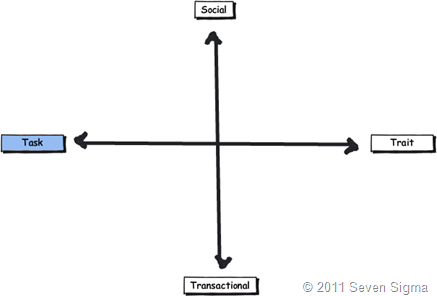
    Task Based Collaboration (Outcome driven)

    Task based collaboration is typically characterised by short(ish)-term groups, comprised of people with a shared goal or common outcome (i.e. a "project”). The membership of a task based group is typically fairly diverse because it is the outcome drives the members’ attention and participation. Members are chosen because of their ability to play a part in achieving the outcome and it is not necessarily true that they have a say in that outcome.

    The dominant characteristic of a task based collaborative group is that members do not necessarily have shared interests beyond the outcome being delivered. A SharePoint project team is a good example of this, because of the multidisciplinary skill set required to deliver it. Outside of that project, people may have vastly different interests and skills, and may have nothing in common beyond the outcome being sought. Some organisations are like this, where the people you work with you do not necessarily have any social interaction with beyond the interactions required to get the job done.

    When you look at the matrix below, the top and bottom left quadrants are therefore driven by outcome. (i.e. getting something done).

    image

    Trait Based Collaboration (Interest Driven)

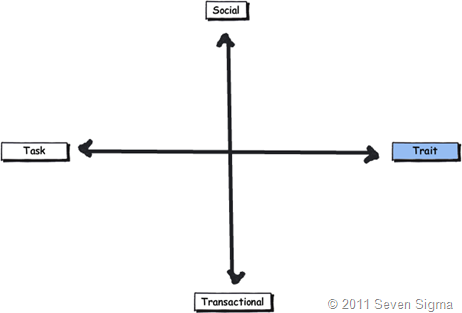
    Trait based collaboration is comprised of users who are related through shared traits or long-term interests. As I stated in the first post, members may not be consciously collaborating on the same task or outcome, but may be highly likely to repeat or augment tasks already accomplished by other group members. Therefore, trait based groups tend to come together to share their learning and experiences. It is the shared interest that drives the members’ attention and participation. There is no deadline as such, or a specific task being shared among the group.

    Examples of trait based groups are special interest groups (fans of a particular musical group) and occupational groups (via job role or even department). When you think about it, Facebook is the mother of all trait based collaborative platforms because members almost overwhelmingly are there connect with people who have a shared trait of some fashion. Also consider a community driven site like NothingButSharePoint or a conference such as SharePoint Best Practices. Both are excellent examples of trait based collaborative scenarios. We use these collaborative environments to gain insight and learning from sharing experiences with like-minded individuals.

    When you look at the matrix below, the top and bottom right quadrants are therefore driven by interest.

     image


    Transactional Based Collaboration (Process Driven)

    Transactional collaboration takes the form of a business process where various people or groups interact to get something done. In this scenario, inputs and outputs are fairly well defined and the process is repetitive by nature. Think of airport baggage handling as a great example. This is a process that has to be run efficiently and consistently. As a traveller, I want baggage handlers to be making sure my suitcase is on the right flight. I don’t want them all sitting on say, Yammer or MSN to co-ordinate the delivery of baggage. But I sure as tell want them to be able to tell me the status of my bag pretty much instantly.

    One interesting characteristic of transactional based collaboration is that the people in the process can often be “swapped out” with other people, because transactional process is designed to be well defined, optimised and easy to follow consistently. It is the process that drives the members’ attention and participation, and governs the interaction between participants.

    As stated in part 1, another characteristic of transactional collaboration is that it is usually not a place of spontaneity. Consistency is key to success and processes are designed to run with a minimum of variation and margin for error. As a result, this is the sort of stuff that well defined business rules, metadata and rule-based workflows handle well.

    When you look at the matrix below, the left and right bottom quadrants are therefore driven by the process that governs the collaboration.


    image


    Social Based Collaboration (Insight Driven)

    Social based collaboration is an interesting one. Truth be told, I knew that this one would have the greatest connotations because of the wildly different interpretations of the word social. From the point of view of my model, I offer the following explanation.

    Social collaboration is the other extreme of transactional. This is usually characterised by more ad-hoc sharing of perspectives and information. It is realisation or insight through pattern sensing via group interaction, rather than structured business rules. It looks beyond the process and attempts to get to the ‘big picture’ of an issue, problem or constellation of problems.

    Therefore social collaboration cannot really be a predefined interaction in the transactional sense. It is not a structured workflow, a rule or something with well defined inputs. But it is the place where tacit knowledge creation, development and exchange typically occurs. It is where hard decisions sometimes have to be made and where innovation tends to come from because it is the shared insight that drives the members’ attention and participation. It is the world of wisdom of the crowds – collaboration in all its messy glory.

    As a simple example of what I mean, even the best business process modelling guru will never be able to document the process a board of directors would go through when performing strategic decision making. If for example, someone worked out the business process diagram that would tell any organization how to develop the next iPod or to master the stock market, then we wouldn’t marvel at Steve Jobs sixth sense for product delivery or Warren Buffets ability to consistently out-perform the market.

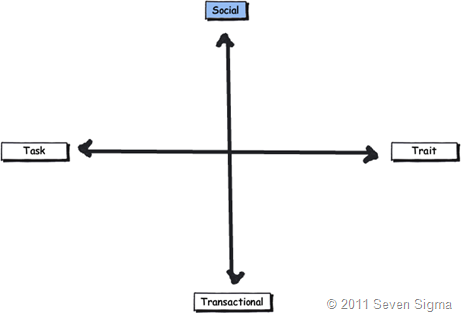
    Therefore in the matrix below, the two top quadrants are therefore driven by the insight gained from the collaboration.

    image


    To Summarise

    Hopefully after that explanation, each of the quadrants start to make more sense. The facets of collaboration can be summarised as follows:

    • Task: Because the outcome drives the members’ attention and participation
    • Trait: Because the interest drives the members’ attention and participation
    • Transactional: Because the process drives the members’ attention and participation
    • Social: Because the shared insight drives the members’ attention and participation

    image


    In the next post, we will use this simple model to examine several common scenarios and see what insight we can glean from looking at collaborative tools and situations through this lens.

    Thanks for reading

    Paul Culmsee
    www.sevensigma.com.au


    The facets of collaboration Part 1–Meet robot barbie


    Hi all

    I have a friend, lets call her Jane (not her real name), who was a huge web2.0 fan. Seriously, if it was a wiki, blog, tweet or anything remotely sounding like RSS, Jane would wax lyrical about how it was the answer to all that was wrong with the silos of the old world and if only people would get with this new paradigm and embrace the social revolution, collaboration within her organisation would markedly improve. After all, look at the popularity of sites like facebook, wikipedia and twitter. Jane also had a very strong vision for what this new world would look like and had spent a lot of time and money investing in customising SharePoint to meet this vision.

    Much to Jane’s dismay, her project failed miserably. Her organisation ultimately wanted something much more boring – a solution to help them manage their files better. All of this “new-age gen Y social crap “ was of little interest to the masses.

    Janes story is actually a very common pattern with SharePoint projects. As it happened, Jane had committed probably the most cardinal sin of information architecture. She had projected her ideals onto an organisation that did not necessarily subscribe to her view. Therefore SharePoint represented her vision and little else. Few others shared it and to this day I think she blames the culture organisation she worked for. I say that she did not do enough to develop a shared understanding of the problem, and shared envisioning of the solution.

    Now most of us know that SharePoint can be a platform for going gung-ho social if you wish, given that it has features like wikis, blogs, folksonomy and RSS. But it can can also be a platform for structured business process via features like workflow, BCS, information management policies, content approvals and the like.

    So that raises a really important question. Why is it that a particular collaboration feature (such as a wiki) might be total nirvana for one situation and can be a project killing fatal flaw in another? Since SharePoint has a ton of collaborative tools in its toolkit that can be rolled up in different ways, when do certain features work well together and when do they completely suck balls together? Why do some people have such wildly differing views on the nature of collaboration and what potential solutions should look like? Why do some people look at the SharePoint feature-set and say “meh”, while others are totally charmed by it?

    This was a question worth pondering and I did look into this in some detail while I was creating my SharePoint 2010 Information Architecture course. In this short series of posts, I am going to introduce you to a way of looking at the wide spectrum of activities that all fall under the guise of this term called collaboration. This mental model seems to help paint a more realistic picture of the collaborative world than the simplistic views that Jane and her ilk use. It goes some way to many of the questions that I raised above. Furthermore, the model has been very well received at my courses. Maybe there is something to this?

    Introducing “robot barbie” – the yardstick for SharePoint information architecture

    Say hello to Robot Barbie, my all-time favourite SharePoint metaphor. I use this picture in all of my classes and talks, such is its persuasive power.

    image

    I first saw this picture via a talk that Joel Oleson gave. The story behind it was that Joel came across this very real toy in a market somewhere in Asia. When Joel asked the storekeeper what the idea was behind the toy, the reply he got was along the lines of:

    “Well, boys like robots and girls like Barbie. Therefore, if we put Barbie’s head on a robot, then logically both boys and girls will like it.”

    Hmm.

    Now I don’t know about you, but I can’t see that boys and girls would suddenly drop their respective robots and Barbies and start playing with this ugly hybrid. In fact, when you look at the result, it is this bizarre, somewhat disturbing combination of features that brilliantly demonstrates the folly of taking two things that work really well alone and expecting that by combining them, things will work even better. Instead, we have a combination that is much less than the sum of its parts and unlikely to satisfy anybody.

    Robot Barbie is a very powerful visual metaphor for SharePoint information architecture because SharePoint is full of Barbies and full of robots. In fact the global SharePoint information architecture mantra should be “avoid robot barbie”. To that end, when I show this image to clients or conference attendees, I ask them the question, “So is your SharePoint implementation a robot-barbie solution?”.

    Many people will admit to varying degrees of robot-barbie. How then to avoid it?

    Research into collaboration itself

    The only SharePoint person I have met who goes to a university library to research more than me is Erica Toelle. In this section I am attempting to make her proud – hehe 🙂

    Since these questions around collaboration came to me while I was developing an Information Architecture course, I became curious as to whether academics, authors or bloggers had ever actually attempted to deconstruct collaboration itself into its core elements (in effect, performing an information architecture exercise on collaboration itself). Surely understanding the some of these elements would help us gain some hints or insights into how collaboration works and in turn, help us avoid Robot Barbie?

    So I hit the journals and did some digging. As it happened, some academic research had been undertaken over a long period of time, trying to codify this lofty ideal called collaboration. As expected, authors looked at the issue from various angles. Some looked at it through the lens of the type of conversation taking place, some via the nature of the problem solved, some through “business activities”, some via the characteristics of group doing the collaborating and others examining the underlying purpose that drove the collaboration in the first place.

    Some of the more interesting writing that I examined in developing my own model included:

    I read all of these papers in detail and then converted the arguments made by each into IBIS and created a single (admittedly very large) issue map to try and draw out any patterns from them. I would group all of the various concepts in the map together in different ways to try and elicit some sort of insight. This proved to be quite a frustrating process because of the various different ways each writer tackled the subject matter. The map was huge and I was at first, unable to find a pattern that worked for me. All of them seemed to have some interesting elements, but they all seemed incomplete or over-thought in some way.

    In frustration, I gave up and slept on it. During the night my subconscious must have kept working to unscramble the map because the next morning, I had my model within a few minutes. I looked at the map again and saw a pattern immediately. It was in essence, a combination of some work by Chuck Hollis and interestingly, Microsoft Research (The last two of the above references).

    Meredith Ringel Morris and Jaime Teevan of Microsoft research wrote a brilliant paper called “Understanding Groups’ Properties as a Means of Improving Collaborative Search Systems”. For the record, anyone that is looking to leverage user profile data via mysites should read it. In this paper, Morris and Teevan divide collaborative groups into trait or task, based around the longevity of a group. They also use group identification in the form of group membership being implicit or explicit. For my own purposes, the implicit vs. explicit membership of a group was not overly relevant so I discarded it. But I found the notion of trait and task based groups fascinating.

    Morris and Teevan characterised task based groups as short term and comprised of people with a shared goal and working together to achieve that goal. (They are describing every project team right there). Trait based groups on the other hand were comprised of users who were related through shared traits of long term interests. Here was the quote that really made me sit up and take notice however. They also suggested that trait based “group members may not be consciously collaborating on the same task, but may be highly likely to repeat or augment tasks already accomplished by other group members” (Love it – they are describing every discussion forum right there).

    So I had my first dimension of collaboration. Task vs trait.

    image

    In 2007 Chuck Hollis of EMC wrote a really insightful blog post entitled “Beyond Document Collaboration”, where recognised that via the advent of social media, organisational collaboration was changing and that “different collaboration models are emerging, each one with entirely different value propositions”. Hollis identified three such models and labelled them transactional collaboration, document collaboration and social collaboration.

    Hollis described transactional collaboration as “workflow, or business process management, or something else” and was characterised by “humans are largely automatons; repetitively processing the output of one function for input by another function.  Not much spontaneous creativity interaction here, nor is it usually encouraged!”. Hollis then spoke of document collaboration and explicitly mentioned both Documentum and SharePoint. He finished with social collaboration, which he described as “It’s not predefined interaction.  It’s not a structured workflow.  It’s something entirely different than the other two collaboration models”.

    After reading that post, I thought Hollis was definitely on to something but I felt his descriptions didn’t quite encompass what I was looking for. Like the Ringel/Teevan paper, I felt that elements of Hollis’s breakdown didn’t quite fit for me. After I had slept on it, it dawned on me that document collaboration was the odd one out. I liked his distinction between transactional and social collaboration, of structure and predictability versus a non predefined interaction because the social dimension to me was describing knowledge work. But document collaboration did not work for me at all. A document is simply a medium, as is a wiki or a forum. Structured, process driven collaboration can still use documents, and so can relatively unstructured social collaboration. They just use them in different ways. The same can also be said for whether the collaboration is task based (ie outcome driven) or trait based (interest driven).

    So I discarded document based collaboration and in doing so had my second dimension.

    image

    Making a model

    Out of all of the material that I researched, I found that these four dimensions or facets of collaboration (task, trait, transactional, social) helped me explain most collaborative scenarios and understand why Robot Barbie solutions occur. Of course, the great thing about distilling it down to four dimensions is that I then I got to do what academics live for. Make a 2*2 matrix!

    Academics simply love doing this, because it helps them deal with over-analysing everything that moves and justify all that R&D that they do! :-). In all seriousness though, people love creating 2*2 or 3*3 matrixes to explain concepts for the simple reason that they make good mental models to help us understand reality. After all, one of the key purposes of information architecture itself is to help users create mental models of a site (“Don’t Make Me Think ”).

    So here is my complete model. In part 2 I will explain how I use this model and the insights that it gives in preventing robot-barbie outcomes.


    image


    Thanks for reading

    Paul Culmsee
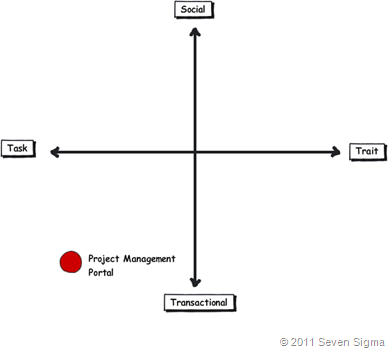
    www.sevensigma.com.au


    More SharePoint Governance, Information Architecture and *Sensemaking* Classes Planned

    imageHi all

    A big chunk of last year had me off under a metaphorical mushroom, putting together several days of courseware on the topic of SharePoint Governance and Information Architecture. My take on these topics are influenced from some odd places, and the course drew on a lot of the non IT work that I do, that involves collaboration on some very complex problems indeed.

    In November and December of 2010, we took this “on the road”, so to speak, firstly in Dublin, then London and Sydney. The courses were sold out and feedback was terrific. Here are a few choice quotes (check out the hyperlinks for full reviews)


    “Did it meet my expectations? Well I’d have to say that it far exceeded them. There had obviously been a large amount of effort in preparing the courseware and modules. They covered the important missing links currently absent from the Microsoft and traditional training courses” – Wes Hackett.

    “I’ve just finished the second day of the SharePoint 2010 Governance and Information Architecture Master Class presented by Paul Culmsee with the support of Andrew Woodward . I can wholeheartedly say it was one of the best courses I’ve attended both in content and presentation style and they deserve a lot of credit for putting together a fantastic course. Paul in particular has put a huge amount of effort into the slidedeck, sample documents and enormous manual (almost 500 pages worth!) let alone all the great additional insight he could provide in person over both days” – Brendan Newell

    “Finally …. after 12 years in the IT industry a course which covers some of the fundamental issues governing project success.   This course is a real eye opener and a must for any IT professional involved in project planning and delivery” -  Stephen McWilliams

    “I just came back from the best technology training I have had in years: a world-first Microsoft SharePoint Elite Information Architecture course designed and delivered by Paul Culmsee. It has taught me a great deal across ALL facets of the day-to-day work that I do as a SharePoint architect” – Jess Kim

    Based on this and similar feedback, we are going to do it again. Locations confirmed so far are London (#SPIAUK), Sydney (#SPIAAU) and Wellington (#SPIANZ) in February and March 2011 and in the pipeline is The Netherlands (#SPIANL) and at least a couple of US cities!

    In addition to the unique content on these classes, I am honoured to announce that I am now authorised to teach the official Cognexus Issue Mapping courseware – the only non Cognexus Dialogue Mapping practitioner authorised to do so. As such, we will be running the inaugural Issue Mapping class in London in late February as well (wohoo!)

    So, here are the details for each location:

  • (Register now) February 21, 2011, London   #SPIAUK SharePoint Governance and Information Architecture Master Class (Download Flyer)
  • (Register now) February 23, 2011, London #IBISUK Issue Mapping Master Class (Download Flyer)
  • (Register now) March 10, 2011, Sydney  #SPIAAU SharePoint Governance and Information Architecture Master Class (Download Flyer)
  • (Register now)March 14, 2011, Wellington #SPIANZ SharePoint Governance and Information Architecture Master Class (Download Flyer)
  • (Register soon) May 9, 2011, Utrecht, Netherlands (watch this space)
  • Wondering what to expect in these classes? Read on!

     SharePoint Governance and Information Architecture Master Class. 2 full days of real world, examples knowledge and techniques

    Most people understand that deploying SharePoint is much more than getting it installed. Despite this, current SharePoint governance documentation abounds in service delivery aspects. However, just because your system is rock solid, stable, well documented and governed through good process, there is absolutely no guarantee of success. Similarly, if Information Architecture for SharePoint was as easy as putting together lists, libraries and metadata the right way, then why doesn’t Microsoft publish the obvious best practices?

    In fact, the secret to a successful SharePoint project is an area that the governance documentation barely touches.

    This master class pinpoints the critical success factors for SharePoint governance and Information Architecture and rectifies this blind spot. Paul‘s style takes an ironic and subversive take on how SharePoint governance really works within organisations, while presenting a model and the tools necessary get it right.

    Drawing on inspiration from many diverse sources, disciplines and case studies, Paul has distilled the “what” and “how” of governance down a simple and accessible, yet rigorous and comprehensive set of tools and methods that organisations large and small can utilise to achieve the level of commitment required to see SharePoint become successful.

    Master class aims:

    • Present SharePoint governance and Information Architecture in a new light – focus on the “blind spots” where the current published material is inadequate
    • Cover lessons learned from Paul’s non IT work as a facilitator and sensemaker in complex large scale projects
    • Examine the latest trends in the information landscape for industry and government and review studies that inform governance and Information Architecture efforts
    • Present an alternative approach to business-as-usual SharePoint governance planning that focuses on real collaboration
    • Provide quality information that is rigorous yet accessible, entertaining and interesting

    Master class outcomes:

    • Understand the SharePoint governance lens beyond an IT service delivery focus
    • Develop your ‘wicked problem’ radar and apply appropriate governance practices, tools and techniques accordingly
    • Learn how to align SharePoint projects to broad organisational goals, avoid chasing platitudes and ensure that the problem being solved is the right problem
    • Learn how to account for cognitive bias and utilise tools and techniques that help stakeholders align to a common vision
    • Understand the relationship between governance and assurance, why both are needed and how they affect innovation and user engagement
    • Understand the underlying, often hidden forces of organisational chaos that underpins projects like SharePoint
    • Understand the key challenges and opportunities that SharePoint presents for Information Architecture
    • Learn how to document your information architecture
    • Practical knowledge: Add lots more tools to your governance and IA toolkit!

    Course Structure: The course is split into 7 modules, run across the two days.

    Module 1: SharePoint Governance f-Laws 1-17:

    Module 1 is all about setting context in the form of clearing some misconceptions about the often muddy topic of SharePoint governance. This module sheds some light onto these less visible SharePoint governance factors in the form of Governance f-Laws, which will also help to provide the context for the rest of this course

    • Why users don’t know what they want
    • The danger of platitudes
    • Why IT doesn’t get it
    • The adaptive challenge – how to govern SharePoint for the hidden organisation
    • The true forces of organisational chaos
    • Wicked problems and how to spot them
    • The myth of best practices and how to determine when a “practice” is really best

    Module 2: The Shared Understanding Toolkit – part 1:

    Module 2 pinpoints the SharePoint governance blind spot and introduces the Seven Sigma Shared Understanding Toolkit to counter it. The toolkit is a suite of tools, patterns and practices that can be used to improve SharePoint outcomes. This module builds upon the f-laws of module 1 and specifically examines the “what” and “why” questions of SharePoint Governance. Areas covered include how to identify particular types of problems, how to align the diverse goals of stakeholders, leverage problem structuring methods and constructing a solid business case.

    Module 3: The Shared Understanding Toolkit – part 2:

    Module 3 continues the Seven Sigma Shared Understanding Toolkit, and focuses on the foundation of “what” and “why” by examining the “who” and “how”. Areas covered include aligning stakeholder expectations, priorities and focus areas and building this alignment into a governance structure and written governance plan that actually make sense and that people will read. We round off by examining user engagement/stakeholder communication and training strategy.

    Module 4: Information Architecture trends, lessons learned and key SharePoint challenges

    Module 4 examines the hidden costs of poor information management practices, as well as some of the trends that are impacting on Information Architecture and the strategic direction of Microsoft as it develops the SharePoint road map. We will also examine the results from what other organisations have attempted and their lessons learned. We then distil those lessons learned into some the fundamental tenants of modern information architecture and finish off by examining the key SharePoint challenges from a technical, strategic and organisational viewpoint.

    Module 5: Information organisation and facets of collaboration

    Module 5 dives deeper into the core Information Architecture topics of information structure and organisation. We explore the various facets of enterprise collaboration and identify common Information Architecture mistakes and the strategies to avoid making them.

    Module 6: Information Seeking, Search and metadata.

    Module 6 examines the factors that affect how users seek information and how they manifest in terms of patterns of use. Building upon the facets of collaboration of module 5, we examine several strategies to improving SharePoint search and navigation. We then turn our attention to taxonomy and metadata, and what SharePoint 2010 has to offer in terms of managed metadata

    Module 7: Shared understanding and visual representation – documenting your Information Architecture

    Module 7 returns to the theme of governance in the sense of communicating your information architecture through visual or written form. To achieve shared understanding among participants, we need to document our designs in various forms for various audiences.

    Putting it all together: From vision to execution

    As a take home, we will also supply a USB stick for attendees with a sample performance framework, governance plan, SharePoint ROI calculator (Spreadsheet), sample mind maps of Information Architecture. These tools are the result of years of continual development and refinement “out in the field” and until now have never been released to the public.

    Note: The workshop sessions will be hands on, we provide all of the tools and samples needed but please bring your own laptop.

    Issue Mapping Master Class. Your path towards shared understanding and shared commitment

    “Some problems are so complex that you have to be highly intelligent and well informed just to be undecided about them.” Laurence J. Peter

    Presented by: Paul Culmsee

    Courseware by: Cognexus Institute and Seven Sigma

    “Not another $#%@*$ meeting!”

    All of us have felt the frustration of walking from yet another unproductive meeting, wondering where the agenda went. Yet, as problems become more complex, meetings are still the place where critical strategic decisions are made.

    ibis-map

    What is Issue Mapping?

    Issue-Based Information Systems (IBIS) is a sense-making framework used to support group discussions to assist all involved to come to a shared understanding. It visually maps participants’ points of views, problems voiced, the rationale and reasons leading up to decision(s). The maps can be easily read and understood by everyone, even by those not part of the discussion group.

    Why Issue Mapping?

    • Maps detailed rationale behind decision-making as well as the decision; maps the thinking process of the group
    • Concentrates on pros and cons to an idea, encourages and explores all views, taking the sting out of differences
    • Represents and clarifies diverse points of views, conflicting interpretations and goals, inconsistent information and other forms of complexity
    • Everyone gets a chance to speak, if they want. People are heard and contributions are acknowledged. Interruptions, repetition and dominance of the loudest decreases
    • Keeps participants on topic because they can visually see the progress of the discussion
    • Keeps everyone’s attention
    • Meeting progress/result can be seen
    • Map helps participants come up with ideas/arguments
    • Visual display of progress to review summary if need so the brain can absorb the bigger picture and appreciate the validity and value of a larger perspective
    • Avoids jumping to easy answers or superficial conclusions
    • Promotes deeper reasoning, rigor and even wisdom
    • Everyone can visually see everything discussed- leaves no room for misunderstandings
    • Documents can easily be attached to map to back up ideas
    • Participants can see effectiveness of mapping and genuine will try to make it more productive

    About Seven Sigma

    Issue Mapping is a life skill that can be applied to many different problem domains and scenarios. Participants will gain proficiency in a craft that can be applied long into the future, to help them and others bring clarity and convergence to the management of complex problems. At Seven Sigma, we practice Issue and Dialogue Mapping routinely and this has brought us many satisfied clients. The Mapping in itself is part of the ‘secret sauce’ that makes Seven Sigma’s reputation renowned.

    Seven Sigma Business Solutions is the only recognised designated partner of Cognexus Institute, founder of the art of Issue Mapping, in the world. We recognise that without reaching shared understanding, you will find yourself at yet another meeting, rehashing the same unresolved problems, listening to the same arguments month after month. Or, if a decision has been made, it has not been followed up to fruition due to lack of commitment/buy-in.

    We are proud to be part of your journey towards shared understanding and shared commitment.

    Master Class aims and outcomes:

    • Be able to create great maps – issue maps that are clear, coherent, and inviting
    • Immediately start using Issue Mapping effectively in your work and life; the class will focus on practical experience and map building
    • Command a rich range of options for publishing and sharing maps
    • Lead with maps: create direction, momentum, and energy with issue maps
    • Quickly and effectively do critical analysis in dynamic situations
    • Organize unstructured information and discover patterns and connections within it
    • Make critical thinking visible for inspection and analysis
    • Recognise early, the symptoms of wicked problems and the forces behind group divergence
    • Recognise the importance of capturing the rationale behind decisions, as well as the decisions themselves
    • Rethink the traditional approach to meetings and decision making
    • Start capturing the rationale leading up to the decisions by using IBIS and Compendium software

    It will also give you a deeper understanding of:

    • The fundamentals of IBIS and Compendium
    • The structural patterns that give clarity and power to issue maps
    • How decision rationale is represented in a map

    This master class will be hands on – please bring your own laptop with Compendium software (freeware) installed.

    Duration: 2 days, with homework after the first day

    Audience: For both IT and non-IT audience; those involved in highly complex projects including leaders, consultants, facilitators, organisational development professionals, change agents, managers and engineers.

    Prerequisite: An open mind geared for shared understanding and shared commitment


    SharePoint Analysts–Stop analysing!

    Michal Pisarek wrote a nice write-up of what makes a good SharePoint Analyst. I feel I have something to offer here, given that I…

    1. am a cynical old bastard
    2. am an opinionated old bastard
    3. have had some opportunities that not too many SharePoint people have had
    4. wrote this post on a plane while suffering jetlag 🙂

    I am going to argue that as a SharePoint ”analyst”, the worst thing you can do is act like an analyst.

    I previously wrote about the identity crisis that Business Analysts have which became apparent to me when I spoke at a BA World Conference last year. The gist of my point in that post came from my observations of a panel discussion on role of a BA within Agile development. I noted that the whole discussion seemed based on an underlying presumption that the role of the BA was to translate between IT and “the business". Agile by its very nature, shifts the ground out from under this assumption which caused a bit of consternation on the part of the panel. My takeaway from this, was that a role does not define the person. The body of knowledge of your discipline (in this case BABOK) is not the one truth. When you think about it, the body of knowledge by definition, consists of the lowest common denominators of a discipline of knowledge – a starting point. This is because the skills that you have built are your skills. Sure, you can write about them, but that only conveys a small dimension of what your skills entail.

    Essentially, if everybody followed the BOK as the source of the truth then all consultancies would look the same. (Thinking about it, now you know why all large and expensive management consulting firms tend to sound the same…hehehe 🙂 )

    image

    The point is that it is the knowledge that you have earned that makes you what you are and what customers want. Knowledge comes from making mistakes, not by confirming your rightness. Therefore, people who practise constant learning by trying things out, challenging their models of reality, always build a hugely valuable corpus of tacit knowledge that is locked up in their brain where knowledge is connected and related in ways that form insight. It is because of this unique insight, that customers rarely want a “Business Analyst”.  They want Joe or Bob because of what Joe or Bob, as individuals, bring to the table. (Kailash writes about this in more detail if I am leaving you scratching your head at this point. I am going to quote him in a reply to Richard Harbridge).

    The point I would like to emphasise, however, is that best practices cannot capture tacit knowledge. Codified best practices (or standards) are therefore necessarily incomplete. One of the things standards don’t tell you is how you should “practice the practice”. Practices have to be customised or adapted to specific organisational contexts before they can be practiced. The process of customisation invariably involves the creation of tacit knowledge to fill in the missing bits. This is why I used the word “rediscover” to describe this process, rather than “customise” (or “adapt”) : the former gives a better sense for the magnitude and type of effort involved whereas the latter suggests that minor tinkering will do the job (which it won’t).

    So, here is a tip. Don’t define your own wellbeing by a role title or adherence to a body of knowledge because, if you do, you will inevitable have an identity crisis. The world simply moves on and with it, the problems that people are trying to solve tend to wriggle out of the domain of any single BOK. Any attempts to resist this will eventually become dogma and then we have “memetic smackdowns” as I describe in this EUSP Post.

    image

    Okay, so now that I have finished a mini rant, I’d like to address the whole “analyst” thing. Don’t get me wrong – it’s not the title of the role I am going to talk about here, but the analyst paradigm itself. That is, the notion that my purpose in life is to take some requirements, go to a back room, spend time “processing” and “synthesising” those requirements, translating away between "IT and “the business”, before formulating a solution for the customer.

    This does not work well with most SharePoint projects! Especially ones that seek to “improve collaboration”.

    Many people fail to see why this is the case, yet given the huge gap between the SharePoint that Microsoft shows you versus what you see on the ground, you would think that it would be kind of obvious. For what it’s worth, understanding why the analyst paradigm is dangerous also neatly explains why IT is generically predisposed to struggling with SharePoint.

    Consider the following projects:

    • Implementing Microsoft Exchange for a global organisation
    • Implementing Active Directory for unified and policy based user and resource management
    • Replacing PBX with a Voice over IP system
    • Upgrading your wide area network from site to site VPN’s to MPLS managed WAN
    • Determining support and escalation procedures for a SharePoint deployment
    • Replacing a Windows XP/Office 2003 desktop environment with Windows 7/Office 2010

    In the above list, if you ask the question “Will users accept and adopt this?” the answer is a fairly clear yes. At the end of the day, no matter what version of Exchange is in, Microsoft Outlook is still Microsoft Outlook. What the user sees is an Inbox and so long as mail comes in and goes out – they are happy. All Active Directory is to a user is a username and password to get to their computer. Irrespective of how clever the routing is in a Voice over IP system or a WAN network, a phone is just a phone. You can plan for support and escalation procedures for SharePoint, but at the end of the day, people will use the SharePoint system because it is the right solution for them. Sure they might get pissed if they have bad technical support, but if the solution is crap then no amount of awesome support structure is going to change this.

    This, my friends, is the realm of the analyst paradigm!

    You see, if you ask me to deploy Active Directory or Exchange, I will ask you a bunch of questions about your number of sites, number of users, communications infrastructure and the like, and I know that users will use it. I actually don’t need to talk to them. Oh sure, someone might do some communications planning, but I don’t need to address user adoption because adoption is already there! People adapted to email, telephone and Microsoft Windows years ago.

    Instead, I can go into a back room, read a bunch of whitepapers and design/deployment guides and blammo. Here is your solution and here is how much I think it will cost. Better still, I can use waterfall style of project methodology because as a specialist, I have done this before and have expertise. I can tell you what needs to be done in considerable detail and break it down into a plan.

    What it all boils down to is that there is a clear relationship between cause and effect, characterised by answering YES to the “If I do this, will users accept and adopt this” test. But most IT departments (and most IT integrators) are going to default to the analyst paradigm because many of their other projects tend to be in the above category. This analysis based mode of project delivery is very much ingrained into the reptile brain of a lot of IT professionals through years of repetition of implementing these types of projects. After all, it’s just IT, right?

    Also, note that many of these type of projects are characterised by being very technically complicated. Some are insanely so and require specialist technical expertise. This is the realm of the supremely skilled person who performs an analyst function with a body of knowledge behind them. The whole industry certification process is built on this fundamental underpinning and works really well with things like Cisco and Microsoft in areas like Exchange, Active Directory and the like.

    Now, consider the following projects or initiatives (I am deliberately picking things where people may disagree with me so go with me, ok).

    • Coming up with an navigational structure for a SharePoint collaborative portal
    • Installing SharePoint to improve collaboration
    • Replacing a folder based file share with a metadata based document repository
    • Designing a new road layout for a local suburb
    • Putting in a new intranet
    • Putting in a records management system
    • Installing a new time tracking system

    In all of these problems, it is difficult to answer yes to the “Will users accept and adopt this” question. Sure, you can go all big stick and say “We will force them to” but that fails the “accept” part of the test. Therein lies the danger for the analyst paradigm. You can go off to the “back room” and use your body of knowledge, read best practices and “analyse” until the cows come home. Until you deliver the solution, you will not know if it will be accepted.  The cause and effect relationship is not clear until after an action has been taken!

    image

    The reason you can’t confidently answer yes is that all of these projects above require adaption on the part of the target audience. Adaption leading to adoption is a hit and miss affair. While we might like to think that we are all rational, clearly we are not. If you want rational, think Dr Spock from Star Trek – and even he got mad sometimes! Office politics and organisational inertia stems from the irrational world. Butt covering by positioning for “blame avoidance” for decisions made by fear and anxiety are commonplace. If you work in a large organisation and listen carefully to a typical meeting, the logic and facts that are spoken out loud are rarely what matters compared to the complex non spoken interplays that go on underneath the words.

    For what it’s worth, I added a non IT example of designing a new road layout for a suburb. A rational analyst might think that residents have to accept the solution by definition because, after all, once a road is in, that’s it. But what typically happens is that residents of that neighbourhood see the plan, petition, form lobby groups and harass the hell out of their local political representatives. If this is enough to make the politician edgy then they will vote the plan down before it ever happens. Sure it might have been a good plan, but it’s gone now and the chances of further buy-in are greatly reduced.

    The pure analyst is often taking a rational approach to an irrational problem space. Sorry folks – this is simply asking for trouble. Like the politician who does what they think will keep them in power versus what is logical shows the rational world does not always get a good look in. A good example in SharePoint land, is the “metadata is good and folders are bad” thing. Any metadata fanboy with this mantra often find the hidden organisation will beg to differ 🙂

    So, what do we do then?

    image

    The facilitator paradigm instead aims to elicit resolution of problems using dialogue between stakeholders by achieving a greater degree of shared perception of the problem situation. Unlike the analyst paradigm, there is no back-room approach as such. By definition, we need to collaborate to do this. (Fancy that, eh? Collaborating to deliver a collaborative platform – who would have thought!)

    Now, I am not talking about facilitation in the classic sense with everybody sitting in a room in a circle and plays team building games. Some of the best project managers and business analysts I have met are facilitators without necessarily knowing it. What I mean by facilitation is that our starting point is to leverage the wisdom of the crowd, by creating an environment conducive to participants being able to surface the irrational as well as the rational. Only in this way, can we come to a shared understanding of a problem and what should be done about it.

    I previously termed this the holding environment, and it really is. A great business analyst or project manager knows this instinctively, and uses many tools (as well as some coercion and sometimes their own ego surrendering) to bring it about.

    If you take anything away from this post, remember this. Anytime you cannot confidently answer the “Will users accept and adopt this” question, it is highly likely that not all users see that there is even a problem yet. Therefore, expecting people to magically buy-in and adapt when they don’t recognise the problem is never going to fly. Like trying to get a Darwinist to accept that intelligent design should be taught in schools, someone who does not believe in it to begin with, is not going to easily buy into a solution that requires them to change their beliefs and therefore behaviour. 

    Conclusion

    When you think about it (rationally!) we usually look at SharePoint as an enabling technology that can address a legacy of poor collaboration and information management. Yet, how can the world of the analyst work out if their solution will create the very same legacy without all stakeholders being on the same page?

    So remember, in a project where the cause and effect relationship is not clear, use the facilitator paradigm and stop being such a bloody analyst!

    Thanks for reading. Comments most welcomed Smile.

    Paul Culmsee

    www.sevensigma.com.au


    In 2011, I will be posting sections of my Governance and Information Master Class here. Much of the content consists of mental models, alternative frames of reference, pattern and practices as well as other tools and methods, specifically for the facilitator paradigm. This is my interest area and feel the analyst paradigm is already well represented in the SharePoint space.


    Dialogue Mapping: The Ying to SharePoint Yang

    I don’t know about you, but as a SharePoint practitioner, I love the fact that I do not do SharePoint full-time anymore. I’d like to take some time to explain why this is the case, and how my non IT work helps me be a better SharePoint practitioner. To do so, I will talk about a recent non IT project I worked on. Who knows? This may give you some insights into how you view and approach collaborative work.

    Western Australia is BIG

    File:Kimberley region of western australia.JPGIn case you don’t know already, I live in Perth, Western Australia. You can see Perth if you squint at the map on your left and look to the south west area.

    Western Australia is a bloody big land area and extremely isolated. One claim to fame about living in Perth is its distinction for being one of the most isolated cities in the world. In fact we has a population density is on par with Mongolia (this is dead-set true – I researched this fact). Of the 2.2 million people that live in the state, 1.8 million live in the Perth metropolitan area and the rest are scattered far and wide. In terms of distribution, there are no other major cities in Western Australia. The next most populated town outside of Perth is Mandurah with some 83,000 people. 

    In the north of Western Australia, these towns are often separated by anywhere from a couple hundred to more than a thousand kilometres. The weather is very hot, the landscape is breathtakingly beautiful and the isolation here is hard to comprehend without visiting. The wealth of Western Australia (“GFC? What GFC?”) comes from the north of this vast state, via huge mineral deposits that China seems happy to buy from us, which in turn keep me and my colleagues busy putting in SharePoint around the place.

    Now if you think Western Australia is big, get this: The Kimberley region of Western Australia (the top section marked in red) is almost as big as the entire country of Germany. For American readers, it alone is three fifths the size of Texas. For all that space, only around 45000-50000 people live there.

    These wide distances create all sorts of challenges. At a most basic level, think about the cost of basic services to such a remote location with such a small population density. Cost of living is high and services like health care are always stretched and people living here have to accept that they will never be able to enjoy the same level of service enjoyed by their city slicker cousins.

    Now that I have painted that picture in your mind, let me intersect that with one of Australia’s biggest wicked problems. The indigenous people’s of Australia have many social and health issues that have had a massive human cost to them. We are talking chronic alcoholism, physical and sexual abuse, depression, suicide and the whole range of mental illnesses. Families and communities tear themselves apart in a seemingly an endless negatively reinforcing cycle. Like many indigenous groups around the world, intervention approaches from earlier periods have had catastrophic long term consequences that were never considered at the time (a classic wicked problem characteristic). When you read the stories about the stolen generations, you cannot help but be deeply moved by the long term effects, the damage done and the sad legacy left behind.

    Continue reading “Dialogue Mapping: The Ying to SharePoint Yang”


    « Previous PageNext Page »

    Today is: Wednesday 3 June 2026 -