Back to Cleverworkarounds mainpage
 

Am I a Business Analyst? What about those calling themselves BAs?

Hi

I attended and spoke at the Perth Business Analyst World Conference this week and really enjoyed it. This was a bit of a departure from the SharePoint events that I normally frequent, and I really didn’t know what to expect. Certainly, not having to fly 30+ hours just to speak is a big plus 🙂 The recommendation to the organisers to consider me, came about via Craig Brown, who has a very popular project management blog that I follow. Thanks so much Craig, I owe you a beer when I am in Melbourne next.
image

The conference report…

My talk was actually *not* about SharePoint and instead I was able to focus on more of my material on wicked problems, the shared understanding/shared commitment principle and then, the sense-making tools and techniques that I use to help bring this about. I was also able to demo the fruits of a very exciting, non IT project that I have been working on for a long time (more on that in a future post).

Despite my “This ain’t my normal crowd” trepidations, the feedback was great and the best thing to hear from participants, was that for many, it was stuff they have never heard before. That, for me, was really satisfying because I like the notion of presenting new ideas that actually have some decent practical examples to back them up. (This is something Andrew Woodward and I have in common. We love academic rigor for what we use, but it has to have been used in the real world with tangible success). Although I know that some people will disagree with the methods that myself and my colleagues use, I was able to demonstrate what I think is some pretty compelling case studies that support them.

What was interesting though, was that the examples and case studies were able to support what a lot of the other presenters had to say as well.

Ann Smith of Black Circle for example, had a great talk that was essentially about human cognition; essentially the wiring in our brains that serve to explain why big, fat documents are often not good ways to convey information. (Being a practicing dialogue mapper, no arguments from me there!) I am a nerd for this sort of stuff, having written previously on behavioural styles, learning styles and organisational culture, and Anne offered some new, interesting things that I have previously not considered or covered – more blog fodder for CleverWorkarounds, methinks.

Another highlight,the Western Power Business Transformation project, presented by Lorraine Pestell was also fascinating (I have a weakness for voice of the customer type sessions and this was no exception). Many of the strategic challenges that they are facing, such as sustainability and the changing business/regulatory environment, is very similar to the work I am doing elsewhere and it was great to see how Lorraine and her team were approaching the challenge and has given me some ideas and approaches to take back with me to my clients and projects.

The BA identity crisis

But back to the question suggested by the title of this post. There were some panel and round-table sessions about the topics of what actually *is* a BA, how you validate or recognise BA excellence, and the perennial BA versus PM turf-war debate.

Up until this time, I had actually never considered myself a BA because I had never actually given it any thought! As a self employed consultant, the only thing that matters is doing a good enough job to keep people wanting you to come back. So to that end, I didn’t worry so much about what I was called, provided that my clients were happy and the invoice was paid. But even if I wasn’t a consultant, I think that role titles often do not reflect reality and they also have a pigeonholing effect, depending on the attitudes and perceptions of what others think that role entails. Many position titles were discussed, “Solutions Architect”, “Business Architect”, “Change Manager” and some that were so pretentious that they bordered on wanky. More fancy words with no more clarity. No wonder many BA’s are struggling a bit for a sense of identity.

What I noticed when talking to the conference participants was that some attendees spoke from a lens where they seemed to feel that it was incumbent on them to provide a “translator” role between IT and “the business”. After all, nerds and CFO’s can’t communicate right? Enter the BA to ask questions and solve problems.

I have no major objection to that notion at some levels, but it is that *precise* mindset that makes me think “Well, I am definitely not a BA.”

Why? It was the notion that this “translation” was based on being the go-between from IT and the business. Thus, taking what one party says, transforming it and then passing it to the other party. As a result, BA’s are acting as a listener and interpreter, yet relaying second hand messages (messages that may be very different originally) between parties.

I personally balk at this. In fact, it really grates on me. By that definition, I don’t think I am a BA at all.

Interestingly, other topics of conversations were around “Well, how does a BA fit into Agile?”, “Is there a place for the BA in an Agile world”, and the like. What was interesting, and somewhat concerning, about these conversations was that those BAs who tended to think of themselves in terms of this “translation” role, really did not have a great grasp on the underlying principles of what we now call “Agile”.

Although Agile means a lot of different things and there are different sub-methods applied, these BAs got all focussed on the processes of Agile. They overlooked the fact that the process is actually the means to an end and it is the end-game that they have overlooked. Agile, (okay well Scrum anyway) attempts to use process and rigour (yes, rigour!) to make a project as conducive to shared understanding as possible. Probably the best thing that Agile does, above all else, is put diverse people in the same room. That alone will make bigger understanding breakthroughs than anything else!

Business Analyst KPI – shared understanding?

So, why am I not a BA?

My methods for translating are fundamentally inclusive. In other words, I do not “translate” anything, “take” it to another party and “relay” through my own words (and lens). I feel that despite all best intentions and whatever diagramming or modelling tool that you use, when you do this, you will always still find that you have your own cognitive biases that will not necessarily deliver the shared understanding that you think you are delivering. Instead, what I do is provide a rich container for a group to explore an issue together. In the same way that Agile tends to like all project members and stakeholders to be in the same room, Dialogue Mapping puts everyone in the same room and provides a suitable container for handling dialogue in a much better manner than traditional meetings and workshops.

If you agree with my previous assertions that a lot of the visible causes of project failure (scope creep, vague requirements, etc) comes from a lack of shared understanding among participants, and that BAs identify themselves as the bridge between IT and “the business” (which by the way is an insultingly gross simplification), then isn’t the ultimate KPI for the BA is to create and maintain that shared understanding? If not, yours is just another opinion that is counted no more or less than anybody else’s. Are you signal or noise?

So, in my humble opinion, the role of the BA is not to be the go-between from disparate stakeholders. Instead, it is your ability to create the sort of conducive holding environment that enables project participants to achieving shared understanding. How you do that is completely up to you of course, and if you have managed to progress a group from an agreed undesirable present state to a desirable future state, then your methods are totally validated.

Get over titles…

Now, if you call yourself a BA and think I am picking on you because you feel that you are the translator, don’t feel bad because plenty of PMs are guilty in their way too. In some ways, I feel that business analysts only exist as a career because enough people with the “Project Manager” title thought that time and budget alone were the only factors in project success. Some PMs who disagreed with this, felt that solving the problem was also critical, gravitated to the discipline of what we now label as “Business Analyst”. Some application developers that felt there was more to life than cutting code and made a similar gravitation. Put a bunch of like-minded people together and soon enough we have a “cool kids” club and lo’ and behold, we have a new discipline with a new set of titles.

(“Information architect” is a more recent example of this phenomenon than “Business Analyst”).

But, let me tell you something else about this title misconception. For a BA to label all PMs as interested only in time and budget is an insult to those PMs who actually understand that achieving and maintaining shared understanding is the end-game. The truly great project managers who I have had the pleasure of working with were actually leaders, not managers. They have all of the same characteristics of what makes a truly good business analyst: Critical thinking, soft-skills and most of all, a great radar for determining when stakeholders are not aligned and doing what is necessary to rectify the situation. They do not always dive into process and structure because their particular body of knowledge told them to. Instead, they have coffees, drink beer, conduct lunch-time workshops with free food and beverages, mediate, essentially whatever is needed to oil the cogs of dialogue that prevents something small becoming something nasty later.

By the way, I have met some angel application developers like this too, as well as infrastructure people.

If you want proof of a truly great project manager, then Kailash Awati’s wonderful site should be mandatory reading for both the BA and PM disciplines (and scrum masters too for that matter!). Kailash writes what essentially is a project management blog, but he has a deeper understanding of the sorts of soft factors that would put many BAs and some facilitators to shame.

Conclusion

In my talk at the conference, I emphasised that the ultimate success factor in any project is bringing about shared commitment through shared understanding among the participants. I believe that achieving these goals is the ultimate KPI for a BA, or anybody else who feels that they are there to help solve a problem, not deliver a crap solution that happens to be on time and on budget.

Thus, any method that helps a group achieve this is a good method because it has made a positive difference in advancing a group from understood present state to an understood desirable future state.

So, perhaps I am, after all, a BA?

Thanks for reading

Paul Culmsee
www.sevensigma.com.au


The practice of Dialogue Mapping – Part 2

Hi there.

Welcome to part 2 of a series of articles on the craft of Dialogue Mapping – something that forms a significant chunk of my SharePoint and non SharePoint work. In the “One best practice” series of articles, I explained IBIS. In part 1 of this series, I introduced the facilitation part that goes along with IBIS. In this article, I’ll spend more time on how Dialogue Mapping works in real world scenarios.

In the previous article, I wrote about how important it was for tools and methods like this to be intuitive and inclusive, allowing you to start from any given point. I also wrote about how methods need to be adaptable and grow, accepting and accommodating for the fact that understanding of the problem changes over time. In any project or problem that is novel or new, there is, invariably, a large degree of unknowns and uncertainties among participants. Solutions are not always obvious and we should be careful not to presume that we are doing something wrong if we reinterpret the problem, as a result of learning more or seeing a suggested solution.

New IT projects, by definition, often fall into this bucket and SharePoint is a poster child for this type of project. But in saying that, some of the toughest problems on the planet are not technically complicated at all and SharePoint is actually not the most wicked problem that I have used this craft on. More on that in part 3…

So, the first example of the practice of Dialogue Mapping that I will tell you about is how effective it is in dealing with IT department physics and nerd law.

IT department physics and nerd law…

Before consulting on any IT project, it is important to understand the inner workings of the IT department. For SharePoint this is particularly important because of its amazing ability for exposing the inherent constraints of IT departmental physics in a negative way.

There are certain fundamental principles of how IT departments work that I have classified into several immutable laws. They are:

  1. The web team dislikes the corporate marketing team because marketing always wants the same garish lime-green colours they have for their printed brochures;
  2. The infrastructure team dislikes the web team because they see them as a bunch of cowboys who mess with forces they do not understand and do not have to deal with the consequences of it;
  3. The web team dislikes the infrastructure team because they are a bunch of control freaks who won’t even allow you to fart without filling in a change control form; and
  4. Nobody likes the misunderstood compliance/records management team at all. They unfortunately perpetuate this by droning on continually about whatever compliance standard/s the organisation has to adhere to.

There are some interesting sub-laws that go along with the four immutable laws. For example, you have only one shot to ask the right question to a good infrastructure guy. In other words, the way you word the question will tell them a lot about your technical chops and if you word the question badly, you will be forever banished into the same sin bin where they hold most project managers and sales people. Once sin-binned, it takes an enormous amount of effort to get out. Similarly, when approaching an application developer, always start the question from the presumption that the error you are encountering is *not* in their code, despite you being fairly certain that it is.

Ted Dzubia is a tech writer equivalent of Dr House. A terrific writer with brilliant insight woven between layers of blistering attitude and well placed vulgarity. He cites a classic example of what he calls “nerd law” and it cuts to the heart of the problem that projects like SharePoint face.

The only way to adjudicate Nerd Law is to write about a transgression on your blog and hope that it gets to the front page of Digg. Nerd Law is the result of the pathological introversion software engineers carry around with them, being too afraid of confrontation after that one time in high school when you stood up to a jock and ended up getting your ass kicked.

If you actually talk to people, network, and make agreements, you’ll find that most are reasonable…

Defying the laws of IT physics

One of my earliest uses of Dialogue Mapping was to deal with a classic case of IT department physics and nerd law. A completely new SharePoint project, with no in-house staff having significant expertise in the product, has decided to implement SharePoint for an intranet. To make it interesting, the project is instigated out of the web team. As the immutable laws explain the forces of IT nature, this means that several things happen by default:

  • The infrastructure team will automatically be against it because they don’t want to get saddled with, yet another, enterprise application to support and manage
  • The records management team, having already been scarred from trying to convince an uninterested workforce that the existing records software does not suck, now will assume that SharePoint is going to take over their area.
  • The software development team will assume that SharePoint is here to replace all of their lovingly coded, yet bloaty and insecure line-of-business systems.

At this point, each side starts googling and discovers that the means by which they will address the “obviously” out-of-bounds web team is via this thing called “Governance”. Governance is then mentioned in every second sentence, in a manner to improve their respective positions. This is the nightmare scenario where governance is used as a tool to perpetuate nerd law. This is to be avoided at all costs.

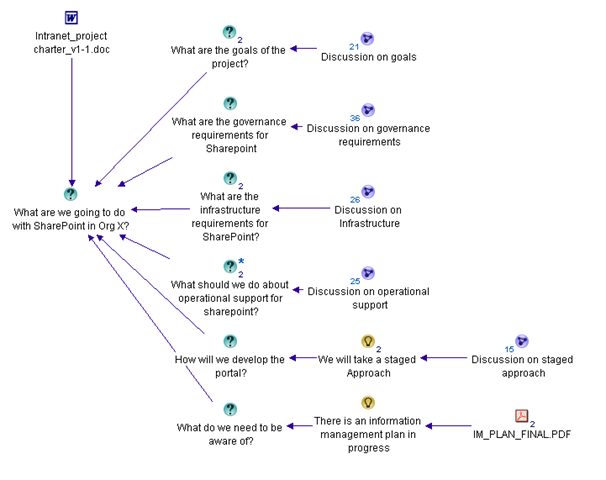
In this project, I introduced the dialogue map from the very first meeting with a simple root question “What are we going to do with SharePoint in Organsiation X”?

Now in this case, SharePoint is my core discipline, so unlike some of my subsequent engagements. I already had a bunch of questions that I wanted the client to start pondering. Being well aware of the destructive forces of the immutable laws of IT, I put down some immediate sub-questions.

  • What are the goals of the project?
  • What are the governance requirements of this project?
  • What are the infrastructure requirements for SharePoint?
  • What should we do about operational support for SharePoint?
  • How will we develop the project?
  • What else do we need to be aware of?

The web team had also developed a project charter which explained, in some detail, the background to this project and how we came to be where we were. I linked this into the issue map. Something that also came up fairly quickly was that the organisation had just completed a large strategic review project and an Information Management Plan had been drafted and approved. This was a key document that pretty much set the direction of the organisation for the next four years.

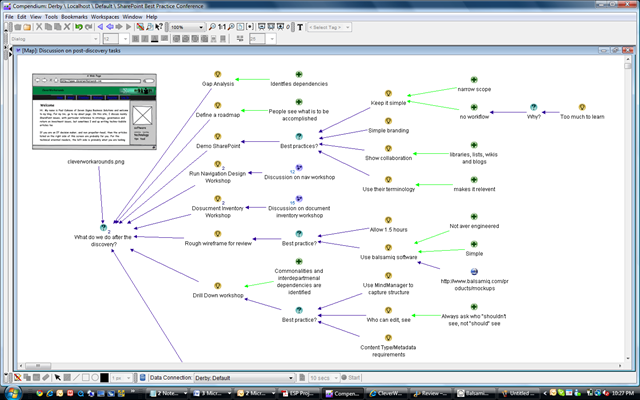
Below is the map showing these initial questions, along with the project charter and Information Management Plan. Note how I can attach documents into the IBIS map along with the argumentation.

image

Adaptive requirements gathering…

As you can imagine, we started working through these questions. Given that the SharePoint was completely new to the team, I was perfectly happy for the web team to jump around to different areas of the map and fill it in. Fairly quickly, the participants identified that a staged approach would be needed for implementation, and we initially would flick between goals and stages until that began to solidify that the details of the implementation matched the goals.

This map evolved over a period of time where we would spend time on-site with the team, performing training and advisory on SharePoint itself. As understanding of SharePoint’s capabilities grew from the use of a demonstration virtual machine, we refactored and re-examined the map as new knowledge, insights and/or understandings came to light. The team took to dialogue mapping like ducks to water, and the web team leader downloaded and installed compendium so that she always had the latest project rationale on her desktop.

This also had advantages to my colleagues who were also involved in the training and advisory phase. Since each of us were trained in IBIS and dialogue mapping, any one of us was able to conduct a session and the new map would be redistributed to all participants. Thus, even if I did not attend a meeting, I was able to very quickly orient myself around any new questions, issues or ideas.

Planting seeds of buy in…

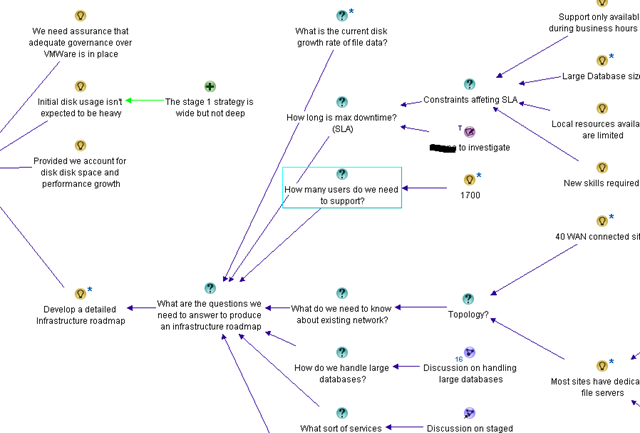
One area that many web teams are weaker on in their knowledge is in infrastructure. In this case, I had a dual role as dialogue mapper and SharePoint consultant because I know how infrastructure guys think. After all, I used to be one myself. Therefore, I wanted to ensure that a lot of infrastructure considerations were captured and made explicit in the map before we took it to the other teams. I ensured that farm topology options were captured, backup and recovery implications, virtualisation and the like were covered. Additionally, many questions were captured but not answered, such as network topology, active directory configuration, large database management, SLA and the like. A snippet of this is below.

image

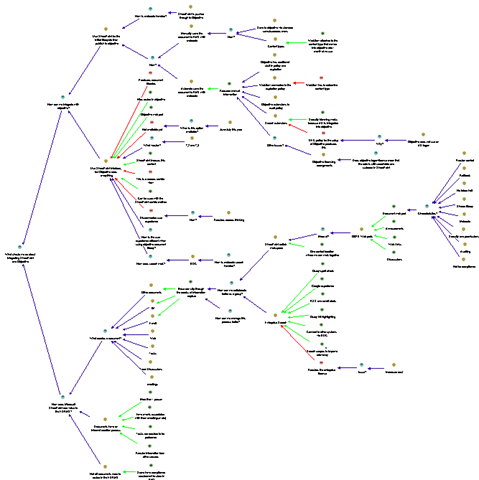
One thing that we were all aware of was to ensure that records management considerations were duly covered. By having a SharePoint environment to use and learn from, the team was able to quickly become much more informed about SharePoint’s view of the world, especially in relation to the orientation of metadata, sites and site collections. We confirmed that the goals of the project was an intranet and the sort of document management that would be required would be skewed very much towards team collaboration. The web team was aware that a records management system existed and also some members had some previous experience working with these systems. We ended up creating a very detailed map outlining the strategy for integration with records management, the options for integrating the current records system with SharePoint and most importantly, the golden rules around integration that ensured that the records management system was still the authoritative location for records. Later, Microsoft and the records management vendor visited the site and presented the latest information on the integration for the product and SharePoint, and the salient points were added to the map. Below is a snippet of the map discussing this topic (deliberately obscured for privacy, but you can get a good feel for the breadth of the discussion).

image

The acid test…

Fast forward another couple of weeks, and the team now has a pretty good understanding of SharePoint and a very well factored map. By this time, others in the department had been called in at various times and added their rationale to the map, answering some of the open questions. Next stop was the ultimate test. A meeting was called, where all of the opposing forces were going to be in the one room at the same time. A dozen people in all, key decision makers who didn’t always enjoy a cosy relationship, crammed into a hot, tiny room with a portable projector.

The web team manager introduced the project via the charter, and we all worked our way through the map. We discussed the goals of the project, how they related back to the strategic Information Management Plan, how we were structuring the phases to support those goals, what was in/out of phase 1 and why, and of course, the considerations that we had made in relation to the other IT Teams. After around 90 minutes, we were done and the group proceeded to give feedback.

The records management team was clearly relieved. In producing the map, we had demonstrated a good awareness of records management considerations and we made it clear and explicit in the map that SharePoint was *not* going to replace or devalue what they already had in place. They loved the fact that we had captured rationale that discussed the pros and cons of the various methods and techniques we could use for integration between their tool and SharePoint as they did not know about this. The infrastructure team was also happy for the same reason. We had captured many of the questions that they would have asked themselves of the web team. We had managed to pass our “one shot” test and were not sin-binned for being naive to the nuances of IT infrastructure.

Key success factors and conclusion

All in all, in that one two hour meeting, everybody was on-side and excited about the project. It was fed back to us that achieving such buy-in within one meeting across these different IT departments was previously unheard of in this organisation.

The key success factors boiled down to 3 major factors:

1. The participants in the Dialogue Mapping process were extremely enthusiastic with the process. We did not sell Dialogue Mapping at all with this engagement – we just used it from the very first workshop. By the end of that first workshop, the participants were very impressed with the richness of what had been captured and it became the standard way we conducted workshops and requirements meetings.

2. The visibility and clarity of the rationale meant that any major concerns of the other teams were mitigated by the fact that the questions they were interested in were either addressed or, at the very least, captured and visible on the map. For many parts of the map, the web team made no pretence to know all of the answers. However, by raising those questions in the map, it gave the other teams much more assurance that the web team were not running off and doing their own thing with a lack of consultation.

3. As a mapper, knowing a fair amount about SharePoint meant that fast-tracking of learning was taking place, both at the map level and at the product capability level. Providing the team with a demo virtual machine allowed members to learn about the product, and then applying that learning back to their understanding of the problem in the map space. This was a great way for them to iterate and converge on the solution much more quickly than fumbling around with the product alone. As a SharePoint practitioner, I was able to foresee problem areas and then utilise the rationale in the map to help steer the various participants into determining the optimum solution for their circumstances.

All in all, this was a great example of the power of Dialogue Mapping in speeding up the normally laborious process of stakeholder consultation and developing a shared sense of what was trying to be achieved. The one thing I would say about this method however, was that being a subject matter expert, as well as the dialogue mapper, meant that I was able to exercise a fair degree of control over the flow of the map. This is because I was both a participant as well as the mapper, both capturing as well as answering questions, raising concerns and flagging issues that may have been missed otherwise. For any aspiring dialogue mappers out there, this is actually a good way to start because you can concentrate on creating well formed IBIS, and not have to worry about whether you are articulating a participant’s dialogue correctly. Almost by definition in this case, you know exactly what the participant is talking about and getting the context onto the map in IBIS notation is not a huge mental challenge.

But there is more…

If I concluded this series now, I would be misleading you. The form of Dialogue Mapping that I undertook here was not what I would call pure Dialogue Mapping. In my explanation of the above process, I was a participant, strategist, mentor as well as mapper. My knowledge of the problem space was very detailed and I used Dialogue Mapping as a tool to help steer the group to a position that enabled them to improve their chances of a great outcome.

In part 3, I will detail more about the craft of pure Dialogue Mapping. In this case, you are not in the room because of any particular expertise and you often do not know any of the stakeholders either. Your critical success factor is to produce a great map and thus, make a positive difference for a group in tackling a really wicked problem. As you will soon see, that changes things quite a bit…

Until then, thanks for reading

Paul Culmsee

www.sevensigma.com.au


The secret to understanding governance

I’m very tempted to start this post like a dodgy wealth-guru infomercial. You know the ones with lots of imagery of people living the dream of financial freedom. I am thinking a montage of a resort, a large yacht anchored in a topical bay, carving up the water with a jet-ski and then a shot of me standing next to my Ferrari, champagne in hand, with Megan Fox on my arm. My message would be that for a “small” fee of $10,000, you too could learn the secrets to your financial freedom in an intimate, exclusive but “intensive” weekend workshop. Just you and the 15,000 other people that pack into the convention hall 🙂

Alas, we both know that this is never going to happen but this post may have a little of that feeling to it. I have titled it “The secret to understanding governance”, because I think there is a way to understand governance that will help you, your colleagues and your team members significantly. Like all good “wealth guru” infomercials, I’m going to give you some hints and I’m kind of hoping that you will then be interested in attending a workshop to find out the rest.

The one difference between the wealth guru and me, though, is that I will never have Megan Fox hanging off my arm, and I am actually going to tell you something useful in this post.

So, what is this big “secret”, anyway?

Definitions definitions definitions

One thing that we all tend to get suckered into doing at times is feeling the urge to define “stuff”. Academics do it all the time. I’ve read countless papers where the authors start out with a ten page examination of all the past definitions of their given topic, before proceeding to tell you why those definitions are inadequate in some way, followed by their own revised definitions. They spend the rest of their essays justifying why their definitions are more correct than their predecessors.

Defining stuff is a time consuming and tiring exercise. Since we live in a world of constant change there will always be new influences which shape and frame perceptions. Therefore, the definition that you spent so much effort on coming up with is redefined by the next academic or blogger who follows the path that you took. Sometimes a whole new word is invented, or an existing word is suddenly used in a new context and the whole cycle starts all over again.

I once explained the philosophical and process aspects of Agile/Scrum to a seriously experienced project manager. This was a fellow who was the PM when skyscrapers were erected. He listened carefully to my explanation, sat back and said “I’ve been doing that for 30 years. There’s nothing new there”. I also found a similar observation in “The Small Business Guerrilla Guide to Six Sigma” by Jay Arthur.

Over the years, I’ve had a chance to learn and study just about every “brand name” systematic improvement methodology. Guess what…they are all pretty much the same. To appear different, consultants have changed:
– the name to Six Sigma (from Total Quality Management)
– the acronyms to confuse the unwary (PDCA to DMAIC)
– the number of tools required for success
– the number of steps in the process (5 to 14 steps)
but…
– the key tools are the same
– the process for using the tools is the same
– and the results are identical assuming you can figure out how to use the wide range of tools and processes

In my opinion, defining things to the nth degree is a zero sum game. Often you confuse the issue more than you clarify it because in your attempts to explain something, you incorporate new words that you then have to explain.

Some ROI Wisdom

Several years ago I was attending a job interview for a promotion and the topic of return on investment came up. I had made the point that most things could be quantified and one of the interviewers fired back “Well tell me how you measure quality?”

That was a curveball that I wasn’t expecting, and I didn’t have an answer (and never got the job either).

Some time later, I read a terrific book by Douglas Hubbard on measurement and return on investment called “How To Measure Anything”. It armed me with some new kung-fu skills and also gave me the perfect comeback answer that I sorely needed during that interview. The question “How do you measure quality?” actually makes very little sense to ask. The reason is quite simple. “Quality is not what you measure. It is the effect it has on something that you measure”.

It is very easy to illustrate the logic behind this important point. Undertaking a quality initiative costs time, money and resources. You are only spending that money and investing those resources because you believe that undertaking this quality initiative will make a positive difference in some way. Otherwise, why bother? If you do not believe that it will make a positive difference, why throw money away?

So, if asked “How do you measure quality?”, you can answer by asking questions back, along the lines of:

  • “What does improved quality look like to you?”
  • “What is the effect of quality?”
  • “How do you know your quality initiative is working?”

The answers to these questions tend to start with “increased this” or “decreased that”. It now should be abundantly clear why asking “How do you measure quality?” actually makes no sense. In fact it is completely the wrong question to ask. Instead, by re-framing the question slightly, you suddenly have answers that can be quantified using the techniques that I detailed in my “Learn to speak to your CFO” series and provided in my free SharePoint ROI modelling spreadsheet.

This same logic applies to other words that are better understood by examining their effect, rather than trying to (re)define them. Examples:

  • Security
  • Flexibility
  • Collaboration
  • Resilience
  • Wellbeing

All of these share the same characteristic as “governance” in that they are easily understood by the effect they have, but harder to define in a universal way.

The secret to understanding governance

The really silly thing about all this is that I did a talk on SharePoint ROI at the Best Practice Conference in Feb 09. In that talk, I explained the above chain of logic and made the point that the way to find measurable success factors with anything that seems “unquantifiable” is to ask the “what will it look like if we do this?” type question. I used this logic to come up with measurable key performance indicators that enabled me to simulate the future financial return (internal rate of return and net present value) of a large SharePoint investment for a mid sized organisation (slide deck and spreadsheet can be downloaded here).

But despite writing several articles and speaking on this topic, the ROI stuff was one of several clouds of “stuff” that was floating around my brain. SharePoint governance was also floating in one of those clouds too, as well as broader governance in a planning and sustainability context. It took a casual comment from Bjørn Furuknap that suddenly gave me one of those wonderful bolts of inspiration and clarify, where these disparate clouds of thought suddenly coalesced and I made a significant breakthrough in my understanding.

Define “governance” in any way you want. I really don’t care – so long as you understand the difference it makes *for you* and you ask the same question of your other stakeholders and participants. Put aside the need to define governance for a while, and instead view “governance” as a means to attain a desirable future state. Agree with each-other on what that state is going to look like. Now tell me the differences between where you are now and that desirable future state.

By asking the question this way, you not only stimulate much more meaningful debate, you will have a much better understanding of everybody else’s frame of reference and the emphasis that they place on various aspects of that difference. The “definition” of governance that you are trying to find will start to suggest itself through those differences between the current and desired state. At the end of the day, that is what really matters.

Instead of reading a methodology like COBiT or ITIL, or following what people like me, Joel, Robert Bogue, Andrew Woodward, Dux Sy and Ruven Gotz say, look at your own needs as an individual, a team and then an organisation. Determine where you want to be, include IT and non IT views and then start to think about what you need to do to get to your desired state.

Congratulations, you’re now officially “governing”. Wasn’t that hard, was it? 🙂

Best practices versus worst practices

This same “secret” to understanding governance also provides the answer to why experts disagree on what is a “best practice”. I sometimes will read a “best practice” and think to myself “No way, that would never work”. Yet, although it doesn’t work for me, I rarely come away thinking the person making the recommendation is actually wrong. When you understand that the “best practice” made a positive difference, and it moved the organisation further along the road from the undesired present state toward the desired future state, then it is perfectly clear why one man’s best practice is another man’s worst practice. No matter what you did, you moved forward – and that is a good thing.

Furthermore, if you agree with the notion that the “best” solution to a problem is the one that has the most shared commitment among participants to seeing it through, then I argue that a perceived “worst practice” with deep commitment and buy-in among stakeholders will deliver a better solution than a “best practice” with poor buy-in and commitment among stakeholders.

Want to argue that point with me? (I’ve got more ammo than this!) Then you can spend 3 days doing that if you want!

…for a small fee 🙂

My intent with this post was to try and lift some of the fog and confusion that surrounds this nebulous thing called governance by suggesting that defining it to the nth degree is not the way forward. “Best and worst” practices? Both are commonly context and culture dependant. Instead, your (multidisciplinary) team needs to agree on and understand your desired future state and where you are now. By starting with the end in mind you will be able to collectively determine what processes, tools and methods to use to get to that place.

The philosophical approaches that I have described in this article are just the tip of the iceberg in relation to the work that I have been doing with Andrew Woodward, Dux Sy and Ruven Gotz for the planned “Governance Mentoring Workshop”, to run for 3 days prior to the August Best Practices Conference. This workshop will be unlike any other SharePoint governance training that is currently in existence and much of the material is completely original and not borrowed from any of the traditional SharePoint governance material that exists today.

Finally, to go back to infomercial mode…

This offer is for a limited time only. Act now! If you’re not completely satisfied, we offer a full “return to base” warranty 🙂

Act Now!

This offer is strictly limited!

Act Now!

Pick up the phone and take the first step toward the new life that is waiting for you!

Act Now!

Thanks for reading

Paul Culmsee


Who wants to spend 3 days with me and the gang?

A quick bit of background. My last 2 trips to the USA were particularly fruitful in meeting many like-minded SharePoint pros, all of which are well known and highly regarded. Some close friendships were made and what was really cool was that some people I met, despite having very different skills and experience (and physical locations!), seemed to connect on a level that gave us the desire and impetus to to work together very closely idealistically and commercially. More on that soon enough… 🙂

So who are the members of this global group of SharePoint mystery men?

  • Andrew (Agile Boy) Woodward – Agile extraordinaire. So damn agile in fact that blink and you’d never know he was there. Able to demolish long SharePoint projects into bite sized chunks in a single bound
  • Ruven (Magneto) Gotz. Mind mapping maestro with the ability to bend information architecture to his will, and able to know what you want before you even have formed the question
  • Dux (Mr Myagi) Sy. A sensei project Manager who will teach you the wax-on/wax-off approach to successful SharePoint delivery. He might even get you to paint his fence if you are lucky

and me (aka Dr Wicked) round it off – pushing the boundaries of pop-culture metaphors for cheap laughs and the odd bit of work on shared understanding, ROI and SharePoint governance.

So why does any of this matter?

image

It just so happens that all four of us are soon to be in the same place at the same time. This is actually a frustratingly rare occasion, given that Andrew is in the UK, I am in Western Australia, Dux is in DC and Ruven is in Toronto. But in August, we will all be presenting at the SharePoint Best Practices Conference in DC. We are all tremendously honoured to be presenters at this event and this time around, we have been collaborating together to try and really deliver some great sessions that capture the essence of our common philosophical approaches.

It takes me around 30 hours of transit to get to the east coast, and Andrew also has to travel a fair distance too. Therefore when these sorts of opportunities present themselves, we like to make the most of it – and we are *not* just talking beer! (ok well that’s not strictly true – beer is a significant motivation :-D)

Accordingly, we are planning a special “SharePoint Governance Mentoring” workshop that will run over a period of 3 days (August 19-21, 2009), prior to the conference itself. It will be a unique, one-off event and numbers will be strictly limited. We think that our combined skills cover the broad spectrum of the SharePoint universe very well, with a particularly strong governance underpinning. Participants will be able to delve into topics such as how to manage a SharePoint project, practical techniques in gathering requirements, achieving shared understanding and buy-in, information architecture, team dynamics and the root causes of organisational chaos that make SharePoint an attractive proposition in the first place. We will also cover making a great business case and understanding return on investment, how to approach application development on the SharePoint platform and above all, learning what governance is really all about, and applying the right sort of governance at the right time. 

Additionally, plenty of time will be allocated for participants to discuss their SharePoint challenges in an open forum, so if you bring your SharePoint baggage, we will lend a sympathetic ear and then arm you with some new kung-fu skills to take back to your organisation.

Does this event sound like your cup of tea? If so, we need to hear from you! We will publish the workshop details and outline in mid-July but we need to gauge interest now. The cost for this three day event will be $1750 per attendee, although anyone who is registered for SharePoint Best Practices Conference will be entitled to a 10% discount.

So if this sounds good to you, then please register your interest at Dux’s site below:

http://sp.meetdux.com/workshop_interest.aspx

Thanks for reading (and we hope to see you there!)

Paul Culmsee

www.sevensigma.com.au


Core Principles for User Engagement – a must read …er… explore!

I listened to Steve Smith talk about user engagement on the SharePoint Pod Show today and found myself nodding in strong agreement with many points that he made. So while in that mood of stakeholder engagement and how to achieve it, twitter made me aware of a really terrific Debategraph map on the topic of “Core Principles of Public Engagements” and think it is mandatory learning material for any SharePoint architect/collaboration consultant/business analyst/business improvement specialists/<insert title here>.

The map above, came from a collaborative effort called the “Public Engagement Principals Project”. This is a recent project (February 2009) and the aim was to “create clarity in our field about what we consider to be the fundamental components of quality public engagement”. The outcome of this project are seven recommendations that reflect the common beliefs and understandings of those working in the fields of public engagement, conflict resolution, and collaboration.

1. Careful Planning and Preparation
Through adequate and inclusive planning, ensure that the design, organization, and convening of the process serve both a clearly defined purpose and the needs of the participants.

2. Inclusion and Demographic Diversity
Equitably incorporate diverse people, voices, ideas, and information to lay the groundwork for quality outcomes and democratic legitimacy.

3. Collaboration and Shared Purpose
Support and encourage participants, government and community institutions, and others to work together to advance the common good.

4. Openness and Learning
Help all involved listen to each other, explore new ideas unconstrained by predetermined outcomes, learn and apply information in ways that generate new options, and rigorously evaluate public engagement activities for effectiveness.

5. Transparency and Trust
Be clear and open about the process, and provide a public record of the organizers, sponsors, outcomes, and range of views and ideas expressed.

6. Impact and Action
Ensure each participatory effort has real potential to make a difference, and that participants are aware of that potential.

7. Sustained Engagement and Participatory Culture
Promote a culture of participation with programs and institutions that support ongoing quality public engagement.

Despite the fact this map is all about public engagement, this material is absolutely the best advice you could ever get for dealing with user engagement in your SharePoint endeavours. If you have any interest whatsoever in the mystical arts of getting true understanding and buy-in among your organisational stakeholder group, then this map (and its underlying documents), is for you.

Also, be sure to use the Debategraph toolbar to explore the detailed information in the root node. There is a lot of supplementary information in this map that you can easily access by clicking on the “Show detailed text and comments” icon (highlighted below).

image 

If you are using the Seven Sigma Web Part for Debategraph, the Map ID is 16220 and you can incorporate this map into your broader governance site. I’ll be linking this map into my SharePoint governance map later as I think it complements, and expands upon the information contained there.

I think these seven principles make a terrific starting point for developing your own guiding principles around user-engagement as part of your governance efforts.

Finally, if you want more detailed information about how this map came to be, then consult the links below


Thanks for reading

Paul Culmsee


SharePoint book review – Seamless Teamwork by Michael Sampson

Hi all

Some time back a publisher sent me a self-help SharePoint book pitched at end users. I figured that I don’t really represent an end user and the best way to review it would be to make Mrs Cleverworkarounds review the book. I mean, after all, getting the spouse to bring home the bacon is part of my quest to eventually be a kept man! However, my grand plan ran aground after a while – she got around halfway through the book and came back and said “It’s easy to follow and all, but I don’t understand *why* I am doing these things.”

As a result, I never published the review of that particular book.

If you are wondering what the point behind that little anecdote is, then read on. 

“Seamless Teamwork” by Michael Sampson is a book that I knew I had to review – from when I first heard about it and read one of the chapters at its web site. Its subtitle is “Using Microsoft SharePoint Technologies to Collaborate, Innovate and Drive Business in New Ways” and as expected, this is a book that looks at SharePoint through a different lens to most of the technical books that I review (with the exception of Dux’s great project management book).

In fact Dux’s book is actually a great frame of reference when reading this book because both authors have adopted a similar approach. Rather than focussing on the technology, both books focus on a specific problem domain and explain how to leverage the technology through the exploration of that problem. In doing so, they avoid the pitfalls of “end user” SharePoint books that lack coherence like the one that my wife was dissatisfied with. Why? Because there is a clear outcome to achieve by the end of the book.

Here is the funny thing, though. Both authors approach the subject matter from the perspective of a new project that needs to be successfully implemented, yet Michael actually uses SharePoint in a very different manner to how Dux does in his book. Does that mean one of them is wrong? Not at all. In fact it really hit home to me that if you can achieve *true* buy-in and shared commitment to a particular solution, then the technology aspects can be implemented in a number of different ways. Michael actually makes this very clear in his preface when he says

In a book of this nature, it is impossible to cover every eventuality, every situation, and every approach. What I hope you get out of it is a vision of how you can apply the capabilities of SharePoint to the work of your team, rather than a prescription of what you need to do at each and every point of a teaming process. Embrace the ideas that work for you and ignore the ones that don’t.

This book explores SharePoint through the “fly on the wall” view of “Project Delta” where an up and coming MBA holding brown-noser named Roger has kissed enough butts to be handed a high profile project to drive growth in the overseas market for his company. (Okay, so I am embellishing the back-story just a teensy bit). Through Roger’s eyes, we discover why email based collaboration is not sufficient for project collaboration, along with some teamwork theory, cleverly interwoven around the storyline. "Project collaboration” is broken down into more specific outcomes and explored individually, illustrating what capabilities of SharePoint are suited to these outcomes.

  • Collaborating
  • Finding
  • Accessing
  • Using for decision making
  • Enforcing structure
  • Publishing and managing

.. and that was just chapter 1!

Chapter 2 introduces the project management model used by Roger and the intrepid heroes of Project Delta. I like this chapter because he offers enough meat to theory nuts like me, while balancing useful and relevant SharePoint content. First up, five project phases are defined and explained, namely:

  • Creating a shared vision
  • Understanding the options
  • Analysing the options
  • Making a decision
  • Concluding the project

This particular choice of wording has no references or footnotes and googling the exact terms leads me straight to Michael’s book so I presume that he is applying his own world view here. Next, we focus on getting the right people involved in the project. Roger has to identify the people with the right mix of skills, background and experiences to participate and this provides a nice dovetail to introduce SharePoint user profiles and “My sites”. As well as explaining the concepts and workings of this SharePoint feature, practical tips are offered to get the best out of it as well. The chapter concludes with a project team identified, assembled and ready to rock and roll.

Chapter 3 now focuses on the different audiences involved in a project, namely the project team, the project sponsors and stakeholders and “everyone else”. SharePoint team sites are introduced by examining the information needs of each of these groups and illustrating that one size does not fit all. The chapter walks through creating a site for each of these groups using a site and subsite hierarchy and the permissions required. Blank site templates are used (something I also tend to start with) and then some “projecty type” out of the box lists are created, as well as the ubiquitous wiki library and a blog site. Finally, some out of the box web parts are added to the mix.

All in all, a great example of a practical project oriented site that one could use or build upon.

Chapter 4 expands on these sites by switching focus from creation to actual use of the site. Michael writes about the “Seamless Teamwork Approach” to project collaboration and then uses this as a platform to explain alerting, RSS, basic usage of the lists, wiki and blog. The key theme of this chapter is the section about “teamworking protocol” – in other words, team members need to agree on the general approach to how they will work together. The most important point  in this chapter deserves its own entire chapter.

It is expected – and absolutely beneficial – that people have disagreements and differences of opinion about key matters in the project. If everyone thinks the same, a team would not be necessary. However the key is that we will not allow disagreements to derail the progress of the project, because we agree to listen carefully and resolve our disagreements through candid dialogue and debate.

Chapter 5 through 9 now examines each of the five project phases  that were outlined in chapter 2.

Chapter 5 is all about creating a shared vision. We examine the different types of vision (again from my research this view of vision seems to be Michael’s ideas and not based on any of the methodologies or academic stuff that I have read). We cover planning for engagement with stakeholders using a wiki, before the actual engagement process itself. Once again, this chapter is a deft mix of the product, the process and the rationale behind the approach. This chapter does not stick strictly with SharePoint either as we have the scenario of a PowerPoint presentation being viewed over a live meeting session for geographically dispersed stakeholders.

Chapter 5 also delves a little into some of the factors that cause the “chaos” that derails projects. The importance of timely notification of changing constraints or circumstances is covered by reviewing how the RSS and email notifications (tasks list connected to Outlook) are used. Finally, for some odd reason, Michael devotes two pages to placating those annoying mac users who, no matter that the problem is, has already tried to convince everyone that buying a mac is the solution…hehehe!

Chapter 6 is all about identifying options and starts out by examining how to effectively brainstorm using the SharePoint wiki (and confluence gets a mention also). OneNote is also covered and I found the shared OneNote notebook idea quite interesting as I have not tried that myself. This chapter is heavy on guidance and decorum around how brainstorming should be approached to get the most out of it. The chapter concludes with consolidating and synthesising the ideas.

Chapter 7 is all about analysing the options from the collated list. The key question here is “what could we realistically do?” This chapter is the first one to introduce the notion of a custom list. In the example, a custom list is used to track further analysis on each option. I loved the little governance interlude here, where Roger, being the angel user that he is, contacts Gareth, the ever friendly and helpful SharePoint support person to get advice on the best way to structure the custom list. (What sort of utopian fantasy world are you painting here Michael? :-D). Seriously though, this is actually quite an advanced chapter in terms of SharePoint conceptual stuff, given that document based content types are also introduced here too and various permutations of mixing and matching document libraries, wikis and the perennial folder vs metadata debate. Thankfully, Michael did not poo-poo folders outright and instead gives one of the best write-ups I’ve seen on the pros and cons of folders vs metadata. He also covers site columns and how they can be scoped. This is great stuff.

The final section from this chapter is on meetings, with participants are either in the same location or separate locations. There are different types of meetings for different purposes and advice is offered on how best to run these meetings and when and what technology is appropriate to augment them. Microsoft’s free conferencing tool, “SharedView” is covered (something I never knew existed until I read this book – duh, Paul!) SharePoint meeting workspaces and Groove 2007 are covered also. The technology detail covered in this section is matched by great, practical advice on how best to use the tools, given the circumstances.

Chapter 8 is entitled “Making a decision.” Now our intrepid Roger has come to the crunch and gets a recommendation made, circulated and signed off. Here we use SharePoint surveys to do the task, but in reality, this chapter is not about SharePoint at all. The meat of this chapter is around the processes needed and advice on decorum in particular situations. There is a smattering of wiki and a good section introducing workflows in context of the feedback process, but fundamentally, the value of this chapter is in the non SharePoint material.

Chapter 9 is all about concluding the project. Roger’s butt kissing and pandering to stakeholders’ whims are finally at an end with confirmation that the final recommendation on project Delta has been accepted by senior management. Tasks include updating participants “My sites” with the project details as well as any skills learned, a blog post about the project in my-site, and the essential, but unpopular task of cleaning up all the loose ends of the projects from a compliance, archival and retention point of view. Some final housekeeping and we are done!

My favourite chapter of the book is actually not in the book at all. It is a separate chapter available from the Seamless Teamwork website and is all about SharePoint governance. I highly recommend this chapter, as it one of the best write-ups that I have seen on the topic so far. 

Overall this is a terrific book, yet there are sections where advice is given that I would personally not take. Some things I flat out disagree with. But I need to fair here. I am currently surrounded by a dozen books on team dynamics, facilitation, soft systems methodology and risk management so I am not the intended audience for this book. Just because I have different philosophical approaches to some aspects does not detract from this book at all. In fact, it comes with the territory of a book like this and this is why I think it is such a great read. I personally find it quite easy to write technically oriented articles, but to delve into ‘soft’ topics like team dynamics, project chaos, developing shared vision and the like is actually much more subjective and I think, ambitious and difficult to write well.

If I was to make a broad comparison with Dux’s book, which is about the closest thing to a comparison out there, I would say that Dux covered more SharePoint feature areas than Michael and stuck fairly close to the project management body of knowledge. Michael on the other hand, delved deeper into some of the softer topics around how teams can deliver great projects. Apples and oranges really, and I think that both books compliment each-other exceptionally well.

The other commonality with Dux’s book is that readers with a technical audience who skip the preface will probably not like this book or consider it too light on in terms of low level SharePoint coverage. Michael is very clear in his preface here. This book is for users, information workers and project team members who want to make the best use of SharePoint for their team. To this end, Michael has completely nailed what he set out to do and should be commended for delivering the goods.

It is great to see SharePoint books coming out that delve deeper into the mechanics of team collaboration, before diving straight into product features and capabilities. Previous books have tended to gloss over the non technical side of team collaboration and this book fills the gap nicely.


Thanks for reading


Paul Culmsee

www.sevensigma.com.au 


SharePoint Governance – Debategraph style

Quick note: This is another of the sort of posts where I cannot help but feel that some readers will wonder what I have been smoking. It is not essential, but reading the “one best practice” series will provide a lot of background to this post.

imageOn the grand scale of world problems, your average messed up SharePoint project would not be considered particularly “wicked”. If you compare a haywire SharePoint project to the truly *global* wicked problems, such as global warming, the Israeli/Palestinian conflict and Tom Cruise, then it kind of makes you realise just how good we SharePoint architects, developers and engineers have it. I mean, hey, if a bunch of nerds can’t make little ol’ SharePoint a success, what hope do we have for the big issues like making Tom Cruise less of a tool?

I know some people who have left SharePoint architecture work because of all the “people crap”. If you think “people crap” is bad in IT, imagine trying to mediate between the myriad of stakeholders involved in, say, cuts to carbon dioxide emissions. That is a world of hurt that is so huge that it pains my brain just to imagine it.

Last year when I was learning the dark Jedi arts of dialogue mapping I got to know David Price, one of my fellow students who operated in that world of hurt. David is a very smart man indeed, with a Ph.D in organisational learning and environmental policy. His career has included public policy consultancy, TV documentary production, academic research and mediation.

It was during that training course that David introduced me to a joint venture that he started with another scarily smart man named Peter Baldwin. Peter is an Australian who had a 15 year career in national politics, including six years as a federal minister in the Australian government. Unlike many Australian pollies, his background was engineering. After leaving politics, with a keen interest in how the web could “raise the quality of debate about public policy issues,” he cranked out visual studio and got down to some coding.

The “baby” from this collaboration between David and Peter is a unique tool called Debategraph and it is a very interesting tool indeed.

image

DebateGraph was conceived as a tool to improve the quality of public debate on contentious or complex issues. Public debate, in general, is usually pretty awful. David and Peter explain why this is the case pretty comprehensively below.

Public debates tend to be complex; with multiple data sources and perspectives and conflicting demands and values. In complex debates, the volume of information and arguments can seem like an overwhelming obstacle to someone, trying to develop a comprehensive understanding of the essential arguments advanced by all sides.

Public debate is all too often characterized by repetitive contributions, digressions, argumentative fallacies, rhetorical flourishes, manipulative framing, obfuscation and personal attacks that result in a high noise-to-signal ratio and confusion rather than clarity.

Conventional media reporting of public policy debates often struggles with the challenge of conveying nuanced, reasoned positions in a compressed linear form, when simple heated oppositions deliver a more dramatic and rewarding effect.

This, in turn, makes it harder for established public figures to think tentatively and creatively in public about new policy approaches and to acknowledge strengths and common ground in opponents’ positions.

We are talking about wicked problems here a lot of the time since public policy debates by definition respond to problems or questions where the general public are stakeholders. This means that there are a lot of varied stakeholders with even more varied world views and frames of reference. By creating a tool to improve the quality of a public policy discussion, DebateGraph is a tool that helps to deal with wicked problems themselves. What is interesting about DebateGraph is that like the IBIS based issue mapping that I practice, it is a visual, map based approach, yet it was developed independently from Conklin, Compendium or anything else in the space.

image

DebateGraph is a free online service. It allows the global community to collaboratively build maps of complex debates that accurately present all sides of the debate from a neutral standpoint, free of repetitive clutter and ‘noise’. Like a wiki, all aspects of the debate maps, both their content and structure, are continuously open to revision, refinement, comment, and evaluation by anyone who wants to join the community of thought. Each map is a cumulative work in progress.

Readers and editors of the maps can explore the top-level structure of debates and delve into specific strands or sub-structures of a debate. What interested me was the fact that the debate maps can be embedded into other websites; with changes made to the map on one site updating immediately across every site on which it appears.

DebateGraph also has RSS and email alerting like SharePoint, as well as a unique rating system where users can specify how much they relate to, or believe in a particular argument. The map then self reconfigures based on what arguments are considered the strongest. In effect, the map becomes a multi-dimensional poll or decision making tool.

“Although consensus can emerge from such a process, not least because it promotes the discovery of previously unidentified options, our hope is as much that the people who continue to disagree will do so on the basis of an enriched understanding of the reasons for their disagreement and having had the chance to test each other’s reasoning to the fullest.”

How DebateGraph works

Using DebateGraph is pretty easy, given that you can embed it into other web sites as I have done here in this post. From the hundreds of maps that I can choose, I’ve decided to embed the map of the global financial crisis for you to explore. Click on the bubbles below and move them around. You will find that like bubble-wrap, you will spend your first few minutes immersing yourself in moving nodes around and navigating here and there. Go ahead and have a play – I’m patient – I’ll wait for you 🙂

Right! I’m guessing around seven minutes have passed. Now that you’ve had a play, click on the first arrow, below the map and above the bottom toolbar. This will take you back to the top level financial crisis map. Let’s take a closer look at what is going on here.

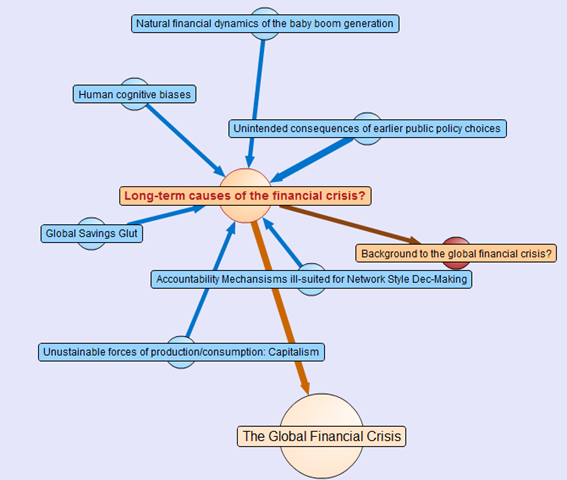
Attached to this “Global Financial Crisis” map is several root questions covering the cause, consequences, triggers and response to this problem. If you hover your mouse over any of the nodes, you will find a more detailed view of the question. Hover your mouse over the arrows between nodes, and you will find that the questions “arise from” the central “global financial crisis” node.

Also, note the thickness of the arrows between nodes. The width represents the importance placed on this node by the community of users that have developed this map.

The node colours are important too. Click on the “Long term causes of the financial crisis?” node above, and it will break out to a sub-map. Here the nodes are blue, rather than orange as shown below. The difference in colour is because these nodes are possible responses to the question “Long term causes of the financial crisis?” Once again, the width of the arrows indicate the community’s view of the validity of the responses. Now let’s look at a response that would potentially be divisive. One of the potential answers to the long term causes of the current crisis is “Natural financial dynamics of the baby boom generation.” So, it’s all the baby boomers fault, is it? 😉

image

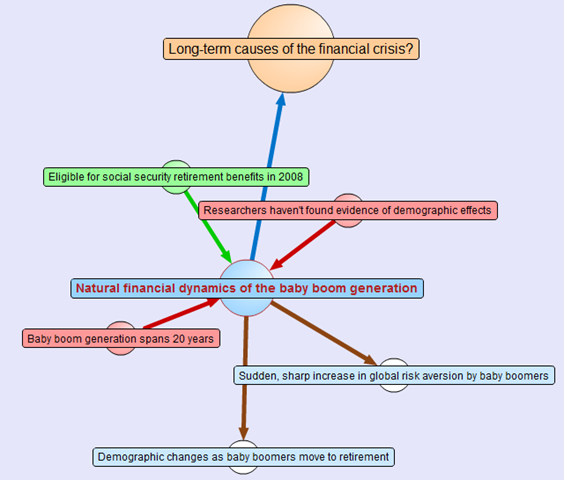
Clicking on the “Natural financial dynamics of the baby boom generation” and we see a map with a few different coloured nodes. This is because there are some supporting and opposing arguments to this idea. The green nodes support the idea and the red nodes oppose the idea. This is the essence of the pro and con type arguments used when you create IBIS maps.

image

There are also some other nodes where the direction of the arrow is the opposite to the ones we have examined so far. These are links to other maps, and if you highlight the outward arrows, you can see that our current map relates to nodes in completely separate maps.

This highlights a really important point about DebateGraph. It links related issues into a “web” of argumentation allowing readers to fully explore the myriad of interlocking issues that make up complex problems without “drowning” in information overload.

Contributing to debates

If you feel strongly on a particular subject then you are free to contribute to the debate. All DebateGraph maps have a toolbar that allows you to perform more advanced activities.

image

From left to right, the icons perform the following tasks

  • Open the DebateGraph home page
  • Show detailed text and comments for the currently selected item
  • Add comments to the selected item
  • Open this map in mapper (map edit) view
  • Edit this map in mapper (map edit) view
  • Search all DebateGraph maps for a given term
  • Share this map view or embed it in your own site
  • View the map in full screen mode
  • Key and explanatory notes for maps

SharePoint Governance?

Andrew Woodward suggested that I should create a DebateGraph map for us all to collectively explore how we could save Tom Cruise from complete agonising lameness. I chose not to do this for three reasons.

  1. Tom Cruise cannot be saved
  2. Tom Cruise’s lawyers would sue my ass
  3. There are more important topics to explore

Let’s instead talk about a pet topic of mine: SharePoint governance.

Governance in SharePoint is pretty misunderstood. There are many definitions of governance and they are all equally right, when judged through the lens of the person defining it. I have my own interpretation of governance (which is, of course, the definitive and completely correct one! – hehe). Maybe we should debate the issue?

Joel talks about a SharePoint governance plan needing to be a ‘living’ document and in fact he states this explicitly in the sample governance plan that he did for Microsoft. I agree wholeheartedly on this notion. The reality is that documents like MSWord documents are not overly conducive to this ideal. The paradox is that the bigger and more comprehensive the governance plan is initially, the harder it can be to maintain and manage over time, and therefore, the greater the likelihood that it can go out of date or fall into disrepair over time.

As a result, it occurred to me some time back that a DebateGraph map is the sort of “living” document that a governance plan really aspires to be. So, I roped in a couple of friends, most notably Andrew Jolly and Ruven Gotz, and together we experimented with DebateGraph to explore our own questions and ideas on the topic of SharePoint governance. The result is the map below which you can explore.

Seven Sigma web part for DebateGraph

It then occurred to me that others could benefit from this experimental exploration of the topic of SharePoint governance. This gave me the idea that having a “SharePoint governance web part” that could be added to any enterprise SharePoint portal would be a really great way to augment internal governance efforts. Additionally, one of my clients is responsible for conservation and sustainability at a local level in the community. They loved the DebateGraph debates around environmental, social and economic sustainability and this web part idea would work equally well for them.

Accordingly, my company, Seven Sigma, has just released a free webpart for SharePoint that allows you to embed DebateGraph debate maps into your SharePoint sites and tune their display to fit into enterprise SharePoint portals. The default debate is the SharePoint Governance debate shown above, but you can view any of the many Debategraph maps via the web part properties.

I have recorded a couple of webcasts, covering the installation and usage of the web part which can be viewed below. Otherwise, click here to download this free web part from the Seven Sigma web site.

dginstall  dgusage

Conclusion

This new web part and the SharePoint governance debate, are essentially an experiment in trying to tackle collaboration a novel way. Like any wiki, to make it truly “living”, the maps need contributions from people who have something to offer on the topic. I fully accept that this initiative is not going to be everybody’s cup of tea, but I hope that it might get people to think about the sort of possibilities presented by this sort of wiki based display. The fact that all of the issues, ideas and argumentation can so easily be made available to a wide audience via a simple web part I think is unique.

Thus, if you would like to contribute to this SharePoint governance debate sign up to Debategraph and we will add you to the governance debate.

I think that DebateGraph, and applications like it, may well represent the next step in the evolution of collaborative applications. While Twitter and Facebook have found interesting ways to bring people together, those applications aren’t exactly going to provide you with the sort of ‘container’ required to tackle really wicked problems. I foresee a lot of development in this sub-genre of collaborative applications in the future.

In other words, watch this space!

Thanks for reading

Paul Culmsee

www.sevensigma.com.au


Listen to me blab on about crap ;-)

Hi

I have been very busy on a number of fronts – which is why the blog hasn’t had much attention lately. I’ll be back soon enough though – once I get a few big jobs done.

For those of you that are not aware, there is a podcast interview that I did with Brett Lonsdale at Sharepoint Pod Show where he allowed me to blab on and on and on and on 🙂 Poor Brett – he didn’t know what he was getting himself into at all!

So if you think my posts are boring and wordy, wait till you hear me talk! 🙂

Paul


Perth SharePoint Users Group wrap

Today I presented a session at the Perth SharePoint Users Group. I was a little unsure whether my non-technically focussed content would be of interest to the geeks but the turnout was terrific and the feedback has been brilliant. (The 3 copies I gave away of Dux’s excellent “SharePoint for Project Management” book may have sweetened the deal – hehe )

My sincere thanks to new user group president Sezai Komur for giving me the opportunity to present this material as it was the first time it has seen the light of day in Perth.

If you want to check out the slide deck from the session, you will find it below. Expanded information that builds on this content can be found at the Seven Sigma site, as well as here at CleverWorkarounds.

Thanks for reading

Paul Culmsee

www.sevensigma.com.au


Review – Balsamiq Mockup Tool (for SharePoint)

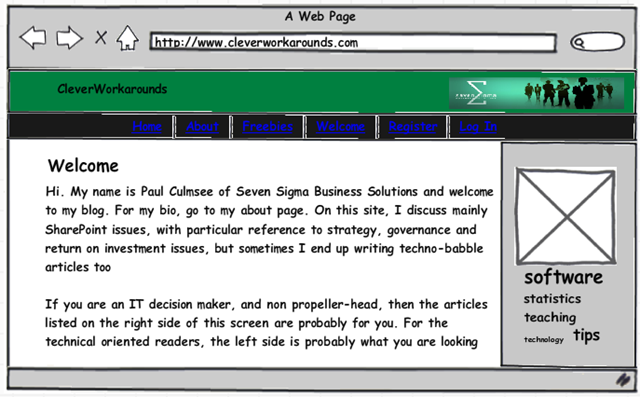
image

Hi

It’s review week here at CleverworkArounds, and the next one on my list that I have been meaning to speak about is an application called Balsamiq Mockups. Mr Mindmapper himself, Ruven Gotz first turned me onto this application some time back, and I have found it very useful in taming RBO (rampant branding obsession).

Although I have written various posts on SharePoint branding, most of the time I find it a tiresome task that for many sites, is pushed way too far up the priority list to the point that much more critical success factors are overlooked or given lip service. Now in saying that, I will admit straight up that although I know how branding *should* be done from a sustainable governance point of view, I suck royally at making a site look good myself and I compensate by relentlessly pummelling SharePoint branding governance best-practices onto completely unsuspecting web designers.

Such fun 🙂

Balsamiq Mockups has adopted a visual based site wireframing approach that takes the opposite approach to the “Photoshop” approach to site design. A web designer using a tool like Photoshop will attempt to create an accurate visual representation of a site based on a stakeholder’s tastes (or lack thereof). The risk here with SharePoint is that the branding vision that is created using Photoshop can often be quite tricky to achieve in SharePoint without being “governance naughty”, particularly for collaborative sites that make extensive use of web parts, application pages and document libraries.

Some of the most difficult SharePoint recovery jobs that I have had to do were a direct result of seemingly innocent “customisations” that came from branding requirements.

So, how can Balsamiq help?

For a start, a complete design-challenged person like me can actually produce something useful :-).

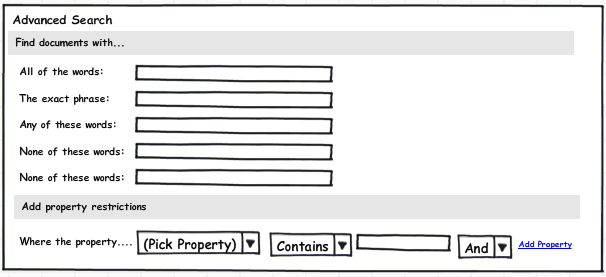
More importantly, however, it is designed on a completely different premise than the Photoshop style approach to design. This tool works on a principle of emulating hand-drawn designs, supplying you with a bunch of drag-and-drop widgets and interface elements which allow you to construct the basic structure of a site in minutes. Out of the box, there are around 70 elements that can be used to construct a web site and you can see the results of my 5 minute effort in the image at the start of this article.

Want to see how easy it is? Then check the video below (assuming your IT department has not blocked Youtube).

Although the video shows how easy it is to create a mock up, you may be wondering if there are any SharePoint specific design elements. Out of the box there are not. But fear not, there is a flourishing community around this product that creates additional elements for you to use. SharePoint is well represented here.

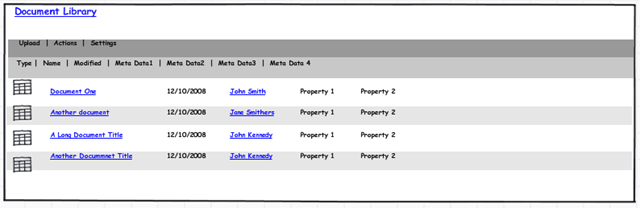
Want to drop a SharePoint document library onto the page? Too easy.

image 

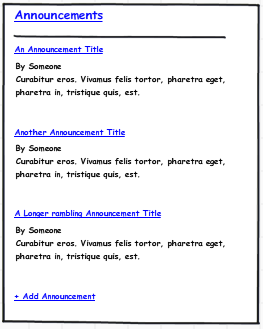
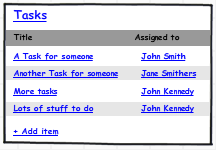
Did someone say calendar, tasks or search?

image image image

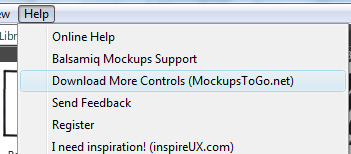
This application does not take much of an investment in learning. One can pretty much learn the product just by watching the Youtube video and learning how to import other design elements is just a matter of clicking the help menu and choosing the “Download More Controls” option.

image

Would hard-core web designers may find the application cramps their artistic style? Maybe – I can only speculate. But for me, I spend most of my time in a PM, training, architect or advisory role. As a result, Balsamiq Mockups is perfect for me because, it above all else, it is quick to produce results. I can flesh out a SharePoint basic site design without having to fiddle around with master pages, SharePoint designer or CSS files (and for that I am eternally grateful!)

I can then export the mockup to a PNG file and use that in documentation, presentations, and best of all, my issue and dialogue maps which makes great strides in achieving the all-important goal of shared understanding among project participants.

image

Try Balsamiq Mockups out. It’s a great tool to add to your armoury.

Thanks for reading

Paul Culmsee

www.sevensigma.com.au


« Previous PageNext Page »

Today is: Wednesday 3 June 2026 -