Back to Cleverworkarounds mainpage
 

A Very Potter Audit – A Best Practices Parable

Once upon a time there lived a rather round wizard named Hocklart who worked at the FogWorts school of witchcraft and wizardry. Hocklart was a very proud wizard, perhaps the proudest in all of FogWorts. His pride did not stem from being a great wizard or a great teacher; in reality, he was neither of those. In fact Hocklart was never much good at wizardry itself, but he knew a lot of people who were – and therein lay the reason for his pride. For what Hocklart lacked in magic ability, he more than made up for with his attention to detail, love of process and determination to rise to the top. From the day he arrived at FogWorts as one apprentice amongst many, he was the first to realise that the influential wizards liked to unwind on Friday nights with a cold ale at the Three and a Half Broomsticks Inn. Hocklart sacrificed many Friday nights at that pub, shouting rounds of frothy brew to thirsty senior wizards, befriending them all, listening to their stories and building up peerless knowledge of FogWorts organisational politics and juicy gossip.

This organisational knowledge brought just enough influence for Hocklart to climb the corporate ladder ahead of his more magically adept colleagues and presently he was very proud. As far as Hocklart was concerned, he had the most important job in all of FogWorts – Manager of the Department Responsible for the Integrity of Potions (or DRIP for short).

You see, in schools of witchcraft and wizardry, wizards and witches concoct all sorts of potions for all sorts of magical purposes. Potions of course require various ingredients in just the right amount and often prepared in just the right way. Some of these ingredients are highly dangerous and need to be handed with utmost care, while others might be harmless by themselves, but dangerous when mixed with something else or prepared incorrectly. Obviously one has to be careful in such a situation because a mix-up could be potentially life threatening or at the very least, turn you into some sort of rodent or small reptile.

The real reason why Hocklart was proud was because of his DRIP track record. You see, over the last six years, Hocklart had ensured that Fogwarts met all its statutory regulatory requirements as per the International Spell-casters Standards Organisation (ISSO). This included the “ISSO 9000 and a half” series of standards for quality management as well as the “ISSO 14000 and a sprinkle more” series for Environmental Management and Occupational Health and Safety. (Like all schools of witchcraft and wizardry, Fogwarts needed to maintain these standards to keep their license to operate current and in good standing).

When Hocklart became manager of DRIP, he signed himself up for a week-long training course to understand the family of ISSO standards in great detail. Enlightened by this training, he now appreciated the sort of things the ISSO auditors would likely audit FogWorts on. Accordingly, he engaged expensive consultants from an expensive consultancy to develop detailed management plans in accordance with wizardry best practices. To deliver this to the detail that Hocklart required, the consultants conjured a small army of business analysts, enterprise architects, system administrators, coordinators, admin assistants, documenters, quality engineers and asset managers who documented all relevant processes that were considered critical to safety and quality for potions.

Meticulous records were kept of all activities and these were sequestered in a secure filing room which was, among other things, guaranteed to be spell-proof. Hocklart was particularly fond of this secure filing room, with its rows and rows of neatly labelled, colour coded files that lovingly held Material Safety Data Sheets (MSDS) for each potion ingredient. These sheets provided wizards the procedures for handling or working with the ingredients in a safe manner, including information of interest to wizards such as fulmination point, spell potency, extra-magical strength, reversal spells as well as routine data such as boiling point, toxicity, health effects, first aid, reactivity, storage, disposal, protective equipment and spill-handling procedures. All potion ingredients themselves were stored in the laboratory in jars with colour coded lids that represented the level of hazard and spell-potency. Ever the perfectionist, Hocklart ensured that all jars had the labels perfectly aligned, facing the front. The system was truly was a thing of beauty and greatly admired by all and sundry, including past ISSO auditors, who were mesmerised by what they saw (especially the colour coded filing system and the symmetry of the labels of the jars).

And so it came to pass that for six years Hocklart, backup up by his various consultants and sub-contractors, saw off every ISSO auditor who ever came to audit things. All of them left FogWorts mightily impressed, telling awestruck tales of Hocklart’s quality of documentation, attention to detail and beautiful presentation. This made Hocklart feel good inside. He was a good wizard…nay, a great one: no one in the wizard-world had emerged from an ISSO audit unscathed more than twice in a row…

On the seventh year of his term as FogWarts head of DRIP, Hocklart’s seventh audit approached. Although eagerly waiting to impress the new auditor (as he did with all the previous auditors), Hocklart did not want to appear overly prepared, so he tried to look as nonchalant as possible by casually reviewing a draft memo he was working on as the hour approached. Only you and I, and of course Hocklart himself, knew that in the weeks prior to today, Hocklart was at his meticulous best in his preparation. He had reviewed all of the processes and documentation and made sure it was all up to date and watertight. There was no way fault could be found.

Presently, there was a rap on the open door, and in walked the auditor.

“Potter – Chris Potter,” the gentleman introduced himself. “Hocklart I presume?”

Hocklart had never met Potter before so as they shook hands he sized up his opponent. The first thing he noticed was that Potter wasn’t carrying anything – no bag, notebook and not even a copy of the ISSO standards. “Have you been doing this sort of work long?” he enquired.

“Long enough,” came the reply. “Let’s go for a walk…”

“Sure,” replied Hocklart. “Where would you like to go?”

For what seemed like an uncomfortably long time to Hocklart, Potter was silent. Then he replied, “Let’s go and have a look at the lab.”

Ha! Nice try, thought Hocklart as he led the auditor to the potion laboratory. Yesterday I had the lab professionally cleaned with a high potency Kleenit spell and we did a stocktake of the ingredients the week before.

Potter cast his sharp eyes around as they walked (as is common with auditors), but remained silent. Soon enough they arrived at a gleaming, most immaculate lab, with nothing out of place. Without a word, Potter surveyed the scene and walked to the shelves of jars that held the ingredients, complete with colour coded lids and perfectly aligned labels. He picked up one of the red labelled jars that contained Wobberworm mucus – a substance that, while not fatal, was known to cause damage if not handled with care. Holding the jar, he turned to Hocklart.

“You have a Materials Safety Data Sheet for this?”

Hocklart grinned. “Absolutely… would you like to see it?”

Potter did not answer. Instead he continued to examine the jar. After another uncomfortable silence, Potter looked up announcing, “I’ve just got this in my eyes.” His eyes fixed on Hocklart.

Hocklart looked at Potter in confusion. The Wobberworm mucus was certainly not in Potter’s eyes because the jar had not been opened.

“What?” he asked hesitantly.

Potter, eyes unwaveringly locked on Hocklart, remained silent. The silence seemed an eternity to Hocklart. A quick glance at his watch then Potter, holding up the jar in his hand, repeated more slowly, “I’ve just got this in my eyes.”

Hocklart’s heart rate began to rise. What is this guy playing at? He asked himself. Potter, meanwhile, looked at his watch again, looked back at Hocklart and sighed. “It’s been a minute now and my eye’s really starting to hurt. I risk permanent eye damage here… What should you be doing?”

A trickle of sweat rolled down Hocklart’s brow. He had not anticipated this at all.

Potter waited, sighed again and grated, “Where is the Materials Safety Data Sheet with the treatment procedure?”

A cog finally shifted in Hocklart’s mind as he realised what Potter was doing. Whilst he was mightily annoyed that Potter had caught him off guard (he would have to deal with that later), right now however he had to play Potter’s game and win.

“We have a secure room with all of that information,” he replied proudly. “I can’t have any of the other wizards messing with my great filing system, it’s my system…”

“Well,” Potter grated, “let’s get in there. My eye isn’t getting any better standing here.”

Hocklart gestured to a side door. “They are in there.” But as he said it his heart skipped a beat as a sense of dread came over him.

“It’s… “ he stammered then cleared his throat. “It’s locked.”

Potter looked straight into Hocklart with a stare that seemed to pierce his very soul. “Now I’m in agony,” he stated. “Where is the key?”

“I keep it in my office…” he replied.

“Well,” Potter said, “I now have permanent scarring on my eye and have lost partial sight. You better get it pronto…”

Hocklart continued to stare at Potter for a moment in disbelief, before turning and running out of the room as fast as his legs could carry his rotund body.

It is common knowledge that wizards are not known for being renowned athletes, and Hocklart was no exception. Nevertheless, he hurtled down corridors, up stairs and through open plan cubicles as if he was chased by a soulsucker. He steamed into his office, red faced and panting. Sweat poured from his brow as he flung a picture from the wall, revealing a safe. With shaking hands, he entered the combination and got it wrong twice before managing to open the safe door. He grabbed the key, turned and made for the lab as if his life depended on it.

Potter was standing exactly where he was, and said nothing as Hocklart surged into the room and straight to the door. He unlocked the door and burst into the secure room. Recalling the jar had a red lid, Hocklart made a beeline for the shelf of files with red labels, grabbed the one labelled with the letter W for Wobberworm and started to flick through it. To his dismay, there was no sign of a material safety data sheet for Wobberworm mucus.

“It’s…it’s not…it’s not here,” he stuttered weakly.

“Perhaps it was filed under “M” for mucus?” Potter offered.

“Yes that must be it”, cried Hocklart (who at this stage was ready to grasp at anything). He grabbed the file labelled M and flicked through each page. Sadly, once again there was no sign of Mucus or Wobberworm.

“Well,” said Potter looking at his watch again. “I’m now permanently blind in one eye… let’s see if we can save the other one eh? Perhaps there is a mismatch between the jar colour and the file?”

Under normal circumstances, Hocklart would snort in derision at such a suggestion, but with the clock ticking and one eye left to save, it seemed feasible.

“Dammit”, he exclaimed, “Someone must have mixed up the labels.” After all, while Wobberworm mucus was damaging, it was certainly not fatal and therefore did not warrant a red cap on the jar. This is why I can’t trust anyone with my system! he thought, as he grabbed two orange files (one labelled W for Wobberworm and one labelled M for mucus) and opened them side by side so he could scan them at the same time.

Eureka! On the fifth page of the file labelled M, he found the sheet for Wobberworm mucus. Elated, he showed the sheet to Potter, breathing a big sigh of relief. He had saved the other eye after all.

Potter took the sheet and studied it. “It has all the necessary information, is up to date – and the formatting is really nice I must say.” He handed the sheet back to Hocklart. “But your system is broken”

Hocklart was still panting from his sprint to his office and back and as you can imagine, was absolutely infuriated at this. How dare this so-called auditor call his system broken. It had been audited for six years until now, and Potter had pulled a nasty trick on him.

“My system is not broken”, he spat vehemently. “The information was there, it was current and properly maintained. I just forgot my key that’s all. Do you even know how much effort it takes to maintain this system to this level of quality?”

A brief wave of exasperation flickered across Potter’s face.

“You still don’t get it…” he countered. “What was my intent when I told you I spilt Wobberworm mucus in my eye?”

To damn well screw me over, thought Hocklart, before icily replying “I don’t care what your intent was, but it was grossly unfair what you did. You were just out to get me because we have passed ISSO audits for the last six years.”

“No,” replied Potter. “My intent was to see whether you have confused the system with the intent of the system.”

Potter gestured around the room to the files. “This is all great eye candy,” he said, “you have dotted the I’s, and crossed the T’s. In fact this is probably the most comprehensive system of documentation I have ever seen. But the entire purpose of this system is to keep people safe and I just demonstrated that it has failed.“

Hocklart was incredulous. “How can I demonstrate the system works when you deliberately entrapped me?”, he spat in rage.

Potter sighed. “No wizards can predict when they will have an accident you know,” he countered. “Then it wouldn’t be an accident would it? For you, this is all about the system and not about the outcome the system enables. It is all about keeping the paperwork up to date and putting it in the files… I’m sorry Hocklart, but you have lost sight of the fact the system is there to keep people safe. Your organisation is at significant risk and you are blind to that risk. You think you have mitigated it when in fact you have made it worse. For all the time, effort and cost, you have not met the intent of the ISSO standards.“

Hocklart’s left eye started to twitch as he struggled to stop himself from throwing red jars at Potter. “Get out of my sight,” he raged. “I will be reporting your misconduct to my and your superiors this afternoon. I don’t know how you can claim to be an auditor when you were clearly out to entrap me. I will not stand for it and I will see you disciplined for this!”

Potter did not answer. He turned from Hocklart, put the jar of Wobberworm mucus back on the shelf where he had found it and turned to leave.

“For pete’s sake”, Hocklart grated, “the least you could do is face the label to the front like the other jars!”

=========================


I wrote this parable after being told the real life version of a audit by a friend of mine… This is very much based on a true story. My Harry Potter obsessed daughter also helped me with some of the finer details. Thanks to Kailash and Mrs Cleverworkarounds for fine tuning…

.

Paul Culmsee

HGBP_Cover-236x300


Confession of a (post) SharePoint architect… What are you polishing?

Hi and welcome to the latest exciting instalment in my epic series of posts on my confessions of a post SharePoint architect. I was motivated to write this series because the mild mannered shrinking violet known as Bjorn Furuknap wrote an insightful series of articles on what it takes to be a SharePoint professional. I had always planned to write on this topic as well and opted to frame it as SharePoint “confessions” because some of my approaches do not always seem mainstream (but work!) so it feels like I am confessing my sins for using them. I chose to use the word “(post)” because SharePoint is not my fulltime gig anymore. I am very lucky to do a lot of non IT work, helping organisations deal with highly complex problems. This side of my work is where most of my insights have come from and what inspired the Heretics Guide to Best Practices book.

Thus far, we have traversed a fair bit of territory via the use of f-laws – home truths about successful SharePoint delivery that focuses on areas often overlooked for various reasons. In case this is your first visit to this series, we have covered 6 f-laws so far and I strongly suggest that you read them first…

In this post, we are continuing with f-law 6, focusing on aspects to SharePoint delivery where geeks have a habit of being crap…

No matter how much you polish it…

In Australia, there is an old saying, that no matter how much you try and polish a turd, it will always be a turd. In the last post, I more or less stated that some geeks have a tendency to polish turds. They do this because of a combination of an inflated view of their self-importance, mental scars from ghosts of disaster recoveries past, and a bias toward something I termed dial tone governance.

Dial tone governance refers to all of the stuff that ensures that the SharePoint platform remains pristine, consistently reliable and high performing. I noted in the previous post that this echoes what quality assurance aspires to do. This type of IT assurance for SharePoint is completely necessary, but it is definitely not sufficient. If it was, lavish praise would be heaped upon us heroic geeks for consistent fantastic SharePoint delivery.

In the last post I also channelled Neo from the Matrix and suggested that being a hero like Neo is a thankless job since, for many stakeholders, the assurance of dial tone is assumed to be there. Whether this is right or wrong is not the point, because geeks do not survive their own hypocrisy on this matter. After all, no one thanks the telephone company for providing them with dial tone when they pick up the phone to make a call – they just get pissed when it is not there.

Now while I can sympathise with unloved telephone company engineers, they actually have it easy because once they provide dial tone, their job is done. This also applies to tools like Microsoft Exchange, Virtualisation, IP networks and storage. Unfortunately with SharePoint, successful delivery is not judged on whether the level of dial tone is appropriate. At the end of the day no amount of turd polishing via awesome support, consistent process or fast response time will make a crap solution anything other than a crap solution.

So this raises a couple of questions that readers should consider:

  1. Am I focusing too much (or too little) on dial tone governance?
  2. What are the other governance areas that I need to focus on?

As it happens, I have some data we can use to answer them.

The hardest thing…

In 2009 I created my SharePoint Governance and Information Architecture class. The class is attended by a wide variety of roles, from BAs to PMs, CIOs as well as developers and tech dudes. It has been delivered around the world with students representing just about every industry sector (including Microsoft employees). This combination of varied audience, varied industry sectors and geographic location has provided a lot of insight, because at the start of every class, I ask students to introduce themselves, and tell the class what they feel is the hardest thing about SharePoint delivery and I dialogue map the answers.

Can you see the logic of this question? By listing all of the areas that is hard about SharePoint delivery, what should emerge are the areas we should be focusing on. Why? Well the hard bits are likely to be the areas of most risk when it comes to a failed or stressed deployment.

So let’s go through the answers given to me from a few SPGovIA classes. Maybe there are some consistent patterns that emerge. It will also be interesting to see how much of it is dial tone governance.

Brisbane 2012 and Melbourne 2010

First up, here are the answers I captured from a small class in Brisbane in 2012:

  • Explaining what SharePoint is
  • User uptake (“People do not like new things”)
  • Managing proliferation of SharePoint sites
  • Too much IT ownership (“Sick of IT people telling me that SP is the solution”)
  • Users don’t know what they want
  • Difficulties around SP ownership because of a lack of accountability

For me some interesting things emerge already, but before we get into detail, let’s look at a Melbourne class answering this question two years earlier and see if any consistent patterns.

  • Every project is “new” (“Traditional ASP.NET web site development is ‘same old same old’)
  • In SharePoint you can do things in many ways so the initial design takes longer
  • The solution is never the same as the initial design and the end client may not realise this. The implication is gaps between expectation and delivery
  • Stakeholders don’t know what they want (“First time around what they sign off on is not what they want “)
  • Projects launched as “IT projects” with no clear deliverable and no success indicators
  • Lack of visibility as to what other organisations are doing
  • Determining limits and boundaries (“Doing anything ‘practically’ in SharePoint is hard”).
    • For example: We improved Ux in certain areas, but to extend to the entire feature set would take too long”
  • Managing expectations around SharePoint.
    • Clients with no experience think it can do everything
    • Difficulties getting information from and translating into design, so it can be implemented
  • Legacy of bad implementations makes it hard to win the business owner
  • Lack of governance
    • Viral spread of unmanaged sites
    • No proper requirements of “why”
    • No-one managing it

Some analysis…

The first thing that I notice is that if you go back to the start of this post and review the six f-laws, four are clearly represented here. We have stakeholders not knowing what they want which makes design hard (f-law 2), the gap between expectation and delivery (f-law 5), the problem of SharePoint projects being done as “IT projects” (f-law 6) with “no clear deliverables and no success indicators” (f-law 3). Other themes include lack of accountability and managing viral growth of sites, but the overwhelming theme that comes through for me is that of managing user expectations and buy-in.

A telling part about what is listed is that aside from the ever present issue of managing site sprawl, not too much of it is dial tone at this point. To see if this pattern continues, let’s head to Auckland New Zealand and see if the Kiwis are any more geeky than their Australian cousins…

Auckland 2011

  • Gap between expectations and reality
  • Accountabilities and role clarity around delivery
  • Knowledge transfer and ongoing maintenance (“Not everything is written down and when people leave, key critical information is lost. For example: Business rules set up at the start are lost over time”)
  • Helping people change practices (“Getting people to use it “)
  • Managing the growth over time (“the challenge of a large user base wanting to use it in different ways”)
  • It’s a big, complex product
  • The perception of “mystique” around SharePoint (“hard to know what not to do”)
  • Seen as another “IT service”
    • product selected because it’s Microsoft
    • the people who chose the product/delivering the product are IT
  • Translating the capabilities of the product to the needs of the user
    • Getting the business to understand SharePoint’s capability
    • Restrictions vs freedom
  • Ramp up time: The learning curve across all roles (tech and non tech)
  • The challenge of user requirements: Knowing the right questions to ask

Some more analysis…

It is clear that the themes that emerged from the two classes in Australia are also consistent here. The issue of stakeholder expectations came up straight away as well as the “IT driven project” issue (“seen as another ‘IT’ service”). Once again, the only real dial tone governance issue was the problem of managing site growth over time, but even then, it was framed more of an expectations issue (“the challenge of a large user base wanting to use it in different ways”). F-law 4 also copped a mention in terms of knowing the right questions to ask to get the right user requirements.

The additional themes that I noted from this group were:

  • complexity (“It’s a big, complex product“)
  • change management (“helping people change practices”)
  • the high learning curve of SharePoint for users
  • knowledge transfer over time the challenge of a large user base wanting to use the product in different ways.

<geek alert>Now if you are reading this and you manage complex infrastructure, let me assure you that tech people were in the classes</geek alert>. Also, since Australia and New Zealand are culturally quite similar to each other, it could be argued that we are not taking into account different cultures. So let’s find out what a 2012 class in Singapore had to say…

Singapore 2012

  • Trying to deal with the sheer number of features
  • “A totally different kind of concept”
    • A little knowledge can be dangerous
    • If you start with the wrong footing, you end up messing it up
  • Trying to deal with “I need SharePoint”
  • SharePoint for an external web site was difficult to use. Unfriendly structure for a public facing website
  • Trying to get users to use it (Steep learning curve for users)
  • The need for “deep discussion” to ensure SharePoint is put in for the right reasons. Without this, the result is messy, disorganised portals
  • The gap between the business and IT results in a sub optimal deployment
  • Demonstrating value to the business (SharePoint installed, but its potential is not being realized)
  • Stakeholders not appreciating the implication of product versus platform
  • You are working across the entire business (The disconnect between management/coalface)
  • “Everything hurts with SharePoint”
  • Facilitating the discussion at the business level is hard when your background is IT

Final Analysis

Once again the answers provided by Singapore attendees is extraordinarily consistent with the other three classes we looked at. User expectations and adoption were at the forefront, complexity was there, as was the business/IT disconnect as well as demonstrating business value. The theme of platitudes (f-law 4) and confusing the means from the ends (f-law 1) was apparent with the comment about dealing with the “I need SharePoint” issue.

I also note that the Singapore group seemed to have a greater recognition of their weaknesses – particularly with SharePoint as a “totally different type of concept” quote and last comment about difficulties facilitating discussion “when your background is IT”. I also noted one potential dial-tone comment about the difficulty of deploying SharePoint as a public facing website. Another emergent complexity related theme here is the perennial problem of SharePoint’s ample supply of features (and caveats) which risks an inappropriate up-front design decision that has negative consequences later (“Trying to deal with the sheer number of features,“ “A little knowledge can be dangerous” & “If you start with the wrong footing, you end up messing it up.”)

Finally, I particularly liked the comment about the “need for “deep discussion” to ensure SharePoint is put in for the right reasons” – that one was made by one of the Microsofties who attended the class.

Conclusions and takeaways

My own conclusion from this examination is that the responses from class attendees illustrate that dial tone governance (which is best termed as IT assurance) is necessary, but certainly not sufficient. The focus on IT assurance is a reflection of the lens that IT looks through. After all, when your performance is judged on keeping things running smoothly and reliably, it makes sense that you will focus on this.

But as illustrated by the responses, it seems that IT assurance isn’t all that hard. If it was, then why didn’t dial tone topics come up with more frequency in the responses?

So IT people, always remember f-law 1. The word ‘govern’ means to steer. We aim to steer the energy and resources available for the greatest benefit to all. Assurance on the other hand provides confidence in a product’s suitability for its intended purpose. It is a set of activities intended to ensure that customer requirements are satisfied in a systematic, reliable fashion. (I didn’t make that up by the way – that is how the ISO9000 family of standards for quality management described assurance).

The key takeaway is that to be effective and successful you actually need to apply both governance and assurance. You cannot have one without the other. Whether you have the balance right between dial tone and all the other stuff is for you to decide. So rather than focus on the stuff you already know well, perhaps it is worth asking yourself what you find hard and focus there as well.


Thanks for reading


Paul Culmsee

www.hereticsguidebooks.com


Confessions of a (post) SharePoint architect: The dangers of dial tone governance…

Hi all and welcome to the next exciting instalment of my confessions from my work as a SharePoint architect and beyond. This is the eighth post and my last for 2012, so I will get straight into it.

To recap, along the way we have examined 5 f-laws and learned that:

Now, as a preamble to today’s mini-rant, I need to ‘fess up. I know this might come as a shock, but there was once a time when I was not the sweet, kind hearted, gentle soul who pens these articles. In my younger days, I used to judge my self-worth on my level of technical knowledge. As a result of this, I knew my stuff, but was completely oblivious to how much of a pain in the ass I was to everyone but geeks who judged themselves similarly. Met anyone like that in IT? Smile

This brings me onto my next SharePoint governance f-law – one that highlights a common blind spot that many IT people have in their approach to SharePoint governance.

F-Law 6: Geeks are far less important than they think they are

All disciplines and organisational departments have a particular slant on reality that is based on them at the centre of that reality. If this was not true, then departments would not spend so much time bitching about other departments and I would have no Dialogue Mapping work. The IT department is no better or worse in this regard than any other department, except that the effects of their particular slant of reality can be more pronounced and far reaching on everyone else. Why? Because the IT slant of reality sometimes looks like a version of Neo from the Matrix. Many, if not most people in IT, have a little Neo inside of them.

image

We all know Neo – an uber hero. He is wise, blessed with super powers, can manipulate your very reality and is a master of all domains of knowledge. Neo is also your last hope because if he goes down, we all go down. Therefore, everything Neo does – no matter how over the top or what the consequences are – is necessary to save the world from evil.

All of the little Neos in IT have a few things in common with bullet stopping big Neo above. Firstly, little Neo has also been entrusted with ensuring that the environment is safe from the forces of evil. Secondly, Little Neo can manipulate the reality that everybody else experiences. And finally, little Neo is often the last hope when things go bad. But that is where the similarities end because big Neo has two massive advantages over little Neo. First, big Neo was a master of a lot of domains of knowledge because he had the convenience of being able to learn any new subject by downloading it into his brain. Little Neo does not have this convenience, yet many little Neos still think they are all-knowing and wise. Secondly, big Neo was never mentally scarred from a really bad tequila bender…

Bad tequila bender? What the…

Never again…

Years ago when I was young and dumb, I was at a party drinking some tequila using the lemon and salt method. My brother-in-law thought it would be hilarious to switch my tequila shots with vodka double shots. Unfortunately for me, I didn’t notice because the lemon and salt masked the taste. I downed a heap of vodkas and the net result for me was not pretty at all. Although I wasn’t quite as unfortunate as the guy in the picture below I wasn’t that far off. As a result, to this day I cannot bring myself to drink tequila or vodka and the smell of it makes me feel sick with painful memories best left supressed.

image

I’m sure many readers can relate to a story like this. Most people have had a similar experience from an alcohol bender, eating a dodgy oyster or accidentally drinking tap water in a place like Bali. So take a moment to reflect on your absolute worst experience until you feel clammy and queasy. Feeling nauseous? Well guess what – there is something even worse…

Anyone who has ever worked in a system administrator role or any sort of infrastructure support will know the feeling of utter dread when the after hours pager goes off, alerting you some sort of problem with the IT infrastructure on which the business depends. Like many, I have lived through disaster recovery scenarios and let me tell you – they are not fun. Everyone turns to little Neo to save the day. It is high pressure and stressful trying to get things back on track, with your boss breathing down your neck, knowing that the entire company is severely degraded until you to get things back online.

Now while that is bad enough, the absolute nightmare scenario for every little Neo in IT is having to pick up the pieces of something not of their doing in the first place. In other words, somehow a non-production system morphed into production and nobody bothered to tell Little Neo. In this situation, not only is there the pressure to get things back as quickly as possible, but Little Neo has no background knowledge of the system being recovered, has no documentation on what to do, never backed it up properly and yet the business expects it back pronto.

So what do you expect will happen in the aftermath of a situation like the one I described above? Like my aversion to tequila, Little Neo will develop a pathological desire to avoid reliving that sort of pain and stress. It will be an all-consuming focus, overriding or trivialising other considerations. Governance for little Neo is all about avoiding risk and just like Big Neo, any actions – no matter how over the top or what the consequences are – will be deemed as necessary to ensure that risk is mitigated. Consequently, a common characteristic of lots of little Neos is the classic conservative IT department who defaults to “No” to pretty much any question that involves introducing something new. Accordingly, governance material will abound with service delivery aspects such as lovingly documented physical and logical architecture, performance testing regimes, defining universal site templates, defining security permissions/policies, allowed columns, content types and branding/styling standards.

Now all of this is nice and needs to be done. But there is a teeny problem. This quest to reduce risk has the opposite effect. It actually increases it because little Neo’s notion of governance is just one piece of the puzzle. It is the “dial tone” of SharePoint governance.

The thing about dial tone…

What is the first thing you hear when you pick up the phone to make a call? The answer of course is dial tone.

Years ago, Ruven Gotz asked me if I had ever picked up the phone, heard dial tone and thought “Ah, dial tone… Those engineers down at the phone company are doing a great job. I ought to bake them a  cake to thank them.” Of course, my answer was “No” and if anyone ever answered “Yes” then I suspect they have issues.

This highlights an oft-overlooked issue that afflicts all Neos. Being a hero is a thankless job. The reality is that the vast majority of the world could not care less that there is dial tone because it is expected to be there – a minimum condition of satisfaction that underpins everything else. In fact, the only time they notice dial tone is when it’s not there.

Yet, when you look at the vast majority of SharePoint governance material online, it could easily be described as “dial tone governance.” It places the majority of focus on the dial tone (service delivery) aspects of SharePoint and as a result, de-emphasises much more important factors of governance. Little Neo, unfortunately, has a governance bias that is skewed towards dial tone.

Keen eyed readers might be thinking that dial tone governance is more along the lines of what quality assurance is trying to do. I agree. Remember in part 2 of this series, I explained that the word ‘govern’ means to steer. We aim to steer the energy and resources available for the greatest benefit to all. Assurance, according to the ISO9000 family of standards for quality management, provides confidence in a product’s suitability for its intended purpose. It is a set of activities intended to ensure that requirements are satisfied in a systematic, reliable fashion. Dial tone governance is all about assurance, but the key word for me in the previous sentence is “intended purpose.”

Dial tone governance is silent on “intended purpose” which provides opportunities for platitudes to fetser and governance becoming a self fulfilling prophecy.

and finally for 2012…

So, all of this leads to a really important question. If most people do not care about dial tone governance, then what do they care about?

As it happens, I’m in a reasonable position to be able to answer that question as I’ve had around 200 people around the world do it for me. This is because in my SharePoint Governance and Information Architecture Class, the first question I ask participants is “What is the hardest thing about SharePoint delivery?”

The question makes a lot of sense when you consider that the hardest bits of SharePoint usually translate to the highest risk areas for SharePoint. Accordingly, governance efforts should be focused in those areas. So in the next post in this series, I will take you through all the answers I have received to this question. This is made easier because I dialogue mapped the discussions, so I have built up a nice corpus of knowledge that we can go through and unpack the key issues. What is interesting about the answers is that no matter where I go, or whatever the version of SharePoint, the answers I get have remained extremely consistent over the years I have run the class.

Thanks for reading…


Paul Culmsee

p.s I am on vacation for all of January 2013 so you will not be getting the next post till early Feb


Confessions of a (post) SharePoint Architect: Don’t define “governance”

Hi all and welcome to the second post of a series that I have been wanting to write for a while. In this series, I am going to cover some of the lesser considered areas of being a SharePoint architect and by association, key aspects to SharePoint governance. In the first confessional post I alluded to the fact that a good SharePoint architect also need to architect the right conditions for SharePoint success. As I work through this series of articles, I will elaborate further on what those conditions are and how to go about creating them.

To do this, I am drawing from my non IT work as a Dialogue Mapper and facilitator, and where applicable, will cover these case studies to see if they give us any insights for SharePoint. I also hope to dispel some common myths and misconceptions about SharePoint project delivery in organisations. Some of these might challenge some notions you hold dear. But for the most part, I hope that many of you reading this find this material to be instinctively compatible with what you have already come to believe. If you are in the latter group and feel as if you are an organisational agitator, this just might give you that rigour and ammo that you need when getting through to the powers that be. Better still, tell them to read this series and let them decide for themselves.

Backstory: Ackoff and f-Laws

image

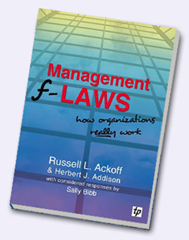
For what it’s worth, a fair chunk of this material comes from my book, as well as the first module of my SharePoint Governance and Information Architecture class that I run a few times a year in various places around the world. When I designed that class, I was inspired by Russell Ackoff, who co-wrote a funny and highly readable book called “Management f-LAWS: How organisations really work”. F-Laws were defined as:

“truths about organisations that we might wish to deny or ignore – simple and more reliable guides to everyday behaviour than the complex truths proposed by scientists, economists, sociologists, politicians and philosophers”

In case you hadn’t noticed, if you remove the hyphen, each f-law become a flaw. You could also consider them as #fail laws. Years ago, I laughed and at the same time, inwardly cringed when I read each f-Law that Ackoff and his co-authors had come up with. I came to realise that SharePoint problems are simply a microcosm of broader issues that plague organisations. If you read Ackoff’s book (and I highly recommend it), you will soon realise that the word “Management” could easily be substituted with “SharePoint” and it doesn’t take much to come up with a few of your own f-laws. This is exactly what I did and at last count, I have 17 of them. In this post, I will detail the very first one.

F-Law 1: The more comprehensive the definition of governance is, the less it will be understood by all

The first condition that I need to design as a SharePoint architect is to put to bed the many misconceptions about SharePoint governance. In this f-Law, I state that the more you try and define what SharePoint governance is, the less anybody will actually understand it. If you consider this counter-intuitive, then let me take it even further. For any project that has a change management aspect (SharePoint projects often are), definitonising not only doesn’t work, but it is actually quite dangerous to your projects health.

To explain why I have come to this conclusion, I’d like to tell you a little story from my non IT work. Several years ago, I was working in a sensemaking capacity with an organisation to help them come up with a strategic plan and performance framework for a new city. This was not a trivial undertaking. The aim was to create a framework with an aligned set of KPI’s to realise the vision for what the city needed to be in the year 2030. While the vision for the city had been previously agreed and understood, the path to realise that vision had not been.

Now if you have ever been involved in strategic plan development, and think that working out your corporate strategy is difficult, I have news for you. Aligning an organisation to a 3 year plan is one thing. Working with a diverse group to determine performance measures of a future city 25 years away is a different thing altogether. I never realised at the time we did this work, just how unique and (dare I say) “cutting edge” it was. Participants were highly varied in skills and areas of interest, and to say each had their own world-view was an… understatement to say the least.

I my book I describe this case study in detail but for the sake of post size, let’s just say that the opportunity to do this work arose from a failed first attempt to create the framework. The first time around an excel spreadsheet was projected onto the wall that looked like the example below. Attempts were made in vain to fill in the strategic outcomes, strategic objectives, key result areas, key performance indicators and measures. After a frustrating few hours of trying this approach, we gave up because participants spent all of their time arguing over the labels and got bogged down in a tangle of definitions and ambiguous terminology. Was it a KPI (Key Performance Indicator) or a KRA (Key Result Area)? Was it a Guiding Principle or a Strategic Objective? Was it a KRA or a Critical Success Factor?  Attempts to resolve this issue with definitions got nowhere because even the definitions could not be agreed upon.

image

In the end, we solved this issue via a rather novel use of Dialogue Mapping along with a problem structuring approach outlined in a book called Breakthrough Thinking. If you’d like to know more on how it was done, then take a look in chapter 12 of the Heretics Guide.

The criticality of context…

The core problem boiled down to context – or lack of it. What I learnt from this is that in situations without a shared context (and the wrong tools to deal with it), we fall back to using definitions to try and fill the gap. When faced with a blank spreadsheet and just some labels, participants attention was fixated on the definitions of the labels, rather than the empty cells where the focus needed to be. This resulted in a bunch of long winded discussions about what terms meant. This seriously stymied efforts aimed at making progress.

I have since performed many workshops, both SharePoint and non SharePoint ones and the pattern is clear. In fact I contend that if you proceed down the road of trying to build context via definitions for complex problems, one of three things will happen.

  1. The definition becomes more verbose. There are a couple of reasons for this:
    • – The definition is expanded to incorporate new aspects of the topic space. In an organisational setting, this creates confusion because the definitions of multiple disciplines can often seemingly contradict each other and thus, careful “wordsmithing” is required to navigate a path through it.
    • – New qualifications or exceptional situations have to be excluded. This leads to more new terms being used in the definition.
  2. As a result of #1, a broader, fundamental definition is developed. This broader definition encompasses more and so is prone to motherly sounding platitudes. Further, such definitions also run the risk of being interpreted in ways other than the one intended by those who worked so hard on the definition.
  3. As a result of #1 and #2, a new word is used or an existing word is used in a new context to try and convey the new meanings or concepts proposed. I have heard governance described as “stewardship”, “risk management” and (guilty as charged), “assurance”.

The effect of this can be far reaching in a bad way because definitionising has a habit of blinding people to what really matters. This leads to terrible project decisions being made up front that have serious consequences. To understand why, consider the image below:

Snapshot

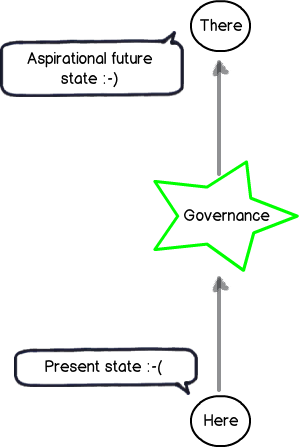
This image represents how governance of a SharePoint project should be viewed. A SharePoint initiative takes time and effort which costs money. We presumably have recognised that the present state is lacking in some way and want to get to somewhere better – an aspirational future place (if you look closely in the left above image note the happy and sad smilies). Accordingly we accept the cost of deploying SharePoint because we believe it will make a positive difference by doing so. If this was not the case, you would be wasting your time and resources on a pointless initiative. Therefore, it is the difference made by the initiative that will tell you if you have succeeded or not. As a result, we have to have a shared context on what that aspirational future looks like!

Don’t confuse the means with the ends…

Governance is, therefore, the means by which you will achieve the end of getting to some better place. It is informed by the end in mind and this is why I drew it in the star in the middle of the above diagram. For example; If the end in mind was compliance, then I will govern SharePoint a heck of a lot differently than say, if the end in mind was improving collaborative decision making.

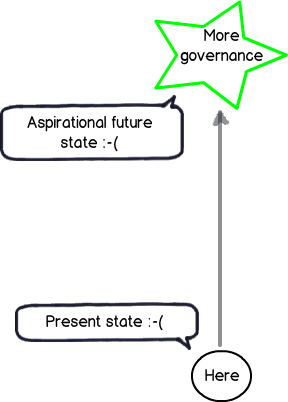
But consider the diagram below. In this context, it should be clear why working from a definition of governance is often problematic. It implies that:

  1. Governance is not being informed by the end in mind;
  2. Your team do not have a shared understanding of what the end in mind actually looks like.

When this happens, project teams rarely realize it and respond by substituting the end with the means. We overly focus on governance via definition without any clarity or context as to what the aspirational future state actually is. Like the example of the blank spreadsheet example I started with, reality starts to look more like the diagram below: (note the happy smilie is gone now)

Snapshot

Steering…

So how do we steer out of this definition pickle? Interestingly “steer” is a appropriate choice of word if we look at the origin of the word “Govern”. This is because “Govern” is a nautical term from Latin and actually means “to steer”. So if your SharePoint project has been more like the Titanic, and hit a giant iceberg along the way, then clearly you need to focus your governance efforts to looking at what is in front of you, rather than scrubbing the deck or keeping the engine room well oiled. The latter tasks are important of course, but you can do all that, still hit an iceberg and waste a lot of money.

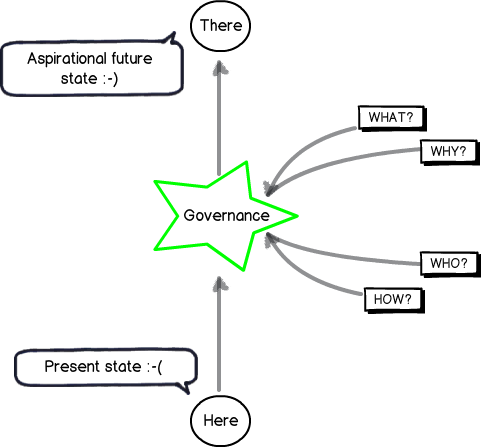
To steer, we all have to understand what the destination is, or at the very least, all agree on the direction. To help you with that journey, consider my final diagram. To steer SharePoint the right way for your organisation requires you to answer four key questions:

  1. What is the aspirational future state and what does it look like?
  2. Why is this the aspirational future state we want?
  3. Who will do what to get us to that state?
  4. How will we get to that state?

Snapshot

The fundamental problem with most SharePoint projects is that questions 1 and 2 are not answered sufficiently, if at all. The next few posts will explore why this is the case, but in the meantime, remember that we could do a SharePoint project that is to scope, time and cost, yet still have no user up-take if we are solving the wrong problem in the first place. Therefore remember that:

  1. Governance is a means to an end, and not the end in itself.
  2. We shouldn’t undertake a “SharePoint governance” project, or consider “SharePoint governance” as deliverable on a project plan. The act of developing a shared context of what the problems are and using that to always steer the governance decision making is paramount. Failure to do this and and your best plans will not save you.

Conclusions and coming next…

This is the second post on what will be a large series – possibly the largest series I have written so far. In the next post in this series, I will continue into our journey of SharePoint governance mistakes and along the way, start to identify what we can do to better answer the “What”, “Why”, “Who” and “How” questions. If you enjoy this series, then consider signing up to one of my classes if one is running in your neck of the woods.


Thanks for reading

Paul Culmsee

www.sevensigma.com.au

www.hereticsguidebooks.com


Demystifying SharePoint Performance Management Part 10 – More tools of the trade…

Hi all and welcome to the tenth article in my series on demystifying SharePoint performance management. I do feel that we are getting toward the home stretch here. If you go way back to Part 1, I stated my intent to highlight some common misconceptions and traps for younger players in the area of SharePoint performance management, while demonstrating a better way to think about measuring SharePoint performance (i.e. lead and lag indicators). While doing so, we examined the common performance indicators of RPS, IOPS, MBPS, latency and the tools and approaches to measuring and using them.

I started the series praising some of Microsoft’s material, namely the “Planning guide for server farms and environments for Microsoft SharePoint Server 2010.”, “Capacity Planning for Microsoft SharePoint Server 2010” and “Analysing Microsoft SharePoint Products and Technologies Usage” guides. But they are not perfect by any stretch, and in last post, I covered some of the inconsistencies and questionable information that does exist in the capacity planning guide in particular. Not only are some of the disk performance figures quoted given without any critical context needed to understand how to measure them in a meaningful way, some of the figures themselves are highly questionable.

I therefore concluded Part 9 by advising readers not to believe everything presented and always verify espoused reality with actual reality via testing and measurement.

Along the journey that we have undertaken, we have examined some of the tools that are available to perform such testing and measurement. So far, we have used Log Parser, SharePoint Flavored Weblog Reader, Windows Performance Monitor, SQLIO and the odd bit of PowerShell thrown in for good measure. This article will round things out by showing you two additional tools to verify theoretical fiction with hard cold reality. Both of these tools allow you to get a really good sense of IO patterns in particular (although they both have many other purposes). The first of which will be familiar to my more nerdy readers, but the second of which is highly powerful, but much lesser known to newbies and seasoned IT pros alike.

So without further adieu, lets meet our tools… Process Monitor and Windows Performance Analysis Toolkit.

Process Monitor

Our first tool is Process Monitor, also commonly known as Procmon. Now this tool is quite well known, so I will not be particularly verbose with my examination of it. But for the three of you who have never heard of this tool, Process Monitor allows us to (among many other things), monitor accesses to the file system by processes running on a server. This allows us to get a really low level view of IO requests as they happen in real time. What is really nice about Process Monitor is its granularity. It allows you to set up some sophisticated filtering that allows you to really see the wood from the trees. For example, one can create fairly elaborate filters that allow you to just see the details of a specific SQL database. Also handy is that all collected data can be saved to file for later examination too.

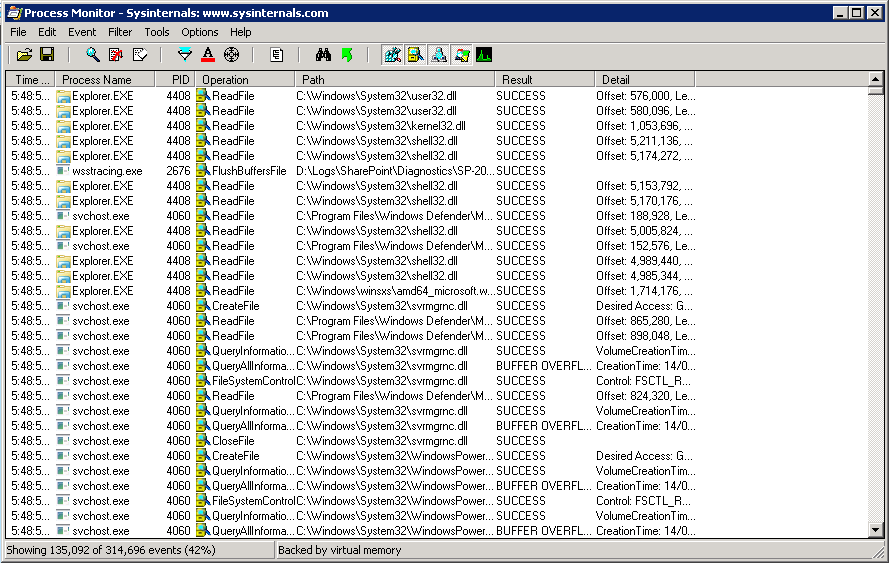
When you start Process Monitor, you will see a screen something like the one below. It will immediately start collecting data about various operations (there are around 140 monitorable operations that cover file system, registry, process, network and kernel stuff). When you launch Process Monitor it immediately starts monitoring file system, registry and processes. The default columns that are displayed include:

  • the name of the process performing the operation
  • the operation itself
  • the path to the object the operation was performed on
  • (and most importantly), a detail column, that tells you the good stuff.

image

The best way to learn Process Monitor is by example, so lets use it to collect SQL Server IO patterns on SharePoint databases when performing a full crawl in SharePoint (while excluding writes to transaction logs). It will be interesting to see the the range of IO request sizes during this time. To achieve this, we need to set up the filters for procmon to give us just what we need…

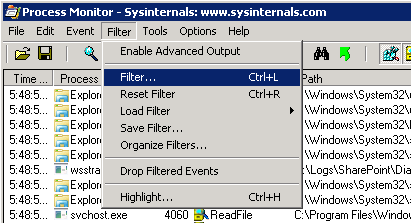
First up,  choose “Filter…” from the Filter menu.

image

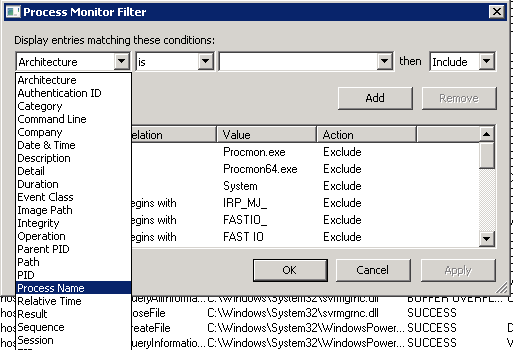
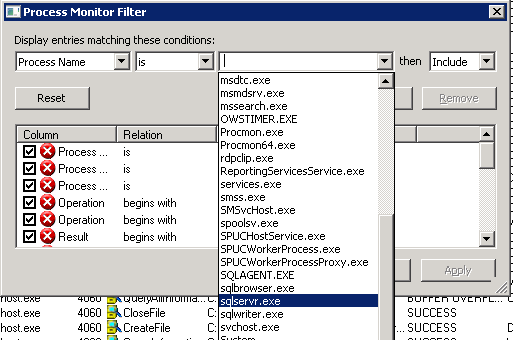
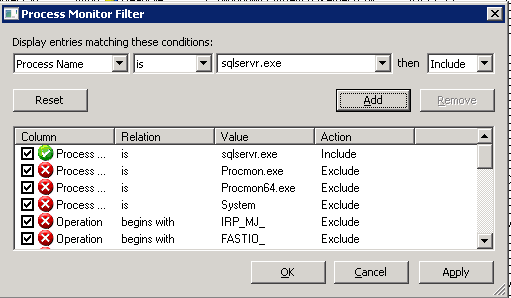
In the top left column, choose “Process Name” from the list of columns. Leave the condition field as “is” and click on the drop down next to it. It will enumerate the running processes, allowing you to scroll down and find sqlservr.exe.

image   image

Click OK and your newly minted filter will be added to the list (check out the green include filter below). Now we will only see operations performed by SQL Server in the Process Monitor display.

image

Rather than give you a dose of screenshot hell, I will not individually show you how to add each filter as they are a similar process to what we just did to include only SQLSERVR.EXE. In all, we have to apply another 5 filters. The first two filter the operations down to reading and writing to the disk.

  • Filter on: Process Name
  • Condition: Is
  • Filter  applied: ReadFile
  • Filter type: Include
  • Filter on: Process Name
  • Condition: Is
  • Filter applied: WriteFile
  • Filter type: Include

Now we need to specify the database(s) that we are interested in. On my test server, SharePoint databases  are on a disk array mounted as D:\ drive. So I add the following filter:

  • Filter on: Path
  • Condition: Contains
  • Filter applied: D:\DATA\MSSQL
  • Filter type: Include

Finally, we want to exclude writes to translation logs. Since all transaction logs write to files with an .LDF extension, we can use an exclusion rule:

  • Filter on: Path
  • Condition: Contains
  • Filter applied: LDF
  • Filter type: Exclude

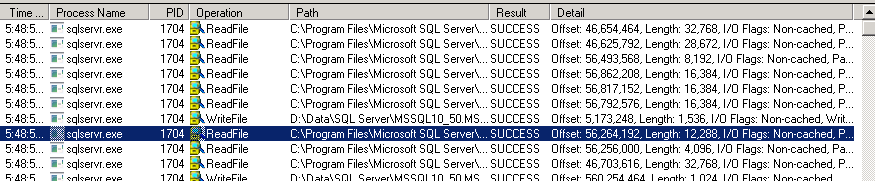
Okay, so we have our filters set. Now widen the detail column that I mentioned earlier. If you have captured some entries, you should see the word “Length :” with a number next to it. This is reporting the size of the IO request in bytes. Divide by 1024 if you want to get to kilobytes (KB). Below you can see a range of 1.5KB to 32KB.

image

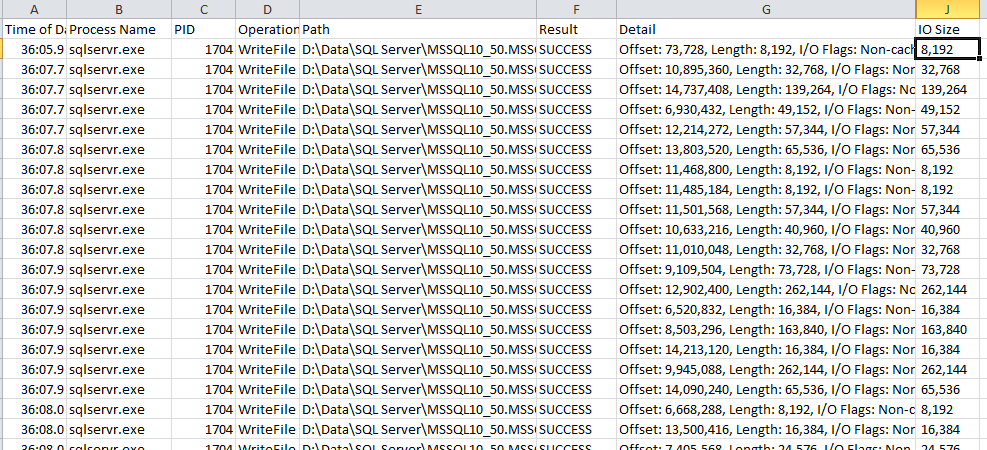
At this point you are all set. Go to SharePoint central administration and find the search service application. Start a full crawl and fairly quickly, you should see matching disk IO operations displayed in Process Monitor. When the crawl is finished, you can choose to stop capturing and save the resulting capture to file. Process Monitor supports CSV format, which makes it easy to import into Excel as shown below. (In the example below I created a formula for the column called “IO Size”.

image

By the way, in my quick test analysis of disk IO of a window during during part of the during a full crawl, I captured 329 requests that were broken down as follows:

  • 142 IO requests (42% of total) were 8KB in size for a total of 1136KB
  • 48 IO requests (15% in total) were 16KB in size for a total of 768KB
  • 48 IO requests (15% in total) were >16KB to 32KB in size for a total of  1136KB
  • 49 IO requests (15% in total) were >32KB to 64KB in size for a total of 2552KB
  • 22 IO requests (7% in total) were >64KB to 128KB in size for a total of 2104KB
  • 20 IO requests (6% in total) were >128KB to 256KB in size for a total of 3904KB

Windows Performance Analyser (with a little help from Xperf123)

Allow me to introduce you to one of the best tools you never knew you needed. Windows Performance Analyser (WPA) is a newer addition to the armoury of tools for performance analysis and capacity planning. In short, it takes the idea of Windows Performance Monitor to a whole new level. WPA comes as part of a broader suite of tools collectively known as the Windows Performance Toolkit (WPT). Microsoft describes the toolkit as:

…designed for analysis of a wide range of performance problems including application start times, boot issues, deferred procedure calls and interrupt activity (DPCs and ISRs), system responsiveness issues, application resource usage, and interrupt storms.”

If most of those terms sounded scary to you, then it should be clear that WPA is a pretty serious tool and has utility for many things, going way beyond our narrow focus of Disk performance. But never fear BA’s, I am not going to take a deep dive approach to explaining this tool. Instead I am going to outline the quickest and simplest way to leverage WPA for examining disk IO patterns. In fact, you should be able to follow what I outline here on your own PC if SharePoint is not conveniently located nearby.

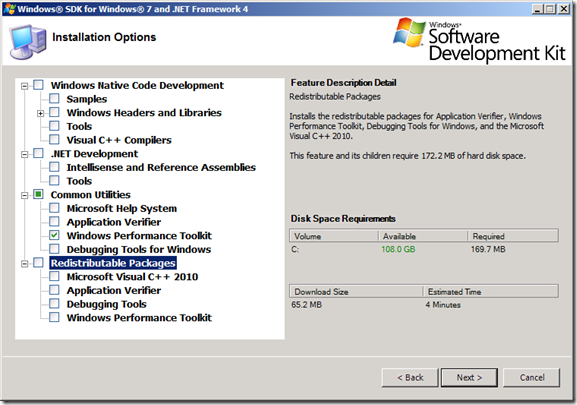
Now this gem of a tool is not available as a separate download. It actually comes installed as part of the Microsoft Windows SDK for Windows 7 and .NET Framework 4. Admins fearing bloat on their servers can rest easy though, as you can choose just to install the WPT components as shown below…

image_thumb6_thumb

By default, the windows performance toolkit will install its goodies into the C:\Program Files\Microsoft Windows Performance Toolkit” folder. So go ahead and install it now since it can be installed onto any version of Windows past Vista. (I am sure that none of you at all are reading this article on an Apple device right? :-).

Now assuming you have successfully installed WPT, I now want you to head on over to codeplex and download a little tool called Xperf123 and save it into the toolkit folder above. Xperf123 is a 3rd party tool that hides a lot of the complexity of WPA and thus is a useful starting point. The only thing to bear in mind is that Xperf123 is not part of WPA and is therefore not a necessity. If your inner tech geek wants to get to know the WPA commands better, then I highly recommend you read a highly comprehensive article written by Microsoft’s Robert Smith and published back in Feb 2012. The article is called “Analysing Storage Performance using the Windows Performance Analysis Toolkit” and it is an outstanding piece of work in this area.

So we are all set. Let’s run the same test as we did with Procmon earlier. I will start a trace on my test SharePoint server, run a full crawl and then look at the resulting IO patterns. Perform the following steps in sequence. (in my example I am using a test SharePoint server).

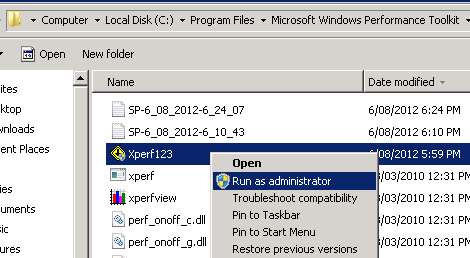
  1. Start Xperf123 from the WPT installation folder (run it as administrator).
  2. At the initial screen, click Next and then Next again at the screen displaying operating system details
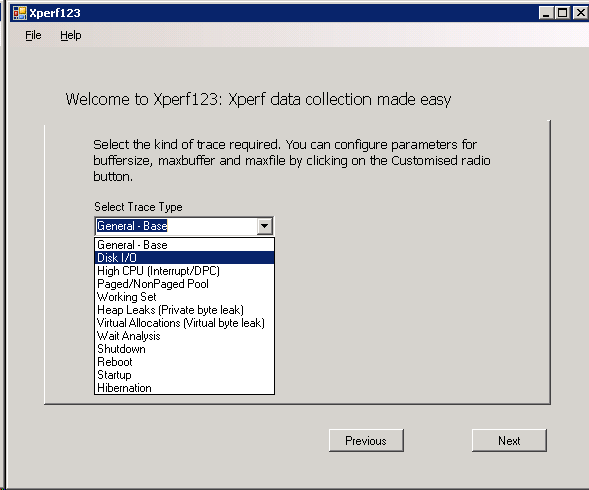
  3. From the Select Trace Type dropdown, choose Disk  I/O and press Next
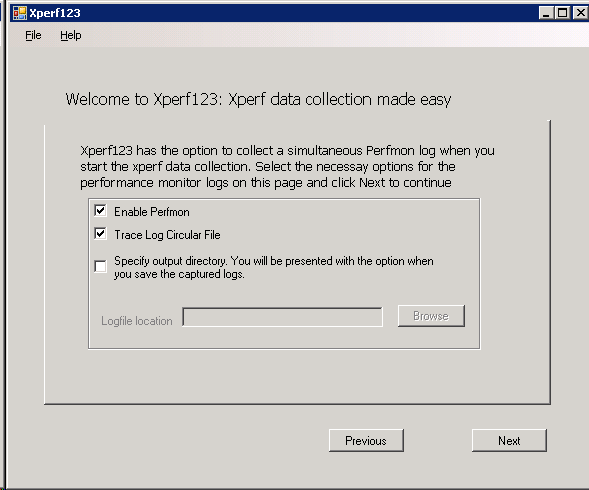
  4. Ensure that “Enable Perfmon”, “use Circular Logging” and optionally choose “Specify Output Directory”. Press Next
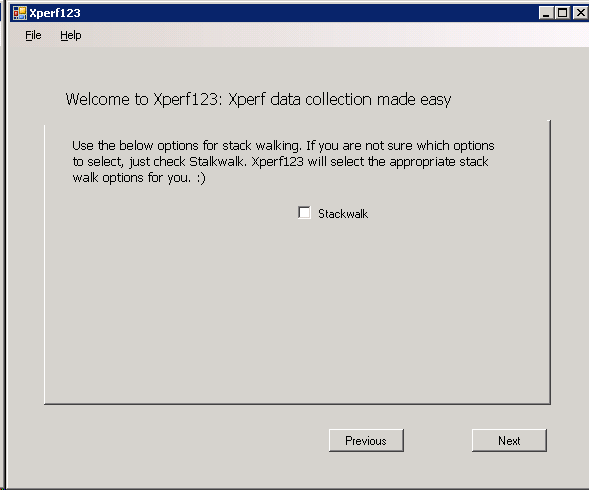
  5. Leave “Stackwalk” unticked and choose Next

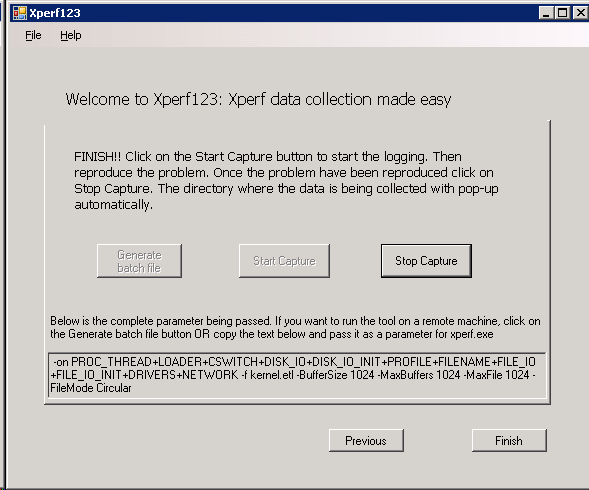
image     image

image  image

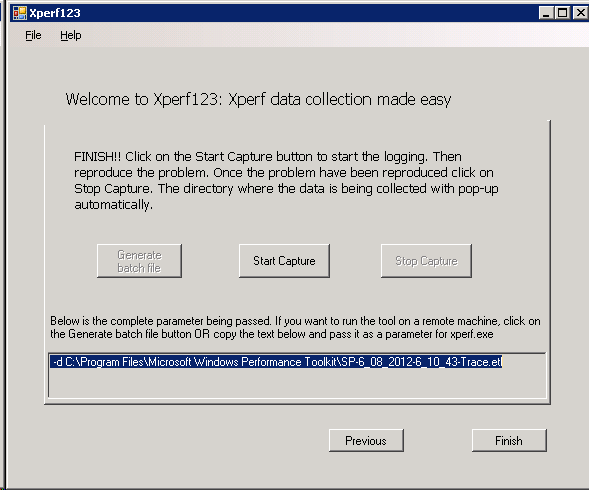
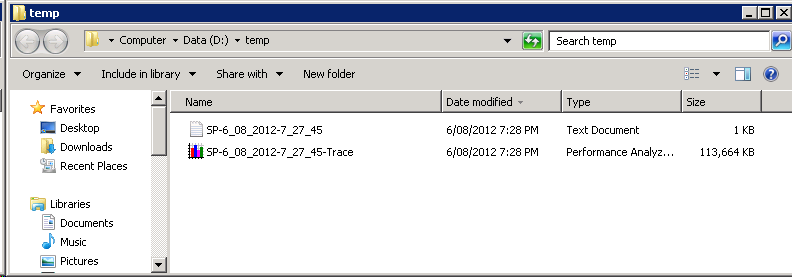
AllrIghtie then… we are all set! Click the Start Capture Button to start collecting the good stuff! Xperf123 will run the actual WPA command line trace utility (called xperf.exe if you really want to know). Now go to SharePoint central administration and like what we did with our test of Process Monitor, start a full crawl. Wait till the crawl finishes and then in Xperf123, click the Stop Capture Button. A trace file will be saved in the WPT installation folder (or wherever you specify). The naming convention will be based on the server name and date the trace was run.

image  image

image

Okay, so capturing the trace was positively easy. How about analysing it visually?

Double click on the newly minted trace file and it will be loaded into the Performance Analyser analysis tool (This tool is also available from the Start menu as well). When the tool loads and processes the trace file, you will see CPU and Disk IO counts reported visually. The CPU is the line graph and IO counts are represented in a bar graph. Unlike Windows Performance Monitor which we covered in Part 7, this tool has a much better ability to drill down into details.

If you look closely below there are two “flyout” arrows. One is on the left side in the middle of the screen and applies to all graphs and the other is on the top-right of each graph. If you click them, you are able to apply filters to what information is displayed. For example: if you click the “IO Counts” flyout, you can filter out which type of IO you want to see. Looking at the screenshot below, you can see that the majority of what was captured were disk writes (the blue bars below).

image  image

Okay so lets get a closer look at what is going on disk-wise. Right click somewhere on the Disk IO bar graph and choose “Detail Graph” from the menu.

image

Now we have a very different view. On the left we can see which disk we are looking at and on the right we can see detailed performance stats for that disk. It may not be clear by the screenshot, but the disk IO reported below is broken down by process. This detailed view also has flyouts and dropdowns that allow you to filter what you see. There is an upper-left dropdown menu under the section called “Physical Disk”. This allows you to change what disk you are interested in. On the upper right, there is a flyout labelled “Process Name”. Clicking this allows you to filter the display to only view a subset of the process that were running at the time the trace was captured.

image

Now in my case, I only want to see the SQL Database activity, so I will make use of the aforementioned filtering capability. Below I show where I selected the disk where the database files reside and on the right I deselected all processes apart from SQLSERVR.EXE. Neat huh? Now we are looking at the graph of every individual IO operation performed during the time displayed and you can even hover over each dot to get more detail of the IO operation performed.

image

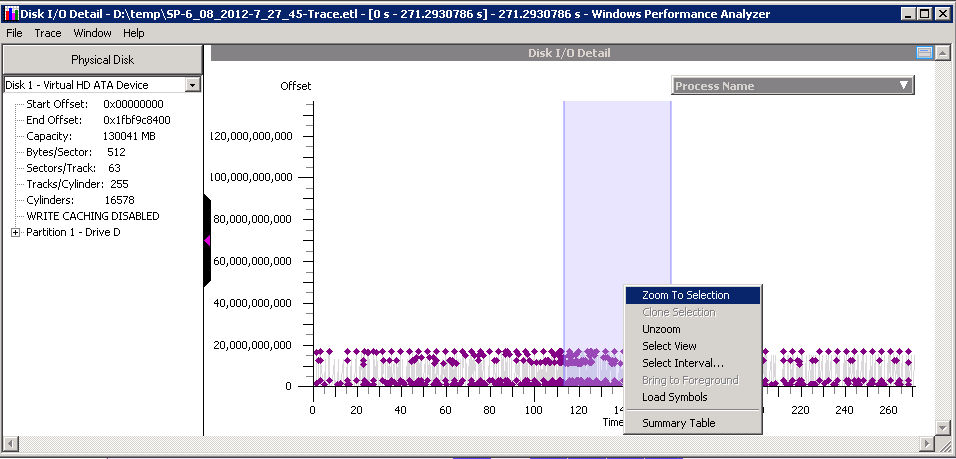
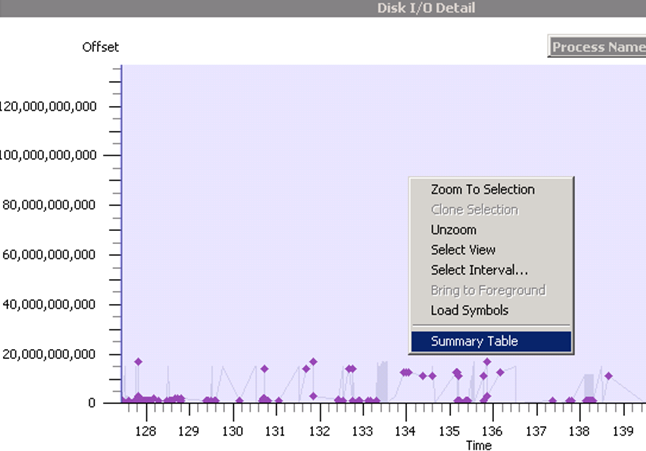
You can also zoom in with great granularity. Simply select a time period from the display using by dragging the mouse pointer over the graph area. Right click the now selected time period and choose “Zoom to Selection”. Cool eh? If your mouse has a wheel button, you can zoom in and out by pressing the Ctrl key and rolling the mouse wheel.

image

Now even for most wussy non technical BA reading this, surely your inner nerd is liking what you see. But why stop here? After all, Process Monitor gave us lots more loving detail and had the ability to utilise sophisticated filtering. So how does WPA stack up?

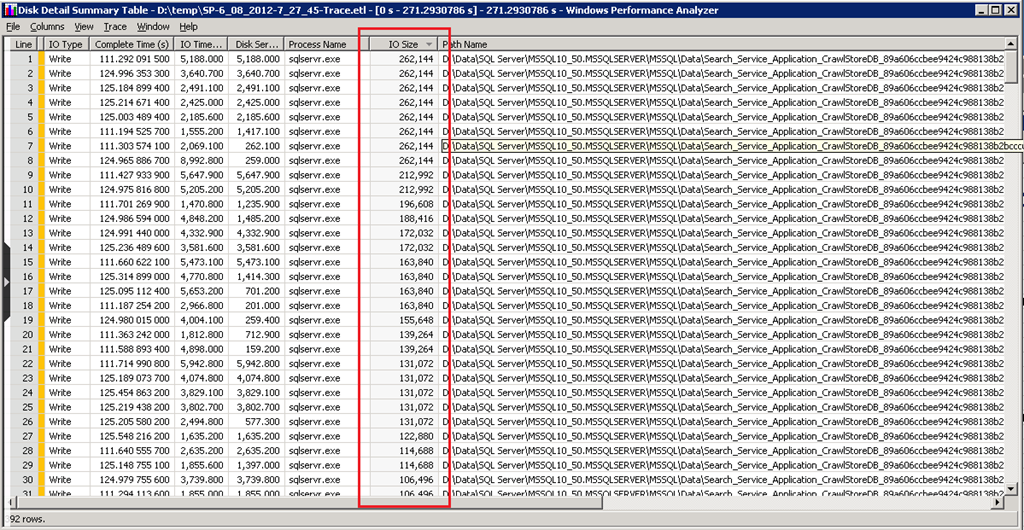
To answer this question, try these steps, Right click on the detail graph and this time choose “Summary Table”. This allows us to view even more detail of IO data.

image

image

Viola! We now have a list of every IO transaction performed during the sample period. Each line in the summary table represents a single I/O operation. The columns are movable and sortable as well. On that note, some of the more interesting ones for our purposes include (thanks Robert Smith for the explanation of these):

  • IO Type: Read, Write, or Flush
  • Complete Time: Time of I/O completion in milliseconds, relative to start and stop of the current trace.
  • IO Time: The amount of time in milliseconds the I/O took to complete
  • Disk Service Time: The inferred amount of time (in microseconds) the IO operation has spent on the device (this one has caveats, check Robert Smiths post for detail).
  • QD/I: Queue Depth the disk , irrespective of partitions, at the time this I/O request initialized
  • IO Size: Size of this I/O, in bytes.
  • Process Name: The name of the process that initiated this I/O.
  • Path: Path and file name, if known, that is the target of this I/O (in plain English, this essentially means the file name).

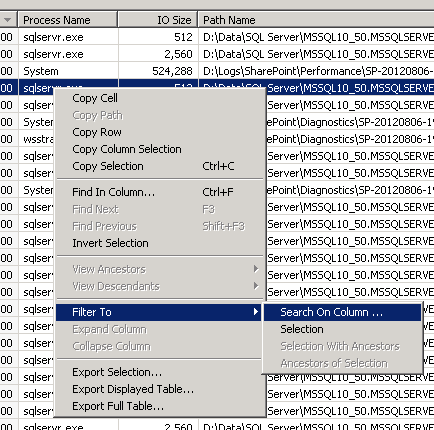
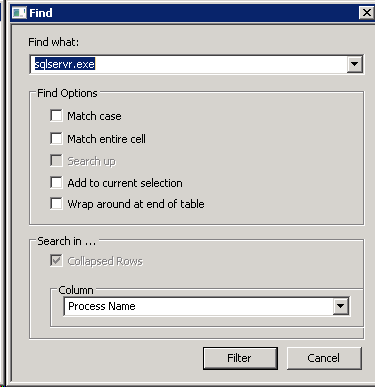
I have a lot of IO requests in this summary view, so let’s see how this baby can filter. First up, lets only look at IO that was initiated from SQL Server only. Right click on the “Process Name” column and choose “Filter To” –> “Search on Column…” In the resulting window, enter “SQLSERVR.EXE” in the “Find what:” textbox. Double check that the column name is set to “Process name” in the dropdown and click Filter.

image  image

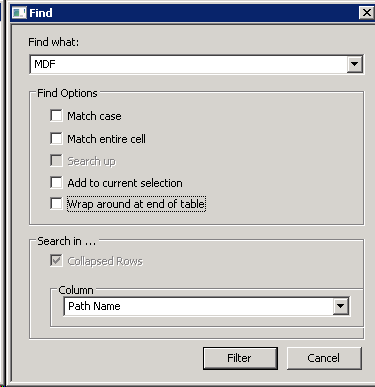
You should now see only SQL IO traffic. So let’s drill down further still. This time I want to exclude IO transactions that are transaction log related. To do this, right click on the “Path Name” column and choose “Filter To” –> “Search on Column…” In the resulting window, enter “MDF” in the “Find what:” textbox. Double check that the column name is set to “Path name” in the dropdown and click Filter.

image image

Can you guess the effect? Only SQL Server database files will be displayed since they typically have a file extension of MDF.

In the screenshot below, I have then used the column sorting capability to look at the IO sizes. Neat huh?

image

Don’t forget Performance Monitor…

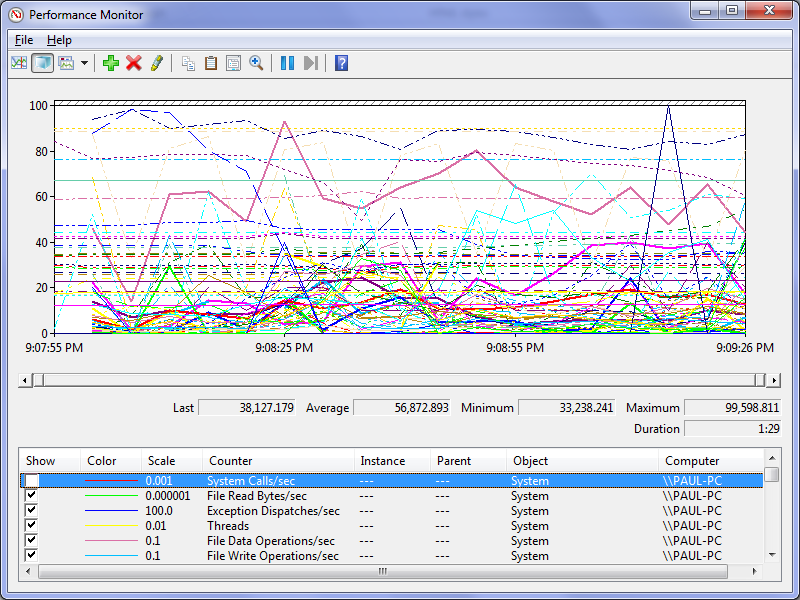
Just before we are done with Windows Performance Analysis Toolkit, cast your mind back to the start of this walkthrough when we used Xperf123 to generate this trace. If you check back, you might recall there was a tickbox in the Xperf123 wizard called “Enable Perfmon”. Well it turns out that Xperf123 had one final perk. While the WPA trace was made, a Perfmon trace was made of the system performance more broadly during the time. These logs are located in the C:\PerfLogs\ directory and are saved in the native Windows Performance Monitor format. So just double click the file and watch the love…

image

How’s that for a handy added bonus. It is also worth mentioning that the Perfmon trace captured has a significant number of performance counters in the categories of Memory, PhysicalDisk, Processor and System.

Conclusion and coming next…

Well! That was a long post, but that was more because of verbose screenshots than anything else.

Both Windows Performance Monitor and Windows Performance Analyser are very useful tools for developing a better understanding of disk IO patterns. While Procmon has more sophisticated filtering capabilities, WPA trumps Procmon in terms of reduced overhead (apparently 20,000 events per second is less than 2% CPU on a 2.0 GHz processor ). WPA also has the ability to visualise and drill down into the data better than Procmon can do.

Nevertheless, both tools have far more utility beyond the basic scenarios outlined in this series and are definitely worth investigating more.

In the next and I suspect final post, I will round off this examination of performance by making a few more general SharePoint performance recommendations and outlining a lightweight methodology that you can use for your own assessments.

Until then, thanks for reading…

Paul Culmsee

www.hereticsguidebooks.com


Demystifying SharePoint Performance Management Part 9 – Don’t believe everything you R/W

Hi and welcome to Part 9 (bloody hell… nine!) of my series on trying to demystify SharePoint performance management a bit. If by any chance you have been asked to provide some sizing information for your organisation and you are finding the resources online a bit overwhelming, this series is for you. If you have been a part of our varied journey so far, the last few posts have been all about Disk IO performance in the form of latency, IOPS and MBPS. In the last two articles, we have been learning about the different IO patterns that SQL Server is likely to utilise, as well as using the jackhammer known as the SQLIO utility, that is used to simulate those IO patterns on unsuspecting disk infrastructure.

Now just to set the scene for this post (and conveniently perform some product placement), I recently published a book called “The Heretics Guide to Best Practices”. Now being the author and all, I am going to suggest you buy it because it is a completely riveting read! :-).

Now apart from blatant product placement, the real reason I mention it is because one of the chapters is called “Myths, Memes and Methodologies”. In it, we examine why some ideas gain legitimacy, even though they are based on often completely dodgy foundations. I mention this here, because in terms of SQL disk IO sizing, something similar has happened with Microsoft’s published material on the topic. So the focus of this article is to finish off our discussion on understanding disk IO patterns, while lifting the lid on some of the inconsistencies in the material that that end up being repeated by SharePoint consultants as gospel to their unsuspecting disciples.

Now harking way back to part 1 to the notion of lead vs. lag indicators, our use of SQLIO thus far has essentially been used as a lead indicator. While SQLIO puts a real load on disk infrastructure and faithfully reports the resulting IOPS, latency and MBPS, the reality is it can never truly capture the nuances of a production SharePoint farm doing its thing. But in terms of a lead indicator that is okay. After all, a lead indicator by definition cannot guarantee an outcome. It can merely suggest that an outcome should be able to be met.

So while we are thinking about the lead indicator world view, some of you might have noticed that I have not yet made any suggestions what are the minimum conditions of satisfaction for disk infrastructure used to underpin SharePoint. This has been deliberate until now, because I felt that it was critical to understand the relationship between the size of a disk IO operation, and its effect on IOPS, latency and MBPS first. To that end, hopefully I have instilled a reflex in you where – if you are given an arbitrary latency, IOPS or MBPS figure that you have to meet – you immediately ask questions like, “What sort of IO patterns?” or “how large is the IO request typically going to be?” or “is the IO random or sequential?”

When whitepapers mislead…

Now we are about to get into one area where Microsoft’s published documentation is quite weak. Remember the 367 page “Capacity Planning for Microsoft SharePoint Server 2010” whitepaper? Starting at page 326, there is a section with the promising title of “Estimate Core Storage and IOPS needs” (this topic is also available separately as a technet article too). The problem is in despite that title, very little IOPS guidance actually is given. Instead the content in the section overwhelmingly speaks about estimating storage requirements. In fact the best you get is one explicit mention of IOPS in relation to the SharePoint Search service application which states the following:

The IOPS requirements for Search are significant.

  • For the Crawl database, search requires from 3,500 to 7,000 IOPS.
  • For the Property database, search requires 2,000 IOPS.

Note: For the purpose of the rest of this article, lets add the above figures together and simply say between 5,500 to 9000 IOPS for search.

Do you see the problem here? This is simply an arbitrary IOPS figure with no guidance as to the IO patterns underpinning it. What about latency or the IO request size that you need to assume? Unfortunately, no guidance is given for these questions which makes this quoted figure not overly helpful. Plus, as you will soon see below, Microsoft seemingly contradict themselves elsewhere in the same whitepaper…

So what are good numbers to use?

In the absence of any hard data, the best way to deal with storage requirements is to think in terms of lead indicators. Indicators from a lead point of view, can be framed as targets – something to aim for. Targets then can be broken down into different categories ranging from “cover your arse” to “above and beyond”:

  • Aspired target: The “this would be bloody fantastic if we could get there” target.
  • Agreed target: The “this is what we are going to deliver no matter what” target.
  • Minimum Condition of Satisfaction (MCOS) target: The “If we don’t achieve this we may as well pack up and go home” target.

So given these sorts of targets, what should the disk IO performance targets for SharePoint be? To work this out, we can utilise information already out there. Well…that is, we could if the information out there wasn’t so disparate and disconnected. So unfortunately, it takes some digging to you can find what you need.

Our first point of call in this regard is indeed Microsoft and the very same capacity planning and configuration guide that I criticised earlier for poorly dealing with IOPS. Hidden in the bowls of that document, the following statement is made on page 334 (emphasis mine):

Any storage architecture must support your availability needs and perform adequately in IOPS and latency. To be supported, the system must consistently return the first byte of data within 20 milliseconds.

So the way I look at it, a 20ms latency should be our MCOS target (see the explanation above for MCOS). If we consistently do worse than this, then we do not have a lot of assurance about the scalability of the disk IO subsystem being used for SharePoint. But like the arbitrary IOPS figure quoted in the previous section, I wonder if readers have spotted the problem with specifying this latency figure alone?

In both cases, don’t forget the almost symbiotic type of relationships between IO size, IOPS and latency. If we assumed that all IO operations were small (for example SQL’s page size of 8KB) then we could likely stay way under the 20ms limit with a more modest disk infrastructure. But to sustain the same latency with a larger IO size would require a faster disk subsystem. Why? Well as we discussed in part 6, if the size of the IO writes are larger, such as 64KB, then latency will go up because servicing larger requests takes longer than smaller ones. Therefore, if we were to assume a larger IO size, we would need more/faster disks to be able to meet the same 20ms latency KPI.

So what disk IO size should we assume to give context to a latency figure? Some insight can be found back in part 6, when we examined SQL IO characteristics and established that it will likely be much more varied than SQL’s base IO unit of 8KB pages. My suggestion therefore, is to test 8KB but also ensure that 64KB can meet the latency target. This is because 64KB represents a reasonable average size between the 8KB to 256KB range most SQL Server’s IO operations will fall within. Thus, if a SQLIO test using random read/writes at 64K indicates more than 20ms latency consistently, then you should probably ask your storage people to take another look at it.

By the way, if you really want to give your storage guys a challenge, keep jacking up the IO size!

What about aspired latency targets?

So if you are cool with the notion that the minimum condition of satisfaction for a random IO test using 64K size should be less than 20ms latency, what about aiming higher with agreed or aspirational targets?

Luckily for all of us, we can once again stand on the shoulders of giants. In this case, the Bob Duffy indirectly answers this question by providing what he considers to be the indicators for optimal SQL Server performance in general. In an excellent article with the rather appropriate title of “How to Specify SQL Storage Requirements to your SAN Dude” Bob makes the following recommendations:

  • SQL Data files must have a response time averaging about 8ms and a maximum response time of around 20ms using 64k size IOs and that are random in nature
  • SQL Log Files must have a write response time averaging from 1-5ms. use 64k IO size and are sequential in nature

The nice thing about specifying a target or benchmark like this, is that you are able to sidestep discussions on RAID levels, stripe sizes and many other things that SAN nerds find interesting. We keep things focused on the lead indicators and in effect state “If you can meet these figures, configure it any way you like.” This gives the SAN guys the freedom to do their job, while giving you an indicator that can give you confidence in the disk infrastructure. So if we were to distil the figures above into lead indicator targets for storage gurus, it might look something like this:

  • MCOS target: Less than 20ms latency for random IO requests of 64KB
  • Agreed target: Average 8ms latency for random IO requests of 64KB with no more than 20ms max latency. Less than 5ms latency for sequential log IO
  • Aspired target: No more than 8ms latency for random SQL IO requests of 64KB and average of 1ms latency sequential log IO with max never going above 5ms

Now in the ProData article, Bob made a slightly tongue in cheek point that sums up the above thinking really well, as well as giving insight to a critical aspect we have not considered so far…

Nowadays most SQL consultants try and not talk about RAID types and types of disk, it can be best to leave that up to the storage guys. If the storage team can meet my requirement for 5,000 random 64k read/write IOPs at 8ms latency by using 50 old SATA drives at 5,400 rpm in RAID 5 then knock yourself out – I’m happy. Well maybe I’m happy till we have that chat about Service Level requirements during a disk degrade event but that’s a different story…

If you look closely at Bob’s quote, you will see that he has also specified the last critical variable in the mix. Bob’s mention of “5000 random 64k read/write IOPS” is in reference to another point he makes. Without an IOPS figure to work from, the targets we have come up with are effectively meaningless. Quoting Bob:

The main thing to specify apart form your latency requirement is the throughput (IOPs). It is no good meeting the 8ms target for 100 IOPs and then finding your workloads needs 5,000 IOPs. You wont be able to meet the 8ms target!!

Consider it this way… a SharePoint site that services 100,000 users, will process a lot more IO requests than a site that services 10 users. With the latter, it is quite likely that the latency targets we have been talking about (even the aspirational ones) would be pretty easy to meet with a single disk. (To hark back to our shopping centre metaphor, one check out operator is all that is needed at a corner store, whereas many are needed at the supermarket). This is presumably why Bob has used a figure like 5000 IOPS for his post. It is probably a figure that conveniently represents some fairly heavy disk usage. But it does beg two question:

  • How much IOPS should we use to simulate SharePoint IOPS?
  • In the absence of anything else, perhaps 5000 IOPS is a good figure to go with?

Don’t believe all you read…

Now if you go back and read the start of this post, you will recall I mentioned that Microsoft stated some IOPS figures for the SharePoint search application databases ranged between 5,500 to 9000. That would indicate that Bob’s base figure of 5000 is a bit low, especially given that SharePoint has many other components beyond search that have not been taken into account. So to put Bob’s 5000 IOPS figure in perspective, let’s re-examine Microsoft’s trusty capacity planning whitepaper. One of the great things about this document is that Microsoft detailed the performance stats of a typical day in the life of their internal SharePoint environments. Since Microsoft are so large, they have different SharePoint farms for different collaborative scenarios. The scenarios they covered were:

  1. Enterprise Intranet environment (also described as published intranet). In this scenario, employees view content like news, technical articles, employee profiles, documentation, and training resources. It is also the place where all search queries are performed for all of the other the SharePoint environments within the company.
  2. Enterprise intranet collaboration environment (also described as intranet collaboration). In this scenario, is where important team sites and publishing portals are housed. They are typically used for enterprise collaboration, organizations, teams, and projects. Sites created in this environment are used as communication portals, applications for business solutions, and general collaboration. No custom code runs in these sites.
  3. Departmental Collaboration environment. In this scenario, employees use this environment to track projects, collaborate on documents, and share information within their department.
  4. Social Collaboration Environment. This is the My Sites scenario. These connect employees with one another and the information that they need. Employees use this environment to present personal information such as areas of expertise, past projects, and colleagues to the wider organization. The environment also hosts personal sites and documents for viewing, editing, and collaboration.

Now reading about these scenarios is highly interesting and Microsoft provides some nice nuggets of information that we will use in a future post. But for now I will stick purely to a disk IOPS perspective. To that end, below are a few fun-filled facts about the number of users in each of the four scenarios:

  1. Enterprise Intranet environment:  33580 unique users per day, with an average of 172 concurrent and a peak concurrency of 376 users.
  2. Enterprise intranet collaboration environment: 69702 unique users per day, with an average of 420 concurrent users and a peak concurrency of 1433 users
  3. Departmental Collaboration environment. 9186 unique users per day, with an average of 189 concurrent users and a peak concurrency of 322 users
  4. Social Collaboration Environment. 69814 unique users per day, with an average of 639 concurrent users and a peak concurrency of 1186 users

So now you have a sense of the size of these scenarios and as an added bonus, gotten a glimpse into the difference that usage patterns can make. For example: social collaboration and enterprise collaboration have similar number of unique users but social has more average concurrency but less peak. But what about IOPS?

In the document, IOPS is split into reads per second and writes per second, so I added them to estimate IOPS. The results are rather surprising…

Metric

Social Collaboration

Departmental Collaboration

Published intranet

Intranet Collaboration

Unique visitors

69814

9186

33580

69702

Average concurrent

639

189

172

420

Max concurrent

1186

322

376

1433

IOPS

941

74

409.66

409.66

Now while it might be tempting to ponder why social collaboration has over double the IOPS, yet half the concurrency of enterprise intranet collaboration, we are not going to worry about here. Besides, we actually covered some of it already when we used logparser to get insights of usage patterns. What I will instead do is draw your attention to is the fact that that none of the IOPS scenarios come anywhere near the 5000 IOPS figures cited by ProData or Microsoft’s 5500-9000 IOPS cited for search (in the very same capacity planning document I might add!)

So something is amiss. If an organisation the size of Microsoft can have almost 70000 unique users per day, with a peak concurrency of 1433 users and only total 410 IOPS, then where the hell did the 5500-9000 IOPS figure for search alone come from? Even if you take the scenario with the highest IOPS (the Social collaboration scenario with 941 IOPS), that’s still less than one fifth 5500 IOPS which was at the low end of the search IOPS figure.

Now I am also suspicious that two different case studies have the exact same IOPS figure. If you compare the “published intranet” scenario with the “intranet collaboration” scenario, one has half the visitors, yet both have precisely the same IOPS (right down to decimal places). That seems highly unlikely to me and I suggest that a mistake has been made. Given the intranet collaboration has the highest max concurrency figure, I would have expected IOPS to be a higher than it is. Hmmm…

What can we take away from this? For one, the capacity planning document could seriously do with a rewrite in this area. Secondly, I don’t have a lot of faith in those IOPS figures quoted (although I have more confidence in the case studies that the arbitrary figures specified for search).

So if we put aside the doubt created by the issues with the capacity planning guide, there is one really interesting fact that remains… none of the reported IOPS figures came anywhere near 5000 IOPS.

Insights from HP…

It turns out that Hewlett Packard also did some load testing of SharePoint 2010 (among other things) and published a whitepaper called the “HP performance and configuration guide for Microsoft SharePoint 2010“.  In this guide, they detail the results of a scenario they tested based on what they termed an “Enterprise Workload”. The guide covers definition of enterprise workload in loving detail, but the gist of it is that it covers the following areas:

  • Document Center (30% of operations) Check-out, download, upload and check-in documents
  • Team Sites – (20% of operations) work with calendars, discussions and documents
  • Portal SItes – (20% of operations) work with event, announcements and surveys
  • My Sites – (10% of operations) work with documents in personal documents library
  • Search – (20% of operations) Submit searches with random word or phrases

HP then simulates 500 concurrent users performing the actions above. In Table 13 of the report (page 28 of their document and reproduced below) , HP outline the performance and even break down the IO characteristics of each SharePoint database (which is really handy indeed). Adding up the last column of transfers/sec (which is essentially IOPS) we get a result of 1347.33 IOPS.

Thus we are still considerably under the 5000 IOPS that Bob Duffy suggests.

Conclusion…

Right! Remember our discussion above on MCOS, agreed and aspired targets? For an aspirational target, I think that we can reasonably use 5000 IOPS as a starting point for an enterprise organisation of Microsoft’s size. If we stick with 5000 IOPS, then my suggestion for an aspirational latency target would be:

  1. no more than 8ms latency for random SQL IO requests of 64KB
  2. average 1ms (and no more than 5ms max) latency of sequential log IO of 64KB

I think these figures are a pretty good test of a disk subsystem and think that Bob at ProData is therefore pretty close to the mark. Of course, you can use these figures to make your own judgement and adjust accordingly. Provided that you think of them as lead indicators that provide you a level of confidence in your disk infrastructure, you now have the tools and knowhow to run the tests too.

So if there was a moral of the story to this post, it would be to not believe everything you read and always verify espoused reality with actual reality via testing. On that note, the next post will finish off our examination of disk performance by going over 2 additional tools that I think are particularly good for testing assumptions. After that, we will be revisiting Microsoft’s case studies, as well as some findings, insights and recommendations from some additional lab scenarios that Microsoft conducted.

Thanks for reading

Paul Culmsee

www.sevensigma.com.au


Demystifying SharePoint Performance Management Part 6 – The unholy trinity of Latency, IOPS and MBPS

Hi all

Welcome to part 6 on my series in making SharePoint performance management that little more digestible. To recap where we have been, I introduced the series by comparing lead versus lag indicators before launching into an examination of Requests Per Second (RPS) as a performance indicator. I spent 3 posts on RPS and then in the last post, we turned our attention to the notion of latency. We watched a Wiggles Video and then looked at all of the interacting components that work together just to load a SharePoint home page. I spent some time explaining that some forms of latency cannot be reduced because of the laws of physics, but other forms of latency are man made. This is when any one of the interacting components are sub-optimally configured and therefore introduce unnecessary latency into the picture. I then asserted that disk latency was one of the most common area that is ripe for sub-optimal configuration. I then finished that post by looking at how a rotational disk works, the strategies employed to mitigate latency (Cache, RAID, SAN’s etc.)

Now on the note of Cache, RAID and SAN’s Robert Bogue who I mentioned in part 1, has also just published an article on this topic area called Computer Hard Disk Performance – From the Ground Up. You should consider Robert’s article part 5.5 of this series of posts because it expands on what I introduced in the last post and also spans a couple of the things I want to talk about in this one (and goes beyond it too). It is an excellent coverage of many aspects of disk latency and I highly recommend you check it out).

Right! In this post, where will look more closely at latency and understand its relationship with two other commonly cited disk performance measures: IOPS and MBPS. To do so, lets go shopping!

Why groceries help to explain disk performance

image

Most people dislike having to wait in a line for a check-out at a supermarket and supermarkets know this. So they always try and balance the number of open check-out counters so that they can scale when things are busy, but not pay the operators to standing around when its quiet. Accordingly, it is common to walk into a store when its quiet and only find only one or two check-out counter open, even if the supermarket has a dozen or more of them.

The trend in Australian supermarkets nowadays is to have some modified check-out counters that are labelled as “express.” In these check-outs, you can only use them if you are buying 15 items or less. While the notion of express check-outs has been around forever, the more recent trend is to modify the design of express check-out counters to have very limited counter space and no moving roller that pushes your goods toward the operator. This discourages people with a fully-loaded trolley/cart to use the express lane because there is simply not enough room to unload the goods, have them scanned and put them back in the trolley. Therefore, many more shoppers can go through express counters than regular counters because they all have smaller loads.

This in turn frees up the “regular” check-out counters for shoppers with a large amount of goods. Not only do they have a nice long conveyor belt with plenty of room for shoppers to unload all of their goods onto and rolls to the operator, but often there will be another operator who puts the goods into bags for you as well. Essentially this counter is optimised for people who have a lot of goods.

Now if you were to measure the “performance” of express lanes versus regular lanes, I bet you would see two trends.

  • Express lanes would have more shoppers go through them per hour, but less goods overall
  • Regular lanes would have more goods go through them per hour, but less shoppers overall

With that in mind, lets now delve back into the world of disk IO and see if the trend holds true there as well.

Disk latency and IOPS

In the last post, I specifically focused on disk latency by pointing out that most of the latency in a rotational hard drive is from rotation time and seek time. Rotation time is time taken for the drive to rotate the disk platter to the data being requested and seek time is how long it takes for the hard drive’s read/write head to then be positioned over that data. Depending on how far the rotation and head have to move, latency can vary. Closely related to disk latency is the notion of I/O per second or “IOPS”. IOPS refer to the maximum number of reads and writes that can be performed on a disk in any given second. If we think about our supermarket metaphor, IOPS is equivalent to the number of shoppers that go through a check-out.

The math behind IOPS and how latency affects it is relatively straightforward. Let’s assume a fixed latency for each IO operation for a moment. If for example, your disk has a large latency… say 25 milliseconds between each IO operation, then you would roughly have 40 IOPS. This is because 1 second = 1000 milliseconds. Divide 1000 by 25 and you get 40. Conversely, if you have 5 milliseconds latency, you would get 200 IOPS (1000 / 5 = 200).

Now if you want to see a more detailed examination of IOPS/ latency and the maths behind it, take a look at an excellent post by Ian Atkin. Below I have listed the disk latency and IOPS figures he posted for different speed disks. Note that a 15k RPM disk came in at around 175-210 IOPS which suggests a typical latency average of between 4.7 and 5.7 milliseconds. (1000/175 = 5.7 and 1000/210 = 4.7). Note: Ian’s article explains in depth the maths behind the average calculation in this section of his post.

image

The big trolley theory of IOPS…

While that math is convenient, the real world is always different to the theoretical reality I painted above. In the world of shopping, imagine if someone with one or two trolleys full of goods like the picture below, decided to use the express check-out. It would mean that all of the other shoppers have to get annoyed and wait around for this shoppers goods to be scanned, bagged and put back into trolley. The net result of this is a reduced number of shoppers going through the check-out too.

image

While the inefficiencies of a supermarket is something that is easy to visualise for most people, disk infrastructure is less so. So while the size of our trolley has an impact on how many people come through a check-out, in the disk world, the size of the IO request has precisely the same effect. To demonstrate, I ran a basic test using a utility called SQLIO (which I will properly introduce you to in part 7) on one of my virtual machines. Below is the results of writing data randomly to a 500GB disk. In the first test we wrote to the disk using 64KB writes and in the second test we used 4KB writes. The results are below:

Size of Write IOPS Result
64KB 279
4KB 572

Clearly, writing 4KB of data over time resulted in a much higher IOPS than when using 64KB of data. But just because there is a higher IOPS for the 4KB write, do you think that is better performance?

Disk latency and MBPS

So far the discussion has been very IOPS focussed. It is now time to rectify this. In terms of the SQLIO test I performed above, there was one other performance result I omitted to show you – the Megabytes per second (MBPS) of each test. I will now add it to the table below:

Size of Write IOPS Result MBPS Result
64KB 279 17.5
4KB 572 2.25

Interesting eh? This additional performance metric paints a completely different picture. In terms of actual data transferred, the 4KB option did only 2.25 megabytes per second whereas the 64KB transferred almost 8 times that amount! Thus, if you were judging performance based on how much data has been transferred, then the 4KB option has been an epic fail. Imagine the response of 500 SharePoint users, loading the latest 30 megabyte annual report from a document library if SharePoint used 4KB reads … Ouch!

So the obvious question is why did a high IOPS equate to a low MBPS?

The answer is latency again (yup – it always comes back to latency). From the time the disk was given the request to the time it completed, writing 4KB simply doesn’t take as long to write as 64KB does. Therefore there are more IOPS that take place with smaller writes. Add to that, the latency from disk rotation and seek time per IO operation and you start to see why there is such a difference. Eric Slack at Storage Switzerland explains with this simple example:

As an illustration, let’s look at two ways a storage system can handle 7.5GB of data. The first is an application that requires reading ten 750MB files, which may take 100 seconds, meaning the transfer rate is 75MB/s and consumes 10 IOPS. The second application requires reading ten thousand 750KB byte files, the same amount of data, but consumes 10,000 IOPS. Given the fact that a typical disk drive provides less than 200 IOPS, the reads from the second application probably won’t get done in the same 100 seconds that the first application did. This is an example of how different ‘workloads’ can require significantly different performance, while using the same capacity of storage.

Now at this point if I haven’t completely lost you, it should become clear that each of the unholy trinity of latency, IOPS and MBPS should not be judged alone. For example, reporting on IOPS without having some idea of the nature of the IO could seriously mislead. To show you just how much, consider the next example…

Sequential vs. Random IO

Now while we are talking about the IO characteristics of applications, two really important point that I have neglected to mention so far is the range of latency and the impact of sequential IO.

The latency math I did above was deliberately simplified. Seek and rotation time are actually across a range of values because sometimes the disk does not have to rotate the spindle/move the head far. The result is a much reduced seek latency and accordingly, increased IOPS and MPBS. Nevertheless, the IO is still considered random.

Taking that one step further, often we are dealing with large sections of contiguous space on the hard disk. Therefore latency is reduced further because there is virtually no seek time involved. This is known as sequential access. Just to show you how much of a difference sequential access makes, I re-ran the two tests above, but this time writing to sequential areas of the disk and not random. With the reduced seek and rotation time, the difference in IOPS and MBPS is significant.

Size of Write IOPS Result MBPS Result
64KB 2095 131
4KB 4152 16

The IOPS and subsequent MBPS has improved significantly from the previous test to the tune of a 750% improvement. Nevertheless, the size of the request and its relation to IOPS and MPBS still holds true. The smaller the size of the IO request being read or written, the more IOPS requests can be sustained, but the less MBPS throughput can be achieved. The reverse then holds true with larger IO requests.

One conclusion that we can draw from this is that specifying IOPS or MBPS alone has the potential to really distort reality if one does not understand the nature of the IO request in terms of its characteristics. For example: Let’s say that you are told your disk infrastructure has to support 5000 IOPS. If you assumed a 4K IO size that is accessed sequentially, then far fewer disks would be required to achieve the result compared to a 64KB IO accessed randomly. In the 64KB case, you would need many disks in an array configuration.

SQL IO Characteristics

So now we get to the million dollar question. What sort of IO characteristics does SQL and SharePoint have?

I will answer this by again quoting from Ian Atkin’s brilliant “Getting the Hang of IOPS” article. Ian makes a really important point that is relevant to SQL and SharePoint in his article which I quote below:

The problem with databases is that database I/O is unlikely to be sequential in nature. One query could ask for some data at the top of a table, and the next query could request data from 100,000 rows down. In fact, consecutive queries might even be for different databases. If we were to look at the disk level whilst such queries are in action, what we’d see is the head zipping back and forth like mad -apparently moving at random as it tries to read and write data in response to the incoming I/O requests.

In the database scenario, the time it takes for each small I/O request to be serviced is dominated by the time it takes the disk heads to travel to the target location and pick up the data. That is to say, the disk’s response time will now dominate our performance.

Okay, so we know that SQL IO is likely to be random in nature. But what about the typical IO size?

Part of the answer to this question can be found in an appropriately titled article called Understanding Pages and Extents. It is appropriate because as far as SQL server database files and indexes are concerned, the fundamental unit of data storage in SQL Server is an 8KB page. The important point for our discussion is that Disk I/O many read and write operations are performed at the page level. Thus, one might assume that 8KB should be the size assumed when working with IOPS calculations because it is possible for SQL to write 8KB to disk at a time.

Unfortunately though, this is not quite correct for a number of reasons. Firstly, eight contiguous 8KB pages are grouped into something called an extent. Given than an extent is a set of 8 pages, the size of an extent is 64KB. SQL Server generally allocates space in a database on a per-extent basis and performs many reads across extents (64KB). Secondly, SQL Server also has a read-ahead algorithm that means SQL will try and proactively retrieve data pages that are going to be used in the immediate future. A read-ahead is typically from 1 to 128 pages for most editions which translates to between 8KB and 1024KB. (for the record, there is a huge amount of conflicting information online about SQL IO characteristics. Bob Door’s highly regarded SQL Server 2000 I/O basics article is the place to go for more gory detail if you find this stuff interesting).

A read-ahead interlude…

Before we get into SharePoint disk characteristics, it is worthwhile mentioning a great article by Linchi Shea called Performance Impact: Some Data Points on Read-Ahead.  Linchni did an experiment by disabling read-ahead behaviour in SQL Server and measured the performance of a query on 2 million rows. With read-ahead enabled, it took 80 seconds to complete. Without read-ahead it took 210 seconds. The key difference was the size of the IO requests. Without read-ahead the reads were all 8KB as per page size. With read-ahead, it was over 350KB per read. Linchi makes this conclusion:

Clearly, with read-ahead, SQL Server was able to take advantage of large sized I/Os (e.g. ~350KB per read). Large-sized I/Os are generally much more efficient than smaller-sized I/Os, especially when you actually need all the data read from the storage as was the case with the test query. From the table above, it’s evident that the read throughput was significantly higher when read-ahead was enabled than it was when read-ahead was disabled. In other words, without read-ahead, SQL Server was not pushing the storage I/O subsystem hard enough, contributing to a significantly longer query elapsed time.

So for our purposes, lets accept that there will be a range of IO sizes for read/writes to databases between 8KB to 1024KB. For disk IO performance testing purposes, lets assume that much of this is across the extent boundaries of 64KB. Based on our discussion of latency and MBPS where the larger the IO being worked with, the lower the IOPS, we can now get a better sense of just how much disk might need to be put into an array to achieve a particular IOPS target. As we saw with the examples earlier in this post, 64KB IO sizes result in more latency and lower IOPS. Therefore SharePoint components requiring a lot of IOPS may need some pretty serious disk infrastructure.

SharePoint IO Characteristics

This brings us onto our final point for this post. We need to understand what SharePoint components are IO intensive. The best place to start to determine this is page 29 of Microsoft’s capacity planning guide as it supplies a table listing the general performance requirements of SharePoint components. A similar table exists on page 217 of the Planning guide for server farms and environments for Microsoft SharePoint Server 2010. We will finish this post with a modified table that shows all the SharePoint components listed with medium to high IOPS requirements from the capacity planning guide, along with some of the comments from the server farm planning guide. This gives us some direction as to the SharePoint components that should be given particular focus in any sort of planning. Unfortunately, IOPS requirements are inconsistently written about in both documents. Sad smile

Service Application

Service Description

SQL Server IOPS

SharePoint Foundation Service

The core SharePoint service for content collaboration.

Almost all of the IOPS occurs in SharePoint content databases. IOPS requirements for content databases vary significantly based on how your environment is being used, and how much disk space and how many servers you have. Microsoft recommends that you compare the predicted workload in your environment to one of the solutions that they have tested. I will be covering this in part 8.

XXX

Logging Service

The service that records usage and health indicators for monitoring purposes.

The Usage database can grow very quickly and require significant IOPS. Use one of the following formulas to estimate the amount of IOPS required:
115 × page hits/second
5 × HTTP requests

XXX

SharePoint Search Service

The shared service application that provides indexing and querying capabilities. There is a dedicated document that among other things that covers IOPS requirements.

For the Crawl database, search requires from 3,500 to 7,000 IOPS.
For the Property database, search requires 2,000 IOPS.

XXX

User Profile Service

The service that powers the social scenarios in SharePoint Server 2010 and enables My Sites, Tagging, Notes, Profile sync with directories and other social capabilities

No mention of IOPS is made in both the planning guides

XXX

Web Analytics Service

The service that aggregates and stores statistics on the usage characteristics of the farm.

The planning guide suggests readers consult a dedicated planning guide for web analytics, but unfortunately no mention of IOPS is made, let alone a recommendation 

XXX

Project Server Service

The service that enables all the Microsoft Project Server 2010 planning and tracking capabilities in addition to SharePoint Server 2010

No mention of IOPS is made in both the planning guides

XXX

PowerPivot Service

The service to display PowerPivot enabled Excel worksheets directly from the browser

No mention of IOPS is made in both the planning guides

XX

(In case it is not obvious, XX – Indicates medium IOPS cost on the resource and XXX indicates high IOPS cost on the resource)

Conclusion (and coming up next)

Whew! I have to say, that was a fairly big post, but I think we have broken the back of latency, IOPS and MBPS. In the next post, we will put all of this theory to the test by looking at the performance counters that allow us to measure it all, as well as play with a couple of very useful utilities that allow us to simulate different scenarios. Subsequent to that, we will look at these measures from a lead indicator perspective and then examine some of Microsoft’s results from their testing.

Until then, thanks very for reading. As always, comments are greatly appreciated.

Paul Culmsee
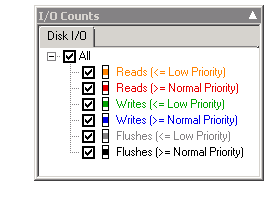
www.hereticsguidebooks.com


I’m published in a PM Journal

Hi all

Just a quick note for those of you who are of the academic persuasion or who have an interest in research and academic literature. Kailash and I wrote a paper for the International Journal for Managing Projects in Business. The article is called “Towards a holding environment: building shared understanding and commitment in projects”. The paper is about how to improve shared understanding on projects – particularly at the early stages where ambiguity around objectives tends to be at its highest. While it covers a similar territory to the Heretics Guide, it covers some literature that we did not use for the book. Plus it is peer reviewed of course.

This paper presents a viewpoint on how to build a shared understanding of project goals and a shared commitment to achieving them. One of the ways to achieve shared understanding is through open dialogue, free from political and other constraints. In this paper (and in the Heretics Book) we flesh out what it takes for this to happen and call an environment which fosters such dialogue a holding environment. We illustrate, via a case study:

  1. How an alliance-based approach to projects can foster a holding environment.
  2. The use of argument visualisation tools such as IBIS (Issue-Based Information System) to clarify different points of view and options within such an environment.

This was my first experience with the peer review process of writing a journal paper. I have to say that, despite the odd bit of teeth gnashing, the review process did make this paper much better than it originally was. Of course, none of this would have even happened without Kailash. This was definitely his baby, and this paper would not exist without his intellect and wide-ranging knowledge.

Thanks for reading

Paul Culmsee
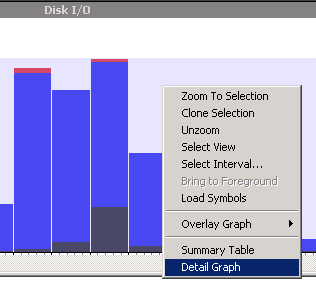
www.hereticsguidebooks.com


The cloud isn’t the problem–Part 6: The pros and cons of patriotism

Hi all and welcome to my 6th post on the weird and wonderful world of cloud computing. The recurring theme in this series has been to point out that the technological aspects of cloud computing have never really been the key issue. Instead, I feel It is everything else around the technology, ranging from immature process, through to the effects of the industry shakeout and consolidation, through to the adaptive change required for certain IT roles. To that end, in the last post, we had fun at the expense of server huggers and the typical defence mechanisms they use to scare the rest of the organization into fitting into their happy-place world of in-house managed infrastructure. In that post I made a note on how you can tell an IT FUD defence because risk averse IT will almost always try use their killer argument up-front to bury the discussion. For many server huggers or risk averse IT, the killer defence is US Patriot Act Issue.

Now just in case you have never been hit with the “…ah but what about the Patriot Act?” line and have no idea what the Patriot Act is all about, let me give you a nice metaphor. It is basically a legislative version of the “Men in Black” movies. Why Men in Black? Because in those movies, Will Smith and Tommy Lee Jones had the ability to erase the memories of anyone who witnessed any extra-terrestrial activity with that silvery little pen-like device. With the Patriot Act, US law enforcement now has a similar instrument. Best of all, theirs doesn’t need batteries – it is all done on paper.

image

In short, the Patriot Act provides a means for U.S. law enforcement agencies, to seek a court order allowing access to the personal records of anyone without their knowledge, provided that it is in relation to an anti-terrorism investigation. This act applies to pretty much any organisation who has any kind of presence in the USA and the rationale behind introducing it was to make it much easier for agencies to conduct terrorism investigations and better co-ordinate their efforts. After all, in the reflection and lessons learnt from the 911 tragedy, the need for for better inter-agency co-ordination was a recurring theme.

The implication of this act is for cloud computing should be fairly clear. Imagine our friendly MIB’s Will Smith (Agent J) and Tommy Lee Jones (Agent K) bursting into Google’s headquarters, all guns blazing, forcing them to hand over their customers data. Then when Google staff start asking too many questions, they zap them with the memory eraser gizmo. (Cue Tommy Lee jones stating “You never saw us and you never handed over any data to us.” )

Scary huh? It’s the sort of scenario that warms the heart of the most paranoid server hugger, because surely no-one in their right mind could mount a credible counter-argument to that sort of risk to the confidentiality and integrity of an organisations sensitive data.

But at the end of the day, cloud computing is here to stay and will no doubt grow. Therefore we need to unpack this issue and see what lies behind the rhetoric on both sides of the debate. Thus, I decided to look into the Patriot act a bit further to understand it better. Of course, it should be clear here that I am not a lawyer, and this is just my own opinions from my research and synthesis of various articles, discussion papers and interviews. My personal conclusion is that all the hoo-hah about the Patriot Act is overblown. Yet in stating this, I have to also state that we are more or less screwed anyway (and always were). As you will see later in this post, there are great counter arguments that pretty much dismantle any anti-cloud arguments that are FUD based, but be warned – in using these arguments, you will demonstrate just how much bigger this thing is beyond cloud computing and get a sense of the broader scale of the risk.

So what is the weapon?

The first thing we have to do is understand some specifics about the Patriot Act’s memory erasing device. Within the vast scope of the act, the two areas for greatest concern in relation to data is the National Security Letter and the Section 215 order. Both provide authorities access to certain types of data and I need to briefly explain them:

A National Security Letter (NSL) is a type of subpoena that permits certain law enforcement agencies to compel organisations or individuals to provide certain types of information like financial and credit records, telephone and ISP records (Internet searches, activity logs, etc). Now NSL’s existed prior to the Patriot Act, but the act loosened some of the controls that previously existed. Prior to the act, the information being sought had to be directly related a foreign power or the agent of a foreign power – thereby protecting US citizens. Now, all agencies have to do is assert that the data being sought is relevant in some way to any international terrorism or foreign espionage investigations.

Want to see what a NSL looks like? Check this redacted one from wikipedia.

A Section 215 Order is similar to an NSL in that it is an instrument that law enforcement agencies can use to obtain data. It is also similar to NSL’s in that it existed prior to the Patriot Act – except back then it was called a FISA Order – named after the Foreign Intelligence Surveillance Act that enacted it. The type of data available under a Section 215 Order is more expansive than what you can eke out of an NSL, but a Section 215 Order does require a judge to let you get hold of it (i.e. there is some judicial oversight). In this case, the FBI obtains a 215 order from the Foreign Intelligence Surveillance Court which reviews the application. What the Patriot Act did different to the FISA Order was to broaden the definition of what information could be sought. Under the Patriot Act, a Section 215 Order can relate to “any tangible things (including books, records, papers, documents, and other items).” If these are believed to be relevant to an authorised investigation they are fair game. The act also eased the requirements for obtaining such an order. Previously, the FBI had to present “specific articulable facts” that provided evidence that the subject of an investigation was a “foreign power or the agent of a foreign power.” From my reading, now there is no requirement for evidence and the reviewing judge therefore has little discretion. If the application meets the requirements of Section 215, they will likely issue the order.

So now that we understand the two weapons that are being wielded, let’s walk through the key concerns being raised.

Concern 1: Impacted cloud providers can’t guarantee that sensitive client data won’t be turned over to the US government

CleverWorkArounds short answer:

Yes this is dead-set true and it has happened already.

CleverWorkArounds long answer:

This concern stems from the “loosening” of previous controls on both NSL’s and Section 215 Orders. NSL’s for example, require no probable cause or judicial oversight at all, meaning that the FBI can issue these at their own volition. Now it is important to note that they could do this before the Patriot Act came into being too, but back then the parameters for usage was much stricter. Section 215 Orders on the other hand, do have judicial oversight, but that oversight has also been watered down. Additionally the breadth of information that can be collected is now greater. Add to that the fact that both NSL’s and Section 215 Orders almost always include a compulsory non-disclosure or “gag” order, preventing notification to the data owner that this has even happened.

This concern is not only valid but it has happened and continues to happen. Microsoft has already stated that it cannot guarantee customers would be informed of Patriot Act requests and furthermore, they have also disclosed that they have complied with Patriot Act requests. Amazon and Google are in the same boat. Google also have also disclosed that they have handed data stored in European datacenters back to U.S. law enforcement.

Now some of you – particularly if you live or work in Europe – might be wondering how this could happen, given the European Union’s strict privacy laws. Why is it that these companies have complied with the US authorities regardless of those laws?

That’s where the gag orders come in – which brings us onto the second concern.

Concern 2: The reach of the act goes beyond US borders and bypasses foreign legislation on data protection for affected providers

CleverWorkArounds short answer:

Yes this is dead-set true and it has happened already.

CleverWorkArounds long answer:

The example of Google – a US company – handing over data in its EU datacentres to US authorities, highlights that the Patriot Act is more pervasive than one might think. In terms of who the act applies to, a terrific article put out by Alex C. Lakatos put it really well when he said.

Furthermore, an entity that is subject to US jurisdiction and is served with a valid subpoena must produce any documents within its “possession, custody, or control.” That means that an entity that is subject to US jurisdiction must produce not only materials located within the United States, but any data or materials it maintains in its branches or offices anywhere in the world. The entity even may be required to produce data stored at a non-US subsidiary.

Think about that last point – “non-US subsidiary”.  This gives you a hint to how pervasive this is. So in terms of jurisdiction and whether an organisation can be compelled to hand over data and be subject to a gag order, the list is expansive. Consider these three categories:

  • – US based company? Absolutely: That alone takes out Apple, Amazon, Dell, EMC (and RSA), Facebook, Google, HP, IBM, Symantec, LinkedIn, Salesforce.com, McAfee, Adobe, Dropbox and Rackspace
  • – Subsiduary company of a US company (incorporated anywhere else in the world)? It seems so.
  • – Non US company that has any form of US presence? It also seems so. Now we are talking about Samsung, Sony, Nokia, RIM and countless others.

The crux of this argument about bypassing is the gag order provisions. If the US company, subsidiary or regional office of a non US company receives the order, they may be forbidden from disclosing anything about it to the rest of the organisation.

Concern 3: Potential for abuse of Patriot Act powers by authorities

CleverWorkArounds short answer:

Yes this is true and it has happened already.

CleverWorkArounds long answer:

Since the Patriot Act came into place, there was a significant marked increase in the FBI’s use of National Security Letters. According to this New York Times article, there were 143,000 requests  between 2003 to 2005. Furthermore, according to a report from the Justice Department’s Inspector General in March 2007, as reported by CNN, the FBI was guilty of “serious misuse” of the power to secretly obtain private information under the Patriot Act. I quote:

The audit found the letters were issued without proper authority, cited incorrect statutes or obtained information they weren’t supposed to. As many as 22% of national security letters were not recorded, the audit said. “We concluded that many of the problems we identified constituted serious misuse of the FBI’s national security letter authorities,” Inspector General Glenn A. Fine said in the report.

The Liberty and Security Coalition went into further detail on this. In a 2009 article, they list some of the specific examples of FBI abuses:

  • – FBI issued NSLs when it had not opened the investigation that is a predicate for issuing an NSL;
  • – FBI used “exigent letters” not authorized by law to quickly obtain information without ever issuing the NSL that it promised to issue to cover the request;
  • – FBI used NSLs to obtain personal information about people two or three steps removed from the subject of the investigation;
  • – FBI has used a single NSL to obtain records about thousands of individuals; and
  • – FBI retains almost indefinitely the information it obtains with an NSL, even after it determines that the subject of the NSL is not suspected of any crime and is not of any continuing intelligence interest, and it makes the information widely available to thousands of people in law enforcement and intelligence agencies.

Concern 4: Impacted cloud providers cannot guarantee continuity of service during investigations

CleverWorkArounds short answer:

Yes this is dead-set true and it has happened already.

CleverWorkArounds long answer:

An oft-overlooked side effect of all of this is that other organisations can be adversely affected. One aspect of cloud computing scalability that we talked about in part 1 is that of multitenancy. Now consider a raid on a datacenter. If cloud services are shared between many tenants, innocent tenants who had nothing whatsoever to do with the investigation can potentially be taken offline. Furthermore, the hosting provider may be gagged from explaining to these affected parties what is going on. Ouch!

An example of this happening was reported in the New York TImes in mid 2011 and concerned Curbed Network, a New York blog publisher. Curbed, along with some other companies, had their service disrupted after an F.B.I. raid on their cloud providers datacenter. They were taken down for 24 hours because the F.B.I.’s raid on the hosting provider seized three enclosures which, unfortunately enough, included the gear they ran on.

Ouch! Is there any coming back?

As I write this post, I wonder how many readers are surprised and dismayed by my four risk areas. The little security guy in me says If you are then that’s good! It means I have made you more aware than you were previously which is a good thing. I also wonder if some readers by now are thinking to themselves that their paranoid server huggers are right?

To decide this, let’s now examine some of the the counter-arguments of the Patriot Act issue.

Rebuttal 1: This is nothing new – Patriot Act is just amendments to pre-existing laws

One common rebuttal is that the Patriot Act legislation did not fundamentally alter the right of the government to access data. This line of argument was presented in August 2011 by Microsoft legal counsel Jeff Bullwinkel in Microsoft Australia’s GovTech blog. After all, it was reasoned, the areas frequently cited for concern (NSL’s and Section 215/FISA orders) were already there to begin with. Quoting from the article:

In fact, U.S. courts have long held that a company with a presence in the United States is obligated to respond to a valid demand by the U.S. government for information – regardless of the physical location of the information – so long as the company retains custody or control over the data. The seminal court decision in this area is United States v. Bank of Nova Scotia, 740 F.2d 817 (11th Cir. 1984) (requiring a U.S. branch of a Canadian bank to produce documents held in the Cayman Islands for use in U.S. criminal proceedings)

So while the Patriot Act might have made it easier in some cases for the U.S. government to gain access to certain end-user data, the right was always there. Again quoting from Bullwinkel:

The Patriot Act, for example, enabled the U.S. government to use a single search warrant obtained from a federal judge to order disclosure of data held by communications providers in multiple states within the U.S., instead of having to seek separate search warrants (from separate judges) for providers that are located in different states. This streamlined the process for U.S. government searches in certain cases, but it did not change the underlying right of the government to access the data under applicable laws and prior court decisions.

Rebuttal 2: Section 215’s are not often used and there are significant limitations on the data you can get using an NSL.

Interestingly, it appears that the more powerful section 215 orders have not been used that often in practice. The best article to read to understand the detail is one by Alex Lakatos. According to him, less than 100 applications for section 215 orders were made in 2010. He says:

In 2010, the US government made only 96 applications to the Foreign Intelligence Surveillance Courts for FISA Orders granting access to business records. There are several reasons why the FBI may be reluctant to use FISA Orders: public outcry; internal FBI politics necessary to obtain approval to seek FISA Orders; and, the availability of other, less controversial mechanisms, with greater due process protections, to seek data that the FBI wants to access. As a result, this Patriot Act tool poses little risk for cloud users.

So while section 215 orders seem less used, NSL’s seem to be used a dime a dozen – which I suppose is understandable since you don’t have to deal with a pesky judge and all that annoying due process. But the downside of NSL’s from a law enforcement point of view is that the the sort of data accessible via the NSL is somewhat limited. Again quoting from Lakatos (with emphasis mine):

While the use of NSLs is not uncommon, the types of data that US authorities can gather from cloud service providers via an NSL is limited. In particular, the FBI cannot properly insist via a NSL that Internet service providers share the content of communications or other underlying data. Rather [.] the statutory provisions authorizing NSLs allow the FBI to obtain “envelope” information from Internet service providers. Indeed, the information that is specifically listed in the relevant statute is limited to a customer’s name, address, and length of service.

The key point is that the FBI has no right to content via an NSL. This fact may not stop the FBI from having a try at getting that data anyway, but it seems that savvy service providers are starting to wise up to exactly what information an NSL applies to. This final quote from the Lakato article summarises the point nicely and at the same time, offers cloud providers a strategy to mitigate the risk to their customers.

The FBI often seeks more, such as who sent and received emails and what websites customers visited. But, more recently, many service providers receiving NSLs have limited the information they give to customers’ names, addresses, length of service and phone billing records. “Beginning in late 2009, certain electronic communications service providers no longer honored” more expansive requests, FBI officials wrote in August 2011, in response to questions from the Senate Judiciary Committee. Although cloud users should expect their service providers that have a US presence to comply with US law, users also can reasonably ask that their cloud service providers limit what they share in response to an NSL to the minimum required by law. If cloud service providers do so, then their customers’ data should typically face only minimal exposure due to NSLs.

Rebuttal 3: Too much focus on cloud data – there are other significant areas of concern

This one for me is a perverse slam-dunk counter argument that puts the FUD defence of a server hugger back in its box. The reason it is perverse is that it opens up the debate that for some server huggers, may mean that they are already exposed to the risks they are raising. You see, the thing to always bear in mind is that the Patriot Act applies to data, not just the cloud. This means that data, in any shape or form is susceptible in some circumstances if a service provider exercises some degree of control over it. When you consider all the applicable companies that I listed earlier in the discussion like IBM, Accenture, McAfee, EMC, RIM and Apple, you then start to think about the other services where this notion of “control” might come into play.

What about if you have outsourced your IT services and management to IBM, HP or Accenture? Are they running your datacentres? Are your executives using Blackberry services? Are you using an outsourced email spam and virus scanning filter supplied by a security firm like McAfee? Using federated instant messaging? Performing B2B transactions with a US based company?

When you start to think about all of the other potential touch-points where control over data is exercised by a service provider, things start to look quite disturbing. We previously established that pretty much any organisation with a US interest (whether US owned or not), falls under Patriot Act jurisdiction and may be gagged from disclosing anything. So sure. . .cloud applications are a potential risk, but it may well be that any one of these companies providing services regarded as “non cloud” might receive an NSL or section 215 order with a gag provision, ordering them to hand over some data in their control. In the case of an outsourced IT provider, how can you be sure that the data is not straight out of your very own datacenter?

Rebuttal 4: Most other countries have similar laws

It also turns out that many other jurisdictions have similar types of laws. Canada, the UK, most countries in the EU, Japan and Australia are some good examples. If you want to dig into this, examine Clive Gringa’s article on the UK’s Regulation of Investigatory Powers Act 2000 (RIPA) and an article published by the global law firm Linklaters (a SharePoint site incidentally), on the legislation of several EU countries.

In the UK, RIPA governs the prevention and detection of acts of terrorism, serious crime and “other national security interests”. It is available to security services, police forces and authorities who investigate and detect these offenses. The act regulates interception of the content of communications as well as envelope information (who, where and when). France has a bunch of acts which I won’t bore you too much with, but after 911, they instituted act 2001-1062 of 15 November 2001 which strengthens the powers of French law enforcement agencies. Now agencies can order anyone to provide them with data relevant to an inquiry and furthermore, the data may relate to a person other than the one being subject to the disclosure order.

The Linklaters article covers Spain and Belgium too and the laws are similar in intent and power. They specifically cite a case study in Belgium where the shoe was very much on the other foot. US company Yahoo was fined for not co-operating with Belgian authorities.

The court considered that Yahoo! was an electronic communication services provider (ESP) within the meaning of the Belgian Code of Criminal Procedure and that the obligation to cooperate with the public prosecutor applied to all ESPs which operate or are found to operate on Belgian territory, regardless of whether or not they are actually established in Belgium

I could go on citing countries and legal cases but I think the point is clear enough. Smile

Rebuttal 5: Many countries co-operate with US law enforcement under treaties

So if the previous rebuttal argument that other countries have similar regimes in place is not convincing enough, consider this one. Lets assume that data is hosted by a major cloud services provider with absolutely zero presence in, or contacts with, the United States. There is still a possibility that this information may still be accessible to the U.S. government if needed in connection with a criminal case. The means by which this can happen is via international treaties relation to legal assistance. These are called Mutual Assistance Legal Treaties (MLAT).

As an example, US and Australia have had a longstanding bilateral arrangement. This provides for law enforcement cooperation between the two countries and under this arrangement, either government can potentially gain access to data located within the territory of the other. To give you an idea of what such a treaty might look like consider the scope of the Australia-US one. The scope of assistance is wide and I have emphasised the more relevant ones:

  • (a) taking the testimony or statements of persons;
  • (b) providing documents, records, and other articles of evidence;
  • (c) serving documents;
  • (d) locating or identifying persons;
  • (e) transferring persons in custody for testimony or other purposes;
  • (f) executing requests for searches and seizures and for restitution;
  • (g) immobilizing instrumentalities and proceeds of crime;
  • (h) assisting in proceedings related to forfeiture or confiscation; and
  • (i) any other form of assistance not prohibited by the laws of the Requested State.

For what its worth, if you are interested in the boundaries and limitations of the treaty, it states that the “Central Authority of the Requested State may deny assistance if”:

  • (a) the request relates to a political offense;
  • (b) the request relates to an offense under military law which would not be an offense under ordinary criminal law; or
  • (c) the execution of the request would prejudice the security or essential interests of the Requested State.

Interesting huh? Even if you host in a completely independent country, better check the treaties they have in place with other countries.

Rebuttal 6: Other countries are adjusting their laws to reduce the impact

The final rebuttal to the whole Patriot Act argument that I will cover is that things are moving fast and countries are moving to mitigate the issue regardless of the points and counterpoints that I have presented here. Once again I will refer to an article from Alex Lakatos, who provides a good example. Lakatos writes that the EU may re-write their laws to ensure that it would be illegal for the US to invoke the Patriot Act in certain circumstances.

It is anticipated, however, that at the World Economic Forum in January 2012, the European Commission will announce legislation to repeal the existing EU data protection directive and replace it with more a robust framework. The new legislation might, among other things, replace EU/US Safe Harbor regulations with a new approach that would make it illegal for the US government to invoke the Patriot Act on a cloud-based or data processing company in efforts to acquire data held in the European Union. The Member States’ data protection agency with authority over the company’s European headquarters would have to agree to the data transfer.

Now Lakatos cautions that this change may take a while before it actually turns into law, but nevertheless is something that should be monitored by cloud providers and cloud consumers alike.

Conclusion

So what do you think? Are you enlightened and empowered or confused and jaded? Smile

I think that the Patriot Act issue is obviously a complex one that is not well served by arguments based on fear, uncertainty and doubt. The risks are real and there are precedents that demonstrate those risks. Scarily, it doesn’t make much digging to realise that those risks are more widespread than one might initially consider. Thus, if you are going to play the Patriot Act card for FUD reasons, or if you are making a genuine effort to mitigate the risks, you need to look at all of the touch points where service provider might exercise a degree of control. They may not be where you think they are.

In saying all of this, I think this examination highlights some strategy that can be employed by cloud providers and cloud consumers alike. Firstly, If I were a cloud provider, I would state my policy about how much data will be given when confronted by an NSL (since that has clear limitations). Many providers may already do this, so to turn it around to the customer, it is incumbent on cloud consumers to confirm with the providers as to where they stand. I don’t know if there is that much value in asking a cloud provider if they are exempt from the reach of the Patriot Act. Maybe its better to assume they are affected and instead, ask them how they intend to mitigate their customers downlevel risks.

Another obvious strategy for organisations is to encrypt data before it is stored on cloud infrastructure. While that is likely not going to be an option in a software as a service model like Office 365, it is certainly an option in the infrastructure and platform as a service models like Amazon and Azure. That would reduce the impact of a Section 215 Order being executed as the cloud provider is unlikely going to have the ability to decrypt the data.

Finally (and to sound like a broken record), a little information management governance would not go astray here. Organisations need to understand what data is appropriate for what range of cloud services. This is security 101 folks and if you are prudent in this area, cloud shouldn’t necessarily be big and scary.

Thanks for reading

Paul Culmsee
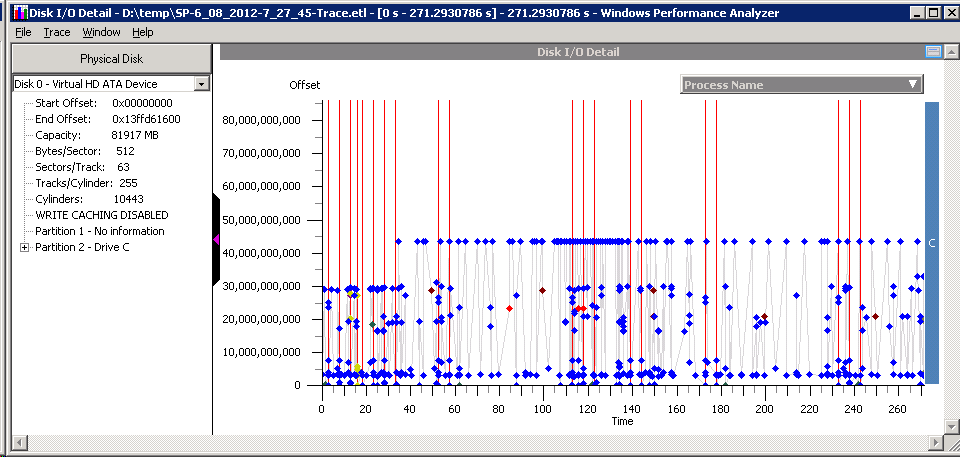
www.hereticsguidebooks.com

www.sevensigma.com.au

p.s Now do not for a second think this article is exhaustive as this stuff moves fast. So always do your research and do not rely on an article on some guys blog that may be out of date before you know it.


An opportunity to learn about aligning SharePoint to business goals in Vancouver

Hi all

Just a quick note to mention that I’m off travelling again, this time swapping 39 degree Celsius summer weather of Perth for somewhere between –6 to 5 degrees of Canada. I’ll be spending a week in Canada running two classes – one public and one private. The first class is a public SharePoint Governance and Information Architecture class running in Vancouver. MVP Michal Pisarek of SharePointAnalystHQ fame will be there and it should be a terrific two days of learning how to think a little differently to govern SharePoint strategy and deployment. You will learn a bunch of new skills, techniques and perspectives. Best of all, the skills learnt are applicable for many other types of complex projects.

The class flyer is here: http://www.sevensigma.com.au/wp-content/uploads/downloads/2011/02/SPIA.pdf

The registration site is here: http://spiavancouver.eventbrite.com/

In terms of course coverage and content it is worth noting the research performed by the Eventful group (who run the Share conferences). According to them, the hot topic areas for SharePoint are governance, user adoption, change management, information architecture and user empowerment. These sort of topics are the sort where plenty of people tell you what the issues are, but are typically lighter on what to do about them. This class covers why this is, as well as dealing with all of these areas and presents detailed strategies, tools and methods to address them. Furthermore, aside from the 500+ page manual of meaty governance goodness, as a take home, we supply a CD for attendees with a sample performance framework, governance plan, SharePoint ROI calculator and sample mind maps of Information Architecture.

At last count there were 5 places left for the Vancouver class, so if you have been pondering if it is a worthwhile class, check out some of the feedback from the class web site. Also, if you know anybody who might be interested in attending, please pass the course flyer and registration site details to them. We always end up with people who tell us “Ah – if only I knew about the class!!”

Thanks for reading

Paul Culmsee
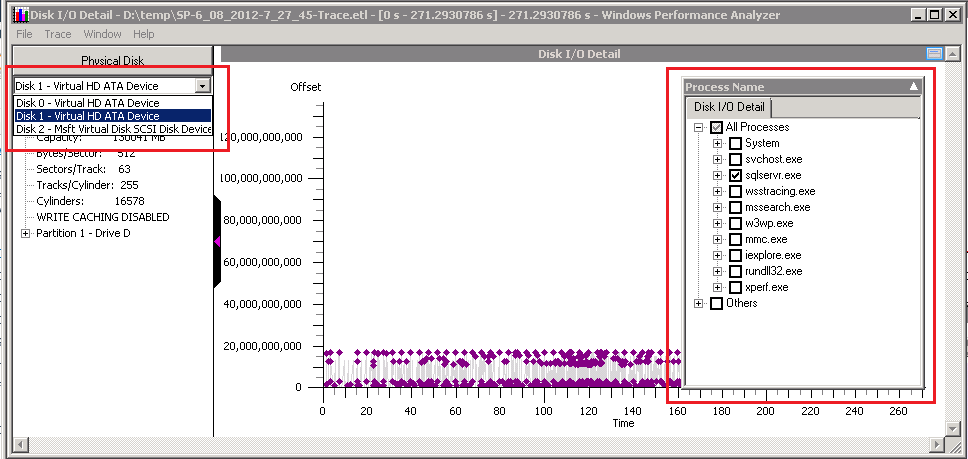
www.sevensigma.com.au

www.hereticsguidebooks.com


« Previous PageNext Page »
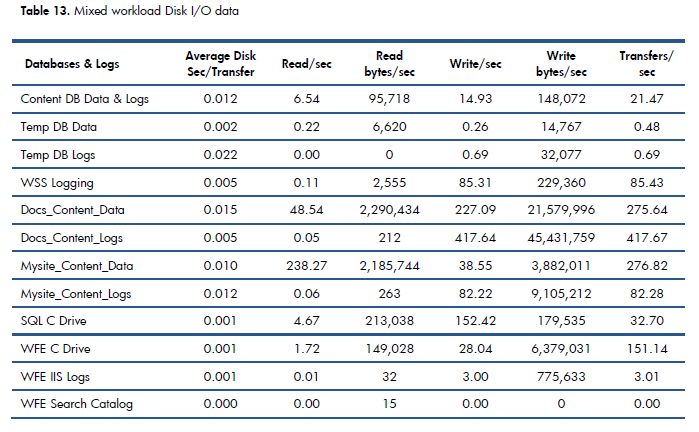
Today is: Wednesday 3 June 2026 -