Back to Cleverworkarounds mainpage
 

Share2010 – A new kind of SharePoint conference

Having spoken at the odd SharePoint event over the last three years or so, I’ve always lamented on the lack of a purely business focused SharePoint conference. Whilst the conferences I attend do cater for non technology oriented topics – particularly the best practice conferences, there is usually an equal or greater proportion of content aimed at the nerdier aspects of SharePoint.

Sadly though, nerds don’t often sign the cheques. Those who do sign them, are rarely interested in deploying SharePoint via Powershell, or why sandboxed solutions are a good thing or not. They are looking for the ways and means to take SharePoint (the enabler) and work out what the hell SharePoint is enabling and to work out if it has done so properly.

Some time back, via a reference from Kristian Kalsing, I received a call from the organisers of the forthcoming Share2010 in Sydney, asking for feedback on what I would like to see in a good business focused SharePoint conference. In speaking to Steve from Eventful Management and his team, it was clear that something unique was in the making here.

Fast forward several months and after a whole lot of market research and round-table discussions from SharePoint customers (including a couple of our clients), we have a conference that puts many critical topics close to my heart, front and centre, namely governance, user engagement and adaption, business process automation and workflow; information architecture; collaboration; document and records management; resourcing and support; social networking; ROI; security and so on.

I am honoured that I was also asked to participate as a speaker at this conference, along side the likes of Dux Sy, Erica Toelle, Andrew Jolly and Michael Sampson. You will find that speakers from this group have one thing in common: Their focus on the softer areas of SharePoint. There are also speakers from some of Australia’s leading organisations (and some international ones too), who will share their trials, tribulations and lessons learned. This is real problem/real solution type stuff and I am seriously looking forward to being part of it.

I’ll be involved in the initial festivities on the Sunday evening, conducting a special interest kickoff session called SharePoint Governance Home Truths. This session aims to present a lot of my work in a more relaxed, entertaining manner and hopefully, set a good tone for the rest of the event.

I will also be running a special event on Wednesday called “Microsoft SharePoint Governance f-Laws: Handy Hints for Those Who Question Business as Usual”. I am really excited about this. Developing the content for this session has been a labour of love for me since November last year – and is a kind of magnum opus of everything I have learned in my IT and non IT work. I have been very fortunate to work on some very large and complex non IT projects and worked with some amazingly talented people in the areas of project management, cognitive science, facilitation and community engagement. I can absolutely guarantee you that there will be many aspects to this session that would not have been seen before in one place in this distilled form. I am super excited about delivering this in full at Share2010 – there simply could not be a better conference for this type of workshop.

By the way, I used elements of this material in the SharePoint 2010 Governance and Information Architecture course that was developed for the Microsoft NZ/3Grow Elite Program. The feedback from that course speaks for itself.

The outcomes to expect for attendee of this session are:

  • Understand the SharePoint governance lens beyond an IT service delivery focus
  • Develop your ‘wicked problem’ radar and apply appropriate governance practices, tools and techniques accordingly
  • Learn how to align SharePoint projects to broad organisational goals, avoid chasing platitudes and ensure that the problem being solved is the right problem
  • Understand the relationship between governance and assurance, why both are needed and how they affect innovation
  • Understand the underlying, often hidden forces of organisational chaos that underpins projects like SharePoint

There is a large amount of content and activities in this session that has never graced CleverworkArounds. In fact, if I ever get around to posting some of the content, I could blog for months. But more importantly than the content, you will have a lot of practical tools to leverage as well. Attendees to my session will receive a CD containing end-to-end governance artefacts ranging from IBIS maps, goal alignment and performance framework outputs, envisioning workshop sample outputs, Information Architecture mind-maps, BPMN diagrams, wireframes, user engagement tools, ROI calculations and more.

As it happens, I collaborated on a lot of this stuff with Erica Toelle, so it is terrific that she is speaking at the event and her “Don’t reinvent the wheel” talk should not be missed, as well as her Tuesday keynote. If I ask her nicely, she might just pop a few of her goodies onto the CD as well!

You can register here, for this unique event, and let’s hope that there are many more to come. There is opportunity for one on one meetings with speakers like myself as part of the deal.

Thanks for reading


Paul Culmsee

www.sevensigma.com.au


Also why I’ve been quiet…

I’m in an airport (again), typing this on my way back from my latest trip to New Zealand – a country I am loving more and more each time I go there. (Anywhere that I can go that uses the same power plugs as back home is a great place in my book).

image

A while back I posted about the book I am writing with Kailash Awati (Beyond Best Practices). If that project wasn’t taking enough time, dedication and brain cells, I have just finished an undertaking that has essentially consumed me for four months (some 450 man hours). This week it was delivered and the student responses far surpassed my expectations and made it all worthwhile.

I created a 4 day SharePoint 2010 Governance and Information Architecture training course as part of Microsoft New Zealand’s Elite initiative. (760 pages of SharePoint governance and IA goodness!) If you are not aware of the Elite initiative, it is a novel initiative by Microsoft in New Zealand to improve the quality of SharePoint practitioners in the Microsoft partner ecosystem. Now I tell you – Darryl Burling and his team down there at Microsoft have their ear to the ground – and really do listen to their customers. They initiated this program to allow local solution providers to take the next step beyond technical knowhow and turn it into deeper proficiency.

The SharePoint Elite Partner Initiative is designed to recognise those New Zealand Partners who have built skills excellence and a track record for success with SharePoint into their business. When it comes to SharePoint, these are the elite – the best of the best. If you are looking for a partner who can help you plan and deploy your SharePoint implementation, these are the best in the business.

This Elite program is unique in its focus and via the insight of those who conceived it, allowed me the flexibility to create a course that was a balance of technical labs, sensemaking, governance, critical thinking and user engagement. I was going through the course feedback just now and the key trend from it all was that the students really enjoyed the softer stuff that I teach, more so than the “here is a SharePoint feature and look at what it can do!” type material (they can get that sort of material anywhere).

So all in all it was a great week, which made all the effort, sweat and tears leading up to it worth it.

So thanks attendees, it was a great 4 days. For other readers, hopefully the course might come to a city near you in the not too distant future.


Thanks for reading

Paul Culmsee

www.sevensigma.com.au


Why I’ve been quiet…

As you may have noticed, this blog has been a bit of a dead zone lately. There are several very good reasons for this – one being that a lot of my creative energy has been going into co-writing a book – and I thought it was time to come clean on it.

So first up, just because I get asked this all the time, the book is definitely *not* “A humble tribute to the leave form – The Book”! In fact, it’s not about SharePoint per se, but rather the deeper dark arts of team collaboration in the face of really complex or novel problems.

It was late 2006 when my own career journey took an interesting trajectory, as I started getting into sensemaking and acquiring the skills necessary to help groups deal with really complex, wicked problems. My original intent was to reduce the chances of SharePoint project failure but in learning these skills, now find myself performing facilitation, goal alignment and sensemaking in areas miles away from IT. In the process I have been involved with projects of considerable complexity and uniqueness that make IT look pretty easy by comparison. The other fringe benefit is being able to sit in a room and listen to the wisdom of some top experts in their chosen disciplines as they work together.

Through this work and the professional and personal learning that came with it, I now have some really good case studies that use unique (and I mean, unique) approaches to tackling complex problems. I have a keen desire to showcase these and explain why our approaches worked.

My leanings towards sensemaking and strategic issues would be apparent to regular readers of CleverWorkarounds. It is therefore no secret that this blog is not really much of a technical SharePoint blog these days. The articles on branding, ROI, and capacity planning were written in 2007, just before the mega explosion of interest in SharePoint. This time around, there are legions of excellent bloggers who are doing a tremendous job on giving readers a leg-up onto this new beast known as SharePoint 2010.

BBP (3)

So back to the book. Our tentative title is “Beyond Best Practices” and it’s an ambitious project, co-authored with Kailash Awati – the man behind the brilliant eight to late blog. I had been a fan of Kailash’s work for a long time now, and was always impressed at the depth of research and effort that he put into his writing. Kailash is a scarily smart guy with two PHD’s under his belt and to this day, I do not think I have ever mentioned a paper or author to him that he hasn’t read already. In fact, usually he has read it, checked out the citations and tells me to go and read three more books!

Kailash writes with the sort of rigour that I aspire to and will never achieve, thus when the opportunity of working with him on a book came up, I knew that I absolutely had to do it and that it would be a significant undertaking indeed.

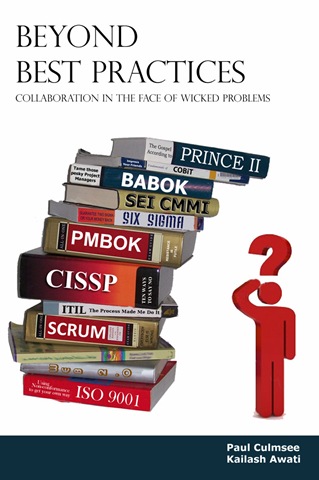
To the left is a mock-up picture to try and convey where we are going with this book. See the guy on the right? Is he scratching his head in confusion, saluting or both? (note, this is our mockup and the real thing may look nothing like this)

This book dives into the seedy underbelly of organisational problem solving, and does so in a way that no other book has thus far attempted. We examine why the very notion of “best practices” often makes no sense and have such a high propensity to go wrong. We challenge some mainstream ideas by shining light on some obscure, but highly topical and interesting research that some may consider radical or heretical. To counter the somewhat dry nature of some of this research (the topics are really interesting but the style in which academics write can put insomniacs to sleep), we give it a bit of the cleverworkarounds style treatment and are writing in a conversational style that loses none of the rigour, but won’t have you nodding off on page 2. If you liked my posts where I use odd metaphors like boy bands to explain SharePoint site collections, the Simpsons to explain InfoPath or death metal to explain records versus collaborative document management, then you should enjoy our journey through the world of cognitive science, memetics, scientific management and Willy Wonka (yup – Willy Wonka!).

Rather than just bleat about what the problems with best-practices are, we will also tell you what you can do to address these issues. We back up this advice by presenting a series of practical case studies, each of which illustrates the techniques used to address the inadequacies of best practices in dealing with wicked problems. In the end, we hope to arm our readers with a bunch of tools and approaches that actually work when dealing with complex issues. Some of these case studies are world unique and I am very proud of them.

Now at this point in the writing, this is not just an idea with an outline and a catchy title. We have been at this for about six months, and the results thus far (some 60-70,000 words) have been very, very exciting. Initially, we really had no idea whether the combination of our writing styles would work – whether we could take the degree of depth and skill of Kailash with my low-brow humour and my quest for cheap laughs (I am just as likely to use a fart joke if it helps me get a key point across)…

… But signs so far are good so stay tuned 🙂

Thanks for reading


Paul Culmsee

www.sevensigma.com.au


SharePoint Webcasts: Reporting Services for the Really Really Good Looking

imageLast year, Peter Serzo and I presented at the SharePoint Best Practices Conference in DC. We did an extremely serious talk called “SharePoint and SQL Reporting Services 2008 for the really really good looking” which rated rather well. As part of this, we recorded a bunch of screencasts that have never seen the light of day, so I thought that some would benefit from this being released to a wider audience.

Note: This post and content is really going make utterly no sense unless you have watched Zoolander. Even if you have seen the movie, before you launch into the webcasts, some scene setting is required.

The business need

Some time ago, Peter and I were contracted by the Derek Zoolander School for the Really, Really Good Looking after Derek saw Microsoft’s new SharePoint diagram when he accidentally picked up a “Computerworld” magazine. Apart from matching Derek’s suit colour rather nicely, the diagram captivated his imagination with the notion of “Insights”.

Zoolander thought that “Insight”, sounded like the perfect look to follow up from the highly successful “Magnum”, which he used to save the Malaysian prime ministers life. He took the diagram to his wife, and demanded that he must have “Insights” at all costs.

image

Zoolander’s wife saw the business problem that “Insights” would help to address. You see, the Derek Zoolander School for the Really, Really Good Looking, at great expense, custom developed an ERP system to manage everything you needed to know about male models. The system was called the “Computerised Records for Attractive People”…

image

The CRAP system stored all sorts of interesting information about male models, such as tracking their “hotness”, as well as important detail such as stated age versus actual age, and any cosmetic procedures that they have undertaken. After a long and expensive consultation, Peter and I concluded that SharePoint 2007, integrated with SQL Reporting Services, was the perfect solution to create the all important “Insights” that Zoolander so desperately needed.

As a result, we conducted a project kickoff meeting with Hansel and Peter tried to explain the architecture of reporting services using a nice diagram.

image

… but we worked out pretty quickly that this was not the way to explain how it all worked to poor old Hansel…

image

So instead, we went the live demo route. Being male models, custom development was totally out of the question. This solution had to be done using all out of the box methods in a quick and easy manner. Below are the four live demos that were recorded and now you can use them as inspiration for your own male modelling school.

  • Our first webcast illustrates how we were able to create a meaningful report from the CRAP system within five minutes.
  • The second webcast expanded on this idea, by illustrating how reports can be parameterised and linked together for drilldown reporting.
  • The third demo modifies the user profile store to allow for recording of each users unique ID in the CRAP system
  • The last webcast strings this all together for the final demonstration where we pimp the report to make it dynamic with no custom code.


image  image

The 5 minute report

Drilling down with Derek
image image

User Profiles for the really really good looking

Pimp my report


We hope you find some value from these webcasts and we look forward to hearing about your hot new look as a result!

Thanks for reading


Paul Culmsee

www.sevensigma.com.au


A roving we will go…

Hi all

I am finding it increasingly difficult to find the time to post at the moment. Too many projects, too many initiatives and too many evil plans coming to fruition. It’s like every seed I planted last year suddenly sprouted this year and I can barely keep up. Whilst this is a good thing for a growing business, it is not a good thing when it comes to writing blog posts.

In April I’ll be jumping on a very long flight to London, to attend and speak at the SharePoint Evolutions conference, held at the Queen Elizabeth II Conference Centre.

SP2010EvoBanner_Large (2)

This conference represents the evolution of the Best Practice conferences held over the last three years or so. It is one of the most unique and important SharePoint conferences of the year. SharePoint 2010 will be a key focus, yet unlike say a Tech-Ed, many of the topics have a heavy focus on the strategic side of the SharePoint challenge, in areas like Information Architecture, User Engagement and Planning and Deployment. There are five tracks in all, and over seventy speakers from all over the world.

  • For the techie geeks who like to hang in datacenters and like to get paged late at night to fix things that have died, the IT Pro track (ITP) will push their buttons. ITP sessions will focus on topics such as Document Management, Database Sizing, SharePoint and SQL optimization or server farm deployments scenarios.
  • For the developers and designers of the world, the DEV track is for you. DEV sessions will focus on topics in the areas of customization, development, and deployment best practices.
  • For all of the cool people, we have the information worker track where I speak (IW). In fact the IW track is so damn cool that there are two IW tracks! Sessions here will focus around business strategy and adoption, information architecture, training your organization or developing a culture of collaboration.
  • For the tech geeks who can code, who are therefore more elite than regular tech geeks and devs (looking at you Spence), there is a deep dive track to make you happy called level 400. In this track there will be IT Pro and Developer sessions that will be deep diving into the product and code. There will be very few slides, lots of source code and demonstrations.
  • Finally, there is a community track. This track has sessions for all verticals and will include speakers from all types of companies who have implemented SharePoint and what they learnt by doing so. All speakers are actively engaged in the SharePoint community and user group and have a wealth of knowledge to share.

This conference is organised by Steve Smith of Combined Knowledge, who is renowned for putting together something special for all participants. The speaker list is pretty much a who’s-who of the SharePoint world, and I am very much looking forward to catching up with (Paul takes deep breath) Andrew Woodward, Ben Curry, Brett Lonsdale, Chandima Kulathilake, Dux Sy, Joel Oleson, Laura Rogers, Michel Noel, Mike Watson and Zlatan Dzinic to name a few.

Bob Fox will also be there, so we finally have that beer that apparently I am supposed to buy – according to Bob anyway :-).

So if you are going to attend a SharePoint conference this year, then my strong suggestion is to make it this one.


Thanks for reading

Paul Culmsee

www.sevensigma.com.au


SharePoint Saturday Perth Wrap and SP2010 BOOTCAMPS!

Well, the event that I never thought would ever happen in Perth happened, and not only did it happen, it had more interest than expected and some people unfortunately missed out. Jeremy, as a result, had to take many upset phone calls. It seems that for Perth, once a few people got wind of SharePoint Saturday, everyone wanted in.

There were great sessions, great giveaways and I think overall, tremendous value for this free event. Seven Sigma sponsored the showbags, which we managed to fill with some awesome goodies, thanks to the generosity of Brett Lonsdale at Lightningtools, Michael Sampson, Bjoern Furuknap, Dux Sy, Combined Knowledge and the good folks at Colligo. If you attended the event, please show your support to these guys – they really went above and beyond. Mrs Cleverworkarounds, on the other hand, never wants to see or hear the word “showbag” ever again! 

For me personally, I enjoyed meeting Michael Noel. I think he and I were the only non devs at SharePint (okay well maybe Joshua Haebets too 🙂 ). Speaking of which, Joshua and Milan Goss were also great to meet too, and I’m sure that there might be projects in the future we will see each other on.

Seven Sigma also donated a seat on the first SharePoint 2010 week-long bootcamp to be held in Perth. As a background: I met Steve Smith in New Zealand last year and we got on very well. Recently, we asked him if he would consider Perth to run his 2010 bootcamps and he has agreed! This is a great outcome for Perth, having beat out Sydney and Melbourne for being the first to run them as this will be the first time the courses have been offered to the general public in Australia.

Steve Smith and Gary Yeoman will be flying in from the UK especially for this event, so it is not to be missed. Both Steve and Gary are internationally renowned for the quality of their training and the courseware itself is the very same material that Microsoft itself uses to train their own staff on SharePoint 2010. All you eastern states people reading this?  It’s about time you went west anyway, so come and check out Perth’s beer while you are here!

SharePoint 2010 Beta Developer Track     4 days

  • Delivered by Gary Yeoman
  • Date:  27th April  -  30th April 2010
  • Cost: $3000 (+GST)

This course guides you through essential 2010 elements, from pre-requisites to system integration, giving you the skills to work confidently and leverage full value from new technology.

Please note: Due to our ANZAC public holiday this course is a 4 day course from 08:30 – 6:00pm. One additional session is added per day to make up for the Monday public holiday.

SharePoint 2010 Beta Administrator Track    5 days

  • Delivered by Steve Smith – MVP
  • Date: 10th May – 14th May 2010
  • Cost: $3000 (+GST)

Step-by -step understanding is the key to successful implementation and deployment of SharePoint 2010. This 15-module course will guide you through each critical stage, giving you exactly the skills you need to leverage full value from the latest SharePoint technology.

Book now at Seven Sigma’s website:

http://www.sevensigma.com.au/2010/02/07/first-ever-sharepoint-2010-training-courses-2/

For more info visit: www.combined-knowledge.com.au

or contact: training@sevensigma.com.au


SharePoint book review – Seamless Teamwork by Michael Sampson

Hi all

Some time back a publisher sent me a self-help SharePoint book pitched at end users. I figured that I don’t really represent an end user and the best way to review it would be to make Mrs Cleverworkarounds review the book. I mean, after all, getting the spouse to bring home the bacon is part of my quest to eventually be a kept man! However, my grand plan ran aground after a while – she got around halfway through the book and came back and said “It’s easy to follow and all, but I don’t understand *why* I am doing these things.”

As a result, I never published the review of that particular book.

If you are wondering what the point behind that little anecdote is, then read on. 

“Seamless Teamwork” by Michael Sampson is a book that I knew I had to review – from when I first heard about it and read one of the chapters at its web site. Its subtitle is “Using Microsoft SharePoint Technologies to Collaborate, Innovate and Drive Business in New Ways” and as expected, this is a book that looks at SharePoint through a different lens to most of the technical books that I review (with the exception of Dux’s great project management book).

In fact Dux’s book is actually a great frame of reference when reading this book because both authors have adopted a similar approach. Rather than focussing on the technology, both books focus on a specific problem domain and explain how to leverage the technology through the exploration of that problem. In doing so, they avoid the pitfalls of “end user” SharePoint books that lack coherence like the one that my wife was dissatisfied with. Why? Because there is a clear outcome to achieve by the end of the book.

Here is the funny thing, though. Both authors approach the subject matter from the perspective of a new project that needs to be successfully implemented, yet Michael actually uses SharePoint in a very different manner to how Dux does in his book. Does that mean one of them is wrong? Not at all. In fact it really hit home to me that if you can achieve *true* buy-in and shared commitment to a particular solution, then the technology aspects can be implemented in a number of different ways. Michael actually makes this very clear in his preface when he says

In a book of this nature, it is impossible to cover every eventuality, every situation, and every approach. What I hope you get out of it is a vision of how you can apply the capabilities of SharePoint to the work of your team, rather than a prescription of what you need to do at each and every point of a teaming process. Embrace the ideas that work for you and ignore the ones that don’t.

This book explores SharePoint through the “fly on the wall” view of “Project Delta” where an up and coming MBA holding brown-noser named Roger has kissed enough butts to be handed a high profile project to drive growth in the overseas market for his company. (Okay, so I am embellishing the back-story just a teensy bit). Through Roger’s eyes, we discover why email based collaboration is not sufficient for project collaboration, along with some teamwork theory, cleverly interwoven around the storyline. "Project collaboration” is broken down into more specific outcomes and explored individually, illustrating what capabilities of SharePoint are suited to these outcomes.

  • Collaborating
  • Finding
  • Accessing
  • Using for decision making
  • Enforcing structure
  • Publishing and managing

.. and that was just chapter 1!

Chapter 2 introduces the project management model used by Roger and the intrepid heroes of Project Delta. I like this chapter because he offers enough meat to theory nuts like me, while balancing useful and relevant SharePoint content. First up, five project phases are defined and explained, namely:

  • Creating a shared vision
  • Understanding the options
  • Analysing the options
  • Making a decision
  • Concluding the project

This particular choice of wording has no references or footnotes and googling the exact terms leads me straight to Michael’s book so I presume that he is applying his own world view here. Next, we focus on getting the right people involved in the project. Roger has to identify the people with the right mix of skills, background and experiences to participate and this provides a nice dovetail to introduce SharePoint user profiles and “My sites”. As well as explaining the concepts and workings of this SharePoint feature, practical tips are offered to get the best out of it as well. The chapter concludes with a project team identified, assembled and ready to rock and roll.

Chapter 3 now focuses on the different audiences involved in a project, namely the project team, the project sponsors and stakeholders and “everyone else”. SharePoint team sites are introduced by examining the information needs of each of these groups and illustrating that one size does not fit all. The chapter walks through creating a site for each of these groups using a site and subsite hierarchy and the permissions required. Blank site templates are used (something I also tend to start with) and then some “projecty type” out of the box lists are created, as well as the ubiquitous wiki library and a blog site. Finally, some out of the box web parts are added to the mix.

All in all, a great example of a practical project oriented site that one could use or build upon.

Chapter 4 expands on these sites by switching focus from creation to actual use of the site. Michael writes about the “Seamless Teamwork Approach” to project collaboration and then uses this as a platform to explain alerting, RSS, basic usage of the lists, wiki and blog. The key theme of this chapter is the section about “teamworking protocol” – in other words, team members need to agree on the general approach to how they will work together. The most important point  in this chapter deserves its own entire chapter.

It is expected – and absolutely beneficial – that people have disagreements and differences of opinion about key matters in the project. If everyone thinks the same, a team would not be necessary. However the key is that we will not allow disagreements to derail the progress of the project, because we agree to listen carefully and resolve our disagreements through candid dialogue and debate.

Chapter 5 through 9 now examines each of the five project phases  that were outlined in chapter 2.

Chapter 5 is all about creating a shared vision. We examine the different types of vision (again from my research this view of vision seems to be Michael’s ideas and not based on any of the methodologies or academic stuff that I have read). We cover planning for engagement with stakeholders using a wiki, before the actual engagement process itself. Once again, this chapter is a deft mix of the product, the process and the rationale behind the approach. This chapter does not stick strictly with SharePoint either as we have the scenario of a PowerPoint presentation being viewed over a live meeting session for geographically dispersed stakeholders.

Chapter 5 also delves a little into some of the factors that cause the “chaos” that derails projects. The importance of timely notification of changing constraints or circumstances is covered by reviewing how the RSS and email notifications (tasks list connected to Outlook) are used. Finally, for some odd reason, Michael devotes two pages to placating those annoying mac users who, no matter that the problem is, has already tried to convince everyone that buying a mac is the solution…hehehe!

Chapter 6 is all about identifying options and starts out by examining how to effectively brainstorm using the SharePoint wiki (and confluence gets a mention also). OneNote is also covered and I found the shared OneNote notebook idea quite interesting as I have not tried that myself. This chapter is heavy on guidance and decorum around how brainstorming should be approached to get the most out of it. The chapter concludes with consolidating and synthesising the ideas.

Chapter 7 is all about analysing the options from the collated list. The key question here is “what could we realistically do?” This chapter is the first one to introduce the notion of a custom list. In the example, a custom list is used to track further analysis on each option. I loved the little governance interlude here, where Roger, being the angel user that he is, contacts Gareth, the ever friendly and helpful SharePoint support person to get advice on the best way to structure the custom list. (What sort of utopian fantasy world are you painting here Michael? :-D). Seriously though, this is actually quite an advanced chapter in terms of SharePoint conceptual stuff, given that document based content types are also introduced here too and various permutations of mixing and matching document libraries, wikis and the perennial folder vs metadata debate. Thankfully, Michael did not poo-poo folders outright and instead gives one of the best write-ups I’ve seen on the pros and cons of folders vs metadata. He also covers site columns and how they can be scoped. This is great stuff.

The final section from this chapter is on meetings, with participants are either in the same location or separate locations. There are different types of meetings for different purposes and advice is offered on how best to run these meetings and when and what technology is appropriate to augment them. Microsoft’s free conferencing tool, “SharedView” is covered (something I never knew existed until I read this book – duh, Paul!) SharePoint meeting workspaces and Groove 2007 are covered also. The technology detail covered in this section is matched by great, practical advice on how best to use the tools, given the circumstances.

Chapter 8 is entitled “Making a decision.” Now our intrepid Roger has come to the crunch and gets a recommendation made, circulated and signed off. Here we use SharePoint surveys to do the task, but in reality, this chapter is not about SharePoint at all. The meat of this chapter is around the processes needed and advice on decorum in particular situations. There is a smattering of wiki and a good section introducing workflows in context of the feedback process, but fundamentally, the value of this chapter is in the non SharePoint material.

Chapter 9 is all about concluding the project. Roger’s butt kissing and pandering to stakeholders’ whims are finally at an end with confirmation that the final recommendation on project Delta has been accepted by senior management. Tasks include updating participants “My sites” with the project details as well as any skills learned, a blog post about the project in my-site, and the essential, but unpopular task of cleaning up all the loose ends of the projects from a compliance, archival and retention point of view. Some final housekeeping and we are done!

My favourite chapter of the book is actually not in the book at all. It is a separate chapter available from the Seamless Teamwork website and is all about SharePoint governance. I highly recommend this chapter, as it one of the best write-ups that I have seen on the topic so far. 

Overall this is a terrific book, yet there are sections where advice is given that I would personally not take. Some things I flat out disagree with. But I need to fair here. I am currently surrounded by a dozen books on team dynamics, facilitation, soft systems methodology and risk management so I am not the intended audience for this book. Just because I have different philosophical approaches to some aspects does not detract from this book at all. In fact, it comes with the territory of a book like this and this is why I think it is such a great read. I personally find it quite easy to write technically oriented articles, but to delve into ‘soft’ topics like team dynamics, project chaos, developing shared vision and the like is actually much more subjective and I think, ambitious and difficult to write well.

If I was to make a broad comparison with Dux’s book, which is about the closest thing to a comparison out there, I would say that Dux covered more SharePoint feature areas than Michael and stuck fairly close to the project management body of knowledge. Michael on the other hand, delved deeper into some of the softer topics around how teams can deliver great projects. Apples and oranges really, and I think that both books compliment each-other exceptionally well.

The other commonality with Dux’s book is that readers with a technical audience who skip the preface will probably not like this book or consider it too light on in terms of low level SharePoint coverage. Michael is very clear in his preface here. This book is for users, information workers and project team members who want to make the best use of SharePoint for their team. To this end, Michael has completely nailed what he set out to do and should be commended for delivering the goods.

It is great to see SharePoint books coming out that delve deeper into the mechanics of team collaboration, before diving straight into product features and capabilities. Previous books have tended to gloss over the non technical side of team collaboration and this book fills the gap nicely.


Thanks for reading


Paul Culmsee

www.sevensigma.com.au 


Perth SharePoint Users Group wrap

Today I presented a session at the Perth SharePoint Users Group. I was a little unsure whether my non-technically focussed content would be of interest to the geeks but the turnout was terrific and the feedback has been brilliant. (The 3 copies I gave away of Dux’s excellent “SharePoint for Project Management” book may have sweetened the deal – hehe )

My sincere thanks to new user group president Sezai Komur for giving me the opportunity to present this material as it was the first time it has seen the light of day in Perth.

If you want to check out the slide deck from the session, you will find it below. Expanded information that builds on this content can be found at the Seven Sigma site, as well as here at CleverWorkarounds.

Thanks for reading

Paul Culmsee

www.sevensigma.com.au



Review – Understanding SharePoint Journal

I have been a huge fan of Bjørn Furuknap ever since I first read his amazing series of posts on on customising the user experience at SharePointMagazine.

What struck me about Bjørn is the quality of his content and his fluid, entertaining and accessible style of writing. Although I can code okay enough, I am not a serious developer by any stretch. But Bjørn’s ability to weave his way through some large, fairly prickly programming topics and at the same time keep a part-timer like me, not only following it all, but really interested from start to finish, is a testament to his skill as a writer and trainer.

Learning SharePoint with USP Journal

So when I found out he had started a series of SharePoint journals, I was very keen to provide a review and asked him nicely if I could :-).

In short, I’m glad I did.

This debut edition starts on a relatively simple premise. “How do we see who is logged into my SharePoint site at any time”? We learn pretty quickly that this is not as simple as it sounds, but Bjørn deftly teases apart this question into the true problem statement, via basic user stories and easy to understand examples. The proposed solution is described at a high level, with a description on what you need to solve the problem and then summarises it with a mission statement, covering the goals of the solution and the “rules of engagement”

The “rules of engagement” are clear and have a strong governance/assurance affinity (brings a tear to my eye). The rules are;

  • Use only supportable methods and not harm a single Microsoft-provided file
  • Use the least amount of effort as possible
  • Utilize SharePoint native techniques as much as possible

I’m sure that “Governance man” would approve…

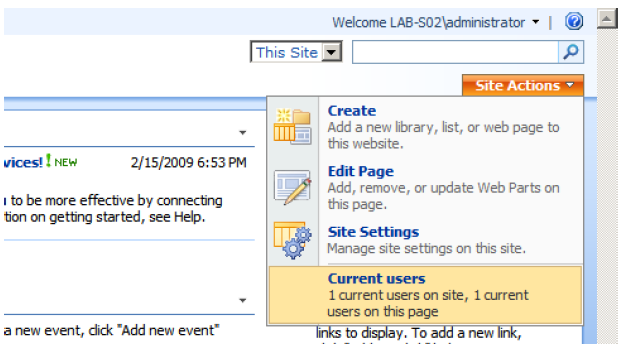
The final component of the introduction is a preview of the completed project (with screenshots – including one that I have pasted here).

image

Chapter 2-5 gets right into the think of things. Bjørn doesn’t assume too much (he skips programming 101 stuff like SharePoint features), but takes the time to explain setting up your project in Visual Studio for each component of this solution. He balances the theory with the practical extremely well, and manages to pack in a whole bunch of really important tools and key concepts such as:

  • WSPBuilder
  • DelegateControl (I love DelegateControl and I‘m not even a developer 🙂 )
  • List creation via feature (and code)
  • FeatureReceivers
  • SharePoint Manager 2007
  • CAML
  • Feature scopes and dependencies (via the object model)
  • Custom application pages
  • CustomAction methods

All chapters come with review questions to ensure key concepts have been learned. Even better still, all code from the journals are posted on codeplex so you can download the complete solutions. Brilliant stuff!

All in all, I have to say that of all of the development oriented authors that I read, Bjørn is one of the best writers out there, If you liked his work on SharePointMagazine and his own blog, then you will love these journals. If you are starting out your career in SharePoint development and want to learn a whole lot of different concepts in a fashion that is underpinned by sustainable development practices, then I strongly suggest that you grab yourself a copy.

Well done mate, great work!

Paul Culmsee

www.sevensigma.com.au


The one best practice to rule them all – Part 5

gandalv17

Hi again and welcome to the fifth article on this series of posts on the topic of group sense-making and the pursuit of shared understanding among a group of participants trying to solve a problem. If you haven’t read the previous articles of this series, then I strongly recommend you go back and read the previous articles in order.

If you have read through the first 4 posts, you should have a pretty good appreciation now for the sort of “lens” that I view the world of problems and the projects undertaken to try and solve those problems. You should also have a pretty solid appreciation of the concept of wicked problems, their characteristics, and the ways and means that those characteristics can turn a happy project into a toxic wasteland, destroying all of the initial enthusiasm and commitment among the participants. Microsoft’s Jason Guthridge recently nailed SharePoint’s place in it all when he wrote the immutable law of SharePoint that “By itself, SharePoint can neither create nor destroy organizational chaos, but does an excellent job of reflecting the level of organizational chaos that existed at the time of deployment” – hehe love that!

I approach all my engagements these days from the point of view that project failure is not due to a lack of rigour or governance around any project management methodology. More often than not, the root cause is in “organisational chaos” and this is *not* a process problem. It all boils down to the fact that shared understanding among a diverse team is an illusive goal which is deceptively difficult to achieve and maintain. That is because SharePoint’s technical complexity gives rise to social complexity. At the end of the day, we all have vastly varying behavioural and learning styles, we all come from varying organisational cultures, have different skills in varying disciplines and have different value sets and life skills. A collaborative platform almost by definition forces us to confront and work through this social complexity and that is where chaos and wicked problem characteristics find a fertile breeding ground.

It is this same underlying social complexity that makes SharePoint governance so hard. That is because governance at its essence is about accountabilities and risk. In short, governance is an attitude and the fact that it is a shared responsibility among participants gives rise to those same “people issues”.

But of course, none of this is helped by the common misdiagnosis that project failure is a failure of process. Although I believe that process is part of the answer, when we look at project failure as a process issue only, we inevitably apply process oriented tools and methods to get things back on track. But if you agree with me that a lot of the time, the real issue is the lack of shared understanding among participants, then it is clear that we are missing a critical step before we dive into process oriented solutions. How do we know that we are all on the same page? Will a 40 page project charter and project management plan do the trick? History tells us fairly convincingly that the answer is no.

Thus, in my last post I described IBIS (Issue based Information System). IBIS is an issue based argumentation system developed in the 1970’s by Horst Rittel and further refined by Jeff Conklin. I described the craft of Dialogue Mapping – a *practical* method that leverages a simple grammar and a shared display, to help groups gain understanding of complex problems right at the very beginning of the journey. This prevents the usual problem of jumping past the sense-making phase too quickly by diving headlong into process and rigour. Even before a project charter is committed to paper, IBIS fills that sense-making void that most of the other methodologies presume exists, but is rarely there in sufficient detail.

For an interesting little experiment, if you have found this series to your liking, now go back and look at your last project management plan and specifically re-read the charter and problem statement. Is it more than two paragraphs? Would all stakeholders read it and then tell you the exact same understanding of the problem being solved?

More IBIS and Issue Mapping

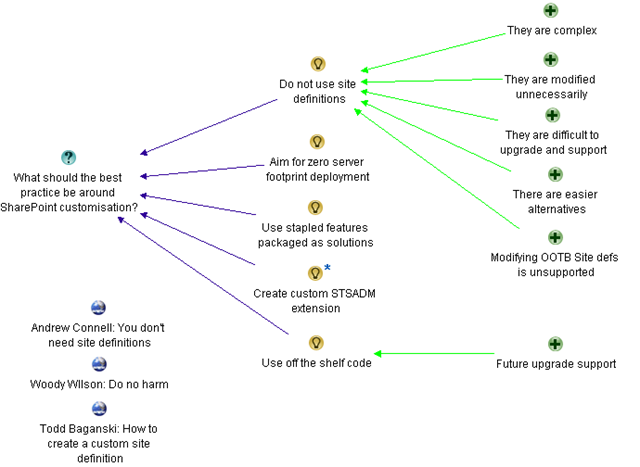
Now if you recall part 4, I created an IBIS issue map to demonstrate the arguments made by Joel Oleson some time back, when he wrote an article that was originally entitled “Just say no to site definitions”. It caused some vigorous debate at the time, and I demonstrated how I was able to both simplify and objectify Joel’s post into a simple issue map that was very easy for any reader to understand. That map is below and this is our starting point for part 5. Have a good look and if you need a refresher on how it was created, refer to part 4.

image

Now it is time to map some of the counter arguments made by those who responded to Joel’s ideas. The first response was anonymous and made various counter points. Let’s take a look at the first half of the counter spray :-).

Are you serious? You prefer STP files over a custom site definition? Man, you obviously have never had to try to build a solution around STP files before.

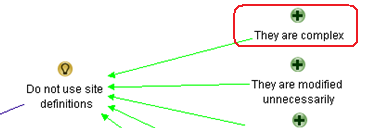
The first line of the response is actually very interesting from an IBIS nerd viewpoint because and it a perfect example of social complexity playing out and it made decide to change major aspects of the map. The above respondent immediately honed in on something that wasn’t actually all that clear to me to begin with. When I first mapped Joel’s statement in part 4, I never actually put the idea of using site templates into the issue map. Why? because Joel never actually suggested it! The closest he came was the statement “Site Templates as tough to work with as they are, are better than custom site definitions”. But I interpreted this as using the example of site templates to highlight the complexity shortcomings of site definitions. I simply captured the argument of “complexity”, supporting the idea “Do not use site definitions”.

image

But look here! Our first respondent interpreted it completely differently to me. They inferred (likely correctly) that Joel prefers site templates over site definitions. But the response then takes a shot at Joel’s credibility.

Are you serious? You prefer STP files over a custom site definition? Man, you obviously have never had to try to build a solution around STP files before

If that exchange happened in a meeting, you may as well call it quits, because it would be very likely that very little valuable dialogue would be obtained after such an exchange. Participants are on the defensive and the meeting will likely get derailed on this tangent. But this is a terrific example of how using IBIS grammar is extremely effective at teasing out ambiguous or poorly formed argumentation, thereby removing the “sting” out of these sorts of debates.

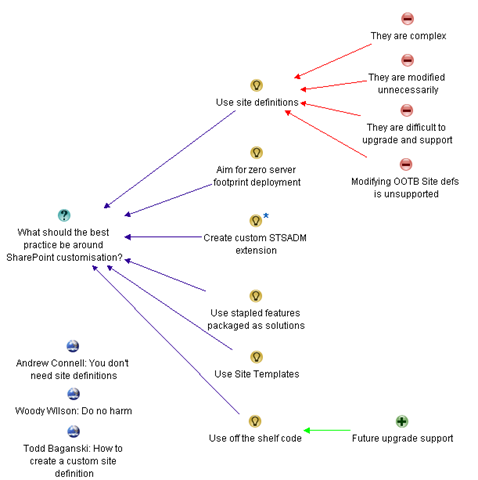
So what should this map look like then? Below is a new version with a few key adjustments.

image

The most obvious change that I have made to the argumentation presented above is Joel’s original idea. I have removed the negative connotation of “Do not use site definitions” to “Use site definitions”. As a result, the previous pros now become cons, because they are no longer supporting the idea. I did this because I have also added the idea “Use Site Templates”, so now we have presented the two ideas without any inferred bias and can simply examine the characteristics, pros and cons of each idea.

For what it’s worth, engineers sometimes unconsciously word questions in a manner that non engineers find biased because of the implied connotation. You can read more about this in my “it’s all how you ask the question” post.

Finally, I also removed the “there are easier alternatives” pro from the map altogether. I did this because this argument has became somewhat redundant. Note how we are now exploring all of the alternatives as separate ideas in the map anyway. More importantly, what does “easier” mean anyway? What is “easier” for an IT pro type person like Joel may be very different to what is “easier” for a SharePoint developer”.

Stepping back

The ability to restructure a map on the fly is one of the key benefits of IBIS. A skilled IBIS practitioner is able to quickly restructure the map as the conversation moves around the various topics, all the time leveraging collective intelligence of the group as they dissect the problem together.

Another key improvement from the previous map is that we have further objectified things. Our first respondent also supplied some great factual counter arguments to Joel, but hid it behind an initial barb that could easily be inferred as a cheap shot.

Nevertheless, here is the portion of the map with showing the additional argumentation from the respondent about using site templates. Now we are getting somewhere!

image

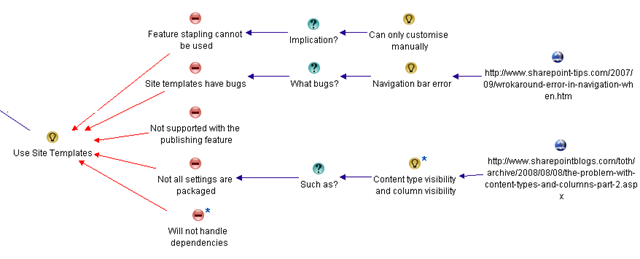
Let’s examine each of the statements of the respondent. All of the arguments made were dumping on site templates in some way, so we capture them as cons to the “Use site templates” idea. The respondent actually did a very good job with his arguments and they were very easy to add to the map.

  • The statement “For one, you can’t feature staple to an STP file, so you are simply limited to the manual UI customizations. To run automation when a site is created, you need to use a site definition with a provision handler or feature stapling”, is a bundled up statement. There is the con argument “feature stapling cannot be used”, with an implication of that argument being “Can only customise manually”. I broke that out into three IBIS elements
  • “STP files are buggy, and sometimes you will randomly get errors like this one in your navigation bars” is stating that there are bugs, and supports that argument by stating a specific example of one. I split this out into separate IBIS elements and additionally linked to the specific example.
  • “STP Files do not support sites with the publishing feature activated” is a nice, simple argument that I captured as “Not supported with the publishing feature”.
  • “STP files do not package all your settings, especially content type visibility and column visibility on lists and libraries” is again a nice counter argument backed up with examples.
  • Finally, the comment “If an STP relies on elements from other higher-level sites or lower-level subsites, good luck”, is in effect stating a counter argument that site template files to not handle dependencies. In case this paraphrased statement is ambiguous, I added additional detail to this node with the original argument as shown below.

image

More arguments against?

Below is the rest of the response that is nowhere near as clear as the first half. Let’s drill down…

I disagree, I think it is lazy devs that want to use an STP file, instead of creating a custom site definition, just like it’s laziness to create a content type through the UI for a custom solution instead of in XML with a feature (which can then easily be moved from environment to environment).
And honestly, is it really easier to go through the machinations to customize the MySite template as recommended here (http://blogs.msdn.com/sharepoint/archive/2007/03/22/customizing-moss-2007-my-sites-within-theenterprise.aspx) to simply move a few web parts around, rather than just make a tweak to the original site definition? Honestly which is less maintenance for a customer, a quick documented change to an XML file in a folder, or a Feature+WebControl+Custom master page+stsadm commands to activate etc.?

I think you are way off base here, and painting with broad brushes.
(I do agree with zero footprint efforts, and only editing built-in site definitions for tiny tweaks).

The first argument is actually now a moot point. Joel did indulge in a bit of developer bashing in his post (and who doesn’t enjoy a bit of that from time to time) and this respondent is simply reacting to that. But since I have already objectified Joel’s original point then arguments about “lazy developers” is actually answering a different question altogether and does not belong here.

I previously removed Joel’s “it is easier” argument and what do we see here? We see the respondent questioning what is “easier”! This respondent argues that a documented tweak is “easier” than applying manual changes. Once again in a real meeting I can see where this would go. One party would probably then say “yeah but you lazy devs never document it” and we are off into a conversational tangent that will not achieve much. So like Joel’s arguments earlier, I am removing the “my easier is better then your easier” arguments.

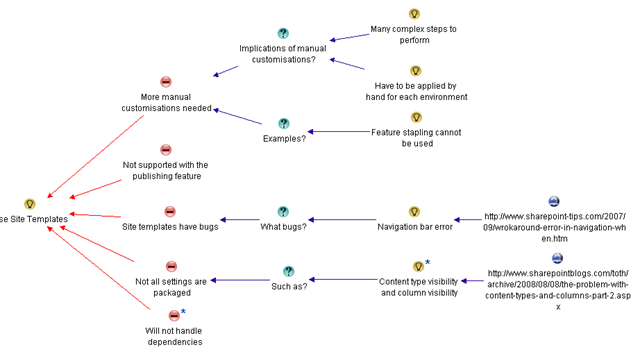
What’s left? Well, pretty much this entire bit of the conversation is talking about how much manual work is involved to manage changes when not utilising site definitions. So we can summarise this counter argument as “more manual customisation needed”. When I look at the map, I see that our existing argument “feature stapling cannot be used” is actually an example of this. So the adjusted arguments against site definitions now look like the map below. Note how I have removed the con of “Feature stapling cannot be used” and reworked it as an example of a new con, called “More manual customisations needed”. This now looks better.


image

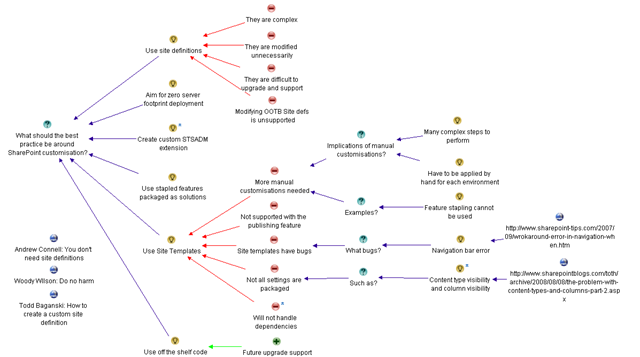
And finally for now, I have this consolidated map to represent our current understanding of the question “What should the best practice be around SharePoint customisation”. There are still other counterpoints, and we still have to add the pro argument into the map too. But by now, you should be getting the idea. Imagine yourself having this discussion in a meeting. Would this map, displayed on a projector have helped keep the meeting on track?

image

Thanks for reading

Paul Culmsee

www.sevensigma.com.au


« Previous PageNext Page »

Today is: Wednesday 3 June 2026 -