Back to Cleverworkarounds mainpage
 

Office Server Search memory leak and stuck on "crawling"

Tags: SQL Server,Troubleshooting @ 11:18 pm

It is the typical scenario isn’t it. Site works fine for a week and then is officially launched on a Monday morning and the site breaks after an hour complaining that it cannot connect to the configuration database. Whoa?

The SQL Server was checked and confirmed to be running fine, and in checking the SharePoint web front end server I I noticed was MSSEARCH.EXE was chewing memory at a rapid rate of knots. Checking the event logs showed up a steady sequence of event ID 7888, 10036 and 3355 messages. Later I noticed that the search crawl was stuck on "Crawling".

If you search on this topic, many people recommend recreating your Shared Service Provider. In this case, this is unnecessary (not to mention drastic).

It turned out to be an unfortunate combination of factors.

  • The client was using SQL Server 2005 with SP1
  • The client had a SQL Server maintenance plan with a "rebuild index" task.
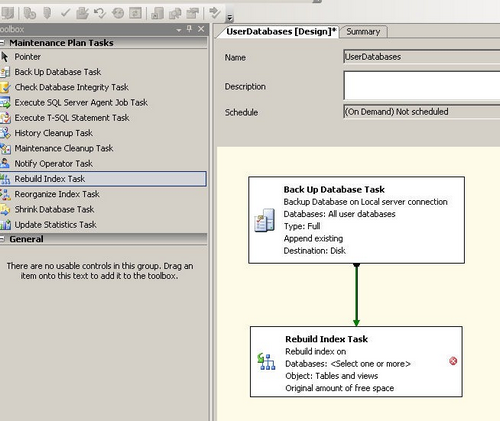
imageNon SQL reader? Maintenance plans are a "good thing". Think of it as a fitness regime for your SQL Server. You can regularly perform integrity checks, tasks to optimise performance, run backups and the like. A screenshot of a basic SQL2005 maintenance plan is to the right.

As it turns out, my client ran a maintenance plan each Sunday (hence why this broke on the Monday of go-live). It also turns out that the "rebuild index" maintenance plan task in SQL Server prior to SP2 has a teeny weenie problem. (By "rebuilding" an index, we mean that it is in effect, deleting and recreating it again).

When rebuilt, various options set on the indexes are not recreated the same way as they were originally created. As you may have guessed, this is extremely uncool, since SharePoint set various indexes in a certain way, it expects things to remain consistent.

There is a KB that you can read all about it here.

http://support.microsoft.com/kb/930887/en-us

Also, another great blog post about the issue is here:

http://blogs.vertigo.com/personal/michael/Blog/Lists/Posts/Post.aspx?ID=4

Some of effects of this dodgily recreated index are listed in the KB article, including:

  1. In Shared Services, the "indexing status" remains stuck in the "Crawling" state
  2. The number of handles that are opened by the MSSearch.exe process increases
  3. The number of TCP connections to the computer that is running SQL Server increases
  4. Several error are recorded in the SharePoint logfiles.
  • "SqlCrawl::ExecuteCommand fails Error 0x80040e2f"
  • CGathererQueueManager::FlushQueue failed with recoverable error 0x80040e2f
  • CGathererFilterSink::CommitLinks : pGatherAddLink->AddLinkComplete error=0x80040e2f

Additionally, in my case, MSSEARCH.EXE leaked memory very rapidly when viewed in Task Manager and I received the event logs as shown at the end of this post.

To resolve it, follow the instructions at Michael’s blog as the KB article is poorly written, but make sure that you do it for all tables as listed in the KB article! Michael’s post only covers 2 indexes and there actually are more in the search database as shown below.

Table Index
MSSAlertDocHistory IX_AlertDocHistory
MSSAnchorChangeLog IX_MSSAnchorChangeLog
MSSAnchorPendingChangeLog IX_MSSAnchorPendingChangeLog
MSSCrawlChangedSourceDocs IX_MSSCrawlChangedSourceDocs
MSSCrawlChangedTargetDocs IX_MSSCrawlChangedTargetDocs
MSSCrawledPropSamples IX_MSSCrawledPropSamplesByDocid
MSSCrawlErrorList IX_MSSCrawlErrorList_hrResult
MSSCrawlHostList IX_MSSCrawlHostList_Name
MSSCrawlQueue IX_MSSCrawlQueue
MSSDocSdids IX_MSSDocSdids

Hope this helps someone

Paul

Error log entries below for the google crawler. You can stop reading now! 🙂

  • Event Type:      Error
  • Event Source:   Office SharePoint Server
  • Event Category:            Office Server General
  • Event ID:          7888
  • Date:                1/07/2008
  • Time:                12:03:03 PM
  • User:                N/A
  • Computer:         MyServer

Description:

Message: A connection was successfully established with the server, but then an error occurred during the pre-login handshake.  When connecting to SQL Server 2005, this failure may be caused by the fact that under the default settings SQL Server does not allow remote connections. (provider: Named Pipes Provider, error: 0 – No process is on the other end of the pipe.)


  • Event Type:      Error
  • Event Source:   Office Server Search
  • Event Category:            Gatherer
  • Event ID:          10036
  • Date:                1/07/2008
  • Time:                12:03:38 PM
  • User:                N/A
  • Computer:         MyServer

Description:

A database error occurred.

Source: Microsoft OLE DB Provider for SQL Server

Code: 17 occurred 1 time(s)

Description: [DBNETLIB][ConnectionOpen (Connect()).]SQL Server does not exist or access denied.


  • Event Type:      Error
  • Event Source:   Windows SharePoint Services 3
  • Event Category:            Database
  • Event ID:          3355
  • Date:                1/07/2008
  • Time:                12:04:08 PM
  • User:                N/A
  • Computer:         MyServer

Description:

Cannot connect to SQL Server. MyServer not found. Additional error information from SQL Server is included below.

[DBNETLIB][ConnectionOpen (Connect()).]SQL Server does not exist or access denied.

  • Event Type:      Error
  • Event Source:   Office SharePoint Server
  • Event Category:            Office Server Shared Services
  • Event ID:          6482
  • Date:                1/07/2008
  • Time:                12:05:12 PM
  • User:                N/A
  • Computer:         MyServer

Description:

Application Server Administration job failed for service instance Microsoft.Office.Server.Search.Administration.SearchServiceInstance (009e9001-5c8f-4705-9b4d-ee514c442fc7).

Reason: Exception from HRESULT: 0x80040D1B

Techinal Support Details:

System.Runtime.InteropServices.COMException (0x80040D1B): Exception from HRESULT: 0x80040D1B

   at Microsoft.Office.Server.Search.Administration.SearchServiceInstance.SynchronizeDefaultContentSource(IDictionary applications)

   at Microsoft.Office.Server.Search.Administration.SearchServiceInstance.Synchronize()

   at Microsoft.Office.Server.Administration.ApplicationServerJob.ProvisionLocalSharedServiceInstances(Boolean isAdministrationServiceJob)

For more information, see Help and Support Center at http://go.microsoft.com/fwlink/events.asp.

07/01/2008 12:25:01.85 mssearch.exe (0x0E20)                          0x0E38 Search Server Common             GathererSql                               0          Monitorable       CSqlCrawl::ExecuteCommand fails Error 0x80040e2f – File:d:\office\source\search\search\gather\server\gathersql.cxx Line:407 


SharePoint development/deployment governance…

My home-town compatriot Jeremy Thake has hit onto a governance topic that I think will turn into a very popular series once he is done with it (in committing to writing it, he will be a busy boy indeed for a while I suspect 🙂 ).

He has written a post on current methods and common issues of deployment of SharePoint customisations from dev to staging to prod, with particular reference to the current pain associated with iterative development and deployment.

The state of play in this area out in SharePoint land is not the best, due to a wide variety of factors and Jeremy sums it up very well.

Certainly, there are some extremely annoying architectural quirks. Back when I did the branding series I encountered some, but Jeremy has hit some nastier ones than what I found.

Anyway, take a look at his post – its a good read.


SQL Logins and AD Accounts can bite

This one had me going for a while.

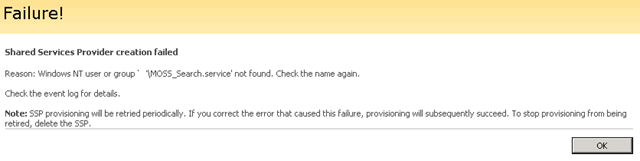
I was minding my own business doing a MOSS install. I successfully created the Office Server Search Service and onto the creation of the Shared Service Provider. Created the SSP and MySite Web Applications and then at the final step of creating the SSP, it bombed out after a long period of time with an error.

image

Reason: Windows NT user or group ‘MyDomain\MOSS_Search.service’ not found. Check the name again.

Continue reading “SQL Logins and AD Accounts can bite”


Darn IIS and Service Packs!

I thought that I was getting pretty good at deciphering odd SharePoint errors. After all, most of the time they are not very friendly! After the subsite/site collection issue of yesterday, you would think I would be in for an easier day today!

But it was not meant to be…

Continue reading “Darn IIS and Service Packs!”


Gary Lapointe is a genius (and has good music taste too)

Tags: SharePoint,Troubleshooting @ 10:32 pm

I recently encountered an nasty, nasty error that threatened to cause me a lot of grief.

I exported a site to a new site collection and initially things looked okay. However, I soon started to encounter strange errors such as:

clip_image002

Continue reading “Gary Lapointe is a genius (and has good music taste too)”


SharePoint Branding Part 6 – A "solution" to all issues?

There has been a bit of a gap in this series between part 5 and 6 – and fortunately for the both of us, I think this is the penultimate post in my series on SharePoint branding. While it has been an interesting exercise for me, I must confess each successive article is getting harder to write as my interest is shifting 🙂  So many sub-disciplines within MOSS – I think I might delve into WCM soon :-).

Continue reading “SharePoint Branding Part 6 – A "solution" to all issues?”


SharePoint Branding Part 5 – Feature Improvements and Bugs

So, here we are at the fifth article in my series on SharePoint branding. By now, we have left all the master page stuff way behind, and we have created a custom feature to install our branding to a server.

To recap for those of you hitting this page first, I suggest you go back and read this series in order.

  • Part 1 dealt with the publishing feature, and some general masterpage/CSS concepts and some quirks (core.css and application.master) that have to be worked around.
  • Part 2 delved into the methods to work around the application.master and core.css issue
  • Part 3 delved further into the methods to work around the application.master and core.css issue and the option that solved a specific problem for me
  • Part 4 then changed tack and introduced how to package up your clever branding

Continue reading “SharePoint Branding Part 5 – Feature Improvements and Bugs”


DCOM Fun with SharePoint

One thing you will first notice in planning a MOSS install is the sheer number of service accounts used. Without proper planning, it is only going to result in a poor set up and most likely be insecure. Despite the complexity of having to learn what each service account is required for, MOSS2007 does a reasonable job in working in a restricted configuration. Properly configured, the majority of these accounts can run with minimal security privileges.

If you follow all the best practice guides, and religiously read Joel’s stuff, I would be preaching to the converted.

Continue reading “DCOM Fun with SharePoint”


Poor windows explorer view performance in SharePoint?

I found that a 5 server MOSS07 farm was very sluggish in terms of windows explorer view performance compared to a single farm running on a vmware box. This seemed on the surface to make no sense, but some further digging uncovered the issue. I was using a host header and the site name was not the same name as the server itself. However in my VMware farm, the server and site names were the same.

Eg

My WFE server was WEBSERVER1

My Web site was MYWEBSITE

The problem as it turns out is with Windows Server 2003, SMB, and strict name checking.

XP Clients, will by default, use the SMB redirector before using the WebDav redirector. But by default, Windows Server 2003 does not respond to SMB queries that use a server name other than the server’s true NetBIOS name or FQDN. If this is attempted, the server will respond with a STATUS_DUPLICATE_NAME error that looks like this in a Network Monitor trace:

SMB: C session setup & X
SMB: R session setup & X
SMB: C tree connect & X, Share = \\WWW.ADATUM.COM\IPC$
SMB: R tree connect & X – NT error, System, Error, Code = (189) STATUS_DUPLICATE_NAME

Because of the robust nature of the Microsoft SMB implementation, the client will attempt this connection many more times before failing. This can cause significant delays in rendering of the Explorer View.

We can force the server to respond to SMB requests regardless of the server name being used and thereby improving the performance of the SMB portion of the Explorer View protocol negotiation. While this will not result in a successful SMB connection being created, it will result in failing over to WebDAV much faster.

KB article 281308, “Connecting to SMB share on a Windows 2000-based computer or a Windows Server 2003-based computer may not work with an alias name” describes how to use the DisableStrictNameChecking registry key to resolve this problem.

As per the KB article http://support.microsoft.com/kb/281308 I changed the registry key on the affected server.

Start Registry Editor (Regedt32.exe).

  • Locate and click the following key in the registry: HKEY_LOCAL_MACHINE\System\CurrentControlSet\Services\LanmanServer\Parameters
  • On the Edit menu, click Add Value, and then add the following registry value:
  • Value name: DisableStrictNameChecking
  • Data type: REG_DWORD
  • Radix: Decimal
  • Value: 1 
  • Quit Registry Editor.
  • Restart your computer. 


Careful with pre-requisite SharePoint Features

After a web designer applied a new master page to a site, he killed the site. We saw these messages (debug logging was enabled on the site)

Server Error in ‘/’ Application.

——————————————————————————–

Compilation Error

Description: An error occurred during the compilation of a resource required to service this request. Please review the following specific error details and modify your source code appropriately.

Continue reading “Careful with pre-requisite SharePoint Features”


« Previous Page

Today is: Monday 16 March 2026 -