
Free MOSS Web Part – Hide Controls via JavaScript
Note: version 0.2 posted with minor bugfix 15th March 08!
Note2: Only works with MOSS 2007 sorry as you WSS guys do not have audiences targeting 🙁
This is my small contribution to the SharePoint world. It is a web part that once added to a web part page, allows you to customise the display by adding JavaScript to selectively hide controls on the page . Ever needed to hide a field from display/edit for a certain audience? Well here is a way do it without requiring SharePoint Designer and having to break a page from it’s site definition (unghosting).
Before and after shots below (look ma – no top button!)
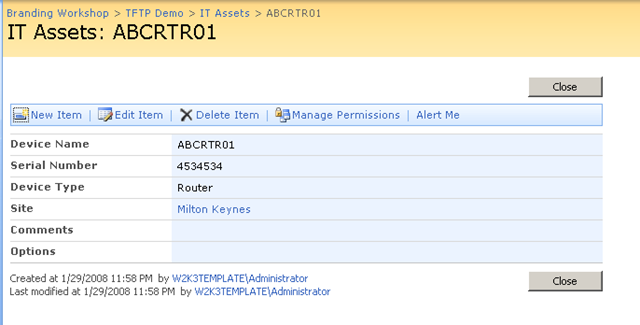
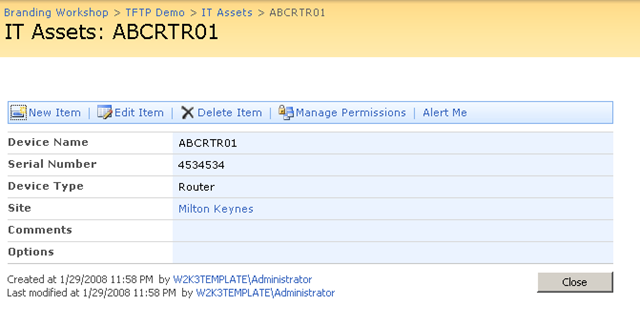
To fully understand what is being done here, I suggest you read my series of articles on the use of JavaScript in SharePoint. Part 3 in particular will show you how to safely add this web part to pages with editing disabled (NewForm.aspx, EditForm.aspx and DispForm.aspx)
The full series can be found here: Part 1, Part 2, Part 3, Part 4, Part 5 and Part 6.
Kudos to Jeremy Thake for feedback and some code contribution. Despite being seriously metrosexual, he is otherwise otherwise very cool :-P.
Now two important warnings:
Warning 1: This is an alpha quality release and I may never touch it again 🙂 So you very likely *will* break it. If there is enough interest, I am happy to pop it on codeplex
Warning 2: This web part should NOT be considered as a security measure and thus used in any security sensitive scenario (such as an extranet or WCM site). JavaScript by its very nature can be trivially interfered with and thus other methods (server side) should be employed in these scenarios to prevent interference at the browser.
You can download by reading the disclaimer and clicking the button below..
THIS CODE IS PROVIDED UNDER THIS LICENSE ON AN “AS IS” BASIS, WITHOUT WARRANTY OF ANY KIND, EITHER EXPRESSED OR IMPLIED, INCLUDING, WITHOUT LIMITATION, WARRANTIES THAT THE COVERED CODE IS FREE OF DEFECTS, MERCHANTABLE, FIT FOR A PARTICULAR PURPOSE OR NON-INFRINGING. THE ENTIRE RISK AS TO THE QUALITY AND PERFORMANCE OF THE COVERED CODE IS WITH YOU. SHOULD ANY COVERED CODE PROVE DEFECTIVE IN ANY RESPECT, YOU (NOT THE INITIAL DEVELOPER OR ANY OTHER CONTRIBUTOR) ASSUME THE COST OF ANY NECESSARY SERVICING, REPAIR OR CORRECTION. THIS DISCLAIMER OF WARRANTY CONSTITUTES AN ESSENTIAL PART OF THIS LICENSE. NO USE OF ANY COVERED CODE IS AUTHORIZED HEREUNDER EXCEPT UNDER THIS DISCLAIMER
Use at your own risk!
To install perform the following commands
- stsadm.exe” -o addsolution -filename CleverWorkAroundsHideFields.wsp
- stsadm.exe” -o execadmsvcjobs
- stsadm.exe” -o deploysolution -name CleverWorkAroundsHideFields.wsp -immediate -allowgacdeployment -allcontenturls
- stsadm.exe” -o execadmsvcjobs
To remove/reinstall perform the following commands
- stsadm.exe” -o retractsolution -name CleverWorkAroundsHideFields.wsp -immediate -allcontenturls
- stsadm.exe” -o execadmsvcjobs
- stsadm.exe” -o deletesolution -name CleverWorkAroundsHideFields.wsp
- stsadm.exe” -o execadmsvcjobs
- stsadm.exe” -o addsolution -filename CleverWorkAroundsHideFields.wsp
- stsadm.exe” -o execadmsvcjobs
- stsadm.exe” -o deploysolution -name CleverWorkAroundsHideFields.wsp -immediate -allowgacdeployment -allcontenturls
- stsadm.exe” -o execadmsvcjobs





