Hi and welcome to part 8 of my series of articles around SharePoint 2013 workflows. Hopefully as you progress through this series, as well as getting a heap of new conceptual baggage, you are getting a better sense of that SharePoint 2013 workflows are capable of and whether they have enough to be a seriously considered solution and whether they can empower citizen developers.
If you have been following proceedings thus far, we just successfully connected to the Process Owners list via REST web services and we manipulated dictionary variables to get to the data returned by the web service. We just started using the looping functionality of SharePoint 2013 workflow and successfully created a loop to iterate through the process owners list.
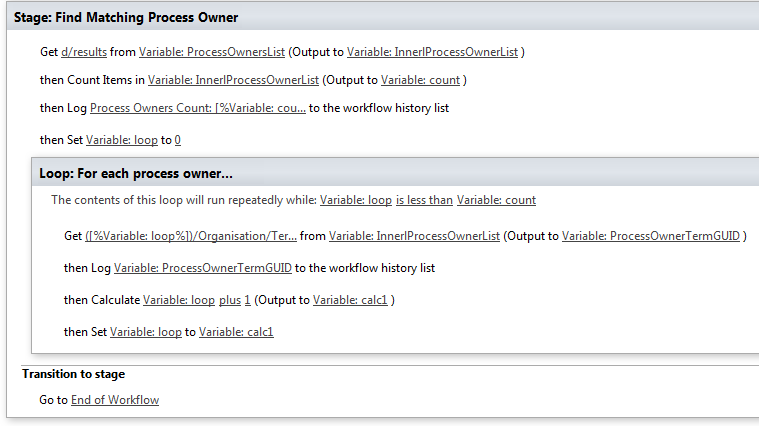
Now it’s time to finish the job. Here is the stage that we successfully tested at the end of the last post…
Adding conditional logic…
Our next task is to add some conditional logic into the workflow where if a match is found between term GUID’s, stop looping through the rest of the process owners. This will make the workflow more efficient because if the process owners list was big and the matching term GUID was one of the first few entries, we can save a lot of unnecessary loops.
Step 1:
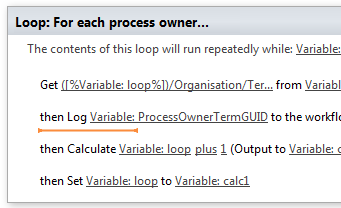
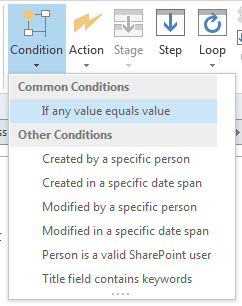
Click in between the second and third workflow actions in the loop. From the ribbon, click the Condition icon and from the list of conditions, choose If any value equals value.
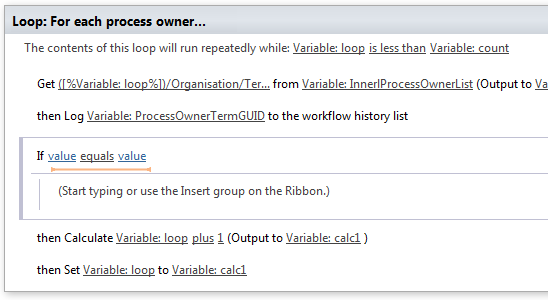
Now back in part 6, in the “Getting the GUID…” section, we added a series of steps to extract the Term GUID from the current item. The variable was called TermGUID. Now we are going to compare the TermGUID with each of the GUID’s returned by each iteration of the loop.
Step 2:
Click on the leftmost value hyperlink of the If statement and click the fx button. In the Define Workflow lookup dialog, choose Workflow Variables and Parameters as the Data source and choose the TermGUID variable in the Field from Source dropdown. Click OK
Step 3:
Click on the rightmost value hyperlink of the If statement and click the fx button. In the Define Workflow lookup dialog, choose Workflow Variables and Parameters as the Data source and choose the ProcessOwnerTermGUID variable in the Field from Source dropdown. Click OK
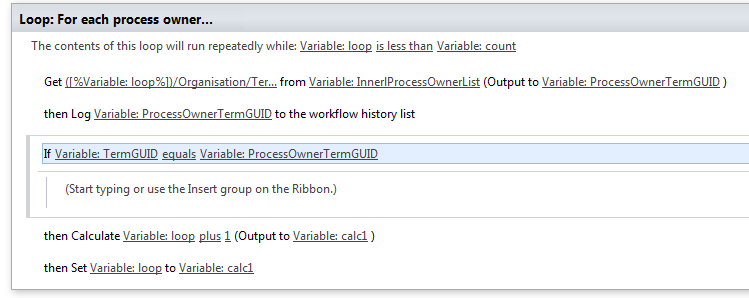
Now we have configured the test for when the Organsiation matches between a document and the process owner list. The next step is to get the value of the Assigned To column, since that has the username of the process owner for a given organisation. But If you review the web service call that was made to to the Process Owners list (http://megacorp/iso9001/_vti_bin/client.svc/web/lists/getbytitle(‘Process%20Owners’)/Items?$select=AssignedToId,Organisation), you might notice that I used the column name AssignedToId rather than the actual column name reported in SharePoint called Assigned To. So what gives?
Turns out that one of the current limitations of using the oData/REST approach is that columns that store People/Group data do not return the persons name. Instead, they return a numeric ID via a different column name. For example: the Created By and Modified By columns are represented in rest by AuthorId and EditorId respectively.
The implication? We will need to call yet another web service, passing it the value of AssignedToId to get the actual username so we can assign them a task.
“Oh come on,” I hear you say, “this is messy enough already and we still have to mess with web services?”
I feel your pain, but at least now you have more of an idea of what it takes to be a citizen developer when it comes to SharePoint Designer 2013 workflows! Let’s get on with it…
Finding the user…
Our first step is to grab the value of AssignedToId from the InnerProceessOwnerList dictionary variable. This is similar to what we did to create the ProcessOwnerTermGUID variable in part 7 – we use a Get Item from a Dictionary action.
Step 1:
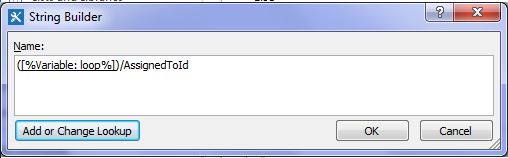
Add a Get an Item from a Dictionary action, click the item by name or path hyperlink and click the ellipses to bring up the string builder screen. Type in a left bracket “(“ and then click the Add or Change lookup button. In the Lookup for String dialog, choose Workflow Variables and Parameters as the data source and find the variable called loop and click OK. Finally, type in the following string “)/AssignedToId” and click OK.
Step 2:
Back at the workflow action, click on the dictionary hyperlink and choose the InnerProcessOwnerList variable from the list.
Step 3:
Click the item hyperlink and choose to create a new variable to bring up the edit variable screen. Name the variable AssignedToID and set its type to Integer.
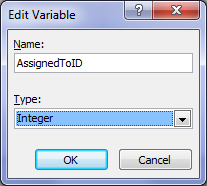

Now that we have our user (well an integer representing the user in the form of the variable AssignedToID), there is not much point in looping around for more process owners, so lets add a workflow step to make the loop end straight away.
Step 4:
Add a Set Workflow Variable action and click on the workflow variable hyperlink. From the list of variables, choose loop. Now click the value hyperlink and click the fx button to bring up the Lookup for Integer dialog. In the Data source dropdown, choose Workflow Variables and Parameters and in the Field from source dropdown, choose the variable count.
To understand what step 4 does, let’s look at the entire loop. Note that the loop will run repeatedly while the value of the loop variable is less than the value of the count variable. Step 4 now means that this is not the case and the loop will end.
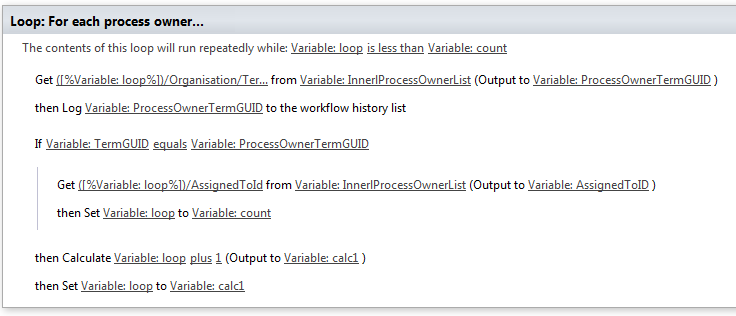
Next we have to grab the user that AssignedToId variable refers to via calling another web service as I previously mentioned. This is a little tricky, so it is best we do it in a new workflow stage. Thus, we will tidy up a few loose ends with this stage.
Step 5:
Add a new workflow stage and name it “Obtain UserID”.
Step 6:
In the Transition to stage section of the Find Matching Process Owner stage, delete the Go to End of Workflow action and replace it with an If any Value equals Value condition. In the first value hyperlink, set it to the variable AssignedToID. Click the equals hyperlink and change it to is greater than. Finally, click the last value hyperlink and set it to zero “0”. The logic behind this workflow action is that the default value for integer variables are 0. If a process owner has been found for a document, the value of AssignedToID will be greater than zero. Therefore the workflow can use this fact when it decides whether to proceed to the new stage created in step 5.
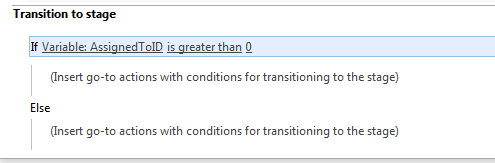
Step 7:
Add a Go to a stage action underneath the If condition and set it to go to the Obtain Userid stage created in step 5.
Step 8:
Add a Go to a stage action underneath the Else condition and set it to End of Workflow.
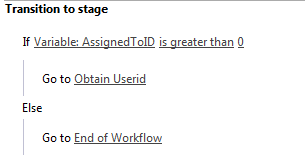
A new web service…
Right, let’s now turn our attention to the Obtain Userid stage created in step 5 above. By now you should be a REST/JSON guru after being able to successfully connect to and parse the data from the Process Owners list in part 6 and part 7. By comparison, the web service method we are about to call is quite simple. It is called GetUserByID and the URL looks like this:
http://megacorp/iso9001/_api/Web/GetUserById().
The one thing we have to do is pass it an integer that refers to the user – value of the AssignedToID variable.
To demonstrate how this works, I will pick an ID at random and we can have a look at the data returned by this web service call. Using the Fiddler composer function to return the data in JSON format, we get the following output.
http://megacorp/iso9001/_api/Web/GetUserById(7)
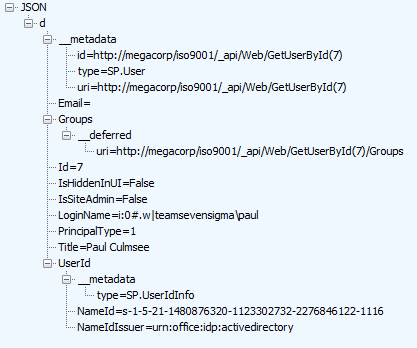
A quick scan of the data above and it appears that the data we are interested in is LoginName. Based on what we learnt from accessing JSON data to get hold of the term GUID of the Organisation column, we will have to use the Get an Item from a Dictionary action, to get at the LoginName entry. The item reference should be d/LoginName, so let’s test it.
Step 1:
Add a Call HTTP Web Service action and click the this hyperlink. Click the ellipses button to display the string builder dialog. Use the Add or Change Lookup button and the text editor to build the following string:
- 1) [Workflow context: Current Site URL]
- 2) “_api/Web/GetUserById(“
- 3) [%Workflow Variables and Parameters: AssignedToID%]
- 4) “)”
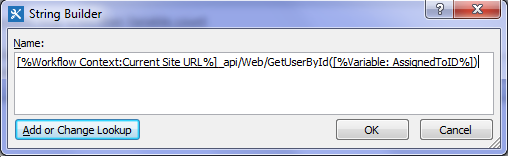
Step 2:
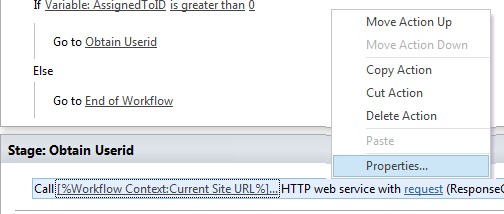
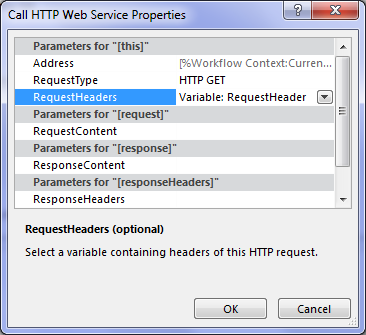
Right click on the Call HTTP Web Service action created in step 1 and choose properties. In the Call HTTP Web Service Properties dialog, set the RequestHeaders dropdown to the RequestHeader dictionary variable. (If you stretch your mind back to part 6, we created the RequestHeader variable to ensure our data comes back in JSON format. We can re-use that here to do the same thing).
Step 3:
On the Call HTTP Web Service action, click the response hyperlink and create a new variable and call it UserDetail. Click the ResponseStatusCode hyperlink and choose the existing variable called responseCode. (It first made an appearance in part 6 and we can re-use it here).

Step 4:
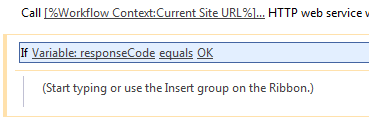
Add an If any value equals value condition and configure it to test of the variable responseCode equals OK
Step 5:
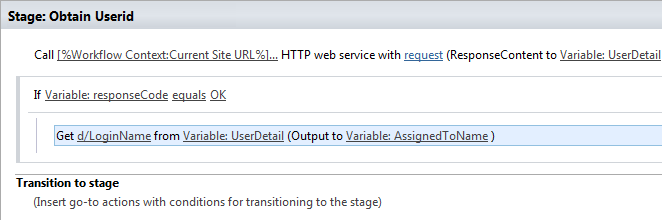
Add a Get an Item from a Dictionary action, click the item by name or path hyperlink and type in “d/LoginName”. Click the dictionary hyperlink and choose the UserDetail variable created in step 3. Click the item hyperlink and create a new string variable called AssignedToName.
At this point it makes sense to log the value of AsssignedToName to workflow history to make sure the have set everything up correctly.
Step 6:
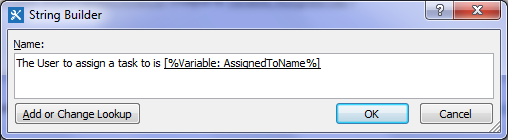
Add a Log to history action and set the message to: “The User to assign a task to is: [%Variable: AssignedToName%]”
Step 7:
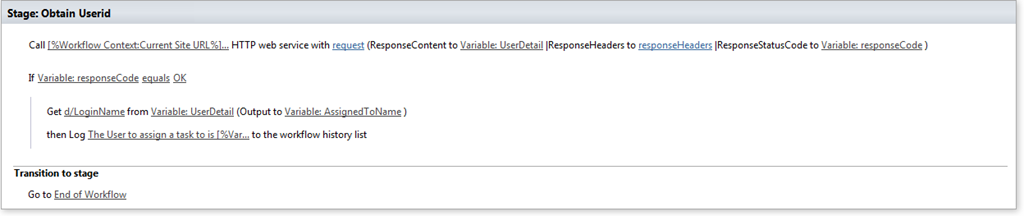
Add a Go to a stage action and set it to end the workflow. The complete configuration for the stage should look like the image below.
Now it’s time to test the workflow. In my case, I went back to the documents library and triggered the workflow on the document called Burger Additives Standard which is assigned to the organisation of Megacorp Burgers. Here is the result…
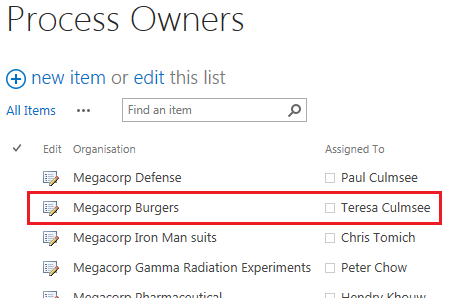
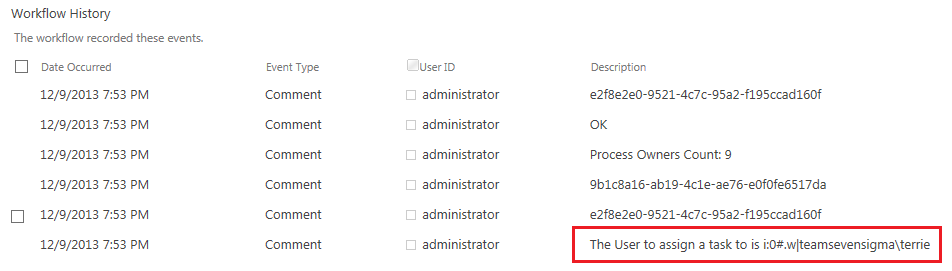
Wohoo! we have our user! If we check the process owners list for Megacorp Burgers on the left image above and compare it to the workflow history next to it, we can indeed confirm that the lookup reported is right. (In my test environment, the userid for Teresa Culmsee is teamsevensigma\terrie).
Assigning a task…
Now I think I speak for all of us when I say HOLY CRAP WE ARE ALMOST THERE!!!. I mean, it has taken 8 posts, but we have one more workflow action to add. Drumroll….the action that we started this series with way back in part 2.
Step 1:
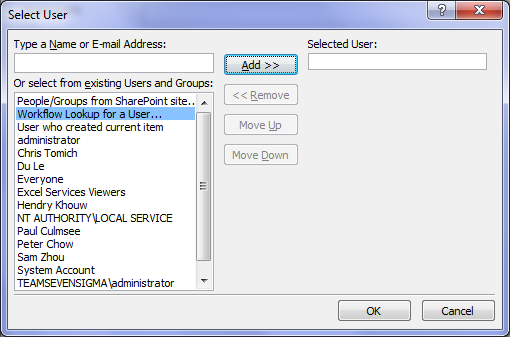
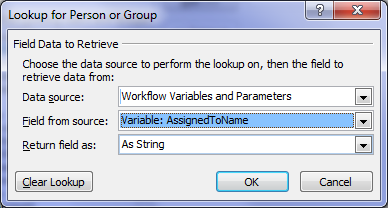
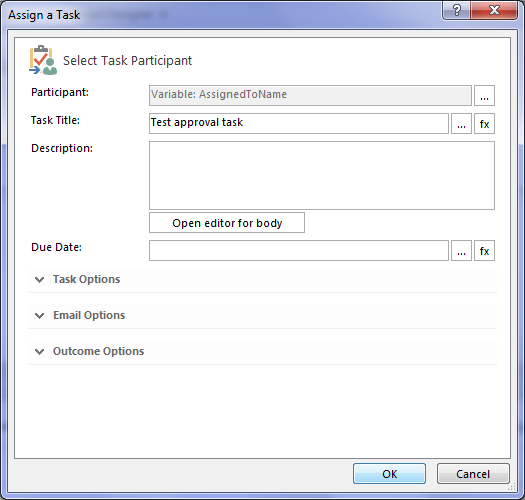
Add an Assign a task action and click on the this user hyperlink. In the Select Task Participant Dialog, click the ellipses next to the Participant textbox. This will bring up the Select User dialog. In the select from existing users or groups list, select Workflow Lookup for a User and click Add. In the Lookup for Person or Group dialog, choose Workflow Variables and Parameters from the Data source dropdown and choose the AssignedToName variable and click OK.
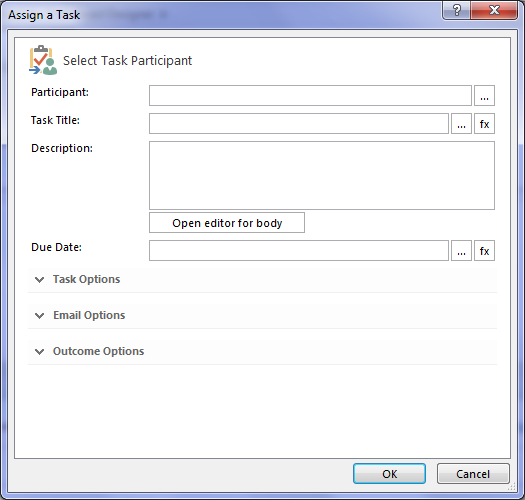
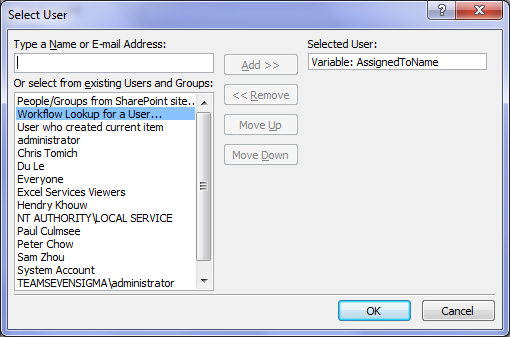
Now you will be back at the Select Task Participant Dialog. Enter a task title of “Test approval task” and click ok. (For now we are not going to wire up the rest of the task, this is enough to prove that it works. So click Ok to go back to the workflow designer and review the action.)
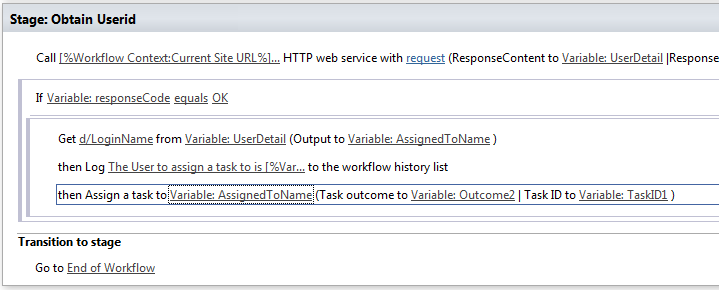
Looks good, so let’s now publish the workflow and let’s test it by taking it from the top.
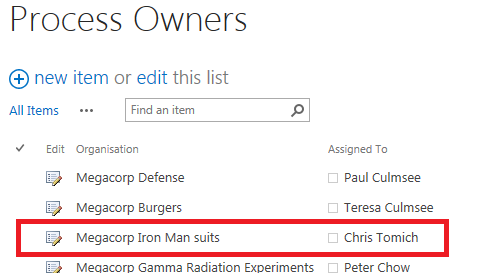
Now as a side note, when writing this post, my colleague Chris Tomich insisted that he had to be process owner for Megacorp’s Iron Man Suits division, and you will see that below. Checking the documents library and using metadata navigation, we see all the documents that are owned by the Iron Man Suits subsidiary of Megacorp. It stands to reason that we would have suit schematics and the backup and recovery process for Javris eh?
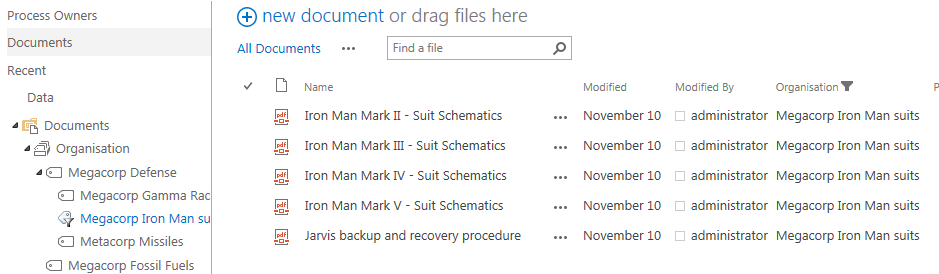
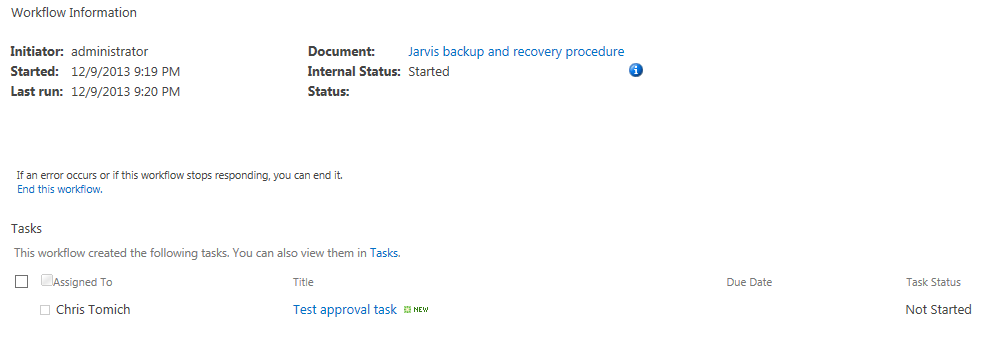
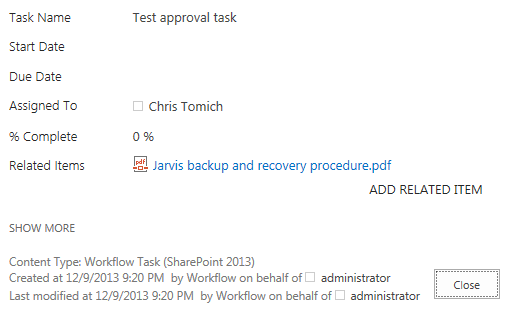
Choosing the Jarvis backup and recovery procedure document, we run our workflow. Checking the status of the workflow, what do we see? Yeah baby! Chris has been assigned a task!
Conclusion…
So at this point, I can’t help but wonder how many readers are actually happy that it took 8 posts to finally assign a task to a user. But nevertheless, the journey has been a good example of the sort of issues that you encounter when using SharePoint 2013 workflows.
Now in part 7, I alluded to the fact that this method had a flaw. Our Megacorp example has been a simple one with just a few entries in the process owners list. But what if there were say, 5000 process owners and the one we want is number 4864? The current workflow would have to iterate through the first 4863 entries before it gets to this one. This isn’t overly efficient to do and might introduce some performance penalty (which plays into the hands of developers who don’t like the idea of scary citizen developers meddling with forces they don’t understand). So it begs the question whether we can come up with an alternate way to do this?
In part 9 and onward from there, we will answer that question.
Thanks for reading
Paul Culmsee


I am using two loops..The second loop is inside the other loop..my condition is not getting executed..Plz help..Is nesting of loops not allowed ?
Comment by Vipul Jain — September 10, 2014 @ 4:24 am
Hi Paul, my compliments for your excellent blog. Very entertaining, clear, well written and extremely applicable use cases for citizen developers such as myself. I have written a SPD 2013 workflow along the lines of your post series and everything works beautifully. My scenario: the list I’m running my WF on has a *multi-value* People field called Assigned To. So (for some list items) my REST call populates the UserDetails dictionary with *multiple* AssignedToID values. My problem: I need to resolve these multiple users to a workflow variable and then have my workflow leverage that variable to create a *single* task assigned to all these multiple users. Can you shed some light on this? Thanks in advance!
Comment by Robert van Raamsdonk — April 15, 2015 @ 8:39 pm
Firstly, thank you very much for your workflow series posts. I understood the Loop logic with your posts. But I have two question.
In “Set Workflow Variable” I couldn’t set the Lookup column to new variable. Because it’s type is not string, integer, bool, etc. I need this because when I loop in process owners, I want to compare the lookup column (Organisation) with the original Organisation. (Not the IDs)
My second question is, for example when I found the Organisation, in the ProcessOwners list while looping, can I update a column in ProcessOwners list? for example, when I found the correct item, I want to make AssignetTo column Empty. I couldn’t find an example about that.
Thank you very much for your help.
Secil
Comment by Seci — October 23, 2015 @ 7:46 pm