Back to Cleverworkarounds mainpage
 

Consequences of complexity–the evilness of the SharePoint 2010 User Profile Service

Hiya

A few months back I posted a relatively well behaved rant over the ridiculously complex User Profile Service Application of SharePoint 2010. I think this component in particular epitomises SharePoint 2010’s awful combination of “design by committee” clunkiness, along with real-world sheltered Microsoft product manager groupthink which seems to rate success on the number of half baked features packed in, as opposed to how well those features install logically, integrate with other products and function properly in real-world scenarios.

Now truth be told, until yesterday, I have had an unblemished record with the User Profile Service – being able to successfully provision it first time at all sites I have visited (and no I did not resort to running it all as administrator). Of course, we all have Spence to thank for this with his rational guide. Nevertheless, I am strongly starting to think that I should write the irrational guide as a sort of bizzaro version of Spencers articles, which combines his rigour with some mega-ranting ;-).

So what happened to blemish my perfect record? Bloody Active Directory policies – that’s what.

In case you didn’t know, SharePoint uses a scaled down, pre-release version of Forefront Identify Manager. Presumably the logic here to this was to allow more flexibility, by two-way syncing to various directory services, thereby saving the SharePoint team development time and effort, as well as being able to tout yet another cool feature to the masses. Of course, the trade-off that the programmers overlooked is the insane complexity that they introduced as a result. I’m sure if you asked Microsoft’s support staff what they think of the UPS, they will tell you it has not worked out overly well. Whether that feedback has made it way back to the hallowed ground of the open-plan cubicles of SharePoint product development I can only guess. But I theorise that if Microsoft made their SharePoint devs accountable for providing front-line tech support for their components, they will suddenly understand why conspiracy theorist support and infrastructure guys act the way they do.

Anyway I better supress my desire for an all out rant and tell you the problem and the fix. The site in question was actually a fairly simple set-up. Two server farm and a single AD forest. About the only thing of significance from the absolute stock standard setup was that the active directory NETBIOS name did not match the active directory fully qualified domain name. But this is actually a well known and well covered by TechNet and Spence. A quick bit of PowerShell goodness and some AD permission configuration sorts the issue.

Yet when I provisioned the User Profile Service Application and then tried to start the User Profile Synchronisation Service on the server (the big, scary step that strikes fear into practitioners), I hit the sadly common “stuck on starting” error. The ULS logs told me utterly nothing of significance – even when i turned the debug juice to full throttle. The ever helpful windows event logs showed me Event ID 3:

ForeFront Identity Manager,
Level: Error

.Net SqlClient Data Provider: System.Data.SqlClient.SqlException: HostId is not registered
at Microsoft.ResourceManagement.Data.Exception.DataAccessExceptionManager.ThrowException(SqlException innerException)
at Microsoft.ResourceManagement.Data.DataAccess.RetrieveWorkflowDataForHostActivator(Int16 hostId, Int16 pingIntervalSecs, Int32 activeHostedWorkflowDefinitionsSequenceNumber, Int16 workflowControlMessagesMaxPerMinute, Int16 requestRecoveryMaxPerMinute, Int16 requestCleanupMaxPerMinute, Boolean runRequestRecoveryScan, Boolean& doPolicyApplicationDispatch, ReadOnlyCollection`1& activeHostedWorkflowDefinitions, ReadOnlyCollection`1& workflowControlMessages, List`1& requestsToRedispatch)
at Microsoft.ResourceManagement.Workflow.Hosting.HostActivator.RetrieveWorkflowDataForHostActivator()
at Microsoft.ResourceManagement.Workflow.Hosting.HostActivator.ActivateHosts(Object source, ElapsedEventArgs e)

The most common issue with this message is the NETBIOS issue I mentioned earlier. But in my case this proved to be fruitless. I also took Spence’s advice and installed the Feb 2011 cumulative update for SharePoint 2010, but to no avail. Every time I provisioned the UPS sync service, I received the above persistent error – many, many, many times. 🙁

For what its worth, forget googling the above error because it is a bit of a red herring and you will find issues that will likely point you to the wrong places.

In my case, the key to the resolution lay in understanding my previously documented issue with the UPS and self-signed certificate creation. This time, I noticed that the certificates were successfully created before the above error happened.  MIISCLIENT showed no configuration had been written to Forefront Identity Manager at all. Then I remembered that the SharePoint User Profile Service Application talks to Forefront over HTTPS on port 5725. As soon as I remembered that HTTP was the communication mechanism, I had a strong suspicion on where the problem was – as I have seen this sort of crap before…

I wondered if some stupid proxy setting was getting in the way. Back in the halcyon days of SharePoint 2003, I had this issue when scheduling SMIGRATE tasks, where the account used to run SMIGRATE is configured to use a proxy server, would fail. To find out if this was the case here, a quick execute of the GPRESULT tool and we realised that there was a proxy configuration script applied at the domain level for all users. We then logged in as the farm account interactively (given that to provision the UPS it needs to be Administrator anyway this was not a problem). We then disabled all proxy configuration via Internet explorer and tried again.

Blammo! The service provisions and we are cooking with gas! it was the bloody proxy server. Reconfigure group policy and all is good.

Conclusion

The moral of the story is this. Anytime windows components communicate with each-other via HTTP, there is always a chance that some AD induced dumbass proxy setting might get in the way. If not that, stateful security apps that check out HTTP traffic or even a corrupted cache (as happened in this case). The ULS logs will never tell you much here, because the problem is not SharePoint per se, but the registry configuration enforced by policy.

So, to ensure that you do not get affected by this, configure all SharePoint servers to be excluded from proxy access, or configure the SharePoint farm account not to use a proxy server at all. (Watch for certificate revocation related slowness if you do this though).

Finally, I called this post “consequences of complexity” because this sort of problem is very tricky to identify the root cause. With so many variables in the mix, how the hell can people figure this sort of stuff out?

Seriously Microsoft, you need to adjust your measures of success to include resiliency of the platform!


Thanks for reading

Paul Culmsee

www.sevensigma.com.au


Migrating managed metadata term sets to another farm on another domain

Hiya

[Note: I have written another article that illustrates a process for migrating the entire term store between farms.]

My colleague Chris Tomich, recently saved the day with a nice PowerShell script that makes the management and migration of managed metadata between farms easier. If you are an elite developer type, you can scroll down to the end of this post. if you are a normal human, read on for background and context.

The Issue

Recently, I had a client who was decommissioning an old active directory domain and starting afresh. Unfortunately for me, there was a SharePoint 2010 farm on the old domain and they had made considerable effort in leveraging managed metadata.

Under normal circumstances, migrating SharePoint in this scenario is usually done via a content database migration into a newly set up farm. This is because the built in SharePoint 2010 backup/restore, although better than 2007, presumes that the underlying domain that you are restoring to is the same (bad things happen if it is not). Additionally, the complex interdependencies between service applications (especially the user profile service) means that restoring one service application like Managed metadata is fiddly and difficult.

I was constrained severely by time, so I decided to try a quick and dirty approach to see what would happen. I created a new, clean farm and provisioned a managed metadata service application. The client in question had half a dozen term sets in the old SP2010 farm and around 20 managed metadata columns in the site collection that leveraged them. I migrated the content database from the old farm to the new farm via the database attach method and that worked fine.

I then used the SolidQ export tool from codeplex to export those term sets from the managed metadata service of the source farm. Since the new SP2010 farm had a freshly provisioned managed metadata service application, re-importing those terms and term sets into this farm was a trivial process and went without a hitch.

I knew that managed metadata stores each term as a unique identifier (GUID I presume because programmers love GUID’s). Since I was migrating a content database to a different farm there were two implications.

  1. The terms stored in lists and libraries in that database would reference the GUID’s of the original managed metadata service
  2. The site columns themselves, would reference the GUID of the term sets of the source managed metadata service

But the GUIDs on the managed metadata service on the new farm will not match the originals. I did not import the terms with their GUID’s intact. Instead I simply imported terms which created new GUID’s. Now everything was orphaned. Managed metadata columns would not know which term store they are assigned to. For example: just because a term set called, say “Clients” exists in the source farm, when a term set is created in the destination farm with the same name, the managed metadata columns will not automatically “re-link” to the clients term set.

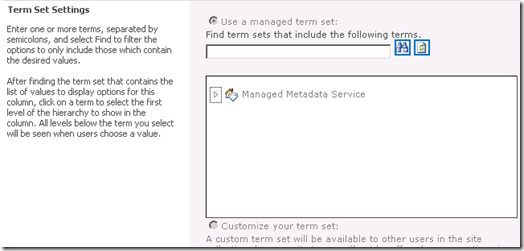
So what does a managed metadata column orphaned from a term set look like? Fortunately, SharePoint handles this gracefully. The leftmost image below shows a managed metadata column happily linked to its term set. The rightmost image shows what it looks like when that term set is deleted while the column remains. As you can see we now have no reference to a term set. However, it is easy to re-point the column to another term set.

image_thumb36 image_thumb37

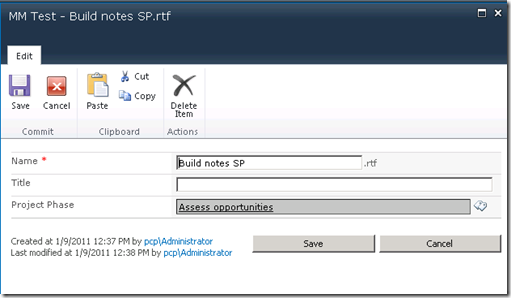
When you examine list or library items that have managed metadata entered for them prior to the term set being deleted, SharePoint prevents the managed metadata control from being used (the Project Phase column below is greyed out). Importantly, the original data is not lost since SharePoint actually stores the term along with the rest of the item metadata, but the term cannot be updated of course as there is no term set to refer to.

image_thumb8

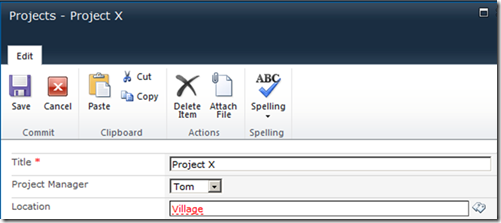
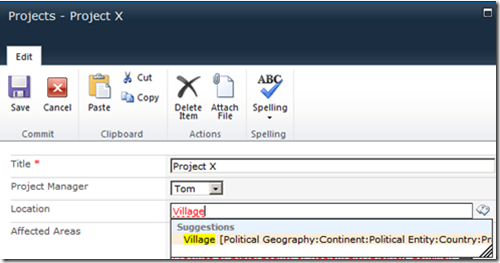
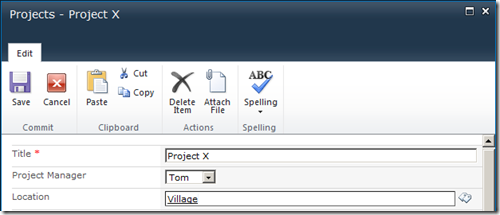
Once you reconnect a managed metadata column to a term set, the existing term will still be orphaned. The process of reconnecting does not do any sort of processing of terms to reconnect them. I show this below. In the example below, notice how this time, the managed metadata control is enabled again (as it has a valid term set), but the terms within it are marked red, signalling that they are invalid terms that do not exist in this term set. Notice though the second screen. By clicking on the orphaned term, managed metadata finds it in the associated term set and offers the right suggestion. With a single click, the term is re-linked back to the term store and the updated GUID is stored for the item. Too easy.

image_thumb21

image_thumb22

image_thumb23

As the sequence of events above show, it is fairly easy to re-link a term to the term set by clicking on it and letting managed metadata find that term in the term set. However, it is not something you would want to do for 10000 items in a list! In addition, the relative ease of relinking a term like the Location column above is elegant only because it is a single term that does not show the hierarchy. This is not the only configuration available for managed metadata though.

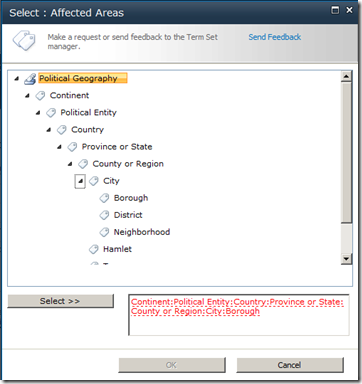
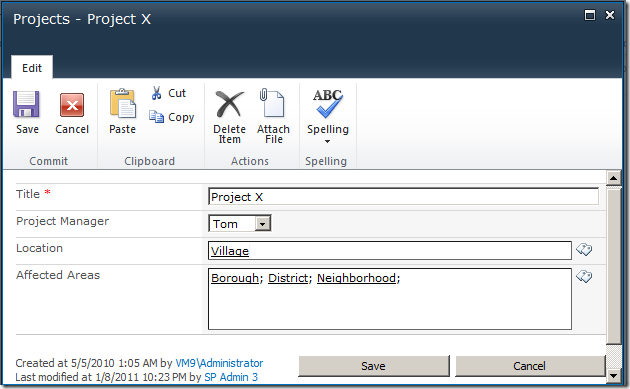
If you have set up your column to use multiple managed metadata entries, as well as allow multiple entries, you will have something like the screen below. In this example, we have three terms selected. “Borough”, “District” and “Neighbourhood”. All three of these terms are at the bottom of a deep hierarchy of terms. (eg Continent > Political Entity > Country > province or State > County or Region > City). As a result, things look ugly.

image_thumb25

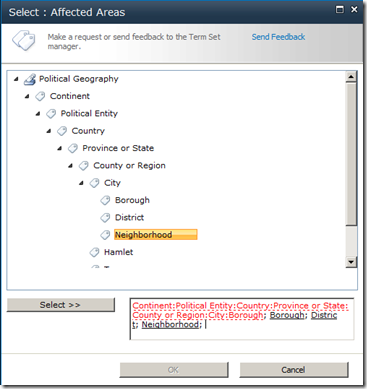
Unfortunately in this use-case, our single click method will not work. Firstly, we have to click each and every term that has been added to this column one at a time. Secondly and more importantly, even if we do click it, the term will not be found in in the new term set. The only way to deal with this is to manually remove the term and re-enter or use the rather clumsy term picker as the sequence below shows.

image_thumb33

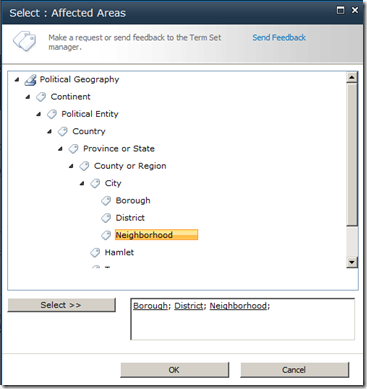
Note how as each term is selected, it is marked in black. We have to manually delete the orphaned terms in red.

image_thumb34 image_thumb35

Finally, after far too many mouse clicks, we are back in business.

image_thumb31

A better approach?

I showed this behaviour to my Seven Sigma colleague, Chris Tomich. Chris took a look at this issue and within a few hours trotted out a terrific PowerShell script to programmatically reconnect terms to a new term set. You can grab the source code for this script from Chris’s blog. The one thing Chris did tell me was that he wasn’t able to re-link a site or list column to its replacement term set. That bit you have to do yourself. This is because only the GUID of a term set is used against a column, which means without access to the original server, you do not know which term set to reattach.

Fortunately, there are not that many term sets to deal with, and the real pain is reattaching orphaned terms anyway.

Chris also added a ‘test’ mode to the script, so that it will flag if a field is currently connected to an invalid term set. This is very handy because you can run the script against a site collection and it will help you narrow down which columns are managed metadata and which need to be updated.

From the SharePoint 2010 Management Shell, the script syntax is: (assuming you call your script ReloadTermSets.ps1) –

.\ReloadTermSets.ps1 -web “http://localhost” -test -recurse

web – This is the web address to use. test – This uses a ‘test’ mode that will output lines detailing found fields and the values found for them in the term store and won’t save the items. recurse – This flag will cause the script to recurse through all child sites.

Of course, the usual disclaimers apply. Use the script/advice at your own risk. By using/viewing/distributing it you accept responsibility for any loss/corruption of data that may be incurred by said actions.

I hope that people find this useful. I sure did

Thanks for reading

Paul Culmsee

www.sevensigma.com.au


Announcing the SamePage Alliance

image

This is really great, and something that’s been a long time coming. On behalf of my partners at Seven Sigma, I’m announcing the formation of the SamePage Alliance. A strategic partnership with Seven Sigma and 21Apps, founded by Andrew Woodward, as founding members. SamePage is a commercial relationship where we will be pooling the respective talents of our organisations together and expanding our service offerings to clients.

I first met Andrew in San Diego in 2008, the SharePoint Best Practices Conference, where I was a very nervous first-time presenter, wondering if all of my wicked problem stuff would resonate with the US audience. Andrew was there, presenting on TDD and Scrum, and apart from having someone in the US I could talk about the cricket with, it was immediately clear that we had a hell of a lot in common. It was like he held a big piece to a puzzle, and I held another piece. The irony was that I never got to see his talk as, if I recall, we presented at the same time. But back then (Feb 08) I made a rather prophetic statement at the end of my report of that conference.

“I feel some future collaboration in the very near future.  Andrew Woodward will definitely be a part of it (although he doesn’t know it yet…Hehehe).”

Funny how things turn out. We have collaborated on a number of different things since then, both within the SharePoint realm and beyond it. The common interests run deep and between 21apps and Seven Sigma, there is a lot of experience there. During the SharePoint Evolutions conference, where a certain volcano prevented me attending, Andrew ran my wicked problems/SharePoint/IBIS talk for me and did a tremendous job (I watched all the tweets from Perth).

In terms of practicalities, we will be reselling each-others products and services. Seven Sigma entered the training space this year, writing the SharePoint 2010 Governance and Information Architecture course that 3Grow and Microsoft New Zealand use to certify gold partners for SharePoint prowess. Seven Sigma also developed a unique 1 and 2-day SharePoint Governance f-Laws course, with content drawn from our sensemaking work that we ran in the New Zealand and Sydney conferences. When it came to who could possibly teach Seven Sigma courseware, the obvious answer was Andrew Woodward, given our shared interests and his sterling job at Evolutions.

21apps released their first SharePoint product into the marketplace this year – 21scrum, and 21apps authors and teaches workshops and training for development teams looking to improve their quality of development around the SharePoint space.

Further to this, we will be co-developing products as well. Seven Sigma has been brewing some things in the cauldron for some time and 21apps will be part of this development effort.

In general terms, we offer great SharePoint competencies across training, governance, infrastructure, development and delivery. Our combined offerings means that we can offer:

  • Global software development and round the clock SharePoint managed services and support
  • World-unique strategic advisory services and collaborative facilitation services, incorporating goal alignment, shared visioning and performance framework development, large group facilitation, user and community engagement, enquiry by design, risk analysis, critical thinking and decision methodologies, process improvement
  • Beyond SharePoint, we can provide full enterprise architecture and analysis services over the program life cycle
  • The first output of this new arrangement is a two-day course to be run in London in mid November. Andrew will be there too, and we will cover my SharePoint Governance f-Laws course as well as material from the recent Information Architecture course in New Zealand. If you have SharePoint competencies and find yourself having to bridge the gap between organisational aspirations and SharePoint as the enabler to that aspiration, then this session is for you.

    You can find out more about this event and register at the 21apps site.

    Looking forward to seeing you all there!

    www.samepage.co

    www.21apps.co.uk

    www.sevensigma.com.au


    Why me? Web part errors on new web applications

    Oh man, it’s just not my week. After nailing a certificate issue yesterday that killed user profile provisioning, I get an even better one today! I’ve posted it here as a lesson on how not to troubleshoot this issue!

    The symptoms:

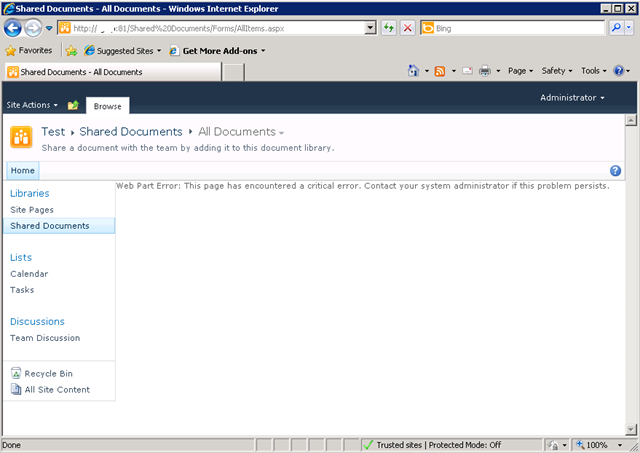
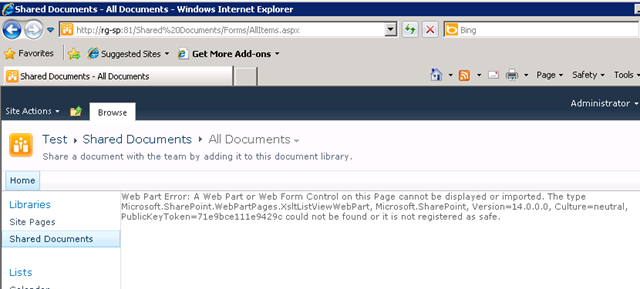
    I created a brand new web application on a SP2010 farm, and irrespective of the site collection I subsequently create, I get the dreaded error "Web Part Error: This page has encountered a critical error. Contact your system administrator if this problem persists"

    Below is a screenshot of a web app using the team site template. Not so good huh?

    image

    The swearing…

    So faced with this broken site, I do what any other self respecting SharePoint consultant would do. I silently cursed Microsoft for being at the root of all the world’s evils and took a peek into that very verbose and very cryptic place known as the ULS logs. Pretty soon I found messages like:

    0x3348 SharePoint Foundation         General                       8sl3 High     DelegateControl: Exception thrown while building custom control ‘Microsoft.SharePoint.SPControlElement’: This page has encountered a critical error. Contact your system administrator if this problem persists. eff89784-003b-43fd-9dde-8377c4191592

    0x3348 SharePoint Foundation         Web Parts                     7935 Information http://sp:81/default.aspx – An unexpected error has been encountered in this Web Part.  Error: This page has encountered a critical error. Contact your system administrator if this problem persists.,

    Okay, so that is about as helpful as a fart in an elevator, so I turned up the debug juice using that new, pretty debug juicer turner-upper (okay, the diagnostic logging section under monitoring in central admin). I turned on a variety of logs at different times including.

    • SharePoint Foundation           Configuration                   Verbose
    • SharePoint Foundation           General                         Verbose
    • SharePoint Foundation           Web Parts                       Verbose
    • SharePoint Foundation           Feature Infrastructure          Verbose
    • SharePoint Foundation           Fields                          Verbose
    • SharePoint Foundation           Web Controls                    Verbose
    • SharePoint Server               General                         Verbose
    • SharePoint Server               Setup and Upgrade               Verbose
    • SharePoint Server               Topology                        Verbose

    While my logs got very big very quickly, I didn’t get much more detail apart from one gem,to me, seemed so innocuous amongst all the detail, yet so kind of.. fundamental 🙂

    0x3348 SharePoint Foundation         Web Parts                     emt7 High     Error: Failure in loading assembly: Microsoft.SharePoint, Version=12.0.0.0, Culture=neutral, PublicKeyToken=b03f5f7f11d50a3a eff89784-003b-43fd-9dde-8377c4191592

    That rather scary log message was then followed up by this one – which proved to be the clue I needed.

    0x3348 SharePoint Foundation         Runtime                       6610 Critical Safe mode did not start successfully. This page has encountered a critical error. Contact your system administrator if this problem persists. eff89784-003b-43fd-9dde-8377c4191592

    It was about this time that I also checked the event logs (I told you this post was about how not to troubleshoot) and I saw the same entry as above.

    Log Name:      Application
    Source:        Microsoft-SharePoint Products-SharePoint Foundation
    Event ID:      6610
    Description:
    Safe mode did not start successfully. This page has encountered a critical error. Contact your system administrator if this problem persists.

    I read the error message carefully. This problem was certainly persisting and I was the system administrator, so I contacted myself and resolved to search google for the “Safe mode did not start successfully” error.

    The 46 minute mark epiphany

    image

    If you watch the TV series “House”, you will know that House always gets an epiphany around the 46 minute mark of the show, just in time to work out what the mystery illness is and save the day. Well, this is the 46 minute mark of this post!

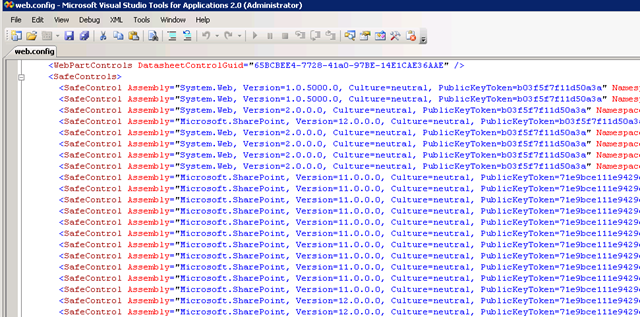
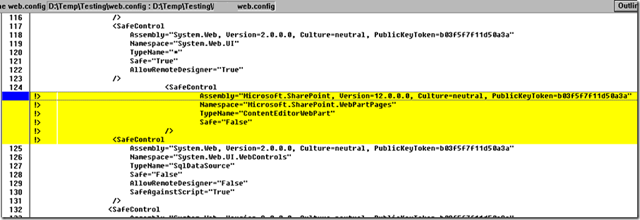
    I quickly found that others had this issue in the past, and it was the process where SharePoint checks web.config to process all of the controls marked as safe. If you have never seen this, it is the section of your SharePoint web application configuration file that looks like this:

    image 

    This particular version of the error is commonly seen when people deploy multiple servers in their SharePoint farm, and use a different file path for the INETPUB folder. In my case, this was a single server. So, although I knew I was on the right track, I knew this wasn’t the issue.

    My next thought was to run the site in full trust mode, to see if that would make the site work. This is usually a setting that makes me mad when developers ask for it because it tells me they have been slack. I changed the entry

    <trust level="WSS_Minimal" originUrl="" />

    to

    <trust level="Full" originUrl="" />

    But to no avail. Whatever was causing this was not affected by code access security.

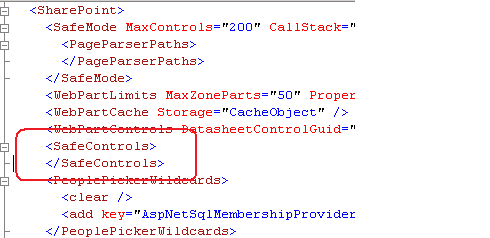
    I reverted back to WSS_Minimal and decided to remove all of the SafeControl entries from the web.config file, as shown below. I knew the site would bleat about it, but was interested if the “Safe Mode” error would go away.

    image

    The result? My broken site was now less broken. It was still bitching, but now it appeared to be bitching more like what I was expecting.

    image

    After that, it was a matter of adding back the <safecontrol> elements and retrying the site. It didn’t take long to pinpoint the offending entry.

    <SafeControl Assembly="Microsoft.SharePoint, Version=12.0.0.0, Culture=neutral, PublicKeyToken=b03f5f7f11d50a3a" Namespace="Microsoft.SharePoint.WebPartPages" TypeName="ContentEditorWebPart" Safe="False" />

    As soon as I removed this entry the site came up fine. I even loaded up the content editor web part without this entry and it worked a treat. Therefore, how this spurious entry got there is still a mystery.

    The final mystery

    My colleague and I checked the web.config file in C:\Program Files\Common Files\Microsoft Shared\Web Server Extensions\14\CONFIG. This is the one that gets munged with other webconfig.* files when a new web application is provisioned.

    Sure enough, its modified date was July 29 (just outside the range of the SharePoint and event logs unfortunately). When we compared against a known good file from another SharePoint site, we immediately saw the offending entry.

    image

    The solution store on this SharePoint server is empty and no 3rd party stuff to my knowledge has been installed here. But clearly this file has been modified. So, we did what any self respecting SharePoint consultant would do…

    …we blamed the last guy.


    Thanks for reading

    Paul Culmsee

    www.sevensigma.com.au


    Index index everywhere but not a result in sight.

    I have been doing a bit more tech work than normal lately – SP2010 popularity I guess, and was asked to remediate a few issues on a problematic server that I hadn’t set up. The server in question had a number of issues (over and above the usual “lets all run it as one account” type stuff) that had a single root cause, so I thought I’d quickly document the symptoms and the cause here.

    Symptom 1: SQL Server Event ID 28005:

    “An exception occurred while enqueueing a message in the target queue. Error: 15404, State: 19. Could not obtain information about Windows NT group/user ‘DOMAIN\someuser’, error code 0x5”

    This error would be reported in the Application log around 70 times per minute. As it happened, I had removed the account in question from running any of the SharePoint web, application or windows services, but this still persisted. I suspect SharePoint was installed as this account because it was the db owner of many of the databases on the SQL Server. Whatever the case, SQL was whinging about it despite its lack of actual need to be there.

    Symptom 2: Event ID 4625:

    At a similar rate of knots as the SQL error, was the rate of 4625 errors in the security log. These logs were not complaining about the account that the SQL event complained about, but instead it complained about ANY account running the SQL Server instance. I tried network service, a domain account and a local account and saw similar errors (although the local one had a different code).

    Log Name:      Security
    Source:        Microsoft-Windows-Security-Auditing
    Event ID:      4625
    Task Category: Logon
    Keywords:      Audit Failure
    Description:  An account failed to log on. 
    
    Subject:
        Security ID:        NETWORK SERVICE
        Account Name:        COMPUTER$
        Account Domain:        DOMAIN
        Logon ID:        0x3e4 
    
    Failure Information:
        Failure Reason:        Unknown user name or bad password.
        Status:            0xc000006d
        Sub Status:        0xc0000064 
    
    Process Information:
        Caller Process ID:    0x7e0
        Caller Process Name:    E:\Program Files\Microsoft SQL Server\MSSQL10_50.MSSQLSERVER\MSSQL\Binn\sqlservr.exe 
    
    Detailed Authentication Information:
        Logon Process:        Authz   
        Authentication Package:    Kerberos

    When using a local, rather than a domain user account the code was:

    Failure Information:
        Failure Reason:        An Error occured during Logon.
        Status:            0xc000005e
        Sub Status:        0x0 

    Symptom 3: Search only working for domain administrators

    On top of the logs being filled by endless entries of the previous two, I had another error (the original reason why I was called in actually). A SharePoint search would yield zip, nada, zero, no results for a regular user, but a domain administrator could happily search SP2010 and get results. (well actually regular users did get some results – people searched actually worked fine).

    The crawler was fine and dandy and the default content source had not been messed with. There were no errors or logs to suggest anything untoward.

    The resolution:

    It was the second symptom that threw me because I thought that the problem must have been kerberos config. But I quickly discounted that after checking SPN’s and the like (notwithstanding the fact this was a single server install anyway!)

    On a hunch (helped by the fact that I had dealt with the issue of registering managed accounts not so long ago), I concentrated on the user account that was causing SQL Server all the trouble (Event ID 28005). I loaded up Active Directory and temporarily changed the security of this user account so that “Authenticated Users” had “READ” access to it.

    image

    As soon as I did this, both event ID 28005 and 4625 stopped.

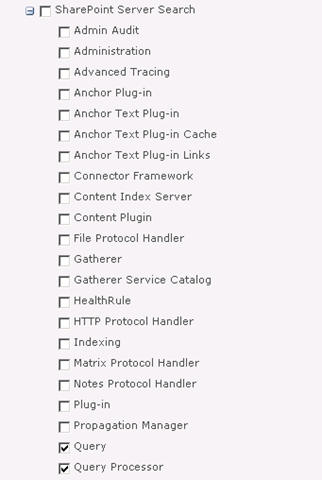
    I then checked the search (symptom 3) and it was still barfing. In this case I decided to turn up the debug juice on the “Query” and “Query Processor” functions of “SharePoint Server Search”.

    image

    After upping the level of verbosity, I found what I was looking for.

    08/12/2010 22:13:41.00     w3wp.exe (0x2228)                           0x1F0C    SharePoint Server Search          Query Processor                   g2j3    High        AuthzInitializeContextFromSid failed with ERROR_ACCESS_DENIED. This error indicates that the account under which this process is executing may not have read access to the tokenGroupsGlobalAndUniversal attribute on the querying user’s Active Directory object. Query results which require non-Claims Windows authorization will not be returned to this querying user.    debd2c54-d6a5-41b8-bf26-c4697b36f4d4

    I knew immediately that this was very likely the same issue as the first two symptoms and when I googled this result, my Perth compatriot, Jeremy Thake had hit the same issue in July. The fix is to add your search service account to a group called “Pre-Windows 2000 Compatibility Access” group. This group happens to have the right required to read this attribute. Whether it is the same attribute I needed for my SQL issue, or the registering managed accounts issue I don’t know, but what I do know is that this group loosens up permissions enough to cure all four of these issues.

    The little security guy in me keeps telling me I should confirm the least privilege in each of these scenarios, but hey if Microsoft are saying to put the accounts into this group, then who am I to argue?

    Finally, it turns out that SP2010 re-introduced something that was in SP2003. A call to a function called AuthzInitializeContextFromSid which seems to be the root of it all. Apparently it was not used in SP2007, but its sure there now. I assume that one of the many stored procedures that SharePoint would call in SQL may have been the cause of Symptom 1. When you look at Symptom 2, it now makes sense because AD was faithfully reporting an access denied when the call to AuthzInitializeContextFromSid was made. It reported SQL Server as the culprit, I assume, because of a stored proc doing the work perhaps? It just sucks that the security event logged is a fairly stock message that doesn’t give you enough specifics to really work out what is going on.

    Anyway, I hope that helps someone else – as googling the event ID details is not overly helpful


    Thanks for reading

    Paul Culmsee

    www.sevensigma.com.au


    SharePoint, Debategraph and Copenhagen 2009 – Collaboration on a global scale

    Note: For those of you who do not wish to read my usual verbose writing, then skip to the last section where there is a free web part to download and try out.

    Unless you are a complete SharePoint nerd and world events don’t interest you while you spend your hours in a darkened room playing with the SP2010 beta, you would no doubt be aware that one of the most significant collaborative events in the world is currently taking place.

    The United Nations climate change conference in Copenhagen this month is one of the most important world gatherings of our time. You might wonder why, as a SharePoint centric blog, I am writing about this. The simple answer is that this conference in which the world will come together to negotiate and agree on one of the toughest wicked problems of our time. How to tackle international climate change in a coordinated global way. As I write this, things do not seem to be going so well :-(.

    image

    Climate change cuts to the heart of the wellbeing expected by every one of us. Whether you live in an affluent country or a developing nation, the stakes are high and the issues at hand are incredibly complex and tightly intertwined. It might all seem far away and out of sight/out of mind, but it is clear that we will all be affected by the outcomes for better and worse. The spectre of the diminishing window of opportunity to deal with this issue means that an unprecedented scale of international cooperation will be required to produce an outcome that can satisfy all stakeholders in an environmentally, economically and social bottom line.

    Can it be done? For readers who are practitioners of SharePoint solutions, you should have an appreciation of the difficulty that a supposedly “collaborative tool” actually is to improve collaboration. Therefore, I want you to imagine your most difficult, dysfunctional project that you have ever encountered and just try and now multiply it by a million, gazzilion times. If there are ever lessons to be learned about effective collaboration among a large, diverse group on a hugely difficult issue, then surely it is this issue and this event.

    Our contribution

    My colleagues and I became interested in sense-making and collaboration on wicked problems some time back, and through the craft of Dialogue Mapping, we have had the opportunity to help diverse groups successfully work through some very challenging local issues. I need to make it clear that much of what we do in this area is far beyond SharePoint in terms of project difficulty, and in fact we often deal with non IT projects and problems that have significant social complexity.

    Working with people like city planners, organisational psychologists, environmental scientists and community leaders to name a few, has rubbed off on myself and my colleagues. Through the sense-making process that we practice with these groups, we have started to see a glimpse of the world through their eyes. For me in particular, it has challenged my values, social conscience and changed the entire trajectory of where I thought my career would go. I feel that the experience has made me a much better practitioner of collaborative tools like SharePoint and I am a textbook case of the the notion that the key to improving in your own discipline, is to learn from people outside of it.

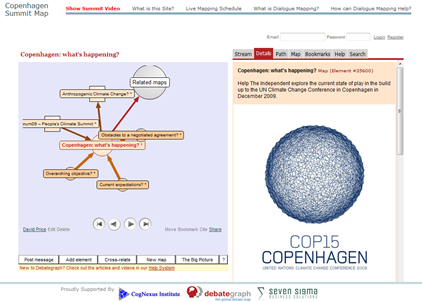
    We have now become part of a global sense-making community, much like the global SharePoint community in a way. A group of diverse people that come together via common interest. To that end, my colleague at Seven Sigma, Chris Tomich has embarked on a wonderful initiative that I hope you may find of interest. He has enlisted the help of several world renowned sense-makers, such as Jeff Conklin of Cognexus and David Price of Debategraph, and created a site, http://www.copenhagensummitmap.org/, where we will attempt to create a global issue map of the various sessions and talks at the Copenhagen summit. The aim of this exercise is to try and help interested people cut through the fog of issues and understand the points of view of the participants. We are utilising IBIS, the grammar behind dialogue mapping, and the DebateGraph tool for the shared display.

    image

    How you can help

    If you feel that issue mapping is for you, then I encourage you to sign up to Debategraph and help contribute to the Copenhagen debate by mapping the dialogue of the online sessions (which you can view from the site).

    Otherwise, Chris has written a simple, free web part, specifically for Copenhagen which can be downloaded “Mapping tools” section of the Copenhagen site. The idea is that if you or your organisation wish to keep up with the latest information from the conference, then installing this web part onto your site, will allow all of your staff to see the Copenhagen debate unfold live via your SharePoint portal. Given that SharePoint is particularly powerful at surfacing data for business intelligence, think of this web part as a means to display global intelligence (or lack thereof, depending on your political view 🙂 ).

    Installing is the usual process for a SharePoint solution file. Add the solution to central admin, deploy it to your web application of choice and then activate the site collection scoped feature called “Seven Sigma Debategraph Components”. The web part will be then available to add to a page layout or web part page.

    image

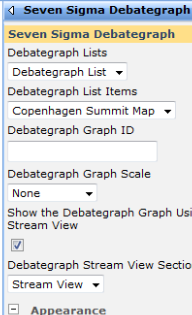
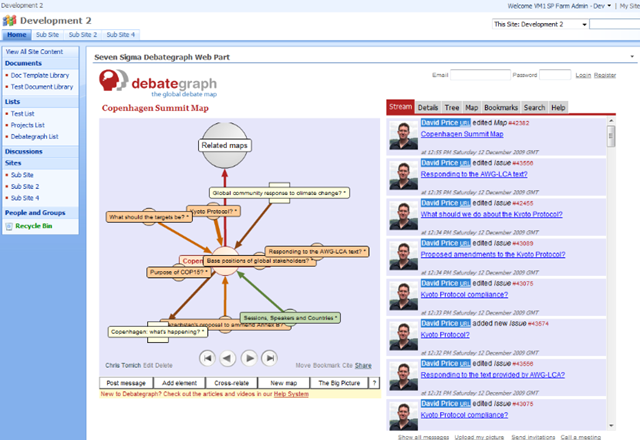
    The properties of this web part allow you some fine grained control over how the Debategraph map renders inside SharePoint. The default is to show the Debategraph stream view, which is a twitter style view of the recent updates as shown in the example below.

    image

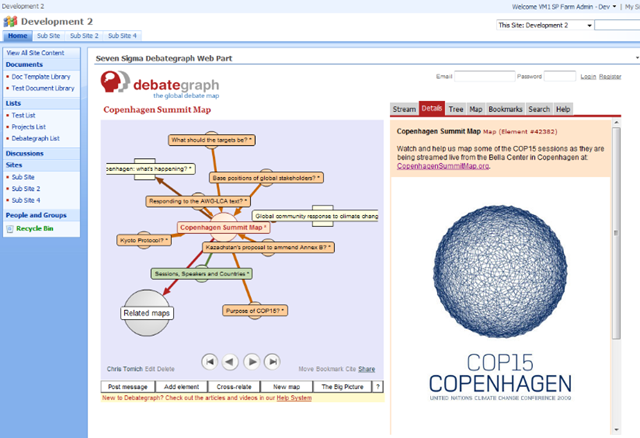
    Stream view is not the only view available. Detail view is also very useful for rationale that has supplementary information, as shown in the example below.

    image

    By the way, you can use this web part to display any Debategraph debate – not just Copenhagen. The Debategraph map to display is also controlled via the web part properties.

    For information on how to change the default map, then check out this webcast I recorded for the previous version here.

    I hope that some of you find this web part of use and look forward to any feedback.


    Kind regards


    Paul Culmsee

    www.sevensigma.com.au


    Missing metadata with Office 2003 – yet another “duh” moment…

    I had a problem this week that got resolved with something quite obvious, but I learned a lot in the process, so I am detailing it here.

    Symptoms: Using MOSS 2007 SP2 and Office 2003 SP3, users complained that metadata on documents went missing. Consider the scenario below where we have a sample document library.

    image

    Our user opens the “Memo to Council re Convenor” document into Word 2003, makes a change and saves it. Note the difference. Where’s my metadata?

    image

    I asked about this on the ozmoss mailing list, and others noted the same issue. Some had applied the June 2009 cumulative update for WSS3 and the problem was solved for them. I applied this update, and it improved the situation, but did not cure the problem totally.

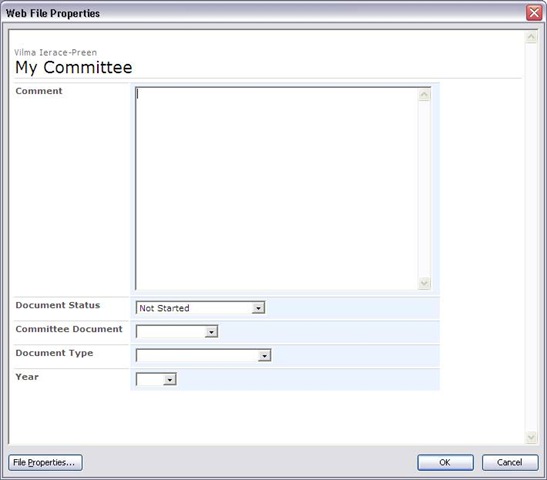
    Upon further investigation, we were able to ascertain that the problem would only happen on certain PCs. The same user could update the same document on a different PC and it would work fine. A fiddler trace of the process allowed me to narrow down the issue and understand the sequence of events. The root cause of the issue was incorrect handling of HTML/JavaScript by Office 2003 and/or Internet Explorer. This manifests itself in an inconsistency in the display of properties in the Office “Web File Properties” dialog box (file->properties in an office 2003 app). Consider the example below.

    clip_image002  clip_image002[5]

    Note that the first dialog shows that values for the metadata columns are blank or default. Now consider the same document opened on a different PC. Well what do you know – we have metadata!

    Fiddler confirmed that when saving a document to SharePoint from an Office 2003 application, the same HTTP request is made to SharePoint as is done when displaying the document properties in the above example.

    In both cases, A HTTP GET request is made to the owssvr.dll  (WSS RPC)  and the dialogview method is called. Therefore, the root of my problem has something to do with the fact that the data returned by this call was not being parsed properly by MSWord on one PC (as illustrated by the first of the above dialog box screenshots). When a user than saved their edits, blank or default values are being written back to SharePoint, in effect “losing” the metadata.

    So let’s take a look at the HTTP call and the data returned. The call to owssvr.dll  looks like this.

    GET /somesite/_vti_bin/owssvr.dll?location=My%20Committee/Agenda%20attachment%20July%2009.doc&dialogview=SaveForm HTTP/1.1

    The output returned by SharePoint is a bunch of HTML and JavaScript that MSWord then renders by calling the Internet Explorers rendering framework programmatically. (I’ve included sample output at the end of the post for the hardcore nerds).

    So the question now becomes, what was preventing the correct HTML rendering on one PC and not the other? This was a difficult question to answer because I was unable to find a way to debug JavaScript when the output was rendered in Office 2003 apps.

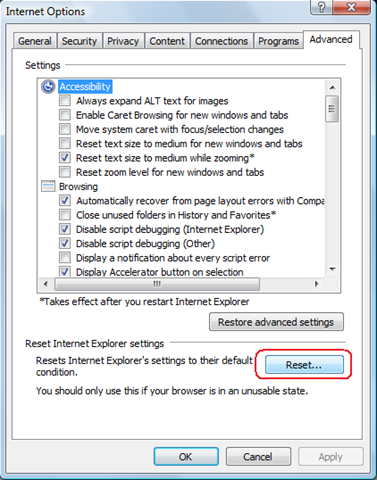
    When you think about it, there can be many potential causes here. Given that Internet Explorer is effectively doing the work (WinINet), this whole process could be adversely affected by add-ins, zone settings, AD policies, virus scanning, etc. On one affected PC I disabled all all-ins to Internet Explorer and retried without success. After around half an hour of frustration, I decided to reset IE’s configuration as shown below.

    image

    After accepting the various warnings, I retried the test and it all worked! Metadata was now being properly saved. “Awesome”, I thought. I’m not quite sure what the true root cause is, but at least I know how to cure it.

    Then it suddenly dawned on me that I’d been stupid. For all of my low level examination of the office 2003/RPC interaction with SharePoint, picking the brain of gurus like MCM Spence Harbar, I’d never thought to clear the temporary internet files cache. Doh!

    On the next affected PC I did so, and the problem also went away instantly.

    *Blush*

    In my defence of my dumbness however, I had never examined the behind the scenes integration with Office 2003 and SharePoint, and it did not even twig that Internet Explorer would be involved in the picture. Given that this problem manifests itself within Office 2003 applications, it is not immediately obvious that your temporary internet files would cause an issue here – but now I know better :-).

    And now I get it…

    Now Office 2007 is not affected by this because it does not use this method at all. In 2007, the document information panel uses InfoPath to render metadata. At the time I naively thought that was a dumb idea because the document information panel cannot display custom column types. For example, let’s say you created a custom column type to hold a phone number with the correct formatting for country code and the like. In a SharePoint site you can display it fine, but in the Office 2007 document information panel, you will never see it. InfoPath only will work with the out of the box in column types.

    My rationale was that if Office 2007 instead used JavaScript and HTML, then it should be able to display these sorts of custom columns. That may actually be true, but it is irrelevant. When you think of the sheer number of ways that the rendering of the code could be interfered with (Temporary Internet Files being one precedent), you can see why the Office team might have opted for the safety of InfoPath instead.

    Now that I understand that this is how Office 2003 does it, I can plainly see that it leaves too much room for error.

    So even though my problem was solved by a simple clearing of the cache, it still remains that things like a bad add-in or a bad AD policy setting could interfere with the Office 2003/SharePoint integration. So if you ever have this issue crop up, try the temporary internet files thing or reset IE’s configuration completely. It may save you a lot of time and pain troubleshooting.

    Thanks for reading

    Paul Culmsee

    www.sevensigma.com.au


    <html dir="ltr">
    <HEAD>
        <META Name="GENERATOR" Content="Microsoft SharePoint">
        <META HTTP-EQUIV="Content-Type" CONTENT="text/html; charset=utf-8">
        <META HTTP-EQUIV="Expires" content="0">
        <!-- _locID="id_PageTitle" _locComment="{StringCategory=TTL}" -->
        <Title ID=onetidTitle>File Properties</Title>
    <Link REL="stylesheet" Type="text/css" HREF="/_layouts/1033/styles/core.css">
        <META Name="Microsoft Theme" Content="default">
        <META Name="Microsoft Border" Content="none">
    <script src="/_layouts/1033/init.js"></script>
    <script src="/_layouts/1033/core.js"></script>
     
    <script src="/_layouts/1033/bform.js"></script>
     
    </HEAD>
    <Script ID="Form_Validate">
    function Form_Validate(fVisible)
    {
        if (frm.FValidate(fVisible))
            document.OWSForm.IsFormValid.value="true";
        else
            document.OWSForm.IsFormValid.value="false";
    }
    </Script>
    <Script ID="Update_UI_From_Values">
    var bFormFieldsInited = false;
    function Update_UI_From_Values()
    {
        frm.SetFirstFocus(bFormFieldsInited);
        bFormFieldsInited = true;
        frm.DataBind();
        DefaultControls();
    }
    </Script>
    <Script ID="Update_Values_From_UI">
    function Update_Values_From_UI()
    {
        frm.SetFirstFocus(bFormFieldsInited);
        bFormFieldsInited = true;
        frm.FValidate(false);
    }
    </Script>
    <script language="JavaScript">
    L_tooltipfile_Text = "";
    L_tooltipfolder_Text = "";
    selectedElement = null
    inChangeSelection = false
    slElem = null;
    oldSelection = "";
    bIsFileDialogView = true;
    function selectrow()
    {
        if (slElem) {
            slElem.className=oldSelection;
            slElem.title="";
            }
        selectedElement = window.event.srcElement;
        while (selectedElement.tagName!="TR") {
               selectedElement=selectedElement.parentElement;
               }
        slElem = selectedElement;
        oldSelection=slElem.className;        
        slElem.className="ms-selected";
        if (slElem.getAttribute("fileattribute") == "file")
            slElem.title=L_tooltipfile_Text;
        else
            slElem.title=L_tooltipfolder_Text;
        document.selection.empty();
    }
    function checkScroll()
    {
        if (document.body.scrollHeight > document.body.offsetHeight ||
            document.body.scrollWidth > document.body.offsetWidth)
           document.body.scroll="yes";
    }
    </script>
    <BODY marginwidth=0 marginheight=0 onload="checkScroll()" onresize="checkScroll()" scroll=no>
    <!-- Banner -->
    <TABLE  CELLPADDING=0 CELLSPACING=0 BORDER=0 WIDTH="100%" >
      <TR>
       <TD COLSPAN=3 STYLE="width:100%">
        <TABLE class=ms-bannerframe CELLPADDING=0 CELLSPACING=0 BORDER=0 STYLE="width:100%">
         <TR>
          <TD VALIGN=BOTTOM WITDH=25>
          <font size=1>&nbsp;</font>
          </TD>
         </TR>
        </TABLE>
       </TD>
      </TR>
    </table>
    <table width=100% cellpadding=4 cellspacing=0>
     <tr>
      <td>
       <TABLE CELLPADDING=0 CELLSPACING=0 BORDER=0 WIDTH="100%" >
        <tr>
         <td>
          <table cellpadding=0 cellspacing=0 style="margin-left: 3px;margin-bottom:2px">
           <tr>
            <td nowrap class="ms-titlearea">Some User</td>
           </tr>
           <tr>
            <td ID=onetidPageTitle nowrap class="ms-pagetitle">My Committee</td>
           </tr>
          </table>
         </td>
        </tr>
        <tr>
         <td>
          <table border=0 width=100% cellpadding=0 cellspacing=0 style="margin-left: 3px;margin-bottom: 3px">
           <tr>
            <td class="ms-sectionline" height=1><img src="/_layouts/images/blank.gif"></td>
           </tr>
          </table>
         </td>
        </tr>
            <!-- Item Form -->
            
    <SCRIPT>
    var frm = new OWSForm("OWSForm", false, "http:\u002f\u002fintranetdev\u002fsomesite\u002f_layouts\u002f");
    </SCRIPT>
     
    <SCRIPT> frm.dopt.chDateSep = "\u002f"; frm.dopt.chTimeSep = ":"; frm.dopt.SetTimeFormat(0); frm.dopt.SetDateOrder(1); frm.dopt.SetDOW(0); frm.dopt.stAM = "AM"; frm.dopt.stPM = "PM"; frm.dopt.TimeMarkPosn = 0; frm.dopt.webTZOffsetMin = -480;  frm.nopt.chDigSep = ","; frm.nopt.chDecimal = "."; frm.nopt.chMinus = "-"; frm.nopt.iNegNumber = 1; frm.nopt.SetGrouping("3;0"); 
    frm.stFieldPrefix = "urn:schemas-microsoft-com:office:office#";
    frm.stImagesPath = "\u002f_layouts\u002fimages\u002f";
    frm.wBaseType = 1;
    </SCRIPT><Form Name="OWSForm" id=OWSForm EncType="multipart/form-data" Action="http://intranetdev/somesite/_vti_bin/owssvr.dll?CS=65001" Method=POST onSubmit="return false;">
    <INPUT Type=Hidden Name="_charset_" Value="utf-8">
    <INPUT ID=onetidCmd Type=Hidden Name="Cmd" Value="Save">
    <INPUT ID=onetidIsFormValid type=hidden name="IsFormValid">
    <INPUT ID=onetidFormWasPosted type=hidden name="FormWasPosted">
    <INPUT ID="MustUpdateForm" type=hidden name="MustUpdateForm" value="true">
    <INPUT type=hidden name="NextID" id="NextID" value="-1">
    <INPUT type=hidden name="NextUsing" id="NextUsing" value="">
    <SPAN id='part1'><INPUT ID=onetidIOHidden TYPE=HIDDEN NAME="List" VALUE="{EF494645-1D24-4761-A874-0CB866FA494C}">
    <INPUT ID=onetidIOHidden TYPE=HIDDEN NAME="ID" VALUE="New">
    <TABLE border=0 cellpadding=2>
    <SCRIPT>var _g_tp_fNewForm = true;</SCRIPT>
    <TR style="display:none"><TH nowrap valign=top class="ms-formlabel"><nobr>Comment<font color=red></font></nobr></TH><TD class="ms-formbody"><SCRIPT>fld = new NoteField(frm,"Comment1","Comment","");fld.stNumLines = "20";fld.IMEMode="";fld.BuildUI();</SCRIPT>&nbsp;<br><SPAN class="ms-formdescription"></SPAN></TD></TR><TR style="display:none"><TH nowrap valign=top class="ms-formlabel"><nobr>Document&nbsp;Status<font color=red></font></nobr></TH><TD class="ms-formbody"><SCRIPT>fld = new ChoiceField(frm,"Corro_x0020_Status","Document Status","Not Started"); fld.format = "Dropdown"; fld.AddChoice("Not Started", "");fld.AddChoice("No Action Required", "");fld.AddChoice("In Progress", "");fld.AddChoice("Completed", "");fld.AddChoice("Deferred", "");fld.AddChoice("Waiting on someone else", "");fld.IMEMode="";fld.BuildUI();</SCRIPT><SPAN class="ms-formdescription"></SPAN></TD></TR><TR style="display:none"><TH nowrap valign=top class="ms-formlabel"><nobr>Content&nbsp;Type<font color=red></font></nobr></TH><TD class="ms-formbody"><SCRIPT>fld = new ChoiceField(frm,"ContentType","Content Type","LSWA Document"); fld.format = "Dropdown"; fld.AddChoice("LSWA Document", "");fld.AddChoice("Folder", "");fld.IMEMode="";fld.BuildUI();</SCRIPT><SPAN class="ms-formdescription"></SPAN></TD></TR><TR style="display:none"><TH nowrap valign=top class="ms-formlabel"><nobr>Committee&nbsp;Document<font color=red></font></nobr></TH><TD class="ms-formbody"><SCRIPT>fld = new ChoiceField(frm,"Committee_x0020_Document","Committee Document",""); fld.format = "Dropdown"; fld.AddChoice("Agendas", "");fld.AddChoice("Minutes", "");fld.AddChoice("Actions", "");fld.AddChoice("Administration", "");fld.IMEMode="";fld.BuildUI();</SCRIPT><SPAN class="ms-formdescription"></SPAN></TD></TR><TR style="display:none"><TH nowrap valign=top class="ms-formlabel"><nobr>Document&nbsp;Type<font color=red></font></nobr></TH><TD class="ms-formbody"><SCRIPT>fld = new ChoiceField(frm,"Document_x0020_Types","Document Type",""); fld.format = "Dropdown"; fld.AddChoice("Incoming Correspondence", "");fld.AddChoice("Outgoing Correspondence", "");fld.AddChoice("Internal Document", "");fld.AddChoice("Fax", "");fld.AddChoice("E-mail", "");fld.AddChoice("Memo", "");fld.IMEMode="";fld.BuildUI();</SCRIPT><SPAN class="ms-formdescription"></SPAN></TD></TR><TR style="display:none"><TH nowrap valign=top class="ms-formlabel"><nobr>Year<font color=red></font></nobr></TH><TD class="ms-formbody"><SCRIPT>fld = new ChoiceField(frm,"Year","Year",""); fld.format = "Dropdown"; fld.AddChoice("2000", "");fld.AddChoice("2001", "");fld.AddChoice("2002", "");fld.AddChoice("2003", "");fld.AddChoice("2004", "");fld.AddChoice("2005", "");fld.AddChoice("2006", "");fld.AddChoice("2007", "");fld.AddChoice("2008", "");fld.AddChoice("2009", "");fld.AddChoice("2010", "");fld.IMEMode="";fld.BuildUI();</SCRIPT><SPAN class="ms-formdescription"></SPAN></TD></TR></TABLE>
    <script type="text/javascript">
    _g_tp_rgctNames = new Array;
    </script><SCRIPT>var _tp_rgctfld = null;var _tp_ctfld = null;var _g_tp_rgcts = new Array;</SCRIPT>
    <script type="text/javascript">
    _g_tp_rgctNames.push("LSWA Document");
    </script>
     
                <SCRIPT>
                _tp_rgctfld = new Array;
                
                    _tp_ctfld = new Object(null);
                    _tp_ctfld.stName="ContentType";
                    _tp_ctfld.fRequired = BoolFromString("");
                    _tp_ctfld.fHidden = BoolFromString("");
                    _tp_ctfld.fShowInNewForm = BoolFromString2("", true);
                    _tp_ctfld.fShowInEditForm = BoolFromString2("", true);
                    _tp_ctfld.fReadOnly = BoolFromString("");
                    _tp_ctfld.stDisplay ="";
                        _tp_rgctfld.push(_tp_ctfld);
                    
                    _tp_ctfld = new Object(null);
                    _tp_ctfld.stName="SelectFilename";
                    _tp_ctfld.fRequired = BoolFromString("");
                    _tp_ctfld.fHidden = BoolFromString("");
                    _tp_ctfld.fShowInNewForm = BoolFromString2("", true);
                    _tp_ctfld.fShowInEditForm = BoolFromString2("", true);
                    _tp_ctfld.fReadOnly = BoolFromString("");
                    _tp_ctfld.stDisplay ="";
                        _tp_rgctfld.push(_tp_ctfld);
                    
                    _tp_ctfld = new Object(null);
                    _tp_ctfld.stName="FileLeafRef";
                    _tp_ctfld.fRequired = BoolFromString("TRUE");
                    _tp_ctfld.fHidden = BoolFromString("");
                    _tp_ctfld.fShowInNewForm = BoolFromString2("", true);
                    _tp_ctfld.fShowInEditForm = BoolFromString2("", true);
                    _tp_ctfld.fReadOnly = BoolFromString("");
                    _tp_ctfld.stDisplay ="";
                        _tp_rgctfld.push(_tp_ctfld);
                    
                    _tp_ctfld = new Object(null);
                    _tp_ctfld.stName="Created";
                    _tp_ctfld.fRequired = BoolFromString("");
                    _tp_ctfld.fHidden = BoolFromString("TRUE");
                    _tp_ctfld.fShowInNewForm = BoolFromString2("", true);
                    _tp_ctfld.fShowInEditForm = BoolFromString2("", true);
                    _tp_ctfld.fReadOnly = BoolFromString("");
                    _tp_ctfld.stDisplay ="";
                        _tp_rgctfld.push(_tp_ctfld);
                    
                    _tp_ctfld = new Object(null);
                    _tp_ctfld.stName="Title";
                    _tp_ctfld.fRequired = BoolFromString("FALSE");
                    _tp_ctfld.fHidden = BoolFromString("");
                    _tp_ctfld.fShowInNewForm = BoolFromString2("FALSE", true);
                    _tp_ctfld.fShowInEditForm = BoolFromString2("TRUE", true);
                    _tp_ctfld.fReadOnly = BoolFromString("");
                    _tp_ctfld.stDisplay ="";
                        _tp_rgctfld.push(_tp_ctfld);
                    
                    _tp_ctfld = new Object(null);
                    _tp_ctfld.stName="Modified";
                    _tp_ctfld.fRequired = BoolFromString("");
                    _tp_ctfld.fHidden = BoolFromString("TRUE");
                    _tp_ctfld.fShowInNewForm = BoolFromString2("", true);
                    _tp_ctfld.fShowInEditForm = BoolFromString2("", true);
                    _tp_ctfld.fReadOnly = BoolFromString("");
                    _tp_ctfld.stDisplay ="";
                        _tp_rgctfld.push(_tp_ctfld);
                    
                    _tp_ctfld = new Object(null);
                    _tp_ctfld.stName="Modified_x0020_By";
                    _tp_ctfld.fRequired = BoolFromString("");
                    _tp_ctfld.fHidden = BoolFromString("FALSE");
                    _tp_ctfld.fShowInNewForm = BoolFromString2("", true);
                    _tp_ctfld.fShowInEditForm = BoolFromString2("", true);
                    _tp_ctfld.fReadOnly = BoolFromString("");
                    _tp_ctfld.stDisplay ="";
                        _tp_rgctfld.push(_tp_ctfld);
                    
                    _tp_ctfld = new Object(null);
                    _tp_ctfld.stName="Created_x0020_By";
                    _tp_ctfld.fRequired = BoolFromString("");
                    _tp_ctfld.fHidden = BoolFromString("FALSE");
                    _tp_ctfld.fShowInNewForm = BoolFromString2("", true);
                    _tp_ctfld.fShowInEditForm = BoolFromString2("", true);
                    _tp_ctfld.fReadOnly = BoolFromString("");
                    _tp_ctfld.stDisplay ="";
                        _tp_rgctfld.push(_tp_ctfld);
                    
                    _tp_ctfld = new Object(null);
                    _tp_ctfld.stName="Comment1";
                    _tp_ctfld.fRequired = BoolFromString("");
                    _tp_ctfld.fHidden = BoolFromString("");
                    _tp_ctfld.fShowInNewForm = BoolFromString2("", true);
                    _tp_ctfld.fShowInEditForm = BoolFromString2("", true);
                    _tp_ctfld.fReadOnly = BoolFromString("");
                    _tp_ctfld.stDisplay ="";
                        _tp_rgctfld.push(_tp_ctfld);
                    
                    _tp_ctfld = new Object(null);
                    _tp_ctfld.stName="Corro_x0020_Status";
                    _tp_ctfld.fRequired = BoolFromString("");
                    _tp_ctfld.fHidden = BoolFromString("");
                    _tp_ctfld.fShowInNewForm = BoolFromString2("", true);
                    _tp_ctfld.fShowInEditForm = BoolFromString2("", true);
                    _tp_ctfld.fReadOnly = BoolFromString("");
                    _tp_ctfld.stDisplay ="";
                        _tp_rgctfld.push(_tp_ctfld);
                    
                    _tp_ctfld = new Object(null);
                    _tp_ctfld.stName="Committee_x0020_Document";
                    _tp_ctfld.fRequired = BoolFromString("FALSE");
                    _tp_ctfld.fHidden = BoolFromString("");
                    _tp_ctfld.fShowInNewForm = BoolFromString2("", true);
                    _tp_ctfld.fShowInEditForm = BoolFromString2("", true);
                    _tp_ctfld.fReadOnly = BoolFromString("");
                    _tp_ctfld.stDisplay ="";
                        _tp_rgctfld.push(_tp_ctfld);
                    
                    _tp_ctfld = new Object(null);
                    _tp_ctfld.stName="Document_x0020_Types";
                    _tp_ctfld.fRequired = BoolFromString("FALSE");
                    _tp_ctfld.fHidden = BoolFromString("");
                    _tp_ctfld.fShowInNewForm = BoolFromString2("", true);
                    _tp_ctfld.fShowInEditForm = BoolFromString2("", true);
                    _tp_ctfld.fReadOnly = BoolFromString("");
                    _tp_ctfld.stDisplay ="";
                        _tp_rgctfld.push(_tp_ctfld);
                    
                    _tp_ctfld = new Object(null);
                    _tp_ctfld.stName="Year";
                    _tp_ctfld.fRequired = BoolFromString("FALSE");
                    _tp_ctfld.fHidden = BoolFromString("");
                    _tp_ctfld.fShowInNewForm = BoolFromString2("", true);
                    _tp_ctfld.fShowInEditForm = BoolFromString2("", true);
                    _tp_ctfld.fReadOnly = BoolFromString("");
                    _tp_ctfld.stDisplay ="";
                        _tp_rgctfld.push(_tp_ctfld);
                    
                    _tp_ctfld = new Object(null);
                    _tp_ctfld.stName="MoveDocu";
                    _tp_ctfld.fRequired = BoolFromString("FALSE");
                    _tp_ctfld.fHidden = BoolFromString("");
                    _tp_ctfld.fShowInNewForm = BoolFromString2("", true);
                    _tp_ctfld.fShowInEditForm = BoolFromString2("", true);
                    _tp_ctfld.fReadOnly = BoolFromString("TRUE");
                    _tp_ctfld.stDisplay ="Move Document";
                        _tp_rgctfld.push(_tp_ctfld);
                    
                _g_tp_rgcts.push(_tp_rgctfld);
                </SCRIPT>
                
    <script type="text/javascript">
    _g_tp_rgctNames.push("Folder");
    </script>
     
                <SCRIPT>
                _tp_rgctfld = new Array;
                _g_tp_rgcts.push(_tp_rgctfld);
                </SCRIPT>
                
    <script type="text/javascript">
    function _FixMpCt2Flds()
    {
        var frm = frmCurrent;
        var rgn1 = frm.rgctNames;
        var rgn2 = _g_tp_rgctNames;
        var rgctflds = _g_tp_rgcts;
        if (rgctflds.length < rgn1.length)
        {
            var rgnew = new Array;
            var i;
            var j = 0;
            for (i = 0; i < rgn1.length; i++)
            {
                var n1 = rgn1[i];
                var n2 = rgn2[j];
                if (n1 != n2)
                {
                    rgnew.push(new Array);
                }
                else
                {
                    rgnew.push(rgctflds[j]);
                    j++;
                }
            }
            _g_tp_rgcts = rgnew;
        }
    }
    _FixMpCt2Flds();
    </script>
     
    </SPAN></form>
    <SCRIPT>
    </SCRIPT>
     
            <!-- FooterBanner closes the TD, TR, TABLE, BODY, And HTML regions opened above -->
    &nbsp;
    </td></tr></table></PlaceHolder></TD></TR>
    </TABLE>
    </BODY>
    </HTML>

    New book preview – SharePoint 2007 Developers Guide to the Business Data Catalog

    I’ve been busy on a number of fronts and some of the fruits of that work will appear soon enough, but I thought that I would pop up to let you know about a forthcoming book written by Brett Lonsdale and Nick Swan on a SharePoint component that has until now, been seriously under-represented in the plethora of SharePoint books out there in the marketplace.

    The Business Data Catalog is one of those SharePoint components that is easy enough to understand conceptually, but then will scare the utter crap out of you when you delve into the guts of its XML based complexity.  At least that was my experience the first time I toyed with it in early 2007. Luckily for me, my ass was saved by a tool that had just been released as a public beta called BDC MetaMan. I downloaded this tool and within around 15 minutes I used it to set up a BDC connection to Microsoft’s Systems Management Server v4 to pull software package details into a SharePoint list and felt very proud of myself indeed. 

    Fast forward to mid 2009 and BDC MetaMan has come a hell of a long way, as have its creators. Nick and Brett are about as world-authoritative as you can possibly get on the BDC and if you wish to become a Jedi in the dark arts of the BDC “force” then you now have your official bible. This book is absolutely crammed with detail and the expertise of the authors in this feature shines throughout.

    The book is split up across 11 chapters and although it is not explicitly stated by the authors, seems to be made of 3 broad parts. Chapter 1 introduces the BDC, how it is architected (web parts, BDC column, BDC Search, and integration with User Profile import and the SDK). Also covered is the range of data sources, an introduction to Application Definition Files (ADF) and how it all integrates into the Shared Service Provider model.

    Once the intro chapter is done with, Brett and Nick don’t waste too much time in diving deep. 

    Chapters 2 and 3 deal with the structure of BDC Application Definition (ADF) files, and follows up with the complex world of how authentication plays out with the BDC. Chapter 2 delves far more into the ADF files than I ever wished to tread, but Nick and Brett somehow manage to describe a long, boring XML file in a logical, easy to follow manner and there was a lot of stuff that I learned here that I had simply missed from trawling MSDN articles. The authentication chapter is covered in excellent detail in Chapter 3 and goes way beyond the usual NTLM/Kerberos double-hop stuff. Authentication in the Microsoft world has become very complex these days, and there are various options and trade-offs. This chapter covers all of this and more, brilliant stuff.

    After the deep dive of ADF and authentication, we surface a little from the previous two chapters into what I think really, is part 2 of this book. That is, several chapters that deal with how you leverage the BDC once you have connected to a line of business application. Chapter 4 introduces the built-in web parts that come with the BDC, shows how they are used and how they can be modified either using SharePoint Designer or tweaking XSL styles directly. Chapter 5 explores the BDC column type, how it can be used in the Office document information panel, in SharePoint Designer workflows, as well as its limitations. Chapter 6 explains how to leverage the BDC for allowing SharePoint to crawl your back-end line of business data and present it in search results. In addition to this, chapter 6 has a lot to offer just from the point of view of customising the search experience, whether using BDC or not. Finally, Chapter 7 examines how the BDC can be utilised to add data into user profiles that is leveraged via audience targeting.

    Next we dive back into “real programmer” territory and what I think makes part 3 of this book. Chapter 8 delves deep into the BDC object model, for those times when the out of the box stuff just won’t quite cut it for you. The example used to demonstrate this object model is a web service that exposes BDC data via several methods. Chapter 9 then covers the creation of a custom web part that is in effect, an Ajax version of the out of the box “Business Data List web part” that refreshes data every few seconds without requiring a page load. Chapter 10 is particularly interesting because it examines how the BDC is used in conjunction with another oft overlooked suite of technologies known as “Office Business Applications”. The combination of BDC and OBA offer many interesting capabilities and among the examples, there are examples of Excel and Word leveraging the BDC as well as creating custom task panes, custom ribbons and the like. Finally, chapter 11 deals with using the BDC to write data back to the line of business applications and finishes with a great example of using InfoPath to submit data to a line of business application via a webservice that calls the BDC. That is hellishly cool in a nerdy developer kind of a way.

    Phew! First up, *man* these guys are smart! I have to say this is the hardest SharePoint book that I have reviewed. It is obviously aimed at developers but it has so much to offer beyond the BDC. The content is very technical at times and obviously low-level. That, itself, is not the problem. Conversely, complex topics are handled really well and everything is extremely logically organised and flows well. The book is simply very, very comprehensive! There is plenty of meat for developers to sink their teeth into and this book will keep you going for a long time.

    The preface of the book states that it has been written for an audience of “Microsoft SharePoint 2007 Information Workers and Developers who need to learn how to use, customize and create solutions using the Business Data Catalog”. I would agree with this, but I hope that information workers do not get put off by chapter 2 (and to some extent, chapter 3). This book dives deep straight off the bat and it is actually the middle chapters that offer the sort of insights that information workers will find the most useful.

    So, if you think that the BDC deserves more than one single chapter towards the back of a SharePoint book, then this is your answer. As well as becoming an expert on the BDC, It will open your eyes to many possibilities beyond it.

    Thanks for reading

    Paul Culmsee


    Developers who do a “Russell Crowe”

    Hi all

    If you were going to slot me into a little stereotype box, then you would slot me into the “IT pro” side of the fence. My coding is okay, but my real vein of expertise lay in infrastructure and over my career, I developed what I think is a reasonable troubleshooting instinct.

    I’ve also worked with developers for the whole of my career and have the scars to prove it. The thing about developers is that they have this in-built reflex that until yesterday I did not have a word for. Then it came to me.

    All developers have a little Russell Crowe inside of them!

    imageWhy do I think this? Am I suggesting that developers are handsome, rugged types who melt your heart with their piercing eyes?  Oh, please. Allow me to explain with a simple mythical conversation with Mr Crowe. Let’s pretend you are a movie director.

    You: “Hey Russell, we need to do another take, your dialogue wasn’t quite right.”

    Russell: “Yes it was.”

    You: “No seriously, I think if you had a look you’ll find that you missed a word or two.”

    Russell: “Completely impossible. You are obviously an amateur and have no idea about acting.”

    You: “I’ve directed twenty films and…”

    BAM!!!  (Flying telephone hits you in the head at high speed, knocking you unconscious.)

    Russell: (2 days later). Okay, so there was a minor issue with my dialogue, but the script was bad to begin with”


    This exchange is somewhat representative of how programmers can occasionally be when it comes to troubleshooting. I remember one case where I was the “Cisco guy” who had problems with a developer who was so utterly fixated on “the network” being the cause of problems with his media streaming application. This created the classic “dev vs infrastructure guy” showdown, which we all know is usually won by the person whose home turf the battle is fought on. Therefore, the developer blaming “the network” and then going up against the “Cisco guy” is like Microsoft trying to win search market share off Google. The battle is so one sided it’s almost cruel to participate – but you feel it is your duty to put the little upstarts in their place anyway.

    I have won the majority of such battles, not because I am any good, but because the developers have thrown the metaphorical phone at me before I’ve finished asking them if they would like a coffee. As a result of their inner Russell Crowe hurling the phone so quickly, their aim is way off, and the phone usually misses me, bounces off the wall and takes out their boss or some other authoritative figure.

    So, they cop some heat and sulk in the corner for awhile, but do developers learn from this? Hell, no! The reason why this is so, is because little Russell doesn’t like to lose, and when he re-emerges, he causes temporary amnesia of all previous battles. Of course, his opponent remembers all, and the next battle is even more cruel that the previous one and the outcome is assured.

    So, yesterday, my friend and colleague did his first “Russell Crowe” for some time. He hit a problem, and misinterpreted the cause and went down a path that led him to a very tunnel-vision view of what was wrong and what the solution was. He described the problem he was having to me and it didn’t feel “right”, but he was pretty insistent he was on the right path. So, I asked Twitter and got back a couple of suggestions and as soon as I put one to him… BAM!! Russell Crowe appeared and threw a phone at me.

    “Well, they are obviously amateurs and haven’t a clue about the SharePoint SDK” was the gist of the response.

    One of the respondents was Bjorn Furuknap, who I can assure you is *not* an amateur :-).

    Anyway a few minutes later we found a different way to troubleshoot which pretty quickly pinpointed the problem. My colleague was very contrite and good natured about it as I teased him mercilessly. I later mentioned to Bjorn that I had just dodged a metaphorical flying phone and he said this wonderful quote which I think sums it up.

    “Of course. He’s a developer. We’re all like that. It is always some else’s fault!”


    Thanks for reading


    Paul Culmsee

    www.sevensigma.com.au


    Review – Understanding SharePoint Journal

    I have been a huge fan of Bjørn Furuknap ever since I first read his amazing series of posts on on customising the user experience at SharePointMagazine.

    What struck me about Bjørn is the quality of his content and his fluid, entertaining and accessible style of writing. Although I can code okay enough, I am not a serious developer by any stretch. But Bjørn’s ability to weave his way through some large, fairly prickly programming topics and at the same time keep a part-timer like me, not only following it all, but really interested from start to finish, is a testament to his skill as a writer and trainer.

    Learning SharePoint with USP Journal

    So when I found out he had started a series of SharePoint journals, I was very keen to provide a review and asked him nicely if I could :-).

    In short, I’m glad I did.

    This debut edition starts on a relatively simple premise. “How do we see who is logged into my SharePoint site at any time”? We learn pretty quickly that this is not as simple as it sounds, but Bjørn deftly teases apart this question into the true problem statement, via basic user stories and easy to understand examples. The proposed solution is described at a high level, with a description on what you need to solve the problem and then summarises it with a mission statement, covering the goals of the solution and the “rules of engagement”

    The “rules of engagement” are clear and have a strong governance/assurance affinity (brings a tear to my eye). The rules are;

    • Use only supportable methods and not harm a single Microsoft-provided file
    • Use the least amount of effort as possible
    • Utilize SharePoint native techniques as much as possible

    I’m sure that “Governance man” would approve…

    The final component of the introduction is a preview of the completed project (with screenshots – including one that I have pasted here).

    image

    Chapter 2-5 gets right into the think of things. Bjørn doesn’t assume too much (he skips programming 101 stuff like SharePoint features), but takes the time to explain setting up your project in Visual Studio for each component of this solution. He balances the theory with the practical extremely well, and manages to pack in a whole bunch of really important tools and key concepts such as:

    • WSPBuilder
    • DelegateControl (I love DelegateControl and I‘m not even a developer 🙂 )
    • List creation via feature (and code)
    • FeatureReceivers
    • SharePoint Manager 2007
    • CAML
    • Feature scopes and dependencies (via the object model)
    • Custom application pages
    • CustomAction methods

    All chapters come with review questions to ensure key concepts have been learned. Even better still, all code from the journals are posted on codeplex so you can download the complete solutions. Brilliant stuff!

    All in all, I have to say that of all of the development oriented authors that I read, Bjørn is one of the best writers out there, If you liked his work on SharePointMagazine and his own blog, then you will love these journals. If you are starting out your career in SharePoint development and want to learn a whole lot of different concepts in a fashion that is underpinned by sustainable development practices, then I strongly suggest that you grab yourself a copy.

    Well done mate, great work!

    Paul Culmsee

    www.sevensigma.com.au


    « Previous PageNext Page »

    Today is: Wednesday 3 June 2026 -