Back to Cleverworkarounds mainpage
 

Mike’s code-monkey "SharePoint suitability" quiz

Ah – this is exactly my sense of humour. My colleague Mike Stringfellow wrote a post called "Code Monkey Hates SharePoint" where he presents a quick multi-choice questionnaire of seemingly innocent questions that allows you to determine how predisposed your code-monkey is to completely butchering your SharePoint environment. Apparently there is not much difference between "the ideal SharePoint developer" and a serial killer 🙂

Good stuff – you can check it out here


Boy bands – how to understand the site definition/template debate

Hi all

I’ve read a few blogs on site definitions vs site templates and reading some development centric articles, particularly the alternative presented by Raymond, and expanded by Mike and summarised neatly by Chris. Being a part time developer, I found that the explanation were a little…shall we say… geeky and I had to expend far too many brain cells.

So to assist the rest of the SharePoint community who are not developers, I am going to attempt to explain the whole sorry debate to you using a more suitable analogy – boy bands. That way you do not have to worry about developer-speak.

image image image

Boy-band "definition"

There are several mandatory characteristics of being a boy band.

  1. All have to be pretty-boys
      One is permitted to be tough in a non threatening way
      One is sensitive
  2. There must be 5 members
  3. All must be able to dance
  4. Playing a musical instrument is not permitted
  5. Clothes are always the latest fashion
  6. Members do not write their own songs
  7. Must do exactly what the record company tells them

When you create a new boy-band, you audition a bunch of hopefuls, using this core set-up and then just give them a nice radio friendly name.

Now, it really doesn’t matter which band it is, this is the formula that is followed by record producers with staggering success. But there is a catch! Change any of these parameters and the whole thing falls apart. For example, if we replace the non-threatening tough guy with a fat kid who can’t dance, teenage girls will rebel and the band will have to break up. It makes no difference which boy-band we are taking about either. You have broken the fundamental structure of how they work and the whole thing will disintegrate.

This, my friends, is a *site definition*.

Also – this is very important to note. The "boy-band" definition is an out-of-the box definition. In other words, no matter what environment that you are operating in, you will always find that the boy-band definition is there.

Boy-band templates

However, just because you have to follow this definition doesn’t mean you can’t make some changes here and there. For example, you can safely change a boy-band’s musical style from pop to light opera and "New Kids On the Block" effectively turns into "Il Divo". If "Il Divo" turns out to be popular among the user population, then the record company will want to produce more operatic boy bands. If we could take "Il Divo" and somehow save them as a template, then we can create new operatic boy-bands quickly and easily.

But the core fact remains that if you modify the original boy-band definition, this new template will crash and burn as well.

"Operatic boy-bands" and "Pop boy-bands" are therefore examples of "site templates".

Both bands are based on the underlying "boy-band" definition and as a result, cannot exist independently without that definition. So what if we want to use the "Operatic boy-band" template in another location?

Not a problem, because as I described earlier, the boy-band definition is out of the box in all locations, and therefore the templates will always be able to be used in other locations.

Unfortunately, sometimes there are limitations with boy-band templates. The bands themselves have "grown" and now realise the original *definition* they have based their template on is too restrictive and will not scale with their future "artistic requirements". There is only so much that you can do when tweaking the more limited options provided by the template model. But since they are based on the underlying boy-band definition, then we are stuck.

New Kids On The block are a great case in point. In 1994, when they released their 4th studio album, they attempted to write their own songs to the detriment of their boy-band career. As we now know that violates rule 6 of the boy-band site definition and as expected, the group split up shortly after.

New site definitions and portability

image image image

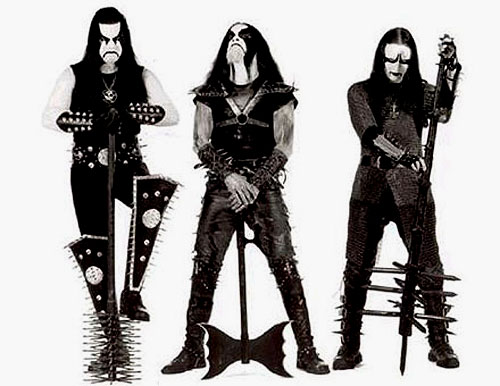
So let’s just say that we want to make the first ever "hybrid death-metal boy band". We know that we cannot do this with a template alone because it will violate the boy-band definition and the world will explode. So we have to make up a new definition to accommodate this unique requirement. Suddenly we are faced with a lot more complexity here. Instead of just re-using a template we have to come up with a brand new definition and this requires specialised expertise. We already know that once we have made up our new definition that it can never be changed, so we had better make sure that we have it right the first time.

Now, let’s say that we create our first death-metal boy band called "New Kids on the Cannibal Corpse" and launch them in Sweden – where all the good metal bands come from. We create our new definition and then set up a new record label, hire PR guys, roadies, stylists, personal assistants and it all goes terrific. Sweden loves this new music sensation. But then when they try and break into the UK scene, it fails miserably. Why? Because we don’t have a record label there. They do not know how to properly deal with a new band based on this hybrid death-metal boy band definition because they have never seen this definition before.

This is one of the problems with making up new site definitions. Since it is not out of the box, if you try and move "New Kids on the Cannibal Corpse" to a new operating environment such as the UK, the definition is missing and therefore they have no idea how to handle it. This creates a dependency issue. Before "New Kids on the Cannibal Corpse" can be launched in the UK, we have to set up the "hybrid death-metal boy band" definition there *first*. Contrast this to "Il Divo" which can tour anywhere because the "boy band" definition is out of the box and therefore already set up by default at all locations.

Future Directions

Musical tastes change over time. Fads come and go, and alas, even boy-bands go out of favour. To achieve real longevity, all bands have to occasionally reinvent themselves – in effect go through a complete upgrade process and emerge as something completely new. The one advantage that boy bands have is that their popularity among teenyboppers means that the record industry will provide assistance to help them emerge as something new.

Unfortunately, the same cannot be said with our poor hybrid death-metal boy band, who, being a custom designed product, will have no guarantees that the record company will help them reinvent.

Therefore, there are disadvantages to a custom band definition. Future upgrades are tougher. But if you have managed to remain on the boy-band definition, despite working with the reduced flexibility of being a customised template, you should be able to upgrade to a newer version with much less pain.

This is important because although you might have more flexibility when freed from the confines of a boy-band definition, you pay for it with future upgrade uncertainty.

Conclusion

So now you should be full-bottle on the difference between site definitions and site templates. So, which one should you use? At the end of the day, it depends on whether you want to be a one-hit-wonder or achieve long term staying power. However, remember the most important thing above all else…

Under no circumstances should you *ever* listen to boy-bands!


Thanks for reading

Paul Culmsee


Free open source WCM for WSS

I have to say, Perth is home to some great SharePoint Talent. MVP Sezai is one prime example and Jeremy Thake is another.

But there is also another colleague of mine who you may or may not know – Tommy Segoro, who is one of those mild-mannered guys who simply gets down to it and produces great things.

Tommy has released a free, open source CMS that sits on top of WSS. Publishing pages, page layouts, the page editing toolbar, all on WSS, without having to upgrade to MOSS at great expense to get the publishing feature.

http://www.codeplex.com/completesharepoint

http://www.completesharepoint.net/Home/Pages/Default.aspx

check it out for yourself!


"Ain’t it cool?" – Integrating SharePoint and real-time performance data – Part 2

Hi again

This article is the second half of a pair of articles explaining how I integrated real-time performance data with an SharePoint based IT operational portal, designed around the principle of passive compliance with legislative or organisational controls.

In the first post, I introduced the PI product by OSIsoft, and explained how SQL Reporting services is able to generate reports from more than just SQL Server databases. I demonstrated how I created a report server report from performance data stored in the PI historian via an OLE DB provider for PI, and I also demonstrated how I was able to create a report that accepted a parameter, so that the output of the report could be customised.

I also showed how a SharePoint provides a facility to enter parameter data when using the report viewer web part.

We will now conclude this article by explaining a little about my passively compliant IT portal, and how I was able to enhance it with seamless integration with the real-time performance data stored in the PI historian.

Just to remind you, here is my conceptual diagram in "acoustic Visio" format
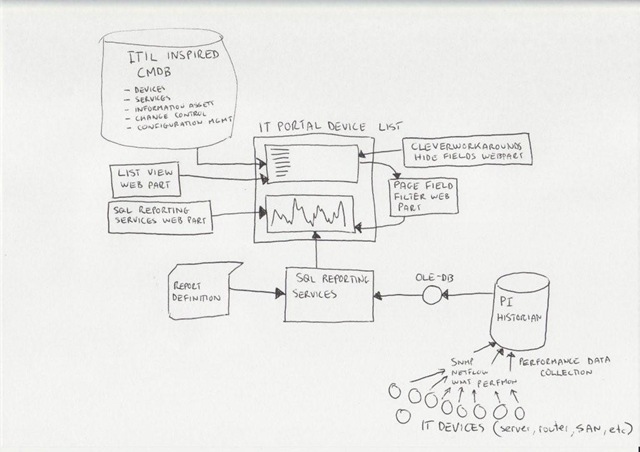
The IT portal

This is the really ultra brief explanation of the thinking that went into my IT portal

I spent a lot of time thinking about how critical IT information could be stored in SharePoint to achieve the goals of quick and easy access to information, make tasks like change/configuration management more transparent and efficient, as well as capture knowledge and documentation. I was influenced considerably by ISO17799 as it was called back then, especially in the area of asset management. I liked the use of the term "IT Assets" in ISO17799 and the strong emphasis on ownership and custodianship.

ISO defined asset as "any tangible or intangible thing that has value to an organization". It maintained that "…to achieve and maintain appropriate protection of organizational assets. All assets should be accounted for and have a nominated owner. Owners should be identified for all assets and the responsibility for the maintenance of appropriate controls should be assigned. The implementation of specific controls may be delegated by the owner as appropriate but the owner remains responsible for the proper protection of the assets."

That idea of delegation is that an owner of an asset can delegate the day-to-day management of that asset to a custodian, but the owner still bears ultimate responsibility.

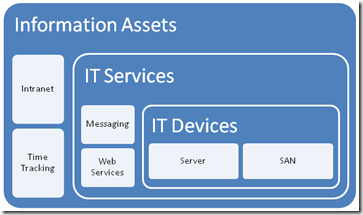
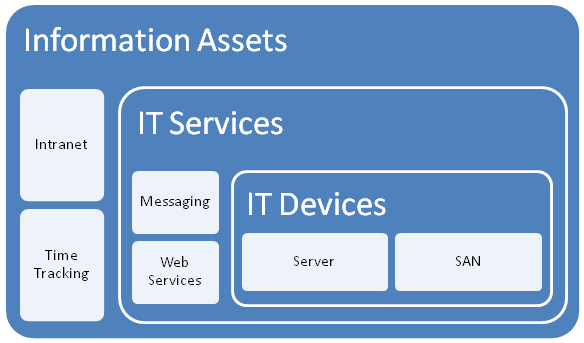
So I developed a portal around this idea, but soon was hit by some constraints due to the broad ISO definition of an asset. Since assets have interdependencies, geeks have a tendency to over-complicate things and product a messy web of interdependencies. After some trial and error, as well as some soul searching I was able to come up with a 3 tier model that worked.

I changed the use of the word "asset", and split it into three broad asset types.

  • Devices (eg Server, SAN, Switch, Router, etc)
  • IT Services (eg Messaging, Databases, IP Network, etc)
  • Information Assets (eg Intranet, Timesheets,
image

The main thing to note about this model is to explain the different between an IT Service and an Information Asset. The distinction is in the area of ownership. In the case of an "Information Asset", the ownership of that asset is not IT. IT are a service provider, and by definition the IT view of the world is different to the rest of the organisation. An "IT Service" on the other hand, is always owned by IT and it is the IT services that underpin information assets.

So there is a hierarchical relationship there. You can’t have an information asset without an IT service providing it. Accountabilities are clear also. IT own the service, but are not responsible for the information asset itself – that’s for other areas of the organisation. (an Information Asset can also depend on other information assets as well as many IT services.

While this may sound so obvious that its not worth writing, my experience is that IT department often view information assets and the services providing those assets as one and the same thing.

Devices and Services

So, as an IT department, we provide a variety of services to the organisation. We provide them with an IP network, potentially a voice over IP system, a database subsystem, a backup and recovery service, etc.

It is fairly obvious that each IT service consists of a combination of IT devices (and often other IT services). an IP network is an obvious one and a basic example. The devices that underpin the "IP Network" service are routers, switches and wireless access points.

For devices we need to store information like

  • Serial Number
  • Warranty Details
  • Physical Location
  • Vendor information
  • Passwords
  • Device Type
  • IP Address
  • Change/Configuration Management history
  • IT Services that depend on this device (there is usually more than 1)

For services, we need to store information like

  • Service Owner
  • Service Custodian
  • Service Level Agreement (uptime guarantees, etc)
  • Change/Configuration Management history
  • IT Devices that underpin this service (there is usually more than 1)
  • Dependency relationships with other IT services
  • Information Assets that depend on this IT service

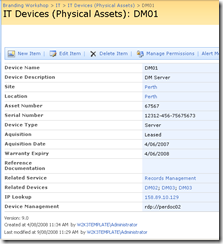
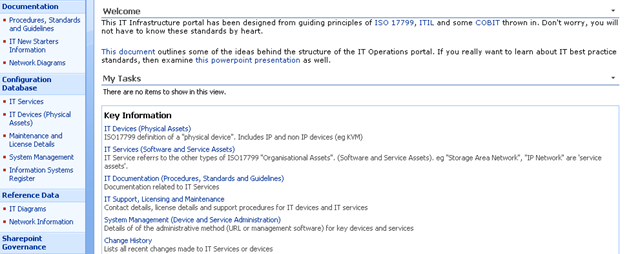
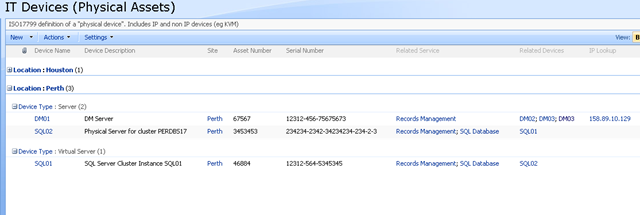
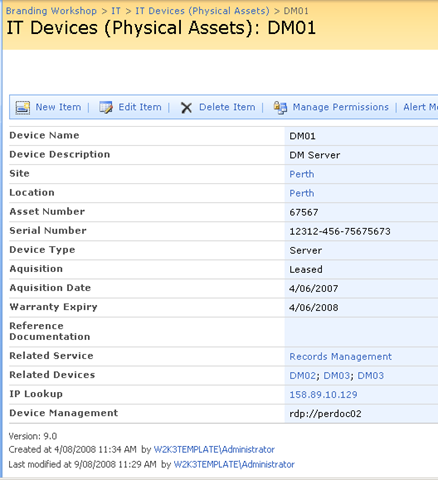
Keen eyed ITIL practitioners will realise that all I am describing here is a SharePoint based CMDB. I have a site template, content types, lists, event handlers and workflows that allow the above information to be managed in SharePoint. Below is three snippets showing sections of the portal, drilling down into the device view by location (click to expand), before showing the actual information about the server "DM01"
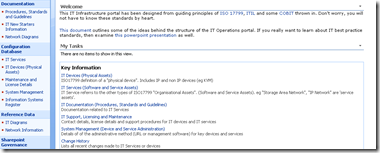
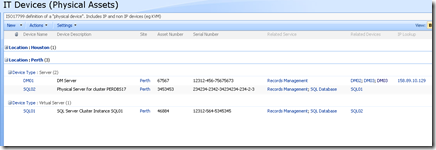
image image

image

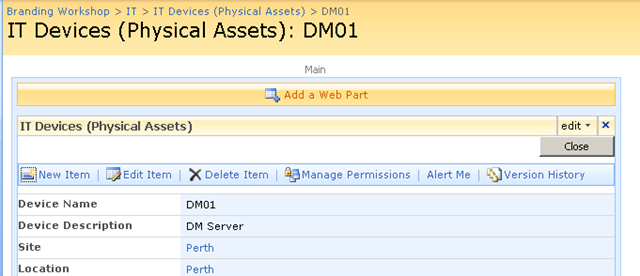
Now the above screen is the one that I am interested in. You may also notice that the page above is a system generated page, based on the list called "IT Devices". I want to add real-time performance data to this screen, so that as well as being able to see asset information about a device, I also want to see its recent performance.

Modifying a system page

I talked about making modifications to system pages in detail in part 3 of my branding using Javascript series. Essentially, a system page is an automatically generated ASPX page that SharePoint creates. Think about what happens each time you add a column to a list or library. The NewForm.aspx, Editform.Aspx and Dispform.aspx are modified as they have to be rebuild to display the new or modified column.

SharePoint makes it a little tricky to edit these pages on account of custom modifications running the risk of breaking things. But as I described in the branding series, using the ToolPaneView hack does the job for us in a safe manner.

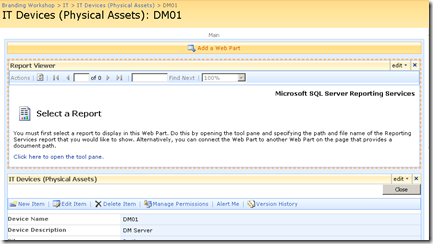
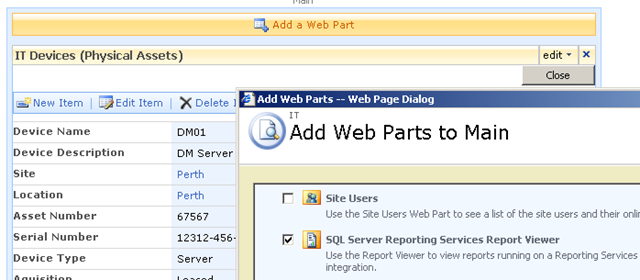
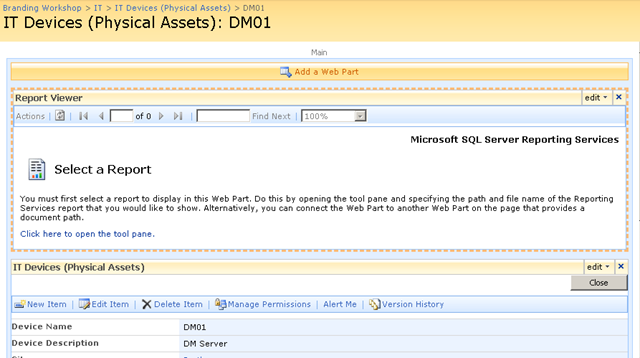
So using this hack, I was able to add a report viewer web part to the Dispform.aspx of the "IT devices" list as shown below.
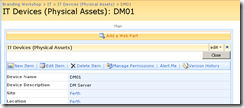
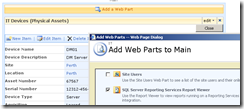
image image

imageimage

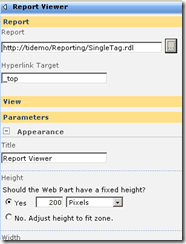
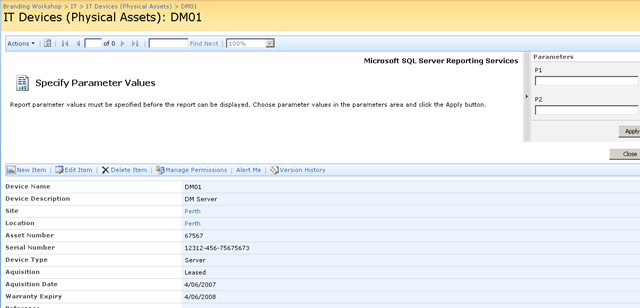
Finally, we have our report viewer webpart, linked to our report that accesses PI historian data. As you can see below, the report that I created actually is expecting two parameters to be supplied. These parameters will be used to retrieve specific performance data and turn it into a chart.
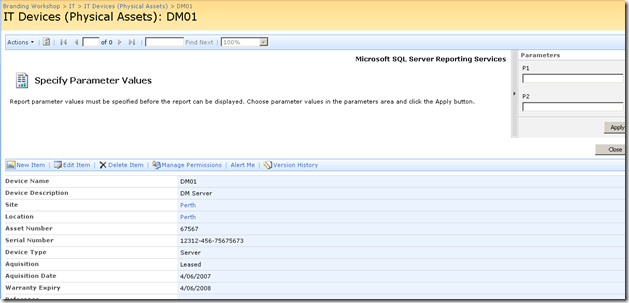
image

Web Part Connection Magic

Now as it stands, the report is pretty much useless to us in the sense that we have to enter parameters to it manually, to get it to actually present us the information that we want. But on the same page as this report is a bunch of interesting information about a particular device, such as its name, IP Address, location and description. Wouldn’t it be great if we could somehow pass the device name (or some other device information) to the report web part automatically.

That way, each time you opened up a device entry, the report would retrieve performance information for the device currently being viewed. That would be very, very cool.

Fortunately for us it can be easily done. The report services web part, like many other web parts is connectable. This means that it can accept information from other web parts. This means that it is possible to have the parameters automatically passed to the report! 

Wohoo!

So here is how I am going to do this. I am going to add two new columns to my device list. Each column will be the parameter passed to the report. This way, I can tailor the report being generated on a device by device basis. For example, for a SAN device I might want to report on disk I/O, but a server I might want CPU. If I store the parameter as a column, the report will be able to retrieve whatever performance data I need.

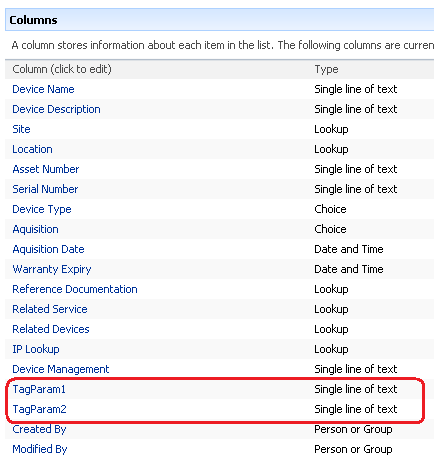
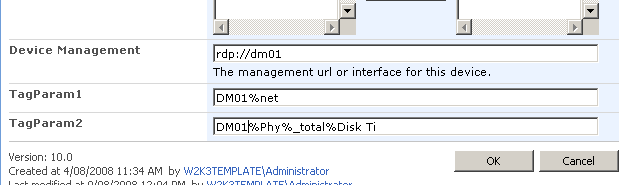
Below shows the device list with the additional two columns added. the columns are called TAGPARAM1 and TAGPARAM2. The next screen below, shows the values I have entered for each column against the device DM01. These values will be passed to the report server report and used to find matching performance data.
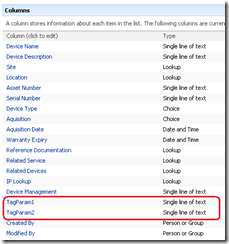
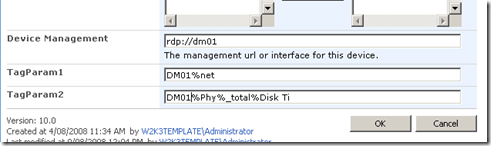
image image

So the next question becomes, how do I now transparently pass these two parameters to the report? We now have the report and the parameters on the same page, but no obvious means to pass the value of TagParam1 and TagParam2 to the report viewer web part.

The answer my friends, is to use a filter web part!

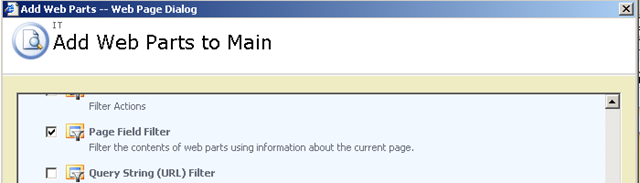
Using the toolpane view hack, we once again edit the view item page for the Device List. We now need to add two additional web parts (because we have two parameters). Below is the web part to add.
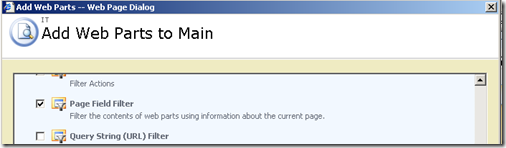
image

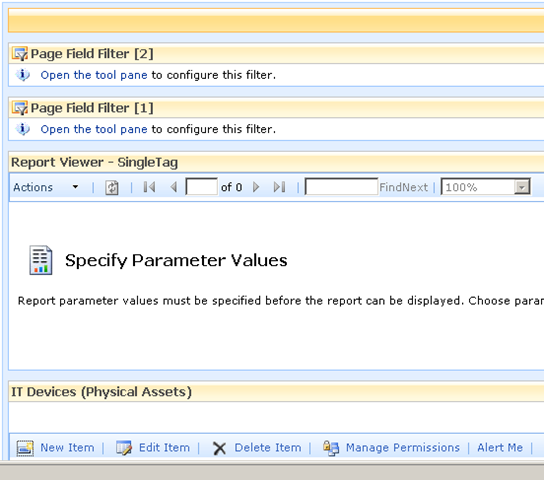
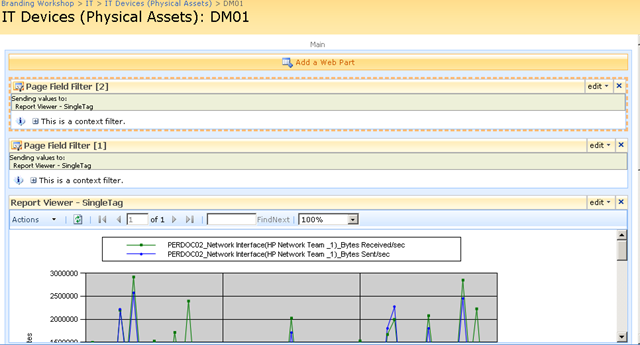
The result should be a screen looking like the figure below
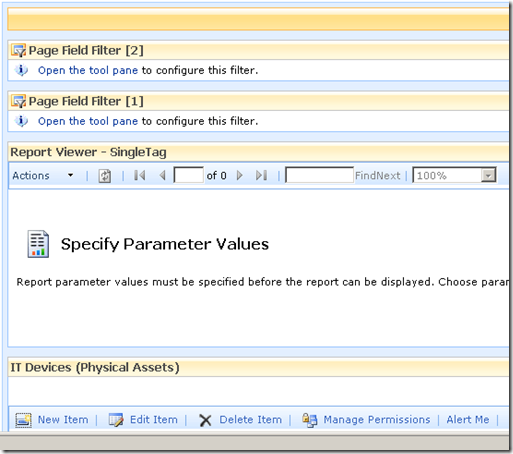
image

Filter web parts are not visible when a page is rendered in the browser. They are instead used to pass data between other web parts. There are various filter web parts that work in different ways. The Page Field filter is capable of passing the value of any column to another web part.

Confused? Check out how I use this web part below…

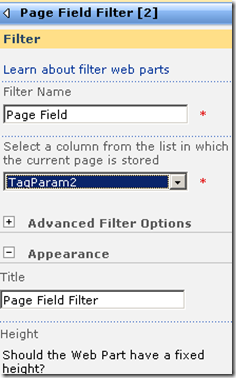
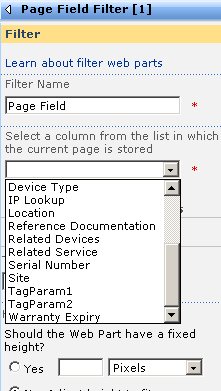
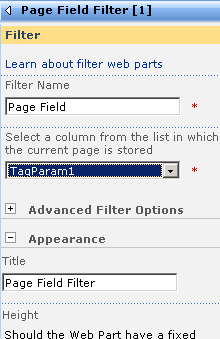
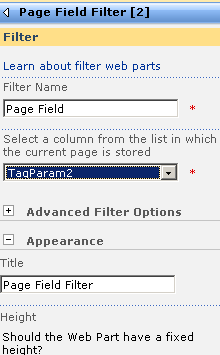
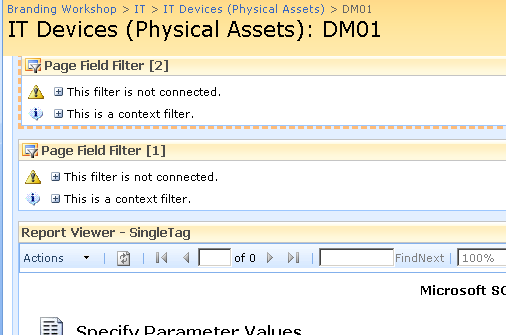
The screen above shows that the two Page Field filters web parts are not configured. They are prompting you to open the tool pane and configure them. Below is the configuration pane for the page field filter. Can you see how it has enumerated all of the columns for the "IT device" list? In the second and third screen we have chosen TagParam1 for the first page filter and TagParam2 for the second page filter web part.
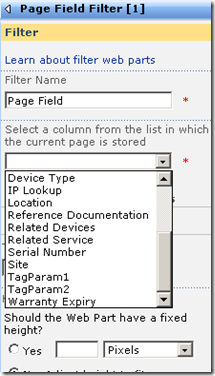
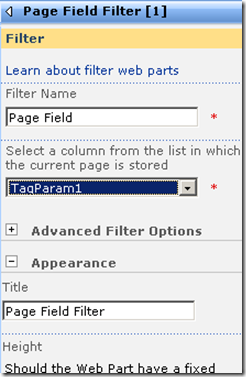
image image image

Now take a look at the page in edit mode. The page filters now change display to say that they are not connected. All we have done so far is tell the web parts which columns to grab the parameter values from
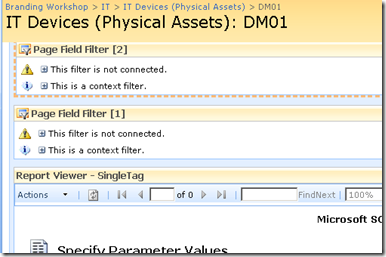
image

Almost Home – Connecting the filters

So now we need to connect each Page Field filter web part to the report viewer web part. This will have the effect of passing to the report viewer web part, the value of TagParam1 and TagParam2. Since these values change from device to device, the report will display unique data for each device.

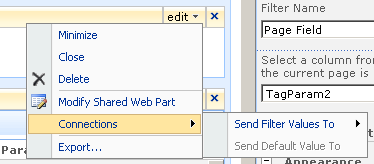
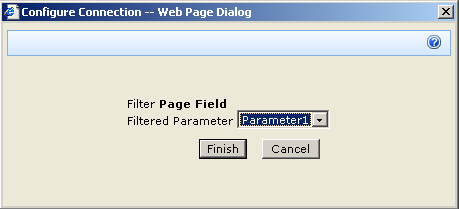
To to connect each page filter web part you click the edit dropdown for each page filter. From the list of choices, choose "Connections", and it will expand out to the choice of "Send Filter Values To". If you click on this, you will be promoted to send the filter values to the report viewer web part on the page. Since in my example, the report viewer web part requires two parameters, you will be asked to choose which of the two parameters to send the value to.
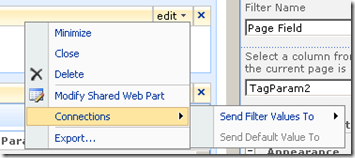
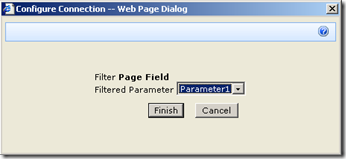
image image

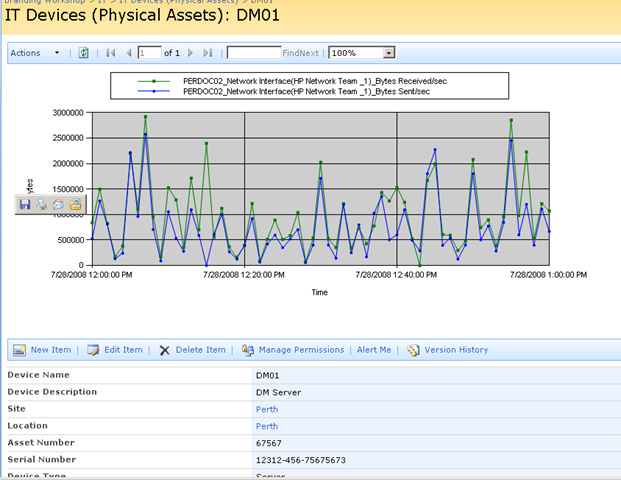
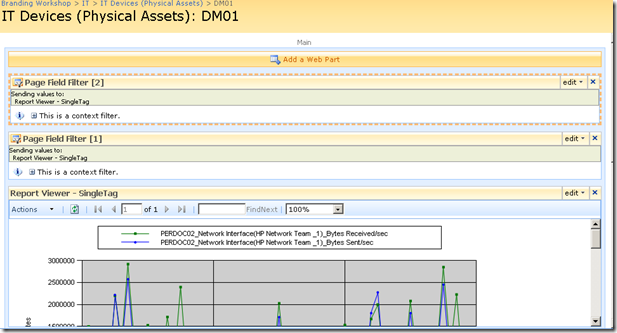
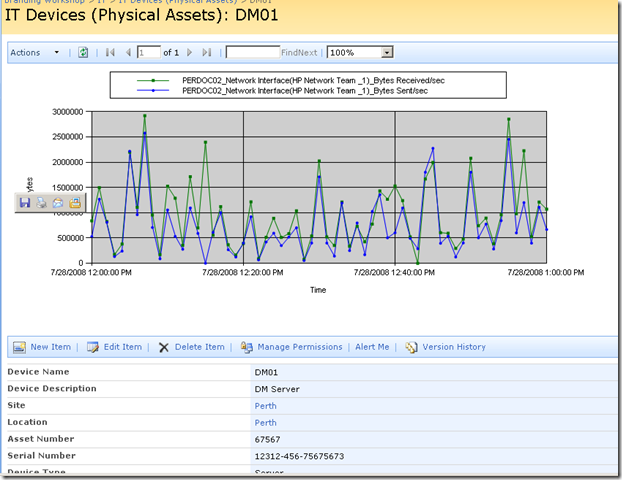
Repeat this step for both page filter web parts and something amazing happens, we see a performance report on the devices page!! The filter has passed the values of TagParam1 and tagParam2 to the report and it has retrieved the matching data!
image

Let’s now save this page and view it in all of its glory! Sweet eh!
image 

Conclusion (and Touchups)

So let’s step back and look at what we have achieved. We can visit our IT Operations portal, open the devices list and immediately view real-time performance statistics for that device. Since I am using a PI historian, the performance data could have been collected via SNMP, netflow, ping, WMI, Performance Monitor counters, a script or many, many methods. But we do not need to worry about that, we just ask PI for the data that we want and display it using reporting services.

Because the parameters are stored as additional metadata with each device, you have complete control over the data being presented back to SharePoint. You might decide that servers should always return CPU stats, but a storage area network return disk I/O stats. It is all controllable just by the values you enter into the columns being used as report parameters.

The only additional thing that I did was to use my CleverWorkArounds Hide Field Web Part, to subsequently hide the TagParam1 and TagParam2 fields from display, so that when IT staff are looking at the integrated asset and performance data, the ‘behind the scenes’ glue is hidden from them.

So looking at this from a IT portal/compliance point of view, we now have an integrated platform where we can:

  • View device asset information (serial number, purchase date, warranty, physical location)
  • View IT Service information (owners, custodians and SLA’s)
  • View Information Asset information (owners, custodians and SLA’s)
  • Understand the relationships between devices, services and information assets
  • Access standards, procedures and work instructions pertaining to devices, services and information assets
  • Manage change and configuration management for devices, services and information assets
  • Quickly and easily view detailed, real time performance statistics of devices

All in all, not a bad afternoons work really! And not one line of code!

As i said way back at the start of the first article, this started out as a quick idea for a demo and it seems to have a heck of a lot of potential. Of course, I used PI but there is no reason why you can’t use similar techniques in your own IT portals to integrate your operational and performance data into the one place.

I hope that you enjoyed this article and I look forward to feedback.

<Blatant Plug>Want an IT Portal built in passive compliance? Then let’s talk!</Blatant Plug>

cheers

Paul Culmsee


OSISoft addendum

Now someone at OSISoft at some point will read this article and wonder why I didn’t write about RTWebparts. Essentially PI has some web parts that can be used to display historian data in SharePoint. There were two reasons why I did not mention them.

  1. To use RTWebparts you have to install a lot of PI components onto your web front end servers. Nothing wrong with that, but with Report Services, those components only need to go onto the report server. For my circumstances and what I had to demonstrate, this was sufficient.
  2. This post was actually not about OSISoft or PI per se. It was used to demonstrate how it is possible to use SharePoint to integrate performance and operational information into one integrated location. In the event that you have PI in your enterprise and want to leverage it with SharePoint, I suggest you contact me about it because we do happen to be very good at it 🙂




Latest article on SharePoint Magazine posted…

The second article in the tribute to the humble leave form series has just been posted at SharePoint Magazine.

I eagerly await the "cease and desist" letter Matt Groenings legal team 🙂

Enjoy!

image


SharePoint development/deployment governance…

My home-town compatriot Jeremy Thake has hit onto a governance topic that I think will turn into a very popular series once he is done with it (in committing to writing it, he will be a busy boy indeed for a while I suspect 🙂 ).

He has written a post on current methods and common issues of deployment of SharePoint customisations from dev to staging to prod, with particular reference to the current pain associated with iterative development and deployment.

The state of play in this area out in SharePoint land is not the best, due to a wide variety of factors and Jeremy sums it up very well.

Certainly, there are some extremely annoying architectural quirks. Back when I did the branding series I encountered some, but Jeremy has hit some nastier ones than what I found.

Anyway, take a look at his post – its a good read.


Why do SharePoint Projects Fail – Part 6

Hi again and welcome to part 6 of my series on the factors of why SharePoint projects fail. Joel Oleson’s write-up a while back gave me 5 minutes of fame, but like any contestant on Big Brother, I’ve had my time in the limelight, been voted out of the house (as in Joel’s front page) and I’m back to being an ordinary citizen again.

If you have followed events thus far, I covered off some wicked problem theory, before delving into the bigger ticket items that contribute to SharePoint project failure. In the last post, we pointed our virtual microscope at the infrastructure aspects that can cause a SharePoint problem to go off the rails.

Now we turn our magnifying glass onto application development issues and therefore application developers. Ah, what fun you can have with application developer stereotyping, eh! A strange breed indeed they are. As a group they have had a significant contribution to the bitter and twisted individual that I am today.

The CleverWorkarounds tequila shot rating is back!

image imageimageimageimageimageimage for a project manager in denial 🙂

imagefor the rest of us!

Continue reading “Why do SharePoint Projects Fail – Part 6”


"Guru of governance?"

My old mate from employers yonder, Mike Stringfellow is one of those developers who always liked to take a step back and think through the bigger picture implications of various design/coding decisions. It’s just a pity that at that particular company we worked at, he was in the minority. (Not helped by some unbelievably poor executive level management wacky views of reality).

So I became one of those bitter and twisted anal infrastructure guys who always seemed to default to "No", when asked a question. (Usually "no" was the right answer nonetheless). I was told by another colleague that some of the (web) developers were scared of me… but Mike at least understood why 🙂

He recently blogged the idea of using features to modify web.config file of a web application. After all, the SharePoint SDK offers the WebConfigModifications property (of the SPWebApplication) class. He suggested that as a governance nazi I might have issues with this idea. As it turns out I do, but only for you developers that have been slack-arsed and not done your homework! 🙂

Continue reading “"Guru of governance?"”


SharePoint External Storage API – Crushing My Dream

When I read several months back, that Microsoft was going to supply an API for external storage in MOSS/WSS, I sprang from my desk and danced around the room and babbled incoherently as if I’d been touched by Benny Hinn.

Okay, well maybe I didn’t quite do that. But what I did do was forward the KB article to a colleague whose company is the leading reseller for EMC Documentum in my town. We’d previously had one of those conversations over a few beers where we questioned the wisdom of SharePoint’s potentially unwise, yet unsurprising use of SQL Server as the storage engine.

…so what’s wrong with SQL?

I am going to briefly dump on SQL here for a minute. But first, let me tell you, I actually like SQL Server! Always have. I hated other Office Server products like Exchange until the 2003 version and SharePoint until the 2007 version. But on the whole, I found SQL to be pretty good. So hopefully that will stop the SQL fanboys from flaming me!

Those readers who appreciate capacity planning issues would appreciate the challenges SQL based storage brings to the table.Additionally, those who have used Enterprise Information Management products like Documentum or Hummingbird (now OpenText) would nod as if Microsoft have finally realised the error of their ways with this updated API.

All of the SharePoint goodies like version control, full text indexing and records management come at a price. Disk consumption and performance drain.  Microsoft say to plan for 1.5 times your previous growth in disk usage. In my own real-world results it is more like 2.5 times previous growth. Disk I/O is also increased markedly.

“So what? Disk is cheap”, you reply. Perhaps so, but the disk itself was never the major cost. Given that this is a SQL database we are talking about, a backup of a 100 gigabyte SQL database could take hours and a restore possibly longer. A differential backup of a SQL database would be the entire 100 gig as it is generally one giant database file! So the whole idea of differential backups during the week and full backups on weekends suddenly has to be re-examined. Imagine a disk partition gets corrupted rendering the data useless. In a file server, this might mean 20% of shared files are unavailable while a restore takes place. In a SQL world, you have likely toasted the whole thing and a full restore is required. Often organisations overlook the common issue of existing backup infrastructure not being scalable enough to deal with SQL databases of this size.

“100 gig”, you scoff, don’t be ridiculous”. Sorry but I have news for you. At an application level, there is a scalability issue in that the lowest logical SharePoint object that can have its own database is a Site Collection, not an individual site. For many reasons, it is usually better to use a single site collection where possible. But if one particular SharePoint site has a library with a lot of files, then the entire content database for the site collection is penalised.

Now the above reasons may be the big ticket items that vendors use to sell SAN’s and complex Backup/Storage solutions, but that’s not the real issue.

The real issue (drumroll…)

It may come as a complete shock to you, but documents are not all created equal. No! Really? 🙂 If they were, those crazy cardigan wearing, file-plan obsessed document controllers and records managers wouldn’t exist. But as it happens, different content is handled and treated completely differently, based on its characteristics.

Case in point: Kentucky Fried Chicken would have some interesting governance around the recipe for its 11 herbs and spices, as would the object of Steve Balmer’s chair throwing with their search engine page ranking algorithms.

I picked out those two obvious examples to show an extreme in documents with high intrinsic value to an organisation. The reality is much more mundane. For example, you may be required by law to store all financial records for seven years. In this day and age, invoices can be received electronically, via fax or email. Once processed by accounts payable, invoices largely have little real value.

By using SQL Server, Microsoft is in effect allocating an identical cost of each document in terms of infrastructure cost. Since all documents of a site collection reside inside a SQL content database, you have limited flexibility to shift lower value documents to lower cost storage infrastructure.

How do the big boys do it then?

Documentum as an example stores the content itself in traditional file shares and then stores the name and location of that document (and any additional metadata) in the SQL database. Those of you who have only seen SharePoint may think this is a crazy idea and introduce much more complex disaster recovery issues. But the reality is the opposite.

Consider the sorts of things you can do with this set-up. You can have many file shares on many servers or SAN’s. Documentum for example, would happily allow an administrator to automatically move all documents not accessed in three months to older, slower file storage. It would move the files and then update the file location in SQL so the new location is hidden from the user and they don’t even know it has been moved. Conversely, documents on older, slower storage that have been accessed recently can be moved back to the faster storage automatically.

It also facilitates geographically dispersed organisations having a central SQL repository for the document metadata, but each remote site has a local file store, to make retrieval work at LAN speeds for most documents. This is a much simpler geographically dispersed scenario than SharePoint can ever do right now.

Restores from backup are quite simple. If a file server corrupts, it only affects the documents stored on that file server. Individual file restores are easy to perform and you don’t have to do a major 100gig database restore for a few files.

Furthermore, documents that have a compliance requirement, but do not need to be immediately available, can easily be archived off to read-only media, thus reducing disk space consumption. The metadata detail of the file can still be retrieved from the SQL database, but location information in the SQL database can now refer to a DVD or tape number.

For this reason, it is clear that SharePoint’s architecture has some cost and scalability limitations when it comes to disk usage and management, largely due to SQL Databases and the limitation of Site Collections for content databases.

So how can we move less valuable documents onto less expensive disk hardware? Multiple databases? Possibly, but that requires multiple site collections and this complicates your architecture significantly. (Doing that is the Active Directory equivalent of using separate forests for each of your departments).

Note to SharePoint fanboys: I am well aware that you can ‘sort of’ do some of this stuff via farm design, site design and 3rd party tools. But until you have seen an high end enterprise content management system, there is no contest.

So you might wonder why SharePoint is all the rage then – even for organisations that already have high end ECM systems? Well the short answer is other ECM vendors’ GUIs suck balls and users like SharePoint’s front end better. (And I am not going to provide a long answer 🙂 )

Utopia then?

As I said at the start of this post, I was very happy to hear about Microsoft’s external storage API. In my mind’s eye, I envisaged a system where you create two types of document libraries: ‘standard’ document libraries that use SQL as the store and ‘enhanced’ document libraries that look and feel identical to a regular document library, but it stores the data outside of SQL. Each ‘enhanced document library’ would be able to point to various different file stores, configured from within the properties of the document library itself.

Utopia my butt!

Then a few weeks back some more detail emerged in SDK documentation and my dream was shattered. This really smells like a “just get version 1 out there and we will fix it properly in version 2” release. I know all software companies partake in this sales technique, but it is Microsoft we are talking about here. Therefore it it my god given right…no…my god given privilege to whine about it as much as I see fit.

Essentially this new feature defines an external BLOB store (EBS). The EBS runs parallel to the SQL Server content database, which stores the site’s structured data. You will note that this is pretty much the Documentum method.

In SharePoint, you must implement a COM interface (called the EBS Provider) to keep these two stores in sync. The COM interface recognizes file Save and Open commands and invokes redirection calls to the EBS. The EBS Provider also ensures that the SQL Server content database contains metadata references to their associated BLOB streams in the external BLOB store.

You install and configure the EBS Provider on each Web front end server in your farm. In its current version, external BLOB storage is supported only at the scope of the farm (SPFarm).

Your point being?

If you haven’t realised why I marked the previous sentence in bold, it is this. Since this EBS provider can only be supported at farm scope, then every document library on every site on every site collection in your farm now saves its data via the EBS provider.

So there is utterly nil granularity with this approach. It’s an all or nothing deal. (There goes my utopian dream of two different types of document libraries). All of your documents in the farm are doing to be stored in this EBS provider!

But it gets worse!

The external BLOB storage feature in the present release will not remain syntactically consistent with external BLOB storage technology to be released with the next full-version release of Microsoft Office and Windows SharePoint Services. Such compatibility was not a design goal, so you cannot assume that your implementation using the present version will be compatible with future versions of Microsoft Office or Windows SharePoint Services.

So basically, if you invest time and resources into implementing an EBS provider, then you’re pretty much have to rewrite it all for the next version. (At least you find this out up front).

No utility is available for moving BLOB data from the content database into the external BLOB store. Therefore, when you install and enable the EBS Provider for the first time, you must manually move existing BLOBs that are currently stored in the content database to your external BLOB store.

Okay that makes sense. It is annoying but I can forgive that. Basically if you implement an EBS provider and enable it, your choices for migrating your existing content into it is a backup and restore/overwrite operation or simply wait it out and allow the natural process of file updates do the job for you.

When using an external BLOB store with the EBS Provider, you must re-engineer your backup and restore procedures, as well as your provisions for disaster recovery, because some backup and restore functions in Windows SharePoint Services operate on the content database but not on the external BLOB store. You must handle the external BLOB store separately.

I would have preferred Microsoft to flesh this statement out, as this will potentially cause much grief if people are not aware of this. It implies that STSADM isn’t going to give you the sort of full-fidelity backup that you expect. Yeouch! I feel I might get a few late night call-outs on that one!

Ah, but wait a minute there, sunshine, is that any different to now? STSADM backup and restore is not exactly rock solid now!

Any error conditions, resource drag, or system latency that is introduced by using the EBS Provider, or in the external BLOB store itself, are reflected in the performance of the SharePoint site generally.

Yeah whatever, this is code word for Microsoft’s tech support way of getting out of helping you. “I’m sorry sir, but call your EBS vendor. Thank you come again!”

Conclusion

I can’t say I am surprised at this version 1 implementation, but I am disappointed. If only the granularity extended to a site collection or better still an individual site, I could forgo the requirement to extend it to individual document libraries or content types.

So it will be interesting to see if this API gets any real uptake and if it does, who would actually use it!

later

Paul


Free MOSS Web Part – Hide Controls via JavaScript

Note: version 0.2 posted with minor bugfix 15th March 08!

Note2: Only works with MOSS 2007 sorry as you WSS guys do not have audiences targeting 🙁

This is my small contribution to the SharePoint world. It is a web part that once added to a web part page, allows you to customise the display by adding JavaScript to selectively hide controls on the page . Ever needed to hide a field from display/edit for a certain audience? Well here is a way do it without requiring SharePoint Designer and having to break a page from it’s site definition (unghosting).

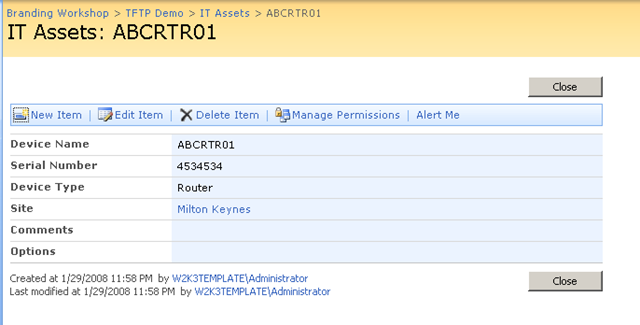
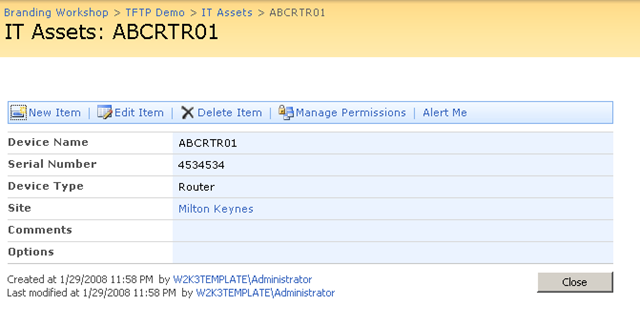
Before and after shots below (look ma – no top button!)

image  image

To fully understand what is being done here, I suggest you read my series of articles on the use of JavaScript in SharePoint. Part 3 in particular will show you how to safely add this web part to pages with editing disabled (NewForm.aspx, EditForm.aspx and DispForm.aspx)

The full series can be found here: Part 1, Part 2, Part 3, Part 4, Part 5 and Part 6.

Kudos to Jeremy Thake for feedback and some code contribution. Despite being seriously metrosexual, he is otherwise otherwise very cool :-P.

Now two important warnings:

Warning 1: This is an alpha quality release and I may never touch it again 🙂 So you very likely *will* break it. If there is enough interest, I am happy to pop it on codeplex

Warning 2: This web part should NOT be considered as a security measure and thus used in any security sensitive scenario (such as an extranet or WCM site). JavaScript by its very nature can be trivially interfered with and thus other methods (server side) should be employed in these scenarios to prevent interference at the browser.

You can download by reading the disclaimer and clicking the button below..

THIS CODE IS PROVIDED UNDER THIS LICENSE ON AN “AS IS” BASIS, WITHOUT WARRANTY OF ANY KIND, EITHER EXPRESSED OR IMPLIED, INCLUDING, WITHOUT LIMITATION, WARRANTIES THAT THE COVERED CODE IS FREE OF DEFECTS, MERCHANTABLE, FIT FOR A PARTICULAR PURPOSE OR NON-INFRINGING. THE ENTIRE RISK AS TO THE QUALITY AND PERFORMANCE OF THE COVERED CODE IS WITH YOU. SHOULD ANY COVERED CODE PROVE DEFECTIVE IN ANY RESPECT, YOU (NOT THE INITIAL DEVELOPER OR ANY OTHER CONTRIBUTOR) ASSUME THE COST OF ANY NECESSARY SERVICING, REPAIR OR CORRECTION. THIS DISCLAIMER OF WARRANTY CONSTITUTES AN ESSENTIAL PART OF THIS LICENSE. NO USE OF ANY COVERED CODE IS AUTHORIZED HEREUNDER EXCEPT UNDER THIS DISCLAIMER

Use at your own risk!

To install perform the following commands

  1. stsadm.exe” -o addsolution -filename CleverWorkAroundsHideFields.wsp
  2. stsadm.exe” -o execadmsvcjobs
  3. stsadm.exe” -o deploysolution -name CleverWorkAroundsHideFields.wsp -immediate -allowgacdeployment -allcontenturls
  4. stsadm.exe” -o execadmsvcjobs

To remove/reinstall perform the following commands

  1. stsadm.exe” -o retractsolution -name CleverWorkAroundsHideFields.wsp -immediate -allcontenturls
  2. stsadm.exe” -o execadmsvcjobs
  3. stsadm.exe” -o deletesolution -name CleverWorkAroundsHideFields.wsp
  4. stsadm.exe” -o execadmsvcjobs
  5. stsadm.exe” -o addsolution -filename CleverWorkAroundsHideFields.wsp
  6. stsadm.exe” -o execadmsvcjobs
  7. stsadm.exe” -o deploysolution -name CleverWorkAroundsHideFields.wsp -immediate -allowgacdeployment -allcontenturls
  8. stsadm.exe” -o execadmsvcjobs


« Previous PageNext Page »

Today is: Wednesday 3 June 2026 -