Back to Cleverworkarounds mainpage
 

Demystifying SharePoint Performance Management Part 5 – So what is latency anyway?

Hi all

Welcome to part 5 in my attempt to make SharePoint performance management a little more accessible. Now that we have dealt with the world of request per second in parts two, three and four, we will focus our attention somewhere different for a post or three.

To set the scene, we are going to take a bit of an end to end look at what it takes to load a SharePoint page. I suspect some readers do not have the full picture on just how many components interact together just to load the SharePoint home page. Things are much more complex in reality than the typical architectural view that adorns SharePoint blogs. A typical SharePoint diagram will list the servers and their roles, but what about all…

  • the network gear like routers, switches, reverse proxies and firewalls that are part of the mix?
  • the VMWare or HyperV virtual hosts that provide the virtualised servers? And
  • the storage area network and its associated paraphernalia that these virtual servers make use of for disk infrastructure?

Make no mistake people, configurations these days are hugely complex and have many moving parts. If any of the various components listed above were to fail or become a bottleneck, the performance of the entire system suffers. Therefore, we need assurance that each component has been optimised to ensure overall function.

This brings us onto the topic of latency. If you are not sure what latency is, I can guarantee that you actually do know. You see, if you have ever experienced a jittery skype call, or your pornography is slow to load, or you have watched a roving reporter respond several seconds after being asked a question from the studio, you are experiencing latency.

Now, the important point to make straight up is that latency is unavoidable because of the laws of physics. Take the example of one of the rovers that NASA sent to Mars. All radio signals to Mars travel at the speed of light (which despite Star Trek’s best efforts to persuade us otherwise, is the absolute speed limit of the universe). The speed of light is around 300,000 kilometres per second and the distance to Mars is currently around 150 million kilometres from Earth. So doing some basic math, we find that it takes a little over 8 minutes for a signal to get from Earth to Mars.

  • 150,000,000 / 300,000 = 500 seconds
  • 500 / 60 = 8.3 minutes

In this example of latency, no matter what  happens, there will always be around 8 minutes of latency between the time an instruction is sent to a rover, to the time it receives and acts on it. Unless Einstein was wrong, this isn’t about to change in a hurry either.

A “lean” view of latency…

Latency is a concept that extends beyond the forces of nature. Let me give you another form of latency that I am sure you have experienced, using Microsoft as the straw man. Let’s say you have a problem with SharePoint and you log a call with Microsoft or your support provider. You call the technical support line and after twiddling your thumbs in the telephone queue for an eternity, you get an inexperienced level 1 tech, who doesn’t understand your problem at all and is hell bent on closing your call anyway because someone higher up in the organisation actually believed that call-time is an indicator of happy customers. You repeat yourself each and every time as your call is slowly routed up the tech support hierarchy. Finally, by the time you get to level 3 or 4, you finally get a good tech who gives you the quick answer you were looking for. The problem is that three weeks have passed to get to this point.

This is also a form of latency. But unlike the first example. It was not the laws of nature this time, but man made laws that caused wasted time. I will call it organisational latency. Addressing this form of latency is a multi billion dollar industry, and keeps an army of organisational/process improvement consultants busy, trying to reduce wastage and improve customer outcomes (now you know what Lean is all about if you hear people taking about it).

So, returning to the SharePoint context – we have a lot of moving parts. We know we cannot alter the laws of physics, but how do we know whether all of the various components are working to their optimum level? Is there any man-made latency that we could reduce or eliminate?

Oh, yes, indeedie there is… and to put some context  to it, let’s utilise the musical genius that is the Wiggles. I found that their rendition of the old folk song “Dem bones” serves my purpose nicely.


The Wiggles, teaching us about SharePoint latency 🙂

When you perform the seemingly benign task of requesting a page with your browser, an amazing number of things have to happen. The browser forms a HTTP request and then passes this to the TCPIP stack on your PC, which takes the HTTP request and breaks it up into IP packets. These packets are passed to your network card driver that turns these packets into Ethernet frames and sends them over the wire. Each network device (switch, router, etc.) has to process each frame or IP packet and to work out where to forward it. Eventually the request finds it way to the destination server where the Ethernet frames are stripped, the IP packets are reassembled into the original HTTP request, passed to IIS and SharePoint then acts on it.

Now all I described above was the task of getting a HTTP request from a browser to a server. To see the entire picture, let’s all sing along with the Wiggles shall we? We will assume a two server deployment, utilising a VMware based virtual web front end SharePoint server and a physical SQL Server. Both servers use a Storage Area Network (SAN) for disk. Cue the melody from “Dem Bones”…

  • Your PC connects to a distribution switch
  • The distribution switch is connected to the core switch
  • The core switch connects to the HyperV host
  • The HyperV host connects to the virtual Web Front End Virtual Machine

… okay so we have managed to get from our browser to the SharePoint web front end but at this point, the web front end hasn’t really done anything yet.  In terms of latency, we had to get through the switches, as well as the virtualisation infrastructure to the virtual SharePoint web front end box. The switches had very little latency at all – probably around 1-2 microseconds (which translates about 0.001 to 0.002 milliseconds) for a network packet to go in one port and out the other. The virtualisation infrastructure also introduced some latency, because there is overhead in running a virtual machine within a physical machine. However, assuming it is well configured and that there aren’t too many virtual machines competing for physical resources like CPU and memory, then that latency is fairly negligible.

Now the virtual web front end server needs to actually deal with the request from your PC. This involves pulling data from the disk infrastructure, so back to the Wiggles we go…

  • the Web Front End Virtual Machine connects to the HyperV host
  • The HyperV host connects to the SAN Switch
  • The SAN Switch connects to the Storage Array
  • The Storage Array connects to the Web Front End disk
  • The Web Front End disk returns data to the SAN Switch
  • The SAN switch returns data to the HyperV host
  • The HyperV host returns data to the Web Front End Virtual Machine

…at this point, the web front end server has retrieved any data it needs to from the disk subsystem. There was definitely latency here. The SAN switches have a similar latency to network switches which is negligible, but the physical disks on the SAN are another story (which we will get to soon). But wait a second – that just loads the stuff the web front end server stores or caches locally, as well as writing to the IIS and SharePoint logs. What about all those sexy web parts you have on the front page that aggregate the latest news feed? That stuff needs to pull information from the SharePoint content database on the SQL Server. So let’s continue, now incorporating the connection between the virtual web front end and SQL Server (Remember, I am assuming the SQL box is not virtualised).

  • The Web Front End Virtual Machine connects to SQL box (via the network on TCPIP port 1433)
  • The SQL Box connects to the SAN Switch
  • The San Switch connects to the Storage Array
  • The Storage Array connects to the SQL disk
  • The SQL disk returns data to the SAN Switch
  • The SAN switch connects to the SQL box
  • The SQL Box connects to Web Front End Virtual Machine (via the network on TCP port 1433)
  • The Web Front End Server returns the page to your PC (via the network on TCP port 80)

Now at this point, non tech oriented readers might be thinking, “Bloody hell! I didn’t realise there were that many interactions.” For you guys… now you know why tech guys are the way they are. Tech guys reading this would know full well that I glossed over many things. For example, I did not include the authentication process in the sequence above, nor did I describe important virtualisation aspects such as VM memory compression. On top of that I glossed big-time over the full gamut of SAN I/O paths.

There is a form of man-made latency that can occur in any of these steps outlined above as a result of the complexity. It is very easy to overlook an important aspect, or to misconfigure something or to assume the default configuration is optimal. In my consulting experience I have seen sub optimal configuration in all of the above touchpoints, but out of all of them, there is one area that is far more likely to have latency issues than any of the other areas: The disk infrastructure.

We will round out this post by taking a fairly high level view at disk infrastructure and why it is latency prone.

Understanding disk latency

Below is a Wikipedia picture that shows the essential components of most hard drives. This type of hard drive is really not that different from its original design in 1954. It is called a rotational hard drive and the spindle rotates, while the actuator arm moves the head to the right position to read data off the platter. As you can imagine, this happens pretty fast too. Most high end hard drives spin the platter at 15000RPM – dizzying, eh?

 

But to put disk performance in perspective, consider my previous example of a network switch with a 1-2 microsecond latency to process an Ethernet frame as it transits through one network port to another. By comparison, a modern hard drive takes a hell of a lot longer to do what it needs to do. As a simple example, the time taken just for the drive to rotate the disk platter takes around 2 milliseconds (or 2000 microseconds). Not only is this a staggering 2000 times slower than the network switch but it does not take into account the time it takes for the hard drive’s read/write head to then be positioned over the sector (this is called seek time and can take anywhere between 3 and 15 milliseconds).

This latency clearly is problematic, and vendors compensate by utilising multiple sets of disks and liberal use of cache technology to mitigate it. Imagine putting 10 hard disks together and when data is saved, parts of it is written to each hard disk. Now you have reduced latency because each drive is handling a smaller part instead of a single drive handling it all. It is important to note that we have done nothing about laws of physics latency per single drive (thanks Robert Bogue for pointing that out) , but throughput induced latency has reduced by using them all. It is just like when you are out the supermarket and there are ten check-out operators working instead of 1. The wait times are much shorter because there are more check out operators available to service the request. (This is the essence of RAID technology and should be familiar to most readers).

But there is still more to the latency story than disks taking time to do their thing. At the operating system level, there are various layers and drivers doing stuff. I won’t go too much into this is except to suggest that if the world of the Class Drivers, Port Drivers, Device Miniport Drivers and Disk Subsystems rock your world then Jeff Hughes has a great writeup where he describes the whole Windows disk IO system in detail.

A note on SSD

I would be remiss not to make a point about these newfangled Solid State Drives (You might have heard them mentioned as SSD). This is a newer technology for hard drives that do not employ any moving mechanical components, like platters and movable read/write heads. Solid State Drives have some seriously improved performance in terms of latency, because they store the data in persistent memory. Wikipedia cites that SSD latency is around 0.1 millisecond compared to rotational drives being around 5-10 milliseconds. The downside is that they are more expensive than traditional rotational disks. According to a May 2012 article, SSDs cost approximately US$0.65 per GB whereas traditional hard disks cost about US$0.05 per GB. Expect prices to continue to fall and for them to appear in more and more solutions.

Then there are SANs

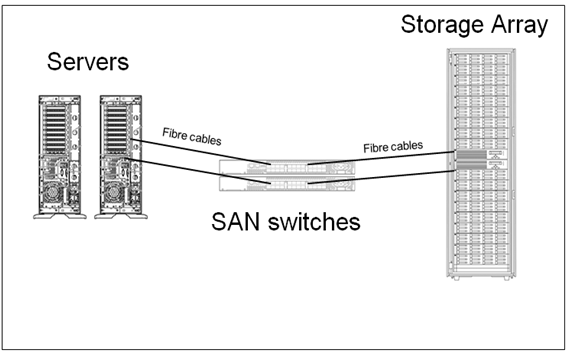
In terms of disk infrastructure and latency aspects, most organisation’s utilise a Storage Area Network (SAN) topology. I previously mentioned the idea of RAID configurations that make use of multiple disks to improve latency (among other things). SANs take the RAID idea and abstracts it further as shown below.
image

(credit for this image is Orbis solutions: http://orbissolutionsinc.com/blog/tag/storage-arrays/)

I sometimes describe SANs to people as a “fridge full of hard drives connected to multiple servers”. What the above diagram shows is that the disks are physically not connected to the servers that use them. Instead they are connected to a storage array via cables, with a switch or three in between. Each server has some disk space reserved for it on the SAN. So the result is we have one centralised high performing disk array where we can take advantage of all of the disks housed within.

But it’s important to understand here that each time data is read from or written to disk, it passes across those cables and through the switches. Like an internet connection, the SAN switch and cables not only have bandwidth limitations, but are prone to misconfiguration. Imagine 50 servers writing data at the same time. If things are not well configured, the SAN switch infrastructure might become overwhelmed like a freeway during peak hour. Direct attached storage (i.e. – the hard drive or RAID array is plugged into the server directly) typically have a higher bandwidth. This quote from a nice sqlteam.com article on SAN performance explains it well.

For instance, if a server is equipped with two older 1-Gbps host bus adapters (HBAs), its MBps throughput would be capped at about 200MB per second no matter how powerful the rest of the SAN is. Replacing the 1-Gbps HBAs with two newer 4-Gbps HBAs or adding more HBAs may improve the throughput, if the HBAs are indeed the throughput bottleneck. But the SAN drive throughput could also be limited by the maximum throughput of the inter-switch links in the SAN switched fabric. Further down the I/O paths, the front-side adapter ports on the disk array, the cache in the disk array, the disk controllers, and the disk spindles can all become the bottleneck limiting the MBps throughput of the SAN drive.

Conclusion and coming next…

Okay… at this point let’s take a breather. For the tech guys reading this post, none of what I covered may seem particularly earth shattering, but it was important to set the context for a deeper dive into disk latency in the next couple of posts. If you are not normally of the tech persuasion, then I hope that this post has opened your eyes a little to just how complicated deployments can be and accordingly, how hard it can sometimes be to pinpoint latency issues when they occur.

In the next post, we will take a deeper look at disk latency and its relationship to the indicators of IOPS and MBPS. We will then examine tools to measure latency and how to best use it as a lead indicator.

Until then, thanks for reading and be sure to check out my recent business book “The Heretics Guide to Best Practices

Paul Culmsee

www.sevensigma.com.au


Demystifying SharePoint Performance Management Part 4 – Making use of RPS

Hi all. Welcome to part 4 of a rapidly growing series of posts on trying to take some of the mystery out of SharePoint performance management. Essentially I am trying to write a sort of preamble to the existing Microsoft resources which are extremely comprehensive and full of wisdom, but suffer from being rather large and a lot to get through. To remind you, we have the 307 page “Planning guide for server farms and environments for Microsoft SharePoint Server 2010,” the 367 page “Capacity Planning for Microsoft SharePoint Server 2010” and the lesser known, but equally excellent 23 pages of “Analysing Microsoft SharePoint Products and Technologies Usage” whitepaper.

My hope that this series establishes just enough groundwork for someone to find the aforementioned documents an easier read and get more out of them.

Now this series is starting to turn out like the “Humble Tribute to the Leave Form” series, which I never actually finished (*blush*). Basically the number of posts to complete it exceeded the time I had available to write it (and my interest shifted to other things). For this topic of performance, I originally thought this series might be 4 posts but we are now at post 4 and haven’t actually gotten off the Requests Per Second (RPS) performance counter yet.

So let’s cracking…

Command line alert (again)

I have a tendency to have fun at the expense of IT stereotypes in my posts, and in the interests of fairness, I turned this around in part 3 I and took the piss out of the “I’m business, not technical” wusses instead. You all know who you are… you tend to shun anything that involves the command line as if it was the most complex thing ever. So continuing in that vein, if I managed not to completely scare the crap out of you in the last post, you should have the excellent log parser utility installed and have created a file called LogWithSeconds.csv.  If you have not, go back and read part 3. To remind you quickly, the log parser command that we used to generate the LogWithSeconds.csv file was:

logparser -i:IISW3C file:GetSeconds.txt?startdate=’2011-11-15′+enddate=’2011-11-15′ -o:csv >LogWithSeconds.csv

The key point being that you can specify a date range for the logs you want to process.

For the rest of this article, we continue to play in the command-line playground and utilise some different logparser scripts to derive some useful information. In addition, we will utilise a bit of PowerShell, as well as check out another great free utility written by Nikander & Margriet Bruggeman (more on that later).

Also at this point I need to call out and credit the excellent work of Mike Wise. His aforementioned 2009 whitepaper called“Analysing Microsoft SharePoint Products and Technologies Usage” is the basis for what I cover here. I urge you to download and read this article as it goes into more detail on Log Parser and its uses beyond just RPS alone. Although I have based my stuff off Mike’s work, there are some differences that you will see as we progress through this article.

Distribution of RPS

The one thing that past examination of RPS can give you is a distribution of requests over time. Understanding the distribution (or shape of RPS) helps you to identify patterns to SharePoint use, such as peak or heavy usage times. To that end, the first log parser script will generate a CSV file that can be imported into a tool like excel to chart the distribution of RPS. The log parser script below has been modified from one in Mike’s document, because he assumes you are only looking at 24 hours of log data. In my case, I assume that you might want to profile more than 24 hours (essentially the date range specified in the log parser command above).

The command to generate a per-second RPS distribution is below. The only difference between my script and the one Mike did is I added the “date” field to the SQL to account for multiple days:

logparser -i:CSV -o:CSV “select count(*) as ct,date as Date, secs,max(hh) as hh,max(mi) as mi,max(ss) as ss from e:\temp\LogWithSeconds.csv group by date,secs order by date, secs” -q >RPSDistribution.csv

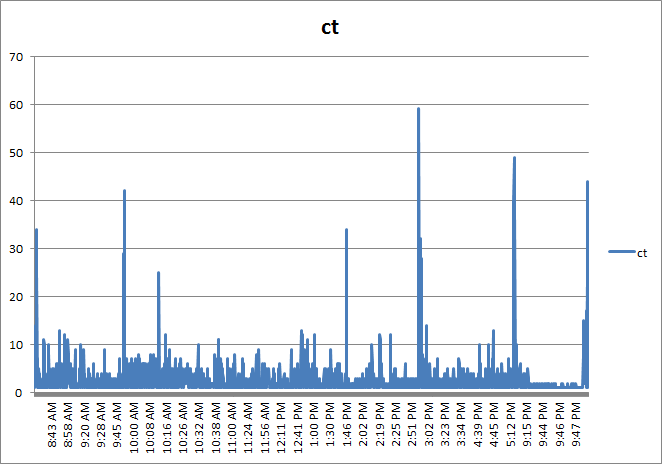
This command will create a new CSV file called RPSDistribution.CSV that contains the count of requests at any given second during the specified date range. So let’s open RPSDistribution.CSV into Excel and create a chart (I assume you know how to do that). Here is what it looks like…

image

Now I wonder if you can spot the issue with this chart? If you look closely, note that the times are not evenly spaced. This occurs because the generated file (RPSDistribution.CSV) only contains entries for the seconds during the day where there were requests. If no requests were made, then nothing was recorded. This skews the graph because if we want to see the distribution of requests, we also need to know the seconds of the day where there were zero requests. The graph you see above has effectively squeezed out all of the quiet times.

To work around this issue, I wrote the following PowerShell script. For you non-programmers, I am not going to explain all of the gory logic of this script, but just be assured that it adds entries stating zero RPS for every second of the day where there were no requests made. This will normalise the data across time and make a much more meaningful graph.

(If this is starting to hurt your brain, stick with me… paste the code below into notepad, save it in the Log parser installation folder and call it AddNulsPerSec.ps1)

param([string]$inputcsv, [string]$outputcsv = "output.csv")
if (!$inputcsv) {
    write-host "The -inputcsv parameter has not been specified. Script cannot run without it";
    exit;
}
if (Test-Path -path $outputcsv) { remove-item $outputcsv }
$x = 0;
$y = import-csv $inputcsv
write-output "ct,date,secs,minu,hh,mm,ss" | add-content -path $outputcsv
$y | foreach {
    if ($x -gt 86399) { $x = 0 }
    $s = [int]$_.secs;
    while ($s -gt $x) {
        $d = [datetime]$_.date;
        $d=$d.AddSeconds($x)
        $ss = $d.tostring("ss")
        $mm = $d.tostring("mm")
        $hh = $d.tostring("HH")
        $minu = [int]$hh * 60 + [int]$mm
        $output = "0" + "," + $_.Date + "," + $x + "," + $minu + "," + $ss + "," + $mm + "," + $hh
        write-output $output
        $x++;
   }
   $output = $_.ct + "," + $_.Date + "," + $_.secs + "," + $_.minu + "," + $_.ss + "," + $_.mi + "," + $_.hh
   write-output $output
   $x++;
} | add-content -path $outputcsv

The above script takes two command-line parameters: inputCSV and outputCSV. inputCSV is the file name to process and outputCSV is the resulting file with the 0 RPS entries added. Note that to run this script you will need to use a PowerShell window, rather than a command prompt. Below is the command I used:

PS C:\Program Files (x86)\Log Parser 2.2> .\AddNulsPerSec.ps1 -inputcsv RPSDistribution.CSV -outputcsv RPSDistributionNormalised.CSV

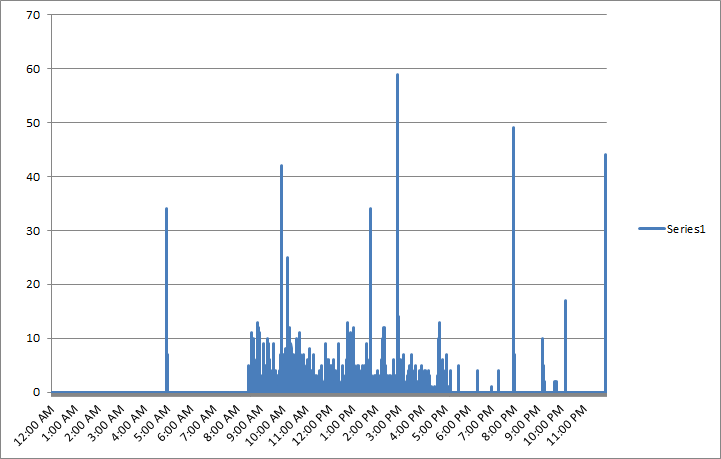
This created the file RPSDistributionNormalised.CSV. I charted this file in Excel and we now have a time-normalised distribution. Take a look at the X axis. This looks more logical now as the times are more evenly spaced. It seems from looking at this, that peak times are between 10am-11am, although one could argue that a lot of the day was fairly busy, with a bit of a lull between 2 and 3pm.

image

So what else can we do?

Right, so apart from the utility of being able to get a sense of when there are a lot of requests versus quiet times, can we find out anything else useful? Much insight can be gleaned from Mike Wise’s document, so here I will cover a couple of things specific to RPS.

RPS distribution for certain users

Let’s go back to the LogWithSeconds.CSV we started with and find out the top users for the period being examined. In the log parser command below we are grouping users by total requests they made, ordering from largest to smallest..

logparser -i:csv “select top 20 count(*) as ct,cs-username as user from LogWithSeconds.csv group by user order by ct desc”

A snippett of the output from this command is below:

ct  user
--- --------------------
840 DOMAIN\Jame.Smith
688 DOMAIN\searchcrawler
614 DOMAIN\Ian.Jones
508 DOMAIN\Steve.Hill
357 DOMAIN\Ant.Cough
313 DOMAIN\dom.davies
260 DOMAIN\matthew.martin

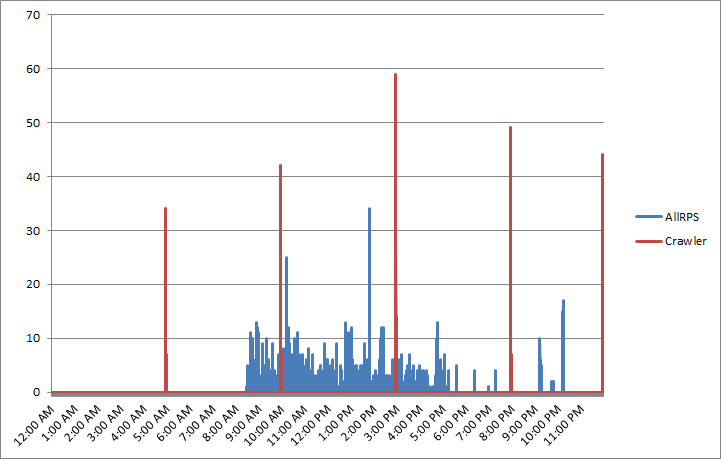
Hmm, I notice that the search crawler account (DOMAIN\searchcrawler) was busy during that day. It appears to have made the second largest number of requests. How about we work out when the search crawler was active by filtering the requests just for this user. Perhaps search crawls are active during peak times and introducing unnecessary load on the server?

First up, lets create the RPS distribution, but this time just for the search crawler account (note the SQL WHERE clause in the command below)

logparser -i:CSV -o:CSV “select count(*) as ct,date as Date, secs,max(hh) as hh,max(mi) as mi,max(ss) as ss,cs-username as user from LogWithSeconds.csv where user=’DOMAIN\searchcrawler’  group by user, date,secs order by date, secs” -q>crawler.csv

Now we need to pad CRAWLER.CSV out with 0 entries to time-normalise it for the seconds in which it wasn’t active…  back to my PowerShell script…

PS C:\Program Files (x86)\Log Parser 2.2> .\AddNulsPerSec.ps1 -inputcsv crawler.csv -outputcsv CrawlerNormalised.csv

I then took the results from CrawlerNormalised.csv and added them to my previous RPS distribution chart in Excel. Straight away you can see the incremental crawl schedule of this SharePoint installation is 5 hourly. (Note the red lines at regular intervals)

image

RPS Distribution for certain clients…

Another use for RPS is to see the pattern of the various applications that interact with SharePoint. Aside from the trusty old browser, we also have Office clients, Windows Explorer, SharePoint Workspace, and 3rd party tools like SharePlus. All of these applications identify themselves to SharePoint via the use of something called the user-agent [stored in the LogWithSeconds.CSV file in a column called cs(user-agent)]. The user agent field is actually part of the HTTP standard and not SharePoint specific, but let’s take advantage of it…

logparser -i:CSV “select count(*) as ct,cs(user-agent) from LogWithSeconds.CSV group by cs(user-agent) order by ct desc” -q >BrowserList.csv

Now, I am not going to paste the complete output of running this command because unfortunately, browsers have a lot of variation in their user agent string. Nevertheless, here are some of results from the BrowserList.csv file…

867 Mozilla/4.0+(compatible;+MSIE+7.0;+Windows+NT+5.1;+Trident/4.0;+.NET+CLR+1.1.4322;+.NET+CLR+2.0.50727;+.NET+CLR+3.0.04506.30;+.NET+CLR+3.0.04506.648;+.NET+CLR+3.0.4506.2152;+.NET+CLR+3.5.30729;+yie8)
688 Mozilla/4.0+(compatible;+MSIE+4.01;+Windows+NT;+MS+Search+6.0+Robot)
386 harmon.ie+for+Notes
333 Mozilla/5.0+(Windows;+U;+Windows+NT+6.1;+en-US;+rv:1.9.2.24)+Gecko/20111103+Firefox/3.6.24
250 SharePlus+2.9.5+(iPad;+iPhone+OS+4.2.1;+en_AU)
99  MSFrontPage/12.0
95  Mainsoft+SharePoint+Integrator
68  Microsoft+Office/14.0+(Windows+NT+6.1;+OWSSUPP+14.0.6112;+Pro)
34  Microsoft-WebDAV-MiniRedir/6.1.7600
24  Microsoft+Office+Outlook+2010+(14.0.6112)+Windows+NT+6.1
23  Microsoft+Office+Sharepoint+Workspace+2010+(14.0.6112)+Windows+NT+6.1
4   MobileSafari/7534.48.3+CFNetwork/548.0.3+Darwin/11.0.0

Now looking at these strings, it doesn’t take long to get a sense of the different ways SharePoint has been accessed. How about we generate a distribution of RPS for all iPad devices or apps? Here’s the log parser command along with my time normaliser script.

logparser -i:CSV -o:CSV “select count(*) as ct,date as Date, secs,max(hh) as hh,max(mi) as mi,max(ss) as ss,cs(User-Agent) as ua from LogWithSeconds.CSV where ua like ‘%iPad%’ group by ua, date,secs order by date, secs”-q >iPads.csv

.\AddNulsPerSec.ps1 -inputcsv E:\temp\ipads.csv -outputcsv e:\temp\iPadNormalised.csv

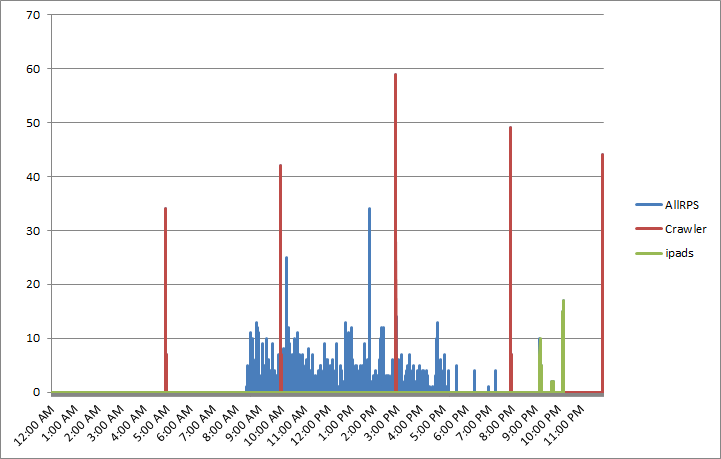
… and the result when added into Excel? iPads were definitely the evening tool of choice that day! Note the green spikes around 9-10pm.

image

Taking it further…

I won’t do much more on RPS now. Hopefully I have given you enough to do much more clever things than I have covered. As I stated in part 2, the nice thing about RPS is that it can be derived from web server logs and these tend to go back quite far in time. Given that the core sequence of events to produce the graphs above are essentially 3 scripts and can be done quickly, it becomes quite easy to sample different points in history. For example: Let’s say that we want to compare the 15th of November 2011 with the 10th of March 2012 to see whether there is an increase/decrease in requests and what this looks like. All we have to do is change the date, re-run the scripts and do some charting magic.

  • logparser -i:IISW3C file:GetSeconds.txt?startdate=’2012-3-10′+enddate=’2012-3-10′ -o:csv >LogWithSeconds.csv
  • logparser -i:CSV -o:CSV “select count(*) as ct,date as Date, secs,max(hh) as hh,max(mi) as mi,max(ss) as ss from LogWithSeconds.csv group by date,secs order by date, secs” -q >RPSDistribution.csv
  • AddNulsPerSec.ps1 -inputcsv RPSDistribution.CSV -outputcsv RPSDistributionNormalised.CSV

We can look at the distribution for an entire week is we wanted to…

  • logparser -i:IISW3C file:GetSeconds.txt?startdate=’2012-5-7′+enddate=’2011-5-11′ -o:csv >LogWithSeconds.csv
  • logparser -i:CSV -o:CSV “select count(*) as ct,date as Date, secs,max(hh) as hh,max(mi) as mi,max(ss) as ss from LogWithSeconds.csv group by date,secs order by date, secs” -q >RPSDistribution.csv
  • AddNulsPerSec.ps1 -inputcsv RPSDistribution.CSV -outputcsv RPSDistributionNormalised.CSV

Also in case you didn’t notice in part 3, my GetSeconds.txt logparser script that performs the initial processing of the IIS logfiles, also stores the minute of the day, as well as seconds of the day. This allows you to perform all of the same things I have specified in this article except it can be Requests Per Minute (RPM) instead. This would allow you to work with a larger date range without such big files (provided RPM is appropriate for what you want). Consult the “Analysing Microsoft SharePoint Products and Technologies Usage” whitepaper for more information on logparser queries for RPM scenarios.

Remember that the virtues of your web server logs go much further than RPS. We saw a hint of this in my examples of showing RPS for just one user or one device type. But this really is just scratching the surface of what can be gleaned via logparser. There are many excellent logparser scripts around, and a quick google search should give you plenty of examples.

Also remember that there are many more sophisticated ways to process this sort of data. For example, putting it into Analysis Services and slicing/dicing it via PowerPivot, or using something like RRDTool. To that end, I would also be seriously remiss if I did not make you aware of the SharePoint Flavored Weblog Reader tool. It was created by Nikander & Margriet Bruggeman who run the SharePoint Dragons blog – probably the best SharePoint performance related blog out there. This tool was specifically designed to make it easier to analyse IIS logs for SharePoint specific information. It is a command line tool, but much simpler and slicker than the methods I introduced in this post. Instead of specifying a date range you specify the number of items from the logs to process. For example:

sfwr.exe 250,000 “E:\LOGS\IIS_WWW\W3SVC1045333159”

Here are some of the things it reports on for you straight out of the box:

  • Most busy days of the week, most requested pages and requested pages per day.
  • The average, max and min request times per URI, InfoPath URI and Report Server URI.
  • Browser percentages, dead links, failed pages, percentage of error page requests.
  • Requests per hour per day, requests per hour, requests per user (also per week and month)
  • Slowest requests, top requests per hour, top visitors.
  • Traffic per day and per week in MB.
  • Unique visitors per day, week and month

Reflections…

At the end of the day, while examining the pattern of RPS can be very handy in offering insights into how your web application (SharePoint or otherwise) performs, as a lead indicator it is always going to be fairly wishy washy. As soon as you turn your attention to the future, many variables come into play that you cannot predict as accurately as you’d like. Your existing webserver logs can offer you a lot of ways to help make a more informed prediction, but at the end of the day, one has to take into account the new unique features of SharePoint 2010, how they will be used and so forth.

I will be returning to this theme, once we examine some other performance indicators, but hopefully at this point, you might find some aspects of Microsoft’s Capacity planning for Microsoft SharePoint Server 2010 guide less intimidating. Page 43 in particular has some great material that builds upon what we cover here. To quote Microsoft…

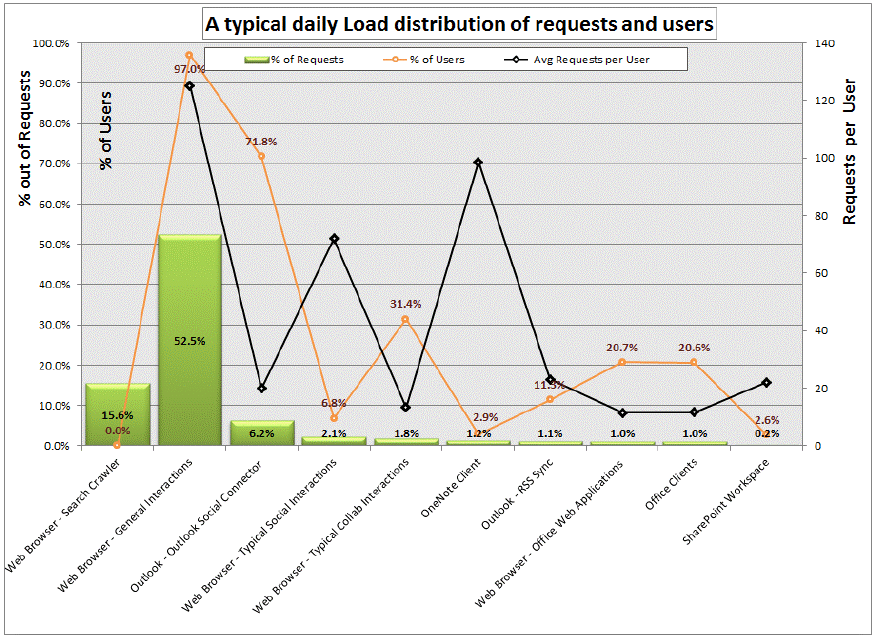
Understanding the distribution of the requests based on the clients applications that are interacting with the farm can help predict the expected trend and load changes after migrating to SharePoint Server 2010. As users transition to more recent client versions such as Office 2010, and start using the new capabilities new load patterns, RPS and total requests are expected to grow

I will leave you with a terrific example a graph that Microsoft created using IIS logs (on page 44 of the aforementioned document). This is a view of a typical day in an internal Microsoft environment serving what is deemed “a typical social solution”. It shows just how much additional load a new feature can introduce (in this case, Outlook Social Connector feature is 6.2% of the total number requests). The combination of different clients on the X axis, with the % distribution of overall and per-user requests on the Y axis is really handy.

image

Coming up next…

At this point I think we have covered RPS sufficiently, and dovetailed in nicely to Microsoft documentation – particularly pages 41-47 of the SharePoint 2010 Capacity Planning Guide. Our next stop will be looking at another much misunderstood lead indicator for performance – disk IO and latency. Once again I will introduce you to a couple of useful tools and offer you what I think is the best way to approach disk performance requirements that will make life easier for you and your storage people.

Until then, thanks for reading…

Paul Culmsee

HGBP_Cover-236x300


Demystifying SharePoint Performance Management Part 1 – How to stop developers blaming the infrastructure

Hi all

It seems to me that many SharePoint consultancies think their job is done when recommending a topology based on:

  • Looking up Microsoft’s server recommendations for CPU and RAM and then doubling them for safety
  • Giving the SQL Database Administrators heart palpitations by ‘proactively’ warning them about how big SharePoint databases can get.
  • Recommending putting database files and logs files on different disks with appropriate RAID levels.

Then satisfied that they have done the due diligence required, deploy a SharePoint farm chock-full of dodgy code and poor configuration.

Now if you are more serious about SharePoint performance, then chances are you had a crack at reading all 307 pages of Microsoft’s “Planning guide for server farms and environments for Microsoft SharePoint Server 2010.” If you indeed read this document, then it is even more likely that you worked your way through the 367 pages of Microsoft whitepaper goodness known as “Capacity Planning for Microsoft SharePoint Server 2010”. If you really searched around you might have also taken a look through the older but very excellent 23 pages of “Analysing Microsoft SharePoint Products and Technologies Usage” whitepaper.

Now let me state from the outset that these documents are hugely valuable for anybody interested in building a high performing SharePoint farm. They have some terrific stuff buried in there – especially the insights from Microsoft’s performance measurement of their own very large SharePoint topologies. But nevertheless, 697 pages is 697 pages (and you thought that my blog posts are wordy!). It is a lot of material to cover.

Having read and digested them recently, as well as chatting to SharePoint luminary Robert Bogue on all things related to performance, I was inspired to write a couple of blog posts on the topic of SharePoint performance management with the aim of making the entire topic a little more accessible. As such, all manner of SharePoint people should benefit from these posts because performance is a misunderstood area by geek and business user alike.

Here is what I am planning to cover in these posts.

  • Highlight some common misconceptions and traps for younger players in this area
  • Understand the way to think about measuring SharePoint performance
  • Understand the most common performance indicators and easy ways to measure them
  • Outline a lightweight, but rigorous method for estimating SharePoint performance requirements

In this introductory post, we will start proceedings by clearing up one of the biggest misconceptions about measuring SharePoint performance – and for that matter, many other performance management efforts. As an added bonus, understanding this issue will help you to put a permanent stop to developers who blame the infrastructure when things slow down. Furthermore you will also prevent rampant over-engineering of infrastructure.

Lead vs. lag indicators

Let’s say for a moment that you are the person responsible for road safety in your city. What is your ultimate indicator of success? I bet many readers will answer something like “reduced number of traffic fatalities per year” or something similar. While that is a definitive metric, it is also pretty macabre. It is also suffers from the problem of being measured after something undesirable has happened. (Despite millions of dollars in research, death is still relatively permanent at the time of writing).

Of course, you want to prevent road fatality, so you might create road safety education campaigns, add more traffic lights, improve signage on the roads and so forth. None of these initiatives are guaranteed to make any difference to road fatalities, but they very likely to make a difference nonetheless! Thus, we should also measure these sorts of things because if it contributes to reducing road fatalities, it is a good thing.

So where am I going with this?

In short, the number of road signage is a lead indicator, while the number of road fatalities is a lag indicator. A lead indicator is something that can help predict an outcome. A lag indicator is something that can only be tracked after a result has been achieved (or not). Therefore lag indicators don’t predict anything, but rather, they show the results of an outcome that has already occurred.

Now Robert Bogue made a great point when we were talking about this topic. He said that SharePoint performance and capacity planning is like trying to come up with drakes equation. For those of you not aware, Drakes equation attempts to estimate how much intelligent life might exist in the galaxy. But it is criticised because there are so many variables and assumption made in it. If any of them are wrong, the entire estimate is called into question. Consider this criticism of the equation by Michael Crighton:

The only way to work the equation is to fill in with guesses. As a result, the Drake equation can have any value from "billions and billions" to zero. An expression that can mean anything means nothing. Speaking precisely, the Drake equation is literally meaningless…

Back to SharePoint land…

Roberts point was that a platform like SharePoint can run many different types of applications with different patterns of performance. An obvious example is that saving a 10 megabyte document to SharePoint has a very different performance pattern than rendering a SharePoint page with a lot of interactive web parts on it. Add to that all of the underlying components that an application might use (for example, PowerPivot, Workflows, Information Management Policies, BCS and Search) and it becomes very difficult to predict future SharePoint performance. Accordingly, it is reasonable to conclude that the only way to truly measure SharePoint performance is via measuring SharePoint response times under some load. At least that performance indicator is reasonably definitive. Response time correlates fairly strongly to user experience.

So now that I have explained lead vs. lag indicators, guess which type of indicator response time is? Yup – you guessed it – a lag indicator. In terms of lag indicator thinking, it is completely true that page response time measures the outcome of all your SharePoint topology and design decisions.

But what if we haven’t determined our SharePoint topology yet? What if your manager wants to know what specification of server and storage will be required? What if your response time is terrible and users are screaming at you? How will response time help you to determine what to do? How can we predict the sort of performance that we will need?

Enter the lead indicator.  These provide assurance that the underlying infrastructure is sound and will scale appropriately. But by themselves, they no a guarantee of SharePoint performance (especially when there are developers and excessive use of foreach loops involved!) But what they do ensure is that you have a baseline of performance that can be used to compare with any future custom work. It is the difference between the baseline and whatever the current reality is that is the interesting bit.

So what lead indicators matter?

The three Microsoft documents I referred above list many useful performance monitor counters (particularly at a SQL Server level) that are useful to monitor. Truth be told I was sorely tempted to go through them in this series of posts, but instead I opted to pitch these articles to a wider audience. So rather than rehash what is in those documents, lets look at the obvious ones that are likely to come up in any sort of conversation around SharePoint performance. In terms of lead indicators there are several important metrics

  • Requests per second (RPS)
  • Disk I/O per second (IOPS)
  • Disk Megabytes transferred per second (MBPS)
  • Disk I/O latency

In the next couple of posts, I will give some more details on each of these indicators (their strengths and weaknesses) and how to go about collecting them.

A final Kaizen addendum

Kaizen? What the?

I  mentioned at the start of this post that performance management is not done well in many other industries. Some of you may have experienced the pain of working for a company that chases short term profit (lag indicator) at the expense of long term sustainability (measured by lead indicators). To that end, I recently read an interesting book on the Japanese management philosophy of Kaizen by Masaaki Imai. Imai highlighted the difference between Western attitudes to management in terms of “process-oriented management vs. result-oriented management”. The contention in the book was that western attitudes to management is all about results whereas Japanese approaches are all about the processes used to deliver the result.

In the United States, generally speaking, no matter how hard a person works, lack of results will result in a poor personal rating and lower income or status. The individuals contribution is valued only for its concrete results. Only results count in a result oriented society.

So as an example, a result society would look at the revenue from sales made over a given timeframe – the short term profit focused lag indicator. But according to the Kaizen philosophy, process oriented management would consider factors like:

  • Time spent calling new customers
  • Time spent on outside customer calls versus time devoted to clerical work

What sort of indicators are these? To me they are clearly lead indicators as they do not guarantee a sale in themselves.

It’s food for thought when we think about how to measure performance across the board. Lead and lag indicators are two sides of the same coin. You need both of them.

Thanks for reading

Paul Culmsee

www.hereticsguidebooks.com


I’m published in a PM Journal

Hi all

Just a quick note for those of you who are of the academic persuasion or who have an interest in research and academic literature. Kailash and I wrote a paper for the International Journal for Managing Projects in Business. The article is called “Towards a holding environment: building shared understanding and commitment in projects”. The paper is about how to improve shared understanding on projects – particularly at the early stages where ambiguity around objectives tends to be at its highest. While it covers a similar territory to the Heretics Guide, it covers some literature that we did not use for the book. Plus it is peer reviewed of course.

This paper presents a viewpoint on how to build a shared understanding of project goals and a shared commitment to achieving them. One of the ways to achieve shared understanding is through open dialogue, free from political and other constraints. In this paper (and in the Heretics Book) we flesh out what it takes for this to happen and call an environment which fosters such dialogue a holding environment. We illustrate, via a case study:

  1. How an alliance-based approach to projects can foster a holding environment.
  2. The use of argument visualisation tools such as IBIS (Issue-Based Information System) to clarify different points of view and options within such an environment.

This was my first experience with the peer review process of writing a journal paper. I have to say that, despite the odd bit of teeth gnashing, the review process did make this paper much better than it originally was. Of course, none of this would have even happened without Kailash. This was definitely his baby, and this paper would not exist without his intellect and wide-ranging knowledge.

Thanks for reading

Paul Culmsee

www.hereticsguidebooks.com


Warts and all SharePoint caveats in Melbourne and Auckland

image   image

Hi all

There are a couple of conferences happening this month that you should seriously consider attending. The New Zealand and Australian SharePoint Community Conferences. This year things have changed. There are over 50 Sessions designed to cater to a wide audience of the SharePoint landscape and the most varied range of international speakers I have seen so far. What is all the more pleasing this year is that aside from 20 sessions of technical content, the business side of SharePoint focus has been given greater coverage and there are over 20 customer case studies, which give great insight into how organisations large and small are making the most of their SharePoint deployments. This stuff is gold because it is what happens in the trenches of reality, rather than the nuanced, airbrushed one you tend to get when people are trying to sell you something.

My involvement will include some piano accompaniment while Christian Buckley hits the high notes Smile, and in terms of talks, I will be “keeping it real“ by presenting a talk called “Aligning Business Objectives with SharePoint“. I will also be running a 1 day class on one of the hardest aspects of SharePoint delivery: Business goal alignment. This is workshop is the “how” of goal alignment (plenty of people can tell you the “what”). If you are a BA, PM or recovering tech dude, do not miss this session. It draws a lot of inspiration from my facilitation and sensemaking work and has been very well received wherever I have run it.

The other session I am really looking forward to is a talk called SharePoint 2010 Caveats: Don’t get caught out! Now anybody in SharePoint for long enough has learnt the hard way to test all assumptions. This is because SharePoint is a complex beast with lots of moving parts. Unfortunately these moving parts don’t always integrate the way they one would assume. Usually the result of such an untested assumption is a lot of teeth gnashing and heavily adjusted project plans.

I mentioned airburshed reality before – this is something that occasionally frustrates me, especially when you see SharePoint demonstrations full of gushing praise, via a use case that glosses over inconvenient facts. Michal Pisarek of SharePointAnlystHQ fame, is a SharePoint practitioner who shares my view and a while back, we both decided to present a talk about some of the most common, dangerous and some downright strange caveats that SharePoint has to offer. The session outline is below.

"Yes but…" is a common answer given by experienced SharePoint consultants when asked if a particular solution design "will work". One of the key reasons for this is that SharePoint’s greatest strength is one of its weaknesses. The sheer number of components or features jam packed into the product, means that there are many complex interactions between them – often with small gotchas or large caveats that were not immediately apparent while the sales guy was dutifully taking you through the SharePoint pie diagram.

Unfortunately, some organizations trip up on such untested assumptions at times, and in turn it can render the logical edifice of their solution design invalid. This is costly in terms of lost time to change approaches, but increased complexity since sometimes workarounds are worse than the caveats. In this fun, lively and interactive session, Michal Pisarek will put his MVP (not really) on the line, and with a little help from Paul Culmsee, examine some of SharePoint’s common caveats. Make no mistake, understanding these caveats and the approaches for mitigating them will save you considerable time, money and heartache.

Don’t miss this informative and eye opening session

Now let me state up front that our aim is not to walk into a session and just spent all of the time bitching about all the ills of SharePoint. In fact the aim and intent of this session was from the point of view of “knowing this will save you money”. To that end, if there is a workaround for an issue, we will outline it for you.

Now just about every person who I have mentioned this talk to, have said something along the lines of “Oh I could give you some good ones”. So to that end, we want to hear any of the weird and wacky things that have stopped you in your tracks. If you have any rippers, then leave a comment below or submit them to Michal (michalpisarek@sharepointanlysthq.com)

We will also make this session casual and interactive. So expect some audience participation!

Thanks for reading


Paul Culmsee

www.sevensigma.com.au

www.hereticsguidebooks.com


An opportunity to learn about aligning SharePoint to business goals in Vancouver

Hi all

Just a quick note to mention that I’m off travelling again, this time swapping 39 degree Celsius summer weather of Perth for somewhere between –6 to 5 degrees of Canada. I’ll be spending a week in Canada running two classes – one public and one private. The first class is a public SharePoint Governance and Information Architecture class running in Vancouver. MVP Michal Pisarek of SharePointAnalystHQ fame will be there and it should be a terrific two days of learning how to think a little differently to govern SharePoint strategy and deployment. You will learn a bunch of new skills, techniques and perspectives. Best of all, the skills learnt are applicable for many other types of complex projects.

The class flyer is here: http://www.sevensigma.com.au/wp-content/uploads/downloads/2011/02/SPIA.pdf

The registration site is here: http://spiavancouver.eventbrite.com/

In terms of course coverage and content it is worth noting the research performed by the Eventful group (who run the Share conferences). According to them, the hot topic areas for SharePoint are governance, user adoption, change management, information architecture and user empowerment. These sort of topics are the sort where plenty of people tell you what the issues are, but are typically lighter on what to do about them. This class covers why this is, as well as dealing with all of these areas and presents detailed strategies, tools and methods to address them. Furthermore, aside from the 500+ page manual of meaty governance goodness, as a take home, we supply a CD for attendees with a sample performance framework, governance plan, SharePoint ROI calculator and sample mind maps of Information Architecture.

At last count there were 5 places left for the Vancouver class, so if you have been pondering if it is a worthwhile class, check out some of the feedback from the class web site. Also, if you know anybody who might be interested in attending, please pass the course flyer and registration site details to them. We always end up with people who tell us “Ah – if only I knew about the class!!”

Thanks for reading

Paul Culmsee

www.sevensigma.com.au

www.hereticsguidebooks.com


The cloud isn’t the problem–Part 5: Server huggers and a crisis of identity

Hi all

Welcome to my fifth post that delves into the irrational world of cloud computing. After examining the not-so-obvious aspects of Microsoft, Amazon and the industry more broadly, its time to shift focus a little. Now the appeal of the cloud really depends on your perspective. To me, there are three basic motivations for getting in on the act…

  1. I can make a buck
  2. I can save a buck
  3. I can save a buck (and while I am at it, escape my pain-in-the-ass IT department)

If you haven’t guessed it, this post will examine #3, and look at what the cloud means for the the perennial issue of the IT department and business disconnect. I recently read an article over at CIO magazine where they coined the term “Server Huggers” to describe the phenomenon I am about to describe. So to set the flavour for this discussion, let me tell you about the biggest secret in organisational life…

We all have an identity crisis (so get over it).

In organizations, there are roles that I would call transactional (i.e. governed by process and clear KPI’s) and those that are knowledge-based (governed by gut feel and insight). Whilst most roles actually entail both of these elements, most of us in SharePoint land are the latter. In fact we actually spend a lot of time in meeting rooms “strategizing” the solutions that our more transactionally focused colleagues will be using to meet their KPI’s. Beyond SharePoint, this also applies to Business Analysts, Information Architects, Enterprise Architects, Project Managers and pretty much anyone with the word “senior”, “architect”, “analyst”  or “strategic” in their job title.

But there is a big, fat, elephant in the “strategizing room” of certain knowledge worker roles that is at the root of some irrational organisational behaviour. Many of us are suffering a role-based identity crisis. To explain this, lets pick a straw-man example of one of the most conflicted roles of all right now: Information Architects.

One challenge with the craft of IA is pace of change, since IA today looks very different from its library and taxonomic roots. Undoubtedly, it will look very different ten years from now too as it gets assailed from various other roles and perspectives, each believing their version of rightness is more right. Consider this slightly abridged quote from Joshua Porter:

Worse, the term “information architecture” has over time come to encompass, as suggested by its principal promoters, nearly every facet of not just web design, but Design itself. Nowhere is this more apparent than in the latest update of Rosenfeld and Morville’s O’Reilly title, where the definition has become so expansive that there is now little left that isn’t information architecture […] In addition, the authors can’t seem to make up their minds about what IA actually is […] (a similar affliction pervades the SIGIA mailing list, which has become infamous for never-ending definition battles.) This is not just academic waffling, but evidence of a term too broadly defined. Many disciplines often reach out beyond their initial borders, after catching on and gaining converts, but IA is going to the extreme. One technologist and designer I know even referred to this ever-growing set of definitions as the “IA land-grab”, referring to the tendency that all things Design are being redefined as IA.

You can tell when a role is suffering an identity crisis rather easily too. It is when people with the current role start to muse that the title no longer reflects what they do and call for new roles to better reflect the environment they find themselves in. Evidence for this exists further in Porter’s post. Check out the line I marked with bold below:

In addition, this shift is already happening to information architects, who, recognizing that information is only a byproduct of activity, increasingly adopt a different job title. Most are moving toward something in the realm of “user experience”, which is probably a good thing because it has the rigor of focusing on the user’s actual experience. Also, this as an inevitable move, given that most IAs are concerned about designing great things. IA Scott Weisbrod, sees this happening too: “People who once identified themselves as Information Architects are now looking for more meaningful expressions to describe what they do – whether it’s interaction architect or experience designer

So while I used the example of Information Architects as an example of how pace of change causes an identity crisis, the advent of the cloud doesn’t actually cause too many IA’s (or whatever they choose to call themselves) to lose too much sleep. But there are other knowledge-worker roles that have not really felt the effects of change in the same way as their IA cousins. In fact, for the better part of twenty years one group have actually benefited greatly from pace of change. Only now is the ground under their feet starting to shift, and the resulting behaviours are starting to reflect the emergence of an identity crisis that some would say is long overdue.

IT Departments and the cloud

At a SharePoint Saturday in 2011, I was on a panel and we were asked by an attendee what effect Office 365 and other cloud based solutions might have on a traditional IT infrastructure role. This person asking was an infrastructure guy and his question was essentially around how his role might change as cloud solutions becomes more and more mainstream. Of course, all of the SharePoint nerds on the panel didn’t want to touch that question with a bargepole and all heads turned to me since apparently I am “the business guy”. My reply was that he was sensing a change – commoditisation of certain aspects of IT roles. Did that mean he was going to lose his job? Unlikely, but nevertheless when  change is upon us, many of us tend to place more value on what we will lose compared to what we will gain. Our defence mechanisms kick in.

But lets take this a little further: The average tech guy comes in two main personas. The first is the tech-cowboy who documents nothing, half completes projects then loses interest, is oblivious to how much they are in over their head and generally gives IT a bad name. They usually have a lot of intellectual intelligence (IQ), but not so much emotional intelligence (EQ). Ben Curry once referred to this group as “dumb smart guys.” The second persona is the conspiracy theorist who had to clean up after such a cowboy. This person usually has more skills and knowledge than the first guy, writes documentation and generally keeps things running well. Unfortunately, they also can give IT a bad name. This is because, after having to pick up the pieces of something not of their doing, they tend to develop a mother hen reflex based on a pathological fear of being paged at 9pm to come in and recover something they had no part in causing. The aforementioned cowboys rarely last the distance and therefore over time, IT departments begin to act as risk minimisers, rather than business enablers.

Now IT departments will never see it this way of course, instead believing that they enable the business because of their risk minimisation. Having spent 20 years being a paranoid conspiracy theorist, security-type IT guy, I totally get why this happens as I was the living embodiment of this attitude for a long time. Technology is getting insanely complex while users innate ability to do some really risky and dumb is increasing. Obviously, such risk needs to be managed and accordingly, a common characteristic of such an IT department is the word “no” to pretty much any question that involves introducing something new (banning iPads or espousing the evils of DropBox are the best examples I can think of right now). When I wrote about this issue in the context of SharePoint user adoption back in 2008, I had this to say:

The mother hen reflex should be understood and not ridiculed, as it is often the user’s past actions that has created the reflex. But once ingrained, the reflex can start to stifle productivity in many different ways. For example, for an employee not being able to operate at full efficiency because they are waiting 2 days for a helpdesk request to be actioned is simply not smart business. Worse still, a vicious circle emerges. Frustrated with a lack of response, the user will take matters into their own hands to improve their efficiency. But this simply plays into the hands of the mother hen reflex and for IT this reinforces the reason why such controls are needed. You just can’t trust those dog-gone users! More controls required!

The long term legacy of increasing technical complexity and risk is that IT departments become slow-moving and find it difficult to react to pace of change. Witness the number of organisations still running parts of their business on Office 2003, IE6 and Windows XP. The rest of the organisation starts to resent using old tools and the imposition of process and structure for no tangible gain. The IT department develops a reputation of being difficult to deal with and taking ages to get anything done. This disconnect begins to fester, and little by little both IT and “the business” develop a rose-tinged view of themselves (which is known as groupthink) and a misguided perception of the other.

At the end of the day though, irrespective of logic or who has the moral high ground in the debate, an IT department with a poor reputation will eventually lose. This is because IT is no longer seen as a business enabler, but as a cost-center. Just as organisations did with the IT outsourcing fad over the last decade, organisational decision makers will read CIO magazine articles about server huggers look longingly to the cloud, as applications become more sophisticated and more and more traditional vendors move into the space, thus legitimising it. IT will be viewed, however unfairly, as a burden where the cost is not worth the value realised. All the while, to conservative IT, the cloud represents some of their worst fears realised. Risk! risk! risk! Then the vicious circle of the mother-hen reflex will continue because rogue cloud applications will be commissioned without IT knowledge or approval. Now we are back to the bad old days of rogue MSAccess or SharePoint deployments that drives the call for control based governance in the first place!

<nerd interlude>

Now to the nerds reading this post who find it incredibly frustrating that their organisation will happily pump money into some cloud-based flight of fancy, but whine when you want to upgrade the network, I want you to take take note of this paragraph as it is really (really) important! I will tell you the simple reason why people are more willing to spend more money on fluffy marketing than IT. In the eyes of a manager who needs to make a profit, sponsoring a conference or making the reception area look nice is seen as revenue generating. Those who sign the cheques do not like to spend capital on stuff unless they can see that it directly contributes to revenue generation! Accordingly, a bunch of servers (and for that matter, a server room) are often not considered expenditure that generates revenue but are instead considered overhead! Overhead is something that any smart organisation strives to reduce to remain competitive. The moral of the story? Stop arguing cloud vs. internal on what direct costs are incurred because people will not care! You would do much better to demonstrate to your decision makers that IT is not an overhead. Depending on how strong your mother hen reflex is and how long it has been in place, that might be an uphill battle.

</nerd interlude>

Defence mechanisms…

Like the poor old Information Architect, the rules of the game are changing for IT with regards to cloud solutions. I am not sure how it will play out, but I am already starting to see the defence mechanisms kicking in. There was a CIO interviewed in the “Server Huggers” article that I referred to earlier (Scott Martin) who was hugely pro-cloud. He suggested that many CIO’s are seeing cloud solutions as a threat to the empire they have built:

I feel like a lot of CIOs are in the process of a kind of empire building.  IT empire builders believe that maintaining in-house services helps justify their importance to the company. Those kinds of things are really irrational and not in the best interest of the company […] there are CEO’s who don’t know anything about technology, so their trusted advisor is the guy trying to protect his job.

A client of mine in Sydney told me he enquired to his IT department about the use of hosted SharePoint for a multi-organisational project and the reply back was a giant “hell no,” based primarily on fear, uncertainty and doubt. With IT, such FUD is always cloaked in areas of quite genuine risk. There *are* many core questions that we must ask cloud vendors when taking the plunge because to not do so would be remiss (I will end this post with some of those questions). But the key issue is whether the real underlying reason behind those questions is to shut down the debate or to genuinely understand the risks and implications of moving to the cloud.

How can you tell an IT department is likely using a FUD defence? Actually, it is pretty easily because conservative IT is very predictable – they will likely try and hit you with what they think is their slam-dunk counter argument first up. Therefore, they will attempt to bury the discussion with the US Patriot Act Issue. I’ve come across this issue and and Mark Miller at FPWeb mentioned to me that this comes up all the time when they talk about SharePoint hosting to clients. (I am going to cover the Patriot Act issue in the next post because it warrants a dedicated post).

If the Patriot Act argument fails to dent unbridled cloud enthusiasm, the next layer of defence is to highlight cloud based security (identity, authentication and compliance) as well as downtime risk, citing examples such as the September outage of Office 365, SalesForce.com’s well publicized outages, the Amazon outage that took out Twitter, Reddit, Foursquare, Turntable.fm, Netflix and many, many others. The fact that many IT departments do not actually have the level of governance and assurance of their systems that they aspire to will be conveniently overlooked. 

Failing that, the last line of defence is to call into question the commercial viability of cloud providers. We talked about the issues facing the smaller players in the last post, but It is not just them. What if the provider decides to change direction and discontinue a service? Google will likely be cited, since it has a habit of axing cloud based services that don’t reach enough critical mass (the most recent casualty is Google health being retired as I write this).  The risk of a cloud provider going out of business or withdrawing a service is a much more serious risk than when a software supplier fails. At least when its on premise you still have the application running and can use it.

Every FUD defence is based on truth…

Now as I stated above, all of the concerns listed above are genuine things to consider before embarking on a cloud strategy. Prudent business managers and CIOs must weigh the pros and cons of cloud offering before rushing into a deployment that may not be appropriate for their organisation. Equally though, its important to be able to see through a FUD defence when its presented. The easiest way to do this is do some of your own investigations first.

To that end, you can save yourself a heap of time by checking out the work of Richard Harbridge. Richard did a terrific cloud talk at the most recent Share 2011 conference. You can view his slide deck here and I recommend really going through slides 48-81. He has provided a really comprehensive summary of considerations and questions to ask. Among other things, he offered a list of questions that any organisation should be asking providers of cloud services. I have listed some of them below and encourage you to check out his slide deck as it is really comprehensive and covers way more than what I have covered here.

Security Storage Identity & Access
Who will have access to my data?
Do I have full ownership of my data?
What type of employee / contractor screening you do, before you hire them?
How do you detect if an application is being attacked (hacked), and how is that
reported to me and my employees?
How do you govern administrator access to the service?
What firewalls and anti-virus technology are in place?
What controls do you have in place to ensure safety for my data while it is
stored in your environment?
What happens to my data if I cancel my service?
Can I archive environments?
Will my data be replicated to any other datacenters around the world (If
yes, then which ones)?
Do you offer single sign-on for your services?
Active directory integration?
Do all of my users have to rely on solely web based tools?
Can users work offline?
Do you offer a way for me to run your application locally and how quickly I can revert to the local installation?
Do you offer on-premise, web-based, or mixed environments?
     
Reliability & Support Performance  
What is your Disaster Recovery and Business Continuity strategy?
What is the retention period and recovery granularity?
Is your Cloud Computing service compliant with [insert compliance regime here]?
What measures do you provide to assist compliance and minimize legal risk?
What types of support do you offer?
How do you ensure we are not affected by upgrades to the service?
What are your SLAs and how do you compensate when it is not met?
How fast is the local network?
What is the storage architecture?
How many locations do you have and how are they connected?
Have you published any benchmark scores for your infrastructure?
What happens when there is over subscription?
How can I ensure CPU and memory are guaranteed?
 

Conclusion and looking forward…

For some organisations, the lure of cloud solutions is very seductive. From a revenue perspective, it saves a lot of capital expenditure. From a time perspective, it can be deployed very quickly and and from a maintenance perspective, takes the burden away from IT. Sounds like a winner when put that way. But the real issue is that the changing cloud paradigm potentially impacts the wellbeing of some IT professionals and IT departments because it calls into question certain patterns and practices within established roles. It also represents a loss of control and as I said earlier, people often place a higher value on what they will lose compared to what they will gain.

Irrespective of this, whether you are a new age cloud loving CIO or a server hugger, any decision to move to the cloud should be about real business outcomes. Don’t blindly accept what the sales guy tells you. Understand the risks as well as the benefits. Leverage the work Richard has done and ask the cloud providers the hard questions. Look for real world stories (like my second and third articles in this series) which illustrate where the services have let people down.

For some, cloud will be very successful. For others, the gap between expectations and reality will come with a thud.

Thanks for reading

Paul Culmsee

www.sevensigma.com.au

www.hereticsguidebooks.com


The cloud is not the problem-Part 4: Industry shakeout and playing with the big kids…

Hi all

Welcome to the fourth post about the adaptive change that cloud computing is going to have on practitioners, paradigms and organisations. The previous two posts took a look at some of the dodgier side of two of the industries biggest players, Microsoft and Amazon. While I have highlighted some dumb issues with both, I nevertheless have to acknowledge their resourcing, scalability, and ability to execute. On that point of ability to execute, in this post we are going to expand a little towards the cloud industry more broadly and the inevitable consolidation that is, and will continue to take place.

Now to set the scene, a lot of people know that in the early twentieth century, there were a lot of US car manufacturers. I wonder if you can take a guess at the number of defunct car manufacturers there have been before and after that time.

…Fifty?

…One Hundred?

Not even close…

What if I told you that there were over 1700!

Here is another interesting stat. The table below shows the years where manufacturers went bankrupt or ceased operations. Below that I have put the average shelf life of each company for that decade.

Year 1870’s 1880’s 1890’s 1900’s 1910’s 1920’s 1930’s 1940’s 1950’s 1960’s 1970’s 1980’s 1990’s 2000’s 2010’s
# defunct 4 2 5 88 660 610 276 42 13 33 11 5 5 3 5
avg years in operation 5 1 1 3 3 4 5 7 14 10 19 37 16 49 42

Now, you would expect that the bulk of closures would be depression era, but note that the depression did not start until the late 1920’s and during the boom times that preceded it, 660 manufactures went to the wall – a worse result!

The pattern of consolidation

image

What I think the above table shows is the classic pattern of industry consolidation after an initial phase of innovation and expansion, where over time, the many are gobbled by the few. As the number of players consolidate, those who remain grow bigger, with more resources and economies of scale. This in turn creates barriers to entry for new participants. Accordingly, the rate of attrition slows down, but that is more due to the fact that there are fewer players in the industry. Those that are left continue to fight their battles, but now those battles take longer. Nevertheless, as time goes on, the number of players consolidate further.

If we applied a cloud/web hosting paradigm to the above table, I would equate the dotcom bust of 2000 with the depression era of the 1920’s and 1930’s. I actually think with cloud computing, we are in the 1960’s and on right now. The largest of the large players have how made big bets on the cloud and have entered the market in a big, big way. For more than a decade, other companies hosted Microsoft technology, with Microsoft showing little interest beyond selling licenses via them. Now Microsoft themselves are also the hosting provider. Does that mean most the hosting providers will have the fate of Netscape? Or will they manage to survive the dance with Goliath like Citrix or VMWare have?

For those who are not Microsoft or Amazon…

image

Imagine you have been hosting SharePoint solutions for a number of years. Depending on your size, you probably own racks or a cage in some-one else’s data centre, or you own a small data centre yourself. You have some high end VMWare gear to underpin your hosting offerings and you do both managed SharePoint (i.e. offer a basic site collection subscription with no custom stuff – ala Office 365) and you offer dedicated virtual machines for those who want more control (ala Amazon). You have dutifully paid your service provider licensing to Microsoft, have IT engineers on staff, some SharePoint specialists, a helpdesk and some dodgy sales guys – all standard stuff and life is good. You had a crack at implementing SharePoint multi tenancy, but found it all a bit too fiddly and complex.

Then Amazon comes along and shakes things up with their IaaS offerings. They are cost competitive, have more data centres in more regions, a higher capacity, more fault tolerance, a wider variety of services and can scale more than you can. Their ability to execute in terms of offering new services is impossible to keep up with. In short, they slowly but relentlessly take a chunk of the market and continue to grow. So, you naturally counter by pushing the legitimate line that you specialise in SharePoint, and as a result customers are in much more trusted hands than Amazon, when investing on such a complex tool as SharePoint.

But suddenly the game changes again. The very vendor who you provide cloud-based SharePoint services for, now bundles it with Exchange, Lync and offers Active Directory integration (yeah, yeah, I know there was BPOS but no-one actually heard of that). Suddenly the argument that you are a safer option than Amazon is shot down by the fact that Microsoft themselves now offer what you do. So whose hands are safer? The small hosting provider with limited resources or the multinational with billions of dollars in the bank who develops the product? Furthermore, given Microsoft’s advantage in being able to mobilise its knowledge resources with deep product knowledge, they have a richer managed service offering than you can offer (i.e. they offer multi tenancy :).

This puts you in a bit of a bind as you are getting assailed at both ends. Amazon trumps you in the capabilities at the IaaS end and is encroaching in your space and Microsoft is assailing the SaaS end. How does a small fish survive in a pond with the big ones? In my opinion, the mid-tier SharePoint cloud providers will have to reinvent themselves.

The adaptive change…

So for the mid-tier SharePoint cloud provider grappling with the fact that their play area is reduced because of the big kids encroaching, there is only one option. They have to be really, really good in areas the big kids are not good at. In SharePoint terms, this means they have to go to places many don’t really want to go: they need to bolster their support offerings and move up the SharePoint stack.

You see, traditionally a SharePoint hosting provider tends to take two approaches. They provide a managed service where the customer cannot mess with it too much (i.e. Site collection admin access only). For those who need more than that, they will offer a virtual machine and wipe their hands of any maintenance or governance, beyond ensuring that  the infrastructure is fast and backed up. Until now, cloud providers could get away with this and the reason they take this approach should be obvious to anyone who has implemented SharePoint. If you don’t maintain operational governance controls, things can rapidly get out of hand. Who wants to deal with all that “people crap”? Besides, that’s a different skill set to typical skills required to run and maintain cloud services at the infrastructure layer.

So some cloud providers will kick and scream about this, and delude themselves into thinking that hosting and cloud services are their core business. For those who think this, I have news for you. The big boys think these are their core business too and they are going to do it better than you. This is now commodity stuff and a by-product of commoditisation is that many SharePoint consultancies are now cloud providers anyway! They sign up to Microsoft or Amazon and are able to provide a highly scalable SharePoint cloud service with all the value added services further up the SharePoint stack. In short, they combine their SharePoint expertise with Microsoft/Amazon’s scale.

Now on the issue of support, Amazon has no specific SharePoint skills and they never will. They are first and foremost a compelling IaaS offering. Microsoft’s support? … go and re-read part 2 if you want to see that. It seems that no matter the big multinational, level 1 tech support is always level 1 tech support.

So what strategies can a mid-tier provider take to stay competitive in this rapidly commoditising space. I think one is to go premium and go niche.

  • Provide brilliant support. If I call you, day or night, I expect to speak to a SharePoint person straight away. I want to get to know them on a first name basis and I do not want to fight the defence mechanism of the support hierarchy.
  • Partner with SharePoint consultancies or acquire consulting resources. The latter allows you to do some vertical integration yourself and broaden your market and offerings. A potential KPI for any SharePoint cloud provider should be that no support person ever says “sorry that’s outside the scope of what we offer.”
  • Develop skills in the tools and systems that surround SharePoint or invest in SharePoint areas where skills are lacking. Examples include Project Server, PerformancePoint, integration with GIS, Records management and ERP systems. Not only will you develop competencies that few others have, but you can target particular vertical market segments who use these tools.
  • (Controversial?) Dump your infrastructure and use Amazon in conjunction with another IaaS provider. You just can’t compete with their scale and price point. If you use them you will likely save costs, when combined with a second provider you can play the resiliency card and best of all … you can offer VPC 🙂

Conclusion

In the last two posts we looked at some of the areas where both Microsoft and Amazon sometimes struggle to come to grips with the SharePoint cloud paradigm. In this post, we took a look at other cloud providers having to come to grips with the SharePoint cloud paradigm of having to compete with these two giants, who are clearly looking to eke out as much value as they can from the cloud pie. Whether you agree with my suggested strategy (Rackspace appears to), the pattern of the auto industry serves as an interesting parallel to the cloud computing marketplace. Is the relentless consolidation a good thing? Probably not in the long term (we will tackle that issue in the last post in this series). In the next post, we are going to shift our focus away from the cloud providers themselves, and turn our gaze to the internal IT departments – who until now, have had it pretty good. As you will see, a big chunk of the irrational side of cloud computing comes from this area.


Thanks for reading

Paul Culmsee

www.sevensigma.com.au


The cloud is not the problem–Part 3: When silos strike back…

What can Ikea fails tell us about cloud computing?

My next door neighbour is a builder. When he moved next door, the house was an old piece of crap. Within 6 months, he completely renovated it himself, adding in two bedrooms, an underground garage and all sorts of cool stuff. On the other hand, I bought my house because it was a good location, someone had already renovated it and all we had to do was move in. The reason for this was simple: I had a new baby and more importantly, me and power tools do not mix. I just don’t have the skills, nor the time to do what my neighbour did.

You can probably imagine what would happen if I tried to renovate my house the way my neighbour did. It would turn out like the Ikea fails in the video. Similarly, many SharePoint installs tend to look similar to the video too. Moral of the story? Sometimes it is better to get something pre-packaged than to do it yourself.

In the last post, we examined the “Software as a Service” (SaaS) model of cloud computing in the form of Office 365. Other popular SaaS providers include SlideShare, Salesforce, Basecamp and Tom’s Planner to name a few. Most SaaS applications are browser based and not as feature rich or complex as their on-premise competition. Therefore the SaaS model is that its a bit like buying a kit home. In SaaS, no user of these services ever touches the underlying cloud infrastructure used to provide the solution, nor do they have a full mandate to tweak and customise to their hearts content. SaaS is basically predicated on the notion that someone else will do a better set-up job than you and the old 80/20 rule about what features for an application are actually used.

Some people may regard the restrictions of SaaS as a good thing – particularly if they have dealt with the consequences of one too many unproductive customization efforts previously. As many SharePointer’s know, the more you customise SharePoint, the less resilient it gets. Thus restricting what sort of customisations can be done in many circumstances might be a wise thing to do.

Nevertheless, this actually goes against the genetic traits of pretty much every Australian male walking the planet. The reason is simple: no matter how much our skills are lacking or however inappropriate tools or training, we nevertheless always want to do it ourselves. This brings me onto our next cloud provider: Amazon, and their Infrastructure as a Service (IaaS) model of cloud based services. This is the ultimate DIY solution for those of us that find SaaS to cramping our style. Let’s take a closer look shall we?

Amazon in a nutshell

Okay, I have to admit that as an infrastructure guy, I am genetically predisposed to liking Amazon’s cloud offerings. Why? well as an infrastructure guy, I am like my neighbour who renovated his own house. I’d rather do it all myself because I have acquired the skills to do so. So for any server-hugging infrastructure people out there who are wondering what they have been missing out on? Read on… you might like what you see.

Now first up, its easy for new players to get a bit intimidated by Amazon’s bewildering array of offerings with brand names that make no sense to anybody but Amazon… EC2, VPC, S3, ECU, EBS, RDS, AMI’s, Availability Zones – sheesh! So I am going to ignore all of their confusing brand names and just hope that you have heard of virtual machines and will assume that you or your tech geeks know all about VMware. The simplest way to describe Amazon is VMWare on steroids. Amazon’s service essentially allows you to create Virtual Machines within Amazon’s “cloud” of large data centres around the world. As I stated earlier, the official cloud terminology that Amazon is traditionally associated is called Infrastructure as a Service (IaaS). This is where, instead of providing ready-made applications like SaaS, a cloud vendor provides lower level IT infrastructure for rent. This consists of stuff like virtualised servers, storage and networking.

Put simply, utilising Amazon, one can deploy virtual servers with my choice of operating system, applications, memory, CPU and disk configuration. Like any good “all you can eat” buffet, one is spoilt for choice. One simply chooses an Amazon Machine Image (AMI) to use as a base for creating a virtual server. You can choose one of Amazon’s pre-built AMI’s (Base installs of Windows Server or Linux) or you can choose an image from the community contributed list of over 8000 base images. Pretty much any vendor out there who sells a turn-key solution (such as those all-in-one virus scanning/security solutions) has likely created an AMI. Microsoft have also gotten in on the Amazon act and created AMI’s for you, optimised by their product teams. Want SQL 2008 the way Microsoft would install it? Choose the Microsoft Optimized Base SQL Server 2008R2 AMI which “contains scripts to install and optimize SQL Server 2008R2 and accompanying services including SQL Server Analysis services, SQL Server Reporting services, and SQL Server Integration services to your environment based on Microsoft best practices.”

The series of screen shots below shows the basic idea. After signing up, use the “Request instance wizard” to create a new virtual server by choosing an AMI first. In the example below, I have shown the default Amazon AMI’s under “Quick start” as well as the community AMI’s.

image61_thumb1
Amazons default AMI’s
image3_thumb
Community contributed AMI’s

From the list above, I have chosen Microsoft’s “Optimized SQL Server 2008 R2 SP1” from the community AMI’s and clicked “Select”. Now I can choose the CPU and memory configurations. Hmm how does a 16 core server sound with 60 gig of RAM? That ought to do it… 🙂

image13_thumb

Now I won’t go through the full description of commissioning virtual servers, but suffice to say that you can choose which geographic location this server will reside within Amazon’s cloud and after 15 minutes or so, your virtual server will be ready to use. It can be assigned a public IP address, firewall restricted and then remotely managed as per any other server. This can all be done programmatically too. You can talk to Amazon via web services start, monitor, terminate, etc. as many virtual machines as you want, which allows you to scale your infrastructure on the fly and very quickly. There are no long procurement times and you then only pay for what servers are currently running. If you shut them down, you stop paying.

But what makes it cool…

Now I am sure that some of you might be thinking “big deal…any virtual machine hoster can do that.” I agree – and when I first saw this capability I just saw it as a larger scale VMWare/Xen type deployment. But when really made me sit up and take notice was Amazon’s Virtual Private Cloud (VPC) functionality. The super-duper short version of VPC is that it allows you extend your corporate network into the Amazon cloud. It does this by allowing you to define your own private network and connecting to it via site-to-site VPN technology. To describe how it works, diagrammatically check out the image below.

image_thumb13

Let’s use an example to understand the basic idea. Let’s say your internal IP address range at your office is 10.10.10.0 to 10.10.10.255 (a /24 for the geeks). With VPC you tell Amazon “I’d like a new IP address range of 10.10.11.0 to 10.10.11.255” . You are then prompted to tell Amazon the public IP address of your internet router. The screenshots below shows what happens next:

image_thumb14

image6_thumb

The first screenshot asks you to choose what type of router is at your end. Available choices are Cisco, Juniper, Yamaha, Astaro and generic. The second screenshot shows you a sample configuration that is downloaded. Now any Cisco trained person reading this will recognise what is going on here. This is the automatically generated configuration to be added to an organisations edge router to create an IPSEC tunnel. In other words, we have extended our corporate network itself into the cloud. Any service can be run on such a network – not just SharePoint. For smaller organisations wanting the benefits of off-site redundancy without the costs of a separate datacenter, this is a very cost effective option indeed.

For the Cisco geeks, the actual configuration is two GRE tunnels that are IPSEC encrypted. BGP is used for route table exchange, so Amazon can learn what routes to tunnel back to your on-premise network. Furthermore Amazon allows you to manage firewall settings at the Amazon end too, so you have an additional layer of defence past your IPSEC router.

This is called Virtual Private Cloud (VPC) and when configured properly is very powerful. Note the “P” is for private. No server deployed to this subnet is internet accessible unless you choose it to be. This allows you to extend your internal network into the cloud and gain all the provisioning, redundancy and scalability benefits without exposure to the internet directly. As an example, I did a hosted SharePoint extranet where we use SQL log shipping of the extranet content databases back to the a DMZ network for redundancy. Try doing that on Office365!

This sort of functionality shows that Amazon is a mature, highly scalable and flexible IaaS offering. They have been in the business for a long time and it shows because their full suite of offerings is much more expansive than what I can possibly cover here. Accordingly my Amazon experiences will be the subject of a more in-depth blog post or two in future. But for now I will force myself to stop so the non-technical readers don’t get too bored. 🙂

So what went wrong?

So after telling you how impressive Amazon’s offering is, what could possibly go wrong? Like the Office365 issue covered in part 2, absolutely nothing with the technology. To understand why, I need to explain Amazon’s pricing model.

Amazon offer a couple of ways to pay for servers (called instances in Amazon speak). An on-demand instance is calculated based on a per-hour price while the server is running. The more powerful the server is in terms of CPU, memory and disk, the more you pay. To give you an idea, Amazon’s pricing for a Windows box with 8CPU’s and 16GB of RAM, running in Amazon’s “US east” region will set you back $0.96 per hour (as of 27/12/11). If you do the basic math for that, it equates to around $8409 per year, or $25228 over three years. (Yeah I agree that’s high – even when you consider that you get all the trappings of a highly scalable and fault tolerant datacentre).

On the other hand, a reserved instance involves making a one-time payment and in turn, receive a significant discount on the hourly charge for that instance. Essentially if you are going to run an Amazon server on a 24*7 basis for more than 18 months or so, a reserved instance makes sense as it reduces considerable cost over the long term. The same server would only cost you $0.40 per hour if you pay an up-front $2800 for a 3 year term. Total cost: $13312 over three years – much better.

So with that scene set, consider this scenario: Back at the start of 2011, a client of mine consolidated all of their SharePoint cloud services to Amazon from a variety of other another hosting providers. They did this for a number of reasons, but it basically boiled down to the fact they had 1) outgrown the SaaS model and 2) had a growing number of clients. As a result, requirements from clients were getting more complicated and beyond that which most of the hosting providers could cater for. They also received irregular and inconsistent support from their existing providers, as well as some unexpected downtime that reduced confidence. In short, they needed to consolidate their cloud offering and manage their own servers. They were developing custom SharePoint solutions, needed to support federated claims authentication and required disaster recovery assurance to mitigate the risk of going 100% cloud. Amazon’s VPC offering in particular seemed ideal, because it allowed full control of the servers in a secure way.

Now making this change was not something we undertook lightly. We spent considerable time researching Amazon’s offerings, trying to understand all the acronyms as well as their fine print. (For what its worth I used IBIS as the basis to develop an assessment and the map of my notes can be found here). As you are about to see though, we did not check well enough.

Back when we initially evaluated the VPC offering, it was only available in very few Amazon sites (two locations in the USA only) and the service was still in beta. This caused us a bit of a dilemma at the time because of the risk of relying on a beta service. But we were assured when Amazon confirmed that VPC would eventually be available in all of of their datacentres. We also stress tested the service for a few weeks, it remained stable and we developed and tested a disaster recovery strategy involving SQL log shipping and a standby farm. We also purchased reserved instances from Amazon since these servers were going to be there for the long haul, so we pre-paid to reduce the hourly rates. Quite a complex configuration was provisioned in only two days and we were amazed by how easy it all was.

Things hummed along for 9 months in this fashion and the world was a happy place. We were delighted when Amazon notified us that VPC had come out of beta and was now available in any of Amazon’s datacentres around the world. We only used the US datacentre because it was the only location available at the time. Now we wanted to transfer the services to Singapore. My client contacted Amazon about some finer points on such a move and was informed that they would have to pay for their reserved instances all over again!

What the?

It turns out, reserved instances are not transferrable! Essentially, Amazon were telling us that although we paid for a three year reserved instance, and only used it for 9 months, to move the servers to a new region would mean we have to pay all over again for another 3 year reserve. According to Amazon’s documentation, each reserved instance is associated with a specific region, which is fixed for the lifetime of the reserved instance and cannot be changed.

“Okay,” we answer, “we can understand that in circumstances where people move to another cloud provider. But in our case we were not.” We had used around 1/3rd of the reserved instance. So surely Amazon should pro-rata the unused amount, and offer that as a credit when we re-purchase reserved instances in Singapore? I mean, we will still be hosting with Amazon, so overall, they will not be losing any revenue al all. On the contrary, we will be paying them more, because we will have to sign up for an additional 3 years of reserve when we move the services.

So we ask Amazon whether that can be done. “Nope,” comes back the answer from amazons not so friendly billing team with one of those trite and grossly insulting “Sorry for any inconvenience this causes” ending sentences. After more discussions, it seems that internally within Amazon, each region or datacentre within each region is its own profit centre. Therefore in typical silo fashion, the US datacentre does not want to pay money to the Singapore operation as that would mean the revenue we paid would no longer recognised against them.

Result? Customer is screwed all because the Amazon fiefdoms don’t like sharing the contents of the till. But hey – the regional managers get their bonuses right? Sad smile

Conclusion

Like part 2 of this cloud computing series, this is not a technical issue. Amazon’s cloud service in our experience has been reliable and performed well. In this case, we are turned off by the fact that their internal accounting procedures create a situation that is not great for customers who wish to remain loyal to them. In a post about the danger of short termism and ignoring legacy, I gave the example of how dumb it is for organisations to think they are measuring success based on how long it takes to close a helpdesk call. When such a KPI is used, those in support roles have little choice but to try and artificially close calls when users problems have not been solved because that’s how they are deemed to be performing well. The reality though is rather than measure happy customers, this KPI simply rewards which helpdesk operators have managed to game the system by getting callers off the phone as soon as they can.

I feel that Amazon are treating this is an internal accounting issue, irrespective of client outcomes. Amazon will lose the business of my client because of this since they have enough servers hosted where the financial impost of paying all over again is much more than transferring to a different cloud provider. While VPC and automated provisioning of virtual servers is cool and all, at the end of the day many hosting providers can offer this if you ask them. Although it might not be as slick with fancy as Amazon’s automated configuration, it nonetheless is very doable and the other providers are playing catch-up. Like Apple, Amazon are enjoying the benefits of being first to market with their service, but as competition heats up, others will rapidly bridge the gap.

Thanks for reading

Paul Culmsee


Why SharePoint training sometimes doesn’t deliver (and what to do about it)

image

I was surprised to see the recent SharePoint Fatigue Syndrome post got some traction in the interweb. As it happened, that particular post was kicking around in an unfinished state for months. The thing is, its not the only “home truth” type of post that I have sitting in my “drafts” folder. I also have one on the state of the SharePoint training market. Given that I have a training announcement to make, I thought that I would combine them.

A day in the life…

We recently worked on a SharePoint upgrade project, where the previous developers did an excellent job overall. That is…if you judge them on the SharePoint governance metrics of writing clean and maintainable code, packaging it up properly, not hacking away at system files and actually writing documentation.

Unfortunately, although they did an excellent job through that lens, the actual solution, when judged on whether users found that it made their life easier, it was an epic fail. Users hated it with passion and like many solution that users hate, the system was soon relegated to being a little-used legacy platform where the maintenance costs now outweighed the benefits. The organisation had invested a couple-hundred thousand dollars on this solution and saw very little value for that money. Accordingly, they took their business elsewhere…to us. After a workshop, the client had one of those inverse “aha” moments when they realised that if they had taken a little more time to understand SharePoint, the custom solution would have never been developed in the first place.

This sort of example, to me, highlights where SharePoint governance goes so wrong. The care and diligence the developers exercised was necessary, but clearly not sufficient. No matter what the quality of the code, the unit testing regime and its packaging, at the end of the day a blueberry pie was baked and the client wanted an apple pie. The problem was not in the ingredients or the baking. The problem was that by the time they delivered the pie, it was clear that the wrong recipe was used. In the above case, the developer had omitted a whole raft of critical considerations in creating the solution – none of which were covered in developer training.

Necessary but not sufficient…

image

When you think about it, the current approach to SharePoint training seems not to be about recipes, but all about ingredients. Trainees get shipped off to “boot camps” for an indoctrination of all of the ingredients in the cupboard (and SharePoint is a bloody big cupboard!). SharePoint features and components are examined in individual detail, usually with an accompanying exercise or lab to demonstrate competency in that particular component. Graduates then return with a huge list of ingredients, but still no skills in how to develop the right recipes.

What exacerbates this problem is that training is siloed across disciplines. As an example: An “IT Pro” bootcamp will go into meticulous detail about performance, scalability and design aspects. Any considerations around development, information architecture and user engagement are seen through the lens of the infrastructure nerd. (Ah – who am I kidding… user engagement in an IT pro bootcamp has never happened. Smile)

Now consider for a second, how we design SharePoint sites. These days, it is common for people to actively discourage designing SharePoint solutions based on organisational departmental boundaries. (By organisational departmental boundaries I mean Marketing, HR, IT etc.) Why is this design approach frowned upon? Proponents claim that it tends to perpetuate  the problem of information silos and doesn’t stand the test of time, given that organisations tend to restructure just when your information architecture masterpiece is ready for prime time. In fact, the research organisation Jackob Neilsen did a study and found that task based structures (characterised by “My…” and “I need to…”) endured better than organisational based structures. Quoting from them:

In our study, task-based structures often endured better than intranets organized departmentally. In our user testing of intranets, we’ve also found that task-based navigation tends to facilitate ease-of-learning. Thus, the benefits for IA durability are just one more argument in favor of adopting a task-based structure for your intranet.

So what I find ironically funny is the second sentence of the Jackob Neilsen quote: “Ease-of-learning.” I wonder what sort of learning they are talking about? Presumably something other than delivering a failed solution with some really nice programming governance behind it! Yet the way SharePoint training is designed and marketed actually compartmentalises SharePoint training into similar silos. The result? Students get a rose coloured view of the SharePoint world, based on their discipline. This is because, as Ackoff brilliantly put it,  “complexity is in the eye of the beholder – the other persons job always looks simple”.

By the way, what I am highlighting is not the fault of the trainers because at the end of the day, they respond to what they think the market wants. Sadly, what the market thinks it wants is often not what it needs.

I feel that the missing link – and most critical aspect of SharePoint training for practitioners – is not about how many ingredients you know, but how you go about creating those recipes. Yet SharePoint training overly focuses on what each ingredient does in isolation – whether a job discipline or a particular component. Whilst I fully accept that knowing the ingredients is a necessity, it is clearly not sufficient. This is an airbrushed version of reality, without due consideration of how ingredients combine in unique scenarios. Accordingly, this training does nothing to teach how to achieve shared understanding between practitioner and the eventual users who have to live with the legacy of what is delivered.

When you think about it, shared understanding is what makes or breaks SharePoint success because it is the pre-requisite to shared commitment to a solution. As demonstrated by the example of great code underpinning a crap solution, lack of shared understanding and commitment will always trump any other good work performed.

What to do about it…

SharePoint is a product that often requires adaptive change on the part of users. Learning the capabilities of the product is one thing – changing entrenched collaborative practice is another altogether. In case you haven’t noticed before, users tend not to be charmed by new, shiny features if they cannot see how it will make their jobs easier. (Nerdy knowledge workers like you and me easily get seduced by shiny things but our world view is seriously skewed compared to those who live on the coal face of organisations). Thus, the skills required to facilitate change and align various roles, require a different type of training course: one that integrates rather than compartmentalises. One that teaches how to synthesise the whole, rather than reductionise into the parts.

For such a course, no virtual machines are needed because there are no labs to demonstrate competence in some SharePoint component that will be out of date by SharePoint vNext. Instead, such a course needs to focus on the concepts, patterns and practices that are typically not seen in the IT practitioners toolkit (and for that matter, not seen in many complex mainstream IT/PM methodologies). The added bonus for such a course is that the skills and learning’s it provides are applicable beyond SharePoint and even beyond IT itself. While a typical SharePoint might give you mileage for the current version, a course like what I describe will give you tools that you can use anywhere, irrespective of the technology and project.

Does such a class exist? (Is that the longest post you have ever read to get to such a rhetorical question? Smile )

Of course it exists – I’ve been running it around the world for a couple of years now. It’s called the SharePoint Governance and Information Architecture Class (#SPGovIA) and it was a year in the making and comes with lots of goodies, such as a CD with a sample performance framework, governance plan, SharePoint ROI calculator (spreadsheet) and sample mind maps of Information Architecture. The class was originally designed for Microsoft New Zealand, on behalf of 3Grow for the Elite program that used to certify gold partners for serious SharePoint competence. Since then its been run in the UK, Netherlands, US, Australia and New Zealand. Next month I will run classes in Singapore and Hong Kong.

For my US readers, early next year I will be taking the course on the road, specifically Canada and the USA in Feb 2012. This course is not run often, because for me the US is a damn long way to travel and my time is tight these days! So I sincerely hope that if this sort of class sounds interesting to you, then you will consider being part of it. Michal Pisarek has already made an announcement for classes in Vancouver, and more details will be forthcoming for one or two US cities. I only have time for 2 classes in North America, so which city should it be?

For more detail on the class, head on over to www.spgovia.com. While there, click the Media link and watch the first half hour of the class. I look forward to seeing you there.

image

Thanks for reading

Paul Culmsee

www.sevensigma.com.au


« Previous PageNext Page »

Today is: Wednesday 3 June 2026 -